Upgrade to Guided Reports Completed
I'm very happy to share that the REX Upgrade has been successfully completed. You may notice some initial slowness when you first run reports, it should speed up after that. That's completely normal and fine.
As previously mentioned, this upgrade doesn't change any of your day-to-day use of REX. The new differences are the logo changing from red to yellow, and you no longer need to enter AD\ when logging in! We're so very excited about that last one. This upgrade enables us to continue to deliver rich functionality and data to the campus.
If you have any questions or issues, please let us know as soon as possible by either commenting on this post or filing a ticket in the REX queue.
]]>
I'm very happy to share that the REX Upgrade has been successfully completed. You may notice some initial slowness when you first run reports, it should speed up after that. That's completely...
https://my3.my.umbc.edu/api/v0/pixel/news/89561/guest@my.umbc.edu/db60525701bfee473c7aafb805856f48/api/pixel
Report Exchange (REX)
https://my3.my.umbc.edu/groups/rex
https://assets1-my.umbc.edu/system/shared/avatars/groups/000/000/027/84d2a013f34a449185e0a8b510929235/xsmall.png?1349113538
https://assets2-my.umbc.edu/system/shared/avatars/groups/000/000/027/84d2a013f34a449185e0a8b510929235/original.png?1349113538
https://assets1-my.umbc.edu/system/shared/avatars/groups/000/000/027/84d2a013f34a449185e0a8b510929235/xxlarge.png?1349113538
https://assets1-my.umbc.edu/system/shared/avatars/groups/000/000/027/84d2a013f34a449185e0a8b510929235/xlarge.png?1349113538
https://assets1-my.umbc.edu/system/shared/avatars/groups/000/000/027/84d2a013f34a449185e0a8b510929235/large.png?1349113538
https://assets2-my.umbc.edu/system/shared/avatars/groups/000/000/027/84d2a013f34a449185e0a8b510929235/medium.png?1349113538
https://assets1-my.umbc.edu/system/shared/avatars/groups/000/000/027/84d2a013f34a449185e0a8b510929235/small.png?1349113538
https://assets1-my.umbc.edu/system/shared/avatars/groups/000/000/027/84d2a013f34a449185e0a8b510929235/xsmall.png?1349113538
https://assets4-my.umbc.edu/system/shared/avatars/groups/000/000/027/84d2a013f34a449185e0a8b510929235/xxsmall.png?1349113538
Report Exchange (REX)
1
0
true
Fri, 10 Jan 2020 20:13:26 -0500
Google Assignments and File Embed Available for Bb Courses
Use Google's Rich Editor to Provide Student Feedback
In January 2018,
Box discontinued Crocodoc in favor of the Box inline grading tool. The goal of this transition was to provide a similar and simpler experience users know from the traditional Box interface. For instructors, the new Box inline grading tool reflects a simpler design, but the tools are often not robust enough to provide feedback.
Earlier in 2019,
Google announced Google Assignments, a new tool that would allow faculty to create and share Google Suite files (Google Docs, Google Slides, and Google Sheets), as assignment templates for individual students and student groups. Google Assignments can be edited by students and faculty, changes tracked by all contributors, and submitted for a grade. When faculty review the submitted Google file, it is locked from further edits. Faculty can embed comments, grade with rubrics, check for plagiarism, or provide feedback from a reusable comment bank. After you post grades through Google Assignments, scores will automatically transfer to Blackboard.
Since
current student submissions via cloud storage will not render and display Google Suite file types, often resulting in students having to download and resubmit their assignment, this new tool addresses a challenge with Blackboard’s current cloud storage support.
Additionally, instructors will be able to leverage
unlimited Google Drive storage, and use the Google Drive File Embed tool into their Blackboard Original and Blackboard Ultra courses. The Google Drive File Embed tool places a link to a native Google Suite file from the instructor's drive directly into a Blackboard course, and provides students with view-only access to the file.
DoIT offers all active members of the UMBC community with three cloud storage options:
- Box, with unlimited storage, is strongly recommended for institutional data
- Google Drive from Google Suite, with unlimited storage
- OneDrive from Office 365, with 1TB storage
As always, if you have any questions, please consider the following options:
]]>
In January 2018, Box discontinued Crocodoc in favor of the Box inline grading tool. The goal of this transition was to provide a similar and simpler experience users know from the traditional Box...
https://my3.my.umbc.edu/api/v0/pixel/news/89495/guest@my.umbc.edu/6b4e2b79f380f7a7e67405885b716222/api/pixel
blackboard
google
google-assignments
lti
ultra-experience
Instructional Technology
https://my3.my.umbc.edu/groups/instructional-technology
https://assets2-my.umbc.edu/system/shared/avatars/groups/000/001/164/dec3b026b81ee6d890a8f82f75c94a2e/xsmall.png?1446126703
https://assets1-my.umbc.edu/system/shared/avatars/groups/000/001/164/dec3b026b81ee6d890a8f82f75c94a2e/original.png?1446126703
https://assets2-my.umbc.edu/system/shared/avatars/groups/000/001/164/dec3b026b81ee6d890a8f82f75c94a2e/xxlarge.png?1446126703
https://assets1-my.umbc.edu/system/shared/avatars/groups/000/001/164/dec3b026b81ee6d890a8f82f75c94a2e/xlarge.png?1446126703
https://assets1-my.umbc.edu/system/shared/avatars/groups/000/001/164/dec3b026b81ee6d890a8f82f75c94a2e/large.png?1446126703
https://assets4-my.umbc.edu/system/shared/avatars/groups/000/001/164/dec3b026b81ee6d890a8f82f75c94a2e/medium.png?1446126703
https://assets3-my.umbc.edu/system/shared/avatars/groups/000/001/164/dec3b026b81ee6d890a8f82f75c94a2e/small.png?1446126703
https://assets2-my.umbc.edu/system/shared/avatars/groups/000/001/164/dec3b026b81ee6d890a8f82f75c94a2e/xsmall.png?1446126703
https://assets3-my.umbc.edu/system/shared/avatars/groups/000/001/164/dec3b026b81ee6d890a8f82f75c94a2e/xxsmall.png?1446126703
Instructional Technology
https://assets4-my.umbc.edu/system/shared/thumbnails/news/000/089/495/134d250453ab702890e092fa58f90778/xxlarge.jpg?1578500809
https://assets3-my.umbc.edu/system/shared/thumbnails/news/000/089/495/134d250453ab702890e092fa58f90778/xlarge.jpg?1578500809
https://assets3-my.umbc.edu/system/shared/thumbnails/news/000/089/495/134d250453ab702890e092fa58f90778/large.jpg?1578500809
https://assets3-my.umbc.edu/system/shared/thumbnails/news/000/089/495/134d250453ab702890e092fa58f90778/medium.jpg?1578500809
https://assets2-my.umbc.edu/system/shared/thumbnails/news/000/089/495/134d250453ab702890e092fa58f90778/small.jpg?1578500809
https://assets4-my.umbc.edu/system/shared/thumbnails/news/000/089/495/134d250453ab702890e092fa58f90778/xsmall.jpg?1578500809
https://assets1-my.umbc.edu/system/shared/thumbnails/news/000/089/495/134d250453ab702890e092fa58f90778/xxsmall.jpg?1578500809
1
0
true
Wed, 08 Jan 2020 11:32:54 -0500
Wed, 08 Jan 2020 11:36:48 -0500
DoIT's Technology Support Center Hiring for the Spring
Are you looking for an on campus job? Come work for us!
The DoIT Technology Support Center is looking to hire additional consultants to work during the Spring semester and beyond. Please see our job description below and visit our job posting on UMBCWorks to apply. (Search for TSC Student Consultant.) The application will be open until January 15th.
We're specifically looking for students available to work during the following hours:
- Mondays 12pm-6pm
- Tuesdays 2pm-6pm
- Wednesdays 4pm-8pm
- Fridays 8am-2pm
TSC Student Consultant Job Description
Technology Support Center (TSC) student consultants are the first points of technical contact for the UMBC community and those who do well often go on to work in other areas of the Division of Information Technology (DoIT). Minimally, consultants are expected to provide initial triage and support for a wide range of information technologies including accounts, hardware, instructional technologies, networking, software, telecommunications, and basic web development.
Responsibilities include, but are not limited to the following:
- Provide technical assistance to users by phone, online and in person;
- Answer TSC phones in a professional and courteous manner;
- Create, update and resolve tickets in the Request Tracker (RT) ticketing system;
- Create, update, suggest and recommend relevant FAQ articles to users (www.umbc.edu/faq);
- Provide direct assistance to users on technical issues they cannot easily resolve on their own;
- Complete in-person or online training about quality support as defined in umbc.edu/go/ticketrubric;
- Respond to all work-related communications in a timely manner;
- Escalate urgent problems to the Full-Time staff, as appropriate.
Required Skills and Experience
- Demonstrated ability to effectively communicate by phone or in person.
- Demonstrated writing ability.
- Demonstrated ability to achieve successful outcomes in handling difficult situations and customers.
- Demonstrated analytical and troubleshooting skills.
- Ability & willingness to learn coupled with a clear understanding of one’s technical abilities, so as to triage and escalate an issue that leads to an effective solution for the user.
]]>
The DoIT Technology Support Center is looking to hire additional consultants to work during the Spring semester and beyond. Please see our job description below and visit our job posting on...
http://doit.umbc.edu/tsc/
https://my3.my.umbc.edu/api/v0/pixel/news/89486/guest@my.umbc.edu/7e4abd0e3249fcc311caf5dd6336e1ea/api/pixel
job
tsc
Division of Information Technology (DoIT)
https://my3.my.umbc.edu/groups/doit
https://assets2-my.umbc.edu/system/shared/avatars/groups/000/000/021/d27760c5de12c74b73faec8d0e631acf/xsmall.png?1727453227
https://assets2-my.umbc.edu/system/shared/avatars/groups/000/000/021/d27760c5de12c74b73faec8d0e631acf/original.JPG?1727453227
https://assets1-my.umbc.edu/system/shared/avatars/groups/000/000/021/d27760c5de12c74b73faec8d0e631acf/xxlarge.png?1727453227
https://assets3-my.umbc.edu/system/shared/avatars/groups/000/000/021/d27760c5de12c74b73faec8d0e631acf/xlarge.png?1727453227
https://assets2-my.umbc.edu/system/shared/avatars/groups/000/000/021/d27760c5de12c74b73faec8d0e631acf/large.png?1727453227
https://assets2-my.umbc.edu/system/shared/avatars/groups/000/000/021/d27760c5de12c74b73faec8d0e631acf/medium.png?1727453227
https://assets2-my.umbc.edu/system/shared/avatars/groups/000/000/021/d27760c5de12c74b73faec8d0e631acf/small.png?1727453227
https://assets2-my.umbc.edu/system/shared/avatars/groups/000/000/021/d27760c5de12c74b73faec8d0e631acf/xsmall.png?1727453227
https://assets4-my.umbc.edu/system/shared/avatars/groups/000/000/021/d27760c5de12c74b73faec8d0e631acf/xxsmall.png?1727453227
Division of Information Technology
https://assets2-my.umbc.edu/system/shared/thumbnails/news/000/089/486/41605643dbea85d3e30a035633452c25/xxlarge.jpg?1578489436
https://assets1-my.umbc.edu/system/shared/thumbnails/news/000/089/486/41605643dbea85d3e30a035633452c25/xlarge.jpg?1578489436
https://assets3-my.umbc.edu/system/shared/thumbnails/news/000/089/486/41605643dbea85d3e30a035633452c25/large.jpg?1578489436
https://assets4-my.umbc.edu/system/shared/thumbnails/news/000/089/486/41605643dbea85d3e30a035633452c25/medium.jpg?1578489436
https://assets1-my.umbc.edu/system/shared/thumbnails/news/000/089/486/41605643dbea85d3e30a035633452c25/small.jpg?1578489436
https://assets2-my.umbc.edu/system/shared/thumbnails/news/000/089/486/41605643dbea85d3e30a035633452c25/xsmall.jpg?1578489436
https://assets1-my.umbc.edu/system/shared/thumbnails/news/000/089/486/41605643dbea85d3e30a035633452c25/xxsmall.jpg?1578489436
0
0
false
Wed, 08 Jan 2020 08:18:31 -0500
New VPN to Replace PulseSecure VPN Tomorrow
New GlobalProtect VPN will replace PulseSecure VPN tomorrow
In December we announced a new VPN system, named GlobalProtect, is now available to the campus to enable access to restricted services from off-campus. Global Protect is scheduled to replace the current VPN, PulseSecure, tomorrow January 7th 2020. The GlobalProtect VPN is fully operational and users are encouraged to migrate to the new client now as the legacy VPN system will no longer be operational starting tomorrow.
The GlobalProtect VPN has the same access and permissions as our existing VPN, and the client works with the latest versions of Windows, Mac, and Linux, as well as iOS and Android mobile platforms.
For more information on getting started with GlobalProtect please see the FAQ here. If you have additional questions or would like assistance please submit a help request through the TSC here or via phone at 410-455-3838.
Thank you,
Ray Soellner
rays1@umbc.edu
Associate Director Telecommunications
DoIT - UMBC
]]>
In December we announced a new VPN system, named GlobalProtect, is now available to the campus to enable access to restricted services from off-campus. Global Protect is scheduled to replace the...
https://my3.my.umbc.edu/api/v0/pixel/news/89436/guest@my.umbc.edu/13f79540dc3f124ce36a65019816b213/api/pixel
Division of Information Technology (DoIT)
https://my3.my.umbc.edu/groups/doit
https://assets2-my.umbc.edu/system/shared/avatars/groups/000/000/021/d27760c5de12c74b73faec8d0e631acf/xsmall.png?1727453227
https://assets2-my.umbc.edu/system/shared/avatars/groups/000/000/021/d27760c5de12c74b73faec8d0e631acf/original.JPG?1727453227
https://assets1-my.umbc.edu/system/shared/avatars/groups/000/000/021/d27760c5de12c74b73faec8d0e631acf/xxlarge.png?1727453227
https://assets3-my.umbc.edu/system/shared/avatars/groups/000/000/021/d27760c5de12c74b73faec8d0e631acf/xlarge.png?1727453227
https://assets2-my.umbc.edu/system/shared/avatars/groups/000/000/021/d27760c5de12c74b73faec8d0e631acf/large.png?1727453227
https://assets2-my.umbc.edu/system/shared/avatars/groups/000/000/021/d27760c5de12c74b73faec8d0e631acf/medium.png?1727453227
https://assets2-my.umbc.edu/system/shared/avatars/groups/000/000/021/d27760c5de12c74b73faec8d0e631acf/small.png?1727453227
https://assets2-my.umbc.edu/system/shared/avatars/groups/000/000/021/d27760c5de12c74b73faec8d0e631acf/xsmall.png?1727453227
https://assets4-my.umbc.edu/system/shared/avatars/groups/000/000/021/d27760c5de12c74b73faec8d0e631acf/xxsmall.png?1727453227
Division of Information Technology (DoIT)
3
0
true
Mon, 06 Jan 2020 11:43:29 -0500
Mon, 06 Jan 2020 13:16:11 -0500
Urgent TurningPoint Update for Instructors effective 12/23
ACTION REQUIRED: Transitioning to TurningPoint 8
Turning Technologies is discontinuing their product TurningPoint Cloud for the release of their newest software TurningPoint 8.
Starting December 23, 2019, UMBC will transition to TurningPoint 8. The software has been updated in the
nine main lecture halls on campus. This new product comes with exciting new features to enhance the polling experience, but also requires some preparation to get started.
To poll in the spring semester, instructors will need to
update their desktop application to TurningPoint 8. If you used TurningPoint Cloud in Fall 2019, all grades should be uploaded to Blackboard by
Monday, December 23rd. On Tuesday, December 24th, the option to upload grades from TuringPoint Cloud into Blackboard will no longer be available due to incompatibility with
Java 11.
Once you have updated to TurningPoint 8, you will notice a few of the new features:
- Participant lists are referred to as your Courses.
- Ability to update grades to Blackboard with a simple click.
- Ability to send an email to unregistered students with ease.
- After connecting your Blackboard course to your TurningPoint account, participant information will automatically update every midnight. Participant lists no longer need to be manually updated. However, the option to update your course is still available for last minute changes.
To get started in TurningPoint 8, visit the helpful
FAQs below. For technical support in transitioning, please
submit an RT ticket.
Recommended Articles:
]]>
Turning Technologies is discontinuing their product TurningPoint Cloud for the release of their newest software TurningPoint 8. Starting December 23, 2019, UMBC will transition to...
Image
https://assets3-my.umbc.edu/system/shared/attachments/dcad6669e8ddef3bc4bbbe3564a4d28e/6a792dbf/news/000/089/310/4f7ef7308c8eb7e5e3730a15a66c0fb3/TurningPoint-logo-2.png?1576774780
https://my3.my.umbc.edu/api/v0/pixel/news/89310/guest@my.umbc.edu/d41416262f8899c6507fafc1d9cbba3c/api/pixel
clickers
turningpoint
Instructional Technology
https://my3.my.umbc.edu/groups/instructional-technology
https://assets2-my.umbc.edu/system/shared/avatars/groups/000/001/164/dec3b026b81ee6d890a8f82f75c94a2e/xsmall.png?1446126703
https://assets1-my.umbc.edu/system/shared/avatars/groups/000/001/164/dec3b026b81ee6d890a8f82f75c94a2e/original.png?1446126703
https://assets2-my.umbc.edu/system/shared/avatars/groups/000/001/164/dec3b026b81ee6d890a8f82f75c94a2e/xxlarge.png?1446126703
https://assets1-my.umbc.edu/system/shared/avatars/groups/000/001/164/dec3b026b81ee6d890a8f82f75c94a2e/xlarge.png?1446126703
https://assets1-my.umbc.edu/system/shared/avatars/groups/000/001/164/dec3b026b81ee6d890a8f82f75c94a2e/large.png?1446126703
https://assets4-my.umbc.edu/system/shared/avatars/groups/000/001/164/dec3b026b81ee6d890a8f82f75c94a2e/medium.png?1446126703
https://assets3-my.umbc.edu/system/shared/avatars/groups/000/001/164/dec3b026b81ee6d890a8f82f75c94a2e/small.png?1446126703
https://assets2-my.umbc.edu/system/shared/avatars/groups/000/001/164/dec3b026b81ee6d890a8f82f75c94a2e/xsmall.png?1446126703
https://assets3-my.umbc.edu/system/shared/avatars/groups/000/001/164/dec3b026b81ee6d890a8f82f75c94a2e/xxsmall.png?1446126703
Instructional Technology
0
0
false
Thu, 19 Dec 2019 13:31:01 -0500
WT2020 Instructional Technology Update
What’s New
Training & Professional Development (view all events)
Other DoIT News
As always, if you have any questions, please consider the following options:
]]>
UMBC Blackboard Update is provided by the Division of Information Technology for students, faculty and staff. If you have questions or need help, please consult the Blackboard Help FAQs or...
https://my3.my.umbc.edu/groups/doit/posts/89297
https://my3.my.umbc.edu/api/v0/pixel/news/89297/guest@my.umbc.edu/37596f3c3d5173ac810ec7ddba311046/api/pixel
instructional-technology
update
wt2020
Division of Information Technology (DoIT)
https://my3.my.umbc.edu/groups/doit
https://assets2-my.umbc.edu/system/shared/avatars/groups/000/000/021/d27760c5de12c74b73faec8d0e631acf/xsmall.png?1727453227
https://assets2-my.umbc.edu/system/shared/avatars/groups/000/000/021/d27760c5de12c74b73faec8d0e631acf/original.JPG?1727453227
https://assets1-my.umbc.edu/system/shared/avatars/groups/000/000/021/d27760c5de12c74b73faec8d0e631acf/xxlarge.png?1727453227
https://assets3-my.umbc.edu/system/shared/avatars/groups/000/000/021/d27760c5de12c74b73faec8d0e631acf/xlarge.png?1727453227
https://assets2-my.umbc.edu/system/shared/avatars/groups/000/000/021/d27760c5de12c74b73faec8d0e631acf/large.png?1727453227
https://assets2-my.umbc.edu/system/shared/avatars/groups/000/000/021/d27760c5de12c74b73faec8d0e631acf/medium.png?1727453227
https://assets2-my.umbc.edu/system/shared/avatars/groups/000/000/021/d27760c5de12c74b73faec8d0e631acf/small.png?1727453227
https://assets2-my.umbc.edu/system/shared/avatars/groups/000/000/021/d27760c5de12c74b73faec8d0e631acf/xsmall.png?1727453227
https://assets4-my.umbc.edu/system/shared/avatars/groups/000/000/021/d27760c5de12c74b73faec8d0e631acf/xxsmall.png?1727453227
Division of Information Technology (DoIT)
0
0
true
Thu, 19 Dec 2019 08:04:34 -0500
Thu, 19 Dec 2019 08:05:00 -0500
RT - NEW tagging option for tickets
RT ticket tagging
Whether it's a blog, a wiki, or even Twitter, when you have a system with a lot of information, some method of tagging that information with easy-to-remember words or phrases makes it much easier to find. RT (Request Tracker) already provides a large amount of metadata to categorize and find tickets including the queue they are in, various dates associated with ticket activity, status, and content like the subject and correspondence. But often you want some way to categorize tickets within a queue into sensible groups.
You can add custom fields to track well-defined attributes and many users add multiple fields to fully describe and categorize tickets. But in some cases a defined drop down list may not be flexible enough. You can allow free-form entry, but that can result in many different variations on what are really the same value, like bug, bugs, issue, and defect all to categorize a bug ticket.
BestPractical, our RT vendor, has released a new extension for tagging which DoIT has applied. This new extension will provide a simple tagging mechanism that solves both issues. It provides free-form entry, but with autocomplete so as you start typing you can see similar values that may already exist. If you do need a new value, just type it in and RT will recognize that it's new and add it to the list so other users will now see it via autocomplete in the future. And once the values are added, they become links making them available for search and reporting.
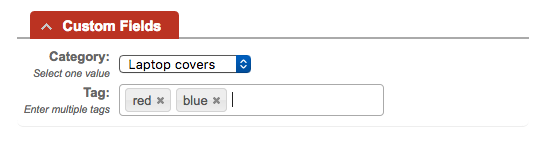
Please note that tags are only available to support staff for the queue. It is an optional entry but if you do chose to add a tag it is delimited by a space. For example CamelCase would be a single tag whereas Camel Case would be considered two tags. Below is an example of tags being added to a ticket.
For your convenience I am including the faq's already in place for RT below.
Please contact me if you have any questions or suggestions.
Joe Kirby
AVP DoIT Business Systems
]]>
Whether it's a blog, a wiki, or even Twitter, when you have a system with a lot of information, some method of tagging that information with easy-to-remember words or phrases makes it much easier...
https://my3.my.umbc.edu/api/v0/pixel/news/89274/guest@my.umbc.edu/953b5940c209fe5665ba347780c169c5/api/pixel
bsg
rt
Division of Information Technology (DoIT)
https://my3.my.umbc.edu/groups/doit
https://assets2-my.umbc.edu/system/shared/avatars/groups/000/000/021/d27760c5de12c74b73faec8d0e631acf/xsmall.png?1727453227
https://assets2-my.umbc.edu/system/shared/avatars/groups/000/000/021/d27760c5de12c74b73faec8d0e631acf/original.JPG?1727453227
https://assets1-my.umbc.edu/system/shared/avatars/groups/000/000/021/d27760c5de12c74b73faec8d0e631acf/xxlarge.png?1727453227
https://assets3-my.umbc.edu/system/shared/avatars/groups/000/000/021/d27760c5de12c74b73faec8d0e631acf/xlarge.png?1727453227
https://assets2-my.umbc.edu/system/shared/avatars/groups/000/000/021/d27760c5de12c74b73faec8d0e631acf/large.png?1727453227
https://assets2-my.umbc.edu/system/shared/avatars/groups/000/000/021/d27760c5de12c74b73faec8d0e631acf/medium.png?1727453227
https://assets2-my.umbc.edu/system/shared/avatars/groups/000/000/021/d27760c5de12c74b73faec8d0e631acf/small.png?1727453227
https://assets2-my.umbc.edu/system/shared/avatars/groups/000/000/021/d27760c5de12c74b73faec8d0e631acf/xsmall.png?1727453227
https://assets4-my.umbc.edu/system/shared/avatars/groups/000/000/021/d27760c5de12c74b73faec8d0e631acf/xxsmall.png?1727453227
Division of Information Technology (DoIT)
2
0
true
Wed, 18 Dec 2019 06:22:33 -0500
Wed, 18 Dec 2019 06:25:01 -0500
Students like Ultra design, organized courses
User surveys reveal consistent satisfaction with Ultra style
More than 70% of 606 student survey respondents who took a course that used Ultra during the FA2019 semester said they were satisfied with the experience. When asked, students described Ultra as easy to use and visually appealing. “It’s new and fun,” said one respondant. “I love the sleek format. Ultra is neat, colorful, and polished,” said another student. Many appreciate the aggregated calendar of due dates and seeing grades posted to their activity stream.
Ultra was initially piloted in SP2018 with four courses. Over the last 18 months, Ultra adoption has increased considerably, but student feedback was not recorded until a larger population of users was available in FA2019 to provide insight. Recent feedback from students is consistent with survey responses following the pilot and with feedback from faculty who have responded to surveys in SP2019 and FA2019.

Figure 1. Student satisfaction with Ultra
Both faculty and students like Ultra for its interface and usability. Faculty find the streamlined tools easier to use in a clean and modern interface. Students generally like the look of Ultra and the ease of finding instructional materials, especially in a well-designed and organized course. About 79% of students were able to find course content and files, and more than 82% said their courses flowed in a logical way.
About 61% of students who completed the survey said they wished more of their courses were using Ultra, citing the flexible environment and convenient structure brought by the redesigned infrastructure. These students may be happy to hear that more than 80% of faculty who have used Ultra over the past year indicated they might or would use Ultra again for their courses.
Despite this insight, qualitative feedback from student surveys suggests a challenging paradox for faculty. Wherever students were concerned about potential lag when opening folders or perpetual scrolling, they generally observed it was due to poor course organization and excessive file load or links in the course. Students who enjoyed opening several folders on the page at one time said consistent course design helped identify where content was located.
In observing how Ultra courses were organized, students wondered if faculty had access to or participated in sufficient training and support for Ultra. Poor organization in a course “makes the exchange of information more difficult,” said one student. DoIT offers multiple training options to faculty who are teaching with or preparing to use Ultra -- boot camps, webinars, customized department workshops, and more. More than 52% of faculty, however, prefer to teach themselves, and more than 47% request support via RT.

Figure 2. Faculty preference for training (purple) compared to preference for support (orange). Click to enlarge.
While FAQs and videos offer the “button-ology” of how an application works, facilitated training (in person and virtual) provided by instructional technology staff includes both technical and pedagogical perspectives to ensure faculty have essential information about how Ultra works and what best practices may optimize a course design.
As DoIT extends its support model for Ultra into SP2021, its instructional technology staff will continue to offer many of these resources while also introducing new options including 30-minute Coffee Break webinars, half-day boot camps on Ultra and supporting technologies, and more self-paced resources focused on best practices. The FA2029 end of semester sprint, an exciting and popular support model, will be repeated at the beginning of SP2020.
The FA2019 surveys provided reasonable and justified criticisms of Ultra, which DoIT has provided to Blackboard and the Ultra developers. Groups, gradebook, and tests are our top priorities for continued enhancement. In an ongoing effort to maintain transparency and momentum for innovation, UMBC has accepted Blackboard’s offer to meet quarterly with Ultra product managers, and continues to meet monthly with Ultra designers and weekly with other Ultra early adopters. Such communication is critical to ensuring Ultra meets the needs of UMBC faculty and students.
As always, if you have any questions, please consider the following options:
The Maryland Open Source Textbook (M.O.S.T.) Initiative is pleased to announce a Request for Proposals for the 2020 OER Grant Program. For 2020, M.O.S.T. is seeking proposals for two grant programs. Learn more below.
Faculty OER Mini-Grant Program
The Faculty OER Mini-Grant Program supports faculty efforts to increase access, affordability, and achievement for students at Maryland’s 2-year and 4-year public higher education institutions through the incorporation of open educational resources (OER) into teaching practice.
The 2020 M.O.S.T. faculty mini-grants will provide recipients with unique opportunities to engage in communities of practice related to teaching with OER, creation of OER in high-need areas, and evaluation of OER use in relation to student success.
Available grants for 2020:
-
Adopt/Adapt OER ($1,000 grant + Participation in the M.O.S.T. Teaching Fellows Program);
-
Create OER ($2,000 grant + Participation in the M.O.S.T. Textbook Success Fellowship Program); and
-
Evaluate OER ($3,000 grant + Dedicated Coaching)
Institutional OER Grant Program
The M.O.S.T. initiative is also seeking proposals for a new Institutional OER Grant Program, which supports strategic institutional efforts to increase access, affordability, and achievement for students at Maryland’s 2-year and 4-year public higher education institutions through more systemic incorporation of open educational resources (OER) into teaching practice.
For 2020, two institutions will be awarded $20,000 grants to support significant advances in OER adoption, scaling, and sustainability in support of student success. In addition, grantees will receive strategic planning and implementation support for their projects from M.O.S.T., as needed, in the form of consultations and regular check-ins.
Institutions applying for these grants should be able to articulate a vision for how OER will help them achieve strategic goals and explain how the campus will nurture and sustain this next-level work after the funding period ends.
Access and Review Request for Proposals
All proposals must be submitted by 11:59 p.m. ET on Friday, February 28, 2020.
-----------------------------------------------------------------------
Informational Webinar
Join us on Thursday, January 23, 2020 from 12:00 p.m. - 1:00 p.m. ET for an Informational Webinar to learn more about the grant requirements and expectations for successful grants. We will also answer any questions about the grants at that time. Register for the Informational Webinar
-------------------------------------------------------------------------
Please feel free to share this information with interested faculty and staff. If you have any questions, please reach out to us at most@usmd.edu.
Thank you for your support in increasing access, affordability, and achievement for all Maryland higher education students through open educational resources (OER).
MJ
Dr. MJ BishopAssociate Vice Chancellor and Director
William E. Kirwan Center for Academic Innovation
University System of Maryland
]]>
The Maryland Open Source Textbook (M.O.S.T.) Initiative is pleased to announce a Request for Proposals for the 2020 OER Grant Program. For 2020, M.O.S.T. is seeking proposals for two grant...
http://www.oer-maryland.org/oer-grant-program/
https://my3.my.umbc.edu/api/v0/pixel/news/89232/guest@my.umbc.edu/aa3901a8168fafef83b3b3b3e6241160/api/pixel
oer
Open Educational Resources at UMBC
https://my3.my.umbc.edu/groups/oer
https://assets1-my.umbc.edu/system/shared/avatars/groups/000/001/664/0e7fb0a3d658c358b4e5e9561f35099e/xsmall.png?1562590436
https://assets2-my.umbc.edu/system/shared/avatars/groups/000/001/664/0e7fb0a3d658c358b4e5e9561f35099e/original.png?1562590436
https://assets1-my.umbc.edu/system/shared/avatars/groups/000/001/664/0e7fb0a3d658c358b4e5e9561f35099e/xxlarge.png?1562590436
https://assets1-my.umbc.edu/system/shared/avatars/groups/000/001/664/0e7fb0a3d658c358b4e5e9561f35099e/xlarge.png?1562590436
https://assets4-my.umbc.edu/system/shared/avatars/groups/000/001/664/0e7fb0a3d658c358b4e5e9561f35099e/large.png?1562590436
https://assets1-my.umbc.edu/system/shared/avatars/groups/000/001/664/0e7fb0a3d658c358b4e5e9561f35099e/medium.png?1562590436
https://assets2-my.umbc.edu/system/shared/avatars/groups/000/001/664/0e7fb0a3d658c358b4e5e9561f35099e/small.png?1562590436
https://assets1-my.umbc.edu/system/shared/avatars/groups/000/001/664/0e7fb0a3d658c358b4e5e9561f35099e/xsmall.png?1562590436
https://assets1-my.umbc.edu/system/shared/avatars/groups/000/001/664/0e7fb0a3d658c358b4e5e9561f35099e/xxsmall.png?1562590436
Open Educational Resources at UMBC
https://assets4-my.umbc.edu/system/shared/thumbnails/news/000/089/232/f4d1557373d78614ac97d60a2abf522a/xxlarge.jpg?1576512013
https://assets1-my.umbc.edu/system/shared/thumbnails/news/000/089/232/f4d1557373d78614ac97d60a2abf522a/xlarge.jpg?1576512013
https://assets3-my.umbc.edu/system/shared/thumbnails/news/000/089/232/f4d1557373d78614ac97d60a2abf522a/large.jpg?1576512013
https://assets4-my.umbc.edu/system/shared/thumbnails/news/000/089/232/f4d1557373d78614ac97d60a2abf522a/medium.jpg?1576512013
https://assets3-my.umbc.edu/system/shared/thumbnails/news/000/089/232/f4d1557373d78614ac97d60a2abf522a/small.jpg?1576512013
https://assets3-my.umbc.edu/system/shared/thumbnails/news/000/089/232/f4d1557373d78614ac97d60a2abf522a/xsmall.jpg?1576512013
https://assets1-my.umbc.edu/system/shared/thumbnails/news/000/089/232/f4d1557373d78614ac97d60a2abf522a/xxsmall.jpg?1576512013
6
0
false
Mon, 16 Dec 2019 11:01:10 -0500
Mon, 16 Dec 2019 11:21:47 -0500
Spear Phishing Attacks On The Rise
Community members being targeted for gift card scams
The DoIT Security Group has received reports of a phishing scam targeting the UMBC community. Please be aware that hackers are sending these email messages to students, faculty, and staff.
The phishing email contents are similar to the following:
---------------------------------------------------------------
    Subject: On Campus and Available?
    To:
    Are you available?I need you to handle something for
    me Now, i'm currently in a meeting with the International
    Advisory Committee (IAC) with limited phone call
    ( phone got broken) and also experiencing some
    difficulties at the moment, just reply to my e-mail as
    soon as you get this. Are you available?

    Best Regards

    (Academic Department Chair)
    University of Maryland Baltimore County
    1000 Hilltop Circle
    Baltimore, MD 21250

    Sent from my iPad, please excuse any typos or
    strange auto-corrections”
    ---------------------------------------------------------------
There are many characteristics that raise suspicions that this is a phishing email; for example, the vague nature of the email content and poor grammar are red flags. Also, the unrelated nature of the email should be an initial giveaway.
However, the biggest concern is the hacker posing as a trusted entity. In this email, they use a specific form of phishing known as spear phishing to target specific members of the UMBC community. Attackers often gather information about organizations in order to make their phishing scams more personal and believable. Here, the hacker impersonates a number of UMBC personnel in order to target staff within the corresponding departments from the impersonated individuals.
The best defense against spear phishing is vigilance. If you receive this email, please be aware of its malicious nature and do NOT reply to it. Replying to this email could further engage the hacker in hopes that you’ll reveal sensitive information that could compromise your online and physical safety.
For more information regarding phishing and spam FAQs, please see the PHISHING/SPAM FAQS section of
itsecurity.umbc.edu.