Graduating AV Students Look Back on Their Time at DoIT
Meet Steven Nguyen, Ally Yang, & Adam Jawarish
DoIT’s Audio Visual (AV) Services provides the UMBC campus with a wide variety of media resource support for instruction and administration. Typical duties include lending laptops to instructors, setting up projectors in rooms that have issues, and answering phone calls from faculty when they are having problems with AV equipment during class.
“They are so understanding and supportive of everything…”
Ally Yang, a Biological Sciences major, first heard about AV Services through a post on campus. Yang learned a lot but also appreciated the amount of support AV services provided her. “The full time staff in the office are just amazing,” said Yang. “They are so understanding and supportive of everything [like] your education, and I could not have had a better experience.”
Adam Jawarish, Information Systems major, recalls his first day working in AV as fun. He walked around campus looking at the systems in classrooms and lecture halls and was shown a few common troubleshooting techniques he could use. Originally, when dealing with the amount of help requests coming in, it was a bit overwhelming for him. “After some time and learning, there was not anything that really threw me off.” said Jawarish.
“There are certain steps we are taught to take that can solve just about any little issue.”
Steven Nguyen, an Information Systems major, remembers touring the different lecture halls on his first day, learning the optimal pathways to travel and familiarizing himself with the AV interfaces. Nguyen also mentioned some of the pressure that comes with the job in terms of solving the issue, but thinks it’s good pressure since it teaches students how to respond quickly and more effectively. “There are certain steps we are taught to take that can solve just about any little issue.” said Nguyen.
The three offered some insight on what you will takeaway as a DoIT student worker. “There is plenty of value in working at DoIT, it looks good on your resume and you gain experience that you wouldn't gain at other on campus jobs.” said Jawarish.
“You learn how to ask questions, get meaningful answers, make some mistakes…”
Yang mentions the behind the scenes work in terms of audio and visual and how you will learn a lot more than you think. When something doesn't work, it’s not magically fixed and AV has to fix it. “Our full staffs work really hard and go into these lecture halls and classrooms when there isn't a class and make sure that everything is working.” said Yang.
“You learn how to ask questions, get meaningful answers, make some mistakes, and fix even more.” said Nguyen. “Learning how to think this way is something you can take with you for the rest of your life.”
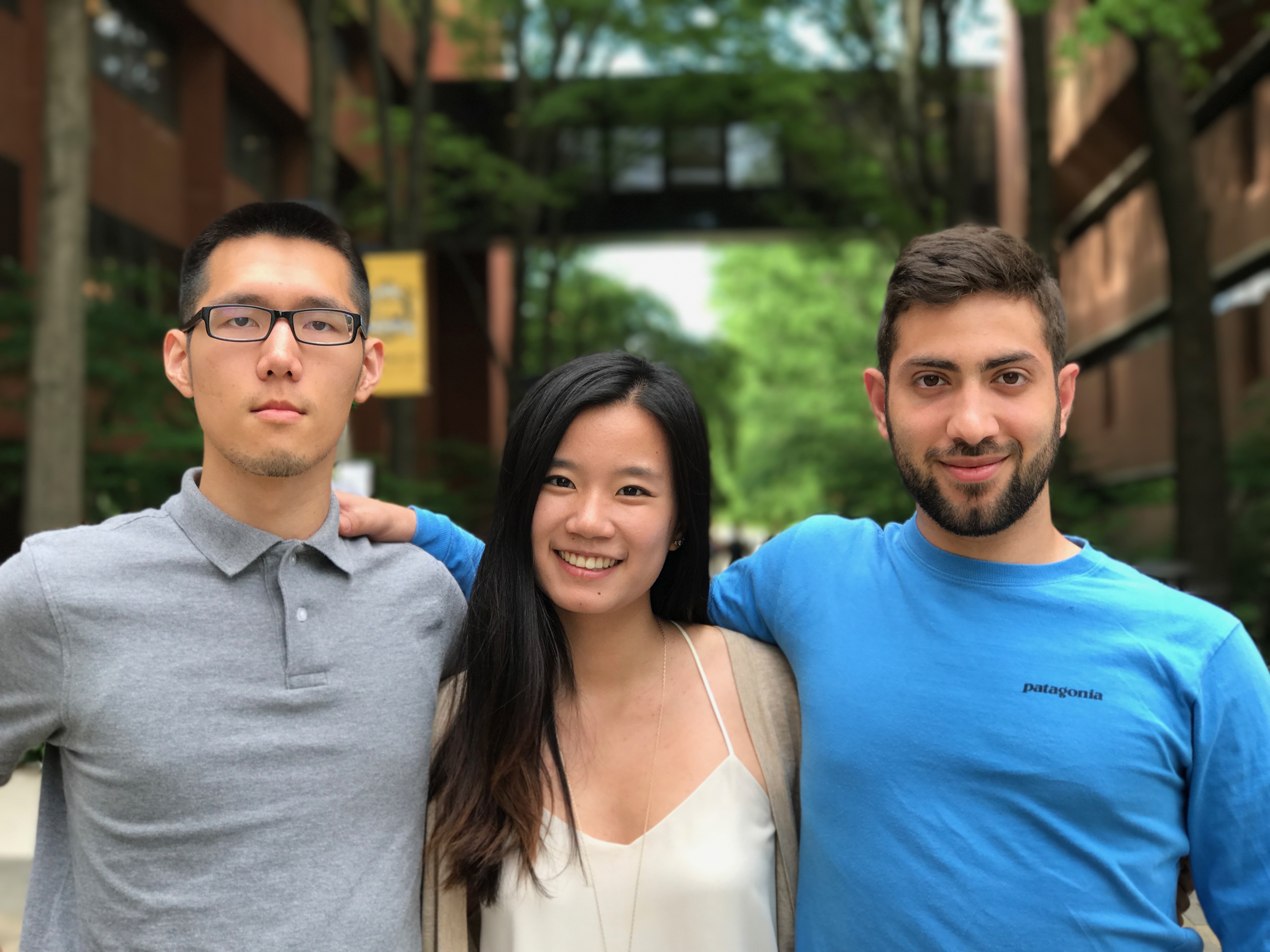 From left to right, Steven Nguyen, Ally Yang, and Adam Jawarish.
]]>
DoIT’s Audio Visual (AV) Services provides the UMBC campus with a wide variety of media resource support for instruction and administration. Typical duties include lending laptops to instructors,...
http://my.umbc.edu/groups/doit/posts
Photo
https://assets3-my.umbc.edu/system/shared/attachments/ed194607780f12bd9afabd01d28d4bc2/69f55729/news/000/067/953/961fbfb28115cd7e4197ae1441c67a6f/Group Photo of AV Students.jpg?1494434860
https://my3.my.umbc.edu/api/v0/pixel/news/67953/guest@my.umbc.edu/9d823bb8016b5fcd71ce1d1cbc0e50f2/api/pixel
av
doit
student
worker
Division of Information Technology (DoIT)
https://my3.my.umbc.edu/groups/doit
https://assets2-my.umbc.edu/system/shared/avatars/groups/000/000/021/d27760c5de12c74b73faec8d0e631acf/xsmall.png?1727453227
https://assets2-my.umbc.edu/system/shared/avatars/groups/000/000/021/d27760c5de12c74b73faec8d0e631acf/original.JPG?1727453227
https://assets1-my.umbc.edu/system/shared/avatars/groups/000/000/021/d27760c5de12c74b73faec8d0e631acf/xxlarge.png?1727453227
https://assets3-my.umbc.edu/system/shared/avatars/groups/000/000/021/d27760c5de12c74b73faec8d0e631acf/xlarge.png?1727453227
https://assets2-my.umbc.edu/system/shared/avatars/groups/000/000/021/d27760c5de12c74b73faec8d0e631acf/large.png?1727453227
https://assets2-my.umbc.edu/system/shared/avatars/groups/000/000/021/d27760c5de12c74b73faec8d0e631acf/medium.png?1727453227
https://assets2-my.umbc.edu/system/shared/avatars/groups/000/000/021/d27760c5de12c74b73faec8d0e631acf/small.png?1727453227
https://assets2-my.umbc.edu/system/shared/avatars/groups/000/000/021/d27760c5de12c74b73faec8d0e631acf/xsmall.png?1727453227
https://assets4-my.umbc.edu/system/shared/avatars/groups/000/000/021/d27760c5de12c74b73faec8d0e631acf/xxsmall.png?1727453227
Division of Information Technology (DoIT)
https://assets4-my.umbc.edu/system/shared/thumbnails/news/000/067/953/2efbed129c9ff397b03b038a3980ebbf/xxlarge.jpg?1494434508
https://assets1-my.umbc.edu/system/shared/thumbnails/news/000/067/953/2efbed129c9ff397b03b038a3980ebbf/xlarge.jpg?1494434508
https://assets2-my.umbc.edu/system/shared/thumbnails/news/000/067/953/2efbed129c9ff397b03b038a3980ebbf/large.jpg?1494434508
https://assets2-my.umbc.edu/system/shared/thumbnails/news/000/067/953/2efbed129c9ff397b03b038a3980ebbf/medium.jpg?1494434508
https://assets3-my.umbc.edu/system/shared/thumbnails/news/000/067/953/2efbed129c9ff397b03b038a3980ebbf/small.jpg?1494434508
https://assets1-my.umbc.edu/system/shared/thumbnails/news/000/067/953/2efbed129c9ff397b03b038a3980ebbf/xsmall.jpg?1494434508
https://assets3-my.umbc.edu/system/shared/thumbnails/news/000/067/953/2efbed129c9ff397b03b038a3980ebbf/xxsmall.jpg?1494434508
15
0
true
Wed, 10 May 2017 13:01:51 -0400
Wed, 10 May 2017 17:20:37 -0400
UMBC Blackboard Update: SP/SU2017
UMBC Blackboard Update is provided by the Division of Information Technology for students, faculty and staff. If you have questions or need help, please consult the Blackboard Help tab inside Blackboard or directly at www.umbc.edu/blackboard/help. You can also contact the Technology Support Center at 410.455.3838 or submit an RT (Request Tracker) ticket via the myUMBC Help Menu or directly at my.umbc.edu/help.
HEADLINES
Blackboard & Instructional Technology
Training & Professional Development
Other DoIT News
REMINDER
Course shells from AY2012-14 and organizations larger than 2.5 GB will be retired from the UMBC server during the Blackboard cloud migration.
As always, if you have any questions, please consider the following options:
]]>
UMBC Blackboard Update is provided by the Division of Information Technology for students, faculty and staff. If you have questions or need help, please consult the Blackboard Help tab inside...
http://my.umbc.edu/groups/bbannouncements/posts/67914
https://my3.my.umbc.edu/api/v0/pixel/news/67914/guest@my.umbc.edu/a1fa44fa86ea3d4f1094b39ba1c049b1/api/pixel
bb-update
blackboard
sp2017
su2017
Blackboard Announcements
https://my3.my.umbc.edu/groups/bbannouncements
https://assets1-my.umbc.edu/system/shared/avatars/groups/000/000/319/f6b35e5217428f5021e113525a55e6f4/xsmall.png?1437137819
https://assets1-my.umbc.edu/system/shared/avatars/groups/000/000/319/f6b35e5217428f5021e113525a55e6f4/original.png?1437137819
https://assets4-my.umbc.edu/system/shared/avatars/groups/000/000/319/f6b35e5217428f5021e113525a55e6f4/xxlarge.png?1437137819
https://assets4-my.umbc.edu/system/shared/avatars/groups/000/000/319/f6b35e5217428f5021e113525a55e6f4/xlarge.png?1437137819
https://assets1-my.umbc.edu/system/shared/avatars/groups/000/000/319/f6b35e5217428f5021e113525a55e6f4/large.png?1437137819
https://assets4-my.umbc.edu/system/shared/avatars/groups/000/000/319/f6b35e5217428f5021e113525a55e6f4/medium.png?1437137819
https://assets1-my.umbc.edu/system/shared/avatars/groups/000/000/319/f6b35e5217428f5021e113525a55e6f4/small.png?1437137819
https://assets1-my.umbc.edu/system/shared/avatars/groups/000/000/319/f6b35e5217428f5021e113525a55e6f4/xsmall.png?1437137819
https://assets4-my.umbc.edu/system/shared/avatars/groups/000/000/319/f6b35e5217428f5021e113525a55e6f4/xxsmall.png?1437137819
Blackboard Announcements
https://assets3-my.umbc.edu/system/shared/thumbnails/news/000/067/914/caa9c58b2ed95e60b548c77a5acd8193/xxlarge.jpg?1494343613
https://assets3-my.umbc.edu/system/shared/thumbnails/news/000/067/914/caa9c58b2ed95e60b548c77a5acd8193/xlarge.jpg?1494343613
https://assets2-my.umbc.edu/system/shared/thumbnails/news/000/067/914/caa9c58b2ed95e60b548c77a5acd8193/large.jpg?1494343613
https://assets2-my.umbc.edu/system/shared/thumbnails/news/000/067/914/caa9c58b2ed95e60b548c77a5acd8193/medium.jpg?1494343613
https://assets3-my.umbc.edu/system/shared/thumbnails/news/000/067/914/caa9c58b2ed95e60b548c77a5acd8193/small.jpg?1494343613
https://assets3-my.umbc.edu/system/shared/thumbnails/news/000/067/914/caa9c58b2ed95e60b548c77a5acd8193/xsmall.jpg?1494343613
https://assets2-my.umbc.edu/system/shared/thumbnails/news/000/067/914/caa9c58b2ed95e60b548c77a5acd8193/xxsmall.jpg?1494343613
4
0
false
Tue, 09 May 2017 11:30:41 -0400
Thu, 31 Aug 2017 09:17:40 -0400
55 People Attend 2nd Annual TechFest
More registrations and an increase in workshops
On April 10, DoIT hosted its 2nd annual TechFest, a campus event that brings together faculty, staff, and students to share technology tools through workshops. This year’s event had a bigger presence than ever before with a 50% increase in registration and a 10% increase in attendees.
TechFest 2017 featured 15 speakers sharing their various technology tools aiming to both support and improve the efficiency of day-to-day activities. Vendors like Lenovo and student organizations like the UMBC Game Developers Club were also a part of this year’s event. The event had a ‘freebie’ table with various items for attendees to take, and over $400 in prizes were raffled off.
Freebie table at TechFest.
New to TechFest 2017 was an app that allowed attendees to build their own schedule of sessions they were interested in attending. The app also featured presenter bios and a QR code scanner allowing users to quickly scan codes to easily leave feedback on the sessions they attended.
The TechFest Guidebook app.
A variety of topics were presented by faculty, staff, and students. Ashley Waters, Associate Director for UMBC - Shady Grove Campus, presented how she uses her favorite Google extensions. DeVaughn Jones, a junior Financial Economics major, presented Social Media: Attention vs. Action where he went into depth on how to utilize social media sites like Facebook to effectively market your group at UMBC.
On the left, Ashley Waters and her workshop on Google extensions like Google Keep. On the right, DeVaughn Jones and his workshop on how using Facebook can be an effective tool on UMBC.
Dr. Ian Anson, assistant professor for Political Science, shared his research findings on engaging student feedback. Rather than giving handwritten feedback, Anson found that by using screen capture technology he could provide more effective student feedback that also engages more with students. You can view his presentation slides here.
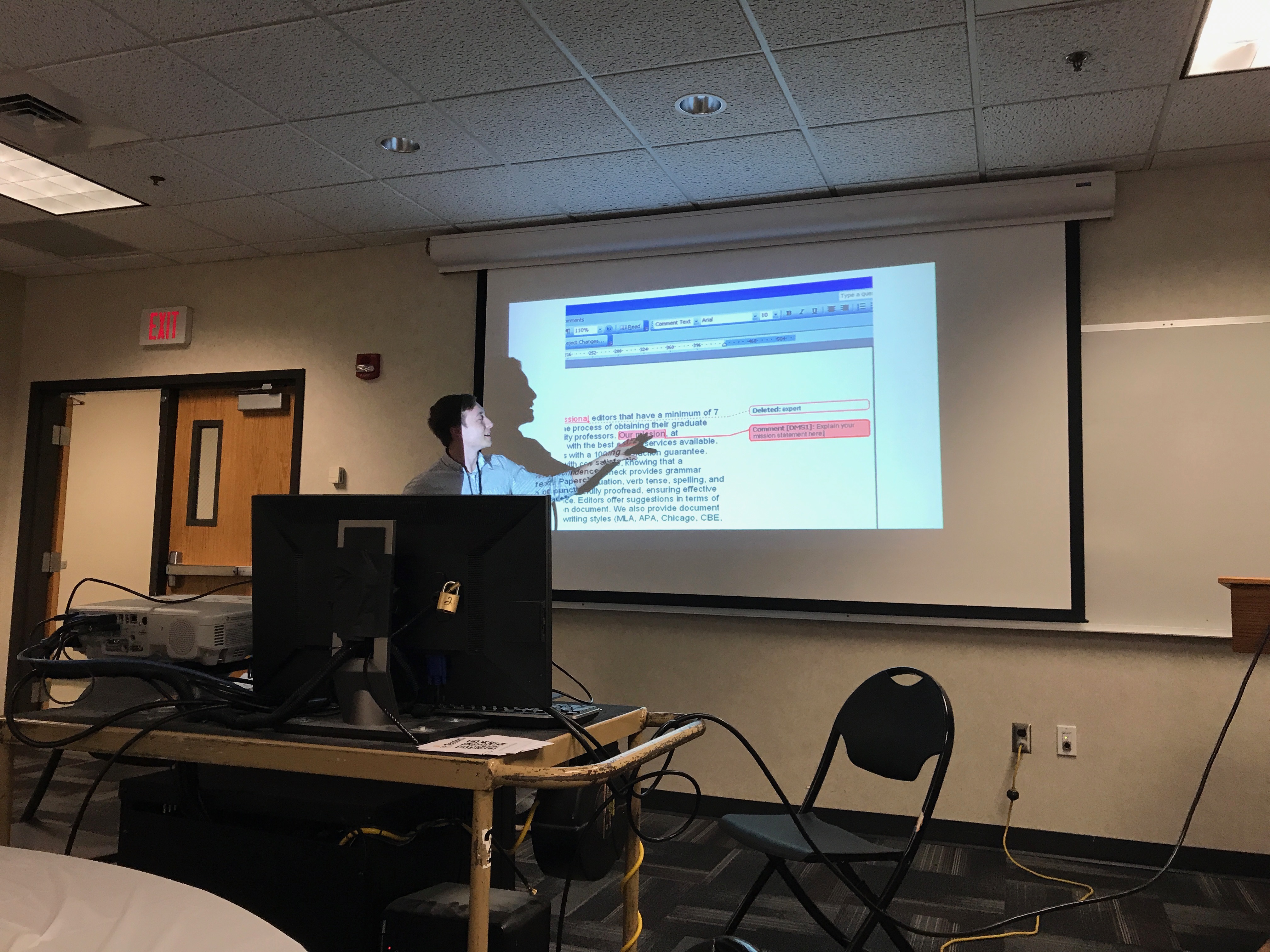 Dr. Ian Anson and his workshop on using various screen capture technologies as an alternative to handwritten feedback.
TechFest 2017 was a big success and engaged the UMBC community. Attendees found the workshops interesting and helpful. DoIT is taking note of all the feedback from TechFest and is looking to make the next TechFest even better.
]]>
On April 10, DoIT hosted its 2nd annual TechFest, a campus event that brings together faculty, staff, and students to share technology tools through workshops. This year’s event had a bigger...
http://my.umbc.edu/groups/doit/posts
Image
https://assets2-my.umbc.edu/system/shared/attachments/38580359cee552259088917ca34b0d29/69f55729/news/000/067/887/f51cf26546d2015352cabae5d9b01b81/TechFest Freebies.jpg?1494269689
https://my3.my.umbc.edu/api/v0/pixel/news/67887/guest@my.umbc.edu/16142df571b386a18192af5817a31922/api/pixel
faculty
staff
student
techfest
technology
workshops
Division of Information Technology (DoIT)
https://my3.my.umbc.edu/groups/doit
https://assets2-my.umbc.edu/system/shared/avatars/groups/000/000/021/d27760c5de12c74b73faec8d0e631acf/xsmall.png?1727453227
https://assets2-my.umbc.edu/system/shared/avatars/groups/000/000/021/d27760c5de12c74b73faec8d0e631acf/original.JPG?1727453227
https://assets1-my.umbc.edu/system/shared/avatars/groups/000/000/021/d27760c5de12c74b73faec8d0e631acf/xxlarge.png?1727453227
https://assets3-my.umbc.edu/system/shared/avatars/groups/000/000/021/d27760c5de12c74b73faec8d0e631acf/xlarge.png?1727453227
https://assets2-my.umbc.edu/system/shared/avatars/groups/000/000/021/d27760c5de12c74b73faec8d0e631acf/large.png?1727453227
https://assets2-my.umbc.edu/system/shared/avatars/groups/000/000/021/d27760c5de12c74b73faec8d0e631acf/medium.png?1727453227
https://assets2-my.umbc.edu/system/shared/avatars/groups/000/000/021/d27760c5de12c74b73faec8d0e631acf/small.png?1727453227
https://assets2-my.umbc.edu/system/shared/avatars/groups/000/000/021/d27760c5de12c74b73faec8d0e631acf/xsmall.png?1727453227
https://assets4-my.umbc.edu/system/shared/avatars/groups/000/000/021/d27760c5de12c74b73faec8d0e631acf/xxsmall.png?1727453227
Division of Information Technology (DoIT)
https://assets3-my.umbc.edu/system/shared/thumbnails/news/000/067/887/bfb3162f43a9f0ad2828baa004084956/xxlarge.jpg?1494269754
https://assets1-my.umbc.edu/system/shared/thumbnails/news/000/067/887/bfb3162f43a9f0ad2828baa004084956/xlarge.jpg?1494269754
https://assets3-my.umbc.edu/system/shared/thumbnails/news/000/067/887/bfb3162f43a9f0ad2828baa004084956/large.jpg?1494269754
https://assets3-my.umbc.edu/system/shared/thumbnails/news/000/067/887/bfb3162f43a9f0ad2828baa004084956/medium.jpg?1494269754
https://assets4-my.umbc.edu/system/shared/thumbnails/news/000/067/887/bfb3162f43a9f0ad2828baa004084956/small.jpg?1494269754
https://assets2-my.umbc.edu/system/shared/thumbnails/news/000/067/887/bfb3162f43a9f0ad2828baa004084956/xsmall.jpg?1494269754
https://assets2-my.umbc.edu/system/shared/thumbnails/news/000/067/887/bfb3162f43a9f0ad2828baa004084956/xxsmall.jpg?1494269754
5
0
true
Tue, 09 May 2017 08:52:08 -0400
Thu, 11 May 2017 09:13:51 -0400
DoIT to Manage New Apple Store
All Personal & Dept. Purchases Will Be Made Online
To The Campus Community,
During this academic year, staff from DoIT, the Bookstore and the Library have been considering a change in how the campus buys Apple computers. Specifically, we are announcing that on June 1 (and pending clearance of the Bookstore’s existing Apple inventory), DoIT will manage a new Apple on Campus (AOC) store that is conducted completely online for personal and department purchases. In addition, DoIT will provide other services designed to complement computer purchase and ownership including the following:
Consulting & Support
Any student, faculty or staff member interested in purchasing or getting the most out of an Apple computer can meet with knowledgeable DoIT staff in our Technology Support Center (TSC) located on the 1st floor of the Library next to the Retriever Learning Center (RLC). Individuals will still make their own purchases through the online Apple Store for education, but DoIT staff can help advise on configurations, or provide support on how to use or troubleshoot their current Apple devices. Department purchases will also be completed online using a PCard or purchase order (PO). In either case, anyone can try out an Apple computer at the TSC’s technology demo table or through the Library’s Laptop Loaner service (subject to availability).
Service & Repair
If consulting & support can’t solve a problem, DoIT will now provide service repairs for any Apple computer owned by UMBC students, faculty, staff or departments that is under warranty. Just bring the unit to the TSC, which will help triage the nature of the problem and coordinate the service repair request. Like any IT support request, individuals will be able to track the status of the service repair through a Request Tracker (RT) ticket confirmation email or by going to my.umbc.edu/help. They can also get a loaner unit until the repair is complete.
Why The Change?
When DoIT’s Help Desk became the Technology Support Center and moved from the basement of Engineering to the Library 1st floor in 2011, we did so to become a more visible, central destination for all basic IT support. Coupled with changes in consumer and institutional purchasing that are increasingly done online, we feel this change complements DoIT’s own strategy for IT support. While campus users may still go elsewhere for their individual Apple purchases, we feel the combination of visibility, consulting, service, repair and loaner options makes sense for the campus at this time. For more information, visit the TSC in the Library or call 410.455.3838. Also, please note: the last day to order from the Bookstore and assure delivery for pickup there will be Monday, May 22.
Finally, we want to personally thank Bob Somers and Cliff Coleman from the Bookstore for being good stewards of the UMBC Apple Store since its inception in 1985 and partnering with DoIT on this transition. We have also appreciated theirs and Library Director Patrick Dawson’s collaboration as we discussed how to change the store’s model going forward.
Sincerely,
Jack Suess
Vice President of Information Technology and Chief Information Officer
John Fritz
Associate Vice President, Instructional Technology
]]>
To The Campus Community, During this academic year, staff from DoIT, the Bookstore and the Library have been considering a change in how the campus buys Apple computers. Specifically, we are...
https://my3.my.umbc.edu/api/v0/pixel/news/67894/guest@my.umbc.edu/9051a27daf29315ad7431a39d5c553e5/api/pixel
tsc
Division of Information Technology (DoIT)
https://my3.my.umbc.edu/groups/doit
https://assets2-my.umbc.edu/system/shared/avatars/groups/000/000/021/d27760c5de12c74b73faec8d0e631acf/xsmall.png?1727453227
https://assets2-my.umbc.edu/system/shared/avatars/groups/000/000/021/d27760c5de12c74b73faec8d0e631acf/original.JPG?1727453227
https://assets1-my.umbc.edu/system/shared/avatars/groups/000/000/021/d27760c5de12c74b73faec8d0e631acf/xxlarge.png?1727453227
https://assets3-my.umbc.edu/system/shared/avatars/groups/000/000/021/d27760c5de12c74b73faec8d0e631acf/xlarge.png?1727453227
https://assets2-my.umbc.edu/system/shared/avatars/groups/000/000/021/d27760c5de12c74b73faec8d0e631acf/large.png?1727453227
https://assets2-my.umbc.edu/system/shared/avatars/groups/000/000/021/d27760c5de12c74b73faec8d0e631acf/medium.png?1727453227
https://assets2-my.umbc.edu/system/shared/avatars/groups/000/000/021/d27760c5de12c74b73faec8d0e631acf/small.png?1727453227
https://assets2-my.umbc.edu/system/shared/avatars/groups/000/000/021/d27760c5de12c74b73faec8d0e631acf/xsmall.png?1727453227
https://assets4-my.umbc.edu/system/shared/avatars/groups/000/000/021/d27760c5de12c74b73faec8d0e631acf/xxsmall.png?1727453227
Division of Information Technology (DoIT)
https://assets1-my.umbc.edu/system/shared/thumbnails/news/000/067/894/4b88f19413d3dbf7ba0e8601ad27e9f6/xxlarge.jpg?1494276620
https://assets1-my.umbc.edu/system/shared/thumbnails/news/000/067/894/4b88f19413d3dbf7ba0e8601ad27e9f6/xlarge.jpg?1494276620
https://assets2-my.umbc.edu/system/shared/thumbnails/news/000/067/894/4b88f19413d3dbf7ba0e8601ad27e9f6/large.jpg?1494276620
https://assets3-my.umbc.edu/system/shared/thumbnails/news/000/067/894/4b88f19413d3dbf7ba0e8601ad27e9f6/medium.jpg?1494276620
https://assets1-my.umbc.edu/system/shared/thumbnails/news/000/067/894/4b88f19413d3dbf7ba0e8601ad27e9f6/small.jpg?1494276620
https://assets2-my.umbc.edu/system/shared/thumbnails/news/000/067/894/4b88f19413d3dbf7ba0e8601ad27e9f6/xsmall.jpg?1494276620
https://assets1-my.umbc.edu/system/shared/thumbnails/news/000/067/894/4b88f19413d3dbf7ba0e8601ad27e9f6/xxsmall.jpg?1494276620
7
0
true
Mon, 08 May 2017 16:51:28 -0400
Wed, 19 Sep 2018 14:38:42 -0400
Mariann Hawken Receives Employee of the Quarter Award
Hawken helped lead the Course Materials Initiative for UMBC
Terry Cook, Senior Associate Vice President for Administrative Services, nominated Hawken for the award. “I think it is noteworthy that her nomination is not submitted by someone in her own division,” said Cook. “This speaks volumes to the impressiveness of her qualities and contributions.”
“...She did not hesitate to investigate the issue, identify options to solve them, and take the necessary steps to resolve the matter.”
Hawken has been instrumental in spearheading the implementation of the Course Materials Initiative (CMI), an effort to provide students with more affordable course materials and integrating them via Blackboard. She took the lead working directly with Vital Source, the digital platform provider, in integrating the course materials from 4 different publishers in Spring 2016. Hawken also proactively developed and conducted training for faculty by creating a training webinar that was easily accessible for faculty members.
“When issues arose, she did not hesitate to investigate the issue, identify options to solve them and take the necessary steps to resolve the matter.” said Cook.
In Fall 2016, CMI rolled out its second phase, extending from 12 courses to 23 courses, with multiple sections and nearly 30 faculty members. Hawken was there to provide the required training and technical support they needed.
“...went above and beyond, and her participation enabled a successful launch of this initiative…”
Hawken continues to make suggestions to improve the CMI, and her efforts have helped position UMBC to be ahead of the curve with digital content. “Mariann went above and beyond, and her participation enabled a successful launch of this initiative to be achieved and be expanded,” said Cook. “The Bookstore could not have done so without her!”
Hawken will receive a check for $500, a special parking space, and one day of administration leave. Congratulations to Mariann Hawken on her EOQ award!
Pictured is Mariann Hawken holding her Employee of Quarter award.
]]>
DoIT would like to congratulate Mariann Hawken, eLearning Coordinator for ITNM, on receiving Employee of the Quarter (EOQ). The program recognizes the outstanding qualities and contributions of...
http://my.umbc.edu/groups/doit
Photo
https://assets2-my.umbc.edu/system/shared/attachments/3db65ec58340fac49d3d27df5cfd3fdb/69f55729/news/000/067/873/ae4a7f24198fdd65303c7b5b7744c229/Mariann Hawken EOQ Award .jpg?1494262770
https://my3.my.umbc.edu/api/v0/pixel/news/67873/guest@my.umbc.edu/32e006131e3a77075b13bdd25a515a25/api/pixel
blackboard
cmi
doit
employee-of-quarter
Division of Information Technology (DoIT)
https://my3.my.umbc.edu/groups/doit
https://assets2-my.umbc.edu/system/shared/avatars/groups/000/000/021/d27760c5de12c74b73faec8d0e631acf/xsmall.png?1727453227
https://assets2-my.umbc.edu/system/shared/avatars/groups/000/000/021/d27760c5de12c74b73faec8d0e631acf/original.JPG?1727453227
https://assets1-my.umbc.edu/system/shared/avatars/groups/000/000/021/d27760c5de12c74b73faec8d0e631acf/xxlarge.png?1727453227
https://assets3-my.umbc.edu/system/shared/avatars/groups/000/000/021/d27760c5de12c74b73faec8d0e631acf/xlarge.png?1727453227
https://assets2-my.umbc.edu/system/shared/avatars/groups/000/000/021/d27760c5de12c74b73faec8d0e631acf/large.png?1727453227
https://assets2-my.umbc.edu/system/shared/avatars/groups/000/000/021/d27760c5de12c74b73faec8d0e631acf/medium.png?1727453227
https://assets2-my.umbc.edu/system/shared/avatars/groups/000/000/021/d27760c5de12c74b73faec8d0e631acf/small.png?1727453227
https://assets2-my.umbc.edu/system/shared/avatars/groups/000/000/021/d27760c5de12c74b73faec8d0e631acf/xsmall.png?1727453227
https://assets4-my.umbc.edu/system/shared/avatars/groups/000/000/021/d27760c5de12c74b73faec8d0e631acf/xxsmall.png?1727453227
Division of Information Technology (DoIT)
https://assets3-my.umbc.edu/system/shared/thumbnails/news/000/067/873/0306b6a2da55dc5be61841cd9b3284b2/xxlarge.jpg?1494262633
https://assets4-my.umbc.edu/system/shared/thumbnails/news/000/067/873/0306b6a2da55dc5be61841cd9b3284b2/xlarge.jpg?1494262633
https://assets3-my.umbc.edu/system/shared/thumbnails/news/000/067/873/0306b6a2da55dc5be61841cd9b3284b2/large.jpg?1494262633
https://assets2-my.umbc.edu/system/shared/thumbnails/news/000/067/873/0306b6a2da55dc5be61841cd9b3284b2/medium.jpg?1494262633
https://assets3-my.umbc.edu/system/shared/thumbnails/news/000/067/873/0306b6a2da55dc5be61841cd9b3284b2/small.jpg?1494262633
https://assets4-my.umbc.edu/system/shared/thumbnails/news/000/067/873/0306b6a2da55dc5be61841cd9b3284b2/xsmall.jpg?1494262633
https://assets4-my.umbc.edu/system/shared/thumbnails/news/000/067/873/0306b6a2da55dc5be61841cd9b3284b2/xxsmall.jpg?1494262633
Mariann Hawken holds the Employee of the Quarter award
23
8
true
Mon, 08 May 2017 13:08:53 -0400
Mon, 30 Mar 2026 16:43:07 -0400
Blackboard Mobile Apps Available for Free Download
Existing Bb Mobile Learn app discontinued in August 2017
With the upcoming retirement of the Bb Learn mobile app in August 2017, we encourage UMBC students who wish to access their Blackboard courses via mobile device to download and use the Blackboard App (formerly Bb Student) mobile app.
The Blackboard App was specifically designed to provide a more user-friendly and modern experience for students. The app offers a "smart" activity stream of prioritized events, content, and actions from courses as well as push notifications to ensure students are updated when tests are coming, assignments are overdue, and grades are posted.
Other features include the ability to
- check grades on individual assignments or an entire course
- join a Bb Collaborate session for virtual office hours, tutoring, or web meetings without a separate browser or mobile app
- participate in discussions, create new discussion threads, browse and read posts from others, and craft a response -- from anywhere via mobile device.
- review course content and materials
- connect Google Drive and Microsoft OneDrive to easily submit cloud content for class assignments
UMBC students can download the Blackboard App
from the Apple, Google, and Microsoft app stores for free. Please note: Due to licensing restrictions, access is limited to UMBC's Blackboard site only. Additionally, summer courses will not be available on the mobile app until after spring grades are submitted (around May 25).
Faculty will not be left without a mobile option. The
Bb Instructor mobile app will be released in July 2017 for faculty. It will be optimized for phones and tablets, allowing faculty to:
- preview course content, tests, and assignments;
- participate in discussions and post announcements;
- join Bb Collab sessions with the ability to view/draw on the virtual whiteboard, chat with students, share audio and video, and record sessions.
Grading functionality should be available in the Bb Instructor mobile app in late 2017.
As always, if you have any questions, please consider the following options:
UPDATE: July 1, 2017
Based on global client feedback, Blackboard will change the name of its student app from Bb Student to simply “Blackboard” to better reflect how users refer to the mobile applications and what they are searching for in app stores.
DoIT has begun transitioning users off mailing lists to Google Groups and myUMBC. We expect this transition to be completed by the end of June 2017. Sympa, the campus software used for handling email lists, is being discontinued, triggering this migration. Mailing list will not be going away. Instead, the software used to access and administer them is changing. DoIT is working with list owners to talk about migration strategies, and how Google Groups & myUMBC can be used to make sure that the transition is as painless as possible for list owners and administrators.
If you are mainly using your group for announcements and events, we recommend using myUMBC Groups. myUMBC is a robust platform for managing your group for both internal and external communications.
With myUMBC Groups, you’ll have more control over who joins your group, what their positions are, and the ability to make the group either public or private. Through subscriptions, you can also pull content into your group from other myUMBC groups and from outside of myUMBC. There are additional features in myUMBC, such as events where you can track attendees and participants. If you have an important post, you can pin it to the top of your group for members to see. Groups can have customized avatars and banner images to give a more unique feel.
For any questions about this transition, please contact Damian Doyle:
damian@umbc.edu
]]>
DoIT has begun transitioning users off mailing lists to Google Groups and myUMBC. We expect this transition to be completed by the end of June 2017. Sympa, the campus software used for handling...
http://my.umbc.edu/groups/doit
https://my3.my.umbc.edu/api/v0/pixel/news/67871/guest@my.umbc.edu/4383226ce786d6f9508f7e73c96a282b/api/pixel
administrators
google
groups
list
mailing
myumbc
sympa
Division of Information Technology (DoIT)
https://my3.my.umbc.edu/groups/doit
https://assets2-my.umbc.edu/system/shared/avatars/groups/000/000/021/d27760c5de12c74b73faec8d0e631acf/xsmall.png?1727453227
https://assets2-my.umbc.edu/system/shared/avatars/groups/000/000/021/d27760c5de12c74b73faec8d0e631acf/original.JPG?1727453227
https://assets1-my.umbc.edu/system/shared/avatars/groups/000/000/021/d27760c5de12c74b73faec8d0e631acf/xxlarge.png?1727453227
https://assets3-my.umbc.edu/system/shared/avatars/groups/000/000/021/d27760c5de12c74b73faec8d0e631acf/xlarge.png?1727453227
https://assets2-my.umbc.edu/system/shared/avatars/groups/000/000/021/d27760c5de12c74b73faec8d0e631acf/large.png?1727453227
https://assets2-my.umbc.edu/system/shared/avatars/groups/000/000/021/d27760c5de12c74b73faec8d0e631acf/medium.png?1727453227
https://assets2-my.umbc.edu/system/shared/avatars/groups/000/000/021/d27760c5de12c74b73faec8d0e631acf/small.png?1727453227
https://assets2-my.umbc.edu/system/shared/avatars/groups/000/000/021/d27760c5de12c74b73faec8d0e631acf/xsmall.png?1727453227
https://assets4-my.umbc.edu/system/shared/avatars/groups/000/000/021/d27760c5de12c74b73faec8d0e631acf/xxsmall.png?1727453227
Division of Information Technology (DoIT)
https://assets2-my.umbc.edu/system/shared/thumbnails/news/000/067/871/247299ce1acd905563275d15e82fa7d4/xxlarge.jpg?1494258240
https://assets3-my.umbc.edu/system/shared/thumbnails/news/000/067/871/247299ce1acd905563275d15e82fa7d4/xlarge.jpg?1494258240
https://assets2-my.umbc.edu/system/shared/thumbnails/news/000/067/871/247299ce1acd905563275d15e82fa7d4/large.jpg?1494258240
https://assets2-my.umbc.edu/system/shared/thumbnails/news/000/067/871/247299ce1acd905563275d15e82fa7d4/medium.jpg?1494258240
https://assets4-my.umbc.edu/system/shared/thumbnails/news/000/067/871/247299ce1acd905563275d15e82fa7d4/small.jpg?1494258240
https://assets4-my.umbc.edu/system/shared/thumbnails/news/000/067/871/247299ce1acd905563275d15e82fa7d4/xsmall.jpg?1494258240
https://assets1-my.umbc.edu/system/shared/thumbnails/news/000/067/871/247299ce1acd905563275d15e82fa7d4/xxsmall.jpg?1494258240
3
3
true
Mon, 08 May 2017 11:48:06 -0400
7 Things to Remember During the Bb Cloud Migration
Essential tips for summer faculty
This summer, UMBC takes Blackboard to the cloud. Summer courses will be hosted in a separate environment while we prepare for the migration of our main site. Here are seven important things to remember during the migration.
(1) Export & Import Content
Since summer courses are on a separate site, you will need to export your content from our main Blackboard site and import to your summer course shell in the cloud. Please review the FAQs for more information or open an RT ticket for support.
(2) Third Party Integrations
The summer environment supports all current integrations with some differences because it is separate from our main site.
Clicker students will need to synchronize their devices and Turning Technologies accounts through the summer Blackboard site. If/when students use clickers again, they will need to repeat this process to re-associate the devices and accounts on the main Blackboard site after the migration.
If your class participates in the Course Materials Initiative, you can add the book link directly into your summer course shell or contact the bookstore for support.
If you use a publisher integration such as McGraw-Hill Connect, Cengage Mindtap, etc., please contact your publisher’s technical integration specialists for support.
(3) Improved Bb Collaborate Dashboard
A new Bb Collaborate dashboard in your course allows you to schedule sessions, assign roles, and view reports. Please review the FAQs for important information about these improvements and configuration updates such as setting browser cookies.
(4) SafeAssign
Your summer courses cannot reference UMBC’s existing SafeAssign archive since the Blackboard sites exist on separate servers; fortunately, the tool will continue to check submissions against the ProQuest ABI Inform database and the internet.
As a workaround, you may log into UMBC’s Blackboard site before or after the downtime to use SafeAssign’s Direct Submit tool to upload an archive (*.zip) of submissions to SafeAssign for (a) processing for plagiarism and/or (b) archiving to the institutional database.
(5) Use Box for Media & Large Files
Please use UMBC Box or Google Drive to host all multimedia and any large files.
Large files (e.g., 500+ MB) cannot be uploaded to the new Blackboard cloud environment and multimedia will cause performance issues. Therefore, you should NOT upload any multimedia files (audio, video, narrated PowerPoints, etc.) to Blackboard.
TIP: Download all of your course files from your course’s Content Collection, then remove large files and multimedia from your course before exporting. In the process, you might also discover unnecessary duplicates from repeated imports or course copies, which impacts your course quota. Removing these files will improve your course’s performance.
(6) Course Retirement
During the summer of 2016, Blackboard archived our complete site, which saved individually backed-up copies of every course and organization through SP2016. As previously announced, courses from AY12-13 and AY13-14 will be retired during the cloud migration. Organizations larger than 2.5 GB will also be retired.
You can export (course content) and/or archive (course content & student data) your courses. You should also download a copy of your grade book. We recommend saving these files to your UMBC Box account to ensure long-term access in the event you change computer systems.
(7) Essential Downtime
UMBC’s primary Blackboard site has a lot of content and data to preserve, and moving all of this takes time. As such, we will be offline for up to 7 days during the summer transition. We have identified June 30 - July 8, 2017 as the downtime period. Since the summer Blackboard site is separate from our primary Bb site, summer courses will not experience any disruption. However, please make sure you have your summer content exported before the downtime.
For more information about the cloud migration, please review DoIT’s Bb migration FAQ for complete details about:
As always, if you have any questions, please consider the following options:
Thank you for your patience while we bring you a better Blackboard experience!
]]>
This summer, UMBC takes Blackboard to the cloud. Summer courses will be hosted in a separate environment while we prepare for the migration of our main site. Here are seven important things to...
http://my.umbc.edu/groups/instructional-technology/posts/67670
https://my3.my.umbc.edu/api/v0/pixel/news/67670/guest@my.umbc.edu/253ce07491125050ae15fba5f3d1c022/api/pixel
blackboard
migration
saas
tips
Instructional Technology
https://my3.my.umbc.edu/groups/instructional-technology
https://assets2-my.umbc.edu/system/shared/avatars/groups/000/001/164/dec3b026b81ee6d890a8f82f75c94a2e/xsmall.png?1446126703
https://assets1-my.umbc.edu/system/shared/avatars/groups/000/001/164/dec3b026b81ee6d890a8f82f75c94a2e/original.png?1446126703
https://assets2-my.umbc.edu/system/shared/avatars/groups/000/001/164/dec3b026b81ee6d890a8f82f75c94a2e/xxlarge.png?1446126703
https://assets1-my.umbc.edu/system/shared/avatars/groups/000/001/164/dec3b026b81ee6d890a8f82f75c94a2e/xlarge.png?1446126703
https://assets1-my.umbc.edu/system/shared/avatars/groups/000/001/164/dec3b026b81ee6d890a8f82f75c94a2e/large.png?1446126703
https://assets4-my.umbc.edu/system/shared/avatars/groups/000/001/164/dec3b026b81ee6d890a8f82f75c94a2e/medium.png?1446126703
https://assets3-my.umbc.edu/system/shared/avatars/groups/000/001/164/dec3b026b81ee6d890a8f82f75c94a2e/small.png?1446126703
https://assets2-my.umbc.edu/system/shared/avatars/groups/000/001/164/dec3b026b81ee6d890a8f82f75c94a2e/xsmall.png?1446126703
https://assets3-my.umbc.edu/system/shared/avatars/groups/000/001/164/dec3b026b81ee6d890a8f82f75c94a2e/xxsmall.png?1446126703
Instructional Technology
https://assets3-my.umbc.edu/system/shared/thumbnails/news/000/067/670/759cd4101f74b1cb055ba9ec82e05aa0/xxlarge.jpg?1493837067
https://assets3-my.umbc.edu/system/shared/thumbnails/news/000/067/670/759cd4101f74b1cb055ba9ec82e05aa0/xlarge.jpg?1493837067
https://assets3-my.umbc.edu/system/shared/thumbnails/news/000/067/670/759cd4101f74b1cb055ba9ec82e05aa0/large.jpg?1493837067
https://assets4-my.umbc.edu/system/shared/thumbnails/news/000/067/670/759cd4101f74b1cb055ba9ec82e05aa0/medium.jpg?1493837067
https://assets1-my.umbc.edu/system/shared/thumbnails/news/000/067/670/759cd4101f74b1cb055ba9ec82e05aa0/small.jpg?1493837067
https://assets2-my.umbc.edu/system/shared/thumbnails/news/000/067/670/759cd4101f74b1cb055ba9ec82e05aa0/xsmall.jpg?1493837067
https://assets2-my.umbc.edu/system/shared/thumbnails/news/000/067/670/759cd4101f74b1cb055ba9ec82e05aa0/xxsmall.jpg?1493837067
4
4
true
Fri, 05 May 2017 10:59:31 -0400
Sat, 10 Jun 2017 13:11:09 -0400
Google Docs Phishing Messages
Google Docs Hack Information
On May 3rd, email messages began to arrive at people's inboxes that appeared to invite people to view a Google document. Upon clicking on the blue icon for the invitation, the person would receive a message asking for permission to access the person's address book and email.
If the person gave permission to access their address book and email, the malicious script would read the person's address book and send the phishing message to everyone in the address book. This is why the messages would have appeared to have come from someone you know.
If the person didn't give the hacker's script permission to access their address book, nothing would happen.
In some instances, a Google form would pop up asking for the person's name and log in credentials.
Within a few hours of the attack being released, Google was working to block the hack and remove the hacker's access. At this point, yesterday's hack has been mostly cleaned up.
Key points
- The malware did not compromise anyone's username or password, unless a person entered their credentials into the Google form that popped up on the screen.
- If anyone did enter their username and password into the hacker's Google form, please reset your password right away. If you need assistance with resetting your password, please contact the DoIT Technology Support Center.
- Google has cleaned up the permissions and blocked the blue icon from working. The phishing messages now also show a warning that says, Be careful with this message. Similar messages were used to steal people's personal information. Unless you trust the sender, don't click links or reply with personal information.
- Please delete any copies of the phishing message that you may have in your inbox.
Additional details about the malicious messages are available at:
Since this hacker was successful with this type of attack, we should all expect to see more of these types of messages. The next attempts could appear to be related to Google again, or the hackers could switch to trying to hack Box.com or any other cloud services.
As always, if you aren't expecting to receive a document from someone or something feels out of the ordinary, call the sender of the message and ask if they really sent it. If they didn't send it to you, don't open it.
Also, anytime something asks for permission to access your address book, docs, email, or any other information; think twice before giving permission. That one click could cause a big mess.
Finally, if you have any questions or would like someone to validate something that doesn't seem right, please DoIT Security at
security@umbc.edu. We are happy to help determine if something is legitimate or a threat.
Thank you,
Mark Cather
Chief Information Security Officer
Division of Information Technology / UMBC
]]>
On May 3rd, email messages began to arrive at people's inboxes that appeared to invite people to view a Google document. Upon clicking on the blue icon for the invitation, the person would...
https://my3.my.umbc.edu/api/v0/pixel/news/67809/guest@my.umbc.edu/72ddd26604e19ffe98c330a344e78c0c/api/pixel
Division of Information Technology (DoIT)
https://my3.my.umbc.edu/groups/doit
https://assets2-my.umbc.edu/system/shared/avatars/groups/000/000/021/d27760c5de12c74b73faec8d0e631acf/xsmall.png?1727453227
https://assets2-my.umbc.edu/system/shared/avatars/groups/000/000/021/d27760c5de12c74b73faec8d0e631acf/original.JPG?1727453227
https://assets1-my.umbc.edu/system/shared/avatars/groups/000/000/021/d27760c5de12c74b73faec8d0e631acf/xxlarge.png?1727453227
https://assets3-my.umbc.edu/system/shared/avatars/groups/000/000/021/d27760c5de12c74b73faec8d0e631acf/xlarge.png?1727453227
https://assets2-my.umbc.edu/system/shared/avatars/groups/000/000/021/d27760c5de12c74b73faec8d0e631acf/large.png?1727453227
https://assets2-my.umbc.edu/system/shared/avatars/groups/000/000/021/d27760c5de12c74b73faec8d0e631acf/medium.png?1727453227
https://assets2-my.umbc.edu/system/shared/avatars/groups/000/000/021/d27760c5de12c74b73faec8d0e631acf/small.png?1727453227
https://assets2-my.umbc.edu/system/shared/avatars/groups/000/000/021/d27760c5de12c74b73faec8d0e631acf/xsmall.png?1727453227
https://assets4-my.umbc.edu/system/shared/avatars/groups/000/000/021/d27760c5de12c74b73faec8d0e631acf/xxsmall.png?1727453227
Division of Information Technology (DoIT)
10
0
false
Thu, 04 May 2017 15:02:53 -0400
Thu, 04 May 2017 15:11:41 -0400
Spring Student Course Evaluations Available May 3 - May 16
Access your evaluations online through Blackboard or email
The student course evaluations for Spring 2017 are now available to complete online between May 3 - May 16. Please note, you will not be able to change your answers after you submit, or access the evaluations after the time window closes.
Course evaluations are used to help improve, not only courses, but the quality of instruction at UMBC. The online survey includes both Likert scale responses and open-ended Direct Instructor Feedback Form (DIFF) questions. Instructors will only see aggregated responses to the survey questions. They will also see responses to open-ended questions but will not be able to connect those responses to individual students. You can
see what the survey looks like here.
In Fall 2016, UMBC made the move away from paper scantrons for student evaluations and toward an online system, allowing more opportunity to complete evaluations.
As a student, you can go to your evaluations anytime during the open window and even save your responses to come back to later. To access them through Blackboard,
log into your Blackboard account and click the MyBlackboard tab. There you will find a section with the heading “Online Student Course Evaluations.”
Screenshot of Blackboard and where to find the student course evaluations link.
Students will also receive an email from
StudentCourseEvaluations@umbc.edu where they can access the evaluations with the link provided. You might notice a question mark next to the sender name. This happens when UMBC Gmail detects an email that was not sent by UMBC Gmail servers. In this case, the emails are being sent by eXplorance Blue, the online service used to administer the Student Course Evaluation program. The link in the email is safe to click with.
If you’re an instructor, you will also receive an email communication from
StudentCourseEvaluations@umbc.edu with a link to a list of your courses. This link can be used for both monitoring response rates throughout the evaluation process, and reviewing survey results after final grades have been posted.
]]>
The student course evaluations for Spring 2017 are now available to complete online between May 3 - May 16. Please note, you will not be able to change your answers after you submit, or access the...
https://wiki.umbc.edu/display/faq/Student+Course+Evaluations
Image
https://assets2-my.umbc.edu/system/shared/attachments/0d9003d7f78e26dc3e2d359fef3efe5b/69f55729/news/000/067/658/e0abd6e6385c00b0960a292aa8522351/bb_student_view.png?1493390926
https://my3.my.umbc.edu/api/v0/pixel/news/67658/guest@my.umbc.edu/f6a0e87485e12b65e43d547df4279d71/api/pixel
blackboard
course
evaluations
instructor
spring
student
Division of Information Technology (DoIT)
https://my3.my.umbc.edu/groups/doit
https://assets2-my.umbc.edu/system/shared/avatars/groups/000/000/021/d27760c5de12c74b73faec8d0e631acf/xsmall.png?1727453227
https://assets2-my.umbc.edu/system/shared/avatars/groups/000/000/021/d27760c5de12c74b73faec8d0e631acf/original.JPG?1727453227
https://assets1-my.umbc.edu/system/shared/avatars/groups/000/000/021/d27760c5de12c74b73faec8d0e631acf/xxlarge.png?1727453227
https://assets3-my.umbc.edu/system/shared/avatars/groups/000/000/021/d27760c5de12c74b73faec8d0e631acf/xlarge.png?1727453227
https://assets2-my.umbc.edu/system/shared/avatars/groups/000/000/021/d27760c5de12c74b73faec8d0e631acf/large.png?1727453227
https://assets2-my.umbc.edu/system/shared/avatars/groups/000/000/021/d27760c5de12c74b73faec8d0e631acf/medium.png?1727453227
https://assets2-my.umbc.edu/system/shared/avatars/groups/000/000/021/d27760c5de12c74b73faec8d0e631acf/small.png?1727453227
https://assets2-my.umbc.edu/system/shared/avatars/groups/000/000/021/d27760c5de12c74b73faec8d0e631acf/xsmall.png?1727453227
https://assets4-my.umbc.edu/system/shared/avatars/groups/000/000/021/d27760c5de12c74b73faec8d0e631acf/xxsmall.png?1727453227
Division of Information Technology (DoIT)
https://assets3-my.umbc.edu/system/shared/thumbnails/news/000/067/658/5dfe006bc8dd31a977f49d27912d2522/xxlarge.jpg?1493390418
https://assets3-my.umbc.edu/system/shared/thumbnails/news/000/067/658/5dfe006bc8dd31a977f49d27912d2522/xlarge.jpg?1493390418
https://assets3-my.umbc.edu/system/shared/thumbnails/news/000/067/658/5dfe006bc8dd31a977f49d27912d2522/large.jpg?1493390418
https://assets1-my.umbc.edu/system/shared/thumbnails/news/000/067/658/5dfe006bc8dd31a977f49d27912d2522/medium.jpg?1493390418
https://assets3-my.umbc.edu/system/shared/thumbnails/news/000/067/658/5dfe006bc8dd31a977f49d27912d2522/small.jpg?1493390418
https://assets3-my.umbc.edu/system/shared/thumbnails/news/000/067/658/5dfe006bc8dd31a977f49d27912d2522/xsmall.jpg?1493390418
https://assets1-my.umbc.edu/system/shared/thumbnails/news/000/067/658/5dfe006bc8dd31a977f49d27912d2522/xxsmall.jpg?1493390418
11
0
true
Wed, 03 May 2017 09:30:46 -0400