<?xml version="1.0"?>
<News hasArchived="false" page="2" pageCount="2" pageSize="10" timestamp="Thu, 30 Jul 2026 05:19:16 -0400" url="https://my3.my.umbc.edu/groups/doit/posts.xml?page=2&amp;tag=grading">
<NewsItem contentIssues="true" id="137337" important="false" status="posted" url="https://my3.my.umbc.edu/groups/doit/posts/137337">
<Title>Dec adds unique group due dates, more sort controls in Ultra</Title>
<Tagline>Features authentic discussion opportunities using AI tools</Tagline>
<Body>
<![CDATA[
    <div class="html-content">
    <div>
    <div><div><div><div>
    <div>As 2023 comes to a close, the December Ultra update brings several features to enhance group functionality and gradebook management. With this update, instructors can <span>assign a unique due date to each group using the exceptions workflow.</span><span> If necessary, instructors can reset the group due date to the default.</span>
    </div>
    <div><span><br></span></div>
    <div>
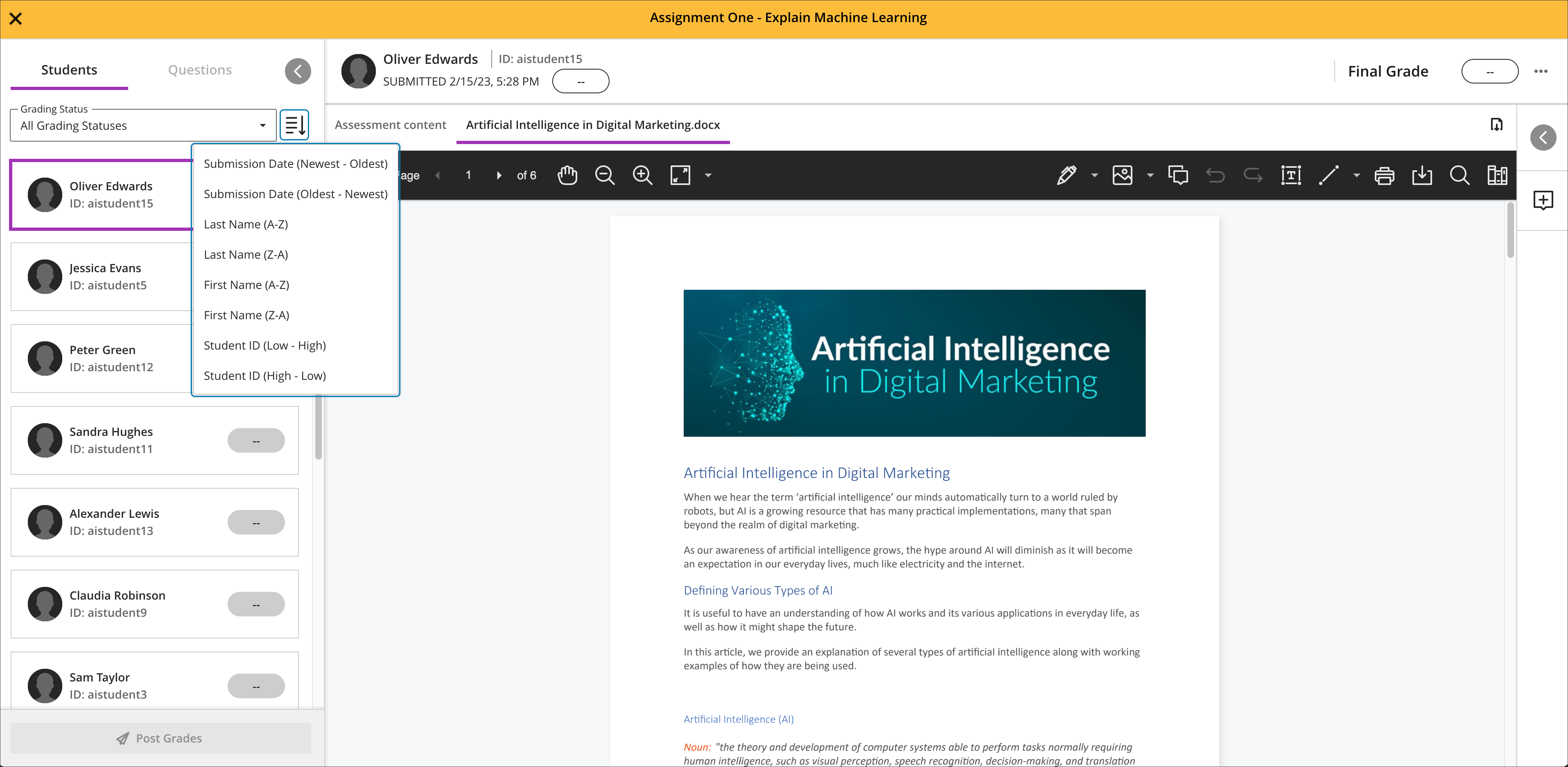
    <span>Gradebook sorting controls provide easier ways to interact with grade information in an Ultra course. T</span><span>he <a href="https://my3.my.umbc.edu/groups/instructional-technology/posts/134272" rel="nofollow external" class="bo">new Flexible Grading interface</a> also features updated sorting controls for column types, allowing instructors and graders to sort data in ascending and descending order.</span>
    </div>
    <div><span><br></span></div>
    <div><img src="https://help.blackboard.com/sites/default/files/images/2023-11/learn_ultra_instructor_SortingControlsInStudentsAndQuestionsTab_SortingOptionsInFlexibleGrading.png" width="500" alt="Image 1: Sorting assessments in Flexible Grading using the Students tab" style="max-width: 100%; height: auto;"></div>
    <div>
    <div><em>Image 1: Sorting assessments in Flexible Grading using the Students tab</em></div>
    <div><em><br></em></div>
    </div>
    <div>
    <span>Further updates to assessments and grading allow instructors to align goals to questions within a question bank and create expanded rubrics without any limit to the row or column sizes. Question-level goal alignment ensures that assessment items measure the desired learning outcomes. Moreover, larger rubrics allow for </span><span>greater criteria to support assessment and accreditation.</span>
    </div>
    <div>
    <div><span><br></span></div>
    <div>
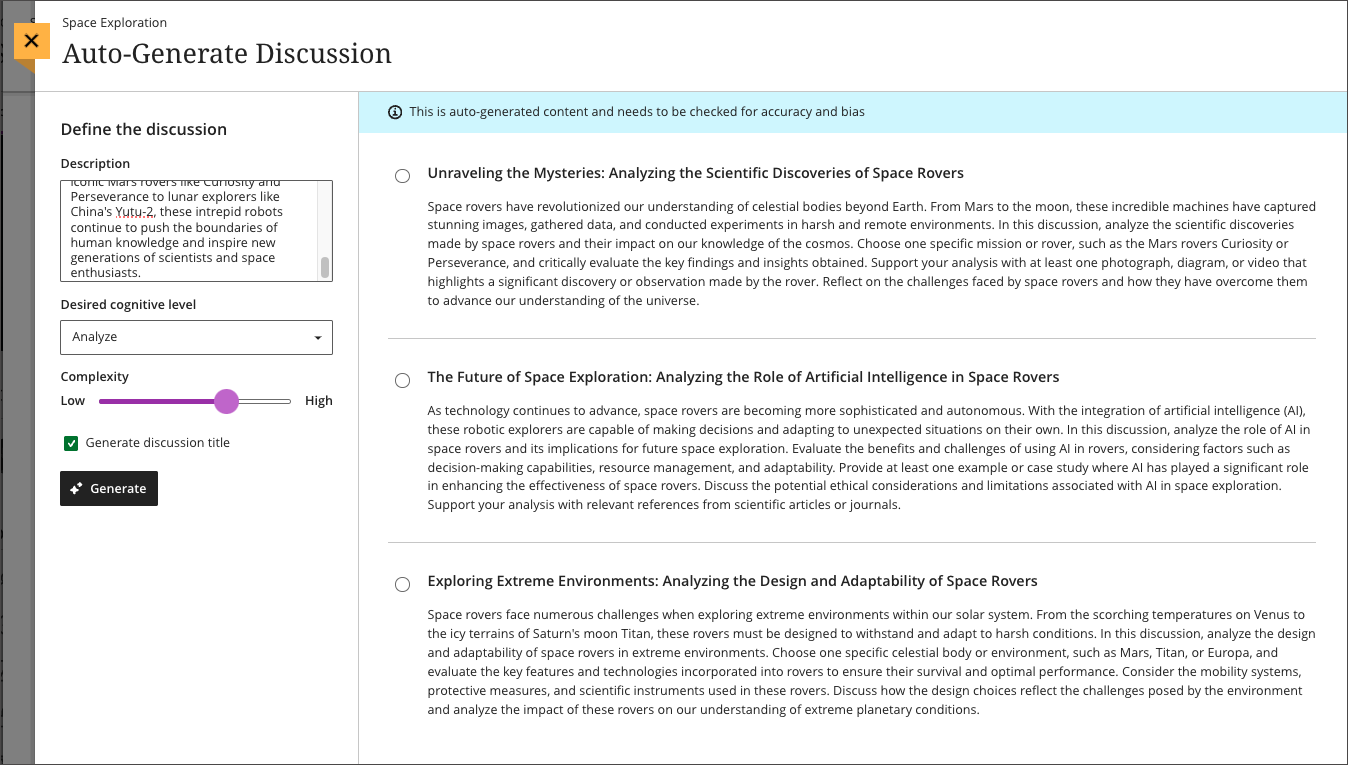
    <span>Additionally, <a href="https://my3.my.umbc.edu/groups/instructional-technology/posts/134605" rel="nofollow external" class="bo">Ultra's exclusive AI course design assistant tools</a> can generate discussion prompts to incorporate authentic assessment and increase learner engagement. </span>The generation process allows instructors to enter a discussion or journal description, select a desired cognitive process based on Bloom's Taxonomy, set the complexity, and generate a discussion or journal title. <span>The instructor can review the generated prompts and select one to add to the discussion or journal. After adding the prompt, the instructor can edit or further refine the prompt as appropriate. </span><span>The goal of this tool is to encourage students to engage in higher-order thinking, apply their knowledge, justify or challenge their beliefs and ideas, and emulate real-world situations.</span>
    </div>
    <div><br></div>
    <div><img src="https://help.blackboard.com/sites/default/files/images/2023-11/learn_ultra_instructor_AuthenticDiscussionAndJournal%20prompts_InstructorOptions.png" width="500" alt="Image 2: Instructors can describe the discussion, select the desired cognitive process and complexity, and then generate prompts" style="max-width: 100%; height: auto;"></div>
    <div>
    <span>Image 2: </span><em>Instructors can describe the discussion, select the desired cognitive process and complexity, and then generate prompts</em>
    </div>
    <div><br></div>
    </div>
    </div></div></div></div>
    <div>
    <div><div><div><div><span><div>
    <span>Faculty should see the latest updates in Ultra courses around December 7-8 2023. </span><span>The next update to our Ultra test environment will take place on December 12, 2023; release notes are posted to the <a href="https://wiki.umbc.edu/x/LohnB" rel="nofollow external" class="bo">What's New in Ultra</a> that same week. Faculty who are interested in test driving new features before they are released to production should </span><a href="http://my.umbc.edu/go/request-help" rel="nofollow external" class="bo">open an RT ticket</a> to request early access. Please <a href="http://umbc.edu/go/ultra" rel="nofollow external" class="bo">watch the FAQs</a>, including <a href="https://wiki.umbc.edu/x/LohnB" rel="nofollow external" class="bo">the What's New with Ultra page</a>, <span>and myUMBC for additional information about Ultra. </span>
    </div></span></div></div></div></div>
    <div><span><br></span></div>
    </div>
    <div><span><strong>Connect with Instructional Technology</strong></span></div>
    <div><span>As always, if you have any questions about teaching, learning, and technology at UMBC, please consider the following options:</span></div>
    <ul>
    <li>
    <a href="http://www.umbc.edu/faq" rel="nofollow external" class="bo">Check our extensive FAQ collection</a><span> </span>
    </li>
    <ul><li><span><a href="https://wiki.umbc.edu/x/LohnB" rel="nofollow external" class="bo"><span>What's new in Ultra?</span></a><span> </span><span>|</span><span> </span><a href="https://wiki.umbc.edu/x/bwrSAQ" rel="nofollow external" class="bo"><span>Known Issues</span></a><span> </span></span></li></ul>
    <li><span><a href="http://my.umbc.edu/go/request-help" rel="nofollow external" class="bo">Open a ticket via RT</a></span></li>
    <li>
    <span>Follow the </span><a href="http://my.umbc.edu/groups/instructional-technology" rel="nofollow external" class="bo">Instructional Technology</a><span> &amp; </span><a href="http://my.umbc.edu/groups/doit" rel="nofollow external" class="bo">DoIT</a><span> myUMBC groups</span>
    </li>
    <li>
    <a href="http://doit.umbc.edu/itnm/staff/" rel="nofollow external" class="bo">Request a consult</a><span> with <a href="http://doit.umbc.edu/itnm/staff" rel="nofollow external" class="bo">instructional technology staff</a></span>
    </li>
    <li>
    <span><a href="http://pivot.umbc.edu" rel="nofollow external" class="bo">PIVOT</a> | <a href="https://doit.umbc.edu/itnm/academic-continuity/" rel="nofollow external" class="bo">Academic Continuity</a></span><span> </span><span>|</span><span> </span><span><a href="https://fdc.umbc.edu/teaching/keep-on-teaching/" rel="nofollow external" class="bo">Keep On Teaching</a></span><span> </span><span>|</span><span> </span><span><a href="https://doit.umbc.edu/students" rel="nofollow external" class="bo">Student Technology Resources</a></span>
    </li>
    </ul>
    </div>
    <div><div></div></div>
    </div>
]]>
</Body>
<Summary>As 2023 comes to a close, the December Ultra update brings several features to enhance group functionality and gradebook management. With this update, instructors can assign a unique due date to...</Summary>
<Website>https://my3.my.umbc.edu/groups/instructional-technology/posts/137337</Website>
<TrackingUrl>https://my3.my.umbc.edu/api/v0/pixel/news/137337/guest@my.umbc.edu/399185d8da49d9564e0ff4f946e356e2/api/pixel</TrackingUrl>
<Tag>ai</Tag>
<Tag>blackboard</Tag>
<Tag>gradebook</Tag>
<Tag>grading</Tag>
<Tag>ultra-experience</Tag>
<Tag>ultra-update</Tag>
<Tag>unsplash</Tag>
<Group token="instructional-technology">Instructional Technology</Group>
<GroupUrl>https://my3.my.umbc.edu/groups/instructional-technology</GroupUrl>
<AvatarUrl>https://assets2-my.umbc.edu/system/shared/avatars/groups/000/001/164/dec3b026b81ee6d890a8f82f75c94a2e/xsmall.png?1446126703</AvatarUrl>
<AvatarUrl size="original">https://assets1-my.umbc.edu/system/shared/avatars/groups/000/001/164/dec3b026b81ee6d890a8f82f75c94a2e/original.png?1446126703</AvatarUrl>
<AvatarUrl size="xxlarge">https://assets2-my.umbc.edu/system/shared/avatars/groups/000/001/164/dec3b026b81ee6d890a8f82f75c94a2e/xxlarge.png?1446126703</AvatarUrl>
<AvatarUrl size="xlarge">https://assets1-my.umbc.edu/system/shared/avatars/groups/000/001/164/dec3b026b81ee6d890a8f82f75c94a2e/xlarge.png?1446126703</AvatarUrl>
<AvatarUrl size="large">https://assets1-my.umbc.edu/system/shared/avatars/groups/000/001/164/dec3b026b81ee6d890a8f82f75c94a2e/large.png?1446126703</AvatarUrl>
<AvatarUrl size="medium">https://assets4-my.umbc.edu/system/shared/avatars/groups/000/001/164/dec3b026b81ee6d890a8f82f75c94a2e/medium.png?1446126703</AvatarUrl>
<AvatarUrl size="small">https://assets3-my.umbc.edu/system/shared/avatars/groups/000/001/164/dec3b026b81ee6d890a8f82f75c94a2e/small.png?1446126703</AvatarUrl>
<AvatarUrl size="xsmall">https://assets2-my.umbc.edu/system/shared/avatars/groups/000/001/164/dec3b026b81ee6d890a8f82f75c94a2e/xsmall.png?1446126703</AvatarUrl>
<AvatarUrl size="xxsmall">https://assets3-my.umbc.edu/system/shared/avatars/groups/000/001/164/dec3b026b81ee6d890a8f82f75c94a2e/xxsmall.png?1446126703</AvatarUrl>
<Sponsor>Instructional Technology</Sponsor>
<ThumbnailUrl size="xxlarge">https://assets3-my.umbc.edu/system/shared/thumbnails/news/000/137/337/ac70c80d8dfe1625932cf54cba55766e/xxlarge.jpg?1701192788</ThumbnailUrl>
<ThumbnailUrl size="xlarge">https://assets2-my.umbc.edu/system/shared/thumbnails/news/000/137/337/ac70c80d8dfe1625932cf54cba55766e/xlarge.jpg?1701192788</ThumbnailUrl>
<ThumbnailUrl size="large">https://assets2-my.umbc.edu/system/shared/thumbnails/news/000/137/337/ac70c80d8dfe1625932cf54cba55766e/large.jpg?1701192788</ThumbnailUrl>
<ThumbnailUrl size="medium">https://assets4-my.umbc.edu/system/shared/thumbnails/news/000/137/337/ac70c80d8dfe1625932cf54cba55766e/medium.jpg?1701192788</ThumbnailUrl>
<ThumbnailUrl size="small">https://assets1-my.umbc.edu/system/shared/thumbnails/news/000/137/337/ac70c80d8dfe1625932cf54cba55766e/small.jpg?1701192788</ThumbnailUrl>
<ThumbnailUrl size="xsmall">https://assets2-my.umbc.edu/system/shared/thumbnails/news/000/137/337/ac70c80d8dfe1625932cf54cba55766e/xsmall.jpg?1701192788</ThumbnailUrl>
<ThumbnailUrl size="xxsmall">https://assets4-my.umbc.edu/system/shared/thumbnails/news/000/137/337/ac70c80d8dfe1625932cf54cba55766e/xxsmall.jpg?1701192788</ThumbnailUrl>
<PawCount>2</PawCount>
<CommentCount>0</CommentCount>
<CommentsAllowed>true</CommentsAllowed>
<PostedAt>Thu, 30 Nov 2023 14:58:57 -0500</PostedAt>
<EditAt>Thu, 30 Nov 2023 15:00:04 -0500</EditAt>
</NewsItem>

<NewsItem contentIssues="true" id="136475" important="false" status="posted" url="https://my3.my.umbc.edu/groups/doit/posts/136475">
<Title>Sorting &amp; submission enhancements for Ultra gradebook in Nov</Title>
<Tagline>Search &amp; use stock images in Ultra docs, discussions, etc.</Tagline>
<Body>
<![CDATA[
    <div class="html-content">
    <div>
    <div><div><div><div>
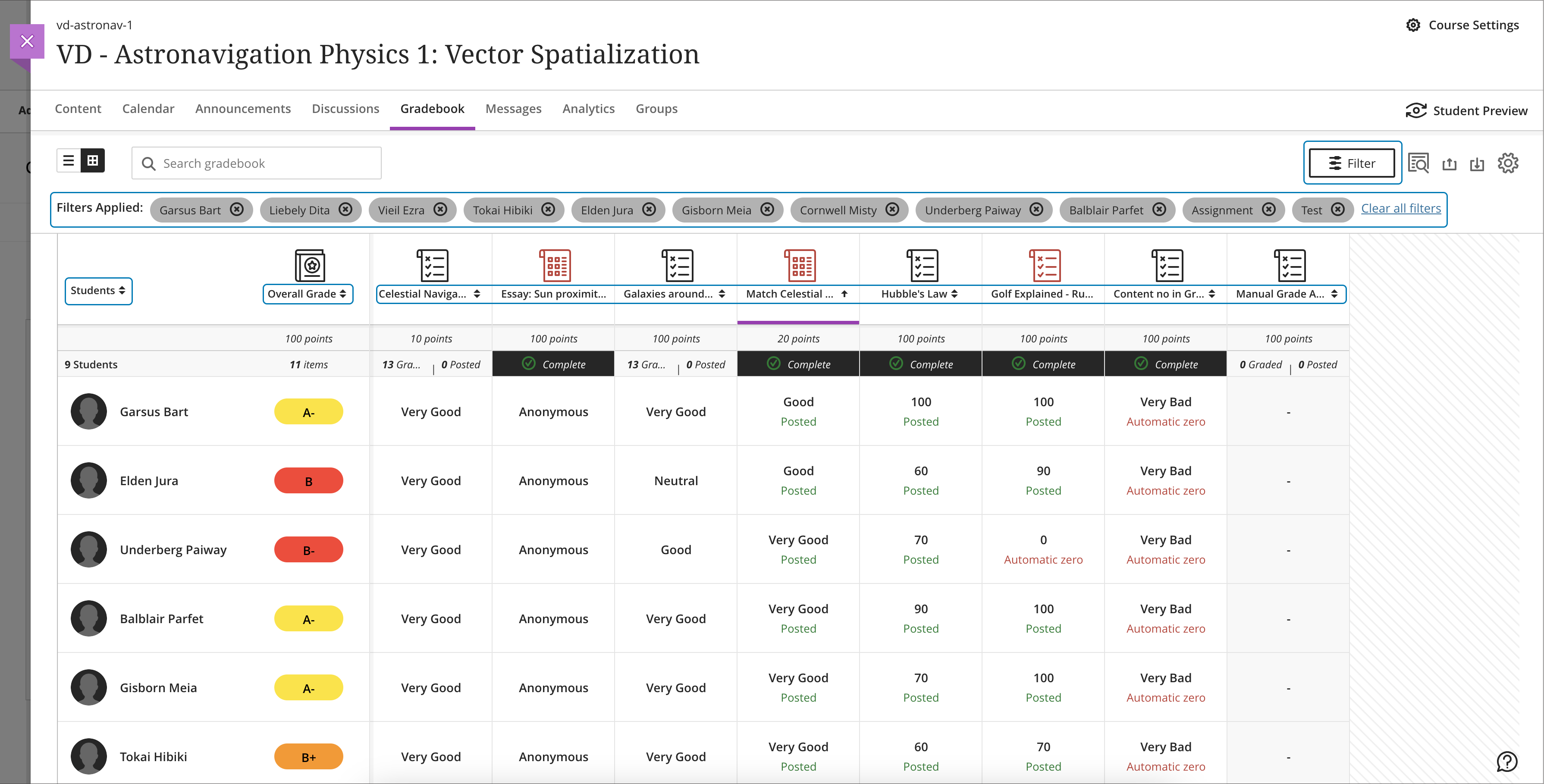
    <div>Continued enhancements to the Ultra gradebook provide greater flexibility and usability. In the November update to Ultra courses, additional sorting controls allow instructors to sort grade records in ascending or descending order including student name, overall grade, tests and assignment grade columns, and manually created grade columns. Future updates will provide sorting controls to other grading categories including discussions and journals.</div>
    <div><br></div>
    <div><img src="https://help.blackboard.com/sites/default/files/images/2023-10/learn_ultra_instruction_Gradebook_GridViewAssessmentSortingWithFilter.png" width="500" alt="Sorting assessments in gradebook grid view with filters applied" style="max-width: 100%; height: auto;"></div>
    <div><em>Image 1: Sorting assessments in gradebook grid view with filters applied. A purple line in the header shows which column is sorted.</em></div>
    <div><br></div>
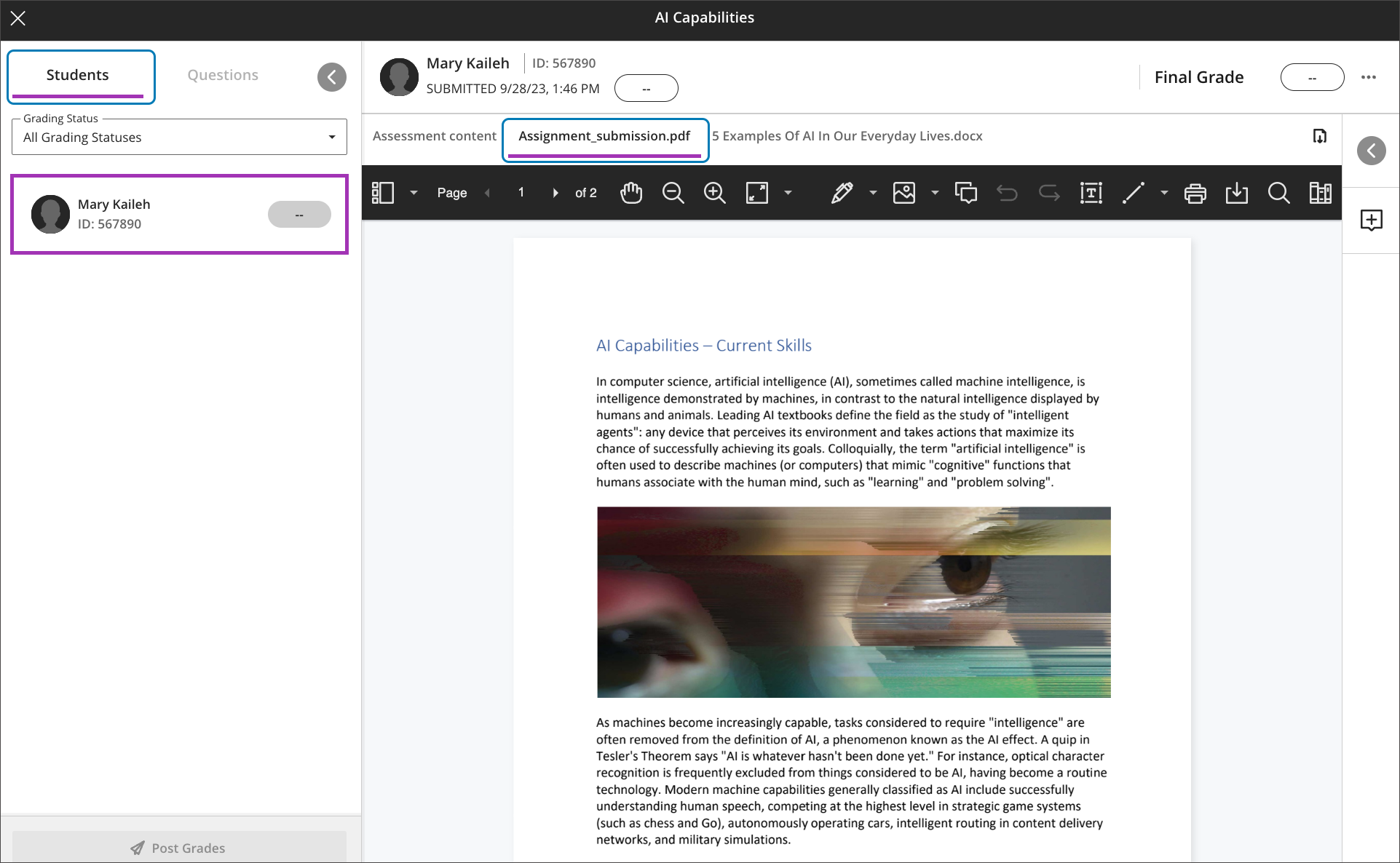
    <div>Instructors will also find it easier to navigate through student file attachments. A new tabbed interface displays when multiple files are uploaded. This updated display allows instructors to quickly navigate between file uploads when grading attachments.</div>
    <div><br></div>
    <div><img src="https://help.blackboard.com/sites/default/files/images/2023-10/learn_ultra_instructor_FlexibleGrading_GradingOptimizationFile-basedAssignmentSubmissions_TabsPerFile_DefaultView.png" width="500" alt="Example of a student submission open for grading with two files attached. The first file attachment is open in Bb Annotate. A new tab appears for the second file attachment." style="max-width: 100%; height: auto;"></div>
    <div>
    <em>Image 2: Example of a student </em><span><em>submission open for grading with two files attached. The first file attachment is open in Bb Annotate. A new tab appears for the second file attachment.</em></span>
    </div>
    <div><br></div>
    <div>Additional updates to grading include:</div>
    <div><ul>
    <li>A new late indicator added to the submission receipt if a student submits after the due date.</li>
    <li>Instructors can access the Edit/Regrade workflow when grading by question or by student.</li>
    <li>Anonymous grading is now supported in <a href="https://my3.my.umbc.edu/groups/instructional-technology/posts/134272" rel="nofollow external" class="bo">the new flexible grading interface</a>.</li>
    <li>Partial and negative credit is available for matching questions and auto-distributed across pairs. </li>
    <li>Tabbed navigation for reading and grading journals was added to be consistent with discussions and assessments.</li>
    </ul></div>
    <div>Load times for the Ultra gradebook for large courses were also improved for the November update. For example, the gradebook for a course with 2000 students and 400 graded items will load in 8 seconds while a course, representing a 57% improvement.</div>
    <div><br></div>
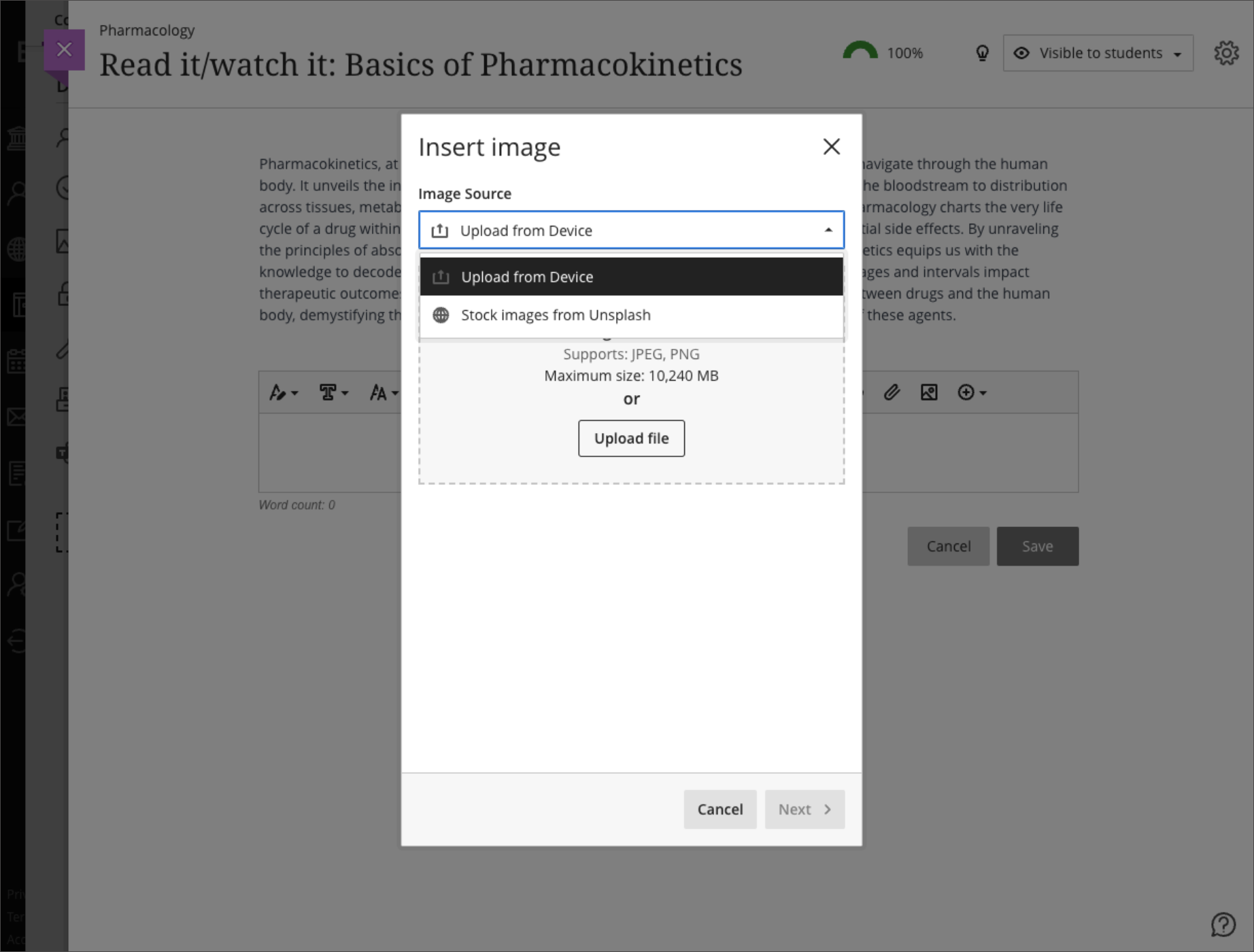
    <div>Finally, the content editor will feature a new image button, making it easier and clearer when and how to upload an image to an Ultra course. When leveraging the <a href="https://my3.my.umbc.edu/groups/instructional-technology/posts/134605" rel="nofollow external" class="bo">AI Course Design Assistant tools</a>, the image function also allows instructors to search Unsplash collection to add<span> </span><span>images to Ultra Documents, discussions, course messages, and journal prompts. All users can use the image button to upload an image, but only faculty with access to the AI tools can search the royalty free image database.</span>
    </div>
    <div><br></div>
    <div><img src="https://help.blackboard.com/sites/default/files/images/2023-10/learn_ultra_instructor_UltraDocs_ImageInsertion_ImageSourceOptions_0.png" width="500" alt="Example of instructor view to select an image upload or image search" style="max-width: 100%; height: auto;"></div>
    <div><em>Image 3: Example of instructor view to select an image upload or image search</em></div>
    <div><br></div>
    </div></div></div></div>
    <div>
    <div><div><div><div><span><div>
    <span>Faculty should see the latest updates in Ultra courses around November 2-3 2023. </span><span>The next update to our Ultra test environment will take place on November 7, 2023; release notes are posted to the <a href="https://wiki.umbc.edu/x/LohnB" rel="nofollow external" class="bo">What's New in Ultra</a> that same week. Faculty who are interested in test driving new features before they are released to production should </span><a href="http://my.umbc.edu/go/request-help" rel="nofollow external" class="bo">open an RT ticket</a> to request early access. Please <a href="http://umbc.edu/go/ultra" rel="nofollow external" class="bo">watch the FAQs</a>, including <a href="https://wiki.umbc.edu/x/LohnB" rel="nofollow external" class="bo">the What's New with Ultra page</a>, <span>and myUMBC for additional information about Ultra. </span>
    </div></span></div></div></div></div>
    <div><span><br></span></div>
    </div>
    <div><span><strong>Connect with Instructional Technology</strong></span></div>
    <div><span>As always, if you have any questions about teaching, learning, and technology at UMBC, please consider the following options:</span></div>
    <ul>
    <li>
    <a href="http://www.umbc.edu/faq" rel="nofollow external" class="bo">Check our extensive FAQ collection</a><span> </span>
    </li>
    <ul><li><span><a href="https://wiki.umbc.edu/x/LohnB" rel="nofollow external" class="bo"><span>What's new in Ultra?</span></a><span> </span><span>|</span><span> </span><a href="https://wiki.umbc.edu/x/bwrSAQ" rel="nofollow external" class="bo"><span>Known Issues</span></a><span> </span></span></li></ul>
    <li><span><a href="http://my.umbc.edu/go/request-help" rel="nofollow external" class="bo">Open a ticket via RT</a></span></li>
    <li>
    <span>Follow the </span><a href="http://my.umbc.edu/groups/instructional-technology" rel="nofollow external" class="bo">Instructional Technology</a><span> &amp; </span><a href="http://my.umbc.edu/groups/doit" rel="nofollow external" class="bo">DoIT</a><span> myUMBC groups</span>
    </li>
    <li>
    <a href="http://doit.umbc.edu/itnm/staff/" rel="nofollow external" class="bo">Request a consult</a><span> with <a href="http://doit.umbc.edu/itnm/staff" rel="nofollow external" class="bo">instructional technology staff</a></span>
    </li>
    <li>
    <span><a href="http://pivot.umbc.edu" rel="nofollow external" class="bo">PIVOT</a> | <a href="https://doit.umbc.edu/itnm/academic-continuity/" rel="nofollow external" class="bo">Academic Continuity</a></span><span> </span><span>|</span><span> </span><span><a href="https://fdc.umbc.edu/teaching/keep-on-teaching/" rel="nofollow external" class="bo">Keep On Teaching</a></span><span> </span><span>|</span><span> </span><span><a href="https://doit.umbc.edu/students" rel="nofollow external" class="bo">Student Technology Resources</a></span>
    </li>
    </ul>
    </div>
    <div><div></div></div>
    </div>
]]>
</Body>
<Summary>Continued enhancements to the Ultra gradebook provide greater flexibility and usability. In the November update to Ultra courses, additional sorting controls allow instructors to sort grade...</Summary>
<Website>https://my3.my.umbc.edu/groups/instructional-technology/posts/136475</Website>
<TrackingUrl>https://my3.my.umbc.edu/api/v0/pixel/news/136475/guest@my.umbc.edu/21ea7db3e03c2605d06bb7489049a8cf/api/pixel</TrackingUrl>
<Tag>ai</Tag>
<Tag>blackboard</Tag>
<Tag>gradebook</Tag>
<Tag>grading</Tag>
<Tag>ultra-experience</Tag>
<Tag>ultra-update</Tag>
<Tag>unsplash</Tag>
<Group token="instructional-technology">Instructional Technology</Group>
<GroupUrl>https://my3.my.umbc.edu/groups/instructional-technology</GroupUrl>
<AvatarUrl>https://assets2-my.umbc.edu/system/shared/avatars/groups/000/001/164/dec3b026b81ee6d890a8f82f75c94a2e/xsmall.png?1446126703</AvatarUrl>
<AvatarUrl size="original">https://assets1-my.umbc.edu/system/shared/avatars/groups/000/001/164/dec3b026b81ee6d890a8f82f75c94a2e/original.png?1446126703</AvatarUrl>
<AvatarUrl size="xxlarge">https://assets2-my.umbc.edu/system/shared/avatars/groups/000/001/164/dec3b026b81ee6d890a8f82f75c94a2e/xxlarge.png?1446126703</AvatarUrl>
<AvatarUrl size="xlarge">https://assets1-my.umbc.edu/system/shared/avatars/groups/000/001/164/dec3b026b81ee6d890a8f82f75c94a2e/xlarge.png?1446126703</AvatarUrl>
<AvatarUrl size="large">https://assets1-my.umbc.edu/system/shared/avatars/groups/000/001/164/dec3b026b81ee6d890a8f82f75c94a2e/large.png?1446126703</AvatarUrl>
<AvatarUrl size="medium">https://assets4-my.umbc.edu/system/shared/avatars/groups/000/001/164/dec3b026b81ee6d890a8f82f75c94a2e/medium.png?1446126703</AvatarUrl>
<AvatarUrl size="small">https://assets3-my.umbc.edu/system/shared/avatars/groups/000/001/164/dec3b026b81ee6d890a8f82f75c94a2e/small.png?1446126703</AvatarUrl>
<AvatarUrl size="xsmall">https://assets2-my.umbc.edu/system/shared/avatars/groups/000/001/164/dec3b026b81ee6d890a8f82f75c94a2e/xsmall.png?1446126703</AvatarUrl>
<AvatarUrl size="xxsmall">https://assets3-my.umbc.edu/system/shared/avatars/groups/000/001/164/dec3b026b81ee6d890a8f82f75c94a2e/xxsmall.png?1446126703</AvatarUrl>
<Sponsor>Instructional Technology</Sponsor>
<ThumbnailUrl size="xxlarge">https://assets1-my.umbc.edu/system/shared/thumbnails/news/000/136/475/7508f0861586250acfa2fae832e76a19/xxlarge.jpg?1698074839</ThumbnailUrl>
<ThumbnailUrl size="xlarge">https://assets3-my.umbc.edu/system/shared/thumbnails/news/000/136/475/7508f0861586250acfa2fae832e76a19/xlarge.jpg?1698074839</ThumbnailUrl>
<ThumbnailUrl size="large">https://assets3-my.umbc.edu/system/shared/thumbnails/news/000/136/475/7508f0861586250acfa2fae832e76a19/large.jpg?1698074839</ThumbnailUrl>
<ThumbnailUrl size="medium">https://assets4-my.umbc.edu/system/shared/thumbnails/news/000/136/475/7508f0861586250acfa2fae832e76a19/medium.jpg?1698074839</ThumbnailUrl>
<ThumbnailUrl size="small">https://assets2-my.umbc.edu/system/shared/thumbnails/news/000/136/475/7508f0861586250acfa2fae832e76a19/small.jpg?1698074839</ThumbnailUrl>
<ThumbnailUrl size="xsmall">https://assets1-my.umbc.edu/system/shared/thumbnails/news/000/136/475/7508f0861586250acfa2fae832e76a19/xsmall.jpg?1698074839</ThumbnailUrl>
<ThumbnailUrl size="xxsmall">https://assets1-my.umbc.edu/system/shared/thumbnails/news/000/136/475/7508f0861586250acfa2fae832e76a19/xxsmall.jpg?1698074839</ThumbnailUrl>
<PawCount>3</PawCount>
<CommentCount>0</CommentCount>
<CommentsAllowed>true</CommentsAllowed>
<PostedAt>Mon, 23 Oct 2023 12:56:13 -0400</PostedAt>
<EditAt>Mon, 23 Oct 2023 13:01:37 -0400</EditAt>
</NewsItem>

<NewsItem contentIssues="true" id="135953" important="false" status="posted" url="https://my3.my.umbc.edu/groups/doit/posts/135953">
<Title>October brings delegated grading to Ultra courses</Title>
<Tagline>Gradebook reminders, SafeAssign Direct Submit &amp; more</Tagline>
<Body>
<![CDATA[
    <div class="html-content">
    <div>
    <div><div><div><div>
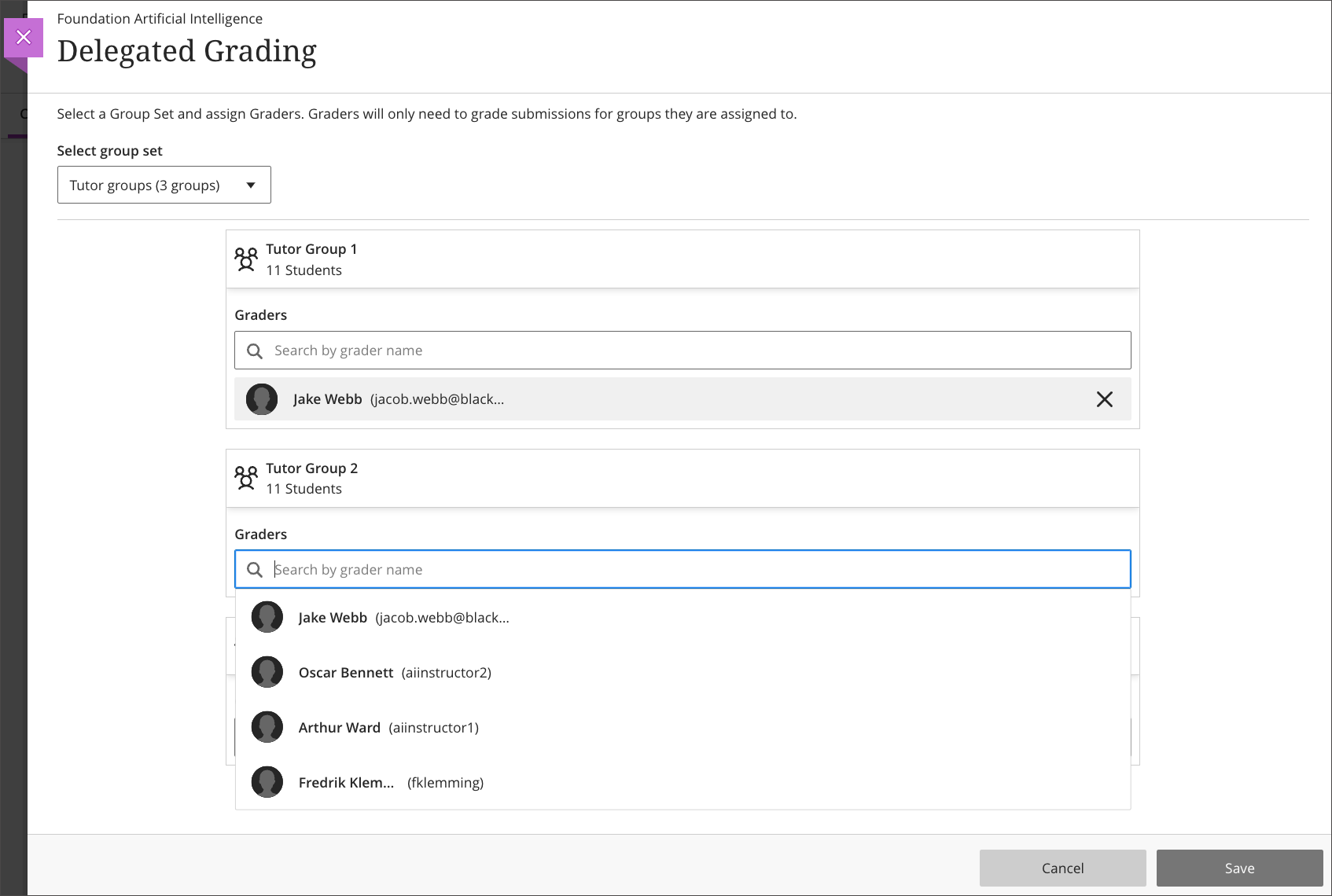
    <div>The October update to Ultra brings a new grading workflow to large Ultra courses, allowing instructors to distribute grading for an assessment to multiple graders. Instructors can assign graders to groups of students using delegated grading and the graders will only see those students they are assigned to grade including randomly generated groups. <span>The first phase of delegated grading supports individual assessments. In subsequent updates to this feature, delegated grading will support tests, group assessments, and anonymous submissions.</span><span> Note: </span><span>Delegated grading works with one grader per group of students whereas </span><a href="https://help.blackboard.com/Learn/Instructor/Ultra/Assignments/Grade_Assignments/ULTRA_Parallel_Grading" rel="nofollow external" class="bo">parallel grading</a><span> works with multiple graders and therefore requires a reconcilement of grades. </span>
    </div>
    <div><span><br></span></div>
    <div><img src="https://help.blackboard.com/sites/default/files/images/2023-09/learn_ultra_instructor_DelegatedGradingDistributionByGroup_AlignGradersToDistributeGradingWork.png" width="500" alt="Image 1: Assigning groups of students to graders" style="max-width: 100%; height: auto;"></div>
    <div><em>Image 1: Assigning groups of students to graders</em></div>
    <div><br></div>
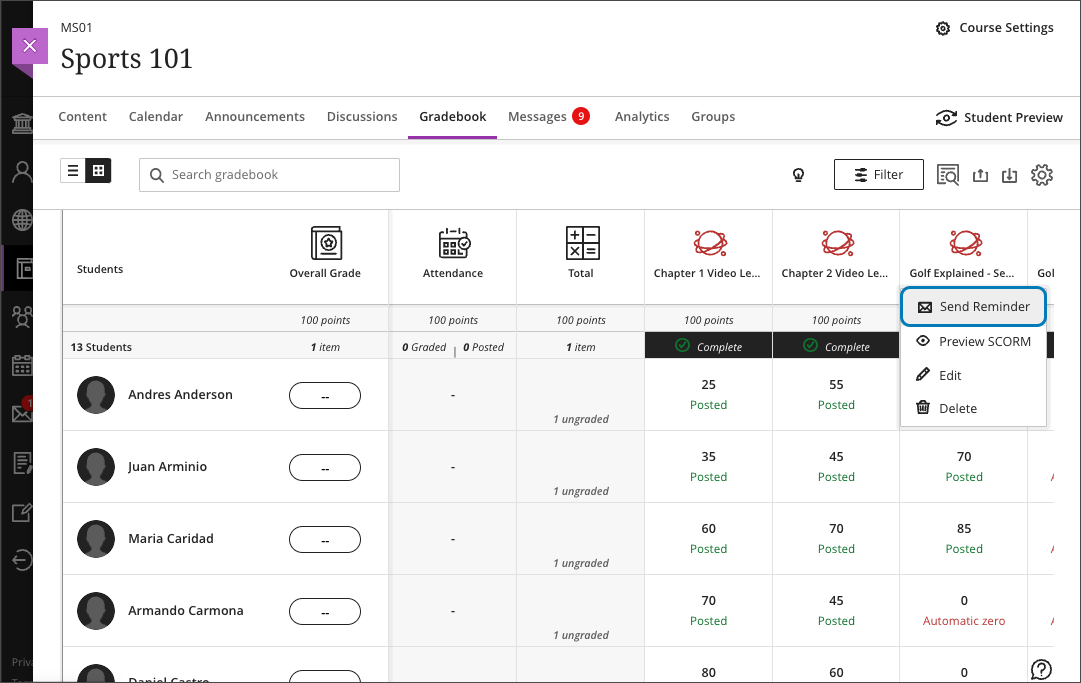
    <div>Faculty can also send reminders to students about missed assessments directly from the Ultra gradebook. This feature includes all assessment types including Ultra created, third-party tools, and anonymous assignments. At this time, reminders can only be sent for assessments that are visible to students and when there are no release conditions. Reminders can be sent from the grid view or the list view in the gradebook.</div>
    <div><br></div>
    <div><img src="https://help.blackboard.com/sites/default/files/images/2023-09/learn_ultra_instructor_Gradebook_SendReminder_OptionFromGridView.png" width="500" alt="Image 2: Sending a reminder from the grid view in the gradebook" style="max-width: 100%; height: auto;"></div>
    <div><em>Image 2: Sending a reminder from the grid view in the gradebook</em></div>
    <div><br></div>
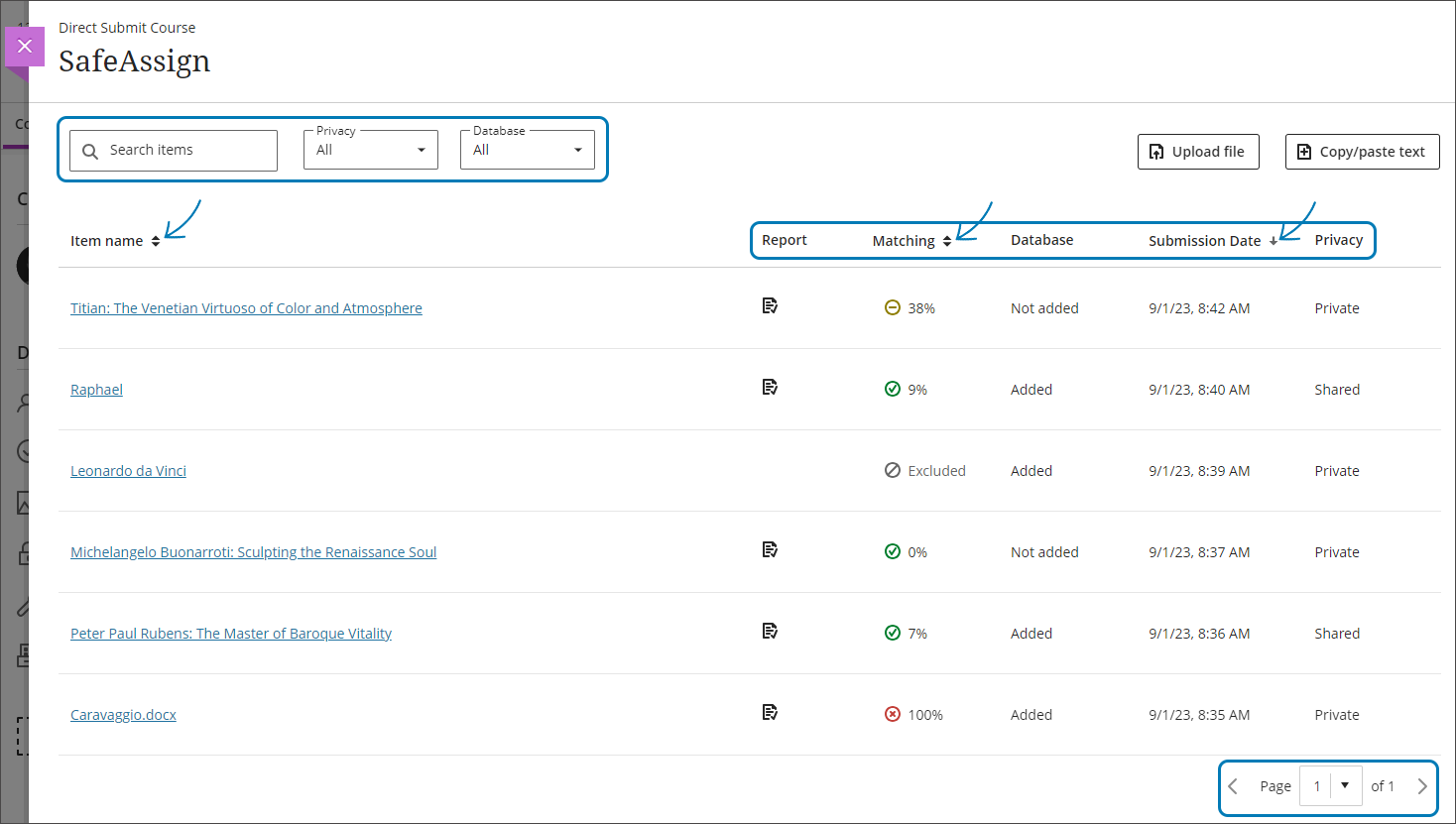
    <div><span>The October update also allows faculty to submit student work to SafeAssign for originality review when not enabled as part of an Ultra assessment. <a href="https://help.blackboard.com/SafeAssign/Instructor/DirectSubmit" rel="nofollow external" class="bo">SafeAssign Direct Submit</a> appears as an instructor tool at the top of the Books &amp; Tools peek panel in every Ultra course, enabling faculty to upload Microsoft Office files, PDF, RTF, HTML, and ZIP files, or copy and paste content for review. Submissions are added to the institutional database unless otherwise specified by the instructor.</span></div>
    <div><br></div>
    <div><img src="https://help.blackboard.com/sites/default/files/images/2023-09/learn_ultra_instructor_SafeAssign_DirectSubmit_DirectSubmitPage.png" width="500" alt="Image 3: Example of SafeAssign Direct Submit page with submissions and originality reports" style="max-width: 100%; height: auto;"></div>
    <div><em>Image 3: Example of SafeAssign Direct Submit page with submissions and originality reports</em></div>
    <div><br></div>
    <div>Please note: SafeAssign does not review for AI-generated content at this time. An integration of GPTZero for SafeAssign was postponed by the vendor <span>due to concerns related to ethics, accuracy, and bias in the evaluation of student submissions (see <a href="https://www.anthology.com/sites/default/files/2023-09/White%20Paper-AI%20Academic%20Integrity%20and%20Authentic%20Assessment-An%20Ethical%20Path%20Forward%20for%20Education-v2_09-23_0.pdf" rel="nofollow external" class="bo">Anthology white paper</a>, 2023). </span>
    </div>
    <div><br></div>
    <div><strong>Assessment &amp; Grading</strong></div>
    </div></div></div></div>
    <div><ul>
    <li><span>Instructors can now copy their custom grading schemas from Ultra and Original courses to other Ultra courses. These schemas are listed in a Grading Schemas folder on the Copy Items panel.</span></li>
    <li><span>Ultra tests will auto-distribute partial credit across correct answer choices. If desired, instructors can edit the values if some correct answer options warrant more or less credit.</span></li>
    <li>Graders can now post Bb Annotate comments without disclosing their names. Instructors have the option to mark inline comments as anonymous when creating them or even after comments are added.</li>
    </ul></div>
    <div>
    <div><div><div><div><span><div>Other updates in October include </div>
    <div><ul>
    <li>While Messages are enabled in all Ultra courses and cannot be turned off, in October, faculty will have the option to customize how students can interact with those messages. For example, students can message anyone or they can only message the instructors.</li>
    <li>Instructors can edit many settings for third-party tools on an assessment or tool link including Name/Title, Description, Release Conditions, and more.</li>
    </ul></div>
    <div>
    <span>Faculty should see the latest updates in Ultra courses around October 5-6 2023. </span><span>The next update to our Ultra test environment will take place on October 10, 2023; release notes are posted to the <a href="https://wiki.umbc.edu/x/LohnB" rel="nofollow external" class="bo">What's New in Ultra</a> that same week. Faculty who are interested in test driving new features before they are released to production should </span><a href="http://my.umbc.edu/go/request-help" rel="nofollow external" class="bo">open an RT ticket</a> to request early access. Please <a href="http://umbc.edu/go/ultra" rel="nofollow external" class="bo">watch the FAQs</a>, including <a href="https://wiki.umbc.edu/x/LohnB" rel="nofollow external" class="bo">the What's New with Ultra page</a>, <span>and myUMBC for additional information about Ultra. </span>
    </div></span></div></div></div></div>
    <div><span><br></span></div>
    </div>
    <div><span><strong>Connect with Instructional Technology</strong></span></div>
    <div><span>As always, if you have any questions about teaching, learning, and technology at UMBC, please consider the following options:</span></div>
    <ul>
    <li>
    <a href="http://www.umbc.edu/faq" rel="nofollow external" class="bo">Check our extensive FAQ collection</a><span> </span>
    </li>
    <ul><li><span><a href="https://wiki.umbc.edu/x/LohnB" rel="nofollow external" class="bo"><span>What's new in Ultra?</span></a><span> </span><span>|</span><span> </span><a href="https://wiki.umbc.edu/x/bwrSAQ" rel="nofollow external" class="bo"><span>Known Issues</span></a><span> </span></span></li></ul>
    <li><span><a href="http://my.umbc.edu/go/request-help" rel="nofollow external" class="bo">Open a ticket via RT</a></span></li>
    <li>
    <span>Follow the </span><a href="http://my.umbc.edu/groups/instructional-technology" rel="nofollow external" class="bo">Instructional Technology</a><span> &amp; </span><a href="http://my.umbc.edu/groups/doit" rel="nofollow external" class="bo">DoIT</a><span> myUMBC groups</span>
    </li>
    <li>
    <a href="http://doit.umbc.edu/itnm/staff/" rel="nofollow external" class="bo">Request a consult</a><span> with <a href="http://doit.umbc.edu/itnm/staff" rel="nofollow external" class="bo">instructional technology staff</a></span>
    </li>
    <li>
    <span><a href="http://pivot.umbc.edu" rel="nofollow external" class="bo">PIVOT</a> | <a href="https://doit.umbc.edu/itnm/academic-continuity/" rel="nofollow external" class="bo">Academic Continuity</a></span><span> </span><span>|</span><span> </span><span><a href="https://fdc.umbc.edu/teaching/keep-on-teaching/" rel="nofollow external" class="bo">Keep On Teaching</a></span><span> </span><span>|</span><span> </span><span><a href="https://doit.umbc.edu/students" rel="nofollow external" class="bo">Student Technology Resources</a></span>
    </li>
    </ul>
    </div>
    <div><div></div></div>
    </div>
]]>
</Body>
<Summary>The October update to Ultra brings a new grading workflow to large Ultra courses, allowing instructors to distribute grading for an assessment to multiple graders. Instructors can assign graders...</Summary>
<Website>https://my3.my.umbc.edu/groups/instructional-technology/posts/135953</Website>
<TrackingUrl>https://my3.my.umbc.edu/api/v0/pixel/news/135953/guest@my.umbc.edu/e06697933e0a3de1cefd9b4ab4c62775/api/pixel</TrackingUrl>
<Tag>blackboard</Tag>
<Tag>delegated-grading</Tag>
<Tag>grading</Tag>
<Tag>safeassign</Tag>
<Tag>ultra-experience</Tag>
<Tag>ultra-update</Tag>
<Group token="instructional-technology">Instructional Technology</Group>
<GroupUrl>https://my3.my.umbc.edu/groups/instructional-technology</GroupUrl>
<AvatarUrl>https://assets2-my.umbc.edu/system/shared/avatars/groups/000/001/164/dec3b026b81ee6d890a8f82f75c94a2e/xsmall.png?1446126703</AvatarUrl>
<AvatarUrl size="original">https://assets1-my.umbc.edu/system/shared/avatars/groups/000/001/164/dec3b026b81ee6d890a8f82f75c94a2e/original.png?1446126703</AvatarUrl>
<AvatarUrl size="xxlarge">https://assets2-my.umbc.edu/system/shared/avatars/groups/000/001/164/dec3b026b81ee6d890a8f82f75c94a2e/xxlarge.png?1446126703</AvatarUrl>
<AvatarUrl size="xlarge">https://assets1-my.umbc.edu/system/shared/avatars/groups/000/001/164/dec3b026b81ee6d890a8f82f75c94a2e/xlarge.png?1446126703</AvatarUrl>
<AvatarUrl size="large">https://assets1-my.umbc.edu/system/shared/avatars/groups/000/001/164/dec3b026b81ee6d890a8f82f75c94a2e/large.png?1446126703</AvatarUrl>
<AvatarUrl size="medium">https://assets4-my.umbc.edu/system/shared/avatars/groups/000/001/164/dec3b026b81ee6d890a8f82f75c94a2e/medium.png?1446126703</AvatarUrl>
<AvatarUrl size="small">https://assets3-my.umbc.edu/system/shared/avatars/groups/000/001/164/dec3b026b81ee6d890a8f82f75c94a2e/small.png?1446126703</AvatarUrl>
<AvatarUrl size="xsmall">https://assets2-my.umbc.edu/system/shared/avatars/groups/000/001/164/dec3b026b81ee6d890a8f82f75c94a2e/xsmall.png?1446126703</AvatarUrl>
<AvatarUrl size="xxsmall">https://assets3-my.umbc.edu/system/shared/avatars/groups/000/001/164/dec3b026b81ee6d890a8f82f75c94a2e/xxsmall.png?1446126703</AvatarUrl>
<Sponsor>Instructional Technology</Sponsor>
<ThumbnailUrl size="xxlarge">https://assets4-my.umbc.edu/system/shared/thumbnails/news/000/135/953/3b667fd8487794ef0e00ef79200ab322/xxlarge.jpg?1696336465</ThumbnailUrl>
<ThumbnailUrl size="xlarge">https://assets3-my.umbc.edu/system/shared/thumbnails/news/000/135/953/3b667fd8487794ef0e00ef79200ab322/xlarge.jpg?1696336465</ThumbnailUrl>
<ThumbnailUrl size="large">https://assets2-my.umbc.edu/system/shared/thumbnails/news/000/135/953/3b667fd8487794ef0e00ef79200ab322/large.jpg?1696336465</ThumbnailUrl>
<ThumbnailUrl size="medium">https://assets3-my.umbc.edu/system/shared/thumbnails/news/000/135/953/3b667fd8487794ef0e00ef79200ab322/medium.jpg?1696336465</ThumbnailUrl>
<ThumbnailUrl size="small">https://assets4-my.umbc.edu/system/shared/thumbnails/news/000/135/953/3b667fd8487794ef0e00ef79200ab322/small.jpg?1696336465</ThumbnailUrl>
<ThumbnailUrl size="xsmall">https://assets1-my.umbc.edu/system/shared/thumbnails/news/000/135/953/3b667fd8487794ef0e00ef79200ab322/xsmall.jpg?1696336465</ThumbnailUrl>
<ThumbnailUrl size="xxsmall">https://assets3-my.umbc.edu/system/shared/thumbnails/news/000/135/953/3b667fd8487794ef0e00ef79200ab322/xxsmall.jpg?1696336465</ThumbnailUrl>
<PawCount>3</PawCount>
<CommentCount>0</CommentCount>
<CommentsAllowed>true</CommentsAllowed>
<PostedAt>Tue, 03 Oct 2023 11:27:04 -0400</PostedAt>
</NewsItem>

<NewsItem contentIssues="true" id="78134" important="false" status="posted" url="https://my3.my.umbc.edu/groups/doit/posts/78134">
<Title>Grade Anywhere with Blackboard Instructor Mobile App</Title>
<Tagline>Save time &amp; stay connect with students!</Tagline>
<Body>
<![CDATA[
    <div class="html-content">Escape your office, save some trees, and head to the coffee shop for a nice latte. Then pull out your iPad because <a href="https://help.blackboard.com/Blackboard_Instructor/Grading" rel="nofollow external" class="bo">mobile grading for Blackboard assignments</a> is here! <div><br></div>
    <div>If you have a virtual pile of student papers in Blackboard to grade and you're stuck waiting for an oil change or hanging out watching soccer practice, you'll be able to grade digitally on your tablet with any cellular or wifi connection.</div>
    <div><br></div>The Blackboard Instructor app helps you easily identify courses where you need to grade student submissions. Instructors and graders can review, annotate, and grade submissions and quickly publish the grades back to students on iOS and Android devices. <div><br></div>
    <div><div class="embed-container"><iframe src="https://www.youtube.com/embed/0nJSNoeLYLc" frameborder="0" webkitallowfullscreen="webkitAllowFullScreen" mozallowfullscreen="mozallowfullscreen" allowfullscreen="allowFullScreen">[Video]</iframe></div></div>
    <div><br></div>
    <div>
    <a href="https://help.blackboard.com/Blackboard_Instructor/Feature_Guide" rel="nofollow external" class="bo">Other features</a> of the Blackboard Instructor app include <br><div><ul>
    <li><span>Preview course items, assignments, and tests.</span></li>
    <li><span>Participate in discussions.</span></li>
    <li><span>Send announcements.</span></li>
    <li><span>Interact with your class in Blackboard Collaborate.</span></li>
    </ul></div>
    <div>Some functions of Blackboard are only available only in the web browser view of Blackboard Learn.</div>
    <div><br></div>
    <div>The Blackboard Instructor app is available for <a href="https://itunes.apple.com/app/blackboard-instructor/id1088457824?ls=1&amp;mt=8" rel="nofollow external" class="bo">iOS</a> and <a href="https://play.google.com/store/apps/details?id=com.blackboard.android.bbinstructor" rel="nofollow external" class="bo">Android</a>. The initial release of the app's grading feature is available for assignments in Original courses only.</div>
    </div>
    <div><br></div>
    <div>NOTE: Students have a separate Blackboard app, designated with a blue icon and a pencil. The faculty Blackboard app is orange with a notebook.</div>
    <div><br></div>
    <div><img src="https://blackboard.umbc.edu/bbcswebdav/institution/images/myumbc/BbAppIcons.png" alt="Bb Mobile App Icons" style="max-width: 100%; height: auto;"></div>
    </div>
]]>
</Body>
<Summary>Escape your office, save some trees, and head to the coffee shop for a nice latte. Then pull out your iPad because mobile grading for Blackboard assignments is here!     If you have a virtual pile...</Summary>
<Website>https://my3.my.umbc.edu/groups/instructional-technology/posts/78134</Website>
<TrackingUrl>https://my3.my.umbc.edu/api/v0/pixel/news/78134/guest@my.umbc.edu/c9d0a2f1c838a36de7e1dc0bfada9c00/api/pixel</TrackingUrl>
<Tag>blackboard</Tag>
<Tag>grading</Tag>
<Tag>instructors</Tag>
<Tag>mobile</Tag>
<Group token="instructional-technology">Instructional Technology</Group>
<GroupUrl>https://my3.my.umbc.edu/groups/instructional-technology</GroupUrl>
<AvatarUrl>https://assets2-my.umbc.edu/system/shared/avatars/groups/000/001/164/dec3b026b81ee6d890a8f82f75c94a2e/xsmall.png?1446126703</AvatarUrl>
<AvatarUrl size="original">https://assets1-my.umbc.edu/system/shared/avatars/groups/000/001/164/dec3b026b81ee6d890a8f82f75c94a2e/original.png?1446126703</AvatarUrl>
<AvatarUrl size="xxlarge">https://assets2-my.umbc.edu/system/shared/avatars/groups/000/001/164/dec3b026b81ee6d890a8f82f75c94a2e/xxlarge.png?1446126703</AvatarUrl>
<AvatarUrl size="xlarge">https://assets1-my.umbc.edu/system/shared/avatars/groups/000/001/164/dec3b026b81ee6d890a8f82f75c94a2e/xlarge.png?1446126703</AvatarUrl>
<AvatarUrl size="large">https://assets1-my.umbc.edu/system/shared/avatars/groups/000/001/164/dec3b026b81ee6d890a8f82f75c94a2e/large.png?1446126703</AvatarUrl>
<AvatarUrl size="medium">https://assets4-my.umbc.edu/system/shared/avatars/groups/000/001/164/dec3b026b81ee6d890a8f82f75c94a2e/medium.png?1446126703</AvatarUrl>
<AvatarUrl size="small">https://assets3-my.umbc.edu/system/shared/avatars/groups/000/001/164/dec3b026b81ee6d890a8f82f75c94a2e/small.png?1446126703</AvatarUrl>
<AvatarUrl size="xsmall">https://assets2-my.umbc.edu/system/shared/avatars/groups/000/001/164/dec3b026b81ee6d890a8f82f75c94a2e/xsmall.png?1446126703</AvatarUrl>
<AvatarUrl size="xxsmall">https://assets3-my.umbc.edu/system/shared/avatars/groups/000/001/164/dec3b026b81ee6d890a8f82f75c94a2e/xxsmall.png?1446126703</AvatarUrl>
<Sponsor>Instructional Technology</Sponsor>
<ThumbnailUrl size="xxlarge">https://assets4-my.umbc.edu/system/shared/thumbnails/news/000/078/134/694306fdfe0ace5a3e1d2efa27ead123/xxlarge.jpg?1535229831</ThumbnailUrl>
<ThumbnailUrl size="xlarge">https://assets3-my.umbc.edu/system/shared/thumbnails/news/000/078/134/694306fdfe0ace5a3e1d2efa27ead123/xlarge.jpg?1535229831</ThumbnailUrl>
<ThumbnailUrl size="large">https://assets4-my.umbc.edu/system/shared/thumbnails/news/000/078/134/694306fdfe0ace5a3e1d2efa27ead123/large.jpg?1535229831</ThumbnailUrl>
<ThumbnailUrl size="medium">https://assets1-my.umbc.edu/system/shared/thumbnails/news/000/078/134/694306fdfe0ace5a3e1d2efa27ead123/medium.jpg?1535229831</ThumbnailUrl>
<ThumbnailUrl size="small">https://assets3-my.umbc.edu/system/shared/thumbnails/news/000/078/134/694306fdfe0ace5a3e1d2efa27ead123/small.jpg?1535229831</ThumbnailUrl>
<ThumbnailUrl size="xsmall">https://assets3-my.umbc.edu/system/shared/thumbnails/news/000/078/134/694306fdfe0ace5a3e1d2efa27ead123/xsmall.jpg?1535229831</ThumbnailUrl>
<ThumbnailUrl size="xxsmall">https://assets2-my.umbc.edu/system/shared/thumbnails/news/000/078/134/694306fdfe0ace5a3e1d2efa27ead123/xxsmall.jpg?1535229831</ThumbnailUrl>
<PawCount>1</PawCount>
<CommentCount>0</CommentCount>
<CommentsAllowed>true</CommentsAllowed>
<PostedAt>Mon, 27 Aug 2018 15:28:26 -0400</PostedAt>
</NewsItem>

<NewsItem contentIssues="true" id="77659" important="false" status="posted" url="https://my3.my.umbc.edu/groups/doit/posts/77659">
<Title>Feedback Recording Tool Now Available in Blackboard</Title>
<Tagline>Engage students with personalized audio or video feedback</Tagline>
<Body>
<![CDATA[
    <div class="html-content"><span><p><span>A new feedback tool in Blackboard allows faculty to embed short audio or video messages to students about their submissions through the grade center. </span></p>
    <p><span>Students can then watch or listen to feedback while reading additional written text or reviewing completed rubrics. When paired with text feedback, audio or video recordings may help provide students with useful, actionable, and more personal feedback regarding their assignments.</span></p>
    <p>Feedback messages may be recorded for up to five minutes for most graded items in a course, but are not yet supported in rubrics themselves. The feedback tool is available for both original and Ultra courses. For more information about how to use the new tool, please <a href="https://wiki.umbc.edu/x/8QFwB" rel="nofollow external" class="bo">review the FAQ</a>. </p>
    <p>NOTE: The feedback tool does not yet support captioning. As with any multimedia tool, instructors should provide alternate formats to meet accessibility requirements. For more information, <a href="http://sds.umbc.edu/contact-us/" rel="nofollow external" class="bo">please contact</a> the <a href="http://sds.umbc.edu/" rel="nofollow external" class="bo">Office of Student Disability Services</a> in person in the Math/Psychology Building, Room 212 (accessible via elevator), by phone at 410-455-2459, or by email at <a href="mailto:disability@umbc.edu" rel="nofollow external" class="bo">disAbility@umbc.edu</a>.</p>
    <p><span>As always, if you have any questions, please consider the following options:</span></p>
    <ul>
    <li><p><a href="http://www.umbc.edu/faq" rel="nofollow external" class="bo"><span>Check our extensive FAQ collection</span></a></p></li>
    <ul><li><p><a href="https://wiki.umbc.edu/pages/viewpage.action?pageId=42533516" rel="nofollow external" class="bo"><span>New Features</span></a><span> | </span><a href="https://wiki.umbc.edu/display/faq/Known+Issues+with+Blackboard" rel="nofollow external" class="bo"><span>Known Issues</span></a><span> | </span><a href="https://wiki.umbc.edu/pages/viewpage.action?pageId=71697555" rel="nofollow external" class="bo"><span>Updates &amp; Fixes</span></a></p></li></ul>
    <li><p><a href="http://my.umbc.edu/go/request-help" rel="nofollow external" class="bo"><span>Open a ticket via RT</span></a></p></li>
    <li><p><span>Follow the </span><a href="http://my.umbc.edu/groups/instructional-technology" rel="nofollow external" class="bo"><span>Instructional Technology</span></a><span> &amp; </span><a href="http://my.umbc.edu/groups/doit" rel="nofollow external" class="bo"><span>DoIT</span></a><span> myUMBC groups</span></p></li>
    <li><p><a href="http://doit.umbc.edu/itnm/staff/" rel="nofollow external" class="bo"><span>Request a consult</span></a><span> with instructional technology staff</span></p></li>
    </ul>
    <br></span></div>
]]>
</Body>
<Summary>A new feedback tool in Blackboard allows faculty to embed short audio or video messages to students about their submissions through the grade center.   Students can then watch or listen to...</Summary>
<TrackingUrl>https://my3.my.umbc.edu/api/v0/pixel/news/77659/guest@my.umbc.edu/a3876ad038f35ac05e968f9cc0b80092/api/pixel</TrackingUrl>
<Tag>blackboard</Tag>
<Tag>grading</Tag>
<Tag>new-feature</Tag>
<Group token="instructional-technology">Instructional Technology</Group>
<GroupUrl>https://my3.my.umbc.edu/groups/instructional-technology</GroupUrl>
<AvatarUrl>https://assets2-my.umbc.edu/system/shared/avatars/groups/000/001/164/dec3b026b81ee6d890a8f82f75c94a2e/xsmall.png?1446126703</AvatarUrl>
<AvatarUrl size="original">https://assets1-my.umbc.edu/system/shared/avatars/groups/000/001/164/dec3b026b81ee6d890a8f82f75c94a2e/original.png?1446126703</AvatarUrl>
<AvatarUrl size="xxlarge">https://assets2-my.umbc.edu/system/shared/avatars/groups/000/001/164/dec3b026b81ee6d890a8f82f75c94a2e/xxlarge.png?1446126703</AvatarUrl>
<AvatarUrl size="xlarge">https://assets1-my.umbc.edu/system/shared/avatars/groups/000/001/164/dec3b026b81ee6d890a8f82f75c94a2e/xlarge.png?1446126703</AvatarUrl>
<AvatarUrl size="large">https://assets1-my.umbc.edu/system/shared/avatars/groups/000/001/164/dec3b026b81ee6d890a8f82f75c94a2e/large.png?1446126703</AvatarUrl>
<AvatarUrl size="medium">https://assets4-my.umbc.edu/system/shared/avatars/groups/000/001/164/dec3b026b81ee6d890a8f82f75c94a2e/medium.png?1446126703</AvatarUrl>
<AvatarUrl size="small">https://assets3-my.umbc.edu/system/shared/avatars/groups/000/001/164/dec3b026b81ee6d890a8f82f75c94a2e/small.png?1446126703</AvatarUrl>
<AvatarUrl size="xsmall">https://assets2-my.umbc.edu/system/shared/avatars/groups/000/001/164/dec3b026b81ee6d890a8f82f75c94a2e/xsmall.png?1446126703</AvatarUrl>
<AvatarUrl size="xxsmall">https://assets3-my.umbc.edu/system/shared/avatars/groups/000/001/164/dec3b026b81ee6d890a8f82f75c94a2e/xxsmall.png?1446126703</AvatarUrl>
<Sponsor>Instructional Technology</Sponsor>
<ThumbnailUrl size="xxlarge">https://assets2-my.umbc.edu/system/shared/thumbnails/news/000/077/659/2e2681fd151b91f1a4c31c1f6e4ca887/xxlarge.jpg?1532619915</ThumbnailUrl>
<ThumbnailUrl size="xlarge">https://assets4-my.umbc.edu/system/shared/thumbnails/news/000/077/659/2e2681fd151b91f1a4c31c1f6e4ca887/xlarge.jpg?1532619915</ThumbnailUrl>
<ThumbnailUrl size="large">https://assets2-my.umbc.edu/system/shared/thumbnails/news/000/077/659/2e2681fd151b91f1a4c31c1f6e4ca887/large.jpg?1532619915</ThumbnailUrl>
<ThumbnailUrl size="medium">https://assets3-my.umbc.edu/system/shared/thumbnails/news/000/077/659/2e2681fd151b91f1a4c31c1f6e4ca887/medium.jpg?1532619915</ThumbnailUrl>
<ThumbnailUrl size="small">https://assets4-my.umbc.edu/system/shared/thumbnails/news/000/077/659/2e2681fd151b91f1a4c31c1f6e4ca887/small.jpg?1532619915</ThumbnailUrl>
<ThumbnailUrl size="xsmall">https://assets3-my.umbc.edu/system/shared/thumbnails/news/000/077/659/2e2681fd151b91f1a4c31c1f6e4ca887/xsmall.jpg?1532619915</ThumbnailUrl>
<ThumbnailUrl size="xxsmall">https://assets3-my.umbc.edu/system/shared/thumbnails/news/000/077/659/2e2681fd151b91f1a4c31c1f6e4ca887/xxsmall.jpg?1532619915</ThumbnailUrl>
<PawCount>3</PawCount>
<CommentCount>0</CommentCount>
<CommentsAllowed>true</CommentsAllowed>
<PostedAt>Thu, 26 Jul 2018 11:45:48 -0400</PostedAt>
<EditAt>Mon, 30 Jul 2018 09:26:10 -0400</EditAt>
</NewsItem>

</News>