July Update Brings Rubric Evaluation Report to Ultra Courses
Discussion descriptions, AI conversation timers, course favs
This month's Ultra update provides a new report that gives instructors class-wide rubric data at a glance, and a dedicated field that separates discussion context from prompt. Paired with clearer time guidelines for students working in AI Conversations, this update gives instructors sharper data and more control over how students engage with course activities.
Rubric Evaluation Report gives instructors a bird's-eye view of rubric performance across an entire class. Instructors can now run this report directly from the gradebook for any graded activity that has a rubric attached, aggregating data from every student submission into a single view. Instructors can see at a glance how students are performing against each criterion, making it easier to spot patterns, identify skills that need reteaching, and adjust instruction before the next assignment is due.
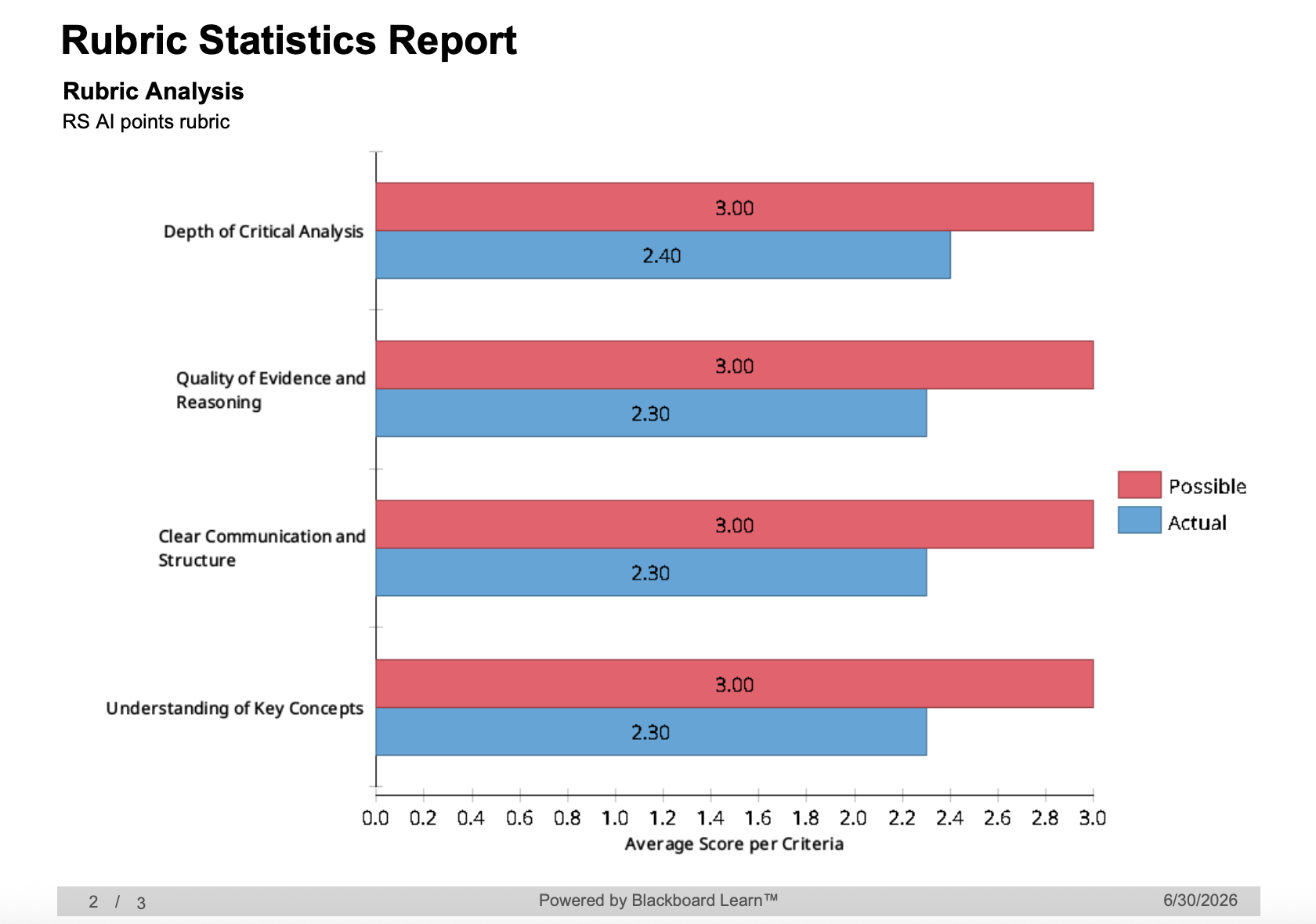
Image 1: Example of Rubric Statistics Report featuring bar chart comparing points possible against actual points
Discussions and Journals now include a dedicated Description field, giving instructors a clearer way to set the stage before students engage with an activity. Previously, the prompt appeared on the Course Content page and had to do double duty as both context and task. Now, instructors can use the new Description field to lay out expectations, background, or logistics, and reserve the prompt itself for the actual engagement question or task.
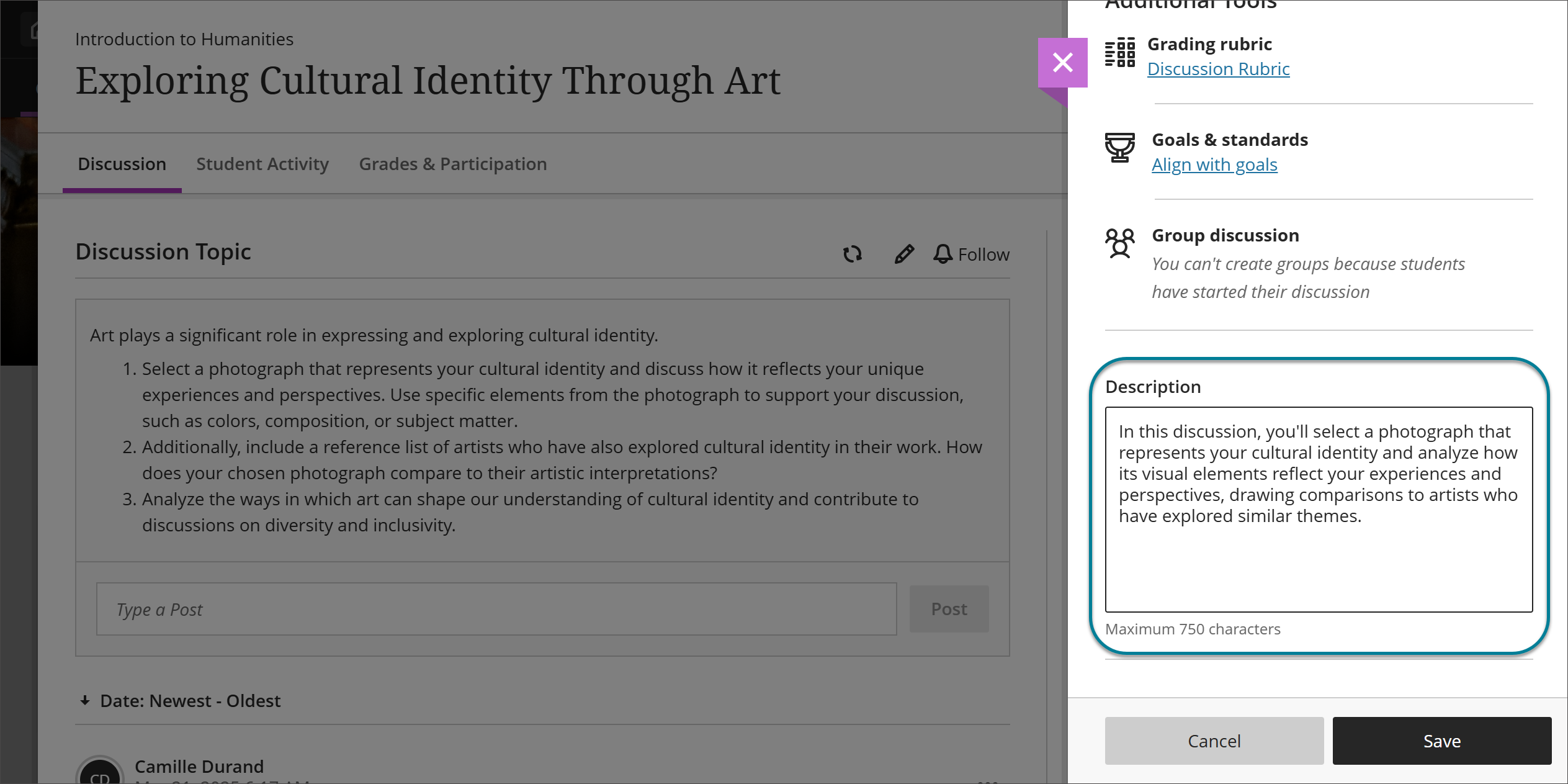 Image 2: Instructors can enter a description in the Description field for a Discussion.
With AI Conversations, instructors can now set a time limit on how long students spend in the activity. Two options are available, depending on how instructors want to structure the experience: instructors can time the assessment as a whole, or limit just the conversation portion itself. This keeps AI-supported activities consistent with the timing of other assessment types, and helps scaffold how long students should spend thinking before they respond.
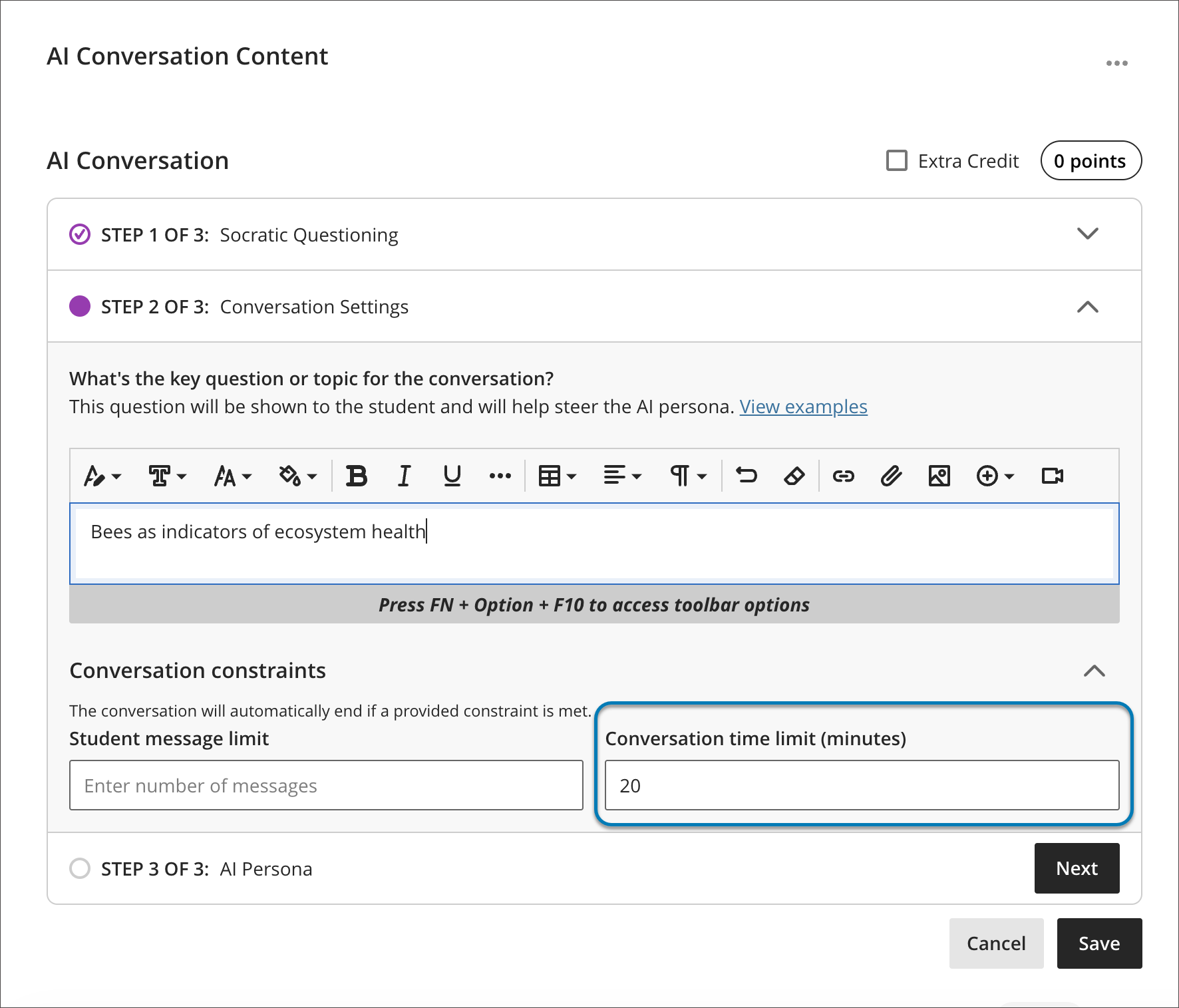 Image 3: Instructors can now set a time limit for either a student's AI conversation, or their written reflection after the chat.
Additional Updates
- Users can now view their favorite courses directly within the Course Switcher. A new Favorites tab surfaces courses marked as favorites on the Courses page, cutting down on trips back to the main Courses page.
- When a user starts a message and adds recipients, any existing conversation with those participants loads right away, making it easy to check recipients and context before sending. Longer conversations remain accessible by scrolling or by selecting "See previous messages" to load the full history.
When can you expect the update?
Faculty should see the latest updates in their Ultra courses around July 2-3, 2026. The next update to our Ultra test environment will take place on July 7, 2026; release notes will be posted to the What's New in Ultra page. Faculty who are interested in test driving new features before they are released to production should open an RT ticket to request early access. Please watch the FAQs, including the What's New with Ultra page, and myUMBC for additional information about Ultra.
Connect with Instructional Technology
As always, if you have any questions about teaching, learning, and technology at UMBC, please consider the following options:
]]>
This month's Ultra update provides a new report that gives instructors class-wide rubric data at a glance, and a dedicated field that separates discussion context from prompt. Paired with clearer...
Inline Image
https://assets3-my.umbc.edu/system/shared/attachments/d7938572942f72b6675a6c8bb75b722d/6a6b1709/news/000/160/921/6ea5010e15c5c4ba5d6c03e6f8e66405/mceclip0.png?1783000900
https://my3.my.umbc.edu/api/v0/pixel/news/160921/guest@my.umbc.edu/3993f7a9d596386da78842811053997e/api/pixel
ai-conversations
assessments
blackboard
discussions
messages
rubrics
ultra-experience
ultra-update
Instructional Technology
https://my3.my.umbc.edu/groups/instructional-technology
https://assets2-my.umbc.edu/system/shared/avatars/groups/000/001/164/dec3b026b81ee6d890a8f82f75c94a2e/xsmall.png?1446126703
https://assets1-my.umbc.edu/system/shared/avatars/groups/000/001/164/dec3b026b81ee6d890a8f82f75c94a2e/original.png?1446126703
https://assets2-my.umbc.edu/system/shared/avatars/groups/000/001/164/dec3b026b81ee6d890a8f82f75c94a2e/xxlarge.png?1446126703
https://assets1-my.umbc.edu/system/shared/avatars/groups/000/001/164/dec3b026b81ee6d890a8f82f75c94a2e/xlarge.png?1446126703
https://assets1-my.umbc.edu/system/shared/avatars/groups/000/001/164/dec3b026b81ee6d890a8f82f75c94a2e/large.png?1446126703
https://assets4-my.umbc.edu/system/shared/avatars/groups/000/001/164/dec3b026b81ee6d890a8f82f75c94a2e/medium.png?1446126703
https://assets3-my.umbc.edu/system/shared/avatars/groups/000/001/164/dec3b026b81ee6d890a8f82f75c94a2e/small.png?1446126703
https://assets2-my.umbc.edu/system/shared/avatars/groups/000/001/164/dec3b026b81ee6d890a8f82f75c94a2e/xsmall.png?1446126703
https://assets3-my.umbc.edu/system/shared/avatars/groups/000/001/164/dec3b026b81ee6d890a8f82f75c94a2e/xxsmall.png?1446126703
Instructional Technology
https://assets1-my.umbc.edu/system/shared/thumbnails/news/000/160/921/00b50cbf16192a3c7e64154728bd8737/xxlarge.jpg?1783000760
https://assets2-my.umbc.edu/system/shared/thumbnails/news/000/160/921/00b50cbf16192a3c7e64154728bd8737/xlarge.jpg?1783000760
https://assets4-my.umbc.edu/system/shared/thumbnails/news/000/160/921/00b50cbf16192a3c7e64154728bd8737/large.jpg?1783000760
https://assets4-my.umbc.edu/system/shared/thumbnails/news/000/160/921/00b50cbf16192a3c7e64154728bd8737/medium.jpg?1783000760
https://assets2-my.umbc.edu/system/shared/thumbnails/news/000/160/921/00b50cbf16192a3c7e64154728bd8737/small.jpg?1783000760
https://assets1-my.umbc.edu/system/shared/thumbnails/news/000/160/921/00b50cbf16192a3c7e64154728bd8737/xsmall.jpg?1783000760
https://assets2-my.umbc.edu/system/shared/thumbnails/news/000/160/921/00b50cbf16192a3c7e64154728bd8737/xxsmall.jpg?1783000760
Notification bell above text “New to Ultra” and Blackboard logo.
3
0
true
Thu, 02 Jul 2026 10:29:54 -0400
New grading features include no points rubric & text-based column for Ultra courses in May update
Updated assessment setting & discussion enhancements
The May 2025 Ultra release delivers several meaningful updates that improve how faculty assess student work, support engagement, and manage course tools. From expanded rubric options to accessible grading workflows, these changes are designed to align with effective teaching practices and support a more inclusive, student-centered experience.
Qualitative, No-Points Rubrics
Instructors can now create and use no-points rubrics in Ultra, a powerful option for qualitative evaluation. These rubrics allow instructors to provide rich, criterion-based feedback without assigning numerical values -- perfect for assignments focused on reflection, creativity, process, or formative assessment. In addition, faculty can leverage the AI assistant to generate descriptive evaluation criteria for no-points rubrics.

Image 1: Example of no-points rubric creation screen
Text-Based Columns in the Gradebook
A new Gradebook feature allows instructors to create text-based columns (up to 32 characters). These flexible columns are not restricted to text-only input and can include a description for context. Instructors can control student visibility, sort values in Grid view, and download the data. This update is especially useful for organizing students, tracking informal feedback, or adding flexibility to the Gradebook without tying everything to a numeric score.

Image 2: Inserting a text-based column in the gradable items tab
Test Submission Review – View Once
A new test setting, “View submission one time,” allows students to review their test responses and feedback just once after submission. Instructors must first enable the “Allow students to view their submission” setting, after which this option becomes available. This strikes a balance between transparency and academic integrity, offering students a chance to learn from their errors while reducing the risk of content sharing.

Image 3: Selecting the one-time view submission assessment setting
Enhanced AI Conversation Tool
The AI Conversation tool has been upgraded to optionally generate three key elements: a conversation title, a persona, and a reflection question. Instructors can further refine the suggestions by adjusting complexity, providing additional context, or pulling from course materials. This makes it easier to create rich dialogue prompts that encourage critical thinking and metacognition.
Gradebook Accessibility Enhancements
The Gradable Items view in the Gradebook has been redesigned to improve accessibility and navigation for users relying on screen readers or keyboard-only navigation. The new table-based layout provides more intuitive movement across cells using arrow keys and includes proper header and row announcements. These enhancements help ensure all instructors and teaching assistants, regardless of ability, can manage course grading with greater ease.
Discussion Board Improvements
Several updates make Ultra Discussions more intuitive and user-friendly. Terminology has been streamlined, replacing “responses” with “posts” for clarity, and the input field now prompts users to “Post a response to the discussion.” Instructor posts are clearly labeled, reply boxes are directly below the topic for better flow, and unnecessary interface elements, such as avatars and large banners, have been removed or simplified. These changes reduce cognitive load, improve mobile usability, and create a smoother, more accessible discussion experience for both students and faculty.
When you can expect the update
Faculty should see the latest updates in their Ultra courses around May 1-2 2025. The next update to our Ultra test environment will take place on May 6, 2025; release notes are posted to the What's New in Ultra that same week. Faculty who are interested in test driving new features before they are released to production should open an RT ticket to request early access. Please watch the FAQs, including the What's New with Ultra page, and myUMBC for additional information about Ultra.
Curious about the all latest features in Ultra? Join our What's New in Ultra Courses for Teaching & Learning SU2025 webinar on May 12, 2025.
Connect with Instructional Technology
As always, if you have any questions about teaching, learning, and technology at UMBC, please consider the following options:
Thumbnail-image: New to Ultra [decorative]
]]>
The May 2025 Ultra release delivers several meaningful updates that improve how faculty assess student work, support engagement, and manage course tools. From expanded rubric options to accessible...
https://my3.my.umbc.edu/groups/instructional-technology/posts/149574
https://my3.my.umbc.edu/api/v0/pixel/news/149574/guest@my.umbc.edu/30f337fd201edf6ac6af17a5ecdb5df1/api/pixel
ai-conversations
blackboard
gradebook
grading
rubrics
ultra-experience
ultra-update
Instructional Technology
https://my3.my.umbc.edu/groups/instructional-technology
https://assets2-my.umbc.edu/system/shared/avatars/groups/000/001/164/dec3b026b81ee6d890a8f82f75c94a2e/xsmall.png?1446126703
https://assets1-my.umbc.edu/system/shared/avatars/groups/000/001/164/dec3b026b81ee6d890a8f82f75c94a2e/original.png?1446126703
https://assets2-my.umbc.edu/system/shared/avatars/groups/000/001/164/dec3b026b81ee6d890a8f82f75c94a2e/xxlarge.png?1446126703
https://assets1-my.umbc.edu/system/shared/avatars/groups/000/001/164/dec3b026b81ee6d890a8f82f75c94a2e/xlarge.png?1446126703
https://assets1-my.umbc.edu/system/shared/avatars/groups/000/001/164/dec3b026b81ee6d890a8f82f75c94a2e/large.png?1446126703
https://assets4-my.umbc.edu/system/shared/avatars/groups/000/001/164/dec3b026b81ee6d890a8f82f75c94a2e/medium.png?1446126703
https://assets3-my.umbc.edu/system/shared/avatars/groups/000/001/164/dec3b026b81ee6d890a8f82f75c94a2e/small.png?1446126703
https://assets2-my.umbc.edu/system/shared/avatars/groups/000/001/164/dec3b026b81ee6d890a8f82f75c94a2e/xsmall.png?1446126703
https://assets3-my.umbc.edu/system/shared/avatars/groups/000/001/164/dec3b026b81ee6d890a8f82f75c94a2e/xxsmall.png?1446126703
Instructional Technology
https://assets3-my.umbc.edu/system/shared/thumbnails/news/000/149/574/62a5ed14ccc0dc07a93d275cc71ae511/xxlarge.jpg?1745928158
https://assets3-my.umbc.edu/system/shared/thumbnails/news/000/149/574/62a5ed14ccc0dc07a93d275cc71ae511/xlarge.jpg?1745928158
https://assets2-my.umbc.edu/system/shared/thumbnails/news/000/149/574/62a5ed14ccc0dc07a93d275cc71ae511/large.jpg?1745928158
https://assets2-my.umbc.edu/system/shared/thumbnails/news/000/149/574/62a5ed14ccc0dc07a93d275cc71ae511/medium.jpg?1745928158
https://assets3-my.umbc.edu/system/shared/thumbnails/news/000/149/574/62a5ed14ccc0dc07a93d275cc71ae511/small.jpg?1745928158
https://assets1-my.umbc.edu/system/shared/thumbnails/news/000/149/574/62a5ed14ccc0dc07a93d275cc71ae511/xsmall.jpg?1745928158
https://assets3-my.umbc.edu/system/shared/thumbnails/news/000/149/574/62a5ed14ccc0dc07a93d275cc71ae511/xxsmall.jpg?1745928158
Black and white robot dog running with the words "New to Ultra" written on light turquoise background
2
0
true
Tue, 29 Apr 2025 08:44:48 -0400
Fri, 23 May 2025 12:10:53 -0400
Roleplay with AI Conversations and print tests with question pools in November update
Increased support for course management & formatting
This month's update to Ultra increases support for assessment, accessibility, learner engagement, and course management.
Instructors can now choose roleplaying as an option for AI Conversations, providing another active learning opportunity in a simulated environment. For example, students can role play a doctor speaking to a patient (played by the AI persona) and practice diagnostics or other soft skills in a safe environment. As with Socratic questioning, the instructor can review the AI conversation transcript and the student's reflection on the experience. All AI tools in Ultra courses are optional to use. Faculty can learn more about the AI Conversations at a webinar on November 4 before the go-live date of the latest feature.

Image 1: Example of decision tree in AI Conversation set-up. Instructors must choose between a Socratic Questioning exercise or a Role Play exercise.
Another helpful update for instructors is the option to print tests that include question from Question Pools. This feature supports just the test or the test with the answer key. Note: The system will generate a unique version of the test and/or test with answer key each time a test is printed when the test has randomized questions/answers and when the test includes question pools.

Image 2: Example of printing a test with questions from Question Pool
Discussion formatting improves to better distinguish between responses and replies including indentation. Additionally, the delete option for discussion topic is removed, and instructors can edit instead. Future changes to discussions will include better navigation, improvements to terminology, updated interface, and clearer calls to action.
Batch edit is a helpful course tool in Ultra courses, and the change dates is the most popular function. As such, it is now the default option to simplify the process for faculty and help prepare courses.
In support of accessibility, Blackboard added a second skip link to the Course Content page. In addition to the current skip link to tab directly into course items, users can now press the Tab key again to skip to course information. If users don’t use either skip link, they will tab into the course features.
Additional updates for October include:
- Instructors can download the Student Activity Log as a CSV. All filters applied to the log also apply to the CSV.
- To help with resizing blocks that are vertically tall, Blackboard modified the resize handle. Now, instructors can resize a block by selecting the vertical edge of a block. It is not necessary to place the mouse directly over the handle.
- To prevent issues when uploading multiple files, students will now be required to wait for the first upload to completely before attaching additional files.
- A message will display if a file exceeds the permitted size limit.
- In the unlikely event of a student attempts to submit a corrupted file, a message will notify them of the issue, and the system will alert the instructor.
- The mobile app will now be known simply as the Blackboard App, aligning with Anthology's rebranding. In addition to an updated name, the app has an updated splash screen, icon, and description.
Faculty should see the latest updates in their Ultra courses around November 7-8, 2024. The next update to our Ultra test environment will take place on November 12, 2024; release notes are posted to the What's New in Ultra that same week. Faculty who are interested in test driving new features before they are released to production should open an RT ticket to request early access. Please watch the FAQs, including the What's New with Ultra page, and myUMBC for additional information about Ultra.
Connect with Instructional Technology
As always, if you have any questions about teaching, learning, and technology at UMBC, please consider the following options:
Thumbnail-image: New to Ultra [decorative]
]]>
This month's update to Ultra increases support for assessment, accessibility, learner engagement, and course management. Instructors can now choose roleplaying as an option for AI Conversations,...
https://my3.my.umbc.edu/groups/instructional-technology/posts/145140
https://my3.my.umbc.edu/api/v0/pixel/news/145140/guest@my.umbc.edu/50d7f575bbba8cf93470b2aa1f62d610/api/pixel
ai-conversations
blackboard
course-management
printer-friendly-tests
question-banks
roleplay
ultra-experience
ultra-update
Instructional Technology
https://my3.my.umbc.edu/groups/instructional-technology
https://assets2-my.umbc.edu/system/shared/avatars/groups/000/001/164/dec3b026b81ee6d890a8f82f75c94a2e/xsmall.png?1446126703
https://assets1-my.umbc.edu/system/shared/avatars/groups/000/001/164/dec3b026b81ee6d890a8f82f75c94a2e/original.png?1446126703
https://assets2-my.umbc.edu/system/shared/avatars/groups/000/001/164/dec3b026b81ee6d890a8f82f75c94a2e/xxlarge.png?1446126703
https://assets1-my.umbc.edu/system/shared/avatars/groups/000/001/164/dec3b026b81ee6d890a8f82f75c94a2e/xlarge.png?1446126703
https://assets1-my.umbc.edu/system/shared/avatars/groups/000/001/164/dec3b026b81ee6d890a8f82f75c94a2e/large.png?1446126703
https://assets4-my.umbc.edu/system/shared/avatars/groups/000/001/164/dec3b026b81ee6d890a8f82f75c94a2e/medium.png?1446126703
https://assets3-my.umbc.edu/system/shared/avatars/groups/000/001/164/dec3b026b81ee6d890a8f82f75c94a2e/small.png?1446126703
https://assets2-my.umbc.edu/system/shared/avatars/groups/000/001/164/dec3b026b81ee6d890a8f82f75c94a2e/xsmall.png?1446126703
https://assets3-my.umbc.edu/system/shared/avatars/groups/000/001/164/dec3b026b81ee6d890a8f82f75c94a2e/xxsmall.png?1446126703
Instructional Technology
https://assets2-my.umbc.edu/system/shared/thumbnails/news/000/145/140/56f1b3b8e9b400136cbb00f51bca5785/xxlarge.jpg?1730141484
https://assets4-my.umbc.edu/system/shared/thumbnails/news/000/145/140/56f1b3b8e9b400136cbb00f51bca5785/xlarge.jpg?1730141484
https://assets4-my.umbc.edu/system/shared/thumbnails/news/000/145/140/56f1b3b8e9b400136cbb00f51bca5785/large.jpg?1730141484
https://assets2-my.umbc.edu/system/shared/thumbnails/news/000/145/140/56f1b3b8e9b400136cbb00f51bca5785/medium.jpg?1730141484
https://assets2-my.umbc.edu/system/shared/thumbnails/news/000/145/140/56f1b3b8e9b400136cbb00f51bca5785/small.jpg?1730141484
https://assets2-my.umbc.edu/system/shared/thumbnails/news/000/145/140/56f1b3b8e9b400136cbb00f51bca5785/xsmall.jpg?1730141484
https://assets3-my.umbc.edu/system/shared/thumbnails/news/000/145/140/56f1b3b8e9b400136cbb00f51bca5785/xxsmall.jpg?1730141484
Black and white robot dog running with the words "New to Ultra" written on light turquoise background
6
0
true
Mon, 04 Nov 2024 09:03:05 -0500
Tue, 29 Apr 2025 11:49:15 -0400