<?xml version="1.0"?>
<News hasArchived="false" page="1" pageCount="3" pageSize="10" timestamp="Wed, 11 Nov 2026 15:05:31 -0500" url="https://my3.my.umbc.edu/groups/gsa/posts.xml?tag=project">
<NewsItem contentIssues="false" id="164850" important="false" status="posted" url="https://my3.my.umbc.edu/groups/gsa/posts/164850">
<Title>Annual DoIT Project Report</Title>
<Tagline>Read more about DoIT&#8217;s major projects in the past year!</Tagline>
<Body>
<![CDATA[
    <div class="html-content">
    <p>We are excited to share DoIT’s <a href="https://docs.google.com/presentation/d/1j1n6CRXzTZ46EGuMq__X5tUtL503dbUUlDKirluGqIc/edit?slide=id.p#slide=id.p" rel="nofollow external" class="bo">Academic Year 2025-2026 Project Report</a>, highlighting key IT projects and initiatives completed or advanced over the past year. This report celebrates the work of DoIT teams and our campus partners to improve technology, strengthen services, and support UMBC’s mission.</p>
    <p>This year’s report features a wide range of projects across digital transformation, infrastructure, cybersecurity, business process improvements, and new system implementations. A few highlights include:</p>
    <h3>
    <strong>1) REX Analytics: Data Warehousing Improvements</strong><strong><br></strong>
    </h3>
    <p>DoIT continued modernizing UMBC’s reporting and analytics environment, including <a href="https://doit.umbc.edu/about/pmo/post/159728/" rel="nofollow external" class="bo">launching the new REX Analytics Portal (REX 2.0)</a> powered by Tableau. Over 300 reports have been converted to Tableau, giving the campus more accessible data, improved visualizations, and a stronger foundation for informed decision-making.</p>
    <h3><strong>2) myUMBC Enhancements &amp; Modernization</strong></h3>
    <p>A number of improvements were made to myUMBC this year, including a modernized applicant experience, improved audience targeting, accessibility updates, new emergency settings, enhancements to myUMBC Answers, and a new Student Organization Management System. Together, these updates improve the myUMBC experience from admission through graduation.</p>
    <h3><strong>3) Digital Accessibility Remediation, Policy, &amp; Long-Term Programming</strong></h3>
    <p><strong><br></strong>UMBC continued its campus-wide digital accessibility efforts through new policy, remediation of key websites and platforms, training, and accessibility tools. By August 2026, 470 of UMBC’s websites <a href="https://my3.my.umbc.edu/groups/sites/posts/161494" rel="nofollow external" class="bo">scored with 90%+ accessibility in Silktide</a> - 90% of our campus websites! Instructional accessibility also remained a major focus through <a href="https://my3.my.umbc.edu/groups/instructional-technology/posts/157436" rel="nofollow external" class="bo"><strong>Strive for 85</strong></a>, UMBC’s institutional goal for all Blackboard courses to achieve an overall Blackboard Ally accessibility score of 85% or better by the end of 2026. myUMBC also introduced additional <a href="https://my3.my.umbc.edu/groups/doit/posts/157632" rel="nofollow external" class="bo">accessibility features</a> in the spring of 2026.</p>
    <h3><strong>4) PeopleSoft HR: System Modernizations </strong></h3>
    <p><br>DoIT partnered with Human Resources &amp; Strategic Talent Management to deliver several major PeopleSoft HR improvements, including <a href="https://my3.my.umbc.edu/groups/hr/posts/152690" rel="nofollow external" class="bo">My WorkView</a>, the <a href="https://my3.my.umbc.edu/groups/hr/posts/160441" rel="nofollow external" class="bo">Alternative Work Arrangement Portal</a>, and customized build-out to support the new State of Maryland <a href="https://hr.umbc.edu/pfml/" rel="nofollow external" class="bo">Paid Family Medical Leave</a> legislation. These updates give employees and supervisors greater transparency and easier access to compensation, timesheet, telework, leave, and employment information.</p>
    <h3><strong>5) New UMBC Software Catalog </strong></h3>
    <p><strong><br></strong>DoIT launched the new <a href="https://softwarecatalog.umbc.edu/" rel="nofollow external" class="bo">UMBC Software Catalog</a>, a centralized and user-friendly platform that makes it easier for faculty, staff, and students to discover and access approved software. The catalog includes improved search and filtering options, recommended tools, and clearer information about security and data classification requirements, helping our campus find the right technology resources more efficiently.</p>
    <h5>
    <a href="https://docs.google.com/presentation/d/1j1n6CRXzTZ46EGuMq__X5tUtL503dbUUlDKirluGqIc/edit?slide=id.p#slide=id.p" rel="nofollow external" class="bo">View the full AY 2025–2026 DoIT Project Report</a> (UMBC login required)</h5>
    <p></p>
    </div>
]]>
</Body>
<Summary>We are excited to share DoIT’s Academic Year 2025-2026 Project Report, highlighting key IT projects and initiatives completed or advanced over the past year. This report celebrates the work of...</Summary>
<TrackingUrl>https://my3.my.umbc.edu/api/v0/pixel/news/164850/guest@my.umbc.edu/89dd8e879683e4c352b9b9bc22ea0a2a/api/pixel</TrackingUrl>
<Tag>project</Tag>
<Tag>success</Tag>
<Group token="doit">Division of Information Technology (DoIT)</Group>
<GroupUrl>https://my3.my.umbc.edu/groups/doit</GroupUrl>
<AvatarUrl>https://assets2-my.umbc.edu/system/shared/avatars/groups/000/000/021/d27760c5de12c74b73faec8d0e631acf/xsmall.png?1727453227</AvatarUrl>
<AvatarUrl size="original">https://assets2-my.umbc.edu/system/shared/avatars/groups/000/000/021/d27760c5de12c74b73faec8d0e631acf/original.JPG?1727453227</AvatarUrl>
<AvatarUrl size="xxlarge">https://assets1-my.umbc.edu/system/shared/avatars/groups/000/000/021/d27760c5de12c74b73faec8d0e631acf/xxlarge.png?1727453227</AvatarUrl>
<AvatarUrl size="xlarge">https://assets3-my.umbc.edu/system/shared/avatars/groups/000/000/021/d27760c5de12c74b73faec8d0e631acf/xlarge.png?1727453227</AvatarUrl>
<AvatarUrl size="large">https://assets2-my.umbc.edu/system/shared/avatars/groups/000/000/021/d27760c5de12c74b73faec8d0e631acf/large.png?1727453227</AvatarUrl>
<AvatarUrl size="medium">https://assets2-my.umbc.edu/system/shared/avatars/groups/000/000/021/d27760c5de12c74b73faec8d0e631acf/medium.png?1727453227</AvatarUrl>
<AvatarUrl size="small">https://assets2-my.umbc.edu/system/shared/avatars/groups/000/000/021/d27760c5de12c74b73faec8d0e631acf/small.png?1727453227</AvatarUrl>
<AvatarUrl size="xsmall">https://assets2-my.umbc.edu/system/shared/avatars/groups/000/000/021/d27760c5de12c74b73faec8d0e631acf/xsmall.png?1727453227</AvatarUrl>
<AvatarUrl size="xxsmall">https://assets4-my.umbc.edu/system/shared/avatars/groups/000/000/021/d27760c5de12c74b73faec8d0e631acf/xxsmall.png?1727453227</AvatarUrl>
<Sponsor>Division of Information Technology (DoIT)</Sponsor>
<ThumbnailUrl size="xxlarge">https://assets3-my.umbc.edu/system/shared/thumbnails/news/000/164/850/5097632156df12d8dd6331a123df297c/xxlarge.jpg?1793812805</ThumbnailUrl>
<ThumbnailUrl size="xlarge">https://assets4-my.umbc.edu/system/shared/thumbnails/news/000/164/850/5097632156df12d8dd6331a123df297c/xlarge.jpg?1793812805</ThumbnailUrl>
<ThumbnailUrl size="large">https://assets4-my.umbc.edu/system/shared/thumbnails/news/000/164/850/5097632156df12d8dd6331a123df297c/large.jpg?1793812805</ThumbnailUrl>
<ThumbnailUrl size="medium">https://assets2-my.umbc.edu/system/shared/thumbnails/news/000/164/850/5097632156df12d8dd6331a123df297c/medium.jpg?1793812805</ThumbnailUrl>
<ThumbnailUrl size="small">https://assets2-my.umbc.edu/system/shared/thumbnails/news/000/164/850/5097632156df12d8dd6331a123df297c/small.jpg?1793812805</ThumbnailUrl>
<ThumbnailUrl size="xsmall">https://assets4-my.umbc.edu/system/shared/thumbnails/news/000/164/850/5097632156df12d8dd6331a123df297c/xsmall.jpg?1793812805</ThumbnailUrl>
<ThumbnailUrl size="xxsmall">https://assets3-my.umbc.edu/system/shared/thumbnails/news/000/164/850/5097632156df12d8dd6331a123df297c/xxsmall.jpg?1793812805</ThumbnailUrl>
<ThumbnailAltText>Slideshow displaying a road with icons along the way and the text Division of Information Technology Project Report</ThumbnailAltText>
<PawCount>0</PawCount>
<CommentCount>0</CommentCount>
<CommentsAllowed>true</CommentsAllowed>
<PostedAt>Wed, 11 Nov 2026 09:30:00 -0500</PostedAt>
</NewsItem>

<NewsItem contentIssues="false" id="159728" important="false" status="posted" url="https://my3.my.umbc.edu/groups/gsa/posts/159728">
<Title>UMBC REX Analytics Adds New Portal &amp; Hub</Title>
<Tagline>New &#8216;Front Door&#8217; Streamlines Access to Campus Reports</Tagline>
<Body>
<![CDATA[
    <div class="html-content">
    <p>DoIT is pleased to announce the official launch of the new<strong> REX Analytics Portal </strong>(REX 2.0), our comprehensive campus reporting portal at <a href="https://rexanalytics.umbc.edu" rel="nofollow external" class="bo">rexanalytics.umbc.edu</a>, also accessible at <a href="https://umbc.edu/go/rex20" rel="nofollow external" class="bo">umbc.edu/go/rex20</a>. This portal is powered by <strong>Tableau</strong>, providing a more dynamic and user-friendly experience for accessing crucial institutional data.</p>
    <h4><strong>What's New in the REX Analytics Portal?</strong></h4>
    <p>Importantly, the new portal helps everyone know what’s in the REX data warehouse by showing all reports, even if you don’t have access to them. Also, with the <a href="https://doit.umbc.edu/news/post/98720/" rel="nofollow external" class="bo">adoption of HelioCampus</a> as our new data warehouse, we have transitioned key institutional reports to the updated REX platform, which offers streamlined access to a collection of new and updated reports, dashboards, and data visualizations in Tableau for authorized users. Main categories include Admissions, Student Records and Enrollment, Financial &amp; Administrative Dashboards, Human Resources, and the Strategic Enrollment Plan reporting. </p>
    <p><img src="https://my3.my.umbc.edu/inline_images/news/159728/63819" alt="Image of REX Analytics portal with black and gold icons and a list of available folders" style="max-width: 100%; height: auto;"><br>In the upper-right corner, click the i icon for an informational overlay on navigating the landing page or the ? icon in the upper-right to request access to reports or get additional help.</p>
    <h4><strong>Getting Started and Resources</strong></h4>
    <p>Access the <a href="https://rexanalytics.umbc.edu/" rel="nofollow external" class="bo">UMBC REX Analytics Portal</a> today to explore the new platform and reports.</p>
    <ul>
    <li>
    <p>To access the REX Analytics Portal from off-campus (or using the Visitor wireless network on-campus), you will need to be in the VPN.</p>
    </li>
    <li>
    <p>The REX Analytics Portal can also be found in the Guide in myUMBC.</p>
    </li>
    <li>
    <p>If you have trouble finding a report, in REX, you can look for "_Where are … Reports" in individual folders for links to the reports in the REX Analytics Portal.</p>
    </li>
    <li>
    <p><a href="https://doit.umbc.edu/post/150150/" rel="nofollow external" class="bo">Why &amp; How to Explore Analytics@UMBC – Division of Information Technology</a> </p>
    </li>
    <li>
    <p><a href="https://umbc.atlassian.net/wiki/x/AoAqQ" rel="nofollow external" class="bo">How do I self-enroll in the "Analytics at UMBC" training organization?</a></p>
    </li>
    <li>
    <p>Learn more about Analytics at UMBC on our website: <a href="https://analytics.umbc.edu" rel="nofollow external" class="bo">analytics.umbc.edu</a></p>
    </li>
    <li>
    <p><a href="https://analytics.umbc.edu/support/request-help-with-data-reports-or-analytics/" rel="nofollow external" class="bo">Get Help with REX - Submit a Ticket</a></p>
    </li>
    </ul>
    <h4><strong>Future REX Analytics News</strong></h4>
    <p>We are actively transitioning and developing additional reports. More report folders and categories will be made available throughout 2026. Please keep an eye out for future DoIT announcements regarding new reports, training opportunities, and system enhancements.</p>
    <p>Reminder: Authorized faculty, staff, and institutional researchers have varying degrees of access to reports, dependent upon their role at the institution. To request access, <a href="https://analytics.umbc.edu/support/request-help-with-data-reports-or-analytics/" rel="nofollow external" class="bo">click here</a>. Please note that this is a role-based approval process.<br><br>Should you have any issues or questions, <a href="https://analytics.umbc.edu/support/request-help-with-data-reports-or-analytics/" rel="nofollow external" class="bo">submit a ticket to the REX Data Analytics team here.</a></p>
    </div>
]]>
</Body>
<Summary>DoIT is pleased to announce the official launch of the new REX Analytics Portal (REX 2.0), our comprehensive campus reporting portal at rexanalytics.umbc.edu, also accessible at umbc.edu/go/rex20....</Summary>
<AttachmentKind>Inline Image</AttachmentKind>
<AttachmentUrl>https://assets3-my.umbc.edu/system/shared/attachments/7ab774a169f5b881d0475b0a9e8d1de4/6af4ca8b/news/000/159/728/e54dd3c15f145f2f31b8192bab7930e9/blobid0.png?1778007678</AttachmentUrl>
<Attachments>
<Attachment kind="Inline Image" url="https://my3.my.umbc.edu/groups/gsa/posts/159728/attachments/63819"></Attachment>
</Attachments>
<TrackingUrl>https://my3.my.umbc.edu/api/v0/pixel/news/159728/guest@my.umbc.edu/db44228d9bef82dbfab71741f6915fce/api/pixel</TrackingUrl>
<Tag>analytics</Tag>
<Tag>project</Tag>
<Tag>rex</Tag>
<Group token="doit">Division of Information Technology (DoIT)</Group>
<GroupUrl>https://my3.my.umbc.edu/groups/doit</GroupUrl>
<AvatarUrl>https://assets2-my.umbc.edu/system/shared/avatars/groups/000/000/021/d27760c5de12c74b73faec8d0e631acf/xsmall.png?1727453227</AvatarUrl>
<AvatarUrl size="original">https://assets2-my.umbc.edu/system/shared/avatars/groups/000/000/021/d27760c5de12c74b73faec8d0e631acf/original.JPG?1727453227</AvatarUrl>
<AvatarUrl size="xxlarge">https://assets1-my.umbc.edu/system/shared/avatars/groups/000/000/021/d27760c5de12c74b73faec8d0e631acf/xxlarge.png?1727453227</AvatarUrl>
<AvatarUrl size="xlarge">https://assets3-my.umbc.edu/system/shared/avatars/groups/000/000/021/d27760c5de12c74b73faec8d0e631acf/xlarge.png?1727453227</AvatarUrl>
<AvatarUrl size="large">https://assets2-my.umbc.edu/system/shared/avatars/groups/000/000/021/d27760c5de12c74b73faec8d0e631acf/large.png?1727453227</AvatarUrl>
<AvatarUrl size="medium">https://assets2-my.umbc.edu/system/shared/avatars/groups/000/000/021/d27760c5de12c74b73faec8d0e631acf/medium.png?1727453227</AvatarUrl>
<AvatarUrl size="small">https://assets2-my.umbc.edu/system/shared/avatars/groups/000/000/021/d27760c5de12c74b73faec8d0e631acf/small.png?1727453227</AvatarUrl>
<AvatarUrl size="xsmall">https://assets2-my.umbc.edu/system/shared/avatars/groups/000/000/021/d27760c5de12c74b73faec8d0e631acf/xsmall.png?1727453227</AvatarUrl>
<AvatarUrl size="xxsmall">https://assets4-my.umbc.edu/system/shared/avatars/groups/000/000/021/d27760c5de12c74b73faec8d0e631acf/xxsmall.png?1727453227</AvatarUrl>
<Sponsor>Division of Information Technology (DoIT)</Sponsor>
<ThumbnailUrl size="xxlarge">https://assets1-my.umbc.edu/system/shared/thumbnails/news/000/159/728/8a3aa6638c8ac330f46e96ed284800f3/xxlarge.jpg?1778074500</ThumbnailUrl>
<ThumbnailUrl size="xlarge">https://assets1-my.umbc.edu/system/shared/thumbnails/news/000/159/728/8a3aa6638c8ac330f46e96ed284800f3/xlarge.jpg?1778074500</ThumbnailUrl>
<ThumbnailUrl size="large">https://assets1-my.umbc.edu/system/shared/thumbnails/news/000/159/728/8a3aa6638c8ac330f46e96ed284800f3/large.jpg?1778074500</ThumbnailUrl>
<ThumbnailUrl size="medium">https://assets1-my.umbc.edu/system/shared/thumbnails/news/000/159/728/8a3aa6638c8ac330f46e96ed284800f3/medium.jpg?1778074500</ThumbnailUrl>
<ThumbnailUrl size="small">https://assets1-my.umbc.edu/system/shared/thumbnails/news/000/159/728/8a3aa6638c8ac330f46e96ed284800f3/small.jpg?1778074500</ThumbnailUrl>
<ThumbnailUrl size="xsmall">https://assets2-my.umbc.edu/system/shared/thumbnails/news/000/159/728/8a3aa6638c8ac330f46e96ed284800f3/xsmall.jpg?1778074500</ThumbnailUrl>
<ThumbnailUrl size="xxsmall">https://assets2-my.umbc.edu/system/shared/thumbnails/news/000/159/728/8a3aa6638c8ac330f46e96ed284800f3/xxsmall.jpg?1778074500</ThumbnailUrl>
<ThumbnailAltText>UMBC shield logo with black text DoIT News on a gold background</ThumbnailAltText>
<PawCount>1</PawCount>
<CommentCount>0</CommentCount>
<CommentsAllowed>true</CommentsAllowed>
<PostedAt>Wed, 06 May 2026 10:00:00 -0400</PostedAt>
<EditAt>Wed, 22 Jul 2026 14:49:53 -0400</EditAt>
</NewsItem>

<NewsItem contentIssues="false" id="153439" important="false" status="posted" url="https://my3.my.umbc.edu/groups/gsa/posts/153439">
<Title>Sherman Hall&#8217;s Phase 1 renovation is complete, creating space for creative collaboration</Title>
<Body>
<![CDATA[
    <div class="html-content">
    <a href="https://my3.my.umbc.edu/groups/umbc-news-magazine/posts/153433" rel="nofollow external" class="bo">Repost from UMBC News &amp; Magazine</a><div><br></div>
    <div>
    <p>The west wing of Sherman Hall is open to students and staff again after 18 months undergoing extensive renovations and modernizations. While the renovation on the building's east wing (adjacent to Academic Row) begins in earnest this semester, west wing residents are settling into their colorful and versatile office set ups and classroom spaces.</p>
    <p>Walking into the Sherman Hall atrium, a floating staircase dominates the entryway, but if you take a right and a left and walk past a few brightly colored sitting areas, you'll find the new offices of Division of <a href="https://my3.my.umbc.edu/groups/umbc-news-magazine/posts/153433/2f8a9/57fa229f916b8a654e5214f991f0f3dd/web/link?link=https%3A%2F%2Fuaa.umbc.edu%2F" rel="nofollow external" class="bo">Undergraduate Academic Affairs</a> (UAA) and <a href="https://my3.my.umbc.edu/groups/umbc-news-magazine/posts/153433/2f8a9/1854f80a699e9bbc47cd8bc9d1e19a6d/web/link?link=https%3A%2F%2Fatp.umbc.edu%2F" rel="nofollow external" class="bo">Academic Transition Programs</a>. It's no longer just the offices of ATP, it's now also home to the <a href="https://my3.my.umbc.edu/groups/umbc-news-magazine/posts/153433/2f8a9/b75031d41ac36f220d23d2e6d047e1b9/web/link?link=https%3A%2F%2Finds.umbc.edu%2F" rel="nofollow external" class="bo">Individualized Study Program</a> (INDS) and the <a href="https://my3.my.umbc.edu/groups/umbc-news-magazine/posts/153433/2f8a9/a752e60f04a3c068f6538ba4eb2c015f/web/link?link=https%3A%2F%2Fuia.umbc.edu%2F" rel="nofollow external" class="bo">University Innovation Alliance</a> (UIA) as well.</p>
    <h5>Relocation inspires collaboration</h5>
    <p>With this exciting new phase for campus, comes disruptions to some normal operations. <strong>Laila Shishineh</strong>, a new resident in Sherman Hall's office suites, and the assistant vice provost and assistant dean for UAA, understands the disruption better than most. Shishineh and her team were relocated two years ago because of the renovations to temporary offices that were shared with them by the Academic Success Center. Now as they settle into their new office space—shared with two offices who await their new space in the east wing—Shishineh celebrates the infrastructural improvements and also the new opportunities for collaboration that weren't possible before.</p>
    <p><img src="https://my3.my.umbc.edu/system/shared/attachments/news/000/153/439/101803876986501153f186d21ad49a46/DSC5793-2-1200x800.jpg" alt="A woman in her office, unpacking items from cardboard boxes." style="max-width: 100%; height: auto;"></p>
    <p><img src="https://my3.my.umbc.edu/system/shared/attachments/news/000/153/439/14e2478fdae5f8cbfe6f14cd046e5832/DSC5856-2-1-1200x800.jpg" alt="Woman sitting at her desk, doing work on her computer" style="max-width: 100%; height: auto;"></p>
    <p><img src="https://my3.my.umbc.edu/system/shared/attachments/news/000/153/439/df5b7c234f5a2171ce4655a048866c96/DSC5846-2-1200x800.jpg" alt="Office items (books, decorations, baskets) layed out on a desk" style="max-width: 100%; height: auto;"></p>Laila Shishineh's new office in Sherman Hall, overlooking the east wing and the under-construction courtyard. (Tanzila Malik/UMBC)</div>
    <div>
    <br><p>Under a plan developed by Shishineh alongside Facilities Management, ATP, UIA, and INDS, the new suite space in Sherman Hall's west wing will be shared by these offices, with hoteling space available for days when employees overlap. This collaboration of 17 people allows flexibility for people to work in the office some days and work from home on other days.</p>
    <p>This physical proximity to other departments allows for unique opportunities of collaboration between them. "It's so nice to have a suite space," says Shishineh. "People get to build new relationships and support each other in different ways as opposed to just being 'doors in a hallway' somewhere on campus."</p>
    <p><img src="https://my3.my.umbc.edu/system/shared/attachments/news/000/153/439/04c75d6cc8f33535fdd3671701579d3d/DSC5815-1200x800.jpg" alt="People sitting around a conference table while eating lunch, and watching someone present at the front of the room." style="max-width: 100%; height: auto;"></p>
    <p><img src="https://my3.my.umbc.edu/system/shared/attachments/news/000/153/439/c06527ad556e307958354d4a385dd76c/DSC5780-1200x800.jpg" alt="Four people talking in an office break room" style="max-width: 100%; height: auto;"></p>
    <p>(Left to right): INDS uses the new conference space for a team meeting; Shishineh speaks with members of Facilities Management about shared space use. (Tanzila Malik, Kayla Logue/UMBC)</p>
    <p><br></p>
    <p>As a former resident assistant in college, Shishineh thought of creating an office-mate agreement, based on the concept of a roommate agreement. Across the three departments, people were paired up based on schedule, personalities, and types of roles. A meet and greet was held so everyone could get to know their officemate, and outline an agreement. The agreements include everything from what days each person is working in the office or from home, to how much shelf space they each get.</p>
    <h5>Student-centered design</h5>
    <div><img src="https://my3.my.umbc.edu/system/shared/attachments/news/000/153/439/26465cf039fb18d0f729270ed9074f7e/DSC5767-2-1200x800.jpg" alt="Desk with two storage baskets labeled &quot;Welcome 'Home' Jose!&quot; and &quot;Welcome 'Home' Tim!&quot;" style="max-width: 100%; height: auto;"></div>Shared office of Tim Olivella (ATP) and Jose Arenas Gómez (INDS). (Kayla Logue/UMBC)<p>The new physical structure of Sherman Hall not only allows for more collaboration among the faculty and staff working there, but also for students. A noticeable difference in the layout is the student-centered design: with plenty of collaborative spaces including lounges, conference/study rooms, vending machines, and TVs broadcasting events happening on campus.</p>
    <p>"I hope it becomes a place where students come not just for classes, but to hangout, study, and congregate," says Shishineh. Improvements have also been made to make wayfinding easier in Sherman Hall, since the two wings make some things difficult to find. New signage, room numbering, general space layouts and color-coding help everyone more easily find their way.</p>
    <p>A feature to look forward to is the courtyard between the east and west wings of Sherman Hall. This multi-tiered green space with new ramps and stairs will provide gathering places and outdoor classroom opportunities at each level when the entire renovation is complete.</p>
    <h5>Construction and cost, with a mind for sustainability</h5>
    <p>At the beginning of the project, UMBC evaluated tearing down Sherman Hall and rebuilding it, versus a significant renovation. It was determined that the structure was still very solid and the cost of a new structure could be as much as 40 percent of the cost of a building, says<strong> Stacy Brian</strong>, the Facilities Management project manager for the renovation. By renovating instead of starting new, money was saved on excavation, underground utilities to serve the building, new foundations, new steel structure, new stair and elevator shafts and new floor slabs, and more.</p>
    <p>But to complete the job, Sherman Hall needed to be gutted down to the bones of the building, with only concrete floor slabs and steel structure remaining. Just about everything else is brand new, says Brian: New elevators, HVAC systems, plumbing, electrical, walls, ceilings, roof, fire alarm and protection systems, finishes, IT/AV, etc.</p>
    <p><img src="https://my3.my.umbc.edu/system/shared/attachments/news/000/153/439/07d1377df0c0d7790beeb2f33a6b336e/Link-lobby-1024x575-1.jpg" alt="Modern lobby with seating area, large windows, and a wooden staircase." style="max-width: 100%; height: auto;"></p>
    <p><img src="https://my3.my.umbc.edu/system/shared/attachments/news/000/153/439/26449f90433c74ebef8c7c92940a12ff/Lecture-Hall-rendering-1024x576-1.png" alt="A modern, curved lecture hall with tiered seating, a wooden slat ceiling, and a large projector screen." style="max-width: 100%; height: auto;"></p>
    <p><img src="https://my3.my.umbc.edu/system/shared/attachments/news/000/153/439/bb174c39f55d57027f17475dd5a51374/Classroom-pre-function-1024x576-1.png" alt="Modern lounge area with people interacting, featuring teal walls and wood accents." style="max-width: 100%; height: auto;"></p>
    <p><img src="https://my3.my.umbc.edu/system/shared/attachments/news/000/153/439/ae4280f25fd5f28a00d850cf9b17d55f/New-courtyard.jpg" alt="Modern building with a courtyard, trees, and people relaxing." style="max-width: 100%; height: auto;"></p>Renderings courtesy of Facilities Management show the linked lobby addition with student lounge and study spaces, Sherman Hall's updated lecture hall, student lounge and study/waiting area between classes; and the outdoor terrace courtyard.<p>Besides the bottom-line cost, there were more considerations for taking on the renovation. Believe it or not, but "tearing this building down completely in the heart of campus would also have been much more disruptive than what we are experiencing now," says Brian.</p>
    <p>The campus utility tunnel wraps all around Sherman Hall, so a significant amount of money would have been spent on protecting the tunnel so that heating, cooling, and power across all of campus wouldn't be disrupted.</p>
    <p><img src="https://my3.my.umbc.edu/system/shared/attachments/news/000/153/439/43a0dda33973576a75a494916a54588e/faculty-staff-social-25-0032-1200x800.jpg" alt="People gather around cocktail tables outside a new building with the sky reflected in the windows" style="max-width: 100%; height: auto;"></p>Faculty and staff gather together in advance of Homecoming at the new entryway of Sherman Hall. (Brad Ziegler/UMBC)<p>There were also considerations regarding the <a href="https://my3.my.umbc.edu/groups/umbc-news-magazine/posts/153433/2f8a9/a5b62cb81f2fa7987847132aa5715610/web/link?link=https%3A%2F%2Fwww.sciencedirect.com%2Fscience%2Farticle%2Fpii%2FS2352710225020625" rel="nofollow external" class="bo">environmental sustainability of the project</a>. "It was definitely 'greener' (more sustainable) to use as much existing structure as possible to save those items from the landfill, the generation of more embedded carbon, etc.," says Brian.</p>
    <p>Additionally, Sherman Hall is now much more energy efficient, greatly reducing not only UMBC's carbon footprint but also saving money on utilities. These savings can provide UMBC the opportunity to spend that money on other important upgrades across the campus. Some of the new features include much larger windows, which bring more daylight into the rooms. Students, staff, and faculty can all <a href="https://my3.my.umbc.edu/groups/umbc-news-magazine/posts/153433/2f8a9/f18f9b8799e44f4ec63604e7e42e565b/web/link?link=https%3A%2F%2Fpmc.ncbi.nlm.nih.gov%2Farticles%2FPMC10277019%2F" rel="nofollow external" class="bo">benefit from more daylight for their mental health</a> and general well-being.</p>
    <p><img src="https://my3.my.umbc.edu/system/shared/attachments/news/000/153/439/e831418c2a8a3d6a69186f181a03b514/Link-facade.png" alt="A modern building with glass and brick facade during twilight with people walking outside." style="max-width: 100%; height: auto;"><img src="https://my3.my.umbc.edu/system/shared/attachments/news/000/153/439/57cffaac8692f8b55550bb1bc1eac791/North-facade-Sondheim-bridge.jpg" alt='Modern university building with red brick and a glass walkway labeled "UMBC".' style="max-width: 100%; height: auto;"></p>Renderings from Facilities Management show Sherman Hall's new front entrance opposite the University Center, rendering of Sherman Hall as viewed from Math/Psych.<p>"This project has been a shining example of how all of the different departments from many different UMBC divisions can come together and accomplish a very difficult task," says <strong>John Zahor</strong>, assistant vice president for Facilities Management.</p>
    <p>From sharing offices, providing earbuds to get through the noise of construction, and putting up with all the other disruptions necessary for a project like this, Zahor says that the building's returning occupants have remained open and flexible, and that's made all the difference. Zahor says without the cooperation of many folks across campus, an already difficult task would have been impossible. Thanks to <strong>Craig Goodwin</strong>, the director of design and construction,<strong> Molly Power</strong>, UMBC's campus planner in charge of the temporary space planning and <strong>Elyse Clegg</strong>, manager of facilities support services, and <strong>Joe Washington</strong>, moving/logistics coordinator and the student workforce supervisor,  "This was a job well done," says Zahor.</p>
    <p>"We hope to be done by the beginning of the 2027 spring semester to give this wonderful building back to the campus community without fences and temporary signs, ready for full use," says Zahor.</p>
    </div>
    </div>
]]>
</Body>
<Summary>Repost from UMBC News &amp; Magazine     The west wing of Sherman Hall is open to students and staff again after 18 months undergoing extensive renovations and modernizations. While the renovation...</Summary>
<AttachmentKind>Image</AttachmentKind>
<AttachmentUrl>https://assets1-my.umbc.edu/system/shared/attachments/d071bb0e9ab735ae2264559a39c68b28/6af4ca8b/news/000/153/439/101803876986501153f186d21ad49a46/DSC5793-2-1200x800.jpg?1760034208</AttachmentUrl>
<Attachments>
<Attachment kind="Image" url="https://my3.my.umbc.edu/groups/gsa/posts/153439/attachments/59438"></Attachment>
<Attachment kind="Image" url="https://my3.my.umbc.edu/groups/gsa/posts/153439/attachments/59439"></Attachment>
<Attachment kind="Image" url="https://my3.my.umbc.edu/groups/gsa/posts/153439/attachments/59440"></Attachment>
<Attachment kind="Image" url="https://my3.my.umbc.edu/groups/gsa/posts/153439/attachments/59441"></Attachment>
<Attachment kind="Image" url="https://my3.my.umbc.edu/groups/gsa/posts/153439/attachments/59442"></Attachment>
<Attachment kind="Image" url="https://my3.my.umbc.edu/groups/gsa/posts/153439/attachments/59443"></Attachment>
<Attachment kind="Image" url="https://my3.my.umbc.edu/groups/gsa/posts/153439/attachments/59444"></Attachment>
<Attachment kind="Image" url="https://my3.my.umbc.edu/groups/gsa/posts/153439/attachments/59445"></Attachment>
<Attachment kind="Image" url="https://my3.my.umbc.edu/groups/gsa/posts/153439/attachments/59446"></Attachment>
<Attachment kind="Image" url="https://my3.my.umbc.edu/groups/gsa/posts/153439/attachments/59447"></Attachment>
<Attachment kind="Image" url="https://my3.my.umbc.edu/groups/gsa/posts/153439/attachments/59448"></Attachment>
<Attachment kind="Image" url="https://my3.my.umbc.edu/groups/gsa/posts/153439/attachments/59449"></Attachment>
<Attachment kind="Image" url="https://my3.my.umbc.edu/groups/gsa/posts/153439/attachments/59450"></Attachment>
</Attachments>
<TrackingUrl>https://my3.my.umbc.edu/api/v0/pixel/news/153439/guest@my.umbc.edu/7d8ac55c76eef32361cd23b62edd00ac/api/pixel</TrackingUrl>
<Tag>av</Tag>
<Tag>community</Tag>
<Tag>inds</Tag>
<Tag>news</Tag>
<Tag>project</Tag>
<Tag>sherman-hall</Tag>
<Tag>staff</Tag>
<Tag>story</Tag>
<Tag>sustainability</Tag>
<Group token="doit">Division of Information Technology (DoIT)</Group>
<GroupUrl>https://my3.my.umbc.edu/groups/doit</GroupUrl>
<AvatarUrl>https://assets2-my.umbc.edu/system/shared/avatars/groups/000/000/021/d27760c5de12c74b73faec8d0e631acf/xsmall.png?1727453227</AvatarUrl>
<AvatarUrl size="original">https://assets2-my.umbc.edu/system/shared/avatars/groups/000/000/021/d27760c5de12c74b73faec8d0e631acf/original.JPG?1727453227</AvatarUrl>
<AvatarUrl size="xxlarge">https://assets1-my.umbc.edu/system/shared/avatars/groups/000/000/021/d27760c5de12c74b73faec8d0e631acf/xxlarge.png?1727453227</AvatarUrl>
<AvatarUrl size="xlarge">https://assets3-my.umbc.edu/system/shared/avatars/groups/000/000/021/d27760c5de12c74b73faec8d0e631acf/xlarge.png?1727453227</AvatarUrl>
<AvatarUrl size="large">https://assets2-my.umbc.edu/system/shared/avatars/groups/000/000/021/d27760c5de12c74b73faec8d0e631acf/large.png?1727453227</AvatarUrl>
<AvatarUrl size="medium">https://assets2-my.umbc.edu/system/shared/avatars/groups/000/000/021/d27760c5de12c74b73faec8d0e631acf/medium.png?1727453227</AvatarUrl>
<AvatarUrl size="small">https://assets2-my.umbc.edu/system/shared/avatars/groups/000/000/021/d27760c5de12c74b73faec8d0e631acf/small.png?1727453227</AvatarUrl>
<AvatarUrl size="xsmall">https://assets2-my.umbc.edu/system/shared/avatars/groups/000/000/021/d27760c5de12c74b73faec8d0e631acf/xsmall.png?1727453227</AvatarUrl>
<AvatarUrl size="xxsmall">https://assets4-my.umbc.edu/system/shared/avatars/groups/000/000/021/d27760c5de12c74b73faec8d0e631acf/xxsmall.png?1727453227</AvatarUrl>
<Sponsor>Division of Information Technology (DoIT)</Sponsor>
<PawCount>2</PawCount>
<CommentCount>0</CommentCount>
<CommentsAllowed>true</CommentsAllowed>
<PostedAt>Thu, 09 Oct 2025 14:34:26 -0400</PostedAt>
<EditAt>Mon, 13 Oct 2025 10:10:26 -0400</EditAt>
</NewsItem>

<NewsItem contentIssues="false" id="152842" important="false" status="posted" url="https://my3.my.umbc.edu/groups/gsa/posts/152842">
<Title>Tips and Best Practices for Managing your Cloud Storage</Title>
<Tagline>Learn ways to better manage space on your cloud!</Tagline>
<Body>
<![CDATA[
    <div class="html-content">Want to learn how to manage your Google Drive storage better? We have 5 steps for you! These tips can generally be applied to other cloud services such as Box and OneDrive.<div><br></div>
    <h3>What are the benefits of managing your storage?</h3>
    <div>
    <ul>
    <li>Better security by reducing data breaches and minimizing the number of files that contain sensitive information</li>
    <li>Freeing up your storage so that you don't have a bunch of old, unnecessary files taking up space</li>
    <li>Decluttering your storage so it's easier to find files</li>
    <li>Makes transitions easier if you leave the university (graduate, new job, etc.)</li>
    </ul>
    <div><br></div>
    </div>
    <h3>5 Steps for Cloud Storage Management</h3>
    <div><br></div>
    <div>Below are some steps you can implement to help manage your cloud storage usage over time.</div>
    <div><br></div>
    <div><br></div>
    <h4>1. Yearly or monthly clean-ups </h4>
    <div>
    <ul>
    <li>Look through your files on your UMBC Drive and look at the last time that file was accessed. If the file was last accessed over a year ago, consider deleting it. If you believe that you may need the file at some point down the line, consider transferring it to a flash drive or somewhere not on UMBC cloud services while considering the sensitivity of the data and protecting it appropriately.</li>
    <li>If you want to hold onto work from previous semesters, consider consolidating them into a compressed folder and downloading them to your hard drive or an external drive.</li>
    </ul>
    <div><br></div>
    </div>
    <h4>2. What should be prioritized on your UMBC Google Drive</h4>
    <div><ul><li>Your UMBC Google Drive and other cloud storage options provided by the university should be prioritized for storing UMBC files.</li></ul></div>
    <blockquote>
    <div><div><strong>UMBC Cloud Storage</strong></div></div>
    <div>
    <ul>
    <li>Documents, spreadsheets, and presentations for classes, UMBC work</li>
    <li>UMBC-related documents</li>
    <li>UMBC Research documents</li>
    <li>Collaborative Files</li>
    </ul>
    <div>
    <strong>Personal Cloud Storage, Hard Drive, </strong><strong>External Drive</strong>
    </div>
    </div>
    <div><ul>
    <li>Personal documents</li>
    <li>Personal photos and videos</li>
    <li>Personal Computer Backups</li>
    <li>Personal projects</li>
    <li>Long-term files not used regularly</li>
    </ul></div>
    </blockquote>
    <h4><span>3. Remember to empty the Trash bin!</span></h4>
    <div>
    <ul><li>After deleting any files, clear out your trash bin so that storage space is freed up on your drive</li></ul>
    <div><br></div>
    </div>
    <div><h4>4. Create a folder structure or naming convention for files</h4></div>
    <div>
    <ul>
    <li>Having your files organized in a consistent system of folders and names that you understand can make your life easier in the long run. When it comes to finding files and when you may need to delete those files later</li>
    <li>Consider asking Google Gemini for help creating a folder structure</li>
    </ul>
    <div><br></div>
    </div>
    <h4>5. File as you go</h4>
    <div>
    <ul><li>Organize your files once you create or download them. Making this a habit will make it so you don't have to worry about a backlog of unsorted files later</li></ul>
    <div><br></div>
    </div>
    <div><br></div>
    <h3>Do you want to learn more? </h3>
    <div><strong>Here are some helpful links and resources</strong></div>
    <div>
    <ul>
    <li><p><a href="https://umbc.atlassian.net/wiki/x/A4CpLQ" rel="nofollow external" class="bo">UMBC Cloud Storage Quotas &amp; Changes</a> </p></li>
    <li><p><a href="https://support.google.com/drive/answer/2375091?hl=en&amp;ref_topic=7000946" rel="nofollow external" class="bo">Organize your files in Google Drive</a></p></li>
    </ul>
    <div><ul>
    <li><p><a href="https://support.google.com/drive/answer/2375114?hl=en&amp;ref_topic=14950478" rel="nofollow external" class="bo">Search for files in Google Drive</a></p></li>
    <li><p><a href="https://support.google.com/drive/answer/2375091?hl=en&amp;ref_topic=7000946" rel="nofollow external" class="bo">Organize your files in Google Drive</a></p></li>
    <li><a href="https://support.google.com/drive/answer/2375102?hl=en&amp;ref_topic=14950478&amp;sjid=10805002849003463636-NA" rel="nofollow external" class="bo">Delete Files in Google Drive</a></li>
    </ul></div>
    <ul><li><p><a href="https://support.google.com/drive/?hl=en#topic=14950478" rel="nofollow external" class="bo">Google Drive Help</a></p></li></ul>
    </div>
    <div><br></div>
    </div>
]]>
</Body>
<Summary>Want to learn how to manage your Google Drive storage better? We have 5 steps for you! These tips can generally be applied to other cloud services such as Box and OneDrive.    What are the...</Summary>
<AttachmentKind>Image</AttachmentKind>
<AttachmentUrl>https://assets1-my.umbc.edu/system/shared/attachments/dbac128cbf572dcfa9f680e732620145/6af4ca8b/news/000/152/842/8b3019adbfbf3960e385d9c9ea50cda2/Cloud storage table.png?1758670528</AttachmentUrl>
<Attachments>
<Attachment kind="Image" url="https://my3.my.umbc.edu/groups/gsa/posts/152842/attachments/58941"></Attachment>
</Attachments>
<TrackingUrl>https://my3.my.umbc.edu/api/v0/pixel/news/152842/guest@my.umbc.edu/49a3d6ab04dfc3bdd1a1c2a938c30495/api/pixel</TrackingUrl>
<Tag>box</Tag>
<Tag>cloud</Tag>
<Tag>google</Tag>
<Tag>project</Tag>
<Group token="doit">Division of Information Technology (DoIT)</Group>
<GroupUrl>https://my3.my.umbc.edu/groups/doit</GroupUrl>
<AvatarUrl>https://assets2-my.umbc.edu/system/shared/avatars/groups/000/000/021/d27760c5de12c74b73faec8d0e631acf/xsmall.png?1727453227</AvatarUrl>
<AvatarUrl size="original">https://assets2-my.umbc.edu/system/shared/avatars/groups/000/000/021/d27760c5de12c74b73faec8d0e631acf/original.JPG?1727453227</AvatarUrl>
<AvatarUrl size="xxlarge">https://assets1-my.umbc.edu/system/shared/avatars/groups/000/000/021/d27760c5de12c74b73faec8d0e631acf/xxlarge.png?1727453227</AvatarUrl>
<AvatarUrl size="xlarge">https://assets3-my.umbc.edu/system/shared/avatars/groups/000/000/021/d27760c5de12c74b73faec8d0e631acf/xlarge.png?1727453227</AvatarUrl>
<AvatarUrl size="large">https://assets2-my.umbc.edu/system/shared/avatars/groups/000/000/021/d27760c5de12c74b73faec8d0e631acf/large.png?1727453227</AvatarUrl>
<AvatarUrl size="medium">https://assets2-my.umbc.edu/system/shared/avatars/groups/000/000/021/d27760c5de12c74b73faec8d0e631acf/medium.png?1727453227</AvatarUrl>
<AvatarUrl size="small">https://assets2-my.umbc.edu/system/shared/avatars/groups/000/000/021/d27760c5de12c74b73faec8d0e631acf/small.png?1727453227</AvatarUrl>
<AvatarUrl size="xsmall">https://assets2-my.umbc.edu/system/shared/avatars/groups/000/000/021/d27760c5de12c74b73faec8d0e631acf/xsmall.png?1727453227</AvatarUrl>
<AvatarUrl size="xxsmall">https://assets4-my.umbc.edu/system/shared/avatars/groups/000/000/021/d27760c5de12c74b73faec8d0e631acf/xxsmall.png?1727453227</AvatarUrl>
<Sponsor>Division of Information Technology (DoIT)</Sponsor>
<ThumbnailUrl size="xxlarge">https://assets2-my.umbc.edu/system/shared/thumbnails/news/000/152/842/6bb3bbe3f2d43c1b263b2ece573c5d54/xxlarge.jpg?1758672564</ThumbnailUrl>
<ThumbnailUrl size="xlarge">https://assets1-my.umbc.edu/system/shared/thumbnails/news/000/152/842/6bb3bbe3f2d43c1b263b2ece573c5d54/xlarge.jpg?1758672564</ThumbnailUrl>
<ThumbnailUrl size="large">https://assets1-my.umbc.edu/system/shared/thumbnails/news/000/152/842/6bb3bbe3f2d43c1b263b2ece573c5d54/large.jpg?1758672564</ThumbnailUrl>
<ThumbnailUrl size="medium">https://assets2-my.umbc.edu/system/shared/thumbnails/news/000/152/842/6bb3bbe3f2d43c1b263b2ece573c5d54/medium.jpg?1758672564</ThumbnailUrl>
<ThumbnailUrl size="small">https://assets3-my.umbc.edu/system/shared/thumbnails/news/000/152/842/6bb3bbe3f2d43c1b263b2ece573c5d54/small.jpg?1758672564</ThumbnailUrl>
<ThumbnailUrl size="xsmall">https://assets1-my.umbc.edu/system/shared/thumbnails/news/000/152/842/6bb3bbe3f2d43c1b263b2ece573c5d54/xsmall.jpg?1758672564</ThumbnailUrl>
<ThumbnailUrl size="xxsmall">https://assets4-my.umbc.edu/system/shared/thumbnails/news/000/152/842/6bb3bbe3f2d43c1b263b2ece573c5d54/xxsmall.jpg?1758672564</ThumbnailUrl>
<ThumbnailAltText>A graphic of the UMBC shield in front of a black Maryland flag pattern with yellow graphics in the corners. The icons include a cloud upload icon (top left), stacked storage bins (top right), a folder (bottom left), and a trash can (bottom right).</ThumbnailAltText>
<PawCount>0</PawCount>
<CommentCount>0</CommentCount>
<CommentsAllowed>true</CommentsAllowed>
<PostedAt>Wed, 24 Sep 2025 10:31:40 -0400</PostedAt>
<EditAt>Wed, 05 Nov 2025 09:01:45 -0500</EditAt>
</NewsItem>

<NewsItem contentIssues="false" id="152740" important="false" status="posted" url="https://my3.my.umbc.edu/groups/gsa/posts/152740">
<Title>DoIT Project Report: Updates from DoIT&#8217;s Project Management Office</Title>
<Tagline>Read more about IT projects completed in the last year!</Tagline>
<Body>
<![CDATA[
    <div class="html-content">
    <p>We are excited to share our <a href="https://www.canva.com/design/DAGreMFBr7A/r8GHzT4kSwv6H0bIUYsDKg/view?utm_content=DAGreMFBr7A&amp;utm_campaign=designshare&amp;utm_medium=link2&amp;utm_source=uniquelinks&amp;utlId=h8ed49dc436#1" rel="nofollow external" class="bo"><strong>Academic Year 2024-2025 Project Report</strong></a>, highlighting key IT projects and initiatives completed over the past year. This report celebrates the progress made across multiple initiatives and the contributions of DoIT teams and campus partners.<br><br>This year's report features several major initiatives, including:</p>
    <p><strong>1)  AI Adoption: myUMBC Answers &amp; Campus Resources </strong><br>DoIT introduced myUMBC Answers, an AI-powered search bar that helps students quickly find answers to common questions. Additional efforts included launching AI resources, piloting tools like Gemini and CoPilot, and supporting open-source AI testing.</p>
    <p><strong>2) NSF Grant for Campus Cyber Infrastructure: Upgrades to Research Storage</strong> <br>DoIT and the Division of Research &amp; Creative Achievement, Information Systems, Computer Science launched the Retriever Research Storage System (R-RSTOR), adding 2.5 petabytes of storage to support data-intensive research, collaborations with UMCES, and seamless data mobility between on-prem and cloud systems.<br><br><strong>3) Reports and Data Infrastructure Converted to New REX Environment</strong><br>DoIT's Analytics &amp; Business Intelligence team is modernizing UMBC's reporting infrastructure by converting legacy reports to Tableau, launching new visualizations, and creating a centralized reporting homepage. This is making data more accessible for decision-makers across campus and improving data infrastructure and long-term sustainability.</p>
    <p><strong>4) Registrar Classroom &amp; Engineering Lecture Hall Upgrades</strong> <br>AV technology was upgraded in multiple Registrar-controlled classrooms and the Engineering 027 Lecture Hall, adding lecture capture and accessibility features to enhance teaching and learning experiences.<br><br><strong>5) Sherman Hall Renovation: Phase I</strong> <br>DoIT supported Phase 1 of the Sherman Hall renovation by equipping classrooms and offices with network, AV, and telecom technology. Phase 2 begins this fall, bringing new classrooms and gathering spaces by 2026.</p>
    <p><a href="https://www.canva.com/design/DAGreMFBr7A/r8GHzT4kSwv6H0bIUYsDKg/view?utm_content=DAGreMFBr7A&amp;utm_campaign=designshare&amp;utm_medium=link2&amp;utm_source=uniquelinks&amp;utlId=h8ed49dc436#1" rel="nofollow external" class="bo"><strong>Click here to view the full project report</strong></a></p>
    <p><strong>About the DoIT Project Management Office: </strong>In the fall of 2023, DoIT established a Project Management Office (PMO) to ensure consistent project management processes, align project objectives with divisional and university strategic goals, and enhance stakeholder communication. The PMO has made significant strides in building a project management framework in DoIT to better support our campus partners in critical IT projects. </p>
    <br><p><strong>Do you have an idea or an upcoming initiative involving IT?</strong> Let us know! Submitting an Idea Form helps us understand your initiative and assist with the discovery process to refine goals and objectives. <a href="https://doit.umbc.edu/about/pmo/doit-project-definitions-process/" rel="nofollow external" class="bo">Click here to submit the Idea Form</a> and read more about the project process.</p>
    <br><p>Thank you for your continued support and collaboration with DoIT! </p>
    <br><p>If you have questions about the <a href="https://my3.my.umbc.edu/groups/doit/posts/144051/2/dfd4663cf8656b2e19d95c635c64d6cc/web/link?link=https%3A%2F%2Fdoit.umbc.edu%2Fabout%2Fpmo%2F" rel="nofollow external" class="bo">DoIT Project Management Office</a> or the projects listed above, please contact us at <a href="mailto:doitpmo@umbc.edu" rel="nofollow external" class="bo">doitpmo@umbc.edu</a>. </p>
    <div><br></div>
    </div>
]]>
</Body>
<Summary>We are excited to share our Academic Year 2024-2025 Project Report, highlighting key IT projects and initiatives completed over the past year. This report celebrates the progress made across...</Summary>
<Website>https://doit.umbc.edu/about/pmo/</Website>
<TrackingUrl>https://my3.my.umbc.edu/api/v0/pixel/news/152740/guest@my.umbc.edu/9a92398d3f1a7b8ee5499ad48d4d1382/api/pixel</TrackingUrl>
<Tag>pmo</Tag>
<Tag>project</Tag>
<Tag>success</Tag>
<Group token="doit">Division of Information Technology (DoIT)</Group>
<GroupUrl>https://my3.my.umbc.edu/groups/doit</GroupUrl>
<AvatarUrl>https://assets2-my.umbc.edu/system/shared/avatars/groups/000/000/021/d27760c5de12c74b73faec8d0e631acf/xsmall.png?1727453227</AvatarUrl>
<AvatarUrl size="original">https://assets2-my.umbc.edu/system/shared/avatars/groups/000/000/021/d27760c5de12c74b73faec8d0e631acf/original.JPG?1727453227</AvatarUrl>
<AvatarUrl size="xxlarge">https://assets1-my.umbc.edu/system/shared/avatars/groups/000/000/021/d27760c5de12c74b73faec8d0e631acf/xxlarge.png?1727453227</AvatarUrl>
<AvatarUrl size="xlarge">https://assets3-my.umbc.edu/system/shared/avatars/groups/000/000/021/d27760c5de12c74b73faec8d0e631acf/xlarge.png?1727453227</AvatarUrl>
<AvatarUrl size="large">https://assets2-my.umbc.edu/system/shared/avatars/groups/000/000/021/d27760c5de12c74b73faec8d0e631acf/large.png?1727453227</AvatarUrl>
<AvatarUrl size="medium">https://assets2-my.umbc.edu/system/shared/avatars/groups/000/000/021/d27760c5de12c74b73faec8d0e631acf/medium.png?1727453227</AvatarUrl>
<AvatarUrl size="small">https://assets2-my.umbc.edu/system/shared/avatars/groups/000/000/021/d27760c5de12c74b73faec8d0e631acf/small.png?1727453227</AvatarUrl>
<AvatarUrl size="xsmall">https://assets2-my.umbc.edu/system/shared/avatars/groups/000/000/021/d27760c5de12c74b73faec8d0e631acf/xsmall.png?1727453227</AvatarUrl>
<AvatarUrl size="xxsmall">https://assets4-my.umbc.edu/system/shared/avatars/groups/000/000/021/d27760c5de12c74b73faec8d0e631acf/xxsmall.png?1727453227</AvatarUrl>
<Sponsor>Division of Information Technology (DoIT)</Sponsor>
<ThumbnailUrl size="xxlarge">https://assets4-my.umbc.edu/system/shared/thumbnails/news/000/152/740/cc1d5804ed049a62f8b2ae25117ec81c/xxlarge.jpg?1758559315</ThumbnailUrl>
<ThumbnailUrl size="xlarge">https://assets2-my.umbc.edu/system/shared/thumbnails/news/000/152/740/cc1d5804ed049a62f8b2ae25117ec81c/xlarge.jpg?1758559315</ThumbnailUrl>
<ThumbnailUrl size="large">https://assets3-my.umbc.edu/system/shared/thumbnails/news/000/152/740/cc1d5804ed049a62f8b2ae25117ec81c/large.jpg?1758559315</ThumbnailUrl>
<ThumbnailUrl size="medium">https://assets4-my.umbc.edu/system/shared/thumbnails/news/000/152/740/cc1d5804ed049a62f8b2ae25117ec81c/medium.jpg?1758559315</ThumbnailUrl>
<ThumbnailUrl size="small">https://assets2-my.umbc.edu/system/shared/thumbnails/news/000/152/740/cc1d5804ed049a62f8b2ae25117ec81c/small.jpg?1758559315</ThumbnailUrl>
<ThumbnailUrl size="xsmall">https://assets4-my.umbc.edu/system/shared/thumbnails/news/000/152/740/cc1d5804ed049a62f8b2ae25117ec81c/xsmall.jpg?1758559315</ThumbnailUrl>
<ThumbnailUrl size="xxsmall">https://assets3-my.umbc.edu/system/shared/thumbnails/news/000/152/740/cc1d5804ed049a62f8b2ae25117ec81c/xxsmall.jpg?1758559315</ThumbnailUrl>
<ThumbnailAltText>screenshot of the DoIT Project Report, AY 2024 to 2025, showing a roadmap with icons</ThumbnailAltText>
<PawCount>3</PawCount>
<CommentCount>0</CommentCount>
<CommentsAllowed>true</CommentsAllowed>
<PostedAt>Mon, 22 Sep 2025 15:23:13 -0400</PostedAt>
</NewsItem>

<NewsItem contentIssues="false" id="152270" important="false" status="posted" url="https://my3.my.umbc.edu/groups/gsa/posts/152270">
<Title>Take Control of Your Google Drive: A Guide to Freeing Up Space</Title>
<Tagline>Declutter your cloud storage and make room for new projects</Tagline>
<Body>
<![CDATA[
    <div class="html-content">
    <div>Is your Google Drive running out of space? Don't worry, you're not alone. With a few simple steps, you can free up valuable storage and get organized for future documents and projects. These tips can also be applied to other UMBC cloud services like Box and OneDrive.</div>
    <div><br></div>
    <div><strong>Check your Google Storage</strong></div>
    <div>To see how much storage you’re using, click here:</div>
    <div><a href="https://one.google.com/storage?g1_landing_page=2" rel="nofollow external" class="bo">Check my Google Storage Usage</a></div>
    <div><br></div>
    <h3>1. Find and Delete Your Largest Files</h3>
    <div>
    <div>The fastest way to free up space is to target the largest files.</div>
    <div>
    <ul>
    <li>In Google Drive, click on the Storage tab in the left-hand menu. Your files will automatically be sorted by size, from largest to smallest.</li>
    <li>Review this list and delete any files you no longer need. This is where you'll find space-consuming files like video files (.MP4, .MOV), large presentations, and audio recordings (.WAV). </li>
    </ul>
    <div><img src="https://my3.my.umbc.edu/system/shared/attachments/news/000/152/270/bd23b052ff0d243a1ef4bfd0996d6f64/Google%20Drive%20Tabs.png" alt="A screenshot taken from Google Drive of the left side tabs, including “Home”, “Activity”, “Workspace”, “MyDrive”, “Shared Drives”, “Recent”, “Starred”, “Spam”, “Trash”, and “Storage” with “Storage” being highlighted." style="max-width: 100%; height: auto;"></div>
    </div>
    </div>
    <h3>2. Clean Up Files You No Longer Need</h3>
    <div>
    <div>If you're not sure which files to delete, consider looking at their last accessed date.</div>
    <div>
    <ul>
    <li>Use Google Drive's advanced search feature to find old files. Click the slider icon at the end of the search bar to open advanced search options.</li>
    <li>You can search for files by type, owner, and date. For example, search for "Last modified: Before [Date]" to find all files you haven't touched in over a year.</li>
    </ul>
    <div><img src="https://my3.my.umbc.edu/system/shared/attachments/news/000/152/270/e61ca781c39008ea17815ea8819446f1/Google%20Drive%20Settings.png" alt="A screenshot taken from Google Drive of a slider icon, which has text below it reading “Advanced search”" style="max-width: 100%; height: auto;"></div>
    <div><span><p><span>Advanced Search can be accessed by clicking the slider icon at the end of the search bar</span></p>
    <p><span><br></span></p>
    <h3>3. Address Shared and Duplicate Files</h3>
    <div><div>
    <ul>
    <li>
    <span><strong>Remove yourself from shared folders no longer in use:</strong></span><span> Removing yourself from a shared folder doesn't reclaim your storage space (the files still belong to the owner), but it's an excellent way to reduce clutter in your drive.</span>
    </li>
    <li>
    <strong>Identify and delete duplicate files: </strong>It's easy to create unnecessary copies of documents. Regularly search for and delete duplicate files to free up space.</li>
    </ul>
    <div><br></div>
    </div></div>
    <h3>4. Empty the Trash</h3>
    <div>
    <div>This is the most critical step! When you delete a file, it's sent to the trash bin and continues to count toward your storage limit for 30 days. To immediately reclaim that space, you must manually empty your trash.</div>
    <div>
    <ul>
    <li>Navigate to the <strong>Trash</strong> tab in the left-hand menu.</li>
    <li>Review the contents and click <strong>Empty Trash</strong> to permanently delete the files and free up your storage.</li>
    </ul>
    <div><br></div>
    <h3>5. Consider Archiving Old Projects</h3>
    </div>
    </div>
    <div>
    <div>For files you want to keep but don't need daily access to, consider archiving them.</div>
    <div><ul>
    <li>Download them to a hard drive or an external storage device.</li>
    <li>You can also compress multiple files into a single .zip folder for easier downloading and storage.</li>
    </ul></div>
    </div></span></div>
    </div>
    </div>
    <div><br></div>
    <h3>Do you want to learn more? </h3>
    <div><br></div>
    <div><span><span><strong>Here are some Frequently Asked Questions and Resources</strong></span></span></div>
    <div><ul>
    <li><a href="https://support.google.com/drive/answer/2375114?hl=en&amp;ref_topic=14950478" rel="nofollow external" class="bo">Search for files in Google Drive</a></li>
    <li><a href="https://support.google.com/drive/answer/2375091?hl=en&amp;ref_topic=7000946" rel="nofollow external" class="bo">Organize your files in Google Drive</a></li>
    <li>
    <a href="https://support.google.com/drive/answer/2375102?hl=en&amp;ref_topic=14950478&amp;sjid=10805002849003463636-NA" rel="nofollow external" class="bo">Delete Files in Google Drive</a> </li>
    <li><a href="https://support.google.com/drive/?hl=en#topic=14950478" rel="nofollow external" class="bo">Google Drive Help</a></li>
    <li><a href="https://umbc.atlassian.net/wiki/x/A4CpLQ" rel="nofollow external" class="bo">UMBC Cloud Storage Quotas &amp; Changes </a></li>
    </ul></div>
    <div><span><span><br></span></span></div>
    </div>
]]>
</Body>
<Summary>Is your Google Drive running out of space? Don't worry, you're not alone. With a few simple steps, you can free up valuable storage and get organized for future documents and projects. These tips...</Summary>
<AttachmentKind>Image</AttachmentKind>
<AttachmentUrl>https://assets3-my.umbc.edu/system/shared/attachments/42c7b1da9e559a56e50a7e4e1dda6eed/6af4ca8c/news/000/152/270/bd23b052ff0d243a1ef4bfd0996d6f64/Google Drive Tabs.png?1757462896</AttachmentUrl>
<Attachments>
<Attachment kind="Image" url="https://my3.my.umbc.edu/groups/gsa/posts/152270/attachments/58567"></Attachment>
<Attachment kind="Image" url="https://my3.my.umbc.edu/groups/gsa/posts/152270/attachments/58568"></Attachment>
</Attachments>
<TrackingUrl>https://my3.my.umbc.edu/api/v0/pixel/news/152270/guest@my.umbc.edu/21b64e88fb0e85f39817dc88d1006aca/api/pixel</TrackingUrl>
<Tag>box</Tag>
<Tag>cloud</Tag>
<Tag>google</Tag>
<Tag>project</Tag>
<Group token="doit">Division of Information Technology (DoIT)</Group>
<GroupUrl>https://my3.my.umbc.edu/groups/doit</GroupUrl>
<AvatarUrl>https://assets2-my.umbc.edu/system/shared/avatars/groups/000/000/021/d27760c5de12c74b73faec8d0e631acf/xsmall.png?1727453227</AvatarUrl>
<AvatarUrl size="original">https://assets2-my.umbc.edu/system/shared/avatars/groups/000/000/021/d27760c5de12c74b73faec8d0e631acf/original.JPG?1727453227</AvatarUrl>
<AvatarUrl size="xxlarge">https://assets1-my.umbc.edu/system/shared/avatars/groups/000/000/021/d27760c5de12c74b73faec8d0e631acf/xxlarge.png?1727453227</AvatarUrl>
<AvatarUrl size="xlarge">https://assets3-my.umbc.edu/system/shared/avatars/groups/000/000/021/d27760c5de12c74b73faec8d0e631acf/xlarge.png?1727453227</AvatarUrl>
<AvatarUrl size="large">https://assets2-my.umbc.edu/system/shared/avatars/groups/000/000/021/d27760c5de12c74b73faec8d0e631acf/large.png?1727453227</AvatarUrl>
<AvatarUrl size="medium">https://assets2-my.umbc.edu/system/shared/avatars/groups/000/000/021/d27760c5de12c74b73faec8d0e631acf/medium.png?1727453227</AvatarUrl>
<AvatarUrl size="small">https://assets2-my.umbc.edu/system/shared/avatars/groups/000/000/021/d27760c5de12c74b73faec8d0e631acf/small.png?1727453227</AvatarUrl>
<AvatarUrl size="xsmall">https://assets2-my.umbc.edu/system/shared/avatars/groups/000/000/021/d27760c5de12c74b73faec8d0e631acf/xsmall.png?1727453227</AvatarUrl>
<AvatarUrl size="xxsmall">https://assets4-my.umbc.edu/system/shared/avatars/groups/000/000/021/d27760c5de12c74b73faec8d0e631acf/xxsmall.png?1727453227</AvatarUrl>
<Sponsor>Division of Information Technology (DoIT)</Sponsor>
<ThumbnailUrl size="xxlarge">https://assets2-my.umbc.edu/system/shared/thumbnails/news/000/152/270/b7c60bf62263c6b200b3350506cea4ce/xxlarge.jpg?1757464911</ThumbnailUrl>
<ThumbnailUrl size="xlarge">https://assets3-my.umbc.edu/system/shared/thumbnails/news/000/152/270/b7c60bf62263c6b200b3350506cea4ce/xlarge.jpg?1757464911</ThumbnailUrl>
<ThumbnailUrl size="large">https://assets3-my.umbc.edu/system/shared/thumbnails/news/000/152/270/b7c60bf62263c6b200b3350506cea4ce/large.jpg?1757464911</ThumbnailUrl>
<ThumbnailUrl size="medium">https://assets3-my.umbc.edu/system/shared/thumbnails/news/000/152/270/b7c60bf62263c6b200b3350506cea4ce/medium.jpg?1757464911</ThumbnailUrl>
<ThumbnailUrl size="small">https://assets1-my.umbc.edu/system/shared/thumbnails/news/000/152/270/b7c60bf62263c6b200b3350506cea4ce/small.jpg?1757464911</ThumbnailUrl>
<ThumbnailUrl size="xsmall">https://assets2-my.umbc.edu/system/shared/thumbnails/news/000/152/270/b7c60bf62263c6b200b3350506cea4ce/xsmall.jpg?1757464911</ThumbnailUrl>
<ThumbnailUrl size="xxsmall">https://assets2-my.umbc.edu/system/shared/thumbnails/news/000/152/270/b7c60bf62263c6b200b3350506cea4ce/xxsmall.jpg?1757464911</ThumbnailUrl>
<ThumbnailAltText>A graphic of the Google Drive logo in front of a black Maryland flag pattern with yellow graphics in the corners. The icons include a copied document icon (top left), a trash can (top right), a computer monitor (bottom left), and a shared folder icon (bottom right)</ThumbnailAltText>
<PawCount>0</PawCount>
<CommentCount>0</CommentCount>
<CommentsAllowed>true</CommentsAllowed>
<PostedAt>Wed, 10 Sep 2025 10:38:46 -0400</PostedAt>
</NewsItem>

<NewsItem contentIssues="false" id="151983" important="false" status="posted" url="https://my3.my.umbc.edu/groups/gsa/posts/151983">
<Title>Declutter Your Inbox: A Guide to Cleaning Up Your Email</Title>
<Tagline>Free up space, reduce stress, and find what you need faster!</Tagline>
<Body>
<![CDATA[
    <div class="html-content">Is your Google Drive nearing its storage limit? Feeling overwhelmed by a cluttered inbox? Cleaning up your Gmail can help with both! Follow these simple steps to free up storage space and make it easier to find the emails that matter.<div><br></div>
    <div><strong>Check Your Google Storage</strong></div>
    <div>To see how much storage you’re using, click here: <a href="https://one.google.com/storage?g1_landing_page=2" rel="nofollow external" class="bo">Check my Google Storage Usage</a>
    </div>
    <div>
    <br><span><h3>
    <span>1. Tackle Emails with Large Attachments</span> </h3>
    <p><span>Attachments in emails are often the biggest culprits for using up your cloud storage. You can quickly find all emails with attachments by using Gmail's search function. Just type </span><span>has:attachment</span><span> into the search bar. Review the results and delete any emails you no longer need.</span></p>
    <ul><li><p><span><strong>Pro-tip:</strong></span><span> If an attachment is important, download and save it to your computer or a more permanent cloud service before deleting the email.</span></p></li></ul>
    <h3>
    <span>2. Unsubscribe from Unwanted Mailing Lists</span><span> </span>
    </h3>
    <p><span>Subscription emails from mailing lists can flood your inbox and contribute significantly to clutter and storage usage. If you're no longer interested in a newsletter or promotional emails, look for the "Unsubscribe" link at the bottom of the email. Unsubscribing stops the emails entirely, saving you the hassle of deleting them one by one.</span></p>
    <h3>
    <span>3. Delete Old and Unnecessary Emails</span><span> </span>
    </h3>
    <p><span>While large attachments are the main culprits, a large volume of old emails also adds up. Take some time to search for and delete emails you no longer need. You can use search terms like </span><span>before:YYYY/MM/DD</span><span> to find emails from a specific date range (e.g., </span><span>before:2024/01/01</span><span> to find emails from last year).</span></p></span>
    </div>
    <img src="https://my3.my.umbc.edu/system/shared/attachments/news/000/151/983/22dc46a29506b300ee44a39343702b3c/Gmail%20Settings.png" alt='A screenshot taken from the Gmail homepage of a slider icon, which has text below it reading "Show search options"' style="max-width: 100%; height: auto;"><div><span><p><em>Advanced Search can also be accessed by clicking the slider icon at the end of the search bar</em></p></span></div>
    <div><span><h3>
    <span>4. Clear Out Your Spam Folder</span><span> </span>
    </h3>
    <p><span>While Gmail automatically empties your spam folder every 30 days, it's a good habit to clear it out more frequently, especially if you receive a lot of spam. This is a quick and easy way to reclaim a small amount of storage space.</span></p>
    <h3>
    <span>5. Empty the Trash Bin</span><span> </span>
    </h3>
    <p><span>This is a critical final step! Remember that moving emails to the trash doesn't delete them permanently—they still take up storage space. Make sure you empty your trash folder regularly after deleting emails to fully recover your storage.</span></p>
    <div><span><h3><span>Do you want to learn more? </span></h3>
    <br><p><span></span><span><strong>Here are some Frequently Asked Questions and Resources
    
    </strong></span></p>
    <ul>
    <li><span><a href="https://umbc.atlassian.net/wiki/x/c3bVAQ" rel="nofollow external" class="bo">How do I use Gmail filters to remove unwanted mail?</a></span></li>
    <li><span><span><a href="https://umbc.atlassian.net/wiki/x/RADVAQ" rel="nofollow external" class="bo">How do I use Gmail Filters?</a></span>
    </span></li>
    <li><span><a href="https://umbc.atlassian.net/wiki/x/RQDVAQ" rel="nofollow external" class="bo">UMBC Gmail FAQs</a></span></li>
    <li><span><a href="https://support.google.com/mail/answer/7190?hl=en&amp;ref_topic=3394593" rel="nofollow external" class="bo">Refine searches in Gmail</a></span></li>
    <li><span><a href="https://support.google.com/mail/answer/6593?hl=en&amp;ref_topic=3394593" rel="nofollow external" class="bo">Search in Gmail</a> </span></li>
    <li><span><a href="https://umbc.atlassian.net/wiki/x/A4CpLQ" rel="nofollow external" class="bo">UMBC Cloud Storage Quotas &amp; Changes</a></span></li>
    </ul></span></div></span></div>
    <div><br></div>
    <div><strong>Recommended Articles:</strong></div>
    <div>
    <div><ul>
    <li><a href="https://umbc.atlassian.net/wiki/external/Y2MxNjE1MTM3M2M3NGEzMzhmMDhkZGYzMmZkM2E0Njc" rel="nofollow external" class="bo">How do I clean up my trash, spam, and large documents in Google Drive?</a></li>
    <li><a href="https://umbc.atlassian.net/l/cp/ubW7gRSf" rel="nofollow external" class="bo">How do I use Google Takeout?</a></li>
    <li><a href="https://support.google.com/accounts/answer/6386856#zippy=" rel="nofollow external" class="bo">How do I copy content from my UMBC account to a personal account?</a></li>
    </ul></div>
    <div><br></div>
    </div>
    </div>
]]>
</Body>
<Summary>Is your Google Drive nearing its storage limit? Feeling overwhelmed by a cluttered inbox? Cleaning up your Gmail can help with both! Follow these simple steps to free up storage space and make it...</Summary>
<AttachmentKind>Image</AttachmentKind>
<AttachmentUrl>https://assets3-my.umbc.edu/system/shared/attachments/f0529be2fe2c371e3d9664df646525e0/6af4ca8c/news/000/151/983/22dc46a29506b300ee44a39343702b3c/Gmail Settings.png?1756870711</AttachmentUrl>
<Attachments>
<Attachment kind="Image" url="https://my3.my.umbc.edu/groups/gsa/posts/151983/attachments/58346"></Attachment>
</Attachments>
<TrackingUrl>https://my3.my.umbc.edu/api/v0/pixel/news/151983/guest@my.umbc.edu/e2b929a34021e5c62a5acaac7cd3f10f/api/pixel</TrackingUrl>
<Tag>box</Tag>
<Tag>cloud</Tag>
<Tag>google</Tag>
<Tag>project</Tag>
<Group token="doit">Division of Information Technology (DoIT)</Group>
<GroupUrl>https://my3.my.umbc.edu/groups/doit</GroupUrl>
<AvatarUrl>https://assets2-my.umbc.edu/system/shared/avatars/groups/000/000/021/d27760c5de12c74b73faec8d0e631acf/xsmall.png?1727453227</AvatarUrl>
<AvatarUrl size="original">https://assets2-my.umbc.edu/system/shared/avatars/groups/000/000/021/d27760c5de12c74b73faec8d0e631acf/original.JPG?1727453227</AvatarUrl>
<AvatarUrl size="xxlarge">https://assets1-my.umbc.edu/system/shared/avatars/groups/000/000/021/d27760c5de12c74b73faec8d0e631acf/xxlarge.png?1727453227</AvatarUrl>
<AvatarUrl size="xlarge">https://assets3-my.umbc.edu/system/shared/avatars/groups/000/000/021/d27760c5de12c74b73faec8d0e631acf/xlarge.png?1727453227</AvatarUrl>
<AvatarUrl size="large">https://assets2-my.umbc.edu/system/shared/avatars/groups/000/000/021/d27760c5de12c74b73faec8d0e631acf/large.png?1727453227</AvatarUrl>
<AvatarUrl size="medium">https://assets2-my.umbc.edu/system/shared/avatars/groups/000/000/021/d27760c5de12c74b73faec8d0e631acf/medium.png?1727453227</AvatarUrl>
<AvatarUrl size="small">https://assets2-my.umbc.edu/system/shared/avatars/groups/000/000/021/d27760c5de12c74b73faec8d0e631acf/small.png?1727453227</AvatarUrl>
<AvatarUrl size="xsmall">https://assets2-my.umbc.edu/system/shared/avatars/groups/000/000/021/d27760c5de12c74b73faec8d0e631acf/xsmall.png?1727453227</AvatarUrl>
<AvatarUrl size="xxsmall">https://assets4-my.umbc.edu/system/shared/avatars/groups/000/000/021/d27760c5de12c74b73faec8d0e631acf/xxsmall.png?1727453227</AvatarUrl>
<Sponsor>Division of Information Technology (DoIT)</Sponsor>
<ThumbnailUrl size="xxlarge">https://assets3-my.umbc.edu/system/shared/thumbnails/news/000/151/983/e52df2199ab03184391b2c47fdc8b7e3/xxlarge.jpg?1756870600</ThumbnailUrl>
<ThumbnailUrl size="xlarge">https://assets4-my.umbc.edu/system/shared/thumbnails/news/000/151/983/e52df2199ab03184391b2c47fdc8b7e3/xlarge.jpg?1756870600</ThumbnailUrl>
<ThumbnailUrl size="large">https://assets3-my.umbc.edu/system/shared/thumbnails/news/000/151/983/e52df2199ab03184391b2c47fdc8b7e3/large.jpg?1756870600</ThumbnailUrl>
<ThumbnailUrl size="medium">https://assets3-my.umbc.edu/system/shared/thumbnails/news/000/151/983/e52df2199ab03184391b2c47fdc8b7e3/medium.jpg?1756870600</ThumbnailUrl>
<ThumbnailUrl size="small">https://assets1-my.umbc.edu/system/shared/thumbnails/news/000/151/983/e52df2199ab03184391b2c47fdc8b7e3/small.jpg?1756870600</ThumbnailUrl>
<ThumbnailUrl size="xsmall">https://assets1-my.umbc.edu/system/shared/thumbnails/news/000/151/983/e52df2199ab03184391b2c47fdc8b7e3/xsmall.jpg?1756870600</ThumbnailUrl>
<ThumbnailUrl size="xxsmall">https://assets2-my.umbc.edu/system/shared/thumbnails/news/000/151/983/e52df2199ab03184391b2c47fdc8b7e3/xxsmall.jpg?1756870600</ThumbnailUrl>
<ThumbnailAltText>A graphic of the Gmail logo in front of a black Maryland flag pattern with yellow graphics in the corners. The icons include an envelope icon (top left), an attachment icon (top right), a trash can (bottom left), and an icon of copied documents (bottom right)</ThumbnailAltText>
<PawCount>5</PawCount>
<CommentCount>0</CommentCount>
<CommentsAllowed>true</CommentsAllowed>
<PostedAt>Wed, 03 Sep 2025 10:33:42 -0400</PostedAt>
</NewsItem>

<NewsItem contentIssues="false" id="150973" important="false" status="posted" url="https://my3.my.umbc.edu/groups/gsa/posts/150973">
<Title>Leveraging UMBC&#8217;s High Performance Computing Facility</Title>
<Tagline>Improving the Chesapeake Bay Watershed Maps</Tagline>
<Body>
<![CDATA[
    <div class="html-content">
    <p>Cross posted from <span>UMBC News &amp; Magazine:</span></p>
    <div><span><br></span></div>
    <h2>New AI-supported, high-resolution Chesapeake Bay Watershed stream maps reveal additional waterways and will help prioritize restoration projects <br>
    </h2>
    <div><div>
    <hr>
    <div><div>
    <p><br></p>
    <p>A dataset unveiled today more than doubles the documented stream miles in the Chesapeake Bay Watershed, elevating the total from approximately 100,000 to over 200,000 miles. The <a href="https://my3.my.umbc.edu/groups/umbc-news-magazine/posts/150827/2f8a9/b588327c1e70ae20860e61d85609d2e2/web/link?link=https%3A%2F%2Fwww.sciencebase.gov%2Fcatalog%2Fitem%2F66d72996d34eef5af66ca61b" rel="nofollow external" class="bo">Hyper-Resolution Hydrography Data</a> used to generate the new stream maps stems from a collaboration between the <a href="https://my3.my.umbc.edu/groups/umbc-news-magazine/posts/150827/2f8a9/7873920131e3d6651188b020e12750d1/web/link?link=http%3A%2F%2Fumbc.edu" rel="nofollow external" class="bo">University of Maryland, Baltimore County</a> (UMBC), the Environmental Protection Agency’s <a href="https://my3.my.umbc.edu/groups/umbc-news-magazine/posts/150827/2f8a9/46b325e403cade974757de6683a741d7/web/link?link=https%3A%2F%2Fwww.chesapeakebay.net%2F" rel="nofollow external" class="bo">Chesapeake Bay Program</a> (CBP), and the <a href="https://my3.my.umbc.edu/groups/umbc-news-magazine/posts/150827/2f8a9/ae8df42c5cb64db3b749051be64e551c/web/link?link=https%3A%2F%2Fwww.chesapeakeconservancy.org%2F" rel="nofollow external" class="bo">Chesapeake Conservancy</a> (CC), including UMBC alumni at CBP and CC. </p>
    <p>The project lays a robust foundation for sustainable management of one of North America’s most critical ecosystems, which spans six states and supports millions of residents and iconic wildlife, such as blue crabs and migrating shorebirds. The new, high-resolution dataset offers the clearest picture yet of how water moves through both pristine landscapes and altered terrain throughout the watershed. </p>
    <p>The novel, AI-supported mapping method the research team used also dramatically reduces costs, time, and labor required for stream mapping, making it easy to update as additional data become available or apply in other watersheds to amplify its impact. </p>
    <p>“The landscape is shaped by running water. Stream networks are the primary conduit between the watershed and the Bay, and now we can characterize that connection in ways that we’ve never been able to before,” says <a href="https://my3.my.umbc.edu/groups/umbc-news-magazine/posts/150827/2f8a9/01c9ae4a16e2ef84415a8296e695521c/web/link?link=https%3A%2F%2Fges.umbc.edu%2Fbaker%2F" rel="nofollow external" class="bo"><strong>Matthew Baker</strong></a>, UMBC professor of geography and environmental systems, and a lead on the mapping project. In addition to locating streams and tracing their flow paths with a high degree of precision, the mapping process also allowed the team to report estimates of each channel’s width and depth along its entire length. </p>
    <img width="1200" height="800" src="https://umbc.edu/wp-content/uploads/2025/05/Matt-Baker-6136-1200x800.jpg" alt="portrait of man in a polo in front of shrubs and a brick wall" style="max-width: 100%; height: auto;">Matthew Baker led the generation of the new hydrography dataset. (Marlayna Demond ’11/UMBC)<h4><strong>A resource for restoration</strong></h4>
    <p>“When you spend a lot of time looking at hillshade relief maps, you begin to recognize the extent of human manipulation of terrain and how dramatically we have shaped how water flows across the landscape,” Baker adds. The new data will allow individuals and organizations to improve efforts to mitigate any harms from human disruption. </p>
    <p>Environmental groups and government agencies, including the CC and CBP, can use the data to prioritize restoration projects, like targeted streamside tree plantings that can mitigate excessive erosion—detected as <a href="https://my3.my.umbc.edu/groups/umbc-news-magazine/posts/150827/2f8a9/4f83a84c46c578b8efc93b1b1fadaee9/web/link?link=https%3A%2F%2Fwww.sciencedirect.com%2Fscience%2Farticle%2Fpii%2FS0169555X24001557%3Futm_campaign%3DSTMJ_219742_AUTH_SERV_PA%26utm_medium%3Demail%26utm_acid%3D74536437%26SIS_ID%3D%26dgcid%3DSTMJ_219742_AUTH_SERV_PA%26CMX_ID%3D%26utm_in%3DDM467488%26utm_source%3DAC_" rel="nofollow external" class="bo">unusually steep banks</a> or deep channels relative to a stream’s width—and filter pollutants to improve water quality. Farmers and urban planners are likely to find it useful as well, to decrease the detrimental effects of agricultural runoff or wisely manage development to avoid flooding and minimize detrimental effects on wildlife habitat, for example.  </p>
    <p>“These maps represent over six years of hard work, and I can’t wait to see what people do with this highly anticipated dataset,” says <strong>David Saavedra</strong> ’14, environmental science. Saavedra’s role as a senior geospatial technical lead at the Chesapeake Conservancy had him intimately involved with the project from brainstorming to implementation. </p>
    <p>The project has been personally rewarding for Saavedra, too. “To work alongside Dr. Matt Baker all these years has been a wonderful opportunity,” he says. “I continue to learn from him every day and am proud to consider him a colleague and mentor.”</p>
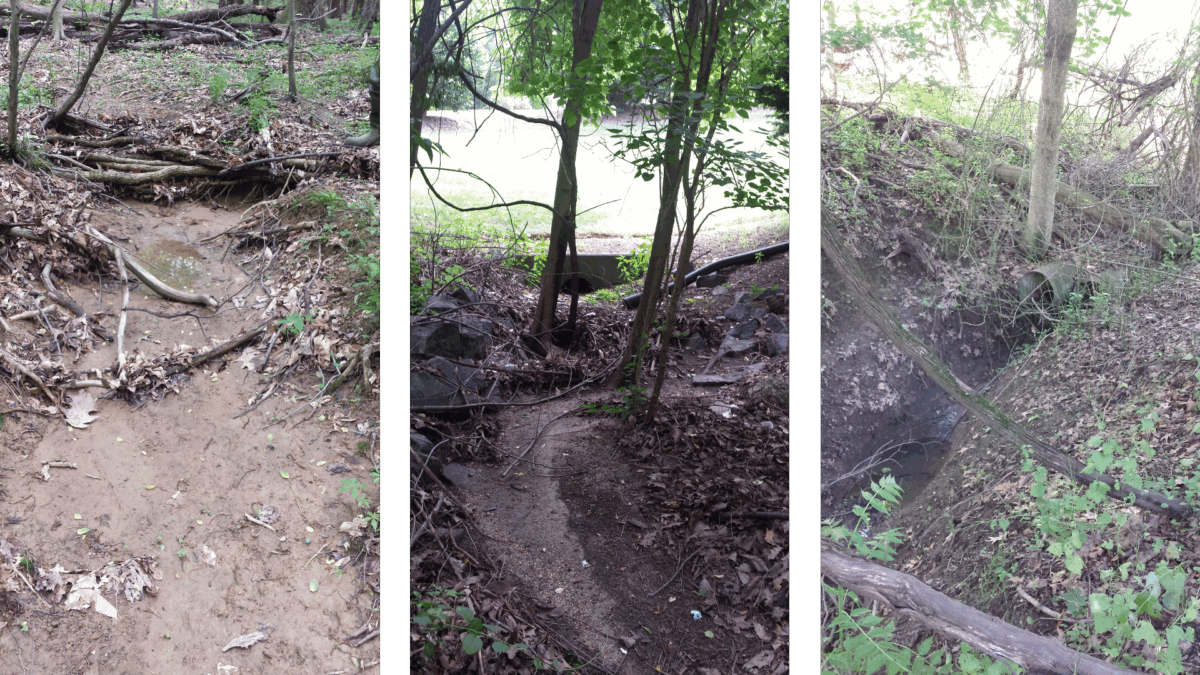
    <img width="1200" height="675" src="https://umbc.edu/wp-content/uploads/2025/05/image5-1200x675.png" alt="three vertical photos showing very shallow and narrow streams" style="max-width: 100%; height: auto;">These streams were all missed by the previous dataset, but the new method picked them up. (David Saavedra)<h4><strong>What to leave in, what to leave out?</strong></h4>
    <p>This project is the first to harness high-resolution LiDAR data and artificial intelligence for large-scale, automated stream mapping. LiDAR, a laser-based system deployed via aircraft, captured elevation data with centimeter-level accuracy, generating a three-dimensional portrait of the terrain. AI algorithms, leveraging resources at UMBC’s <a href="https://my3.my.umbc.edu/groups/umbc-news-magazine/posts/150827/2f8a9/7ca56ec293021e34c72f13e2ce48a96f/web/link?link=https%3A%2F%2Fhpcf.umbc.edu%2F" rel="nofollow external" class="bo">High-Performance Computing Facility</a> (HPCF), then processed the data, employing computer-vision techniques to identify channels. </p>
    <img width="739" height="1024" src="https://umbc.edu/wp-content/uploads/2025/05/saavedra-739x1024.jpeg" alt="portrait of man" style="max-width: 100%; height: auto;">David Saavedra played a key role in validating the new dataset at the Chesapeake Conservancy. (Courtesy of Saavedra)<p>The HPCF computers mapped the entire watershed in a mere two weeks—a feat that traditional methods might take years to accomplish. The results achieved 94 percent accuracy for streams represented in existing data, and between 67 and 82 percent accuracy for previously unmapped streams, as validated by Saavedra against two other datasets, aerial imagery and LiDAR-derived topographic maps.</p>
    <p>“I led a painstaking process of manually evaluating over 7,000 stream reaches across the watershed to conduct a thorough accuracy assessment on this novel dataset,” Saavedra says. Now that the methodology has been demonstrated effective, that level of manual validation shouldn’t be necessary if the technique is applied elsewhere.  </p>
    <p>The algorithm needed some tweaks along the way, however. Initially, it included channel-shaped features that made less sense to include on a stream map, like detention ponds, green swales, gutters, and crop furrows. That necessitated modifications to the algorithm to remove those features.  </p>
    <p>“Part of the challenge in interpreting the terrain was to make distinctions between those features and more natural channels,” Baker says. “So in our model, we had to eliminate some features that were mapped initially. That was unexpected.”</p>
    <h4><strong>Eye-opening opportunities</strong></h4>
    <img width="320" height="320" src="https://umbc.edu/wp-content/uploads/2025/05/labeeb-ahmed.jpg" alt="portrait of man" style="max-width: 100%; height: auto;">Labeeb Ahmed is excited about the research possibilities the new dataset presents. (Courtesy of Ahmed)<p>The resulting maps offer a tenfold boost in resolution, moving from a 1:24,000 map scale to a 1:2,400 map scale with each pixel representing one square meter. The new stream maps align with recently-developed land cover maps produced at the same resolution, which are being released at the same time. </p>
    <p>“I think when people begin using our hyper-resolution hydrography in conjunction with the one-meter land use data, it will be eye-opening to see just how connected the landscape is to our waterways,” Saavedra says. “There are so many opportunities to improve our region’s water quality, many of which may not have been readily apparent with previous data.” </p>
    <p><strong>Labeeb Ahmed </strong>’15, environmental science, has been involved in managing the data release through his role as a geographer in the Chesapeake Bay Program at the EPA. </p>
    <p>“The lack of consistent high-resolution hydrography data has always been a challenge, as it is critical for numerous outcomes outlined in the Chesapeake Bay Watershed Agreement, such as mapping forest buffers, non-tidal wetlands, species habitats for brook trout and black duck, and defining stream health,” he says. “This data release will enable novel and interesting research and scientific inquiries. I’m excited to see how other researchers and stakeholders will use this data in their conservation and restoration efforts.”</p>
    <img width="1116" height="726" src="https://umbc.edu/wp-content/uploads/2025/05/image3.png" alt='topo map, gray background, few windy blue lines topped by a single red line that appears like a "trend line" over all of the twists and turns' style="max-width: 100%; height: auto;">The new stream maps (blue) not only show more streams than the old maps (red), but trace their paths in more detail. (Courtesy of Matthew Baker)</div></div>
    </div></div>
    </div>
]]>
</Body>
<Summary>Cross posted from UMBC News &amp; Magazine:     New AI-supported, high-resolution Chesapeake Bay Watershed stream maps reveal additional waterways and will help prioritize restoration projects ...</Summary>
<Website>https://umbc.edu/stories/high-resolution-stream-maps/</Website>
<TrackingUrl>https://my3.my.umbc.edu/api/v0/pixel/news/150973/guest@my.umbc.edu/92e0903f9150fec9dd88357a111696cf/api/pixel</TrackingUrl>
<Tag>hcp</Tag>
<Tag>project</Tag>
<Tag>success</Tag>
<Group token="doit">Division of Information Technology (DoIT)</Group>
<GroupUrl>https://my3.my.umbc.edu/groups/doit</GroupUrl>
<AvatarUrl>https://assets2-my.umbc.edu/system/shared/avatars/groups/000/000/021/d27760c5de12c74b73faec8d0e631acf/xsmall.png?1727453227</AvatarUrl>
<AvatarUrl size="original">https://assets2-my.umbc.edu/system/shared/avatars/groups/000/000/021/d27760c5de12c74b73faec8d0e631acf/original.JPG?1727453227</AvatarUrl>
<AvatarUrl size="xxlarge">https://assets1-my.umbc.edu/system/shared/avatars/groups/000/000/021/d27760c5de12c74b73faec8d0e631acf/xxlarge.png?1727453227</AvatarUrl>
<AvatarUrl size="xlarge">https://assets3-my.umbc.edu/system/shared/avatars/groups/000/000/021/d27760c5de12c74b73faec8d0e631acf/xlarge.png?1727453227</AvatarUrl>
<AvatarUrl size="large">https://assets2-my.umbc.edu/system/shared/avatars/groups/000/000/021/d27760c5de12c74b73faec8d0e631acf/large.png?1727453227</AvatarUrl>
<AvatarUrl size="medium">https://assets2-my.umbc.edu/system/shared/avatars/groups/000/000/021/d27760c5de12c74b73faec8d0e631acf/medium.png?1727453227</AvatarUrl>
<AvatarUrl size="small">https://assets2-my.umbc.edu/system/shared/avatars/groups/000/000/021/d27760c5de12c74b73faec8d0e631acf/small.png?1727453227</AvatarUrl>
<AvatarUrl size="xsmall">https://assets2-my.umbc.edu/system/shared/avatars/groups/000/000/021/d27760c5de12c74b73faec8d0e631acf/xsmall.png?1727453227</AvatarUrl>
<AvatarUrl size="xxsmall">https://assets4-my.umbc.edu/system/shared/avatars/groups/000/000/021/d27760c5de12c74b73faec8d0e631acf/xxsmall.png?1727453227</AvatarUrl>
<Sponsor>Division of Information Technology (DoIT)</Sponsor>
<PawCount>0</PawCount>
<CommentCount>0</CommentCount>
<CommentsAllowed>true</CommentsAllowed>
<PostedAt>Wed, 09 Jul 2025 14:28:44 -0400</PostedAt>
<EditAt>Thu, 07 Aug 2025 11:33:39 -0400</EditAt>
</NewsItem>

<NewsItem contentIssues="false" id="150497" important="false" status="posted" url="https://my3.my.umbc.edu/groups/gsa/posts/150497">
<Title>SAP Concur Travel System &#8211; Entering the Next Phase</Title>
<Body>
<![CDATA[
    <div class="html-content">DoIT has been working closely with Administration &amp; Finance on the SAP Concur Travel System Implementation! We are excited to begin testing and change management planning. Please see the below message from <a href="https://my3.my.umbc.edu/groups/travel/posts/150432" rel="nofollow external" class="bo">UMBC Travel</a>: <div><br></div>
    <div>
    <p><span>Dear UMBC Community,</span></p>
    <p><span>We’re excited to share that the SAP Concur Travel Implementation Project is entering its next major phase: </span>testing and change management planning<span>.</span></p>
    <p><span>As we move forward, we want to ensure that this transition is not just about technology—but about people. Our goal is to make this change as smooth, transparent, and beneficial as possible for the entire campus community.</span></p>
    <h3><span>What to Look Forward To</span></h3>
    <p><span>With SAP Concur, UMBC will benefit from:</span></p>
    <ul>
    <li><p><span>Streamlined travel booking and expense reporting</span></p></li>
    <li><p><span>Mobile access</span><span> for submitting receipts and managing trips on the go</span></p></li>
    <li><p><span>Improved compliance</span><span> with travel policies and federal regulations</span></p></li>
    <li><p><span>Integrated international travel support</span><span> through Terra Dotta and CISI</span></p></li>
    <li><p><span>Better visibility</span><span> into travel spending and analytics</span></p></li>
    </ul>
    <h3><span>What Our Change Management Efforts Will Include</span></h3>
    <p><span>To support this transition, we are launching a comprehensive change management strategy that includes:</span></p>
    <ul>
    <li><p><span>Stakeholder engagement</span><span>: Identifying and involving key groups early to ensure their needs are heard and addressed</span></p></li>
    <li><p><span>Targeted communications</span><span>: Sharing timely, relevant updates tailored to different audiences</span></p></li>
    <li><p><span>Training and support</span><span>: Offering hands-on sessions, resources, and help channels to guide users through the new system</span></p></li>
    <li><p><span>Feedback loops</span><span>: Creating opportunities for you to share your experience and help shape the rollout</span></p></li>
    </ul>
    <p><span>We’ll continue to keep you informed as we progress. In the meantime, thank you for your engagement and support as we work together to modernize UMBC’s travel experience.</span></p>
    </div>
    <div><span><br></span></div>
    </div>
]]>
</Body>
<Summary>DoIT has been working closely with Administration &amp; Finance on the SAP Concur Travel System Implementation! We are excited to begin testing and change management planning. Please see the below...</Summary>
<Website>https://my3.my.umbc.edu/groups/travel/posts/150432</Website>
<TrackingUrl>https://my3.my.umbc.edu/api/v0/pixel/news/150497/guest@my.umbc.edu/ae7b6bfe8d8b01360735f1a1484f097a/api/pixel</TrackingUrl>
<Tag>bsg</Tag>
<Tag>concur</Tag>
<Tag>project</Tag>
<Tag>sap</Tag>
<Tag>travel</Tag>
<Group token="doit">Division of Information Technology (DoIT)</Group>
<GroupUrl>https://my3.my.umbc.edu/groups/doit</GroupUrl>
<AvatarUrl>https://assets2-my.umbc.edu/system/shared/avatars/groups/000/000/021/d27760c5de12c74b73faec8d0e631acf/xsmall.png?1727453227</AvatarUrl>
<AvatarUrl size="original">https://assets2-my.umbc.edu/system/shared/avatars/groups/000/000/021/d27760c5de12c74b73faec8d0e631acf/original.JPG?1727453227</AvatarUrl>
<AvatarUrl size="xxlarge">https://assets1-my.umbc.edu/system/shared/avatars/groups/000/000/021/d27760c5de12c74b73faec8d0e631acf/xxlarge.png?1727453227</AvatarUrl>
<AvatarUrl size="xlarge">https://assets3-my.umbc.edu/system/shared/avatars/groups/000/000/021/d27760c5de12c74b73faec8d0e631acf/xlarge.png?1727453227</AvatarUrl>
<AvatarUrl size="large">https://assets2-my.umbc.edu/system/shared/avatars/groups/000/000/021/d27760c5de12c74b73faec8d0e631acf/large.png?1727453227</AvatarUrl>
<AvatarUrl size="medium">https://assets2-my.umbc.edu/system/shared/avatars/groups/000/000/021/d27760c5de12c74b73faec8d0e631acf/medium.png?1727453227</AvatarUrl>
<AvatarUrl size="small">https://assets2-my.umbc.edu/system/shared/avatars/groups/000/000/021/d27760c5de12c74b73faec8d0e631acf/small.png?1727453227</AvatarUrl>
<AvatarUrl size="xsmall">https://assets2-my.umbc.edu/system/shared/avatars/groups/000/000/021/d27760c5de12c74b73faec8d0e631acf/xsmall.png?1727453227</AvatarUrl>
<AvatarUrl size="xxsmall">https://assets4-my.umbc.edu/system/shared/avatars/groups/000/000/021/d27760c5de12c74b73faec8d0e631acf/xxsmall.png?1727453227</AvatarUrl>
<Sponsor>Division of Information Technology (DoIT)</Sponsor>
<PawCount>0</PawCount>
<CommentCount>0</CommentCount>
<CommentsAllowed>true</CommentsAllowed>
<PostedAt>Mon, 02 Jun 2025 09:07:09 -0400</PostedAt>
</NewsItem>

<NewsItem contentIssues="false" id="150415" important="false" status="posted" url="https://my3.my.umbc.edu/groups/gsa/posts/150415">
<Title>May Gritty Award Winners: The High Performance Computing Team!</Title>
<Tagline>Congratulations Greg, Roy and Andy!</Tagline>
<Body>
<![CDATA[
    <div class="html-content"><span><p><span>The HPC team, down two staff, performed a large upgrade of the High Performance Computing (HPC) environment. Over $1.7 million in new hardware was purchased, including new HPC CPU nodes, new GPU nodes, and over 2.5 Petabytes of storage. </span><span>The project has significantly enhanced UMBC’s capacity to support high-performance computing (HPC), providing a more secure and robust environment for interdisciplinary and inter-institutional collaborations.</span></p>
    <br><p><span><span><img src="https://lh7-rt.googleusercontent.com/docsz/AD_4nXdrSba1mjo6dH9eBcvDDb_C704BEHlsOASzsXm5ptZomkmQp6QJ_ME1wroQXz74VYWbxpmP4KejnKg1xtDDTTPk3EWmtsh3I_Z4fAG74gJ5KshhhSAVAt9LyLEokp2nxLf_y5naew?key=CadWFwv4HyJ6NaxYle7PRA" width="688" height="384" alt="The DoIT Gritty trophy is in front of Greg, Roy, and Andy, who are looking at the camera through computing equipment" style="max-width: 100%; height: auto;"></span></span></p>
    <h4><span>Outstanding Contributions</span></h4>
    <p><span>This project would not have been possible without the DoIT Research Computing and Unix teams! Thank you to the following folks for their contributions:</span></p>
    <br><p><span><strong>Roy Prouty</strong></span><span>, Assistant Director for Research Computing. Provided background support for all installation, configuration, and support tasks.</span></p>
    <br><p><span><strong>Greg Ballantine</strong></span><span>, Research Computing Systems Administrator. Greg was hired a few months into the project, but quickly got up-to-speed on HPC administration and development. Greg also took over the storage cluster deployment and has worked to integrate the storage cluster with the computing cluster.</span></p>
    <br><p><span><strong>Andy Leeds</strong></span><span>, Coordinator of Research Computing. Helped to layout the computing cluster internal networks and deploy the first layer of the storage cluster.</span></p>
    <br><p><span>A special, wonderful thank you to the <strong>DoIT Student Employees from the Unix Group</strong>, who did much of the heavy (server) lifting and spent many shifts learning the ins and outs of HPC system administration.</span></p>
    <p><span><span><img src="https://lh7-rt.googleusercontent.com/docsz/AD_4nXekismlvvP47CKMT4BzK8AIvVYTJ2kC-LBiuffIPTvIkVzI0orIgEhqfRGVNm0zUUfntBeE6XBvWMb-kvnksSwwb2S9LrNZWifzQdvFoy6TEUI8o-ZN_fLOMWegGyZCSFu3_IDH?key=CadWFwv4HyJ6NaxYle7PRA" width="325" height="435" alt="Unix Students, left to right: Danielle Esposito, Max Breitmeyer, Phil Henry, Beamlak Bekele" style="max-width: 100%; height: auto;"></span></span></p>
    <p><span>Unix Students, left to right: Danielle Esposito, Max Breitmeyer, Phil Henry, Beamlak Bekele</span></p>
    <br><p><span><strong>Danielle Esposito</strong></span><span>, Information Systems. DoIT Student Staff. Helped with physical and software installation and worked to establish baseline usage statistics.</span></p>
    <br><p><span><strong>Max Breitmeyer</strong></span><span>, Computer Science. DoIT GA. Helped with physical and software installation, worked to configure the computing cluster management systems, and developed tutorials and documentation for new users.</span></p>
    <br><p><span><strong>Phil Henry</strong></span><span>, Computer Science. DoIT Student Staff. Helped with physical installation and worked to field tickets relating to the new cluster.</span></p>
    <br><p><span><strong>Beamlak Bekele</strong></span><span>, Computer Science. DoIT Student Staff. Helped with physical and software installation as well as serving as the lead user support student staff member.</span></p>
    <br><br><br><p><span><span><img src="https://lh7-rt.googleusercontent.com/docsz/AD_4nXc4dt_kxRVBa0RB46pVlwDOl21fQFG0huK9IG-ar-nDVcUVVxsii2XW5mc2u_QjuZkuX9UvsmhDKlSoVYog5ABo-whxs2USnBXK5_LQZlwZF71_6gsRT53dzi9offozmijJyz5_Ow?key=CadWFwv4HyJ6NaxYle7PRA" width="325" height="435" alt="New CPU nodes in the bwtech Research Park Data Center." style="max-width: 100%; height: auto;"></span></span><span><span><img src="https://lh7-rt.googleusercontent.com/docsz/AD_4nXe6gGpY1ppHIlz-xsVMpt4no3GdOg7wiThYc7iuFraZYCeuoFwR_f5sFQS3UFvZ35O2iuwBI1_KQIoiQAXYXRkKEijVMxvxVvAoBDbPcDFfw_-hCKwhJ3DhBHFcOU1oMYBquyDY5Q?key=CadWFwv4HyJ6NaxYle7PRA" width="321" height="429" alt="Installing 51 new CPU nodes in the bwtech Research Park Data Center." style="max-width: 100%; height: auto;"></span></span></p>
    <p><br></p>
    <h4><span>Deployment</span></h4>
    <p><span>DoIT’s Research Computing team has successfully deployed over 60 new CPU and GPU nodes, along with integrating the high-performance computing environment with the Retriever Research Storage system (RRStor). The infrastructure enhancements support research activities ranging from artificial intelligence development to atmospheric science analysis. </span></p>
    <p><span>This investment, totaling over $2 million, modernizes our research computing infrastructure by replacing aging hardware and introducing major updates to the management and security to the cluster. These updates will aid researchers in meeting security requirements in research grants and improve the capabilities and access to high-performance computing needs. </span></p>
    <h2><span><br></span></h2>
    <h4><span>Key Achievements</span></h4>
    <ul>
    <li><p><span>51 new CPU nodes on chip: 13 high-memory and 38 regular-memory nodes, providing a total of 3264 CPU cores and 32TB of RAM. </span></p></li>
    <li><p><span>12 new GPU nodes on chip: 10 LS40S nodes and two H100 nodes, adding 320 CPU cores and 44 GPU Cards.</span></p></li>
    <li><p><span>Retriever Research Storage System (RRStor): Added 2.5 PetaBytes of storage, leveraging the Ceph distributed file system to enhance data mobility for research workflows, as part of the </span><a href="https://doit.umbc.edu/about/pmo/post/143845/" rel="nofollow external" class="bo"><span>NSF Grant</span></a><span> awarded to DoIT last year.</span></p></li>
    <li><p><span>Modernized software environment: Transition to Red Hat Enterprise Linux 9 (RHEL9), improving system reliability, security, and compatibility with modern software stacks.</span></p></li>
    <li><p><span>Redundant head nodes: Implemented across clusters to eliminate single points of failure, ensuring a more reliable and secure system.</span></p></li>
    <li><p><span>First HPC Bootcamp: Delivered on November 12, 2024, as part of the NSF SCIPE grant, providing hands-on GPU training for over 20 participants from iHARP, IMET, and UMCES.</span></p></li>
    </ul>
    <p><span>The project has significantly enhanced UMBC’s capacity to support high-performance computing (HPC), providing a more secure and robust environment for interdisciplinary and inter-institutional collaborations.</span></p>
    <p><br></p>
    <br><h4><span>Future Plans</span></h4>
    <ul>
    <li><p><span>The DoIT Research Computing team will continue to monitor and support the new systems post-deployment.</span></p></li>
    <li><p><span>Address optimization needs as researchers test and rebuild software stacks for the new hardware environment.</span></p></li>
    <li><p><span>Expand programming opportunities with additional HPC Bootcamps to train new and experienced users in maximizing the HPC environment.</span></p></li>
    </ul>
    <br><br><p><span>A special thanks to </span><span><strong>Vandana Janeja</strong></span><span><strong>,</strong> iHARP Project Lead, and </span><span><strong>Sai Vikas </strong></span><span><strong>Amaraneni</strong></span><span>, iHARP Graduate Student, for their support throughout the process. </span><span>UMBC Faculty Contributors have played a significant role in the initial specifications, testing, and providing insight along the way, as did the </span><span><strong>NSF SCIPE Grant Team</strong></span><span> and the entire </span><span><strong>UMBC Research Community</strong></span><span>, including </span><span><strong>iHARP</strong></span><span>, </span><span><strong>IMET</strong></span><span>, and</span><span><strong>UMCES</strong></span><span>.</span></p>
    <p><span>We would like to extend our gratitude to everyone who contributed to this project's success!</span></p>
    <br><p><span>For all of your exceptional efforts and commitment to excellence, we are proud to present you all with the May DoIT Gritty Award. Congratulations! </span></p>
    <p><span>Thank you, </span><span><strong>Roy, Greg, and Andy</strong></span><span>,</span><span> for your dedication to research computing!</span></p>
    <p><br></p>
    <p><span><strong>The DoIT Community &amp; The DoIT Gritty Committee</strong></span></p>
    <p><br></p>
    <p><span>Erica D’Eramo</span></p>
    <p><span>Ally Hepp</span></p>
    <p><span>Carlos McKinney</span></p>
    <p><span>David Toothe</span></p>
    <p><span>Dondre Hatef</span></p>
    <p><span>Kashka Donaldson</span></p>
    <p><span>Mariann Hawken </span></p>
    <p><span>Nick Beech</span></p>
    <p><span>Tony Finneran</span></p>
    <p><span>Roy Prouty (recused himself from the meeting and voting) </span></p>
    <br><br></span></div>
]]>
</Body>
<Summary>The HPC team, down two staff, performed a large upgrade of the High Performance Computing (HPC) environment. Over $1.7 million in new hardware was purchased, including new HPC CPU nodes, new GPU...</Summary>
<TrackingUrl>https://my3.my.umbc.edu/api/v0/pixel/news/150415/guest@my.umbc.edu/50eb0083db5719f4340c8dc1bdcaf9a2/api/pixel</TrackingUrl>
<Tag>cpu</Tag>
<Tag>gpu</Tag>
<Tag>hpc</Tag>
<Tag>project</Tag>
<Tag>r-rstor</Tag>
<Tag>research</Tag>
<Tag>success</Tag>
<Group token="doit">Division of Information Technology (DoIT)</Group>
<GroupUrl>https://my3.my.umbc.edu/groups/doit</GroupUrl>
<AvatarUrl>https://assets2-my.umbc.edu/system/shared/avatars/groups/000/000/021/d27760c5de12c74b73faec8d0e631acf/xsmall.png?1727453227</AvatarUrl>
<AvatarUrl size="original">https://assets2-my.umbc.edu/system/shared/avatars/groups/000/000/021/d27760c5de12c74b73faec8d0e631acf/original.JPG?1727453227</AvatarUrl>
<AvatarUrl size="xxlarge">https://assets1-my.umbc.edu/system/shared/avatars/groups/000/000/021/d27760c5de12c74b73faec8d0e631acf/xxlarge.png?1727453227</AvatarUrl>
<AvatarUrl size="xlarge">https://assets3-my.umbc.edu/system/shared/avatars/groups/000/000/021/d27760c5de12c74b73faec8d0e631acf/xlarge.png?1727453227</AvatarUrl>
<AvatarUrl size="large">https://assets2-my.umbc.edu/system/shared/avatars/groups/000/000/021/d27760c5de12c74b73faec8d0e631acf/large.png?1727453227</AvatarUrl>
<AvatarUrl size="medium">https://assets2-my.umbc.edu/system/shared/avatars/groups/000/000/021/d27760c5de12c74b73faec8d0e631acf/medium.png?1727453227</AvatarUrl>
<AvatarUrl size="small">https://assets2-my.umbc.edu/system/shared/avatars/groups/000/000/021/d27760c5de12c74b73faec8d0e631acf/small.png?1727453227</AvatarUrl>
<AvatarUrl size="xsmall">https://assets2-my.umbc.edu/system/shared/avatars/groups/000/000/021/d27760c5de12c74b73faec8d0e631acf/xsmall.png?1727453227</AvatarUrl>
<AvatarUrl size="xxsmall">https://assets4-my.umbc.edu/system/shared/avatars/groups/000/000/021/d27760c5de12c74b73faec8d0e631acf/xxsmall.png?1727453227</AvatarUrl>
<Sponsor>Division of Information Technology (DoIT)</Sponsor>
<ThumbnailUrl size="xxlarge">https://assets3-my.umbc.edu/system/shared/thumbnails/news/000/150/415/800661e50a0ada7d844f97612be4c82c/xxlarge.jpg?1748357864</ThumbnailUrl>
<ThumbnailUrl size="xlarge">https://assets3-my.umbc.edu/system/shared/thumbnails/news/000/150/415/800661e50a0ada7d844f97612be4c82c/xlarge.jpg?1748357864</ThumbnailUrl>
<ThumbnailUrl size="large">https://assets3-my.umbc.edu/system/shared/thumbnails/news/000/150/415/800661e50a0ada7d844f97612be4c82c/large.jpg?1748357864</ThumbnailUrl>
<ThumbnailUrl size="medium">https://assets1-my.umbc.edu/system/shared/thumbnails/news/000/150/415/800661e50a0ada7d844f97612be4c82c/medium.jpg?1748357864</ThumbnailUrl>
<ThumbnailUrl size="small">https://assets3-my.umbc.edu/system/shared/thumbnails/news/000/150/415/800661e50a0ada7d844f97612be4c82c/small.jpg?1748357864</ThumbnailUrl>
<ThumbnailUrl size="xsmall">https://assets1-my.umbc.edu/system/shared/thumbnails/news/000/150/415/800661e50a0ada7d844f97612be4c82c/xsmall.jpg?1748357864</ThumbnailUrl>
<ThumbnailUrl size="xxsmall">https://assets3-my.umbc.edu/system/shared/thumbnails/news/000/150/415/800661e50a0ada7d844f97612be4c82c/xxsmall.jpg?1748357864</ThumbnailUrl>
<ThumbnailAltText>DoIT Gritty Trophy Award</ThumbnailAltText>
<PawCount>4</PawCount>
<CommentCount>0</CommentCount>
<CommentsAllowed>true</CommentsAllowed>
<PostedAt>Tue, 27 May 2025 10:58:13 -0400</PostedAt>
<EditAt>Tue, 27 May 2025 11:25:44 -0400</EditAt>
</NewsItem>

</News>