62% of Fall 2023 Blackboard Courses Now Using Ultra
9 of 10 UMBC students are enrolled in an Ultra course
As UMBC finalizes its migration to Ultra, more faculty opted to use the new course experience during FA2023. Specifically, of 1588 total available Blackboard shells, faculty have enabled 991 using Ultra, or ~62%, -- a ten point jump from last year. Although a broad spectrum of disciplines including seven departments and eight languages opted to use Ultra by default, more than half of active Ultra courses were converted from Original to the new format by faculty this semester.
Since instructors must choose to make a course available to students every semester, FA2023 also represents a notable increase in faculty use of Ultra courses at a much higher rate than their use of Original courses -- 89% of Ultra courses are available to students compared to 51% of Original courses. Additionally, Ultra adoption rose in STEM disciplines during FA2023. The College of Natural and Mathematical Sciences saw a 139% increase in Ultra courses from last fall while the College of Engineering and Information Technology increased by 55%.

Image 1: Comparison of active Original and Ultra courses over time (click to enlarge). For more information about Ultra adoption and course usage, please visit our Ultra course tracker.
With more than 200 enhancements and new features in the last year, Ultra courses offer more than 95% feature parity with Original including extensive updates to grading and assessment, content management, and course design functionality. Improvements to the gradebook, question banks, and groups management are key functional areas raised by UMBC faculty and addressed by Anthology. Ultra also provides exclusive progress tracking reports for learner engagement and new AI Course Design Assistant tools.
Next Steps for Ultra at UMBC
The growth in Ultra course creation and faculty adoption fulfills a longstanding promise to the UMBC community to provide a consistent learning experience for students and support Blackboard innovation, beginning in SP2018 when four faculty piloted Ultra. Since that initial exploration, Ultra adoption grew slowly and steadily as faculty opted in to the new version of Blackboard when they felt ready. The pandemic also provided many faculty with an opportunity to try Ultra and move their courses.
We are committed to ensuring a smooth transition for all departments and faculties.
Following this semester, two full terms remain (SP2024 and FA2024) before we finalize the Ultra migration at UMBC. All courses for CAHSS will be automatically created in Ultra for FA2024 and the entire campus will be on Ultra by WT/SP2025.
For departments or disciplines that want to adopt Ultra by default, Blackboard course shells can be designated as Ultra when courses are created. Please open an RT ticket to coordinate your request with Instructional Technology by November 1, 2023 for WT/SP2024 courses and by June 1, 2024 for SU/FA2024 courses.
In mid October, faculty who have not yet migrated to Ultra will automatically receive a development shell with a copy of their FA2023 course that is converted to Ultra. This copy will not have any student enrollments and will not impact the current term. Faculty are encouraged to review the copy and modify the course. If the course conversion is not the best path to Ultra, there are ample Blackboard resources at umbc.edu/go/ultra as well as Instructional Technology support over the next 15 months to build a new course.
Instructional Technology will also work with departments to customize Ultra workshops and provide dedicated support sessions according to faculty schedules or specific use cases for teaching with Ultra. Please open an RT ticket to schedule a training session or request a consultation appointment.
The campus community continues to play a vital role in championing change throughout our Ultra migration. Faculty and student feedback helps shape the ongoing development of Ultra and contributes to the dynamic platform students experience during their education at UMBC.
Connect with Instructional Technology
As always, if you have any questions about teaching, learning, and technology at UMBC, please consider the following options:
---
UMBC is committed to providing a consistent learning experience for everyone. The last day we will support Blackboard Original is December 31, 2024. Please check out our training and support: umbc.edu/go/ultra
]]>
As UMBC finalizes its migration to Ultra, more faculty opted to use the new course experience during FA2023. Specifically, of 1588 total available Blackboard shells, faculty have enabled 991 using...
https://my3.my.umbc.edu/groups/instructional-technology/posts/135615
Image
https://assets4-my.umbc.edu/system/shared/attachments/0cc9912b7abfa31de3693825f4bde3f3/6a92feec/news/000/135/615/937ae010840679f1d5b1d822452389bd/ActiveUltraOriginalCourses.png?1695235107
https://my3.my.umbc.edu/api/v0/pixel/news/135615/guest@my.umbc.edu/e8ddd57cdd491268e220e8aa6ac0e6a5/api/pixel
blackboard
hawken
training
ultra-experience
ultra-migration
ultra-update
Instructional Technology
https://my3.my.umbc.edu/groups/instructional-technology
https://assets2-my.umbc.edu/system/shared/avatars/groups/000/001/164/dec3b026b81ee6d890a8f82f75c94a2e/xsmall.png?1446126703
https://assets1-my.umbc.edu/system/shared/avatars/groups/000/001/164/dec3b026b81ee6d890a8f82f75c94a2e/original.png?1446126703
https://assets2-my.umbc.edu/system/shared/avatars/groups/000/001/164/dec3b026b81ee6d890a8f82f75c94a2e/xxlarge.png?1446126703
https://assets1-my.umbc.edu/system/shared/avatars/groups/000/001/164/dec3b026b81ee6d890a8f82f75c94a2e/xlarge.png?1446126703
https://assets1-my.umbc.edu/system/shared/avatars/groups/000/001/164/dec3b026b81ee6d890a8f82f75c94a2e/large.png?1446126703
https://assets4-my.umbc.edu/system/shared/avatars/groups/000/001/164/dec3b026b81ee6d890a8f82f75c94a2e/medium.png?1446126703
https://assets3-my.umbc.edu/system/shared/avatars/groups/000/001/164/dec3b026b81ee6d890a8f82f75c94a2e/small.png?1446126703
https://assets2-my.umbc.edu/system/shared/avatars/groups/000/001/164/dec3b026b81ee6d890a8f82f75c94a2e/xsmall.png?1446126703
https://assets3-my.umbc.edu/system/shared/avatars/groups/000/001/164/dec3b026b81ee6d890a8f82f75c94a2e/xxsmall.png?1446126703
Instructional Technology
https://assets4-my.umbc.edu/system/shared/thumbnails/news/000/135/615/9ee02f2a02b6a7aff178c032aca4542d/xxlarge.jpg?1695234988
https://assets2-my.umbc.edu/system/shared/thumbnails/news/000/135/615/9ee02f2a02b6a7aff178c032aca4542d/xlarge.jpg?1695234988
https://assets3-my.umbc.edu/system/shared/thumbnails/news/000/135/615/9ee02f2a02b6a7aff178c032aca4542d/large.jpg?1695234988
https://assets4-my.umbc.edu/system/shared/thumbnails/news/000/135/615/9ee02f2a02b6a7aff178c032aca4542d/medium.jpg?1695234988
https://assets4-my.umbc.edu/system/shared/thumbnails/news/000/135/615/9ee02f2a02b6a7aff178c032aca4542d/small.jpg?1695234988
https://assets3-my.umbc.edu/system/shared/thumbnails/news/000/135/615/9ee02f2a02b6a7aff178c032aca4542d/xsmall.jpg?1695234988
https://assets4-my.umbc.edu/system/shared/thumbnails/news/000/135/615/9ee02f2a02b6a7aff178c032aca4542d/xxsmall.jpg?1695234988
5
0
true
Wed, 20 Sep 2023 14:55:45 -0400
Tue, 13 Feb 2024 08:17:47 -0500
DoIT's Tom Penniston Presents Paper at Copenhagen Conference
Sharing UMBC's Story Globally
DoIT's Coordinator of Learning Analytics, Tom Penniston, recently presented his paper (UMBC login req'd), Toward a New Paradigm: Learning Analytics 2.0, at the 25th International Conference on Human-Computer Interaction, HCI International 2023, in Copenhagen, Denmark. The conference focused on adapting design to meet the needs of our evolving world, from the rise of deep fakes and battling the spread of extremist propaganda, to the legal and social implications of large language model AI, to supporting the needs of the neuro- and ability- diverse populations we serve.
Penniston's paper analyzed ongoing UMBC efforts to leverage predictive machine learning models to inform empathetic behavioral nudges to support student success. He argues that through intentional, rigorous course design we can align intervention strategies with direct measures of learning at scale and thereby best support our students' individualized needs, while simultaneously improving institutional measures of success, such as reduced DFW and 6-year graduation rates.
Attending the conference was a great professional opportunity for Penniston, who was able to represent his department and the university, learn more from experts within the community, and network with peers. "It's really amazing and humbling to be surrounded at work by folks who encourage and support me to pursue these kinds of opportunities!" said Penniston.
]]>
DoIT's Coordinator of Learning Analytics, Tom Penniston, recently presented his paper (UMBC login req'd), Toward a New Paradigm: Learning Analytics 2.0, at the 25th International Conference on...
https://my3.my.umbc.edu/api/v0/pixel/news/135474/guest@my.umbc.edu/cf99af6cfd2371ef79442f0996e0b334/api/pixel
ai
analytics
penniston
Instructional Technology
https://my3.my.umbc.edu/groups/instructional-technology
https://assets2-my.umbc.edu/system/shared/avatars/groups/000/001/164/dec3b026b81ee6d890a8f82f75c94a2e/xsmall.png?1446126703
https://assets1-my.umbc.edu/system/shared/avatars/groups/000/001/164/dec3b026b81ee6d890a8f82f75c94a2e/original.png?1446126703
https://assets2-my.umbc.edu/system/shared/avatars/groups/000/001/164/dec3b026b81ee6d890a8f82f75c94a2e/xxlarge.png?1446126703
https://assets1-my.umbc.edu/system/shared/avatars/groups/000/001/164/dec3b026b81ee6d890a8f82f75c94a2e/xlarge.png?1446126703
https://assets1-my.umbc.edu/system/shared/avatars/groups/000/001/164/dec3b026b81ee6d890a8f82f75c94a2e/large.png?1446126703
https://assets4-my.umbc.edu/system/shared/avatars/groups/000/001/164/dec3b026b81ee6d890a8f82f75c94a2e/medium.png?1446126703
https://assets3-my.umbc.edu/system/shared/avatars/groups/000/001/164/dec3b026b81ee6d890a8f82f75c94a2e/small.png?1446126703
https://assets2-my.umbc.edu/system/shared/avatars/groups/000/001/164/dec3b026b81ee6d890a8f82f75c94a2e/xsmall.png?1446126703
https://assets3-my.umbc.edu/system/shared/avatars/groups/000/001/164/dec3b026b81ee6d890a8f82f75c94a2e/xxsmall.png?1446126703
Instructional Technology
https://assets1-my.umbc.edu/system/shared/thumbnails/news/000/135/474/33d0329f8ef81889ec0f0bc6c3f6d4e9/xxlarge.jpg?1694780681
https://assets4-my.umbc.edu/system/shared/thumbnails/news/000/135/474/33d0329f8ef81889ec0f0bc6c3f6d4e9/xlarge.jpg?1694780681
https://assets1-my.umbc.edu/system/shared/thumbnails/news/000/135/474/33d0329f8ef81889ec0f0bc6c3f6d4e9/large.jpg?1694780681
https://assets2-my.umbc.edu/system/shared/thumbnails/news/000/135/474/33d0329f8ef81889ec0f0bc6c3f6d4e9/medium.jpg?1694780681
https://assets2-my.umbc.edu/system/shared/thumbnails/news/000/135/474/33d0329f8ef81889ec0f0bc6c3f6d4e9/small.jpg?1694780681
https://assets3-my.umbc.edu/system/shared/thumbnails/news/000/135/474/33d0329f8ef81889ec0f0bc6c3f6d4e9/xsmall.jpg?1694780681
https://assets2-my.umbc.edu/system/shared/thumbnails/news/000/135/474/33d0329f8ef81889ec0f0bc6c3f6d4e9/xxsmall.jpg?1694780681
19
0
true
Fri, 15 Sep 2023 08:27:31 -0400
Call for Proposals: Blackboard's Digital Teaching Symposium
Submissions due September 18, 2023
Do you have a digital teaching best practice or experience to share with other educators? What strategies help educators excel and thrive in a shifting higher education landscape? Share your experiences with faculty, lecturers, academic technologists, and instructional designers at the Fall 2023 Digital Teaching Symposium, a fully-online, one-day conference, scheduled for Thursday, November 2, 2023.
Examples of topics include:
Innovations in Teaching and Learning
- Low-cost (or free) apps/platforms to enhance teaching
- New teaching tools
- Safeguarding against plagiarism & academic misconduct
- Simple technology for late adopters of technology in the classroom
Digital Teaching Strategies
- Accessibility
- Alternative assignments and assessments
- Competency-based education
- Data & analytics
- Discipline-specific strategies (science, math, psychology, business)
- Diversity, equity, inclusion & belonging
- Evaluation & feedback
- Faculty training & engagement
- Hybrid/blended learning
- Pedagogy Online student engagement
Teaching in Ultra
- Assignments, alternative assessments, course design
- Built-in tools such as journals, quizzes, discussions, etc.
- How to organize information on Learn Ultra
- Transitioning to Learn Ultra
- Using templates in Learn Ultra
As the fall semester starts, the next update for Ultra courses brings improvements to the course management tools and a new stock image resource for course banners. Additionally, faculty will also have access to a new grading interface and we begin exploring an exciting suite of course design assistant tools powered by AI.
Course Management
- Search Unsplash, the largest stock image database for royalty-free images to use for your course banner.
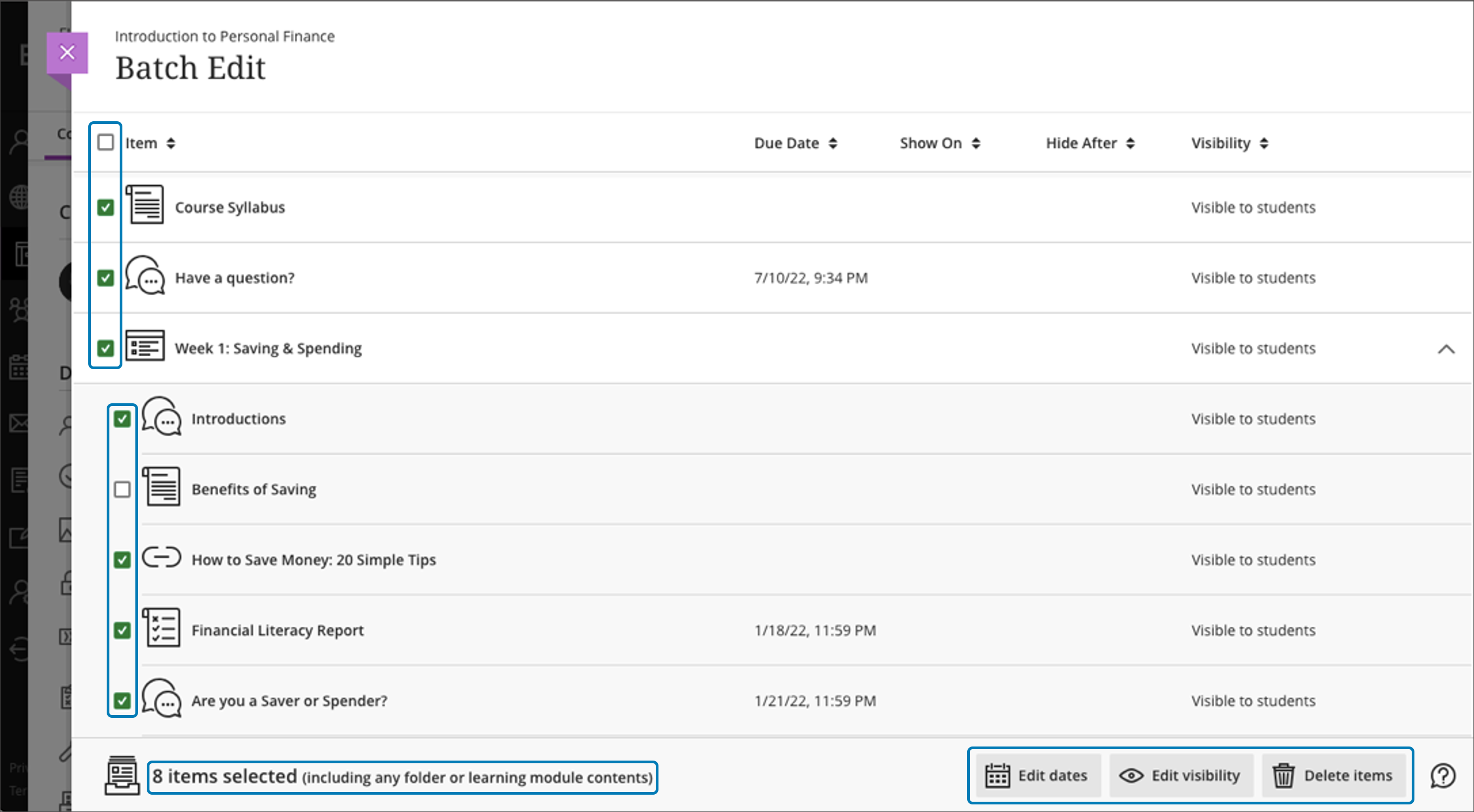
- Batch Edit availability and due dates for content in your course by expanding folders and learning modules on a single page.
Image 1: In the new Batch Edit, all items are now visible on a single page and you can expand and collapse Folders and Learning Modules.
- Copy one, some or all course announcements between Ultra courses, or from Original courses to Ultra.
- Verify student engagement with third-party tools using Progress Tracking. When students complete content in a third-party tool, it will be marked complete.
AI Course Design Assistant Tools
-
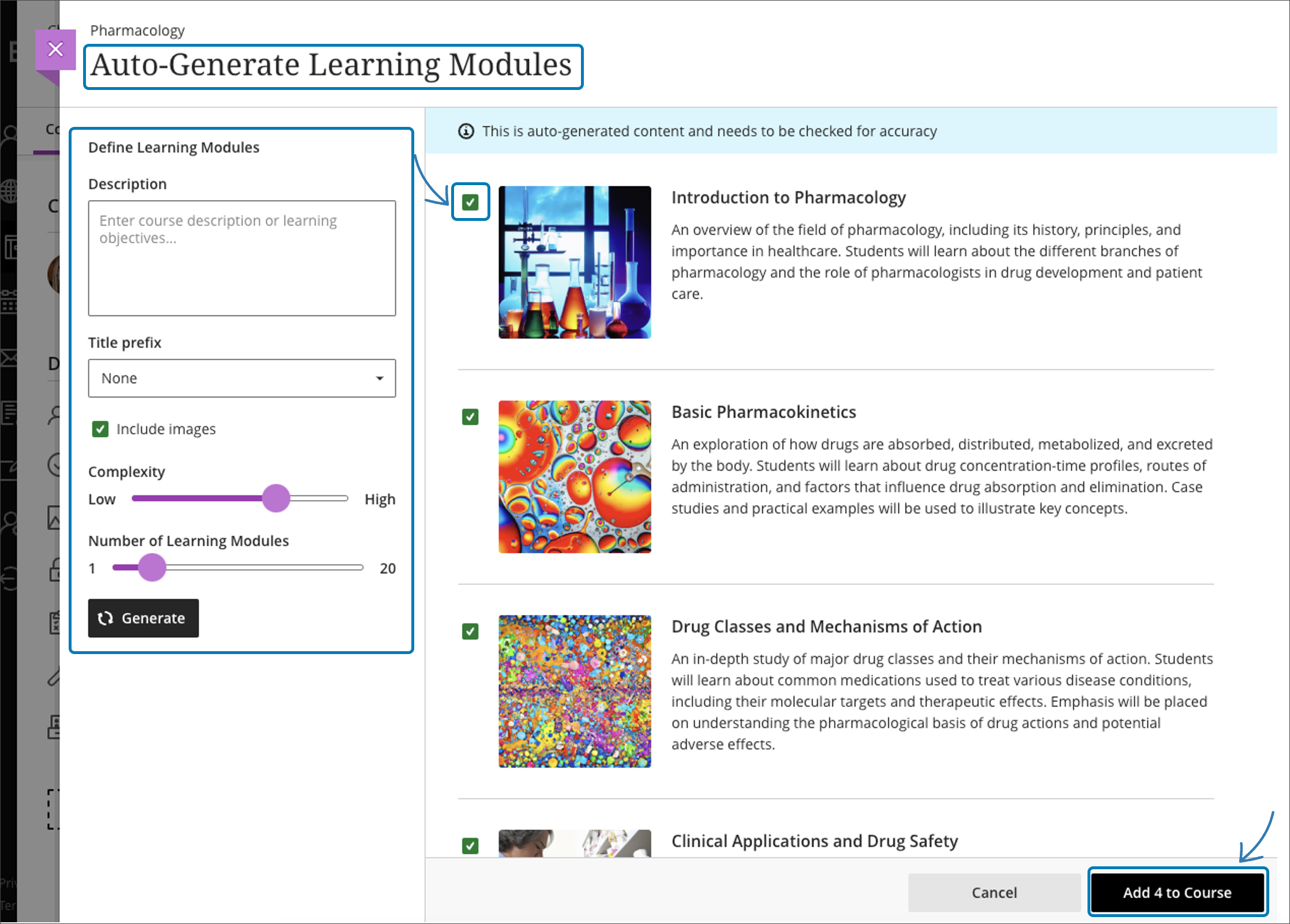
A course-builder assistant. Create sample learning modules, titles, and descriptions.
Image 2: Example of AI-suggested course structure
-
Image suggestion and creation. The assistant can draw from the Unsplash stock image library and suggest thumbnails for illustration in learning modules or identify an image for the course banner. Functionality also includes AI-generated image creation based on course name and keywords.
-
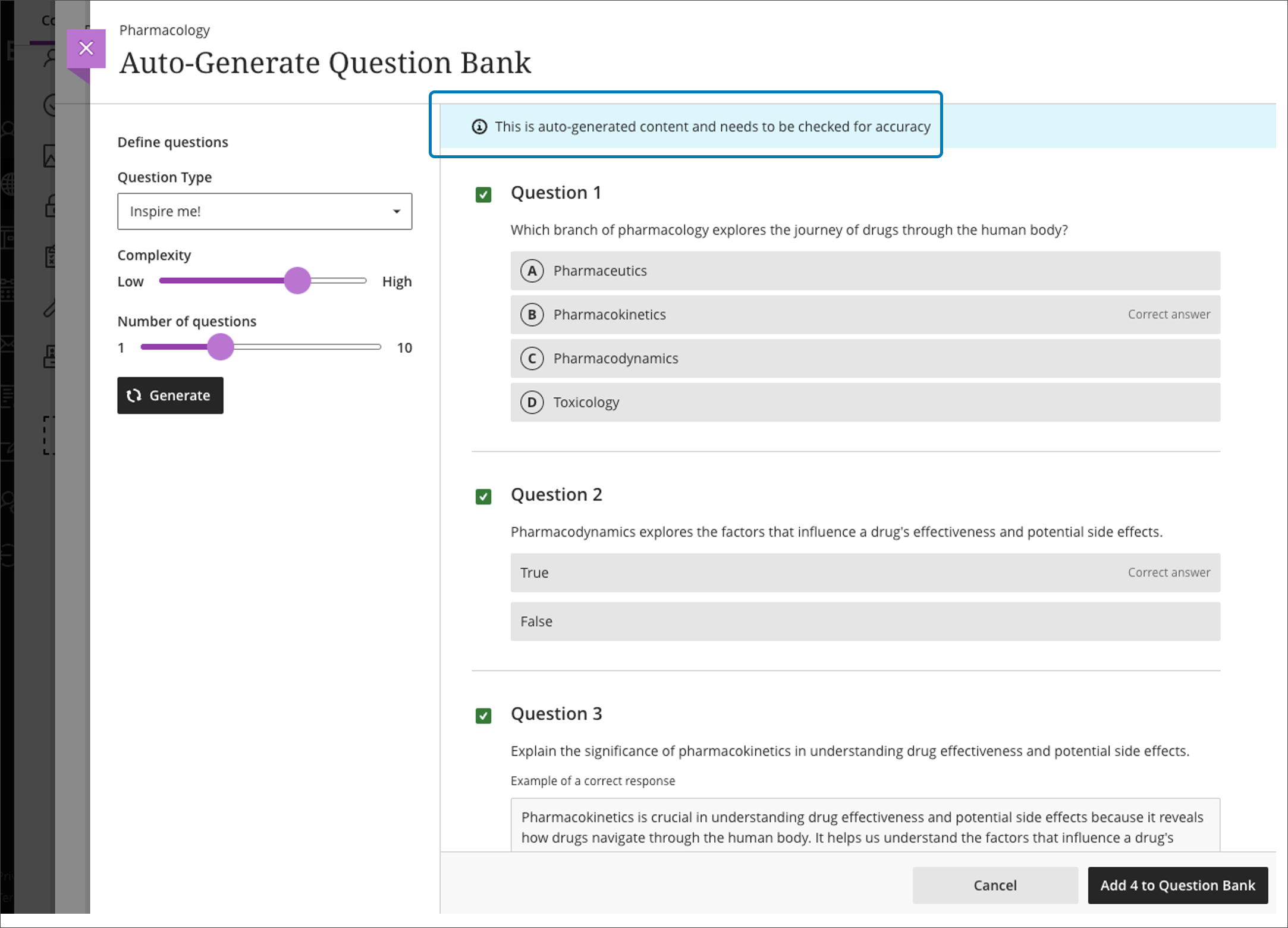
Content-based test generation. AI-powered algorithms analyze an Ultra document's content or inputted learning objectives and quickly generate a diverse set of questions for a test or question bank.
Image 3: Example of AI-generated question bank
-
Rubric creation. Drawing on an assessment or discussion prompt's content, the AI can analyze and streamline the rubric creation process according to specific learning objectives and assessment criteria.
Other updates in September include
-
Flexible Grading, which was activated just before the FA2023 semester started. Flexible Grading features grade by student or question. Instructors can easily move between student attempts and keep track of their grading process. Flexible Grading is supported on desktop, laptop, and tablets. Faculty are invited to join a Flexible Grading preview and training session on September 18, 2023.
-
Auto-captioning of audio and video content used in assessment feedback and announcements. Auto-captioning also supports diverse language preferences, aligning with the user's chosen language in both Original and Ultra courses.
Faculty should see the latest updates in Ultra courses around September 7-8 2023. The next update to our Ultra test environment will take place on September 12, 2023; release notes are posted to the What's New in Ultra that same week. Faculty who are interested in test driving new features before they are released to production should open an RT ticket to request early access. Please
watch the FAQs, including
the What's New with Ultra page,
and myUMBC for additional information about Ultra.
Connect with Instructional Technology
As always, if you have any questions about teaching, learning, and technology at UMBC, please consider the following options:
]]>
As the fall semester starts, the next update for Ultra courses brings improvements to the course management tools and a new stock image resource for course banners. Additionally, faculty will also...
https://my3.my.umbc.edu/groups/instructional-technology/posts/135009
https://my3.my.umbc.edu/api/v0/pixel/news/135009/guest@my.umbc.edu/09a05b190ac396070b0eacadbe29216a/api/pixel
ai
blackboard
flexible-grading
ultra-experience
ultra-update
Instructional Technology
https://my3.my.umbc.edu/groups/instructional-technology
https://assets2-my.umbc.edu/system/shared/avatars/groups/000/001/164/dec3b026b81ee6d890a8f82f75c94a2e/xsmall.png?1446126703
https://assets1-my.umbc.edu/system/shared/avatars/groups/000/001/164/dec3b026b81ee6d890a8f82f75c94a2e/original.png?1446126703
https://assets2-my.umbc.edu/system/shared/avatars/groups/000/001/164/dec3b026b81ee6d890a8f82f75c94a2e/xxlarge.png?1446126703
https://assets1-my.umbc.edu/system/shared/avatars/groups/000/001/164/dec3b026b81ee6d890a8f82f75c94a2e/xlarge.png?1446126703
https://assets1-my.umbc.edu/system/shared/avatars/groups/000/001/164/dec3b026b81ee6d890a8f82f75c94a2e/large.png?1446126703
https://assets4-my.umbc.edu/system/shared/avatars/groups/000/001/164/dec3b026b81ee6d890a8f82f75c94a2e/medium.png?1446126703
https://assets3-my.umbc.edu/system/shared/avatars/groups/000/001/164/dec3b026b81ee6d890a8f82f75c94a2e/small.png?1446126703
https://assets2-my.umbc.edu/system/shared/avatars/groups/000/001/164/dec3b026b81ee6d890a8f82f75c94a2e/xsmall.png?1446126703
https://assets3-my.umbc.edu/system/shared/avatars/groups/000/001/164/dec3b026b81ee6d890a8f82f75c94a2e/xxsmall.png?1446126703
Instructional Technology
https://assets2-my.umbc.edu/system/shared/thumbnails/news/000/135/009/79ef85aca28b5da734f174b439536c44/xxlarge.jpg?1693498242
https://assets1-my.umbc.edu/system/shared/thumbnails/news/000/135/009/79ef85aca28b5da734f174b439536c44/xlarge.jpg?1693498242
https://assets2-my.umbc.edu/system/shared/thumbnails/news/000/135/009/79ef85aca28b5da734f174b439536c44/large.jpg?1693498242
https://assets2-my.umbc.edu/system/shared/thumbnails/news/000/135/009/79ef85aca28b5da734f174b439536c44/medium.jpg?1693498242
https://assets2-my.umbc.edu/system/shared/thumbnails/news/000/135/009/79ef85aca28b5da734f174b439536c44/small.jpg?1693498242
https://assets3-my.umbc.edu/system/shared/thumbnails/news/000/135/009/79ef85aca28b5da734f174b439536c44/xsmall.jpg?1693498242
https://assets2-my.umbc.edu/system/shared/thumbnails/news/000/135/009/79ef85aca28b5da734f174b439536c44/xxsmall.jpg?1693498242
2
0
true
Thu, 31 Aug 2023 13:37:59 -0400
Support student success with Ultra’s progress tracking tools
Discover how and when students engage with course content
The success of students in a Blackboard course is often dependent on their level of engagement and their ability to stay on track with course content and assignments. As an instructor, it's crucial to have the tools and resources to monitor students' progress and ensure they are staying engaged and motivated throughout the course.
An Ultra course provides progress tracking tools to help instructors monitor how much time students are spending in the course, what content they are engaging with, and what their current grades are. This information is invaluable in helping instructors reach out to students who may be struggling or falling behind, and it also helps in retaining students who might otherwise drop out of the course. Progress Tracking is enabled by default in all Ultra courses as of SU2023.
One of the key benefits of tracking students progress is the ability to identify potential issues early on. If a student is not engaging with course content as much as they should be, the instructor can reach out and provide support, resources, or motivation to help the student get back on track. This proactive approach can help students stay engaged and motivated, and it also helps them to understand the importance of their participation and progress in the course.
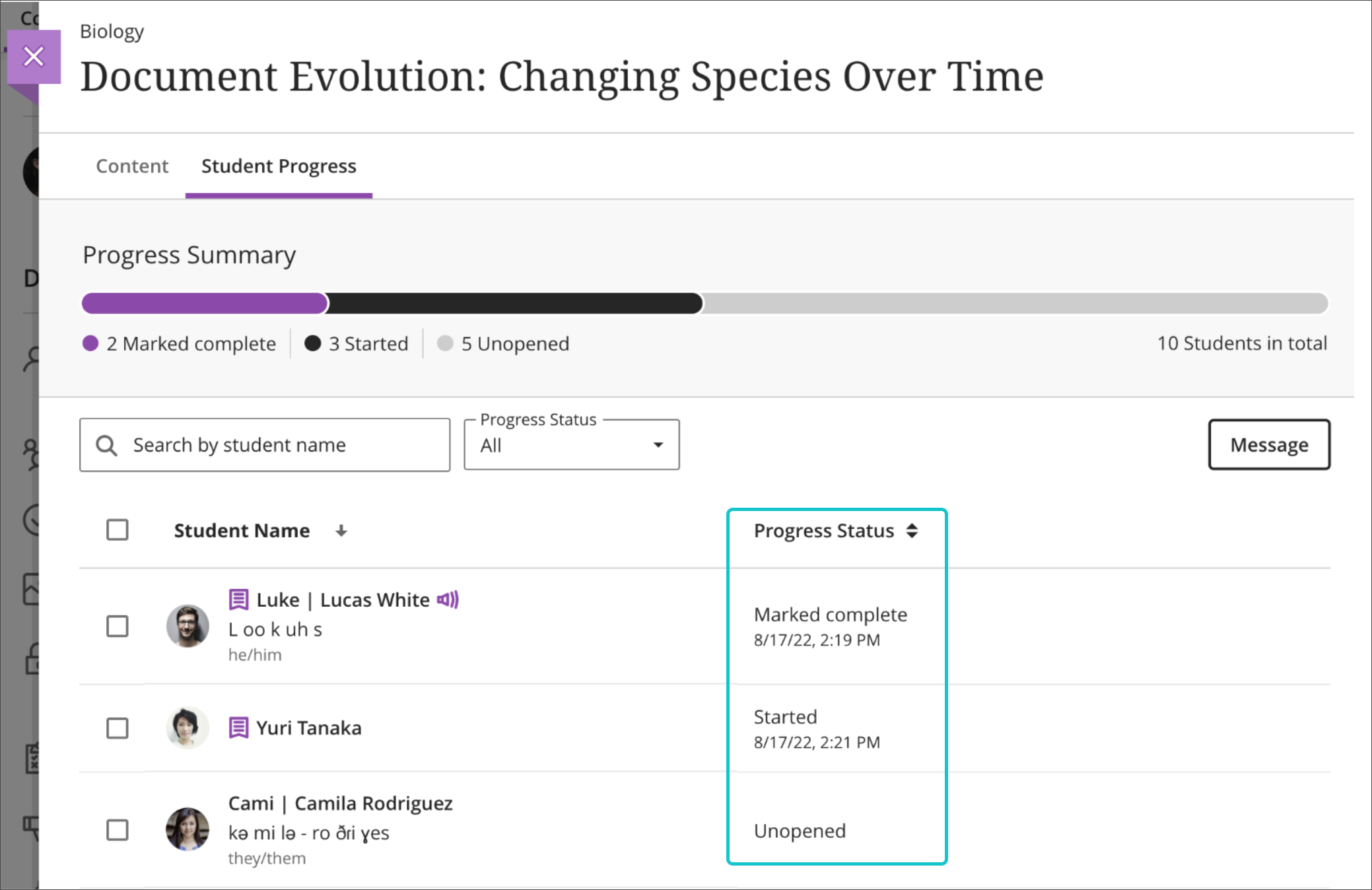
Image 1: Example of Progress Summary report. The Ultra progress tracker allows faculty to view how students are engaging with content in a course. Within the context of each content report, the instructor can easily check boxes for students who are not engaged with course resources and send a message.
Another advantage of progress tracking is the ability to monitor students' time spent in the course and where students are spending that time. Since students have the flexibility to log in and work on course content at any time, some may procrastinate or get sidetracked, leading to a decrease in their engagement and delay in completing assigned tasks. By tracking how much time students are spending in the course and seeing how and where students spend that time, instructors can intervene and provide support to help students stay on track.
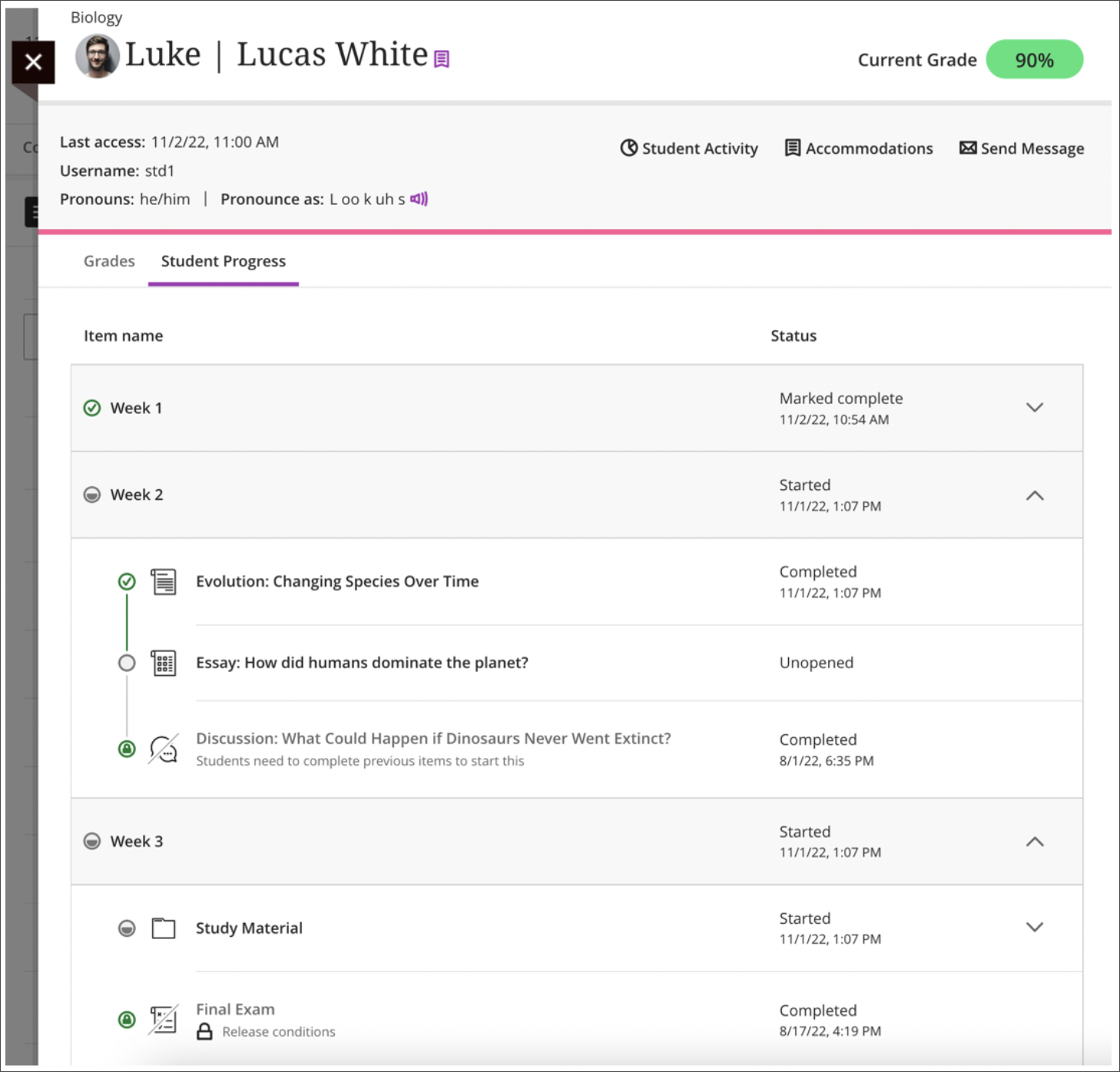
Image 2: Example of Student Progress report, available from the Student Overview. Viewing an individual student's progress in the course will show how s/he has accessed all content to date and the current grade. It's also easy to send that student a message.
Additionally, tracking students' grades helps instructors to monitor their overall performance and provide additional feedback as needed. With progress tracking, instructors can easily see which students are on track for success and which students may need additional support or intervention. From the student's progress report, click on the Student Activity report to view that individual student's time spent in class and its relationship to the overall grade. Instructors can quickly send messages from these various progress tracking tools as well as within the individual submission pages for assessment activities.

Image 3: Example of Course Activity Report. This student spent more time (purple) in his winter course compared to the rest of the class (black).
Here are a few practical tips for instructors to keep in mind when using these tools:
- Leverage learning modules instead of folders. With progress tracking, students can see how much content they've completed and how much content is left to consume or finish. This can be helpful when planning their schedules or motivating to know they have just one or two items left to wrap up.
-
Stay proactive. Regularly check the Student Progress report, available from the Student Overview, and reach out to those who may be struggling. Provide feedback, resources, and encouragement to help students stay on track.
-
Use data to inform decisions. The data you collect from the Progress Summary report can inform your teaching and help you to make data-driven decisions about how to support your students.
-
Personalize your outreach. When reaching out to students, take the time to personalize your message from assessment submissions based on their individual needs and progress. This shows that you care about their success and helps build a positive relationship with your students.
-
Encourage self-reflection. Encourage students to reflect on their progress and engagement, and provide opportunities for them to share their thoughts and experiences with you and their peers.
-
Celebrate successes. Celebrate and acknowledge students' successes and milestones along the way. This helps to keep students motivated and engaged in the course.
Using Ultra's progress tracking tools can be an essential part of your teaching toolkit. By tracking students' engagement, time spent, and overall grades, instructors can intervene and provide support when needed, increase engagement and motivation, and help students succeed in their coursework.
~ Mariann Hawken
Allocating time to configure the Ultra gradebook before the semester starts can support efficient grading throughout the semester. In the recent Gradebook Hacks: 5 Tips to Prep for the Semester session, we explored best practices for instructors to optimize their online gradebook setup. A recap of the best practices and related Blackboard Ultra features to support your assessment and grading practices is shared below.
Define Overall Grade Calculation
Select an overall grade calculation that aligns with the course objectives and stated grading policy. Instructors may select from points-based, weighted, or advanced overall grade calculations.
- Points-based calculations display students' grades based on points earned out of points possible. This calculation can be represented as a running total throughout the semester.
- Weighted grading assigns different percentages to various categories such as assignments and tests, to individual items, or a combination of the two.
- Advanced calculations allow instructors to create custom formulas and calculations.
Overall grade calculations also support rules such as dropping the lowest or highest grades from a particular category.
Customize Grading Schemas
Grading schemas provide transparency and help students understand how their performance will be evaluated. The gradebook supports up to 100 unique schemas, which can be customized in the Gradebook settings. Instructors may select from existing schemas such as Letter, Percent, Complete/Incomplete, or use custom schemas as they configure the settings for each assessment.
Organize the Gradebook with Categories
Organizing the gradebook into categories streamlines the assessment process. Utilize default or custom assessment categories to classify assignments, quizzes, projects, and other assessments. This categorization makes it easier to manage and track student progress while offering a comprehensive overview of their performance in different areas. Additionally, consider distinguishing between formative (ongoing) and summative (final) assessments with the new "formative" assessment label to give students a better understanding of their progress.
Apply Exceptions and Exemptions
Assignment exceptions offer the flexibility to make changes that are specific to one assignment, such as extending a due date or allowing additional attempts. Exemptions exclude an assessment from the student's overall grade calculation, which prevents the assessment from appearing late or applying automatic zero.
Use Filters and Search Options
Filters can help instructors locate specific assignments, students, or assessment categories quickly. This feature enhances efficiency when managing a large number of assessments.
- Course Groups: Create course groups to support filtering in the gradebook, as well as for releasing content to specific users or groups. This can be especially useful when multiple course sections are merged in a single Blackboard course shell.
- Formative Labels: Use the "formative" label on assessments to differentiate between formative and summative assessments. Use gradebook filters to identify formative assessments quickly.
Download Critical Information
Instructors may download assignment submissions, assessment results, analytics, the full gradebook, as well as a complete gradebook history. Downloading submissions can support offline grading throughout the semester. Need to track a change in the gradebook? The gradebook history provides a comprehensive record of all gradebook changes.
New Flexible Grading
Image 1: Example of flexible grading in an assignment.
Connect with Instructional Technology
As always, if you have any questions about teaching, learning, and technology at UMBC, please consider the following options:
]]>
Allocating time to configure the Ultra gradebook before the semester starts can support efficient grading throughout the semester. In the recent Gradebook Hacks: 5 Tips to Prep for the Semester...
https://my3.my.umbc.edu/groups/instructional-technology/posts/134842/
Image
https://assets2-my.umbc.edu/system/shared/attachments/ea3ce8021acb6bdd9757e3dbe00bd26d/6a92feec/news/000/134/842/86a2ebc1d9ebc0d693437b61502e03ce/Image 1.png?1693311294
https://my3.my.umbc.edu/api/v0/pixel/news/134842/guest@my.umbc.edu/ea2bad8d7d753e0988302b5f8a38be59/api/pixel
Instructional Technology
https://my3.my.umbc.edu/groups/instructional-technology
https://assets2-my.umbc.edu/system/shared/avatars/groups/000/001/164/dec3b026b81ee6d890a8f82f75c94a2e/xsmall.png?1446126703
https://assets1-my.umbc.edu/system/shared/avatars/groups/000/001/164/dec3b026b81ee6d890a8f82f75c94a2e/original.png?1446126703
https://assets2-my.umbc.edu/system/shared/avatars/groups/000/001/164/dec3b026b81ee6d890a8f82f75c94a2e/xxlarge.png?1446126703
https://assets1-my.umbc.edu/system/shared/avatars/groups/000/001/164/dec3b026b81ee6d890a8f82f75c94a2e/xlarge.png?1446126703
https://assets1-my.umbc.edu/system/shared/avatars/groups/000/001/164/dec3b026b81ee6d890a8f82f75c94a2e/large.png?1446126703
https://assets4-my.umbc.edu/system/shared/avatars/groups/000/001/164/dec3b026b81ee6d890a8f82f75c94a2e/medium.png?1446126703
https://assets3-my.umbc.edu/system/shared/avatars/groups/000/001/164/dec3b026b81ee6d890a8f82f75c94a2e/small.png?1446126703
https://assets2-my.umbc.edu/system/shared/avatars/groups/000/001/164/dec3b026b81ee6d890a8f82f75c94a2e/xsmall.png?1446126703
https://assets3-my.umbc.edu/system/shared/avatars/groups/000/001/164/dec3b026b81ee6d890a8f82f75c94a2e/xxsmall.png?1446126703
Instructional Technology
https://assets4-my.umbc.edu/system/shared/thumbnails/news/000/134/842/a20f3971f5fffe31e2f5fa7c6d13b6b2/xxlarge.jpg?1693312686
https://assets2-my.umbc.edu/system/shared/thumbnails/news/000/134/842/a20f3971f5fffe31e2f5fa7c6d13b6b2/xlarge.jpg?1693312686
https://assets3-my.umbc.edu/system/shared/thumbnails/news/000/134/842/a20f3971f5fffe31e2f5fa7c6d13b6b2/large.jpg?1693312686
https://assets2-my.umbc.edu/system/shared/thumbnails/news/000/134/842/a20f3971f5fffe31e2f5fa7c6d13b6b2/medium.jpg?1693312686
https://assets3-my.umbc.edu/system/shared/thumbnails/news/000/134/842/a20f3971f5fffe31e2f5fa7c6d13b6b2/small.jpg?1693312686
https://assets4-my.umbc.edu/system/shared/thumbnails/news/000/134/842/a20f3971f5fffe31e2f5fa7c6d13b6b2/xsmall.jpg?1693312686
https://assets1-my.umbc.edu/system/shared/thumbnails/news/000/134/842/a20f3971f5fffe31e2f5fa7c6d13b6b2/xxsmall.jpg?1693312686
3
0
true
Tue, 29 Aug 2023 08:47:42 -0400
Ultra Courses to Offer New AI Course Design Assistant Tools
Generate images, structure, test questions, and rubrics
As the landscape of education continues to evolve, the integration of cutting-edge technology into the classroom has become more vital than ever. The advent of generative AI tools is poised to revolutionize the field of higher education, transforming the virtual classroom into a dynamic and responsive environment. The potential for positive impact on productivity and efficiency for faculty is significant, opening new doors for innovation in teaching and learning as well as course development.
Instructional Technology invites faculty to preview the suite of new AI Course Design Assistant features during two webinars on Wednesday, August 23. Developed to assist faculty in streamlining course preparation, the AI Course Design Assistant tools include:
-
A course-builder assistant. Create sample learning modules, titles, and descriptions.
-
Image suggestion and creation. The assistant can draw from the Unsplash stock image library and suggest thumbnails for illustration in learning modules or identify an image for the course banner. Functionality also includes AI-generated image creation based on course name and keywords.
-
Content-based test generation. AI-powered algorithms analyze an Ultra document's content or inputted learning objectives and quickly generate a diverse set of questions for a test or question bank.
-
Rubric creation. Drawing on an assessment or discussion prompt’s content, the AI can analyze and streamline the rubric creation process according to specific learning objectives and assessment criteria.
Informed by Anthology’s Trustworthy AI Approach and seamlessly embedded into Ultra’s workflows, the AI Course Design Assistant tools are opt-in and the instructor is always in control of the content generated. Faculty can choose when, where, and how to leverage the tools in their Ultra courses.
Instructional Technology expects to launch the tools to the campus during National Distance Learning Week (Nov. 6-10) with a lunchtime series. Limited early access will be available to interested faculty upon request. Please attend a preview session for more information.
Connect with Instructional Technology
As always, if you have any questions about teaching, learning, and technology at UMBC, please consider the following options:
UMBC is committed to providing a consistent learning experience for everyone. The last day we will support Blackboard Original is December 31, 2024. Please check out our training and support: https://umbc.edu/go/ultra.
]]>
As the landscape of education continues to evolve, the integration of cutting-edge technology into the classroom has become more vital than ever. The advent of generative AI tools is poised to...
https://my3.my.umbc.edu/groups/instructional-technology/posts/134605
https://my3.my.umbc.edu/api/v0/pixel/news/134605/guest@my.umbc.edu/d5bafa793745ce800919e038c8e7d5de/api/pixel
ai
ai-course-design-assistant
blackboard
online-learning
ultra
Instructional Technology
https://my3.my.umbc.edu/groups/instructional-technology
https://assets2-my.umbc.edu/system/shared/avatars/groups/000/001/164/dec3b026b81ee6d890a8f82f75c94a2e/xsmall.png?1446126703
https://assets1-my.umbc.edu/system/shared/avatars/groups/000/001/164/dec3b026b81ee6d890a8f82f75c94a2e/original.png?1446126703
https://assets2-my.umbc.edu/system/shared/avatars/groups/000/001/164/dec3b026b81ee6d890a8f82f75c94a2e/xxlarge.png?1446126703
https://assets1-my.umbc.edu/system/shared/avatars/groups/000/001/164/dec3b026b81ee6d890a8f82f75c94a2e/xlarge.png?1446126703
https://assets1-my.umbc.edu/system/shared/avatars/groups/000/001/164/dec3b026b81ee6d890a8f82f75c94a2e/large.png?1446126703
https://assets4-my.umbc.edu/system/shared/avatars/groups/000/001/164/dec3b026b81ee6d890a8f82f75c94a2e/medium.png?1446126703
https://assets3-my.umbc.edu/system/shared/avatars/groups/000/001/164/dec3b026b81ee6d890a8f82f75c94a2e/small.png?1446126703
https://assets2-my.umbc.edu/system/shared/avatars/groups/000/001/164/dec3b026b81ee6d890a8f82f75c94a2e/xsmall.png?1446126703
https://assets3-my.umbc.edu/system/shared/avatars/groups/000/001/164/dec3b026b81ee6d890a8f82f75c94a2e/xxsmall.png?1446126703
Instructional Technology
https://assets4-my.umbc.edu/system/shared/thumbnails/news/000/134/605/45504cc5faf27fb98ed81919fdb263a8/xxlarge.jpg?1691674335
https://assets1-my.umbc.edu/system/shared/thumbnails/news/000/134/605/45504cc5faf27fb98ed81919fdb263a8/xlarge.jpg?1691674335
https://assets4-my.umbc.edu/system/shared/thumbnails/news/000/134/605/45504cc5faf27fb98ed81919fdb263a8/large.jpg?1691674335
https://assets2-my.umbc.edu/system/shared/thumbnails/news/000/134/605/45504cc5faf27fb98ed81919fdb263a8/medium.jpg?1691674335
https://assets3-my.umbc.edu/system/shared/thumbnails/news/000/134/605/45504cc5faf27fb98ed81919fdb263a8/small.jpg?1691674335
https://assets4-my.umbc.edu/system/shared/thumbnails/news/000/134/605/45504cc5faf27fb98ed81919fdb263a8/xsmall.jpg?1691674335
https://assets4-my.umbc.edu/system/shared/thumbnails/news/000/134/605/45504cc5faf27fb98ed81919fdb263a8/xxsmall.jpg?1691674335
5
2
true
Thu, 10 Aug 2023 09:35:19 -0400
QM offers free Accessibility & Usability Resource Site
Built by the peer community for the peer community
In response to institutional and educator priorities for making education accessible for all learners, the Quality Matters peer community created the Accessibility and Usability Resource Site (AURS).
Free and open to everyone, AURS provides the online community with important information on addressing key accessibility and usability concerns, including:
-
Universal Design for Learning - Discover what you need to know about UDL and how it can assist you in creating accessible and usable content to meet the needs of diverse learners.
-
Alternative Text - Find out why alternative text is an important principle in accessible web design and how you can use it to help all learners understand the meaning of the image used in your content.
-
Video Captions and Audio Descriptions - Uncover the specific steps that must be taken to make video content accessible.
-
Hyperlinks - Gain an understanding of how to set up links in the most accessible way possible in order to create accessible content.
-
Accessible MS Office products - Explore the basics of Microsoft product accessibility, including alternative text, document best practices and utilizing built-in accessibility checkers.
-
Readability: Color Choice and Contrast - Dive into the topics of readability and discover why color choice and contrast play a major role in creating accessible digital resources.
-
Accessible PDFs - Take your readability skills to the next level and learn more about how you can make PDFs accessible for your learners.
-
Cognitive Accessibility - Increase your understanding of cognitive accessibility and uncover strategies to combat this common barrier to student success.
-
Inclusive Teaching Practices - Discover design and pedagogical practices to help you foster an inclusive and diverse online learning community.
Each topic features different resources to assist you with your accessibility challenges. Videos show you step-by-step changes you can make to increase the accessibility of your course. Examples highlight best practices. Articles provide you with additional information and resources. And forums allow you to connect directly with accessibility experts --peers who have expertise in designing accessible courses. There is also a General Accessibility and Usability Questions' Forum where you can ask any question that is unrelated to the listed topics.
Accessing AURS
Anyone can register for the site for free by logging into MyQM and selecting "Workshop - Register" in the side navigation and choosing "Register for Accessibility & Usability Resource Site." Need a QM account?
If you've already registered, the AURS link can be found on your Dashboard in the QM Classroom after you log in.
]]>
In response to institutional and educator priorities for making education accessible for all learners, the Quality Matters peer community created the Accessibility and Usability Resource Site...
https://my3.my.umbc.edu/groups/instructional-technology/posts/134515
https://my3.my.umbc.edu/api/v0/pixel/news/134515/guest@my.umbc.edu/fef53ba5b45bdd26f9be0d8413858c5c/api/pixel
accessibility
aurs
online-learning
quality-matters
udl
universal-design-for-learning
Instructional Technology
https://my3.my.umbc.edu/groups/instructional-technology
https://assets2-my.umbc.edu/system/shared/avatars/groups/000/001/164/dec3b026b81ee6d890a8f82f75c94a2e/xsmall.png?1446126703
https://assets1-my.umbc.edu/system/shared/avatars/groups/000/001/164/dec3b026b81ee6d890a8f82f75c94a2e/original.png?1446126703
https://assets2-my.umbc.edu/system/shared/avatars/groups/000/001/164/dec3b026b81ee6d890a8f82f75c94a2e/xxlarge.png?1446126703
https://assets1-my.umbc.edu/system/shared/avatars/groups/000/001/164/dec3b026b81ee6d890a8f82f75c94a2e/xlarge.png?1446126703
https://assets1-my.umbc.edu/system/shared/avatars/groups/000/001/164/dec3b026b81ee6d890a8f82f75c94a2e/large.png?1446126703
https://assets4-my.umbc.edu/system/shared/avatars/groups/000/001/164/dec3b026b81ee6d890a8f82f75c94a2e/medium.png?1446126703
https://assets3-my.umbc.edu/system/shared/avatars/groups/000/001/164/dec3b026b81ee6d890a8f82f75c94a2e/small.png?1446126703
https://assets2-my.umbc.edu/system/shared/avatars/groups/000/001/164/dec3b026b81ee6d890a8f82f75c94a2e/xsmall.png?1446126703
https://assets3-my.umbc.edu/system/shared/avatars/groups/000/001/164/dec3b026b81ee6d890a8f82f75c94a2e/xxsmall.png?1446126703
Instructional Technology
https://assets3-my.umbc.edu/system/shared/thumbnails/news/000/134/515/36d0180fd04cd7fa6bbdc620e5d6138c/xxlarge.jpg?1691072074
https://assets1-my.umbc.edu/system/shared/thumbnails/news/000/134/515/36d0180fd04cd7fa6bbdc620e5d6138c/xlarge.jpg?1691072074
https://assets4-my.umbc.edu/system/shared/thumbnails/news/000/134/515/36d0180fd04cd7fa6bbdc620e5d6138c/large.jpg?1691072074
https://assets1-my.umbc.edu/system/shared/thumbnails/news/000/134/515/36d0180fd04cd7fa6bbdc620e5d6138c/medium.jpg?1691072074
https://assets2-my.umbc.edu/system/shared/thumbnails/news/000/134/515/36d0180fd04cd7fa6bbdc620e5d6138c/small.jpg?1691072074
https://assets2-my.umbc.edu/system/shared/thumbnails/news/000/134/515/36d0180fd04cd7fa6bbdc620e5d6138c/xsmall.jpg?1691072074
https://assets4-my.umbc.edu/system/shared/thumbnails/news/000/134/515/36d0180fd04cd7fa6bbdc620e5d6138c/xxsmall.jpg?1691072074
3
0
true
Thu, 03 Aug 2023 10:18:22 -0400
Thu, 03 Aug 2023 10:18:42 -0400
FA2023 Courses Created in Blackboard on July 25, 2023
Blackboard course shells for FA2023 were created on July 25, 2023.
The Ultra Course Preview setting is enabled in FA2023 courses, which allows faculty to preview OR convert a new Original course to Ultra. The recommendation, however, is to create a new course to optimize the design. Note: The last day we will support Blackboard Original is December 31, 2024.
As previously announced, seven departments, many foreign languages, English 100, IHU, FYE, and TRS courses have opted into Ultra to ensure a consistent approach for their students. This means courses will start with Ultra by default rather than Original. For consistency of instructional technology support, FA2023 courses created in Blackboard on/after August 1, 2023 will be created in Ultra by default.
Plan your accessibility and Universal Design for Learning strategy before students begin working with course materials. Ally, an accessibility tool, is enabled in all course shells. Ally automatically scans uploaded and created course content, then performs a series of steps to make that content more accessible. Please review the Ally FAQs for more information about the accessibility indicators on course content and alternative formats, or attend a training session.
For faculty who will be teaching hybrid or online, the instructional technology team would like to share several resources to support online course development and instruction.
-
Choose from our PIVOT Solo lessons to refresh or enhance your online teaching preparation. Five key topics cover course organization, active learning, community building, assessment, and supporting students.
-
Explore our Panopto folder for a wide variety of recorded webinars on various instructional technologies available at UMBC.
-
Learn about the Quality Matters Impact program, a new initiative to formally recognize courses that meet Quality Matters standards and demonstrate exemplary online/hybrid course design.
About Course Creation
- If you are an instructor, and your name is not associated with the course you are teaching in the SOC, please see your Departmental Scheduling Coordinator to resolve the issue. Once you are listed in the SOC, your Bb course shell will be created automatically.
- If you and your Department Scheduling Coordinator believe you are correctly assigned as the instructor of record in the SOC and you do not see your course shell in Blackboard, please submit a Request Tracker (RT) ticket via my.umbc.edu/help.
- If you need a Bb shell for a research or independent study course, please submit a new course request.
Instructors who teach multiple sections of the same course will find those enrollments merged into one Bb course shell. These sections may be split upon request by an RT ticket, which we recommend submitting at least one week before the semester starts, if not as soon as courses are created in Blackboard. NOTE: Courses should not be split after student grade data and engagement activity is recorded since it will be purged as part of the separation process.
Student enrollment in Bb mirrors the official registration in SA and updates hourly. However, courses are not accessible to students by default until the instructor of record makes them available.
Connect with Instructional Technology
As always, if you have any questions about teaching, learning, and technology at UMBC, please consider the following options:
]]>
Blackboard course shells for FA2023 were created on July 25, 2023. The Ultra Course Preview setting is enabled in FA2023 courses, which allows faculty to preview OR convert a new Original course...
https://my3.my.umbc.edu/groups/instructional-technology/posts/134412
https://my3.my.umbc.edu/api/v0/pixel/news/134412/guest@my.umbc.edu/4a0aab662277b891910ff9c832f337e5/api/pixel
blackboard
course-creation
fa2023
fall
ultra-course-preview
Instructional Technology
https://my3.my.umbc.edu/groups/instructional-technology
https://assets2-my.umbc.edu/system/shared/avatars/groups/000/001/164/dec3b026b81ee6d890a8f82f75c94a2e/xsmall.png?1446126703
https://assets1-my.umbc.edu/system/shared/avatars/groups/000/001/164/dec3b026b81ee6d890a8f82f75c94a2e/original.png?1446126703
https://assets2-my.umbc.edu/system/shared/avatars/groups/000/001/164/dec3b026b81ee6d890a8f82f75c94a2e/xxlarge.png?1446126703
https://assets1-my.umbc.edu/system/shared/avatars/groups/000/001/164/dec3b026b81ee6d890a8f82f75c94a2e/xlarge.png?1446126703
https://assets1-my.umbc.edu/system/shared/avatars/groups/000/001/164/dec3b026b81ee6d890a8f82f75c94a2e/large.png?1446126703
https://assets4-my.umbc.edu/system/shared/avatars/groups/000/001/164/dec3b026b81ee6d890a8f82f75c94a2e/medium.png?1446126703
https://assets3-my.umbc.edu/system/shared/avatars/groups/000/001/164/dec3b026b81ee6d890a8f82f75c94a2e/small.png?1446126703
https://assets2-my.umbc.edu/system/shared/avatars/groups/000/001/164/dec3b026b81ee6d890a8f82f75c94a2e/xsmall.png?1446126703
https://assets3-my.umbc.edu/system/shared/avatars/groups/000/001/164/dec3b026b81ee6d890a8f82f75c94a2e/xxsmall.png?1446126703
Instructional Technology
https://assets2-my.umbc.edu/system/shared/thumbnails/news/000/134/412/417be55c785897bbec9802a7eaba579c/xxlarge.jpg?1690375787
https://assets2-my.umbc.edu/system/shared/thumbnails/news/000/134/412/417be55c785897bbec9802a7eaba579c/xlarge.jpg?1690375787
https://assets4-my.umbc.edu/system/shared/thumbnails/news/000/134/412/417be55c785897bbec9802a7eaba579c/large.jpg?1690375787
https://assets2-my.umbc.edu/system/shared/thumbnails/news/000/134/412/417be55c785897bbec9802a7eaba579c/medium.jpg?1690375787
https://assets4-my.umbc.edu/system/shared/thumbnails/news/000/134/412/417be55c785897bbec9802a7eaba579c/small.jpg?1690375787
https://assets2-my.umbc.edu/system/shared/thumbnails/news/000/134/412/417be55c785897bbec9802a7eaba579c/xsmall.jpg?1690375787
https://assets4-my.umbc.edu/system/shared/thumbnails/news/000/134/412/417be55c785897bbec9802a7eaba579c/xxsmall.jpg?1690375787
4
0
true
Wed, 26 Jul 2023 09:50:56 -0400
Thu, 31 Aug 2023 13:44:24 -0400
Grade by student or question in Ultra courses for Aug update
New Google integration, customize image for learning modules
The August release reveals a new update for the Ultra grading system, enabling faculty to grade by question or student, or mix and match the approach. Additional updates to Ultra for August include enhancements to grading, content creation and content management, learner engagement, and reporting.
Flexible Grading features grade by student or question. Instructors can easily move between student attempts and keep track of their grading process. Grading options include simple scoring, rubrics and inline commenting. Instructors can collapse panels to increase visible space, view SafeAssign originality reports, and post all grades when ready. Subsequent releases will include group submissions, anonymous grading, multiple grades per student, and peer review.
Image 1: Example of flexible grading when grading by student
Image 2: Example of flexible grading when grading by question
Although Flexible Grading will be available in early August, the functionality will not be enabled in Ultra courses until approximately one week before the FA2023 term starts. This is primarily to ensure SU2023 courses maintain continuity of their grading interface until the end of the term.
Assessment & Grading
- Anonymous submissions can be downloaded in bulk from the gradebook column.
- The default state of the gradebook cell is now a dash. "Grade Now" will only appear if there is something to actually grade.
- Student submission receipts will include additional information including submission size for file uploads and auto-submit indicators for timed assessments.
Content Creation & Delivery
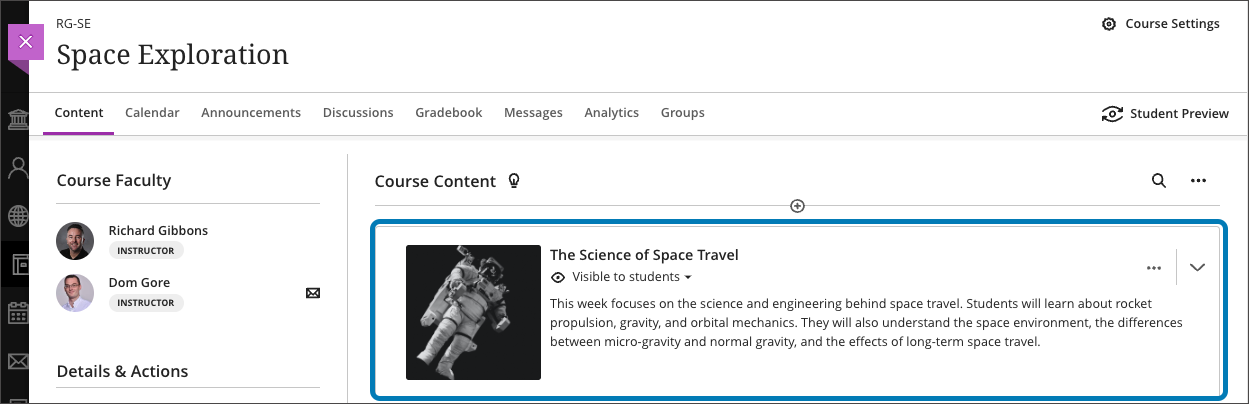
- Add a thumbnail image to a learning module to enhance the visual aesthetics of a course or aid in content identification.
Image 3: Example of thumbnail image for learning module
- A new Google file integration allows faculty to link to files in their Google Drive and edit those files once added to a course. Students have view-only access. This update will be released later in the fall semester.
Image 4: Example of new Google file workflow
- When an instructor replaces a file in an Ultra course, the system will no longer create a new version. This should help with managing course quotas.
Communication & Engagement
-
The Groups tool link is relocated to the top course menu navigation to improve visibility. Instructors can easily send messages to Groups or Group Sets.
- A new dedicated Groups space is available for displaying all assessments assigned to each group. Future milestones will include project management tools for students.
- The Message tab on the Base Navigation now displays courses with unread messages first. An unread message indicator also appears within the course. Newest messages appear first and unread messages are clearly marked.
Reporting & Analytics
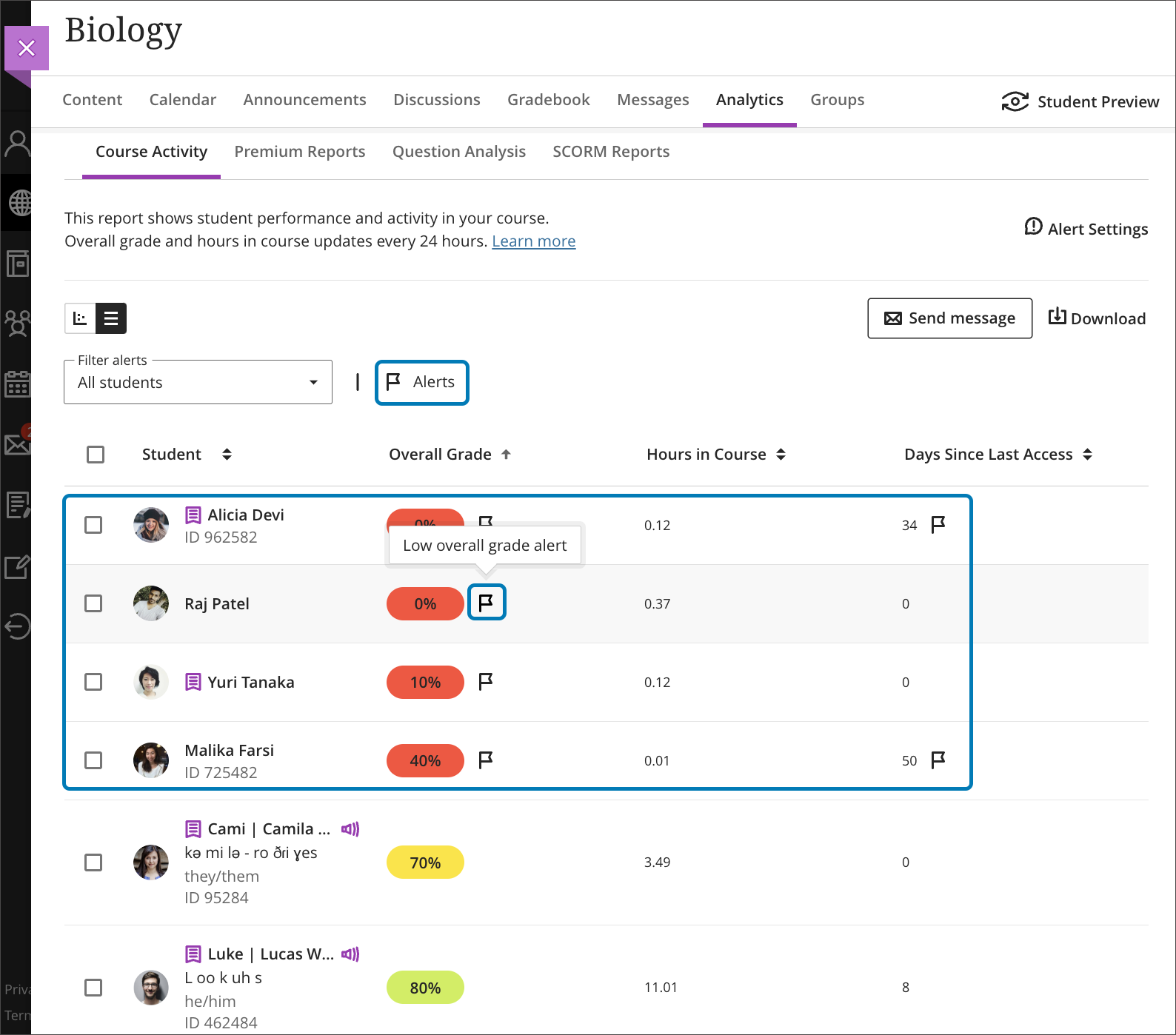
- A flag will appear for students in the Course Activity Report based on the number of days a student is inactive in a course or when the overall grade falls below a specific percentage. These settings are determined by the instructor in the Alert Settings on the Course Activity Report. Alerts can be added, edited, or deleted at any time. Send messages based on flags.
Image 5: Example of flag indicators in Course Activity Report
Faculty should see the latest updates in Ultra courses around August 4-5, 2023. Please sign up for our latest
What's New in Ultra for Teaching & Learning webinar on August 10 or August 18, 2023 to learn more about these and other exciting new features coming to Ultra.
The next update to our Ultra test environment will take place on August 15, 2023; release notes are posted to the What's New in Ultra that same week. Faculty who are interested in test driving new features before they are released to production should open an RT ticket to request early access. Please
watch the FAQs, including
the What's New with Ultra page,
and myUMBC for additional information about Ultra.
Connect with Instructional Technology
As always, if you have any questions about teaching, learning, and technology at UMBC, please consider the following options:
]]>
The August release reveals a new update for the Ultra grading system, enabling faculty to grade by question or student, or mix and match the approach. Additional updates to Ultra for August...
https://my3.my.umbc.edu/groups/instructional-technology/posts/134272
Image
https://assets2-my.umbc.edu/system/shared/attachments/4ebb4d7122a197a9875c1ed071c237f9/6a92feec/news/000/134/272/7cc363172b333199364a4e07bae60688/blackboard-learn-adoption---new-flexible-grading-4.png?1689167733
https://my3.my.umbc.edu/api/v0/pixel/news/134272/guest@my.umbc.edu/e6973324ae5bedf9665be02127452ec2/api/pixel
blackboard
flexible-grading
ultra-experience
ultra-update
Instructional Technology
https://my3.my.umbc.edu/groups/instructional-technology
https://assets2-my.umbc.edu/system/shared/avatars/groups/000/001/164/dec3b026b81ee6d890a8f82f75c94a2e/xsmall.png?1446126703
https://assets1-my.umbc.edu/system/shared/avatars/groups/000/001/164/dec3b026b81ee6d890a8f82f75c94a2e/original.png?1446126703
https://assets2-my.umbc.edu/system/shared/avatars/groups/000/001/164/dec3b026b81ee6d890a8f82f75c94a2e/xxlarge.png?1446126703
https://assets1-my.umbc.edu/system/shared/avatars/groups/000/001/164/dec3b026b81ee6d890a8f82f75c94a2e/xlarge.png?1446126703
https://assets1-my.umbc.edu/system/shared/avatars/groups/000/001/164/dec3b026b81ee6d890a8f82f75c94a2e/large.png?1446126703
https://assets4-my.umbc.edu/system/shared/avatars/groups/000/001/164/dec3b026b81ee6d890a8f82f75c94a2e/medium.png?1446126703
https://assets3-my.umbc.edu/system/shared/avatars/groups/000/001/164/dec3b026b81ee6d890a8f82f75c94a2e/small.png?1446126703
https://assets2-my.umbc.edu/system/shared/avatars/groups/000/001/164/dec3b026b81ee6d890a8f82f75c94a2e/xsmall.png?1446126703
https://assets3-my.umbc.edu/system/shared/avatars/groups/000/001/164/dec3b026b81ee6d890a8f82f75c94a2e/xxsmall.png?1446126703
Instructional Technology
https://assets1-my.umbc.edu/system/shared/thumbnails/news/000/134/272/fa172243a7a9cbea44a5bd68e817c726/xxlarge.jpg?1689167479
https://assets2-my.umbc.edu/system/shared/thumbnails/news/000/134/272/fa172243a7a9cbea44a5bd68e817c726/xlarge.jpg?1689167479
https://assets4-my.umbc.edu/system/shared/thumbnails/news/000/134/272/fa172243a7a9cbea44a5bd68e817c726/large.jpg?1689167479
https://assets3-my.umbc.edu/system/shared/thumbnails/news/000/134/272/fa172243a7a9cbea44a5bd68e817c726/medium.jpg?1689167479
https://assets3-my.umbc.edu/system/shared/thumbnails/news/000/134/272/fa172243a7a9cbea44a5bd68e817c726/small.jpg?1689167479
https://assets4-my.umbc.edu/system/shared/thumbnails/news/000/134/272/fa172243a7a9cbea44a5bd68e817c726/xsmall.jpg?1689167479
https://assets2-my.umbc.edu/system/shared/thumbnails/news/000/134/272/fa172243a7a9cbea44a5bd68e817c726/xxsmall.jpg?1689167479
4
0
true
Mon, 24 Jul 2023 12:47:56 -0400
Mon, 21 Aug 2023 10:06:42 -0400