July Update Brings Rubric Evaluation Report to Ultra Courses
Discussion descriptions, AI conversation timers, course favs
This month's Ultra update provides a new report that gives instructors class-wide rubric data at a glance, and a dedicated field that separates discussion context from prompt. Paired with clearer time guidelines for students working in AI Conversations, this update gives instructors sharper data and more control over how students engage with course activities.
Rubric Evaluation Report gives instructors a bird's-eye view of rubric performance across an entire class. Instructors can now run this report directly from the gradebook for any graded activity that has a rubric attached, aggregating data from every student submission into a single view. Instructors can see at a glance how students are performing against each criterion, making it easier to spot patterns, identify skills that need reteaching, and adjust instruction before the next assignment is due.
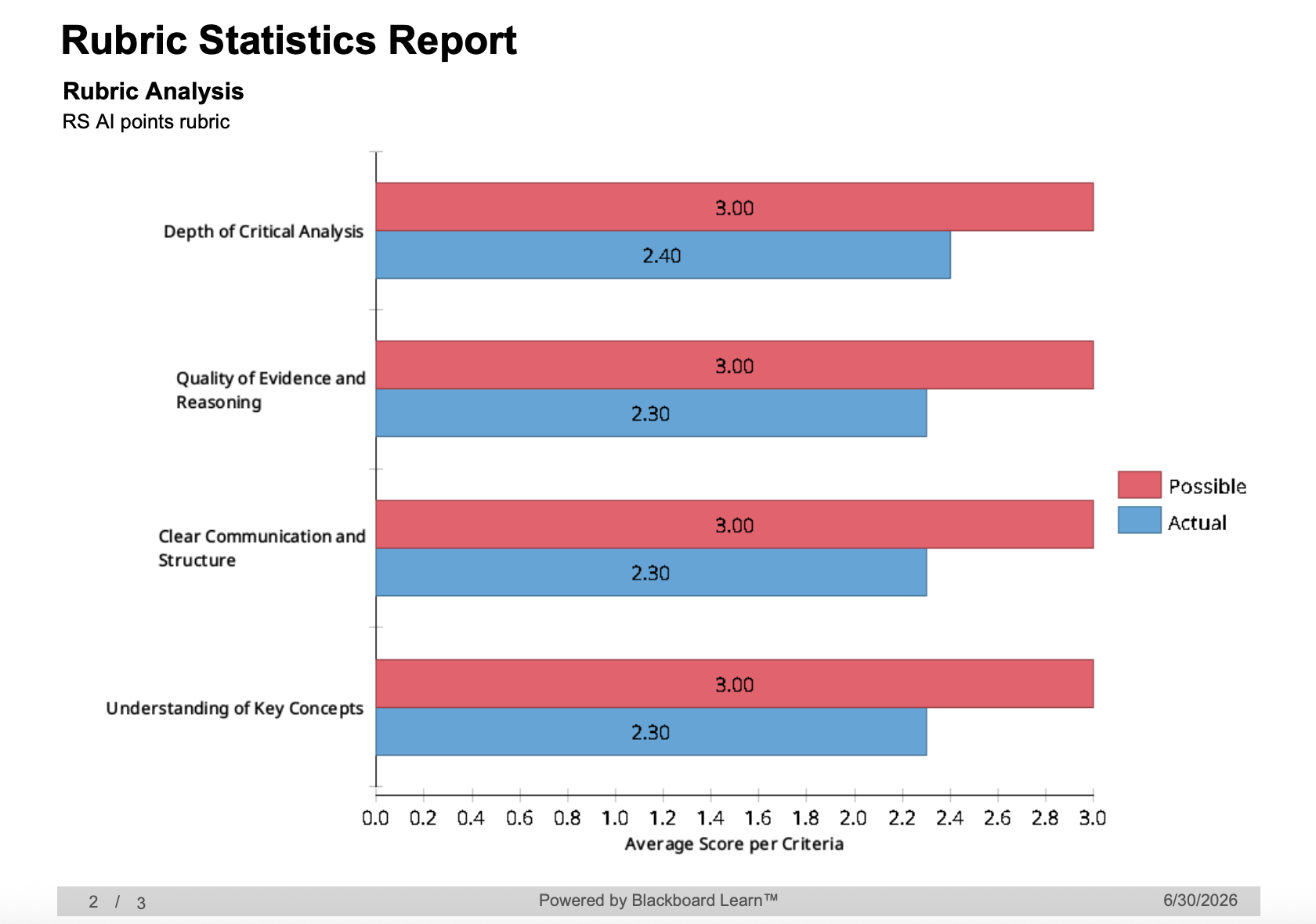
Image 1: Example of Rubric Statistics Report featuring bar chart comparing points possible against actual points
Discussions and Journals now include a dedicated Description field, giving instructors a clearer way to set the stage before students engage with an activity. Previously, the prompt appeared on the Course Content page and had to do double duty as both context and task. Now, instructors can use the new Description field to lay out expectations, background, or logistics, and reserve the prompt itself for the actual engagement question or task.
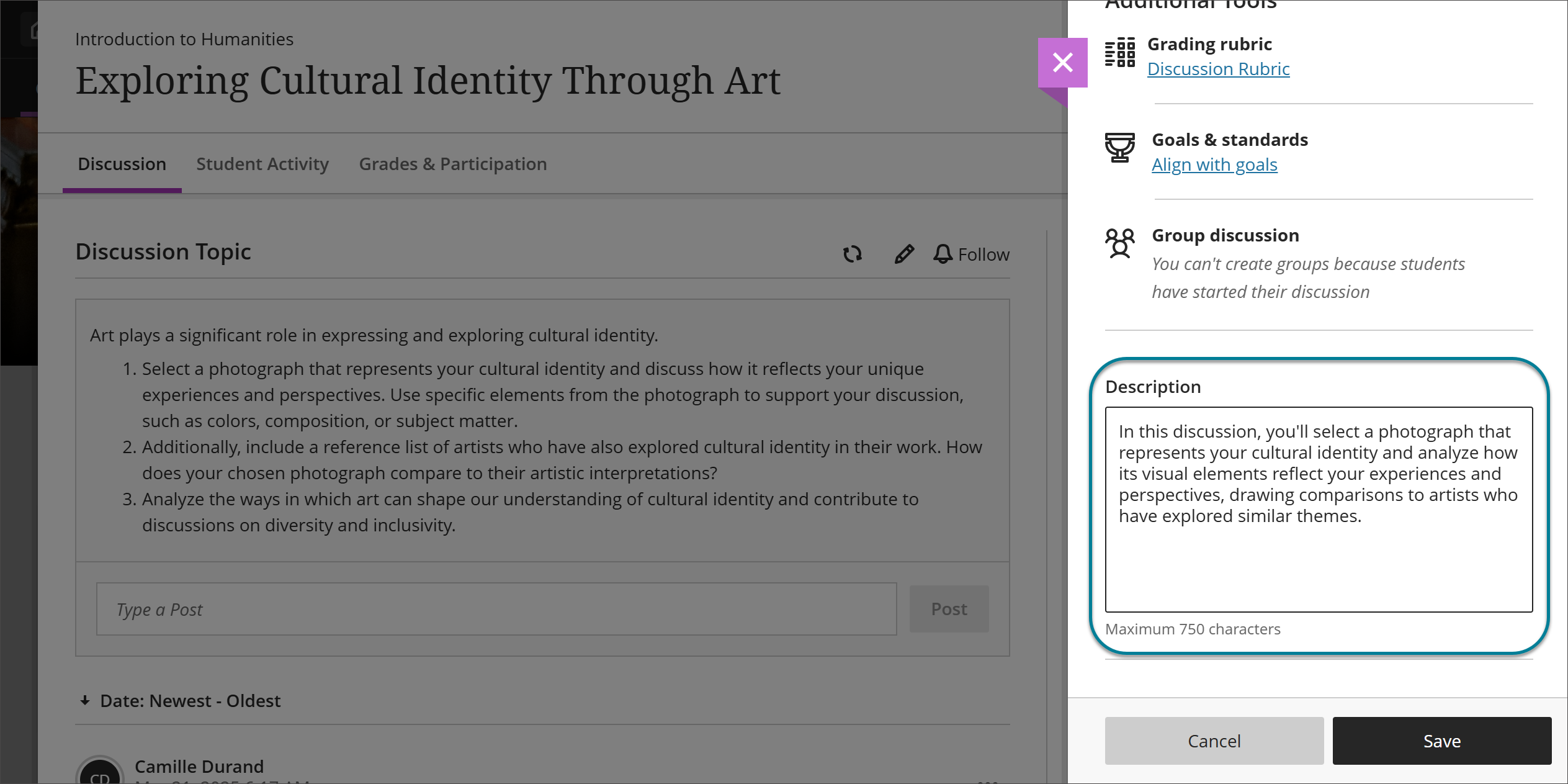 Image 2: Instructors can enter a description in the Description field for a Discussion.
With AI Conversations, instructors can now set a time limit on how long students spend in the activity. Two options are available, depending on how instructors want to structure the experience: instructors can time the assessment as a whole, or limit just the conversation portion itself. This keeps AI-supported activities consistent with the timing of other assessment types, and helps scaffold how long students should spend thinking before they respond.
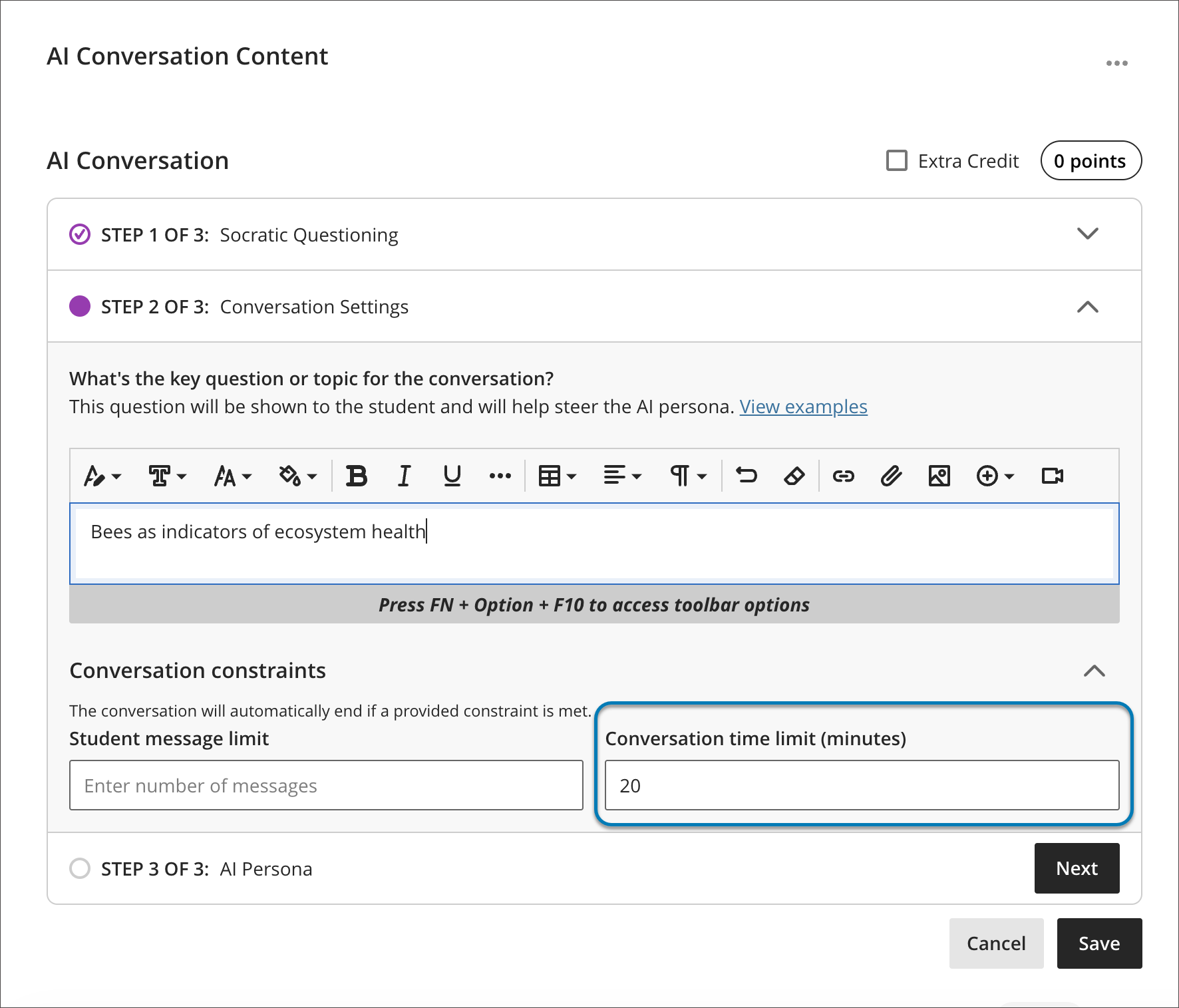 Image 3: Instructors can now set a time limit for either a student's AI conversation, or their written reflection after the chat.
Additional Updates
- Users can now view their favorite courses directly within the Course Switcher. A new Favorites tab surfaces courses marked as favorites on the Courses page, cutting down on trips back to the main Courses page.
- When a user starts a message and adds recipients, any existing conversation with those participants loads right away, making it easy to check recipients and context before sending. Longer conversations remain accessible by scrolling or by selecting "See previous messages" to load the full history.
When can you expect the update?
Faculty should see the latest updates in their Ultra courses around July 2-3, 2026. The next update to our Ultra test environment will take place on July 7, 2026; release notes will be posted to the What's New in Ultra page. Faculty who are interested in test driving new features before they are released to production should open an RT ticket to request early access. Please watch the FAQs, including the What's New with Ultra page, and myUMBC for additional information about Ultra.
Connect with Instructional Technology
As always, if you have any questions about teaching, learning, and technology at UMBC, please consider the following options:
]]>
This month's Ultra update provides a new report that gives instructors class-wide rubric data at a glance, and a dedicated field that separates discussion context from prompt. Paired with clearer...
Inline Image
https://assets2-my.umbc.edu/system/shared/attachments/89d8c7d82fc083572d2d5068227db9ac/6a6770fa/news/000/160/921/6ea5010e15c5c4ba5d6c03e6f8e66405/mceclip0.png?1783000900
https://my3.my.umbc.edu/api/v0/pixel/news/160921/guest@my.umbc.edu/3993f7a9d596386da78842811053997e/api/pixel
ai-conversations
assessments
blackboard
discussions
messages
rubrics
ultra-experience
ultra-update
Instructional Technology
https://my3.my.umbc.edu/groups/instructional-technology
https://assets2-my.umbc.edu/system/shared/avatars/groups/000/001/164/dec3b026b81ee6d890a8f82f75c94a2e/xsmall.png?1446126703
https://assets1-my.umbc.edu/system/shared/avatars/groups/000/001/164/dec3b026b81ee6d890a8f82f75c94a2e/original.png?1446126703
https://assets2-my.umbc.edu/system/shared/avatars/groups/000/001/164/dec3b026b81ee6d890a8f82f75c94a2e/xxlarge.png?1446126703
https://assets1-my.umbc.edu/system/shared/avatars/groups/000/001/164/dec3b026b81ee6d890a8f82f75c94a2e/xlarge.png?1446126703
https://assets1-my.umbc.edu/system/shared/avatars/groups/000/001/164/dec3b026b81ee6d890a8f82f75c94a2e/large.png?1446126703
https://assets4-my.umbc.edu/system/shared/avatars/groups/000/001/164/dec3b026b81ee6d890a8f82f75c94a2e/medium.png?1446126703
https://assets3-my.umbc.edu/system/shared/avatars/groups/000/001/164/dec3b026b81ee6d890a8f82f75c94a2e/small.png?1446126703
https://assets2-my.umbc.edu/system/shared/avatars/groups/000/001/164/dec3b026b81ee6d890a8f82f75c94a2e/xsmall.png?1446126703
https://assets3-my.umbc.edu/system/shared/avatars/groups/000/001/164/dec3b026b81ee6d890a8f82f75c94a2e/xxsmall.png?1446126703
Instructional Technology
https://assets1-my.umbc.edu/system/shared/thumbnails/news/000/160/921/00b50cbf16192a3c7e64154728bd8737/xxlarge.jpg?1783000760
https://assets2-my.umbc.edu/system/shared/thumbnails/news/000/160/921/00b50cbf16192a3c7e64154728bd8737/xlarge.jpg?1783000760
https://assets4-my.umbc.edu/system/shared/thumbnails/news/000/160/921/00b50cbf16192a3c7e64154728bd8737/large.jpg?1783000760
https://assets4-my.umbc.edu/system/shared/thumbnails/news/000/160/921/00b50cbf16192a3c7e64154728bd8737/medium.jpg?1783000760
https://assets2-my.umbc.edu/system/shared/thumbnails/news/000/160/921/00b50cbf16192a3c7e64154728bd8737/small.jpg?1783000760
https://assets1-my.umbc.edu/system/shared/thumbnails/news/000/160/921/00b50cbf16192a3c7e64154728bd8737/xsmall.jpg?1783000760
https://assets2-my.umbc.edu/system/shared/thumbnails/news/000/160/921/00b50cbf16192a3c7e64154728bd8737/xxsmall.jpg?1783000760
Notification bell above text “New to Ultra” and Blackboard logo.
3
0
true
Thu, 02 Jul 2026 10:29:54 -0400
Smarter Feedback and Flexible Rubric Improvements Arrive in the June Ultra Update
Turn every answer choice into a teachable moment
What if a wrong answer could teach just as much as a right one? This month’s Blackboard update brings tools that let instructors do exactly that: Guiding students not just to the correct response, but to a clearer understanding of why other options don't fit. Paired with a few improvements to how rubrics work in practice, this is a helpful update for anyone who invests time in thoughtful assessment design.
Answer-Level Feedback gives instructors a new way to turn multiple choice and multiple answer questions into active learning moments. When creating or editing a question, instructors can enable Option Feedback to reveal feedback text boxes beneath each individual answer choice. This makes it possible to explain why a particular option is correct or, just as usefully, why a common wrong answer misses the mark. Whether you're addressing frequent misconceptions or helping students self-correct on formative assessments, answer-level feedback adds a layer of guidance that goes well beyond a simple right/wrong indicator.
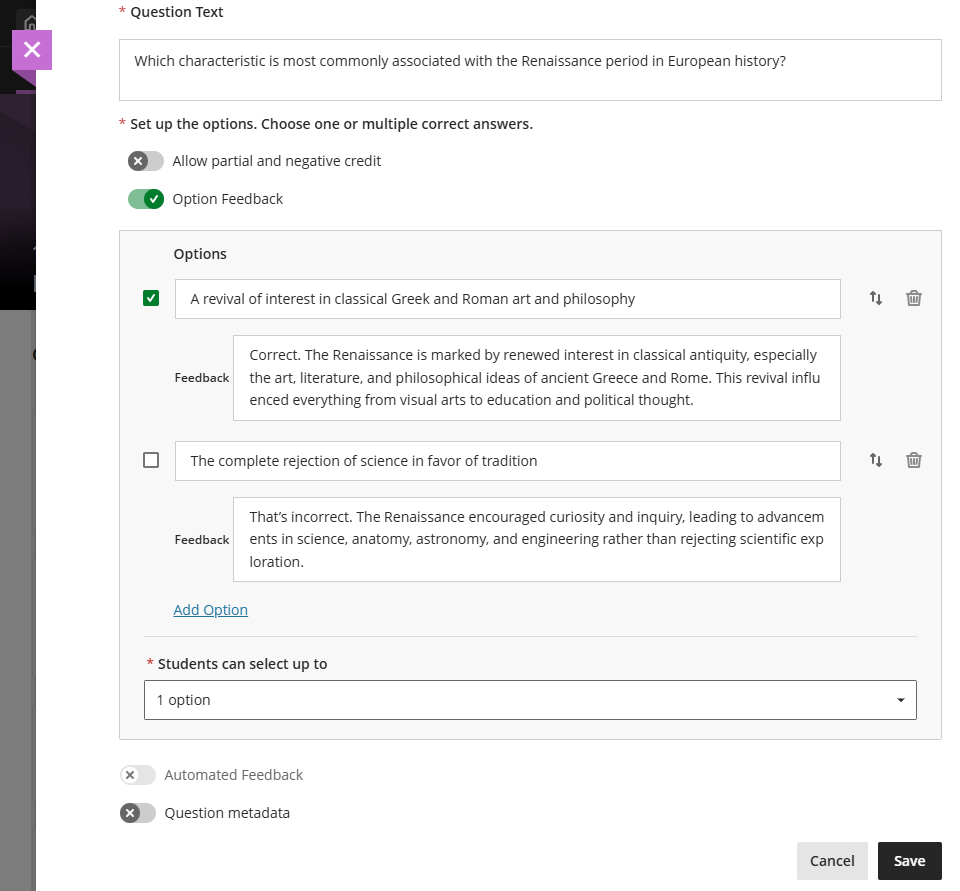
Image 1: Instructors can enter answer-level feedback.
Complementing this, Lock Answer in Fixed Position gives instructors precise control over how answer options behave when randomization is enabled. Specific choices, typically those like "None of the above" or "All of the above", can now be pinned to a fixed spot in the list, so they always appear where they belong regardless of how other options are shuffled. It's a small but meaningful quality-of-life improvement that keeps question logic intact without requiring instructors to abandon randomization.
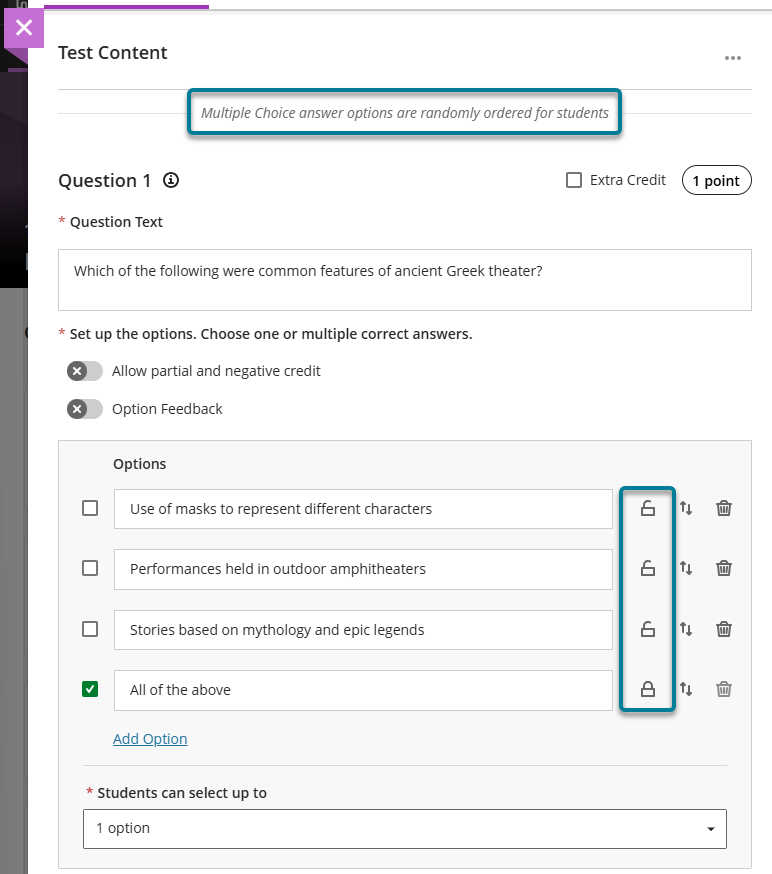
Image 2: Instructors can select the lock icon next to the answer option to lock that option in place. To trigger the lock icons, select Randomize answers in the Assessment Settings.
Rubric Usability Improvements address several practical friction points that instructors have encountered when grading with rubrics. First, instructors can now override a student's grade without locking the rubric, preserving the ability to go back and adjust rubric-based feedback after a grade has been modified. Second, criterion-level feedback is now available for both single and multiple attempts, giving instructors a place to leave targeted comments at the row level, not just at the overall submission level. Discussion and journal grades now save at the attempt level, improving consistency across multi-attempt workflows. Lastly, when a grade is entered directly in the rubric grade pill, it immediately updates the attempt grade, eliminating the extra step of manually syncing the two.
Finally, Instructors can now check which announcements a student has or hasn't read on the new Announcements tab of the Student Overview page, making it easier to follow up with students who may have missed important course communications.
When can you expect the update?
Faculty should see the latest updates in their Ultra courses around June 4-5, 2026. The next update to our Ultra test environment will take place on June 9, 2026; release notes will be posted to the What's New in Ultra page within two weeks. Faculty who are interested in test driving new features before they are released to production should open an RT ticket to request early access. Please watch the FAQs, including the What's New with Ultra page, and myUMBC for additional information about Ultra.
Connect with Instructional Technology
As always, if you have any questions about teaching, learning, and technology at UMBC, please consider the following options:
]]>
What if a wrong answer could teach just as much as a right one? This month’s Blackboard update brings tools that let instructors do exactly that: Guiding students not just to the correct response,...
Inline Image
https://assets4-my.umbc.edu/system/shared/attachments/5b686dee74843d188f33e208abe6dd57/6a6770fa/news/000/160/397/93a22f09b6382ead944e94abc94b79d3/blobid0.png?1779977986
https://my3.my.umbc.edu/api/v0/pixel/news/160397/guest@my.umbc.edu/b2c5b9b18800d7de976d373cd87a5fcb/api/pixel
assessments
blackboard
rubrics
ultra-experience
ultra-update
Instructional Technology
https://my3.my.umbc.edu/groups/instructional-technology
https://assets2-my.umbc.edu/system/shared/avatars/groups/000/001/164/dec3b026b81ee6d890a8f82f75c94a2e/xsmall.png?1446126703
https://assets1-my.umbc.edu/system/shared/avatars/groups/000/001/164/dec3b026b81ee6d890a8f82f75c94a2e/original.png?1446126703
https://assets2-my.umbc.edu/system/shared/avatars/groups/000/001/164/dec3b026b81ee6d890a8f82f75c94a2e/xxlarge.png?1446126703
https://assets1-my.umbc.edu/system/shared/avatars/groups/000/001/164/dec3b026b81ee6d890a8f82f75c94a2e/xlarge.png?1446126703
https://assets1-my.umbc.edu/system/shared/avatars/groups/000/001/164/dec3b026b81ee6d890a8f82f75c94a2e/large.png?1446126703
https://assets4-my.umbc.edu/system/shared/avatars/groups/000/001/164/dec3b026b81ee6d890a8f82f75c94a2e/medium.png?1446126703
https://assets3-my.umbc.edu/system/shared/avatars/groups/000/001/164/dec3b026b81ee6d890a8f82f75c94a2e/small.png?1446126703
https://assets2-my.umbc.edu/system/shared/avatars/groups/000/001/164/dec3b026b81ee6d890a8f82f75c94a2e/xsmall.png?1446126703
https://assets3-my.umbc.edu/system/shared/avatars/groups/000/001/164/dec3b026b81ee6d890a8f82f75c94a2e/xxsmall.png?1446126703
Instructional Technology
https://assets2-my.umbc.edu/system/shared/thumbnails/news/000/160/397/4ed39ce4a7e4827f54682440df66168c/xxlarge.jpg?1779977770
https://assets1-my.umbc.edu/system/shared/thumbnails/news/000/160/397/4ed39ce4a7e4827f54682440df66168c/xlarge.jpg?1779977770
https://assets2-my.umbc.edu/system/shared/thumbnails/news/000/160/397/4ed39ce4a7e4827f54682440df66168c/large.jpg?1779977770
https://assets1-my.umbc.edu/system/shared/thumbnails/news/000/160/397/4ed39ce4a7e4827f54682440df66168c/medium.jpg?1779977770
https://assets4-my.umbc.edu/system/shared/thumbnails/news/000/160/397/4ed39ce4a7e4827f54682440df66168c/small.jpg?1779977770
https://assets1-my.umbc.edu/system/shared/thumbnails/news/000/160/397/4ed39ce4a7e4827f54682440df66168c/xsmall.jpg?1779977770
https://assets4-my.umbc.edu/system/shared/thumbnails/news/000/160/397/4ed39ce4a7e4827f54682440df66168c/xxsmall.jpg?1779977770
Notification bell above text “New to Ultra” and Blackboard logo.
2
0
true
Thu, 28 May 2026 10:32:25 -0400
New grading features include no points rubric & text-based column for Ultra courses in May update
Updated assessment setting & discussion enhancements
The May 2025 Ultra release delivers several meaningful updates that improve how faculty assess student work, support engagement, and manage course tools. From expanded rubric options to accessible grading workflows, these changes are designed to align with effective teaching practices and support a more inclusive, student-centered experience.
Qualitative, No-Points Rubrics
Instructors can now create and use no-points rubrics in Ultra, a powerful option for qualitative evaluation. These rubrics allow instructors to provide rich, criterion-based feedback without assigning numerical values -- perfect for assignments focused on reflection, creativity, process, or formative assessment. In addition, faculty can leverage the AI assistant to generate descriptive evaluation criteria for no-points rubrics.

Image 1: Example of no-points rubric creation screen
Text-Based Columns in the Gradebook
A new Gradebook feature allows instructors to create text-based columns (up to 32 characters). These flexible columns are not restricted to text-only input and can include a description for context. Instructors can control student visibility, sort values in Grid view, and download the data. This update is especially useful for organizing students, tracking informal feedback, or adding flexibility to the Gradebook without tying everything to a numeric score.

Image 2: Inserting a text-based column in the gradable items tab
Test Submission Review – View Once
A new test setting, “View submission one time,” allows students to review their test responses and feedback just once after submission. Instructors must first enable the “Allow students to view their submission” setting, after which this option becomes available. This strikes a balance between transparency and academic integrity, offering students a chance to learn from their errors while reducing the risk of content sharing.

Image 3: Selecting the one-time view submission assessment setting
Enhanced AI Conversation Tool
The AI Conversation tool has been upgraded to optionally generate three key elements: a conversation title, a persona, and a reflection question. Instructors can further refine the suggestions by adjusting complexity, providing additional context, or pulling from course materials. This makes it easier to create rich dialogue prompts that encourage critical thinking and metacognition.
Gradebook Accessibility Enhancements
The Gradable Items view in the Gradebook has been redesigned to improve accessibility and navigation for users relying on screen readers or keyboard-only navigation. The new table-based layout provides more intuitive movement across cells using arrow keys and includes proper header and row announcements. These enhancements help ensure all instructors and teaching assistants, regardless of ability, can manage course grading with greater ease.
Discussion Board Improvements
Several updates make Ultra Discussions more intuitive and user-friendly. Terminology has been streamlined, replacing “responses” with “posts” for clarity, and the input field now prompts users to “Post a response to the discussion.” Instructor posts are clearly labeled, reply boxes are directly below the topic for better flow, and unnecessary interface elements, such as avatars and large banners, have been removed or simplified. These changes reduce cognitive load, improve mobile usability, and create a smoother, more accessible discussion experience for both students and faculty.
When you can expect the update
Faculty should see the latest updates in their Ultra courses around May 1-2 2025. The next update to our Ultra test environment will take place on May 6, 2025; release notes are posted to the What's New in Ultra that same week. Faculty who are interested in test driving new features before they are released to production should open an RT ticket to request early access. Please watch the FAQs, including the What's New with Ultra page, and myUMBC for additional information about Ultra.
Curious about the all latest features in Ultra? Join our What's New in Ultra Courses for Teaching & Learning SU2025 webinar on May 12, 2025.
Connect with Instructional Technology
As always, if you have any questions about teaching, learning, and technology at UMBC, please consider the following options:
Thumbnail-image: New to Ultra [decorative]
]]>
The May 2025 Ultra release delivers several meaningful updates that improve how faculty assess student work, support engagement, and manage course tools. From expanded rubric options to accessible...
https://my3.my.umbc.edu/groups/instructional-technology/posts/149574
https://my3.my.umbc.edu/api/v0/pixel/news/149574/guest@my.umbc.edu/30f337fd201edf6ac6af17a5ecdb5df1/api/pixel
ai-conversations
blackboard
gradebook
grading
rubrics
ultra-experience
ultra-update
Instructional Technology
https://my3.my.umbc.edu/groups/instructional-technology
https://assets2-my.umbc.edu/system/shared/avatars/groups/000/001/164/dec3b026b81ee6d890a8f82f75c94a2e/xsmall.png?1446126703
https://assets1-my.umbc.edu/system/shared/avatars/groups/000/001/164/dec3b026b81ee6d890a8f82f75c94a2e/original.png?1446126703
https://assets2-my.umbc.edu/system/shared/avatars/groups/000/001/164/dec3b026b81ee6d890a8f82f75c94a2e/xxlarge.png?1446126703
https://assets1-my.umbc.edu/system/shared/avatars/groups/000/001/164/dec3b026b81ee6d890a8f82f75c94a2e/xlarge.png?1446126703
https://assets1-my.umbc.edu/system/shared/avatars/groups/000/001/164/dec3b026b81ee6d890a8f82f75c94a2e/large.png?1446126703
https://assets4-my.umbc.edu/system/shared/avatars/groups/000/001/164/dec3b026b81ee6d890a8f82f75c94a2e/medium.png?1446126703
https://assets3-my.umbc.edu/system/shared/avatars/groups/000/001/164/dec3b026b81ee6d890a8f82f75c94a2e/small.png?1446126703
https://assets2-my.umbc.edu/system/shared/avatars/groups/000/001/164/dec3b026b81ee6d890a8f82f75c94a2e/xsmall.png?1446126703
https://assets3-my.umbc.edu/system/shared/avatars/groups/000/001/164/dec3b026b81ee6d890a8f82f75c94a2e/xxsmall.png?1446126703
Instructional Technology
https://assets3-my.umbc.edu/system/shared/thumbnails/news/000/149/574/62a5ed14ccc0dc07a93d275cc71ae511/xxlarge.jpg?1745928158
https://assets3-my.umbc.edu/system/shared/thumbnails/news/000/149/574/62a5ed14ccc0dc07a93d275cc71ae511/xlarge.jpg?1745928158
https://assets2-my.umbc.edu/system/shared/thumbnails/news/000/149/574/62a5ed14ccc0dc07a93d275cc71ae511/large.jpg?1745928158
https://assets2-my.umbc.edu/system/shared/thumbnails/news/000/149/574/62a5ed14ccc0dc07a93d275cc71ae511/medium.jpg?1745928158
https://assets3-my.umbc.edu/system/shared/thumbnails/news/000/149/574/62a5ed14ccc0dc07a93d275cc71ae511/small.jpg?1745928158
https://assets1-my.umbc.edu/system/shared/thumbnails/news/000/149/574/62a5ed14ccc0dc07a93d275cc71ae511/xsmall.jpg?1745928158
https://assets3-my.umbc.edu/system/shared/thumbnails/news/000/149/574/62a5ed14ccc0dc07a93d275cc71ae511/xxsmall.jpg?1745928158
Black and white robot dog running with the words "New to Ultra" written on light turquoise background
2
0
true
Tue, 29 Apr 2025 08:44:48 -0400
Fri, 23 May 2025 12:10:53 -0400
April update to Ultra features flexible grading in groups, printing support for Ultra documents & accessibility support for Office Math
New learning object repository designed for flexible content
The April release introduce several new features aimed at improving content management, grading flexibility, and student feedback tracking.
Instructors and students can now print Ultra Documents or save them as PDFs. This feature facilitates offline content review, sharing with peers, or creating physical copies. Note that if knowledge checks are included and already completed, they will display selected answers and instructor feedback when printed.

Image 1: Example of new print Ultra Document feature
A major addition this month is the Learning Object Repository (LOR), designed to centralize resources across courses and organizations. Instructors can copy objects from the LOR while maintaining control over settings such as availability. Updates made to objects in the LOR are automatically reflected across associated courses, making it easier to manage institutional content like policy documents.
Content Creation & Management
- When performing a whole course copy, achievements are now automatically included, allowing instructors to maintain consistent recognition across course iterations. However, achievements are not included in granular content copies.
- Instructors can now access Achievements through the Student Preview.
Accessibility
- Ally's document conversion process is upgraded to include the first version of support for Office Math found in Microsoft Word documents. Students downloading the HTML and BeeLine Reader Alternative Formats will now see the math equations rendered as MathML via MathJax in their browser.
Communication & Engagement
- To improve communication within large courses, the Course Activity Report now includes clear labels when sending messages: All students, selected students, selected students with alerts, or selected students without alerts. This improvement helps instructors better manage communication, especially when addressing students with specific needs.
- The color of the activity indicator for discussions, journals, and conversations is changed from blue to purple to better unify the color scheme in Ultra.
Assessments & Grading
- Flexible Grading is introduced for group assignments and tests. Though some features (like per-question feedback on group tests) are not yet available, this update is part of ongoing improvements to group grading.
- A new feedback indicator on the student Overview page now shows whether students have reviewed their feedback. The indicator updates from “Not reviewed” to “Reviewed” with a timestamp, giving instructors greater insight into student engagement with their feedback.
- A new “Results” column in the Gradebook replaces the “Feedback” column, making it more intuitive for students to view their grades and feedback.
Faculty should see the latest updates in their Ultra courses around April 4-5 2025. The next update to our Ultra test environment will take place on April 8, 2025; release notes are posted to the What's New in Ultra that same week. Faculty who are interested in test driving new features before they are released to production should open an RT ticket to request early access. Please watch the FAQs, including the What's New with Ultra page, and myUMBC for additional information about Ultra.
Curious about the all latest features in Ultra? Join our What's New in Ultra Courses for Teaching & Learning SU2025 webinar on May 12, 2025.
Connect with Instructional Technology
As always, if you have any questions about teaching, learning, and technology at UMBC, please consider the following options:
Thumbnail-image: New to Ultra [decorative]
]]>
The April release introduce several new features aimed at improving content management, grading flexibility, and student feedback tracking. Instructors and students can now print Ultra Documents...
https://my3.my.umbc.edu/groups/instructional-technology/posts/148527
https://my3.my.umbc.edu/api/v0/pixel/news/148527/guest@my.umbc.edu/98441a11c3906d0a32a59050674887a5/api/pixel
blackboard
gradebook
grading
groups
learning-object-repository
rubrics
ultra-experience
ultra-update
Instructional Technology
https://my3.my.umbc.edu/groups/instructional-technology
https://assets2-my.umbc.edu/system/shared/avatars/groups/000/001/164/dec3b026b81ee6d890a8f82f75c94a2e/xsmall.png?1446126703
https://assets1-my.umbc.edu/system/shared/avatars/groups/000/001/164/dec3b026b81ee6d890a8f82f75c94a2e/original.png?1446126703
https://assets2-my.umbc.edu/system/shared/avatars/groups/000/001/164/dec3b026b81ee6d890a8f82f75c94a2e/xxlarge.png?1446126703
https://assets1-my.umbc.edu/system/shared/avatars/groups/000/001/164/dec3b026b81ee6d890a8f82f75c94a2e/xlarge.png?1446126703
https://assets1-my.umbc.edu/system/shared/avatars/groups/000/001/164/dec3b026b81ee6d890a8f82f75c94a2e/large.png?1446126703
https://assets4-my.umbc.edu/system/shared/avatars/groups/000/001/164/dec3b026b81ee6d890a8f82f75c94a2e/medium.png?1446126703
https://assets3-my.umbc.edu/system/shared/avatars/groups/000/001/164/dec3b026b81ee6d890a8f82f75c94a2e/small.png?1446126703
https://assets2-my.umbc.edu/system/shared/avatars/groups/000/001/164/dec3b026b81ee6d890a8f82f75c94a2e/xsmall.png?1446126703
https://assets3-my.umbc.edu/system/shared/avatars/groups/000/001/164/dec3b026b81ee6d890a8f82f75c94a2e/xxsmall.png?1446126703
Instructional Technology
https://assets4-my.umbc.edu/system/shared/thumbnails/news/000/148/527/2bcf512b1e78e7541b0a4d36471ecf1b/xxlarge.jpg?1743523823
https://assets3-my.umbc.edu/system/shared/thumbnails/news/000/148/527/2bcf512b1e78e7541b0a4d36471ecf1b/xlarge.jpg?1743523823
https://assets4-my.umbc.edu/system/shared/thumbnails/news/000/148/527/2bcf512b1e78e7541b0a4d36471ecf1b/large.jpg?1743523823
https://assets4-my.umbc.edu/system/shared/thumbnails/news/000/148/527/2bcf512b1e78e7541b0a4d36471ecf1b/medium.jpg?1743523823
https://assets1-my.umbc.edu/system/shared/thumbnails/news/000/148/527/2bcf512b1e78e7541b0a4d36471ecf1b/small.jpg?1743523823
https://assets4-my.umbc.edu/system/shared/thumbnails/news/000/148/527/2bcf512b1e78e7541b0a4d36471ecf1b/xsmall.jpg?1743523823
https://assets2-my.umbc.edu/system/shared/thumbnails/news/000/148/527/2bcf512b1e78e7541b0a4d36471ecf1b/xxsmall.jpg?1743523823
White and blue robot dog running against a light turquoise background with the "New to Ultra"
2
0
true
Tue, 01 Apr 2025 12:46:50 -0400
Tue, 29 Apr 2025 08:02:34 -0400
Printable, pop-out rubrics & new course reports for goal tracking available in March's Ultra update
Improvements to discussion formatting & AI image rendering
In March, Ultra's update includes two new course reports, an exciting rubric enhancement requested by faculty, and improvements to the AI Course Design Assistant.
Located on the Analytics page, the two new course reports focus on goals. The Course Goal Coverage Report provides a comprehensive view of goal coverage in the course, including a detailed breakdown of course items aligned with goals. The Course Goal Performance Report evaluates how a course meets selected goals, including a detailed breakdown for individual students and goals. These reports do not include third-party tools and uses snapshot data that is up to 24 hours old.
Instructors will be able to pop out the grading rubric into a separate window when grading an assignment. Formatted in a grid view, the pop-out rubric is a separate, movable window. Popping out a rubric allows an instructor to view a student's submission and the rubric side-by-side for a more efficient grading experience. However, the expand icon for popping out a rubric will only appear if the primary browser window is sufficiently large enough to display enough of the course page. Instructors will be able to print a blank or completed rubric using their browser's print function.

Image 1: Example of new pop-out rubric
Content Creation & Management
AI Course Design Assistant
Communication & Engagement
-
Long discussion posts are now fully visible without scrolling.
- Posts have a gray background for better contrast.
- The number of posts and replies now appears on the discussion home page, replacing the total response counter.
- The Edit button is now directly accessible from each post.
Assessments & Grading
- If an instructor hides an assessment while students are actively taking it, those with the test open can continue without disruption.
- Instructors can configure the visibility of calculated columns from Items Management, streamlining the gradebook view. (Note: The Overall Grade column remains visible at all times.)
- The layout for the Test Submission Page for students now mirrors the assignment submission page update from September 2024, ensuring feedback is clearly presented.
Faculty should see the latest updates in their Ultra courses around March 6-7, 2025. The next update to our Ultra test environment will take place on March 11, 2025; release notes are posted to the What's New in Ultra that same week. Faculty who are interested in test driving new features before they are released to production should open an RT ticket to request early access. Please watch the FAQs, including the What's New with Ultra page, and myUMBC for additional information about Ultra.
Connect with Instructional Technology
As always, if you have any questions about teaching, learning, and technology at UMBC, please consider the following options:
Thumbnail-image: New to Ultra [decorative]
]]>
In March, Ultra's update includes two new course reports, an exciting rubric enhancement requested by faculty, and improvements to the AI Course Design Assistant. Located on the Analytics page,...
https://my3.my.umbc.edu/groups/instructional-technology/posts/147894
https://my3.my.umbc.edu/api/v0/pixel/news/147894/guest@my.umbc.edu/e6e8edee0b3c9f78f532dec53a99b68c/api/pixel
ai-design-assistant
blackboard
discussions
goals-report
gradebook
grading
rubrics
ultra-experience
ultra-update
Instructional Technology
https://my3.my.umbc.edu/groups/instructional-technology
https://assets2-my.umbc.edu/system/shared/avatars/groups/000/001/164/dec3b026b81ee6d890a8f82f75c94a2e/xsmall.png?1446126703
https://assets1-my.umbc.edu/system/shared/avatars/groups/000/001/164/dec3b026b81ee6d890a8f82f75c94a2e/original.png?1446126703
https://assets2-my.umbc.edu/system/shared/avatars/groups/000/001/164/dec3b026b81ee6d890a8f82f75c94a2e/xxlarge.png?1446126703
https://assets1-my.umbc.edu/system/shared/avatars/groups/000/001/164/dec3b026b81ee6d890a8f82f75c94a2e/xlarge.png?1446126703
https://assets1-my.umbc.edu/system/shared/avatars/groups/000/001/164/dec3b026b81ee6d890a8f82f75c94a2e/large.png?1446126703
https://assets4-my.umbc.edu/system/shared/avatars/groups/000/001/164/dec3b026b81ee6d890a8f82f75c94a2e/medium.png?1446126703
https://assets3-my.umbc.edu/system/shared/avatars/groups/000/001/164/dec3b026b81ee6d890a8f82f75c94a2e/small.png?1446126703
https://assets2-my.umbc.edu/system/shared/avatars/groups/000/001/164/dec3b026b81ee6d890a8f82f75c94a2e/xsmall.png?1446126703
https://assets3-my.umbc.edu/system/shared/avatars/groups/000/001/164/dec3b026b81ee6d890a8f82f75c94a2e/xxsmall.png?1446126703
Instructional Technology
https://assets4-my.umbc.edu/system/shared/thumbnails/news/000/147/894/ec6e8c09f9cef4bb5fbd2ad4eca4e52b/xxlarge.jpg?1741273369
https://assets4-my.umbc.edu/system/shared/thumbnails/news/000/147/894/ec6e8c09f9cef4bb5fbd2ad4eca4e52b/xlarge.jpg?1741273369
https://assets4-my.umbc.edu/system/shared/thumbnails/news/000/147/894/ec6e8c09f9cef4bb5fbd2ad4eca4e52b/large.jpg?1741273369
https://assets4-my.umbc.edu/system/shared/thumbnails/news/000/147/894/ec6e8c09f9cef4bb5fbd2ad4eca4e52b/medium.jpg?1741273369
https://assets4-my.umbc.edu/system/shared/thumbnails/news/000/147/894/ec6e8c09f9cef4bb5fbd2ad4eca4e52b/small.jpg?1741273369
https://assets2-my.umbc.edu/system/shared/thumbnails/news/000/147/894/ec6e8c09f9cef4bb5fbd2ad4eca4e52b/xsmall.jpg?1741273369
https://assets4-my.umbc.edu/system/shared/thumbnails/news/000/147/894/ec6e8c09f9cef4bb5fbd2ad4eca4e52b/xxsmall.jpg?1741273369
Black and white robot dog running with the words "New to Ultra" written on light turquoise background
1
0
true
Thu, 06 Mar 2025 10:52:18 -0500
Tue, 29 Apr 2025 11:50:17 -0400