Redesigned Groups, Cascading Release Conditions in the May Ultra Update
Smarter tools for course design and student support
Have you ever spent more time wrestling with Blackboard's Groups tool than actually designing the group work itself, especially in a large course? The May Ultra update delivers meaningful improvements across course management, giving instructors more flexibility and students more clarity from day one.
Groups Management receive a significant overhaul in this release. Blackboard redesigned the entire Groups experience to address long-standing usability challenges, particularly in large courses where creating, organizing, and managing groups has historically been cumbersome. The updated interface is faster, clearer, and more consistent across group types, so instructors can spend less time configuring group logistics and more time designing the collaborative learning experiences that make group work meaningful.
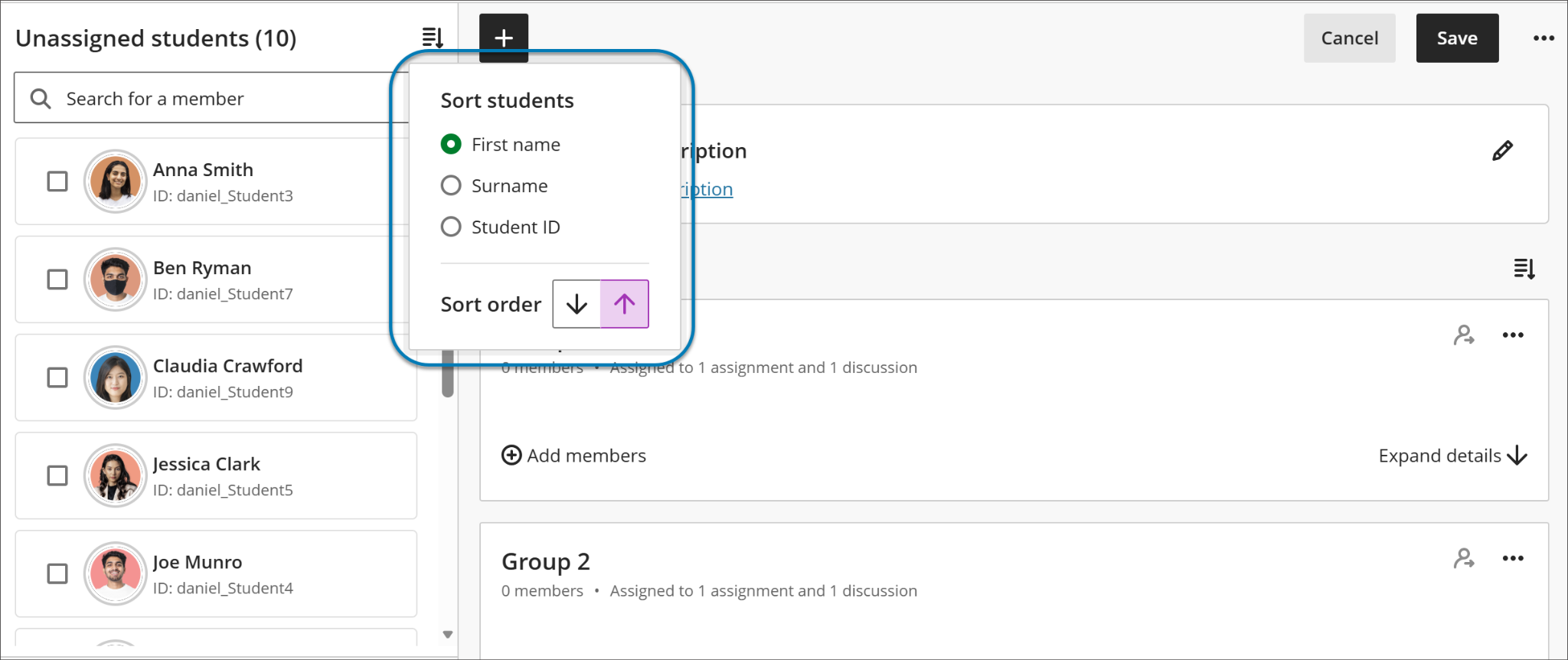
Image 1: Instructors can now sort group members by first or last name, student ID and sort groups by group name or number of members.
Release Conditions just got more transparent. Instructors can now view any release conditions inherited from a parent learning module or folder directly within the release conditions panel of an individual item. These inherited conditions appear in read-only format, giving instructors a complete picture of everything controlling an item's visibility -- both conditions set on the item itself and those cascading down from a parent container. This update also closes a gap where discussions hidden inside a learning module could still be accessed from the Discussions tab; discussions now fully respect the release conditions applied at the learning module level.
Additional updates for May include:
-
Course Switcher search: The Course Switcher now includes a search box, letting users find and navigate to any course by name or course ID, without browsing the full Courses page.
-
Discussion Due Date in Gradebook: The second due date for discussions now appears on the Gradebook's Overview and Gradable Items pages, helping instructors stay aware of discussions that need grading.
-
Document spacing improvements: Blackboard refined spacing and layout behavior in Documents to reduce unnecessary vertical white space, improving readability and visual balance across content items and images whether editing existing content, creating new content, or using AI-generated layouts.
-
Group filter carried into Flexible Grading: The group filter selected in the Gradebook grid view now persists when entering Flexible Grading. The active filter is displayed within the Flexible Grading view, reducing the need to re-filter after switching views.
When can you expect the update?
Faculty should see the latest updates in their Ultra courses around May 7-8, 2026. The next update to our Ultra test environment will take place on May 12, 2026; release notes will be posted to the What's New in Ultra page within two weeks. Faculty who are interested in test driving new features before they are released to production should open an RT ticket to request early access. Please watch the FAQs, including the What's New with Ultra page, and myUMBC for additional information about Ultra.
For additional information about the latest updates to Ultra, and to get a sneak peek at June’s release, please register for our What’s New in Ultra for Teaching & Learning SU2026, scheduled for Friday, May 15, 2026.
Connect with Instructional Technology
As always, if you have any questions about teaching, learning, and technology at UMBC, please consider the following options:
]]>
Have you ever spent more time wrestling with Blackboard's Groups tool than actually designing the group work itself, especially in a large course? The May Ultra update delivers meaningful...
Inline Image
https://assets2-my.umbc.edu/system/shared/attachments/339f89f07bc3f348196290eaf74e8592/6a340557/news/000/159/273/ad19862debc08ee50a8788bb8bf41dcf/blobid0.png?1777134649
https://my3.my.umbc.edu/api/v0/pixel/news/159273/guest@my.umbc.edu/58916919c4eec860f1a97bed4c44edab/api/pixel
blackboard
course-navigation
groups-management
ultra-docs
ultra-experience
ultra-update
Instructional Technology
https://my3.my.umbc.edu/groups/instructional-technology
https://assets2-my.umbc.edu/system/shared/avatars/groups/000/001/164/dec3b026b81ee6d890a8f82f75c94a2e/xsmall.png?1446126703
https://assets1-my.umbc.edu/system/shared/avatars/groups/000/001/164/dec3b026b81ee6d890a8f82f75c94a2e/original.png?1446126703
https://assets2-my.umbc.edu/system/shared/avatars/groups/000/001/164/dec3b026b81ee6d890a8f82f75c94a2e/xxlarge.png?1446126703
https://assets1-my.umbc.edu/system/shared/avatars/groups/000/001/164/dec3b026b81ee6d890a8f82f75c94a2e/xlarge.png?1446126703
https://assets1-my.umbc.edu/system/shared/avatars/groups/000/001/164/dec3b026b81ee6d890a8f82f75c94a2e/large.png?1446126703
https://assets4-my.umbc.edu/system/shared/avatars/groups/000/001/164/dec3b026b81ee6d890a8f82f75c94a2e/medium.png?1446126703
https://assets3-my.umbc.edu/system/shared/avatars/groups/000/001/164/dec3b026b81ee6d890a8f82f75c94a2e/small.png?1446126703
https://assets2-my.umbc.edu/system/shared/avatars/groups/000/001/164/dec3b026b81ee6d890a8f82f75c94a2e/xsmall.png?1446126703
https://assets3-my.umbc.edu/system/shared/avatars/groups/000/001/164/dec3b026b81ee6d890a8f82f75c94a2e/xxsmall.png?1446126703
Instructional Technology
https://assets2-my.umbc.edu/system/shared/thumbnails/news/000/159/273/9069d907179d9dff3ef421fe2f339309/xxlarge.jpg?1777385727
https://assets3-my.umbc.edu/system/shared/thumbnails/news/000/159/273/9069d907179d9dff3ef421fe2f339309/xlarge.jpg?1777385727
https://assets2-my.umbc.edu/system/shared/thumbnails/news/000/159/273/9069d907179d9dff3ef421fe2f339309/large.jpg?1777385727
https://assets4-my.umbc.edu/system/shared/thumbnails/news/000/159/273/9069d907179d9dff3ef421fe2f339309/medium.jpg?1777385727
https://assets2-my.umbc.edu/system/shared/thumbnails/news/000/159/273/9069d907179d9dff3ef421fe2f339309/small.jpg?1777385727
https://assets2-my.umbc.edu/system/shared/thumbnails/news/000/159/273/9069d907179d9dff3ef421fe2f339309/xsmall.jpg?1777385727
https://assets3-my.umbc.edu/system/shared/thumbnails/news/000/159/273/9069d907179d9dff3ef421fe2f339309/xxsmall.jpg?1777385727
Notification bell above text “New to Ultra” and Blackboard logo.
2
0
true
Tue, 05 May 2026 09:03:01 -0400
Set Multiple Due Dates for Discussions & Define Assignment Types in April Ultra Update
New tools for clarity, consistency, and control in your Ultr
Have you ever wanted students to see exactly what's expected of them in a discussion, without having to navigate back to the assignment details to check? Or needed to recognize that one group member's contribution deserved a different grade than the rest of the team? The April Ultra update delivers a focused set of improvements across discussions, assignments, grading, and AI-supported activities, giving instructors more precision over course structure and students more transparency throughout their work.
Building on December's participation requirements feature, instructors who create discussions with multiple due dates will now see both sets of requirements displayed consistently across the Course Content page, Discussion pages, the Gradebook (in both student and instructor views), and the instructor's Discussion analysis panel. Students no longer need to navigate back to a discussion to recall what's expected of them -- deadlines and requirements follow them through the workflow. This is especially useful in scaffolded discussions and different stages of engagement carry distinct expectations.
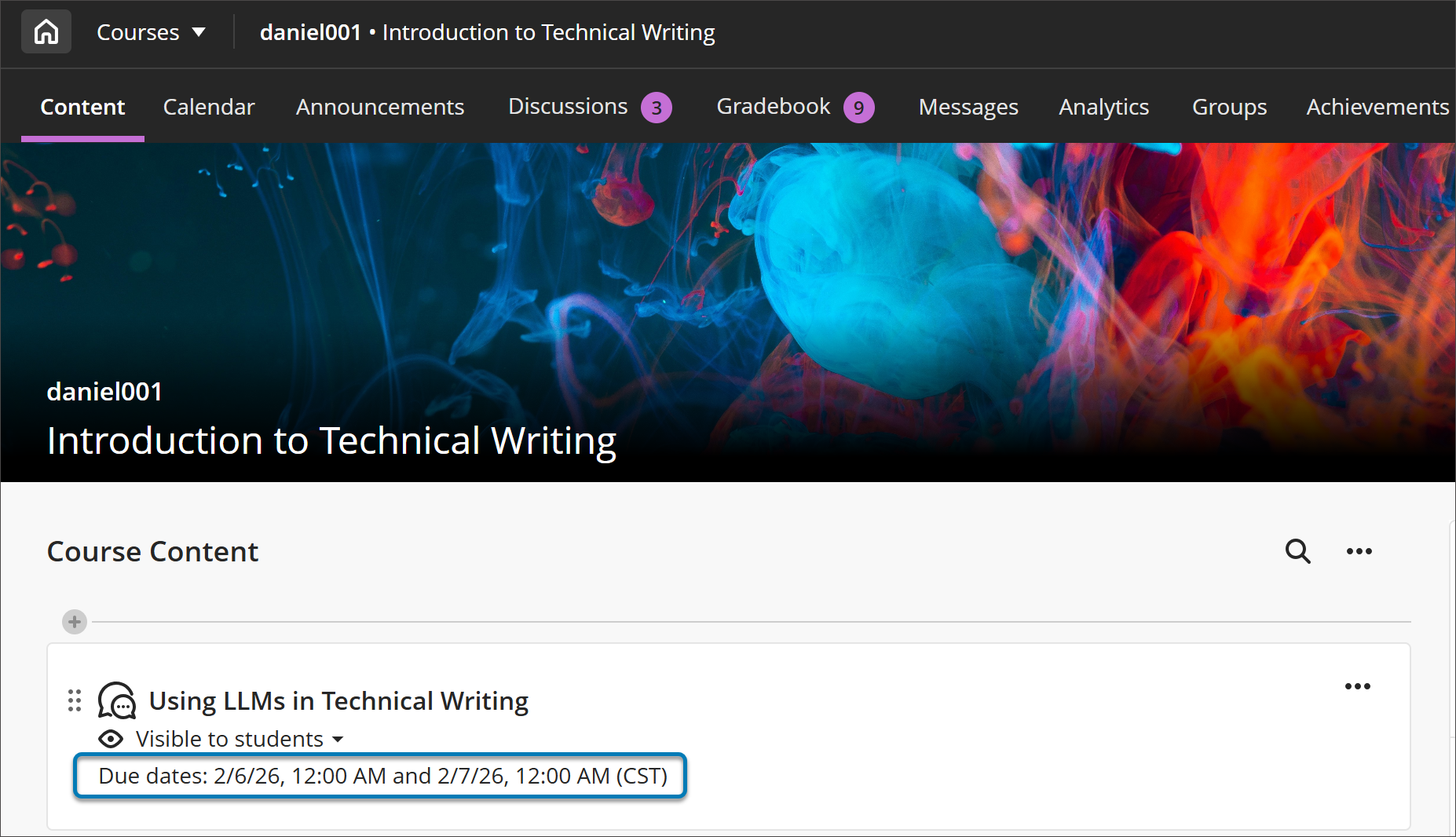
Image 1: On the Course Content page, both due dates and participation requirements are displayed. For all entry points for Discussions, both dates and requirements are displayed.
Instructors can now specify the expected submission type when creating or editing an assignment, choosing from File Upload or Text Entry (or both). When a submission type is selected, students see a streamlined workflow tailored to that format, which reduces confusion about how to submit and cuts down on the "wait, how do I turn this in?" questions at the start of an assignment. The selected type is visible in assignment settings and in student-facing details, and instructors can adjust the setting until students have begun submitting attempts, keeping flexibility intact during course setup without creating ambiguity once work is underway. In a future update to the assignment settings, instructors will be able to specify file types (e.g., Word document or PDF).
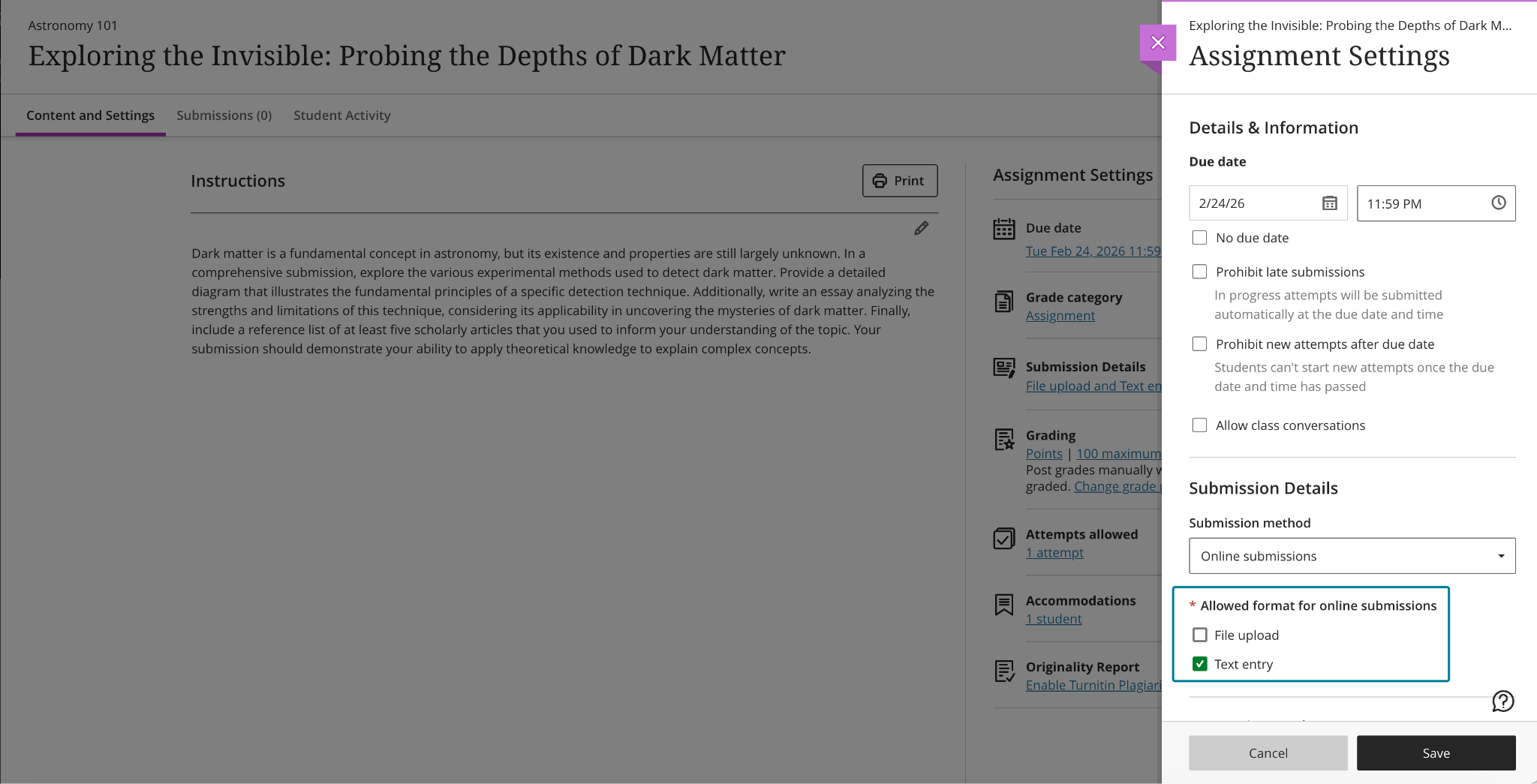
Image 2: Instructors can choose one or more submission types when configuring an assignment.
Instructors using AI-supported conversations can now set message limits (e.g., 8 messages) to guide the length of these interactions. These controls help students understand when a conversation is meant to conclude, keeping exchanges focused on the intended learning activity rather than drifting into open-ended dialogue. For instructors who rely on AI conversations to scaffold critical thinking or formative reflection, message limits offer a lightweight but meaningful way to design interactions with a clearer beginning, middle, and end.
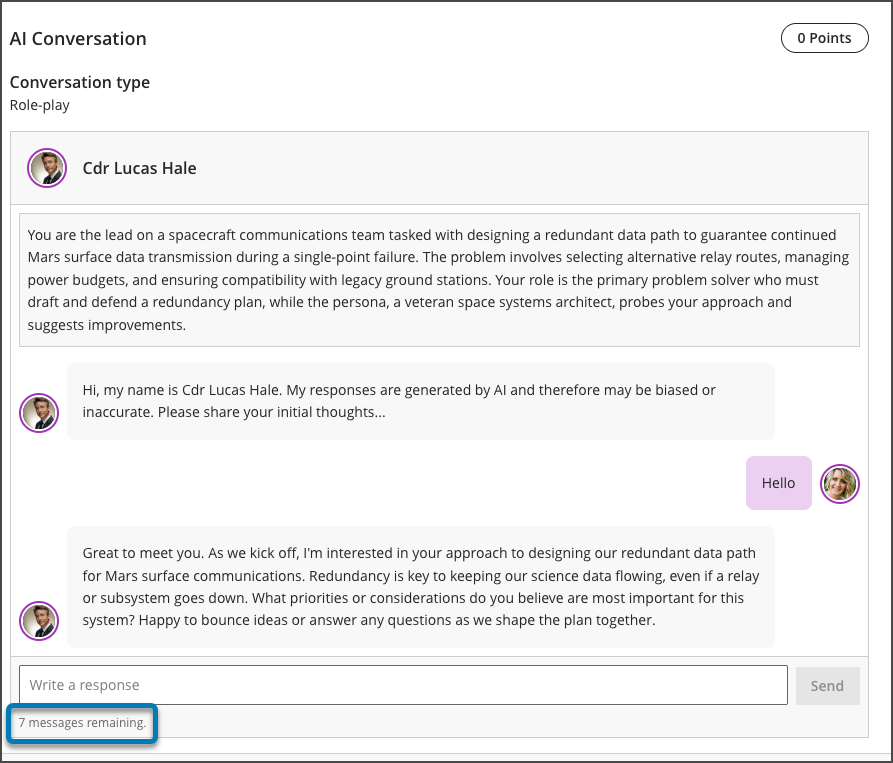
Image 3: Message limit settings for an AI conversation
Finally, instructors grading group work can now override a group attempt score for individual group members directly from the grading interface. When grades differ across group members, the interface clearly indicates this, and adjustments can be removed at any time by restoring a student's grade to match the group score. This gives instructors the flexibility to acknowledge uneven contribution or effort within a team without having to build workarounds outside the gradebook — a long-requested quality-of-life improvement for courses that rely heavily on collaborative assessments.
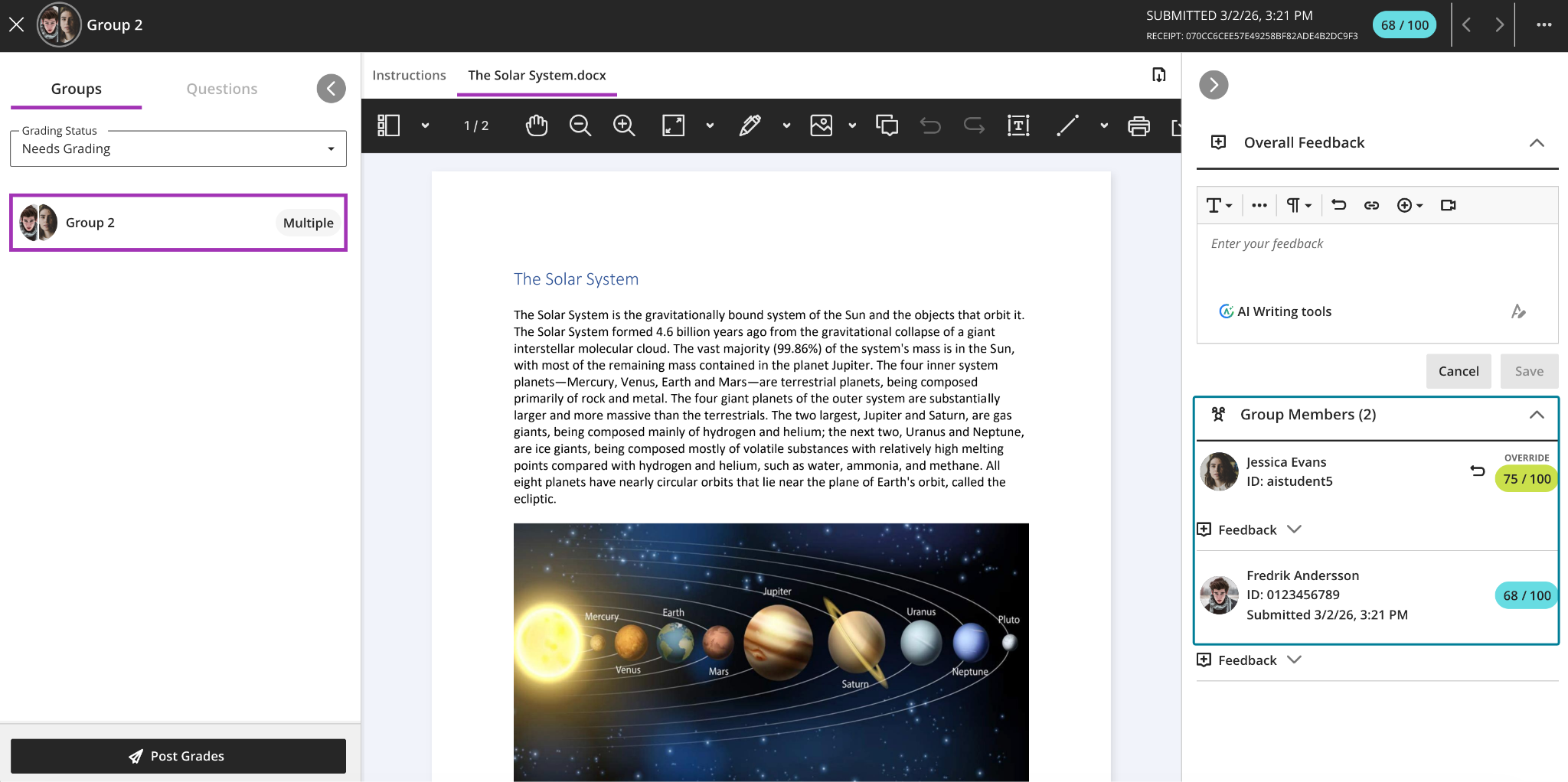
Image 4: Instructors can adjust grades for individual students within a group submission.
Additional updates for April include:
-
Announcement emails now display images, giving recipients a richer preview of content directly in their inbox. This improvement is particularly useful for visual-heavy announcements where the image itself is part of the message.
- The Discussion analysis pagewill label student posts and replies as Substantive Content and Non-substantive Content, making it easier to scan discussion quality at a glance, especially in large courses or discussions with high post volumes.
- Student names in Flexible Grading are now formatted as Surname, First Name by default, matching the default sort order and making it easier to locate students quickly. When sorting by First Name (ascending or descending), names display as First Name Surname.
- Based on instructor feedback, Blackboard made several refinements to multiple-choice and multiple-answer questions: the default number of selectable answer options for multiple-choice questions is now 1 (down from 4); instructors can now change the number of answer options a student may select when creating or editing a question; and alphabetical labels (A, B, C, D) have been restored to answer choices.
- The file size limit for SafeAssign DirectSubmit submissions has been raised to 25 MB, supporting larger documents that include images, tables, and complex formatting.
- When a course is copied, restored, or imported, any automations in that course will carry over as well. Copied automations are always inactive by default and must be reviewed and activated in the destination course before they will be sent.
When you can expect the update
Faculty should see the latest updates in their Ultra courses around April 2-3, 2026. The next update to our Ultra test environment will take place on April 14, 2026]; release notes are posted to the What's New in Ultra page. Faculty who are interested in test driving new features before they are released to production should open an RT ticket to request early access. Please watch the FAQs, including the What's New with Ultra page, and myUMBC for additional information about Ultra.
Connect with Instructional Technology
As always, if you have any questions about teaching, learning, and technology at UMBC, please consider the following options:
Thumbnail-image: New to Ultra [decorative]
]]>
Have you ever wanted students to see exactly what's expected of them in a discussion, without having to navigate back to the assignment details to check? Or needed to recognize that one group...
https://my3.my.umbc.edu/groups/instructional-technology/posts/155530
Inline Image
https://assets2-my.umbc.edu/system/shared/attachments/fe64bea38522eb1def10d90cec22c65c/6a340557/news/000/158/023/0ceb7c1f67445ac41abc09af58114e5c/blobid0.png?1774964242
https://my3.my.umbc.edu/api/v0/pixel/news/158023/guest@my.umbc.edu/f55a9ea50a145baaa7245ea4713df585/api/pixel
assessments
blackboard
course-navigation
ultra-docs
ultra-experience
ultra-update
Instructional Technology
https://my3.my.umbc.edu/groups/instructional-technology
https://assets2-my.umbc.edu/system/shared/avatars/groups/000/001/164/dec3b026b81ee6d890a8f82f75c94a2e/xsmall.png?1446126703
https://assets1-my.umbc.edu/system/shared/avatars/groups/000/001/164/dec3b026b81ee6d890a8f82f75c94a2e/original.png?1446126703
https://assets2-my.umbc.edu/system/shared/avatars/groups/000/001/164/dec3b026b81ee6d890a8f82f75c94a2e/xxlarge.png?1446126703
https://assets1-my.umbc.edu/system/shared/avatars/groups/000/001/164/dec3b026b81ee6d890a8f82f75c94a2e/xlarge.png?1446126703
https://assets1-my.umbc.edu/system/shared/avatars/groups/000/001/164/dec3b026b81ee6d890a8f82f75c94a2e/large.png?1446126703
https://assets4-my.umbc.edu/system/shared/avatars/groups/000/001/164/dec3b026b81ee6d890a8f82f75c94a2e/medium.png?1446126703
https://assets3-my.umbc.edu/system/shared/avatars/groups/000/001/164/dec3b026b81ee6d890a8f82f75c94a2e/small.png?1446126703
https://assets2-my.umbc.edu/system/shared/avatars/groups/000/001/164/dec3b026b81ee6d890a8f82f75c94a2e/xsmall.png?1446126703
https://assets3-my.umbc.edu/system/shared/avatars/groups/000/001/164/dec3b026b81ee6d890a8f82f75c94a2e/xxsmall.png?1446126703
Instructional Technology
https://assets2-my.umbc.edu/system/shared/thumbnails/news/000/158/023/1fc295ba00faa42cac2b4f387af7ff3a/xxlarge.jpg?1774964135
https://assets2-my.umbc.edu/system/shared/thumbnails/news/000/158/023/1fc295ba00faa42cac2b4f387af7ff3a/xlarge.jpg?1774964135
https://assets3-my.umbc.edu/system/shared/thumbnails/news/000/158/023/1fc295ba00faa42cac2b4f387af7ff3a/large.jpg?1774964135
https://assets3-my.umbc.edu/system/shared/thumbnails/news/000/158/023/1fc295ba00faa42cac2b4f387af7ff3a/medium.jpg?1774964135
https://assets4-my.umbc.edu/system/shared/thumbnails/news/000/158/023/1fc295ba00faa42cac2b4f387af7ff3a/small.jpg?1774964135
https://assets3-my.umbc.edu/system/shared/thumbnails/news/000/158/023/1fc295ba00faa42cac2b4f387af7ff3a/xsmall.jpg?1774964135
https://assets4-my.umbc.edu/system/shared/thumbnails/news/000/158/023/1fc295ba00faa42cac2b4f387af7ff3a/xxsmall.jpg?1774964135
Black and white robot dog running with the words "New to Ultra" written on light turquoise background
1
0
true
Fri, 03 Apr 2026 08:20:36 -0400
Simplified Course Navigation and Supercharged Test Setup with the January Ultra Release
Redesigned course layout and time-saving test tools
In January, UMBC faculty and students will experience a redesigned course navigation in Ultra that makes key areas easier to access and understand. The updated layout brings a full-width header with clearer course branding and improved use of screen space on desktop and mobile.
The new course navigation provides an update header, modernized banner layout, and Home button that returns users to the Blackboard landing page (rather than the courses page). You'll still have access to your Courses by using the snazzy Course Switcher, which provides shortcuts to the four most recently accessed courses, or you can choose View All to return to the Courses page again. Learn more about these improvements in our overview article.

Image 1: The refreshed user interface in courses includes full-screen course pages and improvements to enhance the amount of screen space for users to engage with their course.
The Ultra Document layout editor now includes a streamlined block editing menu, reorganized by type of action: Change row, Change size, and Change position. When selecting the edit icon on a block, instructors are guided through structured options rather than hunting through scattered icons. This improved layout reduces visual clutter and makes it easier to design responsive content layouts that look great on all devices. Whether you’re building an infographic-style document or organizing media and text in columns, these updates make layout control more intuitive and less time-consuming.
Image 2: The restructured document block styling options
True/False questions now support expanded labeling options, allowing instructors to display answer choices as True/False, Yes/No, Right/Wrong, or Agree/Disagree. These customizable labels make it easier to align assessments with your course content and instructional tone, whether you’re gauging conceptual understanding, ethical judgments, or student opinions in a low-stakes setting.

Image 3: True/false questions now include additional options.
Additional updates for January include:
- The default number of multiple choice answer options is now four (instead of three), helping speed up question creation.
- Instructors can now limit how many answer choices students can select for a multiple choice question, ideal for “select all that apply” formats.
- Ultra has significantly improved test loading times. For example, a 200-question test now loads in about 5 seconds (down from ~25), making large-format assessments more manageable.
- Instructors now have access to an automation activity log, which tracks when each automation was triggered, which student it applied to, and which content item was involved, providing transparency and accountability for automated course messaging.
When you can expect the update
Faculty should see the latest updates in their Ultra courses around January 8-9, 2026. The next update to our Ultra test environment will take place on January 13, 2026. Faculty who are interested in test driving new features before they are released to production should open an RT ticket to request early access. Please watch the FAQs, including the What's New with Ultra page, and myUMBC for additional information about Ultra. Join our What's New in Ultra for Teaching & Learning on January 13, 2026, to catch up on the latest updates.
Connect with Instructional Technology
As always, if you have any questions about teaching, learning, and technology at UMBC, please consider the following options:
Thumbnail-image: New to Ultra [decorative]
]]>
In January, UMBC faculty and students will experience a redesigned course navigation in Ultra that makes key areas easier to access and understand. The updated layout brings a full-width header...
https://my3.my.umbc.edu/groups/instructional-technology/posts/155530
https://my3.my.umbc.edu/api/v0/pixel/news/155530/guest@my.umbc.edu/1c67c3b88a99ae3c7591b7156481cb65/api/pixel
assessments
blackboard
course-navigation
ultra-docs
ultra-experience
ultra-update
Instructional Technology
https://my3.my.umbc.edu/groups/instructional-technology
https://assets2-my.umbc.edu/system/shared/avatars/groups/000/001/164/dec3b026b81ee6d890a8f82f75c94a2e/xsmall.png?1446126703
https://assets1-my.umbc.edu/system/shared/avatars/groups/000/001/164/dec3b026b81ee6d890a8f82f75c94a2e/original.png?1446126703
https://assets2-my.umbc.edu/system/shared/avatars/groups/000/001/164/dec3b026b81ee6d890a8f82f75c94a2e/xxlarge.png?1446126703
https://assets1-my.umbc.edu/system/shared/avatars/groups/000/001/164/dec3b026b81ee6d890a8f82f75c94a2e/xlarge.png?1446126703
https://assets1-my.umbc.edu/system/shared/avatars/groups/000/001/164/dec3b026b81ee6d890a8f82f75c94a2e/large.png?1446126703
https://assets4-my.umbc.edu/system/shared/avatars/groups/000/001/164/dec3b026b81ee6d890a8f82f75c94a2e/medium.png?1446126703
https://assets3-my.umbc.edu/system/shared/avatars/groups/000/001/164/dec3b026b81ee6d890a8f82f75c94a2e/small.png?1446126703
https://assets2-my.umbc.edu/system/shared/avatars/groups/000/001/164/dec3b026b81ee6d890a8f82f75c94a2e/xsmall.png?1446126703
https://assets3-my.umbc.edu/system/shared/avatars/groups/000/001/164/dec3b026b81ee6d890a8f82f75c94a2e/xxsmall.png?1446126703
Instructional Technology
https://assets3-my.umbc.edu/system/shared/thumbnails/news/000/155/530/d32a89c107e100b1724107fab41850db/xxlarge.jpg?1767710020
https://assets3-my.umbc.edu/system/shared/thumbnails/news/000/155/530/d32a89c107e100b1724107fab41850db/xlarge.jpg?1767710020
https://assets2-my.umbc.edu/system/shared/thumbnails/news/000/155/530/d32a89c107e100b1724107fab41850db/large.jpg?1767710020
https://assets3-my.umbc.edu/system/shared/thumbnails/news/000/155/530/d32a89c107e100b1724107fab41850db/medium.jpg?1767710020
https://assets2-my.umbc.edu/system/shared/thumbnails/news/000/155/530/d32a89c107e100b1724107fab41850db/small.jpg?1767710020
https://assets1-my.umbc.edu/system/shared/thumbnails/news/000/155/530/d32a89c107e100b1724107fab41850db/xsmall.jpg?1767710020
https://assets3-my.umbc.edu/system/shared/thumbnails/news/000/155/530/d32a89c107e100b1724107fab41850db/xxsmall.jpg?1767710020
Black and white robot dog running with the words "New to Ultra" written on light turquoise background
3
0
true
Tue, 06 Jan 2026 09:50:33 -0500
