<?xml version="1.0"?>
<News hasArchived="false" page="10" pageCount="62" pageSize="10" timestamp="Thu, 13 Aug 2026 13:07:04 -0400" url="https://my3.my.umbc.edu/groups/oer/posts.xml?mode=activity&amp;page=10">
<NewsItem contentIssues="true" id="147211" important="false" status="posted" url="https://my3.my.umbc.edu/groups/oer/posts/147211">
<Title>5 Steps to Prepare Your Go Online (GO) Kit for Snow Days &amp; Other Disruptions</Title>
<Tagline>Don&#8217;t let snow disrupt your course academic continuity plan!</Tagline>
<Body>
<![CDATA[
    <div class="html-content">
    <p>Classes can be postponed (or canceled) due to <a href="https://about.umbc.edu/inclement-weather-emergency-closing-policy/" rel="nofollow external" class="bo">inclement weather</a>, <a href="https://my3.my.umbc.edu/groups/announcements/posts/143973" rel="nofollow external" class="bo">utility</a> and <a href="https://my3.my.umbc.edu/groups/insights/posts/131778" rel="nofollow external" class="bo">infrastructure</a> breakdown, <a href="https://my3.my.umbc.edu/groups/insights/posts/91189" rel="nofollow external" class="bo">widespread illness</a>, or other emergencies. By preparing a <strong>Go Online (GO) Kit</strong>, you’ll be ready to transition seamlessly when in-person classes aren’t an option. Here are five steps to help you stay on track.</p>
    <p><strong>1. Stay connected and up-to-date on issues impacting whether your class might get canceled or postponed.</strong></p>
    <ul>
    <li>Sign up for <a href="http://my.umbc.edu/go/alerts" rel="nofollow external" class="bo">UMBC Emergency Alerts</a> to receive text notifications about closures, delays, or campus-wide emergencies.</li>
    <li>Follow <a href="https://my3.my.umbc.edu/groups/announcements" rel="nofollow external" class="bo">Campus Announcements on myUMBC</a> to stay up to date on any university-wide decisions affecting classes.</li>
    </ul>
    <p><strong>2. Identify instructional technologies you can use to support content distribution, active learning, and assessment.</strong></p>
    <ul>
    <li>Familiarize yourself with instructional technologies that <a href="https://doit.umbc.edu/itnm/academic-continuity/" rel="nofollow external" class="bo">support academic continuity using online teaching strategies and tools</a>, </li>
    <ul>
    <li>
    <a href="https://umbc.atlassian.net/wiki/spaces/faq/pages/30736882/Blackboard" rel="nofollow external" class="bo">Blackboard</a> for content distribution, assessments, and discussions.</li>
    <li>Web conferencing tools (<a href="https://umbc.atlassian.net/wiki/spaces/faq/pages/522944514/Google+Meet" rel="nofollow external" class="bo">Google Meet</a>, <a href="https://umbc.atlassian.net/wiki/spaces/faq/pages/30766726/Getting+Started+with+Microsoft+Teams" rel="nofollow external" class="bo">Microsoft Teams</a>, <a href="https://umbc.atlassian.net/wiki/spaces/faq/pages/30751886/Webex" rel="nofollow external" class="bo">Webex</a>) for live class sessions.</li>
    <li>
    <a href="https://umbc.atlassian.net/wiki/spaces/faq/pages/30745091/Panopto" rel="nofollow external" class="bo">Panopto</a> and <a href="https://umbc.atlassian.net/wiki/spaces/faq/pages/30744380/VoiceThread" rel="nofollow external" class="bo">VoiceThread</a> video recording for asynchronous lectures.</li>
    <li>Cloud storage (<a href="https://umbc.atlassian.net/wiki/spaces/faq/pages/30737685/Google+Drive" rel="nofollow external" class="bo">Google Drive</a>, <a href="https://umbc.atlassian.net/wiki/spaces/faq/pages/30739841/Box" rel="nofollow external" class="bo">Box</a>, or <a href="https://umbc.atlassian.net/wiki/spaces/faq/pages/30760779/OneDrive" rel="nofollow external" class="bo">OneDrive</a>) for large file sharing.</li>
    <li><a href="https://umbc.atlassian.net/wiki/x/kBvVAQ" rel="nofollow external" class="bo">Other instructional technologies</a></li>
    </ul>
    <li>Test your setup in advance -- check your internet connection, explore Blackboard and <a href="https://umbc.atlassian.net/wiki/x/kBvVAQ" rel="nofollow external" class="bo">other instructional technologies</a>, and practice using web conferencing tools so you can troubleshoot issues to minimize disruptions when switching to online instruction.</li>
    </ul>
    <div>
    <p><strong>3. When classes are canceled or postponed, communicate expectations and next steps with students.</strong></p>
    <ul>
    <li>Notify students as soon as possible about schedule changes and how instruction will continue.</li>
    <li>Use Blackboard <a href="https://help.blackboard.com/Learn/Instructor/Ultra/Interact/Announcements#ultra_create_announcements" rel="nofollow external" class="bo">Announcements</a> or <a href="https://umbc.atlassian.net/wiki/x/i0rVAQ" rel="nofollow external" class="bo">Messages</a>, or <a href="https://umbc.atlassian.net/wiki/x/PB7VAQ" rel="nofollow external" class="bo">your PeopleSoft roster</a> to send UMBC communication to your class.</li>
    <li>Keep TAs and graders informed about any adjustments.</li>
    </ul>
    <p><strong>4. Provide clear instructions for coursework and assignments.</strong></p>
    <ul>
    <li>Ensure students know how to access learning materials and submit their work:</li>
    <ul>
    <li>Will you <a href="https://umbc.atlassian.net/wiki/spaces/faq/pages/30737119/Content+Management+in+Ultra" rel="nofollow external" class="bo">upload files</a> to Blackboard, send files <a href="https://wiki.umbc.edu/x/uwXSAQ" rel="nofollow external" class="bo">via email</a> or share documents through <a href="https://wiki.umbc.edu/x/BQLnAQ" rel="nofollow external" class="bo">Box</a> or<a href="https://wiki.umbc.edu/x/rIQcAg" rel="nofollow external" class="bo"> Google Drive</a>? </li>
    <li>Will students need to work independently or work in <a href="https://help.blackboard.com/Learn/Instructor/Ultra/Interact/Course_Groups/Create_Groups" rel="nofollow external" class="bo">groups</a>?</li>
    <li>Will students join a synchronous session to complete activities or take tests?</li>
    <li>Will students need to download and install <a href="https://umbc.atlassian.net/wiki/spaces/faq/pages/30743157/Respondus+Lockdown+Browser+RLDB" rel="nofollow external" class="bo">Respondus Lockdown Browser</a> for test proctoring?</li>
    </ul>
    <li>Set expectations for deadlines, participation, and communication while remote.</li>
    <ul>
    <li>Do you want students to email their work to you?</li>
    <li>Will students use <a href="https://wiki.umbc.edu/x/KAD-/" rel="nofollow external" class="bo">Blackboard</a> or another type of tool to submit their work?</li>
    </ul>
    </ul>
    <p><strong>5. Keep students updated on grading and feedback.</strong></p>
    <ul>
    <li>Let students know how they will receive their grades, whether through:</li>
    <ul>
    <li>
    <a href="https://umbc.atlassian.net/wiki/x/AijVAQ" rel="nofollow external" class="bo">Blackboard gradebook</a> for assignment scores and feedback.</li>
    <li>Spreadsheets or alternative tools for tracking progress, but do keep <a href="https://registrar.umbc.edu/services/records/privacy-and-the-release-of-education-records/" rel="nofollow external" class="bo">FERPA and Personally Identifiable Information (PII) confidentiality</a> in mind.</li>
    </ul>
    <li>Ensure that students have access to feedback even when in-person meetings aren’t possible.</li>
    </ul>
    <p>Don’t wait for the next snow day -- <strong>start building your GO Kit today!</strong> A little preparation now can save time and stress when the unexpected happens.</p>
    </div>
    <div>
    <div><span><strong>Connect with Instructional Technology</strong></span></div>
    <div><span>As always, if you have any questions about teaching, learning, and technology at UMBC, please consider the following options:</span></div>
    <ul>
    <li><a href="https://my3.my.umbc.edu/groups/instructional-technology/posts/147015/15848/4335a744abd75aab3e15e3758034aac8/web/link?link=http%3A%2F%2Fwww.umbc.edu%2Ffaq" rel="nofollow external" class="bo">Check our extensive FAQ collection</a></li>
    <ul><li><span><a href="https://my3.my.umbc.edu/groups/instructional-technology/posts/147015/15848/c04021718b18ebd4a16b816eaf0bf41a/web/link?link=https%3A%2F%2Fwiki.umbc.edu%2Fx%2FLohnB" rel="nofollow external" class="bo"><span>What's new in Ultra?</span></a> | <a href="https://my3.my.umbc.edu/groups/instructional-technology/posts/147015/15848/32eb0c2104fe84f192c677c5c1ab56dc/web/link?link=https%3A%2F%2Fwiki.umbc.edu%2Fx%2FbwrSAQ" rel="nofollow external" class="bo"><span>Known Issues</span></a></span></li></ul>
    <li><span><a href="https://my3.my.umbc.edu/groups/instructional-technology/posts/147015/15848/249224eb609a9684a3f9bd6c2bcf8236/web/link?link=http%3A%2F%2Fmy.umbc.edu%2Fgo%2Frequest-help" rel="nofollow external" class="bo">Open a ticket via RT</a></span></li>
    <li>
    <span>Follow the </span><a href="https://my3.my.umbc.edu/groups/instructional-technology/posts/147015/15848/1fe297c1732c16aac3111a7b7db254f1/web/link?link=http%3A%2F%2Fmy.umbc.edu%2Fgroups%2Finstructional-technology" rel="nofollow external" class="bo">Instructional Technology</a> &amp; <a href="https://my3.my.umbc.edu/groups/instructional-technology/posts/147015/15848/7b46e8149dc1d4172f1e100bbe5c5c1c/web/link?link=http%3A%2F%2Fmy.umbc.edu%2Fgroups%2Fdoit" rel="nofollow external" class="bo">DoIT</a><span> myUMBC groups</span>
    </li>
    <li>
    <a href="https://my3.my.umbc.edu/groups/instructional-technology/posts/147015/15848/d719de1aea4e0f1631873147a6ebbb3f/web/link?link=http%3A%2F%2Fdoit.umbc.edu%2Fitnm%2Fstaff%2F" rel="nofollow external" class="bo">Request a consult</a><span> with <a href="https://my3.my.umbc.edu/groups/instructional-technology/posts/147015/15848/5424541fc29e7bf14d4400ad5aba0493/web/link?link=http%3A%2F%2Fdoit.umbc.edu%2Fitnm%2Fstaff" rel="nofollow external" class="bo">instructional technology staff</a></span>
    </li>
    <li>
    <span><a href="https://my3.my.umbc.edu/groups/instructional-technology/posts/147015/15848/03a8cbe8c06134b1ece6af5c9d6c33ab/web/link?link=http%3A%2F%2Fpivot.umbc.edu" rel="nofollow external" class="bo">PIVOT</a> | <a href="https://my3.my.umbc.edu/groups/instructional-technology/posts/147015/15848/7b28f568cfce30e888dabd85681d2765/web/link?link=https%3A%2F%2Fdoit.umbc.edu%2Fitnm%2Facademic-continuity%2F" rel="nofollow external" class="bo">Academic Continuity</a></span> | <a href="https://my3.my.umbc.edu/groups/instructional-technology/posts/147015/15848/2e0f4db54a2f1ba23ffed70b237d3537/web/link?link=https%3A%2F%2Ffdc.umbc.edu%2Fteaching%2Fkeep-on-teaching%2F" rel="nofollow external" class="bo">Keep On Teaching</a> | <span><a href="https://my3.my.umbc.edu/groups/instructional-technology/posts/147015/15848/f2f676573aa73f013923568b06347088/web/link?link=https%3A%2F%2Fdoit.umbc.edu%2Fstudents" rel="nofollow external" class="bo">Student Technology Resources</a></span>
    </li>
    </ul>
    <div><em>Thumbnail-image: Snowy university [decorative]</em></div>
    </div>
    </div>
]]>
</Body>
<Summary>Classes can be postponed (or canceled) due to inclement weather, utility and infrastructure breakdown, widespread illness, or other emergencies. By preparing a Go Online (GO) Kit, you’ll be ready...</Summary>
<Website>https://my3.my.umbc.edu/groups/instructional-technology/posts/147211</Website>
<TrackingUrl>https://my3.my.umbc.edu/api/v0/pixel/news/147211/guest@my.umbc.edu/5be9fff5a111178212f3c9b42501699c/api/pixel</TrackingUrl>
<Tag>academic-continuity</Tag>
<Tag>go-kit</Tag>
<Tag>go-online</Tag>
<Tag>snow-days</Tag>
<Group token="instructional-technology">Instructional Technology</Group>
<GroupUrl>https://my3.my.umbc.edu/groups/instructional-technology</GroupUrl>
<AvatarUrl>https://assets2-my.umbc.edu/system/shared/avatars/groups/000/001/164/dec3b026b81ee6d890a8f82f75c94a2e/xsmall.png?1446126703</AvatarUrl>
<AvatarUrl size="original">https://assets1-my.umbc.edu/system/shared/avatars/groups/000/001/164/dec3b026b81ee6d890a8f82f75c94a2e/original.png?1446126703</AvatarUrl>
<AvatarUrl size="xxlarge">https://assets2-my.umbc.edu/system/shared/avatars/groups/000/001/164/dec3b026b81ee6d890a8f82f75c94a2e/xxlarge.png?1446126703</AvatarUrl>
<AvatarUrl size="xlarge">https://assets1-my.umbc.edu/system/shared/avatars/groups/000/001/164/dec3b026b81ee6d890a8f82f75c94a2e/xlarge.png?1446126703</AvatarUrl>
<AvatarUrl size="large">https://assets1-my.umbc.edu/system/shared/avatars/groups/000/001/164/dec3b026b81ee6d890a8f82f75c94a2e/large.png?1446126703</AvatarUrl>
<AvatarUrl size="medium">https://assets4-my.umbc.edu/system/shared/avatars/groups/000/001/164/dec3b026b81ee6d890a8f82f75c94a2e/medium.png?1446126703</AvatarUrl>
<AvatarUrl size="small">https://assets3-my.umbc.edu/system/shared/avatars/groups/000/001/164/dec3b026b81ee6d890a8f82f75c94a2e/small.png?1446126703</AvatarUrl>
<AvatarUrl size="xsmall">https://assets2-my.umbc.edu/system/shared/avatars/groups/000/001/164/dec3b026b81ee6d890a8f82f75c94a2e/xsmall.png?1446126703</AvatarUrl>
<AvatarUrl size="xxsmall">https://assets3-my.umbc.edu/system/shared/avatars/groups/000/001/164/dec3b026b81ee6d890a8f82f75c94a2e/xxsmall.png?1446126703</AvatarUrl>
<Sponsor>Instructional Technology</Sponsor>
<ThumbnailUrl size="xxlarge">https://assets2-my.umbc.edu/system/shared/thumbnails/news/000/147/211/7edf3790904599fb32c3944d69eb1047/xxlarge.jpg?1739218541</ThumbnailUrl>
<ThumbnailUrl size="xlarge">https://assets3-my.umbc.edu/system/shared/thumbnails/news/000/147/211/7edf3790904599fb32c3944d69eb1047/xlarge.jpg?1739218541</ThumbnailUrl>
<ThumbnailUrl size="large">https://assets1-my.umbc.edu/system/shared/thumbnails/news/000/147/211/7edf3790904599fb32c3944d69eb1047/large.jpg?1739218541</ThumbnailUrl>
<ThumbnailUrl size="medium">https://assets1-my.umbc.edu/system/shared/thumbnails/news/000/147/211/7edf3790904599fb32c3944d69eb1047/medium.jpg?1739218541</ThumbnailUrl>
<ThumbnailUrl size="small">https://assets1-my.umbc.edu/system/shared/thumbnails/news/000/147/211/7edf3790904599fb32c3944d69eb1047/small.jpg?1739218541</ThumbnailUrl>
<ThumbnailUrl size="xsmall">https://assets3-my.umbc.edu/system/shared/thumbnails/news/000/147/211/7edf3790904599fb32c3944d69eb1047/xsmall.jpg?1739218541</ThumbnailUrl>
<ThumbnailUrl size="xxsmall">https://assets4-my.umbc.edu/system/shared/thumbnails/news/000/147/211/7edf3790904599fb32c3944d69eb1047/xxsmall.jpg?1739218541</ThumbnailUrl>
<PawCount>7</PawCount>
<CommentCount>0</CommentCount>
<CommentsAllowed>true</CommentsAllowed>
<PostedAt>Mon, 10 Feb 2025 15:25:22 -0500</PostedAt>
</NewsItem>

<NewsItem contentIssues="false" id="147015" important="false" status="posted" url="https://my3.my.umbc.edu/groups/oer/posts/147015">
<Title>February's Ultra release enhances content creation, assessment management, and instructor grading</Title>
<Tagline>Updates for AI Tools, file rendering, assessment security</Tagline>
<Body>
<![CDATA[
    <div class="html-content">
    <p>The February update for Ultra features enhancements to support content creation, improved file rendering, assessment security, and grading workflows. Additionally, updates to the AI Course Design Assistant provides increases flexibility for test question and learning module generation. Let's explore this month's update!</p>
    <p><strong>Content Creation &amp; Management</strong></p>
    <ul>
    <li><span>With a simple click, instructors can now change a top level folder to a learning module, and quickly enjoy all the benefits of <a href="https://help.blackboard.com/Learn/Instructor/Ultra/Course_Content/Create_Content/Create_Containers_for_Content/Create_Learning_Modules#ultra_modules" rel="nofollow external" class="bo">using learning modules</a>. This includes thumbnail images, navigation, sequencing, and progress bars -- a very popular feature reported by UMBC students!</span></li>
    <li>Instructors can use the new image block <a href="https://help.blackboard.com/Learn/Instructor/Ultra/Course_Content/Create_Content/Create_Course_Materials/Create_Content_Items_or_Documents" rel="nofollow external" class="bo">in Ultra Documents</a> to upload their own images, use the AI Design Assistant to generate images, or select images from Unsplash.</li>
    <li>
    <span>Files uploaded by instructors to Blackboard now retain their original formatting and characteristics wherever instructors can upload files. </span>Student files will also display with the exact same formatting as when they were submitted. </li>
    </ul>
    <p><img src="https://help.blackboard.com/sites/default/files/styles/rich_text_large/public/images/2025-01/ultra_Containers_foldertolearningmodule.png.webp" alt="Example of the new option to change a folder to a learning module in the dropdown menu." width="500" style="max-width: 100%; height: auto;"></p>
    <p><em>Image 1: Example of the new option to change a folder to a learning module in the dropdown menu.</em></p>
    <p><strong>AI Course Design Assistant</strong></p>
    <ul>
    <li>Instructors can now set the number of questions <a href="https://help.blackboard.com/Learn/Instructor/Ultra/Course_Content/Create_Content/AI_Design_Assistant#testquestion" rel="nofollow external" class="bo">generated for tests and question banks</a> to a maximum of 20, which reduces the chance that similar questions will be generated. </li>
    <li>Instructors can exclude descriptions <a href="https://help.blackboard.com/Learn/Instructor/Ultra/Course_Content/Create_Content/AI_Design_Assistant#coursestructure" rel="nofollow external" class="bo">from learning modules</a> when generating these elements.</li>
    </ul>
    <div><strong>Communication &amp; Engagement</strong></div>
    <div><ul>
    <li>Groups can only be <a href="https://help.blackboard.com/Learn/Instructor/Ultra/Interact/Course_Groups/Create_Groups" rel="nofollow external" class="bo">created at the Groups tab</a> -- however, groups can still be assigned to activities and assessments once created.</li>
    <li>Instructors will also receive warnings if groups are empty to help make informed decisions and avoid disruptions in group management. </li>
    </ul></div>
    <p><strong>Reporting</strong></p>
    <ul><li>IP addresses are now in <a href="https://help.blackboard.com/Learn/Instructor/Ultra/Performance/Student_Activity_Log" rel="nofollow external" class="bo">the student activity log</a> for assessment submissions and drafts.</li></ul>
    <p><img src="https://help.blackboard.com/sites/default/files/styles/rich_text_large/public/images/2025-01/ultra_instructor_ActivityLog_IPAddressRN.png.webp" alt="Image 2: Example of the new IP address column that’s included in the student activity log." width="500" style="max-width: 100%; height: auto;"></p>
    <p><em>Image 2: Example of the new IP address column that’s included in the student activity log.</em></p>
    <p><strong>Assessments</strong></p>
    <ul>
    <li>Assignments will be converted <a href="https://help.blackboard.com/Learn/Instructor/Ultra/Assignments/Create_and_Edit_Assignments#NewAssignmentPage" rel="nofollow external" class="bo">to the new interface</a>, which was launched in August 2024. An assignment is an assessment without individual questions (e.g., multiple choice, essay, etc.). Tests will NOT be converted.</li>
    <li><span>The Tests Settings panel was updated to remove assignment specific options (e.g., collect submissions offline, peer review, grading rubric). </span></li>
    <li>Instructors must add at least one question to a test to make it visible to students or to add release conditions.</li>
    <li>When an instructor or exam proctor enters <a href="https://help.blackboard.com/Learn/Instructor/Ultra/Tests_Pools_Surveys/Test_and_Survey_Options#AccessCodes" rel="nofollow external" class="bo">an access code for an assessment</a> on a student's computer, the code is masked (*******) to ensure enhanced security. </li>
    <li><span>Students can now be confident that their files are successfully attached, received, and stored for assessments. They will be notified immediately if there are any issues with their file submissions including timed assessments.</span></li>
    </ul>
    <p><strong>Grading &amp; the Gradebook</strong></p>
    <ul>
    <li><span>The Grading interface is updated to provide more space to instructors.</span></li>
    <li>Instructors can enter discussion and journal grades directly in the Grid view or Grades &amp; Participation page with improved accuracy and consistency.</li>
    <li>Grades and feedback for assignments, journals, and discussions are mapped to the corresponding attempt or submission whenever possible.</li>
    <li>Instructors can choose to exclude attempts that they do not intend to grade. Excluded attempts are removed from the Needs Grading workflow and any gradebook calculations.</li>
    </ul>
    <p><img src="https://help.blackboard.com/sites/default/files/styles/rich_text_large/public/images/2025-01/ultra_instructor_gradinginterfaceAFTER_0.png.webp" alt="Image 3: Example of the newly designed grading interface" width="500" style="max-width: 100%; height: auto;"></p>
    <p><em>Image 3: Example of the newly designed grading interface</em></p>
    <p>Faculty should see the latest updates in their Ultra courses around February 6-7, 2025. The next update to our Ultra test environment will take place on <span>February 11, 2025</span>; release notes are posted to the <a href="https://wiki.umbc.edu/x/LohnB" rel="nofollow external" class="bo">What's New in Ultra</a><span> that same week. Faculty who are interested in test driving new features before they are released to production should </span><a href="http://my.umbc.edu/go/request-help" rel="nofollow external" class="bo">open an RT ticket</a><span> to request early access. Please </span><a href="http://umbc.edu/go/ultra" rel="nofollow external" class="bo">watch the FAQs</a><span>, including </span><a href="https://wiki.umbc.edu/x/LohnB" rel="nofollow external" class="bo">the What's New with Ultra page</a><span>, and myUMBC for additional information about Ultra.</span></p>
    <div>
    <div><span><strong>Connect with Instructional Technology</strong></span></div>
    <div><span>As always, if you have any questions about teaching, learning, and technology at UMBC, please consider the following options:</span></div>
    <ul>
    <li>
    <a href="http://www.umbc.edu/faq" rel="nofollow external" class="bo">Check our extensive FAQ collection</a><span> </span>
    </li>
    <ul><li><span><a href="https://wiki.umbc.edu/x/LohnB" rel="nofollow external" class="bo"><span>What's new in Ultra?</span></a><span> </span><span>|</span><span> </span><a href="https://wiki.umbc.edu/x/bwrSAQ" rel="nofollow external" class="bo"><span>Known Issues</span></a><span> </span></span></li></ul>
    <li><span><a href="http://my.umbc.edu/go/request-help" rel="nofollow external" class="bo">Open a ticket via RT</a></span></li>
    <li>
    <span>Follow the </span><a href="http://my.umbc.edu/groups/instructional-technology" rel="nofollow external" class="bo">Instructional Technology</a><span> &amp; </span><a href="http://my.umbc.edu/groups/doit" rel="nofollow external" class="bo">DoIT</a><span> myUMBC groups</span>
    </li>
    <li>
    <a href="http://doit.umbc.edu/itnm/staff/" rel="nofollow external" class="bo">Request a consult</a><span> with <a href="http://doit.umbc.edu/itnm/staff" rel="nofollow external" class="bo">instructional technology staff</a></span>
    </li>
    <li>
    <span><a href="http://pivot.umbc.edu" rel="nofollow external" class="bo">PIVOT</a> | <a href="https://doit.umbc.edu/itnm/academic-continuity/" rel="nofollow external" class="bo">Academic Continuity</a></span><span> </span><span>|</span><span> </span><span><a href="https://fdc.umbc.edu/teaching/keep-on-teaching/" rel="nofollow external" class="bo">Keep On Teaching</a></span><span> </span><span>|</span><span> </span><span><a href="https://doit.umbc.edu/students" rel="nofollow external" class="bo">Student Technology Resources</a></span>
    </li>
    </ul>
    <div><em>Thumbnail-image: New to Ultra [decorative]</em></div>
    <div><div></div></div>
    </div>
    </div>
]]>
</Body>
<Summary>The February update for Ultra features enhancements to support content creation, improved file rendering, assessment security, and grading workflows. Additionally, updates to the AI Course Design...</Summary>
<Website>https://my3.my.umbc.edu/groups/instructional-technology/posts/147015</Website>
<TrackingUrl>https://my3.my.umbc.edu/api/v0/pixel/news/147015/guest@my.umbc.edu/779e1153654283834c9e55a2f6959c3a/api/pixel</TrackingUrl>
<Tag>ai-design-assistant</Tag>
<Tag>blackboard</Tag>
<Tag>content-management</Tag>
<Tag>course-management</Tag>
<Tag>gradebook</Tag>
<Tag>grading</Tag>
<Tag>ultra-experience</Tag>
<Tag>ultra-update</Tag>
<Group token="instructional-technology">Instructional Technology</Group>
<GroupUrl>https://my3.my.umbc.edu/groups/instructional-technology</GroupUrl>
<AvatarUrl>https://assets2-my.umbc.edu/system/shared/avatars/groups/000/001/164/dec3b026b81ee6d890a8f82f75c94a2e/xsmall.png?1446126703</AvatarUrl>
<AvatarUrl size="original">https://assets1-my.umbc.edu/system/shared/avatars/groups/000/001/164/dec3b026b81ee6d890a8f82f75c94a2e/original.png?1446126703</AvatarUrl>
<AvatarUrl size="xxlarge">https://assets2-my.umbc.edu/system/shared/avatars/groups/000/001/164/dec3b026b81ee6d890a8f82f75c94a2e/xxlarge.png?1446126703</AvatarUrl>
<AvatarUrl size="xlarge">https://assets1-my.umbc.edu/system/shared/avatars/groups/000/001/164/dec3b026b81ee6d890a8f82f75c94a2e/xlarge.png?1446126703</AvatarUrl>
<AvatarUrl size="large">https://assets1-my.umbc.edu/system/shared/avatars/groups/000/001/164/dec3b026b81ee6d890a8f82f75c94a2e/large.png?1446126703</AvatarUrl>
<AvatarUrl size="medium">https://assets4-my.umbc.edu/system/shared/avatars/groups/000/001/164/dec3b026b81ee6d890a8f82f75c94a2e/medium.png?1446126703</AvatarUrl>
<AvatarUrl size="small">https://assets3-my.umbc.edu/system/shared/avatars/groups/000/001/164/dec3b026b81ee6d890a8f82f75c94a2e/small.png?1446126703</AvatarUrl>
<AvatarUrl size="xsmall">https://assets2-my.umbc.edu/system/shared/avatars/groups/000/001/164/dec3b026b81ee6d890a8f82f75c94a2e/xsmall.png?1446126703</AvatarUrl>
<AvatarUrl size="xxsmall">https://assets3-my.umbc.edu/system/shared/avatars/groups/000/001/164/dec3b026b81ee6d890a8f82f75c94a2e/xxsmall.png?1446126703</AvatarUrl>
<Sponsor>Instructional Technology</Sponsor>
<ThumbnailUrl size="xxlarge">https://assets2-my.umbc.edu/system/shared/thumbnails/news/000/147/015/4d74ce3b53234369b21c1d9addca073c/xxlarge.jpg?1738678850</ThumbnailUrl>
<ThumbnailUrl size="xlarge">https://assets2-my.umbc.edu/system/shared/thumbnails/news/000/147/015/4d74ce3b53234369b21c1d9addca073c/xlarge.jpg?1738678850</ThumbnailUrl>
<ThumbnailUrl size="large">https://assets3-my.umbc.edu/system/shared/thumbnails/news/000/147/015/4d74ce3b53234369b21c1d9addca073c/large.jpg?1738678850</ThumbnailUrl>
<ThumbnailUrl size="medium">https://assets2-my.umbc.edu/system/shared/thumbnails/news/000/147/015/4d74ce3b53234369b21c1d9addca073c/medium.jpg?1738678850</ThumbnailUrl>
<ThumbnailUrl size="small">https://assets2-my.umbc.edu/system/shared/thumbnails/news/000/147/015/4d74ce3b53234369b21c1d9addca073c/small.jpg?1738678850</ThumbnailUrl>
<ThumbnailUrl size="xsmall">https://assets3-my.umbc.edu/system/shared/thumbnails/news/000/147/015/4d74ce3b53234369b21c1d9addca073c/xsmall.jpg?1738678850</ThumbnailUrl>
<ThumbnailUrl size="xxsmall">https://assets1-my.umbc.edu/system/shared/thumbnails/news/000/147/015/4d74ce3b53234369b21c1d9addca073c/xxsmall.jpg?1738678850</ThumbnailUrl>
<ThumbnailAltText>Black and white robot dog running with the words "New to Ultra" written on  light turquoise background</ThumbnailAltText>
<PawCount>1</PawCount>
<CommentCount>0</CommentCount>
<CommentsAllowed>true</CommentsAllowed>
<PostedAt>Thu, 06 Feb 2025 10:11:18 -0500</PostedAt>
<EditAt>Tue, 29 Apr 2025 11:50:08 -0400</EditAt>
</NewsItem>

<NewsItem contentIssues="false" id="146450" important="false" status="posted" url="https://my3.my.umbc.edu/groups/oer/posts/146450">
<Title>Ultra releases content based on new submission attempt, improves gradebook data entry, and updates course availability settings in January</Title>
<Tagline>Improvements to AI, access to Mastery Gradebook available</Tagline>
<Body>
<![CDATA[
    <div class="html-content">
    <p>In early January, the Ultra updates features improvements to course settings, content management, grading, and the AI Course Design Assistant, providing increased flexibility for faculty in managing their courses.</p>
    <p>Course availability moves away from the Details and Actions side menu <a href="https://help.blackboard.com/node/49376" rel="nofollow external" class="bo">to the Course Settings</a>, in the top right corner. Available course statuses include </p>
    <ul>
    <li><span><strong>Open</strong>: Content is available to students.</span></li>
    <li><span><strong>Closed</strong>: Content is not available. Students can see the course listed, but they cannot access it. (previously called Private)</span></li>
    <li><span><strong>Complete</strong>: Read-only content. No changes can be made by students OR instructors. Use with caution.</span></li>
    </ul>
    <p>At the top of a course, there is now an indicator that displays whether a course is Open, Closed, or Complete. Instructors can access Course Settings from the Courses page. </p>
    <p><img src="https://help.blackboard.com/sites/default/files/styles/rich_text_large/public/images/2024-12/learn_instructor_course-access-indicator.png.webp?itok=DTSZfy0-" alt="Example of course availability indicator at the top right of an Ultra course" style="max-width: 100%; height: auto;"></p>
    <p><em>Image 1: Example of course availability indicator at the top right of an Ultra course.</em></p>
    <p>Learning pathways are structured, personalized sequences of activities or content that guide students through a course based on their progress, performance, or choices. For example, an instructor might release resources only after a student completes specific assignments, or offer different content tracks based on quiz results to address varying levels of mastery. Ultra can now <a href="https://help.blackboard.com/node/49346" rel="nofollow external" class="bo">support releasing content based on submission attempt</a> in addition to date/time, grade, and user/group membership.</p>
    <p><img src="https://help.blackboard.com/sites/default/files/styles/rich_text_large/public/images/2024-12/ultra_instructor_ReleaseConditions_AttemptSubmitted_0.png.webp?itok=HhMaOmuS" alt="The new Attempt submitted option is in the dropdown menu for a gradable item in the Release condition panel" style="max-width: 100%; height: auto;"></p>
    <p><em>Image 2: The new Attempt submitted option is in the dropdown menu for a gradable item in the Release condition panel.</em></p>
    <div><p>Three updates to the Ultra gradebook enhance instructor efficiency when entering and managing grades.</p></div>
    <ul>
    <li>
    <strong>Direct Grade Entry</strong><span>: When grades are <a href="https://help.blackboard.com/node/49371" rel="nofollow external" class="bo">entered directly</a> from the Grid view or Submissions page, Ultra will no longer display "Needs Grading" to instructors when grades were already completed.</span>
    </li>
    <li>
    <strong>Show/Hide Gradebook Columns</strong><span>: Instructors now have the ability to show or hide columns in the gradebook. While hidden columns offer a more organized workspace, these do not apply to the student view since that visibility is controlled by the assessment settings.</span>
    </li>
    <li>
    <strong>Automatic Zero Defaults</strong><span>: The default setting for automatic zeros is now set to off, giving instructors the flexibility to decide whether or not to enable this feature based on their grading policies. (This applies to newly created courses in the system after Jan 10.)</span>
    </li>
    </ul>
    <p>Additional improvements in January include:</p>
    <ul>
    <li>The AI Course Design Assistant will work faster and generate more complex outputs for assignments, discussions, test questions, learning modules, and AI Conversation avatars.</li>
    <li>
    <span>Instructors can <a href="https://help.blackboard.com/node/49326" rel="nofollow external" class="bo">generate more realistic images</a> faster with the AI Course Design Assistant and the resulting image files require less storage space.</span> </li>
    <li>The output languages available for AI workflows now include Greek, Catalan, Croatian, Irish, and Slovenian. For a list of all languages available for AI outputs, refer to <a href="https://help.blackboard.com/Learn/Instructor/Ultra/Course_Content/Create_Content/AI_Design_Assistant#languages" rel="nofollow external" class="bo">AI Design Assistant for Instructors</a>. </li>
    <li>The Achievements tab is now hidden from students until the instructor creates and posts Achievements for students to earn. </li>
    <li>With the new Mastery Gradebook, instructors can align goals to assessments and view how learners are performing in the course. Moreover, they can also control whether they want students to see their own performance.</li>
    </ul>
    <p>Faculty should see the latest updates in their Ultra courses around January 9-10, 2025. The next update to our Ultra test environment will take place on January 14, 2025; release notes are posted to the <a href="https://wiki.umbc.edu/x/LohnB" rel="nofollow external" class="bo">What's New in Ultra</a><span> that same week. Faculty who are interested in test driving new features before they are released to production should </span><a href="http://my.umbc.edu/go/request-help" rel="nofollow external" class="bo">open an RT ticket</a><span> to request early access. Please </span><a href="http://umbc.edu/go/ultra" rel="nofollow external" class="bo">watch the FAQs</a><span>, including </span><a href="https://wiki.umbc.edu/x/LohnB" rel="nofollow external" class="bo">the What's New with Ultra page</a><span>, and myUMBC for additional information about Ultra.</span></p>
    <p><span>Curious about the all latest features in Ultra? Join our </span><a href="https://my3.my.umbc.edu/groups/instructional-technology/events/135772" rel="nofollow external" class="bo">What's New in Ultra Courses for Teaching &amp; Learning SP2025</a> webinar on January 17, 2025.</p>
    <div>
    <div><span><strong>Connect with Instructional Technology</strong></span></div>
    <div><span>As always, if you have any questions about teaching, learning, and technology at UMBC, please consider the following options:</span></div>
    <ul>
    <li>
    <a href="http://www.umbc.edu/faq" rel="nofollow external" class="bo">Check our extensive FAQ collection</a><span> </span>
    </li>
    <ul><li><span><a href="https://wiki.umbc.edu/x/LohnB" rel="nofollow external" class="bo"><span>What's new in Ultra?</span></a><span> </span><span>|</span><span> </span><a href="https://wiki.umbc.edu/x/bwrSAQ" rel="nofollow external" class="bo"><span>Known Issues</span></a><span> </span></span></li></ul>
    <li><span><a href="http://my.umbc.edu/go/request-help" rel="nofollow external" class="bo">Open a ticket via RT</a></span></li>
    <li>
    <span>Follow the </span><a href="http://my.umbc.edu/groups/instructional-technology" rel="nofollow external" class="bo">Instructional Technology</a><span> &amp; </span><a href="http://my.umbc.edu/groups/doit" rel="nofollow external" class="bo">DoIT</a><span> myUMBC groups</span>
    </li>
    <li>
    <a href="http://doit.umbc.edu/itnm/staff/" rel="nofollow external" class="bo">Request a consult</a><span> with <a href="http://doit.umbc.edu/itnm/staff" rel="nofollow external" class="bo">instructional technology staff</a></span>
    </li>
    <li>
    <span><a href="http://pivot.umbc.edu" rel="nofollow external" class="bo">PIVOT</a> | <a href="https://doit.umbc.edu/itnm/academic-continuity/" rel="nofollow external" class="bo">Academic Continuity</a></span><span> </span><span>|</span><span> </span><span><a href="https://fdc.umbc.edu/teaching/keep-on-teaching/" rel="nofollow external" class="bo">Keep On Teaching</a></span><span> </span><span>|</span><span> </span><span><a href="https://doit.umbc.edu/students" rel="nofollow external" class="bo">Student Technology Resources</a></span>
    </li>
    </ul>
    <div><em>Thumbnail-image: New to Ultra [decorative]</em></div>
    <div><div></div></div>
    </div>
    </div>
]]>
</Body>
<Summary>In early January, the Ultra updates features improvements to course settings, content management, grading, and the AI Course Design Assistant, providing increased flexibility for faculty in...</Summary>
<Website>https://my3.my.umbc.edu/groups/instructional-technology/posts/146450</Website>
<TrackingUrl>https://my3.my.umbc.edu/api/v0/pixel/news/146450/guest@my.umbc.edu/d5af1db9efb50dde1cdcfa86441cdc75/api/pixel</TrackingUrl>
<Tag>ai-design-assistant</Tag>
<Tag>blackboard</Tag>
<Tag>content-management</Tag>
<Tag>course-management</Tag>
<Tag>gradebook</Tag>
<Tag>grading</Tag>
<Tag>learning-pathways</Tag>
<Tag>ultra-experience</Tag>
<Tag>ultra-update</Tag>
<Group token="instructional-technology">Instructional Technology</Group>
<GroupUrl>https://my3.my.umbc.edu/groups/instructional-technology</GroupUrl>
<AvatarUrl>https://assets2-my.umbc.edu/system/shared/avatars/groups/000/001/164/dec3b026b81ee6d890a8f82f75c94a2e/xsmall.png?1446126703</AvatarUrl>
<AvatarUrl size="original">https://assets1-my.umbc.edu/system/shared/avatars/groups/000/001/164/dec3b026b81ee6d890a8f82f75c94a2e/original.png?1446126703</AvatarUrl>
<AvatarUrl size="xxlarge">https://assets2-my.umbc.edu/system/shared/avatars/groups/000/001/164/dec3b026b81ee6d890a8f82f75c94a2e/xxlarge.png?1446126703</AvatarUrl>
<AvatarUrl size="xlarge">https://assets1-my.umbc.edu/system/shared/avatars/groups/000/001/164/dec3b026b81ee6d890a8f82f75c94a2e/xlarge.png?1446126703</AvatarUrl>
<AvatarUrl size="large">https://assets1-my.umbc.edu/system/shared/avatars/groups/000/001/164/dec3b026b81ee6d890a8f82f75c94a2e/large.png?1446126703</AvatarUrl>
<AvatarUrl size="medium">https://assets4-my.umbc.edu/system/shared/avatars/groups/000/001/164/dec3b026b81ee6d890a8f82f75c94a2e/medium.png?1446126703</AvatarUrl>
<AvatarUrl size="small">https://assets3-my.umbc.edu/system/shared/avatars/groups/000/001/164/dec3b026b81ee6d890a8f82f75c94a2e/small.png?1446126703</AvatarUrl>
<AvatarUrl size="xsmall">https://assets2-my.umbc.edu/system/shared/avatars/groups/000/001/164/dec3b026b81ee6d890a8f82f75c94a2e/xsmall.png?1446126703</AvatarUrl>
<AvatarUrl size="xxsmall">https://assets3-my.umbc.edu/system/shared/avatars/groups/000/001/164/dec3b026b81ee6d890a8f82f75c94a2e/xxsmall.png?1446126703</AvatarUrl>
<Sponsor>Instructional Technology</Sponsor>
<ThumbnailUrl size="xxlarge">https://assets3-my.umbc.edu/system/shared/thumbnails/news/000/146/450/0d7dc1e945de6eefd270f4f9834c83f1/xxlarge.jpg?1736181263</ThumbnailUrl>
<ThumbnailUrl size="xlarge">https://assets3-my.umbc.edu/system/shared/thumbnails/news/000/146/450/0d7dc1e945de6eefd270f4f9834c83f1/xlarge.jpg?1736181263</ThumbnailUrl>
<ThumbnailUrl size="large">https://assets3-my.umbc.edu/system/shared/thumbnails/news/000/146/450/0d7dc1e945de6eefd270f4f9834c83f1/large.jpg?1736181263</ThumbnailUrl>
<ThumbnailUrl size="medium">https://assets1-my.umbc.edu/system/shared/thumbnails/news/000/146/450/0d7dc1e945de6eefd270f4f9834c83f1/medium.jpg?1736181263</ThumbnailUrl>
<ThumbnailUrl size="small">https://assets2-my.umbc.edu/system/shared/thumbnails/news/000/146/450/0d7dc1e945de6eefd270f4f9834c83f1/small.jpg?1736181263</ThumbnailUrl>
<ThumbnailUrl size="xsmall">https://assets1-my.umbc.edu/system/shared/thumbnails/news/000/146/450/0d7dc1e945de6eefd270f4f9834c83f1/xsmall.jpg?1736181263</ThumbnailUrl>
<ThumbnailUrl size="xxsmall">https://assets4-my.umbc.edu/system/shared/thumbnails/news/000/146/450/0d7dc1e945de6eefd270f4f9834c83f1/xxsmall.jpg?1736181263</ThumbnailUrl>
<ThumbnailAltText>Black and white robot dog running with the words "New to Ultra" written on  light turquoise background</ThumbnailAltText>
<PawCount>1</PawCount>
<CommentCount>0</CommentCount>
<CommentsAllowed>true</CommentsAllowed>
<PostedAt>Mon, 06 Jan 2025 13:12:48 -0500</PostedAt>
<EditAt>Tue, 29 Apr 2025 11:49:47 -0400</EditAt>
</NewsItem>

<NewsItem contentIssues="true" id="146186" important="false" status="posted" url="https://my3.my.umbc.edu/groups/oer/posts/146186">
<Title>Exploring the Journey from QM Course Certification to becoming a Master Reviewer</Title>
<Tagline>Louise Murray shares insights as first faculty to pursue MR</Tagline>
<Body>
<![CDATA[
    <div class="html-content"><span><p><a href="https://erickson.umbc.edu/about-us/faculty/murray/" rel="nofollow external" class="bo"><span>Louise Murray</span></a><span>, Clinical Associate Professor and Director of Undergraduate Programs at the Erickson School of Aging Studies, recently became UMBC’s first faculty member to become certified as a </span><a href="https://www.qualitymatters.org/qm-membership/faqs/qm-reviewer-eligibility-requirements" rel="nofollow external" class="bo"><span>QM Master Reviewer</span></a><span>. </span></p>
    <p><span>This recent achievement builds on Murray’s long-standing experience with </span><a href="https://www.qualitymatters.org/" rel="nofollow external" class="bo"><span>Quality Matters</span></a><span> Standards as the guiding framework for designing online courses. In order to earn Master Reviewer certification, Murray first had to first complete the Applying the QM Rubric workshop, followed by QM’s Peer Reviewer Course, and then serve on two QM course review teams. Once eligible to become a Master Reviewer, Murray completed QM’s Higher Ed Master Reviewer Certification. </span></p>
    <p><span>She was also among the faculty who completed the </span><a href="https://pivot.umbc.edu/course-design/quality-matters/quality-matters-impact/" rel="nofollow external" class="bo"><span>QM Impact</span></a><span> (QMI) pilot program in 2021. Through that experience, Murray earned QM Certification for <em>AGNG 355: The Experience of Dementia</em>. It is one of UMBC's <a href="https://www.qualitymatters.org/reviews-certifications/qm-certified-courses/nojs/1/rev_count/0/university-of-maryland%2C-baltimore-count" rel="nofollow external" class="bo">19 QM-certified courses</a>. </span></p>
    <h6><span>A Natural Progression </span></h6>
    <p><span>Driven by “a passion for the quality assurance process in education,” Murray said she embraced the transition to online teaching early in her career. She was introduced to the QM framework at a prior institution, calling it a “pivotal motivator” as early training offered a structure and pathway to enhance her skills in online course design. At UMBC, Murray continued learning and applying the QM Rubric, noting that becoming a Peer Reviewer and having opportunities to participate on QM Review teams allowed her to review how others use the Rubric and increased her confidence to pursue Master Reviewer certification.  </span></p>
    <p><span><img src="https://my3.my.umbc.edu/system/shared/attachments/news/000/146/186/4d65e08bffbef39d2422fcf6274c5570/Louise%20Murray_12-10-24.png" style="max-width: 100%; height: auto;"></span></p>
    <p><span></span></p>
    <p><span>Murray emphasized the importance of having institutional support by noting that Dean Dana Burr Bradley at the Erickson School of Aging Studies and her colleagues “were very supportive, providing the time and resources needed for the QM training” and course review opportunities. </span></p>
    <p><span></span></p>
    <p><span>Bradley said Murray's recent accomplishment is indicative of her dedication to quality course design: “We are so proud of Dr. Murray and are pleased that she is able to share her expertise with the QM community. The Erickson School has been at the forefront of distance/online work, and Louise has led our efforts to ensure we meet our students where they are and need to be.”</span></p>
    <div><span><span><h6><span>Transforming the Student Experience </span></h6>
    <p><span>Murray has submitted two courses for QM review, beginning with a course in 2017 at another institution. While that course did not achieve full certification, the process was invaluable. Achieving QM certification at UMBC solidified her commitment to quality online course design.</span></p>
    <p><span>Murray pointed to how QM-designed courses foster better learning experiences for her students, even beyond the online environment. “Applying alignment and structure benefits students in both online and face-to-face courses,” she noted. For instructors, the upfront intentionality of QM allows more focus on mentorship and guidance during the course itself. For students, it ensures clarity and purpose, ultimately boosting engagement and providing tools for success.</span></p>
    <h6><span>Advice for Faculty Interested in QM</span></h6>
    <p><span></span></p>
    <p><span>Murray said the journey with QM is an investment, but one that pays dividends in both teaching and learning. “It’s time-efficient for instructors, and students can navigate the course without frustration. Everything has a purpose, and that transparency helps engagement," she explained.</span></p>
    <h6><span>A Commitment to Continuous Improvement</span></h6>
    <p><span>Looking ahead, Murray envisions an expanded role with QM at UMBC, including taking additional courses through the review process and supporting colleagues in online course design. With many courses offered online at the Erickson School, Murray sees potential to serve as a resource for faculty striving to enhance their course quality and the student experience.</span></p>
    <p><span></span></p>
    <p><span>Reflecting on the resources available at UMBC, Murray noted the collaborative support from DoIT, the Faculty Development Center, and learning communities. “The investment in QM and teaching is about continuous improvement,” Murray said. “Our curriculum is dynamic, and we’re always looking to grow and refine it.”</span></p>
    <div><span><br></span></div>
    <div><span><em>(Image: Decorative, the QM logo)</em></span></div></span></span></div></span></div>
]]>
</Body>
<Summary>Louise Murray, Clinical Associate Professor and Director of Undergraduate Programs at the Erickson School of Aging Studies, recently became UMBC’s first faculty member to become certified as a QM...</Summary>
<Website>https://my3.my.umbc.edu/groups/instructional-technology/posts/146186</Website>
<AttachmentKind>Photo</AttachmentKind>
<AttachmentUrl>https://assets3-my.umbc.edu/system/shared/attachments/ab2c50aa07c0a715c62666f8a7cbbaf5/6a7df9b9/news/000/146/186/4d65e08bffbef39d2422fcf6274c5570/Louise Murray_12-10-24.png?1733843925</AttachmentUrl>
<Attachments>
<Attachment kind="Photo" url="https://my3.my.umbc.edu/groups/oer/posts/146186/attachments/54748"></Attachment>
</Attachments>
<TrackingUrl>https://my3.my.umbc.edu/api/v0/pixel/news/146186/guest@my.umbc.edu/98c1e72e2310637f667c02e721b5832e/api/pixel</TrackingUrl>
<Tag>biro</Tag>
<Tag>louise-murray</Tag>
<Tag>master-reviewer</Tag>
<Tag>qm</Tag>
<Tag>qmi</Tag>
<Tag>quality-matters-impact</Tag>
<Group token="instructional-technology">Instructional Technology</Group>
<GroupUrl>https://my3.my.umbc.edu/groups/instructional-technology</GroupUrl>
<AvatarUrl>https://assets2-my.umbc.edu/system/shared/avatars/groups/000/001/164/dec3b026b81ee6d890a8f82f75c94a2e/xsmall.png?1446126703</AvatarUrl>
<AvatarUrl size="original">https://assets1-my.umbc.edu/system/shared/avatars/groups/000/001/164/dec3b026b81ee6d890a8f82f75c94a2e/original.png?1446126703</AvatarUrl>
<AvatarUrl size="xxlarge">https://assets2-my.umbc.edu/system/shared/avatars/groups/000/001/164/dec3b026b81ee6d890a8f82f75c94a2e/xxlarge.png?1446126703</AvatarUrl>
<AvatarUrl size="xlarge">https://assets1-my.umbc.edu/system/shared/avatars/groups/000/001/164/dec3b026b81ee6d890a8f82f75c94a2e/xlarge.png?1446126703</AvatarUrl>
<AvatarUrl size="large">https://assets1-my.umbc.edu/system/shared/avatars/groups/000/001/164/dec3b026b81ee6d890a8f82f75c94a2e/large.png?1446126703</AvatarUrl>
<AvatarUrl size="medium">https://assets4-my.umbc.edu/system/shared/avatars/groups/000/001/164/dec3b026b81ee6d890a8f82f75c94a2e/medium.png?1446126703</AvatarUrl>
<AvatarUrl size="small">https://assets3-my.umbc.edu/system/shared/avatars/groups/000/001/164/dec3b026b81ee6d890a8f82f75c94a2e/small.png?1446126703</AvatarUrl>
<AvatarUrl size="xsmall">https://assets2-my.umbc.edu/system/shared/avatars/groups/000/001/164/dec3b026b81ee6d890a8f82f75c94a2e/xsmall.png?1446126703</AvatarUrl>
<AvatarUrl size="xxsmall">https://assets3-my.umbc.edu/system/shared/avatars/groups/000/001/164/dec3b026b81ee6d890a8f82f75c94a2e/xxsmall.png?1446126703</AvatarUrl>
<Sponsor>Instructional Technology</Sponsor>
<ThumbnailUrl size="xxlarge">https://assets1-my.umbc.edu/system/shared/thumbnails/news/000/146/186/d56ee2a612a9ea6885c3169c60ecea36/xxlarge.jpg?1733843626</ThumbnailUrl>
<ThumbnailUrl size="xlarge">https://assets1-my.umbc.edu/system/shared/thumbnails/news/000/146/186/d56ee2a612a9ea6885c3169c60ecea36/xlarge.jpg?1733843626</ThumbnailUrl>
<ThumbnailUrl size="large">https://assets2-my.umbc.edu/system/shared/thumbnails/news/000/146/186/d56ee2a612a9ea6885c3169c60ecea36/large.jpg?1733843626</ThumbnailUrl>
<ThumbnailUrl size="medium">https://assets1-my.umbc.edu/system/shared/thumbnails/news/000/146/186/d56ee2a612a9ea6885c3169c60ecea36/medium.jpg?1733843626</ThumbnailUrl>
<ThumbnailUrl size="small">https://assets4-my.umbc.edu/system/shared/thumbnails/news/000/146/186/d56ee2a612a9ea6885c3169c60ecea36/small.jpg?1733843626</ThumbnailUrl>
<ThumbnailUrl size="xsmall">https://assets4-my.umbc.edu/system/shared/thumbnails/news/000/146/186/d56ee2a612a9ea6885c3169c60ecea36/xsmall.jpg?1733843626</ThumbnailUrl>
<ThumbnailUrl size="xxsmall">https://assets2-my.umbc.edu/system/shared/thumbnails/news/000/146/186/d56ee2a612a9ea6885c3169c60ecea36/xxsmall.jpg?1733843626</ThumbnailUrl>
<PawCount>6</PawCount>
<CommentCount>0</CommentCount>
<CommentsAllowed>true</CommentsAllowed>
<PostedAt>Tue, 10 Dec 2024 10:25:25 -0500</PostedAt>
<EditAt>Tue, 10 Dec 2024 13:29:48 -0500</EditAt>
</NewsItem>

<NewsItem contentIssues="false" id="145992" important="false" status="posted" url="https://my3.my.umbc.edu/groups/oer/posts/145992">
<Title>December's Ultra update brings overall enhancements to core functionality</Title>
<Tagline>New indicators for discussions, grading, reports</Tagline>
<Body>
<![CDATA[
    <div class="html-content">
    <p>This month's update to Ultra provides new and updates indicators for core functionality in Ultra courses including discussions, grading, and reports. </p>
    <p>Two improvements to Ultra focus on the AI Course Design Assistant and the Blackboard mobile app:</p>
    <ul>
    <li><span>The AI Course Design Assistant is optimized for complex rubric outputs. Instructors can expect better rubrics, even for complicated assessments. The AI Course Design Assistant should also work faster.</span></li>
    <li><span>UMBC can define the maximum length of time a user can access the Blackboard mobile app before they are required to login again, which will be about 2 weeks if the session hasn't expired.<span> This should address a student concern that the mobile app was frequently logging students out.</span></span></li>
    </ul>
    <p>Additional improvements in December include:</p>
    <ul>
    <li><span>A "new" indicator will display next to discussion posts and replies that a user has not accessed yet, making it easier to find.</span></li>
    <li><span>Late submissions will have a "late" indicator within the Flexible Grading interface.</span></li>
    <li>Instructors will see "Override" for discussion grades that meet this criteria with a new Undo Override workflow.</li>
    <li><span>Instructors can go directly to an attempt log for any test or assignment from the activity log for any student in an Ultra course.</span></li>
    <li><span>Blackboard improved performance so saving groups is now 80%-90% quicker.</span></li>
    <li><span>For easier navigation, students can now select arrows to the left and right of LTI or SCORM items to move through learning modules. </span></li>
    </ul>
    <p>Faculty should see the latest updates in their Ultra courses around December 5-6, 2024. The next update to our Ultra test environment will take place on December 10, 2024; release notes are posted to the <a href="https://wiki.umbc.edu/x/LohnB" rel="nofollow external" class="bo">What's New in Ultra</a><span> that same week. Faculty who are interested in test driving new features before they are released to production should </span><a href="http://my.umbc.edu/go/request-help" rel="nofollow external" class="bo">open an RT ticket</a><span> to request early access. Please </span><a href="http://umbc.edu/go/ultra" rel="nofollow external" class="bo">watch the FAQs</a><span>, including </span><a href="https://wiki.umbc.edu/x/LohnB" rel="nofollow external" class="bo">the What's New with Ultra page</a><span>, and myUMBC for additional information about Ultra.</span></p>
    <div>
    <div><span><strong>Connect with Instructional Technology</strong></span></div>
    <div><span>As always, if you have any questions about teaching, learning, and technology at UMBC, please consider the following options:</span></div>
    <ul>
    <li>
    <a href="http://www.umbc.edu/faq" rel="nofollow external" class="bo">Check our extensive FAQ collection</a><span> </span>
    </li>
    <ul><li><span><a href="https://wiki.umbc.edu/x/LohnB" rel="nofollow external" class="bo"><span>What's new in Ultra?</span></a><span> </span><span>|</span><span> </span><a href="https://wiki.umbc.edu/x/bwrSAQ" rel="nofollow external" class="bo"><span>Known Issues</span></a><span> </span></span></li></ul>
    <li><span><a href="http://my.umbc.edu/go/request-help" rel="nofollow external" class="bo">Open a ticket via RT</a></span></li>
    <li>
    <span>Follow the </span><a href="http://my.umbc.edu/groups/instructional-technology" rel="nofollow external" class="bo">Instructional Technology</a><span> &amp; </span><a href="http://my.umbc.edu/groups/doit" rel="nofollow external" class="bo">DoIT</a><span> myUMBC groups</span>
    </li>
    <li>
    <a href="http://doit.umbc.edu/itnm/staff/" rel="nofollow external" class="bo">Request a consult</a><span> with <a href="http://doit.umbc.edu/itnm/staff" rel="nofollow external" class="bo">instructional technology staff</a></span>
    </li>
    <li>
    <span><a href="http://pivot.umbc.edu" rel="nofollow external" class="bo">PIVOT</a> | <a href="https://doit.umbc.edu/itnm/academic-continuity/" rel="nofollow external" class="bo">Academic Continuity</a></span><span> </span><span>|</span><span> </span><span><a href="https://fdc.umbc.edu/teaching/keep-on-teaching/" rel="nofollow external" class="bo">Keep On Teaching</a></span><span> </span><span>|</span><span> </span><span><a href="https://doit.umbc.edu/students" rel="nofollow external" class="bo">Student Technology Resources</a></span>
    </li>
    </ul>
    <div><em>Thumbnail-image: New to Ultra [decorative]</em></div>
    <div><div></div></div>
    </div>
    </div>
]]>
</Body>
<Summary>This month's update to Ultra provides new and updates indicators for core functionality in Ultra courses including discussions, grading, and reports.   Two improvements to Ultra focus on the AI...</Summary>
<Website>https://my3.my.umbc.edu/groups/instructional-technology/posts/145992</Website>
<TrackingUrl>https://my3.my.umbc.edu/api/v0/pixel/news/145992/guest@my.umbc.edu/610a7011d1dce5a8800665e440dc4433/api/pixel</TrackingUrl>
<Tag>ai-rubrics</Tag>
<Tag>blackboard</Tag>
<Tag>discussions</Tag>
<Tag>grading</Tag>
<Tag>indicators</Tag>
<Tag>mobile-app</Tag>
<Tag>ultra-experience</Tag>
<Tag>ultra-update</Tag>
<Group token="instructional-technology">Instructional Technology</Group>
<GroupUrl>https://my3.my.umbc.edu/groups/instructional-technology</GroupUrl>
<AvatarUrl>https://assets2-my.umbc.edu/system/shared/avatars/groups/000/001/164/dec3b026b81ee6d890a8f82f75c94a2e/xsmall.png?1446126703</AvatarUrl>
<AvatarUrl size="original">https://assets1-my.umbc.edu/system/shared/avatars/groups/000/001/164/dec3b026b81ee6d890a8f82f75c94a2e/original.png?1446126703</AvatarUrl>
<AvatarUrl size="xxlarge">https://assets2-my.umbc.edu/system/shared/avatars/groups/000/001/164/dec3b026b81ee6d890a8f82f75c94a2e/xxlarge.png?1446126703</AvatarUrl>
<AvatarUrl size="xlarge">https://assets1-my.umbc.edu/system/shared/avatars/groups/000/001/164/dec3b026b81ee6d890a8f82f75c94a2e/xlarge.png?1446126703</AvatarUrl>
<AvatarUrl size="large">https://assets1-my.umbc.edu/system/shared/avatars/groups/000/001/164/dec3b026b81ee6d890a8f82f75c94a2e/large.png?1446126703</AvatarUrl>
<AvatarUrl size="medium">https://assets4-my.umbc.edu/system/shared/avatars/groups/000/001/164/dec3b026b81ee6d890a8f82f75c94a2e/medium.png?1446126703</AvatarUrl>
<AvatarUrl size="small">https://assets3-my.umbc.edu/system/shared/avatars/groups/000/001/164/dec3b026b81ee6d890a8f82f75c94a2e/small.png?1446126703</AvatarUrl>
<AvatarUrl size="xsmall">https://assets2-my.umbc.edu/system/shared/avatars/groups/000/001/164/dec3b026b81ee6d890a8f82f75c94a2e/xsmall.png?1446126703</AvatarUrl>
<AvatarUrl size="xxsmall">https://assets3-my.umbc.edu/system/shared/avatars/groups/000/001/164/dec3b026b81ee6d890a8f82f75c94a2e/xxsmall.png?1446126703</AvatarUrl>
<Sponsor>Instructional Technology</Sponsor>
<ThumbnailUrl size="xxlarge">https://assets4-my.umbc.edu/system/shared/thumbnails/news/000/145/992/79e09b788706ab5b9c7ffa6fc5258642/xxlarge.jpg?1733156477</ThumbnailUrl>
<ThumbnailUrl size="xlarge">https://assets3-my.umbc.edu/system/shared/thumbnails/news/000/145/992/79e09b788706ab5b9c7ffa6fc5258642/xlarge.jpg?1733156477</ThumbnailUrl>
<ThumbnailUrl size="large">https://assets2-my.umbc.edu/system/shared/thumbnails/news/000/145/992/79e09b788706ab5b9c7ffa6fc5258642/large.jpg?1733156477</ThumbnailUrl>
<ThumbnailUrl size="medium">https://assets4-my.umbc.edu/system/shared/thumbnails/news/000/145/992/79e09b788706ab5b9c7ffa6fc5258642/medium.jpg?1733156477</ThumbnailUrl>
<ThumbnailUrl size="small">https://assets2-my.umbc.edu/system/shared/thumbnails/news/000/145/992/79e09b788706ab5b9c7ffa6fc5258642/small.jpg?1733156477</ThumbnailUrl>
<ThumbnailUrl size="xsmall">https://assets2-my.umbc.edu/system/shared/thumbnails/news/000/145/992/79e09b788706ab5b9c7ffa6fc5258642/xsmall.jpg?1733156477</ThumbnailUrl>
<ThumbnailUrl size="xxsmall">https://assets3-my.umbc.edu/system/shared/thumbnails/news/000/145/992/79e09b788706ab5b9c7ffa6fc5258642/xxsmall.jpg?1733156477</ThumbnailUrl>
<ThumbnailAltText>Black and white robot dog running with the words "New to Ultra" written on  light turquoise background</ThumbnailAltText>
<PawCount>2</PawCount>
<CommentCount>0</CommentCount>
<CommentsAllowed>true</CommentsAllowed>
<PostedAt>Mon, 02 Dec 2024 11:37:49 -0500</PostedAt>
<EditAt>Tue, 29 Apr 2025 11:49:24 -0400</EditAt>
</NewsItem>

<NewsItem contentIssues="true" id="145871" important="false" status="posted" url="https://my3.my.umbc.edu/groups/oer/posts/145871">
<Title>New Course Management Features in Poll Everywhere</Title>
<Tagline>Available for all presenters on Jan. 6th</Tagline>
<Body>
<![CDATA[
    <div class="html-content">
    <span><p><span>On Jan. 6th, Poll Everywhere will launch a new course management feature to simplify how instructors use polling and to improve the process of synchronizing grade data with  Blackboard's gradebook.</span></p>
    <p></p>
    <p><span>Using a dedicated icon within the Poll Everywhere interface, this feature allows faculty to create and manage polling activities for their courses. Specific Course Management functions include:</span></p>
    <ul>
    <li><a href="https://support.polleverywhere.com/hc/en-us/articles/27578588765339-Getting-Started-with-Course-Management#h_01J3B98B04QXMNDYCAP2ZN0NAE" rel="nofollow external" class="bo">Accessing Courses</a></li>
    <li><a href="https://support.polleverywhere.com/hc/en-us/articles/27578588765339-Getting-Started-with-Course-Management#h_01J3A52AHTZHAPV0J1VR7VSKZ9" rel="nofollow external" class="bo">Creating Assignments</a></li>
    <li><a href="https://support.polleverywhere.com/hc/en-us/articles/27578588765339-Getting-Started-with-Course-Management#h_01J3R0Q984Z3WB3GJ7NW1807HY" rel="nofollow external" class="bo">Grade Synchronization</a></li>
    <li><a href="https://support.polleverywhere.com/hc/en-us/articles/27578588765339-Getting-Started-with-Course-Management#h_01J3B9J0GW968VWAPFQ9HHE1B4" rel="nofollow external" class="bo">Managing Multiple Assignments and Activities</a></li>
    <li><a href="https://support.polleverywhere.com/hc/en-us/articles/27578588765339-Getting-Started-with-Course-Management#01J3BA4YQPK0Z3D2N7KRZM6BJV" rel="nofollow external" class="bo">Viewing Grades</a></li>
    </ul>
    <p></p>
    <p><span><span><span><span><img src="https://lh7-rt.googleusercontent.com/docsz/AD_4nXeN08woFm60F8F6khJsxpSORZULVT0HVp0sGgl-cjTHjA0EhIGuenuuPCb2eW7xlxzVCwPPf92BJ0NbqUgxjSp9IYYqgWdD8cL_HL-8MWZeE1s5yroCr_PfzZmhL0-Cs2b7OIt3GI4S97Uvf5uiyUGmL2Nb?key=2_Nq-5A1_uFiKi8qIeBozw" width="720" height="199" style="max-width: 100%; height: auto;"></span></span></span></span></p>
    <p><span>Image 1: Example of new Poll Everywhere Course Management page showing the dedicated course management icon</span></p>
    <p></p>
    <p><span>Starting Jan. 6th, presenters will see a course management "opt in" banner.</span><span> This banner will allow presenters to try out the Course Management experience throughout the spring semester, with the option to return to the existing experience if needed.</span></p>
    <div><span>
    <h4><span><br></span></h4>
    <h4><span>Poll Everywhere Training</span></h4>
    <p>Please register for this <a href="https://my3.my.umbc.edu/groups/instructional-technology/events/136477" rel="nofollow external" class="bo">Poll Everywhere training webinar</a> on
    Jan. 22nd at 12:00 PM to preview the new course management features. The session will also cover topics useful for new Poll Everywhere users including how to:</p>
    <ul>
    <li>Create, organize, customize and present activities step by
    step.</li>
    <li>Effectively integrate Poll Everywhere seamlessly into your
    presentations.</li>
    <li>Craft engaging questions and track responses in real time.</li>
    <li>Embed polls directly in your PowerPoint or Google Slides
    presentations.</li>
    <li>Run reports on audience responses, provide grades for
    performance/participation, and export the results to Blackboard</li>
    </ul>
    <p></p>
    <p></p>
    <p><br></p></span></div>
    <h4><span>Poll Everywhere Resources</span></h4>
    <p><span>For Poll Everywhere resources, please see our FAQ articles:</span></p>
    <ul>
    <li><span><a href="https://umbc.atlassian.net/l/cp/G1jgf6Qj" rel="nofollow external" class="bo"><span>Poll Everywhere for Instructors and Presenters</span></a></span></li>
    <li><a href="https://umbc.atlassian.net/wiki/x/HwAuBg" rel="nofollow external" class="bo"><span>Poll Everywhere for Students and Participants</span></a></li>
    <li>
    <a href="https://umbc.atlassian.net/wiki/x/KgAsBg" rel="nofollow external" class="bo"><span>How do I manage Attendance with Poll Everywhere?</span></a><span> (instructors)</span>
    </li>
    <li>
    <a href="https://umbc.atlassian.net/wiki/x/CgAzBg" rel="nofollow external" class="bo"><span>How do I check in for Attendance with Poll Everywhere?</span></a><span>    (students)</span>
    </li>
    </ul>
    <p><br></p>
    <h4><span>Connect with Instructional Technology</span></h4>
    <p><span>As always, if you have any questions about teaching, learning, and technology at UMBC, please consider the following options:</span></p>
    <ul>
    <li>
    <a href="http://www.umbc.edu/faq" rel="nofollow external" class="bo"><span>Check our extensive FAQ collection</span></a><span> </span>
    </li>
    <li>
    <a href="https://wiki.umbc.edu/x/LohnB" rel="nofollow external" class="bo"><span>What's new in Ultra?</span></a><span> | </span><a href="https://wiki.umbc.edu/x/bwrSAQ" rel="nofollow external" class="bo"><span>Known Issues</span></a><span> </span>
    </li>
    <li><a href="https://umbc.edu/go/bbsupport" rel="nofollow external" class="bo"><span>Open a ticket via RT</span></a></li>
    <li>
    <span>Follow the </span><a href="http://my.umbc.edu/groups/instructional-technology" rel="nofollow external" class="bo"><span>Instructional Technology</span></a><span> &amp; </span><a href="http://my.umbc.edu/groups/doit" rel="nofollow external" class="bo"><span>DoIT</span></a><span> myUMBC groups</span>
    </li>
    <li>
    <a href="https://umbc.edu/go/bbsupport" rel="nofollow external" class="bo"><span>Request a consult</span></a><span> with </span><a href="https://edtech.umbc.edu/about/staff/" rel="nofollow external" class="bo"><span>instructional technology staff</span></a>
    </li>
    <li>
    <a href="http://pivot.umbc.edu/" rel="nofollow external" class="bo"><span>PIVOT</span></a><span> | </span><a href="https://doit.umbc.edu/itnm/academic-continuity/" rel="nofollow external" class="bo"><span>Academic Continuity</span></a><span> | </span><a href="https://fdc.umbc.edu/teaching/keep-on-teaching/" rel="nofollow external" class="bo"><span>Keep On Teaching</span></a><span> | </span><a href="https://doit.umbc.edu/students" rel="nofollow external" class="bo"><span>Student Technology Resources</span></a>
    </li>
    </ul></span><br><em>Thumbnail: </em>Poll Everywhere Logo</div>
]]>
</Body>
<Summary>On Jan. 6th, Poll Everywhere will launch a new course management feature to simplify how instructors use polling and to improve the process of synchronizing grade data with  Blackboard's...</Summary>
<Website>https://my3.my.umbc.edu/groups/instructional-technology/posts/145871/</Website>
<TrackingUrl>https://my3.my.umbc.edu/api/v0/pixel/news/145871/guest@my.umbc.edu/e27e6e8cefe351aaf1f4dbebd782b4a0/api/pixel</TrackingUrl>
<Tag>course-management</Tag>
<Tag>poll-everywhere</Tag>
<Tag>polling</Tag>
<Tag>sp2025</Tag>
<Group token="instructional-technology">Instructional Technology</Group>
<GroupUrl>https://my3.my.umbc.edu/groups/instructional-technology</GroupUrl>
<AvatarUrl>https://assets2-my.umbc.edu/system/shared/avatars/groups/000/001/164/dec3b026b81ee6d890a8f82f75c94a2e/xsmall.png?1446126703</AvatarUrl>
<AvatarUrl size="original">https://assets1-my.umbc.edu/system/shared/avatars/groups/000/001/164/dec3b026b81ee6d890a8f82f75c94a2e/original.png?1446126703</AvatarUrl>
<AvatarUrl size="xxlarge">https://assets2-my.umbc.edu/system/shared/avatars/groups/000/001/164/dec3b026b81ee6d890a8f82f75c94a2e/xxlarge.png?1446126703</AvatarUrl>
<AvatarUrl size="xlarge">https://assets1-my.umbc.edu/system/shared/avatars/groups/000/001/164/dec3b026b81ee6d890a8f82f75c94a2e/xlarge.png?1446126703</AvatarUrl>
<AvatarUrl size="large">https://assets1-my.umbc.edu/system/shared/avatars/groups/000/001/164/dec3b026b81ee6d890a8f82f75c94a2e/large.png?1446126703</AvatarUrl>
<AvatarUrl size="medium">https://assets4-my.umbc.edu/system/shared/avatars/groups/000/001/164/dec3b026b81ee6d890a8f82f75c94a2e/medium.png?1446126703</AvatarUrl>
<AvatarUrl size="small">https://assets3-my.umbc.edu/system/shared/avatars/groups/000/001/164/dec3b026b81ee6d890a8f82f75c94a2e/small.png?1446126703</AvatarUrl>
<AvatarUrl size="xsmall">https://assets2-my.umbc.edu/system/shared/avatars/groups/000/001/164/dec3b026b81ee6d890a8f82f75c94a2e/xsmall.png?1446126703</AvatarUrl>
<AvatarUrl size="xxsmall">https://assets3-my.umbc.edu/system/shared/avatars/groups/000/001/164/dec3b026b81ee6d890a8f82f75c94a2e/xxsmall.png?1446126703</AvatarUrl>
<Sponsor>Instructional Technology</Sponsor>
<ThumbnailUrl size="xxlarge">https://assets3-my.umbc.edu/system/shared/thumbnails/news/000/145/871/a3c81a83e806ab8e4e5f85cb4d572b6c/xxlarge.jpg?1732474557</ThumbnailUrl>
<ThumbnailUrl size="xlarge">https://assets1-my.umbc.edu/system/shared/thumbnails/news/000/145/871/a3c81a83e806ab8e4e5f85cb4d572b6c/xlarge.jpg?1732474557</ThumbnailUrl>
<ThumbnailUrl size="large">https://assets3-my.umbc.edu/system/shared/thumbnails/news/000/145/871/a3c81a83e806ab8e4e5f85cb4d572b6c/large.jpg?1732474557</ThumbnailUrl>
<ThumbnailUrl size="medium">https://assets2-my.umbc.edu/system/shared/thumbnails/news/000/145/871/a3c81a83e806ab8e4e5f85cb4d572b6c/medium.jpg?1732474557</ThumbnailUrl>
<ThumbnailUrl size="small">https://assets3-my.umbc.edu/system/shared/thumbnails/news/000/145/871/a3c81a83e806ab8e4e5f85cb4d572b6c/small.jpg?1732474557</ThumbnailUrl>
<ThumbnailUrl size="xsmall">https://assets3-my.umbc.edu/system/shared/thumbnails/news/000/145/871/a3c81a83e806ab8e4e5f85cb4d572b6c/xsmall.jpg?1732474557</ThumbnailUrl>
<ThumbnailUrl size="xxsmall">https://assets3-my.umbc.edu/system/shared/thumbnails/news/000/145/871/a3c81a83e806ab8e4e5f85cb4d572b6c/xxsmall.jpg?1732474557</ThumbnailUrl>
<PawCount>3</PawCount>
<CommentCount>0</CommentCount>
<CommentsAllowed>false</CommentsAllowed>
<PostedAt>Mon, 25 Nov 2024 08:01:10 -0500</PostedAt>
</NewsItem>

<NewsItem contentIssues="true" id="145784" important="false" status="posted" url="https://my3.my.umbc.edu/groups/oer/posts/145784">
<Title>Blackboard Publisher Integration Updates to VitalSource, Cengage, Pearson, Macmillan on December 19</Title>
<Tagline>Faculty Can Link Publisher Tools Beginning December 20</Tagline>
<Body>
<![CDATA[
    <div class="html-content"><span><p><span>Blackboard publisher integrations for VitalSource, Cengage, Pearson, and Macmillan will be updated to the latest version on December 19, 2024. To ensure your courses receive the latest update and function properly when using these third party tools, instructors should not link to any VitalSource, Cengage, Pearson, or Macmillan resources in <a href="https://my3.my.umbc.edu/groups/instructional-technology/posts/145780/" rel="nofollow external" class="bo">Winter 2025 or Spring 2025 courses</a> until December 20th. </span></p>
    <p><span><strong>Preparing for the Update</strong></span></p>
    <p><span>Instructors using these publisher integrations in Fall 2024 courses should access grades from the publisher prior to December 19th. Grades will remain available by accessing your instructor account on the publisher site directly after this date. Please see details for each integration below.</span></p>
    <p><span><strong>VitalSource</strong></span></p>
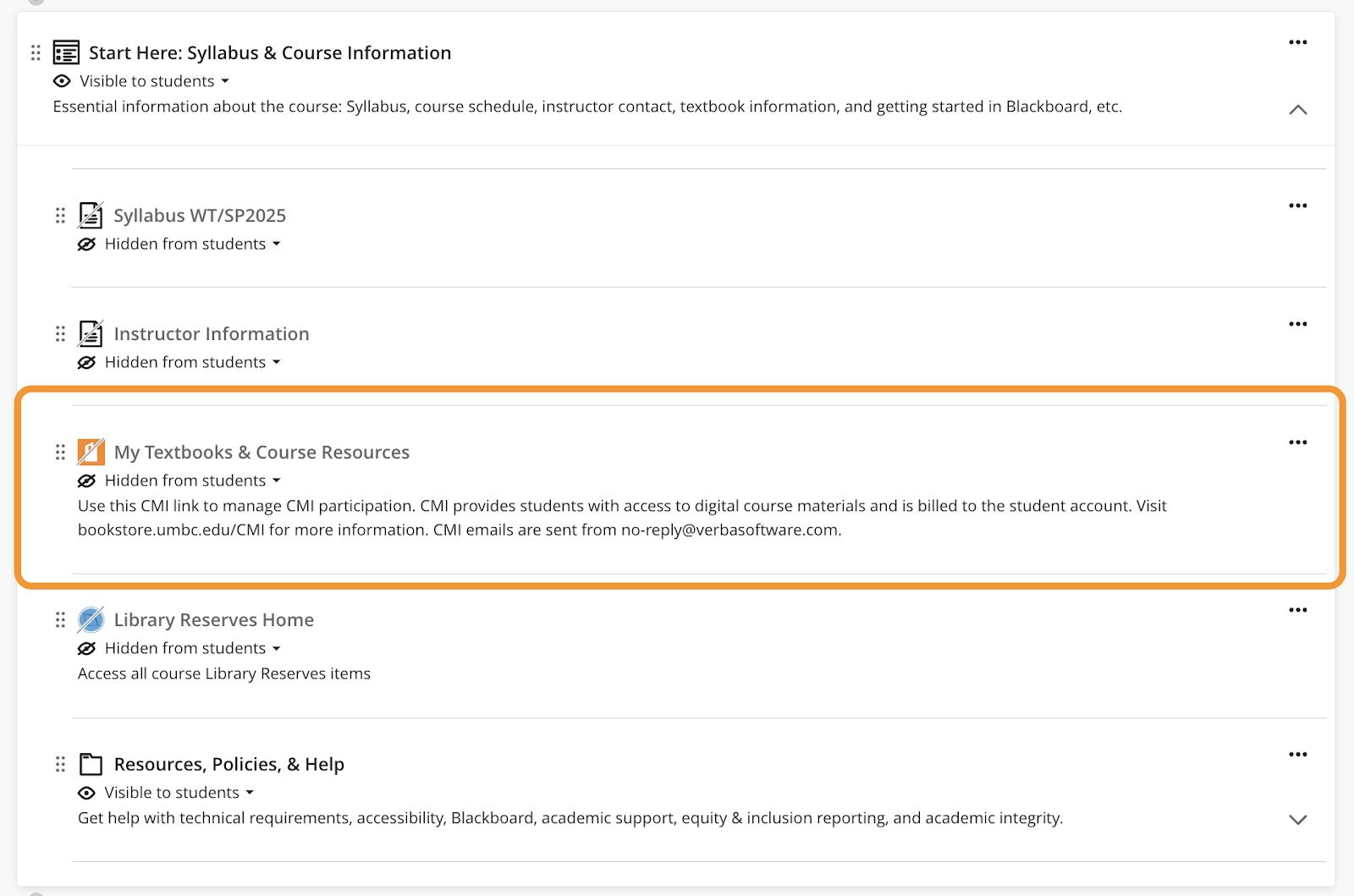
    <p><span>VitalSource links will be updated dynamically in Blackboard courses. Following the update, access VitalSource using the MyTextbooks &amp; Course Materials link in the “Start Here” module. </span></p>
    <p><span><span><img src="https://lh7-rt.googleusercontent.com/docsz/AD_4nXdmwq50OG-i5YofV-7YwfcTZoInhvXLi0avbRYsrunXysZGnuKxQ0kw6EbD3rNRAu1xdFeRCGa67u_iw825oPRoJtO6T-gVmVzNJ8DrL4EQWqRD9RBF9ecC_y1lpKNjrHiZYLhg?key=4R3R5zH3CqiIAxcILC6BcDRa" width="528" height="349" style="max-width: 100%; height: auto;"></span></span></p>
    <p><span><em>Image 1. The Start Here module in Blackboard courses includes a “My Textbooks &amp; Course Resources” link to VitalSource.</em></span></p>
    <p><span><strong>Cengage</strong></span></p>
    <p><span>Existing Cengage links in your Fall 2024 courses will be migrated automatically to the updated integration on December 19th. However, we recommend accessing grades from Cengage prior to the update. Following the update, new Cengage links may be added to Winter and Spring 2025 courses via the Content Market beginning December 20th. Access </span><a href="https://www.cengage.com/training/webassign/?terms=&amp;pageSize=300&amp;pageNumber=1&amp;sortBy=cengage:sequenceNumber&amp;audience=Instructor&amp;lmsType=Blackboard%20Ultra&amp;platform=WebAssign" rel="nofollow external" class="bo"><span>WebAssign</span></a><span> and </span><a href="https://www.cengage.com/training/mindtap/?terms=&amp;pageSize=300&amp;pageNumber=1&amp;sortBy=cengage:sequenceNumber&amp;lmsType=Blackboard%20Ultra&amp;platform=MindTap" rel="nofollow external" class="bo"><span>MindTap</span></a><span> instructor resources for more details. Note: Cengage will no longer appear at the top of the Content Market page, but will appear alphabetically in the list of Content Market tools.</span></p>
    <p><span><strong>Macmillan</strong></span></p>
    <p><span>If you are currently using Macmillan course materials in your Fall 2024 courses, we recommend accessing grades from Macmillan prior to the update. However, if needed, you will be able to relink your active Blackboard courses to Achieve </span><a href="https://mhe.my.site.com/macmillanlearning/s/article/Instructor-guide-to-LTI-Advantage-LTI-1-3-integration-with-Blackboard-Ultra" rel="nofollow external" class="bo"><span>using the updated LTI 1.3 steps</span></a><span> and import any previously completed work to the BB gradebook. Following the update, please use the Macmillan link in the Content Market to add Macmillan content to your upcoming courses. Note: Macmillan will no longer appear at the top of the Content Market page, but will appear alphabetically in the list of Content Market tools.</span></p>
    <p><span><strong>Pearson</strong></span></p>
    <p><span>If you are currently using Pearson course materials in your Fall 2024 courses, we recommend accessing grades from Pearson prior to the update. Pearson links created prior to December 20th will be deactivated following the update. However, if needed, instructors will be able to access grades from Pearson by logging into their instructor Pearson account directly. Following the December update, you may add Pearson links to Winter and Spring 2025 courses by accessing the Blackboard Ultra Books &amp; Tools menu. </span><a href="https://support.pearson.com/getsupport/s/document-item?bundleId=3pl-cg-instructor&amp;topicId=Content/get_started-bb_ultra-13.htm&amp;_LANG=enus" rel="nofollow external" class="bo"><span>Pearson resources</span></a><span> review how to configure your Blackboard course. </span></p>
    <p><span><strong>Course Materials Support</strong></span></p>
    <p><span>Publisher support is available directly from </span><a href="http://support.cengage.com/" rel="nofollow external" class="bo"><span>Cengage</span></a><span>, </span><a href="https://mhe.my.site.com/macmillanlearning/s/chat-with-us" rel="nofollow external" class="bo"><span>Macmillan</span></a><span>, and </span><a href="https://support.pearson.com/getsupport/s/contactsupport" rel="nofollow external" class="bo"><span>Pearson</span></a><span>. If you have questions related to the publisher integration updates, please </span><a href="https://umbc.edu/go/bbsupport" rel="nofollow external" class="bo"><span>submit an RT request</span></a><span> for concerns related to Blackboard. Please contact Jocelyn Ochoa-Garcia (<a href="mailto:textbook@umbc.edu">textbook@umbc.edu</a>) in the UMBC Bookstore for <a href="https://bookstore.umbc.edu/SiteText?id=52872" rel="nofollow external" class="bo">CMI-related</a> questions. </span></p>
    <p><span><strong>Connect with Instructional Technology</strong></span></p>
    <span>As always, if you have any questions about teaching, learning, and technology at UMBC, please consider the following options:</span><br><ul>
    <span><li>
    <a href="http://www.umbc.edu/faq" rel="nofollow external" class="bo"><span>Check our extensive FAQ collection</span></a><span> </span>
    </li></span><ul><li><span><a href="https://wiki.umbc.edu/x/LohnB" rel="nofollow external" class="bo"><span>What's new in Ultra?</span></a><span> | </span><a href="https://wiki.umbc.edu/x/bwrSAQ" rel="nofollow external" class="bo"><span>Known Issues</span></a><span> </span></span></li></ul>
    <span><li><a href="http://my.umbc.edu/go/request-help" rel="nofollow external" class="bo"><span>Open a ticket via RT</span></a></li>
    <li>
    <span>Follow the </span><a href="http://my.umbc.edu/groups/instructional-technology" rel="nofollow external" class="bo"><span>Instructional Technology</span></a><span> &amp; </span><a href="http://my.umbc.edu/groups/doit" rel="nofollow external" class="bo"><span>DoIT</span></a><span> myUMBC groups</span>
    </li>
    <li>
    <a href="http://doit.umbc.edu/itnm/staff/" rel="nofollow external" class="bo"><span>Request a consult</span></a><span> with </span><a href="http://doit.umbc.edu/itnm/staff" rel="nofollow external" class="bo"><span>instructional technology staff</span></a>
    </li>
    <li>
    <a href="http://pivot.umbc.edu/" rel="nofollow external" class="bo"><span>PIVOT</span></a><span> | </span><a href="https://doit.umbc.edu/itnm/academic-continuity/" rel="nofollow external" class="bo"><span>Academic Continuity</span></a><span> | </span><a href="https://fdc.umbc.edu/teaching/keep-on-teaching/" rel="nofollow external" class="bo"><span>Keep On Teaching</span></a><span> | </span><a href="https://doit.umbc.edu/students" rel="nofollow external" class="bo"><span>Student Technology Resources</span></a>
    </li></span>
    </ul>
    <p></p>
    <div><em>Thumbnail-image: decorative </em></div></span></div>
]]>
</Body>
<Summary>Blackboard publisher integrations for VitalSource, Cengage, Pearson, and Macmillan will be updated to the latest version on December 19, 2024. To ensure your courses receive the latest update and...</Summary>
<Website>https://my3.my.umbc.edu/groups/instructional-technology/posts/145784/</Website>
<TrackingUrl>https://my3.my.umbc.edu/api/v0/pixel/news/145784/guest@my.umbc.edu/7083e63fceed8ee9f96962bf5d824427/api/pixel</TrackingUrl>
<Tag>bookstore</Tag>
<Tag>cengage</Tag>
<Tag>cmi</Tag>
<Tag>course-materials-initiative</Tag>
<Tag>lti</Tag>
<Tag>macmillan</Tag>
<Tag>pearson</Tag>
<Tag>publisher</Tag>
<Tag>sp2025</Tag>
<Tag>textbooks</Tag>
<Tag>vitalsource</Tag>
<Tag>wt2025</Tag>
<Group token="instructional-technology">Instructional Technology</Group>
<GroupUrl>https://my3.my.umbc.edu/groups/instructional-technology</GroupUrl>
<AvatarUrl>https://assets2-my.umbc.edu/system/shared/avatars/groups/000/001/164/dec3b026b81ee6d890a8f82f75c94a2e/xsmall.png?1446126703</AvatarUrl>
<AvatarUrl size="original">https://assets1-my.umbc.edu/system/shared/avatars/groups/000/001/164/dec3b026b81ee6d890a8f82f75c94a2e/original.png?1446126703</AvatarUrl>
<AvatarUrl size="xxlarge">https://assets2-my.umbc.edu/system/shared/avatars/groups/000/001/164/dec3b026b81ee6d890a8f82f75c94a2e/xxlarge.png?1446126703</AvatarUrl>
<AvatarUrl size="xlarge">https://assets1-my.umbc.edu/system/shared/avatars/groups/000/001/164/dec3b026b81ee6d890a8f82f75c94a2e/xlarge.png?1446126703</AvatarUrl>
<AvatarUrl size="large">https://assets1-my.umbc.edu/system/shared/avatars/groups/000/001/164/dec3b026b81ee6d890a8f82f75c94a2e/large.png?1446126703</AvatarUrl>
<AvatarUrl size="medium">https://assets4-my.umbc.edu/system/shared/avatars/groups/000/001/164/dec3b026b81ee6d890a8f82f75c94a2e/medium.png?1446126703</AvatarUrl>
<AvatarUrl size="small">https://assets3-my.umbc.edu/system/shared/avatars/groups/000/001/164/dec3b026b81ee6d890a8f82f75c94a2e/small.png?1446126703</AvatarUrl>
<AvatarUrl size="xsmall">https://assets2-my.umbc.edu/system/shared/avatars/groups/000/001/164/dec3b026b81ee6d890a8f82f75c94a2e/xsmall.png?1446126703</AvatarUrl>
<AvatarUrl size="xxsmall">https://assets3-my.umbc.edu/system/shared/avatars/groups/000/001/164/dec3b026b81ee6d890a8f82f75c94a2e/xxsmall.png?1446126703</AvatarUrl>
<Sponsor>Instructional Technology</Sponsor>
<ThumbnailUrl size="xxlarge">https://assets1-my.umbc.edu/system/shared/thumbnails/news/000/145/784/52e49441c8adc1846da506281492d505/xxlarge.jpg?1732129555</ThumbnailUrl>
<ThumbnailUrl size="xlarge">https://assets2-my.umbc.edu/system/shared/thumbnails/news/000/145/784/52e49441c8adc1846da506281492d505/xlarge.jpg?1732129555</ThumbnailUrl>
<ThumbnailUrl size="large">https://assets3-my.umbc.edu/system/shared/thumbnails/news/000/145/784/52e49441c8adc1846da506281492d505/large.jpg?1732129555</ThumbnailUrl>
<ThumbnailUrl size="medium">https://assets2-my.umbc.edu/system/shared/thumbnails/news/000/145/784/52e49441c8adc1846da506281492d505/medium.jpg?1732129555</ThumbnailUrl>
<ThumbnailUrl size="small">https://assets4-my.umbc.edu/system/shared/thumbnails/news/000/145/784/52e49441c8adc1846da506281492d505/small.jpg?1732129555</ThumbnailUrl>
<ThumbnailUrl size="xsmall">https://assets1-my.umbc.edu/system/shared/thumbnails/news/000/145/784/52e49441c8adc1846da506281492d505/xsmall.jpg?1732129555</ThumbnailUrl>
<ThumbnailUrl size="xxsmall">https://assets1-my.umbc.edu/system/shared/thumbnails/news/000/145/784/52e49441c8adc1846da506281492d505/xxsmall.jpg?1732129555</ThumbnailUrl>
<PawCount>5</PawCount>
<CommentCount>0</CommentCount>
<CommentsAllowed>true</CommentsAllowed>
<PostedAt>Fri, 22 Nov 2024 12:37:01 -0500</PostedAt>
</NewsItem>

<NewsItem contentIssues="true" id="145780" important="false" status="posted" url="https://my3.my.umbc.edu/groups/oer/posts/145780">
<Title>WT/SP2025 Courses Created in Blackboard on November 22, 2024</Title>
<Tagline>Prepare your Ultra courses for the upcoming term</Tagline>
<Body>
<![CDATA[
    <div class="html-content">
    <p><span>Blackboard course shells for WT/SP2025 were created on November 22, 2024. All courses now use Ultra </span><a href="https://doit.umbc.edu/news/post/130227/" rel="nofollow external" class="bo"><span>per our earlier announcement</span></a><span>.</span><span> </span></p>
    <p><span><strong>Course Materials Publisher Integration Updates in December</strong></span></p>
    <p><span>Blackboard integrations for VitalSource, Cengage, Pearson, and Macmillan publisher tools <a href="https://my3.my.umbc.edu/groups/instructional-technology/posts/145784/" rel="nofollow external" class="bo">will be updated</a> on December 19, 2024. </span><span>Please do not link any VitalSource, Cengage, Pearson, or Macmillan resources in your Winter 2025 or Spring 2025 courses until December 20th. </span></p>
    <p><span><strong>Training &amp; Support for Ultra</strong></span></p>
    <ul>
    <li>
    <span>Attend an </span><a href="https://my3.my.umbc.edu/groups/instructional-technology/events?mode=upcoming" rel="nofollow external" class="bo"><span>upcoming January training</span></a><span> to prepare for the fall semester.</span>
    </li>
    <li>
    <span>Request a consult </span><span>from our staff </span><a href="https://calendar.app.google/g1NUBauLXnQzavZP8" rel="nofollow external" class="bo"><span>Ultra “office hours”</span></a><span>or download our </span><a href="https://docs.google.com/document/d/1moTh6n0xTLW64IHYoXN8lZ8t1j1rI_L6r_NCiObX6aA/preview?usp=sharing" rel="nofollow external" class="bo"><span>8-step migration guide</span></a><span>.</span>
    </li>
    <li>
    <span>Explore  </span><a href="https://umbc.hosted.panopto.com/Panopto/Pages/Sessions/List.aspx#folderID=%2274ac9d58-1779-44c1-92b7-ab6900dfe6e9%22" rel="nofollow external" class="bo"><span>our Panopto folder</span></a><span> for a wide variety of recorded webinars on various instructional technologies available at UMBC.</span>
    </li>
    <li>
    <span>Have a question about Ultra? Ask  </span><a href="https://wiki.umbc.edu/x/kAU9BQ" rel="nofollow external" class="bo"><span>an Ultra Ambassador</span></a><span>!</span>
    </li>
    </ul>
    <p><span><strong>Create an Inclusive &amp; Accessible Course Environment</strong></span></p>
    <p><span>Plan your accessibility and Universal Design for Learning strategy before students begin working with course materials. Ally, an </span><a href="https://doit.umbc.edu/news/?id=82487" rel="nofollow external" class="bo"><span>accessibility tool</span></a><span>, is enabled in all course shells. Ally automatically scans uploaded and created course content, then performs a series of steps to make that content more accessible. Please review the </span><a href="https://wiki.umbc.edu/x/2IGdB" rel="nofollow external" class="bo"><span>Ally FAQs</span></a><span> for more information about the</span><a href="https://wiki.umbc.edu/x/_YGdB" rel="nofollow external" class="bo"><span>  </span><span>accessibility indicators</span></a><span> on course content and </span><a href="https://wiki.umbc.edu/x/3IGdB" rel="nofollow external" class="bo"><span>alternative formats</span></a><span>. Use Ally’s new AI alt-text generator to add alt text to course images. Training will be  </span><a href="https://my3.my.umbc.edu/groups/doit/events/136188" rel="nofollow external" class="bo"><span>offered on January 24, 2025</span></a><span>.</span></p>
    <p><span>Instructional Technology also offers resources for creating accessible content including three webinar recordings:</span></p>
    <ul>
    <li><a href="https://docs.google.com/document/d/1dy3rYbPDmne449AO_Dm-sOiCcnwsQW-qNXBIENqO9ac/edit?tab=t.0#heading=h.bmslkh4ugfwr" rel="nofollow external" class="bo"><span>Digital Accessibility Guidelines Checklist</span></a></li>
    <li>
    <a href="https://umbc.hosted.panopto.com/Panopto/Pages/Viewer.aspx?id=8da73af3-4992-45bc-9985-b20d013e9ae9&amp;start=0" rel="nofollow external" class="bo"><span>Creating Accessible Documents</span></a><span> (44:51)</span>
    </li>
    <li>
    <a href="https://umbc.hosted.panopto.com/Panopto/Pages/Viewer.aspx?id=dc391e2b-f47d-4ace-b19d-b218018493ee&amp;start=0" rel="nofollow external" class="bo"><span>Creating Accessible Presentations</span></a><span> (31:24) </span>
    </li>
    <li>
    <a href="https://umbc.hosted.panopto.com/Panopto/Pages/Viewer.aspx?id=3998acbb-a6cc-43f2-a102-b2260144d0af&amp;start=0" rel="nofollow external" class="bo"><span>Creating Accessible Instructional Videos</span></a><span> (45:19)</span>
    </li>
    </ul>
    <p><span><strong>About Course Creation</strong></span></p>
    <p><span>Bb shells for WT/SP2025 are available for all courses (designated as lecture, lab, field or discussion) listed in the </span><a href="http://my.umbc.edu/go/schedule" rel="nofollow external" class="bo"><span>UMBC Schedule of Classes (SOC)</span></a><span>, provided that there is an </span><a href="http://www.umbc.edu/blogs/oit-news/archives/2010/08/how_new_employe_1.html" rel="nofollow external" class="bo"><span>instructor of record</span></a><span> listed. As new course sections and/or instructors are added to the SOC by </span><a href="https://registrar.umbc.edu/services/classroom-scheduling/" rel="nofollow external" class="bo"><span>Department Scheduling Coordinators</span></a><span>, corresponding Bb shells are automatically generated overnight. </span></p>
    <ul>
    <li>
    <span>If you are an instructor, and your name is not associated with the course you are teaching in the </span><a href="http://my.umbc.edu/go/schedule" rel="nofollow external" class="bo"><span>SOC</span></a><span>, please see your </span><a href="https://swsupport.umbc.edu/scheduling-coordinators/" rel="nofollow external" class="bo"><span>Departmental Scheduling Coordinator</span></a><span> to resolve the issue. Once you are listed in the </span><a href="https://my.umbc.edu/go/schedule" rel="nofollow external" class="bo"><span>SOC</span></a><span>, your Bb course shell will be created automatically. </span>
    </li>
    <li>
    <span>If you and your </span><a href="https://swsupport.umbc.edu/scheduling-coordinators/" rel="nofollow external" class="bo"><span>Department Scheduling Coordinator</span></a><span> believe you are correctly assigned as the instructor of record in the SOC and you do not see your course shell in Blackboard, please submit a Request Tracker (RT) ticket via </span><a href="https://my.umbc.edu/help" rel="nofollow external" class="bo"><span>my.umbc.edu/help</span></a><span>.</span>
    </li>
    <li>
    <span>If you need a Bb shell for a research or independent study course, please submit a </span><a href="http://www.umbc.edu/doit/blackboard/requestbbshell.html" rel="nofollow external" class="bo"><span>new course request</span></a><span>.</span>
    </li>
    </ul>
    <p><span>Instructors who teach multiple sections of the same course will find those enrollments merged into one Bb course shell. These sections may be split upon </span><a href="https://my.umbc.edu/go/request-help" rel="nofollow external" class="bo"><span>request by an RT ticket</span></a><span>, which we recommend </span><a href="https://wiki.umbc.edu/x/d4HGAw" rel="nofollow external" class="bo"><span>submitting at least one week</span></a><span> before the semester starts, if not as soon as courses are created in Blackboard. </span><strong><span>NOTE:</span></strong><span>Courses should not be split after student grade data and engagement activity is recorded since it will be purged as part of the separation process.</span></p>
    <p><span>Student enrollment in Bb mirrors the official registration in SA and updates hourly. However, courses are not accessible to students by default until the instructor of record </span><a href="https://wiki.umbc.edu/x/VoAc" rel="nofollow external" class="bo"><span>makes them available</span></a><span>.</span></p>
    <p><span><strong>Connect with Instructional Technology</strong></span></p>
    <p><span>As always, if you have any questions about teaching, learning, and technology at UMBC, please consider the following options:</span></p>
    <ul>
    <li>
    <a href="http://www.umbc.edu/faq" rel="nofollow external" class="bo"><span>Check our extensive FAQ collection</span></a><span> </span>
    </li>
    <ul><li>
    <a href="https://wiki.umbc.edu/x/LohnB" rel="nofollow external" class="bo"><span>What's new in Ultra?</span></a><span> | </span><a href="https://wiki.umbc.edu/x/bwrSAQ" rel="nofollow external" class="bo"><span>Known Issues</span></a><span> </span>
    </li></ul>
    <li><a href="http://my.umbc.edu/go/request-help" rel="nofollow external" class="bo"><span>Open a ticket via RT</span></a></li>
    <li>
    <span>Follow the </span><a href="http://my.umbc.edu/groups/instructional-technology" rel="nofollow external" class="bo"><span>Instructional Technology</span></a><span> &amp; </span><a href="http://my.umbc.edu/groups/doit" rel="nofollow external" class="bo"><span>DoIT</span></a><span> myUMBC groups</span>
    </li>
    <li>
    <a href="http://doit.umbc.edu/itnm/staff/" rel="nofollow external" class="bo"><span>Request a consult</span></a><span> with </span><a href="http://doit.umbc.edu/itnm/staff" rel="nofollow external" class="bo"><span>instructional technology staff</span></a>
    </li>
    <li>
    <a href="http://pivot.umbc.edu/" rel="nofollow external" class="bo"><span>PIVOT</span></a><span> | </span><a href="https://doit.umbc.edu/itnm/academic-continuity/" rel="nofollow external" class="bo"><span>Academic Continuity</span></a><span> | </span><a href="https://fdc.umbc.edu/teaching/keep-on-teaching/" rel="nofollow external" class="bo"><span>Keep On Teaching</span></a><span> | </span><a href="https://doit.umbc.edu/students" rel="nofollow external" class="bo"><span>Student Technology Resources</span></a>
    </li>
    </ul>
    <div><br></div>
    <div><em>Thumbnail-image: decorative</em></div>
    </div>
]]>
</Body>
<Summary>Blackboard course shells for WT/SP2025 were created on November 22, 2024. All courses now use Ultra per our earlier announcement.   Course Materials Publisher Integration Updates in December...</Summary>
<Website>https://my3.my.umbc.edu/groups/instructional-technology/posts/145780</Website>
<TrackingUrl>https://my3.my.umbc.edu/api/v0/pixel/news/145780/guest@my.umbc.edu/9524cb0ef1fc593502803da624e1785c/api/pixel</TrackingUrl>
<Tag>blackboard</Tag>
<Tag>course-creation</Tag>
<Tag>sp2025</Tag>
<Tag>spring</Tag>
<Tag>ultra</Tag>
<Tag>winter</Tag>
<Tag>wt2025</Tag>
<Group token="instructional-technology">Instructional Technology</Group>
<GroupUrl>https://my3.my.umbc.edu/groups/instructional-technology</GroupUrl>
<AvatarUrl>https://assets2-my.umbc.edu/system/shared/avatars/groups/000/001/164/dec3b026b81ee6d890a8f82f75c94a2e/xsmall.png?1446126703</AvatarUrl>
<AvatarUrl size="original">https://assets1-my.umbc.edu/system/shared/avatars/groups/000/001/164/dec3b026b81ee6d890a8f82f75c94a2e/original.png?1446126703</AvatarUrl>
<AvatarUrl size="xxlarge">https://assets2-my.umbc.edu/system/shared/avatars/groups/000/001/164/dec3b026b81ee6d890a8f82f75c94a2e/xxlarge.png?1446126703</AvatarUrl>
<AvatarUrl size="xlarge">https://assets1-my.umbc.edu/system/shared/avatars/groups/000/001/164/dec3b026b81ee6d890a8f82f75c94a2e/xlarge.png?1446126703</AvatarUrl>
<AvatarUrl size="large">https://assets1-my.umbc.edu/system/shared/avatars/groups/000/001/164/dec3b026b81ee6d890a8f82f75c94a2e/large.png?1446126703</AvatarUrl>
<AvatarUrl size="medium">https://assets4-my.umbc.edu/system/shared/avatars/groups/000/001/164/dec3b026b81ee6d890a8f82f75c94a2e/medium.png?1446126703</AvatarUrl>
<AvatarUrl size="small">https://assets3-my.umbc.edu/system/shared/avatars/groups/000/001/164/dec3b026b81ee6d890a8f82f75c94a2e/small.png?1446126703</AvatarUrl>
<AvatarUrl size="xsmall">https://assets2-my.umbc.edu/system/shared/avatars/groups/000/001/164/dec3b026b81ee6d890a8f82f75c94a2e/xsmall.png?1446126703</AvatarUrl>
<AvatarUrl size="xxsmall">https://assets3-my.umbc.edu/system/shared/avatars/groups/000/001/164/dec3b026b81ee6d890a8f82f75c94a2e/xxsmall.png?1446126703</AvatarUrl>
<Sponsor>Instructional Technology</Sponsor>
<ThumbnailUrl size="xxlarge">https://assets4-my.umbc.edu/system/shared/thumbnails/news/000/145/780/c050e4694a21c903823dc48315decf0d/xxlarge.jpg?1732129240</ThumbnailUrl>
<ThumbnailUrl size="xlarge">https://assets1-my.umbc.edu/system/shared/thumbnails/news/000/145/780/c050e4694a21c903823dc48315decf0d/xlarge.jpg?1732129240</ThumbnailUrl>
<ThumbnailUrl size="large">https://assets4-my.umbc.edu/system/shared/thumbnails/news/000/145/780/c050e4694a21c903823dc48315decf0d/large.jpg?1732129240</ThumbnailUrl>
<ThumbnailUrl size="medium">https://assets4-my.umbc.edu/system/shared/thumbnails/news/000/145/780/c050e4694a21c903823dc48315decf0d/medium.jpg?1732129240</ThumbnailUrl>
<ThumbnailUrl size="small">https://assets2-my.umbc.edu/system/shared/thumbnails/news/000/145/780/c050e4694a21c903823dc48315decf0d/small.jpg?1732129240</ThumbnailUrl>
<ThumbnailUrl size="xsmall">https://assets1-my.umbc.edu/system/shared/thumbnails/news/000/145/780/c050e4694a21c903823dc48315decf0d/xsmall.jpg?1732129240</ThumbnailUrl>
<ThumbnailUrl size="xxsmall">https://assets3-my.umbc.edu/system/shared/thumbnails/news/000/145/780/c050e4694a21c903823dc48315decf0d/xxsmall.jpg?1732129240</ThumbnailUrl>
<PawCount>4</PawCount>
<CommentCount>0</CommentCount>
<CommentsAllowed>true</CommentsAllowed>
<PostedAt>Fri, 22 Nov 2024 12:36:57 -0500</PostedAt>
</NewsItem>

<NewsItem contentIssues="false" id="145632" important="false" status="posted" url="https://my3.my.umbc.edu/groups/oer/posts/145632">
<Title>4 Faculty, 2 Staff Named 2024-25 LA Fellows</Title>
<Tagline>$2k professional development awards renewable annually</Tagline>
<Body>
<![CDATA[
    <div class="html-content">
    <span><span>To continue our commitment to fostering and sharing effective data-informed teaching and learning practices, the Provost's Office has provided </span><a href="https://doit.umbc.edu/analytics/community/mini-grants/" rel="nofollow external" class="bo"><span>funding through the Learning Analytics Fellowship program</span></a><span> to faculty and staff for the 2024-25 academic year. Details of the new fellowships and renewals are provided below:</span></span><div><img alt="FY24 UMBC LA Fellows" src="https://my3.my.umbc.edu/system/shared/attachments/news/000/145/632/5f2e2f400030f3f4a4d5d36e2aa6c003/FY24_UMBC_LA_Fellows.png" style="max-width: 100%; height: auto;"></div>
    <div><span><p><a href="https://saph.umbc.edu/deptleadership/person/bs37844/" rel="nofollow external" class="bo"><span><strong>Katie Birger</strong></span></a><span><strong>(Public Health): "Leveraging Curricular Analytics to Enhance Student Success in Public Health Courses."</strong></span><span> Building upon research presented at the </span><a href="https://calt.umbc.edu/programs/provosts-teaching-and-learning-symposium/" rel="nofollow external" class="bo"><span>Eighth Annual Provost's Teaching and Learning Symposium</span></a><span>, this renewal proposal aims to explore and standardize the curricular linkages between PBHL 100, 300, and 420. Birger plans to utilize UMBC's license for </span><a href="http://curricularanalytics.org" rel="nofollow external" class="bo"><span>Curricular Analytics</span></a><span> to model and analyze the curriculum structure, shedding light on how course design adjustments can impact student success throughout the Public Health course sequence. By examining variables such as course sequencing, prerequisite alignment, learning outcomes, and the integration of active learning strategies, the project seeks to identify curricular inefficiencies and bottlenecks. The findings will inform evidence-based curriculum discussions and potentially influence departmental policy decisions. The overall goal is to enhance student knowledge and skills in public health, better preparing them for the workforce or graduate education, and contributing to the continuous improvement of the Public Health curriculum through data-informed curricular design.</span></p>
    <p><strong><span><a href="https://my3.my.umbc.edu/groups/instructional-technology/events/138633/11/3aa81123d12fde39f3239d7e09f4cc82/web/link?link=https%3A%2F%2Fumbc.edu%2Fstories%2Fmeet-a-retriever-passera-community-engagement%2F" rel="nofollow external" class="bo">Emily Passera</a></span><span> (Shriver Center): “Exploring Microcredentialing to Enhance Student Engagement in Community Learning.”</span></strong><span>Building upon our </span><a href="https://doit.umbc.edu/analytics/news/post/135851/" rel="nofollow external" class="bo"><span>previous</span></a><span> – and now </span><a href="https://link.springer.com/chapter/10.1007/978-3-031-60609-0_12" rel="nofollow external" class="bo"><span>published</span></a><span> – work, this renewal proposal delves deeper into the Shriver Center's student data to enhance understanding of effective interventions and environments. Specifically, we will investigate the potential benefits of incentivization through microcredentialing for PRAC 096 Student Coordinators. By offering microcredentials, we aim to capture students' learning journeys, provide insights into their engagement and skill mastery, and assess how microcredentialing incentives affect student leader learning recognition. A control group without microcredential incentives will be compared through survey responses to evaluate the impact on skill recognition and behavior during community engagement. Through these approaches, hopes to support student growth, improve pathways to academic success, and contribute to UMBC's broader Learning Analytics and microcredentialing initiatives.</span></p>
    <p><strong><a href="https://honors.umbc.edu/wp-content/uploads/sites/112/2013/10/Dr.-Stacey-CV.pdf" rel="nofollow external" class="bo"><span>Simon Stacey</span></a><span> (Honors College), </span><a href="https://doit.umbc.edu/analytics/our-staff/robert-carpenter/" rel="nofollow external" class="bo"><span>Robert Carpenter</span></a><span> (Provost’s Office/DoIT) and </span><a href="https://doit.umbc.edu/about/directory/person/uq60819/" rel="nofollow external" class="bo"><span>Len Mancini</span></a><span> (DoIT): “Using Advanced Analytics and Course Design to Enhance Team Performance and Team Member Behavior.”</span></strong><span> Building upon prior work supported by the Hrabowski Fund for Innovation in Spring 2019 ("Understanding, Assessing and Improving Student Teamwork"), this new proposal expands efforts to collect and analyze in-person conversational data to deepen our understanding of effective teamwork among college students. Dr. Stacey, Mr. Mancini, and Dr. Carpenter will employ new information technology tools to capture students' written and verbal communications as they collaborate on "wicked problems"—complex, real-world challenges without clear solutions—in the course HONR 300-07/INDS 430: Solving Wicked Problems (Fall 2024). By leveraging artificial intelligence to assess participation and communication, the project aims to identify team and team member behaviors that foster effective teamwork and lead to better outcomes. Data will be collected from various sources, including in-person discussions, online interactions, video meetings, CATME assessments, self-assessments, surveys, and team deliverables. Through these approaches, the team hopes to provide students with feedback to develop durable and transferable teamwork skills, support student growth, enhance pathways to academic and professional success, and contribute to UMBC's broader Learning Analytics initiatives.</span></p>
    <p><span><strong>Note</strong></span><span><strong>:</strong> Given his role as co-sponsor of the LA Fellows, Carpenter recused himself from any evaluation of this new proposal with Stacey. He will also take no professional development award.  </span></p>
    <p><strong><a href="https://www.csee.umbc.edu/people/faculty/rebecca-williams/" rel="nofollow external" class="bo"><span>Rebecca Williams</span></a><span> (CS/EE): “Enhancing Student Visual Literacy &amp; Critical Thinking in CMSC 436/636 (Data Visualization).”</span></strong><span>This renewal proposal aims to build upon the </span><a href="https://doit.umbc.edu/analytics/news/post/135851/" rel="nofollow external" class="bo"><span>previous work</span></a><span> from the 2023 LA Fellowship cycle, focusing on course interventions to address persistent student misconceptions in data visualization. These misconceptions include the belief that simple, easy-to-read charts are always effective and the assumption that data visualizations are entirely objective. Williams' continued interventions involve having students search for, annotate, and critique a broader array of visualization examples, supplementing those provided by the instructor. Additionally, the project will incorporate more rigorous qualitative analysis using Taguette, collect richer demographic data, and analyze the temporal progression of student-created graphs. By expanding these efforts, students are more likely to deepen their critical analysis skills, improve their visual literacy, and retain these competencies in the long term.</span></p>
    <p><span>These one-year learning analytics awards are renewable pending receipt of a final report, paper submitted for publication or conference presentation. In addition to use of UMBC’s Report Exchange (REX) </span><a href="http://rex.umbc.edu" rel="nofollow external" class="bo"><span>data warehouse</span></a><span>, and a </span><a href="https://www.tableau.com/products/viewer" rel="nofollow external" class="bo"><span>Tableau “viewer” license</span></a><span>, faculty recipients can consult with staff from </span><a href="http://analytics.umbc.edu" rel="nofollow external" class="bo"><span>Analytics and Business Intelligence</span></a><span>, </span><a href="http://doit.umbc.edu/itnm" rel="nofollow external" class="bo"><span>Instructional Technology</span></a><span> and </span><a href="https://oir.umbc.edu/" rel="nofollow external" class="bo"><span>Institutional Research and Decision support</span></a><span> (IRADS). </span></p>
    <p><span>For more information about this year’s workshops, speakers and another learning analytics mini-grant call for proposals to be announced in Spring 25, please visit </span><a href="https://doit.umbc.edu/analytics/community/" rel="nofollow external" class="bo"><span>doit.umbc.edu/analytics/community</span></a><span>. </span></p>
    <p><span>By <a href="https://doit.umbc.edu/?tag=fritz" rel="nofollow external" class="bo">John Fritz</a> &amp; <a href="https://doit.umbc.edu/?tag=penniston" rel="nofollow external" class="bo">Tom Penniston</a></span></p></span></div>
    </div>
]]>
</Body>
<Summary>To continue our commitment to fostering and sharing effective data-informed teaching and learning practices, the Provost's Office has provided funding through the Learning Analytics Fellowship...</Summary>
<AttachmentKind>Image</AttachmentKind>
<AttachmentUrl>https://assets1-my.umbc.edu/system/shared/attachments/92c47126fe1304680022a57854aaa6dd/6a7df9b9/news/000/145/632/5f2e2f400030f3f4a4d5d36e2aa6c003/FY24_UMBC_LA_Fellows.png?1731597120</AttachmentUrl>
<Attachments>
<Attachment kind="Image" url="https://my3.my.umbc.edu/groups/oer/posts/145632/attachments/54507"></Attachment>
</Attachments>
<TrackingUrl>https://my3.my.umbc.edu/api/v0/pixel/news/145632/guest@my.umbc.edu/f6c5d017ee30cd798f330d9d8b8f39bc/api/pixel</TrackingUrl>
<Tag>analytics</Tag>
<Tag>la-fellows</Tag>
<Group token="instructional-technology">Instructional Technology</Group>
<GroupUrl>https://my3.my.umbc.edu/groups/instructional-technology</GroupUrl>
<AvatarUrl>https://assets2-my.umbc.edu/system/shared/avatars/groups/000/001/164/dec3b026b81ee6d890a8f82f75c94a2e/xsmall.png?1446126703</AvatarUrl>
<AvatarUrl size="original">https://assets1-my.umbc.edu/system/shared/avatars/groups/000/001/164/dec3b026b81ee6d890a8f82f75c94a2e/original.png?1446126703</AvatarUrl>
<AvatarUrl size="xxlarge">https://assets2-my.umbc.edu/system/shared/avatars/groups/000/001/164/dec3b026b81ee6d890a8f82f75c94a2e/xxlarge.png?1446126703</AvatarUrl>
<AvatarUrl size="xlarge">https://assets1-my.umbc.edu/system/shared/avatars/groups/000/001/164/dec3b026b81ee6d890a8f82f75c94a2e/xlarge.png?1446126703</AvatarUrl>
<AvatarUrl size="large">https://assets1-my.umbc.edu/system/shared/avatars/groups/000/001/164/dec3b026b81ee6d890a8f82f75c94a2e/large.png?1446126703</AvatarUrl>
<AvatarUrl size="medium">https://assets4-my.umbc.edu/system/shared/avatars/groups/000/001/164/dec3b026b81ee6d890a8f82f75c94a2e/medium.png?1446126703</AvatarUrl>
<AvatarUrl size="small">https://assets3-my.umbc.edu/system/shared/avatars/groups/000/001/164/dec3b026b81ee6d890a8f82f75c94a2e/small.png?1446126703</AvatarUrl>
<AvatarUrl size="xsmall">https://assets2-my.umbc.edu/system/shared/avatars/groups/000/001/164/dec3b026b81ee6d890a8f82f75c94a2e/xsmall.png?1446126703</AvatarUrl>
<AvatarUrl size="xxsmall">https://assets3-my.umbc.edu/system/shared/avatars/groups/000/001/164/dec3b026b81ee6d890a8f82f75c94a2e/xxsmall.png?1446126703</AvatarUrl>
<Sponsor>Instructional Technology</Sponsor>
<PawCount>8</PawCount>
<CommentCount>0</CommentCount>
<CommentsAllowed>true</CommentsAllowed>
<PostedAt>Thu, 14 Nov 2024 10:22:50 -0500</PostedAt>
<EditAt>Wed, 05 Feb 2025 13:21:57 -0500</EditAt>
</NewsItem>

<NewsItem contentIssues="true" id="145089" important="false" status="posted" url="https://my3.my.umbc.edu/groups/oer/posts/145089">
<Title>Quality Matters Impact (QMI) Program - Call to Participate</Title>
<Tagline>Faculty can apply by Dec. 6 for Spring/Fall 2025 Cohorts</Tagline>
<Body>
<![CDATA[
    <div class="html-content">
    <span><p><span>As an extension of the <a href="https://doit.umbc.edu/news/post/111756/" rel="nofollow external" class="bo">award-winning</a> <a href="https://pivot.umbc.edu/" rel="nofollow external" class="bo">PIVOT program</a>,</span> <span>the Quality Matters Impact <a href="https://pivot.umbc.edu/course-design/quality-matters/quality-matters-impact/" rel="nofollow external" class="bo">(QMI) program</a> is an </span><span>initiative to formally recognize courses that meet Quality Matters standards and demonstrate exemplary online/hybrid course design. Since its inception in 2021, <a href="https://www.qualitymatters.org/reviews-certifications/qm-certified-courses/nojs/1/rev_count/0/University-of-Maryland%2C-Baltimore-County" rel="nofollow external" class="bo">19 UMBC faculty</a> have earned QM-certification for their online or hybrid course design through the QMI program. </span></p>
    <p><span>A formal QM course review is designed to be a collegial process to provide helpful recommendations for continuous improvement and reinforce effective, research-based practices for online and hybrid course design. </span><span>As part of this process, faculty participants receive feedback from certified Quality Matters peer reviewers including UMBC faculty and staff and other online learning experts in the QM community.</span></p>
    <p><span>DoIT's Instructional Technology team manages the review using </span><span><a href="https://umbc.box.com/shared/static/niq2gc6xqxe6r5pwf76opvtt6wd2plfe.pdf" rel="nofollow external" class="bo">QM's Higher Education Rubric, 7th Edition</a></span><span> (Requires UMBC login to access PDF). When a course meets QM standards following a formal review, it is eligible to </span><span><a href="https://www.qualitymatters.org/qm-membership/faqs/use-qm-logos" rel="nofollow external" class="bo">display the QM Certification Mark</a></span><span>.</span></p></span><span><p><span><strong>Selection Criteria: </strong></span></p>
    <p><span>Participants selected for the Spring/Fall 2025 QMI cohort agree to submit a hybrid or online course for a formal Quality Matters course review.</span></p>
    <p><span>Full or part-time faculty who meet the criteria and have not previously received funding through the QMI program are encouraged to </span><span><strong>apply no later than Friday, December 6.</strong></span><span> </span></p>
    <p><span>Recognizing that the QM Impact program does require an investment of time to participate, a $1000 professional development award will be provided to faculty once a course meets QM standards.</span></p>
    <p><span><strong>Eligibility:</strong></span></p>
    <ol>
    <li>
    <span>You must have taught your course as </span><a href="https://www.qualitymatters.org/qm-membership/faqs/course-format-chart" rel="nofollow external" class="bo">online or hybrid</a><span> for at least two semesters at UMBC.</span>
    </li>
    <li><span>Highly recommended skills that demonstrate proficiency and consistent use of Blackboard Ultra:      </span></li>
    <ol><li>
    <span>Ability to demonstrate skills</span><span> in at least seven of the nine <a href="https://docs.google.com/spreadsheets/d/1446E4U0MGtCxmLXNRheRlnZkbmaY316rchQVszv4J2o/edit?usp=sharing" rel="nofollow external" class="bo">Core Competency Areas</a> for Ultra in a current or past online/hybrid course.</span>
    </li></ol>
    </ol></span><p><span><strong>PARTICIPATION REQUIREMENTS</strong></span></p>
    <p><span>Faculty accepted into the QMI Spring/Fall 2025 cohort agree to complete the following activities:</span></p>
    <p></p>
    <ul>
    <li>
    <span>Attend a 45-minute orientation session: Friday, </span><span>November 22</span><span> at either the <a href="https://my3.my.umbc.edu/groups/instructional-technology/events/136001" rel="nofollow external" class="bo">12 PM</a> or <a href="https://my3.my.umbc.edu/groups/instructional-technology/events/136004" rel="nofollow external" class="bo">2 PM</a> slot (choose one)</span>
    </li>
    <li>
    <span>Complete the DoIT-facilitated </span><a href="https://www.qualitymatters.org/professional-development/workshops/higher-ed-appqmr" rel="nofollow external" class="bo">Applying the Quality Matters Rubric (APPQMR)</a><span> asynchronous online workshop either January 7-28 or June 3-24, 2025.</span>
    </li>
    <li>
    <span>Complete a </span><a href="https://www.qualitymatters.org/reviews-certifications/course-design-reviews/self-review-options" rel="nofollow external" class="bo">QM self-review</a><span> of the course (highly recommended)</span>
    </li>
    <li><span>Meet with your assigned review team for a pre-review conference call</span></li>
    <li><span>Implement recommendations to meet standards based on helpful recommendations from your assigned review team</span></li>
    <li><span>Respond to a QMI survey after the program concludes  </span></li>
    <li><span>Participate on a future panel or record a testimonial about your experience</span></li>
    </ul>
    <p><span><strong>SUPPORT</strong></span></p>
    <ul><li><span>Each participant will be assigned an Instructional Design Specialist to answer Quality Matters questions as the course is prepared for a QM Course Review.</span></li></ul>
    <p><span><strong>APPLICATION REQUIREMENTS</strong></span></p>
    <p></p>
    <p><span>An application to participate in the Spring/Fall 2025 Quality Matters Impact cohort must include both course-level and unit-level learning objectives. </span></p>
    <p><span><strong>Ready to submit? </strong></span></p>
    <ul><li><span>Please complete a <a href="https://forms.gle/kT5kLiaYGd5NPrYf6" rel="nofollow external" class="bo">QMI application</a> no later than December 6. </span></li></ul>
    <p><span>For more information about the Quality Matters Impact program, contact the QM Coordinators for UMBC:</span></p>
    <p><span><strong>Dr. Susan Biro</strong></span></p>
    <p><a href="sbiro@umbc.edu" rel="nofollow external" class="bo">sbiro@umbc.edu</a></p>
    <p><span><strong>Dr. Mariann Hawken</strong></span></p>
    <p><a href="https://my3.my.umbc.edu/groups/instructional-technology/posts/145089/mariannhawken@umbc.edu" rel="nofollow external" class="bo">mariannhawken@umbc.edu</a></p>
    <p><br></p>
    <p>(<em>Image: Decorative, Quality Matters logo</em>)</p>
    </div>
]]>
</Body>
<Summary>As an extension of the award-winning PIVOT program, the Quality Matters Impact (QMI) program is an initiative to formally recognize courses that meet Quality Matters standards and demonstrate...</Summary>
<Website>https://my3.my.umbc.edu/groups/instructional-technology/posts/145089</Website>
<TrackingUrl>https://my3.my.umbc.edu/api/v0/pixel/news/145089/guest@my.umbc.edu/9867f718bcfe639a62f35c13474a1ada/api/pixel</TrackingUrl>
<Tag>biro</Tag>
<Tag>online-hybrid</Tag>
<Tag>online-learning</Tag>
<Tag>pivot</Tag>
<Tag>qmi</Tag>
<Tag>quality-matters</Tag>
<Tag>quality-matters-impact</Tag>
<Group token="instructional-technology">Instructional Technology</Group>
<GroupUrl>https://my3.my.umbc.edu/groups/instructional-technology</GroupUrl>
<AvatarUrl>https://assets2-my.umbc.edu/system/shared/avatars/groups/000/001/164/dec3b026b81ee6d890a8f82f75c94a2e/xsmall.png?1446126703</AvatarUrl>
<AvatarUrl size="original">https://assets1-my.umbc.edu/system/shared/avatars/groups/000/001/164/dec3b026b81ee6d890a8f82f75c94a2e/original.png?1446126703</AvatarUrl>
<AvatarUrl size="xxlarge">https://assets2-my.umbc.edu/system/shared/avatars/groups/000/001/164/dec3b026b81ee6d890a8f82f75c94a2e/xxlarge.png?1446126703</AvatarUrl>
<AvatarUrl size="xlarge">https://assets1-my.umbc.edu/system/shared/avatars/groups/000/001/164/dec3b026b81ee6d890a8f82f75c94a2e/xlarge.png?1446126703</AvatarUrl>
<AvatarUrl size="large">https://assets1-my.umbc.edu/system/shared/avatars/groups/000/001/164/dec3b026b81ee6d890a8f82f75c94a2e/large.png?1446126703</AvatarUrl>
<AvatarUrl size="medium">https://assets4-my.umbc.edu/system/shared/avatars/groups/000/001/164/dec3b026b81ee6d890a8f82f75c94a2e/medium.png?1446126703</AvatarUrl>
<AvatarUrl size="small">https://assets3-my.umbc.edu/system/shared/avatars/groups/000/001/164/dec3b026b81ee6d890a8f82f75c94a2e/small.png?1446126703</AvatarUrl>
<AvatarUrl size="xsmall">https://assets2-my.umbc.edu/system/shared/avatars/groups/000/001/164/dec3b026b81ee6d890a8f82f75c94a2e/xsmall.png?1446126703</AvatarUrl>
<AvatarUrl size="xxsmall">https://assets3-my.umbc.edu/system/shared/avatars/groups/000/001/164/dec3b026b81ee6d890a8f82f75c94a2e/xxsmall.png?1446126703</AvatarUrl>
<Sponsor>Instructional Technology</Sponsor>
<ThumbnailUrl size="xxlarge">https://assets1-my.umbc.edu/system/shared/thumbnails/news/000/145/089/38480a565ce050816110799f403c3c67/xxlarge.jpg?1729882412</ThumbnailUrl>
<ThumbnailUrl size="xlarge">https://assets2-my.umbc.edu/system/shared/thumbnails/news/000/145/089/38480a565ce050816110799f403c3c67/xlarge.jpg?1729882412</ThumbnailUrl>
<ThumbnailUrl size="large">https://assets2-my.umbc.edu/system/shared/thumbnails/news/000/145/089/38480a565ce050816110799f403c3c67/large.jpg?1729882412</ThumbnailUrl>
<ThumbnailUrl size="medium">https://assets4-my.umbc.edu/system/shared/thumbnails/news/000/145/089/38480a565ce050816110799f403c3c67/medium.jpg?1729882412</ThumbnailUrl>
<ThumbnailUrl size="small">https://assets1-my.umbc.edu/system/shared/thumbnails/news/000/145/089/38480a565ce050816110799f403c3c67/small.jpg?1729882412</ThumbnailUrl>
<ThumbnailUrl size="xsmall">https://assets3-my.umbc.edu/system/shared/thumbnails/news/000/145/089/38480a565ce050816110799f403c3c67/xsmall.jpg?1729882412</ThumbnailUrl>
<ThumbnailUrl size="xxsmall">https://assets3-my.umbc.edu/system/shared/thumbnails/news/000/145/089/38480a565ce050816110799f403c3c67/xxsmall.jpg?1729882412</ThumbnailUrl>
<PawCount>5</PawCount>
<CommentCount>0</CommentCount>
<CommentsAllowed>true</CommentsAllowed>
<PostedAt>Tue, 05 Nov 2024 16:46:45 -0500</PostedAt>
<EditAt>Wed, 11 Dec 2024 10:09:16 -0500</EditAt>
</NewsItem>

</News>