Introducing Qwickly Attendance Plus: Now piloting an upgraded version with exciting features for attendance tracking
Detailed reports, new check-in options in Blackboard
Instructional Technology is pleased to announce the pilot of Qwickly Attendance Plus in Blackboard Ultra courses. Featuring mobile check-in and advanced reporting, Qwickly Attendance provides faculty with tools to identify student absences and send email notifications automatically. The Qwickly Attendance Plus pilot will take place November 4, 2024 through May 25, 2025.
Qwickly Attendance was launched at UMBC in 2016, providing an easy tool to take attendance and synchronize points to the Blackboard gradebook. One popular feature of Qwickly allows faculty to set up attendance self check-ins -- in the upgraded version, a rapidly rotating QR code appears on the screen instead of a PIN, reducing the possibility of false attendance. Students can use the Qwickly Attendance mobile app to check in from their smart phone or check their attendance records on the go.
Another exciting new feature in Qwickly Attednance Plus will convert student activity in Blackboard to attendance records. When we consider attendance in an online course, login is often the first metric considered. However, proposed federal regulations for attendance in distance education suggest tracking student activity including LMS activity such as discussion posting and test taking. Qwickly Attendance Plus will automatically derive attendance status for students based on their engagement with specified course activities during a designated period and mark attendance accordingly.
Additional features of Qwickly Attendance Plus include:
-
Check-Out: Add an option for students to check-out at the end of a class meeting.
-
Forgive Absences: Specify how many absences are excluded from grade calculations.
-
Schedule Sessions: Create attendance sessions in advance for the entire semester.
-
Hyflex Support: Create context for attendance location (in-person vs. remote).
-
Location Confirmation: Specific locations create approved zones for attendance tracking.
-
Concurrent Check-in for Groups: Take attendance for any or all groups in a single session.
-
Updated Reporting: Review and identify attendance trends.
We invite faculty to explore the new features during the pilot. Upon conclusion of the pilot, Qwickly is expected to revert to the normal attendance application. Faculty feedback will help inform future adoption of the upgraded features.
Connect with Instructional Technology
As always, if you have any questions about teaching, learning, and technology at UMBC, please consider the following options:
Thumbnail-image: Qwickly logo [decorative]
]]>
Instructional Technology is pleased to announce the pilot of Qwickly Attendance Plus in Blackboard Ultra courses. Featuring mobile check-in and advanced reporting, Qwickly Attendance provides...
https://my3.my.umbc.edu/groups/instructional-technology/posts/145353/
https://my3.my.umbc.edu/api/v0/pixel/news/145353/guest@my.umbc.edu/66705b1528a05ef5f88c8800bae76fa8/api/pixel
attendance
course-tools
pilot
qwickly-attendance-amudzi
Instructional Technology
https://my3.my.umbc.edu/groups/instructional-technology
https://assets2-my.umbc.edu/system/shared/avatars/groups/000/001/164/dec3b026b81ee6d890a8f82f75c94a2e/xsmall.png?1446126703
https://assets1-my.umbc.edu/system/shared/avatars/groups/000/001/164/dec3b026b81ee6d890a8f82f75c94a2e/original.png?1446126703
https://assets2-my.umbc.edu/system/shared/avatars/groups/000/001/164/dec3b026b81ee6d890a8f82f75c94a2e/xxlarge.png?1446126703
https://assets1-my.umbc.edu/system/shared/avatars/groups/000/001/164/dec3b026b81ee6d890a8f82f75c94a2e/xlarge.png?1446126703
https://assets1-my.umbc.edu/system/shared/avatars/groups/000/001/164/dec3b026b81ee6d890a8f82f75c94a2e/large.png?1446126703
https://assets4-my.umbc.edu/system/shared/avatars/groups/000/001/164/dec3b026b81ee6d890a8f82f75c94a2e/medium.png?1446126703
https://assets3-my.umbc.edu/system/shared/avatars/groups/000/001/164/dec3b026b81ee6d890a8f82f75c94a2e/small.png?1446126703
https://assets2-my.umbc.edu/system/shared/avatars/groups/000/001/164/dec3b026b81ee6d890a8f82f75c94a2e/xsmall.png?1446126703
https://assets3-my.umbc.edu/system/shared/avatars/groups/000/001/164/dec3b026b81ee6d890a8f82f75c94a2e/xxsmall.png?1446126703
Instructional Technology
https://assets3-my.umbc.edu/system/shared/thumbnails/news/000/145/353/85a37295c46359d94deada2a1005a361/xxlarge.jpg?1730820311
https://assets3-my.umbc.edu/system/shared/thumbnails/news/000/145/353/85a37295c46359d94deada2a1005a361/xlarge.jpg?1730820311
https://assets1-my.umbc.edu/system/shared/thumbnails/news/000/145/353/85a37295c46359d94deada2a1005a361/large.jpg?1730820311
https://assets1-my.umbc.edu/system/shared/thumbnails/news/000/145/353/85a37295c46359d94deada2a1005a361/medium.jpg?1730820311
https://assets1-my.umbc.edu/system/shared/thumbnails/news/000/145/353/85a37295c46359d94deada2a1005a361/small.jpg?1730820311
https://assets3-my.umbc.edu/system/shared/thumbnails/news/000/145/353/85a37295c46359d94deada2a1005a361/xsmall.jpg?1730820311
https://assets2-my.umbc.edu/system/shared/thumbnails/news/000/145/353/85a37295c46359d94deada2a1005a361/xxsmall.jpg?1730820311
6
0
true
Tue, 05 Nov 2024 13:09:06 -0500
Roleplay with AI Conversations and print tests with question pools in November update
Increased support for course management & formatting
This month's update to Ultra increases support for assessment, accessibility, learner engagement, and course management.
Instructors can now choose roleplaying as an option for AI Conversations, providing another active learning opportunity in a simulated environment. For example, students can role play a doctor speaking to a patient (played by the AI persona) and practice diagnostics or other soft skills in a safe environment. As with Socratic questioning, the instructor can review the AI conversation transcript and the student's reflection on the experience. All AI tools in Ultra courses are optional to use. Faculty can learn more about the AI Conversations at a webinar on November 4 before the go-live date of the latest feature.

Image 1: Example of decision tree in AI Conversation set-up. Instructors must choose between a Socratic Questioning exercise or a Role Play exercise.
Another helpful update for instructors is the option to print tests that include question from Question Pools. This feature supports just the test or the test with the answer key. Note: The system will generate a unique version of the test and/or test with answer key each time a test is printed when the test has randomized questions/answers and when the test includes question pools.

Image 2: Example of printing a test with questions from Question Pool
Discussion formatting improves to better distinguish between responses and replies including indentation. Additionally, the delete option for discussion topic is removed, and instructors can edit instead. Future changes to discussions will include better navigation, improvements to terminology, updated interface, and clearer calls to action.
Batch edit is a helpful course tool in Ultra courses, and the change dates is the most popular function. As such, it is now the default option to simplify the process for faculty and help prepare courses.
In support of accessibility, Blackboard added a second skip link to the Course Content page. In addition to the current skip link to tab directly into course items, users can now press the Tab key again to skip to course information. If users don’t use either skip link, they will tab into the course features.
Additional updates for October include:
- Instructors can download the Student Activity Log as a CSV. All filters applied to the log also apply to the CSV.
- To help with resizing blocks that are vertically tall, Blackboard modified the resize handle. Now, instructors can resize a block by selecting the vertical edge of a block. It is not necessary to place the mouse directly over the handle.
- To prevent issues when uploading multiple files, students will now be required to wait for the first upload to completely before attaching additional files.
- A message will display if a file exceeds the permitted size limit.
- In the unlikely event of a student attempts to submit a corrupted file, a message will notify them of the issue, and the system will alert the instructor.
- The mobile app will now be known simply as the Blackboard App, aligning with Anthology's rebranding. In addition to an updated name, the app has an updated splash screen, icon, and description.
Faculty should see the latest updates in their Ultra courses around November 7-8, 2024. The next update to our Ultra test environment will take place on November 12, 2024; release notes are posted to the What's New in Ultra that same week. Faculty who are interested in test driving new features before they are released to production should open an RT ticket to request early access. Please watch the FAQs, including the What's New with Ultra page, and myUMBC for additional information about Ultra.
Connect with Instructional Technology
As always, if you have any questions about teaching, learning, and technology at UMBC, please consider the following options:
Thumbnail-image: New to Ultra [decorative]
]]>
This month's update to Ultra increases support for assessment, accessibility, learner engagement, and course management. Instructors can now choose roleplaying as an option for AI Conversations,...
https://my3.my.umbc.edu/groups/instructional-technology/posts/145140
https://my3.my.umbc.edu/api/v0/pixel/news/145140/guest@my.umbc.edu/50d7f575bbba8cf93470b2aa1f62d610/api/pixel
ai-conversations
blackboard
course-management
printer-friendly-tests
question-banks
roleplay
ultra-experience
ultra-update
Instructional Technology
https://my3.my.umbc.edu/groups/instructional-technology
https://assets2-my.umbc.edu/system/shared/avatars/groups/000/001/164/dec3b026b81ee6d890a8f82f75c94a2e/xsmall.png?1446126703
https://assets1-my.umbc.edu/system/shared/avatars/groups/000/001/164/dec3b026b81ee6d890a8f82f75c94a2e/original.png?1446126703
https://assets2-my.umbc.edu/system/shared/avatars/groups/000/001/164/dec3b026b81ee6d890a8f82f75c94a2e/xxlarge.png?1446126703
https://assets1-my.umbc.edu/system/shared/avatars/groups/000/001/164/dec3b026b81ee6d890a8f82f75c94a2e/xlarge.png?1446126703
https://assets1-my.umbc.edu/system/shared/avatars/groups/000/001/164/dec3b026b81ee6d890a8f82f75c94a2e/large.png?1446126703
https://assets4-my.umbc.edu/system/shared/avatars/groups/000/001/164/dec3b026b81ee6d890a8f82f75c94a2e/medium.png?1446126703
https://assets3-my.umbc.edu/system/shared/avatars/groups/000/001/164/dec3b026b81ee6d890a8f82f75c94a2e/small.png?1446126703
https://assets2-my.umbc.edu/system/shared/avatars/groups/000/001/164/dec3b026b81ee6d890a8f82f75c94a2e/xsmall.png?1446126703
https://assets3-my.umbc.edu/system/shared/avatars/groups/000/001/164/dec3b026b81ee6d890a8f82f75c94a2e/xxsmall.png?1446126703
Instructional Technology
https://assets2-my.umbc.edu/system/shared/thumbnails/news/000/145/140/56f1b3b8e9b400136cbb00f51bca5785/xxlarge.jpg?1730141484
https://assets4-my.umbc.edu/system/shared/thumbnails/news/000/145/140/56f1b3b8e9b400136cbb00f51bca5785/xlarge.jpg?1730141484
https://assets4-my.umbc.edu/system/shared/thumbnails/news/000/145/140/56f1b3b8e9b400136cbb00f51bca5785/large.jpg?1730141484
https://assets2-my.umbc.edu/system/shared/thumbnails/news/000/145/140/56f1b3b8e9b400136cbb00f51bca5785/medium.jpg?1730141484
https://assets2-my.umbc.edu/system/shared/thumbnails/news/000/145/140/56f1b3b8e9b400136cbb00f51bca5785/small.jpg?1730141484
https://assets2-my.umbc.edu/system/shared/thumbnails/news/000/145/140/56f1b3b8e9b400136cbb00f51bca5785/xsmall.jpg?1730141484
https://assets3-my.umbc.edu/system/shared/thumbnails/news/000/145/140/56f1b3b8e9b400136cbb00f51bca5785/xxsmall.jpg?1730141484
Black and white robot dog running with the words "New to Ultra" written on light turquoise background
6
0
true
Mon, 04 Nov 2024 09:03:05 -0500
Tue, 29 Apr 2025 11:49:15 -0400
RESOLVED - Blackboard Service Disruption - Course Content Access
Access to Blackboard course content may be impacted
Update @ 6:37 PM: After a rolling restart was performed, course menus appear to be consistently stable and content is available. Users also report the error messages are no longer appearing.
At approximately 10:00am on October 29th, UMBC users began reporting error messages upon attempting to access Blackboard courses. Instructional Technology staff opened a ticket with Blackboard Support and are continuing to monitor the service disruption.
As of 11:15am, this issue remains under investigation with Blackboard support.
Users may observe missing items from course menus including attendance, announcements, groups, and messages. Users who are able to log in courses may experience degraded performance and difficulty accessing course content and assessments. Most users are able to log into Blackboard itself and the issue is not system wide at this time.
Clearing the browser cache may offer temporary relief for the issue.
If you encounter an issue when accessing a Blackboard course, please open an RT ticket and provide the session debug code, if available. The unique error id can be shared with Blackboard support to help clarify the errors observed in your course(s). Screenshots are also helpful.
This post will be updated with additional information as we receive it.
Connect with Instructional Technology
As always, if you have any questions about teaching, learning, and technology at UMBC, please consider the following options:
Thumbnail-image: Blackboard logo [decorative]
]]>
Update @ 6:37 PM: After a rolling restart was performed, course menus appear to be consistently stable and content is available. Users also report the error messages are no longer appearing. At...
https://my3.my.umbc.edu/groups/instructional-technology/posts/145161
https://my3.my.umbc.edu/api/v0/pixel/news/145161/guest@my.umbc.edu/e3d13d328264b9676a572be24c196bfd/api/pixel
blackboard
outage
Instructional Technology
https://my3.my.umbc.edu/groups/instructional-technology
https://assets2-my.umbc.edu/system/shared/avatars/groups/000/001/164/dec3b026b81ee6d890a8f82f75c94a2e/xsmall.png?1446126703
https://assets1-my.umbc.edu/system/shared/avatars/groups/000/001/164/dec3b026b81ee6d890a8f82f75c94a2e/original.png?1446126703
https://assets2-my.umbc.edu/system/shared/avatars/groups/000/001/164/dec3b026b81ee6d890a8f82f75c94a2e/xxlarge.png?1446126703
https://assets1-my.umbc.edu/system/shared/avatars/groups/000/001/164/dec3b026b81ee6d890a8f82f75c94a2e/xlarge.png?1446126703
https://assets1-my.umbc.edu/system/shared/avatars/groups/000/001/164/dec3b026b81ee6d890a8f82f75c94a2e/large.png?1446126703
https://assets4-my.umbc.edu/system/shared/avatars/groups/000/001/164/dec3b026b81ee6d890a8f82f75c94a2e/medium.png?1446126703
https://assets3-my.umbc.edu/system/shared/avatars/groups/000/001/164/dec3b026b81ee6d890a8f82f75c94a2e/small.png?1446126703
https://assets2-my.umbc.edu/system/shared/avatars/groups/000/001/164/dec3b026b81ee6d890a8f82f75c94a2e/xsmall.png?1446126703
https://assets3-my.umbc.edu/system/shared/avatars/groups/000/001/164/dec3b026b81ee6d890a8f82f75c94a2e/xxsmall.png?1446126703
Instructional Technology
https://assets1-my.umbc.edu/system/shared/thumbnails/news/000/145/161/30701257b2210aa2f6925ab027d5f62a/xxlarge.jpg?1730215497
https://assets4-my.umbc.edu/system/shared/thumbnails/news/000/145/161/30701257b2210aa2f6925ab027d5f62a/xlarge.jpg?1730215497
https://assets1-my.umbc.edu/system/shared/thumbnails/news/000/145/161/30701257b2210aa2f6925ab027d5f62a/large.jpg?1730215497
https://assets2-my.umbc.edu/system/shared/thumbnails/news/000/145/161/30701257b2210aa2f6925ab027d5f62a/medium.jpg?1730215497
https://assets4-my.umbc.edu/system/shared/thumbnails/news/000/145/161/30701257b2210aa2f6925ab027d5f62a/small.jpg?1730215497
https://assets3-my.umbc.edu/system/shared/thumbnails/news/000/145/161/30701257b2210aa2f6925ab027d5f62a/xsmall.jpg?1730215497
https://assets1-my.umbc.edu/system/shared/thumbnails/news/000/145/161/30701257b2210aa2f6925ab027d5f62a/xxsmall.jpg?1730215497
1
0
false
Tue, 29 Oct 2024 11:27:01 -0400
Tue, 29 Oct 2024 18:40:03 -0400
National IT Survey Highlights Teaching and Learning Trends
Please complete the survey if you’re selected this year
Since 2006, EDUCAUSE, the professional association for IT in higher education, has conducted an annual survey of students about their technology usage and preferences and, beginning in 2014, a survey of faculty on similar topics. In 2023, nearly 2,000 students from across 10 U.S. institutions participated in the study.
With the exception of 2014, UMBC has participated every year in this ongoing research. The resulting longitudinal data have helped us benchmark trends, such as the increasing ubiquity of smart devices. These insights have, in turn, led to advancements, including the adoption of phone-based responseware.
As with previous administrations of these surveys, this year we will randomly select 25% of UMBC students and faculty to participate. If you are among those selected, you will receive an invitation later this week. Please complete the survey to help us better understand and support your needs. Your feedback is invaluable in helping us enhance technology services and support.
Reflecting on the insights gained from previous years’ participation, the results of the 2023 surveys offer valuable perspectives on student and faculty preferences.
The 2023 Student and Faculty surveys were deployed beginning last September. The results revealed student preference shifting toward online and hybrid instructional options. On a Likert scale ranging from strongly agree to strongly disagree, 30% of respondents expressed a preference for online learning, 40% disagreed with this sentiment, and the remaining 30% were neutral. Furthermore, 88% of respondents either agreed or strongly agreed that students should have the autonomy to choose the instructional modality that best suits them.
Figure 1: Every student should be able to participate in course activities in whatever ways work best for them (Students)

Students often choose alternatives to traditional face-to-face instruction due to various external factors, such as family and work commitments or accessibility limitations with campus-based instruction. For these individuals, the absence of alternative formats can pose an insurmountable barrier to accessing higher education opportunities, both generally and, more specifically, at UMBC. Our faculty respondents acknowledge this individual preference for instructional format, with 76% identifying flexibility in teaching modality as either “Important” or “Very Important”.
Figure 2: How important is policy supporting flexibility in teaching modality? (Faculty)
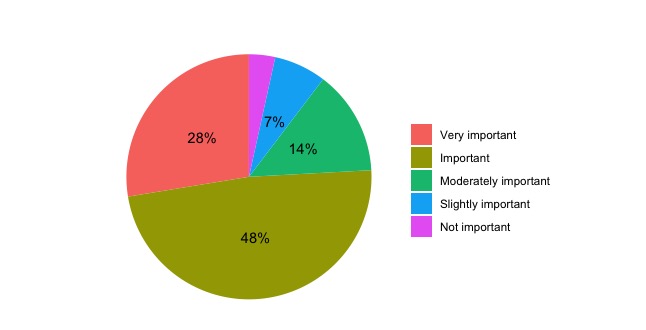
Flexibility in instructional modality was also a principal theme highlighted by EDUCAUSE when providing their survey reflections and next steps.
Image by Freepik
]]>
Since 2006, EDUCAUSE, the professional association for IT in higher education, has conducted an annual survey of students about their technology usage and preferences and, beginning in 2014, a...
https://doit.umbc.edu/post/145116/
https://my3.my.umbc.edu/api/v0/pixel/news/145116/guest@my.umbc.edu/68a3d481b212ab759eb657f3dea35bd7/api/pixel
doit
ecar
educause
survey
Instructional Technology
https://my3.my.umbc.edu/groups/instructional-technology
https://assets2-my.umbc.edu/system/shared/avatars/groups/000/001/164/dec3b026b81ee6d890a8f82f75c94a2e/xsmall.png?1446126703
https://assets1-my.umbc.edu/system/shared/avatars/groups/000/001/164/dec3b026b81ee6d890a8f82f75c94a2e/original.png?1446126703
https://assets2-my.umbc.edu/system/shared/avatars/groups/000/001/164/dec3b026b81ee6d890a8f82f75c94a2e/xxlarge.png?1446126703
https://assets1-my.umbc.edu/system/shared/avatars/groups/000/001/164/dec3b026b81ee6d890a8f82f75c94a2e/xlarge.png?1446126703
https://assets1-my.umbc.edu/system/shared/avatars/groups/000/001/164/dec3b026b81ee6d890a8f82f75c94a2e/large.png?1446126703
https://assets4-my.umbc.edu/system/shared/avatars/groups/000/001/164/dec3b026b81ee6d890a8f82f75c94a2e/medium.png?1446126703
https://assets3-my.umbc.edu/system/shared/avatars/groups/000/001/164/dec3b026b81ee6d890a8f82f75c94a2e/small.png?1446126703
https://assets2-my.umbc.edu/system/shared/avatars/groups/000/001/164/dec3b026b81ee6d890a8f82f75c94a2e/xsmall.png?1446126703
https://assets3-my.umbc.edu/system/shared/avatars/groups/000/001/164/dec3b026b81ee6d890a8f82f75c94a2e/xxsmall.png?1446126703
Instructional Technology
https://assets3-my.umbc.edu/system/shared/thumbnails/news/000/145/116/5ecfe17c34d737ec6000dab0ecc1768b/xxlarge.jpg?1730125856
https://assets4-my.umbc.edu/system/shared/thumbnails/news/000/145/116/5ecfe17c34d737ec6000dab0ecc1768b/xlarge.jpg?1730125856
https://assets2-my.umbc.edu/system/shared/thumbnails/news/000/145/116/5ecfe17c34d737ec6000dab0ecc1768b/large.jpg?1730125856
https://assets2-my.umbc.edu/system/shared/thumbnails/news/000/145/116/5ecfe17c34d737ec6000dab0ecc1768b/medium.jpg?1730125856
https://assets4-my.umbc.edu/system/shared/thumbnails/news/000/145/116/5ecfe17c34d737ec6000dab0ecc1768b/small.jpg?1730125856
https://assets4-my.umbc.edu/system/shared/thumbnails/news/000/145/116/5ecfe17c34d737ec6000dab0ecc1768b/xsmall.jpg?1730125856
https://assets2-my.umbc.edu/system/shared/thumbnails/news/000/145/116/5ecfe17c34d737ec6000dab0ecc1768b/xxsmall.jpg?1730125856
7
0
true
Mon, 28 Oct 2024 11:19:02 -0400
Mon, 28 Oct 2024 11:49:45 -0400
Gamify Ultra courses with achievements & build question banks with AI tools in October update
Enhancements to Ultra Docs & student feedback page
With the October update to Ultra, instructors can gamify their courses or spark learner engagement and motivation using course achievements. Built on performance criteria (e.g., graded items), achievements are visible to students from the main navigation bar. This exciting update provides support for self-directed pathways, offering increased flexibility for assessment and student learning outcomes.

Image 1: Example of badge creation screen in Ultra course
Note: Achievements will be enabled on our production site by October 7.
With the release of the AI Course Design Assistant, instructors benefit from time-saving support for test question creation among other tools. This month's update provides the option to generate test questions directly in a question bank. Refining questions is provided either by entering a description of the learning objective(s) or topic or by selecting course materials, such as Ultra Documents or course files (e.g., readings, handouts, presentations). As with generating test questions directly in a test, instructors can specify the question type, complexity, number of questions, and output language.

Image 2: Example of auto-generating questions in a question bank
Improvements to the student submission review page will make it easier for students to access instructor feedback, including additional labels and other indicators, to help students easily find the information they need. Students now have a Read more option for overall and attempt feedback.
A new Mastery tab in the Gradebook will allow instructors and students to see how their activities align with institutional and/or program goals. Based on the goal performance scale set by UMBC, the tab displays the mastery of each alignment (e.g., Distinguished, Proficient, Foundational, etc.). The Mastery tab enables instructors to view the level of mastery per alignment for each student and how each student is performing against those alignments. Note: UMBC is planning to launch the Mastery tab for SP2025.

Image 3: Example of instructor's view of student's mastery of program goals in a course
Additional updates for October include:
- A Needs reconciling section now appears on the gradebook Overview tab. In this section, reconcilers can easily access all items ready for reconciliation.
- Blackboard expanded discussion notifications to include email. Emails are sent when users opt for "Email me right away" notifications.
- Blackboard made several usability improvements to Ultra Documents including inserting files from the Content Collection.
- Instructors will experience faster loading when scrolling in the Student list, posting grades, and viewing rubrics in Flexible Grading.
- For larger classes with more than 2000 enrollments, the Flexible Grading page loads 25% faster.
Faculty should see the latest updates in their Ultra courses around October 3-4, 2024. The next update to our Ultra test environment will take place on October 8, 2024; release notes are posted to the What's New in Ultra that same week. Faculty who are interested in test driving new features before they are released to production should open an RT ticket to request early access. Please watch the FAQs, including the What's New with Ultra page, and myUMBC for additional information about Ultra.
Connect with Instructional Technology
As always, if you have any questions about teaching, learning, and technology at UMBC, please consider the following options:
Thumbnail-image: New to Ultra [decorative]
]]>
With the October update to Ultra, instructors can gamify their courses or spark learner engagement and motivation using course achievements. Built on performance criteria (e.g., graded items),...
https://my3.my.umbc.edu/groups/instructional-technology/posts/144369
https://my3.my.umbc.edu/api/v0/pixel/news/144369/guest@my.umbc.edu/9b690f94e34ed85e0d7977a070b026b1/api/pixel
achievements
ai-course-design-assistant
blackboard
question-banks
ultra-experience
ultra-update
Instructional Technology
https://my3.my.umbc.edu/groups/instructional-technology
https://assets2-my.umbc.edu/system/shared/avatars/groups/000/001/164/dec3b026b81ee6d890a8f82f75c94a2e/xsmall.png?1446126703
https://assets1-my.umbc.edu/system/shared/avatars/groups/000/001/164/dec3b026b81ee6d890a8f82f75c94a2e/original.png?1446126703
https://assets2-my.umbc.edu/system/shared/avatars/groups/000/001/164/dec3b026b81ee6d890a8f82f75c94a2e/xxlarge.png?1446126703
https://assets1-my.umbc.edu/system/shared/avatars/groups/000/001/164/dec3b026b81ee6d890a8f82f75c94a2e/xlarge.png?1446126703
https://assets1-my.umbc.edu/system/shared/avatars/groups/000/001/164/dec3b026b81ee6d890a8f82f75c94a2e/large.png?1446126703
https://assets4-my.umbc.edu/system/shared/avatars/groups/000/001/164/dec3b026b81ee6d890a8f82f75c94a2e/medium.png?1446126703
https://assets3-my.umbc.edu/system/shared/avatars/groups/000/001/164/dec3b026b81ee6d890a8f82f75c94a2e/small.png?1446126703
https://assets2-my.umbc.edu/system/shared/avatars/groups/000/001/164/dec3b026b81ee6d890a8f82f75c94a2e/xsmall.png?1446126703
https://assets3-my.umbc.edu/system/shared/avatars/groups/000/001/164/dec3b026b81ee6d890a8f82f75c94a2e/xxsmall.png?1446126703
Instructional Technology
https://assets4-my.umbc.edu/system/shared/thumbnails/news/000/144/369/8e67a552d13e90a4ee2c9d7c1708f656/xxlarge.jpg?1727796080
https://assets3-my.umbc.edu/system/shared/thumbnails/news/000/144/369/8e67a552d13e90a4ee2c9d7c1708f656/xlarge.jpg?1727796080
https://assets3-my.umbc.edu/system/shared/thumbnails/news/000/144/369/8e67a552d13e90a4ee2c9d7c1708f656/large.jpg?1727796080
https://assets2-my.umbc.edu/system/shared/thumbnails/news/000/144/369/8e67a552d13e90a4ee2c9d7c1708f656/medium.jpg?1727796080
https://assets4-my.umbc.edu/system/shared/thumbnails/news/000/144/369/8e67a552d13e90a4ee2c9d7c1708f656/small.jpg?1727796080
https://assets1-my.umbc.edu/system/shared/thumbnails/news/000/144/369/8e67a552d13e90a4ee2c9d7c1708f656/xsmall.jpg?1727796080
https://assets1-my.umbc.edu/system/shared/thumbnails/news/000/144/369/8e67a552d13e90a4ee2c9d7c1708f656/xxsmall.jpg?1727796080
Black and white robot dog running with the words "New to Ultra" written on light turquoise background
5
0
true
Thu, 03 Oct 2024 08:29:22 -0400
Tue, 29 Apr 2025 11:49:06 -0400
October Disability Awareness Month Fosters Inclusion in Higher Education
Focus on digital accessibility ensures access, equity to all
In 2019-20, approximately 21 percent of undergraduate students and 11 percent of post baccalaureate students reported having a disability (National Center for Education Statistics, Fast Facts, 2023). Disability Awareness Month offers an opportunity to increase awareness about the variety of disabilities students may experience and help break down misconceptions.
Inclusive Experiences for All
Disability awareness includes addressing physical environments and improving accessibility in buildings, classrooms, and public spaces to ensure all individuals can navigate and participate fully. This might involve installing ramps, widening doorways, adding signage, or improving lighting. The Office of Accessibility & Disability raises awareness about the lived experiences of people with disabilities and highlights services for faculty, staff, and students at UMBC.
Instructors play an important role in recognizing the diverse needs of students with disabilities while striving to promote equity and access for all. This includes creating inclusive learning experiences for students with disabilities and might involve providing assistive technologies, flexible teaching methods, or individualized support plans.
Creating more accessible courses also requires consideration of diverse learning styles and approaches that result in engaging learning for all students. Strategies grounded in Universal Design for Learning principles can leverage technology in ways that help all students succeed. Key practices that support accessible course design include the following.
Universal Design for Learning
One of the most impactful ways instructors can support students is by using Universal Design for Learning (UDL) guidelines, a framework that aims to provide multiple means of engagement, representation, and expression for learners. UDL benefits all students, not just those with disabilities, because it offers flexible ways learners can access content and demonstrate knowledge.
UDL is a key practice that supports accessible course design. Instructors can get started in any of the following ways:
- Review UDL guidelines that support offering multiple means of representation to learners by employing various formats such as text, audio, and visual materials to accommodate diverse learning preferences.
- Foster engagement by incorporating interactive elements, discussions, or hands-on activities that cater to visual, auditory, and kinesthetic learners.
- Ask key questions about learner engagement, representation, action and expression when designing a module or unit in your course.
- Implement UDL incrementally and intentionally. Refer to scholarly works like Behling & Tobin (2018) for guidance. They encourage faculty to think of UDL as “plus-one thinking about the interactions in your course” (p. 134). Is there just one more way you can help students stay on task, give them information, or demonstrate skills?
QM’s Accessibility and Usability Resource Site
- Register for free access to Quality Matters’ Accessibility and Usability Resource Site (AURS), the go-to resource for educators to address key accessibility and usability concerns in course design. Log into MyQM, or create your QM account. After successfully logging in, use the side navigation menu to select “Workshop-Register” and self-enroll into AURS (last item on the workshop list).
- Explore AURS resources, videos, and best practices on topics like UDL, alternative text, captions, hyperlinks, accessible MS Office products, readability, accessible PDFs, accessible course design, and inclusive teaching practices.
Anthology Ally for Remediation, Alt Text
- Explore accessibility tools and built-in features that allow you to cater to students with different abilities and meet recently updated federal requirements for digital accessibility compliance. For example, Ally is a tool available in Blackboard Ultra that improves the accessibility of courses by scanning course content, generating an Accessibility Report, and providing tools to fix accessibility issues.
- Use Ally's Instructor Feedback Panel to preview content and prioritize remediation.
- Consider Ally's powerful alternative format options and let students know they can download content in multiple formats that give them choices in how they watch, read, or listen.
Attending disability awareness workshops or collaborating with the Office of Student Disability Services (SDS) can provide instructors with the tools to accommodate the needs of students with disabilities in the classroom.
Save the dates!
Join Instructional Technology for upcoming digital accessibility events:
References
-
Behling, K. & Tobin, T. J. (2018). Reach everyone, teach everyone: Universal Design for Learning in higher education. Morgantown: West Virginia University Press. https://wvupressonline.com/node/757.
-
CAST (2018). Universal Design for Learning Guidelines version 2.2. Retrieved from http://udlguidelines.cast.org
-
National Center for Education Statistics. (2023, TBA). Table 311.10. Number and percentage distribution of students enrolled in postsecondary institutions, by level, disability status, and selected student characteristics: Academic year 2019–20 [Data table]. In Digest of education statistics. U.S. Department of Education, Institute of Education Sciences. Retrieved December 5, 2023, from https://nces.ed.gov/programs/digest/d22/tables/dt22_311.10.asp.
(Image designed by vectorjuice on Freepik)
]]>
In 2019-20, approximately 21 percent of undergraduate students and 11 percent of post baccalaureate students reported having a disability (National Center for Education Statistics, Fast Facts,...
https://my3.my.umbc.edu/groups/instructional-technology/posts/144396
https://my3.my.umbc.edu/api/v0/pixel/news/144396/guest@my.umbc.edu/15133f302e7411f0c689267dede1867d/api/pixel
access
accessibility
biro
da
digital-accessibility
disability-awareness-month
equity
fa24
Instructional Technology
https://my3.my.umbc.edu/groups/instructional-technology
https://assets2-my.umbc.edu/system/shared/avatars/groups/000/001/164/dec3b026b81ee6d890a8f82f75c94a2e/xsmall.png?1446126703
https://assets1-my.umbc.edu/system/shared/avatars/groups/000/001/164/dec3b026b81ee6d890a8f82f75c94a2e/original.png?1446126703
https://assets2-my.umbc.edu/system/shared/avatars/groups/000/001/164/dec3b026b81ee6d890a8f82f75c94a2e/xxlarge.png?1446126703
https://assets1-my.umbc.edu/system/shared/avatars/groups/000/001/164/dec3b026b81ee6d890a8f82f75c94a2e/xlarge.png?1446126703
https://assets1-my.umbc.edu/system/shared/avatars/groups/000/001/164/dec3b026b81ee6d890a8f82f75c94a2e/large.png?1446126703
https://assets4-my.umbc.edu/system/shared/avatars/groups/000/001/164/dec3b026b81ee6d890a8f82f75c94a2e/medium.png?1446126703
https://assets3-my.umbc.edu/system/shared/avatars/groups/000/001/164/dec3b026b81ee6d890a8f82f75c94a2e/small.png?1446126703
https://assets2-my.umbc.edu/system/shared/avatars/groups/000/001/164/dec3b026b81ee6d890a8f82f75c94a2e/xsmall.png?1446126703
https://assets3-my.umbc.edu/system/shared/avatars/groups/000/001/164/dec3b026b81ee6d890a8f82f75c94a2e/xxsmall.png?1446126703
Instructional Technology
https://assets4-my.umbc.edu/system/shared/thumbnails/news/000/144/396/efda742ca564aeb03f2e829e7e9f8d91/xxlarge.jpg?1727875037
https://assets1-my.umbc.edu/system/shared/thumbnails/news/000/144/396/efda742ca564aeb03f2e829e7e9f8d91/xlarge.jpg?1727875037
https://assets1-my.umbc.edu/system/shared/thumbnails/news/000/144/396/efda742ca564aeb03f2e829e7e9f8d91/large.jpg?1727875037
https://assets4-my.umbc.edu/system/shared/thumbnails/news/000/144/396/efda742ca564aeb03f2e829e7e9f8d91/medium.jpg?1727875037
https://assets1-my.umbc.edu/system/shared/thumbnails/news/000/144/396/efda742ca564aeb03f2e829e7e9f8d91/small.jpg?1727875037
https://assets3-my.umbc.edu/system/shared/thumbnails/news/000/144/396/efda742ca564aeb03f2e829e7e9f8d91/xsmall.jpg?1727875037
https://assets3-my.umbc.edu/system/shared/thumbnails/news/000/144/396/efda742ca564aeb03f2e829e7e9f8d91/xxsmall.jpg?1727875037
5
2
true
Wed, 02 Oct 2024 09:47:19 -0400
UMBC reaches 99.6% Ultra adoption for Fall 2024 term
Reminder: DoIT support of Original ends 12/31/24
After five years of a phased migration, more than 99% of all available Blackboard courses for the fall semester are now using Ultra. This marks a significant milestone in our transition from Blackboard Original with only seven courses still using the legacy system until December 31, 2024.
“I want to thank the Deans, all faculty and students, and especially DoIT’s instructional technology team, for their collaboration, patience and hard work,” says John Fritz, Associate Vice President for Instructional Technology. “I know this was a lot of work over a long period, including the pandemic, but I’m thrilled we’ll all be able to focus on supporting one version of Blackboard and helping the campus community make the best use of it.”

Image 1: Rate of Ultra adoption since Spring 2020
UMBC began using Blackboard Ultra in 2018 with a small pilot involving four faculty members. Since then, adoption grew slowly, but steadily. By Spring 2024, nearly 70% of available courses were delivered in Ultra. DoIT announced that all courses for the fall term would be created in Ultra with a one-time rollback option for COEIT and CNMS (CAHSS had agreed to do so a year ago). More than 125 faculty attended Ultra training in August to prepare for or refresh their Ultra courses.
Instructional Technology continues to work closely with faculty and departments to ensure a smooth transition before the end of Original deadline. For more information about Ultra, please visit the Instructional Technology group on myUMBC or umbc.edu/go/ultra.
Connect with Instructional Technology
As always, if you have any questions about teaching, learning, and technology at UMBC, please consider the following options:
---
UMBC is committed to providing a consistent learning experience for everyone. The last day we will support Blackboard Original is December 31, 2024. Please check out our training and support: umbc.edu/go/ultra
Thumbnail-image: Ultra news update
]]>
After five years of a phased migration, more than 99% of all available Blackboard courses for the fall semester are now using Ultra. This marks a significant milestone in our transition from...
https://my3.my.umbc.edu/groups/instructional-technology/posts/144246
Image
https://assets4-my.umbc.edu/system/shared/attachments/717dade6660c0155f358636ae03e22c2/6a7d7dd5/news/000/144/246/c96fc71df4ef8f6420fda7958957538c/Ultra_Adoption_Tracker.png?1727362195
https://my3.my.umbc.edu/api/v0/pixel/news/144246/guest@my.umbc.edu/bcbc4439a804e22c6ea22b57e91fc5ec/api/pixel
blackboard
hawken
ultra-experience
ultra-migration
Instructional Technology
https://my3.my.umbc.edu/groups/instructional-technology
https://assets2-my.umbc.edu/system/shared/avatars/groups/000/001/164/dec3b026b81ee6d890a8f82f75c94a2e/xsmall.png?1446126703
https://assets1-my.umbc.edu/system/shared/avatars/groups/000/001/164/dec3b026b81ee6d890a8f82f75c94a2e/original.png?1446126703
https://assets2-my.umbc.edu/system/shared/avatars/groups/000/001/164/dec3b026b81ee6d890a8f82f75c94a2e/xxlarge.png?1446126703
https://assets1-my.umbc.edu/system/shared/avatars/groups/000/001/164/dec3b026b81ee6d890a8f82f75c94a2e/xlarge.png?1446126703
https://assets1-my.umbc.edu/system/shared/avatars/groups/000/001/164/dec3b026b81ee6d890a8f82f75c94a2e/large.png?1446126703
https://assets4-my.umbc.edu/system/shared/avatars/groups/000/001/164/dec3b026b81ee6d890a8f82f75c94a2e/medium.png?1446126703
https://assets3-my.umbc.edu/system/shared/avatars/groups/000/001/164/dec3b026b81ee6d890a8f82f75c94a2e/small.png?1446126703
https://assets2-my.umbc.edu/system/shared/avatars/groups/000/001/164/dec3b026b81ee6d890a8f82f75c94a2e/xsmall.png?1446126703
https://assets3-my.umbc.edu/system/shared/avatars/groups/000/001/164/dec3b026b81ee6d890a8f82f75c94a2e/xxsmall.png?1446126703
Instructional Technology
https://assets3-my.umbc.edu/system/shared/thumbnails/news/000/144/246/4c921fdcfcf008002d0d8f2f1f80f2b6/xxlarge.jpg?1727362036
https://assets2-my.umbc.edu/system/shared/thumbnails/news/000/144/246/4c921fdcfcf008002d0d8f2f1f80f2b6/xlarge.jpg?1727362036
https://assets4-my.umbc.edu/system/shared/thumbnails/news/000/144/246/4c921fdcfcf008002d0d8f2f1f80f2b6/large.jpg?1727362036
https://assets3-my.umbc.edu/system/shared/thumbnails/news/000/144/246/4c921fdcfcf008002d0d8f2f1f80f2b6/medium.jpg?1727362036
https://assets1-my.umbc.edu/system/shared/thumbnails/news/000/144/246/4c921fdcfcf008002d0d8f2f1f80f2b6/small.jpg?1727362036
https://assets4-my.umbc.edu/system/shared/thumbnails/news/000/144/246/4c921fdcfcf008002d0d8f2f1f80f2b6/xsmall.jpg?1727362036
https://assets2-my.umbc.edu/system/shared/thumbnails/news/000/144/246/4c921fdcfcf008002d0d8f2f1f80f2b6/xxsmall.jpg?1727362036
4
0
true
Thu, 26 Sep 2024 10:58:57 -0400
Thu, 26 Sep 2024 11:24:36 -0400
Ultra's Progress Tracking Tools Help Instructors Identify, Connect, and Support Learners
Create Your Strategy to Monitor and Reach Out to Students
This article focuses on Ultra's progress tracking tools and strategies for student identification, outreach, and support. It follows Part 1 - Course Design Best Practices in Ultra, which showcased features in Ultra to ensure your course is designed to optimize student learning and ensure they feel welcome and prepared.
As the semester enters week four, there is an opportunity to assess how students are doing in your course when it comes to participating, meeting deadlines, and completing discussions or knowledge checks. Did you know that Ultra offers a variety of reports and analytics that benefit both instructors and students in tracking individual progress?
Progress Tracking
Instructors can monitor student progress through a variety of tools including options that support tracking by content item, submission activity, and test attempt. When tracking student progress in a particular set of content, instructors can filter by student and progress status, or select students and send an individualized message or reminder. In conjunction with early academic alerts, instructors can decide when and how to reach out to students by using details and insights from Ultra’s progress reports.
Student View of Progress Tracking
Students can also leverage Ultra’s progress tracking capabilities to monitor their engagement with content, assignments, and tests. This feature provides visual indicators of student progress, motivating them to stay on track. Students can also see a summary of their progress within learning modules, making it easier to manage their workload and prioritize tasks.
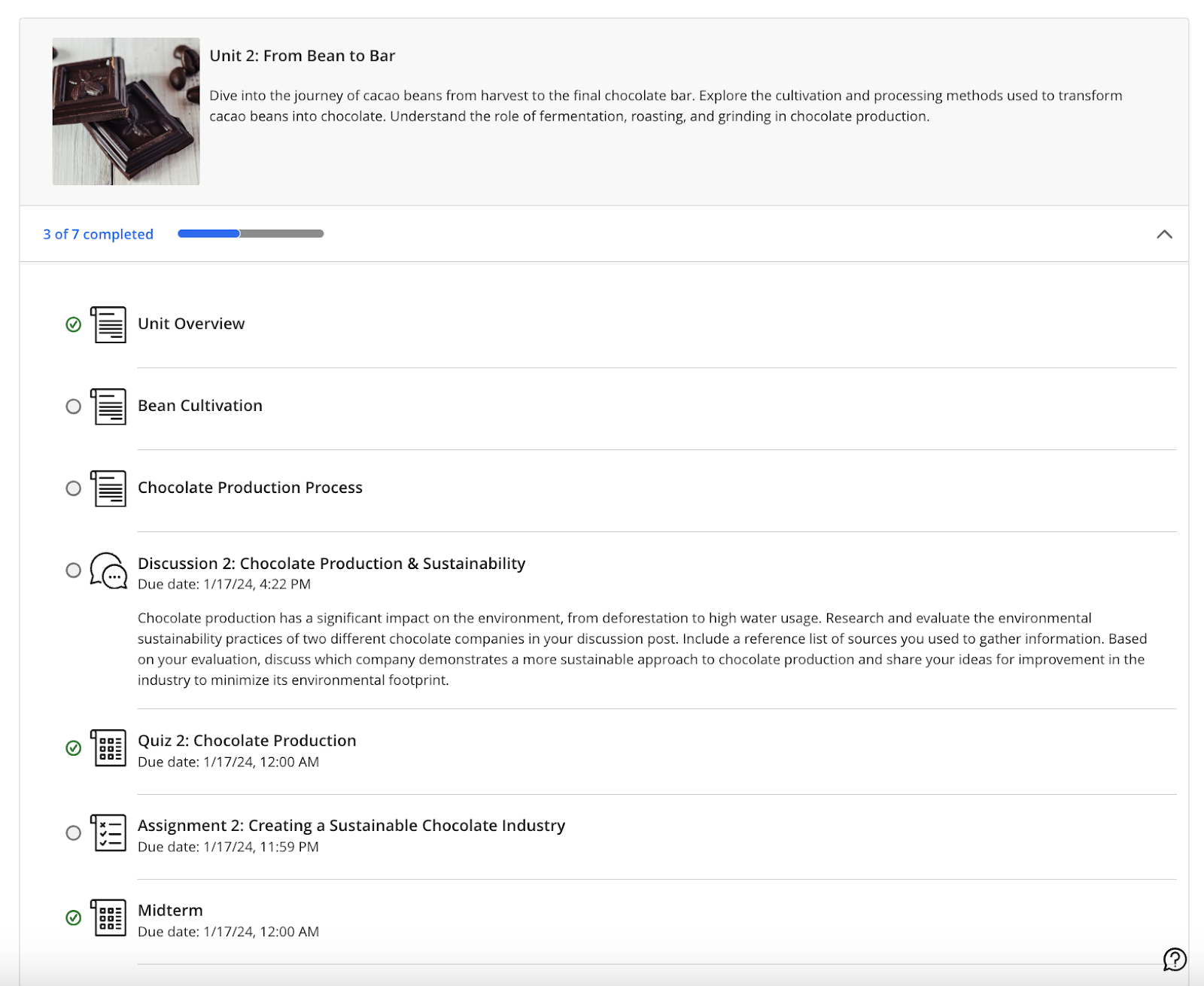
Instructors who have not seen what the Student View of progress tracking looks like may want to go into “Student Preview” mode once the course is open and see how this appears. Each item has a status circle to the left of the item title. An empty circle means the student has not yet accessed content; a partially filled circle indicates the item has been opened or accessed through Ally; and a green check mark appears when the item has been completed. (See image below)
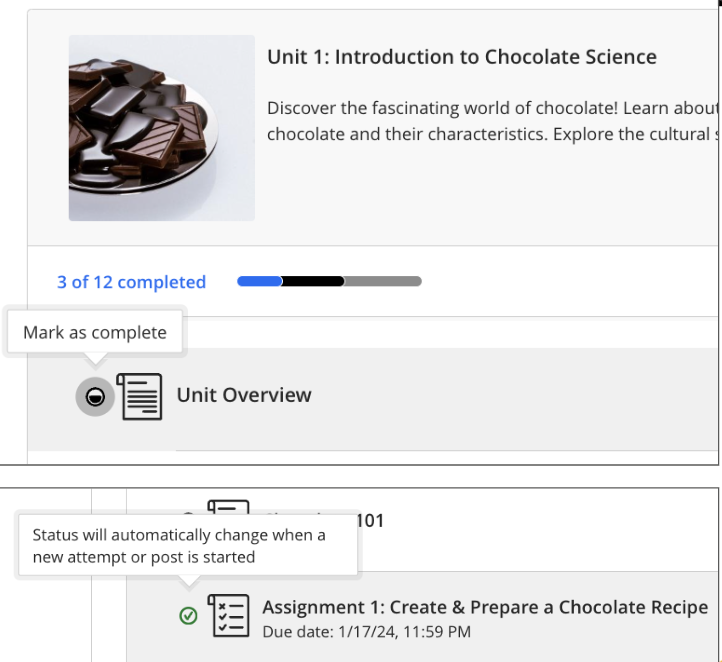
While in “Student View,” instructors can see that students may mark content items “complete” after opening them. This gives students a tangible way to keep track of their progress within the course. Assigned submissions will change automatically to denote completion. (See image below)
Student Overview (Instructor View)
Ultra’s Student Overview offers instructors a single place to access relevant information on a student and personalize outreach. Details such as when a student last accessed the course, overall grade, or any accommodations can be found in the Student Overview.
Student Overview can be accessed in multiple ways including Gradebook on the Students tab, within the course roster, via messages or discussions, or within the table view of the Course Activity Report. Instructors can also contact students through Student Overview by sending a message about grades or progress.
Gradebook Progress & Instructor Notes
Progress tracking features in the Ultra gradebook offer instructors several views including a list of all assignments, a view of students and assignments, or an individual list of students. By selecting the “Progress” tab, instructors can see a list of all content items in the course and status for each item. For students who may be behind or have not opened all content in a module, instructors can select “Send Message” and reach out to a student directly.
In the student view of the Gradebook, instructors have access to a “Notes” tab. This newer feature in Ultra is a dedicated space in the course where you can take notes about students for quick reference as the semester progresses. Instructor notes are private only to you and limited only to the course. Instructor notes do NOT travel to other courses and students do not see them.
Course Activity Report
The Course Activity Report provides an overview of how a student interacts with the course over time. Instructors can observe how a student’s engagement or performance have changed on a weekly basis or over a longer period of time. In the image below, this is the list view of the report and supports instructors who want to filter students based on overall grade, missed due dates, hours spent in the course, or number of days since they last accessed. After filtering the list, instructors can send messages to students from this window and also configure alerts.
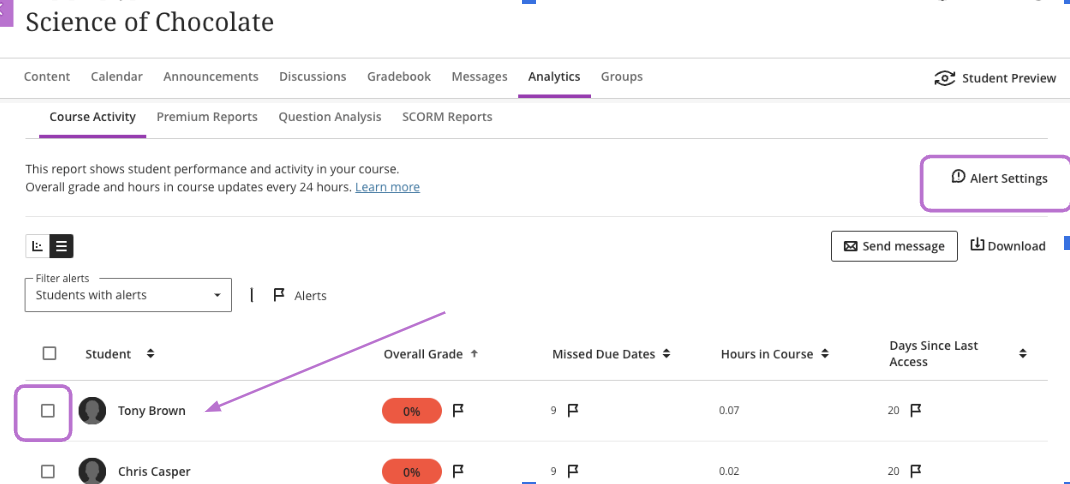
Within the Report, you can enable and customize student alert flags to fit your teaching style. These alerts will be visible in the Course Activity Report and are related to factors such as overall grade, missed due dates, or days since a student last accessed the course. Comprehensive reports let instructors see which students have opened, started, or completed content, helping them tailor teaching strategies.
Exploring and leveraging Ultra's progress tracking tools can make identifying and intervening on behalf of students who may be struggling in the course easier and efficient for instructors.
Upcoming events about progress tracking and student support:
For more information on how to use Ultra’s reports and analytics for student tracking and support, check out these resources:
At 6:40 PM on September 22nd, Blackboard reported a system performance issue affecting clients in the US East region. This disruption may prevent users from accessing the Blackboard platform. Users who are able to log in may experience degraded performance and difficulty accessing course content and assessments.
As of 11:00 PM, system performance issues remain unresolved.
Blackboard engineers are working to address the issue as quickly as possible. Instructional Technology staff opened a ticket with Blackboard Support and are continuing to monitor the service disruption.
Update:
As of 3:15 am on September 23, Blackboard reports that this incident has been resolved. Please open an RT request for any continuing concerns related to system performance.
This post will be updated with additional information as we receive it.
Connect with Instructional Technology
As always, if you have any questions about teaching, learning, and technology at UMBC, please consider the following options:
Thumbnail-image: Blackboard logo [decorative]
]]>
At 6:40 PM on September 22nd, Blackboard reported a system performance issue affecting clients in the US East region. This disruption may prevent users from accessing the Blackboard platform....
https://my3.my.umbc.edu/groups/instructional-technology/posts/144132
https://my3.my.umbc.edu/api/v0/pixel/news/144132/guest@my.umbc.edu/61bae9c56fe299d24494666cc9a1250c/api/pixel
blackboard
outage
Instructional Technology
https://my3.my.umbc.edu/groups/instructional-technology
https://assets2-my.umbc.edu/system/shared/avatars/groups/000/001/164/dec3b026b81ee6d890a8f82f75c94a2e/xsmall.png?1446126703
https://assets1-my.umbc.edu/system/shared/avatars/groups/000/001/164/dec3b026b81ee6d890a8f82f75c94a2e/original.png?1446126703
https://assets2-my.umbc.edu/system/shared/avatars/groups/000/001/164/dec3b026b81ee6d890a8f82f75c94a2e/xxlarge.png?1446126703
https://assets1-my.umbc.edu/system/shared/avatars/groups/000/001/164/dec3b026b81ee6d890a8f82f75c94a2e/xlarge.png?1446126703
https://assets1-my.umbc.edu/system/shared/avatars/groups/000/001/164/dec3b026b81ee6d890a8f82f75c94a2e/large.png?1446126703
https://assets4-my.umbc.edu/system/shared/avatars/groups/000/001/164/dec3b026b81ee6d890a8f82f75c94a2e/medium.png?1446126703
https://assets3-my.umbc.edu/system/shared/avatars/groups/000/001/164/dec3b026b81ee6d890a8f82f75c94a2e/small.png?1446126703
https://assets2-my.umbc.edu/system/shared/avatars/groups/000/001/164/dec3b026b81ee6d890a8f82f75c94a2e/xsmall.png?1446126703
https://assets3-my.umbc.edu/system/shared/avatars/groups/000/001/164/dec3b026b81ee6d890a8f82f75c94a2e/xxsmall.png?1446126703
Instructional Technology
https://assets2-my.umbc.edu/system/shared/thumbnails/news/000/144/132/171974d2b4c87c275a9f91ae12938a88/xxlarge.jpg?1727059322
https://assets4-my.umbc.edu/system/shared/thumbnails/news/000/144/132/171974d2b4c87c275a9f91ae12938a88/xlarge.jpg?1727059322
https://assets3-my.umbc.edu/system/shared/thumbnails/news/000/144/132/171974d2b4c87c275a9f91ae12938a88/large.jpg?1727059322
https://assets4-my.umbc.edu/system/shared/thumbnails/news/000/144/132/171974d2b4c87c275a9f91ae12938a88/medium.jpg?1727059322
https://assets2-my.umbc.edu/system/shared/thumbnails/news/000/144/132/171974d2b4c87c275a9f91ae12938a88/small.jpg?1727059322
https://assets1-my.umbc.edu/system/shared/thumbnails/news/000/144/132/171974d2b4c87c275a9f91ae12938a88/xsmall.jpg?1727059322
https://assets4-my.umbc.edu/system/shared/thumbnails/news/000/144/132/171974d2b4c87c275a9f91ae12938a88/xxsmall.jpg?1727059322
2
0
false
Sun, 22 Sep 2024 23:19:41 -0400
Mon, 23 Sep 2024 06:27:21 -0400
Effective course design helps welcome and orient students
Course Design Best Practices in Ultra - Part 1 of 2
This article focuses on ways to leverage features in Ultra to ensure your course is designed to optimize student learning and ensure students feel welcome and prepared, especially at the start of the term. Part 2 will feature Ultra’s progress tracking tools and effective strategies for student identification, outreach, and support.
A student’s first impression of your course, and their learning opportunities throughout the course, are influenced initially by course design. A clutter-free environment helps students focus on the course and avoid confusion. In addition, students’ learning opportunities can be enhanced by using Blackboard Ultra design features to welcome and orient them within the first critical weeks of the semester and ensure they are on track and able to locate content, engage with one another, get help, and submit assignments.
During emergency-remote instruction in 2020, a survey of more than 500 UMBC courses taught by instructors who completed the PIVOT+ professional development program found students reported enjoying taking classes that were well organized and planned. More than 85% of students agreed or strongly agreed that PIVOT+ courses flowed in a logical format. About 90% of students agreed or strongly agreed that course requirements were clear, while 83% agreed or strongly agreed that assignment instructions were clear.
Using the ‘Start Here’ Module
Every Blackboard course shell at UMBC is created with a “Start Here” module already in place. Within this module are placeholders for the syllabus, instructor information, and eLearning and academic resources. This module can also contain critical orientation information to let students know what to expect in your course, how to navigate, help set the tone for the course, and provide opportunities to establish teaching and social presence (Quality Matters, 2024; Wengier, 2022).
Welcoming and Orienting Students
When it comes to designing the welcome experience for learners, Quality Matters General Standard 1: Course Overview & Introduction (HE Rubric, 7th ed.), offers researched-backed effective practices for orienting students to the course and instructor expectations for communication, feedback, grading, and use of Blackboard.

In the QM-certified course AGNG 355, instructor Louise Murray (pictured above) includes a pre-recorded, narrated, and captioned PowerPoint to provide students with a visual tour of the course and communication expectations. This allows students to see and hear the instructor and complements the text Murray provides about email, phone, office hours, and response times.
There are many ways to welcome and introduce students to your course, including steps you can take before the semester even starts, such as sending a welcome email or announcement. These messages can stay available for students through the duration of the course.
Some instructors send a pre-survey to students before the semester starts to determine prior knowledge or experience. In addition, you may want to prepare a Frequently Asked Questions (FAQs) resource to address the most common student questions, share tips on time management, and remind students how to access technology and resources.
Consider that there are effective options to consider for welcoming and orienting students that create learning opportunities at the beginning of the course including:
- Accessing a welcome video or course tour (pre-recorded)
- Reading an instructor’s introduction
- Introducing themselves in a Discussion forum or VoiceThread
- Using the “Ask the Professor” discussion forum to ask clarifying questions
- Completing a syllabus quiz

In the Quality Matters certified course SPAN 201 (pictured above) instructor Milvia Hernandez pre-records a brief video that complements text in Blackboard. More importantly, students can also see and hear Hernandez as she welcomes them in both Spanish and English and explains the course structure and cadence.
About Quality Matters
Grounded in evidence-based practice research, peer review, and collegiality, Quality Matters (QM) is used by more than 40,000 educators and instructional designers worldwide to strengthen online and blended course design.
At UMBC, 19 courses have earned QM certification for online course design and represent more than half of the QM-certified courses in the University System of Maryland.
References:
-
Quality Matters. (2024, September 9). QM Rubrics & Standards.
-
Wengier, S. (2022). The start here module: Creating a first day impression in an online language class (EJ1346021).