Vasbinder Creates OER Course from 2023 M.O.S.T. Faculty Grant
Dance History course offers inclusive, equitable curriculum
Jill Vasbinder, adjunct faculty, Department of Dance (Dance Appreciation, Dance History) has created an Open Educational Resource (OER) dance history course as a recipient of the 2023 Maryland Open Source Textbook (M.O.S.T.) Faculty OER Grant Program.
The course, Dance History I: Cultural and Classical Forms, offers a more diverse, inclusive, and equitable curriculum that examines the history of dance. Vasbinder began exploring the use of open licensed materials in dance and dance education as a way to practice inclusion in the classroom.
Vasbinder received a $2,000 grant plus participation in the Rebus Textbook Success Program to create the OER course this past year.
She has published and presented on the use of open licensing in dance and viewed the M.O.S.T. Faculty OER Grant Program as an opportunity to “transform Dance History I into an OER course that can be shared with dancers and dance educators … to help bring a more inclusive understanding of a greater variety of dances.”
Creating a more inclusive course
Carol Hess, professor and Chair, Department of Dance, shared, “Over the past several years, Ms. Vasbinder has been transforming her Dance History I course to contain more inclusive, de-colonized content, a wider array of assessment modalities, and embodied experiences for the students. Her OER course shares an approach to the teaching of Dance History that will be a valuable resource for both instructors and students.”
Hess was a project team member on the M.O.S.T. Faculty Grant supporting Vasbinder’s work. Other team members were Erin Durham Wright, Reference & Instruction Librarian; Josh Abrams, Instructional Design Specialist, Instructional Technology; and Susan Biro, Manager, Online Learning, Instructional Technology.
“The process of creating this resource has been an amazing collaboration renewing my joy of teaching and exploring the ever expanding ways to share and learn,” says Vasbinder. “My hope is that this OER course will continue to be updated and expanded and grow to include modules from other dance history scholars as we continue to receive feedback from student and scholar adopters of this work.” She is excited to learn how the course is adopted and adapted by others in the field.
Dance History: Cultural and Classical Forms is now available. Potential adopters and adapters will be able to find the course in the M.O.S.T. Commons, OER Commons, and the DELRdi (Dance Education Literature and Research descriptive index).
M.O.S.T. Initiative expands OER access
The Maryland Open Source Textbook (M.O.S.T.) initiative supports efforts to increase faculty access, affordability, and achievement for students at Maryland’s postsecondary institutions through the incorporation of open educational resources (OER) into teaching practice.
From spring 2014 to fall 2023, 210 courses at 29 institutions across Maryland have switched to OER, saving students more than $22 million in cumulative textbook costs. Since spring 2014, M.O.S.T. has impacted more than 160,000 students, who saved an average of $137 per course.
]]>
Jill Vasbinder, adjunct faculty, Department of Dance (Dance Appreciation, Dance History) has created an Open Educational Resource (OER) dance history course as a recipient of the 2023 Maryland...
https://my3.my.umbc.edu/groups/instructional-technology/posts/142272
Image
https://assets2-my.umbc.edu/system/shared/attachments/538e86932b4e47f009d5897cee6697fc/6a7d3b34/news/000/142/272/b533868508ec8c95aeabdc36ecc28e79/jill portrait.jpg?1725893832
https://my3.my.umbc.edu/api/v0/pixel/news/142272/guest@my.umbc.edu/9e580d17c29da984c62fd0238270cfab/api/pixel
biro
dance-history
most
oer
open-educational-resources
vasbinder
Instructional Technology
https://my3.my.umbc.edu/groups/instructional-technology
https://assets2-my.umbc.edu/system/shared/avatars/groups/000/001/164/dec3b026b81ee6d890a8f82f75c94a2e/xsmall.png?1446126703
https://assets1-my.umbc.edu/system/shared/avatars/groups/000/001/164/dec3b026b81ee6d890a8f82f75c94a2e/original.png?1446126703
https://assets2-my.umbc.edu/system/shared/avatars/groups/000/001/164/dec3b026b81ee6d890a8f82f75c94a2e/xxlarge.png?1446126703
https://assets1-my.umbc.edu/system/shared/avatars/groups/000/001/164/dec3b026b81ee6d890a8f82f75c94a2e/xlarge.png?1446126703
https://assets1-my.umbc.edu/system/shared/avatars/groups/000/001/164/dec3b026b81ee6d890a8f82f75c94a2e/large.png?1446126703
https://assets4-my.umbc.edu/system/shared/avatars/groups/000/001/164/dec3b026b81ee6d890a8f82f75c94a2e/medium.png?1446126703
https://assets3-my.umbc.edu/system/shared/avatars/groups/000/001/164/dec3b026b81ee6d890a8f82f75c94a2e/small.png?1446126703
https://assets2-my.umbc.edu/system/shared/avatars/groups/000/001/164/dec3b026b81ee6d890a8f82f75c94a2e/xsmall.png?1446126703
https://assets3-my.umbc.edu/system/shared/avatars/groups/000/001/164/dec3b026b81ee6d890a8f82f75c94a2e/xxsmall.png?1446126703
Instructional Technology
https://assets3-my.umbc.edu/system/shared/thumbnails/news/000/142/272/7a5c5550f8d27d34d79a5af3bed59ef9/xxlarge.jpg?1725893882
https://assets2-my.umbc.edu/system/shared/thumbnails/news/000/142/272/7a5c5550f8d27d34d79a5af3bed59ef9/xlarge.jpg?1725893882
https://assets3-my.umbc.edu/system/shared/thumbnails/news/000/142/272/7a5c5550f8d27d34d79a5af3bed59ef9/large.jpg?1725893882
https://assets4-my.umbc.edu/system/shared/thumbnails/news/000/142/272/7a5c5550f8d27d34d79a5af3bed59ef9/medium.jpg?1725893882
https://assets1-my.umbc.edu/system/shared/thumbnails/news/000/142/272/7a5c5550f8d27d34d79a5af3bed59ef9/small.jpg?1725893882
https://assets2-my.umbc.edu/system/shared/thumbnails/news/000/142/272/7a5c5550f8d27d34d79a5af3bed59ef9/xsmall.jpg?1725893882
https://assets2-my.umbc.edu/system/shared/thumbnails/news/000/142/272/7a5c5550f8d27d34d79a5af3bed59ef9/xxsmall.jpg?1725893882
5
1
true
Mon, 09 Sep 2024 10:58:55 -0400
Fri, 08 Nov 2024 13:06:28 -0500
September brings knowledge checks, updated course landing page, AI conversations to Ultra
Grading overview, activity log, new feedback for students
The latest release of Ultra enhancements comes two weeks into the fall 24 semester, bringing formative knowledge checks to Ultra Documents, a redesigned course landing page, and a new learner engagement tool called AI Conversations.
In the August release, the Ultra Document saw significant improvements to support robust flexible layouts that are mobile friendly and responsible. With this update, instructors can now create formative knowledge checks to enhance the learning experience, allowing students to engage with content and receive immediate feedback. Instructors can provide correct/incorrect feedback and access simple metrics about attempts. Knowledge checks are formative and do not pass to the gradebook at this time.

Image 1: Example of knowledge check question (animated)
As previously announced, Anthology will update the Ultra course landing page to focus content on the left and course actions on the right. Additionally, it will be easier to distinguish between content containers (e.g., folders, learning modules, other content types) to help improve course navigation for all users. Moreover, functional improvements with this redesign provide clearer options to create content throughout the course.

Image 2: Comparison of old Ultra course page (left) and new Ultra course page (right)
The AI Conversation is a new engagement tool guided by AI, encouraging students explore their thoughts on an assigned topic. Currently available as a Socratic questioning exercise, the AI Conversation's persona is configured by the instructor (name, avatar, and personality trait) with options to test and preview for reliability. Additionally, a customizable reflection question allows students to share their thoughts on the activity and, if prompted by the reflection and instructor, lets them flag any bias or errors from the AI as part of Anthology’s Trustworthy AI Approach. On submission, the instructor can review the AI conversation transcript and the student's reflection. Future updates to this engagement activity in late FA2024 will include roleplaying and debate options.

Image 3: Example of student participating in an AI Conversation
Finally, a new activity log is available to instructors in the Ultra course, helping with decisions in academic disputes and aiding in troubleshooting. Events include course access, assessment start/save/submitted, discussion access/save/edit/reply, document access, LTI (tool) access, and journal access. The Activity log can be filtered by event type and can look to the past 140 days.
Additional updates for September include:
- Instructors will find a new gradebook Overview tab to improve task orientation and grading efficiency. This tab contains two sections: Needs Grading and Needs Posting.
- To help instructors stay on top of their grading workload, there will be a number in the Gradebook tab to indicate when there are new submissions to grade.
-
Ultra introduces a new student-facing submission review page for assignments that makes all instructor feedback on a submission more visible, even if the assignment is hidden by a release condition.
- The Wiris engine and equation editor is updated to improve the rendering of subscript and superscript formulas, providing a better experience for STEM courses.
- Ultra added a new option to help instructors remove submissions from the grading workflow without having to delete them. When grading a student, you can now select Exclude Attempt to remove it from the Needs Grading workflow.
- When enabled, the Automatic Zeros gradebook setting gives a zero score to students who haven’t made a submission by the due date. To help instructors find and grade late assessment submissions, they are now indicated as Needs Grading on the Grades and Gradable Items gradebook pages.
Faculty should see the latest updates in their Ultra courses around September 5-6, 2024. The next update to our Ultra test environment will take place on September 10, 2024; release notes are posted to the What's New in Ultra that same week. Faculty who are interested in test driving new features before they are released to production should open an RT ticket to request early access. Please watch the FAQs, including the What's New with Ultra page, and myUMBC for additional information about Ultra.
Connect with Instructional Technology
As always, if you have any questions about teaching, learning, and technology at UMBC, please consider the following options:
Thumbnail-image: New to Ultra [decorative]
]]>
The latest release of Ultra enhancements comes two weeks into the fall 24 semester, bringing formative knowledge checks to Ultra Documents, a redesigned course landing page, and a new learner...
https://my3.my.umbc.edu/groups/instructional-technology/posts/143384
Image
https://assets3-my.umbc.edu/system/shared/attachments/175180b8c3c2e5cb0a75b1daabafdfa1/6a7d3b34/news/000/143/384/d6da9193daf6eecb2259258ec79b43fb/learn_ultra_instructor_AIConversation_StudentView.png?1724782774
https://my3.my.umbc.edu/api/v0/pixel/news/143384/guest@my.umbc.edu/18c96a6a11e7380b126a951cd5cbc731/api/pixel
blackboard
course-ai-conversations
design
ultra-experience
ultra-update
Instructional Technology
https://my3.my.umbc.edu/groups/instructional-technology
https://assets2-my.umbc.edu/system/shared/avatars/groups/000/001/164/dec3b026b81ee6d890a8f82f75c94a2e/xsmall.png?1446126703
https://assets1-my.umbc.edu/system/shared/avatars/groups/000/001/164/dec3b026b81ee6d890a8f82f75c94a2e/original.png?1446126703
https://assets2-my.umbc.edu/system/shared/avatars/groups/000/001/164/dec3b026b81ee6d890a8f82f75c94a2e/xxlarge.png?1446126703
https://assets1-my.umbc.edu/system/shared/avatars/groups/000/001/164/dec3b026b81ee6d890a8f82f75c94a2e/xlarge.png?1446126703
https://assets1-my.umbc.edu/system/shared/avatars/groups/000/001/164/dec3b026b81ee6d890a8f82f75c94a2e/large.png?1446126703
https://assets4-my.umbc.edu/system/shared/avatars/groups/000/001/164/dec3b026b81ee6d890a8f82f75c94a2e/medium.png?1446126703
https://assets3-my.umbc.edu/system/shared/avatars/groups/000/001/164/dec3b026b81ee6d890a8f82f75c94a2e/small.png?1446126703
https://assets2-my.umbc.edu/system/shared/avatars/groups/000/001/164/dec3b026b81ee6d890a8f82f75c94a2e/xsmall.png?1446126703
https://assets3-my.umbc.edu/system/shared/avatars/groups/000/001/164/dec3b026b81ee6d890a8f82f75c94a2e/xxsmall.png?1446126703
Instructional Technology
https://assets3-my.umbc.edu/system/shared/thumbnails/news/000/143/384/c8d41db1f13878006f4a327708831488/xxlarge.jpg?1724780465
https://assets3-my.umbc.edu/system/shared/thumbnails/news/000/143/384/c8d41db1f13878006f4a327708831488/xlarge.jpg?1724780465
https://assets3-my.umbc.edu/system/shared/thumbnails/news/000/143/384/c8d41db1f13878006f4a327708831488/large.jpg?1724780465
https://assets2-my.umbc.edu/system/shared/thumbnails/news/000/143/384/c8d41db1f13878006f4a327708831488/medium.jpg?1724780465
https://assets2-my.umbc.edu/system/shared/thumbnails/news/000/143/384/c8d41db1f13878006f4a327708831488/small.jpg?1724780465
https://assets1-my.umbc.edu/system/shared/thumbnails/news/000/143/384/c8d41db1f13878006f4a327708831488/xsmall.jpg?1724780465
https://assets2-my.umbc.edu/system/shared/thumbnails/news/000/143/384/c8d41db1f13878006f4a327708831488/xxsmall.jpg?1724780465
Black and white robot dog running with the words "New to Ultra" written on light turquoise background
7
0
true
Thu, 29 Aug 2024 09:33:28 -0400
Tue, 29 Apr 2025 11:48:58 -0400
Anthology to Change Layout of Ultra Courses on September 6
Design change aims to increase support for creating content
Anthology has announced that in early September, the Ultra course landing page will be redesigned to focus content on the left and course actions on the right. This change emphasizes Anthology’s continued investment in a learner-centered design for Ultra courses, ensuring that students easily find and engage with course content while deemphasizing the menu associated with instructor-specific activities. Further enhancements to the page include clearer differentiation between content containers -- folders, learning modules, etc. -- to help improve course navigation for all users.
What does this mean for faculty and students? Per the examples below, when classes start on August 28, the Course Content page will display the menu on the left with your course materials, folders, etc. on the right. However, on September 6, the update to Ultra will flip the layout so the course materials, folders, etc. appear on the left while the menu shifts to the right.
Here is a side-by-side view of old (left) and new (right) course layouts.
Image 1: Comparison of old Ultra course page (left) and new Ultra course page (right)
We realize this redesign may be a bit of a shift in the second week of the semester, but we believe the updated layout will not be too disruptive as the content itself does not change, only the focus of its placement (right instead of left). In preparation for this update, Instructional Technology will display this post as part of an internal outreach in Blackboard to remind faculty and students.
For faculty, functional improvements with this redesign are the clear indications that distinguish between containers (folders or learning modules) and more contextual creation indicators so it's easier to place new content throughout your course. In the second screenshot, you can see the contextual Create (+) and its placement in each version of the course. In the updated course, the (+) will appear on the left) wherever you want to place content while in the current Ultra course, you have to hover to find the (+) and its placement is not as easy to identify within the container.

Image 2: Comparison of creating new content on old Ultra course page (left) and new Ultra course page (right)
From the student perspective, functionality changes are minimal with new visual indicators (e.g., lines) to connect content in learning modules. Additionally, for all users, when you hover over content, Ultra will highlight that content a light blue so you know exactly what you are accessing.

Image 3: Example of student view of forced learning module sequence with highlighted content selected
Throughout the spring and summer, Ultra courses were updated with new features and enhancements to improve assessment, grading, content creation, and learner engagement. Many of these features are welcome changes that strengthen the platform, providing opportunities for faculty to customize courses and leverage Ultra in new ways. Although the redesigned course landing page comes at an unexpected time, the additional improvements provide increased focus for student learning and improve faculty course preparation with easier navigation.
Connect with Instructional Technology
As always, if you have any questions about teaching, learning, and technology at UMBC, please consider the following options:
Thumbnail-image: New to Ultra [decorative]
]]>
Anthology has announced that in early September, the Ultra course landing page will be redesigned to focus content on the left and course actions on the right. This change emphasizes Anthology’s...
https://my3.my.umbc.edu/groups/instructional-technology/posts/143242
Image
https://assets1-my.umbc.edu/system/shared/attachments/daacf29de5cf1c170218bd1265807c53/6a7d3b34/news/000/143/242/49ecdefc6bc4a0afbe59cbf51212146c/Student - Learning Module - forced sequence - continue.png?1724172885
https://my3.my.umbc.edu/api/v0/pixel/news/143242/guest@my.umbc.edu/aeeedf493e6e6feaaedd2d41f9cdea6c/api/pixel
blackboard
course-layout
course-organization
ultra-experience
ultra-update
Instructional Technology
https://my3.my.umbc.edu/groups/instructional-technology
https://assets2-my.umbc.edu/system/shared/avatars/groups/000/001/164/dec3b026b81ee6d890a8f82f75c94a2e/xsmall.png?1446126703
https://assets1-my.umbc.edu/system/shared/avatars/groups/000/001/164/dec3b026b81ee6d890a8f82f75c94a2e/original.png?1446126703
https://assets2-my.umbc.edu/system/shared/avatars/groups/000/001/164/dec3b026b81ee6d890a8f82f75c94a2e/xxlarge.png?1446126703
https://assets1-my.umbc.edu/system/shared/avatars/groups/000/001/164/dec3b026b81ee6d890a8f82f75c94a2e/xlarge.png?1446126703
https://assets1-my.umbc.edu/system/shared/avatars/groups/000/001/164/dec3b026b81ee6d890a8f82f75c94a2e/large.png?1446126703
https://assets4-my.umbc.edu/system/shared/avatars/groups/000/001/164/dec3b026b81ee6d890a8f82f75c94a2e/medium.png?1446126703
https://assets3-my.umbc.edu/system/shared/avatars/groups/000/001/164/dec3b026b81ee6d890a8f82f75c94a2e/small.png?1446126703
https://assets2-my.umbc.edu/system/shared/avatars/groups/000/001/164/dec3b026b81ee6d890a8f82f75c94a2e/xsmall.png?1446126703
https://assets3-my.umbc.edu/system/shared/avatars/groups/000/001/164/dec3b026b81ee6d890a8f82f75c94a2e/xxsmall.png?1446126703
Instructional Technology
https://assets1-my.umbc.edu/system/shared/thumbnails/news/000/143/242/fddb872d10232900a3448c8fbfea5efb/xxlarge.jpg?1724089495
https://assets2-my.umbc.edu/system/shared/thumbnails/news/000/143/242/fddb872d10232900a3448c8fbfea5efb/xlarge.jpg?1724089495
https://assets3-my.umbc.edu/system/shared/thumbnails/news/000/143/242/fddb872d10232900a3448c8fbfea5efb/large.jpg?1724089495
https://assets2-my.umbc.edu/system/shared/thumbnails/news/000/143/242/fddb872d10232900a3448c8fbfea5efb/medium.jpg?1724089495
https://assets3-my.umbc.edu/system/shared/thumbnails/news/000/143/242/fddb872d10232900a3448c8fbfea5efb/small.jpg?1724089495
https://assets4-my.umbc.edu/system/shared/thumbnails/news/000/143/242/fddb872d10232900a3448c8fbfea5efb/xsmall.jpg?1724089495
https://assets2-my.umbc.edu/system/shared/thumbnails/news/000/143/242/fddb872d10232900a3448c8fbfea5efb/xxsmall.jpg?1724089495
Black and white robot dog running with the words "New to Ultra" written on light turquoise background
7
0
true
Tue, 20 Aug 2024 13:05:22 -0400
Tue, 29 Apr 2025 11:48:48 -0400
DoIT Support for Collaborate Will End Next Summer, 2025
Alternate synchronous tools include Google, Microsoft, Webex
After many years of use, UMBC’s license for Class Collaborate (formerly Blackboard Collaborate) will end on July 31, 2025.
As one of our longest licensed tools, Collaborate provided synchronous support for Blackboard courses, serving more than 300,000 sessions over the last ten years. However, since it was acquired by Class Technologies in 2022, it is unclear if and how Collaborate will be supported and developed over the long term, given the company’s priority of its own synchronous platform based on Zoom.
In Spring 24, we announced that we would standardize one version of Blackboard (Ultra) starting this fall. Ideally, we would also simplify the synchronous video conference platform used by courses; however, we recognize that students will likely use a variety of tools in their working lives after graduation. Therefore it is essential to expand access to licensed synchronous tools while we also still have Collaborate for another academic year.
DoIT offers three synchronous meeting tools with robust functionality:
To learn more about these synchronous platforms, please explore pedagogical and technical use cases in this comparison chart. If you have a specific use case not listed, please open an RT ticket for a consult.
Attendance Tracking
While these synchronous platforms offer Blackboard integrations at varying levels, none support 1) attendance synchronization to the Blackboard gradebook and 2) groups synchronization between breakouts and Blackboard. All platforms, however, do provide attendance reports, which will be important for faculty who need to track student attendance as well as proposed regulatory changes for attendance in 100% online courses.
We welcome faculty feedback via this brief survey about synchronous platforms and attendance.
Preparing for the Transition
Starting this fall, Instructional Technology will offer training sessions to familiarize faculty and staff with Google Meet and Microsoft Teams. Webex training is available upon request. These sessions will focus on both the technical aspects of using the tools and pedagogical strategies to enhance student engagement.
Users who wish to save Collaborate recordings will need to migrate them to Panopto by May 25, 2025.
-
Download Collaborate recordings to your computer.
-
Create a new folder in Panopto for Collaborate recordings in My Folder.
-
Upload Collaborate recordings to your new Panopto folder.
Collaborate recordings made before July 1, 2024 will be retired by October 1, 2024.
NOTE: Due to FERPA restrictions, the reuse of any recordings (Collaborate, Webex, etc.) is not permitted if those recordings feature audio or video of students without their express permission.
Key Dates to Remember
May 25, 2025 - Faculty and student access to Collaborate via Blackboard ends
June 15, 2025 - Access to Collaborate sessions outside Blackboard ends
July 31, 2025 - End of support for Collaborate, including DoIT access to the Collaborate system
Connect with Instructional Technology
As always, if you have any questions about teaching, learning, and technology at UMBC, please consider the following options:
Thumbnail-image: Collaborate logo (decorative)
]]>
After many years of use, UMBC’s license for Class Collaborate (formerly Blackboard Collaborate) will end on July 31, 2025. As one of our longest licensed tools, Collaborate provided synchronous...
https://my3.my.umbc.edu/groups/instructional-technology/posts/143150
https://my3.my.umbc.edu/api/v0/pixel/news/143150/guest@my.umbc.edu/76a4aed06d9ae5fea9365e2e6d98e0cb/api/pixel
announcement
collaborate
end-of-support
hawken
learner-engagement
microsoft-teams
synchronous
webex
Instructional Technology
https://my3.my.umbc.edu/groups/instructional-technology
https://assets2-my.umbc.edu/system/shared/avatars/groups/000/001/164/dec3b026b81ee6d890a8f82f75c94a2e/xsmall.png?1446126703
https://assets1-my.umbc.edu/system/shared/avatars/groups/000/001/164/dec3b026b81ee6d890a8f82f75c94a2e/original.png?1446126703
https://assets2-my.umbc.edu/system/shared/avatars/groups/000/001/164/dec3b026b81ee6d890a8f82f75c94a2e/xxlarge.png?1446126703
https://assets1-my.umbc.edu/system/shared/avatars/groups/000/001/164/dec3b026b81ee6d890a8f82f75c94a2e/xlarge.png?1446126703
https://assets1-my.umbc.edu/system/shared/avatars/groups/000/001/164/dec3b026b81ee6d890a8f82f75c94a2e/large.png?1446126703
https://assets4-my.umbc.edu/system/shared/avatars/groups/000/001/164/dec3b026b81ee6d890a8f82f75c94a2e/medium.png?1446126703
https://assets3-my.umbc.edu/system/shared/avatars/groups/000/001/164/dec3b026b81ee6d890a8f82f75c94a2e/small.png?1446126703
https://assets2-my.umbc.edu/system/shared/avatars/groups/000/001/164/dec3b026b81ee6d890a8f82f75c94a2e/xsmall.png?1446126703
https://assets3-my.umbc.edu/system/shared/avatars/groups/000/001/164/dec3b026b81ee6d890a8f82f75c94a2e/xxsmall.png?1446126703
Instructional Technology
https://assets2-my.umbc.edu/system/shared/thumbnails/news/000/143/150/336bbe9742aecf7c2a8a3f3afaeece80/xxlarge.jpg?1723552911
https://assets4-my.umbc.edu/system/shared/thumbnails/news/000/143/150/336bbe9742aecf7c2a8a3f3afaeece80/xlarge.jpg?1723552911
https://assets4-my.umbc.edu/system/shared/thumbnails/news/000/143/150/336bbe9742aecf7c2a8a3f3afaeece80/large.jpg?1723552911
https://assets3-my.umbc.edu/system/shared/thumbnails/news/000/143/150/336bbe9742aecf7c2a8a3f3afaeece80/medium.jpg?1723552911
https://assets3-my.umbc.edu/system/shared/thumbnails/news/000/143/150/336bbe9742aecf7c2a8a3f3afaeece80/small.jpg?1723552911
https://assets1-my.umbc.edu/system/shared/thumbnails/news/000/143/150/336bbe9742aecf7c2a8a3f3afaeece80/xsmall.jpg?1723552911
https://assets3-my.umbc.edu/system/shared/thumbnails/news/000/143/150/336bbe9742aecf7c2a8a3f3afaeece80/xxsmall.jpg?1723552911
Two parallel arrowheads pointing right
5
0
true
Thu, 15 Aug 2024 11:32:38 -0400
Fri, 20 Jun 2025 07:50:30 -0400
New Course Management Features in Poll Everywhere
Streamlined access to courses and activities
Update: This feature is postponed by the vendor to allow UMBC to review and verify functionality. Additional information about availability will be provided to the campus as soon as possible.
In late August 2024, Poll Everywhere will launch a new course management feature to simplify how instructors use polling and to improve the process to synchronize grade data back to the Blackboard gradebook.
Using a dedicated icon within the Poll Everywhere interface, this feature allows faculty to create and manage polling activities for their courses. Specific Course Management functions include:
Image 1: Example of new Poll Everywhere Course Management page
The feature will be turned off initially and will require each instructor to activate it to turn it on for their accounts. You must set up your Blackboard course with Poll Everywhere before you can use this feature. Once the Blackboard course is synchronized with Poll Everywhere, the Course Management icon will appear.
Poll Everywhere Resources
For Attendance Management resources, please see our FAQ articles:
For additional Poll Everywhere information, please see our Poll Everywhere FAQ collections:
Connect with Instructional Technology
As always, if you have any questions about teaching, learning, and technology at UMBC, please consider the following options:
Thumbnail: Poll Everywhere Logo
]]>
Update: This feature is postponed by the vendor to allow UMBC to review and verify functionality. Additional information about availability will be provided to the campus as soon as possible. In...
https://my3.my.umbc.edu/groups/instructional-technology/posts/143083/
https://my3.my.umbc.edu/api/v0/pixel/news/143083/guest@my.umbc.edu/8d5bfbc8e8ba6cf1e5777ccbc5e8ce44/api/pixel
ariev
course-management
fa2024
poll-everywhere
polling
Instructional Technology
https://my3.my.umbc.edu/groups/instructional-technology
https://assets2-my.umbc.edu/system/shared/avatars/groups/000/001/164/dec3b026b81ee6d890a8f82f75c94a2e/xsmall.png?1446126703
https://assets1-my.umbc.edu/system/shared/avatars/groups/000/001/164/dec3b026b81ee6d890a8f82f75c94a2e/original.png?1446126703
https://assets2-my.umbc.edu/system/shared/avatars/groups/000/001/164/dec3b026b81ee6d890a8f82f75c94a2e/xxlarge.png?1446126703
https://assets1-my.umbc.edu/system/shared/avatars/groups/000/001/164/dec3b026b81ee6d890a8f82f75c94a2e/xlarge.png?1446126703
https://assets1-my.umbc.edu/system/shared/avatars/groups/000/001/164/dec3b026b81ee6d890a8f82f75c94a2e/large.png?1446126703
https://assets4-my.umbc.edu/system/shared/avatars/groups/000/001/164/dec3b026b81ee6d890a8f82f75c94a2e/medium.png?1446126703
https://assets3-my.umbc.edu/system/shared/avatars/groups/000/001/164/dec3b026b81ee6d890a8f82f75c94a2e/small.png?1446126703
https://assets2-my.umbc.edu/system/shared/avatars/groups/000/001/164/dec3b026b81ee6d890a8f82f75c94a2e/xsmall.png?1446126703
https://assets3-my.umbc.edu/system/shared/avatars/groups/000/001/164/dec3b026b81ee6d890a8f82f75c94a2e/xxsmall.png?1446126703
Instructional Technology
https://assets2-my.umbc.edu/system/shared/thumbnails/news/000/143/083/5174b3b426509ae508352856762e2c3a/xxlarge.jpg?1723044857
https://assets1-my.umbc.edu/system/shared/thumbnails/news/000/143/083/5174b3b426509ae508352856762e2c3a/xlarge.jpg?1723044857
https://assets3-my.umbc.edu/system/shared/thumbnails/news/000/143/083/5174b3b426509ae508352856762e2c3a/large.jpg?1723044857
https://assets1-my.umbc.edu/system/shared/thumbnails/news/000/143/083/5174b3b426509ae508352856762e2c3a/medium.jpg?1723044857
https://assets1-my.umbc.edu/system/shared/thumbnails/news/000/143/083/5174b3b426509ae508352856762e2c3a/small.jpg?1723044857
https://assets4-my.umbc.edu/system/shared/thumbnails/news/000/143/083/5174b3b426509ae508352856762e2c3a/xsmall.jpg?1723044857
https://assets3-my.umbc.edu/system/shared/thumbnails/news/000/143/083/5174b3b426509ae508352856762e2c3a/xxsmall.jpg?1723044857
5
0
false
Tue, 13 Aug 2024 12:45:20 -0400
Tue, 20 Aug 2024 13:25:52 -0400
Ally Now Supports AI-Generated Descriptions for Images
Leverage AI to provide inclusive resources for students
Recent updates to federal guidelines for digital accessibility underscore the critical need for educators to ensure that all course materials are accessible to every student.
One of the most prevalent accessibility issues in digital course materials is the lack of proper descriptions for images. According to Anthology, nearly one-third of all images flagged by Ally are simply marked as decorative without any descriptive text, which creates a barrier for students who rely on descriptions for their studies.
Properly tagging images not only meets federal guidelines, but also plays a crucial role in creating an inclusive learning environment. Alternative descriptions serve as vital information for students who use screen readers, providing them with textual explanations for images that otherwise visually conveyed. This practice not only supports students with visual impairments, but also benefits those with cognitive disabilities who might struggle to understand the context of images with additional context.
Ally will flag images that lack a description in a Blackboard course. Instructors can enter a description themselves, mark the image as decorative, or leverage AI tools, powered by Microsoft Azure AI Vision, to scan the image and generate a suggested description. Instructors retain full control over the image and can edit the content to make corrections or clarify the information before saving it.
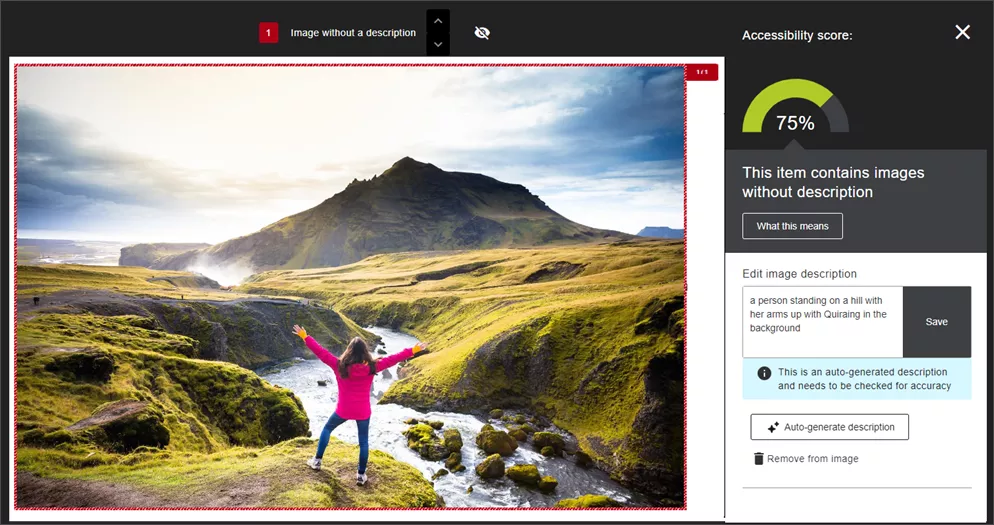
Image 1: Example of Ally's AI generated image description.
Note: Alternative descriptions are not applied automatically. Each suggestion requires the instructor’s review and approval to ensure that the final output aligns with the instructor’s original purpose for that image.
If the alt text does not meet the instructor’s needs, such as a complex image or diagram, ChatGPT and Microsoft Copilot provide excellent tools to create detailed alternative text and long descriptions.
For example, this prompt was shared by the International Ally Users Group. It can be customized for the uploaded image according to context, function and prospective audience (e.g., students).
“You are a university-level instructor working to ensure images in your online course materials conform to Web Content Accessibility Guidelines at Level Double A. You need to accommodate for disabilities and impairments such as blindness, low vision and color vision deficiency to ensure equitable access to module content for all students.
"You will be provided with an image. Please return a succinct title, alternative text (alt text), and a long description. You will also separately list verbatim all words that appear in the image.
"The alt text should be no more than two sentences and should briefly describe the meaning conveyed by the image.
"The detailed description may be one or more paragraphs and must describe the image in great detail so that anyone who does not see it can gain a full understanding of everything in the image. Please format the detailed description such that it will be easily scannable. Use headings, paragraph breaks, and lists as appropriate. Use active voice.”
Prompt created by Purdue University and adapted by Matthew Deeprose (Southampton University)
When we integrate comprehensive and accurate alt text for all images, we adhere to accessibility standards and legal requirements. We also foster an inclusive and supporting learning environment where every student has the opportunity to succeed.
]]>
Recent updates to federal guidelines for digital accessibility underscore the critical need for educators to ensure that all course materials are accessible to every student. One of the most...
https://my3.my.umbc.edu/groups/instructional-technology/posts/143089
https://my3.my.umbc.edu/api/v0/pixel/news/143089/guest@my.umbc.edu/be605c4b901cd19b9c708dfa4d75c784/api/pixel
accessibility
ai
ally
biro
blackboard
Instructional Technology
https://my3.my.umbc.edu/groups/instructional-technology
https://assets2-my.umbc.edu/system/shared/avatars/groups/000/001/164/dec3b026b81ee6d890a8f82f75c94a2e/xsmall.png?1446126703
https://assets1-my.umbc.edu/system/shared/avatars/groups/000/001/164/dec3b026b81ee6d890a8f82f75c94a2e/original.png?1446126703
https://assets2-my.umbc.edu/system/shared/avatars/groups/000/001/164/dec3b026b81ee6d890a8f82f75c94a2e/xxlarge.png?1446126703
https://assets1-my.umbc.edu/system/shared/avatars/groups/000/001/164/dec3b026b81ee6d890a8f82f75c94a2e/xlarge.png?1446126703
https://assets1-my.umbc.edu/system/shared/avatars/groups/000/001/164/dec3b026b81ee6d890a8f82f75c94a2e/large.png?1446126703
https://assets4-my.umbc.edu/system/shared/avatars/groups/000/001/164/dec3b026b81ee6d890a8f82f75c94a2e/medium.png?1446126703
https://assets3-my.umbc.edu/system/shared/avatars/groups/000/001/164/dec3b026b81ee6d890a8f82f75c94a2e/small.png?1446126703
https://assets2-my.umbc.edu/system/shared/avatars/groups/000/001/164/dec3b026b81ee6d890a8f82f75c94a2e/xsmall.png?1446126703
https://assets3-my.umbc.edu/system/shared/avatars/groups/000/001/164/dec3b026b81ee6d890a8f82f75c94a2e/xxsmall.png?1446126703
Instructional Technology
https://assets2-my.umbc.edu/system/shared/thumbnails/news/000/143/089/b229f46db2d2982555055c67d21eb954/xxlarge.jpg?1723053847
https://assets3-my.umbc.edu/system/shared/thumbnails/news/000/143/089/b229f46db2d2982555055c67d21eb954/xlarge.jpg?1723053847
https://assets3-my.umbc.edu/system/shared/thumbnails/news/000/143/089/b229f46db2d2982555055c67d21eb954/large.jpg?1723053847
https://assets3-my.umbc.edu/system/shared/thumbnails/news/000/143/089/b229f46db2d2982555055c67d21eb954/medium.jpg?1723053847
https://assets4-my.umbc.edu/system/shared/thumbnails/news/000/143/089/b229f46db2d2982555055c67d21eb954/small.jpg?1723053847
https://assets2-my.umbc.edu/system/shared/thumbnails/news/000/143/089/b229f46db2d2982555055c67d21eb954/xsmall.jpg?1723053847
https://assets1-my.umbc.edu/system/shared/thumbnails/news/000/143/089/b229f46db2d2982555055c67d21eb954/xxsmall.jpg?1723053847
6
0
true
Tue, 13 Aug 2024 09:26:13 -0400
Tue, 13 Aug 2024 09:34:12 -0400
Blackboard Course Copy: Easy Prep for a New Term
Join a virtual or drop-in session
It’s a new academic year and time to prepare your Blackboard course. The Ultra course copy tool simplifies the transfer of course materials, whether from Original or Ultra, into a new course site. Instructional Technology is offering several support sessions to help faculty seamlessly copy content into your Blackboard Ultra courses. These sessions are designed to cater to all levels of experience with Blackboard Ultra, ensuring that everyone can start the semester smoothly. Choose the session that best fits your schedule!
Virtual Sessions: Join us online for a focused session where you can learn how to efficiently transfer your course materials from previous semesters into your new Ultra course shells. These virtual workshops are perfect for those who prefer to prepare from the comfort of their office or home.
Ultra Quick Start: Copy Content into Blackboard Ultra
Drop-In Sessions: For hands-on assistance, drop by one of our in-person sessions. Bring your laptop, and our Instructional Technology team will be there to provide step-by-step guidance as you copy your course content. These sessions are ideal for those who appreciate direct support and immediate answers.
Blackboard Ultra Course Copy Drop-In
Whether you prefer a guided virtual session or a hands-on drop-in, we have options to fit your schedule and preferences.
Connect with Instructional Technology
As always, if you have any questions about teaching, learning, and technology at UMBC, please consider the following options:
Thumbnail-image: Ultra Quick Tips
]]>
It’s a new academic year and time to prepare your Blackboard course. The Ultra course copy tool simplifies the transfer of course materials, whether from Original or Ultra, into a new course site....
https://my3.my.umbc.edu/groups/instructional-technology/posts/143072
https://my3.my.umbc.edu/api/v0/pixel/news/143072/guest@my.umbc.edu/95f7e055d8232611bd999163f51c4db8/api/pixel
blackboard
course-copy
course-migration
quick-tips
ultra-experience
Instructional Technology
https://my3.my.umbc.edu/groups/instructional-technology
https://assets2-my.umbc.edu/system/shared/avatars/groups/000/001/164/dec3b026b81ee6d890a8f82f75c94a2e/xsmall.png?1446126703
https://assets1-my.umbc.edu/system/shared/avatars/groups/000/001/164/dec3b026b81ee6d890a8f82f75c94a2e/original.png?1446126703
https://assets2-my.umbc.edu/system/shared/avatars/groups/000/001/164/dec3b026b81ee6d890a8f82f75c94a2e/xxlarge.png?1446126703
https://assets1-my.umbc.edu/system/shared/avatars/groups/000/001/164/dec3b026b81ee6d890a8f82f75c94a2e/xlarge.png?1446126703
https://assets1-my.umbc.edu/system/shared/avatars/groups/000/001/164/dec3b026b81ee6d890a8f82f75c94a2e/large.png?1446126703
https://assets4-my.umbc.edu/system/shared/avatars/groups/000/001/164/dec3b026b81ee6d890a8f82f75c94a2e/medium.png?1446126703
https://assets3-my.umbc.edu/system/shared/avatars/groups/000/001/164/dec3b026b81ee6d890a8f82f75c94a2e/small.png?1446126703
https://assets2-my.umbc.edu/system/shared/avatars/groups/000/001/164/dec3b026b81ee6d890a8f82f75c94a2e/xsmall.png?1446126703
https://assets3-my.umbc.edu/system/shared/avatars/groups/000/001/164/dec3b026b81ee6d890a8f82f75c94a2e/xxsmall.png?1446126703
Instructional Technology
https://assets4-my.umbc.edu/system/shared/thumbnails/news/000/143/072/28697b9d338e758abadda5817240dfca/xxlarge.jpg?1723036357
https://assets1-my.umbc.edu/system/shared/thumbnails/news/000/143/072/28697b9d338e758abadda5817240dfca/xlarge.jpg?1723036357
https://assets4-my.umbc.edu/system/shared/thumbnails/news/000/143/072/28697b9d338e758abadda5817240dfca/large.jpg?1723036357
https://assets4-my.umbc.edu/system/shared/thumbnails/news/000/143/072/28697b9d338e758abadda5817240dfca/medium.jpg?1723036357
https://assets1-my.umbc.edu/system/shared/thumbnails/news/000/143/072/28697b9d338e758abadda5817240dfca/small.jpg?1723036357
https://assets4-my.umbc.edu/system/shared/thumbnails/news/000/143/072/28697b9d338e758abadda5817240dfca/xsmall.jpg?1723036357
https://assets2-my.umbc.edu/system/shared/thumbnails/news/000/143/072/28697b9d338e758abadda5817240dfca/xxsmall.jpg?1723036357
A yellow light bulb icon beside bold text reading "Ultra Quick Tips" on a dark background
4
0
true
Wed, 07 Aug 2024 09:14:39 -0400
Wed, 11 Feb 2026 08:09:06 -0500
Enhanced Ultra Docs, Advanced Release Rules Coming in August
Follow discussions, anonymous forms & converted tests
Whether you're preparing your first Ultra course or updating existing content, the latest features released in August are designed to streamline your teaching experience.
The Ultra Document is the centerpiece of the Ultra course, providing a place for preparing and delivering engaging content including text, lists, tables, links, images and media, or third-party tools. The Content Designer is a significant enhancement to the Ultra Document, providing new and robust options that support mobile friendly and responsive columns. Instructors can still embed files, images, and HTML content. To resize a block or move it on the Ultra Document page, simply drag and drop the block. All content is moveable with a mouse, keyboard or tab.

Image 1: Example of redesigned Ultra Document with new column display
Releasing content for different needs in a course is a critical part of an instructor’s toolkit -- whether that content is distributed by date, performance, or group using different criteria. The latest update to Ultra features advanced release conditions allow faculty to create multiple rules for release conditions using AND and OR criteria. For example, if a course consists of undergraduate and graduate students, each group may have different requirements to access certain content in the course. Rules and criteria will copy from Original adaptive release conditions with the exception for attempts and marked reviewed, which are not yet supported in Ultra.

Image 2: Example of Release Conditions page
The Ultra Assignment is also redesigned for August, removing the underlying engine that powered Tests. Now a separate instructions box is available for instructors to specify expectations for completing a graded activity. There are no options to add questions; if this is essential for an assessment, a Test must be used instead. The settings panel is updated to provide options that are only relevant to Assignments. Most importantly, when students access the Assignment, a blank attempt is no longer created, which helps reduce confusion and frustration for both learners and instructors alike. Students can access the Assignment as often as they need to before submitting their actual attempt.

Image 3: Example of new Assignment page
Instructors have long desired for the ability to subscribe to discussions in Ultra. In August, this is now possible with the new Follow Discussions setting, which allows any user in a course to re-engage with a discussion as updates occur. The first version of this feature will distribute notifications through the Activity Stream, which users can customize according to personal preference. In October, the follow notifications can be received via email.

Image 4: Example of Discussion with Follow notification enabled
Finally, when an Original course is converted, undeployed tests from the Tests, Surveys, and Question Pools area will now be converted to question banks. This will help to declutter both the course content page and the gradebook, making it easier for instructors to manage their course materials. NOTE: During the conversion process, any random blocks, question sets, and linked questions included in undeployed tests will be removed as Question Banks do not support those features. However, the resulting question banks will preserve original questions without duplication.
Additional updates for August include:
To learn more about these updates, and other features from the last six months, please join our What's New in Ultra for Teaching & Learning webinar on August 16.
Faculty should see the latest updates in their Ultra courses around August 8-9, 2024. The next update to our Ultra test environment will take place on August 13, 2024; release notes are posted to the What's New in Ultra that same week. Faculty who are interested in test driving new features before they are released to production should open an RT ticket to request early access. Please watch the FAQs, including the What's New with Ultra page, and myUMBC for additional information about Ultra.
Connect with Instructional Technology
As always, if you have any questions about teaching, learning, and technology at UMBC, please consider the following options:
Thumbnail-image: New to Ultra [decorative]
]]>
Whether you're preparing your first Ultra course or updating existing content, the latest features released in August are designed to streamline your teaching experience. The Ultra Document is...
https://my3.my.umbc.edu/groups/instructional-technology/posts/143022
https://my3.my.umbc.edu/api/v0/pixel/news/143022/guest@my.umbc.edu/f6b2b2c94aa2e7af482909078691d6c7/api/pixel
assignments
blackboard
course-design
discussions
release-conditions
ultra-experience
ultra-update
Instructional Technology
https://my3.my.umbc.edu/groups/instructional-technology
https://assets2-my.umbc.edu/system/shared/avatars/groups/000/001/164/dec3b026b81ee6d890a8f82f75c94a2e/xsmall.png?1446126703
https://assets1-my.umbc.edu/system/shared/avatars/groups/000/001/164/dec3b026b81ee6d890a8f82f75c94a2e/original.png?1446126703
https://assets2-my.umbc.edu/system/shared/avatars/groups/000/001/164/dec3b026b81ee6d890a8f82f75c94a2e/xxlarge.png?1446126703
https://assets1-my.umbc.edu/system/shared/avatars/groups/000/001/164/dec3b026b81ee6d890a8f82f75c94a2e/xlarge.png?1446126703
https://assets1-my.umbc.edu/system/shared/avatars/groups/000/001/164/dec3b026b81ee6d890a8f82f75c94a2e/large.png?1446126703
https://assets4-my.umbc.edu/system/shared/avatars/groups/000/001/164/dec3b026b81ee6d890a8f82f75c94a2e/medium.png?1446126703
https://assets3-my.umbc.edu/system/shared/avatars/groups/000/001/164/dec3b026b81ee6d890a8f82f75c94a2e/small.png?1446126703
https://assets2-my.umbc.edu/system/shared/avatars/groups/000/001/164/dec3b026b81ee6d890a8f82f75c94a2e/xsmall.png?1446126703
https://assets3-my.umbc.edu/system/shared/avatars/groups/000/001/164/dec3b026b81ee6d890a8f82f75c94a2e/xxsmall.png?1446126703
Instructional Technology
https://assets1-my.umbc.edu/system/shared/thumbnails/news/000/143/022/61fb5f06bff882737ea5ef126dfcb719/xxlarge.jpg?1722528391
https://assets2-my.umbc.edu/system/shared/thumbnails/news/000/143/022/61fb5f06bff882737ea5ef126dfcb719/xlarge.jpg?1722528391
https://assets2-my.umbc.edu/system/shared/thumbnails/news/000/143/022/61fb5f06bff882737ea5ef126dfcb719/large.jpg?1722528391
https://assets1-my.umbc.edu/system/shared/thumbnails/news/000/143/022/61fb5f06bff882737ea5ef126dfcb719/medium.jpg?1722528391
https://assets3-my.umbc.edu/system/shared/thumbnails/news/000/143/022/61fb5f06bff882737ea5ef126dfcb719/small.jpg?1722528391
https://assets3-my.umbc.edu/system/shared/thumbnails/news/000/143/022/61fb5f06bff882737ea5ef126dfcb719/xsmall.jpg?1722528391
https://assets1-my.umbc.edu/system/shared/thumbnails/news/000/143/022/61fb5f06bff882737ea5ef126dfcb719/xxsmall.jpg?1722528391
3
0
true
Mon, 05 Aug 2024 10:58:45 -0400
Mon, 19 Aug 2024 13:07:50 -0400
Reminder: FA2024 Courses Created in Blackboard
Student Enrollments Processed on July 31, 2024
Blackboard course shells for FA2024 were created on May 13, 2024 per our previous announcement to support faculty preparation for Ultra in advance of the fall semester. Student enrollments, as well as course shells that were not created in May, were processed on July 31, 2024.
Ultra will be the default in Blackboard with nearly 70 percent of all UMBC courses using Ultra since spring 2024. If COEIT or CNMS faculty wish to “roll back” their Fall 2024 Ultra shells to Original, they can do soby RT ticket for this semester only; the last day we will support Blackboard Original is December 31, 2024. DoIT strongly recommends faculty request a roll back before the first day of classes to ensure sufficient time for course preparation. Please review the conditions for requesting a roll back.
Training & Support for Ultra
Plan your accessibility and Universal Design for Learning strategy before students begin working with course materials. Ally, an accessibility tool, is enabled in all course shells. Ally automatically scans uploaded and created course content, then performs a series of steps to make that content more accessible. Please review the Ally FAQs for more information about theaccessibility indicators on course content and alternative formats, or attend a training session. Use Ally’s new AI alt-text generator to add alt text to course images.
About Course Creation
Bb shells for FA2024 are available for all courses (designated as lecture, lab, field or discussion) listed in the UMBC Schedule of Classes (SOC), provided that there is an instructor of record listed. As new course sections and/or instructors are added to the SOC by Department Scheduling Coordinators, corresponding Bb shells are automatically generated overnight.
-
If you are an instructor, and your name is not associated with the course you are teaching in the SOC, please see your Departmental Scheduling Coordinator to resolve the issue. Once you are listed in the SOC, your Bb course shell will be created automatically.
-
If you and your Department Scheduling Coordinator believe you are correctly assigned as the instructor of record in the SOC and you do not see your course shell in Blackboard, please submit a Request Tracker (RT) ticket via my.umbc.edu/help.
-
If you need a Bb shell for a research or independent study course, please submit a new course request.
Instructors who teach multiple sections of the same course will find those enrollments merged into one Bb course shell. These sections may be split upon request by an RT ticket, which we recommend submitting at least one week before the semester starts, if not as soon as courses are created in Blackboard. NOTE: Courses should not be split after student grade data and engagement activity is recorded since it will be purged as part of the separation process.
Student enrollment in Bb mirrors the official registration in SA and updates hourly. However, courses are not accessible to students by default until the instructor of record makes them available.
Connect with Instructional Technology
As always, if you have any questions about teaching, learning, and technology at UMBC, please consider the following options:
]]>
Blackboard course shells for FA2024 were created on May 13, 2024 per our previous announcement to support faculty preparation for Ultra in advance of the fall semester. Student enrollments, as...
https://my3.my.umbc.edu/groups/instructional-technology/posts/143028
https://my3.my.umbc.edu/api/v0/pixel/news/143028/guest@my.umbc.edu/7f24ed5c54cfa2d537de6a8dc1b9eee0/api/pixel
blackboard
course-creation
fa2024
fall
ultra-course-preview
Instructional Technology
https://my3.my.umbc.edu/groups/instructional-technology
https://assets2-my.umbc.edu/system/shared/avatars/groups/000/001/164/dec3b026b81ee6d890a8f82f75c94a2e/xsmall.png?1446126703
https://assets1-my.umbc.edu/system/shared/avatars/groups/000/001/164/dec3b026b81ee6d890a8f82f75c94a2e/original.png?1446126703
https://assets2-my.umbc.edu/system/shared/avatars/groups/000/001/164/dec3b026b81ee6d890a8f82f75c94a2e/xxlarge.png?1446126703
https://assets1-my.umbc.edu/system/shared/avatars/groups/000/001/164/dec3b026b81ee6d890a8f82f75c94a2e/xlarge.png?1446126703
https://assets1-my.umbc.edu/system/shared/avatars/groups/000/001/164/dec3b026b81ee6d890a8f82f75c94a2e/large.png?1446126703
https://assets4-my.umbc.edu/system/shared/avatars/groups/000/001/164/dec3b026b81ee6d890a8f82f75c94a2e/medium.png?1446126703
https://assets3-my.umbc.edu/system/shared/avatars/groups/000/001/164/dec3b026b81ee6d890a8f82f75c94a2e/small.png?1446126703
https://assets2-my.umbc.edu/system/shared/avatars/groups/000/001/164/dec3b026b81ee6d890a8f82f75c94a2e/xsmall.png?1446126703
https://assets3-my.umbc.edu/system/shared/avatars/groups/000/001/164/dec3b026b81ee6d890a8f82f75c94a2e/xxsmall.png?1446126703
Instructional Technology
https://assets1-my.umbc.edu/system/shared/thumbnails/news/000/143/028/6ad6a3deb5397e12b1b77ce8948565d5/xxlarge.jpg?1722613875
https://assets3-my.umbc.edu/system/shared/thumbnails/news/000/143/028/6ad6a3deb5397e12b1b77ce8948565d5/xlarge.jpg?1722613875
https://assets3-my.umbc.edu/system/shared/thumbnails/news/000/143/028/6ad6a3deb5397e12b1b77ce8948565d5/large.jpg?1722613875
https://assets4-my.umbc.edu/system/shared/thumbnails/news/000/143/028/6ad6a3deb5397e12b1b77ce8948565d5/medium.jpg?1722613875
https://assets3-my.umbc.edu/system/shared/thumbnails/news/000/143/028/6ad6a3deb5397e12b1b77ce8948565d5/small.jpg?1722613875
https://assets3-my.umbc.edu/system/shared/thumbnails/news/000/143/028/6ad6a3deb5397e12b1b77ce8948565d5/xsmall.jpg?1722613875
https://assets4-my.umbc.edu/system/shared/thumbnails/news/000/143/028/6ad6a3deb5397e12b1b77ce8948565d5/xxsmall.jpg?1722613875
3
0
true
Fri, 02 Aug 2024 12:11:56 -0400
Fri, 02 Aug 2024 12:36:19 -0400
Free Training for Respondus Lockdown Browser & Monitor
Join an upcoming webinar to see the latest features
Join an upcoming training webinar from Respondus to see the latest features and integrations for LockDown Browser and Monitor. Learn how these applications are used with a range of online testing environments, virtual proctoring and Blackboard. Discover enhancements that make Respondus Monitor even more effective and easy to use.
These sessions provide a detailed demonstration of both applications, including enhancements that make Respondus Monitor even more effective and easy to use.
Instructor Training: LockDown Browser & Respondus Monitor
This comprehensive training is intended for instructors who plan to use LockDown Browser and/or Respondus Monitor to protect academic integrity and ensure student identity during online testing. The training will cover:
- How to use LockDown Browser to prevent digital cheating in proctored testing environments
- How to use Respondus Monitor in non-proctored environments, to protect exam integrity and confirm student identity
- The student perspective using each application
- Efficient review of the assessment data collected, including the Review Priority system, timeline, and milestone features
- Best practices and tips for success with both applications
- Review the new Screen Recording option to capture actions in the lockdown browser, available for Windows and Mac
Pick your date/time and register directly with Respondus:
- Wednesday, July 17 at 1 pm ET / 10 am PT
- Thursday, July 25 at 12 pm ET / 9 am PT
- Thursday, August 1 at 2 pm ET / 11 am PT
- Tuesday, August 6 at 1 pm ET / 10 am PT
- Tuesday, August 13 at 2 pm ET / 11 am PT
- Thursday, August 15 at 12 pm ET / 9 am PT
- Tuesday, August 20 at 1 pm ET / 10 am PT
- Friday, August 23 at 12 pm ET / 9 am PT
- Tuesday, August 27 at 2 pm ET / 11 am PT
- Wednesday, August 28 at 2 pm ET / 11 am PT
All attendees will receive a link to a recording after the session.
NOTE: Students should not register for any instructor training session but instead, contact use the Respondus support tools embedded in RLDB, or
review this FAQ for further help.
About Respondus Lockdown Browser
RLDB is a custom browser that locks down the testing environment within Blackboard. Students are unable to copy, print, access other applications, or visit other websites during an online exam. For additional information, please review
our FAQ collection.
]]>
Join an upcoming training webinar from Respondus to see the latest features and integrations for LockDown Browser and Monitor. Learn how these applications are used with a range of online testing...
https://my3.my.umbc.edu/groups/instructional-technology/posts/142729
https://my3.my.umbc.edu/api/v0/pixel/news/142729/guest@my.umbc.edu/0101113c4e57548d1ba5fb0af2712fce/api/pixel
respondus-lockdown-browser
respondus-monitor
rldb
training
webinar
Instructional Technology
https://my3.my.umbc.edu/groups/instructional-technology
https://assets2-my.umbc.edu/system/shared/avatars/groups/000/001/164/dec3b026b81ee6d890a8f82f75c94a2e/xsmall.png?1446126703
https://assets1-my.umbc.edu/system/shared/avatars/groups/000/001/164/dec3b026b81ee6d890a8f82f75c94a2e/original.png?1446126703
https://assets2-my.umbc.edu/system/shared/avatars/groups/000/001/164/dec3b026b81ee6d890a8f82f75c94a2e/xxlarge.png?1446126703
https://assets1-my.umbc.edu/system/shared/avatars/groups/000/001/164/dec3b026b81ee6d890a8f82f75c94a2e/xlarge.png?1446126703
https://assets1-my.umbc.edu/system/shared/avatars/groups/000/001/164/dec3b026b81ee6d890a8f82f75c94a2e/large.png?1446126703
https://assets4-my.umbc.edu/system/shared/avatars/groups/000/001/164/dec3b026b81ee6d890a8f82f75c94a2e/medium.png?1446126703
https://assets3-my.umbc.edu/system/shared/avatars/groups/000/001/164/dec3b026b81ee6d890a8f82f75c94a2e/small.png?1446126703
https://assets2-my.umbc.edu/system/shared/avatars/groups/000/001/164/dec3b026b81ee6d890a8f82f75c94a2e/xsmall.png?1446126703
https://assets3-my.umbc.edu/system/shared/avatars/groups/000/001/164/dec3b026b81ee6d890a8f82f75c94a2e/xxsmall.png?1446126703
Instructional Technology
https://assets1-my.umbc.edu/system/shared/thumbnails/news/000/142/729/64aae2fd00f09c7f19ecb14bf652dd8d/xxlarge.jpg?1720631425
https://assets2-my.umbc.edu/system/shared/thumbnails/news/000/142/729/64aae2fd00f09c7f19ecb14bf652dd8d/xlarge.jpg?1720631425
https://assets3-my.umbc.edu/system/shared/thumbnails/news/000/142/729/64aae2fd00f09c7f19ecb14bf652dd8d/large.jpg?1720631425
https://assets4-my.umbc.edu/system/shared/thumbnails/news/000/142/729/64aae2fd00f09c7f19ecb14bf652dd8d/medium.jpg?1720631425
https://assets2-my.umbc.edu/system/shared/thumbnails/news/000/142/729/64aae2fd00f09c7f19ecb14bf652dd8d/small.jpg?1720631425
https://assets3-my.umbc.edu/system/shared/thumbnails/news/000/142/729/64aae2fd00f09c7f19ecb14bf652dd8d/xsmall.jpg?1720631425
https://assets4-my.umbc.edu/system/shared/thumbnails/news/000/142/729/64aae2fd00f09c7f19ecb14bf652dd8d/xxsmall.jpg?1720631425
2
0
true
Wed, 10 Jul 2024 13:14:47 -0400
Wed, 10 Jul 2024 13:14:48 -0400