<?xml version="1.0"?>
<News hasArchived="false" page="16" pageCount="62" pageSize="10" timestamp="Thu, 13 Aug 2026 05:34:57 -0400" url="https://my3.my.umbc.edu/groups/oer/posts.xml?mode=activity&amp;page=16">
<NewsItem contentIssues="true" id="138348" important="false" status="posted" url="https://my3.my.umbc.edu/groups/oer/posts/138348">
<Title>Collect surveys using new Forms tool in Ultra courses</Title>
<Tagline>Updates to grading workflows &amp; settings for February update</Tagline>
<Body>
<![CDATA[
    <div class="html-content">
    <div>
    <div><div><div><div>
    <div>
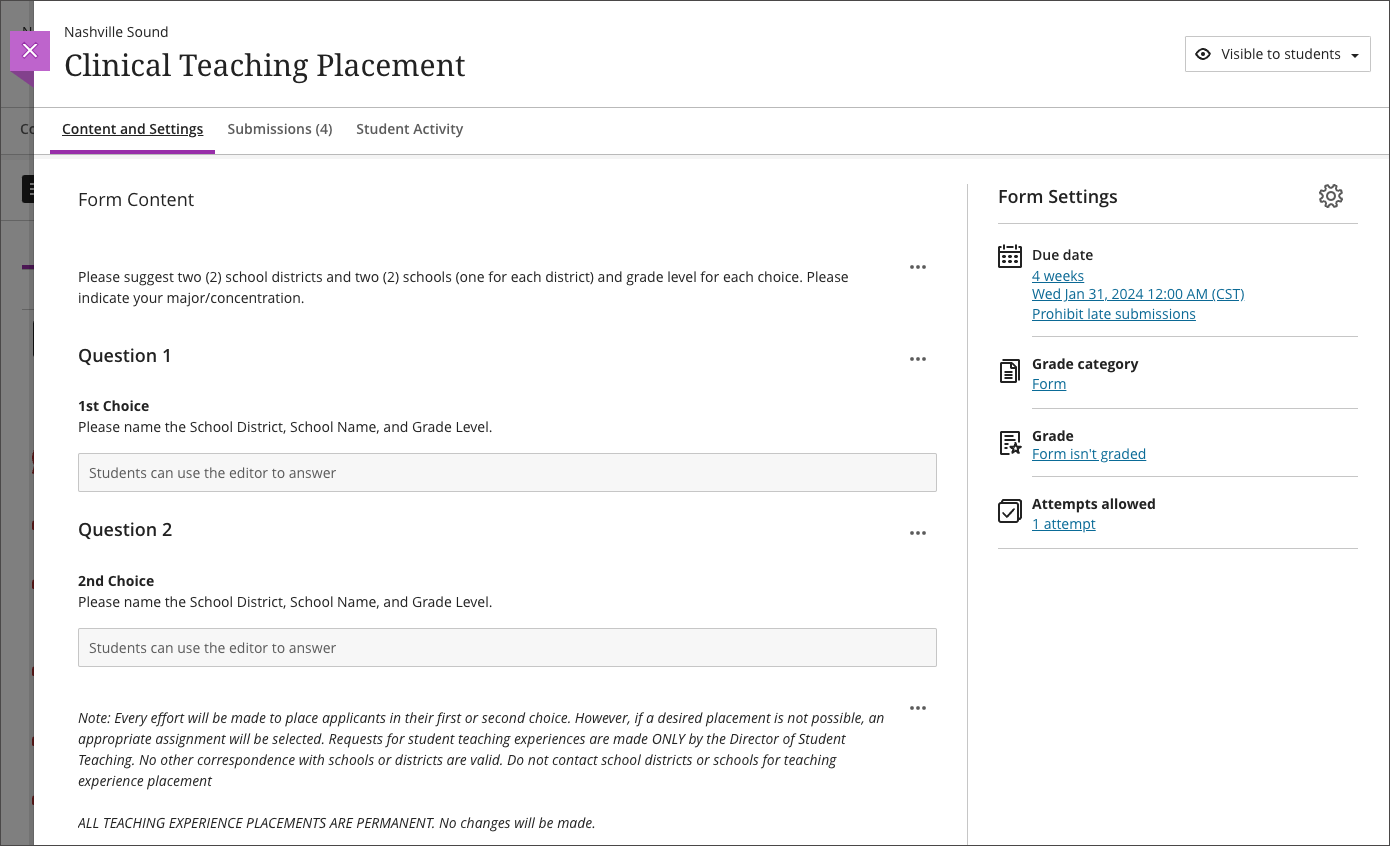
    <div>In February, a new tool will be available in Ultra courses, designed to make information gathering simple and efficient for instructors: <a href="https://help.blackboard.com/node/47511" rel="nofollow external" class="bo">Forms</a>. Whether assigning students to clinical experiences or seeking to understand their interests and opinions through surveys, Forms will streamline these processes. The <span>Forms tool supports several question types including essay, multiple choice, true/false, and Likert. Instructors can view student responses or question responses. Instructors can mark a Form as complete/incomplete or optionally award points.</span>
    </div>
    <div><span><br></span></div>
    <div><img src="https://help.blackboard.com/sites/default/files/images/2024-01/learn-ultra-84-instructors-forms1_0.png" style="max-width: 100%; height: auto;"></div>
    <div>
    <em>Image 1:</em><em><span> Example of the Form creation page. </span><span>The first phase of Forms will not be anonymous. Export Form data to CSV or Excel.</span></em>
    </div>
    <div><br></div>
    <div>Sending reminders about missed work can encourage students to stay on track. Faculty can <a href="https://help.blackboard.com/node/46696" rel="nofollow external" class="bo">send reminders</a> to students through the assessment submission page or the Ultra gradebook, including third-party tools. Updates to the workflow ensures all students will be included as long as they have not received an automatic zero or a manual override grade.</div>
    <div><br></div>
    <div>Grading workflows are improved in the February release including <a href="https://help.blackboard.com/node/47536" rel="nofollow external" class="bo">the ability to provide feedback</a> for automatic zeroes and override grades. Additionally, instructors can upload feedback for manually created grade columns using a CSV file.</div>
    </div>
    <div>
    <div><span><br></span></div>
    <div><span>Additional Updates</span></div>
    <div><ul>
    <li><span>Feedback for all attempts on a test or assignment is visible to learners in a peek panel. Students can view override feedback after grades are posted. </span></li>
    <li><span>Rubrics grading interface will store the most recently used display option. This means that instructors who rely on performance level descriptions when grading don't have to turn them on each time they navigate to grade another submission. </span></li>
    <li><span>To <a href="https://help.blackboard.com/node/47531" rel="nofollow external" class="bo">ensure easy and clear access</a> to the Audio/Video Recording Feedback tool, the recording window appears on the right side of the screen so that the instructor can view the student submission. </span></li>
    <li><span>Instructors can <a href="https://help.blackboard.com/node/47541" rel="nofollow external" class="bo">view the number of missed due dates</a> for students in the Course Activity Report. Instructors can customize the missed due date alert in the Alert Settings via the Gradebook. </span></li>
    <li><span><span>Instructors can now <a href="https://help.blackboard.com/Learn/Administrator/SaaS/Courses/Import_Courses_from_Moodle" rel="nofollow external" class="bo">import Moodle packages</a> into Ultra and Original view courses. </span><span>Blackboard has a guide to explain the differences in </span><a href="https://help.blackboard.com/Learn/Instructor/Ultra/Moodle_to_Ultra_Terminology" title="https://help.blackboard.com/Learn/Instructor/Ultra/Moodle_to_Ultra_Terminology" rel="nofollow external" class="bo">terminology</a><span>.</span></span></li>
    </ul></div>
    </div>
    </div></div></div></div>
    <div>
    <div><div><div><div><span><div>
    <span>Faculty should see the latest updates in Ultra courses around February 1-2, 2024. </span><span>The next update to our Ultra test environment will take place on February 6, 2024; release notes are posted to the <a href="https://wiki.umbc.edu/x/LohnB" rel="nofollow external" class="bo">What's New in Ultra</a> that same week. Faculty who are interested in test driving new features before they are released to production should </span><a href="http://my.umbc.edu/go/request-help" rel="nofollow external" class="bo">open an RT ticket</a> to request early access. Please <a href="http://umbc.edu/go/ultra" rel="nofollow external" class="bo">watch the FAQs</a>, including <a href="https://wiki.umbc.edu/x/LohnB" rel="nofollow external" class="bo">the What's New with Ultra page</a>, <span>and myUMBC for additional information about Ultra. </span>
    </div></span></div></div></div></div>
    <div><span><br></span></div>
    </div>
    <div><span><strong>Connect with Instructional Technology</strong></span></div>
    <div><span>As always, if you have any questions about teaching, learning, and technology at UMBC, please consider the following options:</span></div>
    <ul>
    <li>
    <a href="http://www.umbc.edu/faq" rel="nofollow external" class="bo">Check our extensive FAQ collection</a><span> </span>
    </li>
    <ul><li><span><a href="https://wiki.umbc.edu/x/LohnB" rel="nofollow external" class="bo"><span>What's new in Ultra?</span></a><span> </span><span>|</span><span> </span><a href="https://wiki.umbc.edu/x/bwrSAQ" rel="nofollow external" class="bo"><span>Known Issues</span></a><span> </span></span></li></ul>
    <li><span><a href="http://my.umbc.edu/go/request-help" rel="nofollow external" class="bo">Open a ticket via RT</a></span></li>
    <li>
    <span>Follow the </span><a href="http://my.umbc.edu/groups/instructional-technology" rel="nofollow external" class="bo">Instructional Technology</a><span> &amp; </span><a href="http://my.umbc.edu/groups/doit" rel="nofollow external" class="bo">DoIT</a><span> myUMBC groups</span>
    </li>
    <li>
    <a href="http://doit.umbc.edu/itnm/staff/" rel="nofollow external" class="bo">Request a consult</a><span> with <a href="http://doit.umbc.edu/itnm/staff" rel="nofollow external" class="bo">instructional technology staff</a></span>
    </li>
    <li>
    <span><a href="http://pivot.umbc.edu" rel="nofollow external" class="bo">PIVOT</a> | <a href="https://doit.umbc.edu/itnm/academic-continuity/" rel="nofollow external" class="bo">Academic Continuity</a></span><span> </span><span>|</span><span> </span><span><a href="https://fdc.umbc.edu/teaching/keep-on-teaching/" rel="nofollow external" class="bo">Keep On Teaching</a></span><span> </span><span>|</span><span> </span><span><a href="https://doit.umbc.edu/students" rel="nofollow external" class="bo">Student Technology Resources</a></span>
    </li>
    </ul>
    </div>
    <div><div></div></div>
    </div>
]]>
</Body>
<Summary>In February, a new tool will be available in Ultra courses, designed to make information gathering simple and efficient for instructors: Forms. Whether assigning students to clinical experiences...</Summary>
<Website>https://my3.my.umbc.edu/groups/instructional-technology/posts/138348</Website>
<TrackingUrl>https://my3.my.umbc.edu/api/v0/pixel/news/138348/guest@my.umbc.edu/634e5713e136d422c9676d901833a992/api/pixel</TrackingUrl>
<Tag>blackboard</Tag>
<Tag>forms</Tag>
<Tag>grading</Tag>
<Tag>ultra-experience</Tag>
<Tag>ultra-update</Tag>
<Group token="instructional-technology">Instructional Technology</Group>
<GroupUrl>https://my3.my.umbc.edu/groups/instructional-technology</GroupUrl>
<AvatarUrl>https://assets2-my.umbc.edu/system/shared/avatars/groups/000/001/164/dec3b026b81ee6d890a8f82f75c94a2e/xsmall.png?1446126703</AvatarUrl>
<AvatarUrl size="original">https://assets1-my.umbc.edu/system/shared/avatars/groups/000/001/164/dec3b026b81ee6d890a8f82f75c94a2e/original.png?1446126703</AvatarUrl>
<AvatarUrl size="xxlarge">https://assets2-my.umbc.edu/system/shared/avatars/groups/000/001/164/dec3b026b81ee6d890a8f82f75c94a2e/xxlarge.png?1446126703</AvatarUrl>
<AvatarUrl size="xlarge">https://assets1-my.umbc.edu/system/shared/avatars/groups/000/001/164/dec3b026b81ee6d890a8f82f75c94a2e/xlarge.png?1446126703</AvatarUrl>
<AvatarUrl size="large">https://assets1-my.umbc.edu/system/shared/avatars/groups/000/001/164/dec3b026b81ee6d890a8f82f75c94a2e/large.png?1446126703</AvatarUrl>
<AvatarUrl size="medium">https://assets4-my.umbc.edu/system/shared/avatars/groups/000/001/164/dec3b026b81ee6d890a8f82f75c94a2e/medium.png?1446126703</AvatarUrl>
<AvatarUrl size="small">https://assets3-my.umbc.edu/system/shared/avatars/groups/000/001/164/dec3b026b81ee6d890a8f82f75c94a2e/small.png?1446126703</AvatarUrl>
<AvatarUrl size="xsmall">https://assets2-my.umbc.edu/system/shared/avatars/groups/000/001/164/dec3b026b81ee6d890a8f82f75c94a2e/xsmall.png?1446126703</AvatarUrl>
<AvatarUrl size="xxsmall">https://assets3-my.umbc.edu/system/shared/avatars/groups/000/001/164/dec3b026b81ee6d890a8f82f75c94a2e/xxsmall.png?1446126703</AvatarUrl>
<Sponsor>Instructional Technology</Sponsor>
<ThumbnailUrl size="xxlarge">https://assets1-my.umbc.edu/system/shared/thumbnails/news/000/138/348/362d6c0542ef5d3987b2ae0924e764a0/xxlarge.jpg?1706030039</ThumbnailUrl>
<ThumbnailUrl size="xlarge">https://assets2-my.umbc.edu/system/shared/thumbnails/news/000/138/348/362d6c0542ef5d3987b2ae0924e764a0/xlarge.jpg?1706030039</ThumbnailUrl>
<ThumbnailUrl size="large">https://assets4-my.umbc.edu/system/shared/thumbnails/news/000/138/348/362d6c0542ef5d3987b2ae0924e764a0/large.jpg?1706030039</ThumbnailUrl>
<ThumbnailUrl size="medium">https://assets1-my.umbc.edu/system/shared/thumbnails/news/000/138/348/362d6c0542ef5d3987b2ae0924e764a0/medium.jpg?1706030039</ThumbnailUrl>
<ThumbnailUrl size="small">https://assets4-my.umbc.edu/system/shared/thumbnails/news/000/138/348/362d6c0542ef5d3987b2ae0924e764a0/small.jpg?1706030039</ThumbnailUrl>
<ThumbnailUrl size="xsmall">https://assets1-my.umbc.edu/system/shared/thumbnails/news/000/138/348/362d6c0542ef5d3987b2ae0924e764a0/xsmall.jpg?1706030039</ThumbnailUrl>
<ThumbnailUrl size="xxsmall">https://assets3-my.umbc.edu/system/shared/thumbnails/news/000/138/348/362d6c0542ef5d3987b2ae0924e764a0/xxsmall.jpg?1706030039</ThumbnailUrl>
<PawCount>2</PawCount>
<CommentCount>0</CommentCount>
<CommentsAllowed>true</CommentsAllowed>
<PostedAt>Tue, 23 Jan 2024 13:09:57 -0500</PostedAt>
</NewsItem>

<NewsItem contentIssues="true" id="138255" important="false" status="posted" url="https://my3.my.umbc.edu/groups/oer/posts/138255">
<Title>M.O.S.T. 2024 OER Grant Program: Submit a Proposal</Title>
<Tagline>Proposal deadline: March 1, 2024</Tagline>
<Body>
<![CDATA[
    <div class="html-content">
    <span><span>The Maryland Open Source Textbook (M.O.S.T.) Initiative is pleased to announce a <a href="https://oer-maryland.us8.list-manage.com/track/click?u=4ce992e3f6db63c7af9c28afd&amp;id=ea674b176c&amp;e=b54e6989f4" rel="nofollow external" class="bo">Request for Proposals for the 2024 OER Grant Program</a>.</span></span><p><br><span>For 2024, M.O.S.T. is seeking proposals for two grant programs. Learn more below. Note that all institutional and faculty grants awarded to UMBC must be routed to the Office of Sponsored Programs prior to submission. Contact your unit's business manager or proposal development staff to discuss your application.</span></p>
    <p><span>CAHSS faculty can request assistance from <a href="https://carat.umbc.edu/request-assistance/" rel="nofollow external" class="bo">CARAT </a>(Creative Achievement and Research Administration Team). </span></p>
    <p><span><a href="https://oer-maryland.us8.list-manage.com/track/click?u=4ce992e3f6db63c7af9c28afd&amp;id=2c2c5f7afb&amp;e=b54e6989f4" rel="nofollow external" class="bo"><strong>Faculty OER Grant Program</strong></a><br>The Maryland Open Source Textbook (M.O.S.T.) initiative is seeking proposals for its Faculty OER Grant Program, which supports faculty efforts to increase access, affordability, and achievement for students at Maryland’s postsecondary institutions through the incorporation of open educational resources (OER) into teaching practice.<br><br>Available grants in 2024:</span></p>
    <ul>
    <li><span>Adopt/Adapt OER ($1,000 grant + Participation in the Lumen Circles Community of Practice)</span></li>
    <li><span>Create/Revise and Publish OER ($2,000 grant + Participation in the Rebus Textbook Success Program)</span></li>
    <li><span>OLI STEM Courseware Grant - Use &amp; Evaluate Track ($1,500 grant + Participation in the NSF-Funded Carnegie Mellon Open Learning Initiative (OLI) STEM Courseware Project) <span><em>NOTE: Available for 2-year colleges only</em></span></span></li>
    <li><span>OLI STEM Courseware Grant - Use &amp; Improve Track ($5,000 grant + Participation in the NSF-Funded Carnegie Mellon Open Learning Initiative (OLI) STEM Courseware Project) <span><em>NOTE: Available for 2-year colleges only</em></span></span></li>
    </ul>
    <hr>
    <p><span><a href="https://oer-maryland.us8.list-manage.com/track/click?u=4ce992e3f6db63c7af9c28afd&amp;id=6c410d231c&amp;e=b54e6989f4" rel="nofollow external" class="bo"><strong>Institutional OER Grant Program</strong></a><br>The Maryland Open Source Textbook (M.O.S.T.) initiative is seeking proposals for the Institutional OER Grant Program, which supports strategic institutional efforts to increase access, affordability, and achievement for students at Maryland’s postsecondary institutions through more systemic incorporation of open educational resources (OER) into teaching practice.<br><br>For 2024, selected institutions will be awarded $20,000 grants to support significant advances in OER adoption, scaling, and sustainability in support of student success. In addition, grantees will receive strategic planning and implementation support for their projects from M.O.S.T. in the form of consultations and regular monthly check-ins.</span><br> </p>
    <hr>
    <p><br><em><strong><a href="https://oer-maryland.us8.list-manage.com/track/click?u=4ce992e3f6db63c7af9c28afd&amp;id=4b13cfc014&amp;e=b54e6989f4" rel="nofollow external" class="bo"><span>All proposals must be submitted by 11:59 p.m. ET on Friday, March 1, 2024</span></a></strong></em><br> </p>
    <hr>
    <p><br><span><strong>Informational Webinar</strong><br>Join us on Monday, January 22, 2024 from 2:00 p.m. – 3:00 p.m. ET for an Informational Webinar to learn more about the grant requirements and expectations for successful grants. We will also answer any questions about the grants at that time. <a href="https://oer-maryland.us8.list-manage.com/track/click?u=4ce992e3f6db63c7af9c28afd&amp;id=9f18227fe4&amp;e=b54e6989f4" rel="nofollow external" class="bo">Register for the Informational Webinar</a></span><br> </p>
    <hr>
    <p><span>Please feel free to share this information with interested faculty and staff. If you have any questions, please reach out to us at <a href="mailto:most@usmd.edu" rel="nofollow external" class="bo">most@usmd.edu</a> <br><br>Thank you for your support in increasing access, affordability, and achievement for all Maryland higher education students through open educational resources (OER).</span><br> </p>
    <div><span>Nancy</span></div>
    <div> <div><span>Nancy O’Neill, Ed.D.<br>Acting Director, William E. Kirwan Center for Academic Innovation<br>University System of Maryland</span></div>
    </div>
    <div><span><br></span></div>
    </div>
]]>
</Body>
<Summary>The Maryland Open Source Textbook (M.O.S.T.) Initiative is pleased to announce a Request for Proposals for the 2024 OER Grant Program.  For 2024, M.O.S.T. is seeking proposals for two grant...</Summary>
<TrackingUrl>https://my3.my.umbc.edu/api/v0/pixel/news/138255/guest@my.umbc.edu/f7d3c7f494e1d604191b4d1ef92498a5/api/pixel</TrackingUrl>
<Tag>educational</Tag>
<Tag>grant</Tag>
<Tag>m-o-s-t</Tag>
<Tag>most</Tag>
<Tag>oer</Tag>
<Tag>open</Tag>
<Tag>resources</Tag>
<Group token="oer">Open Educational Resources at UMBC</Group>
<GroupUrl>https://my3.my.umbc.edu/groups/oer</GroupUrl>
<AvatarUrl>https://assets1-my.umbc.edu/system/shared/avatars/groups/000/001/664/0e7fb0a3d658c358b4e5e9561f35099e/xsmall.png?1562590436</AvatarUrl>
<AvatarUrl size="original">https://assets2-my.umbc.edu/system/shared/avatars/groups/000/001/664/0e7fb0a3d658c358b4e5e9561f35099e/original.png?1562590436</AvatarUrl>
<AvatarUrl size="xxlarge">https://assets1-my.umbc.edu/system/shared/avatars/groups/000/001/664/0e7fb0a3d658c358b4e5e9561f35099e/xxlarge.png?1562590436</AvatarUrl>
<AvatarUrl size="xlarge">https://assets1-my.umbc.edu/system/shared/avatars/groups/000/001/664/0e7fb0a3d658c358b4e5e9561f35099e/xlarge.png?1562590436</AvatarUrl>
<AvatarUrl size="large">https://assets4-my.umbc.edu/system/shared/avatars/groups/000/001/664/0e7fb0a3d658c358b4e5e9561f35099e/large.png?1562590436</AvatarUrl>
<AvatarUrl size="medium">https://assets1-my.umbc.edu/system/shared/avatars/groups/000/001/664/0e7fb0a3d658c358b4e5e9561f35099e/medium.png?1562590436</AvatarUrl>
<AvatarUrl size="small">https://assets2-my.umbc.edu/system/shared/avatars/groups/000/001/664/0e7fb0a3d658c358b4e5e9561f35099e/small.png?1562590436</AvatarUrl>
<AvatarUrl size="xsmall">https://assets1-my.umbc.edu/system/shared/avatars/groups/000/001/664/0e7fb0a3d658c358b4e5e9561f35099e/xsmall.png?1562590436</AvatarUrl>
<AvatarUrl size="xxsmall">https://assets1-my.umbc.edu/system/shared/avatars/groups/000/001/664/0e7fb0a3d658c358b4e5e9561f35099e/xxsmall.png?1562590436</AvatarUrl>
<Sponsor>Open Educational Resources at UMBC</Sponsor>
<ThumbnailUrl size="xxlarge">https://assets1-my.umbc.edu/system/shared/thumbnails/news/000/138/255/a411ef80e37a9abbefc824bee7e0d2e8/xxlarge.jpg?1705590470</ThumbnailUrl>
<ThumbnailUrl size="xlarge">https://assets4-my.umbc.edu/system/shared/thumbnails/news/000/138/255/a411ef80e37a9abbefc824bee7e0d2e8/xlarge.jpg?1705590470</ThumbnailUrl>
<ThumbnailUrl size="large">https://assets1-my.umbc.edu/system/shared/thumbnails/news/000/138/255/a411ef80e37a9abbefc824bee7e0d2e8/large.jpg?1705590470</ThumbnailUrl>
<ThumbnailUrl size="medium">https://assets3-my.umbc.edu/system/shared/thumbnails/news/000/138/255/a411ef80e37a9abbefc824bee7e0d2e8/medium.jpg?1705590470</ThumbnailUrl>
<ThumbnailUrl size="small">https://assets4-my.umbc.edu/system/shared/thumbnails/news/000/138/255/a411ef80e37a9abbefc824bee7e0d2e8/small.jpg?1705590470</ThumbnailUrl>
<ThumbnailUrl size="xsmall">https://assets1-my.umbc.edu/system/shared/thumbnails/news/000/138/255/a411ef80e37a9abbefc824bee7e0d2e8/xsmall.jpg?1705590470</ThumbnailUrl>
<ThumbnailUrl size="xxsmall">https://assets3-my.umbc.edu/system/shared/thumbnails/news/000/138/255/a411ef80e37a9abbefc824bee7e0d2e8/xxsmall.jpg?1705590470</ThumbnailUrl>
<PawCount>2</PawCount>
<CommentCount>0</CommentCount>
<CommentsAllowed>true</CommentsAllowed>
<PostedAt>Thu, 18 Jan 2024 10:08:11 -0500</PostedAt>
<EditAt>Mon, 22 Jan 2024 08:28:44 -0500</EditAt>
</NewsItem>

<NewsItem contentIssues="true" id="138020" important="false" status="posted" url="https://my3.my.umbc.edu/groups/oer/posts/138020">
<Title>Google Chrome Settings Impacting Blackboard Integrations</Title>
<Tagline>Update Your Browser Settings Today</Tagline>
<Body>
<![CDATA[
    <div class="html-content">
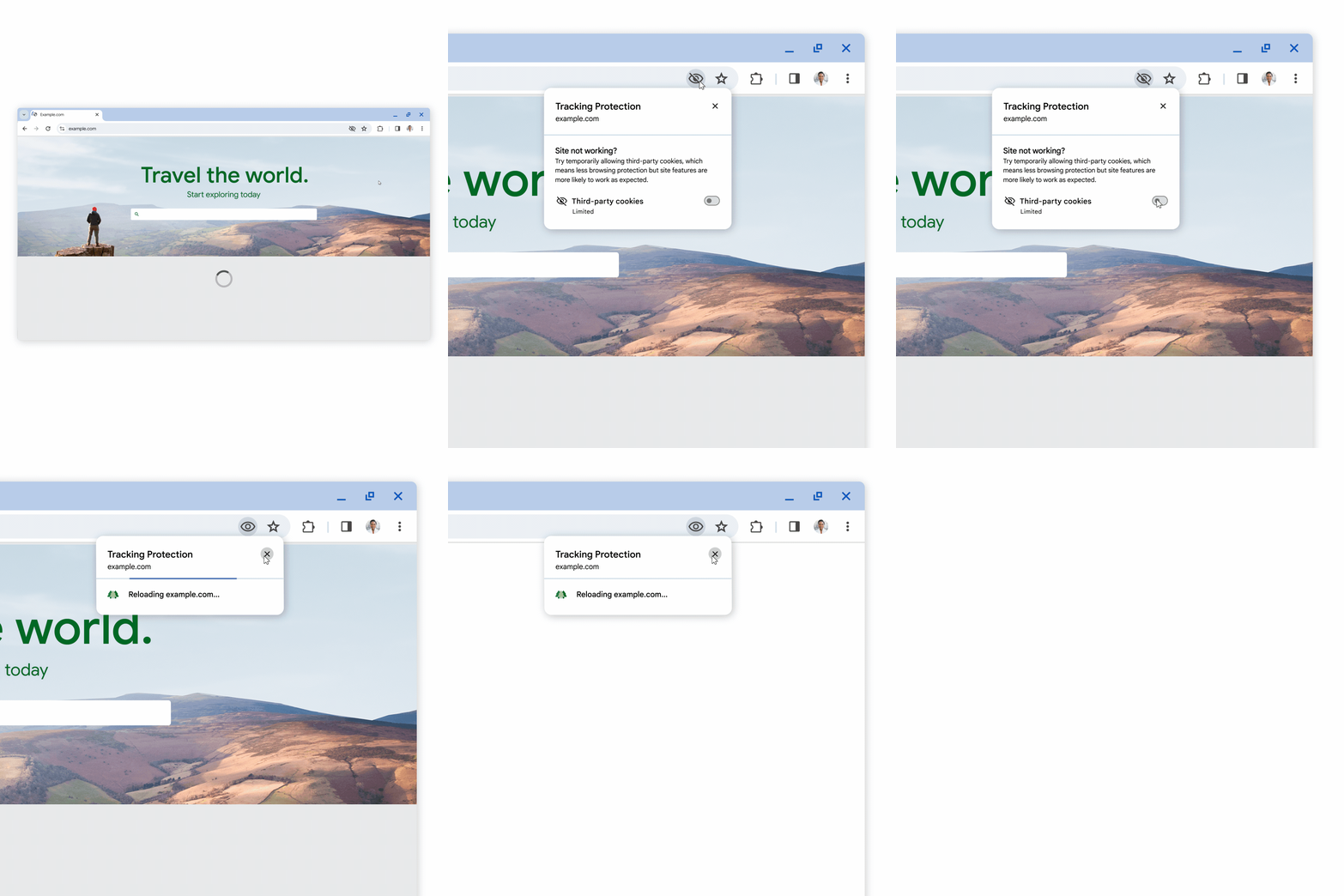
    <span><p><span>Beginning in January 2024, Google will begin </span><a href="https://blog.google/products/chrome/privacy-sandbox-tracking-protection/" rel="nofollow external" class="bo"><span>restricting all third-party cookies in Chrome </span></a><span>by default. </span><span>Technology tools used for instruction in Blackboard may use third-party cookies. </span><span>If third-party cookies are restricted, the ability to access or view content could be impacted.</span></p>
    <p><span>Examples of technologies that may require users to enable third-party cookies include the following:</span></p>
    <ul>
    <li><span><span>Blackboard</span></span></li>
    <li><span><span>CourseArc</span></span></li>
    <li><span><span>Panopto</span></span></li>
    <li><span><span>Poll Everywhere</span></span></li>
    <li><span><span>Publisher materials (ALEKS, Cengage, McGraw-Hill, Macmillan, zyBooks, etc)</span></span></li>
    <li><span><span>Qwickly Attendance</span></span></li>
    <li><span><span>VoiceThread</span></span></li>
    </ul>
    <h5><span><strong>Take Action</strong></span></h5>
    <p><span>Chrome users have several options to manage their Chrome settings to avoid losing access to instructional tools:</span></p>
    <ul>
    <li><span><span><strong>Opt-Out:</strong></span><span>The first users who receive this new Tracking Protection feature can opt-out by clicking the settings (gear) icon in a notification. </span></span></li>
    <li><span><span><strong>Manage Permissions: </strong></span><span>For users who don't opt-out, an </span><a href="https://storage.googleapis.com/gweb-uniblog-publish-prod/original_images/PS_1_Popup_EN.gif" rel="nofollow external" class="bo"><span>eye icon will appear in the address bar</span></a><span> when Chrome blocks an integrated tool because it uses a cookie. Click on the eye icon and select the option to permit cookies temporarily. </span></span></li>
    <li><span><span><strong>Allow Cookies: </strong></span><span>Users can update their browser settings to </span><a href="https://support.google.com/chrome/answer/95647?hl=en" rel="nofollow external" class="bo"><span>allow third-party cookies in Chrome</span></a><span>.</span></span></li>
    </ul>
    <h5><span><strong>Did You Know?</strong></span></h5>
    <p><span>Chrome is not the only browser that restricts third-party cookies by default. To manage settings for another browser, please see </span><a href="https://umbc.atlassian.net/wiki/x/TjbVAQ" rel="nofollow external" class="bo"><span>How do I enable third-party cookies for Blackboard and related integrations?</span></a></p>
    <h5><strong>Connect with Instructional Technology</strong></h5></span><div>
    <div><span>As always, if you have any questions about teaching, learning, and technology at UMBC, please consider the following options:</span></div>
    <ul>
    <li>
    <a href="http://www.umbc.edu/faq" rel="nofollow external" class="bo">Check our extensive FAQ collection</a><span> </span>
    </li>
    <ul><li><span><a href="https://wiki.umbc.edu/x/LohnB" rel="nofollow external" class="bo"><span>What's new in Ultra?</span></a> | <a href="https://wiki.umbc.edu/x/bwrSAQ" rel="nofollow external" class="bo"><span>Known Issues</span></a><span> </span></span></li></ul>
    <li><span><a href="http://my.umbc.edu/go/request-help" rel="nofollow external" class="bo">Open a ticket via RT</a></span></li>
    <li>
    <span>Follow the </span><a href="http://my.umbc.edu/groups/instructional-technology" rel="nofollow external" class="bo">Instructional Technology</a> &amp; <a href="http://my.umbc.edu/groups/doit" rel="nofollow external" class="bo">DoIT</a><span> myUMBC groups</span>
    </li>
    <li>
    <a href="http://doit.umbc.edu/itnm/staff/" rel="nofollow external" class="bo">Request a consult</a><span> with <a href="http://doit.umbc.edu/itnm/staff" rel="nofollow external" class="bo">instructional technology staff</a></span>
    </li>
    <li>
    <span><a href="http://pivot.umbc.edu/" rel="nofollow external" class="bo">PIVOT</a> | <a href="https://doit.umbc.edu/itnm/academic-continuity/" rel="nofollow external" class="bo">Academic Continuity</a></span> | <span><a href="https://fdc.umbc.edu/teaching/keep-on-teaching/" rel="nofollow external" class="bo">Keep On Teaching</a></span> | <span><a href="https://doit.umbc.edu/students" rel="nofollow external" class="bo">Student Technology Resources</a></span>
    </li>
    </ul>
    <div><em>Thumbnail: Gear icons</em></div>
    </div>
    </div>
]]>
</Body>
<Summary>Beginning in January 2024, Google will begin restricting all third-party cookies in Chrome by default. Technology tools used for instruction in Blackboard may use third-party cookies. If...</Summary>
<Website>https://my3.my.umbc.edu/groups/instructional-technology/posts/138020</Website>
<TrackingUrl>https://my3.my.umbc.edu/api/v0/pixel/news/138020/guest@my.umbc.edu/cb43ddb9fce1e52d0c47d3930affece3/api/pixel</TrackingUrl>
<Tag>blackboard</Tag>
<Tag>browser-settings</Tag>
<Tag>chrome</Tag>
<Tag>cookies</Tag>
<Tag>third-party-tools</Tag>
<Group token="instructional-technology">Instructional Technology</Group>
<GroupUrl>https://my3.my.umbc.edu/groups/instructional-technology</GroupUrl>
<AvatarUrl>https://assets2-my.umbc.edu/system/shared/avatars/groups/000/001/164/dec3b026b81ee6d890a8f82f75c94a2e/xsmall.png?1446126703</AvatarUrl>
<AvatarUrl size="original">https://assets1-my.umbc.edu/system/shared/avatars/groups/000/001/164/dec3b026b81ee6d890a8f82f75c94a2e/original.png?1446126703</AvatarUrl>
<AvatarUrl size="xxlarge">https://assets2-my.umbc.edu/system/shared/avatars/groups/000/001/164/dec3b026b81ee6d890a8f82f75c94a2e/xxlarge.png?1446126703</AvatarUrl>
<AvatarUrl size="xlarge">https://assets1-my.umbc.edu/system/shared/avatars/groups/000/001/164/dec3b026b81ee6d890a8f82f75c94a2e/xlarge.png?1446126703</AvatarUrl>
<AvatarUrl size="large">https://assets1-my.umbc.edu/system/shared/avatars/groups/000/001/164/dec3b026b81ee6d890a8f82f75c94a2e/large.png?1446126703</AvatarUrl>
<AvatarUrl size="medium">https://assets4-my.umbc.edu/system/shared/avatars/groups/000/001/164/dec3b026b81ee6d890a8f82f75c94a2e/medium.png?1446126703</AvatarUrl>
<AvatarUrl size="small">https://assets3-my.umbc.edu/system/shared/avatars/groups/000/001/164/dec3b026b81ee6d890a8f82f75c94a2e/small.png?1446126703</AvatarUrl>
<AvatarUrl size="xsmall">https://assets2-my.umbc.edu/system/shared/avatars/groups/000/001/164/dec3b026b81ee6d890a8f82f75c94a2e/xsmall.png?1446126703</AvatarUrl>
<AvatarUrl size="xxsmall">https://assets3-my.umbc.edu/system/shared/avatars/groups/000/001/164/dec3b026b81ee6d890a8f82f75c94a2e/xxsmall.png?1446126703</AvatarUrl>
<Sponsor>Instructional Technology</Sponsor>
<ThumbnailUrl size="xxlarge">https://assets3-my.umbc.edu/system/shared/thumbnails/news/000/138/020/dba8402e99e1e8a4d3f645133f0bb260/xxlarge.jpg?1704402620</ThumbnailUrl>
<ThumbnailUrl size="xlarge">https://assets2-my.umbc.edu/system/shared/thumbnails/news/000/138/020/dba8402e99e1e8a4d3f645133f0bb260/xlarge.jpg?1704402620</ThumbnailUrl>
<ThumbnailUrl size="large">https://assets3-my.umbc.edu/system/shared/thumbnails/news/000/138/020/dba8402e99e1e8a4d3f645133f0bb260/large.jpg?1704402620</ThumbnailUrl>
<ThumbnailUrl size="medium">https://assets3-my.umbc.edu/system/shared/thumbnails/news/000/138/020/dba8402e99e1e8a4d3f645133f0bb260/medium.jpg?1704402620</ThumbnailUrl>
<ThumbnailUrl size="small">https://assets1-my.umbc.edu/system/shared/thumbnails/news/000/138/020/dba8402e99e1e8a4d3f645133f0bb260/small.jpg?1704402620</ThumbnailUrl>
<ThumbnailUrl size="xsmall">https://assets2-my.umbc.edu/system/shared/thumbnails/news/000/138/020/dba8402e99e1e8a4d3f645133f0bb260/xsmall.jpg?1704402620</ThumbnailUrl>
<ThumbnailUrl size="xxsmall">https://assets1-my.umbc.edu/system/shared/thumbnails/news/000/138/020/dba8402e99e1e8a4d3f645133f0bb260/xxsmall.jpg?1704402620</ThumbnailUrl>
<PawCount>6</PawCount>
<CommentCount>0</CommentCount>
<CommentsAllowed>false</CommentsAllowed>
<PostedAt>Thu, 04 Jan 2024 16:15:21 -0500</PostedAt>
<EditAt>Thu, 04 Jan 2024 16:16:31 -0500</EditAt>
</NewsItem>

<NewsItem contentIssues="true" id="137987" important="false" status="posted" url="https://my3.my.umbc.edu/groups/oer/posts/137987">
<Title>Apply for 2024 Accessibility Inclusion Fellowship</Title>
<Tagline>Program &amp; award provided by National Federation of the Blind</Tagline>
<Body>
<![CDATA[
    <div class="html-content">
    <span>The Accessibility Inclusion Fellowship is a one-year fellowship awarded by the <a href="https://nfb.org" rel="nofollow external" class="bo">National Federation of the Blind</a> to three Maryland professors to assist them integrate accessibility into their curriculum and incorporate non-visual teaching methods in at least one course. </span><div><span><br></span></div>
    <div>
    <span>In addition to providing a $2,000 financial award to each professor, the NFB works individually with the professors/instructors to brainstorm solutions to their accessibility challenges, help them develop and implement an accessibility action plan, and provide meaningful educational resources and tools.</span><br><br><span>The <a href="https://nfb.org" rel="nofollow external" class="bo">National Federation of the Blind</a> administers the Accessibility Inclusion Fellowship program under a non-visual accessibility initiative grant from the State of Maryland. Your existing course does not need to have an accessibility component. If chosen, the NFB will work with you through their Center of Excellence in Non-visual Access to enhance your course curriculum to include accessibility concepts by providing consultation and assistance with course instruction.</span><br><br><span>Apply today by submitting the application for the </span><a href="https://nfb.org/programs-services/center-excellence-nonvisual-access/accessibility-inclusion-fellowship-program/application" rel="nofollow external" class="bo">2024 Accessibility Inclusion Fellowship</a><span>. </span><span>Applications must be received by January 27, 2024.</span>
    </div>
    <div><br></div>
    <div>
    <span><strong>All institutional grants and faculty grants awarded to UMBC must be routed to the Office of Sponsored Programs prior to submission. Contact your unit's business manager or proposal development staff to discuss your application.</strong></span><br><br><span>For more information, please visit: </span><a href="https://nfb.org/programs-services/center-excellence-nonvisual-access/accessibility-inclusion-fellowship-program" rel="nofollow external" class="bo">https://nfb.org/programs-services/center-excellence-nonvisual-access/accessibility-inclusion-fellowship-program</a><span> </span><br><br><span>Please send any questions about this opportunity to </span><a href="mailto:nfb@nfb.org" rel="nofollow external" class="bo">nfb@nfb.org</a><span> </span>
    </div>
    </div>
]]>
</Body>
<Summary>The Accessibility Inclusion Fellowship is a one-year fellowship awarded by the National Federation of the Blind to three Maryland professors to assist them integrate accessibility into their...</Summary>
<TrackingUrl>https://my3.my.umbc.edu/api/v0/pixel/news/137987/guest@my.umbc.edu/ff85492ee072b3b47d7a7eda4db3a6ec/api/pixel</TrackingUrl>
<Tag>accessibility</Tag>
<Tag>fellowship</Tag>
<Tag>grant</Tag>
<Tag>inclusion</Tag>
<Tag>non-visual</Tag>
<Group token="instructional-technology">Instructional Technology</Group>
<GroupUrl>https://my3.my.umbc.edu/groups/instructional-technology</GroupUrl>
<AvatarUrl>https://assets2-my.umbc.edu/system/shared/avatars/groups/000/001/164/dec3b026b81ee6d890a8f82f75c94a2e/xsmall.png?1446126703</AvatarUrl>
<AvatarUrl size="original">https://assets1-my.umbc.edu/system/shared/avatars/groups/000/001/164/dec3b026b81ee6d890a8f82f75c94a2e/original.png?1446126703</AvatarUrl>
<AvatarUrl size="xxlarge">https://assets2-my.umbc.edu/system/shared/avatars/groups/000/001/164/dec3b026b81ee6d890a8f82f75c94a2e/xxlarge.png?1446126703</AvatarUrl>
<AvatarUrl size="xlarge">https://assets1-my.umbc.edu/system/shared/avatars/groups/000/001/164/dec3b026b81ee6d890a8f82f75c94a2e/xlarge.png?1446126703</AvatarUrl>
<AvatarUrl size="large">https://assets1-my.umbc.edu/system/shared/avatars/groups/000/001/164/dec3b026b81ee6d890a8f82f75c94a2e/large.png?1446126703</AvatarUrl>
<AvatarUrl size="medium">https://assets4-my.umbc.edu/system/shared/avatars/groups/000/001/164/dec3b026b81ee6d890a8f82f75c94a2e/medium.png?1446126703</AvatarUrl>
<AvatarUrl size="small">https://assets3-my.umbc.edu/system/shared/avatars/groups/000/001/164/dec3b026b81ee6d890a8f82f75c94a2e/small.png?1446126703</AvatarUrl>
<AvatarUrl size="xsmall">https://assets2-my.umbc.edu/system/shared/avatars/groups/000/001/164/dec3b026b81ee6d890a8f82f75c94a2e/xsmall.png?1446126703</AvatarUrl>
<AvatarUrl size="xxsmall">https://assets3-my.umbc.edu/system/shared/avatars/groups/000/001/164/dec3b026b81ee6d890a8f82f75c94a2e/xxsmall.png?1446126703</AvatarUrl>
<Sponsor>Instructional Technology</Sponsor>
<ThumbnailUrl size="xxlarge">https://assets2-my.umbc.edu/system/shared/thumbnails/news/000/137/987/6ac96085dcf42182665a958bab7476cd/xxlarge.jpg?1704301623</ThumbnailUrl>
<ThumbnailUrl size="xlarge">https://assets3-my.umbc.edu/system/shared/thumbnails/news/000/137/987/6ac96085dcf42182665a958bab7476cd/xlarge.jpg?1704301623</ThumbnailUrl>
<ThumbnailUrl size="large">https://assets3-my.umbc.edu/system/shared/thumbnails/news/000/137/987/6ac96085dcf42182665a958bab7476cd/large.jpg?1704301623</ThumbnailUrl>
<ThumbnailUrl size="medium">https://assets1-my.umbc.edu/system/shared/thumbnails/news/000/137/987/6ac96085dcf42182665a958bab7476cd/medium.jpg?1704301623</ThumbnailUrl>
<ThumbnailUrl size="small">https://assets1-my.umbc.edu/system/shared/thumbnails/news/000/137/987/6ac96085dcf42182665a958bab7476cd/small.jpg?1704301623</ThumbnailUrl>
<ThumbnailUrl size="xsmall">https://assets2-my.umbc.edu/system/shared/thumbnails/news/000/137/987/6ac96085dcf42182665a958bab7476cd/xsmall.jpg?1704301623</ThumbnailUrl>
<ThumbnailUrl size="xxsmall">https://assets4-my.umbc.edu/system/shared/thumbnails/news/000/137/987/6ac96085dcf42182665a958bab7476cd/xxsmall.jpg?1704301623</ThumbnailUrl>
<PawCount>1</PawCount>
<CommentCount>0</CommentCount>
<CommentsAllowed>true</CommentsAllowed>
<PostedAt>Wed, 03 Jan 2024 12:10:42 -0500</PostedAt>
</NewsItem>

<NewsItem contentIssues="true" id="137839" important="false" status="posted" url="https://my3.my.umbc.edu/groups/oer/posts/137839">
<Title>More gradebook updates, test access logs coming in January</Title>
<Tagline>Grade visibility, batch edit, authentic assessment prompts</Tagline>
<Body>
<![CDATA[
    <div class="html-content">
    <div>
    <div><div><div><div>
    <div>
    <div>Expanding the functionality for the gradebook and assessments has been a central theme for the past year of Ultra development. When the winter term starts in 2024, Ultra courses will feature additional enhancements for the gradebook, grading interface, and test logs for learner attempts as developers continue to refine features based on institutional and instructor feedback.</div>
    <div><br></div>
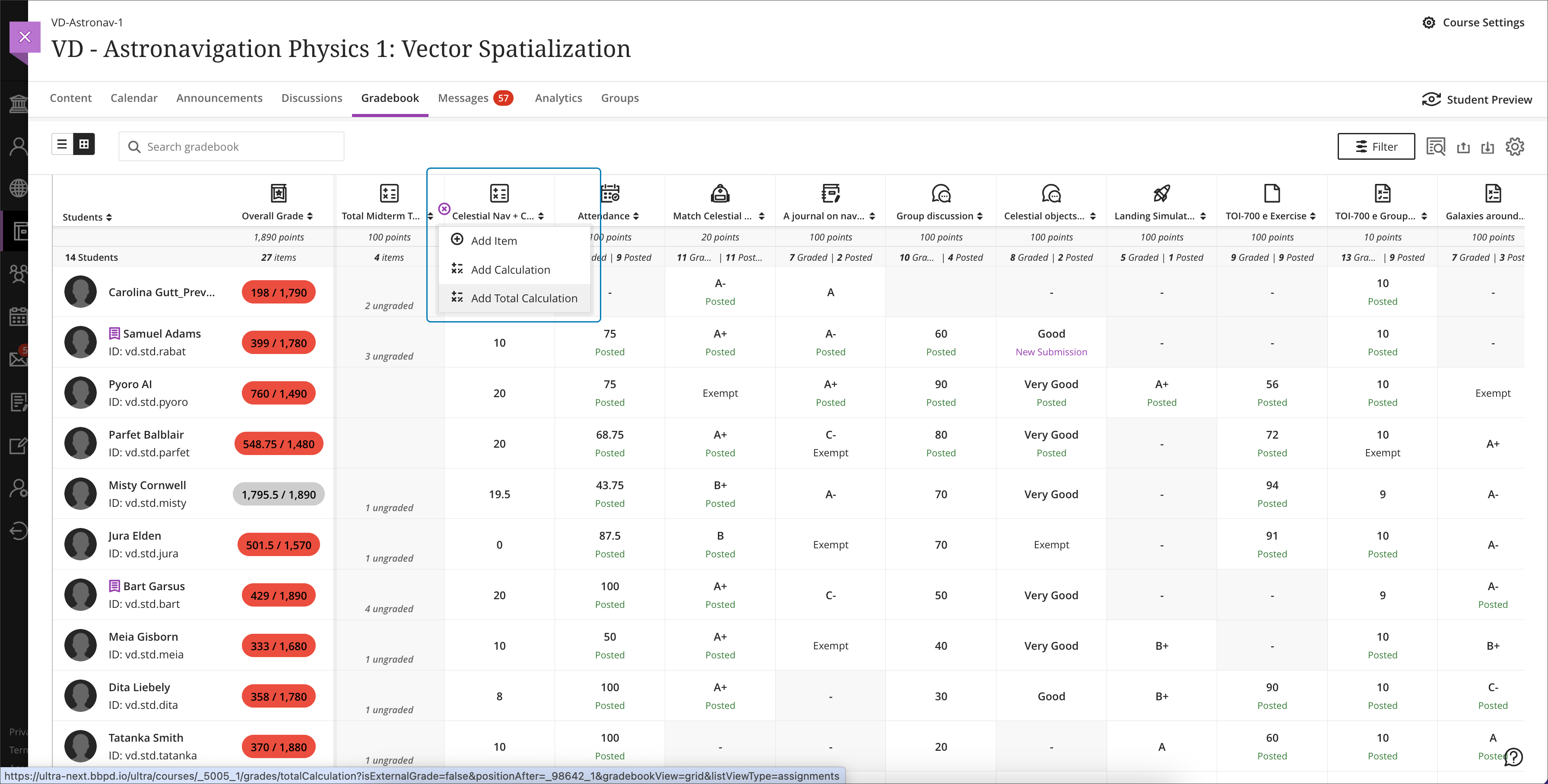
    <div>The gradebook is a key tool for instructors in an Ultra course. With this update, instructors will be able to create total and weighted calculated columns that are point or percentage based with options to include or exclude categories and dropping scores. Moreover, these new total calculated columns can be used toward the overall grade calculation, allowing greater flexibility.</div>
    </div>
    <div><span><br></span></div>
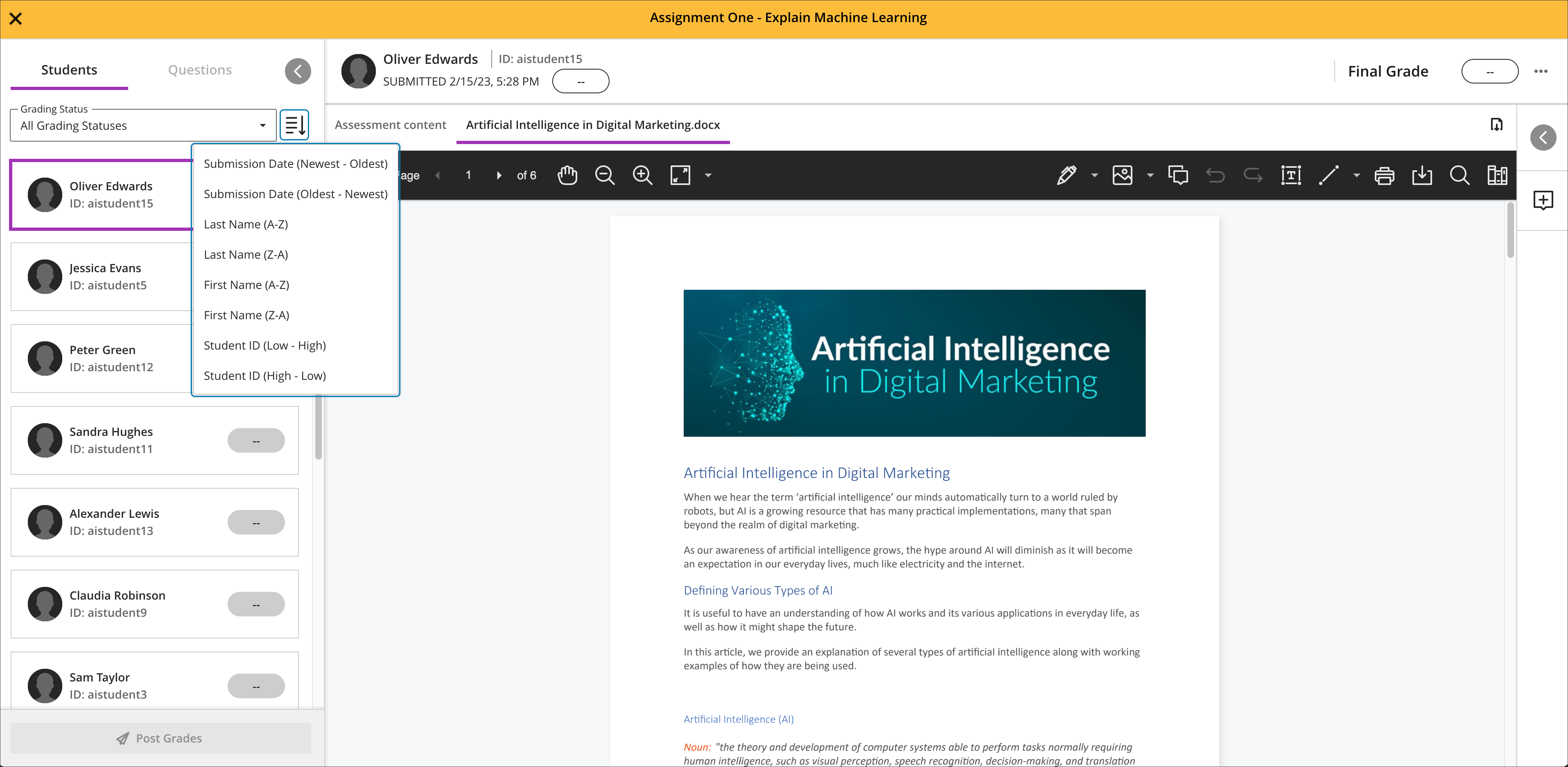
    <div><img src="https://help.blackboard.com/sites/default/files/images/2023-12/learn_ultra_instructor_Grading_TotalAndWeightedCalculatons_TotalCalculationColumn_AddingColumnFromGridView.png" width="500" alt="Image 1: Example of the improved gradebook with option to add a new Total Calculation" style="max-width: 100%; height: auto;"></div>
    <div><div><em>Image 1: Example of the improved gradebook with option to add a new Total Calculation</em></div></div>
    <div>
    <div><br></div>
    <div><strong>Grading &amp; Gradebook Improvements</strong></div>
    <div>
    <ul>
    <li><span>The grid view of the Ultra gradebook features usability improvements that reduces spacing around icons and improves row visibility. </span></li>
    <li>
    <span>The gradebook will now provide the student ID next to each learner's name to improve identification. </span><span>When hovering over a truncated name in the gradebook, a tooltip will reveal the full name.</span>
    </li>
    <li><span>A sortable category column is added to the gradebook list view to provide clarity for those items to be graded.</span></li>
    <li>Students will be able to see their grades for an assessment even if it is hidden. In a future update, feedback will be also visible.</li>
    <li><span>Instructors can use delegated grading for anonymous assessments. Sorting controls are available for submission date.</span></li>
    </ul>
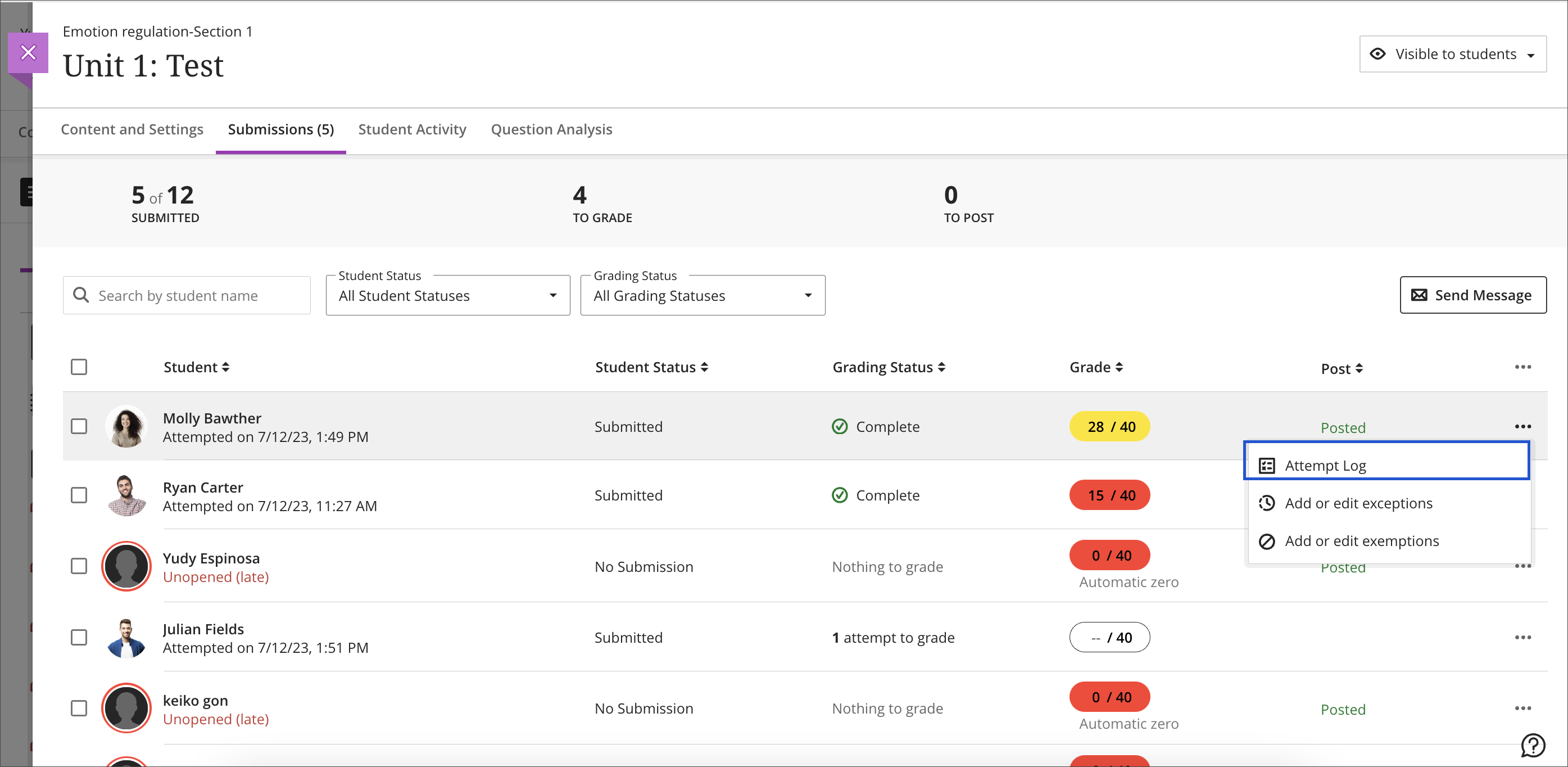
    <div>The test assessment log has been a frequent request for Ultra courses. Unlike Original courses, the Ultra version of this functionality provides information for tests and assignments. The test log will provide detailed information including date and time for starting the test, answers to each question, a preview of the question itself, and the estimated time spent on each question. The assignment log provides the start and submission date and time as well as the submission receipt number.</div>
    </div>
    <div><br></div>
    <div><img src="https://help.blackboard.com/sites/default/files/images/2023-12/learn_ultra_instructor_AssessmentIntegrity_SubmissionListViewEntryPoint.png" width="500" alt="Image 2: Instructors can access the Assessment Submission Log from the individual assessment log" style="max-width: 100%; height: auto;"></div>
    <div>
    <span>Image 2: </span><em>Instructors can access the Assessment Submission Log from the individual assessment</em>
    </div>
    <div><br></div>
    <div><strong>Content Creation &amp; Management</strong></div>
    </div>
    <div>
    <div><br></div>
    <div>
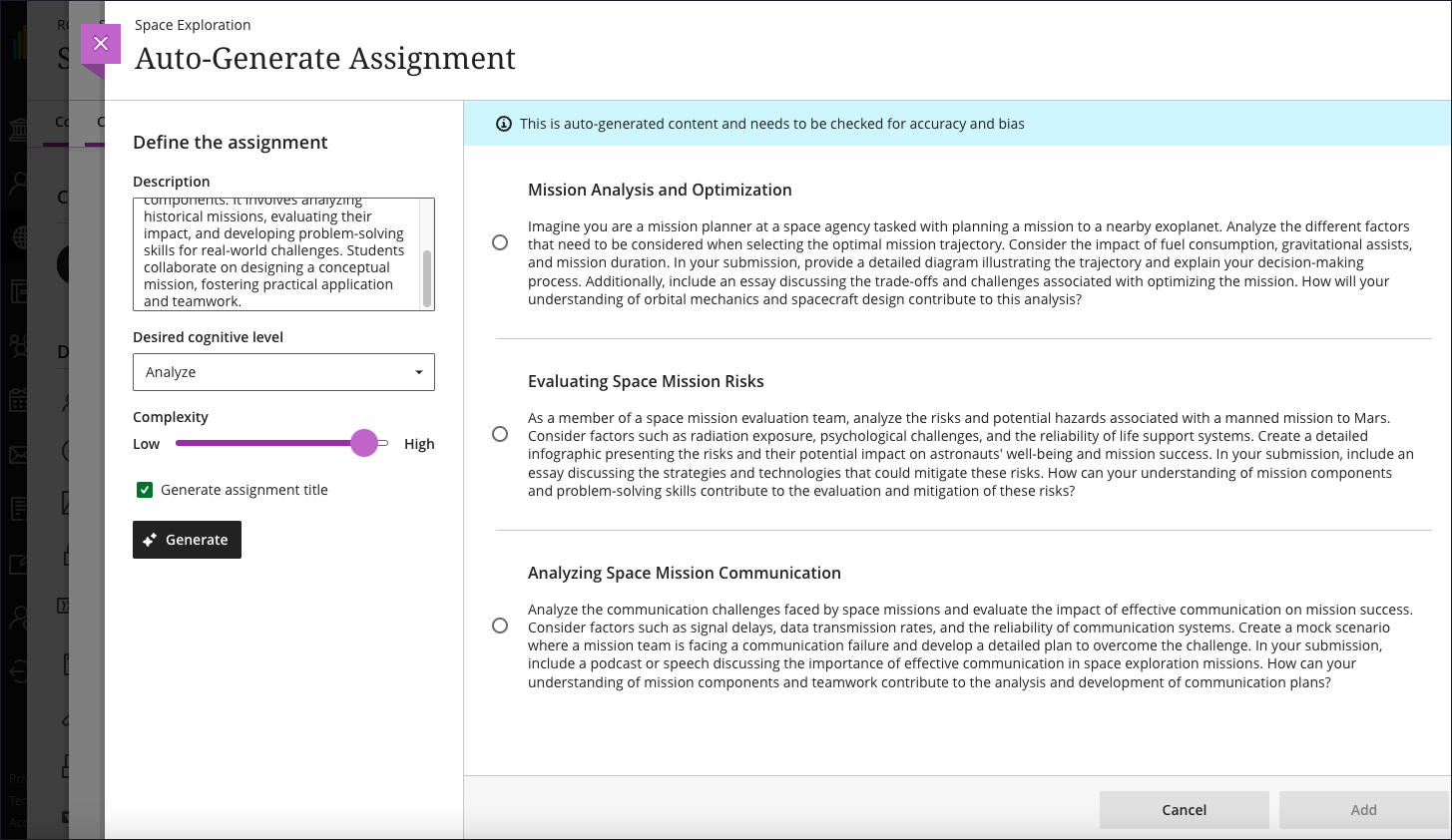
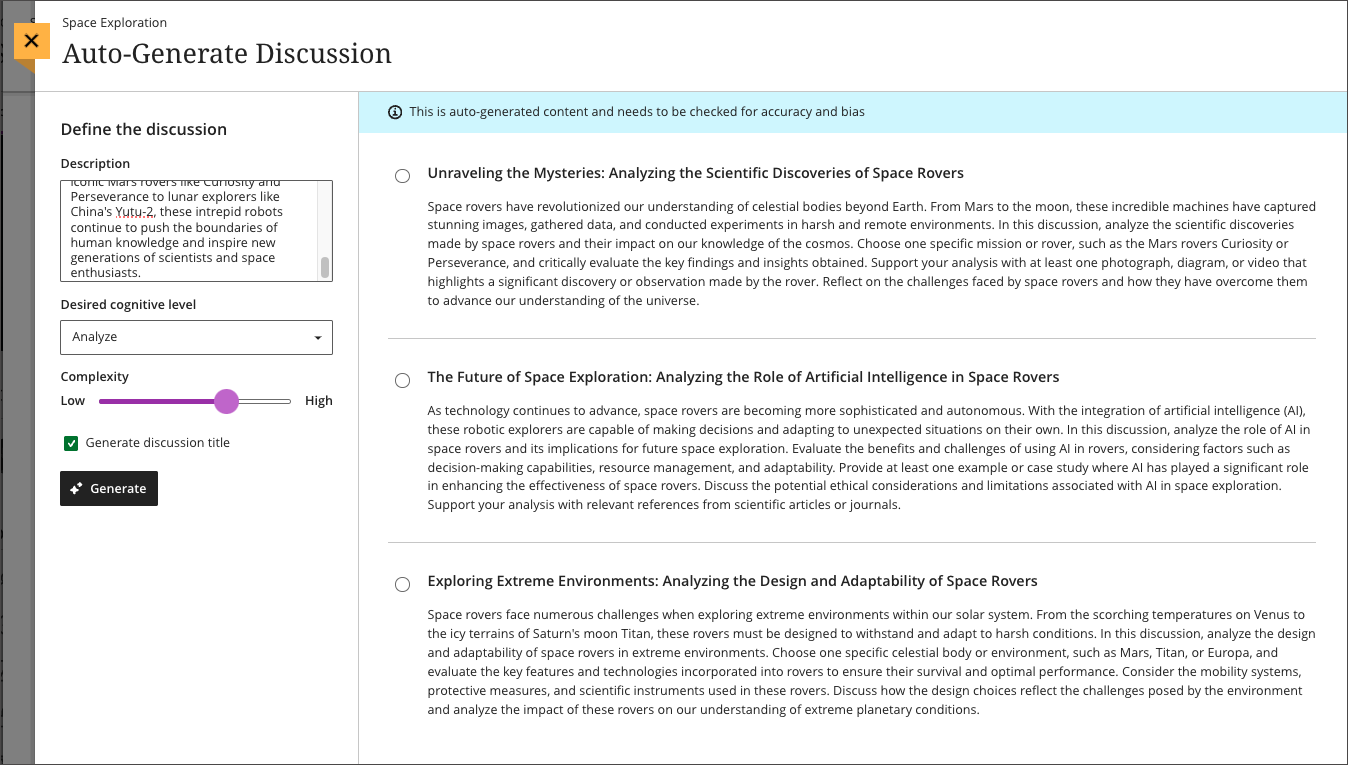
    <div>The latest update to the AI Course Design Assistant Tools in Ultra courses allows instructors to generate assignment prompts aligned to a selected Bloom's cognitive process. As with all AI functionality, instructors are in complete control and can choose when and how to they want to use the tools.</div>
    <div><br></div>
    <div><img src="https://help.blackboard.com/sites/default/files/images/2023-12/Learn_Ultra_Instructors_AI%20Design%20Assistant%20Authentic%20Assignment%20Prompt%20Generation_Prompts%20with%20Content.png" width="500" alt="Image 3: Instructors can add additional context through a description, select the desired cognitive level and complexity, and then generate prompts" style="max-width: 100%; height: auto;"></div>
    <div>
    <span>Image 3: </span><em>Instructors can add additional context through a description, select the desired cognitive level and complexity, and then generate prompts</em>
    </div>
    <div><br></div>
    <div>Additional updates to Content Management include:</div>
    <div><ul>
    <li><span>The Batch Edit tool now allows instructors to manage the date and/or time for selected items that have a pre-existing date/time -- for example, assessment due dates or visibility.</span></li>
    <li><span>Instructors can use the unused files tool to find and remove course files that are not in use in a course. Instructors can download a file before deleting it.</span></li>
    </ul></div>
    </div>
    </div>
    </div></div></div></div>
    <div>
    <div><div><div><div><span><div>
    <span>Faculty should see the latest updates in Ultra courses around January 4-5, 2024. </span><span>The next update to our Ultra test environment will take place on January 9, 2024; release notes are posted to the <a href="https://wiki.umbc.edu/x/LohnB" rel="nofollow external" class="bo">What's New in Ultra</a> that same week. Faculty who are interested in test driving new features before they are released to production should </span><a href="http://my.umbc.edu/go/request-help" rel="nofollow external" class="bo">open an RT ticket</a> to request early access. Please <a href="http://umbc.edu/go/ultra" rel="nofollow external" class="bo">watch the FAQs</a>, including <a href="https://wiki.umbc.edu/x/LohnB" rel="nofollow external" class="bo">the What's New with Ultra page</a>, <span>and myUMBC for additional information about Ultra. </span>
    </div></span></div></div></div></div>
    <div><span><br></span></div>
    </div>
    <div><span><strong>Connect with Instructional Technology</strong></span></div>
    <div><span>As always, if you have any questions about teaching, learning, and technology at UMBC, please consider the following options:</span></div>
    <ul>
    <li>
    <a href="http://www.umbc.edu/faq" rel="nofollow external" class="bo">Check our extensive FAQ collection</a><span> </span>
    </li>
    <ul><li><span><a href="https://wiki.umbc.edu/x/LohnB" rel="nofollow external" class="bo"><span>What's new in Ultra?</span></a><span> </span><span>|</span><span> </span><a href="https://wiki.umbc.edu/x/bwrSAQ" rel="nofollow external" class="bo"><span>Known Issues</span></a><span> </span></span></li></ul>
    <li><span><a href="http://my.umbc.edu/go/request-help" rel="nofollow external" class="bo">Open a ticket via RT</a></span></li>
    <li>
    <span>Follow the </span><a href="http://my.umbc.edu/groups/instructional-technology" rel="nofollow external" class="bo">Instructional Technology</a><span> &amp; </span><a href="http://my.umbc.edu/groups/doit" rel="nofollow external" class="bo">DoIT</a><span> myUMBC groups</span>
    </li>
    <li>
    <a href="http://doit.umbc.edu/itnm/staff/" rel="nofollow external" class="bo">Request a consult</a><span> with <a href="http://doit.umbc.edu/itnm/staff" rel="nofollow external" class="bo">instructional technology staff</a></span>
    </li>
    <li>
    <span><a href="http://pivot.umbc.edu" rel="nofollow external" class="bo">PIVOT</a> | <a href="https://doit.umbc.edu/itnm/academic-continuity/" rel="nofollow external" class="bo">Academic Continuity</a></span><span> </span><span>|</span><span> </span><span><a href="https://fdc.umbc.edu/teaching/keep-on-teaching/" rel="nofollow external" class="bo">Keep On Teaching</a></span><span> </span><span>|</span><span> </span><span><a href="https://doit.umbc.edu/students" rel="nofollow external" class="bo">Student Technology Resources</a></span>
    </li>
    </ul>
    </div>
    <div><div></div></div>
    </div>
]]>
</Body>
<Summary>Expanding the functionality for the gradebook and assessments has been a central theme for the past year of Ultra development. When the winter term starts in 2024, Ultra courses will feature...</Summary>
<Website>https://my3.my.umbc.edu/groups/instructional-technology/posts/137839</Website>
<TrackingUrl>https://my3.my.umbc.edu/api/v0/pixel/news/137839/guest@my.umbc.edu/325b5785e5d87ae1f21f6d288a9d1d92/api/pixel</TrackingUrl>
<Tag>ai</Tag>
<Tag>assessments</Tag>
<Tag>blackboard</Tag>
<Tag>gradebook</Tag>
<Tag>grading</Tag>
<Tag>ultra-experience</Tag>
<Tag>ultra-update</Tag>
<Group token="instructional-technology">Instructional Technology</Group>
<GroupUrl>https://my3.my.umbc.edu/groups/instructional-technology</GroupUrl>
<AvatarUrl>https://assets2-my.umbc.edu/system/shared/avatars/groups/000/001/164/dec3b026b81ee6d890a8f82f75c94a2e/xsmall.png?1446126703</AvatarUrl>
<AvatarUrl size="original">https://assets1-my.umbc.edu/system/shared/avatars/groups/000/001/164/dec3b026b81ee6d890a8f82f75c94a2e/original.png?1446126703</AvatarUrl>
<AvatarUrl size="xxlarge">https://assets2-my.umbc.edu/system/shared/avatars/groups/000/001/164/dec3b026b81ee6d890a8f82f75c94a2e/xxlarge.png?1446126703</AvatarUrl>
<AvatarUrl size="xlarge">https://assets1-my.umbc.edu/system/shared/avatars/groups/000/001/164/dec3b026b81ee6d890a8f82f75c94a2e/xlarge.png?1446126703</AvatarUrl>
<AvatarUrl size="large">https://assets1-my.umbc.edu/system/shared/avatars/groups/000/001/164/dec3b026b81ee6d890a8f82f75c94a2e/large.png?1446126703</AvatarUrl>
<AvatarUrl size="medium">https://assets4-my.umbc.edu/system/shared/avatars/groups/000/001/164/dec3b026b81ee6d890a8f82f75c94a2e/medium.png?1446126703</AvatarUrl>
<AvatarUrl size="small">https://assets3-my.umbc.edu/system/shared/avatars/groups/000/001/164/dec3b026b81ee6d890a8f82f75c94a2e/small.png?1446126703</AvatarUrl>
<AvatarUrl size="xsmall">https://assets2-my.umbc.edu/system/shared/avatars/groups/000/001/164/dec3b026b81ee6d890a8f82f75c94a2e/xsmall.png?1446126703</AvatarUrl>
<AvatarUrl size="xxsmall">https://assets3-my.umbc.edu/system/shared/avatars/groups/000/001/164/dec3b026b81ee6d890a8f82f75c94a2e/xxsmall.png?1446126703</AvatarUrl>
<Sponsor>Instructional Technology</Sponsor>
<ThumbnailUrl size="xxlarge">https://assets4-my.umbc.edu/system/shared/thumbnails/news/000/137/839/6fe5ac4ee868c2fabd33f0aebdee5885/xxlarge.jpg?1702915093</ThumbnailUrl>
<ThumbnailUrl size="xlarge">https://assets1-my.umbc.edu/system/shared/thumbnails/news/000/137/839/6fe5ac4ee868c2fabd33f0aebdee5885/xlarge.jpg?1702915093</ThumbnailUrl>
<ThumbnailUrl size="large">https://assets1-my.umbc.edu/system/shared/thumbnails/news/000/137/839/6fe5ac4ee868c2fabd33f0aebdee5885/large.jpg?1702915093</ThumbnailUrl>
<ThumbnailUrl size="medium">https://assets4-my.umbc.edu/system/shared/thumbnails/news/000/137/839/6fe5ac4ee868c2fabd33f0aebdee5885/medium.jpg?1702915093</ThumbnailUrl>
<ThumbnailUrl size="small">https://assets2-my.umbc.edu/system/shared/thumbnails/news/000/137/839/6fe5ac4ee868c2fabd33f0aebdee5885/small.jpg?1702915093</ThumbnailUrl>
<ThumbnailUrl size="xsmall">https://assets4-my.umbc.edu/system/shared/thumbnails/news/000/137/839/6fe5ac4ee868c2fabd33f0aebdee5885/xsmall.jpg?1702915093</ThumbnailUrl>
<ThumbnailUrl size="xxsmall">https://assets4-my.umbc.edu/system/shared/thumbnails/news/000/137/839/6fe5ac4ee868c2fabd33f0aebdee5885/xxsmall.jpg?1702915093</ThumbnailUrl>
<PawCount>2</PawCount>
<CommentCount>0</CommentCount>
<CommentsAllowed>true</CommentsAllowed>
<PostedAt>Thu, 21 Dec 2023 08:01:31 -0500</PostedAt>
</NewsItem>

<NewsItem contentIssues="false" id="137896" important="false" status="posted" url="https://my3.my.umbc.edu/groups/oer/posts/137896">
<Title>From Syllabi to Textbooks- Institutional OER Accessibility</Title>
<Tagline>Series of no-cost intensives designed to build OER capacity</Tagline>
<Body>
<![CDATA[
    <div class="html-content">
    <span>ISKME and CAST’s National <a href="https://oer-maryland.us8.list-manage.com/track/click?u=4ce992e3f6db63c7af9c28afd&amp;id=6e38224870&amp;e=b54e6989f4" rel="nofollow external" class="bo">AEM (Accessible Educational Materials) Center</a> invite <strong>teams of faculty and staff</strong> to learn how to use accessible Open Educational Resources (OER) to make learning more equitable and bust the barriers to learning that millions of learners experience every day. <br> <br>Our Accessible OER Academy series is provided at no-cost to teams at Institutions of Higher Education (IHE) and will introduce cohorts to how openly licensed resources are key levers for both adapting existing resources to increase digital accessibility and designing resources that are accessible for learners with disabilities from the start. Participants will also gain an understanding of how accessibility relates to Universal Design for Learning (UDL). <br> <br>The series consists of six sessions -- three 90-minute webinars and three 90-minute implementation sessions as outlined below. <strong>All sessions will be from 2:00-3:30 pm ET.</strong><br> </span><ul>
    <li><span>Feb. 15 – 101  Collaborative Questioning and UDL</span></li>
    <li><span>Feb. 22 – 101  Implementation Session</span></li>
    <li><span>Feb. 29 – 201  Adapting and Creating Accessible OER</span></li>
    <li><span>Mar. 7 - 201  Implementation Session</span></li>
    <li><span>Mar. 14 - 301  Curating and Evaluating OER for Accessibility</span></li>
    <li><span>Mar. 21 - 301  Implementation Session</span></li>
    </ul>
    <span> <br>For more information, please review the <a href="https://oer-maryland.us8.list-manage.com/track/click?u=4ce992e3f6db63c7af9c28afd&amp;id=7104a14cc6&amp;e=b54e6989f4" rel="nofollow external" class="bo">Information Flyer</a> and the <a href="https://oer-maryland.us8.list-manage.com/track/click?u=4ce992e3f6db63c7af9c28afd&amp;id=1a3566e889&amp;e=b54e6989f4" rel="nofollow external" class="bo">Application Form</a> for the series. Teams should submit one application. </span><strong>Please contact Instructional Technology if you are interested in participating.</strong><span><br><br>Questions may be directed to Joanna Schimizzi (<a href="mailto:joanna@iskme.org" rel="nofollow external" class="bo">joanna@iskme.org</a>) and Alison Driscoll (<a href="mailto:adriscoll@cast.org" rel="nofollow external" class="bo">adriscoll@cast.org</a>).</span>
    </div>
]]>
</Body>
<Summary>ISKME and CAST’s National AEM (Accessible Educational Materials) Center invite teams of faculty and staff to learn how to use accessible Open Educational Resources (OER) to make learning more...</Summary>
<TrackingUrl>https://my3.my.umbc.edu/api/v0/pixel/news/137896/guest@my.umbc.edu/077ab71ef7965984b41aef0f2cc1155b/api/pixel</TrackingUrl>
<Tag>educational</Tag>
<Tag>oer</Tag>
<Tag>open</Tag>
<Tag>resources</Tag>
<Group token="oer">Open Educational Resources at UMBC</Group>
<GroupUrl>https://my3.my.umbc.edu/groups/oer</GroupUrl>
<AvatarUrl>https://assets1-my.umbc.edu/system/shared/avatars/groups/000/001/664/0e7fb0a3d658c358b4e5e9561f35099e/xsmall.png?1562590436</AvatarUrl>
<AvatarUrl size="original">https://assets2-my.umbc.edu/system/shared/avatars/groups/000/001/664/0e7fb0a3d658c358b4e5e9561f35099e/original.png?1562590436</AvatarUrl>
<AvatarUrl size="xxlarge">https://assets1-my.umbc.edu/system/shared/avatars/groups/000/001/664/0e7fb0a3d658c358b4e5e9561f35099e/xxlarge.png?1562590436</AvatarUrl>
<AvatarUrl size="xlarge">https://assets1-my.umbc.edu/system/shared/avatars/groups/000/001/664/0e7fb0a3d658c358b4e5e9561f35099e/xlarge.png?1562590436</AvatarUrl>
<AvatarUrl size="large">https://assets4-my.umbc.edu/system/shared/avatars/groups/000/001/664/0e7fb0a3d658c358b4e5e9561f35099e/large.png?1562590436</AvatarUrl>
<AvatarUrl size="medium">https://assets1-my.umbc.edu/system/shared/avatars/groups/000/001/664/0e7fb0a3d658c358b4e5e9561f35099e/medium.png?1562590436</AvatarUrl>
<AvatarUrl size="small">https://assets2-my.umbc.edu/system/shared/avatars/groups/000/001/664/0e7fb0a3d658c358b4e5e9561f35099e/small.png?1562590436</AvatarUrl>
<AvatarUrl size="xsmall">https://assets1-my.umbc.edu/system/shared/avatars/groups/000/001/664/0e7fb0a3d658c358b4e5e9561f35099e/xsmall.png?1562590436</AvatarUrl>
<AvatarUrl size="xxsmall">https://assets1-my.umbc.edu/system/shared/avatars/groups/000/001/664/0e7fb0a3d658c358b4e5e9561f35099e/xxsmall.png?1562590436</AvatarUrl>
<Sponsor>Open Educational Resources at UMBC</Sponsor>
<PawCount>3</PawCount>
<CommentCount>0</CommentCount>
<CommentsAllowed>true</CommentsAllowed>
<PostedAt>Wed, 20 Dec 2023 09:28:27 -0500</PostedAt>
<EditAt>Wed, 20 Dec 2023 11:28:36 -0500</EditAt>
</NewsItem>

<NewsItem contentIssues="true" id="137728" important="false" status="posted" url="https://my3.my.umbc.edu/groups/oer/posts/137728">
<Title>CFP - Incorporating Generative AI into Learning Experiences</Title>
<Tagline>Share your assessment experience with USM peers</Tagline>
<Body>
<![CDATA[
    <div class="html-content">
    <div><span>Faculty, staff, and faculty/staff/student teams who have engaged in the use of Generative AI as part of assignments and learning activities are invited to propose sessions for the <strong><a href="https://www.usmd.edu/cai/incorporating-generative-ai-learning-experiences-virtual-showcase" rel="nofollow external" class="bo">Incorporating Generative AI into Learning Experiences Virtual Showcase</a></strong>, taking place via Zoom on Friday, April 26, 2024, from 10:00 am to 1:00 pm ET. </span></div>
    <div><br></div>
    <div>We welcome proposals for brief showcase presentations from faculty, staff, and faculty/staff/student teams from accredited Maryland institutions of higher education related to their development and use of assignments and learning activities that incorporate Generative AI. Learning experiences may reside inside or outside of the classroom and across different modalities.</div>
    <div><br></div>
    <div>Presenters will have 10-15 minutes of presentation time followed by moderated Q&amp;A, for a total of 20 minutes. We ask you to limit the number of presenters to no more than 3 people, though additional collaborators are welcome to be in the session and be available for the Q&amp;A portion of the presentation. </div>
    <div><br></div>
    <div>Showcase presentation topics can include: </div>
    <div><ul>
    <li><span>the use of Generative AI in the development of assignments and learning activities, </span></li>
    <li><span>engaging students in the use of Generative AI as part of the assignment/learning activity, </span></li>
    <li><span>student learning outcomes related to Generative AI and assignments/learning activities,</span></li>
    <li><span>assignments and learning activities that invite students to critically examine the use of Generative AI in society, in education, and in their own learning, </span></li>
    <li><span>the ways in which faculty, staff, and students are navigating appropriate and responsible use of Generative AI, </span></li>
    <li><span>approaches to the use of Generative AI aimed at increasing relevance in learning, mitigating bias in learning materials/generated output, and other dimensions of diversity, equity, and inclusion,</span></li>
    <li><span>the use of Generative AI to enhance course materials, including open educational resources.</span></li>
    </ul></div>
    <div><span>Works in progress should be sufficiently far along to be able to address the proposal session outline. </span></div>
    <div><br></div>
    <div>Final selection of proposals for the showcase will be based on ensuring a diversity of presentations from different institution types across Maryland (2-year, 4-year, public, independent) and from a variety of disciplines. </div>
    <div><br></div>
    <div>Please carefully review <a href="https://www.usmd.edu/cai/sites/default/files/Call%20for%20Proposals%20-%20Generative%20AI%20into%20Learning%20Experiences.pdf" rel="nofollow external" class="bo">the Call for Proposals (pdf)</a> before submitting a proposal. </div>
    <div><br></div>
    <div>
    <a href="https://docs.google.com/forms/d/1nm8uIh4rzz6vn8sX8B_BqRjopaW4vBZa5PMbwkZCs1I/viewform?edit_requested=true" rel="nofollow external" class="bo">Submit Your Proposal</a> by February 12, 2024, 11:59 p.m. ET.</div>
    <div><br></div>
    <div>This event is sponsored by MarylandOnline, Montgomery College, the University System of Maryland William E. Kirwan Center for Academic Innovation, and the USM Council of University System Faculty. Please pardon any cross-posting by the event sponsors. </div>
    <div><br></div>
    <div>Please contact <a href="mailto:cai@usmd.edu">cai@usmd.edu</a> if you have any questions.</div>
    </div>
]]>
</Body>
<Summary>Faculty, staff, and faculty/staff/student teams who have engaged in the use of Generative AI as part of assignments and learning activities are invited to propose sessions for the Incorporating...</Summary>
<Website>https://my3.my.umbc.edu/groups/oer/posts/125789</Website>
<TrackingUrl>https://my3.my.umbc.edu/api/v0/pixel/news/137728/guest@my.umbc.edu/d1b42387339dafdac7ad5b712ac244c1/api/pixel</TrackingUrl>
<Tag>ai</Tag>
<Tag>artificial-intelligence</Tag>
<Tag>assessment</Tag>
<Tag>classroom-experiences</Tag>
<Tag>educational</Tag>
<Tag>genai</Tag>
<Tag>most</Tag>
<Tag>open-educational-resources</Tag>
<Tag>virtual-showcase</Tag>
<Group token="oer">Open Educational Resources at UMBC</Group>
<GroupUrl>https://my3.my.umbc.edu/groups/oer</GroupUrl>
<AvatarUrl>https://assets1-my.umbc.edu/system/shared/avatars/groups/000/001/664/0e7fb0a3d658c358b4e5e9561f35099e/xsmall.png?1562590436</AvatarUrl>
<AvatarUrl size="original">https://assets2-my.umbc.edu/system/shared/avatars/groups/000/001/664/0e7fb0a3d658c358b4e5e9561f35099e/original.png?1562590436</AvatarUrl>
<AvatarUrl size="xxlarge">https://assets1-my.umbc.edu/system/shared/avatars/groups/000/001/664/0e7fb0a3d658c358b4e5e9561f35099e/xxlarge.png?1562590436</AvatarUrl>
<AvatarUrl size="xlarge">https://assets1-my.umbc.edu/system/shared/avatars/groups/000/001/664/0e7fb0a3d658c358b4e5e9561f35099e/xlarge.png?1562590436</AvatarUrl>
<AvatarUrl size="large">https://assets4-my.umbc.edu/system/shared/avatars/groups/000/001/664/0e7fb0a3d658c358b4e5e9561f35099e/large.png?1562590436</AvatarUrl>
<AvatarUrl size="medium">https://assets1-my.umbc.edu/system/shared/avatars/groups/000/001/664/0e7fb0a3d658c358b4e5e9561f35099e/medium.png?1562590436</AvatarUrl>
<AvatarUrl size="small">https://assets2-my.umbc.edu/system/shared/avatars/groups/000/001/664/0e7fb0a3d658c358b4e5e9561f35099e/small.png?1562590436</AvatarUrl>
<AvatarUrl size="xsmall">https://assets1-my.umbc.edu/system/shared/avatars/groups/000/001/664/0e7fb0a3d658c358b4e5e9561f35099e/xsmall.png?1562590436</AvatarUrl>
<AvatarUrl size="xxsmall">https://assets1-my.umbc.edu/system/shared/avatars/groups/000/001/664/0e7fb0a3d658c358b4e5e9561f35099e/xxsmall.png?1562590436</AvatarUrl>
<Sponsor>Open Educational Resources at UMBC</Sponsor>
<ThumbnailUrl size="xxlarge">https://assets4-my.umbc.edu/system/shared/thumbnails/news/000/137/728/5350b8033be069df01073f7452e2e09b/xxlarge.jpg?1702409872</ThumbnailUrl>
<ThumbnailUrl size="xlarge">https://assets2-my.umbc.edu/system/shared/thumbnails/news/000/137/728/5350b8033be069df01073f7452e2e09b/xlarge.jpg?1702409872</ThumbnailUrl>
<ThumbnailUrl size="large">https://assets3-my.umbc.edu/system/shared/thumbnails/news/000/137/728/5350b8033be069df01073f7452e2e09b/large.jpg?1702409872</ThumbnailUrl>
<ThumbnailUrl size="medium">https://assets4-my.umbc.edu/system/shared/thumbnails/news/000/137/728/5350b8033be069df01073f7452e2e09b/medium.jpg?1702409872</ThumbnailUrl>
<ThumbnailUrl size="small">https://assets1-my.umbc.edu/system/shared/thumbnails/news/000/137/728/5350b8033be069df01073f7452e2e09b/small.jpg?1702409872</ThumbnailUrl>
<ThumbnailUrl size="xsmall">https://assets2-my.umbc.edu/system/shared/thumbnails/news/000/137/728/5350b8033be069df01073f7452e2e09b/xsmall.jpg?1702409872</ThumbnailUrl>
<ThumbnailUrl size="xxsmall">https://assets3-my.umbc.edu/system/shared/thumbnails/news/000/137/728/5350b8033be069df01073f7452e2e09b/xxsmall.jpg?1702409872</ThumbnailUrl>
<PawCount>1</PawCount>
<CommentCount>0</CommentCount>
<CommentsAllowed>true</CommentsAllowed>
<PostedAt>Tue, 12 Dec 2023 14:39:37 -0500</PostedAt>
</NewsItem>

<NewsItem contentIssues="false" id="137662" important="false" status="posted" url="https://my3.my.umbc.edu/groups/oer/posts/137662">
<Title>Accessible Course Design Supports Diverse Learning Styles</Title>
<Tagline>Save the dates! Accessibility Workshop and Bb Ally Webinar</Tagline>
<Body>
<![CDATA[
    <div class="html-content"><span><p><span>Creating accessible courses requires thoughtful consideration of diverse learning styles and strategies that result in fostering engaging learning experiences for all students. These strategies include leveraging Universal Design for Learning principles to guide course design that offers variety to all learners. </span></p>
    <p><span>Faculty can utilize Blackboard Ally to provide multiple content formats and empower students to use Ally's alternative formats to meet their learning styles. Additional resources about course usability and accessibility, including the chance to connect with peers, can be accessed by using your QM login to enroll in the Accessibility and Usability Resource Site (AURS). </span></p>
    <p><span>Highlights of these approaches include the following:  </span></p>
    <div><span><span><p><span><strong>Universal Design for Learning Guidelines</strong></span></p>
    <ul>
    <li><span><span><span>Review </span><a href="https://udlguidelines.cast.org/" rel="nofollow external" class="bo"><span>UDL guidelines</span></a><span> that support offering multiple means of representation to learners by employing various formats such as text, audio, and visual materials to accommodate diverse learning preferences. </span></span></span></li>
    <li><span><span><span>Foster engagement by incorporating interactive elements, discussions, or hands-on activities that cater to visual, auditory, and kinesthetic learners. </span></span></span></li>
    <li><span><span><span>Ask yourself these </span><a href="https://udlguidelines.cast.org/binaries/content/assets/common/publications/articles/cast-udl-planningq-a11y.pdf" rel="nofollow external" class="bo"><span>key questions</span></a><span> about learner engagement, representation, action and expression when designing a module or unit in your course. </span></span></span></li>
    <li><span><span><span>Implement UDL incrementally and intentionally. Refer to scholarly works like Behling &amp; Tobin (2018) for guidance. They encourage faculty to think of UDL as "plus-one thinking about the interactions in your course" (p. 134). For example, is there just one more way you can help students stay on task, give them information, or demonstrate skills? The answers can help unlock a UDL strategy for your course. </span></span></span></li>
    </ul>
    <div><span><p><span><strong>Bb Ally for Remediation, Alt Text</strong></span></p>
    <ul>
    <li><span><span>Explore accessibility tools and built-in features that allow you to cater to students with different  abilities. For example, </span><a href="https://wiki.umbc.edu/display/faq/Ally" rel="nofollow external" class="bo"><span>Ally</span></a><span> is a tool available in Blackboard Ultra that improves the accessibility of courses by scanning course content, generating an </span><a href="https://wiki.umbc.edu/pages/viewpage.action?pageId=87884573" rel="nofollow external" class="bo"><span>Accessibility Report</span></a><span>, and providing tools to fix accessibility issues.</span></span></li>
    <li><span><span>Use Ally's </span><a href="https://wiki.umbc.edu/display/faq/Ally+for+Instructors" rel="nofollow external" class="bo"><span>Instructor Feedback Panel</span></a><span> to preview content and prioritize remediation.</span></span></li>
    <li><span><span>Consider </span><a href="https://wiki.umbc.edu/pages/viewpage.action?pageId=77431280" rel="nofollow external" class="bo"><span>Ally's powerful alternative format</span></a><span> options and let students know they can download content in multiple formats that give them choices in how they watch, read, or listen. </span></span></li>
    </ul>
    <div><span><p><span><strong>QM's Accessibility and Usability Resource Site </strong></span></p>
    <ul>
    <li><span><span>Register for free access to Quality Matters </span><a href="https://www.qualitymatters.org/node/1532" rel="nofollow external" class="bo"><span>Accessibility and Usability Resource Site</span></a><span> (AURS), the go-to resource for educators to address key accessibility and usability concerns. Log into </span><a href="https://www.qmprogram.org/myqm/" rel="nofollow external" class="bo"><span>MyQM</span></a><span>, or </span><a href="https://wiki.umbc.edu/x/a4-LBg" rel="nofollow external" class="bo"><span>create your QM account</span></a><span>. After successfully logging in, use the side navigation menu to select "Workshop-Register" and self-enroll in AURS (last item on the workshop list).</span></span></li>
    <li><span><span>Explore resources, videos, and best practices on topics like UDL, alternative text, captions, hyperlinks, accessible MS Office products, readability, accessible PDFs, accessible course design, and inclusive teaching practices.</span></span></li>
    <li><span><span>Connect with colleagues through AURS discussion forums to seek and incorporate feedback to refine course design that supports an inclusive learning experience. </span></span></li>
    </ul>
    <div><span><p><span><strong>Save the dates!</strong></span></p>
    <p><span>Instructional Technology will offer an accessibility workshop in January and a Bb Ally webinar in February to share best practices in course accessibility and usability. To learn more and register for an event, follow us on </span><a href="https://my3.my.umbc.edu/groups/instructional-technology" rel="nofollow external" class="bo"><span>myUMBC</span></a><span>.  </span></p>
    <ul>
    <li><span><span><strong>January 23:</strong> <a href="https://my3.my.umbc.edu/groups/instructional-technology/events/124608/" rel="nofollow external" class="bo">Accessibility workshop,</a> </span><span>from 1 - 2:15 p.m. (hands-on workshop)</span></span></li>
    <li><span><span><strong>February 15:</strong> <a href="https://my3.my.umbc.edu/groups/instructional-technology/events/124592/" rel="nofollow external" class="bo">30 Minutes or Less - 3 Things You can Do With Bb Ally,</a> </span><span>from 12 - 12:30 p.m.</span></span></li>
    </ul>
    <div><span><p><span><strong>References</strong></span></p>
    <ul>
    <li>
    <span>Behling, K. &amp; Tobin, T. J. (2018). </span><span>Reach everyone, teach everyone: Universal Design for Learning in higher education</span><span>. Morgantown: West Virginia University Press. </span><a href="https://wvupressonline.com/node/757" rel="nofollow external" class="bo"><span>https://wvupressonline.com/node/757</span></a><span>. </span>
    </li>
    <li>
    <span>CAST (2018). </span><a href="https://udlguidelines.cast.org/" rel="nofollow external" class="bo"><span>Universal Design for Learning Guidelines</span></a><span> version 2.2. Retrieved from <a href="http://udlguidelines.cast.org">http://udlguidelines.cast.org</a></span>
    </li>
    <li>
    <span>UDL on campus: Universal Design for Learning in higher education</span><span>. </span><span>UDL On Campus by </span><a href="http://www.cast.org/" rel="nofollow external" class="bo"><span>CAST</span></a><span> is licensed under a Creative Commons Attribution-ShareAlike 4.0 International License. Retrieved from </span><a href="http://udloncampus.cast.org/home" rel="nofollow external" class="bo"><span>http://udloncampus.cast.org/home</span></a>
    </li>
    </ul>
    <p><span>UMBC is committed to providing a consistent learning experience for everyone. The </span><a href="https://doit.umbc.edu/news/post/130227/" rel="nofollow external" class="bo"><span>last day we will support Blackboard Original</span></a><span> is December 31, 2024. Please check out our training and support:</span><a href="http://umbc.edu/go/ultra" rel="nofollow external" class="bo"><span>umbc.edu/go/ultra</span></a></p>
    <div><br></div></span></div></span></div></span></div></span></div></span></span></div></span></div>
]]>
</Body>
<Summary>Creating accessible courses requires thoughtful consideration of diverse learning styles and strategies that result in fostering engaging learning experiences for all students. These strategies...</Summary>
<Website>https://my3.my.umbc.edu/groups/instructional-technology/posts/137662</Website>
<AttachmentKind>Image</AttachmentKind>
<AttachmentUrl>https://assets3-my.umbc.edu/system/shared/attachments/710de176c72c2b0f11708bc0856900a5/6a7d8fc1/news/000/137/662/798014564d89b66bdea039ebf5c56664/enroll.png?1702302484</AttachmentUrl>
<Attachments>
<Attachment kind="Image" url="https://my3.my.umbc.edu/groups/oer/posts/137662/attachments/49873"></Attachment>
</Attachments>
<TrackingUrl>https://my3.my.umbc.edu/api/v0/pixel/news/137662/guest@my.umbc.edu/be9b39ee1c1c1f88f2562e3882de51de/api/pixel</TrackingUrl>
<Tag>accessibility</Tag>
<Tag>ally</Tag>
<Tag>aurs</Tag>
<Tag>fa23</Tag>
<Tag>qm</Tag>
<Tag>quality-matters</Tag>
<Tag>udl</Tag>
<Tag>usability</Tag>
<Group token="instructional-technology">Instructional Technology</Group>
<GroupUrl>https://my3.my.umbc.edu/groups/instructional-technology</GroupUrl>
<AvatarUrl>https://assets2-my.umbc.edu/system/shared/avatars/groups/000/001/164/dec3b026b81ee6d890a8f82f75c94a2e/xsmall.png?1446126703</AvatarUrl>
<AvatarUrl size="original">https://assets1-my.umbc.edu/system/shared/avatars/groups/000/001/164/dec3b026b81ee6d890a8f82f75c94a2e/original.png?1446126703</AvatarUrl>
<AvatarUrl size="xxlarge">https://assets2-my.umbc.edu/system/shared/avatars/groups/000/001/164/dec3b026b81ee6d890a8f82f75c94a2e/xxlarge.png?1446126703</AvatarUrl>
<AvatarUrl size="xlarge">https://assets1-my.umbc.edu/system/shared/avatars/groups/000/001/164/dec3b026b81ee6d890a8f82f75c94a2e/xlarge.png?1446126703</AvatarUrl>
<AvatarUrl size="large">https://assets1-my.umbc.edu/system/shared/avatars/groups/000/001/164/dec3b026b81ee6d890a8f82f75c94a2e/large.png?1446126703</AvatarUrl>
<AvatarUrl size="medium">https://assets4-my.umbc.edu/system/shared/avatars/groups/000/001/164/dec3b026b81ee6d890a8f82f75c94a2e/medium.png?1446126703</AvatarUrl>
<AvatarUrl size="small">https://assets3-my.umbc.edu/system/shared/avatars/groups/000/001/164/dec3b026b81ee6d890a8f82f75c94a2e/small.png?1446126703</AvatarUrl>
<AvatarUrl size="xsmall">https://assets2-my.umbc.edu/system/shared/avatars/groups/000/001/164/dec3b026b81ee6d890a8f82f75c94a2e/xsmall.png?1446126703</AvatarUrl>
<AvatarUrl size="xxsmall">https://assets3-my.umbc.edu/system/shared/avatars/groups/000/001/164/dec3b026b81ee6d890a8f82f75c94a2e/xxsmall.png?1446126703</AvatarUrl>
<Sponsor>Instructional Technology</Sponsor>
<ThumbnailUrl size="xxlarge">https://assets2-my.umbc.edu/system/shared/thumbnails/news/000/137/662/48682790ddaa917b811b72b6bbecd8e5/xxlarge.jpg?1702302484</ThumbnailUrl>
<ThumbnailUrl size="xlarge">https://assets4-my.umbc.edu/system/shared/thumbnails/news/000/137/662/48682790ddaa917b811b72b6bbecd8e5/xlarge.jpg?1702302484</ThumbnailUrl>
<ThumbnailUrl size="large">https://assets2-my.umbc.edu/system/shared/thumbnails/news/000/137/662/48682790ddaa917b811b72b6bbecd8e5/large.jpg?1702302484</ThumbnailUrl>
<ThumbnailUrl size="medium">https://assets2-my.umbc.edu/system/shared/thumbnails/news/000/137/662/48682790ddaa917b811b72b6bbecd8e5/medium.jpg?1702302484</ThumbnailUrl>
<ThumbnailUrl size="small">https://assets4-my.umbc.edu/system/shared/thumbnails/news/000/137/662/48682790ddaa917b811b72b6bbecd8e5/small.jpg?1702302484</ThumbnailUrl>
<ThumbnailUrl size="xsmall">https://assets3-my.umbc.edu/system/shared/thumbnails/news/000/137/662/48682790ddaa917b811b72b6bbecd8e5/xsmall.jpg?1702302484</ThumbnailUrl>
<ThumbnailUrl size="xxsmall">https://assets3-my.umbc.edu/system/shared/thumbnails/news/000/137/662/48682790ddaa917b811b72b6bbecd8e5/xxsmall.jpg?1702302484</ThumbnailUrl>
<ThumbnailAltText>Image is decorative.</ThumbnailAltText>
<PawCount>7</PawCount>
<CommentCount>0</CommentCount>
<CommentsAllowed>false</CommentsAllowed>
<PostedAt>Tue, 12 Dec 2023 10:04:02 -0500</PostedAt>
<EditAt>Fri, 17 Oct 2025 11:48:13 -0400</EditAt>
</NewsItem>

<NewsItem contentIssues="true" id="137637" important="false" status="posted" url="https://my3.my.umbc.edu/groups/oer/posts/137637">
<Title>Catch an Ultra Sprint on January 22</Title>
<Tagline>Join one of two open sessions to learn about Ultra</Tagline>
<Body>
<![CDATA[
    <div class="html-content"><span><p><span>Are you stepping into the world of Blackboard Ultra? Instructional Technology is offering two identical sessions on January 22, 2024, providing flexible opportunities to fit into an instructors busy schedule.</span></p>
    <p><span>In these fast-paced and focused sessions, you'll dive into the essentials of Blackboard Ultra, exploring efficient navigation, content creation, assessment tools, grading techniques, and effective communication strategies with students. Our streamlined approach is designed to deliver key information swiftly, ensuring you get the most out of every minute.</span></p>
    <p><span><strong>Session Objectives</strong></span></p>
    <ul>
    <li><p><span>Swift Navigation: Learn to maneuver through Ultra with ease.</span></p></li>
    <li><p><span>Content Building: Discover quick tips for effective course material creation.</span></p></li>
    <li><p><span>Assessment Tools: Set up and manage student assessments.</span></p></li>
    <li><p><span>Grading Simplified: Review efficient grading practices.</span></p></li>
    <li><p><span>Student Communication: Explore strategies to maintain clear and effective communication.</span></p></li>
    </ul>
    <p><span>These sessions are an ideal jumpstart for instructors preparing to adopt Blackboard Ultra, providing comprehensive coverage of fundamental features.</span></p>
    <p><span><strong>Post-Session Support:</strong></span><span> Although the main session is a quick 50 minutes, we invite you to stay for an additional 10-minute Q&amp;A segment. Here, you can ask specific questions and see live demonstrations tailored to your needs.</span></p>
    <p><span>Join us to streamline your transition to Blackboard Ultra and enhance your digital teaching toolkit. Choose </span><span>either of the two</span><span> available sessions and get ready to elevate for Blackboard Ultra!</span></p>
    <p><span><strong>Join a Session:</strong></span></p>
    <p><span>Sessions will be facilitated by Instructional Technology Staff:</span></p>
    <ul>
    <li>
    <span><strong><a href="https://my3.my.umbc.edu/groups/instructional-technology/events/124590" rel="nofollow external" class="bo">Session #1</a></strong></span><span><strong>:</strong> 9 AM - 9:50 AM</span>
    </li>
    <ul><li><span>Staff: Mariann Hawken / Susan Biro</span></li></ul>
    <li>
    <span><strong><a href="https://my3.my.umbc.edu/groups/instructional-technology/events/124604" rel="nofollow external" class="bo">Session #2</a>:</strong></span><span> 10:30 AM - 11:20 AM</span>
    </li>
    <ul><li><span>Staff: Josh Abrams / Peter Ariev</span></li></ul>
    </ul>
    <p><span>These sessions will take place in a Microsoft Teams virtual conference room. Please see the individual event to RSVP and learn about login information.</span></p>
    <p><em><span>Please note: </span><span>UMBC is committed to creating an accessible and inclusive environment for all faculty, staff, students, and visitors.  If you would like to request accommodations (e.g., ASL interpreters, captioning, wheelchair access, etc.) for this event, please notify us at least two weeks prior to the event. Requests received after that time cannot be guaranteed, but we will do our best to make arrangements for program access. Please contact the event host (<a href="mailto:instructionaltechnology@umbc.edu">instructionaltechnology@umbc.edu</a>) with your specific request and be sure to include the event title, date, and time.</span></em></p>
    <em><a href="https://support.microsoft.com/en-us/office/use-live-captions-in-microsoft-teams-meetings-4be2d304-f675-4b57-8347-cbd000a21260" rel="nofollow external" class="bo"><span>Automated closed captioning</span></a><span> for virtual events is available via the Microsoft Teams desktop and mobile applications. All recordings are uploaded to Panopto with captioning enabled.</span></em></span></div>
]]>
</Body>
<Summary>Are you stepping into the world of Blackboard Ultra? Instructional Technology is offering two identical sessions on January 22, 2024, providing flexible opportunities to fit into an instructors...</Summary>
<Website>https://my3.my.umbc.edu/groups/instructional-technology/posts/137637</Website>
<TrackingUrl>https://my3.my.umbc.edu/api/v0/pixel/news/137637/guest@my.umbc.edu/e823fd1315e7bc581bd88b92b33b7bbe/api/pixel</TrackingUrl>
<Tag>sp2024</Tag>
<Tag>sprint</Tag>
<Tag>ultra</Tag>
<Tag>ultra-experience</Tag>
<Tag>webinar</Tag>
<Group token="instructional-technology">Instructional Technology</Group>
<GroupUrl>https://my3.my.umbc.edu/groups/instructional-technology</GroupUrl>
<AvatarUrl>https://assets2-my.umbc.edu/system/shared/avatars/groups/000/001/164/dec3b026b81ee6d890a8f82f75c94a2e/xsmall.png?1446126703</AvatarUrl>
<AvatarUrl size="original">https://assets1-my.umbc.edu/system/shared/avatars/groups/000/001/164/dec3b026b81ee6d890a8f82f75c94a2e/original.png?1446126703</AvatarUrl>
<AvatarUrl size="xxlarge">https://assets2-my.umbc.edu/system/shared/avatars/groups/000/001/164/dec3b026b81ee6d890a8f82f75c94a2e/xxlarge.png?1446126703</AvatarUrl>
<AvatarUrl size="xlarge">https://assets1-my.umbc.edu/system/shared/avatars/groups/000/001/164/dec3b026b81ee6d890a8f82f75c94a2e/xlarge.png?1446126703</AvatarUrl>
<AvatarUrl size="large">https://assets1-my.umbc.edu/system/shared/avatars/groups/000/001/164/dec3b026b81ee6d890a8f82f75c94a2e/large.png?1446126703</AvatarUrl>
<AvatarUrl size="medium">https://assets4-my.umbc.edu/system/shared/avatars/groups/000/001/164/dec3b026b81ee6d890a8f82f75c94a2e/medium.png?1446126703</AvatarUrl>
<AvatarUrl size="small">https://assets3-my.umbc.edu/system/shared/avatars/groups/000/001/164/dec3b026b81ee6d890a8f82f75c94a2e/small.png?1446126703</AvatarUrl>
<AvatarUrl size="xsmall">https://assets2-my.umbc.edu/system/shared/avatars/groups/000/001/164/dec3b026b81ee6d890a8f82f75c94a2e/xsmall.png?1446126703</AvatarUrl>
<AvatarUrl size="xxsmall">https://assets3-my.umbc.edu/system/shared/avatars/groups/000/001/164/dec3b026b81ee6d890a8f82f75c94a2e/xxsmall.png?1446126703</AvatarUrl>
<Sponsor>Instructional Technology</Sponsor>
<ThumbnailUrl size="xxlarge">https://assets4-my.umbc.edu/system/shared/thumbnails/news/000/137/637/2007d0325a087a0ee801fc5a8996b360/xxlarge.jpg?1702324769</ThumbnailUrl>
<ThumbnailUrl size="xlarge">https://assets3-my.umbc.edu/system/shared/thumbnails/news/000/137/637/2007d0325a087a0ee801fc5a8996b360/xlarge.jpg?1702324769</ThumbnailUrl>
<ThumbnailUrl size="large">https://assets2-my.umbc.edu/system/shared/thumbnails/news/000/137/637/2007d0325a087a0ee801fc5a8996b360/large.jpg?1702324769</ThumbnailUrl>
<ThumbnailUrl size="medium">https://assets3-my.umbc.edu/system/shared/thumbnails/news/000/137/637/2007d0325a087a0ee801fc5a8996b360/medium.jpg?1702324769</ThumbnailUrl>
<ThumbnailUrl size="small">https://assets3-my.umbc.edu/system/shared/thumbnails/news/000/137/637/2007d0325a087a0ee801fc5a8996b360/small.jpg?1702324769</ThumbnailUrl>
<ThumbnailUrl size="xsmall">https://assets2-my.umbc.edu/system/shared/thumbnails/news/000/137/637/2007d0325a087a0ee801fc5a8996b360/xsmall.jpg?1702324769</ThumbnailUrl>
<ThumbnailUrl size="xxsmall">https://assets2-my.umbc.edu/system/shared/thumbnails/news/000/137/637/2007d0325a087a0ee801fc5a8996b360/xxsmall.jpg?1702324769</ThumbnailUrl>
<PawCount>3</PawCount>
<CommentCount>0</CommentCount>
<CommentsAllowed>true</CommentsAllowed>
<PostedAt>Mon, 11 Dec 2023 15:03:50 -0500</PostedAt>
<EditAt>Wed, 17 Jan 2024 12:07:54 -0500</EditAt>
</NewsItem>

<NewsItem contentIssues="true" id="137337" important="false" status="posted" url="https://my3.my.umbc.edu/groups/oer/posts/137337">
<Title>Dec adds unique group due dates, more sort controls in Ultra</Title>
<Tagline>Features authentic discussion opportunities using AI tools</Tagline>
<Body>
<![CDATA[
    <div class="html-content">
    <div>
    <div><div><div><div>
    <div>As 2023 comes to a close, the December Ultra update brings several features to enhance group functionality and gradebook management. With this update, instructors can <span>assign a unique due date to each group using the exceptions workflow.</span><span> If necessary, instructors can reset the group due date to the default.</span>
    </div>
    <div><span><br></span></div>
    <div>
    <span>Gradebook sorting controls provide easier ways to interact with grade information in an Ultra course. T</span><span>he <a href="https://my3.my.umbc.edu/groups/instructional-technology/posts/134272" rel="nofollow external" class="bo">new Flexible Grading interface</a> also features updated sorting controls for column types, allowing instructors and graders to sort data in ascending and descending order.</span>
    </div>
    <div><span><br></span></div>
    <div><img src="https://help.blackboard.com/sites/default/files/images/2023-11/learn_ultra_instructor_SortingControlsInStudentsAndQuestionsTab_SortingOptionsInFlexibleGrading.png" width="500" alt="Image 1: Sorting assessments in Flexible Grading using the Students tab" style="max-width: 100%; height: auto;"></div>
    <div>
    <div><em>Image 1: Sorting assessments in Flexible Grading using the Students tab</em></div>
    <div><em><br></em></div>
    </div>
    <div>
    <span>Further updates to assessments and grading allow instructors to align goals to questions within a question bank and create expanded rubrics without any limit to the row or column sizes. Question-level goal alignment ensures that assessment items measure the desired learning outcomes. Moreover, larger rubrics allow for </span><span>greater criteria to support assessment and accreditation.</span>
    </div>
    <div>
    <div><span><br></span></div>
    <div>
    <span>Additionally, <a href="https://my3.my.umbc.edu/groups/instructional-technology/posts/134605" rel="nofollow external" class="bo">Ultra's exclusive AI course design assistant tools</a> can generate discussion prompts to incorporate authentic assessment and increase learner engagement. </span>The generation process allows instructors to enter a discussion or journal description, select a desired cognitive process based on Bloom's Taxonomy, set the complexity, and generate a discussion or journal title. <span>The instructor can review the generated prompts and select one to add to the discussion or journal. After adding the prompt, the instructor can edit or further refine the prompt as appropriate. </span><span>The goal of this tool is to encourage students to engage in higher-order thinking, apply their knowledge, justify or challenge their beliefs and ideas, and emulate real-world situations.</span>
    </div>
    <div><br></div>
    <div><img src="https://help.blackboard.com/sites/default/files/images/2023-11/learn_ultra_instructor_AuthenticDiscussionAndJournal%20prompts_InstructorOptions.png" width="500" alt="Image 2: Instructors can describe the discussion, select the desired cognitive process and complexity, and then generate prompts" style="max-width: 100%; height: auto;"></div>
    <div>
    <span>Image 2: </span><em>Instructors can describe the discussion, select the desired cognitive process and complexity, and then generate prompts</em>
    </div>
    <div><br></div>
    </div>
    </div></div></div></div>
    <div>
    <div><div><div><div><span><div>
    <span>Faculty should see the latest updates in Ultra courses around December 7-8 2023. </span><span>The next update to our Ultra test environment will take place on December 12, 2023; release notes are posted to the <a href="https://wiki.umbc.edu/x/LohnB" rel="nofollow external" class="bo">What's New in Ultra</a> that same week. Faculty who are interested in test driving new features before they are released to production should </span><a href="http://my.umbc.edu/go/request-help" rel="nofollow external" class="bo">open an RT ticket</a> to request early access. Please <a href="http://umbc.edu/go/ultra" rel="nofollow external" class="bo">watch the FAQs</a>, including <a href="https://wiki.umbc.edu/x/LohnB" rel="nofollow external" class="bo">the What's New with Ultra page</a>, <span>and myUMBC for additional information about Ultra. </span>
    </div></span></div></div></div></div>
    <div><span><br></span></div>
    </div>
    <div><span><strong>Connect with Instructional Technology</strong></span></div>
    <div><span>As always, if you have any questions about teaching, learning, and technology at UMBC, please consider the following options:</span></div>
    <ul>
    <li>
    <a href="http://www.umbc.edu/faq" rel="nofollow external" class="bo">Check our extensive FAQ collection</a><span> </span>
    </li>
    <ul><li><span><a href="https://wiki.umbc.edu/x/LohnB" rel="nofollow external" class="bo"><span>What's new in Ultra?</span></a><span> </span><span>|</span><span> </span><a href="https://wiki.umbc.edu/x/bwrSAQ" rel="nofollow external" class="bo"><span>Known Issues</span></a><span> </span></span></li></ul>
    <li><span><a href="http://my.umbc.edu/go/request-help" rel="nofollow external" class="bo">Open a ticket via RT</a></span></li>
    <li>
    <span>Follow the </span><a href="http://my.umbc.edu/groups/instructional-technology" rel="nofollow external" class="bo">Instructional Technology</a><span> &amp; </span><a href="http://my.umbc.edu/groups/doit" rel="nofollow external" class="bo">DoIT</a><span> myUMBC groups</span>
    </li>
    <li>
    <a href="http://doit.umbc.edu/itnm/staff/" rel="nofollow external" class="bo">Request a consult</a><span> with <a href="http://doit.umbc.edu/itnm/staff" rel="nofollow external" class="bo">instructional technology staff</a></span>
    </li>
    <li>
    <span><a href="http://pivot.umbc.edu" rel="nofollow external" class="bo">PIVOT</a> | <a href="https://doit.umbc.edu/itnm/academic-continuity/" rel="nofollow external" class="bo">Academic Continuity</a></span><span> </span><span>|</span><span> </span><span><a href="https://fdc.umbc.edu/teaching/keep-on-teaching/" rel="nofollow external" class="bo">Keep On Teaching</a></span><span> </span><span>|</span><span> </span><span><a href="https://doit.umbc.edu/students" rel="nofollow external" class="bo">Student Technology Resources</a></span>
    </li>
    </ul>
    </div>
    <div><div></div></div>
    </div>
]]>
</Body>
<Summary>As 2023 comes to a close, the December Ultra update brings several features to enhance group functionality and gradebook management. With this update, instructors can assign a unique due date to...</Summary>
<Website>https://my3.my.umbc.edu/groups/instructional-technology/posts/137337</Website>
<TrackingUrl>https://my3.my.umbc.edu/api/v0/pixel/news/137337/guest@my.umbc.edu/399185d8da49d9564e0ff4f946e356e2/api/pixel</TrackingUrl>
<Tag>ai</Tag>
<Tag>blackboard</Tag>
<Tag>gradebook</Tag>
<Tag>grading</Tag>
<Tag>ultra-experience</Tag>
<Tag>ultra-update</Tag>
<Tag>unsplash</Tag>
<Group token="instructional-technology">Instructional Technology</Group>
<GroupUrl>https://my3.my.umbc.edu/groups/instructional-technology</GroupUrl>
<AvatarUrl>https://assets2-my.umbc.edu/system/shared/avatars/groups/000/001/164/dec3b026b81ee6d890a8f82f75c94a2e/xsmall.png?1446126703</AvatarUrl>
<AvatarUrl size="original">https://assets1-my.umbc.edu/system/shared/avatars/groups/000/001/164/dec3b026b81ee6d890a8f82f75c94a2e/original.png?1446126703</AvatarUrl>
<AvatarUrl size="xxlarge">https://assets2-my.umbc.edu/system/shared/avatars/groups/000/001/164/dec3b026b81ee6d890a8f82f75c94a2e/xxlarge.png?1446126703</AvatarUrl>
<AvatarUrl size="xlarge">https://assets1-my.umbc.edu/system/shared/avatars/groups/000/001/164/dec3b026b81ee6d890a8f82f75c94a2e/xlarge.png?1446126703</AvatarUrl>
<AvatarUrl size="large">https://assets1-my.umbc.edu/system/shared/avatars/groups/000/001/164/dec3b026b81ee6d890a8f82f75c94a2e/large.png?1446126703</AvatarUrl>
<AvatarUrl size="medium">https://assets4-my.umbc.edu/system/shared/avatars/groups/000/001/164/dec3b026b81ee6d890a8f82f75c94a2e/medium.png?1446126703</AvatarUrl>
<AvatarUrl size="small">https://assets3-my.umbc.edu/system/shared/avatars/groups/000/001/164/dec3b026b81ee6d890a8f82f75c94a2e/small.png?1446126703</AvatarUrl>
<AvatarUrl size="xsmall">https://assets2-my.umbc.edu/system/shared/avatars/groups/000/001/164/dec3b026b81ee6d890a8f82f75c94a2e/xsmall.png?1446126703</AvatarUrl>
<AvatarUrl size="xxsmall">https://assets3-my.umbc.edu/system/shared/avatars/groups/000/001/164/dec3b026b81ee6d890a8f82f75c94a2e/xxsmall.png?1446126703</AvatarUrl>
<Sponsor>Instructional Technology</Sponsor>
<ThumbnailUrl size="xxlarge">https://assets3-my.umbc.edu/system/shared/thumbnails/news/000/137/337/ac70c80d8dfe1625932cf54cba55766e/xxlarge.jpg?1701192788</ThumbnailUrl>
<ThumbnailUrl size="xlarge">https://assets2-my.umbc.edu/system/shared/thumbnails/news/000/137/337/ac70c80d8dfe1625932cf54cba55766e/xlarge.jpg?1701192788</ThumbnailUrl>
<ThumbnailUrl size="large">https://assets2-my.umbc.edu/system/shared/thumbnails/news/000/137/337/ac70c80d8dfe1625932cf54cba55766e/large.jpg?1701192788</ThumbnailUrl>
<ThumbnailUrl size="medium">https://assets4-my.umbc.edu/system/shared/thumbnails/news/000/137/337/ac70c80d8dfe1625932cf54cba55766e/medium.jpg?1701192788</ThumbnailUrl>
<ThumbnailUrl size="small">https://assets1-my.umbc.edu/system/shared/thumbnails/news/000/137/337/ac70c80d8dfe1625932cf54cba55766e/small.jpg?1701192788</ThumbnailUrl>
<ThumbnailUrl size="xsmall">https://assets2-my.umbc.edu/system/shared/thumbnails/news/000/137/337/ac70c80d8dfe1625932cf54cba55766e/xsmall.jpg?1701192788</ThumbnailUrl>
<ThumbnailUrl size="xxsmall">https://assets4-my.umbc.edu/system/shared/thumbnails/news/000/137/337/ac70c80d8dfe1625932cf54cba55766e/xxsmall.jpg?1701192788</ThumbnailUrl>
<PawCount>2</PawCount>
<CommentCount>0</CommentCount>
<CommentsAllowed>true</CommentsAllowed>
<PostedAt>Thu, 30 Nov 2023 14:58:57 -0500</PostedAt>
<EditAt>Thu, 30 Nov 2023 15:00:04 -0500</EditAt>
</NewsItem>

</News>