When Good Design Is Invisible: Four UMBC Faculty Share How UDL Supports Student Learning
Small design choices make learning more accessible for all.
Students in Sarah Bass’s chemistry courses who use the course-grounded AI assistant say it feels like talking to their professor. Many of their classmates, though, don’t know the assistant exists or aren’t sure what it’s for.
That gap between a well-designed support and the student who actually uses it was the focus of “When Good Design Is Invisible: Helping Students Recognize UDL,” a National Distance Learning Week panel on November 2. Four UMBC faculty from social work, chemistry, modern languages, and dance shared how Universal Design for Learning (UDL) shapes their courses, and how they help students see and use the choices built into them.

Panelists: Sarah Bass, Jill Vasbinder Morrison, Milvia Hernández, and Tiffany Banks
1. Building a Structure Students Can Predict
With more than 300 students in each chemistry lecture section, Bass relies on consistency. Deadlines follow a predictable pattern and appear everywhere students look: Blackboard, their calendars, and the slides posted after class. After a deadline passes, the material reopens so students can keep practicing. Bass tells students why the course runs this way.
Predictable organization means less energy spent figuring out what to do and more spent on chemistry. She also explains the purpose of each kind of practice, from reviewing foundational concepts to taking practice exams. The goal isn't simply to help students navigate chemistry, but to help them recognize what they need and develop strategies for managing their own learning.
2. Counting More Than One Kind of Participation
In dance courses, participation is essential, and Jill Vasbinder Morrison grades it. She doesn’t define it as raising a hand. Students can talk in pairs, add to shared slides and spreadsheets, serve as class scribe, or join an optional discussion board after a missed class. When she explains this on the first day, she can see the relief. She repeats it in the Start Here folder, the syllabus, every slide deck, and VoiceThread.
A syllabus quiz with multiple attempts reinforces these expectations and helps students locate important course information. When a student still isn’t using any of the options, she reaches out one-on-one to remind them that the choices are real and that they count. By making participation options explicit and reinforcing them throughout the semester, Morrison helps students recognize that contributing to learning doesn't have to look the same for everyone.
3. Explaining the Small Routines
Some of the most effective supports in Milvia Hernández’s asynchronous Spanish courses look almost too simple. Students copy each chapter’s vocabulary by hand, even though it’s in the ebook, and a short video explains why handwriting helps language learning. For a student who can’t handwrite, recording the words aloud serves the same purpose.
Projects unfold in connected stages with feedback along the way, so the final product gathers work students have already done. Students rarely see the point at first, but by the end they say it’s what helped most. In the first week, instead of handing out study tips, Hernández has students find strategies for learning a language online, share them in a forum, and pick one or two to try. Whether students are practicing vocabulary, building a project, or choosing study strategies, Hernández helps them understand why they're doing the work and how those routines support their learning.
4. Making It Safe to Ask
Tiffany Banks opens each semester in her social work courses by telling students what it means to her to be a neuroaffirming educator. Students can ask her for flexibility, such as an extension, even without a diagnosis or formal accommodation. When she can’t say yes, usually because grades are due, she tells them why. In class, she makes it clear that not every activity is graded. A quick thumbs up, sideways, or down tells her whether to slow down or try another approach.
Some of those new approaches last: a visual that one cohort created to understand a difficult concept now appears in her slides for the next class. As Banks emphasized, there's never a perfect solution. UDL is an ongoing process of listening, adjusting, and recognizing that students may need different kinds of support at different times.
Across four very different disciplines, the panelists demonstrated that UDL doesn't require redesigning an entire course. It starts with noticing where students encounter barriers, making one purposeful change, and helping students understand how that change supports their learning. Sometimes the most meaningful improvement isn't adding another activity or resource. It's helping students recognize and use the thoughtful design already built into their learning experience.
Explore UDL in Your Teaching
Interested in applying Universal Design for Learning to your courses? UMBC's Instructional Technology team can help you identify barriers, explore practical strategies, and make purposeful changes that support student learning.
]]>
Students in Sarah Bass’s chemistry courses who use the course-grounded AI assistant say it feels like talking to their professor. Many of their classmates, though, don’t know the assistant exists...
Inline Image
https://assets4-my.umbc.edu/system/shared/attachments/c46e653b7cb1aa069c6f40057bdaf43e/6aeae3b1/news/000/164/840/6c5f8fc72176d961820f0d9b8ae70006/FourFaculty.jpeg?1793716499
https://my3.my.umbc.edu/api/v0/pixel/news/164840/guest@my.umbc.edu/ed3ab9c93d462fea753ca9d66631f387/api/pixel
da
digital-accessibility
fa2026
faculty
fine-arts
humanities
learner-variability
national-distance-learning-week
ndlw
panel-discussion
social-sciences
stem
student-success
udl
universal-design-for-learning
Instructional Technology
https://my3.my.umbc.edu/groups/instructional-technology
https://assets2-my.umbc.edu/system/shared/avatars/groups/000/001/164/dec3b026b81ee6d890a8f82f75c94a2e/xsmall.png?1446126703
https://assets1-my.umbc.edu/system/shared/avatars/groups/000/001/164/dec3b026b81ee6d890a8f82f75c94a2e/original.png?1446126703
https://assets2-my.umbc.edu/system/shared/avatars/groups/000/001/164/dec3b026b81ee6d890a8f82f75c94a2e/xxlarge.png?1446126703
https://assets1-my.umbc.edu/system/shared/avatars/groups/000/001/164/dec3b026b81ee6d890a8f82f75c94a2e/xlarge.png?1446126703
https://assets1-my.umbc.edu/system/shared/avatars/groups/000/001/164/dec3b026b81ee6d890a8f82f75c94a2e/large.png?1446126703
https://assets4-my.umbc.edu/system/shared/avatars/groups/000/001/164/dec3b026b81ee6d890a8f82f75c94a2e/medium.png?1446126703
https://assets3-my.umbc.edu/system/shared/avatars/groups/000/001/164/dec3b026b81ee6d890a8f82f75c94a2e/small.png?1446126703
https://assets2-my.umbc.edu/system/shared/avatars/groups/000/001/164/dec3b026b81ee6d890a8f82f75c94a2e/xsmall.png?1446126703
https://assets3-my.umbc.edu/system/shared/avatars/groups/000/001/164/dec3b026b81ee6d890a8f82f75c94a2e/xxsmall.png?1446126703
Instructional Technology
https://assets4-my.umbc.edu/system/shared/thumbnails/news/000/164/840/32991528515cbbe70bf544859549e7a3/xxlarge.jpg?1793715741
https://assets2-my.umbc.edu/system/shared/thumbnails/news/000/164/840/32991528515cbbe70bf544859549e7a3/xlarge.jpg?1793715741
https://assets2-my.umbc.edu/system/shared/thumbnails/news/000/164/840/32991528515cbbe70bf544859549e7a3/large.jpg?1793715741
https://assets1-my.umbc.edu/system/shared/thumbnails/news/000/164/840/32991528515cbbe70bf544859549e7a3/medium.jpg?1793715741
https://assets2-my.umbc.edu/system/shared/thumbnails/news/000/164/840/32991528515cbbe70bf544859549e7a3/small.jpg?1793715741
https://assets3-my.umbc.edu/system/shared/thumbnails/news/000/164/840/32991528515cbbe70bf544859549e7a3/xsmall.jpg?1793715741
https://assets1-my.umbc.edu/system/shared/thumbnails/news/000/164/840/32991528515cbbe70bf544859549e7a3/xxsmall.jpg?1793715741
Course Roadmap to Equity Learning Design logo
4
0
true
Tue, 03 Nov 2026 14:30:00 -0500
6 Ways to Make Social Science Content More Accessible
Where evidence lives shouldn't decide who can reach it.
A student opens the assigned dataset the night before discussion, ready to test a hypothesis about voting patterns in urban counties. But the chart won't resize, the color-coded legend is difficult to distinguish with her display settings, and there's no data table to fall back on. She isn't struggling with the statistics. She's struggling to get to them.
Fixing those barriers matters. But even when students can access a chart, dataset, map, interview, or other source, they may still struggle to navigate the information, identify relevant evidence, or understand how they're expected to use it. Technical access opens the door. Learning design considers what students need to do once they're through it.
That's where learning purpose becomes important. Before changing how evidence is presented, ask: What are students supposed to do with this evidence? What analytical challenge needs to remain?
Access to the evidence can become easier without making the analysis easier.
1. Start With the Evidence Students Need to Reach
Before changing a chart, article, map, dataset, or recording, ask what students are expected to do with it. Are they identifying a trend? Comparing values? Evaluating a research method? Coding an interview? Interpreting geographic relationships?
Then, consider where different learners might get stuck.
-
Can they access the information?
-
Can they navigate and use it?
-
Is it clear what they're supposed to examine?
-
Do they have the background knowledge needed to begin?
Identifying the barrier before choosing a solution helps keep the change purposeful.
If students need to identify a trend, they need access to the trend. If they need to calculate from individual values, they need the underlying data. The analytical work still belongs to them.
2. Make the Finding Available Beyond the Visualization
Charts and graphs compress large amounts of information into visual patterns. That's their strength, and why technical accessibility alone may not be enough.
-
Pair a visualization with accessible data when students need individual values.
-
Describe significant trends or relationships when that's what students need to examine.
-
Use labels, patterns, shapes, or line styles in addition to color.
-
Make alternative text meaningful rather than simply naming the chart type.
Additional representation depends on the purpose. Students may need a data table, a description, clearer labels, or another representation.
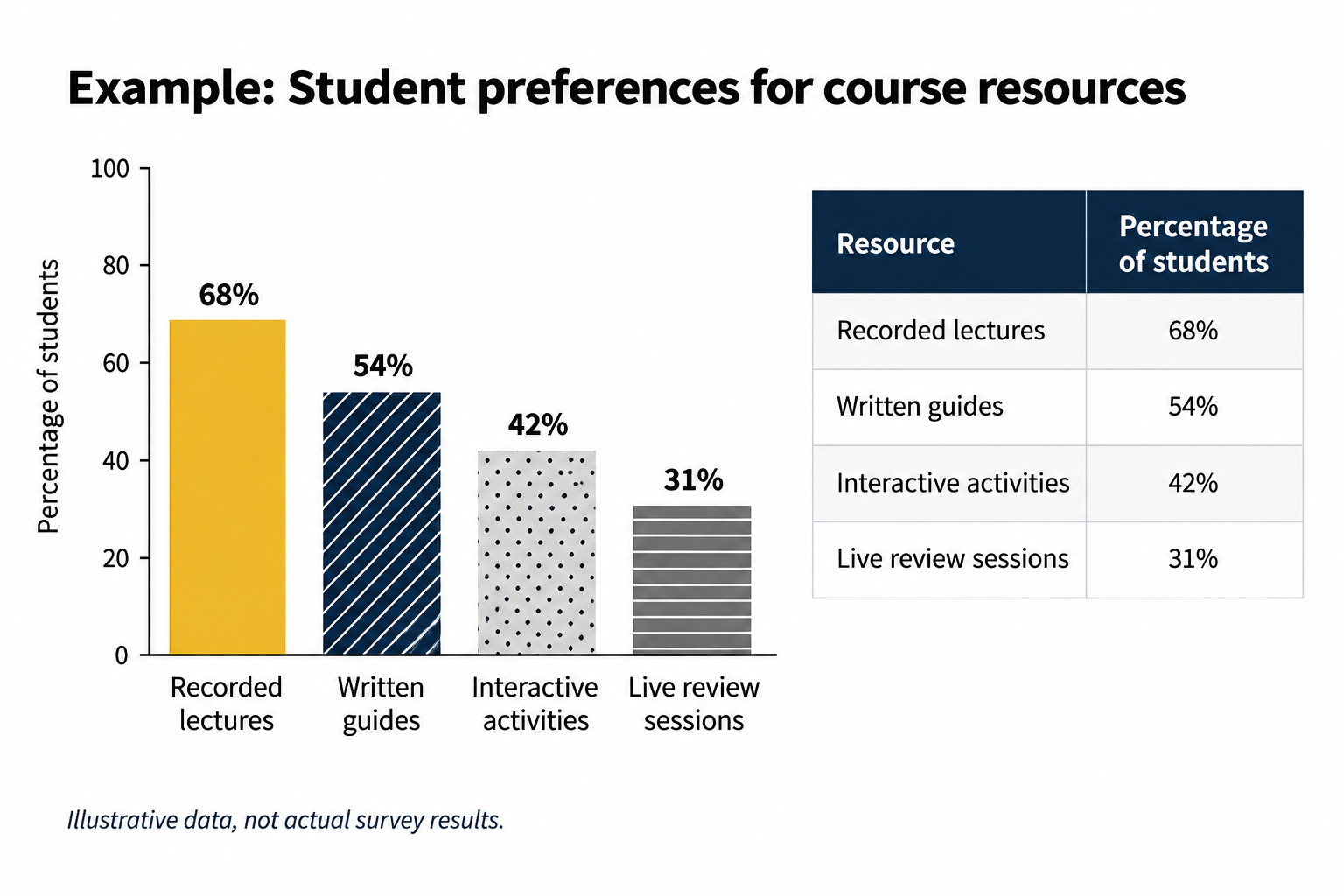
Image: A bar chart and accompanying data table present the same hypothetical student survey results, allowing learners to access and compare information in different ways.
The visualization can remain useful without being the only place the evidence exists.
3. Translate Spatial Patterns Into More Than Color
Maps communicate through position, boundaries, color, scale, and spatial relationships. A technically accessible description that merely repeats the legend may still leave the important pattern hidden.
-
Describe significant geographic patterns when they matter to the activity.
-
Use labels, patterns, boundaries, or other cues when color distinguishes categories.
-
Provide underlying data when students need to compare individual locations or values.
Students should still have to interpret why the pattern exists or what it means. The purposeful change simply makes the pattern available for analysis.
4. Remove Barriers From Data Collection
When students design or complete surveys, accessibility becomes part of the research process itself. If some participants can't use an instrument, or don't understand how to respond, that can affect who participates and potentially the data collected.
-
Choose survey tools and question types that support keyboard and assistive technology use.
-
Avoid interactions such as drag-and-drop or sliders when a simpler response can collect the same information.
-
Avoid timing unless timing is part of the research design.
-
Determine whether directions and response expectations are clear to participants.
If some participants can't complete or understand our instrument, what might that mean for our sample or conclusions?
Accessibility and usability aren't separate from research design when they affect who can participate.
5. If the Recording Is Data, Treat the Transcript as Data
Interviews, oral histories, focus groups, and field recordings may be evidence students are expected to code, compare, quote, and interpret.
-
Caption video and provide transcripts for audio.
-
Check automated transcripts for names, places, terminology, and errors that could change meaning.
-
Include relevant nonverbal or contextual information when it matters to the analysis.
-
Use speaker labels or timestamps when students need to move between the transcript and recording.
A transcript doesn't merely make the recording accessible. It can make qualitative evidence easier to search, annotate, compare, and revisit.
6. Make Room for Analysis Before Discussion
A discussion can be technically accessible while still favoring whoever processes the evidence fastest and speaks first.
-
Share data or prompts in advance when possible.
-
Give students time to examine the evidence and record an observation before discussion.
-
Offer a written way to contribute alongside live discussion when appropriate.
Try this: Ask students to identify one pattern, one piece of evidence supporting it, and one question the evidence raises. Then begin the group analysis.
The goal is to hear from students who did the analytical work—not just the ones comfortable speaking first.
Try One Purposeful Change
Choose one place where students encounter evidence and ask:
What do they need to do with this evidence? What analytical challenge needs to remain? Where might different learners be getting stuck?
Start with one manageable change that removes a barrier while preserving the analytical work students need to do. Then look for evidence that the change helped, whether that's fewer navigation questions, stronger use of evidence, more accurate interpretations, broader participation, or student feedback. Use what you learn to decide what to try next.
Keep Exploring
Find step-by-step guidance and additional resources for creating accessible course content on the Digital Accessibility website.
Join us on October 14 for Expand Access to Evidence and Inquiry: Designing Accessible Social Science Learning. Bring a dataset, article, map, survey, recording, or discussion activity from your course, and we'll explore where students encounter barriers and how purposeful changes can improve access without reducing the challenge.
]]>
A student opens the assigned dataset the night before discussion, ready to test a hypothesis about voting patterns in urban counties. But the chart won't resize, the color-coded legend is...
Inline Image
https://assets4-my.umbc.edu/system/shared/attachments/20c3be55e58f0e6d3d5737e10a7147fe/6aeae3b1/news/000/163/368/bd696ff9a19d67e4b02b30d060edbd04/mceclip0.png?1791733277
https://my3.my.umbc.edu/api/v0/pixel/news/163368/guest@my.umbc.edu/ba35992c123922306e66a7f58abd2803/api/pixel
da
digital-accessibility
fa2026
social-sciences
udl
universal-design-for-learning
Instructional Technology
https://my3.my.umbc.edu/groups/instructional-technology
https://assets2-my.umbc.edu/system/shared/avatars/groups/000/001/164/dec3b026b81ee6d890a8f82f75c94a2e/xsmall.png?1446126703
https://assets1-my.umbc.edu/system/shared/avatars/groups/000/001/164/dec3b026b81ee6d890a8f82f75c94a2e/original.png?1446126703
https://assets2-my.umbc.edu/system/shared/avatars/groups/000/001/164/dec3b026b81ee6d890a8f82f75c94a2e/xxlarge.png?1446126703
https://assets1-my.umbc.edu/system/shared/avatars/groups/000/001/164/dec3b026b81ee6d890a8f82f75c94a2e/xlarge.png?1446126703
https://assets1-my.umbc.edu/system/shared/avatars/groups/000/001/164/dec3b026b81ee6d890a8f82f75c94a2e/large.png?1446126703
https://assets4-my.umbc.edu/system/shared/avatars/groups/000/001/164/dec3b026b81ee6d890a8f82f75c94a2e/medium.png?1446126703
https://assets3-my.umbc.edu/system/shared/avatars/groups/000/001/164/dec3b026b81ee6d890a8f82f75c94a2e/small.png?1446126703
https://assets2-my.umbc.edu/system/shared/avatars/groups/000/001/164/dec3b026b81ee6d890a8f82f75c94a2e/xsmall.png?1446126703
https://assets3-my.umbc.edu/system/shared/avatars/groups/000/001/164/dec3b026b81ee6d890a8f82f75c94a2e/xxsmall.png?1446126703
Instructional Technology
https://assets3-my.umbc.edu/system/shared/thumbnails/news/000/163/368/885c854510f9551e52b27825d24ddf5c/xxlarge.jpg?1791982846
https://assets1-my.umbc.edu/system/shared/thumbnails/news/000/163/368/885c854510f9551e52b27825d24ddf5c/xlarge.jpg?1791982846
https://assets2-my.umbc.edu/system/shared/thumbnails/news/000/163/368/885c854510f9551e52b27825d24ddf5c/large.jpg?1791982846
https://assets3-my.umbc.edu/system/shared/thumbnails/news/000/163/368/885c854510f9551e52b27825d24ddf5c/medium.jpg?1791982846
https://assets1-my.umbc.edu/system/shared/thumbnails/news/000/163/368/885c854510f9551e52b27825d24ddf5c/small.jpg?1791982846
https://assets1-my.umbc.edu/system/shared/thumbnails/news/000/163/368/885c854510f9551e52b27825d24ddf5c/xsmall.jpg?1791982846
https://assets2-my.umbc.edu/system/shared/thumbnails/news/000/163/368/885c854510f9551e52b27825d24ddf5c/xxsmall.jpg?1791982846
Course Roadmap to Equity Learning Design logo
2
0
true
Tue, 13 Oct 2026 10:00:00 -0400
Wed, 14 Oct 2026 09:01:13 -0400