6 Ways to Make Visual and Creative Media More Accessible
Art can challenge students without creating barriers.
A student opens the image for tomorrow's critique. The assignment asks her to analyze composition, contrast, and scale, but the image description says only, "abstract painting." She knows what she's supposed to analyze. She just doesn't have access to the details that make the analysis possible.
Fixing that barrier matters. But even when an image, video, performance, or demonstration is technically accessible, students may still struggle actually using the content to notice what's important, follow the creative process, or understand what they need to do. Making creative media technically accessible matters. So does making it usable so students can meet your learning goal.
That's where purpose becomes important. Fine arts courses ask students to learn through looking, listening, making, performing, and responding - experiences that are often central to the discipline. Before changing those experiences, ask: What are students supposed to perceive, interpret, create, or communicate? What challenge is essential to that work?
Then consider where different learners might get stuck. The goal isn't to remove the sensory, creative, or experiential challenge. It's to reduce barriers that aren't essential to learning.
1. Describe What Students Need to Notice
"A painting of three people" may technically identify an image, but it doesn't provide much to work with if students are asked to analyze composition, technique, scale, symbolism, or visual relationships.
Start with the assignment: What do students need to notice to do the interpretation themselves?
-
Use brief alternative text when identifying the work is sufficient.
-
Provide a longer description when students need significant visual detail.
-
Describe relevant composition, placement, scale, color, texture, contrast, or technique.
-
Separate observation from interpretation.
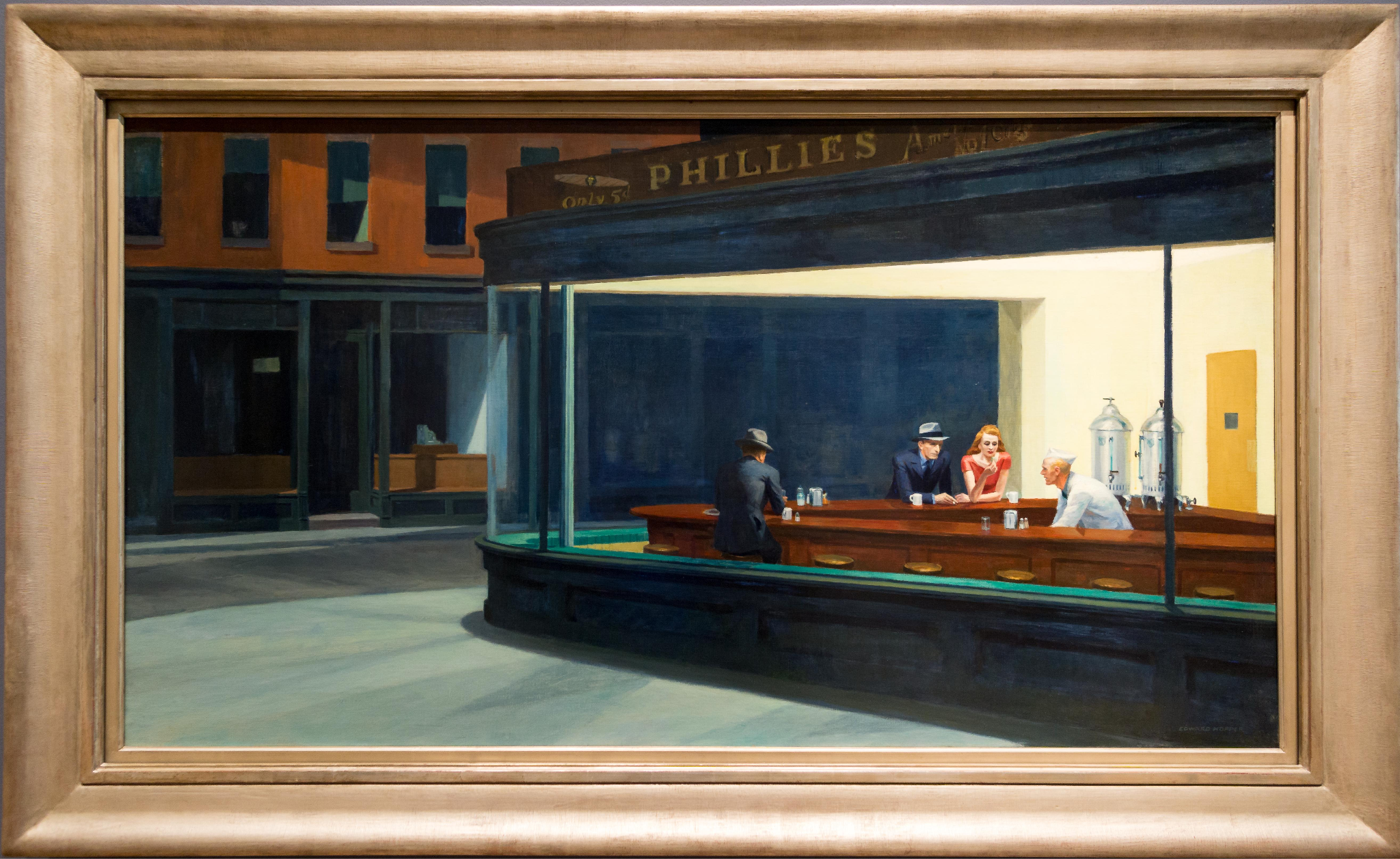
For example: If students are analyzing composition and visual relationships in Edward Hopper's Nighthawks (1942), a description might read:
“Four people occupy a brightly lit diner at night. Three customers sit along a curved counter while a worker stands behind it. Large glass windows reveal the interior from the dark, nearly empty street outside. The diner extends diagonally across the painting, with its illuminated windows occupying much of the foreground.”
The description gives students visual details to examine without interpreting the artwork for them.
2. Narrate the Creative Process, Not Just the Steps
Watching someone throw clay, mix paint, position a camera, shape a musical phrase, or demonstrate movement can communicate things that are difficult to capture in written instructions alone.
But a demonstration can be perfectly visible and audible, while important ‘expert thinking’ and other details remain hidden inside phrases such as "watch what I'm doing" or "you want it to look like this." Consider techniques that support learner usability alongside the technically accessible content.
-
Narrate significant movements, choices, adjustments, and changes.
-
Explain what you're looking, listening, or feeling for as you make a decision.
-
Pair demonstrations with instructions or reference materials that students can revisit.
Describing the process doesn't replace the demonstration. It makes the expert's thinking inside it more visible.
See it in practice: Artist Kelly Wang discusses materials, techniques, and tools, with footage of her studio demonstrations. How might narrating your creative decisions help students understand not just what you're doing, but why? Note: Captions are auto-generated.
3. Give Performances More Than One Way to Be Studied
Music, theater, dance, film, and other time-based work may combine dialogue, sound, movement, gesture, staging, costume, lighting, and spatial relationships. Captions provide access to speech; however, they don't necessarily capture everything students need for the learning activity.
-
Describe significant movement, staging, gesture, or other visual information when it affects meaning.
-
Provide transcripts for spoken or audio content.
-
Use scores, scripts, lyrics, program notes, storyboards, or other supporting materials when they offer another useful route into the work.
If students are studying staging, they need access to staging. If they're analyzing rhythm, they need access to the relevant musical information. The support should follow the purpose.
See it in practice: Candoco Dance Company provides an audio-described performance, transcripts, a visual guide, and an interview with the creative cast. Which of these resources might help students notice, revisit, or analyze aspects of a performance they would otherwise miss?
4. Let Color Create Meaning, Not Gatekeep It
Color may be the content in fine arts. Students may be studying hue, value, contrast, palette, lighting, or the meanings attached to color. So the guidance, "don't rely on color," is too simplistic here. Instead, distinguish between color as something students are studying and color as the only way unrelated information is communicated.
-
Use sufficient contrast for instructional text, labels, and functional information.
-
When color identifies categories, steps, materials, or instructions, pair it with another cue.
-
When color itself is the subject of study, provide another way to access relevant relationships when needed.
Accessibility doesn't mean taking color out of art. It means being intentional about what color is being asked to do.
See it in practice: Explore the Museum of Contemporary Art Chicago's Color for All to consider how differences in color perception can shape the experience of artwork. How might you help students examine color relationships without assuming everyone perceives them in the same way?
5. Slow Critique Down Enough for Thinking
A critique may have no obvious technical accessibility problem and still create a barrier when it comes to students’ ability to use that content to meet the learning goal. Students may be asked to observe a work, develop an interpretation, connect it to disciplinary language, or respond publicly within seconds. Speed can become an unintended requirement.
-
Share critique questions or criteria before discussion when possible.
-
Give students time to observe, listen, annotate, sketch, or write before responding.
-
Offer a written or annotated way to contribute alongside live critique.
Try this: Give students two minutes to record one thing they notice, one interpretation they're considering, and one question they want to ask the artist. How might this brief pause change the quality of observations and contributions during critique?
6. Teach Students to Create Accessibly, Too
Students aren't only consuming creative media. They're making it.
Portfolios, videos, performances, posters, exhibitions, presentations, websites, and other creative projects offer an opportunity to make accessibility and usability part of the creative process, rather than something added after the work is complete.
-
Introduce relevant accessibility expectations when you introduce the assignment.
-
Show examples of accessible creative work and discuss the choices behind them.
-
Ask students to consider who can perceive, navigate, or participate in what they're creating, which supports the usability of that content to achieve desired learning.
-
Include accessibility in the rubric when it is an expected part of the work.
Consider this: When students create a portfolio, video, performance, or exhibition, how might accessibility become part of their creative decisions about audience, medium, and presentation rather than a correction made afterward?
Try One Purposeful Change
Choose one place where students look, listen, make, perform, or respond. Ask: What are students supposed to perceive, interpret, create, or communicate? What challenge should remain? Where might different learners be getting stuck?
Then try one manageable change while preserving the creative or disciplinary work. Look for one reasonable sign that it helped: more specific observations during critique; fewer procedural questions during demonstrations; stronger explanations of creative choices; broader participation or student feedback. Use what you notice to decide what to keep, adjust, or try next.
Keep Exploring
Find step-by-step guidance and additional resources for creating accessible course content on the Digital Accessibility website.
We'll work through strategies like these at Amplify Access to Creative Learning: Designing Accessible Fine Arts Experiences on October 21. Bring an image, demonstration, performance, creative assignment, or critique activity from your course.
]]>
A student opens the image for tomorrow's critique. The assignment asks her to analyze composition, contrast, and scale, but the image description says only, "abstract painting." She knows what...
Inline Image
https://assets3-my.umbc.edu/system/shared/attachments/6f6bafbf867007be15510c3315174453/6ada4e10/news/000/164/380/225de5ef23fbfa96f02a8e1e8626ab66/blobid0.png?1792529683
https://my3.my.umbc.edu/api/v0/pixel/news/164380/guest@my.umbc.edu/ad366d8c44868b4690120c9d8f0b37bb/api/pixel
da
dance
digital-accessibility
fa2026
fine-arts
music
udl
universal-design-for-learning
Instructional Technology
https://my3.my.umbc.edu/groups/instructional-technology
https://assets2-my.umbc.edu/system/shared/avatars/groups/000/001/164/dec3b026b81ee6d890a8f82f75c94a2e/xsmall.png?1446126703
https://assets1-my.umbc.edu/system/shared/avatars/groups/000/001/164/dec3b026b81ee6d890a8f82f75c94a2e/original.png?1446126703
https://assets2-my.umbc.edu/system/shared/avatars/groups/000/001/164/dec3b026b81ee6d890a8f82f75c94a2e/xxlarge.png?1446126703
https://assets1-my.umbc.edu/system/shared/avatars/groups/000/001/164/dec3b026b81ee6d890a8f82f75c94a2e/xlarge.png?1446126703
https://assets1-my.umbc.edu/system/shared/avatars/groups/000/001/164/dec3b026b81ee6d890a8f82f75c94a2e/large.png?1446126703
https://assets4-my.umbc.edu/system/shared/avatars/groups/000/001/164/dec3b026b81ee6d890a8f82f75c94a2e/medium.png?1446126703
https://assets3-my.umbc.edu/system/shared/avatars/groups/000/001/164/dec3b026b81ee6d890a8f82f75c94a2e/small.png?1446126703
https://assets2-my.umbc.edu/system/shared/avatars/groups/000/001/164/dec3b026b81ee6d890a8f82f75c94a2e/xsmall.png?1446126703
https://assets3-my.umbc.edu/system/shared/avatars/groups/000/001/164/dec3b026b81ee6d890a8f82f75c94a2e/xxsmall.png?1446126703
Instructional Technology
https://assets1-my.umbc.edu/system/shared/thumbnails/news/000/164/380/7aea6cae5cf332dccd0f2aad404a945f/xxlarge.jpg?1792528098
https://assets1-my.umbc.edu/system/shared/thumbnails/news/000/164/380/7aea6cae5cf332dccd0f2aad404a945f/xlarge.jpg?1792528098
https://assets4-my.umbc.edu/system/shared/thumbnails/news/000/164/380/7aea6cae5cf332dccd0f2aad404a945f/large.jpg?1792528098
https://assets1-my.umbc.edu/system/shared/thumbnails/news/000/164/380/7aea6cae5cf332dccd0f2aad404a945f/medium.jpg?1792528098
https://assets2-my.umbc.edu/system/shared/thumbnails/news/000/164/380/7aea6cae5cf332dccd0f2aad404a945f/small.jpg?1792528098
https://assets1-my.umbc.edu/system/shared/thumbnails/news/000/164/380/7aea6cae5cf332dccd0f2aad404a945f/xsmall.jpg?1792528098
https://assets4-my.umbc.edu/system/shared/thumbnails/news/000/164/380/7aea6cae5cf332dccd0f2aad404a945f/xxsmall.jpg?1792528098
Course Roadmap to Equity Learning Design logo
1
0
true
Tue, 20 Oct 2026 16:59:05 -0400
6 Ways to Make Social Science Content More Accessible
Where evidence lives shouldn't decide who can reach it.
A student opens the assigned dataset the night before discussion, ready to test a hypothesis about voting patterns in urban counties. But the chart won't resize, the color-coded legend is difficult to distinguish with her display settings, and there's no data table to fall back on. She isn't struggling with the statistics. She's struggling to get to them.
Fixing those barriers matters. But even when students can access a chart, dataset, map, interview, or other source, they may still struggle to navigate the information, identify relevant evidence, or understand how they're expected to use it. Technical access opens the door. Learning design considers what students need to do once they're through it.
That's where learning purpose becomes important. Before changing how evidence is presented, ask: What are students supposed to do with this evidence? What analytical challenge needs to remain?
Access to the evidence can become easier without making the analysis easier.
1. Start With the Evidence Students Need to Reach
Before changing a chart, article, map, dataset, or recording, ask what students are expected to do with it. Are they identifying a trend? Comparing values? Evaluating a research method? Coding an interview? Interpreting geographic relationships?
Then, consider where different learners might get stuck.
-
Can they access the information?
-
Can they navigate and use it?
-
Is it clear what they're supposed to examine?
-
Do they have the background knowledge needed to begin?
Identifying the barrier before choosing a solution helps keep the change purposeful.
If students need to identify a trend, they need access to the trend. If they need to calculate from individual values, they need the underlying data. The analytical work still belongs to them.
2. Make the Finding Available Beyond the Visualization
Charts and graphs compress large amounts of information into visual patterns. That's their strength, and why technical accessibility alone may not be enough.
-
Pair a visualization with accessible data when students need individual values.
-
Describe significant trends or relationships when that's what students need to examine.
-
Use labels, patterns, shapes, or line styles in addition to color.
-
Make alternative text meaningful rather than simply naming the chart type.
Additional representation depends on the purpose. Students may need a data table, a description, clearer labels, or another representation.
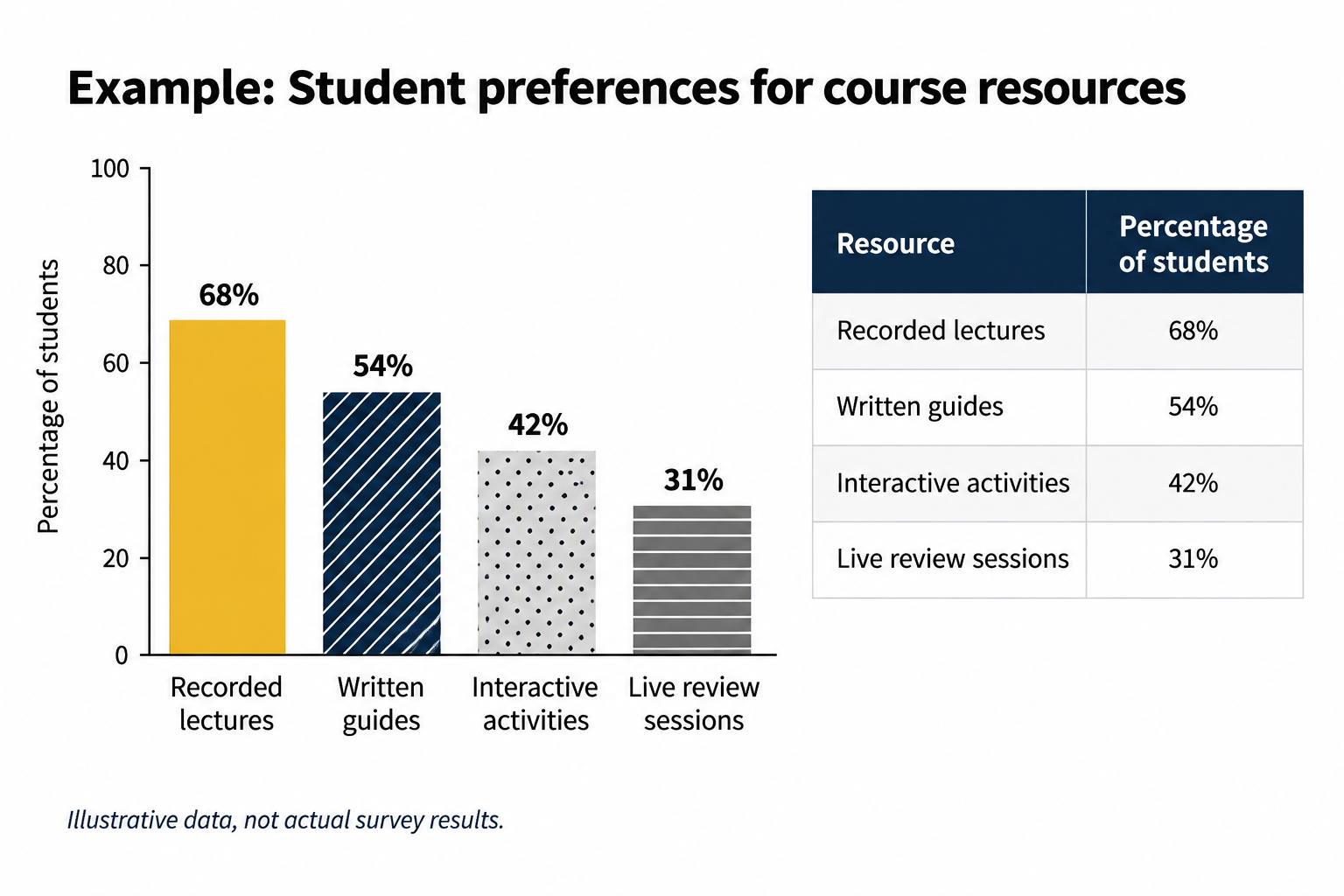
Image: A bar chart and accompanying data table present the same hypothetical student survey results, allowing learners to access and compare information in different ways.
The visualization can remain useful without being the only place the evidence exists.
3. Translate Spatial Patterns Into More Than Color
Maps communicate through position, boundaries, color, scale, and spatial relationships. A technically accessible description that merely repeats the legend may still leave the important pattern hidden.
-
Describe significant geographic patterns when they matter to the activity.
-
Use labels, patterns, boundaries, or other cues when color distinguishes categories.
-
Provide underlying data when students need to compare individual locations or values.
Students should still have to interpret why the pattern exists or what it means. The purposeful change simply makes the pattern available for analysis.
4. Remove Barriers From Data Collection
When students design or complete surveys, accessibility becomes part of the research process itself. If some participants can't use an instrument, or don't understand how to respond, that can affect who participates and potentially the data collected.
-
Choose survey tools and question types that support keyboard and assistive technology use.
-
Avoid interactions such as drag-and-drop or sliders when a simpler response can collect the same information.
-
Avoid timing unless timing is part of the research design.
-
Determine whether directions and response expectations are clear to participants.
If some participants can't complete or understand our instrument, what might that mean for our sample or conclusions?
Accessibility and usability aren't separate from research design when they affect who can participate.
5. If the Recording Is Data, Treat the Transcript as Data
Interviews, oral histories, focus groups, and field recordings may be evidence students are expected to code, compare, quote, and interpret.
-
Caption video and provide transcripts for audio.
-
Check automated transcripts for names, places, terminology, and errors that could change meaning.
-
Include relevant nonverbal or contextual information when it matters to the analysis.
-
Use speaker labels or timestamps when students need to move between the transcript and recording.
A transcript doesn't merely make the recording accessible. It can make qualitative evidence easier to search, annotate, compare, and revisit.
6. Make Room for Analysis Before Discussion
A discussion can be technically accessible while still favoring whoever processes the evidence fastest and speaks first.
-
Share data or prompts in advance when possible.
-
Give students time to examine the evidence and record an observation before discussion.
-
Offer a written way to contribute alongside live discussion when appropriate.
Try this: Ask students to identify one pattern, one piece of evidence supporting it, and one question the evidence raises. Then begin the group analysis.
The goal is to hear from students who did the analytical work—not just the ones comfortable speaking first.
Try One Purposeful Change
Choose one place where students encounter evidence and ask:
What do they need to do with this evidence? What analytical challenge needs to remain? Where might different learners be getting stuck?
Start with one manageable change that removes a barrier while preserving the analytical work students need to do. Then look for evidence that the change helped, whether that's fewer navigation questions, stronger use of evidence, more accurate interpretations, broader participation, or student feedback. Use what you learn to decide what to try next.
Keep Exploring
Find step-by-step guidance and additional resources for creating accessible course content on the Digital Accessibility website.
Join us on October 14 for Expand Access to Evidence and Inquiry: Designing Accessible Social Science Learning. Bring a dataset, article, map, survey, recording, or discussion activity from your course, and we'll explore where students encounter barriers and how purposeful changes can improve access without reducing the challenge.
]]>
A student opens the assigned dataset the night before discussion, ready to test a hypothesis about voting patterns in urban counties. But the chart won't resize, the color-coded legend is...
Inline Image
https://assets1-my.umbc.edu/system/shared/attachments/9884746723ef091a5e3baac65079e120/6ada4e11/news/000/163/368/bd696ff9a19d67e4b02b30d060edbd04/mceclip0.png?1791733277
https://my3.my.umbc.edu/api/v0/pixel/news/163368/guest@my.umbc.edu/ba35992c123922306e66a7f58abd2803/api/pixel
da
digital-accessibility
fa2026
social-sciences
udl
universal-design-for-learning
Instructional Technology
https://my3.my.umbc.edu/groups/instructional-technology
https://assets2-my.umbc.edu/system/shared/avatars/groups/000/001/164/dec3b026b81ee6d890a8f82f75c94a2e/xsmall.png?1446126703
https://assets1-my.umbc.edu/system/shared/avatars/groups/000/001/164/dec3b026b81ee6d890a8f82f75c94a2e/original.png?1446126703
https://assets2-my.umbc.edu/system/shared/avatars/groups/000/001/164/dec3b026b81ee6d890a8f82f75c94a2e/xxlarge.png?1446126703
https://assets1-my.umbc.edu/system/shared/avatars/groups/000/001/164/dec3b026b81ee6d890a8f82f75c94a2e/xlarge.png?1446126703
https://assets1-my.umbc.edu/system/shared/avatars/groups/000/001/164/dec3b026b81ee6d890a8f82f75c94a2e/large.png?1446126703
https://assets4-my.umbc.edu/system/shared/avatars/groups/000/001/164/dec3b026b81ee6d890a8f82f75c94a2e/medium.png?1446126703
https://assets3-my.umbc.edu/system/shared/avatars/groups/000/001/164/dec3b026b81ee6d890a8f82f75c94a2e/small.png?1446126703
https://assets2-my.umbc.edu/system/shared/avatars/groups/000/001/164/dec3b026b81ee6d890a8f82f75c94a2e/xsmall.png?1446126703
https://assets3-my.umbc.edu/system/shared/avatars/groups/000/001/164/dec3b026b81ee6d890a8f82f75c94a2e/xxsmall.png?1446126703
Instructional Technology
https://assets3-my.umbc.edu/system/shared/thumbnails/news/000/163/368/885c854510f9551e52b27825d24ddf5c/xxlarge.jpg?1791982846
https://assets1-my.umbc.edu/system/shared/thumbnails/news/000/163/368/885c854510f9551e52b27825d24ddf5c/xlarge.jpg?1791982846
https://assets2-my.umbc.edu/system/shared/thumbnails/news/000/163/368/885c854510f9551e52b27825d24ddf5c/large.jpg?1791982846
https://assets3-my.umbc.edu/system/shared/thumbnails/news/000/163/368/885c854510f9551e52b27825d24ddf5c/medium.jpg?1791982846
https://assets1-my.umbc.edu/system/shared/thumbnails/news/000/163/368/885c854510f9551e52b27825d24ddf5c/small.jpg?1791982846
https://assets1-my.umbc.edu/system/shared/thumbnails/news/000/163/368/885c854510f9551e52b27825d24ddf5c/xsmall.jpg?1791982846
https://assets2-my.umbc.edu/system/shared/thumbnails/news/000/163/368/885c854510f9551e52b27825d24ddf5c/xxsmall.jpg?1791982846
Course Roadmap to Equity Learning Design logo
1
0
true
Tue, 13 Oct 2026 10:00:00 -0400
Wed, 14 Oct 2026 09:01:13 -0400