Tips and Best Practices for Managing your Cloud Storage
Learn ways to better manage space on your cloud!
Want to learn how to manage your Google Drive storage better? We have 5 steps for you! These tips can generally be applied to other cloud services such as Box and OneDrive.
What are the benefits of managing your storage?
- Better security by reducing data breaches and minimizing the number of files that contain sensitive information
- Freeing up your storage so that you don't have a bunch of old, unnecessary files taking up space
- Decluttering your storage so it's easier to find files
- Makes transitions easier if you leave the university (graduate, new job, etc.)
5 Steps for Cloud Storage Management
Below are some steps you can implement to help manage your cloud storage usage over time.
1. Yearly or monthly clean-ups
- Look through your files on your UMBC Drive and look at the last time that file was accessed. If the file was last accessed over a year ago, consider deleting it. If you believe that you may need the file at some point down the line, consider transferring it to a flash drive or somewhere not on UMBC cloud services while considering the sensitivity of the data and protecting it appropriately.
- If you want to hold onto work from previous semesters, consider consolidating them into a compressed folder and downloading them to your hard drive or an external drive.
2. What should be prioritized on your UMBC Google Drive
- Your UMBC Google Drive and other cloud storage options provided by the university should be prioritized for storing UMBC files.
- Documents, spreadsheets, and presentations for classes, UMBC work
- UMBC-related documents
- UMBC Research documents
- Collaborative Files
Personal Cloud Storage, Hard Drive, External Drive
- Personal documents
- Personal photos and videos
- Personal Computer Backups
- Personal projects
- Long-term files not used regularly
3. Remember to empty the Trash bin!
- After deleting any files, clear out your trash bin so that storage space is freed up on your drive
4. Create a folder structure or naming convention for files
- Having your files organized in a consistent system of folders and names that you understand can make your life easier in the long run. When it comes to finding files and when you may need to delete those files later
- Consider asking Google Gemini for help creating a folder structure
5. File as you go
- Organize your files once you create or download them. Making this a habit will make it so you don't have to worry about a backlog of unsorted files later
Do you want to learn more?
Here are some helpful links and resources
]]>
Want to learn how to manage your Google Drive storage better? We have 5 steps for you! These tips can generally be applied to other cloud services such as Box and OneDrive. What are the...
Image
https://assets1-my.umbc.edu/system/shared/attachments/0f6309046c00b56fe688ff6562f6649c/69f1710a/news/000/152/842/8b3019adbfbf3960e385d9c9ea50cda2/Cloud storage table.png?1758670528
https://my3.my.umbc.edu/api/v0/pixel/news/152842/guest@my.umbc.edu/49a3d6ab04dfc3bdd1a1c2a938c30495/api/pixel
box
cloud
google
project
Division of Information Technology (DoIT)
https://my3.my.umbc.edu/groups/doit
https://assets2-my.umbc.edu/system/shared/avatars/groups/000/000/021/d27760c5de12c74b73faec8d0e631acf/xsmall.png?1727453227
https://assets2-my.umbc.edu/system/shared/avatars/groups/000/000/021/d27760c5de12c74b73faec8d0e631acf/original.JPG?1727453227
https://assets1-my.umbc.edu/system/shared/avatars/groups/000/000/021/d27760c5de12c74b73faec8d0e631acf/xxlarge.png?1727453227
https://assets3-my.umbc.edu/system/shared/avatars/groups/000/000/021/d27760c5de12c74b73faec8d0e631acf/xlarge.png?1727453227
https://assets2-my.umbc.edu/system/shared/avatars/groups/000/000/021/d27760c5de12c74b73faec8d0e631acf/large.png?1727453227
https://assets2-my.umbc.edu/system/shared/avatars/groups/000/000/021/d27760c5de12c74b73faec8d0e631acf/medium.png?1727453227
https://assets2-my.umbc.edu/system/shared/avatars/groups/000/000/021/d27760c5de12c74b73faec8d0e631acf/small.png?1727453227
https://assets2-my.umbc.edu/system/shared/avatars/groups/000/000/021/d27760c5de12c74b73faec8d0e631acf/xsmall.png?1727453227
https://assets4-my.umbc.edu/system/shared/avatars/groups/000/000/021/d27760c5de12c74b73faec8d0e631acf/xxsmall.png?1727453227
Division of Information Technology (DoIT)
https://assets2-my.umbc.edu/system/shared/thumbnails/news/000/152/842/6bb3bbe3f2d43c1b263b2ece573c5d54/xxlarge.jpg?1758672564
https://assets1-my.umbc.edu/system/shared/thumbnails/news/000/152/842/6bb3bbe3f2d43c1b263b2ece573c5d54/xlarge.jpg?1758672564
https://assets1-my.umbc.edu/system/shared/thumbnails/news/000/152/842/6bb3bbe3f2d43c1b263b2ece573c5d54/large.jpg?1758672564
https://assets2-my.umbc.edu/system/shared/thumbnails/news/000/152/842/6bb3bbe3f2d43c1b263b2ece573c5d54/medium.jpg?1758672564
https://assets3-my.umbc.edu/system/shared/thumbnails/news/000/152/842/6bb3bbe3f2d43c1b263b2ece573c5d54/small.jpg?1758672564
https://assets1-my.umbc.edu/system/shared/thumbnails/news/000/152/842/6bb3bbe3f2d43c1b263b2ece573c5d54/xsmall.jpg?1758672564
https://assets4-my.umbc.edu/system/shared/thumbnails/news/000/152/842/6bb3bbe3f2d43c1b263b2ece573c5d54/xxsmall.jpg?1758672564
A graphic of the UMBC shield in front of a black Maryland flag pattern with yellow graphics in the corners. The icons include a cloud upload icon (top left), stacked storage bins (top right), a folder (bottom left), and a trash can (bottom right).
0
0
true
Wed, 24 Sep 2025 10:31:40 -0400
Wed, 05 Nov 2025 09:01:45 -0500
Maryland Institute for Innovative Computing: U.S. Cyber Range
Explore our First Newsletter - September 2025 Edition
Welcome to the Maryland Institute for Innovative Computing (MIIC) newsletter.
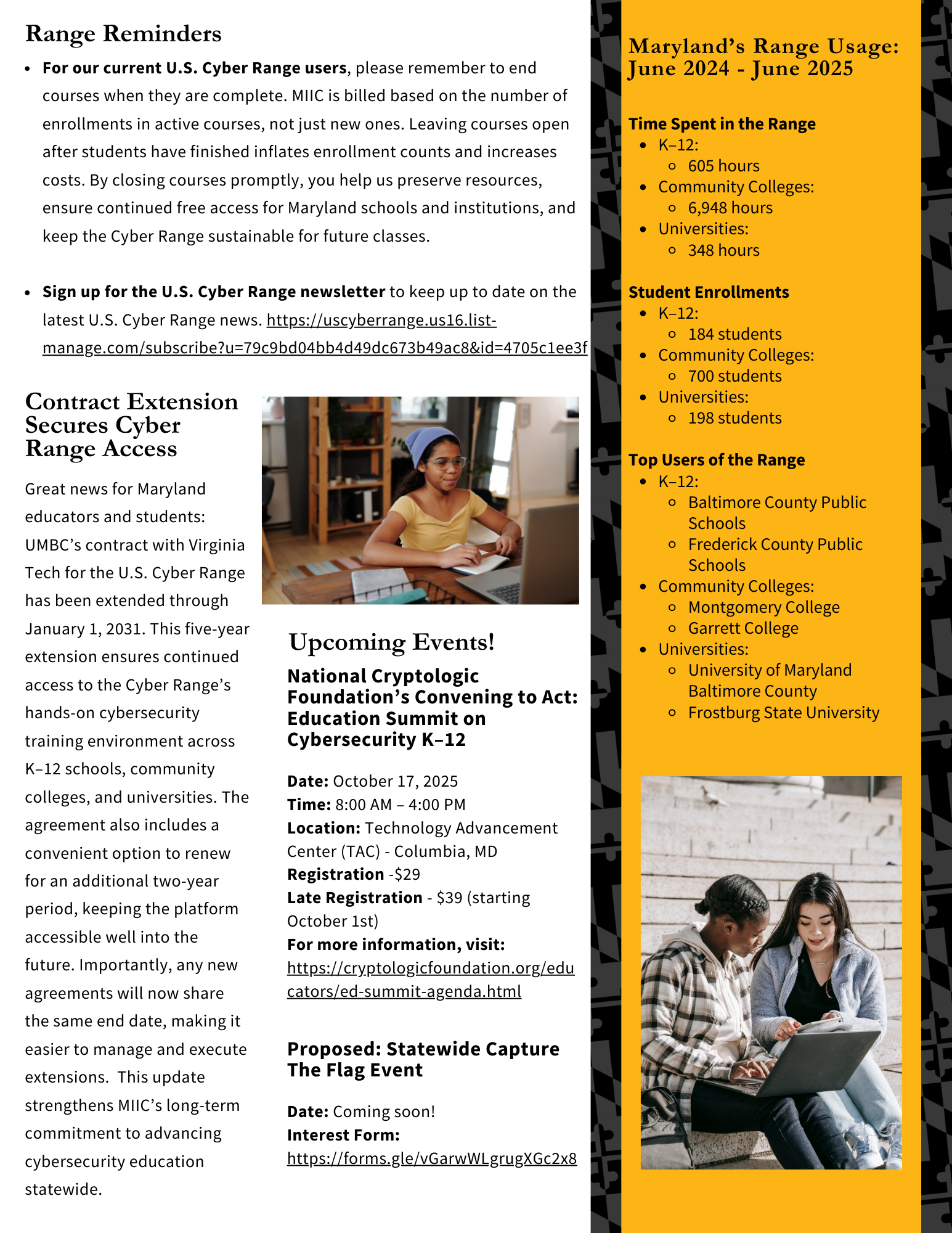
MIIC's purpose is to bring together researchers, educators, industry, and government to address challenges in areas such as cybersecurity, artificial intelligence, and cloud computing. Our goal is to keep Maryland at the forefront of discovery while providing opportunities for students, educators, and professionals to develop the skills needed in today's technology-driven world.
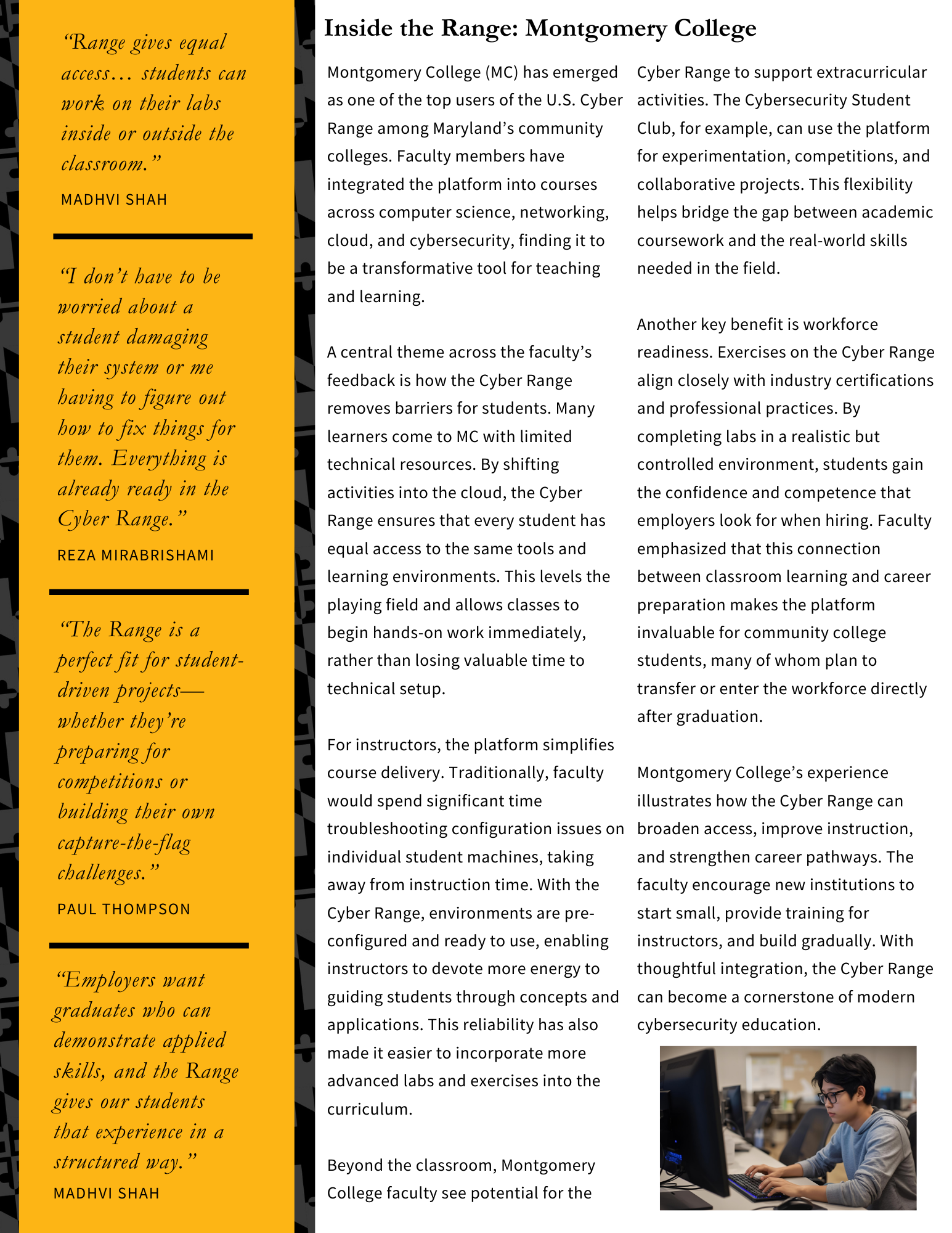
"The Range is a perfect fit for student-driven projects—whether they're preparing for competitions or building their own capture-the-flag challenges."
- Paul Thompson
In this first issue, we highlight one of our flagship initiatives: Maryland's access to the U.S. Cyber Range. This cloud-based training environment provides hands-on cybersecurity learning without the need for local infrastructure.
Thanks to state support, K–12 school systems and public higher education institutions can use the platform at no cost.
This newsletter will feature updates, events, and opportunities to engage with MIIC. We look forward to building this community together!
For the complete newsletter, please check out the flyer attached!

]]>
Welcome to the Maryland Institute for Innovative Computing (MIIC) newsletter. MIIC's purpose is to bring together researchers, educators, industry, and government to address challenges in areas...
Newsletter
https://assets1-my.umbc.edu/system/shared/attachments/dd70d51490112471e40daa6ee3eb61b5/69f1710a/news/000/152/837/d2477fc4bf0dc177f12260233f22eff2/September 2025 MIIC Newsletter.pdf?1758660844
https://my3.my.umbc.edu/api/v0/pixel/news/152837/guest@my.umbc.edu/d5531e02fa6f8df054abcfc5aeef739a/api/pixel
cybersecurity
maryland
miic
Division of Information Technology (DoIT)
https://my3.my.umbc.edu/groups/doit
https://assets2-my.umbc.edu/system/shared/avatars/groups/000/000/021/d27760c5de12c74b73faec8d0e631acf/xsmall.png?1727453227
https://assets2-my.umbc.edu/system/shared/avatars/groups/000/000/021/d27760c5de12c74b73faec8d0e631acf/original.JPG?1727453227
https://assets1-my.umbc.edu/system/shared/avatars/groups/000/000/021/d27760c5de12c74b73faec8d0e631acf/xxlarge.png?1727453227
https://assets3-my.umbc.edu/system/shared/avatars/groups/000/000/021/d27760c5de12c74b73faec8d0e631acf/xlarge.png?1727453227
https://assets2-my.umbc.edu/system/shared/avatars/groups/000/000/021/d27760c5de12c74b73faec8d0e631acf/large.png?1727453227
https://assets2-my.umbc.edu/system/shared/avatars/groups/000/000/021/d27760c5de12c74b73faec8d0e631acf/medium.png?1727453227
https://assets2-my.umbc.edu/system/shared/avatars/groups/000/000/021/d27760c5de12c74b73faec8d0e631acf/small.png?1727453227
https://assets2-my.umbc.edu/system/shared/avatars/groups/000/000/021/d27760c5de12c74b73faec8d0e631acf/xsmall.png?1727453227
https://assets4-my.umbc.edu/system/shared/avatars/groups/000/000/021/d27760c5de12c74b73faec8d0e631acf/xxsmall.png?1727453227
Division of Information Technology (DoIT)
https://assets1-my.umbc.edu/system/shared/thumbnails/news/000/152/837/6c7acd763f22d8f11202266eebf1aed9/xxlarge.jpg?1758720037
https://assets1-my.umbc.edu/system/shared/thumbnails/news/000/152/837/6c7acd763f22d8f11202266eebf1aed9/xlarge.jpg?1758720037
https://assets1-my.umbc.edu/system/shared/thumbnails/news/000/152/837/6c7acd763f22d8f11202266eebf1aed9/large.jpg?1758720037
https://assets2-my.umbc.edu/system/shared/thumbnails/news/000/152/837/6c7acd763f22d8f11202266eebf1aed9/medium.jpg?1758720037
https://assets2-my.umbc.edu/system/shared/thumbnails/news/000/152/837/6c7acd763f22d8f11202266eebf1aed9/small.jpg?1758720037
https://assets3-my.umbc.edu/system/shared/thumbnails/news/000/152/837/6c7acd763f22d8f11202266eebf1aed9/xsmall.jpg?1758720037
https://assets1-my.umbc.edu/system/shared/thumbnails/news/000/152/837/6c7acd763f22d8f11202266eebf1aed9/xxsmall.jpg?1758720037
MIIC US Cyber Range Newsletter with a laptop running code displayed
0
0
true
Wed, 24 Sep 2025 09:51:00 -0400
DoIT Project Report: Updates from DoIT’s Project Management Office
Read more about IT projects completed in the last year!
We are excited to share our Academic Year 2024-2025 Project Report, highlighting key IT projects and initiatives completed over the past year. This report celebrates the progress made across multiple initiatives and the contributions of DoIT teams and campus partners.
This year's report features several major initiatives, including:
1) AI Adoption: myUMBC Answers & Campus Resources
DoIT introduced myUMBC Answers, an AI-powered search bar that helps students quickly find answers to common questions. Additional efforts included launching AI resources, piloting tools like Gemini and CoPilot, and supporting open-source AI testing.
2) NSF Grant for Campus Cyber Infrastructure: Upgrades to Research Storage
DoIT and the Division of Research & Creative Achievement, Information Systems, Computer Science launched the Retriever Research Storage System (R-RSTOR), adding 2.5 petabytes of storage to support data-intensive research, collaborations with UMCES, and seamless data mobility between on-prem and cloud systems.
3) Reports and Data Infrastructure Converted to New REX Environment
DoIT's Analytics & Business Intelligence team is modernizing UMBC's reporting infrastructure by converting legacy reports to Tableau, launching new visualizations, and creating a centralized reporting homepage. This is making data more accessible for decision-makers across campus and improving data infrastructure and long-term sustainability.
4) Registrar Classroom & Engineering Lecture Hall Upgrades
AV technology was upgraded in multiple Registrar-controlled classrooms and the Engineering 027 Lecture Hall, adding lecture capture and accessibility features to enhance teaching and learning experiences.
5) Sherman Hall Renovation: Phase I
DoIT supported Phase 1 of the Sherman Hall renovation by equipping classrooms and offices with network, AV, and telecom technology. Phase 2 begins this fall, bringing new classrooms and gathering spaces by 2026.
Click here to view the full project report
About the DoIT Project Management Office: In the fall of 2023, DoIT established a Project Management Office (PMO) to ensure consistent project management processes, align project objectives with divisional and university strategic goals, and enhance stakeholder communication. The PMO has made significant strides in building a project management framework in DoIT to better support our campus partners in critical IT projects.
Do you have an idea or an upcoming initiative involving IT? Let us know! Submitting an Idea Form helps us understand your initiative and assist with the discovery process to refine goals and objectives. Click here to submit the Idea Form and read more about the project process.
Thank you for your continued support and collaboration with DoIT!
If you have questions about the DoIT Project Management Office or the projects listed above, please contact us at doitpmo@umbc.edu.
]]>
We are excited to share our Academic Year 2024-2025 Project Report, highlighting key IT projects and initiatives completed over the past year. This report celebrates the progress made across...
https://doit.umbc.edu/about/pmo/
https://my3.my.umbc.edu/api/v0/pixel/news/152740/guest@my.umbc.edu/9a92398d3f1a7b8ee5499ad48d4d1382/api/pixel
pmo
project
success
Division of Information Technology (DoIT)
https://my3.my.umbc.edu/groups/doit
https://assets2-my.umbc.edu/system/shared/avatars/groups/000/000/021/d27760c5de12c74b73faec8d0e631acf/xsmall.png?1727453227
https://assets2-my.umbc.edu/system/shared/avatars/groups/000/000/021/d27760c5de12c74b73faec8d0e631acf/original.JPG?1727453227
https://assets1-my.umbc.edu/system/shared/avatars/groups/000/000/021/d27760c5de12c74b73faec8d0e631acf/xxlarge.png?1727453227
https://assets3-my.umbc.edu/system/shared/avatars/groups/000/000/021/d27760c5de12c74b73faec8d0e631acf/xlarge.png?1727453227
https://assets2-my.umbc.edu/system/shared/avatars/groups/000/000/021/d27760c5de12c74b73faec8d0e631acf/large.png?1727453227
https://assets2-my.umbc.edu/system/shared/avatars/groups/000/000/021/d27760c5de12c74b73faec8d0e631acf/medium.png?1727453227
https://assets2-my.umbc.edu/system/shared/avatars/groups/000/000/021/d27760c5de12c74b73faec8d0e631acf/small.png?1727453227
https://assets2-my.umbc.edu/system/shared/avatars/groups/000/000/021/d27760c5de12c74b73faec8d0e631acf/xsmall.png?1727453227
https://assets4-my.umbc.edu/system/shared/avatars/groups/000/000/021/d27760c5de12c74b73faec8d0e631acf/xxsmall.png?1727453227
Division of Information Technology (DoIT)
https://assets4-my.umbc.edu/system/shared/thumbnails/news/000/152/740/cc1d5804ed049a62f8b2ae25117ec81c/xxlarge.jpg?1758559315
https://assets2-my.umbc.edu/system/shared/thumbnails/news/000/152/740/cc1d5804ed049a62f8b2ae25117ec81c/xlarge.jpg?1758559315
https://assets3-my.umbc.edu/system/shared/thumbnails/news/000/152/740/cc1d5804ed049a62f8b2ae25117ec81c/large.jpg?1758559315
https://assets4-my.umbc.edu/system/shared/thumbnails/news/000/152/740/cc1d5804ed049a62f8b2ae25117ec81c/medium.jpg?1758559315
https://assets2-my.umbc.edu/system/shared/thumbnails/news/000/152/740/cc1d5804ed049a62f8b2ae25117ec81c/small.jpg?1758559315
https://assets4-my.umbc.edu/system/shared/thumbnails/news/000/152/740/cc1d5804ed049a62f8b2ae25117ec81c/xsmall.jpg?1758559315
https://assets3-my.umbc.edu/system/shared/thumbnails/news/000/152/740/cc1d5804ed049a62f8b2ae25117ec81c/xxsmall.jpg?1758559315
screenshot of the DoIT Project Report, AY 2024 to 2025, showing a roadmap with icons
3
0
true
Mon, 22 Sep 2025 15:23:13 -0400
The Basics of using myUMBC for Students
A general overview of where to find information on myUMBC
Welcome to myUMBC! Here is a brief overview of what and where to find information as a UMBC student.
What's new this fall?
Search / Ask Bar
- This is a useful research tool for finding what you want through myUMBC if you’re not sure where to look
- You can ask general and personal questions, and using AI, it will do its best to provide you with an accurate answer
1. Profile
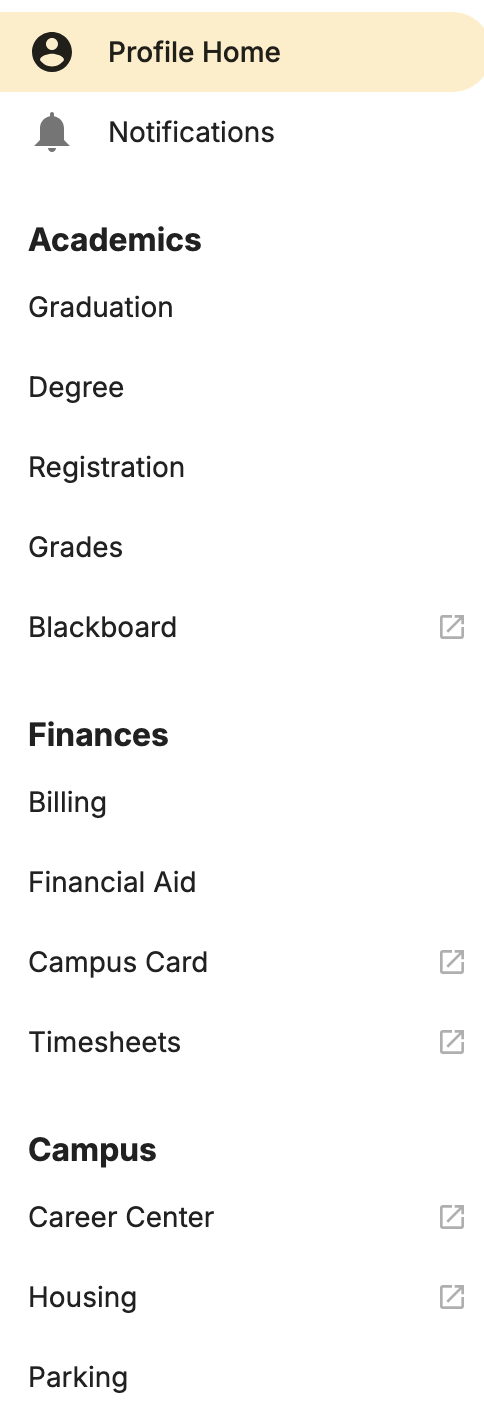
- Under your “Profile” tab, you can find different cards for information about you as a member of UMBC
- You can find information about your degree, registration, grades, billing, financial aid, parking, and more
- There is also a list of tabs on the left of the page that has a few more options, including “Housing” and “Timesheets”
2. Guide
- Here you’ll find information about upcoming deadlines/important dates for the campus, basic profile information, and links to various campus resources
- Along the side are different categories of resources for the university
- Student staff will also find links and resources for their position
3. Events
- The “Events” tab is where you can find out about what's going on on campus throughout the week
- You can find fun campus and club events, information sessions, performances, and more
4. Groups
- “Groups” is where you can find and receive information about specific clubs, organizations you have joined, as well as different UMBC Departments
- By joining groups, you can choose if and how you want to receive updates about events going on or general information about the group
5. Help
- The “Help” tab can be used to find links for information or request help on specific topics
Want to learn more about the myUMBC as a site?
Here are some resources about myUMBC
We're always looking for ideas on how to make myUMBC better. Please feel free to contact us if you have any questions or comments.
]]>
Welcome to myUMBC! Here is a brief overview of what and where to find information as a UMBC student. What's new this fall? Search / Ask Bar This is a useful research tool for finding what...
Image
https://assets4-my.umbc.edu/system/shared/attachments/496ceb5409d87d52f69c66e66cdb699d/69f1710a/news/000/152/441/470fe954b680cf02b4ca3137595cc603/myUMBC Navigation.png?1757873495
https://my3.my.umbc.edu/api/v0/pixel/news/152441/guest@my.umbc.edu/9b6545b6897a9ef117cbf2d4ac26494e/api/pixel
myumbc
Division of Information Technology (DoIT)
https://my3.my.umbc.edu/groups/doit
https://assets2-my.umbc.edu/system/shared/avatars/groups/000/000/021/d27760c5de12c74b73faec8d0e631acf/xsmall.png?1727453227
https://assets2-my.umbc.edu/system/shared/avatars/groups/000/000/021/d27760c5de12c74b73faec8d0e631acf/original.JPG?1727453227
https://assets1-my.umbc.edu/system/shared/avatars/groups/000/000/021/d27760c5de12c74b73faec8d0e631acf/xxlarge.png?1727453227
https://assets3-my.umbc.edu/system/shared/avatars/groups/000/000/021/d27760c5de12c74b73faec8d0e631acf/xlarge.png?1727453227
https://assets2-my.umbc.edu/system/shared/avatars/groups/000/000/021/d27760c5de12c74b73faec8d0e631acf/large.png?1727453227
https://assets2-my.umbc.edu/system/shared/avatars/groups/000/000/021/d27760c5de12c74b73faec8d0e631acf/medium.png?1727453227
https://assets2-my.umbc.edu/system/shared/avatars/groups/000/000/021/d27760c5de12c74b73faec8d0e631acf/small.png?1727453227
https://assets2-my.umbc.edu/system/shared/avatars/groups/000/000/021/d27760c5de12c74b73faec8d0e631acf/xsmall.png?1727453227
https://assets4-my.umbc.edu/system/shared/avatars/groups/000/000/021/d27760c5de12c74b73faec8d0e631acf/xxsmall.png?1727453227
Division of Information Technology (DoIT)
https://assets2-my.umbc.edu/system/shared/thumbnails/news/000/152/441/6b201e8894d7a09300734dbb62148ba3/xxlarge.jpg?1757878071
https://assets3-my.umbc.edu/system/shared/thumbnails/news/000/152/441/6b201e8894d7a09300734dbb62148ba3/xlarge.jpg?1757878071
https://assets1-my.umbc.edu/system/shared/thumbnails/news/000/152/441/6b201e8894d7a09300734dbb62148ba3/large.jpg?1757878071
https://assets2-my.umbc.edu/system/shared/thumbnails/news/000/152/441/6b201e8894d7a09300734dbb62148ba3/medium.jpg?1757878071
https://assets1-my.umbc.edu/system/shared/thumbnails/news/000/152/441/6b201e8894d7a09300734dbb62148ba3/small.jpg?1757878071
https://assets4-my.umbc.edu/system/shared/thumbnails/news/000/152/441/6b201e8894d7a09300734dbb62148ba3/xsmall.jpg?1757878071
https://assets1-my.umbc.edu/system/shared/thumbnails/news/000/152/441/6b201e8894d7a09300734dbb62148ba3/xxsmall.jpg?1757878071
The myUMBC logo in front of a black background. There is an image in each corner of the graphic including a magnifying glass (top left), a notification bell (top right), an id/profile graphic (bottom left), and a group of people (bottom right)
0
0
true
Mon, 15 Sep 2025 11:06:34 -0400
Take Control of Your Google Drive: A Guide to Freeing Up Space
Declutter your cloud storage and make room for new projects
Is your Google Drive running out of space? Don't worry, you're not alone. With a few simple steps, you can free up valuable storage and get organized for future documents and projects. These tips can also be applied to other UMBC cloud services like Box and OneDrive.
Check your Google Storage
To see how much storage you’re using, click here:
1. Find and Delete Your Largest Files
The fastest way to free up space is to target the largest files.
- In Google Drive, click on the Storage tab in the left-hand menu. Your files will automatically be sorted by size, from largest to smallest.
- Review this list and delete any files you no longer need. This is where you'll find space-consuming files like video files (.MP4, .MOV), large presentations, and audio recordings (.WAV).
2. Clean Up Files You No Longer Need
If you're not sure which files to delete, consider looking at their last accessed date.
- Use Google Drive's advanced search feature to find old files. Click the slider icon at the end of the search bar to open advanced search options.
- You can search for files by type, owner, and date. For example, search for "Last modified: Before [Date]" to find all files you haven't touched in over a year.
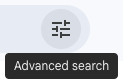
Advanced Search can be accessed by clicking the slider icon at the end of the search bar
3. Address Shared and Duplicate Files
- Remove yourself from shared folders no longer in use: Removing yourself from a shared folder doesn't reclaim your storage space (the files still belong to the owner), but it's an excellent way to reduce clutter in your drive.
- Identify and delete duplicate files: It's easy to create unnecessary copies of documents. Regularly search for and delete duplicate files to free up space.
4. Empty the Trash
This is the most critical step! When you delete a file, it's sent to the trash bin and continues to count toward your storage limit for 30 days. To immediately reclaim that space, you must manually empty your trash.
- Navigate to the Trash tab in the left-hand menu.
- Review the contents and click Empty Trash to permanently delete the files and free up your storage.
5. Consider Archiving Old Projects
For files you want to keep but don't need daily access to, consider archiving them.
- Download them to a hard drive or an external storage device.
- You can also compress multiple files into a single .zip folder for easier downloading and storage.
Do you want to learn more?
Here are some Frequently Asked Questions and Resources
]]>
Is your Google Drive running out of space? Don't worry, you're not alone. With a few simple steps, you can free up valuable storage and get organized for future documents and projects. These tips...
Image
https://assets4-my.umbc.edu/system/shared/attachments/53ffc46b3fe62b3d478337f13dc6bd28/69f1710a/news/000/152/270/bd23b052ff0d243a1ef4bfd0996d6f64/Google Drive Tabs.png?1757462896
https://my3.my.umbc.edu/api/v0/pixel/news/152270/guest@my.umbc.edu/21b64e88fb0e85f39817dc88d1006aca/api/pixel
box
cloud
google
project
Division of Information Technology (DoIT)
https://my3.my.umbc.edu/groups/doit
https://assets2-my.umbc.edu/system/shared/avatars/groups/000/000/021/d27760c5de12c74b73faec8d0e631acf/xsmall.png?1727453227
https://assets2-my.umbc.edu/system/shared/avatars/groups/000/000/021/d27760c5de12c74b73faec8d0e631acf/original.JPG?1727453227
https://assets1-my.umbc.edu/system/shared/avatars/groups/000/000/021/d27760c5de12c74b73faec8d0e631acf/xxlarge.png?1727453227
https://assets3-my.umbc.edu/system/shared/avatars/groups/000/000/021/d27760c5de12c74b73faec8d0e631acf/xlarge.png?1727453227
https://assets2-my.umbc.edu/system/shared/avatars/groups/000/000/021/d27760c5de12c74b73faec8d0e631acf/large.png?1727453227
https://assets2-my.umbc.edu/system/shared/avatars/groups/000/000/021/d27760c5de12c74b73faec8d0e631acf/medium.png?1727453227
https://assets2-my.umbc.edu/system/shared/avatars/groups/000/000/021/d27760c5de12c74b73faec8d0e631acf/small.png?1727453227
https://assets2-my.umbc.edu/system/shared/avatars/groups/000/000/021/d27760c5de12c74b73faec8d0e631acf/xsmall.png?1727453227
https://assets4-my.umbc.edu/system/shared/avatars/groups/000/000/021/d27760c5de12c74b73faec8d0e631acf/xxsmall.png?1727453227
Division of Information Technology (DoIT)
https://assets2-my.umbc.edu/system/shared/thumbnails/news/000/152/270/b7c60bf62263c6b200b3350506cea4ce/xxlarge.jpg?1757464911
https://assets3-my.umbc.edu/system/shared/thumbnails/news/000/152/270/b7c60bf62263c6b200b3350506cea4ce/xlarge.jpg?1757464911
https://assets3-my.umbc.edu/system/shared/thumbnails/news/000/152/270/b7c60bf62263c6b200b3350506cea4ce/large.jpg?1757464911
https://assets3-my.umbc.edu/system/shared/thumbnails/news/000/152/270/b7c60bf62263c6b200b3350506cea4ce/medium.jpg?1757464911
https://assets1-my.umbc.edu/system/shared/thumbnails/news/000/152/270/b7c60bf62263c6b200b3350506cea4ce/small.jpg?1757464911
https://assets2-my.umbc.edu/system/shared/thumbnails/news/000/152/270/b7c60bf62263c6b200b3350506cea4ce/xsmall.jpg?1757464911
https://assets2-my.umbc.edu/system/shared/thumbnails/news/000/152/270/b7c60bf62263c6b200b3350506cea4ce/xxsmall.jpg?1757464911
A graphic of the Google Drive logo in front of a black Maryland flag pattern with yellow graphics in the corners. The icons include a copied document icon (top left), a trash can (top right), a computer monitor (bottom left), and a shared folder icon (bottom right)
0
0
true
Wed, 10 Sep 2025 10:38:46 -0400
Repost: Announcing the 2025 AI Symposium
Join us for our virtual series this fall!
On the heels of the successful “AI, Privacy, and Ethics Symposium” of April 2024, we’re back with a new iteration! Please join us for this fall’s AI Symposium, titled “Exploring the Gadgets & Gizmos in Your AI Toolkit.” This fall’s series will highlight various topics ranging from Google Gemini and its integration into UMBC platforms, to the broader legal implications of using generative AI, and much more! This free symposium will be held virtually at noon via Webex on Wednesdays beginning October 1st through November 12th.
Below you will find the individual links for each discussion:
Our symposium was made possible thanks to the following sponsors:
UMBC’s Division of Information Technology (DoIT), The Center for Social Science Scholarship, the Department of Computer Science & Electrical Engineering, the Department of Information Systems, and The Hackerman Foundation.
]]>
The original post can be found on myumbc at Announcing the 2025 AI Symposium! On the heels of the successful “AI, Privacy, and Ethics Symposium” of April 2024, we’re back with a new iteration!...
https://my3.my.umbc.edu/api/v0/pixel/news/152178/guest@my.umbc.edu/1df3021c00d6bab586d8bd1ac8a3d636/api/pixel
ai
symposium
workshop
Division of Information Technology (DoIT)
https://my3.my.umbc.edu/groups/doit
https://assets2-my.umbc.edu/system/shared/avatars/groups/000/000/021/d27760c5de12c74b73faec8d0e631acf/xsmall.png?1727453227
https://assets2-my.umbc.edu/system/shared/avatars/groups/000/000/021/d27760c5de12c74b73faec8d0e631acf/original.JPG?1727453227
https://assets1-my.umbc.edu/system/shared/avatars/groups/000/000/021/d27760c5de12c74b73faec8d0e631acf/xxlarge.png?1727453227
https://assets3-my.umbc.edu/system/shared/avatars/groups/000/000/021/d27760c5de12c74b73faec8d0e631acf/xlarge.png?1727453227
https://assets2-my.umbc.edu/system/shared/avatars/groups/000/000/021/d27760c5de12c74b73faec8d0e631acf/large.png?1727453227
https://assets2-my.umbc.edu/system/shared/avatars/groups/000/000/021/d27760c5de12c74b73faec8d0e631acf/medium.png?1727453227
https://assets2-my.umbc.edu/system/shared/avatars/groups/000/000/021/d27760c5de12c74b73faec8d0e631acf/small.png?1727453227
https://assets2-my.umbc.edu/system/shared/avatars/groups/000/000/021/d27760c5de12c74b73faec8d0e631acf/xsmall.png?1727453227
https://assets4-my.umbc.edu/system/shared/avatars/groups/000/000/021/d27760c5de12c74b73faec8d0e631acf/xxsmall.png?1727453227
Division of Information Technology (DoIT)
https://assets2-my.umbc.edu/system/shared/thumbnails/news/000/152/178/f128fb8514bdc393fd27e4d5926e52f8/xxlarge.jpg?1757351713
https://assets4-my.umbc.edu/system/shared/thumbnails/news/000/152/178/f128fb8514bdc393fd27e4d5926e52f8/xlarge.jpg?1757351713
https://assets3-my.umbc.edu/system/shared/thumbnails/news/000/152/178/f128fb8514bdc393fd27e4d5926e52f8/large.jpg?1757351713
https://assets4-my.umbc.edu/system/shared/thumbnails/news/000/152/178/f128fb8514bdc393fd27e4d5926e52f8/medium.jpg?1757351713
https://assets2-my.umbc.edu/system/shared/thumbnails/news/000/152/178/f128fb8514bdc393fd27e4d5926e52f8/small.jpg?1757351713
https://assets3-my.umbc.edu/system/shared/thumbnails/news/000/152/178/f128fb8514bdc393fd27e4d5926e52f8/xsmall.jpg?1757351713
https://assets4-my.umbc.edu/system/shared/thumbnails/news/000/152/178/f128fb8514bdc393fd27e4d5926e52f8/xxsmall.jpg?1757351713
Decorative flyer of the AI symposium
0
0
true
Mon, 08 Sep 2025 13:18:40 -0400
Declutter Your Inbox: A Guide to Cleaning Up Your Email
Free up space, reduce stress, and find what you need faster!
Is your Google Drive nearing its storage limit? Feeling overwhelmed by a cluttered inbox? Cleaning up your Gmail can help with both! Follow these simple steps to free up storage space and make it easier to find the emails that matter.
Check Your Google Storage
1. Tackle Emails with Large Attachments
Attachments in emails are often the biggest culprits for using up your cloud storage. You can quickly find all emails with attachments by using Gmail's search function. Just type has:attachment into the search bar. Review the results and delete any emails you no longer need.
2. Unsubscribe from Unwanted Mailing Lists
Subscription emails from mailing lists can flood your inbox and contribute significantly to clutter and storage usage. If you're no longer interested in a newsletter or promotional emails, look for the "Unsubscribe" link at the bottom of the email. Unsubscribing stops the emails entirely, saving you the hassle of deleting them one by one.
3. Delete Old and Unnecessary Emails
While large attachments are the main culprits, a large volume of old emails also adds up. Take some time to search for and delete emails you no longer need. You can use search terms like before:YYYY/MM/DD to find emails from a specific date range (e.g., before:2024/01/01 to find emails from last year).
Advanced Search can also be accessed by clicking the slider icon at the end of the search bar
4. Clear Out Your Spam Folder
While Gmail automatically empties your spam folder every 30 days, it's a good habit to clear it out more frequently, especially if you receive a lot of spam. This is a quick and easy way to reclaim a small amount of storage space.
5. Empty the Trash Bin
This is a critical final step! Remember that moving emails to the trash doesn't delete them permanently—they still take up storage space. Make sure you empty your trash folder regularly after deleting emails to fully recover your storage.
Do you want to learn more?
Here are some Frequently Asked Questions and Resources
Recommended Articles:
]]>
Is your Google Drive nearing its storage limit? Feeling overwhelmed by a cluttered inbox? Cleaning up your Gmail can help with both! Follow these simple steps to free up storage space and make it...
Image
https://assets3-my.umbc.edu/system/shared/attachments/625c812cddd78d9096e288e2585a4210/69f1710a/news/000/151/983/22dc46a29506b300ee44a39343702b3c/Gmail Settings.png?1756870711
https://my3.my.umbc.edu/api/v0/pixel/news/151983/guest@my.umbc.edu/e2b929a34021e5c62a5acaac7cd3f10f/api/pixel
box
cloud
google
project
Division of Information Technology (DoIT)
https://my3.my.umbc.edu/groups/doit
https://assets2-my.umbc.edu/system/shared/avatars/groups/000/000/021/d27760c5de12c74b73faec8d0e631acf/xsmall.png?1727453227
https://assets2-my.umbc.edu/system/shared/avatars/groups/000/000/021/d27760c5de12c74b73faec8d0e631acf/original.JPG?1727453227
https://assets1-my.umbc.edu/system/shared/avatars/groups/000/000/021/d27760c5de12c74b73faec8d0e631acf/xxlarge.png?1727453227
https://assets3-my.umbc.edu/system/shared/avatars/groups/000/000/021/d27760c5de12c74b73faec8d0e631acf/xlarge.png?1727453227
https://assets2-my.umbc.edu/system/shared/avatars/groups/000/000/021/d27760c5de12c74b73faec8d0e631acf/large.png?1727453227
https://assets2-my.umbc.edu/system/shared/avatars/groups/000/000/021/d27760c5de12c74b73faec8d0e631acf/medium.png?1727453227
https://assets2-my.umbc.edu/system/shared/avatars/groups/000/000/021/d27760c5de12c74b73faec8d0e631acf/small.png?1727453227
https://assets2-my.umbc.edu/system/shared/avatars/groups/000/000/021/d27760c5de12c74b73faec8d0e631acf/xsmall.png?1727453227
https://assets4-my.umbc.edu/system/shared/avatars/groups/000/000/021/d27760c5de12c74b73faec8d0e631acf/xxsmall.png?1727453227
Division of Information Technology (DoIT)
https://assets3-my.umbc.edu/system/shared/thumbnails/news/000/151/983/e52df2199ab03184391b2c47fdc8b7e3/xxlarge.jpg?1756870600
https://assets4-my.umbc.edu/system/shared/thumbnails/news/000/151/983/e52df2199ab03184391b2c47fdc8b7e3/xlarge.jpg?1756870600
https://assets3-my.umbc.edu/system/shared/thumbnails/news/000/151/983/e52df2199ab03184391b2c47fdc8b7e3/large.jpg?1756870600
https://assets3-my.umbc.edu/system/shared/thumbnails/news/000/151/983/e52df2199ab03184391b2c47fdc8b7e3/medium.jpg?1756870600
https://assets1-my.umbc.edu/system/shared/thumbnails/news/000/151/983/e52df2199ab03184391b2c47fdc8b7e3/small.jpg?1756870600
https://assets1-my.umbc.edu/system/shared/thumbnails/news/000/151/983/e52df2199ab03184391b2c47fdc8b7e3/xsmall.jpg?1756870600
https://assets2-my.umbc.edu/system/shared/thumbnails/news/000/151/983/e52df2199ab03184391b2c47fdc8b7e3/xxsmall.jpg?1756870600
A graphic of the Gmail logo in front of a black Maryland flag pattern with yellow graphics in the corners. The icons include an envelope icon (top left), an attachment icon (top right), a trash can (bottom left), and an icon of copied documents (bottom right)
5
0
true
Wed, 03 Sep 2025 10:33:42 -0400
Adobe Access Restored
The Adobe license issue has been resolved, and access to Adobe applications has been fully restored.
As part of this update, you may see a new e-mail message from Adobe indicating that “social sign-in has been disabled” for your account (see example below). This is expected and does not affect UMBC users and you do not need to set a password for Adobe.
![A notification from Adobe with the heading "Your account access policy has been updated." The text below explains that the "MEEC - University of Maryland Baltimore County (UMBC) administrator has disabled social sign-in for your account." The message also states, "With this new update, you may need to set a password for your account. We'll help you set this up the next time you sign in." There's a "Sign in" button at the bottom.]()
When signing in, always use your UMBC email address in the email box and select Continue — do not use the Google, Facebook, or Apple social login options.
![Sign in page with an email address entered in the text field and red arrows pointing to the email field and the blue "Continue" button.]()
For detailed instructions on signing in, please visit:
Thank you for your patience while we worked with Adobe to resolve this issue.
]]>
The Adobe license issue has been resolved, and access to Adobe applications has been fully restored. As part of this update, you may see a new e-mail message from Adobe indicating that “social...
https://my3.my.umbc.edu/api/v0/pixel/news/151865/guest@my.umbc.edu/1ab28081e5e05bc4f708b03cc44500e4/api/pixel
Division of Information Technology (DoIT)
https://my3.my.umbc.edu/groups/doit
https://assets2-my.umbc.edu/system/shared/avatars/groups/000/000/021/d27760c5de12c74b73faec8d0e631acf/xsmall.png?1727453227
https://assets2-my.umbc.edu/system/shared/avatars/groups/000/000/021/d27760c5de12c74b73faec8d0e631acf/original.JPG?1727453227
https://assets1-my.umbc.edu/system/shared/avatars/groups/000/000/021/d27760c5de12c74b73faec8d0e631acf/xxlarge.png?1727453227
https://assets3-my.umbc.edu/system/shared/avatars/groups/000/000/021/d27760c5de12c74b73faec8d0e631acf/xlarge.png?1727453227
https://assets2-my.umbc.edu/system/shared/avatars/groups/000/000/021/d27760c5de12c74b73faec8d0e631acf/large.png?1727453227
https://assets2-my.umbc.edu/system/shared/avatars/groups/000/000/021/d27760c5de12c74b73faec8d0e631acf/medium.png?1727453227
https://assets2-my.umbc.edu/system/shared/avatars/groups/000/000/021/d27760c5de12c74b73faec8d0e631acf/small.png?1727453227
https://assets2-my.umbc.edu/system/shared/avatars/groups/000/000/021/d27760c5de12c74b73faec8d0e631acf/xsmall.png?1727453227
https://assets4-my.umbc.edu/system/shared/avatars/groups/000/000/021/d27760c5de12c74b73faec8d0e631acf/xxsmall.png?1727453227
Division of Information Technology (DoIT)
1
0
true
Fri, 29 Aug 2025 11:35:42 -0400
Fri, 29 Aug 2025 11:36:06 -0400
Adobe Access Issue – Resolution in Progress
Update 8/29/25: Issue Resolved. Please refer to the updated Adobe Access Issue post.
The Division of Information Technology is aware of a system-wide issue affecting access to Adobe applications across the University System of Maryland, including UMBC.
At this time, you may see messages indicating that your Adobe license has expired. However, you will still have up to 7 days of grace-period access while we work with Adobe and USM to restore full access.
No action is required on your part, and there is no need to open individual support tickets. We are actively working with Adobe to resolve the issue and will send an update as soon as full access has been restored.
Thank you for your patience and understanding.

]]>
Update 8/29/25: Issue Resolved. Please refer to the updated Adobe Access Issue post. The Division of Information Technology is aware of a system-wide issue affecting access to Adobe...
https://my3.my.umbc.edu/api/v0/pixel/news/151790/guest@my.umbc.edu/93acd3437f0e77ce4b7502c6332fb359/api/pixel
Division of Information Technology (DoIT)
https://my3.my.umbc.edu/groups/doit
https://assets2-my.umbc.edu/system/shared/avatars/groups/000/000/021/d27760c5de12c74b73faec8d0e631acf/xsmall.png?1727453227
https://assets2-my.umbc.edu/system/shared/avatars/groups/000/000/021/d27760c5de12c74b73faec8d0e631acf/original.JPG?1727453227
https://assets1-my.umbc.edu/system/shared/avatars/groups/000/000/021/d27760c5de12c74b73faec8d0e631acf/xxlarge.png?1727453227
https://assets3-my.umbc.edu/system/shared/avatars/groups/000/000/021/d27760c5de12c74b73faec8d0e631acf/xlarge.png?1727453227
https://assets2-my.umbc.edu/system/shared/avatars/groups/000/000/021/d27760c5de12c74b73faec8d0e631acf/large.png?1727453227
https://assets2-my.umbc.edu/system/shared/avatars/groups/000/000/021/d27760c5de12c74b73faec8d0e631acf/medium.png?1727453227
https://assets2-my.umbc.edu/system/shared/avatars/groups/000/000/021/d27760c5de12c74b73faec8d0e631acf/small.png?1727453227
https://assets2-my.umbc.edu/system/shared/avatars/groups/000/000/021/d27760c5de12c74b73faec8d0e631acf/xsmall.png?1727453227
https://assets4-my.umbc.edu/system/shared/avatars/groups/000/000/021/d27760c5de12c74b73faec8d0e631acf/xxsmall.png?1727453227
Division of Information Technology (DoIT)
8
0
true
Wed, 27 Aug 2025 09:46:45 -0400
Fri, 29 Aug 2025 13:06:38 -0400
2025 Summer Student Employee Gritty Award Winners: Cybersecurity Assurance and Digital Trust Security Operations Student Team
Division of Information Technology Outstanding Student Team
We are thrilled to announce that the Cybersecurity Assurance and Digital Trust Security Operationsteam, Anna Plass, Ben Guest, William Brooks, and Karina Lopez-Brown, are the recipients of the prestigious Student Employee Gritty Award! This award recognizes their exceptional management of a significant surge in phishing incidents that occurred over several weeks.

The team is being recognized for their quick response times, professional communication, and their ability to handle a high volume of security tickets. Their efforts were crucial in minimizing organizational risk and protecting our data.
The team's success was driven by their collaborative spirit and proactive approach. They not only responded to incoming threats but also independently identified new ones and developed innovative response strategies. This work significantly strengthened our overall security posture, educated the campus community, and fostered a more vigilant organizational culture.
We celebrate the team's grit, dedication, and outstanding teamwork. Please join us in congratulating the Cybersecurity Assurance and Digital Trust Security Operations team for this well-deserved honor!
Congratulations!
The DoIT Community & The DoIT Gritty Committee
Erica D’Eramo
Ada Crutchfield
Andrew Shebest
Anthony Finneran
Carlos McKinney
Daniel Loftus
Dave Souder
David Toothe
Debbie Michaels
Dondre Hatef
Josh Abrams
Khalil Alston
Matt Baker
Nick Beech
Peter Ariev
Susan Biro
]]>
We are thrilled to announce that the Cybersecurity Assurance and Digital Trust Security Operationsteam, Anna Plass, Ben Guest, William Brooks, and Karina Lopez-Brown, are the recipients of the...
https://my3.my.umbc.edu/api/v0/pixel/news/151736/guest@my.umbc.edu/7138a27ff2b98a4bc6468a6a16f7aed5/api/pixel
security
success
Division of Information Technology (DoIT)
https://my3.my.umbc.edu/groups/doit
https://assets2-my.umbc.edu/system/shared/avatars/groups/000/000/021/d27760c5de12c74b73faec8d0e631acf/xsmall.png?1727453227
https://assets2-my.umbc.edu/system/shared/avatars/groups/000/000/021/d27760c5de12c74b73faec8d0e631acf/original.JPG?1727453227
https://assets1-my.umbc.edu/system/shared/avatars/groups/000/000/021/d27760c5de12c74b73faec8d0e631acf/xxlarge.png?1727453227
https://assets3-my.umbc.edu/system/shared/avatars/groups/000/000/021/d27760c5de12c74b73faec8d0e631acf/xlarge.png?1727453227
https://assets2-my.umbc.edu/system/shared/avatars/groups/000/000/021/d27760c5de12c74b73faec8d0e631acf/large.png?1727453227
https://assets2-my.umbc.edu/system/shared/avatars/groups/000/000/021/d27760c5de12c74b73faec8d0e631acf/medium.png?1727453227
https://assets2-my.umbc.edu/system/shared/avatars/groups/000/000/021/d27760c5de12c74b73faec8d0e631acf/small.png?1727453227
https://assets2-my.umbc.edu/system/shared/avatars/groups/000/000/021/d27760c5de12c74b73faec8d0e631acf/xsmall.png?1727453227
https://assets4-my.umbc.edu/system/shared/avatars/groups/000/000/021/d27760c5de12c74b73faec8d0e631acf/xxsmall.png?1727453227
Division of Information Technology (DoIT)
https://assets3-my.umbc.edu/system/shared/thumbnails/news/000/151/736/0be7cdb85414d32ce759f54a7f5c60c6/xxlarge.jpg?1756152926
https://assets2-my.umbc.edu/system/shared/thumbnails/news/000/151/736/0be7cdb85414d32ce759f54a7f5c60c6/xlarge.jpg?1756152926
https://assets1-my.umbc.edu/system/shared/thumbnails/news/000/151/736/0be7cdb85414d32ce759f54a7f5c60c6/large.jpg?1756152926
https://assets1-my.umbc.edu/system/shared/thumbnails/news/000/151/736/0be7cdb85414d32ce759f54a7f5c60c6/medium.jpg?1756152926
https://assets3-my.umbc.edu/system/shared/thumbnails/news/000/151/736/0be7cdb85414d32ce759f54a7f5c60c6/small.jpg?1756152926
https://assets3-my.umbc.edu/system/shared/thumbnails/news/000/151/736/0be7cdb85414d32ce759f54a7f5c60c6/xsmall.jpg?1756152926
https://assets2-my.umbc.edu/system/shared/thumbnails/news/000/151/736/0be7cdb85414d32ce759f54a7f5c60c6/xxsmall.jpg?1756152926
DoIT Gritty Trophy with the Maryland Flag shield behind it
5
0
true
Mon, 25 Aug 2025 16:20:52 -0400
