UMBC's Collier Jones on Using AI & Analytics for myUMBC's Annual Report
12-1pm Thurs. Sept. 24 in ENGR 102 and online
Repost from UMBC AI
In this Analytics Community of Practice session, UMBC's Campus Portal Architect, Collier Jones, describes the methodology and technical process for crunching the numbers behind the 2025–2026 myUMBC report. He'll cover how AI assisted in parsing search query behavior, evaluating search response times, and processing topic categorization. This is a hybrid event with lunch provided for registered in-person participants. A virtual link will be sent to all registered participants the morning of the event. Get more information and register here.
]]>
Repost from UMBC AI In this Analytics Community of Practice session, UMBC's Campus Portal Architect, Collier Jones, describes the methodology and technical process for crunching the numbers...
https://my3.my.umbc.edu/api/v0/pixel/news/162038/guest@my.umbc.edu/98dfe406c5372bb1ddaa903ae26026e8/api/pixel
ai
analytics
myumbc
Division of Information Technology (DoIT)
https://my3.my.umbc.edu/groups/doit
https://assets2-my.umbc.edu/system/shared/avatars/groups/000/000/021/d27760c5de12c74b73faec8d0e631acf/xsmall.png?1727453227
https://assets2-my.umbc.edu/system/shared/avatars/groups/000/000/021/d27760c5de12c74b73faec8d0e631acf/original.JPG?1727453227
https://assets1-my.umbc.edu/system/shared/avatars/groups/000/000/021/d27760c5de12c74b73faec8d0e631acf/xxlarge.png?1727453227
https://assets3-my.umbc.edu/system/shared/avatars/groups/000/000/021/d27760c5de12c74b73faec8d0e631acf/xlarge.png?1727453227
https://assets2-my.umbc.edu/system/shared/avatars/groups/000/000/021/d27760c5de12c74b73faec8d0e631acf/large.png?1727453227
https://assets2-my.umbc.edu/system/shared/avatars/groups/000/000/021/d27760c5de12c74b73faec8d0e631acf/medium.png?1727453227
https://assets2-my.umbc.edu/system/shared/avatars/groups/000/000/021/d27760c5de12c74b73faec8d0e631acf/small.png?1727453227
https://assets2-my.umbc.edu/system/shared/avatars/groups/000/000/021/d27760c5de12c74b73faec8d0e631acf/xsmall.png?1727453227
https://assets4-my.umbc.edu/system/shared/avatars/groups/000/000/021/d27760c5de12c74b73faec8d0e631acf/xxsmall.png?1727453227
Division of Information Technology (DoIT)
https://assets4-my.umbc.edu/system/shared/thumbnails/news/000/162/038/b9a2f032a2f6bc80e45e79c50b944eda/xxlarge.jpg?1787771622
https://assets2-my.umbc.edu/system/shared/thumbnails/news/000/162/038/b9a2f032a2f6bc80e45e79c50b944eda/xlarge.jpg?1787771622
https://assets4-my.umbc.edu/system/shared/thumbnails/news/000/162/038/b9a2f032a2f6bc80e45e79c50b944eda/large.jpg?1787771622
https://assets4-my.umbc.edu/system/shared/thumbnails/news/000/162/038/b9a2f032a2f6bc80e45e79c50b944eda/medium.jpg?1787771622
https://assets2-my.umbc.edu/system/shared/thumbnails/news/000/162/038/b9a2f032a2f6bc80e45e79c50b944eda/small.jpg?1787771622
https://assets1-my.umbc.edu/system/shared/thumbnails/news/000/162/038/b9a2f032a2f6bc80e45e79c50b944eda/xsmall.jpg?1787771622
https://assets3-my.umbc.edu/system/shared/thumbnails/news/000/162/038/b9a2f032a2f6bc80e45e79c50b944eda/xxsmall.jpg?1787771622
Collier Jones headshot next to a "Page Views per Month by Role" graph
1
0
true
Thu, 27 Aug 2026 14:10:00 -0400
Strengthening Our Campus Safety: New myUMBC Features
A simpler way to manage your emergency alerts and contacts
DoIT has been working with the Division of Student Affairs to introduce a new, easy-to-use Emergency Settings page in myUMBC.
The myUMBC Emergency Settings page integrates our campus-wide emergency alert system and required emergency contact information in one place. You may notice new homepage reminders - these will guide you to sign up for emergency alerts or update your required emergency contact information. When you log in, you may see two specific notifications:
-
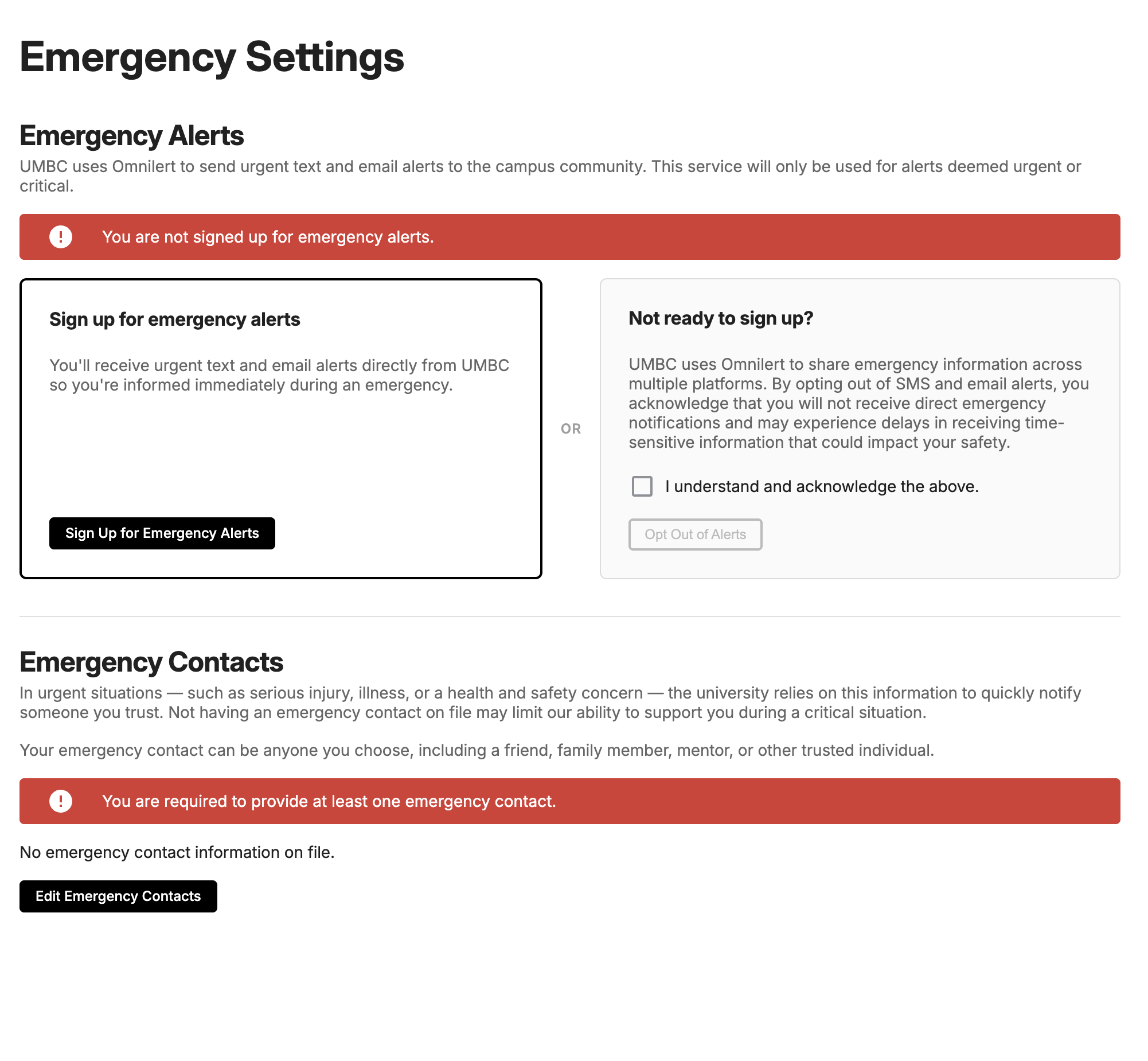 Emergency Alerts: If you haven't signed up, you’ll see a prompt to join.
-
Emergency Contacts: If your contacts are missing, you'll see a reminder. This notification will remain active until a contact is added.
Take Action: Click the notification to go directly to your settings, or access them anytime by clicking your Profile Photo > Emergency. See “How do I update my Emergency Settings in myUMBC?” for more information about the page.
Please take a moment today to ensure your emergency alert enrollment is active and your emergency contacts are up to date.
If you have any issues, please contact the Technology Support Center via help.umbc.edu or by calling 410-455-3838.
]]>
DoIT has been working with the Division of Student Affairs to introduce a new, easy-to-use Emergency Settings page in myUMBC. The myUMBC Emergency Settings page integrates our campus-wide...
Inline Image
https://assets4-my.umbc.edu/system/shared/attachments/7ca24e8f08e62ba0df164b336080b48e/6ae7b3da/news/000/160/630/09ad6b97b47773d7ff7f499daf333174/mceclip0.png?1781719581
https://my3.my.umbc.edu/api/v0/pixel/news/160630/guest@my.umbc.edu/c32a7f9ba0d9c955da89549b18c8db10/api/pixel
myumbc
Division of Information Technology (DoIT)
https://my3.my.umbc.edu/groups/doit
https://assets2-my.umbc.edu/system/shared/avatars/groups/000/000/021/d27760c5de12c74b73faec8d0e631acf/xsmall.png?1727453227
https://assets2-my.umbc.edu/system/shared/avatars/groups/000/000/021/d27760c5de12c74b73faec8d0e631acf/original.JPG?1727453227
https://assets1-my.umbc.edu/system/shared/avatars/groups/000/000/021/d27760c5de12c74b73faec8d0e631acf/xxlarge.png?1727453227
https://assets3-my.umbc.edu/system/shared/avatars/groups/000/000/021/d27760c5de12c74b73faec8d0e631acf/xlarge.png?1727453227
https://assets2-my.umbc.edu/system/shared/avatars/groups/000/000/021/d27760c5de12c74b73faec8d0e631acf/large.png?1727453227
https://assets2-my.umbc.edu/system/shared/avatars/groups/000/000/021/d27760c5de12c74b73faec8d0e631acf/medium.png?1727453227
https://assets2-my.umbc.edu/system/shared/avatars/groups/000/000/021/d27760c5de12c74b73faec8d0e631acf/small.png?1727453227
https://assets2-my.umbc.edu/system/shared/avatars/groups/000/000/021/d27760c5de12c74b73faec8d0e631acf/xsmall.png?1727453227
https://assets4-my.umbc.edu/system/shared/avatars/groups/000/000/021/d27760c5de12c74b73faec8d0e631acf/xxsmall.png?1727453227
Division of Information Technology (DoIT)
0
0
true
Thu, 18 Jun 2026 13:00:00 -0400
myUMBC Groups: We Heard You and We've Been Busy
A new editor, accessibility, scheduling, archiving, more...
If you manage a myUMBC group, you've probably noticed some things look a little different lately. We've been working on a big round of improvements to the editor and groups experience, and I wanted to walk you through what changed and why.
There's a lot here, so I'll try to keep it organized.
A Much Better Editor
The most visible change is the editor itself. We replaced the old one with a modern rich-text editor that, hopefully, just gets out of your way.
Paste from Word or Google Docs and it just works. Formatting comes in cleanly without a wall of mystery HTML. This one has been a long time coming.
Images are easier to work with. You can paste, drag-and-drop, or upload images directly into the body of your post. No more hunting for a separate upload button. When you insert an image you'll be prompted for alt text (more on that in a minute).
Paste a YouTube URL and it becomes a player. Drop a YouTube link into the editor and it automatically embeds as a video player. In the notification email that goes out to your group, recipients will see a clickable thumbnail linking to the video instead of a broken embed.
Attachments and tags got some attention too. The interface for attaching files is cleaner, and the tag editor now works like a chip input: type a tag, press Enter to add it, click the x to remove it.
One small but important change: the "Silent" option on the post form has been renamed to "Send Notifications." It's on by default, which is the right behavior for most posts. If you don't want to send a notification, just uncheck it. We made this change because "silent" wasn't exactly self-explanatory.
Preview Before You Publish (and Scheduling!)
Instead of going straight from editing to publishing, there's now a Preview step in between.
On the edit form, you'll choose whether to publish immediately or schedule your post for later. Group admins can schedule up to 30 days in advance. Once you've made that choice, you click Preview before anything goes out.
From the preview screen you can:
- See exactly what your post will look like to readers before it goes live
- Send yourself a test email to see what the notification looks like in your inbox
- Copy a shareable preview link to send to other group admins if you want a second set of eyes before it goes live
Then you confirm the publish or the scheduled time from there.
If your group does a lot of time-sensitive announcements, scheduling should make your life a lot easier.
Alt Text is Now Required
We're making a serious push on accessibility, and one concrete change is that alt text is now required on all images before you can publish. If you've got images without alt text, the Publish button will stay disabled until you fix them.
When you insert an image you'll be prompted right then. If the image is purely decorative, you can check "decorative" and move on. Otherwise a short description goes a long way for people using screen readers.
You may notice other accessibility-related changes around myUMBC as we continue this work. We do our best to make sure nothing breaks along the way, but if something feels off please don't hesitate to reach out to me or the team.
Archive Your Content
Groups can now archive posts and events rather than choosing between leaving old content in the feed or deleting it forever.
Each post and event now has an Archive button. Archiving moves that item out of the main listing into a separate archived view. On your Posts tab, there's a button on the right side that says "View Archived Posts" to toggle between active and archived content.
This is especially useful for groups targeting students with announcements. Old posts that aren't relevant to new visitors can be tucked away without losing them permanently.
If you want to do a bulk cleanup, say archive everything before a certain date, submit a ticket and our team will take care of it.
A Few More Things
Events: In-Person, Virtual, or Hybrid. When creating an event you now explicitly choose the format, and the form shows or hides relevant fields based on what you pick. No more filling in a location for a fully virtual event.
Subscription tag filtering. If your group subscribes to another group's content, you can now limit that subscription to specific tags so only the content you care about comes through.
Group inactivity process. After eight months of inactivity, your group will start receiving emails letting you know. You'll have the option to extend the group for four more months, or choose to archive or delete it. Archiving sets the group to read-only so people can still see past content but no new posts can be made. Deleting removes the group itself but keeps individual posts intact since we hold onto public content for the historical record.
My Events page. Go to the Events section in the left nav and choose My Events to see upcoming events you're signed up for, plus upcoming events from the groups you belong to.
Personal posts are now called Messages. For groups that use them, you'll see the updated label.
Questions?
If something isn't working right or you have questions about any of this, reach out to our team and we'll be happy to help.
]]>
If you manage a myUMBC group, you've probably noticed some things look a little different lately. We've been working on a big round of improvements to the editor and groups experience, and I...
https://my3.my.umbc.edu/api/v0/pixel/news/159074/guest@my.umbc.edu/09483988e566baa1634a15cb5ff00365/api/pixel
myumbc
Division of Information Technology (DoIT)
https://my3.my.umbc.edu/groups/doit
https://assets2-my.umbc.edu/system/shared/avatars/groups/000/000/021/d27760c5de12c74b73faec8d0e631acf/xsmall.png?1727453227
https://assets2-my.umbc.edu/system/shared/avatars/groups/000/000/021/d27760c5de12c74b73faec8d0e631acf/original.JPG?1727453227
https://assets1-my.umbc.edu/system/shared/avatars/groups/000/000/021/d27760c5de12c74b73faec8d0e631acf/xxlarge.png?1727453227
https://assets3-my.umbc.edu/system/shared/avatars/groups/000/000/021/d27760c5de12c74b73faec8d0e631acf/xlarge.png?1727453227
https://assets2-my.umbc.edu/system/shared/avatars/groups/000/000/021/d27760c5de12c74b73faec8d0e631acf/large.png?1727453227
https://assets2-my.umbc.edu/system/shared/avatars/groups/000/000/021/d27760c5de12c74b73faec8d0e631acf/medium.png?1727453227
https://assets2-my.umbc.edu/system/shared/avatars/groups/000/000/021/d27760c5de12c74b73faec8d0e631acf/small.png?1727453227
https://assets2-my.umbc.edu/system/shared/avatars/groups/000/000/021/d27760c5de12c74b73faec8d0e631acf/xsmall.png?1727453227
https://assets4-my.umbc.edu/system/shared/avatars/groups/000/000/021/d27760c5de12c74b73faec8d0e631acf/xxsmall.png?1727453227
Division of Information Technology (DoIT)
43
11
true
Wed, 22 Apr 2026 07:00:00 -0400
Fri, 24 Apr 2026 11:51:29 -0400
Weekend Service Disruption Status
Resolved: Disruption impacting Blackboard, Google, and more
Over this past weekend, April 4-5, 2026, one of UMBC’s services experienced a disruption, resulting in slower loading times. This affected some users' ability to log in to platforms such as Blackboard, Google Services, and myUMBC. This also caused a backlog of emails for some accounts. The issue has been resolved as of April 6, 2026. No action is needed by users at this time.
Need Assistance?
If you have any questions or experience further issues, please contact the TSC at UMBC’s Help Service.
]]>
Over this past weekend, April 4-5, 2026, one of UMBC’s services experienced a disruption, resulting in slower loading times. This affected some users' ability to log in to platforms such as...
https://my3.my.umbc.edu/api/v0/pixel/news/158397/guest@my.umbc.edu/e0c12bad9bca7cbc5d5be36fba561fa6/api/pixel
blackboard
disruption
error
google
help
myumbc
news
Division of Information Technology (DoIT)
https://my3.my.umbc.edu/groups/doit
https://assets2-my.umbc.edu/system/shared/avatars/groups/000/000/021/d27760c5de12c74b73faec8d0e631acf/xsmall.png?1727453227
https://assets2-my.umbc.edu/system/shared/avatars/groups/000/000/021/d27760c5de12c74b73faec8d0e631acf/original.JPG?1727453227
https://assets1-my.umbc.edu/system/shared/avatars/groups/000/000/021/d27760c5de12c74b73faec8d0e631acf/xxlarge.png?1727453227
https://assets3-my.umbc.edu/system/shared/avatars/groups/000/000/021/d27760c5de12c74b73faec8d0e631acf/xlarge.png?1727453227
https://assets2-my.umbc.edu/system/shared/avatars/groups/000/000/021/d27760c5de12c74b73faec8d0e631acf/large.png?1727453227
https://assets2-my.umbc.edu/system/shared/avatars/groups/000/000/021/d27760c5de12c74b73faec8d0e631acf/medium.png?1727453227
https://assets2-my.umbc.edu/system/shared/avatars/groups/000/000/021/d27760c5de12c74b73faec8d0e631acf/small.png?1727453227
https://assets2-my.umbc.edu/system/shared/avatars/groups/000/000/021/d27760c5de12c74b73faec8d0e631acf/xsmall.png?1727453227
https://assets4-my.umbc.edu/system/shared/avatars/groups/000/000/021/d27760c5de12c74b73faec8d0e631acf/xxsmall.png?1727453227
Division of Information Technology (DoIT)
https://assets1-my.umbc.edu/system/shared/thumbnails/news/000/158/397/22ad8b1711389810357527e676d8c96d/xxlarge.jpg?1775588023
https://assets4-my.umbc.edu/system/shared/thumbnails/news/000/158/397/22ad8b1711389810357527e676d8c96d/xlarge.jpg?1775588023
https://assets3-my.umbc.edu/system/shared/thumbnails/news/000/158/397/22ad8b1711389810357527e676d8c96d/large.jpg?1775588023
https://assets1-my.umbc.edu/system/shared/thumbnails/news/000/158/397/22ad8b1711389810357527e676d8c96d/medium.jpg?1775588023
https://assets4-my.umbc.edu/system/shared/thumbnails/news/000/158/397/22ad8b1711389810357527e676d8c96d/small.jpg?1775588023
https://assets2-my.umbc.edu/system/shared/thumbnails/news/000/158/397/22ad8b1711389810357527e676d8c96d/xsmall.jpg?1775588023
https://assets4-my.umbc.edu/system/shared/thumbnails/news/000/158/397/22ad8b1711389810357527e676d8c96d/xxsmall.jpg?1775588023
U-M-B-C logo shield with the text "D-O-I-T News
3
0
true
Tue, 07 Apr 2026 14:56:19 -0400
Accessibility Updates Coming to myUMBC
As we approach our late-April accessibility compliance deadline, we want to share a clear roadmap of the changes coming to myUMBC and what they mean for you.
Phase 1: Content Checks & Preview
Coming later during the week of March 23rd.
Content Checks
When editing a Post or Event, you'll see a new Content Checks section that flags accessibility issues before publishing, such as missing alt text on images or broken links.
Previously, you could publish posts and events without addressing accessibility issues. That is no longer the case, flagged issues must be resolved before content can go live.
Preview & Publish
The publish button has been replaced with a Preview & Publish button. Clicking it takes you to a preview of your content where you can:
- Review how it will appear to readers
- Return to edit if needed
- Send a preview of the notification email to yourself
- Share the preview link with teammates for review
- Publish to make it live
Phase 2: Content Archiving
In late-April, any content with unresolved accessibility issues published before January 1, 2023 will be marked as archived. The most common issue is images missing alt text.
Admins will have access to a report showing all of their group's flagged content. If you resolve issues before mid-April, that content will not be archived.
Here's what to expect for content that is archived:
- It will appear under a new Archived filter in your group
-
URLs will not change, so existing links won't break
- Archived content is read-only, but you can edit and republish it at any time
- It will display a prominent banner indicating the content is archived and may not be current
For departmental websites: If your site pulls in myUMBC group content, no changes are needed on your end. Archiving will be reflected automatically on your site.
Why This Matters
These changes reflect UMBC's institutional commitment to making myUMBC accessible to everyone. The goal is to make compliance as manageable as possible — catching issues early, giving you visibility into your content, and providing time to act before archiving occurs.
Questions? Reach out to collier@umbc.edu.
]]>
As we approach our late-April accessibility compliance deadline, we want to share a clear roadmap of the changes coming to myUMBC and what they mean for you. Phase 1: Content Checks &...
https://my3.my.umbc.edu/api/v0/pixel/news/157632/guest@my.umbc.edu/0b03ef7c16d1565e60e937bc9f53b0d6/api/pixel
myumbc
Division of Information Technology (DoIT)
https://my3.my.umbc.edu/groups/doit
https://assets2-my.umbc.edu/system/shared/avatars/groups/000/000/021/d27760c5de12c74b73faec8d0e631acf/xsmall.png?1727453227
https://assets2-my.umbc.edu/system/shared/avatars/groups/000/000/021/d27760c5de12c74b73faec8d0e631acf/original.JPG?1727453227
https://assets1-my.umbc.edu/system/shared/avatars/groups/000/000/021/d27760c5de12c74b73faec8d0e631acf/xxlarge.png?1727453227
https://assets3-my.umbc.edu/system/shared/avatars/groups/000/000/021/d27760c5de12c74b73faec8d0e631acf/xlarge.png?1727453227
https://assets2-my.umbc.edu/system/shared/avatars/groups/000/000/021/d27760c5de12c74b73faec8d0e631acf/large.png?1727453227
https://assets2-my.umbc.edu/system/shared/avatars/groups/000/000/021/d27760c5de12c74b73faec8d0e631acf/medium.png?1727453227
https://assets2-my.umbc.edu/system/shared/avatars/groups/000/000/021/d27760c5de12c74b73faec8d0e631acf/small.png?1727453227
https://assets2-my.umbc.edu/system/shared/avatars/groups/000/000/021/d27760c5de12c74b73faec8d0e631acf/xsmall.png?1727453227
https://assets4-my.umbc.edu/system/shared/avatars/groups/000/000/021/d27760c5de12c74b73faec8d0e631acf/xxsmall.png?1727453227
Division of Information Technology (DoIT)
13
0
false
Tue, 24 Mar 2026 09:27:35 -0400
Fri, 24 Apr 2026 11:54:18 -0400
Post and Event Promotion on myUMBC
How to share and promote your announcements on myUMBC
Have you ever wanted to promote your club, group, or organization's event or announcement on the front page of myUMBC? Well, here is a quick guide on what you need to know.
The promotion feature allows you to share content from your myUMBC group to all myUMBC users on the front page, reaching a much wider audience than if it were just posted to a group's page. This is a free feature for departments and official student organizations to use that operates on a first-come, first-served basis.
Before you are able to promote content to the front page of myUMBC, there are a few requirements that must be met.
The post or content you wish to promote must be published in an official and public myUMBC group run by a UMBC department or student organization
To have the option to promote content, you must be an admin of the group from which the content originates. This does not mean you have to be the creator of the post.
There must be an approved thumbnail image to go along with the post
The content should be appropriate for all UMBC audiences
Content can be promoted by a group once every 3 days, and only 10 promotions can be scheduled in advance
If these requirements are met, you should have no trouble promoting your content.
To start, you will need to create a post as normal on myUMBC, including your text, thumbnails, alt-text, and any relevant tags. After you hit publish on your post, you may have to refresh the page or navigate to the main page of your group to find the post.
Here you should see a box on the right side with the posts analytics as well as buttons to "Edit", "Copy", "Mark Important", and "Pin". If you are an admin for this group and it qualifies as a department or official student organization, then you should see a purple button labeled "Promote".

From here, you will be able to pick which day you would like to promote your content. You will see what slots are available. Each day has 4 slots, and you have the ability to make 10 selections for promotions.
If you wish to reserve a spot but don't have your content fully completed, you can fill a future slot with placeholder information to ensure that it won't be taken. Just make sure to update the post with your content before the date it is scheduled to be promoted or posted.
After these are chosen, they can be managed under the "Promotions" tab on your myUMBC Group page. This page will be useful if you wish to cancel posts, make changes to future promotions, or if you signed up for slots using placeholder information.
As always, remember to look over your post to ensure all information is correct and that any approvals needed regarding posting or thumbnails are received.
We encourage and appreciate any and all feedback from users. If you have any questions or suggestions on how to improve myUMBC, please contact B. Collier Jones at bcjones@umbc.edu or schedule a meeting on Google Calendar.
]]>
Have you ever wanted to promote your club, group, or organization's event or announcement on the front page of myUMBC? Well, here is a quick guide on what you need to know. The promotion...
Image
https://assets4-my.umbc.edu/system/shared/attachments/3ab28d548ae8f69c961b1b20c5871fe4/6ae7b3da/news/000/156/065/9e2482461175ac10b26c0fd4b4b56e28/myUMBC promotion button.png?1769988664
https://my3.my.umbc.edu/api/v0/pixel/news/156065/guest@my.umbc.edu/84f333ce2aea5ca7d3fdef336a53ac79/api/pixel
event
learning
myumbc
post
promotion
share
Division of Information Technology (DoIT)
https://my3.my.umbc.edu/groups/doit
https://assets2-my.umbc.edu/system/shared/avatars/groups/000/000/021/d27760c5de12c74b73faec8d0e631acf/xsmall.png?1727453227
https://assets2-my.umbc.edu/system/shared/avatars/groups/000/000/021/d27760c5de12c74b73faec8d0e631acf/original.JPG?1727453227
https://assets1-my.umbc.edu/system/shared/avatars/groups/000/000/021/d27760c5de12c74b73faec8d0e631acf/xxlarge.png?1727453227
https://assets3-my.umbc.edu/system/shared/avatars/groups/000/000/021/d27760c5de12c74b73faec8d0e631acf/xlarge.png?1727453227
https://assets2-my.umbc.edu/system/shared/avatars/groups/000/000/021/d27760c5de12c74b73faec8d0e631acf/large.png?1727453227
https://assets2-my.umbc.edu/system/shared/avatars/groups/000/000/021/d27760c5de12c74b73faec8d0e631acf/medium.png?1727453227
https://assets2-my.umbc.edu/system/shared/avatars/groups/000/000/021/d27760c5de12c74b73faec8d0e631acf/small.png?1727453227
https://assets2-my.umbc.edu/system/shared/avatars/groups/000/000/021/d27760c5de12c74b73faec8d0e631acf/xsmall.png?1727453227
https://assets4-my.umbc.edu/system/shared/avatars/groups/000/000/021/d27760c5de12c74b73faec8d0e631acf/xxsmall.png?1727453227
Division of Information Technology (DoIT)
https://assets3-my.umbc.edu/system/shared/thumbnails/news/000/156/065/539f6ce48e5e0c388cc809280184d376/xxlarge.jpg?1770042628
https://assets1-my.umbc.edu/system/shared/thumbnails/news/000/156/065/539f6ce48e5e0c388cc809280184d376/xlarge.jpg?1770042628
https://assets2-my.umbc.edu/system/shared/thumbnails/news/000/156/065/539f6ce48e5e0c388cc809280184d376/large.jpg?1770042628
https://assets3-my.umbc.edu/system/shared/thumbnails/news/000/156/065/539f6ce48e5e0c388cc809280184d376/medium.jpg?1770042628
https://assets4-my.umbc.edu/system/shared/thumbnails/news/000/156/065/539f6ce48e5e0c388cc809280184d376/small.jpg?1770042628
https://assets1-my.umbc.edu/system/shared/thumbnails/news/000/156/065/539f6ce48e5e0c388cc809280184d376/xsmall.jpg?1770042628
https://assets1-my.umbc.edu/system/shared/thumbnails/news/000/156/065/539f6ce48e5e0c388cc809280184d376/xxsmall.jpg?1770042628
A black background with the myUMBC logo at the top and the words “Post & Event Promotion” below that. Under this are three graphics which, from left to right, depict a white internet post with a pencil on it, a yellow information “i” icon, and a white megaphone.
5
0
false
Mon, 02 Feb 2026 09:54:24 -0500
Fri, 27 Feb 2026 13:04:07 -0500
Profile Sharing on myUMBC
How to safely share your academic information with others
Did you know that you can share your myUMBC profile with your parent, guardian, or whomever you wish without having to give out your password or login credentials?
Profile sharing allows them to have access to information that you see fit, whether that be grades, billing, financial aid, etc. This can be useful to allow them to see and access certain information, especially if you are not always around to show them or if you only want them to look at some information and not everything. You have complete control when using this feature, which means you can also revoke people’s access to information at any time.
To access profile sharing, you can click on your picture in the top right of your myUMBC page and select “Sharing”.
]]>
Did you know that you can share your myUMBC profile with your parent, guardian, or whomever you wish without having to give out your password or login credentials? Profile sharing allows them...
Image
https://assets3-my.umbc.edu/system/shared/attachments/acc7c1bce406ddfdaa30966c56023e80/6ae7b3da/news/000/154/894/a6dc0a4e78bc98512fe1f7e09995dc7d/myUMBC Profile Sharing.png?1764536416
https://my3.my.umbc.edu/api/v0/pixel/news/154894/guest@my.umbc.edu/0165d126bffaa54565e726e7e4b23a50/api/pixel
information
myumbc
profile
sharing
Division of Information Technology (DoIT)
https://my3.my.umbc.edu/groups/doit
https://assets2-my.umbc.edu/system/shared/avatars/groups/000/000/021/d27760c5de12c74b73faec8d0e631acf/xsmall.png?1727453227
https://assets2-my.umbc.edu/system/shared/avatars/groups/000/000/021/d27760c5de12c74b73faec8d0e631acf/original.JPG?1727453227
https://assets1-my.umbc.edu/system/shared/avatars/groups/000/000/021/d27760c5de12c74b73faec8d0e631acf/xxlarge.png?1727453227
https://assets3-my.umbc.edu/system/shared/avatars/groups/000/000/021/d27760c5de12c74b73faec8d0e631acf/xlarge.png?1727453227
https://assets2-my.umbc.edu/system/shared/avatars/groups/000/000/021/d27760c5de12c74b73faec8d0e631acf/large.png?1727453227
https://assets2-my.umbc.edu/system/shared/avatars/groups/000/000/021/d27760c5de12c74b73faec8d0e631acf/medium.png?1727453227
https://assets2-my.umbc.edu/system/shared/avatars/groups/000/000/021/d27760c5de12c74b73faec8d0e631acf/small.png?1727453227
https://assets2-my.umbc.edu/system/shared/avatars/groups/000/000/021/d27760c5de12c74b73faec8d0e631acf/xsmall.png?1727453227
https://assets4-my.umbc.edu/system/shared/avatars/groups/000/000/021/d27760c5de12c74b73faec8d0e631acf/xxsmall.png?1727453227
Division of Information Technology (DoIT)
https://assets4-my.umbc.edu/system/shared/thumbnails/news/000/154/894/ca6f37a13e9935bc20ba21dde86e1ca8/xxlarge.jpg?1764536995
https://assets1-my.umbc.edu/system/shared/thumbnails/news/000/154/894/ca6f37a13e9935bc20ba21dde86e1ca8/xlarge.jpg?1764536995
https://assets2-my.umbc.edu/system/shared/thumbnails/news/000/154/894/ca6f37a13e9935bc20ba21dde86e1ca8/large.jpg?1764536995
https://assets3-my.umbc.edu/system/shared/thumbnails/news/000/154/894/ca6f37a13e9935bc20ba21dde86e1ca8/medium.jpg?1764536995
https://assets2-my.umbc.edu/system/shared/thumbnails/news/000/154/894/ca6f37a13e9935bc20ba21dde86e1ca8/small.jpg?1764536995
https://assets4-my.umbc.edu/system/shared/thumbnails/news/000/154/894/ca6f37a13e9935bc20ba21dde86e1ca8/xsmall.jpg?1764536995
https://assets4-my.umbc.edu/system/shared/thumbnails/news/000/154/894/ca6f37a13e9935bc20ba21dde86e1ca8/xxsmall.jpg?1764536995
a plain black background with a graphic of the myUMBC logo at the top followed by text reading "Profile Sharing" and three graphics below it depicted from left to right as: a profile, an information "i" icon, and an arrow used to indicate sharing
2
0
true
Wed, 03 Dec 2025 10:25:13 -0500
The Basics of using myUMBC for Students
A general overview of where to find information on myUMBC
Welcome to myUMBC! Here is a brief overview of what and where to find information as a UMBC student.
What's new this fall?
Search / Ask Bar
- This is a useful research tool for finding what you want through myUMBC if you’re not sure where to look
- You can ask general and personal questions, and using AI, it will do its best to provide you with an accurate answer
1. Profile
- Under your “Profile” tab, you can find different cards for information about you as a member of UMBC
- You can find information about your degree, registration, grades, billing, financial aid, parking, and more
- There is also a list of tabs on the left of the page that has a few more options, including “Housing” and “Timesheets”

2. Guide
- Here you’ll find information about upcoming deadlines/important dates for the campus, basic profile information, and links to various campus resources
- Along the side are different categories of resources for the university
- Student staff will also find links and resources for their position
3. Events
- The “Events” tab is where you can find out about what's going on on campus throughout the week
- You can find fun campus and club events, information sessions, performances, and more
4. Groups
- “Groups” is where you can find and receive information about specific clubs, organizations you have joined, as well as different UMBC Departments
- By joining groups, you can choose if and how you want to receive updates about events going on or general information about the group
5. Help
- The “Help” tab can be used to find links for information or request help on specific topics
Want to learn more about the myUMBC as a site?
Here are some resources about myUMBC
We're always looking for ideas on how to make myUMBC better. Please feel free to contact us if you have any questions or comments.
]]>
Welcome to myUMBC! Here is a brief overview of what and where to find information as a UMBC student. What's new this fall? Search / Ask Bar This is a useful research tool for finding what...
Image
https://assets1-my.umbc.edu/system/shared/attachments/284e2c6b5c40302d22d3b0f27b77db4b/6ae7b3da/news/000/152/441/470fe954b680cf02b4ca3137595cc603/myUMBC Navigation.png?1757873495
https://my3.my.umbc.edu/api/v0/pixel/news/152441/guest@my.umbc.edu/9b6545b6897a9ef117cbf2d4ac26494e/api/pixel
myumbc
Division of Information Technology (DoIT)
https://my3.my.umbc.edu/groups/doit
https://assets2-my.umbc.edu/system/shared/avatars/groups/000/000/021/d27760c5de12c74b73faec8d0e631acf/xsmall.png?1727453227
https://assets2-my.umbc.edu/system/shared/avatars/groups/000/000/021/d27760c5de12c74b73faec8d0e631acf/original.JPG?1727453227
https://assets1-my.umbc.edu/system/shared/avatars/groups/000/000/021/d27760c5de12c74b73faec8d0e631acf/xxlarge.png?1727453227
https://assets3-my.umbc.edu/system/shared/avatars/groups/000/000/021/d27760c5de12c74b73faec8d0e631acf/xlarge.png?1727453227
https://assets2-my.umbc.edu/system/shared/avatars/groups/000/000/021/d27760c5de12c74b73faec8d0e631acf/large.png?1727453227
https://assets2-my.umbc.edu/system/shared/avatars/groups/000/000/021/d27760c5de12c74b73faec8d0e631acf/medium.png?1727453227
https://assets2-my.umbc.edu/system/shared/avatars/groups/000/000/021/d27760c5de12c74b73faec8d0e631acf/small.png?1727453227
https://assets2-my.umbc.edu/system/shared/avatars/groups/000/000/021/d27760c5de12c74b73faec8d0e631acf/xsmall.png?1727453227
https://assets4-my.umbc.edu/system/shared/avatars/groups/000/000/021/d27760c5de12c74b73faec8d0e631acf/xxsmall.png?1727453227
Division of Information Technology (DoIT)
https://assets2-my.umbc.edu/system/shared/thumbnails/news/000/152/441/6b201e8894d7a09300734dbb62148ba3/xxlarge.jpg?1757878071
https://assets3-my.umbc.edu/system/shared/thumbnails/news/000/152/441/6b201e8894d7a09300734dbb62148ba3/xlarge.jpg?1757878071
https://assets1-my.umbc.edu/system/shared/thumbnails/news/000/152/441/6b201e8894d7a09300734dbb62148ba3/large.jpg?1757878071
https://assets2-my.umbc.edu/system/shared/thumbnails/news/000/152/441/6b201e8894d7a09300734dbb62148ba3/medium.jpg?1757878071
https://assets1-my.umbc.edu/system/shared/thumbnails/news/000/152/441/6b201e8894d7a09300734dbb62148ba3/small.jpg?1757878071
https://assets4-my.umbc.edu/system/shared/thumbnails/news/000/152/441/6b201e8894d7a09300734dbb62148ba3/xsmall.jpg?1757878071
https://assets1-my.umbc.edu/system/shared/thumbnails/news/000/152/441/6b201e8894d7a09300734dbb62148ba3/xxsmall.jpg?1757878071
The myUMBC logo in front of a black background. There is an image in each corner of the graphic including a magnifying glass (top left), a notification bell (top right), an id/profile graphic (bottom left), and a group of people (bottom right)
0
0
true
Mon, 15 Sep 2025 11:06:34 -0400
myUMBC Answers: AI-Powered Search Bar Updates
Providing answers that are unique to you!
In early February, the myUMBC team launched my UMBC Answers, an AI-driven search bar to improve experiences for students, faculty, and staff while ensuring security and privacy. Now, all campus members have been enrolled in this new feature! It helps provide fast, accurate answers to common student questions. The common questions focus on the student experience, but future updates will incorporate resources for faculty and staff. There is an option to opt out if users prefer.
Interactive Feedback Loop:A sophisticated mechanism allows users to contribute qualitative assessments of answer accuracy. University technology architect Collier Jones emphasizes a critical advisory: "While our AI system provides remarkable support, it is not infallible. Students must exercise due diligence by independently verifying critical information."
Privacy and Security: The system has been meticulously designed with privacy protocols, ensuring the protection of sensitive student information throughout every interaction.
What can it do?
The platform empowers students by providing rapid, secure access to essential personal information, including:
Academic performance records
Financial billing statements
Retriever Card balance details
Additional Resources
The AI-powered answers system exemplifies UMBC's commitment to leveraging cutting-edge technology to enhance student support and institutional efficiency.
The following images show some examples of questions that MyUMBC’s Answers:

Image: A search bar with the question “What’s the last day of classes?” and underneath the question shows a toggle bar with myUMBC Answers “ON” and a disclaimer “Answers aren’t always accurate, double-check anything important.” The answer to the question is displayed as “May 13, 2025 is the last day of classes for the Spring 2025 semester.” Users can click to indicate if the answer provided was helpful.

Image: A search bar with the question “Who is my advisor?” and underneath the question shows a toggle bar with myUMBC Answers “ON” and a disclaimer “Answers aren’t always accurate, double-check anything important.” The answer to the questions is displayed as “Your academic advisor for Psychology - BS is Tasneem Khambaty. You can contact them at khambaty@umbc.edu” Users can click to indicate if the answer provided was helpful.
If you have any questions or comments, let us know here.The myUMBC team has been exploring how artificial intelligence (AI) can make the platform better for students, faculty, and staff, all while ensuring security and privacy. We are excited to announce that we are improving the search feature, making it easier and quicker for students to find what they need with AI. This helps provide fast, accurate answers to common student questions.
A key focus is helping students access important personal information—like grades, billing statements, and Retriever Card balances—right from the search bar. This means students can find what they need quickly, without having to dig through the system, while knowing their data is protected.

This is just the beginning! We’re looking at how AI can further improve the myUMBC experience, from academic support to campus life to create a more efficient and personalized platform for students.
Please remember to verify any information before you take action. At this time, please be aware that answers are focused on student-related scenarios. Faculty/Staff-related answers are still in development. If you identify any mistakes, please let us know using the “Was this useful” feature at the bottom of each answer.
If you have any questions or comments, let us know here.
]]>
The myUMBC team has been exploring how artificial intelligence (AI) can make the platform better for students, faculty, and staff, all while ensuring security and privacy. We are excited to...
https://my3.my.umbc.edu/api/v0/pixel/news/147188/guest@my.umbc.edu/2facf78c740b507c8eca8821bfac37f1/api/pixel
ai
help
myumbc
project
Division of Information Technology (DoIT)
https://my3.my.umbc.edu/groups/doit
https://assets2-my.umbc.edu/system/shared/avatars/groups/000/000/021/d27760c5de12c74b73faec8d0e631acf/xsmall.png?1727453227
https://assets2-my.umbc.edu/system/shared/avatars/groups/000/000/021/d27760c5de12c74b73faec8d0e631acf/original.JPG?1727453227
https://assets1-my.umbc.edu/system/shared/avatars/groups/000/000/021/d27760c5de12c74b73faec8d0e631acf/xxlarge.png?1727453227
https://assets3-my.umbc.edu/system/shared/avatars/groups/000/000/021/d27760c5de12c74b73faec8d0e631acf/xlarge.png?1727453227
https://assets2-my.umbc.edu/system/shared/avatars/groups/000/000/021/d27760c5de12c74b73faec8d0e631acf/large.png?1727453227
https://assets2-my.umbc.edu/system/shared/avatars/groups/000/000/021/d27760c5de12c74b73faec8d0e631acf/medium.png?1727453227
https://assets2-my.umbc.edu/system/shared/avatars/groups/000/000/021/d27760c5de12c74b73faec8d0e631acf/small.png?1727453227
https://assets2-my.umbc.edu/system/shared/avatars/groups/000/000/021/d27760c5de12c74b73faec8d0e631acf/xsmall.png?1727453227
https://assets4-my.umbc.edu/system/shared/avatars/groups/000/000/021/d27760c5de12c74b73faec8d0e631acf/xxsmall.png?1727453227
Division of Information Technology (DoIT)
https://assets1-my.umbc.edu/system/shared/thumbnails/news/000/147/188/913d264faa0920f511157b71025fd067/xxlarge.jpg?1739201870
https://assets4-my.umbc.edu/system/shared/thumbnails/news/000/147/188/913d264faa0920f511157b71025fd067/xlarge.jpg?1739201870
https://assets1-my.umbc.edu/system/shared/thumbnails/news/000/147/188/913d264faa0920f511157b71025fd067/large.jpg?1739201870
https://assets1-my.umbc.edu/system/shared/thumbnails/news/000/147/188/913d264faa0920f511157b71025fd067/medium.jpg?1739201870
https://assets4-my.umbc.edu/system/shared/thumbnails/news/000/147/188/913d264faa0920f511157b71025fd067/small.jpg?1739201870
https://assets4-my.umbc.edu/system/shared/thumbnails/news/000/147/188/913d264faa0920f511157b71025fd067/xsmall.jpg?1739201870
https://assets3-my.umbc.edu/system/shared/thumbnails/news/000/147/188/913d264faa0920f511157b71025fd067/xxsmall.jpg?1739201870
4
0
true
Mon, 10 Feb 2025 10:38:24 -0500
Mon, 10 Feb 2025 10:40:15 -0500


