<?xml version="1.0"?>
<News hasArchived="true" page="7591" pageCount="10799" pageSize="10" timestamp="Wed, 09 Sep 2026 04:08:35 -0400" url="https://my3.my.umbc.edu/posts.xml?mode=activity&amp;page=7591&amp;range=30">
<NewsItem contentIssues="false" id="43945" important="false" status="posted" url="https://my3.my.umbc.edu/posts/43945">
<Title>U.S. News STEM Solutions Conference</Title>
<Tagline>Pres. Hrabowski and UMBC Students Headline Keynote Panel</Tagline>
<Body>
<![CDATA[
    <div class="html-content">President Hrabowski and three undergraduate scholars from UMBC kicked off the U.S. News STEM Solutions conference with a keynote panel on April 23. <strong>Dalton Hughes</strong> ’14, chemical engineering, <strong>Lauren Mazzoli</strong> ’15, mathematics and computer science, and <strong>Mitchel Zavala</strong> ’14, mechanical engineering, spoke about their UMBC experiences in a discussion moderated by <a href="http://www.pbs.org/newshour/" rel="nofollow external" class="bo">PBS NewsHour</a> co-anchor Judy Woodruff.<br><br>The panel addressed major issues in STEM education, including the challenge of retaining students as STEM majors, the need to increase the participation of underrepresented populations in STEM, and the importance of mentorship and a supportive peer community in student success. Mazzoli, Zavala and Hughes shared what drew them to STEM and to UMBC, describing their experiences with the Meyerhoff Scholars Program (Hughes) and <a href="http://www.cwit.umbc.edu/" rel="nofollow external" class="bo">Center for Women in Technology </a>(CWIT) Scholars Program (Mazzoli). Describing UMBC, Mazzoli shared, “It’s a great community… they’re always supporting you.”<br><br>Click <a href="http://www.livestream.com/stemsolutions/video?clipId=flv_39ececba-0f81-4b41-9834-723ff5220af5" rel="nofollow external" class="bo"><u>here</u></a> to watch the keynote panel (starting at 22 min.).</div>
]]>
</Body>
<Summary>President Hrabowski and three undergraduate scholars from UMBC kicked off the U.S. News STEM Solutions conference with a keynote panel on April 23. Dalton Hughes ’14, chemical engineering, Lauren...</Summary>
<Website>http://umbcinsights.wordpress.com/2014/04/25/pres-hrabowski-and-umbc-students-headline-u-s-news-stem-solutions-conference/</Website>
<TrackingUrl>https://my3.my.umbc.edu/api/v0/pixel/news/43945/guest@my.umbc.edu/28cb7435ebcead84d0acc3331a3ca904/api/pixel</TrackingUrl>
<Group token="retired-95">College of Engineering and Information Technology</Group>
<GroupUrl>https://my3.my.umbc.edu/groups/retired-95</GroupUrl>
<AvatarUrl>https://assets3-my.umbc.edu/system/shared/avatars/groups/000/000/095/c2a784a6cda726ef5f845e9192adb64b/xsmall.png?1496851664</AvatarUrl>
<AvatarUrl size="original">https://assets1-my.umbc.edu/system/shared/avatars/groups/000/000/095/c2a784a6cda726ef5f845e9192adb64b/original.jpg?1496851664</AvatarUrl>
<AvatarUrl size="xxlarge">https://assets3-my.umbc.edu/system/shared/avatars/groups/000/000/095/c2a784a6cda726ef5f845e9192adb64b/xxlarge.png?1496851664</AvatarUrl>
<AvatarUrl size="xlarge">https://assets3-my.umbc.edu/system/shared/avatars/groups/000/000/095/c2a784a6cda726ef5f845e9192adb64b/xlarge.png?1496851664</AvatarUrl>
<AvatarUrl size="large">https://assets2-my.umbc.edu/system/shared/avatars/groups/000/000/095/c2a784a6cda726ef5f845e9192adb64b/large.png?1496851664</AvatarUrl>
<AvatarUrl size="medium">https://assets3-my.umbc.edu/system/shared/avatars/groups/000/000/095/c2a784a6cda726ef5f845e9192adb64b/medium.png?1496851664</AvatarUrl>
<AvatarUrl size="small">https://assets3-my.umbc.edu/system/shared/avatars/groups/000/000/095/c2a784a6cda726ef5f845e9192adb64b/small.png?1496851664</AvatarUrl>
<AvatarUrl size="xsmall">https://assets3-my.umbc.edu/system/shared/avatars/groups/000/000/095/c2a784a6cda726ef5f845e9192adb64b/xsmall.png?1496851664</AvatarUrl>
<AvatarUrl size="xxsmall">https://assets2-my.umbc.edu/system/shared/avatars/groups/000/000/095/c2a784a6cda726ef5f845e9192adb64b/xxsmall.png?1496851664</AvatarUrl>
<Sponsor>College of Engineering and Information Technology</Sponsor>
<PawCount>0</PawCount>
<CommentCount>0</CommentCount>
<CommentsAllowed>false</CommentsAllowed>
<PostedAt>Mon, 28 Apr 2014 11:16:04 -0400</PostedAt>
<EditAt>Mon, 28 Apr 2014 11:26:21 -0400</EditAt>
</NewsItem>

<NewsItem contentIssues="false" id="43944" important="false" status="posted" url="https://my3.my.umbc.edu/posts/43944">
<Title>UMBC scientists get grant to restore contaiminated sediments</Title>
<Body>
<![CDATA[
    <div class="html-content"> 
    		<h1>UMBC scientists receive Maryland Innovation grant from TEDCO to advance bioremediation of PCB-contaminated sediments</h1>
    
    				<div>
    						<span><span><br></span></span>		</div>


    		<p>Professor Kevin Sowers, Professor of Marine Biotechnology at the 
    Institute of Marine and Environmental Technology (IMET), and Professor 
    Upal Ghosh, at the University of Maryland Baltimore County, have 
    received a $100,000 grant from the Maryland Innovation Initiative (MII).
     The grant will fund research to that will ameliorate the environmental 
    harms of PCB’s. The program is an initiative of the Technology Council 
    of Maryland (TEDCO) created in 1998 to spur commercialization of 
    scientific research in Maryland as part of the state’s efforts to foster
     economic development through academic research.</p>
    <p>Sowers is a global leader in environmental science and has pioneered a
     method that uses activated carbon pellets seeded with microorganisms 
    that degrade the concentration of polychlorinated biphenyls (PCBs) in 
    sediments. In recent laboratory experiments, the cultures Sowers created
     resulted in over 80% reduction in the PCB mass after treatment.</p>
    <p>“Our hope is that this method for treating PCB’s will have a tangible
     impact in restoring previously degraded areas – both on land and in 
    bodies of water,” says Sowers. “PCB’s have long been a harmful and 
    largely intransigent pollutant and our work is intended to address 
    serious health impacts these chemicals have on people, animals and the 
    environment.”</p>
    <p>Sowers is collaborating in this work with Upal Ghosh, a professor at 
    the Department of Chemical, Biochemical, and Environmental Engineering 
    at UMBC. “The magnitude of PCB sediment contamination and associated 
    water quality problems in the United States is reflected in more than 
    3,200 state and local advisories that have warned the public about of 
    the health impacts of consuming contaminated fish. These warnings cover 
    24% of total river miles throughout the United States,” Ghosh says. “The
     advisories include 100% of the Great Lakes and 35% of all other lakes 
    nationwide.” PCBs are frequently reported as the leading contaminants at
     impacted sites. Current remediation technologies are expensive, 
    destructive to environmentally sensitive areas, and difficult to 
    coordinate with local activities. The technology proposed by Sowers and 
    Ghosh addresses existing challenges and is especially suitable for 
    environmentally sensitive sites such as wetlands and difficult-to-reach 
    areas under-pier structures in contaminated harbors. This technology 
    advances an in-situ remediation approach using activated carbon that has
     been recently developed by Ghosh and commercialized through a startup 
    company Sediment Solutions.</p>
    <p>The Maryland Innovation Initiative (MII) was created as a partnership
     between the State of Maryland and five Maryland academic research 
    institutions (Johns Hopkins University, Morgan State University, 
    University of Maryland College Park, University of Maryland Baltimore 
    and University of Maryland Baltimore County.) The program is designed to
     promote commercialization of research conducted between and among the 
    partnership universities and it leverages each institution’s unique 
    strengths.</p>
    <p>“The MII program is critically important to our partner universities 
    and the citizens of Maryland,” noted Russell Hill, IMET Director, 
    “because it facilitates the transformation of basic science into 
    practical and far-reaching applications. We are grateful for TEDCO’s 
    support and foresight in addressing this important environmental issue 
    and are proud of the excellent research being done by Dr. Sowers and Dr.
     Ghosh.”</p>
    <p><strong>TEDCO</strong></p>
    <p>The Maryland State Legislature created TEDCO in 1998 to facilitate 
    the transfer and commercialization of technology from Maryland’s 
    research universities and federal labs into the marketplace and to 
    assist in the creation and growth of technology-based businesses in all 
    regions of the State. TEDCO is an independent organization that strives 
    to be Maryland’s leading source for entrepreneurial business assistance 
    and seed funding for the development of startup companies in Maryland’s 
    innovation economy.</p>
    <p><strong>INSTITUTE OF MARINE AND ENVIRONMENTAL TECHNOLOGY</strong></p>
    <p>Located in Baltimore’s Inner Harbor, the Institute of Marine and 
    Environmental Technology is a strategic alliance involving scientists at
     the University of Maryland Center for Environmental Science, the 
    University of Maryland Baltimore and the University of Maryland 
    Baltimore County. Scientists are engaged in cutting-edge research in 
    microbiology, molecular genetic analysis and biotechnology, using marine
     resources to develop new drug therapies, alternative energy and other 
    innovations to improve public health and economic opportunities. IMET 
    also contributes to sustainable marine aquaculture and fisheries in the 
    Chesapeake Bay and other marine ecosystems.</p>
    </div>
]]>
</Body>
<Summary>UMBC scientists receive Maryland Innovation grant from TEDCO to advance bioremediation of PCB-contaminated sediments                               Professor Kevin Sowers, Professor of Marine...</Summary>
<TrackingUrl>https://my3.my.umbc.edu/api/v0/pixel/news/43944/guest@my.umbc.edu/3f27a3a217ab3f10020c3ada14b62cb4/api/pixel</TrackingUrl>
<Tag>bioremediation</Tag>
<Tag>contaminants</Tag>
<Tag>contamination</Tag>
<Tag>environment</Tag>
<Tag>environmental</Tag>
<Tag>marine</Tag>
<Tag>remediation</Tag>
<Tag>sediment</Tag>
<Tag>sustainable</Tag>
<Group token="sustainability">Sustainability Matters at UMBC</Group>
<GroupUrl>https://my3.my.umbc.edu/groups/sustainability</GroupUrl>
<AvatarUrl>https://assets1-my.umbc.edu/system/shared/avatars/groups/000/000/086/91091ac32f525d88daa6d6b721420ac1/xsmall.png?1586269437</AvatarUrl>
<AvatarUrl size="original">https://assets3-my.umbc.edu/system/shared/avatars/groups/000/000/086/91091ac32f525d88daa6d6b721420ac1/original.png?1586269437</AvatarUrl>
<AvatarUrl size="xxlarge">https://assets4-my.umbc.edu/system/shared/avatars/groups/000/000/086/91091ac32f525d88daa6d6b721420ac1/xxlarge.png?1586269437</AvatarUrl>
<AvatarUrl size="xlarge">https://assets2-my.umbc.edu/system/shared/avatars/groups/000/000/086/91091ac32f525d88daa6d6b721420ac1/xlarge.png?1586269437</AvatarUrl>
<AvatarUrl size="large">https://assets2-my.umbc.edu/system/shared/avatars/groups/000/000/086/91091ac32f525d88daa6d6b721420ac1/large.png?1586269437</AvatarUrl>
<AvatarUrl size="medium">https://assets4-my.umbc.edu/system/shared/avatars/groups/000/000/086/91091ac32f525d88daa6d6b721420ac1/medium.png?1586269437</AvatarUrl>
<AvatarUrl size="small">https://assets4-my.umbc.edu/system/shared/avatars/groups/000/000/086/91091ac32f525d88daa6d6b721420ac1/small.png?1586269437</AvatarUrl>
<AvatarUrl size="xsmall">https://assets1-my.umbc.edu/system/shared/avatars/groups/000/000/086/91091ac32f525d88daa6d6b721420ac1/xsmall.png?1586269437</AvatarUrl>
<AvatarUrl size="xxsmall">https://assets3-my.umbc.edu/system/shared/avatars/groups/000/000/086/91091ac32f525d88daa6d6b721420ac1/xxsmall.png?1586269437</AvatarUrl>
<Sponsor>Sustainability Matters at UMBC</Sponsor>
<PawCount>2</PawCount>
<CommentCount>1</CommentCount>
<CommentsAllowed>true</CommentsAllowed>
<PostedAt>Mon, 28 Apr 2014 11:09:31 -0400</PostedAt>
</NewsItem>

<NewsItem contentIssues="false" id="43943" important="false" status="posted" url="https://my3.my.umbc.edu/posts/43943">
<Title>Incomplete List of Mistakes in the Design of CSS</Title>
<Body>
<![CDATA[
    <div class="html-content">
    <p>Interesting to see what the CSS sausagemakers consider failures of CSS. </p>
    <p>I think the box-sizing choice has probably caused the most confusion and extra code over the years. Thankfully it's <a href="http://css-tricks.com/international-box-sizing-awareness-day/" rel="nofollow external" class="bo">fixable</a>. </p>
    <p><a href="http://wiki.csswg.org/ideas/mistakes" title="Direct link to featured article" rel="nofollow external" class="bo">Direct Link to Article</a> — <a href="http://css-tricks.com/incomplete-list-mistakes-design-css/" rel="nofollow external" class="bo">Permalink</a></p>
    <hr>
    <p><small><a href="http://css-tricks.com/incomplete-list-mistakes-design-css/" rel="nofollow external" class="bo">Incomplete List of Mistakes in the Design of CSS</a> is a post from <a href="http://css-tricks.com" rel="nofollow external" class="bo">CSS-Tricks</a></small></p>
    </div>
]]>
</Body>
<Summary>Interesting to see what the CSS sausagemakers consider failures of CSS.    I think the box-sizing choice has probably caused the most confusion and extra code over the years. Thankfully it's...</Summary>
<Website>http://wiki.csswg.org/ideas/mistakes</Website>
<TrackingUrl>https://my3.my.umbc.edu/api/v0/pixel/news/43943/guest@my.umbc.edu/43baf84a620d4bf321bfb2b0fab6ef06/api/pixel</TrackingUrl>
<Tag>css</Tag>
<Tag>html</Tag>
<Tag>javascript</Tag>
<Tag>link</Tag>
<Tag>mysql</Tag>
<Tag>php</Tag>
<Tag>sql</Tag>
<Tag>tricks</Tag>
<Group token="retired-583">Web Developer - Build Group</Group>
<GroupUrl>https://my3.my.umbc.edu/groups/retired-583</GroupUrl>
<AvatarUrl>https://assets3-my.umbc.edu/system/shared/avatars/groups/000/000/583/fc60f5d7abc2e080599bb6dc465db54d/xsmall.png?1363101197</AvatarUrl>
<AvatarUrl size="original">https://assets4-my.umbc.edu/system/shared/avatars/groups/000/000/583/fc60f5d7abc2e080599bb6dc465db54d/original.jpg?1363101197</AvatarUrl>
<AvatarUrl size="xxlarge">https://assets4-my.umbc.edu/system/shared/avatars/groups/000/000/583/fc60f5d7abc2e080599bb6dc465db54d/xxlarge.png?1363101197</AvatarUrl>
<AvatarUrl size="xlarge">https://assets4-my.umbc.edu/system/shared/avatars/groups/000/000/583/fc60f5d7abc2e080599bb6dc465db54d/xlarge.png?1363101197</AvatarUrl>
<AvatarUrl size="large">https://assets3-my.umbc.edu/system/shared/avatars/groups/000/000/583/fc60f5d7abc2e080599bb6dc465db54d/large.png?1363101197</AvatarUrl>
<AvatarUrl size="medium">https://assets3-my.umbc.edu/system/shared/avatars/groups/000/000/583/fc60f5d7abc2e080599bb6dc465db54d/medium.png?1363101197</AvatarUrl>
<AvatarUrl size="small">https://assets4-my.umbc.edu/system/shared/avatars/groups/000/000/583/fc60f5d7abc2e080599bb6dc465db54d/small.png?1363101197</AvatarUrl>
<AvatarUrl size="xsmall">https://assets3-my.umbc.edu/system/shared/avatars/groups/000/000/583/fc60f5d7abc2e080599bb6dc465db54d/xsmall.png?1363101197</AvatarUrl>
<AvatarUrl size="xxsmall">https://assets4-my.umbc.edu/system/shared/avatars/groups/000/000/583/fc60f5d7abc2e080599bb6dc465db54d/xxsmall.png?1363101197</AvatarUrl>
<Sponsor>Web Developer - Build Group</Sponsor>
<PawCount>0</PawCount>
<CommentCount>0</CommentCount>
<CommentsAllowed>true</CommentsAllowed>
<PostedAt>Mon, 28 Apr 2014 10:25:27 -0400</PostedAt>
</NewsItem>

<NewsItem contentIssues="false" id="43942" important="false" status="posted" url="https://my3.my.umbc.edu/posts/43942">
<Title>Oh Mah Gurd Two Weeks Left!!!</Title>
<Tagline>We're basically going loony.</Tagline>
<Body>
<![CDATA[
    <div class="html-content">Yeah, two weeks of school left. Hoorah!!<br><br>We're having our first official group meeting this sunday afternoon. Please make sure to free up that time in your schedule. The event will be on campus, though I'm -still- trying to figure out where it will be. I'll let you all know asap.<br><br>Good luck with upcoming finals.<br>
    </div>
]]>
</Body>
<Summary>Yeah, two weeks of school left. Hoorah!!  We're having our first official group meeting this sunday afternoon. Please make sure to free up that time in your schedule. The event will be on campus,...</Summary>
<TrackingUrl>https://my3.my.umbc.edu/api/v0/pixel/news/43942/guest@my.umbc.edu/e98924d69da10eb9edc79c3ab5fc0b27/api/pixel</TrackingUrl>
<Group token="retired-489">Federation of Furry Fans of the Furry Fandom</Group>
<GroupUrl>https://my3.my.umbc.edu/groups/retired-489</GroupUrl>
<AvatarUrl>https://assets2-my.umbc.edu/images/avatars/group/7/xsmall.png?1787842820</AvatarUrl>
<AvatarUrl size="original">https://assets3-my.umbc.edu/images/avatars/group/7/original.png?1787842820</AvatarUrl>
<AvatarUrl size="xxlarge">https://assets2-my.umbc.edu/images/avatars/group/7/xxlarge.png?1787842820</AvatarUrl>
<AvatarUrl size="xlarge">https://assets3-my.umbc.edu/images/avatars/group/7/xlarge.png?1787842820</AvatarUrl>
<AvatarUrl size="large">https://assets2-my.umbc.edu/images/avatars/group/7/large.png?1787842820</AvatarUrl>
<AvatarUrl size="medium">https://assets1-my.umbc.edu/images/avatars/group/7/medium.png?1787842820</AvatarUrl>
<AvatarUrl size="small">https://assets2-my.umbc.edu/images/avatars/group/7/small.png?1787842820</AvatarUrl>
<AvatarUrl size="xsmall">https://assets2-my.umbc.edu/images/avatars/group/7/xsmall.png?1787842820</AvatarUrl>
<AvatarUrl size="xxsmall">https://assets4-my.umbc.edu/images/avatars/group/7/xxsmall.png?1787842820</AvatarUrl>
<Sponsor>Federation of Furry Fans of the Furry Fandom</Sponsor>
<PawCount>0</PawCount>
<CommentCount>0</CommentCount>
<CommentsAllowed>true</CommentsAllowed>
<PostedAt>Mon, 28 Apr 2014 09:59:36 -0400</PostedAt>
</NewsItem>

<NewsItem contentIssues="false" id="44118" important="false" status="posted" url="https://my3.my.umbc.edu/posts/44118">
<Title>Collaborating With Adobe Fireworks On Large Design Teams</Title>
<Body>
<![CDATA[
    <div class="html-content">
    <p>Working with people can be hard. But get it right, and you’ll be able to produce stunning work more smartly and quickly than ever before.</p>
    <p>With methodologies such as <a href="https://www.gov.uk/service-manual/agile" title="Read: Explanation of Agile methodology" rel="nofollow external" class="bo">agile</a> and <a href="http://en.wikipedia.org/wiki/Lean_software_development" title="Read: Lean software development" rel="nofollow external" class="bo">lean</a> influencing how design teams work, some interesting challenges lie ahead. Iterative and collaborative practices vary greatly across work environments and even projects, and they can, and most likely will, bring your time-honed workflow to its knees.</p>
    <p>A shared understanding of the tools (and the way you use them) is crucial, then. By sharing assets, constructing files systematically and generating objects using core techniques, the team is freed to focus on crafting concepts and solving problems, rather than fighting unwieldy file structures and obtuse working practices. This shared understanding should underpin everything the team works on, becoming part of an ever-evolving process of refinement and learning.</p>
    <p>In this article, we’ll see how to start that journey by <strong>creating a stronger foundation for collaboration</strong>, even before the design process begins. I’ll also explore some techniques that are unique to Adobe Fireworks and that have the potential to transform your collaboration. (While these techniques involve Fireworks — my team’s tool of choice — you could apply them to your own workflow, even if you use another UI design tool.)</p>
    <h3>The Right Tools For The Job</h3>
    <p>You don’t have to listen too hard to be deafened by the passionate war cries of designers defending their program of choice, or else ditching it altogether. With Adobe’s decision to <a href="http://blogs.adobe.com/fireworks/2013/05/the-future-of-adobe-fireworks.html" rel="nofollow external" class="bo">cease active development</a> of Fireworks, focusing on this design tool might seem strange. However, neither Photoshop nor Illustrator can yet be used to design interfaces and Web graphics as efficiently.</p>
    <p>The open extension architecture of Adobe Fireworks keeps its pulse beating, enabling the wider community to pick up Adobe’s slack. (The article “<a href="http://fireworks.smashingmagazine.com/2013/12/19/present-future-adobe-fireworks/" title="The Present And Future Of Adobe Fireworks (an article by Michel Bozgounov)" rel="nofollow external" class="bo">The Present and Future of Adobe Fireworks</a>” covers this topic in depth and is well worth digging into.)</p>
    <p>When it comes to UI design, <strong>Fireworks still has numerous advantages</strong> and is without doubt my team’s preferred design tool. In fear of repeating others, I’ll refrain from describing every Fireworks feature, focusing instead on what works best for us and on how Fireworks improves our workflow.</p>
    <p>To get primed, consider reading some of Smashing Magazine’s other detailed articles about Fireworks, covering such essentials as vector graphics, direct selection, master pages, symbols, prototyping and extensions:</p>
    <ul>
    <li>“<a href="http://fireworks.smashingmagazine.com/2012/06/11/developing-a-design-workflow-in-adobe-fireworks/" rel="nofollow external" class="bo">Developing a Design Workflow in Adobe Fireworks</a>,” Joshua Bullock</li>
    <li>“<a href="http://fireworks.smashingmagazine.com/2012/10/12/adobe-fireworks-enterprise/" rel="nofollow external" class="bo">Useful Fireworks Techniques and Features for Large Design Teams</a>,” Kris Niles</li>
    <li>“iOS Prototyping With TAP and Adobe Fireworks,” <a href="http://fireworks.smashingmagazine.com/2013/01/11/ios-prototyping-adobe-fireworks-tap-part1/" rel="nofollow external" class="bo">Part 1</a>, <a href="http://fireworks.smashingmagazine.com/2013/01/25/ios-prototyping-adobe-fireworks-tap-part2/" rel="nofollow external" class="bo">Part 2</a>, <a href="http://fireworks.smashingmagazine.com/2013/02/15/ios-prototyping-adobe-fireworks-tap-part3/" rel="nofollow external" class="bo">Part 3</a>, Shlomo Goltz</li>
    <li>“Optimizing the Design Workflow With Fireworks Extensions,” <a href="http://fireworks.smashingmagazine.com/2012/08/28/fireworks-extensions-for-better-workflow/" rel="nofollow external" class="bo">Part 1</a>, <a href="http://fireworks.smashingmagazine.com/2013/09/20/fireworks-extensions-for-better-workflow-part-2/" rel="nofollow external" class="bo">Part 2</a>, <a href="http://fireworks.smashingmagazine.com/2013/11/06/even-more-fireworks-extensions-optimized-design-workflow/" rel="nofollow external" class="bo">Part 3</a>, Ashish Bogawat</li>
    </ul>
    <p>What we’re really interested in is how best to exploit what’s available to improve collaboration. Below is a rundown of the juiciest parts.</p>
    <h4>Multiple Pages in a Single Document</h4>
    <p>Fireworks PNG (<code>*.fw.png</code>) is a neat, self-contained editable file format that contains all of a website or section’s layouts. This affords us a couple of advantages because we can apply a common page and layer structure to all pages in a document by using master pages and shared layers.</p>
    <p><img src="http://www.smashingmagazine.com/wp-content/uploads/2014/04/01-multiple-pages.png" alt="Multiple pages in Fireworks." width="500" height="120" style="max-width: 100%; height: auto;"><br><em>Multiple pages in Fireworks help to organize your workflow. (Image credit: <a href="http://fireworks.smashingmagazine.com/2012/07/03/interactive-prototypes-timesavers-adobe-fireworks/" rel="nofollow external" class="bo">Trevor Kay</a>)</em></p>
    <p>Multiple pages also help with cross-device design, because each page can have its own dimensions. You could have laptop, tablet and mobile phone screens all in one file, and even 1× and 2× versions that share assets and styles!</p>
    <h4>Using Symbols for Common UI Elements</h4>
    <p>By turning common UI elements into symbols, we can reuse them throughout the document. Update once and the changes will propagate everywhere!</p>
    <p>Symbols can also make any transformations to a rasterized image non-destructive. Import an image, turn it into a symbol and then scale without a care.</p>
    <p><strong>Note:</strong> When using symbols to make bitmaps lossless when rescaled, you are still limited by the original image size. Scaling a symbol larger than the original will obviously introduce artifacts. Turning a bitmap into a symbol only facilitates lossless rescaling, as long as the symbol is as large as or smaller than the original.</p>
    <h4>External Libraries</h4>
    <p>With the Common Library, you can save a group of symbols outside of your PNG files to be reused across projects — think browser scroll bars, social icons and other handy stuff. Adobe Fireworks already comes preinstalled with a selection of symbols, ranging from fair to best forgotten. Unfortunately, these (and any libraries you create) must be saved locally in a particular folder on your computer, so sharing them with the team could be painful.</p>
    <p>Fear not. This workflow can still be useful, and we’ll walk through a way that is not as well documented. Avoiding many of the limitations mentioned above, we can <strong>create a Fireworks master document</strong>: a single self-contained file that houses all of your shared symbols and that will feed all of your separate artwork files.</p>
    <h4>Export, Import and Update Graphic and Typographic Styles</h4>
    <p>Similar to other Adobe programs, Fireworks allows you to <strong>create a library of styles</strong>. Save any color, typographic style (font family, font weight, font color, etc.) or combination of live filters into a preset. Then, at the click of a button, the selected element will adopt the styles you’ve defined. These styles may be grouped, exported and imported between documents and, again, updated globally.</p>
    <p>The workflow described in this article assumes a team of people, but the techniques will save you time even if you work alone.</p>
    <h3>Creating A Strong Foundation: Boilerplate To The Rescue</h3>
    <p>We’re going to have to overcome a few hurdles in order to use Fireworks effectively and to prepare a given project for the team. <strong>Creating and sharing a common starting point is key</strong>. A solid folder structure outside of Fireworks and a boilerplate will enable us to start quickly and to pick up a document where another team member left off, with minimal fuss and fewer headaches.</p>
    <h4>Creating a Boilerplate</h4>
    <p>The boilerplate should be the first file your team opens when it starts to design. It needs to be a living document, evolving as you improve your workflow and learn. Every team will have its own preferences, but here are some principles to guide you.</p>
    <p>To get started, download the <strong><a href="http://fireworks.smashingmagazine.com/wp-content/uploads/2014/04/ProjectBoilerplate.v1.0.zip" title="Download: Sample Boilerplate" rel="nofollow external" class="bo">sample boilerplate</a></strong> (ZIP, 200 KB) that I created for this article.</p>
    <p><a href="http://www.smashingmagazine.com/wp-content/uploads/2014/04/02-image-boilerplate.png" rel="nofollow external" class="bo"><img src="http://www.smashingmagazine.com/wp-content/uploads/2014/04/02-image-boilerplate-500.png" alt="Boilerplate" width="500" height="438" style="max-width: 100%; height: auto;"></a><br>
    <em>Your boilerplate should be a living document. (<a href="http://www.smashingmagazine.com/wp-content/uploads/2014/04/02-image-boilerplate.png" rel="nofollow external" class="bo">Large version</a>)</em></p>
    <p>The sample boilerplate (<code>ProjectBoilerplate_1140_v1.0.fw.png</code>) contains two pages: “1. Blank” and “2. Modular Scale.” I also took advantage of the “Share Layer to Pages…” feature in Fireworks to organize the file.</p>
    <h4>Structure and Layers</h4>
    <p>Fireworks layers (identifiable by a folder icon) may contain multiple objects, groups of objects and sublayers.</p>
    <p><img src="http://www.smashingmagazine.com/wp-content/uploads/2014/04/03-image-layerpanel.png" alt="Fireworks layers panel." width="500" height="540" style="max-width: 100%; height: auto;"><br><em>Fireworks’ Layers panel. Every layer, sublayer and individual object (or group of objects) can be easily renamed.</em></p>
    <p>Keep the base structure high level and abstracted. In my experience, three layers, named “Foreground,” “Background” and “Guides” are usually more than enough. With fewer layers, you will enjoy the benefits of easy object ordering and direct selection. Photoshop users will feel uncomfortable as they try to confine each element to a separate layer group. Resist the urge! It will restrict your flow and efficiency.</p>
    <p>Select any object on the canvas with the Selection (the <code>V</code> key is a shortcut) and Sub-selection (<code>A</code>) tools, and rearrange the stacking order easily with <code>Control/Command + up/down</code> or <code>Control/Command + Shift + up/down</code>. Manipulating objects in this way is incredibly quick. Note that an object may be arranged only within the current layer; so, the higher the number of layers, the more restricted an object’s movement will be. If you find yourself working with the Layers panel for specific actions, like naming, visibility and masking, then try to simplify your file structure by reducing the number of layers (perhaps by consolidating layers).</p>
    <h4>Labelling</h4>
    <p>That being said, don’t get (too) lazy. Labeling (or renaming) symbols and locking objects are still important. Because the naming of object groups is non-persistent, there is little point in going over the top.</p>
    <p>Use the Pointer tool (i.e. the Direct Selection tool — <code>V</code>) and Subselection tool (<code>A</code>) to highlight the objects you’re working with and to work more quickly. The Pointer tool is usually used to select an individual object or a group of objects, while the Subselection tool will select an object in a particular group of objects.</p>
    <p>When working with more complex objects, the Select Behind tool (press <code>V</code> twice) might be handy, too.</p>
    <p><strong>Important:</strong> Once a group of objects that you have named is ungrouped, the name will be lost, even if you regroup them. To help you work with groups, <a href="http://twitter.com/fwextensions" rel="nofollow external" class="bo">John Dunning</a> has created a smart <a href="http://johndunning.com/fireworks/about/GroupCommands" rel="nofollow external" class="bo">set of commands</a>. These commands enable you to add elements to existing groups, to easily ungroup objects without losing the attributes of the individual objects within the group, and more.</p>
    <h4>Grids</h4>
    <p><strong>There are no hard and fast rules about grids</strong>. Different grids suit different briefs, technologies and situations. Test different systems, though, to get a quick start when you need one. Use both solid shapes and guides (<code>Control/Command + ;</code> or <code>View → Guides → Show Guides</code>) to define horizontal spacing and gutters. Some great Fireworks extensions for creating grids are covered in Ashish Bogawat’s article “<a href="http://www.smashingmagazine.com/2012/08/28/fireworks-extensions-for-better-workflow/" rel="nofollow external" class="bo">Optimizing the Design Workflow With Fireworks Extensions, Part 1</a>” (see the sections on “Grids Panel” and “Guides Panel”).</p>
    <h4>Common Viewport Dimensions</h4>
    <p>By c<strong>reating a small library of graphical silhouettes</strong> that match the dimensions of common monitor resolutions, you can quickly sense-check your layouts (and page folds) by toggling their visibility. The silhouettes can also help you frame content when designing long pages.</p>
    <h4>Baseline</h4>
    <p>Make a vertical baseline with the Grid tool (<code>Alt + Control/Command + G</code>), and turn on “Snap to Grid.” Now, when you resize elements, you’ll find that snapping their height to the baseline value becomes natural. This enables you not only to run the baseline down the canvas infinitely, but to control each one independently, viewing it separately or alongside the horizontal grid.</p>
    <h4>Modular and Typographic Scale</h4>
    <p>As part of creating a coherent design, you will be defining the space between page elements. Not only is this a necessary element of a design system, but it enables the design team to make informed decisions going forward.</p>
    <p>Normally, these values settle into multiples of 10. Why? Because that is the number of pixels that the extended nudge command (<code>Shift + down/up/left/right</code>) moves in most of Adobe’s applications (Fireworks, Illustrator, Photoshop and so on). And, realistically speaking, who doesn’t prefer to deal with nice, clean round numbers? As convenient as that may be, though, it makes little sense. <strong>Defining a modular scale up front will help here</strong>. Like a musical scale, a modular scale is a prearranged set of harmonious proportions that run through the design, forming relationships between elements and pulling them into a balanced whole. Because the Web is primarily a medium for textual content, our scale should be driven by typography.</p>
    <p>The website <a href="http://modularscale.com/" title="Modular Scale" rel="nofollow external" class="bo">Modular Scale</a> is incredibly useful both for defining a typographic scale and for gathering a set of proportions to define spacing and size. Use solid shapes in the proper dimensions as measurement guides to lay out the design.</p>
    <p>Like all rules, these too may be broken. But by educating your design and development teams and by giving them logical, predictable rules to follow, they will find their own efficiencies and achieve wonderful things. If this piques your interest, you can find out more from the following resources:</p>
    <ul>
    <li>“<a href="https://vimeo.com/17079380" rel="nofollow external" class="bo">More Perfect Typography</a>” (video) Tim Brown, Build Conference</li>
    <li>“<a href="http://alistapart.com/article/more-meaningful-typography" rel="nofollow external" class="bo">More Meaningful Typography</a>,” Tim Brown, A List Apart</li>
    <li>“<a href="http://24ways.org/2011/composing-the-new-canon/" rel="nofollow external" class="bo">Composing the New Canon: Music, Harmony, Proportion</a>,” Owen Gregory, 24 Ways</li>
    <li>“<a href="http://blog.8thlight.com/billy-whited/2011/10/28/r-a-ela-tional-design.html" rel="nofollow external" class="bo">R(a|ela)tional Design</a>,” Billy Whited, 8th Light blog</li>
    </ul>
    <h4>Common Folder Structures and Naming Conventions</h4>
    <p>Any folder that is accessed and organized by many hands has the potential to get ugly, and fast. Agree on common folders and file-naming conventions for templates, assets, source PNGs and documents, and then stick to the system. The team should adhere to the rules, or at least try to <strong>maintain some level of discipline</strong>.</p>
    <p><strong>Tip:</strong> Try numbering your project’s folders to order them according to your agency’s convention or creative process. It also forces people to think about structure before offloading their files.</p>
    <p>If you’re using Fireworks CS6, then you’re probably aware that the file names of artwork you save now include <code>.fw</code> before the <code>.png</code> file extension (i.e. <code>*.fw.png</code>). If you’re using an older version of Adobe Fireworks (CS5.1 or lower), get into the habit of manually following this convention. Not only does it immediately distinguish an editable PNG file from a regular (flattened) PNG, but it also fixes an old bug when opening Fireworks documents in Photoshop.</p>
    <h4>Version Control</h4>
    <p>Versioning software can be incredibly powerful for a team. It can certainly help to kill the <code>final_final_finalv8_last</code> schema that we all know and love. But popular technology such as <a href="https://en.wikipedia.org/wiki/Apache_Subversion" rel="nofollow external" class="bo">SVN</a> and <a href="https://en.wikipedia.org/wiki/Git_%28software%29" rel="nofollow external" class="bo">GIT</a> have their downsides. They are not developed with a designer’s needs at heart, instead treating our files like any other flat asset and preventing us from accessing individual pages. We also can’t visually browse the history of our artwork, and we often need a certain level of technical knowledge to use them comfortably.</p>
    <p>But things are changing. Services such as <a href="https://layervault.com/" title="Visit: LayerVault - Simple version control for designers" rel="nofollow external" class="bo">LayerVault</a>, <a href="https://www.pixelapse.com/" title="Visit: Pixelapse - Visual version control for designers" rel="nofollow external" class="bo">Pixelapse</a> and <a href="http://beanstalkapp.com/features/collaboration" title="Visit: Beanstalk App" rel="nofollow external" class="bo">Beanstalk</a> (with its design preview) are now releasing the potential of version control. They keep things simple and streamlined, and they can show the evolution of a design through every save and comment (comments are tied to particular versions). If you have not considered version control, now is the time to introduce it into your workflow.</p>
    <p><img src="http://www.smashingmagazine.com/wp-content/uploads/2014/04/04-visual-version-control.png" alt="Visual version control" width="500" height="308" style="max-width: 100%; height: auto;"><br><em>Visual version control</em></p>
    <h3>Style Guide-Powered Visuals</h3>
    <p>Like most graphic design apps, Fireworks was built from the ground up for individual users. Only one designer can open and work on a given file at any time. You will more than likely fall into the natural habit of separating a file into sections, saving individual PNGs that reflect the website’s architecture. This will enable other designers to work on the project at the same time.</p>
    <p>There is a downside. When you split a project into separate files, you lose many of Fireworks’ advantages — namely, shared layers, master pages, symbols and more. This is where the Common Library saves us a lot of heartache by keeping things consistent across multiple documents.</p>
    <h4>Fireworks Library Panels</h4>
    <p>Fireworks has two library panels: the Document Library and the Common Library.</p>
    <p>The <strong>Document Library</strong> panel (<code>Window → Document Library</code> or <code>Alt + F11</code>) lists any symbols that you create, import and use in the active document.</p>
    <p><img src="http://www.smashingmagazine.com/wp-content/uploads/2014/04/05-document-library.png" alt="Fireworks Document Library panel." width="500" height="459" style="max-width: 100%; height: auto;"><br><em>The Document Library panel.</em></p>
    <p>The <strong>Common Library</strong> panel (<code>Window → Common Library</code> or <code>F7</code>) holds non-project symbols that have the possibility of being used across multiple projects or in more than one document.</p>
    <p><img src="http://www.smashingmagazine.com/wp-content/uploads/2014/04/06-common-library.png" alt="Fireworks Common Library panel." width="500" height="481" style="max-width: 100%; height: auto;"><br><em>The Common Library panel.</em></p>
    <p>The name of this panel — “Common Library” — sometimes causes confusion. The panel is simply a way to navigate and select symbols that are available across any (and all) Fireworks documents at any time (think of a common library of symbols). A symbol taken from the Common Library panel will appear in the Document Library panel (for that file) only after it has been selected and included from the Common Library.</p>
    <p>Let’s make things a little clearer by creating a Common Library symbol. First, draw a simple shape and turn it into a symbol (<code>F8</code> or <code>Modify → Symbol → Convert to Symbol</code>).</p>
    <p><img src="http://www.smashingmagazine.com/wp-content/uploads/2014/04/07-common-save.png" alt="Symbol creation dialogue." width="500" height="243" style="max-width: 100%; height: auto;"><br><em>Creating a Common Library symbol.</em></p>
    <p>Name your symbol, and make sure to check the Common Library box (see the screenshot above).</p>
    <p>You should now be presented with a “File Save…” dialog box. (Notice that the file name ends in <code>*.graphic.png</code>, which is how Fireworks defines a Common Library symbol, although the <code>graphic</code> part isn’t strictly necessary.) To include this symbol with the other assets available in the Common Library panel, we need to save it to a particular folder in the Fireworks config folder on your computer. Here are the exact paths for Fireworks CS6:</p>
    <ul>
    <li>
    <strong>Mac OS X</strong><br>
    	<code>~/Library/Application Support/Adobe/Fireworks CS6/Common Library/…</code>
    </li>
    <li>
    <strong>Windows Vista, 7, 8 and 8.1</strong><br>
    	<code>[system drive]:Users&lt;USERNAME&gt;AppDataRoamingAdobeFireworks CS6Common Library…</code>
    </li>
    <li>
    <strong>Windows XP</strong><br>
    	<code>[system drive]:Documents and Settings&lt;USERNAME&gt;Application DataAdobeFireworks CS6Common Library…</code>
    </li>
    </ul>
    <p>Save the symbol, and then return to the Common Library panel. Hit “Refresh” in the bottom-right of the panel, and your new custom symbol should appear, ready to be used across any number of documents!</p>
    <p><img src="http://www.smashingmagazine.com/wp-content/uploads/2014/04/08-common-library-refresh-button.png" alt="Common library (refresh button)." width="500" height="136" style="max-width: 100%; height: auto;"><br><em>The refresh button in the Common Library panel.</em></p>
    <p>On the face of it, this seems pretty useful. Yet it has some significant limitations for large teams:</p>
    <ul>
    <li>Each symbol must exist as a separate Fireworks PNG file, which means it will show no context of the design around it.</li>
    <li>There is no easy way to alter the location of the graphic files, which makes it difficult for a team to share and update the symbol files.</li>
    </ul>
    <p>Let’s dig a little deeper.</p>
    <h3>How To Create A Fireworks Style Guide (Symbol Library)</h3>
    <p>Although there is little in the way of documentation, there is another way to implement a Common Library, one that is far more useful: by leveraging a single external library, which can feed any number of symbols to multiple PNGs, which, in turn, can be updated globally. If this gets you excited, just wait till I show you its potential to become more: a master document, <strong>a backbone for your project</strong>, all driven from your multi-paged style guide. Exciting times!</p>
    <h4>The Configuration</h4>
    <p>From this point on, it will help to work with an established design, once you’ve agreed on the direction and have an initial framework in place.</p>
    <p>Create a new Fireworks PNG file, which will act as a source file for your external library and style guide. Enlarge the canvas and save the file (for example, as <code>styleguide.fw.png</code>). If you’re part of a team, then save the file on a shared space or common server.</p>
    <h4>Adding Objects</h4>
    <p>Our empty document isn’t exactly fulfilling our hope of it being a global style guide. Let’s add some of our design elements.</p>
    <p>Select a component from your artwork. Copy and paste it into your style guide. To turn this object into a shared asset, convert it into a symbol. And this time, leave the “Save to Common Library” box unchecked.</p>
    <p><strong>Reminder</strong>: If you add any symbols in the style guide, remember to leave the “Save to Common Library” box unchecked.</p>
    <p>At this point, following a naming convention when creating the symbols would be useful. I like to use prefixes like <code>Global_</code>, <code>Form_</code> and <code>Btn_</code> to categorize symbols, but you can follow your own convention, of course. Prefixes makes it easier to find the right asset when you later need to import it back into your original artwork files.</p>
    <p><strong>Note:</strong> You can also split the document into a number of pages and add supporting graphics. It won’t affect how we import the symbols into our artwork.</p>
    <h4>Importing Symbols</h4>
    <p>Returning to the original file, open the Document Library panel (<code>F11</code>), and select “Import symbols” from the drop-down menu in the top-right of the Document Library panel.</p>
    <p><img src="http://www.smashingmagazine.com/wp-content/uploads/2014/04/09-image-import.png" alt="Importing a Symbol" width="500" height="481" style="max-width: 100%; height: auto;"><br><em>Importing a symbol into the current Fireworks PNG file.</em></p>
    <p>In the file browser, navigate and select the style guide library file that you have just saved (<code>styleguide.fw.png</code>). You will be presented with a list of all of the symbols available to be imported from your style guide. Select the symbols you need and click “Import.”</p>
    <p><img src="http://www.smashingmagazine.com/wp-content/uploads/2014/04/10-importselect.png" alt="Updating a Symbol in Fireworks." width="500" height="404" style="max-width: 100%; height: auto;"><br><em>Selecting a symbol (or symbols) to import</em></p>
    <p>Once they’re imported, you’ll find the symbols in the Document Library panel, with an <code>_imported</code> suffix. From this point on, you can treat them like any other symbols. You can drag and drop them into your current Fireworks artwork file, rename them and so on.</p>
    <h4>Summary: Creating a New External Library of Symbols</h4>
    <ol>
    <li>Create a new Fireworks source file for your external library and style guide (for example, <code>styleguide.fw.png</code>).</li>
    <li>Copy the assets and symbols from the working design document(s) to the <code>styleguide.fw.png</code> file.</li>
    <li>Convert the assets and objects in the <code>styleguide.fw.png</code> file into symbols (if they are not already symbols).</li>
    <li>Save the <code>styleguide.fw.png</code> file in a location that will not change.</li>
    <li>Create a new working design file.</li>
    <li>Open the Document Library panel and choose “Import” from the context menu.</li>
    <li>Navigate to and select the <code>styleguide.fw.png</code> file, then open it.</li>
    <li>Choose the symbols that you want to import from the <code>styleguide.fw.png</code> file.</li>
    <li>Import the symbols, which will now appear in the Document Library. Done!</li>
    </ol>
    <h3>Updating The Style Guide</h3>
    <p>We’ve created our style guide library (<code>styleguide.fw.png</code>), identified the elements to share between documents and started rolling out templates across multiple Fireworks PNG files. But wait! What happens when we need to change one of our components?</p>
    <p>Remember that we’re feeding all of our artwork Fireworks PNGs from our external library, so any changes need to originate from there.</p>
    <p>Open the style guide file, double-click the symbol that needs to be updated, apply the corrections, and resave the file. Next, return to your current artwork; in the Document Library panel, select the imported symbol(s) that you wish to update (holding <code>Shift</code> to select multiple items); and, from the drop-down menu in the top-right of the panel, select “Update…”</p>
    <p><img src="http://www.smashingmagazine.com/wp-content/uploads/2014/04/11-update.png" alt="Updating a Symbol in Fireworks." width="500" height="459" style="max-width: 100%; height: auto;"><br><em>Updating a Symbol in Fireworks.</em></p>
    <p>Adobe Fireworks will look for the file that the symbol was originally imported from, automatically updating the relevant symbols in your artwork, regardless of how many pages it contains. Repeat this step for any Fireworks PNG artwork files that source symbols from the same library.</p>
    <p><strong>Note:</strong> For large files, the updating process might take some time. When the process is complete, Fireworks will display a success message.</p>
    <h4>Summary: Updating the External Library</h4>
    <ol>
    <li>Amend the symbols you wish to change in your style guide file.</li>
    <li>Save the changes to the file.</li>
    <li>Navigate to and open your artwork file(s).</li>
    <li>Open the Document Library, and select the symbols you wish to update.</li>
    <li>Choose “Update…” from the context menu.</li>
    <li>Wait for the success message to appear.</li>
    <li>Repeat for all of the artwork files you wish to update.</li>
    </ol>
    <p><strong>Your style guide will now serve as a single reference library</strong>, accessible to everyone on the team, and detailing all of your designs components and development notes. It will also <strong>serve as a master symbol library</strong>, powering all of your artwork files.</p>
    <h4>Things to Be Aware Of</h4>
    <p>Nesting a symbol within another symbol is possible. With this method, both symbols will be imported, and the symbols will be displayed as separate items in the Document Library panel. But if you enable the “Select Unused Symbols…” option, it will highlight the nested symbol to be deleted, not recognizing that it’s being used in the active document canvas. So, I wouldn’t recommend nesting symbols.</p>
    <h3>Tips And Tricks</h3>
    <p>By keeping your source files clean, deleting unused symbols, grouping complex objects and doing regular housekeeping, you’ll keep Fireworks from getting too hungry for system resources. But if you find yourself running into problems and Fireworks slows down, there are few tricks worth knowing.</p>
    <h4>Pages (Un)limited</h4>
    <p>Multiple pages are a great feature in Fireworks but at times can give you some trouble.</p>
    <p>There is no limit to the number of pages you can add to a document. (In his article “<a href="http://fireworks.smashingmagazine.com/2012/07/03/interactive-prototypes-timesavers-adobe-fireworks/" rel="nofollow external" class="bo">Interactive Prototypes and Time-Savers With Adobe Fireworks</a>,” Trevor Kay mentions that he was able to use Fireworks PNG files with more than 150 pages.) But the more complex each page is, the more memory Fireworks will need.</p>
    <p>Add too many pages, and there’s a good chance Fireworks will use too much RAM and slow down a bit (or even become unresponsive or crash). So, for complex designs, <strong>I recommend keeping Fireworks PNG files to under 25 pages</strong>. And if you mostly use lightweight simple vectors, you can push that number to 40. Staying within these limits will prevent frustration down the line.</p>
    <p><strong>Tip:</strong> While there is no upper limit to the number of pages you can add to a document, there is a small bug with page numbers when you create more than 100 pages. Adobe planned for only two digits in the page-number field; so, <code>98-99-100-101</code> becomes <code>98-99-10-10</code> and so on (i.e. the third digit cannot be displayed). Luckily, you would rarely need more than 100 pages.</p>
    <h4>Learn to Love Control/Command + S</h4>
    <p>This could be said of any application, but you should really learn to love <code>Control/Command + S</code> in Fireworks. Save your files regularly! On Mac OS X, if you forget to save regularly and Fireworks crashes for some reason, it will try to restore a backup copy of your Fireworks PNGs on the desktop — but don’t count on it.</p>
    <p>If auto-saving is your thing, a number of great free extensions are available:</p>
    <ul>
    <li>Auto Save<br>
    This panel automatically saves the active document at an interval of your choosing (for example, every 5 or 10 minutes). An <a href="http://launch.fwpolice.com/phoenix/#AutoSave" rel="nofollow external" class="bo">updated and improved version</a> of it is also available, hosted on <a href="http://launch.fwpolice.com/phoenix/" rel="nofollow external" class="bo">Project Phoenix</a>.</li>
    <li>
    <a href="http://www.isfireworksbetterthanphotoshop.com/web/extensions/Fireworks_AutoBackup_v1.0.air" rel="nofollow external" class="bo">Auto Backup</a><br>
    This small AIR extension backs up all of your open documents, saving the copies in separate folder at an interval of your choosing. Sarthak Singhal has <a href="http://blogs.adobe.com/sarthak/2008/12/auto_save_in_fireworks_cs3_cs4.html" rel="nofollow external" class="bo">more about the extension</a>.</li>
    </ul>
    <h4>Temporarily Lock Complex Assets</h4>
    <p>Group and lock heavy, complex vector shapes. Locking assets in a document can speed up rendering of the canvas substantially. When you do it, Fireworks will “know” that you’re unable to select that thousand-pointed vector object and will free up a fair bit of resources as a result. You’d be surprised by how much better Fireworks performs once you master this simple tip.</p>
    <p>Of course, once you need to edit an object again, you can unlock it at any time.</p>
    <h4>Unused Symbols</h4>
    <p>Throughout the creative process, things change and elements are added, expanded and removed. If you are doing things right, you will be turning a lot of these elements into symbols. But symbols hang around, taking up memory and filling the document library. Solution? Simple yet effective, you can <strong>clean up the garbage</strong> by selecting the context menu in the top-right of the Document Library panel and then hitting the “Select Unused Symbols” option. Fireworks will automatically highlight all symbols that are not in use on any pages in the document. Now, you can easily delete them. Reducing the overall file size is a good housekeeping practice.</p>
    <h4>Clear Your History</h4>
    <p>If you really find yourself in a tight spot, clear the undo history from the History panel’s context menu, saving the Fireworks PNG file immediately after.</p>
    <h3>Conclusion</h3>
    <p>Taking the time to create a broad foundation is a simple and effective way to enhance understanding among team members. It is an important first step to unlocking better collaboration and facilitating the future involvement of other designers. It also provides an opportunity for discussion and a point of focus for iterations on a design.</p>
    <p>By exploiting Fireworks’ libraries to their full potential, we can <strong>improve our workflow and roll out our artwork more quickly</strong>. When we adapt the master symbol library into a global style guide, we create a single entity with multiple facets of use. In fact, the majority of the workflow we’ve covered here could theoretically be applied to any graphic design application that supports symbols in a way similar to Fireworks!</p>
    <p>So, why not try implementing this for your next team project? And if you have any other collaboration tips or any questions, we’d love to hear them in the comments below!</p>
    <p><em>(mb, al, ml)</em></p>
    <p>The post <a href="http://www.smashingmagazine.com/2014/04/28/collaborating-with-adobe-fireworks-on-large-design-teams/" rel="nofollow external" class="bo">Collaborating With Adobe Fireworks On Large Design Teams</a> appeared first on <a href="http://www.smashingmagazine.com" rel="nofollow external" class="bo">Smashing Magazine</a>.</p>
    </div>
]]>
</Body>
<Summary>Working with people can be hard. But get it right, and you’ll be able to produce stunning work more smartly and quickly than ever before.   With methodologies such as agile and lean influencing...</Summary>
<Website>http://www.smashingmagazine.com/2014/04/28/collaborating-with-adobe-fireworks-on-large-design-teams/</Website>
<TrackingUrl>https://my3.my.umbc.edu/api/v0/pixel/news/44118/guest@my.umbc.edu/29fdf65aa65e7193924d753b280d1490/api/pixel</TrackingUrl>
<Tag>communication</Tag>
<Tag>css</Tag>
<Tag>design</Tag>
<Tag>development</Tag>
<Tag>fireworks</Tag>
<Tag>html</Tag>
<Tag>javascript</Tag>
<Tag>mysql</Tag>
<Tag>php</Tag>
<Tag>sql</Tag>
<Tag>web</Tag>
<Tag>workflow</Tag>
<Group token="retired-583">Web Developer - Build Group</Group>
<GroupUrl>https://my3.my.umbc.edu/groups/retired-583</GroupUrl>
<AvatarUrl>https://assets3-my.umbc.edu/system/shared/avatars/groups/000/000/583/fc60f5d7abc2e080599bb6dc465db54d/xsmall.png?1363101197</AvatarUrl>
<AvatarUrl size="original">https://assets4-my.umbc.edu/system/shared/avatars/groups/000/000/583/fc60f5d7abc2e080599bb6dc465db54d/original.jpg?1363101197</AvatarUrl>
<AvatarUrl size="xxlarge">https://assets4-my.umbc.edu/system/shared/avatars/groups/000/000/583/fc60f5d7abc2e080599bb6dc465db54d/xxlarge.png?1363101197</AvatarUrl>
<AvatarUrl size="xlarge">https://assets4-my.umbc.edu/system/shared/avatars/groups/000/000/583/fc60f5d7abc2e080599bb6dc465db54d/xlarge.png?1363101197</AvatarUrl>
<AvatarUrl size="large">https://assets3-my.umbc.edu/system/shared/avatars/groups/000/000/583/fc60f5d7abc2e080599bb6dc465db54d/large.png?1363101197</AvatarUrl>
<AvatarUrl size="medium">https://assets3-my.umbc.edu/system/shared/avatars/groups/000/000/583/fc60f5d7abc2e080599bb6dc465db54d/medium.png?1363101197</AvatarUrl>
<AvatarUrl size="small">https://assets4-my.umbc.edu/system/shared/avatars/groups/000/000/583/fc60f5d7abc2e080599bb6dc465db54d/small.png?1363101197</AvatarUrl>
<AvatarUrl size="xsmall">https://assets3-my.umbc.edu/system/shared/avatars/groups/000/000/583/fc60f5d7abc2e080599bb6dc465db54d/xsmall.png?1363101197</AvatarUrl>
<AvatarUrl size="xxsmall">https://assets4-my.umbc.edu/system/shared/avatars/groups/000/000/583/fc60f5d7abc2e080599bb6dc465db54d/xxsmall.png?1363101197</AvatarUrl>
<Sponsor>Web Developer - Build Group</Sponsor>
<PawCount>0</PawCount>
<CommentCount>0</CommentCount>
<CommentsAllowed>true</CommentsAllowed>
<PostedAt>Mon, 28 Apr 2014 09:49:06 -0400</PostedAt>
</NewsItem>

<NewsItem contentIssues="true" id="43941" important="false" status="posted" url="https://my3.my.umbc.edu/posts/43941">
<Title>Researcher of the Week: Rajashree Mishra</Title>
<Tagline>Undergraduate researchers explore their interests!</Tagline>
<Body>
<![CDATA[
    <div class="html-content">
    <p>We met Rajashree last Fall semester and we thought it would be a good idea to revisit our researcher's again to promote the hard work that she has been working on.</p>
    <p> Rajashree is a <a href="http://biology.umbc.edu/" rel="nofollow external" class="bo">Bioinformatics &amp; Computational Biology major</a> and an undergraduate researcher at the Howard Hughes Medical Institute. Her research probed into the micro-biological world of protein interaction which is essential to understand function within cells, pathways and relationship to diseases.<br></p>
    <br><strong>How did you find your mentor for year research project?</strong><br>Through the <a href="http://www.hhmi.umbc.edu/hhmischolars/index.html" rel="nofollow external" class="bo">Howard Hughes Medical Institute Scholars Program</a>.<br><br><strong>How did you know this was the project you wanted to do?</strong><br>I chose the lab because of the friendly environment, the skills I knew I would be learning, and the idea of developing a tool that could be useful for the scientific community. <br><br><strong>Is this your first independent research project?</strong><br>Yes.<br><br><strong>Do you get course credit for this work?</strong><br>Yes, it counts for an upper level biology elective.<br><br><strong>How much time do you put into it?</strong><br>I put it in about 12 hours a week.<br><br><strong>How did you hear about the </strong><a href="http://www.umbc.edu/undergrad_ed/research/URA/" rel="nofollow external" class="bo">Undergraduate Research Award (URA</a><strong>) program?</strong><br>A fellow undergraduate in the lab received a URA.<br><br><strong>What academic background did you have before you applied for the URA?</strong><br>When I applied, I had 2.5 years of undergraduate courses. This includes Biology, Chemistry, Math, Physics, Statistics and Computer Science.<br><br><strong>Was the application difficult to do?</strong><br>No, because I have written abstracts before and I was very familiar with my work.<br><br><strong>How much did your mentor help you with the application?</strong><br>I wrote the application independently and she reviewed and edited it.<br><br><strong>What has been the hardest part about your research?</strong><br>The hardest part about the research is evaluating my method. It’s a unique method and is hard to find other methods out there to compare it to.<br><br><strong>How does your research relate to your work in other classes?</strong><br>My research relates to the skills I learned in my computer science classes and it can be applied to the information I learn in my biology classes.<br><br><strong>What else are you involved in on campus?</strong><br>I am president of Hindu Students Council and a member of UMBC ADAA, and the South Asian fusion dance team<br><br><strong>What is your advice to other students about getting involved in research? </strong><br><br>“What is research, but a blind date with knowledge.”<br> -William Henry<br><br>What you learn from books and lectures is incomparable to the information and skills you learn from being involved in research. In my opinion, a great research experience is based on how much you learned and what skills you gained from the experience.<br><br><strong>What are your career goals?</strong><br>I will be applying to PhD programs this Fall. As I work towards completing my PhD, I will better understand whether or not I want to stay in academia, work for the government, or go into industry. I eventually would like to teach at the college level.<p><br></p>
    <p>Read more about Rajashree's research here... </p>
    </div>
]]>
</Body>
<Summary>We met Rajashree last Fall semester and we thought it would be a good idea to revisit our researcher's again to promote the hard work that she has been working on.   Rajashree is a Bioinformatics...</Summary>
<Website>http://www.umbc.edu/undergrad_ed/research/ResearcherProfiles/rajashreeMishra.htm</Website>
<TrackingUrl>https://my3.my.umbc.edu/api/v0/pixel/news/43941/guest@my.umbc.edu/cdd191d97ca09319839c5831e0dc0551/api/pixel</TrackingUrl>
<Tag>ura</Tag>
<Tag>urcad</Tag>
<Group token="undergradresearch">Undergraduate Research</Group>
<GroupUrl>https://my3.my.umbc.edu/groups/undergradresearch</GroupUrl>
<AvatarUrl>https://assets2-my.umbc.edu/system/shared/avatars/groups/000/000/006/875606ced2b629148af4caa1a4e8dd3c/xsmall.png?1600355057</AvatarUrl>
<AvatarUrl size="original">https://assets3-my.umbc.edu/system/shared/avatars/groups/000/000/006/875606ced2b629148af4caa1a4e8dd3c/original.jpg?1600355057</AvatarUrl>
<AvatarUrl size="xxlarge">https://assets4-my.umbc.edu/system/shared/avatars/groups/000/000/006/875606ced2b629148af4caa1a4e8dd3c/xxlarge.png?1600355057</AvatarUrl>
<AvatarUrl size="xlarge">https://assets1-my.umbc.edu/system/shared/avatars/groups/000/000/006/875606ced2b629148af4caa1a4e8dd3c/xlarge.png?1600355057</AvatarUrl>
<AvatarUrl size="large">https://assets2-my.umbc.edu/system/shared/avatars/groups/000/000/006/875606ced2b629148af4caa1a4e8dd3c/large.png?1600355057</AvatarUrl>
<AvatarUrl size="medium">https://assets2-my.umbc.edu/system/shared/avatars/groups/000/000/006/875606ced2b629148af4caa1a4e8dd3c/medium.png?1600355057</AvatarUrl>
<AvatarUrl size="small">https://assets4-my.umbc.edu/system/shared/avatars/groups/000/000/006/875606ced2b629148af4caa1a4e8dd3c/small.png?1600355057</AvatarUrl>
<AvatarUrl size="xsmall">https://assets2-my.umbc.edu/system/shared/avatars/groups/000/000/006/875606ced2b629148af4caa1a4e8dd3c/xsmall.png?1600355057</AvatarUrl>
<AvatarUrl size="xxsmall">https://assets4-my.umbc.edu/system/shared/avatars/groups/000/000/006/875606ced2b629148af4caa1a4e8dd3c/xxsmall.png?1600355057</AvatarUrl>
<Sponsor>Undergraduate Research</Sponsor>
<ThumbnailUrl size="xxlarge">https://assets2-my.umbc.edu/system/shared/thumbnails/news/000/043/941/65ae27b8c33157282761f37083da12dd/xxlarge.jpg?1398690532</ThumbnailUrl>
<ThumbnailUrl size="xlarge">https://assets3-my.umbc.edu/system/shared/thumbnails/news/000/043/941/65ae27b8c33157282761f37083da12dd/xlarge.jpg?1398690532</ThumbnailUrl>
<ThumbnailUrl size="large">https://assets4-my.umbc.edu/system/shared/thumbnails/news/000/043/941/65ae27b8c33157282761f37083da12dd/large.jpg?1398690532</ThumbnailUrl>
<ThumbnailUrl size="medium">https://assets4-my.umbc.edu/system/shared/thumbnails/news/000/043/941/65ae27b8c33157282761f37083da12dd/medium.jpg?1398690532</ThumbnailUrl>
<ThumbnailUrl size="small">https://assets1-my.umbc.edu/system/shared/thumbnails/news/000/043/941/65ae27b8c33157282761f37083da12dd/small.jpg?1398690532</ThumbnailUrl>
<ThumbnailUrl size="xsmall">https://assets3-my.umbc.edu/system/shared/thumbnails/news/000/043/941/65ae27b8c33157282761f37083da12dd/xsmall.jpg?1398690532</ThumbnailUrl>
<ThumbnailUrl size="xxsmall">https://assets2-my.umbc.edu/system/shared/thumbnails/news/000/043/941/65ae27b8c33157282761f37083da12dd/xxsmall.jpg?1398690532</ThumbnailUrl>
<PawCount>3</PawCount>
<CommentCount>0</CommentCount>
<CommentsAllowed>true</CommentsAllowed>
<PostedAt>Mon, 28 Apr 2014 09:13:52 -0400</PostedAt>
<EditAt>Tue, 20 May 2014 09:02:14 -0400</EditAt>
</NewsItem>

<NewsItem contentIssues="true" id="43940" important="false" status="posted" url="https://my3.my.umbc.edu/posts/43940">
<Title>What Design Really Means</Title>
<Body>
<![CDATA[
    <div class="html-content">
    <p><em>Design</em> is  an imprecise term. Especially when used in regular language.</p>
    <p>For instance, someone who believes "design" is quantified solely by a product’s visual appeal might be disappointed when they get a set of gray boxes and lines — a <a href="http://sixrevisions.com/user-experience-ux/wireframes-vs-prototypes-difference/" rel="nofollow external" class="bo">wireframe</a> — as a deliverable created by a talented designer.</p>
    <p></p>
    <p><img src="http://cdn.sixrevisions.com/0419-01_wireframe_example.jpg" width="550" height="461" style="max-width: 100%; height: auto;"></p>
    <p>Design is not principally measured by a product’s visual appeal; its <em>aesthetic qualities.</em></p>
    <p>It’s also measured by how it was planned and articulated, how it was built, how it functions. It’s about the design’s ability to improve upon the current reality.</p>
    <p>The commonplace view that a "good design" is anything that is beautiful and visually appealing is wrong. It’s wrong because a good design is more than that. The visual quality of a good design is just a portion of the equation.</p>
    <p>Steve Jobs explains this point well, once saying:</p>
    <blockquote><p>"People think it’s this veneer — that the designers are handed this box and told, ‘Make it look good!’ That’s not what we think design is. It’s not just what it looks like and feels like. Design is how it works."</p></blockquote>
    <p><strong>Gmail</strong> has a good design because it’s able to intelligently discern between contextually-relevant emails versus ones you may not want to see right now, and because it gives you the ability to search thousands of archived emails  accurately and quickly.</p>
    <p>But you will never find Gmail being featured in any web design gallery, even though these galleries purport to have the goal of <em>inspiring</em> designers toward creating good designs.</p>
    <p><strong>Dropbox</strong> has a good design because it works flawlessly in the background without any fussing about, and because it ambitiously tackles a huge everyday problem people have.</p>
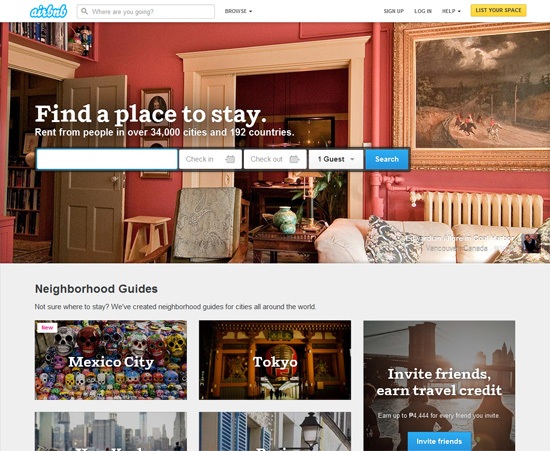
    <p><strong>Airbnb</strong> has a good design, not because the site is on all the <a href="http://sixrevisions.com/web_design/16-best-web-design-galleries-for-inspiration/" title="Best Web Design Galleries for Inspiration" rel="nofollow external" class="bo">popular web design galleries</a>, but because of the company’s ability to reliably and conveniently provide a new form of accommodation for travelers.</p>
    <p><img src="http://cdn.sixrevisions.com/0419-02_airbnb_good_design.jpg" width="550" height="451" style="max-width: 100%; height: auto;"></p>
    <p>Design is the creation of a plan for the construction of an object; a plan that represents how the product should be built.</p>
    <p>Design lies at the crossroads of art and science, but both roads are equally important, so design is also about how we deal with that challenge.</p>
    <p>A product’s visual appeal — its aesthetic attributes — is merely a part of its design.</p>
    <h3>Related Content</h3>
    <ul>
    <li><a href="http://sixrevisions.com/web_design/the-difference-between-good-design-and-great-design/" rel="nofollow external" class="bo">The Difference Between Good Design and Great Design</a></li>
    <li><a href="http://sixrevisions.com/web_design/stay-passionate-motivated/" rel="nofollow external" class="bo">Staying Passionate and Motivated as a Web Designer</a></li>
    <li><a href="http://sixrevisions.com/user-interface/when-flat-design-falls-flat/" rel="nofollow external" class="bo">When Flat Design Falls Flat</a></li>
    </ul>
    <h3>About the Author</h3>
    <p><img src="http://cdn.sixrevisions.com/authors/marcin_treder_small.jpg" alt="" width="80" height="80" style="max-width: 100%; height: auto;"><strong>Marcin Treder</strong> is a UX designer, the CEO of <a href="http://uxpin.com/" rel="nofollow external" class="bo">UXPin</a>, and author of several UX design books (such as <em><a href="http://uxpin.com/ux-design-for-startups.html" rel="nofollow external" class="bo">UX Design for Startups</a></em>).</p>
    <p>The post <a href="http://sixrevisions.com/ideas/what-design-really-means/" rel="nofollow external" class="bo">What Design Really Means</a> appeared first on <a href="http://sixrevisions.com" rel="nofollow external" class="bo">Six Revisions</a>.</p>
    </div>
]]>
</Body>
<Summary>Design is  an imprecise term. Especially when used in regular language.   For instance, someone who believes "design" is quantified solely by a product’s visual appeal might be disappointed when...</Summary>
<Website>http://feedproxy.google.com/~r/SixRevisions/~3/BwGhivzUl1Y/</Website>
<TrackingUrl>https://my3.my.umbc.edu/api/v0/pixel/news/43940/guest@my.umbc.edu/bdfc8174fb6d2a6eac7aadb9d2345920/api/pixel</TrackingUrl>
<Tag>css</Tag>
<Tag>database</Tag>
<Tag>design</Tag>
<Tag>development</Tag>
<Tag>html</Tag>
<Tag>ideas</Tag>
<Tag>javascript</Tag>
<Tag>mysql</Tag>
<Tag>sql</Tag>
<Tag>web</Tag>
<Group token="retired-583">Web Developer - Build Group</Group>
<GroupUrl>https://my3.my.umbc.edu/groups/retired-583</GroupUrl>
<AvatarUrl>https://assets3-my.umbc.edu/system/shared/avatars/groups/000/000/583/fc60f5d7abc2e080599bb6dc465db54d/xsmall.png?1363101197</AvatarUrl>
<AvatarUrl size="original">https://assets4-my.umbc.edu/system/shared/avatars/groups/000/000/583/fc60f5d7abc2e080599bb6dc465db54d/original.jpg?1363101197</AvatarUrl>
<AvatarUrl size="xxlarge">https://assets4-my.umbc.edu/system/shared/avatars/groups/000/000/583/fc60f5d7abc2e080599bb6dc465db54d/xxlarge.png?1363101197</AvatarUrl>
<AvatarUrl size="xlarge">https://assets4-my.umbc.edu/system/shared/avatars/groups/000/000/583/fc60f5d7abc2e080599bb6dc465db54d/xlarge.png?1363101197</AvatarUrl>
<AvatarUrl size="large">https://assets3-my.umbc.edu/system/shared/avatars/groups/000/000/583/fc60f5d7abc2e080599bb6dc465db54d/large.png?1363101197</AvatarUrl>
<AvatarUrl size="medium">https://assets3-my.umbc.edu/system/shared/avatars/groups/000/000/583/fc60f5d7abc2e080599bb6dc465db54d/medium.png?1363101197</AvatarUrl>
<AvatarUrl size="small">https://assets4-my.umbc.edu/system/shared/avatars/groups/000/000/583/fc60f5d7abc2e080599bb6dc465db54d/small.png?1363101197</AvatarUrl>
<AvatarUrl size="xsmall">https://assets3-my.umbc.edu/system/shared/avatars/groups/000/000/583/fc60f5d7abc2e080599bb6dc465db54d/xsmall.png?1363101197</AvatarUrl>
<AvatarUrl size="xxsmall">https://assets4-my.umbc.edu/system/shared/avatars/groups/000/000/583/fc60f5d7abc2e080599bb6dc465db54d/xxsmall.png?1363101197</AvatarUrl>
<Sponsor>Web Developer - Build Group</Sponsor>
<PawCount>0</PawCount>
<CommentCount>0</CommentCount>
<CommentsAllowed>true</CommentsAllowed>
<PostedAt>Mon, 28 Apr 2014 06:00:27 -0400</PostedAt>
<EditAt>Mon, 28 Apr 2014 06:00:27 -0400</EditAt>
</NewsItem>

<NewsItem contentIssues="true" id="43939" important="false" status="posted" url="https://my3.my.umbc.edu/posts/43939">
<Title>6 apps to supercharge your prototyping</Title>
<Body>
<![CDATA[
    <div class="html-content">
    <p><img alt="thumbnail" src="http://netdna.webdesignerdepot.com/uploads/2014/04/thumbnail14.jpg" width="200" height="160" style="max-width: 100%; height: auto;">Being a user centered designer means a significant portion of my responsibility involves prototyping concepts to gain feedback for various designs that solve actual business problems. That means iteratively sketching or wireframing ideas early and often in the design process to generate conversation, and more importantly, to gather feedback from stakeholders.</p> <p>My goal is to ultimately mesh user goals with business goals for a win-win situation that is mutually beneficial from both perspectives. Therefore, I’m always interested in any tool that enables me to not only be more effficient, but more effective in that process.</p> <p>If what I’ve said so far begins to resonate, you may be interested in the following prototyping tools that can assist you in walking your stakeholders through your vision on the way to your final product.</p> <h1>iMockups for iPad ($7)</h1> <p>If you have an iPad and prefer working on it, <a href="http://www.endloop.ca/imockups/" rel="nofollow external" class="bo">iMockups</a> may be worth a look. Although iMockups is designed exclusively for the iPad, it has a presentation view for sharing your vision with a larger audience by connecting your iPad to a big screen. You can place hotlinks on various elements in the wireframe for actual navigation from one wireframe to the next.</p> <p>If you’re a <a href="http://balsamiq.com/" rel="nofollow external" class="bo">Balsamiq Mockups</a> user or work with someone who is, it is convenient that iMockups files can be exported to Balsamiq BMML format. With that said though, collaboration and sharing is limited to emailing either editable project files or PNGs.</p> <p><a href="http://www.endloop.ca/imockups/" rel="nofollow external" class="bo"><img src="http://netdna.webdesignerdepot.com/uploads/2014/04/imockup.jpg" width="650" alt="6 apps to supercharge your prototyping" style="max-width: 100%; height: auto;"></a></p> <p> </p> <h1>Flinto ($20.00/month—30 day free trial)</h1> <p>From PNGs to prototypes in 45 seconds is <a href="https://www.flinto.com/" rel="nofollow external" class="bo">Flinto</a>‘s pitch. That said, however, you still need to create those PNGs outside of Flinto unlike some other prototyping services. Some people might look at that as a negative, but I actually like having the ability to use my favorite graphic editor instead of being confined to using yet another built-in interface that I have to learn how to use before I can do anything. And I don’t think I’m really stepping out on a limb when I say if you’re in the business of creating apps, you probably already have your preferred graphic editor ready to go at a moment’s notice.</p> <p>Where Flinto really excels is with its integrated Share &amp; Install feature. It allows you to share your prototype link with others who can install the prototype on their homescreen-both iOS and Android-to use like a live working app. You can make it as realistic as you want it to be with recreated iOS and Android transitions, fixed headers and footers, and screens that scroll vertically.</p> <p><a href="https://www.flinto.com/" rel="nofollow external" class="bo"><img src="http://netdna.webdesignerdepot.com/uploads/2014/04/flinto.jpg" width="650" alt="6 apps to supercharge your prototyping" style="max-width: 100%; height: auto;"></a></p> <p> </p> <h1>Briefs ($199—free trial)</h1> <p>Built for visual thinkers, <a href="http://giveabrief.com/" rel="nofollow external" class="bo">Briefs</a> provides a way for you describe your mobile app to others. You’ve got an app design in your head, and Briefs is here to help you get that idea into the heads of others, which includes more that just sharing a demo. Briefs for Mac allows you to see your design and even test it live on actual devices while you design. It uses native animations and interactions so you can gain a really strong appreciation for how it will feel. Like other competing services, you can apply hotspots to flat files that link between “pages” but Briefs gives you the flexibility to use either your own assets created outside of the app or you can build pages right in the app using their library of interface elements.</p> <p>Briefs separates itself from the rest when it comes time to share your work. Using what they call briefs, you package all of your mobile design timelines into one brief that can be viewed on the free Briefscase iOS app by clients or teammates on their own devices. But what’s especially nice is Briefs for Mac streamlines the exporting of your assets to your developer(s), where you can provide a detailed blueprint that represents your app design.</p> <p><a href="http://giveabrief.com/" rel="nofollow external" class="bo"><img src="http://netdna.webdesignerdepot.com/uploads/2014/04/briefs.jpg" width="650" alt="6 apps to supercharge your prototyping" style="max-width: 100%; height: auto;"></a></p> <p> </p> <h1>POP — Prototyping on Paper (free)</h1> <p>If you prefer the tried and true method of sketching wireframes on actual paper or the proverbial back of a napkin, of which I am personally a fan, then have we got an app for you. You literally sketch out your ideas, take pictures of them with your phone, and then upload them into <a href="https://popapp.in/" rel="nofollow external" class="bo">Prototyping on Paper</a> where you can then begin to stitch together your sketches using hotspots.</p> <p>Yes it’s basic, but that’s the beauty of it. You don’t need any complicated software, just a pencil and piece of paper. After you’ve created your scenario, you can share and demo your rough prototype on an iPhone, iPad, or even in your web browser.</p> <p><a href="https://popapp.in/" rel="nofollow external" class="bo"><img src="http://netdna.webdesignerdepot.com/uploads/2014/04/pop.jpg" width="650" alt="6 apps to supercharge your prototyping" style="max-width: 100%; height: auto;"></a></p> <p> </p> <h1>Marvel (free)</h1> <p>Running completely off DropBox, updating your prototype is as simple as updating your design files: <a href="https://marvelapp.com/" rel="nofollow external" class="bo">Marvel</a> automatically recognizes whenever you save changes to your assets and updates your prototype in the background without the nuisance of re-uploading your files. And unlike much of the competition, Marvel not only supports mobile (iOS and Android), but web and gaming devices as well.</p> <p>Another standout feature is while you could convert your Photoshop files to images (PNG, JPG, GIF), you don’t need to unless you want to, because Marvel supports PSD files and also claims it will be supporting Sketch soon.</p> <p><a href="https://marvelapp.com/" rel="nofollow external" class="bo"><img src="http://netdna.webdesignerdepot.com/uploads/2014/04/marvel1.jpg" width="650" alt="6 apps to supercharge your prototyping" style="max-width: 100%; height: auto;"></a></p> <p> </p> <h1>InVision (free–$22/month)</h1> <p>Built for agile iterations, the power of <a href="http://www.invisionapp.com/" rel="nofollow external" class="bo">InVision</a> is in its collaboration platform, making it a great choice for distributed teams. Obviously, like many other prototyping services and apps, you can create a clickable demo by linking up sketches, wireframes, or high fidelity designs. And such prototypes can be shared and viewed through a browser or a mobile device for an instant touchable demo. I don’t mean to gloss over these facts, but I just want to get to what sets it apart from other prototyping services.</p> <p>Unless you’re a one-person team designing apps only for yourself, then you’ve probably experienced some of the difficulties collaborating with clients and teammates, keeping track of who said what about what, and organizing all of the comments and recommendations in a digestible format.</p> <p>Any designer who has been buried in feedback and struggled to organize all of it will appreciate InVision’s design collaboration tool, LiveShare, which enables real time in-browser collaboration with no downloading required. LiveShare is much more than a screen sharing application as evidenced by visible name tag pointers for everyone in the meeting, voice chat, private conference line capabilities, text chat, sketch mode, and even whiteboard mode where everyone has a pencil with which to draw on a shared virtual whiteboard.</p> <p><img src="http://netdna.webdesignerdepot.com/uploads/2014/04/invision.jpg" width="650" alt="6 apps to supercharge your prototyping" style="max-width: 100%; height: auto;"></p> <p> </p> <p>Of course, there is no one size fits all prototyping tool. Many factors determine what might be right for you or your team.</p> <p><br><br> </p>
    <table width="100%"> <tbody>
    <tr> <td> <a href="http://www.mightydeals.com/deal/depositphotos.html?ref=inwidget" rel="nofollow external" class="bo"><strong>Massive Discounts on Stock Photos – 90% off!</strong></a> </td> <td> <a href="http://www.mightydeals.com/?ref=inwidget" rel="nofollow external" class="bo"><br> <img src="http://mightydeals.com/web/images/widget-logo.png" height="40" width="90" alt="6 apps to supercharge your prototyping" style="max-width: 100%; height: auto;"><br> </a> </td> </tr> </tbody>
    </table> <p><br> </p> <a href="http://www.webdesignerdepot.com/2014/04/6-apps-to-supercharge-your-prototyping/" rel="nofollow external" class="bo">Source</a> <br><br><br><a href="http://da.feedsportal.com/r/195505316225/u/49/f/661066/c/35285/s/39d31b90/sc/4/rc/1/rc.htm" rel="nofollow external" class="bo"><img src="http://da.feedsportal.com/r/195505316225/u/49/f/661066/c/35285/s/39d31b90/sc/4/rc/1/rc.img" style="max-width: 100%; height: auto;"></a><br><a href="http://da.feedsportal.com/r/195505316225/u/49/f/661066/c/35285/s/39d31b90/sc/4/rc/2/rc.htm" rel="nofollow external" class="bo"><img src="http://da.feedsportal.com/r/195505316225/u/49/f/661066/c/35285/s/39d31b90/sc/4/rc/2/rc.img" style="max-width: 100%; height: auto;"></a><br><a href="http://da.feedsportal.com/r/195505316225/u/49/f/661066/c/35285/s/39d31b90/sc/4/rc/3/rc.htm" rel="nofollow external" class="bo"><img src="http://da.feedsportal.com/r/195505316225/u/49/f/661066/c/35285/s/39d31b90/sc/4/rc/3/rc.img" style="max-width: 100%; height: auto;"></a><br><br><a href="http://da.feedsportal.com/r/195505316225/u/49/f/661066/c/35285/s/39d31b90/sc/4/a2.htm" rel="nofollow external" class="bo"><img src="http://da.feedsportal.com/r/195505316225/u/49/f/661066/c/35285/s/39d31b90/sc/4/a2.img" style="max-width: 100%; height: auto;"></a>
    </div>
]]>
</Body>
<Summary>Being a user centered designer means a significant portion of my responsibility involves prototyping concepts to gain feedback for various designs that solve actual business problems. That means...</Summary>
<Website>http://rss.feedsportal.com/c/35285/f/661066/s/39d31b90/sc/4/l/0L0Swebdesignerdepot0N0C20A140C0A40C60Eapps0Eto0Esupercharge0Eyour0Eprototyping0C/story01.htm</Website>
<TrackingUrl>https://my3.my.umbc.edu/api/v0/pixel/news/43939/guest@my.umbc.edu/995d802edbe882c6275727b08cd11f8e/api/pixel</TrackingUrl>
<Tag>art</Tag>
<Tag>css</Tag>
<Tag>design</Tag>
<Tag>design-resources</Tag>
<Tag>development</Tag>
<Tag>html</Tag>
<Tag>html5</Tag>
<Tag>illustrator</Tag>
<Tag>javascript</Tag>
<Tag>mysql</Tag>
<Tag>oracle</Tag>
<Tag>photoshop</Tag>
<Tag>php</Tag>
<Tag>planning-design</Tag>
<Tag>prototyping</Tag>
<Tag>prototyping-applications</Tag>
<Tag>prototyping-apps</Tag>
<Tag>resources</Tag>
<Tag>sql</Tag>
<Group token="retired-583">Web Developer - Build Group</Group>
<GroupUrl>https://my3.my.umbc.edu/groups/retired-583</GroupUrl>
<AvatarUrl>https://assets3-my.umbc.edu/system/shared/avatars/groups/000/000/583/fc60f5d7abc2e080599bb6dc465db54d/xsmall.png?1363101197</AvatarUrl>
<AvatarUrl size="original">https://assets4-my.umbc.edu/system/shared/avatars/groups/000/000/583/fc60f5d7abc2e080599bb6dc465db54d/original.jpg?1363101197</AvatarUrl>
<AvatarUrl size="xxlarge">https://assets4-my.umbc.edu/system/shared/avatars/groups/000/000/583/fc60f5d7abc2e080599bb6dc465db54d/xxlarge.png?1363101197</AvatarUrl>
<AvatarUrl size="xlarge">https://assets4-my.umbc.edu/system/shared/avatars/groups/000/000/583/fc60f5d7abc2e080599bb6dc465db54d/xlarge.png?1363101197</AvatarUrl>
<AvatarUrl size="large">https://assets3-my.umbc.edu/system/shared/avatars/groups/000/000/583/fc60f5d7abc2e080599bb6dc465db54d/large.png?1363101197</AvatarUrl>
<AvatarUrl size="medium">https://assets3-my.umbc.edu/system/shared/avatars/groups/000/000/583/fc60f5d7abc2e080599bb6dc465db54d/medium.png?1363101197</AvatarUrl>
<AvatarUrl size="small">https://assets4-my.umbc.edu/system/shared/avatars/groups/000/000/583/fc60f5d7abc2e080599bb6dc465db54d/small.png?1363101197</AvatarUrl>
<AvatarUrl size="xsmall">https://assets3-my.umbc.edu/system/shared/avatars/groups/000/000/583/fc60f5d7abc2e080599bb6dc465db54d/xsmall.png?1363101197</AvatarUrl>
<AvatarUrl size="xxsmall">https://assets4-my.umbc.edu/system/shared/avatars/groups/000/000/583/fc60f5d7abc2e080599bb6dc465db54d/xxsmall.png?1363101197</AvatarUrl>
<Sponsor>Web Developer - Build Group</Sponsor>
<PawCount>0</PawCount>
<CommentCount>0</CommentCount>
<CommentsAllowed>true</CommentsAllowed>
<PostedAt>Mon, 28 Apr 2014 04:15:36 -0400</PostedAt>
<EditAt>Mon, 28 Apr 2014 04:15:36 -0400</EditAt>
</NewsItem>

<NewsItem contentIssues="false" id="43937" important="false" status="posted" url="https://my3.my.umbc.edu/posts/43937">
<Title>B'PAR wins Graduate Student Organization of the Year Award</Title>
<Body>
<![CDATA[
    <div class="html-content">B'PAR (Baltimore Participatory Action Research) won this year's Graduate Student Organization of the Year Award. The organization's Executive Board consists of Diane Kuthy (LLC), Shawntay Stocks (LLC), Tahira Mahdi (Psychology), and Romy Hübler (LLC). Preminda Jacob (Visual Arts) is the faculty adviser. Congratulations! <br><br>GSA would be delighted to have faculty, staff, and students attend the GSA Awards Reception on Monday, May 12th. Click <a href="https://docs.google.com/forms/d/1Bi2uRdIArzE5SOK5V3NeJ4c2NwXUET3vy3Jo-qRU92M/viewform" rel="nofollow external" class="bo">here </a>to view all the details about the event and who else will be honored. Everyone should RSVP by May 5th.</div>
]]>
</Body>
<Summary>B'PAR (Baltimore Participatory Action Research) won this year's Graduate Student Organization of the Year Award. The organization's Executive Board consists of Diane Kuthy (LLC), Shawntay Stocks...</Summary>
<TrackingUrl>https://my3.my.umbc.edu/api/v0/pixel/news/43937/guest@my.umbc.edu/be24cebae92bcd98720397db9ecb3fbc/api/pixel</TrackingUrl>
<Group token="llc">Language, Literacy and Culture Doctoral Program</Group>
<GroupUrl>https://my3.my.umbc.edu/groups/llc</GroupUrl>
<AvatarUrl>https://assets4-my.umbc.edu/system/shared/avatars/groups/000/000/537/e594b22cf15b445f7476775aa508e9c3/xsmall.png?1375383725</AvatarUrl>
<AvatarUrl size="original">https://assets4-my.umbc.edu/system/shared/avatars/groups/000/000/537/e594b22cf15b445f7476775aa508e9c3/original.jpg?1375383725</AvatarUrl>
<AvatarUrl size="xxlarge">https://assets3-my.umbc.edu/system/shared/avatars/groups/000/000/537/e594b22cf15b445f7476775aa508e9c3/xxlarge.png?1375383725</AvatarUrl>
<AvatarUrl size="xlarge">https://assets1-my.umbc.edu/system/shared/avatars/groups/000/000/537/e594b22cf15b445f7476775aa508e9c3/xlarge.png?1375383725</AvatarUrl>
<AvatarUrl size="large">https://assets4-my.umbc.edu/system/shared/avatars/groups/000/000/537/e594b22cf15b445f7476775aa508e9c3/large.png?1375383725</AvatarUrl>
<AvatarUrl size="medium">https://assets1-my.umbc.edu/system/shared/avatars/groups/000/000/537/e594b22cf15b445f7476775aa508e9c3/medium.png?1375383725</AvatarUrl>
<AvatarUrl size="small">https://assets1-my.umbc.edu/system/shared/avatars/groups/000/000/537/e594b22cf15b445f7476775aa508e9c3/small.png?1375383725</AvatarUrl>
<AvatarUrl size="xsmall">https://assets4-my.umbc.edu/system/shared/avatars/groups/000/000/537/e594b22cf15b445f7476775aa508e9c3/xsmall.png?1375383725</AvatarUrl>
<AvatarUrl size="xxsmall">https://assets2-my.umbc.edu/system/shared/avatars/groups/000/000/537/e594b22cf15b445f7476775aa508e9c3/xxsmall.png?1375383725</AvatarUrl>
<Sponsor>Language, Literacy and Culture Doctoral Program</Sponsor>
<PawCount>0</PawCount>
<CommentCount>0</CommentCount>
<CommentsAllowed>true</CommentsAllowed>
<PostedAt>Sun, 27 Apr 2014 22:12:33 -0400</PostedAt>
</NewsItem>

<NewsItem contentIssues="false" id="43938" important="false" status="posted" url="https://my3.my.umbc.edu/posts/43938">
<Title>Working with Cross-Origin Resource Sharing APIs in HTML5</Title>
<Body>
<![CDATA[
    <div class="html-content"><p>This article walks web developers through the basics of cross-origin resource sharing in HTML5.</p></div>
]]>
</Body>
<Summary>This article walks web developers through the basics of cross-origin resource sharing in HTML5.</Summary>
<Website>http://www.htmlgoodies.com/HTML5/other/working-with-cross-origin-resource-sharing-apis-in-html5.html</Website>
<TrackingUrl>https://my3.my.umbc.edu/api/v0/pixel/news/43938/guest@my.umbc.edu/c3aa3e19568e60f3de52871a9d5f2fd6/api/pixel</TrackingUrl>
<Tag>html</Tag>
<Tag>htmlgoodies</Tag>
<Tag>learning</Tag>
<Group token="retired-583">Web Developer - Build Group</Group>
<GroupUrl>https://my3.my.umbc.edu/groups/retired-583</GroupUrl>
<AvatarUrl>https://assets3-my.umbc.edu/system/shared/avatars/groups/000/000/583/fc60f5d7abc2e080599bb6dc465db54d/xsmall.png?1363101197</AvatarUrl>
<AvatarUrl size="original">https://assets4-my.umbc.edu/system/shared/avatars/groups/000/000/583/fc60f5d7abc2e080599bb6dc465db54d/original.jpg?1363101197</AvatarUrl>
<AvatarUrl size="xxlarge">https://assets4-my.umbc.edu/system/shared/avatars/groups/000/000/583/fc60f5d7abc2e080599bb6dc465db54d/xxlarge.png?1363101197</AvatarUrl>
<AvatarUrl size="xlarge">https://assets4-my.umbc.edu/system/shared/avatars/groups/000/000/583/fc60f5d7abc2e080599bb6dc465db54d/xlarge.png?1363101197</AvatarUrl>
<AvatarUrl size="large">https://assets3-my.umbc.edu/system/shared/avatars/groups/000/000/583/fc60f5d7abc2e080599bb6dc465db54d/large.png?1363101197</AvatarUrl>
<AvatarUrl size="medium">https://assets3-my.umbc.edu/system/shared/avatars/groups/000/000/583/fc60f5d7abc2e080599bb6dc465db54d/medium.png?1363101197</AvatarUrl>
<AvatarUrl size="small">https://assets4-my.umbc.edu/system/shared/avatars/groups/000/000/583/fc60f5d7abc2e080599bb6dc465db54d/small.png?1363101197</AvatarUrl>
<AvatarUrl size="xsmall">https://assets3-my.umbc.edu/system/shared/avatars/groups/000/000/583/fc60f5d7abc2e080599bb6dc465db54d/xsmall.png?1363101197</AvatarUrl>
<AvatarUrl size="xxsmall">https://assets4-my.umbc.edu/system/shared/avatars/groups/000/000/583/fc60f5d7abc2e080599bb6dc465db54d/xxsmall.png?1363101197</AvatarUrl>
<Sponsor>Web Developer - Build Group</Sponsor>
<PawCount>0</PawCount>
<CommentCount>0</CommentCount>
<CommentsAllowed>true</CommentsAllowed>
<PostedAt>Sun, 27 Apr 2014 22:00:00 -0400</PostedAt>
</NewsItem>

</News>