As Slumping Demand Persists, IBM Revenue Falls Short of Expectations
The world’s largest technology services company reported its seventh straight quarterly decline in revenue that also fell short of estimates, hurt by lower demand for its services and hardware.


 ]]>
The world’s largest technology services company reported its seventh straight quarterly decline in revenue that also fell short of estimates, hurt by lower demand for its services and hardware.
http://www.nytimes.com/reuters/2014/01/21/business/21reuters-ibm-results.html?partner=rss&emc=rss
https://my3.my.umbc.edu/api/v0/pixel/news/40454/guest@my.umbc.edu/ef69197dd50196ec24bbeb45ef982c04/api/pixel
international-business-machines-corporation-ibm-nyse
new
technology
thomson-reuters-corporation-tri-nyse
york
Web Developer - Build Group
https://my3.my.umbc.edu/groups/retired-583
https://assets3-my.umbc.edu/system/shared/avatars/groups/000/000/583/fc60f5d7abc2e080599bb6dc465db54d/xsmall.png?1363101197
https://assets4-my.umbc.edu/system/shared/avatars/groups/000/000/583/fc60f5d7abc2e080599bb6dc465db54d/original.jpg?1363101197
https://assets4-my.umbc.edu/system/shared/avatars/groups/000/000/583/fc60f5d7abc2e080599bb6dc465db54d/xxlarge.png?1363101197
https://assets4-my.umbc.edu/system/shared/avatars/groups/000/000/583/fc60f5d7abc2e080599bb6dc465db54d/xlarge.png?1363101197
https://assets3-my.umbc.edu/system/shared/avatars/groups/000/000/583/fc60f5d7abc2e080599bb6dc465db54d/large.png?1363101197
https://assets3-my.umbc.edu/system/shared/avatars/groups/000/000/583/fc60f5d7abc2e080599bb6dc465db54d/medium.png?1363101197
https://assets4-my.umbc.edu/system/shared/avatars/groups/000/000/583/fc60f5d7abc2e080599bb6dc465db54d/small.png?1363101197
https://assets3-my.umbc.edu/system/shared/avatars/groups/000/000/583/fc60f5d7abc2e080599bb6dc465db54d/xsmall.png?1363101197
https://assets4-my.umbc.edu/system/shared/avatars/groups/000/000/583/fc60f5d7abc2e080599bb6dc465db54d/xxsmall.png?1363101197
Web Developer - Build Group
0
0
true
Tue, 21 Jan 2014 16:35:42 -0500
Tue, 21 Jan 2014 20:08:41 -0500
Gadgetwise: Review: Stratus Game Controller From SteelSeries
The Stratus game controller from SteelSeries is a stand-alone gadget that connects to mobile devices via Bluetooth.
]]>
The world’s largest technology services company reported its seventh straight quarterly decline in revenue that also fell short of estimates, hurt by lower demand for its services and hardware.
http://www.nytimes.com/reuters/2014/01/21/business/21reuters-ibm-results.html?partner=rss&emc=rss
https://my3.my.umbc.edu/api/v0/pixel/news/40454/guest@my.umbc.edu/ef69197dd50196ec24bbeb45ef982c04/api/pixel
international-business-machines-corporation-ibm-nyse
new
technology
thomson-reuters-corporation-tri-nyse
york
Web Developer - Build Group
https://my3.my.umbc.edu/groups/retired-583
https://assets3-my.umbc.edu/system/shared/avatars/groups/000/000/583/fc60f5d7abc2e080599bb6dc465db54d/xsmall.png?1363101197
https://assets4-my.umbc.edu/system/shared/avatars/groups/000/000/583/fc60f5d7abc2e080599bb6dc465db54d/original.jpg?1363101197
https://assets4-my.umbc.edu/system/shared/avatars/groups/000/000/583/fc60f5d7abc2e080599bb6dc465db54d/xxlarge.png?1363101197
https://assets4-my.umbc.edu/system/shared/avatars/groups/000/000/583/fc60f5d7abc2e080599bb6dc465db54d/xlarge.png?1363101197
https://assets3-my.umbc.edu/system/shared/avatars/groups/000/000/583/fc60f5d7abc2e080599bb6dc465db54d/large.png?1363101197
https://assets3-my.umbc.edu/system/shared/avatars/groups/000/000/583/fc60f5d7abc2e080599bb6dc465db54d/medium.png?1363101197
https://assets4-my.umbc.edu/system/shared/avatars/groups/000/000/583/fc60f5d7abc2e080599bb6dc465db54d/small.png?1363101197
https://assets3-my.umbc.edu/system/shared/avatars/groups/000/000/583/fc60f5d7abc2e080599bb6dc465db54d/xsmall.png?1363101197
https://assets4-my.umbc.edu/system/shared/avatars/groups/000/000/583/fc60f5d7abc2e080599bb6dc465db54d/xxsmall.png?1363101197
Web Developer - Build Group
0
0
true
Tue, 21 Jan 2014 16:35:42 -0500
Tue, 21 Jan 2014 20:08:41 -0500
Gadgetwise: Review: Stratus Game Controller From SteelSeries
The Stratus game controller from SteelSeries is a stand-alone gadget that connects to mobile devices via Bluetooth.


 ]]>
The Stratus game controller from SteelSeries is a stand-alone gadget that connects to mobile devices via Bluetooth.
http://www.nytimes.com/2014/01/23/technology/personaltech/review-stratus-game-controller-from-steelseries.html?partner=rss&emc=rss
https://my3.my.umbc.edu/api/v0/pixel/news/40452/guest@my.umbc.edu/4fce622f78b1ad203203f1776d8a72ce/api/pixel
apple-inc-aapl-nasdaq
mobile-applications
new
technology
york
Web Developer - Build Group
https://my3.my.umbc.edu/groups/retired-583
https://assets3-my.umbc.edu/system/shared/avatars/groups/000/000/583/fc60f5d7abc2e080599bb6dc465db54d/xsmall.png?1363101197
https://assets4-my.umbc.edu/system/shared/avatars/groups/000/000/583/fc60f5d7abc2e080599bb6dc465db54d/original.jpg?1363101197
https://assets4-my.umbc.edu/system/shared/avatars/groups/000/000/583/fc60f5d7abc2e080599bb6dc465db54d/xxlarge.png?1363101197
https://assets4-my.umbc.edu/system/shared/avatars/groups/000/000/583/fc60f5d7abc2e080599bb6dc465db54d/xlarge.png?1363101197
https://assets3-my.umbc.edu/system/shared/avatars/groups/000/000/583/fc60f5d7abc2e080599bb6dc465db54d/large.png?1363101197
https://assets3-my.umbc.edu/system/shared/avatars/groups/000/000/583/fc60f5d7abc2e080599bb6dc465db54d/medium.png?1363101197
https://assets4-my.umbc.edu/system/shared/avatars/groups/000/000/583/fc60f5d7abc2e080599bb6dc465db54d/small.png?1363101197
https://assets3-my.umbc.edu/system/shared/avatars/groups/000/000/583/fc60f5d7abc2e080599bb6dc465db54d/xsmall.png?1363101197
https://assets4-my.umbc.edu/system/shared/avatars/groups/000/000/583/fc60f5d7abc2e080599bb6dc465db54d/xxsmall.png?1363101197
Web Developer - Build Group
0
0
true
Tue, 21 Jan 2014 16:09:22 -0500
Wed, 22 Jan 2014 17:33:52 -0500
Gadgetwise: Review: The Philips SlimStyle LED Lamp
The Philips SlimStyle looks like a lollipop, but it meets Energy Start requirements and costs less than $10.
]]>
The Stratus game controller from SteelSeries is a stand-alone gadget that connects to mobile devices via Bluetooth.
http://www.nytimes.com/2014/01/23/technology/personaltech/review-stratus-game-controller-from-steelseries.html?partner=rss&emc=rss
https://my3.my.umbc.edu/api/v0/pixel/news/40452/guest@my.umbc.edu/4fce622f78b1ad203203f1776d8a72ce/api/pixel
apple-inc-aapl-nasdaq
mobile-applications
new
technology
york
Web Developer - Build Group
https://my3.my.umbc.edu/groups/retired-583
https://assets3-my.umbc.edu/system/shared/avatars/groups/000/000/583/fc60f5d7abc2e080599bb6dc465db54d/xsmall.png?1363101197
https://assets4-my.umbc.edu/system/shared/avatars/groups/000/000/583/fc60f5d7abc2e080599bb6dc465db54d/original.jpg?1363101197
https://assets4-my.umbc.edu/system/shared/avatars/groups/000/000/583/fc60f5d7abc2e080599bb6dc465db54d/xxlarge.png?1363101197
https://assets4-my.umbc.edu/system/shared/avatars/groups/000/000/583/fc60f5d7abc2e080599bb6dc465db54d/xlarge.png?1363101197
https://assets3-my.umbc.edu/system/shared/avatars/groups/000/000/583/fc60f5d7abc2e080599bb6dc465db54d/large.png?1363101197
https://assets3-my.umbc.edu/system/shared/avatars/groups/000/000/583/fc60f5d7abc2e080599bb6dc465db54d/medium.png?1363101197
https://assets4-my.umbc.edu/system/shared/avatars/groups/000/000/583/fc60f5d7abc2e080599bb6dc465db54d/small.png?1363101197
https://assets3-my.umbc.edu/system/shared/avatars/groups/000/000/583/fc60f5d7abc2e080599bb6dc465db54d/xsmall.png?1363101197
https://assets4-my.umbc.edu/system/shared/avatars/groups/000/000/583/fc60f5d7abc2e080599bb6dc465db54d/xxsmall.png?1363101197
Web Developer - Build Group
0
0
true
Tue, 21 Jan 2014 16:09:22 -0500
Wed, 22 Jan 2014 17:33:52 -0500
Gadgetwise: Review: The Philips SlimStyle LED Lamp
The Philips SlimStyle looks like a lollipop, but it meets Energy Start requirements and costs less than $10.


 ]]>
The Philips SlimStyle looks like a lollipop, but it meets Energy Start requirements and costs less than $10.
http://www.nytimes.com/2014/01/23/technology/personaltech/review-the-philips-slimstyle-led-lamp.html?partner=rss&emc=rss
https://my3.my.umbc.edu/api/v0/pixel/news/40450/guest@my.umbc.edu/3a6a80d395dd3c3d790d9b3a5c0b1251/api/pixel
home-depot-inc-hd-nyse
koninklijke-philips-electronics-nv
light-emitting-diodes
lighting
new
technology
york
Web Developer - Build Group
https://my3.my.umbc.edu/groups/retired-583
https://assets3-my.umbc.edu/system/shared/avatars/groups/000/000/583/fc60f5d7abc2e080599bb6dc465db54d/xsmall.png?1363101197
https://assets4-my.umbc.edu/system/shared/avatars/groups/000/000/583/fc60f5d7abc2e080599bb6dc465db54d/original.jpg?1363101197
https://assets4-my.umbc.edu/system/shared/avatars/groups/000/000/583/fc60f5d7abc2e080599bb6dc465db54d/xxlarge.png?1363101197
https://assets4-my.umbc.edu/system/shared/avatars/groups/000/000/583/fc60f5d7abc2e080599bb6dc465db54d/xlarge.png?1363101197
https://assets3-my.umbc.edu/system/shared/avatars/groups/000/000/583/fc60f5d7abc2e080599bb6dc465db54d/large.png?1363101197
https://assets3-my.umbc.edu/system/shared/avatars/groups/000/000/583/fc60f5d7abc2e080599bb6dc465db54d/medium.png?1363101197
https://assets4-my.umbc.edu/system/shared/avatars/groups/000/000/583/fc60f5d7abc2e080599bb6dc465db54d/small.png?1363101197
https://assets3-my.umbc.edu/system/shared/avatars/groups/000/000/583/fc60f5d7abc2e080599bb6dc465db54d/xsmall.png?1363101197
https://assets4-my.umbc.edu/system/shared/avatars/groups/000/000/583/fc60f5d7abc2e080599bb6dc465db54d/xxsmall.png?1363101197
Web Developer - Build Group
0
0
true
Tue, 21 Jan 2014 15:05:13 -0500
Working With LESS and the Chrome DevTools
]]>
The Philips SlimStyle looks like a lollipop, but it meets Energy Start requirements and costs less than $10.
http://www.nytimes.com/2014/01/23/technology/personaltech/review-the-philips-slimstyle-led-lamp.html?partner=rss&emc=rss
https://my3.my.umbc.edu/api/v0/pixel/news/40450/guest@my.umbc.edu/3a6a80d395dd3c3d790d9b3a5c0b1251/api/pixel
home-depot-inc-hd-nyse
koninklijke-philips-electronics-nv
light-emitting-diodes
lighting
new
technology
york
Web Developer - Build Group
https://my3.my.umbc.edu/groups/retired-583
https://assets3-my.umbc.edu/system/shared/avatars/groups/000/000/583/fc60f5d7abc2e080599bb6dc465db54d/xsmall.png?1363101197
https://assets4-my.umbc.edu/system/shared/avatars/groups/000/000/583/fc60f5d7abc2e080599bb6dc465db54d/original.jpg?1363101197
https://assets4-my.umbc.edu/system/shared/avatars/groups/000/000/583/fc60f5d7abc2e080599bb6dc465db54d/xxlarge.png?1363101197
https://assets4-my.umbc.edu/system/shared/avatars/groups/000/000/583/fc60f5d7abc2e080599bb6dc465db54d/xlarge.png?1363101197
https://assets3-my.umbc.edu/system/shared/avatars/groups/000/000/583/fc60f5d7abc2e080599bb6dc465db54d/large.png?1363101197
https://assets3-my.umbc.edu/system/shared/avatars/groups/000/000/583/fc60f5d7abc2e080599bb6dc465db54d/medium.png?1363101197
https://assets4-my.umbc.edu/system/shared/avatars/groups/000/000/583/fc60f5d7abc2e080599bb6dc465db54d/small.png?1363101197
https://assets3-my.umbc.edu/system/shared/avatars/groups/000/000/583/fc60f5d7abc2e080599bb6dc465db54d/xsmall.png?1363101197
https://assets4-my.umbc.edu/system/shared/avatars/groups/000/000/583/fc60f5d7abc2e080599bb6dc465db54d/xxsmall.png?1363101197
Web Developer - Build Group
0
0
true
Tue, 21 Jan 2014 15:05:13 -0500
Working With LESS and the Chrome DevTools

This is a complete tutorial to using LESS with Chrome’s DevTools. If you’ve used Sass with Chrome’s DevTools, you’ll most likely already be familiar with the concepts introduced here.
The Short Version
- LESS has very recently added support for Source Maps, so this is new and exciting!
- DevTools mapping means you can view LESS styles for all your relevant CSS.
- Edit LESS source files within DevTools and have them save to disk.
- Source Map adoption is improving with Sass, CoffeeScript, UglifyJS2 and more.
Introduction
Not too long ago, the Chrome DevTools added a number of IDE-like features (and continues to do so), one of which is the ability to understand the mapping between a compiled file and its corresponding source file. This is made possible thanks to Source Maps.

What This Tutorial Will Cover
- How to generate Source Maps from LESS files.
- Debugging LESS code through the DevTools.
- Authoring LESS code in the DevTools and seeing changes immediately via Workspaces and Grunt.
Everything mentioned here is available in Chrome Canary.
Configuring LESS for Source Maps
First thing’s first, install the latest (1.5.1 at the time of this writing) version of LESS through NPM (Source Maps arrived in 1.5.0):
$ npm install -g less
    $ lessc -v
    lessc 1.5.1 (LESS Compiler) [JavaScript]

At this point, you can run the LESS compiler in your terminal using the lessc command.

Create a new LESS file. For demonstration purposes, it’ll be kept short and simple.
@color: #4D926F;
    #header {
      color: @color;
    }
To turn the LESS file into a CSS file, it’s a simple case of running:
lessc header.less header.css

We now need a Source Map file. Create it with the -source-map flag.
lessc --source-map=header.map header.less header.css
Using the LESS code shown above, running this command produces a Source Map file with the following contents:
{"version":3,"file":"header.css","sources":["header.less"],"names":[],"mappings":"AAEQ;EACP,cAAA"}
Using DevTools to Map to LESS Source Files
In a world without Source Maps, DevTools would display styles originating from the compiled CSS. Line numbering would not be useful due to a mismatch between compiled CSS and the source CSS. With Source Maps, when inspecting a DOM node on the page, DevTools will automatically show the styles originating from the LESS source file.
Viewing a web page which references the previously mentioned header.css is now inspectable in a more meaningful way.

While holding Command (Control on Windows), click any property, value or selector to jump to the line of code in the corresponding LESS source file within the Sources panel.
Authoring Workflow With DevTools & LESS
Viewing LESS code in the DevTools is certainly useful, but integrating an authoring workflow can speed up your iteration cycle. The next step is to tell DevTools how the resources on a web page map to files on a file system. Enter: Workspaces.
Note: Workspaces are suitable for many projects, not just those using CSS preprocessors.
Workspaces
You might already be familiar with the Sources panel from an editing perspective. The general idea is that you have a file navigator in the sidebar where each file is typically a stylesheet, script or HTML resource that the web page has loaded.

Clicking on a resource displays the contents in the main panel. You may notice the similarity this has with the Resources panel, however there is at least one major difference: the Sources panel contains a live editor. Changes you make to stylesheets are applied to the page instantly and changes you make to scripts are injected back into the V8 engine and evaluated immediately. Not only does this work for remotely hosted files, but also for local ones with the added benefit of persisting your changes to a file.
Note: To make use of Workspaces, the following steps are only required once per project.
Step 1.
Open up a local webpage and add its corresponding folder on your file system to the workspace by right-clicking in the Sources panel sidebar and selecting Add Folder to Workspace.

Step 2.
Allow DevTools access to the folder you’ve just added.

Step 3.
Your newly added folder will appear in the sidebar navigation.

Right-click on a file within a network resourced folder in the Sources panel (make sure it has an obvious mapping to a file on your file system) and select Map to File System Resource.

Step 4.
The first suggestion provided by DevTools is the correct one. It has noticed that the file on my file system (/Users/.../bootstrap.css) has the same name as a network resource file (http://localhost/.../bootstrap.css). Verify the mapping by selecting the correct resource.

DevTools now understands the mapping between filesystem resources and network resources. When you Command/Control-Click a selector from the Styles panel and end in the Sources panel, you’re now being shown your actual LESS source file. You can edit a file in the Sources panel and those changes will persist to disk when you Command/Control-S.
We’ve come all this way, so let’s complete this workflow by using a Grunt watch task to watch for changes made to the LESS files and then automatically compile our CSS and make a corresponding Source Map file.
Using Grunt to Watch & Compile LESS
With Workspaces set up, configure Grunt (or another tool of your choice) to watch for changes to LESS source files and compile a new CSS file (with a Source Map). DevTools will pick up this change automatically and apply any new styles to the page.
Note: Enable the Auto-reload generated CSS flag in the Settings panel to use this workflow.

Here is an outline of the automated steps which will occur:
- You save a change to a LESS file via DevTools.
- A watch task monitors LESS files for changes and then runs a LESS task.
- The LESS task compiles a new CSS file plus a Source Map file.
- DevTools injects the new CSS file onto the current page without a page refresh.
Here’s a simplified Gruntfile:
module.exports = function(grunt) {
        'use strict';

        require('matchdep').filterDev('grunt-!(cli)').forEach(grunt.loadNpmTasks);

        grunt.initConfig({
            less: {
                dev: {
                    options: {
                        sourceMap: true,
                        sourceMapFilename: 'bootstrap.map'
                    },
                    files: {
                        'less/bootstrap.css': 'less/bootstrap.less'
                    }
                }
            },
            watch: {
                all: {
                    files: ['less/**/*.less'],
                    tasks: ['less'],
                }
            }
        });

        grunt.registerTask('default', ['less', 'watch']);
    };
Note: The code snippet above comes from the demo repository.
After an npm install, running grunt in your terminal should show a watch task running.

DevTools already has write access to your development folder (through Workspaces). Command/Control-S your changes in the Sources panel to have DevTools overwrite the source LESS file with your new change, Grunt compiles a new CSS file which DevTools pulls in and applies to the page.
Conclusion
- During development and debugging, looking at your source file (rather than the compiled file) will almost always be more useful to you.
- For DevTools to understand source file mappings, it needs to be compatible with the Source Map v3 proposal which is up to the compilation tool to implement.
- Tools adopting Source Maps are improving. We have Sass, Compass, LESS, autoprefixer, UglifyJS2, CoffeeScript and more. There are
grunt-contrib-* tasks for most of these tools (Sass, Compass, LESS, autoprefixr, UglifyJS2, CoffeeScript) which tie in nicely with a livereload workflow.
- Viewing LESS files will work out of the box with DevTools. To actually edit files, try out Workspaces which gives you the ability to persist changes to disk.
Further Reading
Source Maps
- An Introduction to Source Maps on the Nettuts+.
LESS
Chrome DevTools
]]>
This is a complete tutorial to using LESS with Chrome’s DevTools. If you’ve used Sass with Chrome’s DevTools, you’ll most likely already be familiar with the concepts introduced here. The Short...
http://feedproxy.google.com/~r/nettuts/~3/0ss1gz9_E0g/
https://my3.my.umbc.edu/api/v0/pixel/news/40449/guest@my.umbc.edu/46c9bc9035ed32599f76e562524e6745/api/pixel
chrome-devtools
css
development
html
javascript
less
mysql
php
sql
tools-and-tips
tutorials
wed
Web Developer - Build Group
https://my3.my.umbc.edu/groups/retired-583
https://assets3-my.umbc.edu/system/shared/avatars/groups/000/000/583/fc60f5d7abc2e080599bb6dc465db54d/xsmall.png?1363101197
https://assets4-my.umbc.edu/system/shared/avatars/groups/000/000/583/fc60f5d7abc2e080599bb6dc465db54d/original.jpg?1363101197
https://assets4-my.umbc.edu/system/shared/avatars/groups/000/000/583/fc60f5d7abc2e080599bb6dc465db54d/xxlarge.png?1363101197
https://assets4-my.umbc.edu/system/shared/avatars/groups/000/000/583/fc60f5d7abc2e080599bb6dc465db54d/xlarge.png?1363101197
https://assets3-my.umbc.edu/system/shared/avatars/groups/000/000/583/fc60f5d7abc2e080599bb6dc465db54d/large.png?1363101197
https://assets3-my.umbc.edu/system/shared/avatars/groups/000/000/583/fc60f5d7abc2e080599bb6dc465db54d/medium.png?1363101197
https://assets4-my.umbc.edu/system/shared/avatars/groups/000/000/583/fc60f5d7abc2e080599bb6dc465db54d/small.png?1363101197
https://assets3-my.umbc.edu/system/shared/avatars/groups/000/000/583/fc60f5d7abc2e080599bb6dc465db54d/xsmall.png?1363101197
https://assets4-my.umbc.edu/system/shared/avatars/groups/000/000/583/fc60f5d7abc2e080599bb6dc465db54d/xxsmall.png?1363101197
Web Developer - Build Group
0
0
true
Tue, 21 Jan 2014 14:50:23 -0500
Tue, 21 Jan 2014 14:50:23 -0500
Working With LESS and the Chrome DevTools
This is a complete tutorial to using LESS with Chrome's DevTools. If you've used Sass with Chrome's DevTools, you'll most likely already be familiar with the concepts introduced here.
The Short Version
- LESS has very recently added support for Source Maps, so this is new and exciting!
- DevTools mapping means you can view LESS styles for all your relevant CSS.
- Edit LESS source files within DevTools and have them save to disk.
- Source Map adoption is improving with Sass, CoffeeScript, UglifyJS2 and more.
Introduction
Not too long ago, the Chrome DevTools added a number of IDE-like features (and continues to do so), one of which is the ability to understand the mapping between a compiled file and its corresponding source file. This is made possible thanks to Source Maps.
What This Tutorial Will Cover
- How to generate Source Maps from LESS files.
- Debugging LESS code through the DevTools.
- Authoring LESS code in the DevTools and seeing changes immediately via Workspaces and Grunt.
Everything mentioned here is available in Chrome Canary.
Configuring LESS for Source Maps
First thing's first, install the latest (1.5.1 at the time of this writing) version of LESS through NPM (Source Maps arrived in 1.5.0):
$ npm install -g less
    $ lessc -v
    lessc 1.5.1 (LESS Compiler) [JavaScript]
At this point, you can run the LESS compiler in your terminal using the lessc command.
Create a new LESS file. For demonstration purposes, it'll be kept short and simple.
@color: #4D926F;
    #header {
      color: @color;
    }
To turn the LESS file into a CSS file, it's a simple case of running:
lessc header.less header.css
We now need a Source Map file. Create it with the -source-map flag.
lessc --source-map=header.map header.less header.css
Using the LESS code shown above, running this command produces a Source Map file with the following contents:
{"version":3,"file":"header.css","sources":["header.less"],"names":[],"mappings":"AAEQ;EACP,cAAA"}
Using DevTools to Map to LESS Source Files
In a world without Source Maps, DevTools would display styles originating from the compiled CSS. Line numbering would not be useful due to a mismatch between compiled CSS and the source CSS. With Source Maps, when inspecting a DOM node on the page, DevTools will automatically show the styles originating from the LESS source file.
Viewing a web page which references the previously mentioned header.css is now inspectable in a more meaningful way.
While holding Command (Control on Windows), click any property, value or selector to jump to the line of code in the corresponding LESS source file within the Sources panel.
Authoring Workflow With DevTools & LESS
Viewing LESS code in the DevTools is certainly useful, but integrating an authoring workflow can speed up your iteration cycle. The next step is to tell DevTools how the resources on a web page map to files on a file system. Enter: Workspaces.
Note: Workspaces are suitable for many projects, not just those using CSS preprocessors.
Workspaces
You might already be familiar with the Sources panel from an editing perspective. The general idea is that you have a file navigator in the sidebar where each file is typically a stylesheet, script or HTML resource that the web page has loaded.
Clicking on a resource displays the contents in the main panel. You may notice the similarity this has with the Resources panel, however there is at least one major difference: the Sources panel contains a live editor. Changes you make to stylesheets are applied to the page instantly and changes you make to scripts are injected back into the V8 engine and evaluated immediately. Not only does this work for remotely hosted files, but also for local ones with the added benefit of persisting your changes to a file.
Note: To make use of Workspaces, the following steps are only required once per project.
Step 1.
Open up a local webpage and add its corresponding folder on your file system to the workspace by right-clicking in the Sources panel sidebar and selecting Add Folder to Workspace.
Step 2.
Allow DevTools access to the folder you've just added.
Step 3.
Your newly added folder will appear in the sidebar navigation.
Right-click on a file within a network resourced folder in the Sources panel (make sure it has an obvious mapping to a file on your file system) and select Map to File System Resource.
Step 4.
The first suggestion provided by DevTools is the correct one. It has noticed that the file on my file system (/Users/.../bootstrap.css) has the same name as a network resource file (http://localhost/.../bootstrap.css). Verify the mapping by selecting the correct resource.
DevTools now understands the mapping between filesystem resources and network resources. When you Command/Control-Click a selector from the Styles panel and end in the Sources panel, you're now being shown your actual LESS source file. You can edit a file in the Sources panel and those changes will persist to disk when you Command/Control-S.
We've come all this way, so let's complete this workflow by using a Grunt watch task to watch for changes made to the LESS files and then automatically compile our CSS and make a corresponding Source Map file.
Using Grunt to Watch & Compile LESS
With Workspaces set up, configure Grunt (or another tool of your choice) to watch for changes to LESS source files and compile a new CSS file (with a Source Map). DevTools will pick up this change automatically and apply any new styles to the page.
Note: Enable the Auto-reload generated CSS flag in the Settings panel to use this workflow.
Here is an outline of the automated steps which will occur:
- You save a change to a LESS file via DevTools.
- A watch task monitors LESS files for changes and then runs a LESS task.
- The LESS task compiles a new CSS file plus a Source Map file.
- DevTools injects the new CSS file onto the current page without a page refresh.
Here's a simplified Gruntfile:
module.exports = function(grunt) {
        'use strict';

        require('matchdep').filterDev('grunt-!(cli)').forEach(grunt.loadNpmTasks);

        grunt.initConfig({
            less: {
                dev: {
                    options: {
                        sourceMap: true,
                        sourceMapFilename: 'bootstrap.map'
                    },
                    files: {
                        'less/bootstrap.css': 'less/bootstrap.less'
                    }
                }
            },
            watch: {
                all: {
                    files: ['less/**/*.less'],
                    tasks: ['less'],
                }
            }
        });

        grunt.registerTask('default', ['less', 'watch']);
    };
Note: The code snippet above comes from the demo repository.
After an npm install, running grunt in your terminal should show a watch task running.
DevTools already has write access to your development folder (through Workspaces). Command/Control-S your changes in the Sources panel to have DevTools overwrite the source LESS file with your new change, Grunt compiles a new CSS file which DevTools pulls in and applies to the page.
Conclusion
- During development and debugging, looking at your source file (rather than the compiled file) will almost always be more useful to you.
- For DevTools to understand source file mappings, it needs to be compatible with the Source Map v3 proposal which is up to the compilation tool to implement.
- Tools adopting Source Maps are improving. We have Sass, Compass, LESS, autoprefixer, UglifyJS2, CoffeeScript and more. There are
grunt-contrib-* tasks for most of these tools (Sass, Compass, LESS, autoprefixr, UglifyJS2, CoffeeScript) which tie in nicely with a livereload workflow.
- Viewing LESS files will work out of the box with DevTools. To actually edit files, try out Workspaces which gives you the ability to persist changes to disk.
Further Reading
Source Maps
- An Introduction to Source Maps on the Nettuts+.
LESS
Chrome DevTools
]]>
This is a complete tutorial to using LESS with Chrome's DevTools. If you've used Sass with Chrome's DevTools, you'll most likely already be familiar with the concepts introduced here. The...
http://code.tutsplus.com/tutorials/working-with-less-and-the-chrome-devtools--net-36636
https://my3.my.umbc.edu/api/v0/pixel/news/41060/guest@my.umbc.edu/6ff14ac385b852d0a446bb2bad0cc9d9/api/pixel
css
development
html
javascript
mysql
php
sql
wed
Web Developer - Build Group
https://my3.my.umbc.edu/groups/retired-583
https://assets3-my.umbc.edu/system/shared/avatars/groups/000/000/583/fc60f5d7abc2e080599bb6dc465db54d/xsmall.png?1363101197
https://assets4-my.umbc.edu/system/shared/avatars/groups/000/000/583/fc60f5d7abc2e080599bb6dc465db54d/original.jpg?1363101197
https://assets4-my.umbc.edu/system/shared/avatars/groups/000/000/583/fc60f5d7abc2e080599bb6dc465db54d/xxlarge.png?1363101197
https://assets4-my.umbc.edu/system/shared/avatars/groups/000/000/583/fc60f5d7abc2e080599bb6dc465db54d/xlarge.png?1363101197
https://assets3-my.umbc.edu/system/shared/avatars/groups/000/000/583/fc60f5d7abc2e080599bb6dc465db54d/large.png?1363101197
https://assets3-my.umbc.edu/system/shared/avatars/groups/000/000/583/fc60f5d7abc2e080599bb6dc465db54d/medium.png?1363101197
https://assets4-my.umbc.edu/system/shared/avatars/groups/000/000/583/fc60f5d7abc2e080599bb6dc465db54d/small.png?1363101197
https://assets3-my.umbc.edu/system/shared/avatars/groups/000/000/583/fc60f5d7abc2e080599bb6dc465db54d/xsmall.png?1363101197
https://assets4-my.umbc.edu/system/shared/avatars/groups/000/000/583/fc60f5d7abc2e080599bb6dc465db54d/xxsmall.png?1363101197
Web Developer - Build Group
0
0
true
Tue, 21 Jan 2014 14:50:23 -0500
Exploring the Battery Status API
With the rise in popularity of mobile web apps there’s been a big push to develop device APIs that allow web developers to reach out of the browser and access the underlying device hardware. We’ve seen the introduction of getUserMedia, allowing you to access the device camera; the device orientation API, enabling the development of interactive gaming experiences; and the touch events API.
In this post you’re going to learn about the Battery Status API, another member in the family of device APIs that are helping to expand the capabilities of mobile web apps.
The BatteryManager Object
The Battery Status API allows you to access information about the device battery, including it’s charging status and current power level. This information is exposed through the BatteryManager object.
The BatteryManager object can be accessed on the global navigator object.
var battery = navigator.battery || navigator.mozBattery;
Older versions of Firefox used the vendor-prefixed name mozBattery. The prefix was dropped in Firefox 16.
BatteryManager Properties
The BatteryManager object includes a number of read only properties that can be used to acquire information about the device’s power status.
Charging Status
The charging property is a boolean (true / false) value indicating whether the battery is currently charging or not.
navigator.battery.charging;
Charging Time
The chargingTime property represents the time in seconds until the battery is fully charged.
navigator.battery.chargingTime;
Discharging Time
The dischargingTime property represents the time in seconds until the battery is completely discharged and the system is suspended.
navigator.battery.dischargingTime;
Battery Level
The level property indicates the level of charge in the battery, represented as a number between 0 and 1.
navigator.battery.level;
BatteryManager Events
As well as these four properties, the BatteryManager also defines a number of events that can be used to monitor changes in battery status.
Changes in Charging State
Changes to the charging property can be monitored by listening for the chargingchange event. This will be fired whenever the charging state changes. For example, when the power cord is plugged in, or the battery is full.
navigator.battery.onchargingchange = function(event) {
        // A change in charging state occurred.
    };
Changes in Charging Time
The chargingtimechange event can be used to listen for changes in the chargingtime property.
navigator.battery.onchargingtimechange = function(event) {
        // The charging time was updated.
    };
Changes in Discharging Time
The dischargingtimechange event is fired when the dischargingtime property is updated.
navigator.battery.ondischargingtimechange = function(event) {
        // The discharging time was updated.
    };
Changes in Battery Level
The levelchange event is used to track changes to the level of charge in the battery.
navigator.battery.onlevelchange = function(event) {
        // The battery level changed.
    }
Browser Support for the Battery Status API
The Battery Status API is currently supported in Firefox 11+ (16+ for the the unprefixed API).
The API was previously implemented in Chromium but has since been removed after lengthy discussions around the specification and potential use cases.
An intent to implement was recently posted in the blink-dev discussion group, but there’s no indication of when (or if) this will make it into Blink.
As this API interacts with the underlying device hardware it’s not possible to create a polyfill which adds this functionality to other browsers.
The Battery Status API in Action
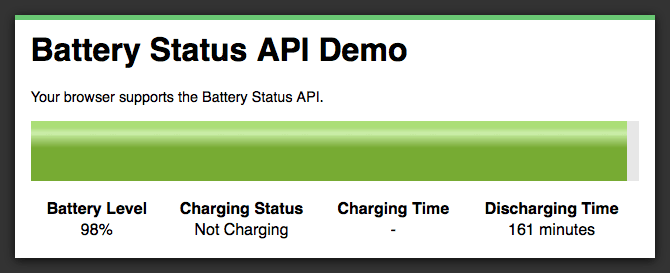
Battery Status API Demo
I’ve put together a simple demo app to show how you can use the events and properties of the BatteryManager object to create a battery monitor. Explore the source code on codepen to see how it works.
See the Demo View on CodePen Download the Code
Summary
In this post you’ve learned how to use the Battery Status API to monitor a device’s power usage. Having access to this information allows you to build applications that can adapt based on different power conditions. For example, you may choose not to run battery-intensive animations if the device isn’t plugged into a power source, or the battery is low.
Despite the somewhat troubled past this API has had in Chromium, I’m confident that we’ll see it reach more browsers in the future. Until then you can still use this API to progressively enhance the functionality of your web apps in Firefox.
What are your thoughts about the Battery Status API? Are you glad to see more device APIs being implemented, or is this something you’re not that bothered about?
Further Reading
The post Exploring the Battery Status API appeared first on Treehouse Blog.
]]>
With the rise in popularity of mobile web apps there’s been a big push to develop device APIs that allow web developers to reach out of the browser and access the underlying device hardware. We’ve...
http://feedproxy.google.com/~r/teamtreehouse/~3/DzqdDt1mWMo/exploring-battery-status-api
https://my3.my.umbc.edu/api/v0/pixel/news/40448/guest@my.umbc.edu/60e43b287fe4d75b533abcde2ccace52/api/pixel
android
battery-api
battery-status-api
code
css
design
development
html
html5
ios
javascript
responsive
web
web-apps
Web Developer - Build Group
https://my3.my.umbc.edu/groups/retired-583
https://assets3-my.umbc.edu/system/shared/avatars/groups/000/000/583/fc60f5d7abc2e080599bb6dc465db54d/xsmall.png?1363101197
https://assets4-my.umbc.edu/system/shared/avatars/groups/000/000/583/fc60f5d7abc2e080599bb6dc465db54d/original.jpg?1363101197
https://assets4-my.umbc.edu/system/shared/avatars/groups/000/000/583/fc60f5d7abc2e080599bb6dc465db54d/xxlarge.png?1363101197
https://assets4-my.umbc.edu/system/shared/avatars/groups/000/000/583/fc60f5d7abc2e080599bb6dc465db54d/xlarge.png?1363101197
https://assets3-my.umbc.edu/system/shared/avatars/groups/000/000/583/fc60f5d7abc2e080599bb6dc465db54d/large.png?1363101197
https://assets3-my.umbc.edu/system/shared/avatars/groups/000/000/583/fc60f5d7abc2e080599bb6dc465db54d/medium.png?1363101197
https://assets4-my.umbc.edu/system/shared/avatars/groups/000/000/583/fc60f5d7abc2e080599bb6dc465db54d/small.png?1363101197
https://assets3-my.umbc.edu/system/shared/avatars/groups/000/000/583/fc60f5d7abc2e080599bb6dc465db54d/xsmall.png?1363101197
https://assets4-my.umbc.edu/system/shared/avatars/groups/000/000/583/fc60f5d7abc2e080599bb6dc465db54d/xxsmall.png?1363101197
Web Developer - Build Group
0
0
true
Tue, 21 Jan 2014 14:47:46 -0500
King Caffeine: Our Lord and Master

We’ve always been warned about the dangers of coffee.
After all, caffeine is a drug (a stimulant!), and as a rule we tend to categorizes all drugs as “bad”.
But recently there’s been a study that can dispel those myths. John’s Hopkins came to the conclusion that caffeine can help with memory consolidation.
Best dose? 200 mg, as The Atlantic notes, about half of a Starbucks Venti coffee. But Mr. Mike Yassa, who may or may not have a burgeoning caffeine addiction, is not the only one who has noticed the positive effects of coffee consumption.
Several other studies (here and here) noted that, unlike urban legend, moderately consuming coffee does not necessarily contribute to dehydration. Oh, and by the way? Daily consumption of coffee or green tea decreases your risk of stroke. Even historians praise humanity’s ongoing caffeine addiction: It allowed us to “sober up” and create “a more productive society”
You hear that? Yeah, that’s the sound of college students everywhere rejoicing.
But don’t overdo it ’cause you know what else is important? Sleep.
]]>
We’ve always been warned about the dangers of coffee. After all, caffeine is a drug (a stimulant!), and as a rule we tend to categorizes all drugs as “bad”. But recently there’s been a study...
http://usdemocrazy.net/king-caffeine-our-lord-and-master/
https://my3.my.umbc.edu/api/v0/pixel/news/40447/guest@my.umbc.edu/ff7e39863b6c7bb9366ad3b1e6d5d3f5/api/pixel
current
democracy
news
politics
uncategorized
us
usdemocrazy
USDemocrazy
https://my3.my.umbc.edu/groups/retired-12
https://assets1-my.umbc.edu/system/shared/avatars/groups/000/000/012/f0935e4cd5920aa6c7c996a5ee53a70f/xsmall.png?1279120129
https://assets4-my.umbc.edu/system/shared/avatars/groups/000/000/012/f0935e4cd5920aa6c7c996a5ee53a70f/original.jpg?1279120129
https://assets3-my.umbc.edu/system/shared/avatars/groups/000/000/012/f0935e4cd5920aa6c7c996a5ee53a70f/xxlarge.png?1279120129
https://assets4-my.umbc.edu/system/shared/avatars/groups/000/000/012/f0935e4cd5920aa6c7c996a5ee53a70f/xlarge.png?1279120129
https://assets4-my.umbc.edu/system/shared/avatars/groups/000/000/012/f0935e4cd5920aa6c7c996a5ee53a70f/large.png?1279120129
https://assets1-my.umbc.edu/system/shared/avatars/groups/000/000/012/f0935e4cd5920aa6c7c996a5ee53a70f/medium.png?1279120129
https://assets2-my.umbc.edu/system/shared/avatars/groups/000/000/012/f0935e4cd5920aa6c7c996a5ee53a70f/small.png?1279120129
https://assets1-my.umbc.edu/system/shared/avatars/groups/000/000/012/f0935e4cd5920aa6c7c996a5ee53a70f/xsmall.png?1279120129
https://assets1-my.umbc.edu/system/shared/avatars/groups/000/000/012/f0935e4cd5920aa6c7c996a5ee53a70f/xxsmall.png?1279120129
USDemocrazy
27
6
true
Tue, 21 Jan 2014 14:23:51 -0500
Your Money Adviser: Data Breaches Are Scary, but Don’t Panic. React.
People, like those affected by the Target breach, who believe their data was stolen have many defenses, including simply changing their passwords.
]]>
People, like those affected by the Target breach, who believe their data was stolen have many defenses, including simply changing their passwords.
http://www.nytimes.com/2014/01/22/your-money/data-breaches-are-scary-but-dont-panic-react.html?partner=rss&emc=rss
https://my3.my.umbc.edu/api/v0/pixel/news/40472/guest@my.umbc.edu/9b0114d7d8752d2ba3563b4dff6bca1b/api/pixel
bank-of-america-corporation-bac-nyse
citigroup-inc-c-nyse
identity-theft
jpmorgan-chase-and-company-jpm-nyse
new
target-corporation-tgt-nyse
technology
york
Web Developer - Build Group
https://my3.my.umbc.edu/groups/retired-583
https://assets3-my.umbc.edu/system/shared/avatars/groups/000/000/583/fc60f5d7abc2e080599bb6dc465db54d/xsmall.png?1363101197
https://assets4-my.umbc.edu/system/shared/avatars/groups/000/000/583/fc60f5d7abc2e080599bb6dc465db54d/original.jpg?1363101197
https://assets4-my.umbc.edu/system/shared/avatars/groups/000/000/583/fc60f5d7abc2e080599bb6dc465db54d/xxlarge.png?1363101197
https://assets4-my.umbc.edu/system/shared/avatars/groups/000/000/583/fc60f5d7abc2e080599bb6dc465db54d/xlarge.png?1363101197
https://assets3-my.umbc.edu/system/shared/avatars/groups/000/000/583/fc60f5d7abc2e080599bb6dc465db54d/large.png?1363101197
https://assets3-my.umbc.edu/system/shared/avatars/groups/000/000/583/fc60f5d7abc2e080599bb6dc465db54d/medium.png?1363101197
https://assets4-my.umbc.edu/system/shared/avatars/groups/000/000/583/fc60f5d7abc2e080599bb6dc465db54d/small.png?1363101197
https://assets3-my.umbc.edu/system/shared/avatars/groups/000/000/583/fc60f5d7abc2e080599bb6dc465db54d/xsmall.png?1363101197
https://assets4-my.umbc.edu/system/shared/avatars/groups/000/000/583/fc60f5d7abc2e080599bb6dc465db54d/xxsmall.png?1363101197
Web Developer - Build Group
0
0
true
Tue, 21 Jan 2014 14:20:39 -0500
Verizon Revenue Climbs on Sturdy Mobile Growth
Verizon Communications said on Tuesday its quarterly revenue rose 3.4 percent, slightly ahead of Wall Street estimates as it added more wireless subscribers than expected.
]]>
Verizon Communications said on Tuesday its quarterly revenue rose 3.4 percent, slightly ahead of Wall Street estimates as it added more wireless subscribers than expected.
http://www.nytimes.com/reuters/2014/01/21/business/21reuters-verizon-earnings.html?partner=rss&emc=rss
https://my3.my.umbc.edu/api/v0/pixel/news/40451/guest@my.umbc.edu/24f627a7b7a7eb4b6719cc02c67daf3c/api/pixel
at-and-t-inc-t-nyse
intel-corporation-intc-nasdaq
new
sprint-nextel-corporation-s-nyse
t-mobile-us-inc-tmus-nyse
technology
thomson-reuters-corporation-tri-nyse
verizon-communications-inc-vz-nyse
vodafone-group-plc-vod-nasdaq
wells-fargo-and-company-wfc-nyse
york
Web Developer - Build Group
https://my3.my.umbc.edu/groups/retired-583
https://assets3-my.umbc.edu/system/shared/avatars/groups/000/000/583/fc60f5d7abc2e080599bb6dc465db54d/xsmall.png?1363101197
https://assets4-my.umbc.edu/system/shared/avatars/groups/000/000/583/fc60f5d7abc2e080599bb6dc465db54d/original.jpg?1363101197
https://assets4-my.umbc.edu/system/shared/avatars/groups/000/000/583/fc60f5d7abc2e080599bb6dc465db54d/xxlarge.png?1363101197
https://assets4-my.umbc.edu/system/shared/avatars/groups/000/000/583/fc60f5d7abc2e080599bb6dc465db54d/xlarge.png?1363101197
https://assets3-my.umbc.edu/system/shared/avatars/groups/000/000/583/fc60f5d7abc2e080599bb6dc465db54d/large.png?1363101197
https://assets3-my.umbc.edu/system/shared/avatars/groups/000/000/583/fc60f5d7abc2e080599bb6dc465db54d/medium.png?1363101197
https://assets4-my.umbc.edu/system/shared/avatars/groups/000/000/583/fc60f5d7abc2e080599bb6dc465db54d/small.png?1363101197
https://assets3-my.umbc.edu/system/shared/avatars/groups/000/000/583/fc60f5d7abc2e080599bb6dc465db54d/xsmall.png?1363101197
https://assets4-my.umbc.edu/system/shared/avatars/groups/000/000/583/fc60f5d7abc2e080599bb6dc465db54d/xxsmall.png?1363101197
Web Developer - Build Group
0
0
true
Tue, 21 Jan 2014 13:38:41 -0500
AFST Students: Earn a FREE ticket to see the Alvin Ailey Co!
Contact Dr. King-Meadows by January 31, 2014
AFST will give one FREE orchestra ticket to an AFST major or minor who is interested in attending the Saturday, February 8, 2014, performance of the Alvin Ailey American Dance Theater to be held at the John F. Kennedy Center for the Performing Arts. The ticket includes a pre-show reception at 6 pm sponsored by the Chapter of Black and Latino Alumni of UMBC. Show at 7:30 pm.
The captivating performances include Jirí Kylián's sensual and surprising Petite Mort; in-demand choreographer Aszure Barton's exhilarating D.C. premiere of LIFT; and Alvin Ailey's enduring classic, Revelations.
Students interested in the free ticket must contact Dr. King-Meadows (tkingmea@umbc.edu) by January 31st. Graduating seniors are especially encouraged to inquire about the free ticket. The ticket does not include transportation to or from the Kennedy Center. The free ticket represents an $85 value and is not transferable.
Award recipient must sit within the orchestra block assigned to the Chapter of Black and Latino Alumni. Award recipient must also submit to AFST a 500-word essay about their experiences at the dance performance no later than one week following the event.
]]>
AFST will give one FREE orchestra ticket to an AFST major or minor who is interested in attending the Saturday, February 8, 2014, performance of the Alvin Ailey American Dance Theater to be held...
https://my3.my.umbc.edu/api/v0/pixel/news/40445/guest@my.umbc.edu/7d848e6b02c5bc3d119df82198ca49cb/api/pixel
American Studies Department
https://my3.my.umbc.edu/groups/amst
https://assets1-my.umbc.edu/system/shared/avatars/groups/000/000/571/f1a862c4a5a31b363f857fee1e038fea/xsmall.png?1700059172
https://assets4-my.umbc.edu/system/shared/avatars/groups/000/000/571/f1a862c4a5a31b363f857fee1e038fea/original.png?1700059172
https://assets1-my.umbc.edu/system/shared/avatars/groups/000/000/571/f1a862c4a5a31b363f857fee1e038fea/xxlarge.png?1700059172
https://assets2-my.umbc.edu/system/shared/avatars/groups/000/000/571/f1a862c4a5a31b363f857fee1e038fea/xlarge.png?1700059172
https://assets2-my.umbc.edu/system/shared/avatars/groups/000/000/571/f1a862c4a5a31b363f857fee1e038fea/large.png?1700059172
https://assets3-my.umbc.edu/system/shared/avatars/groups/000/000/571/f1a862c4a5a31b363f857fee1e038fea/medium.png?1700059172
https://assets1-my.umbc.edu/system/shared/avatars/groups/000/000/571/f1a862c4a5a31b363f857fee1e038fea/small.png?1700059172
https://assets1-my.umbc.edu/system/shared/avatars/groups/000/000/571/f1a862c4a5a31b363f857fee1e038fea/xsmall.png?1700059172
https://assets2-my.umbc.edu/system/shared/avatars/groups/000/000/571/f1a862c4a5a31b363f857fee1e038fea/xxsmall.png?1700059172
Africana Studies
https://assets3-my.umbc.edu/system/shared/thumbnails/news/000/040/445/d7b34cc18c3b1c0a53acf0987d834a31/xxlarge.jpg?1390329134
https://assets2-my.umbc.edu/system/shared/thumbnails/news/000/040/445/d7b34cc18c3b1c0a53acf0987d834a31/xlarge.jpg?1390329134
https://assets4-my.umbc.edu/system/shared/thumbnails/news/000/040/445/d7b34cc18c3b1c0a53acf0987d834a31/large.jpg?1390329134
https://assets3-my.umbc.edu/system/shared/thumbnails/news/000/040/445/d7b34cc18c3b1c0a53acf0987d834a31/medium.jpg?1390329134
https://assets4-my.umbc.edu/system/shared/thumbnails/news/000/040/445/d7b34cc18c3b1c0a53acf0987d834a31/small.jpg?1390329134
https://assets3-my.umbc.edu/system/shared/thumbnails/news/000/040/445/d7b34cc18c3b1c0a53acf0987d834a31/xsmall.jpg?1390329134
https://assets1-my.umbc.edu/system/shared/thumbnails/news/000/040/445/d7b34cc18c3b1c0a53acf0987d834a31/xxsmall.jpg?1390329134
0
0
true
Tue, 21 Jan 2014 13:33:05 -0500
Tue, 21 Jan 2014 13:45:53 -0500


