<?xml version="1.0"?>
<News hasArchived="true" page="7890" pageCount="10751" pageSize="10" timestamp="Fri, 14 Aug 2026 23:39:58 -0400" url="https://my3.my.umbc.edu/posts.xml?mode=activity&amp;page=7890">
<NewsItem contentIssues="false" id="40337" important="false" status="posted" url="https://my3.my.umbc.edu/posts/40337">
<Title>Pres Hrabowski speaks at JHU School of Medicine MLK event</Title>
<Body>
<![CDATA[
    <div class="html-content">President Hrabowski gave the keynote speech on Jan. 9 at the Johns Hopkins University School of Medicine's annual ceremony honoring Martin Luther King, Jr. Dr. Hrabowski was also presented with the <em>Martin Luther King, Jr., Ideals Award</em>. </div>
]]>
</Body>
<Summary>President Hrabowski gave the keynote speech on Jan. 9 at the Johns Hopkins University School of Medicine's annual ceremony honoring Martin Luther King, Jr. Dr. Hrabowski was also presented with...</Summary>
<Website>http://hub.jhu.edu/2014/01/13/hrabowski-mlk-commemoration</Website>
<TrackingUrl>https://my3.my.umbc.edu/api/v0/pixel/news/40337/guest@my.umbc.edu/97e45a5658015dd74c82873bdcbf502b/api/pixel</TrackingUrl>
<Group token="retired-426">President's Office What's New</Group>
<GroupUrl>https://my3.my.umbc.edu/groups/retired-426</GroupUrl>
<AvatarUrl>https://assets4-my.umbc.edu/images/avatars/group/11/xsmall.png?1786448318</AvatarUrl>
<AvatarUrl size="original">https://assets3-my.umbc.edu/images/avatars/group/11/original.png?1786448318</AvatarUrl>
<AvatarUrl size="xxlarge">https://assets2-my.umbc.edu/images/avatars/group/11/xxlarge.png?1786448318</AvatarUrl>
<AvatarUrl size="xlarge">https://assets3-my.umbc.edu/images/avatars/group/11/xlarge.png?1786448318</AvatarUrl>
<AvatarUrl size="large">https://assets1-my.umbc.edu/images/avatars/group/11/large.png?1786448318</AvatarUrl>
<AvatarUrl size="medium">https://assets4-my.umbc.edu/images/avatars/group/11/medium.png?1786448318</AvatarUrl>
<AvatarUrl size="small">https://assets4-my.umbc.edu/images/avatars/group/11/small.png?1786448318</AvatarUrl>
<AvatarUrl size="xsmall">https://assets4-my.umbc.edu/images/avatars/group/11/xsmall.png?1786448318</AvatarUrl>
<AvatarUrl size="xxsmall">https://assets2-my.umbc.edu/images/avatars/group/11/xxsmall.png?1786448318</AvatarUrl>
<Sponsor>President's Office What's New</Sponsor>
<PawCount>0</PawCount>
<CommentCount>0</CommentCount>
<CommentsAllowed>false</CommentsAllowed>
<PostedAt>Thu, 16 Jan 2014 17:47:57 -0500</PostedAt>
</NewsItem>

<NewsItem contentIssues="true" id="40334" important="false" status="posted" url="https://my3.my.umbc.edu/posts/40334">
<Title>Intel Gives Lukewarm Revenue Forecast</Title>
<Body>
<![CDATA[
    <div class="html-content">Intel’s earnings missed expectations by a mere penny in the fourth quarter as the chipmaker grapples with a slow PC industry.<br><div><table border="0"><tbody><tr><td>
    <a href="http://share.feedsportal.com/share/twitter/?u=http%3A%2F%2Fwww.nytimes.com%2Freuters%2F2014%2F01%2F16%2Fbusiness%2F16reuters-intel-results.html%3Fpartner%3Drss%26emc%3Drss&amp;t=Intel+Gives+Lukewarm+Revenue+Forecast" rel="nofollow external" class="bo"><img src="http://res3.feedsportal.com/social/twitter.png" style="max-width: 100%; height: auto;"></a> <a href="http://share.feedsportal.com/share/facebook/?u=http%3A%2F%2Fwww.nytimes.com%2Freuters%2F2014%2F01%2F16%2Fbusiness%2F16reuters-intel-results.html%3Fpartner%3Drss%26emc%3Drss&amp;t=Intel+Gives+Lukewarm+Revenue+Forecast" rel="nofollow external" class="bo"><img src="http://res3.feedsportal.com/social/facebook.png" style="max-width: 100%; height: auto;"></a> <a href="http://share.feedsportal.com/share/linkedin/?u=http%3A%2F%2Fwww.nytimes.com%2Freuters%2F2014%2F01%2F16%2Fbusiness%2F16reuters-intel-results.html%3Fpartner%3Drss%26emc%3Drss&amp;t=Intel+Gives+Lukewarm+Revenue+Forecast" rel="nofollow external" class="bo"><img src="http://res3.feedsportal.com/social/linkedin.png" style="max-width: 100%; height: auto;"></a> <a href="http://share.feedsportal.com/share/gplus/?u=http%3A%2F%2Fwww.nytimes.com%2Freuters%2F2014%2F01%2F16%2Fbusiness%2F16reuters-intel-results.html%3Fpartner%3Drss%26emc%3Drss&amp;t=Intel+Gives+Lukewarm+Revenue+Forecast" rel="nofollow external" class="bo"><img src="http://res3.feedsportal.com/social/googleplus.png" style="max-width: 100%; height: auto;"></a> <a href="http://share.feedsportal.com/share/email/?u=http%3A%2F%2Fwww.nytimes.com%2Freuters%2F2014%2F01%2F16%2Fbusiness%2F16reuters-intel-results.html%3Fpartner%3Drss%26emc%3Drss&amp;t=Intel+Gives+Lukewarm+Revenue+Forecast" rel="nofollow external" class="bo"><img src="http://res3.feedsportal.com/social/email.png" style="max-width: 100%; height: auto;"></a>
    </td></tr></tbody></table></div>
    <br><br><a href="http://da.feedsportal.com/r/186529035580/u/0/f/640387/c/34625/s/35fffe88/sc/30/rc/1/rc.htm" rel="nofollow external" class="bo"><img src="http://da.feedsportal.com/r/186529035580/u/0/f/640387/c/34625/s/35fffe88/sc/30/rc/1/rc.img" style="max-width: 100%; height: auto;"></a><br><a href="http://da.feedsportal.com/r/186529035580/u/0/f/640387/c/34625/s/35fffe88/sc/30/rc/2/rc.htm" rel="nofollow external" class="bo"><img src="http://da.feedsportal.com/r/186529035580/u/0/f/640387/c/34625/s/35fffe88/sc/30/rc/2/rc.img" style="max-width: 100%; height: auto;"></a><br><a href="http://da.feedsportal.com/r/186529035580/u/0/f/640387/c/34625/s/35fffe88/sc/30/rc/3/rc.htm" rel="nofollow external" class="bo"><img src="http://da.feedsportal.com/r/186529035580/u/0/f/640387/c/34625/s/35fffe88/sc/30/rc/3/rc.img" style="max-width: 100%; height: auto;"></a><br><br><a href="http://da.feedsportal.com/r/186529035580/u/0/f/640387/c/34625/s/35fffe88/a2.htm" rel="nofollow external" class="bo"><img src="http://da.feedsportal.com/r/186529035580/u/0/f/640387/c/34625/s/35fffe88/a2.img" style="max-width: 100%; height: auto;"></a>
    </div>
]]>
</Body>
<Summary>Intel’s earnings missed expectations by a mere penny in the fourth quarter as the chipmaker grapples with a slow PC industry.      </Summary>
<Website>http://www.nytimes.com/reuters/2014/01/16/business/16reuters-intel-results.html?partner=rss&amp;emc=rss</Website>
<TrackingUrl>https://my3.my.umbc.edu/api/v0/pixel/news/40334/guest@my.umbc.edu/18055355bc1656163bea9a5b5e435a1a/api/pixel</TrackingUrl>
<Tag>intel-corporation-intc-nasdaq</Tag>
<Tag>new</Tag>
<Tag>technology</Tag>
<Tag>thomson-reuters-corporation-tri-nyse</Tag>
<Tag>york</Tag>
<Group token="retired-583">Web Developer - Build Group</Group>
<GroupUrl>https://my3.my.umbc.edu/groups/retired-583</GroupUrl>
<AvatarUrl>https://assets3-my.umbc.edu/system/shared/avatars/groups/000/000/583/fc60f5d7abc2e080599bb6dc465db54d/xsmall.png?1363101197</AvatarUrl>
<AvatarUrl size="original">https://assets4-my.umbc.edu/system/shared/avatars/groups/000/000/583/fc60f5d7abc2e080599bb6dc465db54d/original.jpg?1363101197</AvatarUrl>
<AvatarUrl size="xxlarge">https://assets4-my.umbc.edu/system/shared/avatars/groups/000/000/583/fc60f5d7abc2e080599bb6dc465db54d/xxlarge.png?1363101197</AvatarUrl>
<AvatarUrl size="xlarge">https://assets4-my.umbc.edu/system/shared/avatars/groups/000/000/583/fc60f5d7abc2e080599bb6dc465db54d/xlarge.png?1363101197</AvatarUrl>
<AvatarUrl size="large">https://assets3-my.umbc.edu/system/shared/avatars/groups/000/000/583/fc60f5d7abc2e080599bb6dc465db54d/large.png?1363101197</AvatarUrl>
<AvatarUrl size="medium">https://assets3-my.umbc.edu/system/shared/avatars/groups/000/000/583/fc60f5d7abc2e080599bb6dc465db54d/medium.png?1363101197</AvatarUrl>
<AvatarUrl size="small">https://assets4-my.umbc.edu/system/shared/avatars/groups/000/000/583/fc60f5d7abc2e080599bb6dc465db54d/small.png?1363101197</AvatarUrl>
<AvatarUrl size="xsmall">https://assets3-my.umbc.edu/system/shared/avatars/groups/000/000/583/fc60f5d7abc2e080599bb6dc465db54d/xsmall.png?1363101197</AvatarUrl>
<AvatarUrl size="xxsmall">https://assets4-my.umbc.edu/system/shared/avatars/groups/000/000/583/fc60f5d7abc2e080599bb6dc465db54d/xxsmall.png?1363101197</AvatarUrl>
<Sponsor>Web Developer - Build Group</Sponsor>
<PawCount>0</PawCount>
<CommentCount>0</CommentCount>
<CommentsAllowed>true</CommentsAllowed>
<PostedAt>Thu, 16 Jan 2014 16:53:58 -0500</PostedAt>
<EditAt>Thu, 16 Jan 2014 17:53:57 -0500</EditAt>
</NewsItem>

<NewsItem contentIssues="true" id="40335" important="false" status="posted" url="https://my3.my.umbc.edu/posts/40335">
<Title>Latest Perk on Google Buses: Security Guards</Title>
<Body>
<![CDATA[
    <div class="html-content">Security guards have begun monitoring company shuttle stops in San Francisco a few weeks after Google buses were targeted by protesters who blame tech employees for rising rents.<br><div><table border="0"><tbody><tr><td>
    <a href="http://share.feedsportal.com/share/twitter/?u=http%3A%2F%2Fwww.nytimes.com%2Freuters%2F2014%2F01%2F16%2Ftechnology%2F16reuters-techbuses-security.html%3Fpartner%3Drss%26emc%3Drss&amp;t=Latest+Perk+on+Google+Buses%3A+Security+Guards" rel="nofollow external" class="bo"><img src="http://res3.feedsportal.com/social/twitter.png" style="max-width: 100%; height: auto;"></a> <a href="http://share.feedsportal.com/share/facebook/?u=http%3A%2F%2Fwww.nytimes.com%2Freuters%2F2014%2F01%2F16%2Ftechnology%2F16reuters-techbuses-security.html%3Fpartner%3Drss%26emc%3Drss&amp;t=Latest+Perk+on+Google+Buses%3A+Security+Guards" rel="nofollow external" class="bo"><img src="http://res3.feedsportal.com/social/facebook.png" style="max-width: 100%; height: auto;"></a> <a href="http://share.feedsportal.com/share/linkedin/?u=http%3A%2F%2Fwww.nytimes.com%2Freuters%2F2014%2F01%2F16%2Ftechnology%2F16reuters-techbuses-security.html%3Fpartner%3Drss%26emc%3Drss&amp;t=Latest+Perk+on+Google+Buses%3A+Security+Guards" rel="nofollow external" class="bo"><img src="http://res3.feedsportal.com/social/linkedin.png" style="max-width: 100%; height: auto;"></a> <a href="http://share.feedsportal.com/share/gplus/?u=http%3A%2F%2Fwww.nytimes.com%2Freuters%2F2014%2F01%2F16%2Ftechnology%2F16reuters-techbuses-security.html%3Fpartner%3Drss%26emc%3Drss&amp;t=Latest+Perk+on+Google+Buses%3A+Security+Guards" rel="nofollow external" class="bo"><img src="http://res3.feedsportal.com/social/googleplus.png" style="max-width: 100%; height: auto;"></a> <a href="http://share.feedsportal.com/share/email/?u=http%3A%2F%2Fwww.nytimes.com%2Freuters%2F2014%2F01%2F16%2Ftechnology%2F16reuters-techbuses-security.html%3Fpartner%3Drss%26emc%3Drss&amp;t=Latest+Perk+on+Google+Buses%3A+Security+Guards" rel="nofollow external" class="bo"><img src="http://res3.feedsportal.com/social/email.png" style="max-width: 100%; height: auto;"></a>
    </td></tr></tbody></table></div>
    </div>
]]>
</Body>
<Summary>Security guards have begun monitoring company shuttle stops in San Francisco a few weeks after Google buses were targeted by protesters who blame tech employees for rising rents.      </Summary>
<Website>http://www.nytimes.com/reuters/2014/01/16/technology/16reuters-techbuses-security.html?partner=rss&amp;emc=rss</Website>
<TrackingUrl>https://my3.my.umbc.edu/api/v0/pixel/news/40335/guest@my.umbc.edu/174dadd11b7b5400c0ab8994c546886d/api/pixel</TrackingUrl>
<Tag>apple-inc-aapl-nasdaq</Tag>
<Tag>facebook-inc-fb-nasdaq</Tag>
<Tag>google-inc-goog-nasdaq</Tag>
<Tag>new</Tag>
<Tag>technology</Tag>
<Tag>twitter-twtr-nyse</Tag>
<Tag>york</Tag>
<Group token="retired-583">Web Developer - Build Group</Group>
<GroupUrl>https://my3.my.umbc.edu/groups/retired-583</GroupUrl>
<AvatarUrl>https://assets3-my.umbc.edu/system/shared/avatars/groups/000/000/583/fc60f5d7abc2e080599bb6dc465db54d/xsmall.png?1363101197</AvatarUrl>
<AvatarUrl size="original">https://assets4-my.umbc.edu/system/shared/avatars/groups/000/000/583/fc60f5d7abc2e080599bb6dc465db54d/original.jpg?1363101197</AvatarUrl>
<AvatarUrl size="xxlarge">https://assets4-my.umbc.edu/system/shared/avatars/groups/000/000/583/fc60f5d7abc2e080599bb6dc465db54d/xxlarge.png?1363101197</AvatarUrl>
<AvatarUrl size="xlarge">https://assets4-my.umbc.edu/system/shared/avatars/groups/000/000/583/fc60f5d7abc2e080599bb6dc465db54d/xlarge.png?1363101197</AvatarUrl>
<AvatarUrl size="large">https://assets3-my.umbc.edu/system/shared/avatars/groups/000/000/583/fc60f5d7abc2e080599bb6dc465db54d/large.png?1363101197</AvatarUrl>
<AvatarUrl size="medium">https://assets3-my.umbc.edu/system/shared/avatars/groups/000/000/583/fc60f5d7abc2e080599bb6dc465db54d/medium.png?1363101197</AvatarUrl>
<AvatarUrl size="small">https://assets4-my.umbc.edu/system/shared/avatars/groups/000/000/583/fc60f5d7abc2e080599bb6dc465db54d/small.png?1363101197</AvatarUrl>
<AvatarUrl size="xsmall">https://assets3-my.umbc.edu/system/shared/avatars/groups/000/000/583/fc60f5d7abc2e080599bb6dc465db54d/xsmall.png?1363101197</AvatarUrl>
<AvatarUrl size="xxsmall">https://assets4-my.umbc.edu/system/shared/avatars/groups/000/000/583/fc60f5d7abc2e080599bb6dc465db54d/xxsmall.png?1363101197</AvatarUrl>
<Sponsor>Web Developer - Build Group</Sponsor>
<PawCount>0</PawCount>
<CommentCount>0</CommentCount>
<CommentsAllowed>true</CommentsAllowed>
<PostedAt>Thu, 16 Jan 2014 15:57:00 -0500</PostedAt>
<EditAt>Thu, 16 Jan 2014 15:57:00 -0500</EditAt>
</NewsItem>

<NewsItem contentIssues="false" id="40331" important="false" status="posted" url="https://my3.my.umbc.edu/posts/40331">
<Title>For Review: Updated Techniques for Web Content Accessibility Guidelines (WCAG)</Title>
<Body>
<![CDATA[
    <div class="html-content"><p>The <a href="http://www.w3.org/WAI/GL/" rel="nofollow external" class="bo">Web Content Accessibility Guidelines Working Group (WCAG WG)</a> requests review of draft updates to Notes that accompany WCAG 2.0: <a href="http://www.w3.org/WAI/GL/2014/WD-WCAG20-TECHS-20140107/" rel="nofollow external" class="bo">Techniques for WCAG 2.0 (Editors’ Draft)</a> and <a href="http://www.w3.org/WAI/GL/2014/WD-UNDERSTANDING-WCAG20-20140107/" rel="nofollow external" class="bo">Understanding WCAG 2.0 (Editors’ Draft)</a>. Comments are welcome through 14 February 2014. (This is not an update to WCAG 2.0, which is a stable document.) To learn more about the updates, see the <a href="http://lists.w3.org/Archives/Public/w3c-wai-ig/2014JanMar/0015.html" rel="nofollow external" class="bo">Call for Review: WCAG 2.0 Techniques Draft Updates e-mail</a>. Read  about the <a href="http://www.w3.org/WAI/" rel="nofollow external" class="bo">Web Accessibility Initiative (WAI)</a>.</p></div>
]]>
</Body>
<Summary>The Web Content Accessibility Guidelines Working Group (WCAG WG) requests review of draft updates to Notes that accompany WCAG 2.0: Techniques for WCAG 2.0 (Editors’ Draft) and Understanding WCAG...</Summary>
<Website>http://www.w3.org/blog/news/archives/3600</Website>
<TrackingUrl>https://my3.my.umbc.edu/api/v0/pixel/news/40331/guest@my.umbc.edu/2dca25c6d1c5faedd965470896945acb/api/pixel</TrackingUrl>
<Tag>browsers-and-authoring-tools</Tag>
<Tag>css</Tag>
<Tag>design</Tag>
<Tag>development</Tag>
<Tag>home-page-stories</Tag>
<Tag>html</Tag>
<Tag>javascript</Tag>
<Tag>mysql</Tag>
<Tag>publication</Tag>
<Tag>sql</Tag>
<Tag>w3</Tag>
<Tag>web</Tag>
<Tag>web-design-and-applications</Tag>
<Tag>web-of-services</Tag>
<Group token="retired-583">Web Developer - Build Group</Group>
<GroupUrl>https://my3.my.umbc.edu/groups/retired-583</GroupUrl>
<AvatarUrl>https://assets3-my.umbc.edu/system/shared/avatars/groups/000/000/583/fc60f5d7abc2e080599bb6dc465db54d/xsmall.png?1363101197</AvatarUrl>
<AvatarUrl size="original">https://assets4-my.umbc.edu/system/shared/avatars/groups/000/000/583/fc60f5d7abc2e080599bb6dc465db54d/original.jpg?1363101197</AvatarUrl>
<AvatarUrl size="xxlarge">https://assets4-my.umbc.edu/system/shared/avatars/groups/000/000/583/fc60f5d7abc2e080599bb6dc465db54d/xxlarge.png?1363101197</AvatarUrl>
<AvatarUrl size="xlarge">https://assets4-my.umbc.edu/system/shared/avatars/groups/000/000/583/fc60f5d7abc2e080599bb6dc465db54d/xlarge.png?1363101197</AvatarUrl>
<AvatarUrl size="large">https://assets3-my.umbc.edu/system/shared/avatars/groups/000/000/583/fc60f5d7abc2e080599bb6dc465db54d/large.png?1363101197</AvatarUrl>
<AvatarUrl size="medium">https://assets3-my.umbc.edu/system/shared/avatars/groups/000/000/583/fc60f5d7abc2e080599bb6dc465db54d/medium.png?1363101197</AvatarUrl>
<AvatarUrl size="small">https://assets4-my.umbc.edu/system/shared/avatars/groups/000/000/583/fc60f5d7abc2e080599bb6dc465db54d/small.png?1363101197</AvatarUrl>
<AvatarUrl size="xsmall">https://assets3-my.umbc.edu/system/shared/avatars/groups/000/000/583/fc60f5d7abc2e080599bb6dc465db54d/xsmall.png?1363101197</AvatarUrl>
<AvatarUrl size="xxsmall">https://assets4-my.umbc.edu/system/shared/avatars/groups/000/000/583/fc60f5d7abc2e080599bb6dc465db54d/xxsmall.png?1363101197</AvatarUrl>
<Sponsor>Web Developer - Build Group</Sponsor>
<PawCount>0</PawCount>
<CommentCount>0</CommentCount>
<CommentsAllowed>true</CommentsAllowed>
<PostedAt>Thu, 16 Jan 2014 15:22:53 -0500</PostedAt>
</NewsItem>

<NewsItem contentIssues="true" id="40330" important="false" status="posted" url="https://my3.my.umbc.edu/posts/40330">
<Title>Summer Research Opportunity in Physics!</Title>
<Tagline>University of Missouri, Columbia: Deadline March 1st</Tagline>
<Body>
<![CDATA[
    <div class="html-content">
    <p>The National Science Foundation is sponsoring a Summer Research Experience in the Department of Physics and Astronomy at the University of Missouri (MU) to engage students in high quality research on topics in materials and modeling. The program is one of several research experiences being offered by <a href="http://undergradresearch.missouri.edu/programs-jobs/programs/index.php" rel="nofollow external" class="bo">MU’s Office of Undergraduate Research</a>.</p>
    <h4>Program details:</h4>
    <ul>
    <li>Engage in cutting-edge research in active and established physics research groups. <a href="http://physics.missouri.edu/reu-projects/" rel="nofollow external" class="bo">List of specific projects</a>.</li>
    <li>Participate in a nine-week research experience from Wed, May 28 to Friday July 25, 2014 (travel days on Tuesday, May 27 and Saturday, July 26).</li>
    <li>Earn a $4,500 stipend and the cost of travel, tuition, air-conditioned campus dorm housing and meals will be covered.</li>
    <li>Present completed work in a poster session, or possibly a co-authored journal publication.</li>
    <li>Earn 1 hr credit for a course in “Undergraduate Research in Physics.” Tuition is waived.</li>
    <li>Join 50+ undergraduate students in a Research Symposium. Prepare a poster presentation and a one-page abstract for publication in a symposium handbook.</li>
    <li>Attend weekly science events, including popular science lectures, skill development (e.g. science writing and ethics), career and graduate school opportunities, and weekly lunches with other undergraduate researchers.</li>
    <li>Visit off-campus industrial research and development opportunities.</li>
    <li>Have fun and build a collegial network with organized community-building activities and outings.</li>
    <li>Enhance your resume and prepare for graduate school!</li>
    </ul>
    <h4>Eligibility:</h4>
    <p>Acceptance to the program is competitive. At a minimum, students must:</p>
    <ul>
    <li>have completed at least two years of full-time college enrollment prior to June 2014 and be entering their junior or senior year of college.</li>
    <li>be pursuing a major in physics, engineering, biophysics or related fields</li>
    <li>be citizens or permanent residents of the US</li>
    <li>have earned a minimum GPA of 3.0 (on 4.00 scale) including both overall GPA and science/math GPA</li>
    <li>have completed calculus-based physics by the start of the program</li>
    <li>be interested in physics, including a possible career in physics</li>
    </ul>
    </div>
]]>
</Body>
<Summary>The National Science Foundation is sponsoring a Summer Research Experience in the Department of Physics and Astronomy at the University of Missouri (MU) to engage students in high quality research...</Summary>
<Website>http://physics.missouri.edu/undergraduate-program/reu/</Website>
<TrackingUrl>https://my3.my.umbc.edu/api/v0/pixel/news/40330/guest@my.umbc.edu/8d65340826d025a8f131cbb44e16d127/api/pixel</TrackingUrl>
<Tag>research</Tag>
<Tag>summer</Tag>
<Group token="undergradresearch">Undergraduate Research</Group>
<GroupUrl>https://my3.my.umbc.edu/groups/undergradresearch</GroupUrl>
<AvatarUrl>https://assets2-my.umbc.edu/system/shared/avatars/groups/000/000/006/875606ced2b629148af4caa1a4e8dd3c/xsmall.png?1600355057</AvatarUrl>
<AvatarUrl size="original">https://assets3-my.umbc.edu/system/shared/avatars/groups/000/000/006/875606ced2b629148af4caa1a4e8dd3c/original.jpg?1600355057</AvatarUrl>
<AvatarUrl size="xxlarge">https://assets4-my.umbc.edu/system/shared/avatars/groups/000/000/006/875606ced2b629148af4caa1a4e8dd3c/xxlarge.png?1600355057</AvatarUrl>
<AvatarUrl size="xlarge">https://assets1-my.umbc.edu/system/shared/avatars/groups/000/000/006/875606ced2b629148af4caa1a4e8dd3c/xlarge.png?1600355057</AvatarUrl>
<AvatarUrl size="large">https://assets2-my.umbc.edu/system/shared/avatars/groups/000/000/006/875606ced2b629148af4caa1a4e8dd3c/large.png?1600355057</AvatarUrl>
<AvatarUrl size="medium">https://assets2-my.umbc.edu/system/shared/avatars/groups/000/000/006/875606ced2b629148af4caa1a4e8dd3c/medium.png?1600355057</AvatarUrl>
<AvatarUrl size="small">https://assets4-my.umbc.edu/system/shared/avatars/groups/000/000/006/875606ced2b629148af4caa1a4e8dd3c/small.png?1600355057</AvatarUrl>
<AvatarUrl size="xsmall">https://assets2-my.umbc.edu/system/shared/avatars/groups/000/000/006/875606ced2b629148af4caa1a4e8dd3c/xsmall.png?1600355057</AvatarUrl>
<AvatarUrl size="xxsmall">https://assets4-my.umbc.edu/system/shared/avatars/groups/000/000/006/875606ced2b629148af4caa1a4e8dd3c/xxsmall.png?1600355057</AvatarUrl>
<Sponsor>Undergraduate Research</Sponsor>
<ThumbnailUrl size="xxlarge">https://assets1-my.umbc.edu/system/shared/thumbnails/news/000/040/330/ac936595d26d8c1d3d2db539dce0fffa/xxlarge.jpg?1389903703</ThumbnailUrl>
<ThumbnailUrl size="xlarge">https://assets2-my.umbc.edu/system/shared/thumbnails/news/000/040/330/ac936595d26d8c1d3d2db539dce0fffa/xlarge.jpg?1389903703</ThumbnailUrl>
<ThumbnailUrl size="large">https://assets2-my.umbc.edu/system/shared/thumbnails/news/000/040/330/ac936595d26d8c1d3d2db539dce0fffa/large.jpg?1389903703</ThumbnailUrl>
<ThumbnailUrl size="medium">https://assets4-my.umbc.edu/system/shared/thumbnails/news/000/040/330/ac936595d26d8c1d3d2db539dce0fffa/medium.jpg?1389903703</ThumbnailUrl>
<ThumbnailUrl size="small">https://assets1-my.umbc.edu/system/shared/thumbnails/news/000/040/330/ac936595d26d8c1d3d2db539dce0fffa/small.jpg?1389903703</ThumbnailUrl>
<ThumbnailUrl size="xsmall">https://assets1-my.umbc.edu/system/shared/thumbnails/news/000/040/330/ac936595d26d8c1d3d2db539dce0fffa/xsmall.jpg?1389903703</ThumbnailUrl>
<ThumbnailUrl size="xxsmall">https://assets4-my.umbc.edu/system/shared/thumbnails/news/000/040/330/ac936595d26d8c1d3d2db539dce0fffa/xxsmall.jpg?1389903703</ThumbnailUrl>
<PawCount>11</PawCount>
<CommentCount>0</CommentCount>
<CommentsAllowed>true</CommentsAllowed>
<PostedAt>Thu, 16 Jan 2014 15:21:56 -0500</PostedAt>
</NewsItem>

<NewsItem contentIssues="false" id="40336" important="false" status="posted" url="https://my3.my.umbc.edu/posts/40336">
<Title>Recommended from Around the Web (Week Ending January 17, 2014)</Title>
<Body>
<![CDATA[
    <div class="html-content">
    <p>A roundup of the most interesting stories from other sites, collected by the staff at <em>MIT Technology Review</em>.</p>
    <p><a href="http://www.bbc.co.uk/news/science-environment-25576718" rel="nofollow external" class="bo">China Cloning on an “Industrial Scale</a>”<br> The BBC reports from China’s genome institute, the BGI. Together, the video and text give us a look at its pig cloning factory, where some 500 pigs are cloned each year to study human diseases and to try to improve yields on farms. <br> —<a href="http://www.technologyreview.com/contributor/susan-young/" rel="nofollow external" class="bo">Susan Young</a>, biomedicine editor</p>
    </div>
]]>
</Body>
<Summary>A roundup of the most interesting stories from other sites, collected by the staff at MIT Technology Review.  China Cloning on an “Industrial Scale”  The BBC reports from China’s genome institute,...</Summary>
<Website>http://www.technologyreview.com/view/523611/recommended-from-around-the-web-week-ending-january-17-2014/</Website>
<TrackingUrl>https://my3.my.umbc.edu/api/v0/pixel/news/40336/guest@my.umbc.edu/d954301852ba26f121e4af8db6adf1ac/api/pixel</TrackingUrl>
<Tag>development</Tag>
<Tag>internet</Tag>
<Tag>mit</Tag>
<Tag>technology</Tag>
<Tag>web</Tag>
<Group token="retired-583">Web Developer - Build Group</Group>
<GroupUrl>https://my3.my.umbc.edu/groups/retired-583</GroupUrl>
<AvatarUrl>https://assets3-my.umbc.edu/system/shared/avatars/groups/000/000/583/fc60f5d7abc2e080599bb6dc465db54d/xsmall.png?1363101197</AvatarUrl>
<AvatarUrl size="original">https://assets4-my.umbc.edu/system/shared/avatars/groups/000/000/583/fc60f5d7abc2e080599bb6dc465db54d/original.jpg?1363101197</AvatarUrl>
<AvatarUrl size="xxlarge">https://assets4-my.umbc.edu/system/shared/avatars/groups/000/000/583/fc60f5d7abc2e080599bb6dc465db54d/xxlarge.png?1363101197</AvatarUrl>
<AvatarUrl size="xlarge">https://assets4-my.umbc.edu/system/shared/avatars/groups/000/000/583/fc60f5d7abc2e080599bb6dc465db54d/xlarge.png?1363101197</AvatarUrl>
<AvatarUrl size="large">https://assets3-my.umbc.edu/system/shared/avatars/groups/000/000/583/fc60f5d7abc2e080599bb6dc465db54d/large.png?1363101197</AvatarUrl>
<AvatarUrl size="medium">https://assets3-my.umbc.edu/system/shared/avatars/groups/000/000/583/fc60f5d7abc2e080599bb6dc465db54d/medium.png?1363101197</AvatarUrl>
<AvatarUrl size="small">https://assets4-my.umbc.edu/system/shared/avatars/groups/000/000/583/fc60f5d7abc2e080599bb6dc465db54d/small.png?1363101197</AvatarUrl>
<AvatarUrl size="xsmall">https://assets3-my.umbc.edu/system/shared/avatars/groups/000/000/583/fc60f5d7abc2e080599bb6dc465db54d/xsmall.png?1363101197</AvatarUrl>
<AvatarUrl size="xxsmall">https://assets4-my.umbc.edu/system/shared/avatars/groups/000/000/583/fc60f5d7abc2e080599bb6dc465db54d/xxsmall.png?1363101197</AvatarUrl>
<Sponsor>Web Developer - Build Group</Sponsor>
<PawCount>0</PawCount>
<CommentCount>0</CommentCount>
<CommentsAllowed>true</CommentsAllowed>
<PostedAt>Thu, 16 Jan 2014 15:19:05 -0500</PostedAt>
</NewsItem>

<NewsItem contentIssues="true" id="40327" important="false" status="posted" url="https://my3.my.umbc.edu/posts/40327">
<Title>Accepting Speech Input in HTML5 Forms</Title>
<Body>
<![CDATA[
    <div class="html-content">
    <p>The way that we interact with computers has changed dramatically over the past decade. Touch-screen devices and laptop trackpads have enabled a much more intuitive form of interaction than is achievable using a traditional mouse. These changes haven’t been limited to just hardware. Gestures, predictive text, and speech recognition are all examples of software innovations that have improved the way in which we interact with our devices.</p>
    <p>Speech recognition has somewhat eluded innovators for decades. Many organizations have tried (with varying levels of success) to create reliable speech recognition technologies. There is one company however that looks to have cracked the problem – Google.</p>
    <p>In this post you’ll be learning how to take advantage of Google’s speech recognition technologies to enhance your web forms. You’ll learn how to give Chrome users the ability to fill-in text fields using speech, and how to detect support for this new speech input capability in browsers.</p>
    <p>Lets get started.</p>
    <h2>Enabling Speech Input</h2>
    <p>Enabling support for speech input is as simple as adding an attribute to your <code>&lt;input&gt;</code> elements. The <code>x-webkit-speech</code> attribute will indicate to the browser that the user should be given the option to complete this form field using speech input.</p>
    <pre><code>&lt;input type="text" x-webkit-speech&gt;</code></pre>
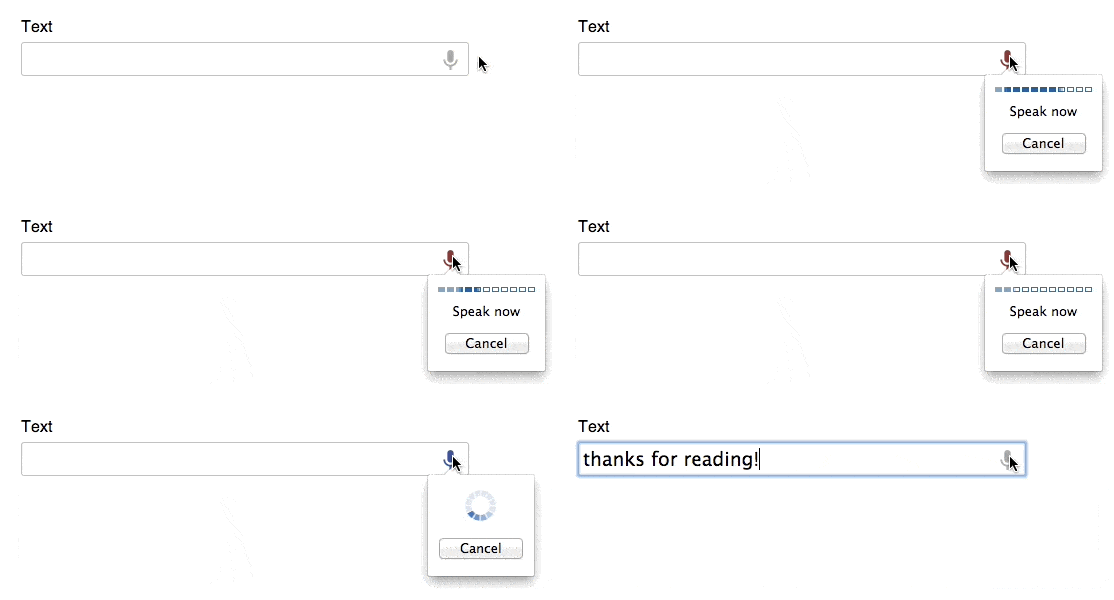
    <p>When speech input is enabled the element will have a small microphone icon displayed on the right of the input. Clicking on this icon will launch a small tooltip to show that your voice is now being recorded. You can also start speech input by focussing the element and pressing <code>Ctrl</code> + <code>Shift</code> + <code>.</code> on Windows, or <code>Command</code> + <code>Shift</code> + <code>.</code> on Mac.</p>
    <div>
    <a href="http://blog.teamtreehouse.com/wp-content/uploads/2014/01/x-webkit-speech-demo.gif" rel="nofollow external" class="bo"><img alt="Speech Input in Chrome" src="http://blog.teamtreehouse.com/wp-content/uploads/2014/01/x-webkit-speech-demo.gif" width="557" height="200" style="max-width: 100%; height: auto;"></a><p>Speech Input in Chrome</p>
    </div>
    <p><a href="http://codepen.io/matt-west/full/wbpqu" rel="nofollow external" class="bo">See the Demo</a> <a href="http://codepen.io/matt-west/pen/wbpqu" rel="nofollow external" class="bo">View on CodePen</a></p>
    <p>In JavaScript, you can test to see if an element has speech input enabled by examining it’s <code>webkitSpeech</code> property. This is a boolean property and will therefore be set to <code>true</code> or <code>false</code>. You can override this property to enable or disable speech input on an element.</p>
    <pre><code>// Enable&#x000A;    element.webkitSpeech = true;&#x000A;    &#x000A;    // Disable&#x000A;    element.webkitSpeech = false;</code></pre>
    <h3>A Caveat About Input Types</h3>
    <p>Speech input is not available for all the different HTML5 input types. In <a href="http://codepen.io/matt-west/pen/wbpqu" rel="nofollow external" class="bo">my testing</a> I found that the <code>text</code>, <code>number</code>, and <code>tel</code> types do support speech input whereas the <code>email</code>, <code>url</code>, <code>date</code>, and <code>month</code> input types don’t.</p>
    <p>If you apply the <code>x-webkit-speech</code> attribute to an <code>&lt;input&gt;</code> element with an unsupported input type, the <code>webkitSpeech</code> property on that element will still be set to <code>true</code>. You therefore cannot rely on this property to tell if the browser is displaying the speech input controls, only that the browser supports speech input in general.</p>
    <h2>Detecting Browser Support</h2>
    <p>A simple way of checking if the user’s browser supports speech input is to look for the <code>webkitSpeech</code> property on an <code>&lt;input&gt;</code> element. An example of how to do this is shown below.</p>
    <pre><code>if (document.createElement('input').webkitSpeech === undefined) {&#x000A;        // Not supported&#x000A;    } else {&#x000A;        // Supported!&#x000A;    }</code></pre>
    <p>Google Chrome is the only browser that currently supports speech input. We’ll examine the reasons for this in the next section.</p>
    <h2>How Speech Recognition Works</h2>
    <div>
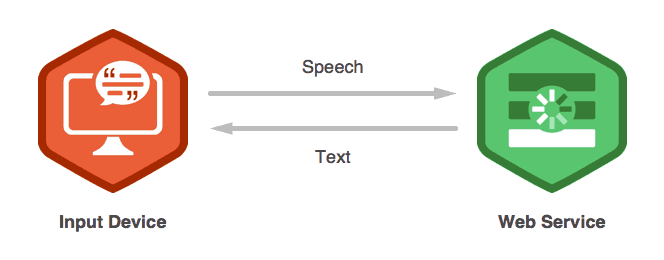
    <a href="http://blog.teamtreehouse.com/wp-content/uploads/2014/01/diagram.png" rel="nofollow external" class="bo"><img alt="Speech-to-Text with a Web Service" src="http://blog.teamtreehouse.com/wp-content/uploads/2014/01/diagram.png" width="664" height="260" style="max-width: 100%; height: auto;"></a><p>Speech-to-Text with a Web Service</p>
    </div>
    <p>The browser relies on an external service to handle speech-to-text conversion. The recording of your voice is sent to this service which then analyses the audio and constructs a textual representation. The text is then sent back to the browser which populates the <code>&lt;input&gt;</code> element to complete the process. Many speech-to-text services incorporate machine-learning algorithms that allow them to get more accurate over time.</p>
    <hr>
    <p><strong>Note:</strong> A side effect of using an external service to handle speech-to-text is that you will need an internet connection for speech input to work. This is something to keep in mind if you plan for your web application to work offline.</p>
    <hr>
    <p>The Chrome browser relies on Google’s proprietary speech recognition technology to provide the functionality behind <code>x-webkit-speech</code>. Google has had a team working on speech recognition and natural language processing for a long time. It’s this team that’s been responsible for developing the complex systems needed to provide a reliable speech-to-text service for products like Google Translate and Voice Search.</p>
    <hr>
    <p><strong>Note:</strong> If you’re interested in learning more about how speech-to-text works check out the <a href="http://research.google.com/pubs/SpeechProcessing.html" rel="nofollow external" class="bo">research papers</a> published by Google engineers.</p>
    <hr>
    <p>Developing speech-to-text services is incredibly difficult and requires a significant amount of investment. This is probably the main reason why no other browser vendor has implemented speech recognition yet. However, now that Apple has acquired Siri, I’m interested to see if speech recognition will make it’s way into Safari some time soon.</p>
    <h2>Summary</h2>
    <p>In this post you’ve learned about the <code>x-webkit-speech</code> attribute and how it can be used to add speech input capabilities to your web forms. There is also a more advanced <a href="http://updates.html5rocks.com/2013/01/Voice-Driven-Web-Apps-Introduction-to-the-Web-Speech-API" rel="nofollow external" class="bo">Web Speech API</a> that we haven’t covered in this post. This API allows developers to add speech recognition functionality to more aspects of their applications, and even synthesize speech from text.</p>
    <p>Whether it’s in the computer on your desk, or the phone in your pocket, software innovations like Google Voice Search and Siri are paving the way for a revolution in how we interact with computers. Welcome to the future my friends, now if only someone could figure out the whole teleportation thing.</p>
    <h2>Further Reading &amp; Links</h2>
    <ul>
    <li><a href="http://codepen.io/matt-west/pen/wbpqu" rel="nofollow external" class="bo">Speech Input Demo</a></li>
    <li><a href="http://updates.html5rocks.com/2013/01/Voice-Driven-Web-Apps-Introduction-to-the-Web-Speech-API" rel="nofollow external" class="bo">Voice Driven Web Apps: Introduction to the Web Speech API</a></li>
    </ul>
    <p>The post <a href="http://blog.teamtreehouse.com/accepting-speech-input-html5-forms" rel="nofollow external" class="bo">Accepting Speech Input in HTML5 Forms</a> appeared first on <a href="http://blog.teamtreehouse.com" rel="nofollow external" class="bo">Treehouse Blog</a>.</p>
    </div>
]]>
</Body>
<Summary>The way that we interact with computers has changed dramatically over the past decade. Touch-screen devices and laptop trackpads have enabled a much more intuitive form of interaction than is...</Summary>
<Website>http://feedproxy.google.com/~r/teamtreehouse/~3/poBxMTrmCoo/accepting-speech-input-html5-forms</Website>
<TrackingUrl>https://my3.my.umbc.edu/api/v0/pixel/news/40327/guest@my.umbc.edu/2002b8361f24195f1175b331f9ef39c8/api/pixel</TrackingUrl>
<Tag>android</Tag>
<Tag>code</Tag>
<Tag>css</Tag>
<Tag>design</Tag>
<Tag>development</Tag>
<Tag>html</Tag>
<Tag>html5</Tag>
<Tag>ios</Tag>
<Tag>javascript</Tag>
<Tag>responsive</Tag>
<Tag>speech-input</Tag>
<Tag>speech-recognition</Tag>
<Tag>web</Tag>
<Tag>web-apps</Tag>
<Tag>web-speech</Tag>
<Group token="retired-583">Web Developer - Build Group</Group>
<GroupUrl>https://my3.my.umbc.edu/groups/retired-583</GroupUrl>
<AvatarUrl>https://assets3-my.umbc.edu/system/shared/avatars/groups/000/000/583/fc60f5d7abc2e080599bb6dc465db54d/xsmall.png?1363101197</AvatarUrl>
<AvatarUrl size="original">https://assets4-my.umbc.edu/system/shared/avatars/groups/000/000/583/fc60f5d7abc2e080599bb6dc465db54d/original.jpg?1363101197</AvatarUrl>
<AvatarUrl size="xxlarge">https://assets4-my.umbc.edu/system/shared/avatars/groups/000/000/583/fc60f5d7abc2e080599bb6dc465db54d/xxlarge.png?1363101197</AvatarUrl>
<AvatarUrl size="xlarge">https://assets4-my.umbc.edu/system/shared/avatars/groups/000/000/583/fc60f5d7abc2e080599bb6dc465db54d/xlarge.png?1363101197</AvatarUrl>
<AvatarUrl size="large">https://assets3-my.umbc.edu/system/shared/avatars/groups/000/000/583/fc60f5d7abc2e080599bb6dc465db54d/large.png?1363101197</AvatarUrl>
<AvatarUrl size="medium">https://assets3-my.umbc.edu/system/shared/avatars/groups/000/000/583/fc60f5d7abc2e080599bb6dc465db54d/medium.png?1363101197</AvatarUrl>
<AvatarUrl size="small">https://assets4-my.umbc.edu/system/shared/avatars/groups/000/000/583/fc60f5d7abc2e080599bb6dc465db54d/small.png?1363101197</AvatarUrl>
<AvatarUrl size="xsmall">https://assets3-my.umbc.edu/system/shared/avatars/groups/000/000/583/fc60f5d7abc2e080599bb6dc465db54d/xsmall.png?1363101197</AvatarUrl>
<AvatarUrl size="xxsmall">https://assets4-my.umbc.edu/system/shared/avatars/groups/000/000/583/fc60f5d7abc2e080599bb6dc465db54d/xxsmall.png?1363101197</AvatarUrl>
<Sponsor>Web Developer - Build Group</Sponsor>
<PawCount>0</PawCount>
<CommentCount>0</CommentCount>
<CommentsAllowed>true</CommentsAllowed>
<PostedAt>Thu, 16 Jan 2014 15:00:50 -0500</PostedAt>
</NewsItem>

<NewsItem contentIssues="true" id="40332" important="false" status="posted" url="https://my3.my.umbc.edu/posts/40332">
<Title>Bits: Apple and Samsung Widen Lead in U.S. Phone Market</Title>
<Body>
<![CDATA[
    <div class="html-content">Apple and Samsung Electronics, the two technology companies that make almost all the profit in the smartphone market, have grown even stronger in the United States.<br><div><table border="0"><tbody><tr><td>
    <a href="http://share.feedsportal.com/share/twitter/?u=http%3A%2F%2Fbits.blogs.nytimes.com%2F2014%2F01%2F16%2Fapple-and-samsung-widen-lead-in-u-s-phone-market%2F%3Fpartner%3Drss%26emc%3Drss&amp;t=Bits%3A+Apple+and+Samsung+Widen+Lead+in+U.S.+Phone+Market" rel="nofollow external" class="bo"><img src="http://res3.feedsportal.com/social/twitter.png" style="max-width: 100%; height: auto;"></a> <a href="http://share.feedsportal.com/share/facebook/?u=http%3A%2F%2Fbits.blogs.nytimes.com%2F2014%2F01%2F16%2Fapple-and-samsung-widen-lead-in-u-s-phone-market%2F%3Fpartner%3Drss%26emc%3Drss&amp;t=Bits%3A+Apple+and+Samsung+Widen+Lead+in+U.S.+Phone+Market" rel="nofollow external" class="bo"><img src="http://res3.feedsportal.com/social/facebook.png" style="max-width: 100%; height: auto;"></a> <a href="http://share.feedsportal.com/share/linkedin/?u=http%3A%2F%2Fbits.blogs.nytimes.com%2F2014%2F01%2F16%2Fapple-and-samsung-widen-lead-in-u-s-phone-market%2F%3Fpartner%3Drss%26emc%3Drss&amp;t=Bits%3A+Apple+and+Samsung+Widen+Lead+in+U.S.+Phone+Market" rel="nofollow external" class="bo"><img src="http://res3.feedsportal.com/social/linkedin.png" style="max-width: 100%; height: auto;"></a> <a href="http://share.feedsportal.com/share/gplus/?u=http%3A%2F%2Fbits.blogs.nytimes.com%2F2014%2F01%2F16%2Fapple-and-samsung-widen-lead-in-u-s-phone-market%2F%3Fpartner%3Drss%26emc%3Drss&amp;t=Bits%3A+Apple+and+Samsung+Widen+Lead+in+U.S.+Phone+Market" rel="nofollow external" class="bo"><img src="http://res3.feedsportal.com/social/googleplus.png" style="max-width: 100%; height: auto;"></a> <a href="http://share.feedsportal.com/share/email/?u=http%3A%2F%2Fbits.blogs.nytimes.com%2F2014%2F01%2F16%2Fapple-and-samsung-widen-lead-in-u-s-phone-market%2F%3Fpartner%3Drss%26emc%3Drss&amp;t=Bits%3A+Apple+and+Samsung+Widen+Lead+in+U.S.+Phone+Market" rel="nofollow external" class="bo"><img src="http://res3.feedsportal.com/social/email.png" style="max-width: 100%; height: auto;"></a>
    </td></tr></tbody></table></div>
    <br><br><a href="http://da.feedsportal.com/r/187556365736/u/0/f/640387/c/34625/s/35ff9c48/sc/15/rc/1/rc.htm" rel="nofollow external" class="bo"><img src="http://da.feedsportal.com/r/187556365736/u/0/f/640387/c/34625/s/35ff9c48/sc/15/rc/1/rc.img" style="max-width: 100%; height: auto;"></a><br><a href="http://da.feedsportal.com/r/187556365736/u/0/f/640387/c/34625/s/35ff9c48/sc/15/rc/2/rc.htm" rel="nofollow external" class="bo"><img src="http://da.feedsportal.com/r/187556365736/u/0/f/640387/c/34625/s/35ff9c48/sc/15/rc/2/rc.img" style="max-width: 100%; height: auto;"></a><br><a href="http://da.feedsportal.com/r/187556365736/u/0/f/640387/c/34625/s/35ff9c48/sc/15/rc/3/rc.htm" rel="nofollow external" class="bo"><img src="http://da.feedsportal.com/r/187556365736/u/0/f/640387/c/34625/s/35ff9c48/sc/15/rc/3/rc.img" style="max-width: 100%; height: auto;"></a><br><br><a href="http://da.feedsportal.com/r/187556365736/u/0/f/640387/c/34625/s/35ff9c48/a2.htm" rel="nofollow external" class="bo"><img src="http://da.feedsportal.com/r/187556365736/u/0/f/640387/c/34625/s/35ff9c48/a2.img" style="max-width: 100%; height: auto;"></a>
    </div>
]]>
</Body>
<Summary>Apple and Samsung Electronics, the two technology companies that make almost all the profit in the smartphone market, have grown even stronger in the United States.      </Summary>
<Website>http://bits.blogs.nytimes.com/2014/01/16/apple-and-samsung-widen-lead-in-u-s-phone-market/?partner=rss&amp;emc=rss</Website>
<TrackingUrl>https://my3.my.umbc.edu/api/v0/pixel/news/40332/guest@my.umbc.edu/7d1f8016670d08d50c6dad1942c99657/api/pixel</TrackingUrl>
<Tag>apple-inc</Tag>
<Tag>mobile</Tag>
<Tag>motorola-mobility-llc</Tag>
<Tag>new</Tag>
<Tag>nokia-oyj</Tag>
<Tag>samsung-electronics-co</Tag>
<Tag>smartphones</Tag>
<Tag>technology</Tag>
<Tag>york</Tag>
<Group token="retired-583">Web Developer - Build Group</Group>
<GroupUrl>https://my3.my.umbc.edu/groups/retired-583</GroupUrl>
<AvatarUrl>https://assets3-my.umbc.edu/system/shared/avatars/groups/000/000/583/fc60f5d7abc2e080599bb6dc465db54d/xsmall.png?1363101197</AvatarUrl>
<AvatarUrl size="original">https://assets4-my.umbc.edu/system/shared/avatars/groups/000/000/583/fc60f5d7abc2e080599bb6dc465db54d/original.jpg?1363101197</AvatarUrl>
<AvatarUrl size="xxlarge">https://assets4-my.umbc.edu/system/shared/avatars/groups/000/000/583/fc60f5d7abc2e080599bb6dc465db54d/xxlarge.png?1363101197</AvatarUrl>
<AvatarUrl size="xlarge">https://assets4-my.umbc.edu/system/shared/avatars/groups/000/000/583/fc60f5d7abc2e080599bb6dc465db54d/xlarge.png?1363101197</AvatarUrl>
<AvatarUrl size="large">https://assets3-my.umbc.edu/system/shared/avatars/groups/000/000/583/fc60f5d7abc2e080599bb6dc465db54d/large.png?1363101197</AvatarUrl>
<AvatarUrl size="medium">https://assets3-my.umbc.edu/system/shared/avatars/groups/000/000/583/fc60f5d7abc2e080599bb6dc465db54d/medium.png?1363101197</AvatarUrl>
<AvatarUrl size="small">https://assets4-my.umbc.edu/system/shared/avatars/groups/000/000/583/fc60f5d7abc2e080599bb6dc465db54d/small.png?1363101197</AvatarUrl>
<AvatarUrl size="xsmall">https://assets3-my.umbc.edu/system/shared/avatars/groups/000/000/583/fc60f5d7abc2e080599bb6dc465db54d/xsmall.png?1363101197</AvatarUrl>
<AvatarUrl size="xxsmall">https://assets4-my.umbc.edu/system/shared/avatars/groups/000/000/583/fc60f5d7abc2e080599bb6dc465db54d/xxsmall.png?1363101197</AvatarUrl>
<Sponsor>Web Developer - Build Group</Sponsor>
<PawCount>0</PawCount>
<CommentCount>0</CommentCount>
<CommentsAllowed>true</CommentsAllowed>
<PostedAt>Thu, 16 Jan 2014 15:00:43 -0500</PostedAt>
<EditAt>Fri, 17 Jan 2014 12:54:34 -0500</EditAt>
</NewsItem>

<NewsItem contentIssues="true" id="40328" important="false" status="posted" url="https://my3.my.umbc.edu/posts/40328">
<Title>Ember.js Testing</Title>
<Body>
<![CDATA[
    <div class="html-content">
    <a href="http://rss.buysellads.com/click.php?z=1260013&amp;k=d754f1e9ba63a736ba8ff5ece958f7dd&amp;a=36575&amp;c=4041808" rel="nofollow external" class="bo"><img src="http://rss.buysellads.com/img.php?z=1260013&amp;k=d754f1e9ba63a736ba8ff5ece958f7dd&amp;a=36575&amp;c=4041808" alt="" style="max-width: 100%; height: auto;"></a><p>When I started playing around with <a href="http://emberjs.com/" rel="nofollow external" class="bo">Ember.js</a> almost a year ago, the testability story left something to be desired. You could unit test an object without any trouble, but a unit test is only one way to get feedback when you’re building a software product. In addition to unit tests, I wanted a way to verify the integration of multiple components. So like most people testing rich JavaScript applications, I reached for the mother of all testing tools, <a href="http://docs.Seleniumhq.org/" rel="nofollow external" class="bo">Selenium</a>.</p>
    <p></p>
    <p>Now before I bash it, without a proper introduction, it’s worth mentioning that Selenium is a great way to verify your entire web application works with a full production-like database and all your production dependencies, etc. And from a QA perspective, this tool can be a great resource for teams who need end-to-end UI acceptance tests.</p>
    <p>But over time, a seemingly small test suite built on Selenium can begin to drag the velocity of your team to a snails pace. One easy way to reduce this pain is to avoid building a large application in the first place. If you build a handful of smaller web applications instead, it might help keep you afloat for a little longer because no individual build will crush the team, as you grow.</p>
    <p>But even on a small project, the real problem with Selenium is that it’s not part of the <a href="http://butunclebob.com/ArticleS.UncleBob.TheThreeRulesOfTdd" rel="nofollow external" class="bo">test driven development</a> process. When I’m doing red/ green/ refactor I don’t have time for slow feedback in any form. I needed a way to write both unit and integration tests that would provide quick feedback to help me shape the software I was writing in a more iterative way. If you are using a version of Ember.js &gt;= RC3, you’re in luck because writing a unit or integration test is a walk in the part.</p>
    <hr>
    <h2>Installing the Test Runner</h2>
    <p>Now that we can write JavaScript tests for our application, how do we execute them? Most developers start out using the browser directly, but because I wanted something I could execute headless from the command line in a CI environment with a rich ecosystem full of plugins, I looked to <a href="http://karma-runner.github.io/0.10/index.html" rel="nofollow external" class="bo">Karma</a>.</p>
    <p>What I liked about Karma is that it only wants to be your test runner. It doesn’t care what JavaScript test framework you use or what client side MVC framework you use. It’s simple to get started with and writing tests that execute against your production Ember.js application is just a few lines of configuration.</p>
    <p>But before we can configure Karma, we need to install it using npm. I recommend installing it locally so you can keep your npm modules isolated per project. To do this, add a file named <code>package.json</code>‘ to the root of your project that looks something like the below.</p>
    <pre>{&#x000A;      "dependencies": {&#x000A;        "karma-qunit": "*",&#x000A;        "karma": "0.10.2"&#x000A;      }&#x000A;    }&#x000A;    </pre>
    <p>This example will require both Karma, and a plugin for <a href="http://qunitjs.com/" rel="nofollow external" class="bo">QUnit</a>. After you save the <code>package.json</code> file above, drop back to the command line and type <code>npm install</code> to pull down the required <a href="http://nodejs.org/" rel="nofollow external" class="bo">Node</a> modules.</p>
    <p>After the npm install completes, you will now see a new folder with the name <code>node_modules</code> in the root of your project. This folder contains all the JavaScript code we just pulled down with npm, including Karma and the QUnit plugin. If you drill down even further to <code>node_modules/karma/bin/</code> you will see the Karma executable. We will be using this to configure the test runner, execute tests from the command line, etc.</p>
    <hr>
    <h2>Configure the Test Runner</h2>
    <p>Next we need to configure karma so it knows how to execute the QUnit tests. Type <code>karma init</code> from the root of the project. You will be prompted with a list of questions. The first will ask what testing framework you want to use, hit <strong>Tab</strong> until you see <code>qunit</code>, then hit <strong>Enter</strong>. Next answer <code>no</code> to the Require.js question, as we won’t be using it for this sample application. <strong>Tab</strong> until you see <strong>PhantomJS</strong> for the third question and you will need to hit <strong>Enter</strong> twice as it allows multiple options here. As for the rest, just leave them at their default option.</p>
    <p>When you are done, you should see Karma has generated a configuration file named <code>karma.conf.js</code> in the root or your project. If you want to read more about the various options Karma supports, you might find the comments helpful. For the sake of this example, I have a simplified version of the configuration file to keep things beginner friendly.</p>
    <p>If you want to follow along, delete the generated configuration file and replace it with this one.</p>
    <pre>module.exports = function(karma) {&#x000A;      karma.set({&#x000A;        basePath: 'js',&#x000A;         &#x000A;        files: [&#x000A;          "vendor/jquery/jquery.min.js",&#x000A;          "vendor/handlebars/handlebars.js",&#x000A;          "vendor/ember/ember.js",&#x000A;          "vendor/jquery-mockjax/jquery.mockjax.js",&#x000A;          "app.js",&#x000A;          "tests/*.js"&#x000A;        ],&#x000A;         &#x000A;        logLevel: karma.LOG_ERROR,&#x000A;        browsers: ['PhantomJS'],&#x000A;        singleRun: true,&#x000A;        autoWatch: false,&#x000A;          &#x000A;        frameworks: ["qunit"]&#x000A;      });&#x000A;    };&#x000A;    </pre>
    <p>This should be fairly similar to what Karma generated earlier, I’ve just removed all the comments and cut out a few options we don’t care about right now. In order to write the first unit test, I had to tell Karma a little more about the project structure.</p>
    <p>At the top of the configuration file, you will see that I’ve set the <code>basePath</code> to <code>js</code> because all of the JavaScript assets live under this folder in the project. Next, I told Karma where it can find the JavaScript files required to test our simple application. This includes jQuery, Handlebars, Ember.js and the <code>app.js</code> file itself.</p>
    <hr>
    <h2>Writing the First Unit Test</h2>
    <p>Now we can add the first unit test file to the project. First make a new folder named <code>tests</code> and nest it under the <code>js</code> folder. Add a file in this new directory named <code>unit_tests.js</code> that looks something like this.</p>
    <pre>test('hello world', function() {&#x000A;      equal(1, 1, "");&#x000A;    });&#x000A;    </pre>
    <p>This test isn’t doing anything valuable yet, but it will help us verify we have everything wired up with Karma to execute it correctly. Notice in the Karma <code>files</code> section, we already added the <code>js/tests</code> directory. This way Karma will pull in every JavaScript file we use to test our application with, going forward.</p>
    <p>Now that we have Karma configured correctly, execute the qunit tests from the command line using <code>./node_modules/karma/bin/karma start</code>.</p>
    <p>If you have everything setup correctly, you should see Karma execute one test and it being successful. To verify it executed the test we just wrote, go make it fail by altering the equals statement. For example, you could do the following:</p>
    <pre>test('hello world', function() {&#x000A;      equal(1, 2, "boom");&#x000A;    });&#x000A;    </pre>
    <p>If you can fail this and make it pass again, it’s time to write a test with a little more purpose.</p>
    <hr>
    <h2>The Sample Application</h2>
    <p>But before we get started, lets discuss the sample application used throughout this post. In the screenshot below, you see we have a very simple grid of users. In the HTML table, each user is shown by first name along with a button to delete that user. At the top of the application you will see an input for the first name, last name and finally a button that will add another user to the table when clicked.</p>
    <p><a href="https://dl.dropboxusercontent.com/u/716525/content/images/2013/pre-tuts.png">https://dl.dropboxusercontent.com/u/716525/content/images/2013/pre-tuts.png</a></p>
    <p>The example application has three problems. First, we want to show the user’s first and last name, not just the first name. Next, when you click a delete button it won’t actually remove the user. And finally, when you add a first name, last name and click add, it won’t put another user into the table.</p>
    <p>On the surface, the full name change appears to be the simplest. It also turned out to be a great example that shows when you should write a unit test, an integration test or both. In this example, the quickest way to get feedback is to write a simple unit test that asserts the model has a computed property <code>fullName</code>.</p>
    <hr>
    <h2>Unit Testing the Computed Property</h2>
    <p>Unit testing an ember object is easy, you simply create a new instance of the object and ask for the <code>fullName</code> value.</p>
    <pre>test('fullName property returns both first and last', function() {&#x000A;      var person = App.Person.create({firstName: 'toran', lastName: 'billups'});&#x000A;      var result = person.get('fullName');&#x000A;      equal(result, 'toran billups', "fullName was " + result);&#x000A;    });&#x000A;    </pre>
    <p>Next if you go back to the command line and run <code>./node_modules/karma/bin/karma start</code>, it should show one failing test with a helpful message describing <code>fullName</code> as undefined currently. To fix this, we need to open the <code>app.js</code> file and add a computed property to the model that returns a string of the combined first and last name values.</p>
    <pre>App.Person = Ember.Object.extend({&#x000A;      firstName: '',&#x000A;      lastName: '',&#x000A;      fullName: function() {&#x000A;        var firstName = this.get('firstName');&#x000A;        var lastName = this.get('lastName');&#x000A;        return firstName + ' ' + lastName;&#x000A;      }.property()&#x000A;    });&#x000A;    </pre>
    <p>If you drop back to the command line and run <code>./node_modules/karma/bin/karma start</code> you should now see a passing unit test. You can extend this example by writing a few other unit tests to show that the computed property should change when either the first or last name is updated on the model.</p>
    <pre>test('fullName property returns both first and last', function() {&#x000A;      var person = App.Person.create({firstName: 'toran', lastName: 'billups'});&#x000A;      var result = person.get('fullName');&#x000A;      equal(result, 'toran billups', "fullName was " + result);&#x000A;    });&#x000A;    &#x000A;    test('fullName property updates when firstName is changed', function() {&#x000A;      var person = App.Person.create({firstName: 'toran', lastName: 'billups'});&#x000A;      var result = person.get('fullName');&#x000A;      equal(result, 'toran billups', "fullName was " + result);&#x000A;      person.set('firstName', 'wat');&#x000A;      result = person.get('fullName');&#x000A;      equal(result, 'wat billups', "fullName was " + result);&#x000A;    });&#x000A;    &#x000A;    test('fullName property updates when lastName is changed', function() {&#x000A;      var person = App.Person.create({firstName: 'toran', lastName: 'billups'});&#x000A;      var result = person.get('fullName');&#x000A;      equal(result, 'toran billups', "fullName was " + result);&#x000A;      person.set('lastName', 'tbozz');&#x000A;      result = person.get('fullName');&#x000A;      equal(result, 'toran tbozz', "fullName was " + result);&#x000A;    });&#x000A;    </pre>
    <p>If you add these two additional tests and run all three from the command line, you should have two failing. To get all three tests passing, modify the computed property to listen for changes on both the first name and last name. Now if you run <code>./node_modules/karma/bin/karma start</code> from the command line, you should have three passing tests.</p>
    <pre>App.Person = Ember.Object.extend({&#x000A;      firstName: '',&#x000A;      lastName: '',&#x000A;      fullName: function() {&#x000A;        var firstName = this.get('firstName');&#x000A;        var lastName = this.get('lastName');&#x000A;        return firstName + ' ' + lastName;&#x000A;      }.property('firstName', 'lastName')&#x000A;    });&#x000A;    </pre>
    <hr>
    <h2>Add the Karma-Ember-Preprocessor and Configure It</h2>
    <p>Now that we have a computed property on the model, we need to look at the template itself because currently we don’t use the new <code>fullName</code> property. In the past, you would need to wire up everything yourself, or use Selenium to verify the template gets rendered correctly. But with ember-testing you can now integration test this by adding a few lines of JavaScript and a plugin for Karma.</p>
    <p>First open the <code>package.json</code> file and add the <a href="https://github.com/karma-runner/karma-ember-preprocessor" rel="nofollow external" class="bo">karma-ember-preprocessor</a> dependency. After you update the <code>package.json</code> file, do <code>npm install</code> from the command line to pull this down.</p>
    <pre>{&#x000A;      "dependencies": {&#x000A;        "karma-ember-preprocessor": "*",&#x000A;        "karma-qunit": "*",&#x000A;        "karma": "0.10.2"&#x000A;      }&#x000A;    }&#x000A;    </pre>
    <p>Now that you have the pre-processor installed, we need to make Karma aware of the template files. In the <code>files</code> section of your <code>karma.conf.js</code> file add the following to tell Karma about the Handlebars templates.</p>
    <pre>module.exports = function(karma) {&#x000A;      karma.set({&#x000A;        basePath: 'js',&#x000A;        &#x000A;        files: [&#x000A;          "vendor/jquery/jquery.min.js",&#x000A;          "vendor/handlebars/handlebars.js",&#x000A;          "vendor/ember/ember.js",&#x000A;          "vendor/jquery-mockjax/jquery.mockjax.js",&#x000A;          "app.js",&#x000A;          "tests/*.js",&#x000A;          "templates/*.handlebars"&#x000A;        ],&#x000A;        &#x000A;        logLevel: karma.LOG_ERROR,&#x000A;        browsers: ['PhantomJS'],&#x000A;        singleRun: true,&#x000A;        autoWatch: false,&#x000A;         &#x000A;        frameworks: ["qunit"]&#x000A;      });&#x000A;    };&#x000A;    </pre>
    <p>Next we need to tell Karma what to do with these handlebars files, because technically we want to have each template precompiled before it’s handed over to PhantomJS. Add the preprocessor configuration and point anything with a file extension of <code>*.handlebars</code> at the ember preprocessor. Also you need to add the plugins configuration to register the ember pre-processor (along with a few others that normally get included with Karma’s default configuration).</p>
    <pre>module.exports = function(karma) {&#x000A;      karma.set({&#x000A;        basePath: 'js',&#x000A;         &#x000A;        files: [&#x000A;          "vendor/jquery/jquery.min.js",&#x000A;          "vendor/handlebars/handlebars.js",&#x000A;          "vendor/ember/ember.js",&#x000A;          "vendor/jquery-mockjax/jquery.mockjax.js",&#x000A;          "app.js",&#x000A;          "tests/*.js",&#x000A;          "templates/*.handlebars"&#x000A;        ],&#x000A;         &#x000A;        logLevel: karma.LOG_ERROR,&#x000A;        browsers: ['PhantomJS'],&#x000A;        singleRun: true,&#x000A;        autoWatch: false,&#x000A;         &#x000A;        frameworks: ["qunit"],&#x000A;         &#x000A;        plugins: [&#x000A;          'karma-qunit',&#x000A;          'karma-chrome-launcher',&#x000A;          'karma-ember-preprocessor',&#x000A;          'karma-phantomjs-launcher'&#x000A;        ],&#x000A;         &#x000A;        preprocessors: {&#x000A;          "**/*.handlebars": 'ember'&#x000A;        }&#x000A;      });&#x000A;    };&#x000A;    </pre>
    <hr>
    <h2>Integration Testing the Data-Bound Template</h2>
    <p>Now that we have the Karma configuration setup for integration testing, add a new file named <code>integration_tests.js</code> under the <code>tests</code> folder. Inside this folder we need to add a simple test to prove we can stand up the entire Ember.js application without error. Add a simple qunit test to see if we can hit the <code>'/'</code> route and get the basic HTML returned. For the initial test, we are only asserting that the <code>table</code> tag exists in the HTML that was generated.</p>
    <pre>test('hello world', function() {&#x000A;      App.reset();&#x000A;      visit("/").then(function() {&#x000A;        ok(exists("table"));&#x000A;      });&#x000A;    });&#x000A;    </pre>
    <p>Notice we are using a few helpers that are built into ember-testing like <code>visit</code> and <code>find</code>. The <code>visit</code> helper is an ember friendly way of telling the application what state to be at during the execution. This test starts at the <code>'/'</code> route because that is where the People models get bound to the template and our HTML table is generated. The <code>find</code> helper is a quick way to lookup elements in the DOM using CSS selectors like you would with jQuery to verify something about the markup.</p>
    <p>Before we can run this test we need to add a test helper file that will inject the test helpers and set a generic root element. Add the code below, to a file named <code>integration_test_helper.js</code> in the same <code>tests</code> directory. This will ensure our application has the test helpers at execution time.</p>
    <pre>document.write('&lt;div id="ember-testing-container"&gt;&lt;div id="ember-testing"&gt;&lt;/div&gt;&lt;/div&gt;');&#x000A;     &#x000A;    App.rootElement = '#ember-testing';&#x000A;    App.setupForTesting();&#x000A;    App.injectTestHelpers();&#x000A;    &#x000A;    function exists(selector) {&#x000A;      return !!find(selector).length;&#x000A;    }&#x000A;    </pre>
    <p>Now from the command line you should be able to execute the integration test above. If you got a passing test, remove the table from the handlebars template to make it fail (just to help prove Ember was generating the HTML using that template).</p>
    <p>Now that we have the integration tests setup, it’s time to write the one that asserts we show each user’s <code>fullName</code> instead of their <code>firstName</code>. We want to first assert that we get two rows, one for each person.</p>
    <pre>test('hello world', function() {&#x000A;      App.reset();&#x000A;      visit("/").then(function() {&#x000A;        var rows = find("table tr").length;&#x000A;        equal(rows, 2, rows);&#x000A;      });&#x000A;    });&#x000A;    </pre>
    <p>Note: The application is currently returning hard coded data to keep everything simple at the moment. If you are curious why we get two people, here is the <code>find</code> method on the model:</p>
    <pre>App.Person.reopenClass({&#x000A;      people: [],&#x000A;      find: function() {&#x000A;        var first = App.Person.create({firstName: 'x', lastName: 'y'});&#x000A;        var last = App.Person.create({firstName: 'x', lastName: 'y'});&#x000A;        this.people.pushObject(first);&#x000A;        this.people.pushObject(last);&#x000A;        return this.people;&#x000A;      }&#x000A;    });&#x000A;    </pre>
    <p>If we run the tests now, we should still have everything passing because two people are returned as we would expect. Next, we need to get the table cell that shows the person’s name and assert it’s using the <code>fullName</code> property instead of just <code>firstName</code>.</p>
    <pre>test('hello world', function() {&#x000A;      App.reset();&#x000A;      visit("/").then(function() {&#x000A;        var rows = find("table tr").length;&#x000A;        equal(rows, 2, rows);&#x000A;        var fullName = find("table tr:eq(0) td:eq(0)").text();&#x000A;        equal(fullName, "x y", "the first table row had fullName: " + fullName);&#x000A;      });&#x000A;    });&#x000A;    </pre>
    <p>If you run the above test you should see a failing test because we haven’t yet updated the template to use <code>fullName</code>. Now that we have a failing test, update the template to use <code>fullName</code> and run the tests using <code>./node_modules/karma/bin/karma start</code>. You should now have a passing suite of both unit and integration tests.</p>
    <hr>
    <h2>Should I Write Unit or Integration Tests?</h2>
    <p>If you are asking yourself, “when should I write a unit test vs. an integration test?”, the answer is simply: what will be less painful? If writing a unit test is faster and it explains the problem better than a much larger integration test, then I say write the unit test. If the unit tests seem less valuable because you are doing basic CRUD and the real behavior is in the interaction between components, I say write the integration test. Because the integration tests written with ember-testing are blazingly fast, they are part of the developer feedback cycle and should be used similarly to a unit test when it makes sense.</p>
    <p>To show a CRUD like integration test in action, write the following test to prove the <strong>add</strong> button puts the person into the collection and that a new row gets rendered in the handlebars template.</p>
    <pre>test('add will append another person to the html table', function() {&#x000A;      App.Person.people = [];&#x000A;      App.reset();&#x000A;      visit("/").then(function() {&#x000A;        var rows = find("table tr").length&#x000A;        equal(rows, 2, "the table had " + rows + " rows");&#x000A;        fillIn(".firstName", "foo");&#x000A;        fillIn(".lastName", "bar");&#x000A;        return click(".submit");&#x000A;      }).then(function() {&#x000A;        equal(find("table tr").length, 3, "the table of people was not complete");&#x000A;        equal(find("table tr:eq(2) td:eq(0)").text(), "foo bar", "the fullName for the person was incorrect");&#x000A;      });&#x000A;    });&#x000A;    </pre>
    <p>Start by telling the test what state you want to work with, then using the <code>fillIn</code> helper, add a first name and last name. Now if you click the <strong>submit</strong> button it should add that person to the HTML table, so in the returning <code>then</code> we can assert that three people exist in the HTML table. Run this test and it should fail because the Ember controller isn’t complete.</p>
    <p>To get the test passing, add the following line to the <code>PeopleController</code></p>
    <pre>App.PeopleController = Ember.ArrayController.extend({&#x000A;      actions: {&#x000A;        addPerson: function() {&#x000A;          var person = {&#x000A;            firstName: this.get('firstName'),&#x000A;            lastName: this.get('lastName')&#x000A;          };&#x000A;          App.Person.add(person);&#x000A;        }&#x000A;      }&#x000A;    });&#x000A;    </pre>
    <p>Now if you run the tests using <code>./node_modules/karma/bin/karma start</code> it should show three people in the rendered HTML.</p>
    <p>The last test is the delete, notice we find the button for a specific row and click it. In the following <code>then</code> we simply verify one less person is shown in the HTML table.</p>
    <pre>test('delete will remove the person for a given row', function() {&#x000A;      App.Person.people = [];&#x000A;      App.reset();&#x000A;      visit("/").then(function() {&#x000A;        var rows = find("table tr").length;&#x000A;        equal(rows, 2, "the table had " + rows + " rows");&#x000A;        return click("table .delete:first");&#x000A;      }).then(function() {&#x000A;        equal(find("table tr").length, 1, "the table of people was not complete&#x000A;      });&#x000A;    });")})})&#x000A;    </pre>
    <p>To get this passing, simply add the following line to the <code>PeopleController</code>:</p>
    <pre>App.PeopleController = Ember.ArrayController.extend({&#x000A;      actions: {&#x000A;        addPerson: function() {&#x000A;          var person = {&#x000A;            firstName: this.get('firstName'),&#x000A;            lastName: this.get('lastName')&#x000A;          };&#x000A;          App.Person.add(person);&#x000A;        },&#x000A;        deletePerson: function(person) {&#x000A;          App.Person.remove(person);&#x000A;        }&#x000A;      }&#x000A;    });&#x000A;    </pre>
    <p>Run the tests from the command line and you should once again have a passing suite of tests.</p>
    <hr>
    <h2>Conclusion</h2>
    <p>So that wraps up our sample application. Feel free to ask any questions down in the comments.</p>
    <h3>Bonus: But I’m Already Using Grunt…</h3>
    <p>If you prefer to use Grunt instead of the karma-ember-preprocessor, simply remove the plugins and preprocessors configuration. Also remove <code>templates/*.handlebars</code> from the files section as Karma won’t need to precompile the templates. Here is a simplified <code>karma.conf.js</code> that works when using grunt to precompile the handlebars templates.</p>
    <pre>module.exports = function(karma) {&#x000A;      karma.set({&#x000A;        basePath: 'js',&#x000A;     &#x000A;        files: [&#x000A;          "lib/deps.min.js", //built by your grunt task&#x000A;          "tests/*.js"&#x000A;        ],&#x000A;        &#x000A;        logLevel: karma.LOG_ERROR,&#x000A;        browsers: ['PhantomJS'],&#x000A;        singleRun: true,&#x000A;        autoWatch: false,&#x000A;         &#x000A;        frameworks: ["qunit"]&#x000A;      });&#x000A;    };&#x000A;    </pre>
    <p>And that’s it!</p>
    </div>
]]>
</Body>
<Summary>When I started playing around with Ember.js almost a year ago, the testability story left something to be desired. You could unit test an object without any trouble, but a unit test is only one...</Summary>
<Website>http://feedproxy.google.com/~r/nettuts/~3/MuFQVG92DFE/</Website>
<TrackingUrl>https://my3.my.umbc.edu/api/v0/pixel/news/40328/guest@my.umbc.edu/d3b76fcc6e98bf6f4d4f3972e5fdd62b/api/pixel</TrackingUrl>
<Tag>css</Tag>
<Tag>development</Tag>
<Tag>ember-testing</Tag>
<Tag>html</Tag>
<Tag>javascript</Tag>
<Tag>javascript-and-ajax</Tag>
<Tag>mysql</Tag>
<Tag>php</Tag>
<Tag>sql</Tag>
<Tag>tutorials</Tag>
<Tag>wed</Tag>
<Group token="retired-583">Web Developer - Build Group</Group>
<GroupUrl>https://my3.my.umbc.edu/groups/retired-583</GroupUrl>
<AvatarUrl>https://assets3-my.umbc.edu/system/shared/avatars/groups/000/000/583/fc60f5d7abc2e080599bb6dc465db54d/xsmall.png?1363101197</AvatarUrl>
<AvatarUrl size="original">https://assets4-my.umbc.edu/system/shared/avatars/groups/000/000/583/fc60f5d7abc2e080599bb6dc465db54d/original.jpg?1363101197</AvatarUrl>
<AvatarUrl size="xxlarge">https://assets4-my.umbc.edu/system/shared/avatars/groups/000/000/583/fc60f5d7abc2e080599bb6dc465db54d/xxlarge.png?1363101197</AvatarUrl>
<AvatarUrl size="xlarge">https://assets4-my.umbc.edu/system/shared/avatars/groups/000/000/583/fc60f5d7abc2e080599bb6dc465db54d/xlarge.png?1363101197</AvatarUrl>
<AvatarUrl size="large">https://assets3-my.umbc.edu/system/shared/avatars/groups/000/000/583/fc60f5d7abc2e080599bb6dc465db54d/large.png?1363101197</AvatarUrl>
<AvatarUrl size="medium">https://assets3-my.umbc.edu/system/shared/avatars/groups/000/000/583/fc60f5d7abc2e080599bb6dc465db54d/medium.png?1363101197</AvatarUrl>
<AvatarUrl size="small">https://assets4-my.umbc.edu/system/shared/avatars/groups/000/000/583/fc60f5d7abc2e080599bb6dc465db54d/small.png?1363101197</AvatarUrl>
<AvatarUrl size="xsmall">https://assets3-my.umbc.edu/system/shared/avatars/groups/000/000/583/fc60f5d7abc2e080599bb6dc465db54d/xsmall.png?1363101197</AvatarUrl>
<AvatarUrl size="xxsmall">https://assets4-my.umbc.edu/system/shared/avatars/groups/000/000/583/fc60f5d7abc2e080599bb6dc465db54d/xxsmall.png?1363101197</AvatarUrl>
<Sponsor>Web Developer - Build Group</Sponsor>
<PawCount>0</PawCount>
<CommentCount>0</CommentCount>
<CommentsAllowed>true</CommentsAllowed>
<PostedAt>Thu, 16 Jan 2014 14:42:48 -0500</PostedAt>
<EditAt>Thu, 16 Jan 2014 14:42:48 -0500</EditAt>
</NewsItem>

<NewsItem contentIssues="true" id="41063" important="false" status="posted" url="https://my3.my.umbc.edu/posts/41063">
<Title>Ember.js Testing</Title>
<Body>
<![CDATA[
    <div class="html-content">
    <p>When I started playing around with <a href="http://emberjs.com/" rel="nofollow external" class="bo">Ember.js</a> almost a year ago, the testability story left something to be desired. You could unit test an object without any trouble, but a unit test is only one way to get feedback when you're building a software product. In addition to unit tests, I wanted a way to verify the integration of multiple components. So like most people testing rich JavaScript applications, I reached for the mother of all testing tools, <a href="http://docs.Seleniumhq.org/" rel="nofollow external" class="bo">Selenium</a>.</p>
    <p></p>
    <p>Now before I bash it, without a proper introduction, it's worth mentioning that Selenium is a great way to verify your entire web application works with a full production-like database and all your production dependencies, etc. And from a QA perspective, this tool can be a great resource for teams who need end-to-end UI acceptance tests.</p>
    <p>But over time, a seemingly small test suite built on Selenium can begin to drag the velocity of your team to a snails pace. One easy way to reduce this pain is to avoid building a large application in the first place. If you build a handful of smaller web applications instead, it might help keep you afloat for a little longer because no individual build will crush the team, as you grow.</p>
    <p>But even on a small project, the real problem with Selenium is that it's not part of the <a href="http://butunclebob.com/ArticleS.UncleBob.TheThreeRulesOfTdd" rel="nofollow external" class="bo">test driven development</a> process. When I'm doing red/ green/ refactor I don't have time for slow feedback in any form. I needed a way to write both unit and integration tests that would provide quick feedback to help me shape the software I was writing in a more iterative way. If you are using a version of Ember.js &gt;= RC3, you're in luck because writing a unit or integration test is a walk in the part.</p>
    <hr>
    <h2>Installing the Test Runner</h2>
    <p>Now that we can write JavaScript tests for our application, how do we execute them? Most developers start out using the browser directly, but because I wanted something I could execute headless from the command line in a CI environment with a rich ecosystem full of plugins, I looked to <a href="http://karma-runner.github.io/0.10/index.html" rel="nofollow external" class="bo">Karma</a>. </p>
    <p>What I liked about Karma is that it only wants to be your test runner. It doesn't care what JavaScript test framework you use or what client side MVC framework you use. It's simple to get started with and writing tests that execute against your production Ember.js application is just a few lines of configuration.</p>
    <p>But before we can configure Karma, we need to install it using npm. I recommend installing it locally so you can keep your npm modules isolated per project. To do this, add a file named <code>package.json</code>' to the root of your project that looks something like the below.</p>
    <pre>{&#x000A;      "dependencies": {&#x000A;        "karma-qunit": "*",&#x000A;        "karma": "0.10.2"&#x000A;      }&#x000A;    }</pre>
    <p>This example will require both Karma, and a plugin for <a href="http://qunitjs.com/" rel="nofollow external" class="bo">QUnit</a>. After you save the <code>package.json</code> file above, drop back to the command line and type <code>npm install</code> to pull down the required <a href="http://nodejs.org/" rel="nofollow external" class="bo">Node</a> modules.</p>
    <p>After the npm install completes, you will now see a new folder with the name <code>node_modules</code> in the root of your project. This folder contains all the JavaScript code we just pulled down with npm, including Karma and the QUnit plugin. If you drill down even further to <code>node_modules/karma/bin/</code> you will see the Karma executable. We will be using this to configure the test runner, execute tests from the command line, etc.</p>
    <hr>
    <h2>Configure the Test Runner</h2>
    <p>Next we need to configure karma so it knows how to execute the QUnit tests. Type <code>karma init</code> from the root of the project. You will be prompted with a list of questions. The first will ask what testing framework you want to use, hit <strong>Tab</strong> until you see <code>qunit</code>, then hit <strong>Enter</strong>. Next answer <code>no</code> to the Require.js question, as we won't be using it for this sample application. <strong>Tab</strong> until you see <strong>PhantomJS</strong> for the third question and you will need to hit <strong>Enter</strong> twice as it allows multiple options here. As for the rest, just leave them at their default option. </p>
    <p>When you are done, you should see Karma has generated a configuration file named <code>karma.conf.js</code> in the root or your project. If you want to read more about the various options Karma supports, you might find the comments helpful. For the sake of this example, I have a simplified version of the configuration file to keep things beginner friendly.</p>
    <p>If you want to follow along, delete the generated configuration file and replace it with this one.</p>
    <pre>module.exports = function(karma) {&#x000A;      karma.set({&#x000A;        basePath: 'js',&#x000A;         &#x000A;        files: [&#x000A;          "vendor/jquery/jquery.min.js",&#x000A;          "vendor/handlebars/handlebars.js",&#x000A;          "vendor/ember/ember.js",&#x000A;          "vendor/jquery-mockjax/jquery.mockjax.js",&#x000A;          "app.js",&#x000A;          "tests/*.js"&#x000A;        ],&#x000A;         &#x000A;        logLevel: karma.LOG_ERROR,&#x000A;        browsers: ['PhantomJS'],&#x000A;        singleRun: true,&#x000A;        autoWatch: false,&#x000A;          &#x000A;        frameworks: ["qunit"]&#x000A;      });&#x000A;    };</pre>
    <p>This should be fairly similar to what Karma generated earlier, I've just removed all the comments and cut out a few options we don't care about right now. In order to write the first unit test, I had to tell Karma a little more about the project structure.</p>
    <p>At the top of the configuration file, you will see that I've set the <code>basePath</code> to <code>js</code> because all of the JavaScript assets live under this folder in the project. Next, I told Karma where it can find the JavaScript files required to test our simple application. This includes jQuery, Handlebars, Ember.js and the <code>app.js</code> file itself.</p>
    <hr>
    <h2>Writing the First Unit Test</h2>
    <p>Now we can add the first unit test file to the project. First make a new folder named <code>tests</code> and nest it under the <code>js</code> folder. Add a file in this new directory named <code>unit_tests.js</code> that looks something like this.</p>
    <pre>test('hello world', function() {&#x000A;      equal(1, 1, "");&#x000A;    });</pre>
    <p>This test isn't doing anything valuable yet, but it will help us verify we have everything wired up with Karma to execute it correctly. Notice in the Karma <code>files</code> section, we already added the <code>js/tests</code> directory. This way Karma will pull in every JavaScript file we use to test our application with, going forward.</p>
    <p>Now that we have Karma configured correctly, execute the qunit tests from the command line using <code>./node_modules/karma/bin/karma start</code>.</p>
    <p>If you have everything setup correctly, you should see Karma execute one test and it being successful. To verify it executed the test we just wrote, go make it fail by altering the equals statement. For example, you could do the following:</p>
    <pre>test('hello world', function() {&#x000A;      equal(1, 2, "boom");&#x000A;    });</pre>
    <p>If you can fail this and make it pass again, it's time to write a test with a little more purpose.</p>
    <hr>
    <h2>The Sample Application</h2>
    <p>But before we get started, lets discuss the sample application used throughout this post. In the screenshot below, you see we have a very simple grid of users. In the HTML table, each user is shown by first name along with a button to delete that user. At the top of the application you will see an input for the first name, last name and finally a button that will add another user to the table when clicked.</p>
    <p><a href="https://dl.dropboxusercontent.com/u/716525/content/images/2013/pre-tuts.png">https://dl.dropboxusercontent.com/u/716525/content/images/2013/pre-tuts.png</a></p>
    <p>The example application has three problems. First, we want to show the user's first and last name, not just the first name. Next, when you click a delete button it won't actually remove the user. And finally, when you add a first name, last name and click add, it won't put another user into the table.</p>
    <p>On the surface, the full name change appears to be the simplest. It also turned out to be a great example that shows when you should write a unit test, an integration test or both. In this example, the quickest way to get feedback is to write a simple unit test that asserts the model has a computed property <code>fullName</code>.</p>
    <hr>
    <h2>Unit Testing the Computed Property</h2>
    <p>Unit testing an ember object is easy, you simply create a new instance of the object and ask for the <code>fullName</code> value.</p>
    <pre>test('fullName property returns both first and last', function() {&#x000A;      var person = App.Person.create({firstName: 'toran', lastName: 'billups'});&#x000A;      var result = person.get('fullName');&#x000A;      equal(result, 'toran billups', "fullName was " + result);&#x000A;    });</pre>
    <p>Next if you go back to the command line and run <code>./node_modules/karma/bin/karma start</code>, it should show one failing test with a helpful message describing <code>fullName</code> as undefined currently. To fix this, we need to open the <code>app.js</code> file and add a computed property to the model that returns a string of the combined first and last name values.</p>
    <pre>App.Person = Ember.Object.extend({&#x000A;      firstName: '',&#x000A;      lastName: '',&#x000A;      fullName: function() {&#x000A;        var firstName = this.get('firstName');&#x000A;        var lastName = this.get('lastName');&#x000A;        return firstName + ' ' + lastName;&#x000A;      }.property()&#x000A;    });</pre>
    <p>If you drop back to the command line and run <code>./node_modules/karma/bin/karma start</code> you should now see a passing unit test. You can extend this example by writing a few other unit tests to show that the computed property should change when either the first or last name is updated on the model.</p>
    <pre>test('fullName property returns both first and last', function() {&#x000A;      var person = App.Person.create({firstName: 'toran', lastName: 'billups'});&#x000A;      var result = person.get('fullName');&#x000A;      equal(result, 'toran billups', "fullName was " + result);&#x000A;    });&#x000A;    &#x000A;    test('fullName property updates when firstName is changed', function() {&#x000A;      var person = App.Person.create({firstName: 'toran', lastName: 'billups'});&#x000A;      var result = person.get('fullName');&#x000A;      equal(result, 'toran billups', "fullName was " + result);&#x000A;      person.set('firstName', 'wat');&#x000A;      result = person.get('fullName');&#x000A;      equal(result, 'wat billups', "fullName was " + result);&#x000A;    });&#x000A;    &#x000A;    test('fullName property updates when lastName is changed', function() {&#x000A;      var person = App.Person.create({firstName: 'toran', lastName: 'billups'});&#x000A;      var result = person.get('fullName');&#x000A;      equal(result, 'toran billups', "fullName was " + result);&#x000A;      person.set('lastName', 'tbozz');&#x000A;      result = person.get('fullName');&#x000A;      equal(result, 'toran tbozz', "fullName was " + result);&#x000A;    });</pre>
    <p>If you add these two additional tests and run all three from the command line, you should have two failing. To get all three tests passing, modify the computed property to listen for changes on both the first name and last name. Now if you run <code>./node_modules/karma/bin/karma start</code> from the command line, you should have three passing tests.</p>
    <pre>App.Person = Ember.Object.extend({&#x000A;      firstName: '',&#x000A;      lastName: '',&#x000A;      fullName: function() {&#x000A;        var firstName = this.get('firstName');&#x000A;        var lastName = this.get('lastName');&#x000A;        return firstName + ' ' + lastName;&#x000A;      }.property('firstName', 'lastName')&#x000A;    });</pre>
    <hr>
    <h2>Add the Karma-Ember-Preprocessor and Configure It</h2>
    <p>Now that we have a computed property on the model, we need to look at the template itself because currently we don't use the new <code>fullName</code> property. In the past, you would need to wire up everything yourself, or use Selenium to verify the template gets rendered correctly. But with ember-testing you can now integration test this by adding a few lines of JavaScript and a plugin for Karma.</p>
    <p>First open the <code>package.json</code> file and add the <a href="https://github.com/karma-runner/karma-ember-preprocessor" rel="nofollow external" class="bo">karma-ember-preprocessor</a> dependency. After you update the <code>package.json</code> file, do <code>npm install</code> from the command line to pull this down.</p>
    <pre>{&#x000A;      "dependencies": {&#x000A;        "karma-ember-preprocessor": "*",&#x000A;        "karma-qunit": "*",&#x000A;        "karma": "0.10.2"&#x000A;      }&#x000A;    }</pre>
    <p>Now that you have the pre-processor installed, we need to make Karma aware of the template files. In the <code>files</code> section of your <code>karma.conf.js</code> file add the following to tell Karma about the Handlebars templates.</p>
    <pre>module.exports = function(karma) {&#x000A;      karma.set({&#x000A;        basePath: 'js',&#x000A;        &#x000A;        files: [&#x000A;          "vendor/jquery/jquery.min.js",&#x000A;          "vendor/handlebars/handlebars.js",&#x000A;          "vendor/ember/ember.js",&#x000A;          "vendor/jquery-mockjax/jquery.mockjax.js",&#x000A;          "app.js",&#x000A;          "tests/*.js",&#x000A;          "templates/*.handlebars"&#x000A;        ],&#x000A;        &#x000A;        logLevel: karma.LOG_ERROR,&#x000A;        browsers: ['PhantomJS'],&#x000A;        singleRun: true,&#x000A;        autoWatch: false,&#x000A;         &#x000A;        frameworks: ["qunit"]&#x000A;      });&#x000A;    };</pre>
    <p>Next we need to tell Karma what to do with these handlebars files, because technically we want to have each template precompiled before it's handed over to PhantomJS. Add the preprocessor configuration and point anything with a file extension of <code>*.handlebars</code> at the ember preprocessor. Also you need to add the plugins configuration to register the ember pre-processor (along with a few others that normally get included with Karma's default configuration).</p>
    <pre>module.exports = function(karma) {&#x000A;      karma.set({&#x000A;        basePath: 'js',&#x000A;         &#x000A;        files: [&#x000A;          "vendor/jquery/jquery.min.js",&#x000A;          "vendor/handlebars/handlebars.js",&#x000A;          "vendor/ember/ember.js",&#x000A;          "vendor/jquery-mockjax/jquery.mockjax.js",&#x000A;          "app.js",&#x000A;          "tests/*.js",&#x000A;          "templates/*.handlebars"&#x000A;        ],&#x000A;         &#x000A;        logLevel: karma.LOG_ERROR,&#x000A;        browsers: ['PhantomJS'],&#x000A;        singleRun: true,&#x000A;        autoWatch: false,&#x000A;         &#x000A;        frameworks: ["qunit"],&#x000A;         &#x000A;        plugins: [&#x000A;          'karma-qunit',&#x000A;          'karma-chrome-launcher',&#x000A;          'karma-ember-preprocessor',&#x000A;          'karma-phantomjs-launcher'&#x000A;        ],&#x000A;         &#x000A;        preprocessors: {&#x000A;          "**/*.handlebars": 'ember'&#x000A;        }&#x000A;      });&#x000A;    };</pre>
    <hr>
    <h2>Integration Testing the Data-Bound Template</h2>
    <p>Now that we have the Karma configuration setup for integration testing, add a new file named <code>integration_tests.js</code> under the <code>tests</code> folder. Inside this folder we need to add a simple test to prove we can stand up the entire Ember.js application without error. Add a simple qunit test to see if we can hit the <code>'/'</code> route and get the basic HTML returned. For the initial test, we are only asserting that the <code>table</code> tag exists in the HTML that was generated.</p>
    <pre>test('hello world', function() {&#x000A;      App.reset();&#x000A;      visit("/").then(function() {&#x000A;        ok(exists("table"));&#x000A;      });&#x000A;    });</pre>
    <p>Notice we are using a few helpers that are built into ember-testing like <code>visit</code> and <code>find</code>. The <code>visit</code> helper is an ember friendly way of telling the application what state to be at during the execution. This test starts at the <code>'/'</code> route because that is where the People models get bound to the template and our HTML table is generated. The <code>find</code> helper is a quick way to lookup elements in the DOM using CSS selectors like you would with jQuery to verify something about the markup.</p>
    <p>Before we can run this test we need to add a test helper file that will inject the test helpers and set a generic root element. Add the code below, to a file named <code>integration_test_helper.js</code> in the same <code>tests</code> directory. This will ensure our application has the test helpers at execution time.</p>
    <pre>document.write('&lt;div id="ember-testing-container"&gt;&lt;div id="ember-testing"&gt;&lt;/div&gt;&lt;/div&gt;');&#x000A;     &#x000A;    App.rootElement = '#ember-testing';&#x000A;    App.setupForTesting();&#x000A;    App.injectTestHelpers();&#x000A;    &#x000A;    function exists(selector) {&#x000A;      return !!find(selector).length;&#x000A;    }</pre>
    <p>Now from the command line you should be able to execute the integration test above. If you got a passing test, remove the table from the handlebars template to make it fail (just to help prove Ember was generating the HTML using that template).</p>
    <p>Now that we have the integration tests setup, it's time to write the one that asserts we show each user's <code>fullName</code> instead of their <code>firstName</code>. We want to first assert that we get two rows, one for each person.</p>
    <pre>test('hello world', function() {&#x000A;      App.reset();&#x000A;      visit("/").then(function() {&#x000A;        var rows = find("table tr").length;&#x000A;        equal(rows, 2, rows);&#x000A;      });&#x000A;    });</pre>
    <p>Note: The application is currently returning hard coded data to keep everything simple at the moment. If you are curious why we get two people, here is the <code>find</code> method on the model:</p>
    <pre>App.Person.reopenClass({&#x000A;      people: [],&#x000A;      find: function() {&#x000A;        var first = App.Person.create({firstName: 'x', lastName: 'y'});&#x000A;        var last = App.Person.create({firstName: 'x', lastName: 'y'});&#x000A;        this.people.pushObject(first);&#x000A;        this.people.pushObject(last);&#x000A;        return this.people;&#x000A;      }&#x000A;    });</pre>
    <p>If we run the tests now, we should still have everything passing because two people are returned as we would expect. Next, we need to get the table cell that shows the person's name and assert it's using the <code>fullName</code> property instead of just <code>firstName</code>.</p>
    <pre>test('hello world', function() {&#x000A;      App.reset();&#x000A;      visit("/").then(function() {&#x000A;        var rows = find("table tr").length;&#x000A;        equal(rows, 2, rows);&#x000A;        var fullName = find("table tr:eq(0) td:eq(0)").text();&#x000A;        equal(fullName, "x y", "the first table row had fullName: " + fullName);&#x000A;      });&#x000A;    });</pre>
    <p>If you run the above test you should see a failing test because we haven't yet updated the template to use <code>fullName</code>. Now that we have a failing test, update the template to use <code>fullName</code> and run the tests using <code>./node_modules/karma/bin/karma start</code>. You should now have a passing suite of both unit and integration tests.</p>
    <hr>
    <h2>Should I Write Unit or Integration Tests?</h2>
    <p>If you are asking yourself, "when should I write a unit test vs. an integration test?", the answer is simply: what will be less painful? If writing a unit test is faster and it explains the problem better than a much larger integration test, then I say write the unit test. If the unit tests seem less valuable because you are doing basic CRUD and the real behavior is in the interaction between components, I say write the integration test. Because the integration tests written with ember-testing are blazingly fast, they are part of the developer feedback cycle and should be used similarly to a unit test when it makes sense.</p>
    <p>To show a CRUD like integration test in action, write the following test to prove the <strong>add</strong> button puts the person into the collection and that a new row gets rendered in the handlebars template.</p>
    <pre>test('add will append another person to the html table', function() {&#x000A;      App.Person.people = [];&#x000A;      App.reset();&#x000A;      visit("/").then(function() {&#x000A;        var rows = find("table tr").length&#x000A;        equal(rows, 2, "the table had " + rows + " rows");&#x000A;        fillIn(".firstName", "foo");&#x000A;        fillIn(".lastName", "bar");&#x000A;        return click(".submit");&#x000A;      }).then(function() {&#x000A;        equal(find("table tr").length, 3, "the table of people was not complete");&#x000A;        equal(find("table tr:eq(2) td:eq(0)").text(), "foo bar", "the fullName for the person was incorrect");&#x000A;      });&#x000A;    });</pre>
    <p>Start by telling the test what state you want to work with, then using the <code>fillIn</code> helper, add a first name and last name. Now if you click the <strong>submit</strong> button it should add that person to the HTML table, so in the returning <code>then</code> we can assert that three people exist in the HTML table. Run this test and it should fail because the Ember controller isn't complete.</p>
    <p>To get the test passing, add the following line to the <code>PeopleController</code></p>
    <pre>App.PeopleController = Ember.ArrayController.extend({&#x000A;      actions: {&#x000A;        addPerson: function() {&#x000A;          var person = {&#x000A;            firstName: this.get('firstName'),&#x000A;            lastName: this.get('lastName')&#x000A;          };&#x000A;          App.Person.add(person);&#x000A;        }&#x000A;      }&#x000A;    });</pre>
    <p>Now if you run the tests using <code>./node_modules/karma/bin/karma start</code> it should show three people in the rendered HTML.</p>
    <p>The last test is the delete, notice we find the button for a specific row and click it. In the following <code>then</code> we simply verify one less person is shown in the HTML table.</p>
    <pre>test('delete will remove the person for a given row', function() {&#x000A;      App.Person.people = [];&#x000A;      App.reset();&#x000A;      visit("/").then(function() {&#x000A;        var rows = find("table tr").length;&#x000A;        equal(rows, 2, "the table had " + rows + " rows");&#x000A;        return click("table .delete:first");&#x000A;      }).then(function() {&#x000A;        equal(find("table tr").length, 1, "the table of people was not complete&#x000A;      });&#x000A;    });")})})</pre>
    <p>To get this passing, simply add the following line to the <code>PeopleController</code>:</p>
    <pre>App.PeopleController = Ember.ArrayController.extend({&#x000A;      actions: {&#x000A;        addPerson: function() {&#x000A;          var person = {&#x000A;            firstName: this.get('firstName'),&#x000A;            lastName: this.get('lastName')&#x000A;          };&#x000A;          App.Person.add(person);&#x000A;        },&#x000A;        deletePerson: function(person) {&#x000A;          App.Person.remove(person);&#x000A;        }&#x000A;      }&#x000A;    });</pre>
    <p>Run the tests from the command line and you should once again have a passing suite of tests.</p>
    <hr>
    <h2>Conclusion</h2>
    <p>So that wraps up our sample application. Feel free to ask any questions down in the comments.</p>
    <h3>Bonus: But I'm Already Using Grunt...</h3>
    <p>If you prefer to use Grunt instead of the karma-ember-preprocessor, simply remove the plugins and preprocessors configuration. Also remove <code>templates/*.handlebars</code> from the files section as Karma won't need to precompile the templates. Here is a simplified <code>karma.conf.js</code> that works when using grunt to precompile the handlebars templates.</p>
    <pre>module.exports = function(karma) {&#x000A;      karma.set({&#x000A;        basePath: 'js',&#x000A;     &#x000A;        files: [&#x000A;          "lib/deps.min.js", //built by your grunt task&#x000A;          "tests/*.js"&#x000A;        ],&#x000A;        &#x000A;        logLevel: karma.LOG_ERROR,&#x000A;        browsers: ['PhantomJS'],&#x000A;        singleRun: true,&#x000A;        autoWatch: false,&#x000A;         &#x000A;        frameworks: ["qunit"]&#x000A;      });&#x000A;    };</pre>
    <p>And that's it!</p>
    </div>
]]>
</Body>
<Summary>When I started playing around with Ember.js almost a year ago, the testability story left something to be desired. You could unit test an object without any trouble, but a unit test is only one...</Summary>
<Website>http://code.tutsplus.com/tutorials/emberjs-testing--net-36575</Website>
<TrackingUrl>https://my3.my.umbc.edu/api/v0/pixel/news/41063/guest@my.umbc.edu/02e90f925dabbba92e1782142903ff8e/api/pixel</TrackingUrl>
<Tag>css</Tag>
<Tag>development</Tag>
<Tag>html</Tag>
<Tag>javascript</Tag>
<Tag>mysql</Tag>
<Tag>php</Tag>
<Tag>sql</Tag>
<Tag>wed</Tag>
<Group token="retired-583">Web Developer - Build Group</Group>
<GroupUrl>https://my3.my.umbc.edu/groups/retired-583</GroupUrl>
<AvatarUrl>https://assets3-my.umbc.edu/system/shared/avatars/groups/000/000/583/fc60f5d7abc2e080599bb6dc465db54d/xsmall.png?1363101197</AvatarUrl>
<AvatarUrl size="original">https://assets4-my.umbc.edu/system/shared/avatars/groups/000/000/583/fc60f5d7abc2e080599bb6dc465db54d/original.jpg?1363101197</AvatarUrl>
<AvatarUrl size="xxlarge">https://assets4-my.umbc.edu/system/shared/avatars/groups/000/000/583/fc60f5d7abc2e080599bb6dc465db54d/xxlarge.png?1363101197</AvatarUrl>
<AvatarUrl size="xlarge">https://assets4-my.umbc.edu/system/shared/avatars/groups/000/000/583/fc60f5d7abc2e080599bb6dc465db54d/xlarge.png?1363101197</AvatarUrl>
<AvatarUrl size="large">https://assets3-my.umbc.edu/system/shared/avatars/groups/000/000/583/fc60f5d7abc2e080599bb6dc465db54d/large.png?1363101197</AvatarUrl>
<AvatarUrl size="medium">https://assets3-my.umbc.edu/system/shared/avatars/groups/000/000/583/fc60f5d7abc2e080599bb6dc465db54d/medium.png?1363101197</AvatarUrl>
<AvatarUrl size="small">https://assets4-my.umbc.edu/system/shared/avatars/groups/000/000/583/fc60f5d7abc2e080599bb6dc465db54d/small.png?1363101197</AvatarUrl>
<AvatarUrl size="xsmall">https://assets3-my.umbc.edu/system/shared/avatars/groups/000/000/583/fc60f5d7abc2e080599bb6dc465db54d/xsmall.png?1363101197</AvatarUrl>
<AvatarUrl size="xxsmall">https://assets4-my.umbc.edu/system/shared/avatars/groups/000/000/583/fc60f5d7abc2e080599bb6dc465db54d/xxsmall.png?1363101197</AvatarUrl>
<Sponsor>Web Developer - Build Group</Sponsor>
<PawCount>0</PawCount>
<CommentCount>0</CommentCount>
<CommentsAllowed>true</CommentsAllowed>
<PostedAt>Thu, 16 Jan 2014 14:42:48 -0500</PostedAt>
</NewsItem>

</News>