<?xml version="1.0"?>
<News hasArchived="true" page="7923" pageCount="10750" pageSize="10" timestamp="Fri, 14 Aug 2026 06:52:45 -0400" url="https://my3.my.umbc.edu/posts.xml?mode=activity&amp;page=7923">
<NewsItem contentIssues="true" id="39970" important="false" status="posted" url="https://my3.my.umbc.edu/posts/39970">
<Title>Bits Blog: Palo Alto Networks Acquires Start-Up Morta Security</Title>
<Body>
<![CDATA[
    <div class="html-content">Palo Alto Networks has acquired Morta Security, a two year old Silicon Valley based security start-up run by former employees of the National Security Agency and United States Air Force.<br><div><table border="0"><tbody><tr><td>
    <a href="http://share.feedsportal.com/share/twitter/?u=http%3A%2F%2Fbits.blogs.nytimes.com%2F2014%2F01%2F06%2Fpalo-alto-networks-acquires-morta-security-as-security-acquisitions-gain-steam%2F%3Fpartner%3Drss%26emc%3Drss&amp;t=Bits+Blog%3A+Palo+Alto+Networks+Acquires+Start-Up+Morta+Security" rel="nofollow external" class="bo"><img src="http://res3.feedsportal.com/social/twitter.png" style="max-width: 100%; height: auto;"></a> <a href="http://share.feedsportal.com/share/facebook/?u=http%3A%2F%2Fbits.blogs.nytimes.com%2F2014%2F01%2F06%2Fpalo-alto-networks-acquires-morta-security-as-security-acquisitions-gain-steam%2F%3Fpartner%3Drss%26emc%3Drss&amp;t=Bits+Blog%3A+Palo+Alto+Networks+Acquires+Start-Up+Morta+Security" rel="nofollow external" class="bo"><img src="http://res3.feedsportal.com/social/facebook.png" style="max-width: 100%; height: auto;"></a> <a href="http://share.feedsportal.com/share/linkedin/?u=http%3A%2F%2Fbits.blogs.nytimes.com%2F2014%2F01%2F06%2Fpalo-alto-networks-acquires-morta-security-as-security-acquisitions-gain-steam%2F%3Fpartner%3Drss%26emc%3Drss&amp;t=Bits+Blog%3A+Palo+Alto+Networks+Acquires+Start-Up+Morta+Security" rel="nofollow external" class="bo"><img src="http://res3.feedsportal.com/social/linkedin.png" style="max-width: 100%; height: auto;"></a> <a href="http://share.feedsportal.com/share/gplus/?u=http%3A%2F%2Fbits.blogs.nytimes.com%2F2014%2F01%2F06%2Fpalo-alto-networks-acquires-morta-security-as-security-acquisitions-gain-steam%2F%3Fpartner%3Drss%26emc%3Drss&amp;t=Bits+Blog%3A+Palo+Alto+Networks+Acquires+Start-Up+Morta+Security" rel="nofollow external" class="bo"><img src="http://res3.feedsportal.com/social/googleplus.png" style="max-width: 100%; height: auto;"></a> <a href="http://share.feedsportal.com/share/email/?u=http%3A%2F%2Fbits.blogs.nytimes.com%2F2014%2F01%2F06%2Fpalo-alto-networks-acquires-morta-security-as-security-acquisitions-gain-steam%2F%3Fpartner%3Drss%26emc%3Drss&amp;t=Bits+Blog%3A+Palo+Alto+Networks+Acquires+Start-Up+Morta+Security" rel="nofollow external" class="bo"><img src="http://res3.feedsportal.com/social/email.png" style="max-width: 100%; height: auto;"></a>
    </td></tr></tbody></table></div>
    <br><br><a href="http://da.feedsportal.com/r/186528260843/u/0/f/640387/c/34625/s/35929925/sc/1/rc/1/rc.htm" rel="nofollow external" class="bo"><img src="http://da.feedsportal.com/r/186528260843/u/0/f/640387/c/34625/s/35929925/sc/1/rc/1/rc.img" style="max-width: 100%; height: auto;"></a><br><a href="http://da.feedsportal.com/r/186528260843/u/0/f/640387/c/34625/s/35929925/sc/1/rc/2/rc.htm" rel="nofollow external" class="bo"><img src="http://da.feedsportal.com/r/186528260843/u/0/f/640387/c/34625/s/35929925/sc/1/rc/2/rc.img" style="max-width: 100%; height: auto;"></a><br><a href="http://da.feedsportal.com/r/186528260843/u/0/f/640387/c/34625/s/35929925/sc/1/rc/3/rc.htm" rel="nofollow external" class="bo"><img src="http://da.feedsportal.com/r/186528260843/u/0/f/640387/c/34625/s/35929925/sc/1/rc/3/rc.img" style="max-width: 100%; height: auto;"></a><br><br><a href="http://da.feedsportal.com/r/186528260843/u/0/f/640387/c/34625/s/35929925/a2.htm" rel="nofollow external" class="bo"><img src="http://da.feedsportal.com/r/186528260843/u/0/f/640387/c/34625/s/35929925/a2.img" style="max-width: 100%; height: auto;"></a>
    </div>
]]>
</Body>
<Summary>Palo Alto Networks has acquired Morta Security, a two year old Silicon Valley based security start-up run by former employees of the National Security Agency and United States Air Force.      </Summary>
<Website>http://bits.blogs.nytimes.com/2014/01/06/palo-alto-networks-acquires-morta-security-as-security-acquisitions-gain-steam/?partner=rss&amp;emc=rss</Website>
<TrackingUrl>https://my3.my.umbc.edu/api/v0/pixel/news/39970/guest@my.umbc.edu/b4ab162738632599a712a612afb91452/api/pixel</TrackingUrl>
<Tag>andreessen-horowitz</Tag>
<Tag>greylock-partners</Tag>
<Tag>mergers-acquisitions-and-divestitures</Tag>
<Tag>national-security-agency</Tag>
<Tag>new</Tag>
<Tag>norwest-venture-partners</Tag>
<Tag>palo-alto-networks-inc</Tag>
<Tag>security</Tag>
<Tag>silicon-valley-calif</Tag>
<Tag>technology</Tag>
<Tag>york</Tag>
<Group token="retired-583">Web Developer - Build Group</Group>
<GroupUrl>https://my3.my.umbc.edu/groups/retired-583</GroupUrl>
<AvatarUrl>https://assets3-my.umbc.edu/system/shared/avatars/groups/000/000/583/fc60f5d7abc2e080599bb6dc465db54d/xsmall.png?1363101197</AvatarUrl>
<AvatarUrl size="original">https://assets4-my.umbc.edu/system/shared/avatars/groups/000/000/583/fc60f5d7abc2e080599bb6dc465db54d/original.jpg?1363101197</AvatarUrl>
<AvatarUrl size="xxlarge">https://assets4-my.umbc.edu/system/shared/avatars/groups/000/000/583/fc60f5d7abc2e080599bb6dc465db54d/xxlarge.png?1363101197</AvatarUrl>
<AvatarUrl size="xlarge">https://assets4-my.umbc.edu/system/shared/avatars/groups/000/000/583/fc60f5d7abc2e080599bb6dc465db54d/xlarge.png?1363101197</AvatarUrl>
<AvatarUrl size="large">https://assets3-my.umbc.edu/system/shared/avatars/groups/000/000/583/fc60f5d7abc2e080599bb6dc465db54d/large.png?1363101197</AvatarUrl>
<AvatarUrl size="medium">https://assets3-my.umbc.edu/system/shared/avatars/groups/000/000/583/fc60f5d7abc2e080599bb6dc465db54d/medium.png?1363101197</AvatarUrl>
<AvatarUrl size="small">https://assets4-my.umbc.edu/system/shared/avatars/groups/000/000/583/fc60f5d7abc2e080599bb6dc465db54d/small.png?1363101197</AvatarUrl>
<AvatarUrl size="xsmall">https://assets3-my.umbc.edu/system/shared/avatars/groups/000/000/583/fc60f5d7abc2e080599bb6dc465db54d/xsmall.png?1363101197</AvatarUrl>
<AvatarUrl size="xxsmall">https://assets4-my.umbc.edu/system/shared/avatars/groups/000/000/583/fc60f5d7abc2e080599bb6dc465db54d/xxsmall.png?1363101197</AvatarUrl>
<Sponsor>Web Developer - Build Group</Sponsor>
<PawCount>0</PawCount>
<CommentCount>0</CommentCount>
<CommentsAllowed>true</CommentsAllowed>
<PostedAt>Mon, 06 Jan 2014 16:12:50 -0500</PostedAt>
<EditAt>Mon, 06 Jan 2014 17:59:42 -0500</EditAt>
</NewsItem>

<NewsItem contentIssues="false" id="109877" important="false" status="posted" url="https://my3.my.umbc.edu/posts/109877">
<Title>Robert Deluty, Graduate School, Publishes His 43rd Book</Title>
<Body>
<![CDATA[
    <div class="html-content">Robert Deluty, associate dean of the graduate school, has published a new volume of poetry, “Opening the Doors of Perception.” In his review, Richard M. Berlin writes: “From the drama of the opening poem, to the shock of the finale, Robert Deluty’s latest collection throws open all the doors. And the light that enters illuminates the humor at the center of our joys and heartbreak. Best of all, his poems let us see ourselves from a fresh angle, especially our shared humanity. Once again, Deluty has created a volume to treasure.” “Opening the Doors of Perception,” as well as all …</div>
]]>
</Body>
<Summary>Robert Deluty, associate dean of the graduate school, has published a new volume of poetry, “Opening the Doors of Perception.” In his review, Richard M. Berlin writes: “From the drama of the...</Summary>
<Website>https://news.umbc.edu/robert-deluty-graduate-school-publishes-his-43rd-book/</Website>
<TrackingUrl>https://my3.my.umbc.edu/api/v0/pixel/news/109877/guest@my.umbc.edu/021d5c8275716a57a293d0649f7b78bb/api/pixel</TrackingUrl>
<Tag>arts-and-culture</Tag>
<Group token="umbc-news">UMBC News</Group>
<GroupUrl>https://my3.my.umbc.edu/groups/umbc-news</GroupUrl>
<AvatarUrl>https://assets2-my.umbc.edu/system/shared/avatars/groups/000/001/944/2c79aeea85b1abb37f8cf9fbcdc382b0/xsmall.png?1632921809</AvatarUrl>
<AvatarUrl size="original">https://assets4-my.umbc.edu/system/shared/avatars/groups/000/001/944/2c79aeea85b1abb37f8cf9fbcdc382b0/original.png?1632921809</AvatarUrl>
<AvatarUrl size="xxlarge">https://assets4-my.umbc.edu/system/shared/avatars/groups/000/001/944/2c79aeea85b1abb37f8cf9fbcdc382b0/xxlarge.png?1632921809</AvatarUrl>
<AvatarUrl size="xlarge">https://assets1-my.umbc.edu/system/shared/avatars/groups/000/001/944/2c79aeea85b1abb37f8cf9fbcdc382b0/xlarge.png?1632921809</AvatarUrl>
<AvatarUrl size="large">https://assets1-my.umbc.edu/system/shared/avatars/groups/000/001/944/2c79aeea85b1abb37f8cf9fbcdc382b0/large.png?1632921809</AvatarUrl>
<AvatarUrl size="medium">https://assets1-my.umbc.edu/system/shared/avatars/groups/000/001/944/2c79aeea85b1abb37f8cf9fbcdc382b0/medium.png?1632921809</AvatarUrl>
<AvatarUrl size="small">https://assets4-my.umbc.edu/system/shared/avatars/groups/000/001/944/2c79aeea85b1abb37f8cf9fbcdc382b0/small.png?1632921809</AvatarUrl>
<AvatarUrl size="xsmall">https://assets2-my.umbc.edu/system/shared/avatars/groups/000/001/944/2c79aeea85b1abb37f8cf9fbcdc382b0/xsmall.png?1632921809</AvatarUrl>
<AvatarUrl size="xxsmall">https://assets4-my.umbc.edu/system/shared/avatars/groups/000/001/944/2c79aeea85b1abb37f8cf9fbcdc382b0/xxsmall.png?1632921809</AvatarUrl>
<Sponsor>UMBC News</Sponsor>
<PawCount>0</PawCount>
<CommentCount>0</CommentCount>
<CommentsAllowed>false</CommentsAllowed>
<PostedAt>Mon, 06 Jan 2014 15:49:33 -0500</PostedAt>
</NewsItem>

<NewsItem contentIssues="false" id="109878" important="false" status="posted" url="https://my3.my.umbc.edu/posts/109878">
<Title>Watch Our Winter Graduate and Undergraduate Ceremonies Online</Title>
<Body>
<![CDATA[
    <div class="html-content">Didn’t have a chance to see the 2013 winter commencement ceremonies? UMBC has recorded the Graduate Ceremony on Thursday, December 19 and the Undergraduate Ceremony on Friday, December 20. Undergraduate Commencement Graduate Commencement</div>
]]>
</Body>
<Summary>Didn’t have a chance to see the 2013 winter commencement ceremonies? UMBC has recorded the Graduate Ceremony on Thursday, December 19 and the Undergraduate Ceremony on Friday, December 20....</Summary>
<Website>https://news.umbc.edu/watch-our-winter-graduate-and-undergraduate-ceremonies-online/</Website>
<TrackingUrl>https://my3.my.umbc.edu/api/v0/pixel/news/109878/guest@my.umbc.edu/9f36fde74a3960cda7cac97f307a5c29/api/pixel</TrackingUrl>
<Tag>community</Tag>
<Group token="umbc-news">UMBC News</Group>
<GroupUrl>https://my3.my.umbc.edu/groups/umbc-news</GroupUrl>
<AvatarUrl>https://assets2-my.umbc.edu/system/shared/avatars/groups/000/001/944/2c79aeea85b1abb37f8cf9fbcdc382b0/xsmall.png?1632921809</AvatarUrl>
<AvatarUrl size="original">https://assets4-my.umbc.edu/system/shared/avatars/groups/000/001/944/2c79aeea85b1abb37f8cf9fbcdc382b0/original.png?1632921809</AvatarUrl>
<AvatarUrl size="xxlarge">https://assets4-my.umbc.edu/system/shared/avatars/groups/000/001/944/2c79aeea85b1abb37f8cf9fbcdc382b0/xxlarge.png?1632921809</AvatarUrl>
<AvatarUrl size="xlarge">https://assets1-my.umbc.edu/system/shared/avatars/groups/000/001/944/2c79aeea85b1abb37f8cf9fbcdc382b0/xlarge.png?1632921809</AvatarUrl>
<AvatarUrl size="large">https://assets1-my.umbc.edu/system/shared/avatars/groups/000/001/944/2c79aeea85b1abb37f8cf9fbcdc382b0/large.png?1632921809</AvatarUrl>
<AvatarUrl size="medium">https://assets1-my.umbc.edu/system/shared/avatars/groups/000/001/944/2c79aeea85b1abb37f8cf9fbcdc382b0/medium.png?1632921809</AvatarUrl>
<AvatarUrl size="small">https://assets4-my.umbc.edu/system/shared/avatars/groups/000/001/944/2c79aeea85b1abb37f8cf9fbcdc382b0/small.png?1632921809</AvatarUrl>
<AvatarUrl size="xsmall">https://assets2-my.umbc.edu/system/shared/avatars/groups/000/001/944/2c79aeea85b1abb37f8cf9fbcdc382b0/xsmall.png?1632921809</AvatarUrl>
<AvatarUrl size="xxsmall">https://assets4-my.umbc.edu/system/shared/avatars/groups/000/001/944/2c79aeea85b1abb37f8cf9fbcdc382b0/xxsmall.png?1632921809</AvatarUrl>
<Sponsor>UMBC News</Sponsor>
<PawCount>0</PawCount>
<CommentCount>0</CommentCount>
<CommentsAllowed>false</CommentsAllowed>
<PostedAt>Mon, 06 Jan 2014 15:42:18 -0500</PostedAt>
</NewsItem>

<NewsItem contentIssues="false" id="39969" important="false" status="posted" url="https://my3.my.umbc.edu/posts/39969">
<Title>Automating Web Performance Best Practices with mod_pagespeed</Title>
<Body>
<![CDATA[
    <div class="html-content">
    <p><a href="http://blog.teamtreehouse.com/wp-content/uploads/2014/01/pagespeed-256.png" rel="nofollow external" class="bo"><img alt="pagespeed-256" src="http://blog.teamtreehouse.com/wp-content/uploads/2014/01/pagespeed-256-150x150.png" width="150" height="150" style="max-width: 100%; height: auto;"></a>Web performance is a brilliant, but sometimes complex world. Concatenating and minifying files, optimizing images, setting up caching, these are all tasks that can lead to great performance wins. We know that this stuff is good for performance but actually putting these strategies into practice can sometimes be tedious. A team at Google recognized this problem and came up with the idea of creating a web server module that would take of a whole bunch of performance optimizations for you; thus mod_pagespeed was born.</p>
    <p>In this post you’re going to learn how to set up mod_pagespeed on an Apache web server. You’ll also be learning how to configure optimization filters that are provided by the module.</p>
    <hr>
    <p><strong>Note</strong>: This post assumes a familiarity with using the command line, SSH, and basic Apache configurations.</p>
    <hr>
    <h2>Performance Optimizations Covered by mod_pagespeed</h2>
    <p>The PageSpeed module (mod_pagespeed) contains a number of <em>filters</em> that are each responsible for taking care of an optimization task. By default, filters are enabled that handle:</p>
    <ul>
    <li>Image Optimization (Compression and Resizing)</li>
    <li>CSS &amp; JavaScript Concatenation, Minification, and Inlining</li>
    <li>Asset Caching</li>
    </ul>
    <p>As well as these common optimizations there are filters available for a wide range of other tasks, including:</p>
    <ul>
    <li>Deferred Loading of JavaScript and Images</li>
    <li>Removal of HTML Comments and Whitespace</li>
    <li>Lazy-loading Images (only loaded when they become visible in the viewport)</li>
    <li>Google Analytics Injection</li>
    <li>and more…</li>
    </ul>
    <p>Later in this post you’ll learn how to enable these additional filters in the PageSpeed configuration.</p>
    <h2>Installing mod_pagespeed For Apache</h2>
    <p>In this post we’re going to focussing on setting up the PageSpeed module for an Apache web server. It’s worth noting that there is also an equivalent module available for <a href="https://developers.google.com/speed/pagespeed/module/build_ngx_pagespeed_from_source" rel="nofollow external" class="bo">nginx</a>.</p>
    <hr>
    <p><strong>Note</strong>: In order to install the mod_pagespeed module you will need to have SSH access to your web server. If you use a shared hosting service this may not be the case, and therefore I’d advise you to contact your hosting provider and enquire if they have support for mod_pagespeed. You can also check to see if the module is enabled using a <a href="https://kb.mediatemple.net/questions/764/How+can+I+create+a+phpinfo.php+page%3F" rel="nofollow external" class="bo">phpinfo file</a>.</p>
    <hr>
    <p>To install the mod_pagespeed module follow these steps.</p>
    <h3>1. Open a Connection to Your Server</h3>
    <p>Start by opening up Terminal and creating a new SSH connection to your server.</p>
    <pre><code>ssh user@hostname  # e.g. ssh <a href="mailto:root@127.0.0.1">root@127.0.0.1</a>&#x000A;    </code></pre>
    <h3>2. Download the Package</h3>
    <p><a href="https://developers.google.com/speed/pagespeed/module/download" rel="nofollow external" class="bo">Download</a> the appropriate package for your server environment. You can use the <code>wget</code> program to save this file directly to your server.</p>
    <pre><code>wget &lt;package url&gt;&#x000A;    </code></pre>
    <ul>
    <li>32 Bit (Debian/Ubuntu): <a href="https://dl-ssl.google.com/dl/linux/direct/mod-pagespeed-stable_current_i386.deb" rel="nofollow external" class="bo">https://dl-ssl.google.com/dl/linux/direct/mod-pagespeed-stable_current_i386.deb</a>
    </li>
    <li>64 Bit (Debian/Ubuntu): <a href="https://dl-ssl.google.com/dl/linux/direct/mod-pagespeed-stable_current_amd64.deb" rel="nofollow external" class="bo">https://dl-ssl.google.com/dl/linux/direct/mod-pagespeed-stable_current_amd64.deb</a>
    </li>
    <li>32 Bit (CentOS/Fedora): <a href="https://dl-ssl.google.com/dl/linux/direct/mod-pagespeed-stable_current_i386.rpm" rel="nofollow external" class="bo">https://dl-ssl.google.com/dl/linux/direct/mod-pagespeed-stable_current_i386.rpm</a>
    </li>
    <li>64 Bit (CentOS/Fedora): <a href="https://dl-ssl.google.com/dl/linux/direct/mod-pagespeed-stable_current_x86_64.rpm" rel="nofollow external" class="bo">https://dl-ssl.google.com/dl/linux/direct/mod-pagespeed-stable_current_x86_64.rpm</a>
    </li>
    </ul>
    <h3>3. Install the Package</h3>
    <p>Next you need to install the package. Instructions for doing this vary depending on what type of server you are using.</p>
    <p>For Debian/Ubuntu servers:</p>
    <pre><code>sudo dpkg -i mod-pagespeed-*.deb&#x000A;    sudo apt-get -f install&#x000A;    </code></pre>
    <p>For CentOS/Fedora servers:</p>
    <pre><code># only if 'at' is not installed&#x000A;    sudo yum install at&#x000A;    &#x000A;    # install the package&#x000A;    sudo rpm -U mod-pagespeed-*.rpm&#x000A;    </code></pre>
    <h3>4. Restart Apache</h3>
    <p>The mod_pagespeed module should now be installed on your server. All you need to do now is restart Apache.</p>
    <pre><code>service apache2 restart&#x000A;    </code></pre>
    <p>The installation process should have enabled the new module for you. You can check this by looking for the <code>pagespeed.conf</code> and <code>pagespeed.load</code> files in the <code>/etc/apache2/mods-enabled</code> directory. If these two files are present the module will be loaded by Apache and you’re good to go!</p>
    <p>If you can’t find these<code>files in the</code>mods-enabled` folder, execute the following commands to enable the module and restart the web server.</p>
    <pre><code>cd /etc/apache2/mods-enabled&#x000A;    ln -s ../mods-available/pagespeed.* ./&#x000A;    &#x000A;    # Restart Apache&#x000A;    service apache2 restart&#x000A;    </code></pre>
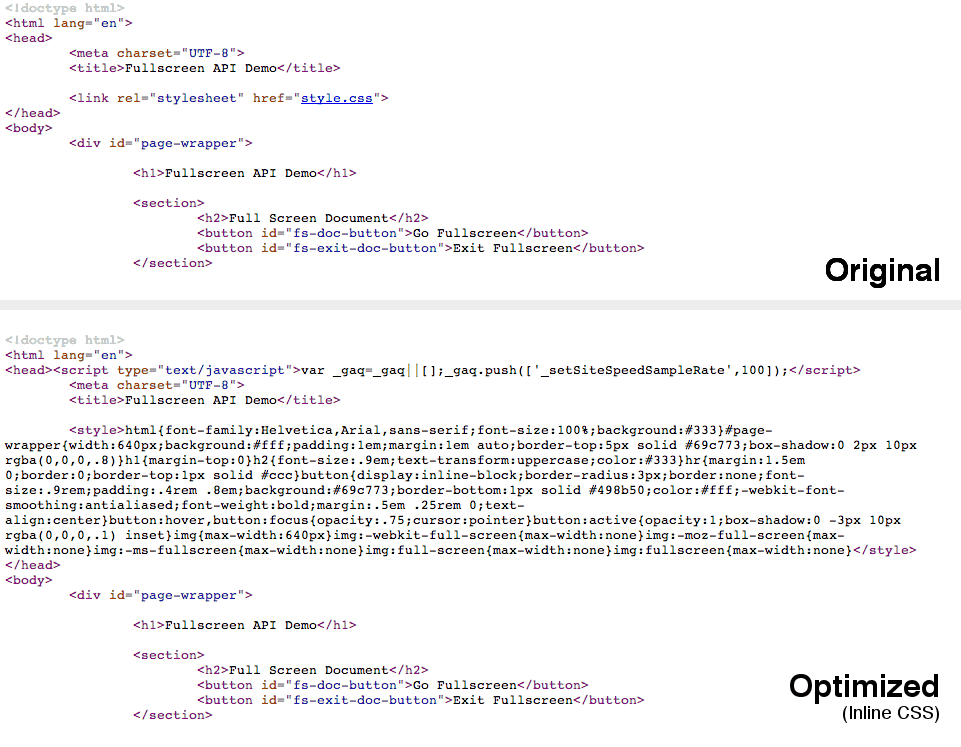
    <p>Simply by installing mod_pagespeed you’ve bagged yourself a bunch of great performance wins. By default, mod_pagespeed will be enabled for all of the websites on your server.</p>
    <div>
    <a href="http://blog.teamtreehouse.com/wp-content/uploads/2014/01/opt.png" rel="nofollow external" class="bo"><img alt="Inline CSS with mod_pagespeed" src="http://blog.teamtreehouse.com/wp-content/uploads/2014/01/opt.png" width="961" height="747" style="max-width: 100%; height: auto;"></a><p>Inline CSS with mod_pagespeed</p>
    </div>
    <p>Try visiting one of the websites on your server and take a look at the source code in the browser. You’ll see that mod_pagespeed has changed things around a bit. You may now have CSS and JavaScript assets (maybe even some small images) inline within your HTML. This reduces the number of HTTP requests that are needed to load the page, resulting in faster load times.</p>
    <h2>Configuring mod_pagespeed</h2>
    <p>The mod_pagespeed module comes with some of the most commonly used filters enabled by default. In this section you’re going to learn how to enable some of the other optimization filters that are provided.</p>
    <p>The master configuration file for mod_pagespeed can be found at <code>/etc/apache2/mods-available/pagespeed.conf</code>. This defines the global configuration for mod_pagespeed and therefore any changes that you make to this file will affect all of the websites on your server. This is great if you want all of your websites to use the same filters but there may be times when this is not the case.</p>
    <p>If you’re using <a href="http://httpd.apache.org/docs/current/vhosts/" rel="nofollow external" class="bo">virtual hosts</a>, an ideal place to put your site-specific PageSpeed filters is within the host configuration. Depending on your setup, you may find virtual hosts declared within the files in the <code>/etc/apache2/sites-available</code> folder.</p>
    <p>The snippet below shows an example <code>VirtualHost</code> configuration with mod_pagespeed directives.</p>
    <pre><code>&lt;VirtualHost *:80&gt;&#x000A;      DocumentRoot /www/example&#x000A;      ServerName <a href="http://www.example.come">www.example.come</a>&#x000A;    &#x000A;      # mod_pagespeed configuration&#x000A;      ModPagespeedEnableFilters lazyload_images&#x000A;      ModPagespeedDisableFilters inline_css&#x000A;    &lt;/VirtualHost&gt;&#x000A;    </code></pre>
    <p>You can also use a <code>.htaccess</code> file if you don’t have access to the configuration for you virtual host.</p>
    <hr>
    <p><strong>Note</strong>: By default, virtual hosts will inherit the options specified in the master <code>pagespeed.conf</code> file. This behaviour is controlled using the <code>ModPagespeedInheritVHostConfig</code> directive. Setting this to <code>off</code> would cause each of the virtual hosts to have a completely independent PageSpeed configuration.</p>
    <hr>
    <h3>Rewrite Levels</h3>
    <p>PageSpeed uses two different levels to make configuration simple. The <code>CoreFilters</code> level enables a default set of filters that will make your website faster. You can then enable or disable filters to modify the configuration as you wish.</p>
    <p>Alternatively you can disable <code>CoreFilters</code> by setting the <code>RewriteLevel</code> to <code>PassThrough</code>. You will then need to manually enable all of the filters that you wish to use.</p>
    <pre><code>ModPagespeedRewriteLevel PassThrough&#x000A;    </code></pre>
    <p>Unless you have some very specific requirements it’s often best to leave the <code>RewriteLevel</code> as <code>CoreFilters</code> and then modify the enabled filters in the host configuration.</p>
    <h3>Enabling Filters</h3>
    <p>To enable a filter you use the <code>ModPagespeedEnableFilters</code> directive.</p>
    <pre><code>ModPagespeedEnableFilters &lt;filter_name&gt;,&lt;filter2_name&gt;&#x000A;    </code></pre>
    <p>You can find a full list of the different filters available <a href="https://developers.google.com/speed/pagespeed/module/config_filters" rel="nofollow external" class="bo">here</a>.</p>
    <p>Note than some filters rely on additional configuration variables, such as the <code>insert_ga</code> filter which will automatically insert the Google Analytics code into your pages.</p>
    <pre><code>ModPagespeedEnableFilters insert_ga&#x000A;    ModPagespeedAnalyticsID &lt;Analytics ID&gt;&#x000A;    </code></pre>
    <p>Refer to the <a href="https://developers.google.com/speed/pagespeed/module/config_filters" rel="nofollow external" class="bo">documentation</a> for each of the options to find out if you need to set additional variables.</p>
    <h3>Disabling Filters</h3>
    <p>To disable a filter you use the <code>ModPagespeedDisableFilters</code> directive.</p>
    <pre><code>ModPagespeedDisableFilters &lt;filter_name&gt;,&lt;filter2_name&gt;&#x000A;    </code></pre>
    <p>Specifying this in your host config will override the options specified in <code>pagespeed.conf</code>.</p>
    <p>As well as disabling filters you can also forbid virtual hosts from using specific filters. This is done using the <code>ModPagespeedForbidFilters</code> directive.</p>
    <pre><code>ModPagespeedForbidFilters &lt;filter_name&gt;,&lt;filter2_name&gt;&#x000A;    </code></pre>
    <p>Forbidding access to filters can be useful if you manage a server that hosts many different websites.</p>
    <h3>Disabling mod_pagespeed for a Website</h3>
    <p>You can disable the PageSpeed module completely for a specific website by setting <code>ModPagespeed</code> to <code>off</code> in your host configuration.</p>
    <pre><code>ModPagespeed off&#x000A;    </code></pre>
    <p>If you only need to temporarily disable mod_pagespeed for testing purposes, you can just add the <code>ModPagespeed=off</code> query parameter to the URL.</p>
    <pre><code><a href="http://example.com/index.html?ModPagespeed=off">http://example.com/index.html?ModPagespeed=off</a>&#x000A;    </code></pre>
    <h2>Final Thoughts</h2>
    <p>We all know that optimizing websites for performance is a big part of web development today, but taking care of all the different optimization tasks can often become tedious. The PageSpeed module you’ve learned about here takes care of much of this headache; leaving you to do what you do best – build great websites.</p>
    <p>I highly recommend that you take a little time to install this module on your web servers. For a minimal amount of effort you can unlock a wide range of performance gains and supercharge your websites.</p>
    <h2>Useful Links</h2>
    <ul>
    <li><a href="https://developers.google.com/speed/pagespeed/module" rel="nofollow external" class="bo">PageSpeed Module Homepage</a></li>
    <li><a href="https://code.google.com/p/modpagespeed/" rel="nofollow external" class="bo">Google Code Project</a></li>
    <li><a href="http://www.modpagespeed.com/" rel="nofollow external" class="bo">mod_pagespeed Filter Examples</a></li>
    <li><a href="https://developers.google.com/speed/pagespeed/module/build_ngx_pagespeed_from_source" rel="nofollow external" class="bo">Nginx Install Instructions</a></li>
    <li><a href="https://developers.google.com/speed/pagespeed/module/config_filters" rel="nofollow external" class="bo">Configuring PageSpeed Filters</a></li>
    </ul>
    <p>The post <a href="http://blog.teamtreehouse.com/automating-web-performance-best-practices-mod_pagespeed" rel="nofollow external" class="bo">Automating Web Performance Best Practices with mod_pagespeed</a> appeared first on <a href="http://blog.teamtreehouse.com" rel="nofollow external" class="bo">Treehouse Blog</a>.</p>
    </div>
]]>
</Body>
<Summary>Web performance is a brilliant, but sometimes complex world. Concatenating and minifying files, optimizing images, setting up caching, these are all tasks that can lead to great performance wins....</Summary>
<Website>http://blog.teamtreehouse.com/automating-web-performance-best-practices-mod_pagespeed?utm_source=rss&amp;utm_medium=rss&amp;utm_campaign=automating-web-performance-best-practices-mod_pagespeed</Website>
<TrackingUrl>https://my3.my.umbc.edu/api/v0/pixel/news/39969/guest@my.umbc.edu/c640a935d63b8021d1ee05550a6fd055/api/pixel</TrackingUrl>
<Tag>android</Tag>
<Tag>code</Tag>
<Tag>css</Tag>
<Tag>design</Tag>
<Tag>development</Tag>
<Tag>html</Tag>
<Tag>ios</Tag>
<Tag>javascript</Tag>
<Tag>responsive</Tag>
<Tag>web</Tag>
<Tag>web-apps</Tag>
<Group token="retired-583">Web Developer - Build Group</Group>
<GroupUrl>https://my3.my.umbc.edu/groups/retired-583</GroupUrl>
<AvatarUrl>https://assets3-my.umbc.edu/system/shared/avatars/groups/000/000/583/fc60f5d7abc2e080599bb6dc465db54d/xsmall.png?1363101197</AvatarUrl>
<AvatarUrl size="original">https://assets4-my.umbc.edu/system/shared/avatars/groups/000/000/583/fc60f5d7abc2e080599bb6dc465db54d/original.jpg?1363101197</AvatarUrl>
<AvatarUrl size="xxlarge">https://assets4-my.umbc.edu/system/shared/avatars/groups/000/000/583/fc60f5d7abc2e080599bb6dc465db54d/xxlarge.png?1363101197</AvatarUrl>
<AvatarUrl size="xlarge">https://assets4-my.umbc.edu/system/shared/avatars/groups/000/000/583/fc60f5d7abc2e080599bb6dc465db54d/xlarge.png?1363101197</AvatarUrl>
<AvatarUrl size="large">https://assets3-my.umbc.edu/system/shared/avatars/groups/000/000/583/fc60f5d7abc2e080599bb6dc465db54d/large.png?1363101197</AvatarUrl>
<AvatarUrl size="medium">https://assets3-my.umbc.edu/system/shared/avatars/groups/000/000/583/fc60f5d7abc2e080599bb6dc465db54d/medium.png?1363101197</AvatarUrl>
<AvatarUrl size="small">https://assets4-my.umbc.edu/system/shared/avatars/groups/000/000/583/fc60f5d7abc2e080599bb6dc465db54d/small.png?1363101197</AvatarUrl>
<AvatarUrl size="xsmall">https://assets3-my.umbc.edu/system/shared/avatars/groups/000/000/583/fc60f5d7abc2e080599bb6dc465db54d/xsmall.png?1363101197</AvatarUrl>
<AvatarUrl size="xxsmall">https://assets4-my.umbc.edu/system/shared/avatars/groups/000/000/583/fc60f5d7abc2e080599bb6dc465db54d/xxsmall.png?1363101197</AvatarUrl>
<Sponsor>Web Developer - Build Group</Sponsor>
<PawCount>0</PawCount>
<CommentCount>0</CommentCount>
<CommentsAllowed>true</CommentsAllowed>
<PostedAt>Mon, 06 Jan 2014 14:54:13 -0500</PostedAt>
</NewsItem>

<NewsItem contentIssues="true" id="40317" important="false" status="posted" url="https://my3.my.umbc.edu/posts/40317">
<Title>Automating Web Performance Best Practices with mod_pagespeed</Title>
<Body>
<![CDATA[
    <div class="html-content">
    <p><a href="http://blog.teamtreehouse.com/wp-content/uploads/2014/01/pagespeed-256.png" rel="nofollow external" class="bo"><img alt="pagespeed-256" src="http://blog.teamtreehouse.com/wp-content/uploads/2014/01/pagespeed-256-150x150.png" width="150" height="150" style="max-width: 100%; height: auto;"></a>Web performance is a brilliant, but sometimes complex world. Concatenating and minifying files, optimizing images, setting up caching, these are all tasks that can lead to great performance wins. We know that this stuff is good for performance but actually putting these strategies into practice can sometimes be tedious. A team at Google recognized this problem and came up with the idea of creating a web server module that would take of a whole bunch of performance optimizations for you; thus mod_pagespeed was born.</p>
    <p>In this post you’re going to learn how to set up mod_pagespeed on an Apache web server. You’ll also be learning how to configure optimization filters that are provided by the module.</p>
    <hr>
    <p><strong>Note</strong>: This post assumes a familiarity with using the command line, SSH, and basic Apache configurations.</p>
    <hr>
    <h2>Performance Optimizations Covered by mod_pagespeed</h2>
    <p>The PageSpeed module (mod_pagespeed) contains a number of <em>filters</em> that are each responsible for taking care of an optimization task. By default, filters are enabled that handle:</p>
    <ul>
    <li>Image Optimization (Compression and Resizing)</li>
    <li>CSS &amp; JavaScript Concatenation, Minification, and Inlining</li>
    <li>Asset Caching</li>
    </ul>
    <p>As well as these common optimizations there are filters available for a wide range of other tasks, including:</p>
    <ul>
    <li>Deferred Loading of JavaScript and Images</li>
    <li>Removal of HTML Comments and Whitespace</li>
    <li>Lazy-loading Images (only loaded when they become visible in the viewport)</li>
    <li>Google Analytics Injection</li>
    <li>and more…</li>
    </ul>
    <p>Later in this post you’ll learn how to enable these additional filters in the PageSpeed configuration.</p>
    <h2>Installing mod_pagespeed For Apache</h2>
    <p>In this post we’re going to focussing on setting up the PageSpeed module for an Apache web server. It’s worth noting that there is also an equivalent module available for <a href="https://developers.google.com/speed/pagespeed/module/build_ngx_pagespeed_from_source" rel="nofollow external" class="bo">nginx</a>.</p>
    <hr>
    <p><strong>Note</strong>: In order to install the mod_pagespeed module you will need to have SSH access to your web server. If you use a shared hosting service this may not be the case, and therefore I’d advise you to contact your hosting provider and enquire if they have support for mod_pagespeed. You can also check to see if the module is enabled using a <a href="https://kb.mediatemple.net/questions/764/How+can+I+create+a+phpinfo.php+page%3F" rel="nofollow external" class="bo">phpinfo file</a>.</p>
    <hr>
    <p>To install the mod_pagespeed module follow these steps.</p>
    <h3>1. Open a Connection to Your Server</h3>
    <p>Start by opening up Terminal and creating a new SSH connection to your server.</p>
    <pre><code>ssh user@hostname  # e.g. ssh <a href="mailto:root@127.0.0.1">root@127.0.0.1</a>&#x000A;    </code></pre>
    <h3>2. Download the Package</h3>
    <p><a href="https://developers.google.com/speed/pagespeed/module/download" rel="nofollow external" class="bo">Download</a> the appropriate package for your server environment. You can use the <code>wget</code> program to save this file directly to your server.</p>
    <pre><code>wget &lt;package url&gt;&#x000A;    </code></pre>
    <ul>
    <li>32 Bit (Debian/Ubuntu): <a href="https://dl-ssl.google.com/dl/linux/direct/mod-pagespeed-stable_current_i386.deb" rel="nofollow external" class="bo">https://dl-ssl.google.com/dl/linux/direct/mod-pagespeed-stable_current_i386.deb</a>
    </li>
    <li>64 Bit (Debian/Ubuntu): <a href="https://dl-ssl.google.com/dl/linux/direct/mod-pagespeed-stable_current_amd64.deb" rel="nofollow external" class="bo">https://dl-ssl.google.com/dl/linux/direct/mod-pagespeed-stable_current_amd64.deb</a>
    </li>
    <li>32 Bit (CentOS/Fedora): <a href="https://dl-ssl.google.com/dl/linux/direct/mod-pagespeed-stable_current_i386.rpm" rel="nofollow external" class="bo">https://dl-ssl.google.com/dl/linux/direct/mod-pagespeed-stable_current_i386.rpm</a>
    </li>
    <li>64 Bit (CentOS/Fedora): <a href="https://dl-ssl.google.com/dl/linux/direct/mod-pagespeed-stable_current_x86_64.rpm" rel="nofollow external" class="bo">https://dl-ssl.google.com/dl/linux/direct/mod-pagespeed-stable_current_x86_64.rpm</a>
    </li>
    </ul>
    <h3>3. Install the Package</h3>
    <p>Next you need to install the package. Instructions for doing this vary depending on what type of server you are using.</p>
    <p>For Debian/Ubuntu servers:</p>
    <pre><code>sudo dpkg -i mod-pagespeed-*.deb&#x000A;    sudo apt-get -f install&#x000A;    </code></pre>
    <p>For CentOS/Fedora servers:</p>
    <pre><code># only if 'at' is not installed&#x000A;    sudo yum install at&#x000A;    &#x000A;    # install the package&#x000A;    sudo rpm -U mod-pagespeed-*.rpm&#x000A;    </code></pre>
    <h3>4. Restart Apache</h3>
    <p>The mod_pagespeed module should now be installed on your server. All you need to do now is restart Apache.</p>
    <pre><code>service apache2 restart&#x000A;    </code></pre>
    <p>The installation process should have enabled the new module for you. You can check this by looking for the <code>pagespeed.conf</code> and <code>pagespeed.load</code> files in the <code>/etc/apache2/mods-enabled</code> directory. If these two files are present the module will be loaded by Apache and you’re good to go!</p>
    <p>If you can’t find these<code>files in the</code>mods-enabled` folder, execute the following commands to enable the module and restart the web server.</p>
    <pre><code>cd /etc/apache2/mods-enabled&#x000A;    ln -s ../mods-available/pagespeed.* ./&#x000A;    &#x000A;    # Restart Apache&#x000A;    service apache2 restart&#x000A;    </code></pre>
    <p>Simply by installing mod_pagespeed you’ve bagged yourself a bunch of great performance wins. By default, mod_pagespeed will be enabled for all of the websites on your server.</p>
    <div>
    <a href="http://blog.teamtreehouse.com/wp-content/uploads/2014/01/opt.png" rel="nofollow external" class="bo"><img alt="Inline CSS with mod_pagespeed" src="http://blog.teamtreehouse.com/wp-content/uploads/2014/01/opt.png" width="961" height="747" style="max-width: 100%; height: auto;"></a><p>Inline CSS with mod_pagespeed</p>
    </div>
    <p>Try visiting one of the websites on your server and take a look at the source code in the browser. You’ll see that mod_pagespeed has changed things around a bit. You may now have CSS and JavaScript assets (maybe even some small images) inline within your HTML. This reduces the number of HTTP requests that are needed to load the page, resulting in faster load times.</p>
    <h2>Configuring mod_pagespeed</h2>
    <p>The mod_pagespeed module comes with some of the most commonly used filters enabled by default. In this section you’re going to learn how to enable some of the other optimization filters that are provided.</p>
    <p>The master configuration file for mod_pagespeed can be found at <code>/etc/apache2/mods-available/pagespeed.conf</code>. This defines the global configuration for mod_pagespeed and therefore any changes that you make to this file will affect all of the websites on your server. This is great if you want all of your websites to use the same filters but there may be times when this is not the case.</p>
    <p>If you’re using <a href="http://httpd.apache.org/docs/current/vhosts/" rel="nofollow external" class="bo">virtual hosts</a>, an ideal place to put your site-specific PageSpeed filters is within the host configuration. Depending on your setup, you may find virtual hosts declared within the files in the <code>/etc/apache2/sites-available</code> folder.</p>
    <p>The snippet below shows an example <code>VirtualHost</code> configuration with mod_pagespeed directives.</p>
    <pre><code>&lt;VirtualHost *:80&gt;&#x000A;      DocumentRoot /www/example&#x000A;      ServerName <a href="http://www.example.come">www.example.come</a>&#x000A;    &#x000A;      # mod_pagespeed configuration&#x000A;      ModPagespeedEnableFilters lazyload_images&#x000A;      ModPagespeedDisableFilters inline_css&#x000A;    &lt;/VirtualHost&gt;&#x000A;    </code></pre>
    <p>You can also use a <code>.htaccess</code> file if you don’t have access to the configuration for you virtual host.</p>
    <hr>
    <p><strong>Note</strong>: By default, virtual hosts will inherit the options specified in the master <code>pagespeed.conf</code> file. This behaviour is controlled using the <code>ModPagespeedInheritVHostConfig</code> directive. Setting this to <code>off</code> would cause each of the virtual hosts to have a completely independent PageSpeed configuration.</p>
    <hr>
    <h3>Rewrite Levels</h3>
    <p>PageSpeed uses two different levels to make configuration simple. The <code>CoreFilters</code> level enables a default set of filters that will make your website faster. You can then enable or disable filters to modify the configuration as you wish.</p>
    <p>Alternatively you can disable <code>CoreFilters</code> by setting the <code>RewriteLevel</code> to <code>PassThrough</code>. You will then need to manually enable all of the filters that you wish to use.</p>
    <pre><code>ModPagespeedRewriteLevel PassThrough&#x000A;    </code></pre>
    <p>Unless you have some very specific requirements it’s often best to leave the <code>RewriteLevel</code> as <code>CoreFilters</code> and then modify the enabled filters in the host configuration.</p>
    <h3>Enabling Filters</h3>
    <p>To enable a filter you use the <code>ModPagespeedEnableFilters</code> directive.</p>
    <pre><code>ModPagespeedEnableFilters &lt;filter_name&gt;,&lt;filter2_name&gt;&#x000A;    </code></pre>
    <p>You can find a full list of the different filters available <a href="https://developers.google.com/speed/pagespeed/module/config_filters" rel="nofollow external" class="bo">here</a>.</p>
    <p>Note than some filters rely on additional configuration variables, such as the <code>insert_ga</code> filter which will automatically insert the Google Analytics code into your pages.</p>
    <pre><code>ModPagespeedEnableFilters insert_ga&#x000A;    ModPagespeedAnalyticsID &lt;Analytics ID&gt;&#x000A;    </code></pre>
    <p>Refer to the <a href="https://developers.google.com/speed/pagespeed/module/config_filters" rel="nofollow external" class="bo">documentation</a> for each of the options to find out if you need to set additional variables.</p>
    <h3>Disabling Filters</h3>
    <p>To disable a filter you use the <code>ModPagespeedDisableFilters</code> directive.</p>
    <pre><code>ModPagespeedDisableFilters &lt;filter_name&gt;,&lt;filter2_name&gt;&#x000A;    </code></pre>
    <p>Specifying this in your host config will override the options specified in <code>pagespeed.conf</code>.</p>
    <p>As well as disabling filters you can also forbid virtual hosts from using specific filters. This is done using the <code>ModPagespeedForbidFilters</code> directive.</p>
    <pre><code>ModPagespeedForbidFilters &lt;filter_name&gt;,&lt;filter2_name&gt;&#x000A;    </code></pre>
    <p>Forbidding access to filters can be useful if you manage a server that hosts many different websites.</p>
    <h3>Disabling mod_pagespeed for a Website</h3>
    <p>You can disable the PageSpeed module completely for a specific website by setting <code>ModPagespeed</code> to <code>off</code> in your host configuration.</p>
    <pre><code>ModPagespeed off&#x000A;    </code></pre>
    <p>If you only need to temporarily disable mod_pagespeed for testing purposes, you can just add the <code>ModPagespeed=off</code> query parameter to the URL.</p>
    <pre><code><a href="http://example.com/index.html?ModPagespeed=off">http://example.com/index.html?ModPagespeed=off</a>&#x000A;    </code></pre>
    <h2>Final Thoughts</h2>
    <p>We all know that optimizing websites for performance is a big part of web development today, but taking care of all the different optimization tasks can often become tedious. The PageSpeed module you’ve learned about here takes care of much of this headache; leaving you to do what you do best – build great websites.</p>
    <p>I highly recommend that you take a little time to install this module on your web servers. For a minimal amount of effort you can unlock a wide range of performance gains and supercharge your websites.</p>
    <h2>Useful Links</h2>
    <ul>
    <li><a href="https://developers.google.com/speed/pagespeed/module" rel="nofollow external" class="bo">PageSpeed Module Homepage</a></li>
    <li><a href="https://code.google.com/p/modpagespeed/" rel="nofollow external" class="bo">Google Code Project</a></li>
    <li><a href="http://www.modpagespeed.com/" rel="nofollow external" class="bo">mod_pagespeed Filter Examples</a></li>
    <li><a href="https://developers.google.com/speed/pagespeed/module/build_ngx_pagespeed_from_source" rel="nofollow external" class="bo">Nginx Install Instructions</a></li>
    <li><a href="https://developers.google.com/speed/pagespeed/module/config_filters" rel="nofollow external" class="bo">Configuring PageSpeed Filters</a></li>
    </ul>
    <p>The post <a href="http://blog.teamtreehouse.com/automating-web-performance-best-practices-mod_pagespeed" rel="nofollow external" class="bo">Automating Web Performance Best Practices with mod_pagespeed</a> appeared first on <a href="http://blog.teamtreehouse.com" rel="nofollow external" class="bo">Treehouse Blog</a>.</p>
    </div>
]]>
</Body>
<Summary>Web performance is a brilliant, but sometimes complex world. Concatenating and minifying files, optimizing images, setting up caching, these are all tasks that can lead to great performance wins....</Summary>
<Website>http://feedproxy.google.com/~r/teamtreehouse/~3/0lh2qtt1LpE/automating-web-performance-best-practices-mod_pagespeed</Website>
<TrackingUrl>https://my3.my.umbc.edu/api/v0/pixel/news/40317/guest@my.umbc.edu/10dff16b2d611301fb21cd3c879210ab/api/pixel</TrackingUrl>
<Tag>android</Tag>
<Tag>code</Tag>
<Tag>css</Tag>
<Tag>design</Tag>
<Tag>development</Tag>
<Tag>html</Tag>
<Tag>ios</Tag>
<Tag>javascript</Tag>
<Tag>responsive</Tag>
<Tag>web</Tag>
<Tag>web-apps</Tag>
<Group token="retired-583">Web Developer - Build Group</Group>
<GroupUrl>https://my3.my.umbc.edu/groups/retired-583</GroupUrl>
<AvatarUrl>https://assets3-my.umbc.edu/system/shared/avatars/groups/000/000/583/fc60f5d7abc2e080599bb6dc465db54d/xsmall.png?1363101197</AvatarUrl>
<AvatarUrl size="original">https://assets4-my.umbc.edu/system/shared/avatars/groups/000/000/583/fc60f5d7abc2e080599bb6dc465db54d/original.jpg?1363101197</AvatarUrl>
<AvatarUrl size="xxlarge">https://assets4-my.umbc.edu/system/shared/avatars/groups/000/000/583/fc60f5d7abc2e080599bb6dc465db54d/xxlarge.png?1363101197</AvatarUrl>
<AvatarUrl size="xlarge">https://assets4-my.umbc.edu/system/shared/avatars/groups/000/000/583/fc60f5d7abc2e080599bb6dc465db54d/xlarge.png?1363101197</AvatarUrl>
<AvatarUrl size="large">https://assets3-my.umbc.edu/system/shared/avatars/groups/000/000/583/fc60f5d7abc2e080599bb6dc465db54d/large.png?1363101197</AvatarUrl>
<AvatarUrl size="medium">https://assets3-my.umbc.edu/system/shared/avatars/groups/000/000/583/fc60f5d7abc2e080599bb6dc465db54d/medium.png?1363101197</AvatarUrl>
<AvatarUrl size="small">https://assets4-my.umbc.edu/system/shared/avatars/groups/000/000/583/fc60f5d7abc2e080599bb6dc465db54d/small.png?1363101197</AvatarUrl>
<AvatarUrl size="xsmall">https://assets3-my.umbc.edu/system/shared/avatars/groups/000/000/583/fc60f5d7abc2e080599bb6dc465db54d/xsmall.png?1363101197</AvatarUrl>
<AvatarUrl size="xxsmall">https://assets4-my.umbc.edu/system/shared/avatars/groups/000/000/583/fc60f5d7abc2e080599bb6dc465db54d/xxsmall.png?1363101197</AvatarUrl>
<Sponsor>Web Developer - Build Group</Sponsor>
<PawCount>0</PawCount>
<CommentCount>0</CommentCount>
<CommentsAllowed>true</CommentsAllowed>
<PostedAt>Mon, 06 Jan 2014 14:54:13 -0500</PostedAt>
</NewsItem>

<NewsItem contentIssues="false" id="109879" important="false" status="posted" url="https://my3.my.umbc.edu/posts/109879">
<Title>Prof. desJardins receives NSF research award for CS education development</Title>
<Body>
<![CDATA[
    <div class="html-content">Professor Marie desJardins received a research award from the National Science Foundation focused on increasing the expertise of Maryland high school teachers for teaching computer science, with the ultimate goal of increasing the number of computer science classes offered in Maryland and the number and diversity of students taking them. The project, CS10K: Collaborative Research: A Structured CS Principles Approach to Professional Development for Maryland High School Teachers, is led by Dr. desJardins and will involve collaborators from the Computer Science department at the University of Maryland, College Park, and high school teachers from Charles County and Baltimore County. The …</div>
]]>
</Body>
<Summary>Professor Marie desJardins received a research award from the National Science Foundation focused on increasing the expertise of Maryland high school teachers for teaching computer science, with...</Summary>
<Website>https://news.umbc.edu/prof-desjardins-receives-nsf-research-award-for-cs-education-development/</Website>
<TrackingUrl>https://my3.my.umbc.edu/api/v0/pixel/news/109879/guest@my.umbc.edu/be25e17660130e465a0a0db51844b63f/api/pixel</TrackingUrl>
<Tag>science-and-technology</Tag>
<Group token="umbc-news">UMBC News</Group>
<GroupUrl>https://my3.my.umbc.edu/groups/umbc-news</GroupUrl>
<AvatarUrl>https://assets2-my.umbc.edu/system/shared/avatars/groups/000/001/944/2c79aeea85b1abb37f8cf9fbcdc382b0/xsmall.png?1632921809</AvatarUrl>
<AvatarUrl size="original">https://assets4-my.umbc.edu/system/shared/avatars/groups/000/001/944/2c79aeea85b1abb37f8cf9fbcdc382b0/original.png?1632921809</AvatarUrl>
<AvatarUrl size="xxlarge">https://assets4-my.umbc.edu/system/shared/avatars/groups/000/001/944/2c79aeea85b1abb37f8cf9fbcdc382b0/xxlarge.png?1632921809</AvatarUrl>
<AvatarUrl size="xlarge">https://assets1-my.umbc.edu/system/shared/avatars/groups/000/001/944/2c79aeea85b1abb37f8cf9fbcdc382b0/xlarge.png?1632921809</AvatarUrl>
<AvatarUrl size="large">https://assets1-my.umbc.edu/system/shared/avatars/groups/000/001/944/2c79aeea85b1abb37f8cf9fbcdc382b0/large.png?1632921809</AvatarUrl>
<AvatarUrl size="medium">https://assets1-my.umbc.edu/system/shared/avatars/groups/000/001/944/2c79aeea85b1abb37f8cf9fbcdc382b0/medium.png?1632921809</AvatarUrl>
<AvatarUrl size="small">https://assets4-my.umbc.edu/system/shared/avatars/groups/000/001/944/2c79aeea85b1abb37f8cf9fbcdc382b0/small.png?1632921809</AvatarUrl>
<AvatarUrl size="xsmall">https://assets2-my.umbc.edu/system/shared/avatars/groups/000/001/944/2c79aeea85b1abb37f8cf9fbcdc382b0/xsmall.png?1632921809</AvatarUrl>
<AvatarUrl size="xxsmall">https://assets4-my.umbc.edu/system/shared/avatars/groups/000/001/944/2c79aeea85b1abb37f8cf9fbcdc382b0/xxsmall.png?1632921809</AvatarUrl>
<Sponsor>UMBC News</Sponsor>
<PawCount>0</PawCount>
<CommentCount>0</CommentCount>
<CommentsAllowed>false</CommentsAllowed>
<PostedAt>Mon, 06 Jan 2014 14:53:39 -0500</PostedAt>
</NewsItem>

<NewsItem contentIssues="false" id="109880" important="false" status="posted" url="https://my3.my.umbc.edu/posts/109880">
<Title>Greg Couturier, Peaceworker Fellow, Writes Op-Ed in The Baltimore Sun</Title>
<Body>
<![CDATA[
    <div class="html-content">Greg Couturier, a Peaceworker Fellow affiliated with UMBC’s Shriver Center, recently wrote an op-ed published in The Baltimore Sun about the current state of Baltimore’s juvenile services. In his commentary titled “A plea for moral imagination,” Couturier argues more needs to be done than simply spending money to combat juvenile crime. “Instead of putting delinquent youth in facilities that have been proven to exacerbate violent behavior, many researchers are now calling for a push toward evidence-based, family-centered and community-based interventions, such as multi-systemic therapy, functional family therapy and various types of social education programs,” he writes. Couturier is currently earning his Master’s …</div>
]]>
</Body>
<Summary>Greg Couturier, a Peaceworker Fellow affiliated with UMBC’s Shriver Center, recently wrote an op-ed published in The Baltimore Sun about the current state of Baltimore’s juvenile services. In his...</Summary>
<Website>https://news.umbc.edu/greg-couturier-peaceworker-fellow-writes-op-ed-in-the-baltimore-sun/</Website>
<TrackingUrl>https://my3.my.umbc.edu/api/v0/pixel/news/109880/guest@my.umbc.edu/85513798c13bc8d6b85b358080e7360e/api/pixel</TrackingUrl>
<Tag>policy-and-society</Tag>
<Tag>shrivercenter</Tag>
<Group token="umbc-news">UMBC News</Group>
<GroupUrl>https://my3.my.umbc.edu/groups/umbc-news</GroupUrl>
<AvatarUrl>https://assets2-my.umbc.edu/system/shared/avatars/groups/000/001/944/2c79aeea85b1abb37f8cf9fbcdc382b0/xsmall.png?1632921809</AvatarUrl>
<AvatarUrl size="original">https://assets4-my.umbc.edu/system/shared/avatars/groups/000/001/944/2c79aeea85b1abb37f8cf9fbcdc382b0/original.png?1632921809</AvatarUrl>
<AvatarUrl size="xxlarge">https://assets4-my.umbc.edu/system/shared/avatars/groups/000/001/944/2c79aeea85b1abb37f8cf9fbcdc382b0/xxlarge.png?1632921809</AvatarUrl>
<AvatarUrl size="xlarge">https://assets1-my.umbc.edu/system/shared/avatars/groups/000/001/944/2c79aeea85b1abb37f8cf9fbcdc382b0/xlarge.png?1632921809</AvatarUrl>
<AvatarUrl size="large">https://assets1-my.umbc.edu/system/shared/avatars/groups/000/001/944/2c79aeea85b1abb37f8cf9fbcdc382b0/large.png?1632921809</AvatarUrl>
<AvatarUrl size="medium">https://assets1-my.umbc.edu/system/shared/avatars/groups/000/001/944/2c79aeea85b1abb37f8cf9fbcdc382b0/medium.png?1632921809</AvatarUrl>
<AvatarUrl size="small">https://assets4-my.umbc.edu/system/shared/avatars/groups/000/001/944/2c79aeea85b1abb37f8cf9fbcdc382b0/small.png?1632921809</AvatarUrl>
<AvatarUrl size="xsmall">https://assets2-my.umbc.edu/system/shared/avatars/groups/000/001/944/2c79aeea85b1abb37f8cf9fbcdc382b0/xsmall.png?1632921809</AvatarUrl>
<AvatarUrl size="xxsmall">https://assets4-my.umbc.edu/system/shared/avatars/groups/000/001/944/2c79aeea85b1abb37f8cf9fbcdc382b0/xxsmall.png?1632921809</AvatarUrl>
<Sponsor>UMBC News</Sponsor>
<PawCount>0</PawCount>
<CommentCount>0</CommentCount>
<CommentsAllowed>false</CommentsAllowed>
<PostedAt>Mon, 06 Jan 2014 14:51:15 -0500</PostedAt>
</NewsItem>

<NewsItem contentIssues="false" id="109881" important="false" status="posted" url="https://my3.my.umbc.edu/posts/109881">
<Title>Prof. Charles LaBerge cited for work on advancing aviation safety</Title>
<Body>
<![CDATA[
    <div class="html-content">Professor Charles Laberge, director of UMBC’s undergraduate Computer Engineering program, was recently recognized by the Radio Technical Commission for Aeronautics (RCTA) for more than thirty years of service helping to develop technical standards critical to aviation safety. RTCA is a private, not-for-profit association founded in 1935 to provide a public-private partnership venue for developing consensus among diverse, competing interests on critical aviation modernization issues in an increasingly global enterprise. Dr. Laberge’s work was cited in an article the December issue of the RTCA digest, Spotlight on Volunteers: Communications Expert Advances Aviation Safety, for his leadership and contributions to standards for …</div>
]]>
</Body>
<Summary>Professor Charles Laberge, director of UMBC’s undergraduate Computer Engineering program, was recently recognized by the Radio Technical Commission for Aeronautics (RCTA) for more than thirty...</Summary>
<Website>https://news.umbc.edu/prof-charles-laberge-cited-for-work-on-advancing-aviation-safety/</Website>
<TrackingUrl>https://my3.my.umbc.edu/api/v0/pixel/news/109881/guest@my.umbc.edu/1b438b9fe6c21ce4379acdd4e5c02e04/api/pixel</TrackingUrl>
<Tag>science-and-technology</Tag>
<Group token="umbc-news">UMBC News</Group>
<GroupUrl>https://my3.my.umbc.edu/groups/umbc-news</GroupUrl>
<AvatarUrl>https://assets2-my.umbc.edu/system/shared/avatars/groups/000/001/944/2c79aeea85b1abb37f8cf9fbcdc382b0/xsmall.png?1632921809</AvatarUrl>
<AvatarUrl size="original">https://assets4-my.umbc.edu/system/shared/avatars/groups/000/001/944/2c79aeea85b1abb37f8cf9fbcdc382b0/original.png?1632921809</AvatarUrl>
<AvatarUrl size="xxlarge">https://assets4-my.umbc.edu/system/shared/avatars/groups/000/001/944/2c79aeea85b1abb37f8cf9fbcdc382b0/xxlarge.png?1632921809</AvatarUrl>
<AvatarUrl size="xlarge">https://assets1-my.umbc.edu/system/shared/avatars/groups/000/001/944/2c79aeea85b1abb37f8cf9fbcdc382b0/xlarge.png?1632921809</AvatarUrl>
<AvatarUrl size="large">https://assets1-my.umbc.edu/system/shared/avatars/groups/000/001/944/2c79aeea85b1abb37f8cf9fbcdc382b0/large.png?1632921809</AvatarUrl>
<AvatarUrl size="medium">https://assets1-my.umbc.edu/system/shared/avatars/groups/000/001/944/2c79aeea85b1abb37f8cf9fbcdc382b0/medium.png?1632921809</AvatarUrl>
<AvatarUrl size="small">https://assets4-my.umbc.edu/system/shared/avatars/groups/000/001/944/2c79aeea85b1abb37f8cf9fbcdc382b0/small.png?1632921809</AvatarUrl>
<AvatarUrl size="xsmall">https://assets2-my.umbc.edu/system/shared/avatars/groups/000/001/944/2c79aeea85b1abb37f8cf9fbcdc382b0/xsmall.png?1632921809</AvatarUrl>
<AvatarUrl size="xxsmall">https://assets4-my.umbc.edu/system/shared/avatars/groups/000/001/944/2c79aeea85b1abb37f8cf9fbcdc382b0/xxsmall.png?1632921809</AvatarUrl>
<Sponsor>UMBC News</Sponsor>
<PawCount>0</PawCount>
<CommentCount>0</CommentCount>
<CommentsAllowed>false</CommentsAllowed>
<PostedAt>Mon, 06 Jan 2014 14:48:59 -0500</PostedAt>
</NewsItem>

<NewsItem contentIssues="false" id="109882" important="false" status="posted" url="https://my3.my.umbc.edu/posts/109882">
<Title>Prof. Anupam Joshi discusses Target data breach on NBC and ABC</Title>
<Body>
<![CDATA[
    <div class="html-content">In December it was revealed that Target suffered a data breach that involved more than 40 million credit and debit card accounts. The unauthorized access may impact guests who made credit or debit card purchases in our U.S. stores from Nov. 27 to Dec. 15, 2013. Director of the UMBC Center for Cybersecurity and CSEE Professor Anupam Joshi discussed the possible consequences of the breach in video reports by local affiliates for both ABC and NBC. Dr. Joshi outlined some of the possible ways that the data breach might have happened and pointed out that while the lost data could …</div>
]]>
</Body>
<Summary>In December it was revealed that Target suffered a data breach that involved more than 40 million credit and debit card accounts. The unauthorized access may impact guests who made credit or debit...</Summary>
<Website>https://news.umbc.edu/prof-anupam-joshi-discusses-target-data-breach-on-nbc-and-abc/</Website>
<TrackingUrl>https://my3.my.umbc.edu/api/v0/pixel/news/109882/guest@my.umbc.edu/9804abfcdb95d00037bcb92463306514/api/pixel</TrackingUrl>
<Tag>science-and-technology</Tag>
<Group token="umbc-news">UMBC News</Group>
<GroupUrl>https://my3.my.umbc.edu/groups/umbc-news</GroupUrl>
<AvatarUrl>https://assets2-my.umbc.edu/system/shared/avatars/groups/000/001/944/2c79aeea85b1abb37f8cf9fbcdc382b0/xsmall.png?1632921809</AvatarUrl>
<AvatarUrl size="original">https://assets4-my.umbc.edu/system/shared/avatars/groups/000/001/944/2c79aeea85b1abb37f8cf9fbcdc382b0/original.png?1632921809</AvatarUrl>
<AvatarUrl size="xxlarge">https://assets4-my.umbc.edu/system/shared/avatars/groups/000/001/944/2c79aeea85b1abb37f8cf9fbcdc382b0/xxlarge.png?1632921809</AvatarUrl>
<AvatarUrl size="xlarge">https://assets1-my.umbc.edu/system/shared/avatars/groups/000/001/944/2c79aeea85b1abb37f8cf9fbcdc382b0/xlarge.png?1632921809</AvatarUrl>
<AvatarUrl size="large">https://assets1-my.umbc.edu/system/shared/avatars/groups/000/001/944/2c79aeea85b1abb37f8cf9fbcdc382b0/large.png?1632921809</AvatarUrl>
<AvatarUrl size="medium">https://assets1-my.umbc.edu/system/shared/avatars/groups/000/001/944/2c79aeea85b1abb37f8cf9fbcdc382b0/medium.png?1632921809</AvatarUrl>
<AvatarUrl size="small">https://assets4-my.umbc.edu/system/shared/avatars/groups/000/001/944/2c79aeea85b1abb37f8cf9fbcdc382b0/small.png?1632921809</AvatarUrl>
<AvatarUrl size="xsmall">https://assets2-my.umbc.edu/system/shared/avatars/groups/000/001/944/2c79aeea85b1abb37f8cf9fbcdc382b0/xsmall.png?1632921809</AvatarUrl>
<AvatarUrl size="xxsmall">https://assets4-my.umbc.edu/system/shared/avatars/groups/000/001/944/2c79aeea85b1abb37f8cf9fbcdc382b0/xxsmall.png?1632921809</AvatarUrl>
<Sponsor>UMBC News</Sponsor>
<PawCount>0</PawCount>
<CommentCount>0</CommentCount>
<CommentsAllowed>false</CommentsAllowed>
<PostedAt>Mon, 06 Jan 2014 14:46:21 -0500</PostedAt>
</NewsItem>

<NewsItem contentIssues="false" id="39968" important="false" status="posted" url="https://my3.my.umbc.edu/posts/39968">
<Title>CMUA Indoor Starts Tonight</Title>
<Body>
<![CDATA[
    <div class="html-content">Hello,<div><br></div>
    <div>If you haven't heard, CMUA Indoor starts tonight at its really awesome new turf location (it's pretty freakin' sweet). The below spiel is from the email they sent out the other day. A clarification, though. Cleats are allowed as long as they're not really muddy from that stupid mud puddle you jumped in the other day. Sweet, here it is:</div>
    <div><br></div>
    <div>
    <div><p><span>Hello everyone and Happy New Year! Here it is, the email you've been waiting for! Here is everything you need know compiled into one convenient email. Please read through it all since we are doing things slightly different this year now that we have turf.</span></p></div>
    <div><p><span> </span></p></div>
    <div><p><span>Thanks to the hard work and resourcefulness of the one and only Barry Lloyd, we are now at a sweet new Indoor facility with a very nice turf field. The address to the place is:</span></p></div>
    <div><p>GOALS Baltimore</p></div>
    <div><p>6159 Edmondson Ave, Suite D<br>Catonsville, MD 21228</p></div>
    <div><p> </p></div>
    <div><p><span>We have the facility from <span><span>8:30 pm until 10:30</span></span>. Pickup begins at <span><span>8:30</span></span>, games are at <span><span>9:00 and 10:00</span></span> with more pickup in between. </span></p></div>
    <div><p> </p></div>
    <div><p><span>Along with the new facility, which we are very fortunate to have there are the rules of the place itself. Here they are.</span></p></div>
    <p>1. NO ALCOLHOL, Tobacco, or illegal substances permitted.<br>2. Swearing, abusive or foul language will NOT be permitted in the facility.<br>3. Do not play ball outside of the dasher boards (game playing fields) or outside of the facility. (<strong>this includes throwing discs)</strong></p>
    <div>
    <p>4. Coaches are to provide the balls for practice and the games.  (Team balls only) <strong>(Just bring your own discs, we will not provide all the discs for you... JP)</strong><br>5. Children must be accompanied by parent/guardian.<br>6. No running or horseplay in the facility.<br>6. No skate shoe, skate boards or roller blades allowed in the facility<br>7. Players/Teams are responsible for their own trash.<br>8. NO chewing gum – this will damage our court and field.<br>9. There must be a parent/coach to accompany all players under 18 on the field.<br>10. Proper attire is mandatory, including shirt and shoes. Goals Baltimore prefers turf shoes in lieu of cleats on the turf field.<br>11. No drink or food allowed on the fields.<br>12. Every player that steps onto the turf or field must sign a GOALS waiver. <strong><span>Please fill out waiver attached to this email and bring it with you.</span></strong><br>13. Play hard and have fun</p>
    <div>
    <p> </p>
    <div><p><span>James Kelly-Lieb and I will be running the show. We even have access to a scoreboard this year, so you'll never have to ask us for the score again. Barry will also be around, and being the proverbial Godfather to the Baltimore Ultimate community that he is, please do anything he tells you. And buy the man a drink if you see him out.</span></p></div>
    <div><p><span>If you get to the fields early, please don't overwhelm the folks inside. There are probably youth programs going on up until we have our time reserved, please do not go onto the field until you are given the "All clear." Please follow all the house rules. We don't want to lose our sweet new set up.<strong> </strong></span></p></div>
    <div><p><span> </span></p></div>
    <div><p><span> </span></p></div>
    <div><p><strong><span>Now, about the teams...</span></strong><span></span></p></div>
    <div><p><span>There is no way to make the teams perfectly even.  We tried, but we also tried to honor most buddy requests and this tends to skew the parity.  Sorry if your buddy request didn’t make it.  We couldn't do them all.</span><span></span></p></div>
    <div><p><span> </span></p></div>
    <div><p><span>The team size is roughly 15 players this year, which is great, and more than last year. We even had to make a waitlist, so I guess you can say Ultimate is getting pretty popular these days.  The teams have 12 guys and 4 or 5 women.  Teams can decide beforehand whether they would like to play 4/1 or 3/2. They are even able to switch between the two, but this must be agreed upon before games start.</span></p></div>
    <div><p><span> </span></p></div>
    <div><p><span>Teams are named, this year, after the X-men. Don't worry, we picked the cool ones, no one ended up as Kitty Pride or Jubilee.</span></p></div>
    <div><p><span> </span></p></div>
    <div><p><span>Things to keep in mind as we start league play:</span></p></div>
    <div><p><span> </span></p></div>
    <div><p><span> - This is not a highly competitive, super serious league.  The main reason we organize this league rather than just play pick-up all winter is to avoid having a ton of people waiting on the sideline each night.  It’s simply a way to split up the crowd into smaller groups and give them a dedicated (and somewhat exclusive) play period.  Bottom line: play hard, have fun, but don’t take it too seriously.</span></p></div>
    <div><p><span> </span></p></div>
    <div><p><span> - These play periods will start on time!  If you want to maximize your playing time, please arrive early and be ready to go at the start time.</span></p></div>
    <div><p><span> </span></p></div>
    <div><p><span> - A play period consists of a warm-up game, a water break, and a “real” game.  All league players are welcome to join in for the pickup.</span></p></div>
    <div><p><span>  </span></p></div>
    <div><p><span> - No team captains are required, but teams do seem to have more fun when someone is making the decisions.  Think about taking a leadership role.</span></p></div>
    <div><p><span> </span></p></div>
    <div><p><span>A volunteer MC (Master of Ceremonies) will be present each night to keep things organized.  This person is responsible for assigning sliders (defined below) and getting the games started on time.  Please treat all of your MC’s with the utmost respect and give them all the help you can.</span></p></div>
    <div><p><span> </span></p></div>
    <div><p><strong><span>Game Play:</span></strong><span></span></p></div>
    <div><p><span>We are changing things a little bit this year to fit with the new facility. The field is a little narrower and a good bit longer. There are walls around the arena, so to save lives, there is a 1 yard buffer around the field. If you or the disc touch the walls or net, you are out of bounds.</span></p></div>
    <div><p><span> </span></p></div>
    <div><p><span>The biggest change is this, we are not playing make it take it.</span></p></div>
    <div><p><span>Instead we are playing that you when score you immediately put the disc down where you are in the end-zone and go on defense. This allows for continuous play and easier tracking of scores since each team will only score in their very own end-zone. </span></p></div>
    <div><p><span> </span></p></div>
    <div><p><span>Subbing is still on the fly. Players not on the field must remain off the field. To be subbed in, you MUST be tagged in by the player who is subbing out. This is the only way to keep it fair and prevent people from "teleporting" onto the field.</span></p></div>
    <div><p><span>For those that have not played this style of indoor before, you should know that subbing on offense is way more convenient than subbing on defense.</span></p></div>
    <div><p><span> </span></p></div>
    <div><p><span>Official games last 30 minutes. Each team has a 1 minute time out. </span></p></div>
    <div><p><span>When time expires, if a team is in the lead, the game is over. If the disc is in the air when time expires, then the pass may be completed.</span></p></div>
    <div><p><span>If scores are tied when time expires, then there is a sudden death overtime. First team to score wins.</span></p></div>
    <div><p><span> </span></p></div>
    <div><p><span>You can call skips. (Good Luck)</span></p></div>
    <div><p><span> </span></p></div>
    <div><p><strong><em><span>Only active players (who are on the 2 teams playing) are allowed on the turf during the game.</span></em></strong><strong><span> </span></strong><span>Spectate from outside the glass... like hockey.</span></p></div>
    <div><p><span> </span></p></div>
    <div><p><span> </span></p></div>
    <div><p><strong><span>A Short Discussion of Sliding:</span></strong><span></span></p></div>
    <div><p><span> </span></p></div>
    <div><p><span>Each player is scheduled for one game per week.  There are two other ways for league members to get additional playing time:</span></p></div>
    <div><p><span>  - by showing up on time and participating in the pickup round prior to each game</span></p></div>
    <div><p><span>  - by being assigned by an MC to be a "slider" and participate in a game in which their team is not playing</span></p></div>
    <div><p><span> </span></p></div>
    <div><p><span>Sliding is an important part of the league due to the  obstacles that pop up in life that prevent people from making the games.  Thanks to sliders no one has to worry about letting their team down when they can’t make it.  Plus, it gives hardcore players additional court time.   On the other hand, we don’t want sliders to take away too much playing time from the players scheduled for a given hour, hence we limit the number of subs allowed. With team size being bigger this year, sliding will be harder. As always it is up to the teams themselves to decide if they want sliders.</span></p></div>
    <div><p><span> </span></p></div>
    <div><p><span>The MC will assign sliders during the pickup round in consultation with members of both teams, and with the goal of making the game as even as possible.  We will try to reach a consensus, but decision of the MC is final. Please be nice to us.</span></p></div>
    <div><p><span> </span></p></div>
    <div><p><span>Be advised that Sliding is risky business in that there may be no need for substitutes on a given night.  The MC is under no obligation to play you simply because you have made the trip to the gym.</span></p></div>
    <div><p><span> </span></p></div>
    <div><p><strong><em><span>It is important to remember that if you are sliding, it is not your team, so please take subs to allow the actual team members to play more than the sliders. If they really want you on the court, they'll sub to get you back in.</span></em></strong><span></span></p></div>
    <div><p><span> </span></p></div>
    <div><p><span> </span></p></div>
    <div><p><span> </span></p></div>
    <div><p><strong><span>Schedule and Format:</span></strong><span></span></p></div>
    <div><p><span> </span></p></div>
    <div><p><span>Each team has one game per week.  Over the first 6 weeks of the season, every team will play all but one team team once.  I tried to make the schedule so that people with a preference between Mondays and Wednesdays would have the majority of their games on their preferred night, but every team has at least one or two games on the other night.</span></p></div>
    <div><p><span> </span></p></div>
    <div><p><span>Playoffs will last two weeks after the regular season.  The top two teams after the regular season will be placed in the A-division semifinals, and the bottom two in the B-division semis.  The four in the middle will play a quarterfinal round, with winners moving to the A-division and losers to the B-division.</span></p></div>
    <div><p><span> </span></p></div>
    <div><p><span>Administrative Stuff:</span></p></div>
    <div><p><span> </span></p></div>
    <div><p><span>If you still owe money and/or a signed registration form and waiver please try to do that as soon as you get to the facility. <strong>You will not be allowed on the turf if you haven't paid your $35 dollars and filled out a GOALS waiver</strong> (remember, it's attached to this email)<strong>.</strong>  We will track you down if you haven't paid, so please make it easy on us and bring money this week! </span></p></div>
    <div><p><span> </span></p></div>
    <div><p><span> </span></p></div>
    <div><p><span>All the information about the league, including rosters, schedule, standings, and announcements will be posted at the CMUA Website:</span></p></div>
    <div><p><span><a href="http://md-ultimate.org/" rel="nofollow external" class="bo"><span>http://md-ultimate.org/</span></a></span></p></div>
    <div><p><span> </span></p></div>
    <div><p><span> </span></p></div>
    <div><p><span>Thanks for reading, and See you soon.</span></p></div>
    <div><p><span> </span></p></div>
    <div><p><span>Jon Pressimone</span></p></div>
    <div><p><span> </span></p></div>
    <div><p><span>Here is the schedule:</span></p></div>
    <div><p><span> </span></p></div>
    <div><table border="0" width="688"><tbody>
    <tr>
    <td><p>Schedule:</p></td>
    <td><p><span><span>9:00</span></span> Game</p></td>
    <td><p><span><span>10:00</span></span> Game</p></td>
    </tr>
    <tr>
    <td><p>Light</p></td>
    <td><p>Dark</p></td>
    <td><p>Light</p></td>
    <td><p>Dark</p></td>
    </tr>
    <tr>
    <td><p><span><span>1/6/2014</span></span></p></td>
    <td><p><span>Wolverine</span></p></td>
    <td><p><strong><span>Nightcrawler</span></strong></p></td>
    <td><p>Storm</p></td>
    <td><p><strong><span>Cyclops</span></strong></p></td>
    </tr>
    <tr>
    <td><p><span><span>1/8/2014</span></span></p></td>
    <td><p>Beast</p></td>
    <td><p><strong><span>Colossus</span></strong></p></td>
    <td><p>Rogue</p></td>
    <td><p><strong><span>Gambit</span></strong></p></td>
    </tr>
    <tr>
    <td><p><span><span>1/13/2014</span></span></p></td>
    <td><p>Nightcrawler</p></td>
    <td><p><strong><span>Cyclops</span></strong></p></td>
    <td><p><span>Wolverine</span></p></td>
    <td><p><strong><span>Storm</span></strong></p></td>
    </tr>
    <tr>
    <td><p><span><span>1/15/2014</span></span></p></td>
    <td><p><span>Colossus</span></p></td>
    <td><p><strong><span>Rogue</span></strong></p></td>
    <td><p>Beast</p></td>
    <td><p><strong><span>Gambit</span></strong></p></td>
    </tr>
    <tr>
    <td><p><span><span>1/20/2014</span></span></p></td>
    <td><p><span>Wolverine</span></p></td>
    <td><p><strong><span>Rogue</span></strong></p></td>
    <td><p>Nightcrawler</p></td>
    <td><p><strong><span>Beast</span></strong></p></td>
    </tr>
    <tr>
    <td><p><span><span>1/22/2014</span></span></p></td>
    <td><p>Storm</p></td>
    <td><p><strong><span>Gambit</span></strong></p></td>
    <td><p>Cyclops</p></td>
    <td><p><strong><span>Colossus</span></strong></p></td>
    </tr>
    <tr>
    <td><p><span><span>1/27/2014</span></span></p></td>
    <td><p>Beast</p></td>
    <td><p><strong><span>Wolverine</span></strong></p></td>
    <td><p>Rogue</p></td>
    <td><p><strong><span>Nightcrawler</span></strong></p></td>
    </tr>
    <tr>
    <td><p><span><span>1/29/2014</span></span></p></td>
    <td><p><span>Gambit</span></p></td>
    <td><p><strong><span>Cyclops</span></strong></p></td>
    <td><p><span>Colossus</span></p></td>
    <td><p><strong><span>Storm</span></strong></p></td>
    </tr>
    <tr>
    <td><p><span><span>2/3/2014</span></span></p></td>
    <td><p><span>Wolverine</span></p></td>
    <td><p><strong><span>Gambit</span></strong></p></td>
    <td><p>Beast</p></td>
    <td><p><strong><span>Storm</span></strong></p></td>
    </tr>
    <tr>
    <td><p><span><span>2/5/2015</span></span></p></td>
    <td><p>Cyclops</p></td>
    <td><p><strong><span>Rogue</span></strong></p></td>
    <td><p>Nightcrawler</p></td>
    <td><p><strong><span>Colossus</span></strong></p></td>
    </tr>
    <tr>
    <td><p><span><span>2/10/2014</span></span></p></td>
    <td><p>Nightcrawler</p></td>
    <td><p><strong><span>Storm</span></strong></p></td>
    <td><p><span>Wolverine</span></p></td>
    <td><p><strong><span>Cyclops</span></strong></p></td>
    </tr>
    <tr>
    <td><p><span><span>2/12/2014</span></span></p></td>
    <td><p>Rogue</p></td>
    <td><p><strong><span>Beast</span></strong></p></td>
    <td><p><span>Gambit</span></p></td>
    <td><p><strong><span>Colossus</span></strong></p></td>
    </tr>
    </tbody></table></div>
    <div><p><span> </span></p></div>
    <div><p><span> </span></p></div>
    <div><p><span>Here are the teams:</span></p></div>
    <div><p><span> </span></p></div>
    <div>
    <table border="0" width="177"><tbody>
    <tr><td><p><strong><span>Wolverine (1)</span></strong></p></td></tr>
    <tr><td><p>Ryan Balch</p></td></tr>
    <tr><td><p>James Kelly-Lieb</p></td></tr>
    <tr><td><p>Tommy Barber</p></td></tr>
    <tr><td><p>Dale Appleman</p></td></tr>
    <tr><td><p>Adam Melfa</p></td></tr>
    <tr><td><p>Jesse Goldstein</p></td></tr>
    <tr><td><p>Donny Gorsuch</p></td></tr>
    <tr><td><p>Mark Boyd</p></td></tr>
    <tr><td><p>E Tyler Garee</p></td></tr>
    <tr><td><p>David Ness</p></td></tr>
    <tr><td><p>Tyler Stocksdale</p></td></tr>
    <tr><td><p>Joe Skura</p></td></tr>
    <tr><td><p>Vickie Brown</p></td></tr>
    <tr><td><p>Rachel Trau</p></td></tr>
    <tr><td><p>Maggie Kemper</p></td></tr>
    <tr><td><p>Kristen Mitsunikus</p></td></tr>
    </tbody></table>
    <p><span> </span></p>
    </div>
    <div>
    <table border="0" width="163"><tbody>
    <tr><td><p><strong><span>Nightcrawler (2)</span></strong></p></td></tr>
    <tr><td><p>Danny Dennin</p></td></tr>
    <tr><td><p>Tony Baeg</p></td></tr>
    <tr><td><p>Carlos Lalimarmo</p></td></tr>
    <tr><td><p>Greg Landry</p></td></tr>
    <tr><td><p>Brad Scott</p></td></tr>
    <tr><td><p>Simon Pollock</p></td></tr>
    <tr><td><p>Charley Grevers</p></td></tr>
    <tr><td><p>Andrew Burlin</p></td></tr>
    <tr><td><p>Alex Groopman</p></td></tr>
    <tr><td><p>Matt O'Reilly</p></td></tr>
    <tr><td><p>Noah Streib</p></td></tr>
    <tr><td><p>Mitch Vitullo</p></td></tr>
    <tr><td><p>Courtney Greene</p></td></tr>
    <tr><td><p>Sarah Markowski</p></td></tr>
    <tr><td><p>Rachel Moser</p></td></tr>
    <tr><td><p>Jean Zipigan</p></td></tr>
    </tbody></table>
    <p><span> </span></p>
    </div>
    <div>
    <table border="0" width="163"><tbody>
    <tr><td><p><strong><span>Storm (3)</span></strong></p></td></tr>
    <tr><td><p>Rico Johnson</p></td></tr>
    <tr><td><p>Dan Aleksiewicz</p></td></tr>
    <tr><td><p>Chris Cahoon</p></td></tr>
    <tr><td><p>Meech Wells</p></td></tr>
    <tr><td><p>Danny Paoletti</p></td></tr>
    <tr><td><p>Jeremiah LeBlanc</p></td></tr>
    <tr><td><p>Zach Hall</p></td></tr>
    <tr><td><p>Noah Cowan</p></td></tr>
    <tr><td><p>Ian Gunn</p></td></tr>
    <tr><td><p>Noah Robinson</p></td></tr>
    <tr><td><p>Blair Shevlin</p></td></tr>
    <tr><td><p>Colby Agar</p></td></tr>
    <tr><td><p>Wei Gao</p></td></tr>
    <tr><td><p>Vickie Wyatt</p></td></tr>
    <tr><td><p>Marlie Sommers</p></td></tr>
    <tr><td><p>Hillary Blunt</p></td></tr>
    <tr><td><p>Ada Maxwell</p></td></tr>
    </tbody></table>
    <p><span> </span></p>
    </div>
    <div>
    <table border="0" width="177"><tbody>
    <tr><td><p><strong><span>Cyclops (4)</span></strong></p></td></tr>
    <tr><td><p>Keven Moldenhauer</p></td></tr>
    <tr><td><p>Sean McComb</p></td></tr>
    <tr><td><p>Suman Chattopadhyay</p></td></tr>
    <tr><td><p>Kevin Walko</p></td></tr>
    <tr><td><p>Etienne Roberts</p></td></tr>
    <tr><td><p>Brett Youngerman</p></td></tr>
    <tr><td><p>Kevin MacDonald</p></td></tr>
    <tr><td><p>Bryson Cramer</p></td></tr>
    <tr><td><p>Thomas Hervey</p></td></tr>
    <tr><td><p>Craig Sanford</p></td></tr>
    <tr><td><p>William Albert</p></td></tr>
    <tr><td><p>Austin Butts</p></td></tr>
    <tr><td><p>Britta Schaefmeyer</p></td></tr>
    <tr><td><p>Elise Jackson</p></td></tr>
    <tr><td><p>Leslie Walko</p></td></tr>
    <tr><td><p>Lila Cummings</p></td></tr>
    </tbody></table>
    <p><span> </span></p>
    </div>
    <div>
    <table border="0" width="163"><tbody>
    <tr><td><p><strong><span>Rogue (5)</span></strong></p></td></tr>
    <tr><td><p>Matt Radhe</p></td></tr>
    <tr><td><p>Matt Anderson</p></td></tr>
    <tr><td><p>Lorerenzo Lalimarmo</p></td></tr>
    <tr><td><p>Adam Ross</p></td></tr>
    <tr><td><p>Mike Sharma</p></td></tr>
    <tr><td><p>Tom Pope</p></td></tr>
    <tr><td><p>David Jones</p></td></tr>
    <tr><td><p>Christopher Cruman</p></td></tr>
    <tr><td><p>Bob Hume</p></td></tr>
    <tr><td><p>Nick Schweitzer</p></td></tr>
    <tr><td><p>Marshall Carpenter</p></td></tr>
    <tr><td><p>Shannon Garrahy</p></td></tr>
    <tr><td><p>Katie Grant</p></td></tr>
    <tr><td><p>Jordin Fox</p></td></tr>
    <tr><td><p>Julie Horner</p></td></tr>
    <tr><td><p>Jada Oglesby</p></td></tr>
    </tbody></table>
    <p><span> </span></p>
    </div>
    <div>
    <table border="0" width="163"><tbody>
    <tr><td><p><strong><span>Beast (6)</span></strong></p></td></tr>
    <tr><td><p>White Hat</p></td></tr>
    <tr><td><p>Jake Berzoff-Cohen</p></td></tr>
    <tr><td><p>Pat Cox</p></td></tr>
    <tr><td><p>Jon Pressimone</p></td></tr>
    <tr><td><p>Dave Ritchie</p></td></tr>
    <tr><td><p>Mike Myers</p></td></tr>
    <tr><td><p>Andew Mullican</p></td></tr>
    <tr><td><p>Neill Curtis</p></td></tr>
    <tr><td><p>Adams Jacobs</p></td></tr>
    <tr><td><p>Joey Scumick</p></td></tr>
    <tr><td><p>Timmy Gelles</p></td></tr>
    <tr><td><p>Mike Miller</p></td></tr>
    <tr><td><p>Carmen Tong</p></td></tr>
    <tr><td><p>Alice Bauman</p></td></tr>
    <tr><td><p>Kim Kreitner</p></td></tr>
    <tr><td><p>Rosa Rada</p></td></tr>
    </tbody></table>
    <p><span> </span></p>
    </div>
    </div>
    </div>
    <div>
    <table border="0" width="150"><tbody>
    <tr><td><p><strong><span>Gambit (7)</span></strong></p></td></tr>
    <tr><td><p>Justin Solis</p></td></tr>
    <tr><td><p>Josh Mull</p></td></tr>
    <tr><td><p>Matt Foley</p></td></tr>
    <tr><td><p>Mark Stephen </p></td></tr>
    <tr><td><p>Brad Tinney</p></td></tr>
    <tr><td><p>Kevin Baker</p></td></tr>
    <tr><td><p>Jason Woody</p></td></tr>
    <tr><td><p>Austin Duff</p></td></tr>
    <tr><td><p>Brady Smith</p></td></tr>
    <tr><td><p>TJ Sebastian</p></td></tr>
    <tr><td><p>Joel Moore</p></td></tr>
    <tr><td><p>David Morris</p></td></tr>
    <tr><td><p>Patrick Terranova</p></td></tr>
    <tr><td><p>Bridey Gallagher</p></td></tr>
    <tr><td><p>Seval Kanik</p></td></tr>
    <tr><td><p>Allie Emmerich</p></td></tr>
    <tr><td><p>Natasha Najmi</p></td></tr>
    <tr><td><p>Clea Samson</p></td></tr>
    </tbody></table>
    <p><span> </span></p>
    </div>
    <div><table border="0" width="150"><tbody>
    <tr><td><p><strong><span>Colossus (8)</span></strong></p></td></tr>
    <tr><td><p>Tim Spiridinov</p></td></tr>
    <tr><td><p>Eric Clarkson</p></td></tr>
    <tr><td><p>Elie Bergsman</p></td></tr>
    <tr><td><p>David Gers</p></td></tr>
    <tr><td><p>Shelby White</p></td></tr>
    <tr><td><p>Topher Murray</p></td></tr>
    <tr><td><p>Tin-Guen Yen</p></td></tr>
    <tr><td><p>Travis Faust</p></td></tr>
    <tr><td><p>Brandon Luzar</p></td></tr>
    <tr><td><p>Rusty Kahl</p></td></tr>
    <tr><td><p>Jason Pon</p></td></tr>
    <tr><td><p>Justin Taylor</p></td></tr>
    <tr><td><p>Adi Malave</p></td></tr>
    <tr><td><p>Heather Jacobs</p></td></tr>
    <tr><td><p>Laura Camarata</p></td></tr>
    <tr><td><p>Kerri Robinson</p></td></tr>
    <tr><td>
    <p>Kaitlyn Golden</p>
    <div><br></div>
    <div><br></div>
    <div>-Clarkson</div>
    </td></tr>
    </tbody></table></div>
    </div>
    </div>
]]>
</Body>
<Summary>Hello,    If you haven't heard, CMUA Indoor starts tonight at its really awesome new turf location (it's pretty freakin' sweet). The below spiel is from the email they sent out the other day. A...</Summary>
<TrackingUrl>https://my3.my.umbc.edu/api/v0/pixel/news/39968/guest@my.umbc.edu/c1acb055bfdae1f1393fc7355e982783/api/pixel</TrackingUrl>
<Group token="retired-70">UMBC Men's Ultimate</Group>
<GroupUrl>https://my3.my.umbc.edu/groups/retired-70</GroupUrl>
<AvatarUrl>https://assets1-my.umbc.edu/system/shared/avatars/groups/000/000/070/032dd17b77fab7d51a476c5ff2b5659c/xsmall.png?1283625337</AvatarUrl>
<AvatarUrl size="original">https://assets1-my.umbc.edu/system/shared/avatars/groups/000/000/070/032dd17b77fab7d51a476c5ff2b5659c/original.png?1283625337</AvatarUrl>
<AvatarUrl size="xxlarge">https://assets4-my.umbc.edu/system/shared/avatars/groups/000/000/070/032dd17b77fab7d51a476c5ff2b5659c/xxlarge.png?1283625337</AvatarUrl>
<AvatarUrl size="xlarge">https://assets2-my.umbc.edu/system/shared/avatars/groups/000/000/070/032dd17b77fab7d51a476c5ff2b5659c/xlarge.png?1283625337</AvatarUrl>
<AvatarUrl size="large">https://assets2-my.umbc.edu/system/shared/avatars/groups/000/000/070/032dd17b77fab7d51a476c5ff2b5659c/large.png?1283625337</AvatarUrl>
<AvatarUrl size="medium">https://assets4-my.umbc.edu/system/shared/avatars/groups/000/000/070/032dd17b77fab7d51a476c5ff2b5659c/medium.png?1283625337</AvatarUrl>
<AvatarUrl size="small">https://assets3-my.umbc.edu/system/shared/avatars/groups/000/000/070/032dd17b77fab7d51a476c5ff2b5659c/small.png?1283625337</AvatarUrl>
<AvatarUrl size="xsmall">https://assets1-my.umbc.edu/system/shared/avatars/groups/000/000/070/032dd17b77fab7d51a476c5ff2b5659c/xsmall.png?1283625337</AvatarUrl>
<AvatarUrl size="xxsmall">https://assets3-my.umbc.edu/system/shared/avatars/groups/000/000/070/032dd17b77fab7d51a476c5ff2b5659c/xxsmall.png?1283625337</AvatarUrl>
<Sponsor>Booya Men's Ultimate</Sponsor>
<PawCount>0</PawCount>
<CommentCount>0</CommentCount>
<CommentsAllowed>true</CommentsAllowed>
<PostedAt>Mon, 06 Jan 2014 14:38:33 -0500</PostedAt>
</NewsItem>

</News>