<?xml version="1.0"?>
<News hasArchived="true" page="7945" pageCount="10750" pageSize="10" timestamp="Thu, 13 Aug 2026 17:02:38 -0400" url="https://my3.my.umbc.edu/posts.xml?mode=activity&amp;page=7945">
<NewsItem contentIssues="true" id="39725" important="false" status="posted" url="https://my3.my.umbc.edu/posts/39725">
<Title>Bits Blog: The Last Minute Geek&#8217;s Guide to Gadgets</Title>
<Body>
<![CDATA[
    <div class="html-content">Still shopping for Christmas? A few geeks share their favorite gadgets, including the Bose Quietcomfort headphones, a Livescribe pen and a Kalita Wave coffee filter.<br><div><table border="0"><tbody><tr><td>
    <a href="http://share.feedsportal.com/share/twitter/?u=http%3A%2F%2Fbits.blogs.nytimes.com%2F2013%2F12%2F23%2Fthe-last-minute-geeks-guide-to-gadgets%2F%3Fpartner%3Drss%26emc%3Drss&amp;t=Bits+Blog%3A+The+Last+Minute+Geek%E2%80%99s+Guide+to+Gadgets" rel="nofollow external" class="bo"><img src="http://res3.feedsportal.com/social/twitter.png" style="max-width: 100%; height: auto;"></a> <a href="http://share.feedsportal.com/share/facebook/?u=http%3A%2F%2Fbits.blogs.nytimes.com%2F2013%2F12%2F23%2Fthe-last-minute-geeks-guide-to-gadgets%2F%3Fpartner%3Drss%26emc%3Drss&amp;t=Bits+Blog%3A+The+Last+Minute+Geek%E2%80%99s+Guide+to+Gadgets" rel="nofollow external" class="bo"><img src="http://res3.feedsportal.com/social/facebook.png" style="max-width: 100%; height: auto;"></a> <a href="http://share.feedsportal.com/share/linkedin/?u=http%3A%2F%2Fbits.blogs.nytimes.com%2F2013%2F12%2F23%2Fthe-last-minute-geeks-guide-to-gadgets%2F%3Fpartner%3Drss%26emc%3Drss&amp;t=Bits+Blog%3A+The+Last+Minute+Geek%E2%80%99s+Guide+to+Gadgets" rel="nofollow external" class="bo"><img src="http://res3.feedsportal.com/social/linkedin.png" style="max-width: 100%; height: auto;"></a> <a href="http://share.feedsportal.com/share/gplus/?u=http%3A%2F%2Fbits.blogs.nytimes.com%2F2013%2F12%2F23%2Fthe-last-minute-geeks-guide-to-gadgets%2F%3Fpartner%3Drss%26emc%3Drss&amp;t=Bits+Blog%3A+The+Last+Minute+Geek%E2%80%99s+Guide+to+Gadgets" rel="nofollow external" class="bo"><img src="http://res3.feedsportal.com/social/googleplus.png" style="max-width: 100%; height: auto;"></a> <a href="http://share.feedsportal.com/share/email/?u=http%3A%2F%2Fbits.blogs.nytimes.com%2F2013%2F12%2F23%2Fthe-last-minute-geeks-guide-to-gadgets%2F%3Fpartner%3Drss%26emc%3Drss&amp;t=Bits+Blog%3A+The+Last+Minute+Geek%E2%80%99s+Guide+to+Gadgets" rel="nofollow external" class="bo"><img src="http://res3.feedsportal.com/social/email.png" style="max-width: 100%; height: auto;"></a>
    </td></tr></tbody></table></div>
    <br><br><a href="http://da.feedsportal.com/r/184842130938/u/0/f/640387/c/34625/s/352510fb/sc/4/rc/1/rc.htm" rel="nofollow external" class="bo"><img src="http://da.feedsportal.com/r/184842130938/u/0/f/640387/c/34625/s/352510fb/sc/4/rc/1/rc.img" style="max-width: 100%; height: auto;"></a><br><a href="http://da.feedsportal.com/r/184842130938/u/0/f/640387/c/34625/s/352510fb/sc/4/rc/2/rc.htm" rel="nofollow external" class="bo"><img src="http://da.feedsportal.com/r/184842130938/u/0/f/640387/c/34625/s/352510fb/sc/4/rc/2/rc.img" style="max-width: 100%; height: auto;"></a><br><a href="http://da.feedsportal.com/r/184842130938/u/0/f/640387/c/34625/s/352510fb/sc/4/rc/3/rc.htm" rel="nofollow external" class="bo"><img src="http://da.feedsportal.com/r/184842130938/u/0/f/640387/c/34625/s/352510fb/sc/4/rc/3/rc.img" style="max-width: 100%; height: auto;"></a><br><br><a href="http://da.feedsportal.com/r/184842130938/u/0/f/640387/c/34625/s/352510fb/a2.htm" rel="nofollow external" class="bo"><img src="http://da.feedsportal.com/r/184842130938/u/0/f/640387/c/34625/s/352510fb/a2.img" style="max-width: 100%; height: auto;"></a>
    </div>
]]>
</Body>
<Summary>Still shopping for Christmas? A few geeks share their favorite gadgets, including the Bose Quietcomfort headphones, a Livescribe pen and a Kalita Wave coffee filter.      </Summary>
<Website>http://bits.blogs.nytimes.com/2013/12/23/the-last-minute-geeks-guide-to-gadgets/?partner=rss&amp;emc=rss</Website>
<TrackingUrl>https://my3.my.umbc.edu/api/v0/pixel/news/39725/guest@my.umbc.edu/3a8b67d4f6332914ab8c3e2e724b3090/api/pixel</TrackingUrl>
<Tag>devices</Tag>
<Tag>gifts</Tag>
<Tag>headphones-and-headsets</Tag>
<Tag>new</Tag>
<Tag>speakers-audio</Tag>
<Tag>technology</Tag>
<Tag>york</Tag>
<Group token="retired-583">Web Developer - Build Group</Group>
<GroupUrl>https://my3.my.umbc.edu/groups/retired-583</GroupUrl>
<AvatarUrl>https://assets3-my.umbc.edu/system/shared/avatars/groups/000/000/583/fc60f5d7abc2e080599bb6dc465db54d/xsmall.png?1363101197</AvatarUrl>
<AvatarUrl size="original">https://assets4-my.umbc.edu/system/shared/avatars/groups/000/000/583/fc60f5d7abc2e080599bb6dc465db54d/original.jpg?1363101197</AvatarUrl>
<AvatarUrl size="xxlarge">https://assets4-my.umbc.edu/system/shared/avatars/groups/000/000/583/fc60f5d7abc2e080599bb6dc465db54d/xxlarge.png?1363101197</AvatarUrl>
<AvatarUrl size="xlarge">https://assets4-my.umbc.edu/system/shared/avatars/groups/000/000/583/fc60f5d7abc2e080599bb6dc465db54d/xlarge.png?1363101197</AvatarUrl>
<AvatarUrl size="large">https://assets3-my.umbc.edu/system/shared/avatars/groups/000/000/583/fc60f5d7abc2e080599bb6dc465db54d/large.png?1363101197</AvatarUrl>
<AvatarUrl size="medium">https://assets3-my.umbc.edu/system/shared/avatars/groups/000/000/583/fc60f5d7abc2e080599bb6dc465db54d/medium.png?1363101197</AvatarUrl>
<AvatarUrl size="small">https://assets4-my.umbc.edu/system/shared/avatars/groups/000/000/583/fc60f5d7abc2e080599bb6dc465db54d/small.png?1363101197</AvatarUrl>
<AvatarUrl size="xsmall">https://assets3-my.umbc.edu/system/shared/avatars/groups/000/000/583/fc60f5d7abc2e080599bb6dc465db54d/xsmall.png?1363101197</AvatarUrl>
<AvatarUrl size="xxsmall">https://assets4-my.umbc.edu/system/shared/avatars/groups/000/000/583/fc60f5d7abc2e080599bb6dc465db54d/xxsmall.png?1363101197</AvatarUrl>
<Sponsor>Web Developer - Build Group</Sponsor>
<PawCount>0</PawCount>
<CommentCount>0</CommentCount>
<CommentsAllowed>true</CommentsAllowed>
<PostedAt>Mon, 23 Dec 2013 14:33:00 -0500</PostedAt>
<EditAt>Tue, 24 Dec 2013 07:18:46 -0500</EditAt>
</NewsItem>

<NewsItem contentIssues="true" id="39724" important="false" status="posted" url="https://my3.my.umbc.edu/posts/39724">
<Title>Helping the pond, helping the bay: repairs to library pond</Title>
<Body>
<![CDATA[
    <div class="html-content"> <h1>Stormwater Management (Pond) Repair Project</h1>
    <div>
    <span>Posted on </span><a href="http://umbcinsights.wordpress.com/2013/12/23/stormwater-management-pond-repair-project/" title="12:07 pm" rel="nofollow external" class="bo">December 23, 2013</a><span> <span>by </span><span><a href="http://umbcinsights.wordpress.com/author/rolandhking/" title="View all posts by Roland King" rel="nofollow external" class="bo">Roland King</a></span></span>
    </div> <div>
    <p><strong>WHAT:</strong> A repair project is needed on the stormwater retention facility (pond).</p>
    <p><strong>WHERE:</strong> Work will be performed on the pond located between the Library and the Chemistry Building.</p>
    <p><strong>WHEN:</strong> Work will begin on December 26, 2013 and will continue for about 8 months. The work over the holiday break will consist of initial site clearing work and erection of the construction fencing.</p>
    <p><strong>WHY:</strong> The structural components of the stormwater facility (pond) have deteriorated and now require extensive repair. In addition, the pond has become silted-in over time, significantly reducing the water retention capacity. The improvements to the pond will increase the ability to control stormwater and improve the quality of water flowing to the Chesapeake Bay.</p>
    <p><strong>EFFECT:</strong> The construction work will require changes in pedestrian access around the area (directional signage will be provided).</p>
    <p>Thank you for your understanding during this inconvenience as we repair infrastructure to improve stormwater management and enhance the appearance of the pond area.</p>
    </div>
    </div>
]]>
</Body>
<Summary>Stormwater Management (Pond) Repair Project  Posted on December 23, 2013 by Roland King    WHAT: A repair project is needed on the stormwater retention facility (pond).  WHERE: Work will be...</Summary>
<TrackingUrl>https://my3.my.umbc.edu/api/v0/pixel/news/39724/guest@my.umbc.edu/ddf1c9ebcd491d9afe8bf623cbbcc06f/api/pixel</TrackingUrl>
<Group token="sustainability">Sustainability Matters at UMBC</Group>
<GroupUrl>https://my3.my.umbc.edu/groups/sustainability</GroupUrl>
<AvatarUrl>https://assets1-my.umbc.edu/system/shared/avatars/groups/000/000/086/91091ac32f525d88daa6d6b721420ac1/xsmall.png?1586269437</AvatarUrl>
<AvatarUrl size="original">https://assets3-my.umbc.edu/system/shared/avatars/groups/000/000/086/91091ac32f525d88daa6d6b721420ac1/original.png?1586269437</AvatarUrl>
<AvatarUrl size="xxlarge">https://assets4-my.umbc.edu/system/shared/avatars/groups/000/000/086/91091ac32f525d88daa6d6b721420ac1/xxlarge.png?1586269437</AvatarUrl>
<AvatarUrl size="xlarge">https://assets2-my.umbc.edu/system/shared/avatars/groups/000/000/086/91091ac32f525d88daa6d6b721420ac1/xlarge.png?1586269437</AvatarUrl>
<AvatarUrl size="large">https://assets2-my.umbc.edu/system/shared/avatars/groups/000/000/086/91091ac32f525d88daa6d6b721420ac1/large.png?1586269437</AvatarUrl>
<AvatarUrl size="medium">https://assets4-my.umbc.edu/system/shared/avatars/groups/000/000/086/91091ac32f525d88daa6d6b721420ac1/medium.png?1586269437</AvatarUrl>
<AvatarUrl size="small">https://assets4-my.umbc.edu/system/shared/avatars/groups/000/000/086/91091ac32f525d88daa6d6b721420ac1/small.png?1586269437</AvatarUrl>
<AvatarUrl size="xsmall">https://assets1-my.umbc.edu/system/shared/avatars/groups/000/000/086/91091ac32f525d88daa6d6b721420ac1/xsmall.png?1586269437</AvatarUrl>
<AvatarUrl size="xxsmall">https://assets3-my.umbc.edu/system/shared/avatars/groups/000/000/086/91091ac32f525d88daa6d6b721420ac1/xxsmall.png?1586269437</AvatarUrl>
<Sponsor>Sustainability Matters @UMBC</Sponsor>
<ThumbnailUrl size="xxlarge">https://assets2-my.umbc.edu/system/shared/thumbnails/news/000/039/724/f5ab819096e724e77696c8cb5ad21bf1/xxlarge.jpg?1387826652</ThumbnailUrl>
<ThumbnailUrl size="xlarge">https://assets1-my.umbc.edu/system/shared/thumbnails/news/000/039/724/f5ab819096e724e77696c8cb5ad21bf1/xlarge.jpg?1387826652</ThumbnailUrl>
<ThumbnailUrl size="large">https://assets2-my.umbc.edu/system/shared/thumbnails/news/000/039/724/f5ab819096e724e77696c8cb5ad21bf1/large.jpg?1387826652</ThumbnailUrl>
<ThumbnailUrl size="medium">https://assets1-my.umbc.edu/system/shared/thumbnails/news/000/039/724/f5ab819096e724e77696c8cb5ad21bf1/medium.jpg?1387826652</ThumbnailUrl>
<ThumbnailUrl size="small">https://assets4-my.umbc.edu/system/shared/thumbnails/news/000/039/724/f5ab819096e724e77696c8cb5ad21bf1/small.jpg?1387826652</ThumbnailUrl>
<ThumbnailUrl size="xsmall">https://assets3-my.umbc.edu/system/shared/thumbnails/news/000/039/724/f5ab819096e724e77696c8cb5ad21bf1/xsmall.jpg?1387826652</ThumbnailUrl>
<ThumbnailUrl size="xxsmall">https://assets1-my.umbc.edu/system/shared/thumbnails/news/000/039/724/f5ab819096e724e77696c8cb5ad21bf1/xxsmall.jpg?1387826652</ThumbnailUrl>
<PawCount>30</PawCount>
<CommentCount>2</CommentCount>
<CommentsAllowed>true</CommentsAllowed>
<PostedAt>Mon, 23 Dec 2013 14:25:35 -0500</PostedAt>
</NewsItem>

<NewsItem contentIssues="true" id="39727" important="false" status="posted" url="https://my3.my.umbc.edu/posts/39727">
<Title>Babes in a Digital Toyland: Even 3-Year-Olds Get Gadgets</Title>
<Body>
<![CDATA[
    <div class="html-content">Parents with young children are buying them tablets and other devices, while the toy industry stalls, but retro toys, perhaps in a backlash, are resurgent.<br><div><table border="0"><tbody><tr><td>
    <a href="http://share.feedsportal.com/share/twitter/?u=http%3A%2F%2Fwww.nytimes.com%2F2013%2F12%2F24%2Fbusiness%2Ffor-babes-these-days-toyland-has-a-digital-bent.html%3Fpartner%3Drss%26emc%3Drss&amp;t=Babes+in+a+Digital+Toyland%3A+Even+3-Year-Olds+Get+Gadgets" rel="nofollow external" class="bo"><img src="http://res3.feedsportal.com/social/twitter.png" style="max-width: 100%; height: auto;"></a> <a href="http://share.feedsportal.com/share/facebook/?u=http%3A%2F%2Fwww.nytimes.com%2F2013%2F12%2F24%2Fbusiness%2Ffor-babes-these-days-toyland-has-a-digital-bent.html%3Fpartner%3Drss%26emc%3Drss&amp;t=Babes+in+a+Digital+Toyland%3A+Even+3-Year-Olds+Get+Gadgets" rel="nofollow external" class="bo"><img src="http://res3.feedsportal.com/social/facebook.png" style="max-width: 100%; height: auto;"></a> <a href="http://share.feedsportal.com/share/linkedin/?u=http%3A%2F%2Fwww.nytimes.com%2F2013%2F12%2F24%2Fbusiness%2Ffor-babes-these-days-toyland-has-a-digital-bent.html%3Fpartner%3Drss%26emc%3Drss&amp;t=Babes+in+a+Digital+Toyland%3A+Even+3-Year-Olds+Get+Gadgets" rel="nofollow external" class="bo"><img src="http://res3.feedsportal.com/social/linkedin.png" style="max-width: 100%; height: auto;"></a> <a href="http://share.feedsportal.com/share/gplus/?u=http%3A%2F%2Fwww.nytimes.com%2F2013%2F12%2F24%2Fbusiness%2Ffor-babes-these-days-toyland-has-a-digital-bent.html%3Fpartner%3Drss%26emc%3Drss&amp;t=Babes+in+a+Digital+Toyland%3A+Even+3-Year-Olds+Get+Gadgets" rel="nofollow external" class="bo"><img src="http://res3.feedsportal.com/social/googleplus.png" style="max-width: 100%; height: auto;"></a> <a href="http://share.feedsportal.com/share/email/?u=http%3A%2F%2Fwww.nytimes.com%2F2013%2F12%2F24%2Fbusiness%2Ffor-babes-these-days-toyland-has-a-digital-bent.html%3Fpartner%3Drss%26emc%3Drss&amp;t=Babes+in+a+Digital+Toyland%3A+Even+3-Year-Olds+Get+Gadgets" rel="nofollow external" class="bo"><img src="http://res3.feedsportal.com/social/email.png" style="max-width: 100%; height: auto;"></a>
    </td></tr></tbody></table></div>
    </div>
]]>
</Body>
<Summary>Parents with young children are buying them tablets and other devices, while the toy industry stalls, but retro toys, perhaps in a backlash, are resurgent.      </Summary>
<Website>http://www.nytimes.com/2013/12/24/business/for-babes-these-days-toyland-has-a-digital-bent.html?partner=rss&amp;emc=rss</Website>
<TrackingUrl>https://my3.my.umbc.edu/api/v0/pixel/news/39727/guest@my.umbc.edu/202e4336e96a3f874b9f75a090ddc20d/api/pixel</TrackingUrl>
<Tag>christmas</Tag>
<Tag>ebay-inc-ebay-nasdaq</Tag>
<Tag>hasbro-inc-has-nasdaq</Tag>
<Tag>new</Tag>
<Tag>shopping-and-retail</Tag>
<Tag>smartphones</Tag>
<Tag>tablet-computers</Tag>
<Tag>technology</Tag>
<Tag>toys</Tag>
<Tag>walmart-stores-inc-wmt-nyse</Tag>
<Tag>york</Tag>
<Group token="retired-583">Web Developer - Build Group</Group>
<GroupUrl>https://my3.my.umbc.edu/groups/retired-583</GroupUrl>
<AvatarUrl>https://assets3-my.umbc.edu/system/shared/avatars/groups/000/000/583/fc60f5d7abc2e080599bb6dc465db54d/xsmall.png?1363101197</AvatarUrl>
<AvatarUrl size="original">https://assets4-my.umbc.edu/system/shared/avatars/groups/000/000/583/fc60f5d7abc2e080599bb6dc465db54d/original.jpg?1363101197</AvatarUrl>
<AvatarUrl size="xxlarge">https://assets4-my.umbc.edu/system/shared/avatars/groups/000/000/583/fc60f5d7abc2e080599bb6dc465db54d/xxlarge.png?1363101197</AvatarUrl>
<AvatarUrl size="xlarge">https://assets4-my.umbc.edu/system/shared/avatars/groups/000/000/583/fc60f5d7abc2e080599bb6dc465db54d/xlarge.png?1363101197</AvatarUrl>
<AvatarUrl size="large">https://assets3-my.umbc.edu/system/shared/avatars/groups/000/000/583/fc60f5d7abc2e080599bb6dc465db54d/large.png?1363101197</AvatarUrl>
<AvatarUrl size="medium">https://assets3-my.umbc.edu/system/shared/avatars/groups/000/000/583/fc60f5d7abc2e080599bb6dc465db54d/medium.png?1363101197</AvatarUrl>
<AvatarUrl size="small">https://assets4-my.umbc.edu/system/shared/avatars/groups/000/000/583/fc60f5d7abc2e080599bb6dc465db54d/small.png?1363101197</AvatarUrl>
<AvatarUrl size="xsmall">https://assets3-my.umbc.edu/system/shared/avatars/groups/000/000/583/fc60f5d7abc2e080599bb6dc465db54d/xsmall.png?1363101197</AvatarUrl>
<AvatarUrl size="xxsmall">https://assets4-my.umbc.edu/system/shared/avatars/groups/000/000/583/fc60f5d7abc2e080599bb6dc465db54d/xxsmall.png?1363101197</AvatarUrl>
<Sponsor>Web Developer - Build Group</Sponsor>
<PawCount>0</PawCount>
<CommentCount>0</CommentCount>
<CommentsAllowed>true</CommentsAllowed>
<PostedAt>Mon, 23 Dec 2013 14:24:29 -0500</PostedAt>
<EditAt>Mon, 23 Dec 2013 14:24:29 -0500</EditAt>
</NewsItem>

<NewsItem contentIssues="false" id="109888" important="false" status="posted" url="https://my3.my.umbc.edu/posts/109888">
<Title>Manil Suri, Mathematics, Writes Washington Post Op-Ed</Title>
<Body>
<![CDATA[
    <div class="html-content">In a Washington Post op-ed titled, “Court ruling ignores India’s rich heritage of diversity,” UMBC mathematics professor Manil Suri critically examines the Indian Supreme Court’s recent decision to reinstate a 19th-century law criminalizing homosexual acts (Section 377), a law which had been repealed by a lower-court decision in 2009. In his analysis, Suri draws attention to how the ruling “criticized previous judges for relying too much on foreign precedents in their ‘anxiety to protect the so-called rights of LGBT persons.'” Suri argues that the foreign imposition in this case is actually the statute itself. He notes: “The statute was passed …</div>
]]>
</Body>
<Summary>In a Washington Post op-ed titled, “Court ruling ignores India’s rich heritage of diversity,” UMBC mathematics professor Manil Suri critically examines the Indian Supreme Court’s recent decision...</Summary>
<Website>https://news.umbc.edu/manil-suri-mathematics-writes-washington-post-op-ed/</Website>
<TrackingUrl>https://my3.my.umbc.edu/api/v0/pixel/news/109888/guest@my.umbc.edu/9fc6401173d08768588bf437c0e62e6a/api/pixel</TrackingUrl>
<Tag>cnms</Tag>
<Tag>mathstat</Tag>
<Tag>policy-and-society</Tag>
<Group token="umbc-news">UMBC News</Group>
<GroupUrl>https://my3.my.umbc.edu/groups/umbc-news</GroupUrl>
<AvatarUrl>https://assets2-my.umbc.edu/system/shared/avatars/groups/000/001/944/2c79aeea85b1abb37f8cf9fbcdc382b0/xsmall.png?1632921809</AvatarUrl>
<AvatarUrl size="original">https://assets4-my.umbc.edu/system/shared/avatars/groups/000/001/944/2c79aeea85b1abb37f8cf9fbcdc382b0/original.png?1632921809</AvatarUrl>
<AvatarUrl size="xxlarge">https://assets4-my.umbc.edu/system/shared/avatars/groups/000/001/944/2c79aeea85b1abb37f8cf9fbcdc382b0/xxlarge.png?1632921809</AvatarUrl>
<AvatarUrl size="xlarge">https://assets1-my.umbc.edu/system/shared/avatars/groups/000/001/944/2c79aeea85b1abb37f8cf9fbcdc382b0/xlarge.png?1632921809</AvatarUrl>
<AvatarUrl size="large">https://assets1-my.umbc.edu/system/shared/avatars/groups/000/001/944/2c79aeea85b1abb37f8cf9fbcdc382b0/large.png?1632921809</AvatarUrl>
<AvatarUrl size="medium">https://assets1-my.umbc.edu/system/shared/avatars/groups/000/001/944/2c79aeea85b1abb37f8cf9fbcdc382b0/medium.png?1632921809</AvatarUrl>
<AvatarUrl size="small">https://assets4-my.umbc.edu/system/shared/avatars/groups/000/001/944/2c79aeea85b1abb37f8cf9fbcdc382b0/small.png?1632921809</AvatarUrl>
<AvatarUrl size="xsmall">https://assets2-my.umbc.edu/system/shared/avatars/groups/000/001/944/2c79aeea85b1abb37f8cf9fbcdc382b0/xsmall.png?1632921809</AvatarUrl>
<AvatarUrl size="xxsmall">https://assets4-my.umbc.edu/system/shared/avatars/groups/000/001/944/2c79aeea85b1abb37f8cf9fbcdc382b0/xxsmall.png?1632921809</AvatarUrl>
<Sponsor>UMBC News</Sponsor>
<PawCount>0</PawCount>
<CommentCount>0</CommentCount>
<CommentsAllowed>false</CommentsAllowed>
<PostedAt>Mon, 23 Dec 2013 13:43:05 -0500</PostedAt>
</NewsItem>

<NewsItem contentIssues="false" id="109889" important="false" status="posted" url="https://my3.my.umbc.edu/posts/109889">
<Title>Watch Our Graduate and Undergraduate Ceremonies Online</Title>
<Body>
<![CDATA[
    <div class="html-content">UMBC has recorded the Graduate Ceremony on Thursday, December 19 and the Undergraduate Ceremony on Friday, December 20. Watch the ceremony online »</div>
]]>
</Body>
<Summary>UMBC has recorded the Graduate Ceremony on Thursday, December 19 and the Undergraduate Ceremony on Friday, December 20. Watch the ceremony online »</Summary>
<Website>https://news.umbc.edu/watch-our-graduate-and-undergraduate-ceremonies-online/</Website>
<TrackingUrl>https://my3.my.umbc.edu/api/v0/pixel/news/109889/guest@my.umbc.edu/5d81923e6c84f1cb43bed2e8cd605c31/api/pixel</TrackingUrl>
<Tag>community</Tag>
<Group token="umbc-news">UMBC News</Group>
<GroupUrl>https://my3.my.umbc.edu/groups/umbc-news</GroupUrl>
<AvatarUrl>https://assets2-my.umbc.edu/system/shared/avatars/groups/000/001/944/2c79aeea85b1abb37f8cf9fbcdc382b0/xsmall.png?1632921809</AvatarUrl>
<AvatarUrl size="original">https://assets4-my.umbc.edu/system/shared/avatars/groups/000/001/944/2c79aeea85b1abb37f8cf9fbcdc382b0/original.png?1632921809</AvatarUrl>
<AvatarUrl size="xxlarge">https://assets4-my.umbc.edu/system/shared/avatars/groups/000/001/944/2c79aeea85b1abb37f8cf9fbcdc382b0/xxlarge.png?1632921809</AvatarUrl>
<AvatarUrl size="xlarge">https://assets1-my.umbc.edu/system/shared/avatars/groups/000/001/944/2c79aeea85b1abb37f8cf9fbcdc382b0/xlarge.png?1632921809</AvatarUrl>
<AvatarUrl size="large">https://assets1-my.umbc.edu/system/shared/avatars/groups/000/001/944/2c79aeea85b1abb37f8cf9fbcdc382b0/large.png?1632921809</AvatarUrl>
<AvatarUrl size="medium">https://assets1-my.umbc.edu/system/shared/avatars/groups/000/001/944/2c79aeea85b1abb37f8cf9fbcdc382b0/medium.png?1632921809</AvatarUrl>
<AvatarUrl size="small">https://assets4-my.umbc.edu/system/shared/avatars/groups/000/001/944/2c79aeea85b1abb37f8cf9fbcdc382b0/small.png?1632921809</AvatarUrl>
<AvatarUrl size="xsmall">https://assets2-my.umbc.edu/system/shared/avatars/groups/000/001/944/2c79aeea85b1abb37f8cf9fbcdc382b0/xsmall.png?1632921809</AvatarUrl>
<AvatarUrl size="xxsmall">https://assets4-my.umbc.edu/system/shared/avatars/groups/000/001/944/2c79aeea85b1abb37f8cf9fbcdc382b0/xxsmall.png?1632921809</AvatarUrl>
<Sponsor>UMBC News</Sponsor>
<PawCount>0</PawCount>
<CommentCount>0</CommentCount>
<CommentsAllowed>false</CommentsAllowed>
<PostedAt>Mon, 23 Dec 2013 13:02:40 -0500</PostedAt>
</NewsItem>

<NewsItem contentIssues="true" id="39723" important="false" status="posted" url="https://my3.my.umbc.edu/posts/39723">
<Title>Building Multi-Touch Web Applications</Title>
<Body>
<![CDATA[
    <div class="html-content">
    <p>With mobile web browsing now accounting for <a href="http://www.slideshare.net/kleinerperkins/kpcb-internet-trends-2013" rel="nofollow external" class="bo">15% of all global internet traffic</a> building web applications targeted at mobile has become more important than ever. Building for mobile is very different to creating web applications targeted at the desktop environment. The way in which we interact with mobile devices is inherently different and therefore requires a different approach when it comes to designing our applications.</p>
    <p>In this blog post we are going to be focussing on the how we interact with multi-touch displays. You are going to be learning about the APIs that are available for building multi-touch web applications. After a quick bit of initial theory you’ll build a fully-functional multi-touch drawing app that works great on your phone or tablet.</p>
    <p>Lets get started!</p>
    <h2>A Primer on Touch Events</h2>
    <p>Before we dive into the demo, lets quickly take a look at the events and objects that you will be using to create multi-touch web applications.</p>
    <h3>Types of Touch Events</h3>
    <p>There a six types of touch events:</p>
    <ul>
    <li>
    <code>touchstart</code> – Triggered when a pointer first touches the screen.</li>
    <li>
    <code>touchmove</code> – Triggered when a pointer is moved on the screen.</li>
    <li>
    <code>touchend</code> – Triggered when a pointer leaves the screen.</li>
    <li>
    <code>touchcancel</code> – Triggered when a pointer is disrupted. This could be for a number of reasons:
    <ul>
    <li>Another event occurred that disrupted the touch.</li>
    <li>The pointer left the window and entered another area, such as the browser’s UI.</li>
    <li>There are more pointers on the screen than the browser supports. If this happens the first touch that is being tracked will be cancelled.</li>
    </ul>
    </li>
    <li>
    <code>touchenter</code> – Triggered when the pointer enters the target element.</li>
    <li>
    <code>touchleave</code> – Triggered when the pointer leaves the target element.</li>
    </ul>
    <hr>
    <p><strong>Note</strong>: Both touch and mouse events are triggered to make sure that non-touch-specific code still runs correctly on mobile devices. If you don’t want the mouse events to be triggered make sure that you use <code>event.preventDefault()</code> in your event handlers.</p>
    <hr>
    <p>Each <a href="https://developer.mozilla.org/en-US/docs/Web/API/TouchEvent" rel="nofollow external" class="bo"><code>TouchEvent</code></a> has a number of properties. For the purpose of this post we’re just interested in one, <code>changedTouches</code>. This property contains a list of all the <a href="https://developer.mozilla.org/en-US/docs/Web/API/Touch" rel="nofollow external" class="bo"><code>Touch</code></a> objects that changed with the event.</p>
    <p>There is also a property named <code>touches</code> which contains a full list of all the active touch points.</p>
    <h3>Touch Objects</h3>
    <p>Each <code>Touch</code> object includes a number of properties that provide information about the position of the pointer on the screen. For this blog post you are just going to focus on three properties: <code>identifier</code>, <code>pageX</code>, and <code>pageY</code>.</p>
    <ul>
    <li>
    <code>identifier</code> – A unique ID for the touch object. This allows you to track an individual pointer throughout an interaction with the device.</li>
    <li>
    <code>pageX</code> – The position of the touch point relative to the left of the screen. This property includes any scroll offset.</li>
    <li>
    <code>pageY</code> – The position of the touch point relative to the top of the screen, including any scroll offset.</li>
    </ul>
    <hr>
    <p><strong>Note</strong>: Take a look at the <a href="https://developer.mozilla.org/en-US/docs/Web/API/Touch" rel="nofollow external" class="bo">documentation</a> for a full list of properties that are available on <code>Touch</code> objects.</p>
    <hr>
    <h3>Browser Support</h3>
    <p>Chrome, Firefox and Opera all include support for touch events on the desktop. Chrome even includes a method of emulating touch events using non-touch devices (i.e. a mouse). This comes in handy when testing your applications. You’ll learn how to enable that feature later in this post.</p>
    <table>
    <thead>
    <tr>
    <th>IE</th>
    <th>Firefox</th>
    <th>Chrome</th>
    <th>Safari</th>
    <th>Opera</th>
    </tr>
    </thead>
    <tbody>
    <tr>
    <td>-</td>
    <td>18.0+</td>
    <td>22.0+</td>
    <td>-</td>
    <td>15+</td>
    </tr>
    </tbody>
    </table>
    <p>As you might expect, support for touch events across mobile browsers is very good. All the major mobile browsers support touch events. The outlier is in IE which supports <a href="http://msdn.microsoft.com/en-us/library/ie/dn433244(v=vs.85).aspx" rel="nofollow external" class="bo">Pointer Events</a> instead.</p>
    <table>
    <thead>
    <tr>
    <th>iOS Safari</th>
    <th>Android Browser</th>
    <th>Blackberry Browser</th>
    <th>Opera Mobile</th>
    <th>Chrome for Android</th>
    <th>Firefox for Android</th>
    <th>IE Mobile</th>
    </tr>
    </thead>
    <tbody>
    <tr>
    <td>3.2+</td>
    <td>2.1+</td>
    <td>7.0+</td>
    <td>11.0+</td>
    <td>31.0</td>
    <td>25.0</td>
    <td>-</td>
    </tr>
    </tbody>
    </table>
    <p>Source: <a href="http://caniuse.com/touch" rel="nofollow external" class="bo">http://caniuse.com/touch</a></p>
    <h2>Building a Multi-Touch Drawing App</h2>
    <p><a href="http://blog.teamtreehouse.com/wp-content/uploads/2013/12/touch-app-demo.gif" rel="nofollow external" class="bo"><img alt="touch-app-demo" src="http://blog.teamtreehouse.com/wp-content/uploads/2013/12/touch-app-demo.gif" width="864" height="353" style="max-width: 100%; height: auto;"></a></p>
    <p>For the remainder of this post you’re going to build a multi-touch drawing app using touch events and the Canvas API. The primer on touch events has already covered all of the things that you need to know to handle interactions. Don’t worry if you haven’t worked with the Canvas API before, I’ll walk you through all the code as we go.</p>
    <p><a href="http://codepen.io/matt-west/full/nwCqB" rel="nofollow external" class="bo">See the Demo</a> <a href="http://codepen.io/matt-west/share/zip/nwCqB" rel="nofollow external" class="bo">Download The Code</a> <a href="http://codepen.io/matt-west/pen/nwCqB" rel="nofollow external" class="bo">View on CodePen</a></p>
    <hr>
    <p><strong>Note</strong>: If you want to learn more about the 2D Canvas API check out <a href="http://blog.teamtreehouse.com/getting-started-with-the-canvas-api" rel="nofollow external" class="bo">my previous article</a> on the subject.</p>
    <hr>
    <h3>Setting up the HTML and CSS</h3>
    <p>The first job is to set up the HTML and CSS for your application. Create a new file called <code>index.html</code> and copy in the following code.</p>
    <pre><code>&lt;!doctype html&gt;&#x000A;    &lt;html lang="en"&gt;&#x000A;    &lt;head&gt;&#x000A;        &lt;meta charset="UTF-8"&gt;&#x000A;        &lt;title&gt;Touch Event Demo&lt;/title&gt;&#x000A;    &#x000A;        &lt;meta name="viewport" content="width=device-width, initial-scale=1.0, user-scalable=no"&gt;&#x000A;    &#x000A;        &lt;style&gt;&#x000A;        body, html {&#x000A;            margin: 0;&#x000A;        }&#x000A;        &lt;/style&gt;&#x000A;    &lt;/head&gt;&#x000A;    &lt;body&gt;&#x000A;        &lt;canvas id="myCanvas" width="500" height="500"&gt;&lt;/canvas&gt;&#x000A;        &lt;script src="app.js"&gt;&lt;/script&gt;&#x000A;    &lt;/body&gt;&#x000A;    &lt;/html&gt;</code></pre>
    <p>Here you’ve set up a simple page that contains a <code>&lt;canvas&gt;</code> element. You don’t need much CSS for this demo so you’ve placed this with the <code>&lt;head&gt;</code>.</p>
    <p>A key element in this markup is the meta viewport tag.</p>
    <pre><code>&lt;meta name="viewport" content="width=device-width, initial-scale=1.0, user-scalable=no"&gt;</code></pre>
    <p>This tag will disable pinch-zoom on mobile devices; that feature can often get in the way when creating multi-touch applications.</p>
    <h3>Emulating Touch Events with Chrome Dev Tools</h3>
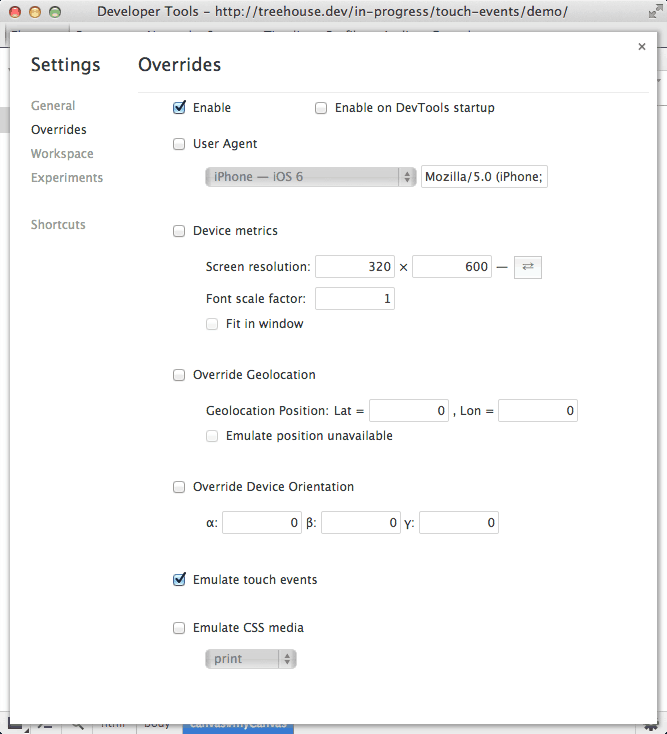
    <p>Before we go any further lets quickly take a look at how you can emulate touch events in Google Chrome. This will come in handy when testing your applications.</p>
    <div>
    <a href="http://blog.teamtreehouse.com/wp-content/uploads/2013/12/chrome-dev-tools-touch-emulation.png" rel="nofollow external" class="bo"><img alt="Emulating touch events using Chrome dev tools." src="http://blog.teamtreehouse.com/wp-content/uploads/2013/12/chrome-dev-tools-touch-emulation.png" width="667" height="734" style="max-width: 100%; height: auto;"></a><p>Emulating touch events using Chrome dev tools.</p>
    </div>
    <ol>
    <li>Launch the Chrome Developer Tools.
    <ul>
    <li>Mac: <code>Command</code> + <code>Option</code> + <code>I</code>
    </li>
    <li>Windows: <code>Ctrl</code> + <code>Shift</code> + <code>I</code>
    </li>
    </ul>
    </li>
    <li>Now open the settings page (cog in bottom right corner).</li>
    <li>Click on the <strong>Overrides</strong> tab on the left-hand side.</li>
    <li>Tick <strong>Enable</strong>.</li>
    <li>Tick <strong>Emulate touch events</strong>.</li>
    </ol>
    <p>Enabling this feature will cause Chrome to fire touch events as you interact with the app using your mouse. As you build the demo application you will want to have this feature enabled.</p>
    <h3>Getting Started on the JavaScript</h3>
    <p>In this section you are going to make a start on the JavaScript that will power your multi-touch application.</p>
    <p>Create a new file called <code>app.js</code> and save it in the same folder as your <code>index.html</code> file.</p>
    <p>Copy the following code into your <code>app.js</code> file.</p>
    <pre><code>(function(){&#x000A;    &#x000A;        // Get the canvas.&#x000A;        var canvas = document.getElementById('myCanvas');&#x000A;    &#x000A;        // Set the canvas to fill the screen.&#x000A;        canvas.width = window.outerWidth;&#x000A;        canvas.height = window.outerHeight;&#x000A;    &#x000A;        // Get a 2d drawing context.&#x000A;        var ctx = canvas.getContext('2d');&#x000A;    &#x000A;        // Used to keep track of active touches.&#x000A;        var currentTouches = new Array;&#x000A;    &#x000A;        // The rest of the code goes here...&#x000A;    &#x000A;    }());</code></pre>
    <p>This code mainly handles setting up the canvas. You have created a <code>canvas</code> variable and initialized it by fetching the <code>&lt;canvas&gt;</code> element in your HTML markup.</p>
    <p>You then set the <code>width</code> and <code>height</code> properties of the canvas so that it fills the entire window.</p>
    <p>Next you create a 2D drawing context by calling the <code>getContext('2d')</code> method on your canvas. This is then stored in the <code>ctx</code> variable. If you’re not familiar with the Canvas API think of the drawing context like you would a pen or pencil when drawing on paper. It provides a number of methods that can be used for drawing objects on your canvas.</p>
    <p>Finally, you create an array called <code>currentTouches</code>. This will be used to keep track of the touch points that are currently active on the screen.</p>
    <p>Now add the following code to your <code>app.js</code> file. This should replace the last comment in your current code.</p>
    <pre><code>// Returns a random color from an array.&#x000A;    var randomColor = function () {&#x000A;        var colors = ['#3F3F3F', '#929292', '#00A3EE', '#F5D908', '#D80351'];&#x000A;        return colors[Math.floor(Math.random() * colors.length)];&#x000A;    };&#x000A;    &#x000A;    // Finds the array index of a touch in the currentTouches array.&#x000A;    var findCurrentTouchIndex = function (id) {&#x000A;        for (var i=0; i &lt; currentTouches.length; i++) {&#x000A;            if (currentTouches[i].id === id) {&#x000A;                return i;&#x000A;            }&#x000A;        }&#x000A;    &#x000A;        // Touch not found! Return -1.&#x000A;        return -1;&#x000A;    };</code></pre>
    <p>In this code snippet you have created two helper functions, <code>randomColor</code> and <code>findCurrentTouchIndex</code>. You will be using these later on.</p>
    <p>The <code>randomColor</code> function will return a color from the <code>colors</code> array. Every new touch on the screen will be assigned a color using this function.</p>
    <p>The <code>findCurrentTouchIndex</code> function will loop through the <code>currentTouches</code> array until it finds an object with the desired <code>id</code>. The position of that object in the array is then returned. We can’t modify a <code>Touch</code> object itself so in order to store the color that is associated with a pointer we have to save this information in a separate array.</p>
    <h3>Handling New Touches</h3>
    <p>In this section you’re going to be writing the code that will handle new touch events. Lets start by defining the <code>touchStart</code> function.</p>
    <p>Add the following code to your <code>app.js</code> file.</p>
    <pre><code>// Creates a new touch in the currentTouches array and draws the starting&#x000A;    // point on the canvas.&#x000A;    var touchStarted = function (event) {&#x000A;        var touches = event.changedTouches;&#x000A;    &#x000A;        for (var i=0; i &lt; touches.length; i++) {&#x000A;            var touch = touches[i];&#x000A;            var touchColor = randomColor();&#x000A;    &#x000A;            currentTouches.push({&#x000A;                id: touch.identifier,&#x000A;                pageX: touch.pageX,&#x000A;                pageY: touch.pageY,&#x000A;                color: touchColor&#x000A;            });&#x000A;    &#x000A;            ctx.beginPath();&#x000A;            ctx.arc(touch.pageX, touch.pageY, 2.5, Math.PI*2, false);&#x000A;            ctx.fillStyle = touchColor;&#x000A;            ctx.fill();&#x000A;        }&#x000A;    };</code></pre>
    <p>Here you have started by accessing the <code>changedTouches</code> array that is present on the <code>TouchEvent</code> object. You then loop through this array to access each of the individual <code>Touch</code> objects.</p>
    <p>For each touch you first generate a random color using the <code>randomColor</code> function you created earlier. You then push a new object into the <code>currentTouches</code> array. This object contains four properties: <code>id</code>, <code>pageX</code>, <code>pageY</code>, and <code>color</code>. The first three of these are set using the corresponding properties from the <code>Touch</code> object.</p>
    <p>The code will then draw the initial touch point on the canvas. The call to <code>beginPath</code>creates a new path to draw from.</p>
    <hr>
    <p><strong>Note</strong>: Objects on the canvas are mainly drawn using lines (with a few exceptions), just as you would if you were drawing with a pen and paper.</p>
    <hr>
    <p>The call to the <code>arc</code> method draws the outline of a circle. Don’t worry too much about the syntax here. It looks a bit funky because this method is used to draw more than just circles.</p>
    <p>You then set the <code>fillStyle</code> property of the drawing context using the color that you generated for this touch. The call to <code>fill</code> will color in the circle and close the path.</p>
    <p>Now all that’s left is to add the event listener that will call the <code>touchStarted</code> function when the <code>touchstart</code> event is fired.</p>
    <p>Add the following to your <code>app.js</code> file.</p>
    <pre><code>// Set up an event listener for new touches.&#x000A;    canvas.addEventListener('touchstart', function(e) {&#x000A;        e.preventDefault();&#x000A;        touchStarted(event);&#x000A;    });</code></pre>
    <h3>Drawing on The Move</h3>
    <p>Your next task is to write the code that will draw a line as the user drags their finger (or other touch pointer) across the screen.</p>
    <p>Copy this code into your <code>app.js</code> file.</p>
    <pre><code>// Draws a line on the canvas between the previous touch location and&#x000A;    // the new location.&#x000A;    var touchMoved = function (event) {&#x000A;        var touches = event.changedTouches;&#x000A;    &#x000A;        for (var i=0; i &lt; touches.length; i++) {&#x000A;            var touch = touches[i];&#x000A;            var currentTouchIndex = findCurrentTouchIndex(touch.identifier);&#x000A;    &#x000A;            if (currentTouchIndex &gt;= 0) {&#x000A;                var currentTouch = currentTouches[currentTouchIndex];&#x000A;    &#x000A;                ctx.beginPath();&#x000A;                ctx.moveTo(currentTouch.pageX, currentTouch.pageY);&#x000A;                ctx.lineTo(touch.pageX, touch.pageY);&#x000A;                ctx.lineWidth = 4;&#x000A;                ctx.strokeStyle = currentTouch.color;&#x000A;                ctx.stroke();&#x000A;    &#x000A;                // Update the touch record.&#x000A;                currentTouch.pageX = touch.pageX;&#x000A;                currentTouch.pageY = touch.pageY;&#x000A;    &#x000A;                // Store the record.&#x000A;                currentTouches.splice(currentTouchIndex, 1, currentTouch);&#x000A;            } else {&#x000A;                console.log('Touch was not found!');&#x000A;            }&#x000A;    &#x000A;        }&#x000A;    };</code></pre>
    <p>The <code>touchMoved</code> function again starts by fetching the <code>changedTouches</code> array and then looping through each of the <code>Touch</code> objects.</p>
    <p>For each <code>Touch</code> object we start by using the <code>findCurrentTouchIndex</code> function to find the position of the corresponding object in the <code>currentTouches</code> array. If the object exists, a value larger or equal to zero will be returned. You can then retrieve the stored object from the <code>currentTouches</code> array using this index. This object contains the <code>color</code> that will be used for the line as well as the <code>pageX</code> and <code>pageY</code> coordinates that represent the position of the previous touch point.</p>
    <p>You then call <code>beginPath</code> to create a new path to draw from. The call to <code>moveTo</code> sets the start position for this path to the location of the previous touch point (i.e. the current end of the line on the canvas). Using the <code>lineTo</code> method you draw a path from the start point to the new touch position.</p>
    <p>For this path to become visible you set the <code>lineWidth</code> and <code>strokeStyle</code> properties of the drawing context and then call the <code>stroke</code> method to color the path.</p>
    <p>Now you’re done drawing on the canvas, you update the <code>pageX</code> and <code>pageY</code> properties of the <code>currentTouch</code> object and store this back in the <code>currentTouches</code> array. This is so that you know where to draw the next part of the line from when the pointer moves.</p>
    <p>To finish up you just need to add an event listener that will call the <code>touchMoved</code> function when the <code>touchmove</code> event is fired.</p>
    <pre><code>// Set up an event listener for when the touch instrument is moved.&#x000A;    canvas.addEventListener('touchmove', function(e) {&#x000A;        e.preventDefault();&#x000A;        touchMoved(e);&#x000A;    });</code></pre>
    <h3>Letting Go</h3>
    <p>When the user removes the pointer from the screen you need to draw the final touch position and then remove the corresponding object from the <code>currentTouches</code> array.</p>
    <p>Start by adding the following code to your <code>app.js</code> file.</p>
    <pre><code>// Draws a line to the final touch position on the canvas and then&#x000A;    // removes the touh from the currentTouches array.&#x000A;    var touchEnded = function (event) {&#x000A;        var touches = event.changedTouches;&#x000A;    &#x000A;        for (var i=0; i &lt; touches.length; i++) {&#x000A;            var touch = touches[i];&#x000A;            var currentTouchIndex = findCurrentTouchIndex(touch.identifier);&#x000A;    &#x000A;            if (currentTouchIndex &gt;= 0) {&#x000A;                var currentTouch = currentTouches[currentTouchIndex];&#x000A;    &#x000A;                ctx.beginPath();&#x000A;                ctx.moveTo(currentTouch.pageX, currentTouch.pageY);&#x000A;                ctx.lineTo(touch.pageX, touch.pageY);&#x000A;                ctx.lineWidth = 4;&#x000A;                ctx.strokeStyle = currentTouch.color;&#x000A;                ctx.stroke();&#x000A;    &#x000A;                // Remove the record.&#x000A;                currentTouches.splice(currentTouchIndex, 1);&#x000A;            } else {&#x000A;                console.log('Touch was not found!');&#x000A;            }&#x000A;    &#x000A;        }&#x000A;    };</code></pre>
    <p>The code here is much the same as in <code>touchMoved</code>. However instead of updating and storing the <code>currentTouch</code> object you remove it from the <code>currentTouches</code> array.</p>
    <p>The <code>touchEnded</code> function should be called if either the <code>touchend</code> or <code>touchleave</code> event is fired.</p>
    <p>Add the following event listeners to your <code>app.js</code> file.</p>
    <pre><code>// Set up an event listener for when a touch ends.&#x000A;    canvas.addEventListener('touchend', function(e) {&#x000A;        e.preventDefault();&#x000A;        touchEnded(e);&#x000A;    });&#x000A;    &#x000A;    // Set up an event listener for when a touch leaves the canvas.&#x000A;    canvas.addEventListener('touchleave', function(e) {&#x000A;        e.preventDefault();&#x000A;        touchEnded(e);&#x000A;    });</code></pre>
    <h3>Handling Cancelled Touches</h3>
    <p>The last event you need to deal with is cancelled touches. A touch can be cancelled for a number of reasons. This usually happens if something else takes control of the touch (like the browser UI), or if there are too many touch points on the screen (in which case the first touch point gets cancelled).</p>
    <p>If a touch gets cancelled you want to immediately remove the corresponding object from the <code>currentTouches</code> array. There’s no need to draw anything on the canvas.</p>
    <p>Copy the following JavaScript code into your <code>app.js</code> file.</p>
    <pre><code>// Removes cancelled touches from the currentTouches array.&#x000A;    var touchCancelled = function (event) {&#x000A;        var touches = event.changedTouches;&#x000A;    &#x000A;        for (var i=0; i &lt; touches.length; i++) {&#x000A;            var currentTouchIndex = findCurrentTouchIndex(touches[i].identifier);&#x000A;    &#x000A;            if (currentTouchIndex &gt;= 0) {&#x000A;                // Remove the touch record.&#x000A;                currentTouches.splice(currentTouchIndex, 1);&#x000A;            } else {&#x000A;                console.log('Touch was not found!');&#x000A;            }&#x000A;        }&#x000A;    };</code></pre>
    <p>This <code>touchCancelled</code> function will loop through each of the <code>changedTouches</code> and remove the corresponding objects from the <code>currentTouches</code> array.</p>
    <p>Now you just need to add an event listener that calls <code>touchCancelled</code> when the <code>touchcancel</code> event is fired.</p>
    <pre><code>// Set up an event listener to catch cancelled touches.&#x000A;    canvas.addEventListener('touchcancel', function(e) {&#x000A;        touchCancelled(e);&#x000A;    });</code></pre>
    <h3>Finishing Up</h3>
    <p>That completes your multi-touch drawing application. Fire it up on a mobile device and give it a go!</p>
    <p><a href="http://codepen.io/matt-west/full/nwCqB" rel="nofollow external" class="bo">See the Demo</a> <a href="http://codepen.io/matt-west/share/zip/nwCqB" rel="nofollow external" class="bo">Download The Code</a> <a href="http://codepen.io/matt-west/pen/nwCqB" rel="nofollow external" class="bo">View on CodePen</a></p>
    <p>For extra credit you could try adding UI elements that allow you to manipulate the width of the lines, or the colors that are available.</p>
    <h2>Summary</h2>
    <p>In this blog post you’ve learned about touch events, and have created your very own multi-touch drawing application.</p>
    <p>Mobile web usage is growing at a staggering pace. Taking full advantage of this platform shift goes way beyond just responsive design. By using these platform-specific APIs we can make sure that our web applications are delivering a great user experience across multiple devices.</p>
    <h2>Useful Links</h2>
    <ul>
    <li><a href="https://developer.mozilla.org/en-US/docs/Web/Guide/API/DOM/Events/Touch_events" rel="nofollow external" class="bo">Touch Events Documentation (MDN)</a></li>
    <li><a href="http://www.w3.org/TR/touch-events/" rel="nofollow external" class="bo">Touch Events W3C Specification</a></li>
    <li><a href="http://www.html5rocks.com/en/mobile/touch/" rel="nofollow external" class="bo">Multi-Touch Web Development (HTML5 Rocks)</a></li>
    </ul>
    <p>The post <a href="http://blog.teamtreehouse.com/building-multi-touch-web-applications" rel="nofollow external" class="bo">Building Multi-Touch Web Applications</a> appeared first on <a href="http://blog.teamtreehouse.com" rel="nofollow external" class="bo">Treehouse Blog</a>.</p>
    </div>
]]>
</Body>
<Summary>With mobile web browsing now accounting for 15% of all global internet traffic building web applications targeted at mobile has become more important than ever. Building for mobile is very...</Summary>
<Website>http://feedproxy.google.com/~r/teamtreehouse/~3/td1phUft33g/building-multi-touch-web-applications</Website>
<TrackingUrl>https://my3.my.umbc.edu/api/v0/pixel/news/39723/guest@my.umbc.edu/b6a8e464c9121d2a53be00d1835466e9/api/pixel</TrackingUrl>
<Tag>android</Tag>
<Tag>code</Tag>
<Tag>css</Tag>
<Tag>design</Tag>
<Tag>development</Tag>
<Tag>html</Tag>
<Tag>html5</Tag>
<Tag>ios</Tag>
<Tag>javascript</Tag>
<Tag>learn-to-code</Tag>
<Tag>mobile</Tag>
<Tag>multi-touch</Tag>
<Tag>responsive</Tag>
<Tag>touch</Tag>
<Tag>web</Tag>
<Tag>web-apps</Tag>
<Group token="retired-583">Web Developer - Build Group</Group>
<GroupUrl>https://my3.my.umbc.edu/groups/retired-583</GroupUrl>
<AvatarUrl>https://assets3-my.umbc.edu/system/shared/avatars/groups/000/000/583/fc60f5d7abc2e080599bb6dc465db54d/xsmall.png?1363101197</AvatarUrl>
<AvatarUrl size="original">https://assets4-my.umbc.edu/system/shared/avatars/groups/000/000/583/fc60f5d7abc2e080599bb6dc465db54d/original.jpg?1363101197</AvatarUrl>
<AvatarUrl size="xxlarge">https://assets4-my.umbc.edu/system/shared/avatars/groups/000/000/583/fc60f5d7abc2e080599bb6dc465db54d/xxlarge.png?1363101197</AvatarUrl>
<AvatarUrl size="xlarge">https://assets4-my.umbc.edu/system/shared/avatars/groups/000/000/583/fc60f5d7abc2e080599bb6dc465db54d/xlarge.png?1363101197</AvatarUrl>
<AvatarUrl size="large">https://assets3-my.umbc.edu/system/shared/avatars/groups/000/000/583/fc60f5d7abc2e080599bb6dc465db54d/large.png?1363101197</AvatarUrl>
<AvatarUrl size="medium">https://assets3-my.umbc.edu/system/shared/avatars/groups/000/000/583/fc60f5d7abc2e080599bb6dc465db54d/medium.png?1363101197</AvatarUrl>
<AvatarUrl size="small">https://assets4-my.umbc.edu/system/shared/avatars/groups/000/000/583/fc60f5d7abc2e080599bb6dc465db54d/small.png?1363101197</AvatarUrl>
<AvatarUrl size="xsmall">https://assets3-my.umbc.edu/system/shared/avatars/groups/000/000/583/fc60f5d7abc2e080599bb6dc465db54d/xsmall.png?1363101197</AvatarUrl>
<AvatarUrl size="xxsmall">https://assets4-my.umbc.edu/system/shared/avatars/groups/000/000/583/fc60f5d7abc2e080599bb6dc465db54d/xxsmall.png?1363101197</AvatarUrl>
<Sponsor>Web Developer - Build Group</Sponsor>
<PawCount>0</PawCount>
<CommentCount>0</CommentCount>
<CommentsAllowed>true</CommentsAllowed>
<PostedAt>Mon, 23 Dec 2013 13:02:20 -0500</PostedAt>
</NewsItem>

<NewsItem contentIssues="true" id="39722" important="false" status="posted" url="https://my3.my.umbc.edu/posts/39722">
<Title>Empty Shelves Signal Revival in Game Consoles</Title>
<Body>
<![CDATA[
    <div class="html-content">Those sales bolster the view that the console business is turning into a two-horse race, with Nintendo a distant third.<br><div><table border="0"><tbody><tr><td>
    <a href="http://share.feedsportal.com/share/twitter/?u=http%3A%2F%2Fwww.nytimes.com%2F2013%2F12%2F24%2Ftechnology%2Fstrong-sales-make-xbox-one-and-playstation-4-hard-to-find.html%3Fpartner%3Drss%26emc%3Drss&amp;t=Empty+Shelves+Signal+Revival+in+Game+Consoles" rel="nofollow external" class="bo"><img src="http://res3.feedsportal.com/social/twitter.png" style="max-width: 100%; height: auto;"></a> <a href="http://share.feedsportal.com/share/facebook/?u=http%3A%2F%2Fwww.nytimes.com%2F2013%2F12%2F24%2Ftechnology%2Fstrong-sales-make-xbox-one-and-playstation-4-hard-to-find.html%3Fpartner%3Drss%26emc%3Drss&amp;t=Empty+Shelves+Signal+Revival+in+Game+Consoles" rel="nofollow external" class="bo"><img src="http://res3.feedsportal.com/social/facebook.png" style="max-width: 100%; height: auto;"></a> <a href="http://share.feedsportal.com/share/linkedin/?u=http%3A%2F%2Fwww.nytimes.com%2F2013%2F12%2F24%2Ftechnology%2Fstrong-sales-make-xbox-one-and-playstation-4-hard-to-find.html%3Fpartner%3Drss%26emc%3Drss&amp;t=Empty+Shelves+Signal+Revival+in+Game+Consoles" rel="nofollow external" class="bo"><img src="http://res3.feedsportal.com/social/linkedin.png" style="max-width: 100%; height: auto;"></a> <a href="http://share.feedsportal.com/share/gplus/?u=http%3A%2F%2Fwww.nytimes.com%2F2013%2F12%2F24%2Ftechnology%2Fstrong-sales-make-xbox-one-and-playstation-4-hard-to-find.html%3Fpartner%3Drss%26emc%3Drss&amp;t=Empty+Shelves+Signal+Revival+in+Game+Consoles" rel="nofollow external" class="bo"><img src="http://res3.feedsportal.com/social/googleplus.png" style="max-width: 100%; height: auto;"></a> <a href="http://share.feedsportal.com/share/email/?u=http%3A%2F%2Fwww.nytimes.com%2F2013%2F12%2F24%2Ftechnology%2Fstrong-sales-make-xbox-one-and-playstation-4-hard-to-find.html%3Fpartner%3Drss%26emc%3Drss&amp;t=Empty+Shelves+Signal+Revival+in+Game+Consoles" rel="nofollow external" class="bo"><img src="http://res3.feedsportal.com/social/email.png" style="max-width: 100%; height: auto;"></a>
    </td></tr></tbody></table></div>
    <br><br><a href="http://da.feedsportal.com/r/184842134123/u/0/f/640387/c/34625/s/352471c2/sc/15/rc/1/rc.htm" rel="nofollow external" class="bo"><img src="http://da.feedsportal.com/r/184842134123/u/0/f/640387/c/34625/s/352471c2/sc/15/rc/1/rc.img" style="max-width: 100%; height: auto;"></a><br><a href="http://da.feedsportal.com/r/184842134123/u/0/f/640387/c/34625/s/352471c2/sc/15/rc/2/rc.htm" rel="nofollow external" class="bo"><img src="http://da.feedsportal.com/r/184842134123/u/0/f/640387/c/34625/s/352471c2/sc/15/rc/2/rc.img" style="max-width: 100%; height: auto;"></a><br><a href="http://da.feedsportal.com/r/184842134123/u/0/f/640387/c/34625/s/352471c2/sc/15/rc/3/rc.htm" rel="nofollow external" class="bo"><img src="http://da.feedsportal.com/r/184842134123/u/0/f/640387/c/34625/s/352471c2/sc/15/rc/3/rc.img" style="max-width: 100%; height: auto;"></a><br><br><a href="http://da.feedsportal.com/r/184842134123/u/0/f/640387/c/34625/s/352471c2/a2.htm" rel="nofollow external" class="bo"><img src="http://da.feedsportal.com/r/184842134123/u/0/f/640387/c/34625/s/352471c2/a2.img" style="max-width: 100%; height: auto;"></a>
    </div>
]]>
</Body>
<Summary>Those sales bolster the view that the console business is turning into a two-horse race, with Nintendo a distant third.      </Summary>
<Website>http://www.nytimes.com/2013/12/24/technology/strong-sales-make-xbox-one-and-playstation-4-hard-to-find.html?partner=rss&amp;emc=rss</Website>
<TrackingUrl>https://my3.my.umbc.edu/api/v0/pixel/news/39722/guest@my.umbc.edu/46be971ec755e3ab4f8b063c7adc5e7d/api/pixel</TrackingUrl>
<Tag>best-buy-company-inc-bby-nyse</Tag>
<Tag>computer-and-video-games</Tag>
<Tag>microsoft-corporation-msft-nasdaq</Tag>
<Tag>new</Tag>
<Tag>nintendo-co-ltd</Tag>
<Tag>shopping-and-retail</Tag>
<Tag>sony-corporation-sne-nyse</Tag>
<Tag>technology</Tag>
<Tag>twitter-twtr-nyse</Tag>
<Tag>verizon-communications-inc-vz-nyse</Tag>
<Tag>york</Tag>
<Group token="retired-583">Web Developer - Build Group</Group>
<GroupUrl>https://my3.my.umbc.edu/groups/retired-583</GroupUrl>
<AvatarUrl>https://assets3-my.umbc.edu/system/shared/avatars/groups/000/000/583/fc60f5d7abc2e080599bb6dc465db54d/xsmall.png?1363101197</AvatarUrl>
<AvatarUrl size="original">https://assets4-my.umbc.edu/system/shared/avatars/groups/000/000/583/fc60f5d7abc2e080599bb6dc465db54d/original.jpg?1363101197</AvatarUrl>
<AvatarUrl size="xxlarge">https://assets4-my.umbc.edu/system/shared/avatars/groups/000/000/583/fc60f5d7abc2e080599bb6dc465db54d/xxlarge.png?1363101197</AvatarUrl>
<AvatarUrl size="xlarge">https://assets4-my.umbc.edu/system/shared/avatars/groups/000/000/583/fc60f5d7abc2e080599bb6dc465db54d/xlarge.png?1363101197</AvatarUrl>
<AvatarUrl size="large">https://assets3-my.umbc.edu/system/shared/avatars/groups/000/000/583/fc60f5d7abc2e080599bb6dc465db54d/large.png?1363101197</AvatarUrl>
<AvatarUrl size="medium">https://assets3-my.umbc.edu/system/shared/avatars/groups/000/000/583/fc60f5d7abc2e080599bb6dc465db54d/medium.png?1363101197</AvatarUrl>
<AvatarUrl size="small">https://assets4-my.umbc.edu/system/shared/avatars/groups/000/000/583/fc60f5d7abc2e080599bb6dc465db54d/small.png?1363101197</AvatarUrl>
<AvatarUrl size="xsmall">https://assets3-my.umbc.edu/system/shared/avatars/groups/000/000/583/fc60f5d7abc2e080599bb6dc465db54d/xsmall.png?1363101197</AvatarUrl>
<AvatarUrl size="xxsmall">https://assets4-my.umbc.edu/system/shared/avatars/groups/000/000/583/fc60f5d7abc2e080599bb6dc465db54d/xxsmall.png?1363101197</AvatarUrl>
<Sponsor>Web Developer - Build Group</Sponsor>
<PawCount>0</PawCount>
<CommentCount>0</CommentCount>
<CommentsAllowed>true</CommentsAllowed>
<PostedAt>Mon, 23 Dec 2013 12:46:28 -0500</PostedAt>
<EditAt>Mon, 23 Dec 2013 12:46:28 -0500</EditAt>
</NewsItem>

<NewsItem contentIssues="true" id="39728" important="false" status="posted" url="https://my3.my.umbc.edu/posts/39728">
<Title>The Appraisal: Still Unconvinced, Home Buyer? Check Out the View From the Drone</Title>
<Body>
<![CDATA[
    <div class="html-content">When terrestrial images simply cannot do multimillion-dollar homes justice, more agents are capturing aerial views and luring buyers with drones.<br><div><table border="0"><tbody><tr><td>
    <a href="http://share.feedsportal.com/share/twitter/?u=http%3A%2F%2Fwww.nytimes.com%2F2013%2F12%2F24%2Fnyregion%2Fstill-unconvinced-home-buyer-check-out-the-view-from-the-drone.html%3Fpartner%3Drss%26emc%3Drss&amp;t=The+Appraisal%3A+Still+Unconvinced%2C+Home+Buyer%3F+Check+Out+the+View+From+the+Drone" rel="nofollow external" class="bo"><img src="http://res3.feedsportal.com/social/twitter.png" style="max-width: 100%; height: auto;"></a> <a href="http://share.feedsportal.com/share/facebook/?u=http%3A%2F%2Fwww.nytimes.com%2F2013%2F12%2F24%2Fnyregion%2Fstill-unconvinced-home-buyer-check-out-the-view-from-the-drone.html%3Fpartner%3Drss%26emc%3Drss&amp;t=The+Appraisal%3A+Still+Unconvinced%2C+Home+Buyer%3F+Check+Out+the+View+From+the+Drone" rel="nofollow external" class="bo"><img src="http://res3.feedsportal.com/social/facebook.png" style="max-width: 100%; height: auto;"></a> <a href="http://share.feedsportal.com/share/linkedin/?u=http%3A%2F%2Fwww.nytimes.com%2F2013%2F12%2F24%2Fnyregion%2Fstill-unconvinced-home-buyer-check-out-the-view-from-the-drone.html%3Fpartner%3Drss%26emc%3Drss&amp;t=The+Appraisal%3A+Still+Unconvinced%2C+Home+Buyer%3F+Check+Out+the+View+From+the+Drone" rel="nofollow external" class="bo"><img src="http://res3.feedsportal.com/social/linkedin.png" style="max-width: 100%; height: auto;"></a> <a href="http://share.feedsportal.com/share/gplus/?u=http%3A%2F%2Fwww.nytimes.com%2F2013%2F12%2F24%2Fnyregion%2Fstill-unconvinced-home-buyer-check-out-the-view-from-the-drone.html%3Fpartner%3Drss%26emc%3Drss&amp;t=The+Appraisal%3A+Still+Unconvinced%2C+Home+Buyer%3F+Check+Out+the+View+From+the+Drone" rel="nofollow external" class="bo"><img src="http://res3.feedsportal.com/social/googleplus.png" style="max-width: 100%; height: auto;"></a> <a href="http://share.feedsportal.com/share/email/?u=http%3A%2F%2Fwww.nytimes.com%2F2013%2F12%2F24%2Fnyregion%2Fstill-unconvinced-home-buyer-check-out-the-view-from-the-drone.html%3Fpartner%3Drss%26emc%3Drss&amp;t=The+Appraisal%3A+Still+Unconvinced%2C+Home+Buyer%3F+Check+Out+the+View+From+the+Drone" rel="nofollow external" class="bo"><img src="http://res3.feedsportal.com/social/email.png" style="max-width: 100%; height: auto;"></a>
    </td></tr></tbody></table></div>
    </div>
]]>
</Body>
<Summary>When terrestrial images simply cannot do multimillion-dollar homes justice, more agents are capturing aerial views and luring buyers with drones.      </Summary>
<Website>http://www.nytimes.com/2013/12/24/nyregion/still-unconvinced-home-buyer-check-out-the-view-from-the-drone.html?partner=rss&amp;emc=rss</Website>
<TrackingUrl>https://my3.my.umbc.edu/api/v0/pixel/news/39728/guest@my.umbc.edu/0362e61ca6b856314c86c3b8cbe1e884/api/pixel</TrackingUrl>
<Tag>alchemy-properties-inc</Tag>
<Tag>amazon-com-inc-amzn-nasdaq</Tag>
<Tag>brown-harris-stevens</Tag>
<Tag>drones-pilotless-planes</Tag>
<Tag>federal-aviation-administration</Tag>
<Tag>greenwich-conn</Tag>
<Tag>halstead-property-company</Tag>
<Tag>new</Tag>
<Tag>photography</Tag>
<Tag>real-estate-and-housing-residential</Tag>
<Tag>real-estate-brokers</Tag>
<Tag>technology</Tag>
<Tag>york</Tag>
<Group token="retired-583">Web Developer - Build Group</Group>
<GroupUrl>https://my3.my.umbc.edu/groups/retired-583</GroupUrl>
<AvatarUrl>https://assets3-my.umbc.edu/system/shared/avatars/groups/000/000/583/fc60f5d7abc2e080599bb6dc465db54d/xsmall.png?1363101197</AvatarUrl>
<AvatarUrl size="original">https://assets4-my.umbc.edu/system/shared/avatars/groups/000/000/583/fc60f5d7abc2e080599bb6dc465db54d/original.jpg?1363101197</AvatarUrl>
<AvatarUrl size="xxlarge">https://assets4-my.umbc.edu/system/shared/avatars/groups/000/000/583/fc60f5d7abc2e080599bb6dc465db54d/xxlarge.png?1363101197</AvatarUrl>
<AvatarUrl size="xlarge">https://assets4-my.umbc.edu/system/shared/avatars/groups/000/000/583/fc60f5d7abc2e080599bb6dc465db54d/xlarge.png?1363101197</AvatarUrl>
<AvatarUrl size="large">https://assets3-my.umbc.edu/system/shared/avatars/groups/000/000/583/fc60f5d7abc2e080599bb6dc465db54d/large.png?1363101197</AvatarUrl>
<AvatarUrl size="medium">https://assets3-my.umbc.edu/system/shared/avatars/groups/000/000/583/fc60f5d7abc2e080599bb6dc465db54d/medium.png?1363101197</AvatarUrl>
<AvatarUrl size="small">https://assets4-my.umbc.edu/system/shared/avatars/groups/000/000/583/fc60f5d7abc2e080599bb6dc465db54d/small.png?1363101197</AvatarUrl>
<AvatarUrl size="xsmall">https://assets3-my.umbc.edu/system/shared/avatars/groups/000/000/583/fc60f5d7abc2e080599bb6dc465db54d/xsmall.png?1363101197</AvatarUrl>
<AvatarUrl size="xxsmall">https://assets4-my.umbc.edu/system/shared/avatars/groups/000/000/583/fc60f5d7abc2e080599bb6dc465db54d/xxsmall.png?1363101197</AvatarUrl>
<Sponsor>Web Developer - Build Group</Sponsor>
<PawCount>0</PawCount>
<CommentCount>0</CommentCount>
<CommentsAllowed>true</CommentsAllowed>
<PostedAt>Mon, 23 Dec 2013 12:41:10 -0500</PostedAt>
</NewsItem>

<NewsItem contentIssues="true" id="39720" important="false" status="posted" url="https://my3.my.umbc.edu/posts/39720">
<Title>BDD With Behat</Title>
<Body>
<![CDATA[
    <div class="html-content">
    <a href="http://rss.buysellads.com/click.php?z=1260013&amp;k=d754f1e9ba63a736ba8ff5ece958f7dd&amp;a=36171&amp;c=2087447360" rel="nofollow external" class="bo"><img src="http://rss.buysellads.com/img.php?z=1260013&amp;k=d754f1e9ba63a736ba8ff5ece958f7dd&amp;a=36171&amp;c=2087447360" alt="" style="max-width: 100%; height: auto;"></a><p>The BDD PHP framework <a href="http://behat.org/" rel="nofollow external" class="bo">Behat</a>, allows you to test your PHP applications using human-readable sentences to write features and scenarios about how your applications should behave in order to test out its functionality. We can then run these tests to see if our application is behaving as expected. Let’s spend about 15 minutes quickly going over Behat’s installation process and learn how we can test our PHP applications behavior using the basics.</p>
    <p></p>
    <hr>
    <h2>Installation</h2>
    <p>To begin testing with Behat, we just need to install it on our local development machine. I’ll be using Composer, but you can <a href="http://docs.behat.org/quick_intro.html#installation" rel="nofollow external" class="bo">take a look at a the documentation</a> for additional installation methods.</p>
    <p>Within your PHP application (I have a blank PHP app named <code>phpbehat</code> created in advance) create a <code>composer.json</code> file with the following code to load in Behat:</p>
    <pre>{&#x000A;    	"require": {&#x000A;    		"behat/behat": "2.4.*@stable"&#x000A;    	},&#x000A;    	"minimum-stability": "dev",&#x000A;    	"config": {&#x000A;    		"bin-dir": "bin/"&#x000A;    	}&#x000A;    }&#x000A;    </pre>
    <p> In your terminal we can install it using the following command:</p>
    <pre>composer update</pre>
    <p>We should now be able to run the <code>bin/behat</code> command to work with Behat.</p>
    <hr>
    <h2>Creating Features</h2>
    <p>We always begin by creating a new <em>feature</em>. A feature is something that we can use to describe a feature of our application and then implement it to get the test to pass.</p>
    <p>A feature, at its simplest, consists of:</p>
    <ul>
    <li>Human-readable, plain text.</li>
    <li>Uses a <code>.feature</code> extension.</li>
    <li>Contains the feature’s benefit, role, and the feature itself.</li>
    <li>May hold a list of scenarios.</li>
    </ul>
    <p>Now I can’t show you how to test all possible features for an application, as that would take far too long. But what I can do is show you how to go about writing a basic feature and you can adapt this code to make it work for your specific application.</p>
    <h3>Testing the Phpadder Class</h3>
    <p>To avoid complicating the learning process, let’s create a very simple <code>Phpadder.php</code> file which contains a couple methods that we can use to add two numbers together and display their sum.</p>
    <pre>class Phpadder {&#x000A;    &#x000A;    	private $a;&#x000A;    	private $b;&#x000A;    	public $sum;&#x000A;    &#x000A;    	public function __construct($a, $b) {&#x000A;    		$this-&gt;a = $a;&#x000A;    		$this-&gt;b = $b;&#x000A;    	}&#x000A;    &#x000A;    	public function add() {&#x000A;    		$this-&gt;sum = $this-&gt;a + $this-&gt;b;&#x000A;    	}&#x000A;    &#x000A;    	public function display() {&#x000A;    		return $this-&gt;sum;&#x000A;    	}&#x000A;    }&#x000A;    </pre>
    <p>This creates a new class named <code>Phpadder</code>. We have a few properties to hold the first (<code>$a</code>) and second (<code>$b</code>) numbers to be added, as well as a <code>$sum</code> property to hold the values’s sum.</p>
    <p>Next, we have our constructor which initializes our properties. Then we have an <code>add</code> method to add the two numbers together and finally a <code>display</code> method to display the sum of the two numbers.</p>
    <h3>Adder Feature</h3>
    <p>Let’s now test this <code>Phpadder</code> class. Create a new <code>.feature</code> file along with the following code:</p>
    <pre># features/phpadder.feature&#x000A;    Feature: adder&#x000A;    	In order to display the sum of two numbers&#x000A;    	As anybody&#x000A;    	I need to provide two numbers&#x000A;    </pre>
    <p>We start out by giving our feature a name of <code>adder</code>. Then we specify, on three lines, the feature’s benefit, role, and finally the feature itself. It should be fairly self explanatory.</p>
    <p>Now that we have our feature, let’s start writing our scenarios.</p>
    <hr>
    <h2>Creating Scenarios</h2>
    <p>Anytime we create a feature we can define scenarios that describe how that feature behaves given certain conditions. Scenario’s follow the same basic layout consisting of the scenario’s description, a context, an event, and an outcome.</p>
    <p>Let’s create a scenario to test out our <code>Phpadder</code> application:</p>
    <pre>Scenario: Display the sum of two provided numbers&#x000A;    	Given I have the number 50 and the number 25&#x000A;    	When I add them together&#x000A;    	Then I should get 75&#x000A;    </pre>
    <p>We begin with our scenario description, we then list out that we start with the two numbers of 50 and 25 and when they are added together it should display the sum of 75.</p>
    <p>You can also have multiple contexts, events, and outcomes as well using the following keywords: <code>And</code> and <code>But</code>. Here’s a modified example of the previous scenario where we’ll use <code>And</code>:</p>
    <pre>Scenario: Display the sum of two provided numbers&#x000A;    	Given I have the number 50 and the number 25&#x000A;    	And I have a third number of 25&#x000A;    	When I add them together&#x000A;    	Then I should get 100&#x000A;    </pre>
    <hr>
    <h2>Creating Step Definitions</h2>
    <p>A step is nothing more than a PHP function which is made up of a keyword, a regular expression, and a callback function. Each statement within your scenario will be matched to a step. These steps define what should happen given one of your statements are called within a scenario. You store all of your steps within the <code>features/bootstrap/FeatureContext.php</code> file.</p>
    <h3>The “Given” Step</h3>
    <p>In our <code>FeatureContext.php</code> file (you may need to create this), we need to write a step for each of our statements, using its name as the function name. We’ll start with the <code>"Given I have the number"</code> statement:</p>
    <pre># features/bootstrap/FeaturesContext.php&#x000A;    &#x000A;    require("Phpadder.php");&#x000A;    &#x000A;    use Behat\Behat\Context\BehatContext, &#x000A;    	Behat\Behat\Exception\PendingException;&#x000A;    &#x000A;    use Behat\Gherkin\Node\PyStringNode,&#x000A;    	Behat\Gherkin\Node\TableNode;&#x000A;    	&#x000A;    class FeatureContext extends BehatContext {&#x000A;    &#x000A;    	private $Adder;&#x000A;    	&#x000A;    	/**&#x000A;    	 * @Given /^I have the number (\d+) and the number (\d+)$/&#x000A;    	 */&#x000A;    	public function iHaveTheNumberAndTheNumber($a, $b) {&#x000A;    		$this-&gt;Adder = new Phpadder($a, $b);&#x000A;    	}&#x000A;    </pre>
    <p>First, we create a new PHP file, require in our <code>Phpadder.php</code> file (the file that we’re testing), and then we use a few Behat classes with <code>use</code> statements, right after.</p>
    <p>Next, we create our <code>FeatureContext</code> class and have it extend the <code>BehatContext</code> class.</p>
    <p>Our class has only one property, <code>$Adder</code>, which will hold a <code>Phpadder</code> object.</p>
    <p>Finally, we create a method for our first step using the same name as the statement. Our step has a regular expression, found within the method’s comment. This regular expression is used to match the step to a scenario statement. Within this method we simply assign a new <code>Phpadder</code> object to our <code>$this-&gt;Adder</code> property so that the rest of our methods have access to the same <code>Phpadder</code> object.</p>
    <p>Now, you’ve probably noticed the <code>@Given</code> keyword within your function’s comment, this is actually an annotation so that the different types of steps can be identified. You can use <code>@Given</code>, <code>@When</code>, and <code>@Then</code>.</p>
    <p>Now we just need to write the last two steps.</p>
    <h3>The “When” Step</h3>
    <pre>/**&#x000A;     * @When /^I add them together$/&#x000A;     */&#x000A;    public function iAddThemTogether() {&#x000A;    	$this-&gt;Adder-&gt;add();&#x000A;    }&#x000A;    </pre>
    <p>This step simply uses our <code>$this-&gt;Adder</code> object’s <code>add</code> method to add the two numbers together.</p>
    <h3>The “Then” Step</h3>
    <pre>/** &#x000A;     * @Then /^I should get (\d+)$/ &#x000A;     */&#x000A;    public function iShouldGet($sum) {&#x000A;    	if ($this-&gt;Adder-&gt;sum != $sum) {&#x000A;    		throw new Exception("Actual sum: ".$this-&gt;Adder-&gt;sum);&#x000A;    	}&#x000A;    	$this-&gt;Adder-&gt;display();&#x000A;    }&#x000A;    </pre>
    <p>This step starts off by checking if the actual sum (retrieved using our <code>$this-&gt;Adder</code> object and its <code>sum</code> property) is <em>not</em> equal to the expected sum. If this evaluates to true that means we need to have Behat show a failure. To do so, we’ll just throw a new exception displaying the actual sum so we can compare. Otherwise, we call our <code>display</code> method.</p>
    <p>Time to run the tests.</p>
    <hr>
    <h2>Running the Tests</h2>
    <p>Now that we have our features, scenarios, and steps laid out, let’s run our tests using the following command:</p>
    <pre>bin/behat&#x000A;    </pre>
    <p>You should see the following success messages inside of your terminal:</p>  <img src="http://cdn.tutsplus.com/net/uploads/2013/12/testing-success.png" alt="testing-success" width="576" height="371" style="max-width: 100%; height: auto;"><br> <p>You can ensure that your tests are running correctly, by simply breaking something in your <code>Phpadder.php</code> file so that it doesn’t run quite the same way your test expects it to. For example, if we change the <code>add</code> method to instead use subtraction, like so:</p>
    <pre>public function add() {&#x000A;    	$this-&gt;sum = $this-&gt;a - $this-&gt;b;&#x000A;    }&#x000A;    </pre>
    <p>And then we rerun our tests: <code>bin/behat</code>. You can see in our terminal, we now have a failing test, because it’s no longer adding our numbers but subtracting them:</p>  <img src="http://cdn.tutsplus.com/net/uploads/2013/12/testing-fail.png" alt="testing-fail" width="576" height="371" style="max-width: 100%; height: auto;"><br> <hr>
    <h2>Conclusion</h2>
    <p>In conclusion, you can follow a small four step process for testing your PHP apps using Behat:</p>
    <ol>
    <li>Define a Feature</li>
    <li>Define a Scenario</li>
    <li>Define Step Definitions</li>
    <li>Run the tests using <code>bin/behat</code>
    </li>
    </ol>
    <p>So, with just that small amount of code, we should now have a basic understanding of how to work with Behat to test our PHP applications. For more information about working with Behat please checkout their <a href="http://docs.behat.org/" rel="nofollow external" class="bo">documentation</a>.</p>
    </div>
]]>
</Body>
<Summary>The BDD PHP framework Behat, allows you to test your PHP applications using human-readable sentences to write features and scenarios about how your applications should behave in order to test out...</Summary>
<Website>http://feedproxy.google.com/~r/nettuts/~3/7YvArN5gNz8/</Website>
<TrackingUrl>https://my3.my.umbc.edu/api/v0/pixel/news/39720/guest@my.umbc.edu/d89d9dc61374bbb9643b27c1fbe3a2b0/api/pixel</TrackingUrl>
<Tag>bdd</Tag>
<Tag>behat</Tag>
<Tag>css</Tag>
<Tag>development</Tag>
<Tag>html</Tag>
<Tag>javascript</Tag>
<Tag>mysql</Tag>
<Tag>php</Tag>
<Tag>sql</Tag>
<Tag>tutorials</Tag>
<Tag>wed</Tag>
<Group token="retired-583">Web Developer - Build Group</Group>
<GroupUrl>https://my3.my.umbc.edu/groups/retired-583</GroupUrl>
<AvatarUrl>https://assets3-my.umbc.edu/system/shared/avatars/groups/000/000/583/fc60f5d7abc2e080599bb6dc465db54d/xsmall.png?1363101197</AvatarUrl>
<AvatarUrl size="original">https://assets4-my.umbc.edu/system/shared/avatars/groups/000/000/583/fc60f5d7abc2e080599bb6dc465db54d/original.jpg?1363101197</AvatarUrl>
<AvatarUrl size="xxlarge">https://assets4-my.umbc.edu/system/shared/avatars/groups/000/000/583/fc60f5d7abc2e080599bb6dc465db54d/xxlarge.png?1363101197</AvatarUrl>
<AvatarUrl size="xlarge">https://assets4-my.umbc.edu/system/shared/avatars/groups/000/000/583/fc60f5d7abc2e080599bb6dc465db54d/xlarge.png?1363101197</AvatarUrl>
<AvatarUrl size="large">https://assets3-my.umbc.edu/system/shared/avatars/groups/000/000/583/fc60f5d7abc2e080599bb6dc465db54d/large.png?1363101197</AvatarUrl>
<AvatarUrl size="medium">https://assets3-my.umbc.edu/system/shared/avatars/groups/000/000/583/fc60f5d7abc2e080599bb6dc465db54d/medium.png?1363101197</AvatarUrl>
<AvatarUrl size="small">https://assets4-my.umbc.edu/system/shared/avatars/groups/000/000/583/fc60f5d7abc2e080599bb6dc465db54d/small.png?1363101197</AvatarUrl>
<AvatarUrl size="xsmall">https://assets3-my.umbc.edu/system/shared/avatars/groups/000/000/583/fc60f5d7abc2e080599bb6dc465db54d/xsmall.png?1363101197</AvatarUrl>
<AvatarUrl size="xxsmall">https://assets4-my.umbc.edu/system/shared/avatars/groups/000/000/583/fc60f5d7abc2e080599bb6dc465db54d/xxsmall.png?1363101197</AvatarUrl>
<Sponsor>Web Developer - Build Group</Sponsor>
<PawCount>0</PawCount>
<CommentCount>0</CommentCount>
<CommentsAllowed>true</CommentsAllowed>
<PostedAt>Mon, 23 Dec 2013 11:24:44 -0500</PostedAt>
<EditAt>Mon, 23 Dec 2013 11:24:44 -0500</EditAt>
</NewsItem>

<NewsItem contentIssues="true" id="39721" important="false" status="posted" url="https://my3.my.umbc.edu/posts/39721">
<Title>Bits Blog: A Start-Up Moves Teachers Past Data Entry</Title>
<Body>
<![CDATA[
    <div class="html-content">Clever, a San Francisco start-up, enables teachers to enroll and track students, normally a time-consuming process. Its software is now in 15,000 schools.<br><div><table border="0"><tbody><tr><td>
    <a href="http://share.feedsportal.com/share/twitter/?u=http%3A%2F%2Fbits.blogs.nytimes.com%2F2013%2F12%2F23%2Fa-start-up-moves-teachers-past-data-entry%2F%3Fpartner%3Drss%26emc%3Drss&amp;t=Bits+Blog%3A+A+Start-Up+Moves+Teachers+Past+Data+Entry" rel="nofollow external" class="bo"><img src="http://res3.feedsportal.com/social/twitter.png" style="max-width: 100%; height: auto;"></a> <a href="http://share.feedsportal.com/share/facebook/?u=http%3A%2F%2Fbits.blogs.nytimes.com%2F2013%2F12%2F23%2Fa-start-up-moves-teachers-past-data-entry%2F%3Fpartner%3Drss%26emc%3Drss&amp;t=Bits+Blog%3A+A+Start-Up+Moves+Teachers+Past+Data+Entry" rel="nofollow external" class="bo"><img src="http://res3.feedsportal.com/social/facebook.png" style="max-width: 100%; height: auto;"></a> <a href="http://share.feedsportal.com/share/linkedin/?u=http%3A%2F%2Fbits.blogs.nytimes.com%2F2013%2F12%2F23%2Fa-start-up-moves-teachers-past-data-entry%2F%3Fpartner%3Drss%26emc%3Drss&amp;t=Bits+Blog%3A+A+Start-Up+Moves+Teachers+Past+Data+Entry" rel="nofollow external" class="bo"><img src="http://res3.feedsportal.com/social/linkedin.png" style="max-width: 100%; height: auto;"></a> <a href="http://share.feedsportal.com/share/gplus/?u=http%3A%2F%2Fbits.blogs.nytimes.com%2F2013%2F12%2F23%2Fa-start-up-moves-teachers-past-data-entry%2F%3Fpartner%3Drss%26emc%3Drss&amp;t=Bits+Blog%3A+A+Start-Up+Moves+Teachers+Past+Data+Entry" rel="nofollow external" class="bo"><img src="http://res3.feedsportal.com/social/googleplus.png" style="max-width: 100%; height: auto;"></a> <a href="http://share.feedsportal.com/share/email/?u=http%3A%2F%2Fbits.blogs.nytimes.com%2F2013%2F12%2F23%2Fa-start-up-moves-teachers-past-data-entry%2F%3Fpartner%3Drss%26emc%3Drss&amp;t=Bits+Blog%3A+A+Start-Up+Moves+Teachers+Past+Data+Entry" rel="nofollow external" class="bo"><img src="http://res3.feedsportal.com/social/email.png" style="max-width: 100%; height: auto;"></a>
    </td></tr></tbody></table></div>
    <br><br><a href="http://da.feedsportal.com/r/184842121623/u/0/f/640387/c/34625/s/3523f9c8/sc/4/rc/1/rc.htm" rel="nofollow external" class="bo"><img src="http://da.feedsportal.com/r/184842121623/u/0/f/640387/c/34625/s/3523f9c8/sc/4/rc/1/rc.img" style="max-width: 100%; height: auto;"></a><br><a href="http://da.feedsportal.com/r/184842121623/u/0/f/640387/c/34625/s/3523f9c8/sc/4/rc/2/rc.htm" rel="nofollow external" class="bo"><img src="http://da.feedsportal.com/r/184842121623/u/0/f/640387/c/34625/s/3523f9c8/sc/4/rc/2/rc.img" style="max-width: 100%; height: auto;"></a><br><a href="http://da.feedsportal.com/r/184842121623/u/0/f/640387/c/34625/s/3523f9c8/sc/4/rc/3/rc.htm" rel="nofollow external" class="bo"><img src="http://da.feedsportal.com/r/184842121623/u/0/f/640387/c/34625/s/3523f9c8/sc/4/rc/3/rc.img" style="max-width: 100%; height: auto;"></a><br><br><a href="http://da.feedsportal.com/r/184842121623/u/0/f/640387/c/34625/s/3523f9c8/a2.htm" rel="nofollow external" class="bo"><img src="http://da.feedsportal.com/r/184842121623/u/0/f/640387/c/34625/s/3523f9c8/a2.img" style="max-width: 100%; height: auto;"></a>
    </div>
]]>
</Body>
<Summary>Clever, a San Francisco start-up, enables teachers to enroll and track students, normally a time-consuming process. Its software is now in 15,000 schools.      </Summary>
<Website>http://bits.blogs.nytimes.com/2013/12/23/a-start-up-moves-teachers-past-data-entry/?partner=rss&amp;emc=rss</Website>
<TrackingUrl>https://my3.my.umbc.edu/api/v0/pixel/news/39721/guest@my.umbc.edu/6e97d0b00aea9d3b07d7b6d8b47a1726/api/pixel</TrackingUrl>
<Tag>computers-and-the-internet</Tag>
<Tag>education</Tag>
<Tag>education-k-12</Tag>
<Tag>new</Tag>
<Tag>teachers-and-school-employees</Tag>
<Tag>technology</Tag>
<Tag>york</Tag>
<Group token="retired-583">Web Developer - Build Group</Group>
<GroupUrl>https://my3.my.umbc.edu/groups/retired-583</GroupUrl>
<AvatarUrl>https://assets3-my.umbc.edu/system/shared/avatars/groups/000/000/583/fc60f5d7abc2e080599bb6dc465db54d/xsmall.png?1363101197</AvatarUrl>
<AvatarUrl size="original">https://assets4-my.umbc.edu/system/shared/avatars/groups/000/000/583/fc60f5d7abc2e080599bb6dc465db54d/original.jpg?1363101197</AvatarUrl>
<AvatarUrl size="xxlarge">https://assets4-my.umbc.edu/system/shared/avatars/groups/000/000/583/fc60f5d7abc2e080599bb6dc465db54d/xxlarge.png?1363101197</AvatarUrl>
<AvatarUrl size="xlarge">https://assets4-my.umbc.edu/system/shared/avatars/groups/000/000/583/fc60f5d7abc2e080599bb6dc465db54d/xlarge.png?1363101197</AvatarUrl>
<AvatarUrl size="large">https://assets3-my.umbc.edu/system/shared/avatars/groups/000/000/583/fc60f5d7abc2e080599bb6dc465db54d/large.png?1363101197</AvatarUrl>
<AvatarUrl size="medium">https://assets3-my.umbc.edu/system/shared/avatars/groups/000/000/583/fc60f5d7abc2e080599bb6dc465db54d/medium.png?1363101197</AvatarUrl>
<AvatarUrl size="small">https://assets4-my.umbc.edu/system/shared/avatars/groups/000/000/583/fc60f5d7abc2e080599bb6dc465db54d/small.png?1363101197</AvatarUrl>
<AvatarUrl size="xsmall">https://assets3-my.umbc.edu/system/shared/avatars/groups/000/000/583/fc60f5d7abc2e080599bb6dc465db54d/xsmall.png?1363101197</AvatarUrl>
<AvatarUrl size="xxsmall">https://assets4-my.umbc.edu/system/shared/avatars/groups/000/000/583/fc60f5d7abc2e080599bb6dc465db54d/xxsmall.png?1363101197</AvatarUrl>
<Sponsor>Web Developer - Build Group</Sponsor>
<PawCount>0</PawCount>
<CommentCount>0</CommentCount>
<CommentsAllowed>true</CommentsAllowed>
<PostedAt>Mon, 23 Dec 2013 11:19:44 -0500</PostedAt>
<EditAt>Mon, 23 Dec 2013 14:33:33 -0500</EditAt>
</NewsItem>

</News>