<?xml version="1.0"?>
<News hasArchived="true" page="7983" pageCount="10746" pageSize="10" timestamp="Tue, 11 Aug 2026 22:39:16 -0400" url="https://my3.my.umbc.edu/posts.xml?mode=activity&amp;page=7983">
<NewsItem contentIssues="false" id="39310" important="false" status="posted" url="https://my3.my.umbc.edu/posts/39310">
<Title>RAC Final Exam Week Hours of Operation</Title>
<Tagline>RAC Final Exam Week Hours of Operation</Tagline>
<Body>
<![CDATA[
    <div class="html-content">All UMBC Students, Faculty, Staff, and RAC Members:<br><br>Below are the RAC Hours of Operation for Final Exams:<br><br><strong><span><span>Wednesday, December 11th</span></span></strong>........................7:30am-10pm<br><div>
    <strong><span><span>Thursday, December 12th</span></span></strong>............................<span><span>7:30am-8pm</span></span><br><strong><span><span>Friday, December 13th</span></span></strong>................................<span><span>7:30am-8pm</span></span><br><strong><span><span>Saturday, December 14th</span></span></strong>............................<span><span>12pm-7pm</span></span><br><strong><span><span>Sunday, December 15th</span></span></strong>..............................<span><span>12pm-7pm</span></span><br><br><strong><span><span>Monday, December 16th</span></span></strong>..............................<span><span>7:30am-8pm</span></span><br><strong><span><span>Tuesday, December 17th</span></span></strong>.............................<span><span>7:30am-8pm</span></span><br><strong><span><span>Wednesday, December 18th</span></span></strong>........................7:30am-8pm<br><strong><span><span>Thursday, December 19th</span></span></strong>............................<span><span>1pm-9pm</span></span><br><strong><span><span>Friday, December 20th</span></span></strong>.................................<span><span>1pm-9pm</span></span><br><strong><span><span>Saturday, December 21st</span></span></strong>.............................<span><span>12pm-7pm</span></span><br><strong><span><span>Sunday, December 22nd</span></span></strong>..............................<span><span>12pm-7pm</span></span><br><br><strong>*The Hours of Operation for <span><span>Monday, December 23rd</span></span> are still To Be Determined*</strong>
    </div>
    </div>
]]>
</Body>
<Summary>All UMBC Students, Faculty, Staff, and RAC Members:  Below are the RAC Hours of Operation for Final Exams:  Wednesday, December 11th........................7:30am-10pm  Thursday, December...</Summary>
<TrackingUrl>https://my3.my.umbc.edu/api/v0/pixel/news/39310/guest@my.umbc.edu/109c94f18856d0d1732452a33ac22dc8/api/pixel</TrackingUrl>
<Group token="fitness-at-therac">Fitness and Wellness</Group>
<GroupUrl>https://my3.my.umbc.edu/groups/fitness-at-therac</GroupUrl>
<AvatarUrl>https://assets1-my.umbc.edu/system/shared/avatars/groups/000/000/161/ddb53d2daaf1e43c35a2cf744997d6b0/xsmall.png?1661190221</AvatarUrl>
<AvatarUrl size="original">https://assets4-my.umbc.edu/system/shared/avatars/groups/000/000/161/ddb53d2daaf1e43c35a2cf744997d6b0/original.png?1661190221</AvatarUrl>
<AvatarUrl size="xxlarge">https://assets4-my.umbc.edu/system/shared/avatars/groups/000/000/161/ddb53d2daaf1e43c35a2cf744997d6b0/xxlarge.png?1661190221</AvatarUrl>
<AvatarUrl size="xlarge">https://assets1-my.umbc.edu/system/shared/avatars/groups/000/000/161/ddb53d2daaf1e43c35a2cf744997d6b0/xlarge.png?1661190221</AvatarUrl>
<AvatarUrl size="large">https://assets4-my.umbc.edu/system/shared/avatars/groups/000/000/161/ddb53d2daaf1e43c35a2cf744997d6b0/large.png?1661190221</AvatarUrl>
<AvatarUrl size="medium">https://assets4-my.umbc.edu/system/shared/avatars/groups/000/000/161/ddb53d2daaf1e43c35a2cf744997d6b0/medium.png?1661190221</AvatarUrl>
<AvatarUrl size="small">https://assets3-my.umbc.edu/system/shared/avatars/groups/000/000/161/ddb53d2daaf1e43c35a2cf744997d6b0/small.png?1661190221</AvatarUrl>
<AvatarUrl size="xsmall">https://assets1-my.umbc.edu/system/shared/avatars/groups/000/000/161/ddb53d2daaf1e43c35a2cf744997d6b0/xsmall.png?1661190221</AvatarUrl>
<AvatarUrl size="xxsmall">https://assets4-my.umbc.edu/system/shared/avatars/groups/000/000/161/ddb53d2daaf1e43c35a2cf744997d6b0/xxsmall.png?1661190221</AvatarUrl>
<Sponsor>UMBC Group Fitness and Wellness</Sponsor>
<PawCount>1</PawCount>
<CommentCount>0</CommentCount>
<CommentsAllowed>true</CommentsAllowed>
<PostedAt>Tue, 10 Dec 2013 16:22:13 -0500</PostedAt>
</NewsItem>

<NewsItem contentIssues="false" id="122924" important="false" status="posted" url="https://my3.my.umbc.edu/posts/122924">
<Title>Thomas Schaller, Political Science, in The New York Times</Title>
<Body>
<![CDATA[
    <div class="html-content">
    <p>With less than a year to go before Election Day 2014, three Southern Democrats in the U.S. Senate are up for re-election and Republicans are trying to capture all three seats, which would strengthen the party’s firm hold on the Senate in South.</p>
    <p>Senators Mary Landrieu of Louisiana, Mark Pryor of Arkansas, and Kay Hagan of North Carolina are the three Democrats up for election next year.</p>
    <p><a href="/wp-content/uploads/2012/08/tom-schaller-11.jpg" rel="nofollow external" class="bo"><img alt="Tom Schaller" src="/wp-content/uploads/2012/08/tom-schaller-11.jpg?w=300" width="300" height="200" style="max-width: 100%; height: auto;"></a></p>
    <p>Political science professor Thomas Schaller was interviewed by <em>The New York Times </em>about the Democrats’ future prospects in the South.</p>
    <p>“Democrats are fighting against history in most of the South,” Schaller said. “You can still elect a Democrat to a statewide office in the South,” he added, “if you have the right candidate, with the right biography, in the right cycle. And then hopefully you get some help from the Republicans’ nominating a bad candidate. But that’s a lot of ifs.”</p>
    <p>The article also discusses how Democrats are hopeful in states such as Georgia in winning against conservative candidates who they deem too far to the right to be elected, but others point to Texas as an example that such candidates can win.</p>
    <p>“My three-word answer to that is: Senator Ted Cruz,” Schaller said.</p>
    <p>You can read the full article in <em>The New York Times </em><a href="http://www.nytimes.com/2013/12/09/us/politics/three-senators-try-to-hold-off-gop-in-south.html?pagewanted=1&amp;_r=0" rel="nofollow external" class="bo">here</a>.</p>
    <p>Thomas Schaller is author of “Whistling Past Dixie: How Democrats Can Win Without The South.”</p>
    </div>
]]>
</Body>
<Summary>With less than a year to go before Election Day 2014, three Southern Democrats in the U.S. Senate are up for re-election and Republicans are trying to capture all three seats, which would...</Summary>
<Website>https://umbc.edu/stories/thomas-schaller-political-science-in-the-new-york-times/</Website>
<TrackingUrl>https://my3.my.umbc.edu/api/v0/pixel/news/122924/guest@my.umbc.edu/499f9c849ed04118d0926badee2f9c07/api/pixel</TrackingUrl>
<Tag>cahss</Tag>
<Tag>policy-and-society</Tag>
<Tag>politicalscience</Tag>
<Group token="umbc-news-magazine">UMBC News &amp;amp; Magazine</Group>
<GroupUrl>https://my3.my.umbc.edu/groups/umbc-news-magazine</GroupUrl>
<AvatarUrl>https://assets1-my.umbc.edu/system/shared/avatars/groups/000/001/943/24435aa6207c452e7bc15cc74b42c7bb/xsmall.png?1748556657</AvatarUrl>
<AvatarUrl size="original">https://assets1-my.umbc.edu/system/shared/avatars/groups/000/001/943/24435aa6207c452e7bc15cc74b42c7bb/original.png?1748556657</AvatarUrl>
<AvatarUrl size="xxlarge">https://assets2-my.umbc.edu/system/shared/avatars/groups/000/001/943/24435aa6207c452e7bc15cc74b42c7bb/xxlarge.png?1748556657</AvatarUrl>
<AvatarUrl size="xlarge">https://assets2-my.umbc.edu/system/shared/avatars/groups/000/001/943/24435aa6207c452e7bc15cc74b42c7bb/xlarge.png?1748556657</AvatarUrl>
<AvatarUrl size="large">https://assets3-my.umbc.edu/system/shared/avatars/groups/000/001/943/24435aa6207c452e7bc15cc74b42c7bb/large.png?1748556657</AvatarUrl>
<AvatarUrl size="medium">https://assets1-my.umbc.edu/system/shared/avatars/groups/000/001/943/24435aa6207c452e7bc15cc74b42c7bb/medium.png?1748556657</AvatarUrl>
<AvatarUrl size="small">https://assets2-my.umbc.edu/system/shared/avatars/groups/000/001/943/24435aa6207c452e7bc15cc74b42c7bb/small.png?1748556657</AvatarUrl>
<AvatarUrl size="xsmall">https://assets1-my.umbc.edu/system/shared/avatars/groups/000/001/943/24435aa6207c452e7bc15cc74b42c7bb/xsmall.png?1748556657</AvatarUrl>
<AvatarUrl size="xxsmall">https://assets2-my.umbc.edu/system/shared/avatars/groups/000/001/943/24435aa6207c452e7bc15cc74b42c7bb/xxsmall.png?1748556657</AvatarUrl>
<Sponsor>UMBC News &amp; Magazine</Sponsor>
<PawCount>0</PawCount>
<CommentCount>0</CommentCount>
<CommentsAllowed>false</CommentsAllowed>
<PostedAt>Tue, 10 Dec 2013 16:19:20 -0500</PostedAt>
</NewsItem>

<NewsItem contentIssues="false" id="122925" important="false" status="posted" url="https://my3.my.umbc.edu/posts/122925">
<Title>Simon Stacey, Honors College, on The Marc Steiner Show</Title>
<Body>
<![CDATA[
    <div class="html-content">
    <p><em>The Marc Steiner Show</em> held a special two-hour tribute to Nelson Mandela on Monday, who passed away last week at the age of 95. The program featured guests from all over the world who discussed the life and legacy of Mandela, including some who fought with him to end Apartheid.</p>
    <p>Honors College Director Simon Stacey was a guest during the show’s second hour, which discussed Mandela’s legacy and contemporary politics in South Africa.</p>
    <p>“It’s difficult to imagine South Africa having weathered the transition without Mandela at the helm, especially after he was made the face of the armed struggle,” Stacey said.</p>
    <p>“If Mandela had died on the operating table in the early 80s when he was having his prostate surgery, if the long bout with tuberculosis in the late 80s had killed him, I don’t think South Africa would have made it,” he added.</p>
    <p>Other panelists in the discussion included Patrick Bond, professor at the University of KwaZulu-Natal, Emira Woods, co-director of <em>Foreign Policy in Focus </em>at the Institute for Policy Studies, and Zane Ibrahim, who grew up in Mandela’s era and was in exile at the time of the resistance.</p>
    <p>You can listen to the full segment on <em>The Marc Steiner Show </em><a href="http://www.steinershow.org/podcasts/racism/remembering-nelson-mandela-struggle-against-apartheid-contemporary-politics-legacy/" rel="nofollow external" class="bo">here</a>.</p>
    </div>
]]>
</Body>
<Summary>The Marc Steiner Show held a special two-hour tribute to Nelson Mandela on Monday, who passed away last week at the age of 95. The program featured guests from all over the world who discussed the...</Summary>
<Website>https://umbc.edu/stories/simon-stacey-honors-college-on-the-marc-steiner-show/</Website>
<TrackingUrl>https://my3.my.umbc.edu/api/v0/pixel/news/122925/guest@my.umbc.edu/b9cff370e2f545e7bc3f94c3ad5077e2/api/pixel</TrackingUrl>
<Tag>cahss</Tag>
<Tag>honorscollege</Tag>
<Tag>policy-and-society</Tag>
<Group token="umbc-news-magazine">UMBC News &amp;amp; Magazine</Group>
<GroupUrl>https://my3.my.umbc.edu/groups/umbc-news-magazine</GroupUrl>
<AvatarUrl>https://assets1-my.umbc.edu/system/shared/avatars/groups/000/001/943/24435aa6207c452e7bc15cc74b42c7bb/xsmall.png?1748556657</AvatarUrl>
<AvatarUrl size="original">https://assets1-my.umbc.edu/system/shared/avatars/groups/000/001/943/24435aa6207c452e7bc15cc74b42c7bb/original.png?1748556657</AvatarUrl>
<AvatarUrl size="xxlarge">https://assets2-my.umbc.edu/system/shared/avatars/groups/000/001/943/24435aa6207c452e7bc15cc74b42c7bb/xxlarge.png?1748556657</AvatarUrl>
<AvatarUrl size="xlarge">https://assets2-my.umbc.edu/system/shared/avatars/groups/000/001/943/24435aa6207c452e7bc15cc74b42c7bb/xlarge.png?1748556657</AvatarUrl>
<AvatarUrl size="large">https://assets3-my.umbc.edu/system/shared/avatars/groups/000/001/943/24435aa6207c452e7bc15cc74b42c7bb/large.png?1748556657</AvatarUrl>
<AvatarUrl size="medium">https://assets1-my.umbc.edu/system/shared/avatars/groups/000/001/943/24435aa6207c452e7bc15cc74b42c7bb/medium.png?1748556657</AvatarUrl>
<AvatarUrl size="small">https://assets2-my.umbc.edu/system/shared/avatars/groups/000/001/943/24435aa6207c452e7bc15cc74b42c7bb/small.png?1748556657</AvatarUrl>
<AvatarUrl size="xsmall">https://assets1-my.umbc.edu/system/shared/avatars/groups/000/001/943/24435aa6207c452e7bc15cc74b42c7bb/xsmall.png?1748556657</AvatarUrl>
<AvatarUrl size="xxsmall">https://assets2-my.umbc.edu/system/shared/avatars/groups/000/001/943/24435aa6207c452e7bc15cc74b42c7bb/xxsmall.png?1748556657</AvatarUrl>
<Sponsor>UMBC News &amp; Magazine</Sponsor>
<PawCount>0</PawCount>
<CommentCount>0</CommentCount>
<CommentsAllowed>false</CommentsAllowed>
<PostedAt>Tue, 10 Dec 2013 16:16:24 -0500</PostedAt>
</NewsItem>

<NewsItem contentIssues="false" id="122926" important="false" status="posted" url="https://my3.my.umbc.edu/posts/122926">
<Title>Donald Norris, Public Policy, in The Baltimore Sun</Title>
<Body>
<![CDATA[
    <div class="html-content">
    <p>Rebecca Pearce, Maryland’s health insurance exchange director, resigned on Friday after ongoing technical issues and criticism surrounding a recent Caribbean vacation she took while the state health secretary was being questioned by lawmakers about ongoing problems with the system.</p>
    <p><a href="/wp-content/uploads/2012/09/donald-norris-umbc.jpg" rel="nofollow external" class="bo"><img alt="Donald Norris UMBC" src="/wp-content/uploads/2012/09/donald-norris-umbc.jpg" width="200" height="180" style="max-width: 100%; height: auto;"></a></p>
    <p>Pearce was hired two years ago to create the exchange and her resignation comes as officials are trying to fix the system which has had low enrollment numbers since it was launched on October 1.</p>
    <p>Public policy professor and chair Donald Norris was interviewed by <em>The Baltimore Sun </em>about Pearce’s resignation and decision to take the vacation amid the ongoing problems.</p>
    <p>“That’s pretty bad timing,” Norris said. “If you are responsible for something that is failing, you don’t bail out on it until you fix it.”</p>
    <p>You can read the full article in <em>The Baltimore Sun </em><a href="http://www.baltimoresun.com/health/health-care/bs-md-rebecca-pearce-20131206,0,3388347.story" rel="nofollow external" class="bo">here</a>.</p>
    </div>
]]>
</Body>
<Summary>Rebecca Pearce, Maryland’s health insurance exchange director, resigned on Friday after ongoing technical issues and criticism surrounding a recent Caribbean vacation she took while the state...</Summary>
<Website>https://umbc.edu/stories/donald-norris-public-policy-in-the-baltimore-sun-24/</Website>
<TrackingUrl>https://my3.my.umbc.edu/api/v0/pixel/news/122926/guest@my.umbc.edu/81867568e2689938f1a1ebea9bdafe5f/api/pixel</TrackingUrl>
<Tag>cahss</Tag>
<Tag>policy-and-society</Tag>
<Tag>publicpolicy</Tag>
<Group token="umbc-news-magazine">UMBC News &amp;amp; Magazine</Group>
<GroupUrl>https://my3.my.umbc.edu/groups/umbc-news-magazine</GroupUrl>
<AvatarUrl>https://assets1-my.umbc.edu/system/shared/avatars/groups/000/001/943/24435aa6207c452e7bc15cc74b42c7bb/xsmall.png?1748556657</AvatarUrl>
<AvatarUrl size="original">https://assets1-my.umbc.edu/system/shared/avatars/groups/000/001/943/24435aa6207c452e7bc15cc74b42c7bb/original.png?1748556657</AvatarUrl>
<AvatarUrl size="xxlarge">https://assets2-my.umbc.edu/system/shared/avatars/groups/000/001/943/24435aa6207c452e7bc15cc74b42c7bb/xxlarge.png?1748556657</AvatarUrl>
<AvatarUrl size="xlarge">https://assets2-my.umbc.edu/system/shared/avatars/groups/000/001/943/24435aa6207c452e7bc15cc74b42c7bb/xlarge.png?1748556657</AvatarUrl>
<AvatarUrl size="large">https://assets3-my.umbc.edu/system/shared/avatars/groups/000/001/943/24435aa6207c452e7bc15cc74b42c7bb/large.png?1748556657</AvatarUrl>
<AvatarUrl size="medium">https://assets1-my.umbc.edu/system/shared/avatars/groups/000/001/943/24435aa6207c452e7bc15cc74b42c7bb/medium.png?1748556657</AvatarUrl>
<AvatarUrl size="small">https://assets2-my.umbc.edu/system/shared/avatars/groups/000/001/943/24435aa6207c452e7bc15cc74b42c7bb/small.png?1748556657</AvatarUrl>
<AvatarUrl size="xsmall">https://assets1-my.umbc.edu/system/shared/avatars/groups/000/001/943/24435aa6207c452e7bc15cc74b42c7bb/xsmall.png?1748556657</AvatarUrl>
<AvatarUrl size="xxsmall">https://assets2-my.umbc.edu/system/shared/avatars/groups/000/001/943/24435aa6207c452e7bc15cc74b42c7bb/xxsmall.png?1748556657</AvatarUrl>
<Sponsor>UMBC News &amp; Magazine</Sponsor>
<PawCount>0</PawCount>
<CommentCount>0</CommentCount>
<CommentsAllowed>false</CommentsAllowed>
<PostedAt>Tue, 10 Dec 2013 16:12:38 -0500</PostedAt>
</NewsItem>

<NewsItem contentIssues="false" id="122927" important="false" status="posted" url="https://my3.my.umbc.edu/posts/122927">
<Title>Manil Suri, Mathematics, on Saturday Night Live&#8217;s &#8220;Weekend Update&#8221;</Title>
<Body>
<![CDATA[
    <div class="html-content">
    <p>Mathematics professor Manil Suri was mentioned on <em>Saturday Night Live</em>‘s “Weekend Update” (Dec. 7) for winning the Bad Sex in Fiction award for his most recent novel, <em>The City of Devi</em>. Some of the world’s most acclaimed writers have won the award, including John Updike, Norman Mailer and Tom Wolfe.</p>
    <p><a href="/wp-content/uploads/2012/12/thecityofdevi.jpg" rel="nofollow external" class="bo"><img alt="thecityofdevi" src="/wp-content/uploads/2012/12/thecityofdevi.jpg?w=202" width="202" height="300" style="max-width: 100%; height: auto;"></a>Media across the globe have covered news of the prize, awarded last Tuesday. Suri spoke about the honor with <em>Washington Post</em> book editor Ron Charles (read the full story <a href="http://www.washingtonpost.com/lifestyle/style/md-novelist-manil-suri-wins-award-for-a-bad-sex-scene/2013/12/04/c9174c00-5d1d-11e3-bc56-c6ca94801fac_story.html" rel="nofollow external" class="bo">here</a>). Suri was also mentioned in <em><a href="http://www.baltimoresun.com/features/baltimore-insider-blog/bal-bac-sex-in-fiction-award-goes-to-umbc-professor-20131205,0,2038126.story" rel="nofollow external" class="bo">The Baltimore Sun</a></em>.</p>
    <p>In accepting the award, Suri’s publisher pointed out that the <em>Times Literary Supplement</em> praised the novel’s sex scenes as “unfettered, quirky, beautiful, tragic and wildly experimental.” In addition, the <em>Wall Street Journal </em>writes that Suri “captures the insecurity, the curiosity and even the comedy of those vulnerable moments without stooping to prurience.”</p>
    <p>Suri is also author of <em>The Death of Vishnu</em> and <em>The Age of Shiva</em>.</p>
    </div>
]]>
</Body>
<Summary>Mathematics professor Manil Suri was mentioned on Saturday Night Live‘s “Weekend Update” (Dec. 7) for winning the Bad Sex in Fiction award for his most recent novel, The City of Devi. Some of the...</Summary>
<Website>https://umbc.edu/stories/manil-suri-mathematics-on-saturday-night-lives-weekend-update/</Website>
<TrackingUrl>https://my3.my.umbc.edu/api/v0/pixel/news/122927/guest@my.umbc.edu/9b26c17d8e9d62be143eed1779f5a64e/api/pixel</TrackingUrl>
<Tag>arts-and-culture</Tag>
<Group token="umbc-news-magazine">UMBC News &amp;amp; Magazine</Group>
<GroupUrl>https://my3.my.umbc.edu/groups/umbc-news-magazine</GroupUrl>
<AvatarUrl>https://assets1-my.umbc.edu/system/shared/avatars/groups/000/001/943/24435aa6207c452e7bc15cc74b42c7bb/xsmall.png?1748556657</AvatarUrl>
<AvatarUrl size="original">https://assets1-my.umbc.edu/system/shared/avatars/groups/000/001/943/24435aa6207c452e7bc15cc74b42c7bb/original.png?1748556657</AvatarUrl>
<AvatarUrl size="xxlarge">https://assets2-my.umbc.edu/system/shared/avatars/groups/000/001/943/24435aa6207c452e7bc15cc74b42c7bb/xxlarge.png?1748556657</AvatarUrl>
<AvatarUrl size="xlarge">https://assets2-my.umbc.edu/system/shared/avatars/groups/000/001/943/24435aa6207c452e7bc15cc74b42c7bb/xlarge.png?1748556657</AvatarUrl>
<AvatarUrl size="large">https://assets3-my.umbc.edu/system/shared/avatars/groups/000/001/943/24435aa6207c452e7bc15cc74b42c7bb/large.png?1748556657</AvatarUrl>
<AvatarUrl size="medium">https://assets1-my.umbc.edu/system/shared/avatars/groups/000/001/943/24435aa6207c452e7bc15cc74b42c7bb/medium.png?1748556657</AvatarUrl>
<AvatarUrl size="small">https://assets2-my.umbc.edu/system/shared/avatars/groups/000/001/943/24435aa6207c452e7bc15cc74b42c7bb/small.png?1748556657</AvatarUrl>
<AvatarUrl size="xsmall">https://assets1-my.umbc.edu/system/shared/avatars/groups/000/001/943/24435aa6207c452e7bc15cc74b42c7bb/xsmall.png?1748556657</AvatarUrl>
<AvatarUrl size="xxsmall">https://assets2-my.umbc.edu/system/shared/avatars/groups/000/001/943/24435aa6207c452e7bc15cc74b42c7bb/xxsmall.png?1748556657</AvatarUrl>
<Sponsor>UMBC News &amp; Magazine</Sponsor>
<PawCount>0</PawCount>
<CommentCount>0</CommentCount>
<CommentsAllowed>false</CommentsAllowed>
<PostedAt>Tue, 10 Dec 2013 16:08:02 -0500</PostedAt>
</NewsItem>

<NewsItem contentIssues="true" id="39305" important="false" status="posted" url="https://my3.my.umbc.edu/posts/39305">
<Title>Apps, Clouds, and File Systems: Background and History</Title>
<Body>
<![CDATA[
    <div class="html-content">
    <p>Websites and phone apps are made of many different files that come together to form a whole. These complete packages are wrapped so neatly that their underlying structure is completely hidden from the end user. However, designers and developers deal with files every day as a part of their work. If you’ve never had much interaction with file systems and you want to make websites or apps, the first part of this article will give you some background. In the follow-up to this article, we’ll cover some file systems basics.</p>
    <h2>The Mystery of Apps and Clouds</h2>
    <p>When I first started teaching web design to people several years ago on <a href="https://teamtreehouse.com/" rel="nofollow external" class="bo">Treehouse</a>, most beginners already understood the concept of files and folders and it was never something that I needed to explain (with the exception of relative and absolute links, of course). In fact, I always equated file systems with basic computer skills, like using a keyboard and mouse. If they were capable of signing up for Treehouse on their own, I assumed they already knew this stuff. Using the file system in a text editor isn’t that different from using the file navigator in an operating system.</p>
    <div>
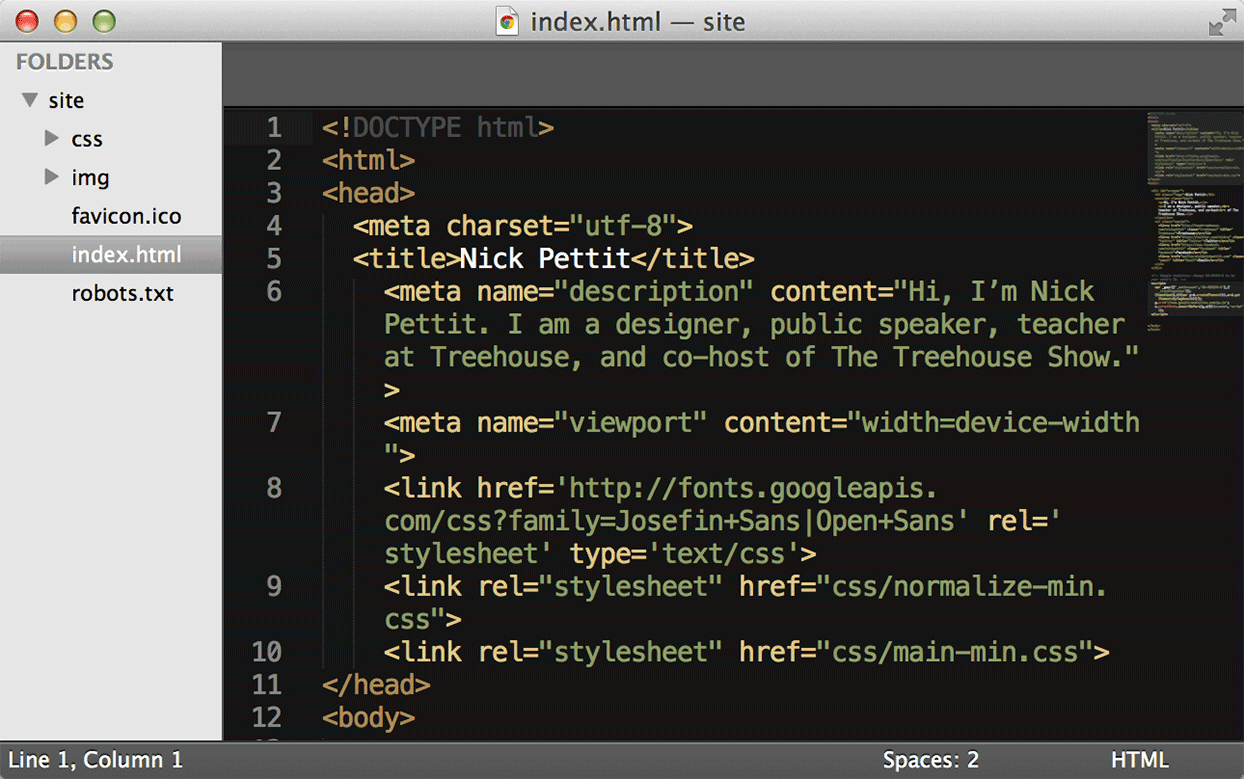
    <img alt="Screenshot of a website loaded into Sublime Text 2." src="http://blog.teamtreehouse.com/wp-content/uploads/2013/12/sublime.png" width="1244" height="779" style="max-width: 100%; height: auto;"><p>In the text editor Sublime Text 2, the project directory on the left side shows the same files that can also be found through the operating system’s file browser.</p>
    </div>
    <p>Recently though, I noticed that something had changed. More and more students were getting stuck on problems like broken images, CSS that’s not included properly, zipping and unzipping files, and other seemingly simple problems. When I first noticed this, I just thought that Treehouse was growing rapidly and that there would always be someone out there that has trouble with the first steps. Programming can be challenging when you’re new to it! However, the forum posts and tweets and emails continued to roll in with greater frequency as the days, weeks, and months passed onward.</p>
    <p>I was puzzled: Could I have explained a few things more clearly? How could such a large number of people use a computer effectively but not understand files and folders? Did they just save everything to the desktop and have a massive clutter of icons like you might expect back in 1995? Were they in some cultural or socioeconomic situation where this was their first time using a computer? Eventually, the answer came to me.</p>
    <p>If you grow up in the age of tablets, phones, and web apps, when would you ever have the need to learn about files and folders? The younger a student is, the more likely it is for them to have never encountered files and folders. Now you can just open a web browser or an iPad app and it’s all there. Netflix is your movie library, Pandora lets you listen to music, Facebook is a place to put your pictures and contacts, and so on. On phone apps, the files are simply stored with the programs you use. Even in desktop operating systems like Mac OS X, features like iCloud are starting to make files fade into the background.</p>
    <div>
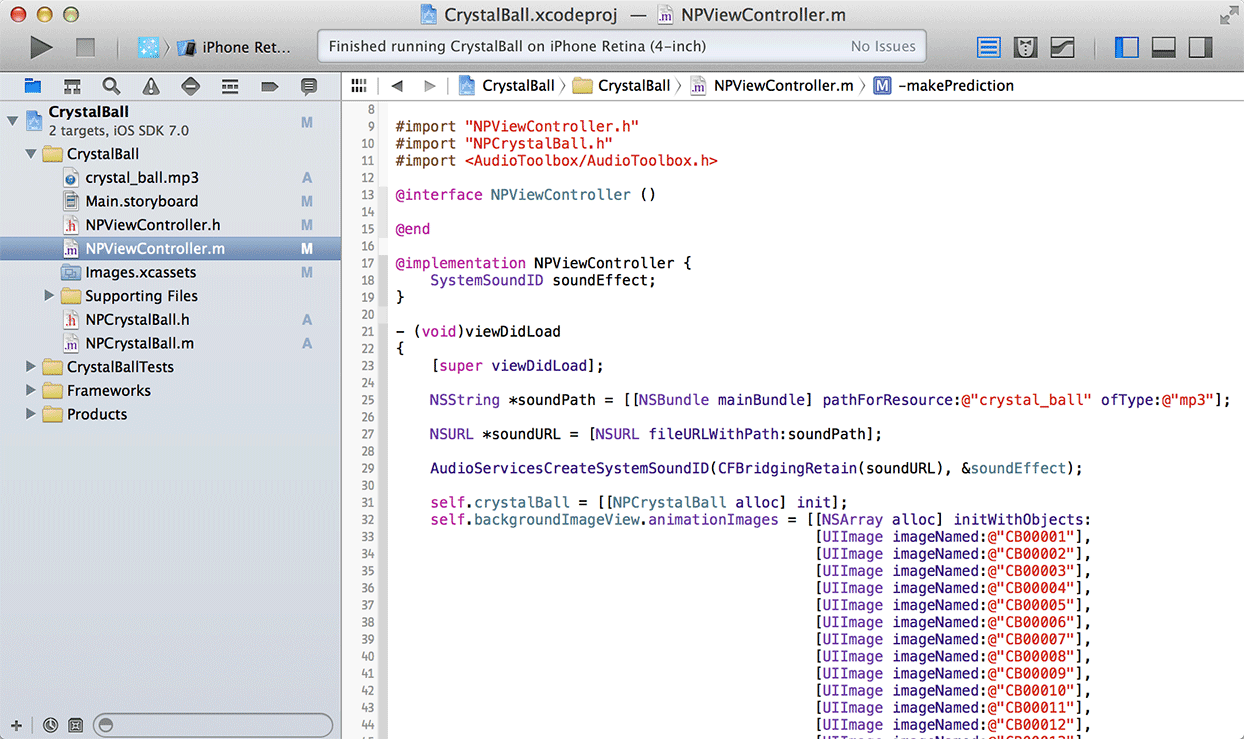
    <img alt="Screenshot of Xcode with a project titled Crystal Ball loaded into the editor." src="http://blog.teamtreehouse.com/wp-content/uploads/2013/12/xcode.png" width="1244" height="739" style="max-width: 100%; height: auto;"><p>Under the hood, iOS apps store files without asking the user to save them anywhere in particular. When iPhone app developers create projects, they too involve lots of different files. These can be code, images, sounds, and more. In this screenshot of Xcode, the light blue Project Navigator on the left side shows the files inside the Crystal Ball app that you can build on Treehouse.</p>
    </div>
    <p>This technology is wonderfully convenient, but its magic and mystery comes at a price. A new generation of designers and developers has arrived and they are increasingly oblivious to the concept of file systems.</p>
    <h2>“PCs are going to be like trucks.”</h2>
    <p>The hierarchical file system browser on Windows operating systems is called Windows Explorer, and on a Mac it’s called Finder. However, I don’t think anyone uses their computer because they like to <em>explore</em> and <em>find</em> things as if they’re on an archeological expedition. Rather, people use computers to get stuff done, and the best software gets out of the way.</p>
    <div>
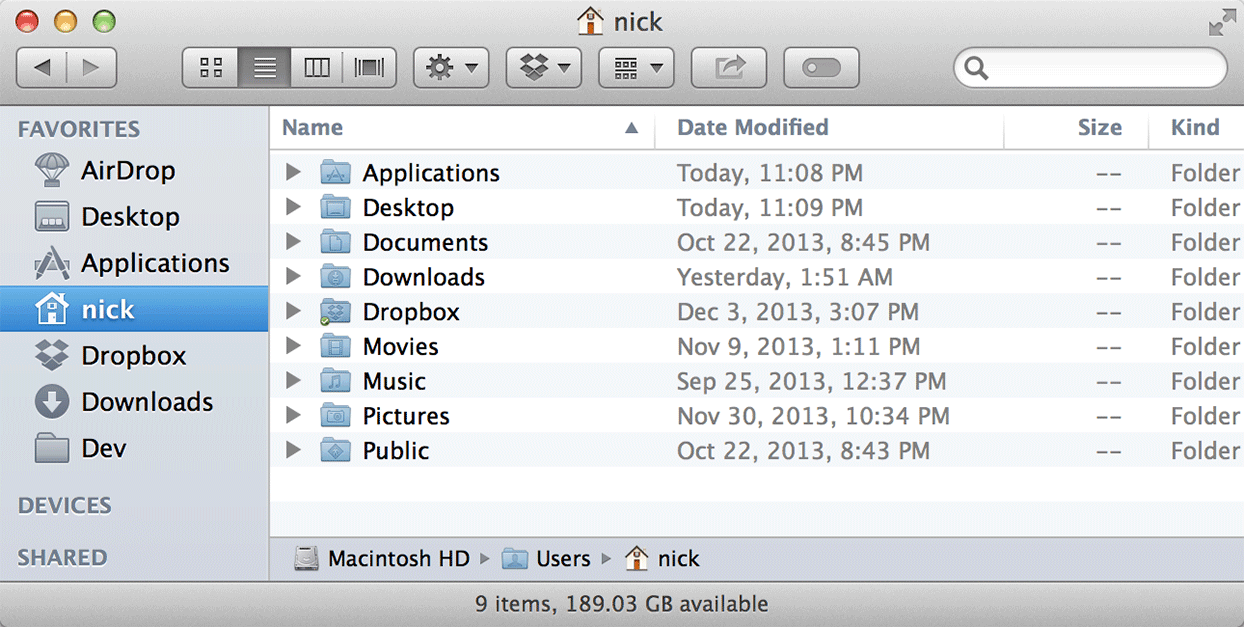
    <img alt="Screenshot of the Finder in Mac OS X." src="http://blog.teamtreehouse.com/wp-content/uploads/2013/12/finder.png" width="1244" height="627" style="max-width: 100%; height: auto;"><p>In Mac OS X, the Finder is the file system navigator. By contrast, there is no built-in equivalent to this on iOS devices like iPhones and iPads.</p>
    </div>
    <p>These days, you don’t need to know much about how computers work in order to use them, but that wasn’t always the case. In 1983, MS-DOS 2.0 introduced folders to what would become a ubiquitous file system, sparking multiple decades of users forgetting where they stored things. More web-like features such as tagging and search have improved the situation over the years, but file systems have never really been a positive or exciting part of the computing experience. Instead, most new features are just intended to make it more bearable. Apps for tablets, phones, and the web, have all cleverly done away with them completely.</p>
    <p>I think <a href="http://allthingsd.com/20100601/steve-jobs-session/" rel="nofollow external" class="bo">Steve Jobs summarized it well</a> at the D8 conference in 2010:</p>
    <blockquote><p>When we were an agrarian nation, all cars were trucks, because that’s what you needed on the farm. But as vehicles started to be used in the urban centers, cars got more popular. Innovations like automatic transmission and power steering and things that you didn’t care about in a truck as much started to become paramount in cars. … PCs are going to be like trucks. They’re still going to be around, they’re still going to have a lot of value, but they’re going to be used by one out of X people.</p></blockquote>
    <p>This seemed a little far fetched back in 2010, but the signs are already starting to show. We’re entering a future where desktops and laptops are tools intended for professionals that create media and software.</p>
    <h2>File Systems 101: A Basic Tutorial</h2>
    <p>If you’re totally new to web design and development, you understandably might not know much about files and folders. Next week in the follow-up to this article, we’ll get into the details of how to use file systems so that you can kick start your learning on Treehouse.</p>
    <p>The post <a href="http://blog.teamtreehouse.com/apps-clouds-and-file-systems-background-and-history" rel="nofollow external" class="bo">Apps, Clouds, and File Systems: Background and History</a> appeared first on <a href="http://blog.teamtreehouse.com" rel="nofollow external" class="bo">Treehouse Blog</a>.</p>
    </div>
]]>
</Body>
<Summary>Websites and phone apps are made of many different files that come together to form a whole. These complete packages are wrapped so neatly that their underlying structure is completely hidden from...</Summary>
<Website>http://feedproxy.google.com/~r/teamtreehouse/~3/XunGHyYs_JM/apps-clouds-and-file-systems-background-and-history</Website>
<TrackingUrl>https://my3.my.umbc.edu/api/v0/pixel/news/39305/guest@my.umbc.edu/b6f9419019847322c034996a671f7b98/api/pixel</TrackingUrl>
<Tag>android</Tag>
<Tag>css</Tag>
<Tag>design</Tag>
<Tag>development</Tag>
<Tag>html</Tag>
<Tag>ios</Tag>
<Tag>javascript</Tag>
<Tag>learn-to-code</Tag>
<Tag>make-a-website</Tag>
<Tag>responsive</Tag>
<Tag>web</Tag>
<Group token="retired-583">Web Developer - Build Group</Group>
<GroupUrl>https://my3.my.umbc.edu/groups/retired-583</GroupUrl>
<AvatarUrl>https://assets3-my.umbc.edu/system/shared/avatars/groups/000/000/583/fc60f5d7abc2e080599bb6dc465db54d/xsmall.png?1363101197</AvatarUrl>
<AvatarUrl size="original">https://assets4-my.umbc.edu/system/shared/avatars/groups/000/000/583/fc60f5d7abc2e080599bb6dc465db54d/original.jpg?1363101197</AvatarUrl>
<AvatarUrl size="xxlarge">https://assets4-my.umbc.edu/system/shared/avatars/groups/000/000/583/fc60f5d7abc2e080599bb6dc465db54d/xxlarge.png?1363101197</AvatarUrl>
<AvatarUrl size="xlarge">https://assets4-my.umbc.edu/system/shared/avatars/groups/000/000/583/fc60f5d7abc2e080599bb6dc465db54d/xlarge.png?1363101197</AvatarUrl>
<AvatarUrl size="large">https://assets3-my.umbc.edu/system/shared/avatars/groups/000/000/583/fc60f5d7abc2e080599bb6dc465db54d/large.png?1363101197</AvatarUrl>
<AvatarUrl size="medium">https://assets3-my.umbc.edu/system/shared/avatars/groups/000/000/583/fc60f5d7abc2e080599bb6dc465db54d/medium.png?1363101197</AvatarUrl>
<AvatarUrl size="small">https://assets4-my.umbc.edu/system/shared/avatars/groups/000/000/583/fc60f5d7abc2e080599bb6dc465db54d/small.png?1363101197</AvatarUrl>
<AvatarUrl size="xsmall">https://assets3-my.umbc.edu/system/shared/avatars/groups/000/000/583/fc60f5d7abc2e080599bb6dc465db54d/xsmall.png?1363101197</AvatarUrl>
<AvatarUrl size="xxsmall">https://assets4-my.umbc.edu/system/shared/avatars/groups/000/000/583/fc60f5d7abc2e080599bb6dc465db54d/xxsmall.png?1363101197</AvatarUrl>
<Sponsor>Web Developer - Build Group</Sponsor>
<PawCount>0</PawCount>
<CommentCount>0</CommentCount>
<CommentsAllowed>true</CommentsAllowed>
<PostedAt>Tue, 10 Dec 2013 15:00:54 -0500</PostedAt>
</NewsItem>

<NewsItem contentIssues="true" id="39307" important="false" status="posted" url="https://my3.my.umbc.edu/posts/39307">
<Title>Statamic 101</Title>
<Body>
<![CDATA[
    <div class="html-content">
    <a href="http://rss.buysellads.com/click.php?z=1260013&amp;k=d754f1e9ba63a736ba8ff5ece958f7dd&amp;a=34632&amp;c=1560057160" rel="nofollow external" class="bo"><img src="http://rss.buysellads.com/img.php?z=1260013&amp;k=d754f1e9ba63a736ba8ff5ece958f7dd&amp;a=34632&amp;c=1560057160" alt="" style="max-width: 100%; height: auto;"></a><p>Statamic is a modern PHP CMS which really makes an effort to be easy and intuitive to use. From its flat-file design to its use of technologies like Markdown and YAML, you can accomplish an outstanding amount of work without writing any code at all.</p>
    <p>In this article we will take a look at the process from installation to setting up a basic portfolio.</p>
    <p></p>
    <p>Having a flat-file design, setup is as simple as extracting the zip file you download from the <a title="Site" href="http://www.statamic.com/" rel="nofollow external" class="bo">Statamic website</a>. There is no database involved, all the content and settings are stored locally in a host of different files, which also means you have automatic backups and versioning on all of your content if you use something like Git.</p>
    <p>With the contents extracted, let’s take a look at Statamic’s structure.</p>
    <hr>
    <h2>The File Structure</h2>
    <p>There are more or less five different folders you will most likely be interacting with, and they are:</p>
    <ul>
    <li>
    <strong>_config</strong> is where all your settings are held</li>
    <li>
    <strong>_content</strong> is where you will put your Markdown files</li>
    <li>
    <strong>_add-ons</strong> is for Statamic add-ons</li>
    <li>
    <strong>_themes</strong> is where you build your theme</li>
    <li>
    <strong>assets</strong> is where you can stick resources for your site</li>
    </ul>
    <p>Besides these, you have the following four folders that you probably won’t touch directly:</p>
    <ul>
    <li>
    <strong>_app</strong> is home to Statamic’s own source code</li>
    <li>
    <strong>_cache</strong> is where Statamic caches all your content</li>
    <li>
    <strong>_logs</strong> is where Statamic will store your logs</li>
    <li>
    <strong>admin</strong> is the Statamic admin panel</li>
    </ul>
    <p>The first step in every Statamic site is to configure its options.</p>
    <hr>
    <h2>Configuration</h2>
    <p>All the configuration files are inside the _config folder as described above. The main file you should take a look at is the <code>settings.yaml</code>.</p>
    <p>If you are new to YAML, then all you really need to know is that it’s a data format similar to JSON except that it’s meant to be a more human-readable format. It accomplishes this by not requiring any separating characters like semi-colons or quotation marks, instead it gets its structure from placement and indentation.</p>
    <p>The <code>settings.yaml</code> file is really well documented so you shouldn’t have a problem filling it out. Some of the options you will probably want to look at are the following:</p>
    <pre>_license_key: Enter your License Key&#x000A;    _site_name: My Portfolio&#x000A;    _site_url: <a href="http://localhost:7000">http://localhost:7000</a>&#x000A;    _theme: portfolio&#x000A;    _taxonomy:&#x000A;       - language&#x000A;    _log_enabled: true&#x000A;    _cookies.secret_key: Some Random Key&#x000A;    </pre>
    <p>Most of these are pretty straightforward, like setting the license key, your site’s name and URL. The <code>theme</code> option sets which theme folder to load. We will get into this in a moment, but a theme is essentially the place where you specify how the different pages on your site will work. We will be creating our own theme so you can name it whatever you want. I chose ‘portfolio’.</p>
    <p>The next option is an array called taxonomy. If you have ever used something like WordPress, then you should know what this is for. Basically, it allows you to add a setting or ‘type’ to each post, and you can then use these taxonomies to filter your content and create custom pages for these groupings.</p>
    <p>I am only adding one taxonomy; the language taxonomy, because in our example portfolio we are going to specify each work’s programming languages. You don’t need to create a taxonomy for each custom property. We are going to want other things in our portfolio, like links and descriptions. A taxonomy is for fields that multiple entries have in common, and for fields that you may want to create a custom page for.</p>
    <p>The <code>log_enabled</code> setting turns on logging, so you can view problems which come up from the admin panel. They will be stored in the <code>_logs</code> folder we saw earlier. Finally the last option I mentioned is the secret key used to encrypt the cookie.</p>
    <p>This file can now be saved out, but before we move onto content, let’s take a moment to set up the portfolio template so we can see what we are doing.</p>
    <hr>
    <h2>Theme Basics</h2>
    <p>Like most modern frameworks, when you load a page, you can build it up from multiple reusable components. A page in Statamic is made up of a <code>layout</code>, a <code>template</code>, and a <code>content file</code>. Both the layout files and templates can optionally also be made of even more pieces called partials.</p>
    <p>The <code>layout</code> is the outer shell in which your template will be placed. This is usually used to hold the boilerplate HTML code like the head section, as well as the basic body that all the pages using this layout will need, like adding common libraries at the bottom of your file.</p>
    <p>The <code>template</code> is a specific view for a single page. You can have a home page template, a contact page template, and so on. You don’t need to create one per page, but I would recommend one per <em>type</em> of page.</p>
    <p>In these templates you have the ability to use variables stored in the actual content files. For example, say you need a page which displays an index of books you are reading, and then another page to display a list of shows you are watching. Instead of replicating most of the code for each page, you can create one template for displaying a list of objects, and then pull in the specifics of which list to retrieve from the content file itself.</p>
    <p>The <code>content file</code>—like its name suggests—is the actual resource being displayed. This can range from things like an actual unique web page, to a single blog entry. We will get to these in more details in a moment.</p>
    <p>Now instead of manually creating all these different components, Statamic provides a sort of starter template, giving you a basic structure to get started. You can download the theme folder from <a title="Kindling Theme" href="https://github.com/statamic/Theme-Kindling" rel="nofollow external" class="bo">Github</a>.</p>
    <p>Just place the entire folder into the <code>_themes</code> directory, and rename the folder to ‘portfolio’ (as that’s the theme name we declared in the settings file). You also need to rename the <code>kindling.js</code> file from the js folder and the <code>kindling.css</code> file from the css directory, to <code>portfolio.js</code> and <code>portfolio.css</code> respectively, as there is a special tag to pull these in automatically.</p>
    <p>That’s all the setup we need now, but to get a better idea of what I was talking about regarding the layout and template, let’s take a look at those files. To begin with, open up the file named <code>default.html</code> from the <code>layouts</code> folder. This corresponds to the default layout as you may have guessed.</p>
    <pre>&lt;!DOCTYPE html&gt;&#x000A;    &lt;html lang="en"&gt;&#x000A;        &lt;head&gt;&#x000A;            &lt;meta charset="utf-8" /&gt;&#x000A;            &lt;title&gt;{{ _site_name }}&lt;/title&gt;&#x000A;            &lt;link rel="stylesheet" href="{{ theme:css }}"&gt;&#x000A;        &lt;/head&gt;&#x000A;        &lt;body&gt;&#x000A;    &#x000A;            {{ layout_content }}&#x000A;    &#x000A;            &lt;script src="<a href="http://ajax.googleapis.com/ajax/libs/jquery/1/jquery.min.js%22&gt;&lt;/script&amp;gt">http://ajax.googleapis.com/ajax/libs/jquery/1/jquery.min.js"&gt;&lt;/script&amp;gt</a>;&#x000A;            &lt;script src="{{ theme:js }}"&gt;&lt;/script&gt;&#x000A;    &#x000A;        &lt;/body&gt;&#x000A;    &lt;/html&gt;&#x000A;    </pre>
    <p>Like I mentioned earlier, the layout is a good place to put code that is required on multiple pages (or templates rather), which is why the default layout in this file just contains the basic outline of an HTML file. Now we haven’t really talked about it yet, but Statamic comes with its own templating engine, which is fairly easy to pick up. You basically just place a tag where you want something to be inserted, similar to Handlebars if you’re familiar with that.</p>
    <p>This layout contains a couple of tags which I thought I would go through, the first of which is <code>_site_name</code>. This tag actually refers to the property we set up inside of the <code>settings.yaml</code> file. You will find this convention all throughout Statamic. You can set YAML options either globally like this, or even on a per-file basis, and you can then get these options just by placing a tag with their names into your templates.</p>
    <p>The next tag, which actually comes up twice, is the <a title="Theme Tag" href="http://statamic.com/learn/documentation/tags/theme" rel="nofollow external" class="bo"><code>theme</code></a> tag. Helpers in Statamic are more like independent modules, so they can have multiple different functions attached to the same name; you access the individual functions with a colon and then the name of the command you want.</p>
    <p>The <code>theme</code> tag is all about loading in resources specific to this theme. It can be used to pull in things like scripts and stylesheets, but also things like images and partials. It’s a helper function that basically allows you to just provide the name of the resource you want and it will fill in the path to the current templates directory. So for instance if you were to write:</p>
    <pre>{{ theme:js src="underscore.js" }}&#x000A;    </pre>
    <p>It would replace that with a link to a file named <strong>underscore.js</strong> inside of the current theme’s js folder. By default if no src parameter is set for the js or css command, it will assume you are referring to a js or css file with the name of the current theme, which is why we renamed those files to match; it’s just a matter of convenience so we don’t need to specify them and it cleans up the source a little bit.</p>
    <p>The next tag that comes up is <code>{{ layout_content }}</code>. This is similar to <code>yield</code> in other templating engines, and it basically signifies where the inner template should be inserted.</p>
    <p>The last thing I want to do in this file is remove the link to jQuery, because I won’t be using it (if you will then you can of course leave it).</p>
    <p>Next let’s move onto the default template file (<code>templates/default.html</code>). It should be blank. For education’s sake, let’s add a tag called <code>{{content}}</code> which just inserts the contents of the current page being loaded.</p>
    <p>So to recap, when you go to a page it will first load the layout file, and then wherever the <code>{{layout_content}}</code> tag is placed this template will get inserted. This template will then just output whatever the current page has inside.</p>
    <p>With that done, save out these files and let’s move on to content.</p>
    <hr>
    <h2>The Content</h2>
    <p>Content in Statamic is specified in Markdown files by default, and the default file loaded is called <code>page.md</code>. The same way a standard web server will load index.html if no file is specified, Statamic will load page.md.</p>
    <p>It’s also worth noting that routes, or URL links in your site, will be defined by the <code>_content</code> directory. For example, if you create a folder named <code>demo</code> in the <code>_content</code> directory, and in it place a file named <code>link.md</code>, this will correspond to the URL <code>/demo/link</code>. If you place a <code>page.md</code> file inside, it will be loaded if you navigate to <code>/demo/</code> since it is the default file name.</p>
    <p>Statamic comes with some demo content, but you can just delete everything inside the <code>_content</code> directory for this example (or move it aside for now).</p>
    <p>Let’s start with a basic home page. At the root of the <code>_content</code> directory, create a file named <code>page.md</code> with the following:</p>
    <pre>---&#x000A;    title: Home&#x000A;    ---&#x000A;    &#x000A;    # Welcome to the {{title}} Page&#x000A;    </pre>
    <p>All content files are split into two sections; the YAML front-matter and the contents. The top part (between the dashed lines) is where you can put standard YAML specific to this file, and is a good way to set options to adjust your template files. The second part is the Markdown area, where you put the contents of the actual page. You can use standard Markdown as well as Statamic helper tags.</p>
    <p>This page will load with the default layout and template files we just set up, but if you want it to use different ones, you can specify these as options in the YAML section at the top using <code>_layout</code> and <code>_template</code> respectively.</p>
    <p>If you create a server at the root of your Statamic directory:</p>
    <pre>php -S localhost:7000&#x000A;    </pre>
    <p>…and then navigate to <code><a href="http://localhost:7000">http://localhost:7000</a></code> in your browser you should see the H1 tag with our welcome message.</p>
    <p>This is all you need to know to create pages in Statamic, and if you are building a fairly static site, this would be enough. But for a lot of sites we need to be able to add dynamic data, which can take the form of blog posts, shop items, or in our case portfolio works.</p>
    <hr>
    <h2>Entries</h2>
    <p>There is no database in Statamic, so these kinds of entries are stored in Markdown files just like the page we just built, although a couple of things were done to subtly introduce multiple features to optimize things and to make it work in the admin.</p>
    <p>First off you can name the files with a special date format so they can be sorted and filtered by date. You do this by pre-pending the title with a <code>year-month-day</code> pattern. If you wanted to create a post named ‘foobar’ you would name it something like:</p>
    <pre>2013-09-15-foobar.md&#x000A;    </pre>
    <p>Any settings the post requires go inside the front-matter section at the top, and then the content is placed underneath. This follows the format of pages as outlined above.</p>
    <p>While this is pretty cool, it’s the equivalent of manually entering posts into a database of a traditional system. There is another option!</p>
    <p>Statamic comes bundled with a really nice admin which can do all this for you, but in order to get it set up we need to tell it which fields this type of entry is supposed to have. This is done in a file appropriately named <code>fields.yaml</code>.</p>
    <p>So for our example let’s create a folder inside the _content directory named <code>works</code>, and inside the <code>works</code> folder let’s create a file named <code>fields.yaml</code>. Inside the <code>fields.yaml</code> file we need to specify which properties our ‘entries’ will contain and the individual types for each of these settings.</p>
    <p>You can either specify your fieldset (the list of fields) in the <code>_config/fieldsets/</code> directory and pull in a definition, or you can just enter the definition here (or you can do both to extend an existing definition). For our simple example I am just going to put the definition here since we won’t be reusing it anywhere:</p>
    <pre>type: date&#x000A;    fields:&#x000A;     language:&#x000A;       type: tags&#x000A;       display: Programming Language&#x000A;       required: true&#x000A;    &#x000A;     description:&#x000A;        type: text&#x000A;        display: Description&#x000A;        required: false&#x000A;    &#x000A;     link:&#x000A;        type: text&#x000A;        display: Link&#x000A;        required: true&#x000A;    &#x000A;     content:&#x000A;        type: hidden&#x000A;    </pre>
    <p>The first property just tells Statamic that we want these entry files to have a date property and to be named appropriately. Next we open up a YAML object named <code>fields</code> containing all the properties of our entries.</p>
    <p>The first is the <code>language</code> field, which if you remember is the taxonomy we created in the <code>settings.yaml</code>. Inside each property we need to specify its type (or it defaults to a text box), its display text (which will default to the property name), and whether it is required. There are other options you can set, including instructions and the default value, You can view more information about these options <a title="Fieldset Options" href="http://statamic.com/learn/control-panel/fields-and-fieldsets" rel="nofollow external" class="bo">on Statamic’s website</a>. Alongside these settings, different field types can have their own custom options.</p>
    <p>For the <code>language</code> input, I set it to use the <code>tag</code> type, which allows you to set multiple tags for this option. It’s just a different type of input for entering its value in the admin. You can view all the different fieldtypes in <a title="Fieldtypes" href="http://statamic.com/learn/documentation/fieldtypes" rel="nofollow external" class="bo">Statamic’s documentation</a> or on the official <a title="Cheat Sheet" href="http://statamic.github.io/statamic-cheat-sheet/" rel="nofollow external" class="bo">Statamic Cheat Sheet</a> under ‘Fieldtypes’.</p>
    <p>The <code>description</code> and <code>link</code> are pretty much the same. They will both be text boxes, except one will be required and the other won’t be. Besides the fields you specify, all entries will come with a title and content field. We don’t really want a content field—in our works they will be more like links—so I have set it to <code>hidden</code>.</p>
    <p>The last step before we go to the admin is to create a <code>page.md</code> file inside the <code>works</code> directory. This isn’t required, but the admin will attempt to get the title of this entry type from here so it’s a good idea to just place it. To do this, create a <code>page.md</code> file inside the <code>works</code> folder with just the title set to ‘Works’:</p>
    <pre>---&#x000A;    title: Works&#x000A;    ---&#x000A;    </pre>
    <hr>
    <h2>The Admin</h2>
    <p>To get into the admin we need to first create a user. This is a simple YAML file inside of the <code>config</code> folder. The name of the file is the username you will use to log in, and inside the file you configure the user’s details and password.</p>
    <p>Let’s create a new user with a username of <code>editor</code>. We do this by creating a file called <code>editor.yaml</code> inside of the <code>_config/users/</code> folder. Insert the following data (except with your info instead of mine):</p>
    <pre>---&#x000A;    first_name: Gabriel&#x000A;    last_name: Manricks&#x000A;    roles: [admin]&#x000A;    email: <a href="mailto:gmanricks@gmail.com">gmanricks@gmail.com</a>&#x000A;    password: password&#x000A;    ---&#x000A;    &#x000A;    The Editor of this Portfolio&#x000A;    </pre>
    <p>Most of these columns are pretty straight forward and I don’t think they require any explanation. The only field worth mentioning is the <code>roles</code> setting. Currently <code>admin</code> is the only option available, but in the future this will be where you would be able to adjust the user’s editing permissions.</p>
    <p>It’s also worth mentioning that the password will not stay in plain-text. After the first login, Statamic will hash the password along with a salt and include those here instead.</p>
    <p>Everything after the dashed lines will be stored as the content for this user, and can be used as a sort of bio for them.</p>
    <p>Now save this file, and if your web server is still running, navigate to <code>/admin</code> in your browser. This will open up the login console where you can enter these properties. The first time you log in you will need to do this twice, once to hash the password, and the second time to actually log in.</p> <img alt="Admin Login" src="http://cdn.tutsplus.com/net/uploads/2013/09/statamic_1.png" style="max-width: 100%; height: auto;"><br> The Statamic Login <p>Once you’re logged in you will see a list of our pages. Included is our home page as well as the ‘Works’ entry type. Let’s take a look at what our fields declaration did for us. Click on the <strong>Create</strong> link inside of the <strong>Works</strong> bar.</p> <img alt="Pages Admin" src="http://cdn.tutsplus.com/net/uploads/2013/09/statamic_2.png" style="max-width: 100%; height: auto;"><p>You should see a nice form which includes all the fields we specified, and the title. Try adding a few posts to test it out.</p> <img alt="Demo Post" src="http://cdn.tutsplus.com/net/uploads/2013/09/statamic_3.png" style="max-width: 100%; height: auto;"><p>With some posts stored, we have completed round one. You now know how to create pages, themes, users, and entries, it’s a great first step. But there is a lot more Statamic has to offer.</p>
    <hr>
    <h2>The Templating Engine</h2>
    <p>Having some posts created is nice, but what would be better is if we could actually display them on a page. For this we will need to edit the default template.</p>
    <p>This will be our first real interaction with the included templating engine, but not to worry, Statamic’s intuitive design makes it easy to pick up.</p>
    <p>To view a full list of the available tags you can take a look at <a title="Tags" href="http://statamic.com/learn/documentation/tags" rel="nofollow external" class="bo">Statamic’s documentation</a>. All we really need for this example is the <code>entries</code> tag, which is used to pull in entries from a specific folder in the <code>_content</code> directory. There are a lot of optional properties, allowing you to filter by date, or by conditions like taxonomies or even standard properties. We are going to keep it simple and just list the properties by date (which is the default).</p>
    <p>Here is the complete new default template (<code>templates/default.html</code>):</p>
    <pre>&lt;h1&gt;Portfolio&lt;/h1&gt;&#x000A;    &#x000A;    &lt;table&gt;&#x000A;     {{ entries:listing folder="works" }}&#x000A;         &lt;tr&gt;&#x000A;             &lt;td class="lang"&gt;&lt;p&gt;{{ language }}&lt;/p&gt;&lt;/td&gt;&#x000A;             &lt;td class="work"&gt;&#x000A;                 &lt;a href="{{ link }}"&gt;&#x000A;                     &lt;span class="title"&gt;{{ title }} - &lt;/span&gt;&#x000A;                     &lt;span class="desc"&gt;{{ description }}&lt;/span&gt;&#x000A;                 &lt;/a&gt;&#x000A;             &lt;/td&gt;&#x000A;         &lt;/tr&gt;&#x000A;     {{ /entries:listing }}&#x000A;    &lt;/table&gt;&#x000A;    </pre>
    <p>In this code we are creating a table and looping through all posts in the ‘works’ directory. These kind of block tags, where you place more HTML inside, assign new placeholders. Aside from providing access to things like all the post’s attributes, you also get special helper variables which can tell you things like the current index, or whether this is the first or last post. We won’t be using any of those variables. All we need is to display the title, language, description and link. However if you load up the page in your browser, you will probably realize that instead of showing the language it just says “Array”.</p>
    <p>This is because we set this property to be a type tag, which means it could hold more than one language. So even though you may have only put one language, it is still being stored in an array. Luckily, Statamic comes with modifiers.</p>
    <hr>
    <h2>Modifiers</h2>
    <p>To finish off this guide, let’s take a look at a few modifiers which will allow us to make this page even better.</p>
    <p>The first and biggest problem is making the language show up. If you take a look at the <a title="Cheat Sheet" href="http://statamic.github.io/statamic-cheat-sheet/" rel="nofollow external" class="bo">Statamic Cheat Sheet</a>, all the way at the bottom left, you will see a section named <strong>List Shortcuts</strong>. While not technically being modifiers, Statamic allows you to append these words to the end of a list variable, and it will instead return a string representation. The one I want to use in this situation is the standard <code>_list</code> helper. What this will do is separate multiple values in the array with a comma and space, and is what we would want in our situation.</p>
    <p>To try it out, replace the <code>{{ language }}</code> tag with <code>{{ language_list }}</code>. Refresh your browser and it should now be displaying the languages correctly.</p>
    <p>Next let’s add a modifier to the title to make it all uppercase. If you have ever used something like the Smarty templating engine, this works the same way. You add a pipe to the end of the variable name and then add a modifier. In our example you just need to replace the call to <code>{{ title }}</code> with <code>{{ title|upper }}</code> and these are chainable so you can keep adding pipes indefinitely.</p>
    <p>Now let’s just add some CSS to style everything up. Remember, this goes in the <code>css/portfolio.css</code> file:</p>
    <pre>body { background: #FAFAF5; }&#x000A;    &#x000A;    h1 {&#x000A;     font: 800 64px 'Raleway', sans-serif;&#x000A;     margin-bottom: 28px;&#x000A;    }&#x000A;    &#x000A;    table { font: 15px 'Coustard', serif; }&#x000A;    &#x000A;    td { padding: 10px 10px 0 10px; }&#x000A;    p { margin-bottom: 15px; }&#x000A;    &#x000A;    .lang p {&#x000A;     background: #CA9F53;&#x000A;     color: #FFF;&#x000A;     padding: 3px 5px;&#x000A;     text-align: right;&#x000A;    }&#x000A;    &#x000A;    .work { text-align:left; }&#x000A;    .work a{&#x000A;     border-bottom: 1px solid #000;&#x000A;     text-decoration: none;&#x000A;    }&#x000A;    &#x000A;    .title {&#x000A;     font-weight: 600;&#x000A;     color: #000;&#x000A;    }&#x000A;    &#x000A;    .desc { color: #666; }&#x000A;    </pre>
    <p>And these two fonts are from Google Fonts, so you will need to add the following link at the top of your default layout file:</p>
    <pre>&lt;!DOCTYPE html&gt;&#x000A;    &lt;html lang="en"&gt;&#x000A;    &lt;head&gt;&#x000A;     &lt;meta charset="utf-8" /&gt;&#x000A;     &lt;title&gt;{{ _site_name }}&lt;/title&gt;&#x000A;     &lt;link href='<a href="http://fonts.googleapis.com/css?family=Coustard%7CRaleway:800">http://fonts.googleapis.com/css?family=Coustard|Raleway:800</a>' rel='stylesheet' type='text/css'&gt;&#x000A;     &lt;link rel="stylesheet" href="{{ theme:css }}"&gt;&#x000A;    &lt;/head&gt;&#x000A;    &lt;body&gt;&#x000A;    &#x000A;     {{ layout_content }}&#x000A;    &#x000A;     &lt;script src="{{ theme:js }}"&gt;&lt;/script&gt;&#x000A;    &#x000A;    &lt;/body&gt;&#x000A;    &lt;/html&gt;&#x000A;    </pre>
    <p>If everything worked out you should see the following page (except with the works you added):</p> <img alt="The Demo" src="http://cdn.tutsplus.com/net/uploads/2013/09/statamic_4.png" style="max-width: 100%; height: auto;"><hr>
    <h2>Conclusion</h2>
    <p>In this tutorial I’ve taken you through the entire process from installing the framework, to setting everything up, creating a new entry type, and building a custom theme. It’s a lot to do, and it’s only possible because of how easy Statamic makes things.</p>
    <p>We have seen a lot of functionality already and we haven’t even touched on creating your own modules and extending Statamic with PHP, but I think the most amazing thing so far is that we haven’t had to write a single line of PHP in this entire tutorial! That’s something to brag about.</p>
    <p>So I think the main question people might have is, “Should I use it?”, or, “What should this replace in my current repertoire?” It’s important to gauge what Statamic is for. If you are building a new startup and need the flexibility of a fully fledged framework, I am sure you would be able to get it running in Statamic, but it would be a lot of custom code, which might defeat the purpose. Where I think this will thrive is as a blogging platform or CMS.</p>
    <p>Coming from a background in WordPress, this feels like a direct successor. It follows a lot of the same conventions in theory, but they are all implemented in a much smarter way. Comparing the amount of code required in each becomes a joke. Moving forward, Statamic has an incredible API for building custom tags, hooks, new fieldtypes and more, and you can imagine Statamic makes it as lean and simple to do as you might have come to expect.</p>
    <p>I hope you enjoyed this article, if you have any questions feel free to ask me below, on twitter <a title="Twitter" href="https://twitter.com/gabrielmanricks" rel="nofollow external" class="bo">@gabrielmanricks</a>, or on the Tuts+ web dev IRC channel on freenode (#nettuts).</p>
    </div>
]]>
</Body>
<Summary>Statamic is a modern PHP CMS which really makes an effort to be easy and intuitive to use. From its flat-file design to its use of technologies like Markdown and YAML, you can accomplish an...</Summary>
<Website>http://feedproxy.google.com/~r/nettuts/~3/7ZNF_kbkIxo/</Website>
<TrackingUrl>https://my3.my.umbc.edu/api/v0/pixel/news/39307/guest@my.umbc.edu/274f7c50005bcf330b783e6d03ee0690/api/pixel</TrackingUrl>
<Tag>cmss</Tag>
<Tag>css</Tag>
<Tag>development</Tag>
<Tag>html</Tag>
<Tag>javascript</Tag>
<Tag>mysql</Tag>
<Tag>php</Tag>
<Tag>sql</Tag>
<Tag>statamic</Tag>
<Tag>tutorials</Tag>
<Tag>wed</Tag>
<Group token="retired-583">Web Developer - Build Group</Group>
<GroupUrl>https://my3.my.umbc.edu/groups/retired-583</GroupUrl>
<AvatarUrl>https://assets3-my.umbc.edu/system/shared/avatars/groups/000/000/583/fc60f5d7abc2e080599bb6dc465db54d/xsmall.png?1363101197</AvatarUrl>
<AvatarUrl size="original">https://assets4-my.umbc.edu/system/shared/avatars/groups/000/000/583/fc60f5d7abc2e080599bb6dc465db54d/original.jpg?1363101197</AvatarUrl>
<AvatarUrl size="xxlarge">https://assets4-my.umbc.edu/system/shared/avatars/groups/000/000/583/fc60f5d7abc2e080599bb6dc465db54d/xxlarge.png?1363101197</AvatarUrl>
<AvatarUrl size="xlarge">https://assets4-my.umbc.edu/system/shared/avatars/groups/000/000/583/fc60f5d7abc2e080599bb6dc465db54d/xlarge.png?1363101197</AvatarUrl>
<AvatarUrl size="large">https://assets3-my.umbc.edu/system/shared/avatars/groups/000/000/583/fc60f5d7abc2e080599bb6dc465db54d/large.png?1363101197</AvatarUrl>
<AvatarUrl size="medium">https://assets3-my.umbc.edu/system/shared/avatars/groups/000/000/583/fc60f5d7abc2e080599bb6dc465db54d/medium.png?1363101197</AvatarUrl>
<AvatarUrl size="small">https://assets4-my.umbc.edu/system/shared/avatars/groups/000/000/583/fc60f5d7abc2e080599bb6dc465db54d/small.png?1363101197</AvatarUrl>
<AvatarUrl size="xsmall">https://assets3-my.umbc.edu/system/shared/avatars/groups/000/000/583/fc60f5d7abc2e080599bb6dc465db54d/xsmall.png?1363101197</AvatarUrl>
<AvatarUrl size="xxsmall">https://assets4-my.umbc.edu/system/shared/avatars/groups/000/000/583/fc60f5d7abc2e080599bb6dc465db54d/xxsmall.png?1363101197</AvatarUrl>
<Sponsor>Web Developer - Build Group</Sponsor>
<PawCount>0</PawCount>
<CommentCount>0</CommentCount>
<CommentsAllowed>true</CommentsAllowed>
<PostedAt>Tue, 10 Dec 2013 15:00:09 -0500</PostedAt>
<EditAt>Tue, 10 Dec 2013 15:00:09 -0500</EditAt>
</NewsItem>

<NewsItem contentIssues="true" id="39304" important="false" status="posted" url="https://my3.my.umbc.edu/posts/39304">
<Title>#GivingTuesday: Thank You for Your Support!</Title>
<Body>
<![CDATA[
    <div class="html-content">
    <p><a href="http://umbcgiving.files.wordpress.com/2013/11/givingtuesday2.jpg" rel="nofollow external" class="bo"><img alt="givingtuesday2" src="http://umbcgiving.files.wordpress.com/2013/11/givingtuesday2.jpg?w=640&amp;h=146" style="max-width: 100%; height: auto;"></a></p>
    <p><a href="http://umbcgiving.files.wordpress.com/2013/11/thankyou2_112813.jpg" rel="nofollow external" class="bo"><img alt="ThankYou2_112813" src="http://umbcgiving.files.wordpress.com/2013/11/thankyou2_112813.jpg?w=299&amp;h=221" width="299" height="221" style="max-width: 100%; height: auto;"></a>Thank you so much to everyone who made a gift to UMBC and our awesome student projects on #GivingTuesday! It was an incredible day for philanthropy–both throughout Baltimore and across the country–and we are proud to have been a part of it. We already knew that Retrievers are some of the best and most loyal folks, but you proved it all over again with your support on December 3.</p>
    <p>Here’s a quick update on our featured #GivingTuesday projects:</p>
    <hr>
    <p><a href="http://umbcgiving.files.wordpress.com/2013/11/ewb-umbc_111213.jpg" rel="nofollow external" class="bo"><img alt="EWB-UMBC_111213" src="http://umbcgiving.files.wordpress.com/2013/11/ewb-umbc_111213.jpg?w=221&amp;h=166" width="221" height="166" style="max-width: 100%; height: auto;"></a>Thanks to you, Engineers Without Borders (EWB) has raised $1,535 toward their January trip to Isongo, Kenya. They still need to raise a bit more, but we’ve made a good start. We hope you’ll help us spread the word and <a href="https://givecorps.com/en/umbc/projects/457-annual-giving-causes-ewb-umbc" rel="nofollow external" class="bo">continue to gather support for EWB. </a></p>
    <hr>
    <p><a href="http://umbcgiving.files.wordpress.com/2013/11/dawgband_gt111913.jpg" rel="nofollow external" class="bo"><img alt="DawgBand_GT111913" src="http://umbcgiving.files.wordpress.com/2013/11/dawgband_gt111913.jpg?w=221&amp;h=164" width="221" height="164" style="max-width: 100%; height: auto;"></a>Success! Thanks to your support, <a href="https://givecorps.com/en/umbc/projects/653-student-organizations-black-and-gold-cd-down-and-dirty-dawg-band" rel="nofollow external" class="bo">the Down and Dirty Dawg Band</a> not only reached their goal of $2,500, but have exceeded it by over $300 (via online and offline donations). Additionally, their CD, “Black &amp; Gold” is<a href="http://www.umbc.edu/pepband/index.php/page/store" rel="nofollow external" class="bo"> now available for purchase online.</a></p>
    <hr>
    <p><a href="http://umbcgiving.files.wordpress.com/2013/11/gt_rainbow-flag_square.jpg" rel="nofollow external" class="bo"><img alt="GT_rainbow flag_square" src="http://umbcgiving.files.wordpress.com/2013/11/gt_rainbow-flag_square.jpg?w=174&amp;h=174" width="174" height="174" style="max-width: 100%; height: auto;"></a>So far, you’ve helped us raise $500 toward <a href="https://givecorps.com/en/umbc/projects/448-campus-life-lgbtq-outreach-and-support" rel="nofollow external" class="bo">new projects and initiatives for our LGBTQ students.</a> With that money, UMBC will be able to fund a few workshops or guest lectures on campus. It’s a great start, and we hope to raise more in the coming months.</p>
    <hr>
    <h2><a href="https://givecorps.com/en/umbc" rel="nofollow external" class="bo">Thank you for your continued support!</a></h2>
    <br>   </div>
]]>
</Body>
<Summary>Thank you so much to everyone who made a gift to UMBC and our awesome student projects on #GivingTuesday! It was an incredible day for philanthropy–both throughout Baltimore and across the...</Summary>
<Website>http://umbcgiving.wordpress.com/2013/12/10/givingtuesday-thank-you-for-your-support/</Website>
<TrackingUrl>https://my3.my.umbc.edu/api/v0/pixel/news/39304/guest@my.umbc.edu/41d55ff80894ca4c09875bd6413261f9/api/pixel</TrackingUrl>
<Tag>annual-giving</Tag>
<Tag>bmore-gives-more</Tag>
<Tag>down-and-dirty-dawg-band</Tag>
<Tag>engineers-without-borders</Tag>
<Tag>giving-tuesday</Tag>
<Tag>how-you-make-a-difference</Tag>
<Tag>lgbtq</Tag>
<Tag>retrievers</Tag>
<Tag>teaching-and-learning-innovation</Tag>
<Tag>umbc</Tag>
<Tag>university-of-maryland-baltimore-county</Tag>
<Tag>ways-to-give</Tag>
<Group token="retired-548">UMBC Giving</Group>
<GroupUrl>https://my3.my.umbc.edu/groups/retired-548</GroupUrl>
<AvatarUrl>https://assets1-my.umbc.edu/images/avatars/group/11/xsmall.png?1786447565</AvatarUrl>
<AvatarUrl size="original">https://assets3-my.umbc.edu/images/avatars/group/11/original.png?1786447565</AvatarUrl>
<AvatarUrl size="xxlarge">https://assets4-my.umbc.edu/images/avatars/group/11/xxlarge.png?1786447565</AvatarUrl>
<AvatarUrl size="xlarge">https://assets2-my.umbc.edu/images/avatars/group/11/xlarge.png?1786447565</AvatarUrl>
<AvatarUrl size="large">https://assets3-my.umbc.edu/images/avatars/group/11/large.png?1786447565</AvatarUrl>
<AvatarUrl size="medium">https://assets4-my.umbc.edu/images/avatars/group/11/medium.png?1786447565</AvatarUrl>
<AvatarUrl size="small">https://assets3-my.umbc.edu/images/avatars/group/11/small.png?1786447565</AvatarUrl>
<AvatarUrl size="xsmall">https://assets1-my.umbc.edu/images/avatars/group/11/xsmall.png?1786447565</AvatarUrl>
<AvatarUrl size="xxsmall">https://assets1-my.umbc.edu/images/avatars/group/11/xxsmall.png?1786447565</AvatarUrl>
<Sponsor>UMBC Giving</Sponsor>
<PawCount>0</PawCount>
<CommentCount>0</CommentCount>
<CommentsAllowed>false</CommentsAllowed>
<PostedAt>Tue, 10 Dec 2013 14:57:53 -0500</PostedAt>
</NewsItem>

<NewsItem contentIssues="true" id="39303" important="false" status="posted" url="https://my3.my.umbc.edu/posts/39303">
<Title>JavaScript footnotes, geographic auto completion, sortable lists | Treehouse Show Episode 69</Title>
<Body>
<![CDATA[
    <div class="html-content">
    <p>It’s Tuesday which means that the Treehouse Show is back! In episode 70 of The Treehouse Show, Nick and Jason (<a href="http://twitter.com/jseifer" rel="nofollow external" class="bo">@jseifer</a>) talk about JavaScript footnotes, geographic auto completion, sortable lists, and more!</p>
    <p></p>
    <div class="embed-container"><iframe src="//www.youtube.com/embed/G1xhdkSNjvw" frameborder="0" webkitallowfullscreen="webkitAllowFullScreen" mozallowfullscreen="mozallowfullscreen" allowfullscreen="allowFullScreen">[Video]</iframe></div>
    <h3>This Week’s Links</h3>
    <ul>
    <li>
    <p><a href="http://24ways.org/2013/url-rewriting-for-the-fearful/" rel="nofollow external" class="bo">URL Rewriting for the Fearful ◆ 24 ways</a></p>
    </li>
    <li>
    <p><a href="http://resume.github.io/" rel="nofollow external" class="bo">GitHub Résumé</a></p>
    </li>
    <li>
    <p><a href="http://atmb4u.github.io/AutoJS/" rel="nofollow external" class="bo">AutoJS by atmb4u</a></p>
    </li>
    <li>
    <p><a href="http://zurb.com/ink/" rel="nofollow external" class="bo">Ink: A Responsive Email Framework from ZURB</a></p>
    </li>
    <li>
    <p><a href="http://davidshimjs.github.io/qrcodejs/" rel="nofollow external" class="bo">qrcode.js</a></p>
    </li>
    <li>
    <p><a href="http://css-tricks.com/html5-meter-element/" rel="nofollow external" class="bo">The HTML5 meter Element | CSS-Tricks</a></p>
    </li>
    <li>
    <p><a href="http://prismjs.com/" rel="nofollow external" class="bo">Prism</a></p>
    </li>
    <li>
    <p><a href="http://tympanus.net/Development/SectionSeparators/" rel="nofollow external" class="bo">A Collection of Section Separators</a></p>
    </li>
    <p>The post <a href="http://blog.teamtreehouse.com/javascript-footnotes-geographic-auto-completion-sortable-lists-treehouse-show-episode-69" rel="nofollow external" class="bo">JavaScript footnotes, geographic auto completion, sortable lists | Treehouse Show Episode 69</a> appeared first on <a href="http://blog.teamtreehouse.com" rel="nofollow external" class="bo">Treehouse Blog</a>.</p>
    </ul>
    </div>
]]>
</Body>
<Summary>It’s Tuesday which means that the Treehouse Show is back! In episode 70 of The Treehouse Show, Nick and Jason (@jseifer) talk about JavaScript footnotes, geographic auto completion, sortable...</Summary>
<Website>http://feedproxy.google.com/~r/teamtreehouse/~3/fv569x7tVZY/javascript-footnotes-geographic-auto-completion-sortable-lists-treehouse-show-episode-69</Website>
<TrackingUrl>https://my3.my.umbc.edu/api/v0/pixel/news/39303/guest@my.umbc.edu/b836d025899501cc233e0daaa5dc28ac/api/pixel</TrackingUrl>
<Tag>android</Tag>
<Tag>css</Tag>
<Tag>design</Tag>
<Tag>development</Tag>
<Tag>html</Tag>
<Tag>ios</Tag>
<Tag>javascript</Tag>
<Tag>responsive</Tag>
<Tag>treehouse-show</Tag>
<Tag>web</Tag>
<Group token="retired-583">Web Developer - Build Group</Group>
<GroupUrl>https://my3.my.umbc.edu/groups/retired-583</GroupUrl>
<AvatarUrl>https://assets3-my.umbc.edu/system/shared/avatars/groups/000/000/583/fc60f5d7abc2e080599bb6dc465db54d/xsmall.png?1363101197</AvatarUrl>
<AvatarUrl size="original">https://assets4-my.umbc.edu/system/shared/avatars/groups/000/000/583/fc60f5d7abc2e080599bb6dc465db54d/original.jpg?1363101197</AvatarUrl>
<AvatarUrl size="xxlarge">https://assets4-my.umbc.edu/system/shared/avatars/groups/000/000/583/fc60f5d7abc2e080599bb6dc465db54d/xxlarge.png?1363101197</AvatarUrl>
<AvatarUrl size="xlarge">https://assets4-my.umbc.edu/system/shared/avatars/groups/000/000/583/fc60f5d7abc2e080599bb6dc465db54d/xlarge.png?1363101197</AvatarUrl>
<AvatarUrl size="large">https://assets3-my.umbc.edu/system/shared/avatars/groups/000/000/583/fc60f5d7abc2e080599bb6dc465db54d/large.png?1363101197</AvatarUrl>
<AvatarUrl size="medium">https://assets3-my.umbc.edu/system/shared/avatars/groups/000/000/583/fc60f5d7abc2e080599bb6dc465db54d/medium.png?1363101197</AvatarUrl>
<AvatarUrl size="small">https://assets4-my.umbc.edu/system/shared/avatars/groups/000/000/583/fc60f5d7abc2e080599bb6dc465db54d/small.png?1363101197</AvatarUrl>
<AvatarUrl size="xsmall">https://assets3-my.umbc.edu/system/shared/avatars/groups/000/000/583/fc60f5d7abc2e080599bb6dc465db54d/xsmall.png?1363101197</AvatarUrl>
<AvatarUrl size="xxsmall">https://assets4-my.umbc.edu/system/shared/avatars/groups/000/000/583/fc60f5d7abc2e080599bb6dc465db54d/xxsmall.png?1363101197</AvatarUrl>
<Sponsor>Web Developer - Build Group</Sponsor>
<PawCount>0</PawCount>
<CommentCount>0</CommentCount>
<CommentsAllowed>true</CommentsAllowed>
<PostedAt>Tue, 10 Dec 2013 14:25:29 -0500</PostedAt>
</NewsItem>

<NewsItem contentIssues="false" id="39302" important="false" status="posted" url="https://my3.my.umbc.edu/posts/39302">
<Title>RT ticket system downtime notice for 12-14-2013</Title>
<Body>
<![CDATA[
    <div class="html-content">Request Tracker (RT) has been in place almost 5 years now running on the same hardware. 
    <br><br>Over the next 6 months DoIT will be upgrading the hardware and application staring with Phase 1 for the database server hardware. This will require downtime this coming Saturday, December 14, 2013 from 6am to 2pm. <br><br>Phase 2 is currently scheduled for March 2014 to upgrade the web and application hardware.<br><br>Phase 3 is currently scheduled for June 2014 to upgrade the actual RT software application.<br><br>If an issue arises during the downtime please call the Technology Support Center (TSC) at 410-455-3838. The Saturday hours are from noon until 6pm however you can leave a voice mail and someone will get back to you during the normal Saturday operating hours.<br><br>Joe Kirby ,  Assistant Vice President, Business Systems<br>Division of Information Technology (DoIT) <br>Support Response -   <a href="http://www.umbc.edu/doit">http://www.umbc.edu/doit</a> <br>Administration 627<br>Office - 410-455-3020 <br>Email - <a href="mailto:kirby@umbc.edu">kirby@umbc.edu</a><br><br>
    </div>
]]>
</Body>
<Summary>Request Tracker (RT) has been in place almost 5 years now running on the same hardware.    Over the next 6 months DoIT will be upgrading the hardware and application staring with Phase 1 for the...</Summary>
<TrackingUrl>https://my3.my.umbc.edu/api/v0/pixel/news/39302/guest@my.umbc.edu/0c253f02b39e6a04dd3adf4385606aa8/api/pixel</TrackingUrl>
<Group token="doit">Division of Information Technology (DoIT)</Group>
<GroupUrl>https://my3.my.umbc.edu/groups/doit</GroupUrl>
<AvatarUrl>https://assets2-my.umbc.edu/system/shared/avatars/groups/000/000/021/d27760c5de12c74b73faec8d0e631acf/xsmall.png?1727453227</AvatarUrl>
<AvatarUrl size="original">https://assets2-my.umbc.edu/system/shared/avatars/groups/000/000/021/d27760c5de12c74b73faec8d0e631acf/original.JPG?1727453227</AvatarUrl>
<AvatarUrl size="xxlarge">https://assets1-my.umbc.edu/system/shared/avatars/groups/000/000/021/d27760c5de12c74b73faec8d0e631acf/xxlarge.png?1727453227</AvatarUrl>
<AvatarUrl size="xlarge">https://assets3-my.umbc.edu/system/shared/avatars/groups/000/000/021/d27760c5de12c74b73faec8d0e631acf/xlarge.png?1727453227</AvatarUrl>
<AvatarUrl size="large">https://assets2-my.umbc.edu/system/shared/avatars/groups/000/000/021/d27760c5de12c74b73faec8d0e631acf/large.png?1727453227</AvatarUrl>
<AvatarUrl size="medium">https://assets2-my.umbc.edu/system/shared/avatars/groups/000/000/021/d27760c5de12c74b73faec8d0e631acf/medium.png?1727453227</AvatarUrl>
<AvatarUrl size="small">https://assets2-my.umbc.edu/system/shared/avatars/groups/000/000/021/d27760c5de12c74b73faec8d0e631acf/small.png?1727453227</AvatarUrl>
<AvatarUrl size="xsmall">https://assets2-my.umbc.edu/system/shared/avatars/groups/000/000/021/d27760c5de12c74b73faec8d0e631acf/xsmall.png?1727453227</AvatarUrl>
<AvatarUrl size="xxsmall">https://assets4-my.umbc.edu/system/shared/avatars/groups/000/000/021/d27760c5de12c74b73faec8d0e631acf/xxsmall.png?1727453227</AvatarUrl>
<Sponsor>Division of Information Technology</Sponsor>
<PawCount>0</PawCount>
<CommentCount>0</CommentCount>
<CommentsAllowed>true</CommentsAllowed>
<PostedAt>Tue, 10 Dec 2013 14:24:05 -0500</PostedAt>
</NewsItem>

</News>