Bits Blog: Growth Returns to Tech, but Profits Will Not Be So Easy
After a tough 2013 for information technology, a leading analysis company said Monday that spending worldwide is set to increase. Profitability, however, may not match the trend.


 ]]>
After a tough 2013 for information technology, a leading analysis company said Monday that spending worldwide is set to increase. Profitability, however, may not match the trend.
http://bits.blogs.nytimes.com/2014/01/06/growth-returns-to-tech-but-profits-will-not-be-so-easy/?partner=rss&emc=rss
https://my3.my.umbc.edu/api/v0/pixel/news/39971/guest@my.umbc.edu/880389ff34de162bcebd7e84f1f3d17f/api/pixel
cloud-computing
computers-and-the-internet
data-centers
enterprise-computing
gartner-inc
new
technology
telephones-and-telecommunications
york
Web Developer - Build Group
https://my3.my.umbc.edu/groups/retired-583
https://assets3-my.umbc.edu/system/shared/avatars/groups/000/000/583/fc60f5d7abc2e080599bb6dc465db54d/xsmall.png?1363101197
https://assets4-my.umbc.edu/system/shared/avatars/groups/000/000/583/fc60f5d7abc2e080599bb6dc465db54d/original.jpg?1363101197
https://assets4-my.umbc.edu/system/shared/avatars/groups/000/000/583/fc60f5d7abc2e080599bb6dc465db54d/xxlarge.png?1363101197
https://assets4-my.umbc.edu/system/shared/avatars/groups/000/000/583/fc60f5d7abc2e080599bb6dc465db54d/xlarge.png?1363101197
https://assets3-my.umbc.edu/system/shared/avatars/groups/000/000/583/fc60f5d7abc2e080599bb6dc465db54d/large.png?1363101197
https://assets3-my.umbc.edu/system/shared/avatars/groups/000/000/583/fc60f5d7abc2e080599bb6dc465db54d/medium.png?1363101197
https://assets4-my.umbc.edu/system/shared/avatars/groups/000/000/583/fc60f5d7abc2e080599bb6dc465db54d/small.png?1363101197
https://assets3-my.umbc.edu/system/shared/avatars/groups/000/000/583/fc60f5d7abc2e080599bb6dc465db54d/xsmall.png?1363101197
https://assets4-my.umbc.edu/system/shared/avatars/groups/000/000/583/fc60f5d7abc2e080599bb6dc465db54d/xxsmall.png?1363101197
Web Developer - Build Group
0
0
true
Mon, 06 Jan 2014 17:04:45 -0500
Tue, 07 Jan 2014 12:00:22 -0500
Bits Blog: Samsung Electronics Goes Big on Tablets
Samsung Electronics, the No. 1 handset maker, is trying to take on both Microsoft and Apple with two tablets aimed at professional users.
]]>
After a tough 2013 for information technology, a leading analysis company said Monday that spending worldwide is set to increase. Profitability, however, may not match the trend.
http://bits.blogs.nytimes.com/2014/01/06/growth-returns-to-tech-but-profits-will-not-be-so-easy/?partner=rss&emc=rss
https://my3.my.umbc.edu/api/v0/pixel/news/39971/guest@my.umbc.edu/880389ff34de162bcebd7e84f1f3d17f/api/pixel
cloud-computing
computers-and-the-internet
data-centers
enterprise-computing
gartner-inc
new
technology
telephones-and-telecommunications
york
Web Developer - Build Group
https://my3.my.umbc.edu/groups/retired-583
https://assets3-my.umbc.edu/system/shared/avatars/groups/000/000/583/fc60f5d7abc2e080599bb6dc465db54d/xsmall.png?1363101197
https://assets4-my.umbc.edu/system/shared/avatars/groups/000/000/583/fc60f5d7abc2e080599bb6dc465db54d/original.jpg?1363101197
https://assets4-my.umbc.edu/system/shared/avatars/groups/000/000/583/fc60f5d7abc2e080599bb6dc465db54d/xxlarge.png?1363101197
https://assets4-my.umbc.edu/system/shared/avatars/groups/000/000/583/fc60f5d7abc2e080599bb6dc465db54d/xlarge.png?1363101197
https://assets3-my.umbc.edu/system/shared/avatars/groups/000/000/583/fc60f5d7abc2e080599bb6dc465db54d/large.png?1363101197
https://assets3-my.umbc.edu/system/shared/avatars/groups/000/000/583/fc60f5d7abc2e080599bb6dc465db54d/medium.png?1363101197
https://assets4-my.umbc.edu/system/shared/avatars/groups/000/000/583/fc60f5d7abc2e080599bb6dc465db54d/small.png?1363101197
https://assets3-my.umbc.edu/system/shared/avatars/groups/000/000/583/fc60f5d7abc2e080599bb6dc465db54d/xsmall.png?1363101197
https://assets4-my.umbc.edu/system/shared/avatars/groups/000/000/583/fc60f5d7abc2e080599bb6dc465db54d/xxsmall.png?1363101197
Web Developer - Build Group
0
0
true
Mon, 06 Jan 2014 17:04:45 -0500
Tue, 07 Jan 2014 12:00:22 -0500
Bits Blog: Samsung Electronics Goes Big on Tablets
Samsung Electronics, the No. 1 handset maker, is trying to take on both Microsoft and Apple with two tablets aimed at professional users.
]]>
Samsung Electronics, the No. 1 handset maker, is trying to take on both Microsoft and Apple with two tablets aimed at professional users.
http://bits.blogs.nytimes.com/2014/01/06/samsung-electronics-goes-big-on-tablets/?partner=rss&emc=rss
https://my3.my.umbc.edu/api/v0/pixel/news/39972/guest@my.umbc.edu/5fb0c785379aa97370f90b14aa0930ef/api/pixel
c-e-s-2014
mobile
new
samsung-group
tablet-computers
technology
york
Web Developer - Build Group
https://my3.my.umbc.edu/groups/retired-583
https://assets3-my.umbc.edu/system/shared/avatars/groups/000/000/583/fc60f5d7abc2e080599bb6dc465db54d/xsmall.png?1363101197
https://assets4-my.umbc.edu/system/shared/avatars/groups/000/000/583/fc60f5d7abc2e080599bb6dc465db54d/original.jpg?1363101197
https://assets4-my.umbc.edu/system/shared/avatars/groups/000/000/583/fc60f5d7abc2e080599bb6dc465db54d/xxlarge.png?1363101197
https://assets4-my.umbc.edu/system/shared/avatars/groups/000/000/583/fc60f5d7abc2e080599bb6dc465db54d/xlarge.png?1363101197
https://assets3-my.umbc.edu/system/shared/avatars/groups/000/000/583/fc60f5d7abc2e080599bb6dc465db54d/large.png?1363101197
https://assets3-my.umbc.edu/system/shared/avatars/groups/000/000/583/fc60f5d7abc2e080599bb6dc465db54d/medium.png?1363101197
https://assets4-my.umbc.edu/system/shared/avatars/groups/000/000/583/fc60f5d7abc2e080599bb6dc465db54d/small.png?1363101197
https://assets3-my.umbc.edu/system/shared/avatars/groups/000/000/583/fc60f5d7abc2e080599bb6dc465db54d/xsmall.png?1363101197
https://assets4-my.umbc.edu/system/shared/avatars/groups/000/000/583/fc60f5d7abc2e080599bb6dc465db54d/xxsmall.png?1363101197
Web Developer - Build Group
0
0
true
Mon, 06 Jan 2014 17:00:47 -0500
Tue, 07 Jan 2014 08:14:21 -0500
Retriever Love: Catherine and Josh Kruder

 Editor’s note: Students come to UMBC to get an education, but they end up getting so much more. Catherine ’12, English, and Josh Kruder ’11, computer science, happened to fall in love. Lucky for us, they were generous enough to share their story.
“My husband and I just celebrated our one-year wedding anniversary, after meeting and falling in love at UMBC in 2009. Now, this isn’t your run-of-the-mill Retriever love story. There was no eying each other in Chemistry 101; and there was no relating to common interests at a Resident Student Association movie night.
You see, my mom had been taking classes at the university and when I got there in 2008, I was still living at home and we were carpooling to school. In February 2009, she came home one night gushing about this “really cute” boy in her class with “these adorable blue eyes and blonde hair!” She said, “You come see me tomorrow and I will introduce you”… you know with that all-assuring “I got this” smirk on her face. Needless to say, children aren’t really that fond of their parents’ advice, and certainly not when it comes to dating! Did I mention that my mom was taking Computer Science classes? “Oh no,” I thought. “Geek alert!” But I decided to go anyway, just for the fun of it.
 The next day, I walked into her classroom and see her talking to, well, a really cute, blonde-haired, blue-eyed guy! Go figure. She introduces us, we make small talk about my major and how hard their professor was, and when it’s time for class to start, I go to leave. I barely get out the door before I hear my mom’s voice trickle off, “I know I don’t look old enough to have a daughter, Josh. Isn’t she beautiful?” This would have been what they call a “face-palm” moment. Forget the subtleties, that boy was definitely scared off!
That night is one I’ll never forget. My mom came home with her goofy smile that reeked of accomplishment and pride.
Mom: “So, how are we going to do this? I could give him your phone number. Or… you could email him!”
Me: “Mom, I don’t want to be some creeper, weirdo. What if he already has a girlfriend?”
Mom: “All is fair in love and war.”
Me: “Why don’t I just Facebook him.”
Mom: “Oh, you can do that? Yes, do that.”
 The next day, I got my friend request confirmed and an unread message from that really cute boy in my mom’s class. And three days later, we had our first date and we’ve been inseparable ever since. We were married on September 22, 2012.
Looking back, I joke with my husband, “You know you were set up, right?” He smiles and nods his head, “I know… and I’m okay with that.” And then there’s the always hilarious disclaimer, “You can never complain about my family… you knew the crazy before ever meeting me!”
I tell you this because the details matter. I wouldn’t have found my soul mate at UMBC if it hadn’t been for my mom. I got my fairytale… even if it was sort of picked out for me.”
If you met your sweetheart at UMBC, send your pictures and story to retrievernet@umbc.edu and you could be featured here, too!
]]>
Editor’s note: Students come to UMBC to get an education, but they end up getting so much more. Catherine ’12, English, and Josh Kruder ’11, computer science, happened to fall in love. Lucky for...
https://umbc.edu/stories/retriever-love-catherine-and-josh-kruder/
https://my3.my.umbc.edu/api/v0/pixel/news/122896/guest@my.umbc.edu/be88b419df5b9d7ebb35afed2d1001c6/api/pixel
alumni
retriever-love
umbc
university-of-maryland-baltimore-county
UMBC News & Magazine
https://my3.my.umbc.edu/groups/umbc-news-magazine
https://assets1-my.umbc.edu/system/shared/avatars/groups/000/001/943/24435aa6207c452e7bc15cc74b42c7bb/xsmall.png?1748556657
https://assets1-my.umbc.edu/system/shared/avatars/groups/000/001/943/24435aa6207c452e7bc15cc74b42c7bb/original.png?1748556657
https://assets2-my.umbc.edu/system/shared/avatars/groups/000/001/943/24435aa6207c452e7bc15cc74b42c7bb/xxlarge.png?1748556657
https://assets2-my.umbc.edu/system/shared/avatars/groups/000/001/943/24435aa6207c452e7bc15cc74b42c7bb/xlarge.png?1748556657
https://assets3-my.umbc.edu/system/shared/avatars/groups/000/001/943/24435aa6207c452e7bc15cc74b42c7bb/large.png?1748556657
https://assets1-my.umbc.edu/system/shared/avatars/groups/000/001/943/24435aa6207c452e7bc15cc74b42c7bb/medium.png?1748556657
https://assets2-my.umbc.edu/system/shared/avatars/groups/000/001/943/24435aa6207c452e7bc15cc74b42c7bb/small.png?1748556657
https://assets1-my.umbc.edu/system/shared/avatars/groups/000/001/943/24435aa6207c452e7bc15cc74b42c7bb/xsmall.png?1748556657
https://assets2-my.umbc.edu/system/shared/avatars/groups/000/001/943/24435aa6207c452e7bc15cc74b42c7bb/xxsmall.png?1748556657
UMBC News & Magazine
0
0
false
Mon, 06 Jan 2014 16:59:55 -0500
Community Bulletins: Happenings in Oracle Technology Network
Introducing the ArchBeat YouTube channel, announcing OTN at SXSW Interactive, and setting the rules for a friendly debate on the impact of hardware versus software on system performance.
]]>
Introducing the ArchBeat YouTube channel, announcing OTN at SXSW Interactive, and setting the rules for a friendly debate on the impact of hardware versus software on system performance.
http://www.oracle.com/technetwork/issue-archive/2014/14-jan/o14bulletin-2076713.html
https://my3.my.umbc.edu/api/v0/pixel/news/40051/guest@my.umbc.edu/1b803564ce151b92fb6e7637b5813856/api/pixel
css
design
development
html
javascript
mysql
oracle
pl-sql
sql
Web Developer - Build Group
https://my3.my.umbc.edu/groups/retired-583
https://assets3-my.umbc.edu/system/shared/avatars/groups/000/000/583/fc60f5d7abc2e080599bb6dc465db54d/xsmall.png?1363101197
https://assets4-my.umbc.edu/system/shared/avatars/groups/000/000/583/fc60f5d7abc2e080599bb6dc465db54d/original.jpg?1363101197
https://assets4-my.umbc.edu/system/shared/avatars/groups/000/000/583/fc60f5d7abc2e080599bb6dc465db54d/xxlarge.png?1363101197
https://assets4-my.umbc.edu/system/shared/avatars/groups/000/000/583/fc60f5d7abc2e080599bb6dc465db54d/xlarge.png?1363101197
https://assets3-my.umbc.edu/system/shared/avatars/groups/000/000/583/fc60f5d7abc2e080599bb6dc465db54d/large.png?1363101197
https://assets3-my.umbc.edu/system/shared/avatars/groups/000/000/583/fc60f5d7abc2e080599bb6dc465db54d/medium.png?1363101197
https://assets4-my.umbc.edu/system/shared/avatars/groups/000/000/583/fc60f5d7abc2e080599bb6dc465db54d/small.png?1363101197
https://assets3-my.umbc.edu/system/shared/avatars/groups/000/000/583/fc60f5d7abc2e080599bb6dc465db54d/xsmall.png?1363101197
https://assets4-my.umbc.edu/system/shared/avatars/groups/000/000/583/fc60f5d7abc2e080599bb6dc465db54d/xxsmall.png?1363101197
Web Developer - Build Group
0
0
true
Mon, 06 Jan 2014 16:26:33 -0500
In the Field: Survival for the Database Technologist
Five steps to help you sort through the information about information management
]]>
Five steps to help you sort through the information about information management
http://www.oracle.com/technetwork/issue-archive/2014/14-jan/o14field-2075161.html
https://my3.my.umbc.edu/api/v0/pixel/news/39974/guest@my.umbc.edu/1ba0dba54c0b60579124c2d1d8a94b32/api/pixel
css
design
development
html
javascript
mysql
oracle
pl-sql
sql
Web Developer - Build Group
https://my3.my.umbc.edu/groups/retired-583
https://assets3-my.umbc.edu/system/shared/avatars/groups/000/000/583/fc60f5d7abc2e080599bb6dc465db54d/xsmall.png?1363101197
https://assets4-my.umbc.edu/system/shared/avatars/groups/000/000/583/fc60f5d7abc2e080599bb6dc465db54d/original.jpg?1363101197
https://assets4-my.umbc.edu/system/shared/avatars/groups/000/000/583/fc60f5d7abc2e080599bb6dc465db54d/xxlarge.png?1363101197
https://assets4-my.umbc.edu/system/shared/avatars/groups/000/000/583/fc60f5d7abc2e080599bb6dc465db54d/xlarge.png?1363101197
https://assets3-my.umbc.edu/system/shared/avatars/groups/000/000/583/fc60f5d7abc2e080599bb6dc465db54d/large.png?1363101197
https://assets3-my.umbc.edu/system/shared/avatars/groups/000/000/583/fc60f5d7abc2e080599bb6dc465db54d/medium.png?1363101197
https://assets4-my.umbc.edu/system/shared/avatars/groups/000/000/583/fc60f5d7abc2e080599bb6dc465db54d/small.png?1363101197
https://assets3-my.umbc.edu/system/shared/avatars/groups/000/000/583/fc60f5d7abc2e080599bb6dc465db54d/xsmall.png?1363101197
https://assets4-my.umbc.edu/system/shared/avatars/groups/000/000/583/fc60f5d7abc2e080599bb6dc465db54d/xxsmall.png?1363101197
Web Developer - Build Group
0
0
true
Mon, 06 Jan 2014 16:16:42 -0500
Bits Blog: Palo Alto Networks Acquires Start-Up Morta Security
Palo Alto Networks has acquired Morta Security, a two year old Silicon Valley based security start-up run by former employees of the National Security Agency and United States Air Force.


 ]]>
Palo Alto Networks has acquired Morta Security, a two year old Silicon Valley based security start-up run by former employees of the National Security Agency and United States Air Force.
http://bits.blogs.nytimes.com/2014/01/06/palo-alto-networks-acquires-morta-security-as-security-acquisitions-gain-steam/?partner=rss&emc=rss
https://my3.my.umbc.edu/api/v0/pixel/news/39970/guest@my.umbc.edu/b4ab162738632599a712a612afb91452/api/pixel
andreessen-horowitz
greylock-partners
mergers-acquisitions-and-divestitures
national-security-agency
new
norwest-venture-partners
palo-alto-networks-inc
security
silicon-valley-calif
technology
york
Web Developer - Build Group
https://my3.my.umbc.edu/groups/retired-583
https://assets3-my.umbc.edu/system/shared/avatars/groups/000/000/583/fc60f5d7abc2e080599bb6dc465db54d/xsmall.png?1363101197
https://assets4-my.umbc.edu/system/shared/avatars/groups/000/000/583/fc60f5d7abc2e080599bb6dc465db54d/original.jpg?1363101197
https://assets4-my.umbc.edu/system/shared/avatars/groups/000/000/583/fc60f5d7abc2e080599bb6dc465db54d/xxlarge.png?1363101197
https://assets4-my.umbc.edu/system/shared/avatars/groups/000/000/583/fc60f5d7abc2e080599bb6dc465db54d/xlarge.png?1363101197
https://assets3-my.umbc.edu/system/shared/avatars/groups/000/000/583/fc60f5d7abc2e080599bb6dc465db54d/large.png?1363101197
https://assets3-my.umbc.edu/system/shared/avatars/groups/000/000/583/fc60f5d7abc2e080599bb6dc465db54d/medium.png?1363101197
https://assets4-my.umbc.edu/system/shared/avatars/groups/000/000/583/fc60f5d7abc2e080599bb6dc465db54d/small.png?1363101197
https://assets3-my.umbc.edu/system/shared/avatars/groups/000/000/583/fc60f5d7abc2e080599bb6dc465db54d/xsmall.png?1363101197
https://assets4-my.umbc.edu/system/shared/avatars/groups/000/000/583/fc60f5d7abc2e080599bb6dc465db54d/xxsmall.png?1363101197
Web Developer - Build Group
0
0
true
Mon, 06 Jan 2014 16:12:50 -0500
Mon, 06 Jan 2014 17:59:42 -0500
Robert Deluty, Graduate School, Publishes His 43rd Book
Robert Deluty, associate dean of the graduate school, has published a new volume of poetry, “Opening the Doors of Perception.” In his review, Richard M. Berlin writes: “From the drama of the opening poem, to the shock of the finale, Robert Deluty’s latest collection throws open all the doors. And the light that enters illuminates the humor at the center of our joys and heartbreak. Best of all, his poems let us see ourselves from a fresh angle, especially our shared humanity. Once again, Deluty has created a volume to treasure.” “Opening the Doors of Perception,” as well as all …
]]>
Robert Deluty, associate dean of the graduate school, has published a new volume of poetry, “Opening the Doors of Perception.” In his review, Richard M. Berlin writes: “From the drama of the...
https://news.umbc.edu/robert-deluty-graduate-school-publishes-his-43rd-book/
https://my3.my.umbc.edu/api/v0/pixel/news/109877/guest@my.umbc.edu/021d5c8275716a57a293d0649f7b78bb/api/pixel
arts-and-culture
UMBC News
https://my3.my.umbc.edu/groups/umbc-news
https://assets2-my.umbc.edu/system/shared/avatars/groups/000/001/944/2c79aeea85b1abb37f8cf9fbcdc382b0/xsmall.png?1632921809
https://assets4-my.umbc.edu/system/shared/avatars/groups/000/001/944/2c79aeea85b1abb37f8cf9fbcdc382b0/original.png?1632921809
https://assets4-my.umbc.edu/system/shared/avatars/groups/000/001/944/2c79aeea85b1abb37f8cf9fbcdc382b0/xxlarge.png?1632921809
https://assets1-my.umbc.edu/system/shared/avatars/groups/000/001/944/2c79aeea85b1abb37f8cf9fbcdc382b0/xlarge.png?1632921809
https://assets1-my.umbc.edu/system/shared/avatars/groups/000/001/944/2c79aeea85b1abb37f8cf9fbcdc382b0/large.png?1632921809
https://assets1-my.umbc.edu/system/shared/avatars/groups/000/001/944/2c79aeea85b1abb37f8cf9fbcdc382b0/medium.png?1632921809
https://assets4-my.umbc.edu/system/shared/avatars/groups/000/001/944/2c79aeea85b1abb37f8cf9fbcdc382b0/small.png?1632921809
https://assets2-my.umbc.edu/system/shared/avatars/groups/000/001/944/2c79aeea85b1abb37f8cf9fbcdc382b0/xsmall.png?1632921809
https://assets4-my.umbc.edu/system/shared/avatars/groups/000/001/944/2c79aeea85b1abb37f8cf9fbcdc382b0/xxsmall.png?1632921809
UMBC News
0
0
false
Mon, 06 Jan 2014 15:49:33 -0500
Watch Our Winter Graduate and Undergraduate Ceremonies Online
Didn’t have a chance to see the 2013 winter commencement ceremonies? UMBC has recorded the Graduate Ceremony on Thursday, December 19 and the Undergraduate Ceremony on Friday, December 20. Undergraduate Commencement Graduate Commencement
]]>
Didn’t have a chance to see the 2013 winter commencement ceremonies? UMBC has recorded the Graduate Ceremony on Thursday, December 19 and the Undergraduate Ceremony on Friday, December 20....
https://news.umbc.edu/watch-our-winter-graduate-and-undergraduate-ceremonies-online/
https://my3.my.umbc.edu/api/v0/pixel/news/109878/guest@my.umbc.edu/9f36fde74a3960cda7cac97f307a5c29/api/pixel
community
UMBC News
https://my3.my.umbc.edu/groups/umbc-news
https://assets2-my.umbc.edu/system/shared/avatars/groups/000/001/944/2c79aeea85b1abb37f8cf9fbcdc382b0/xsmall.png?1632921809
https://assets4-my.umbc.edu/system/shared/avatars/groups/000/001/944/2c79aeea85b1abb37f8cf9fbcdc382b0/original.png?1632921809
https://assets4-my.umbc.edu/system/shared/avatars/groups/000/001/944/2c79aeea85b1abb37f8cf9fbcdc382b0/xxlarge.png?1632921809
https://assets1-my.umbc.edu/system/shared/avatars/groups/000/001/944/2c79aeea85b1abb37f8cf9fbcdc382b0/xlarge.png?1632921809
https://assets1-my.umbc.edu/system/shared/avatars/groups/000/001/944/2c79aeea85b1abb37f8cf9fbcdc382b0/large.png?1632921809
https://assets1-my.umbc.edu/system/shared/avatars/groups/000/001/944/2c79aeea85b1abb37f8cf9fbcdc382b0/medium.png?1632921809
https://assets4-my.umbc.edu/system/shared/avatars/groups/000/001/944/2c79aeea85b1abb37f8cf9fbcdc382b0/small.png?1632921809
https://assets2-my.umbc.edu/system/shared/avatars/groups/000/001/944/2c79aeea85b1abb37f8cf9fbcdc382b0/xsmall.png?1632921809
https://assets4-my.umbc.edu/system/shared/avatars/groups/000/001/944/2c79aeea85b1abb37f8cf9fbcdc382b0/xxsmall.png?1632921809
UMBC News
0
0
false
Mon, 06 Jan 2014 15:42:18 -0500
Automating Web Performance Best Practices with mod_pagespeed
]]>
Palo Alto Networks has acquired Morta Security, a two year old Silicon Valley based security start-up run by former employees of the National Security Agency and United States Air Force.
http://bits.blogs.nytimes.com/2014/01/06/palo-alto-networks-acquires-morta-security-as-security-acquisitions-gain-steam/?partner=rss&emc=rss
https://my3.my.umbc.edu/api/v0/pixel/news/39970/guest@my.umbc.edu/b4ab162738632599a712a612afb91452/api/pixel
andreessen-horowitz
greylock-partners
mergers-acquisitions-and-divestitures
national-security-agency
new
norwest-venture-partners
palo-alto-networks-inc
security
silicon-valley-calif
technology
york
Web Developer - Build Group
https://my3.my.umbc.edu/groups/retired-583
https://assets3-my.umbc.edu/system/shared/avatars/groups/000/000/583/fc60f5d7abc2e080599bb6dc465db54d/xsmall.png?1363101197
https://assets4-my.umbc.edu/system/shared/avatars/groups/000/000/583/fc60f5d7abc2e080599bb6dc465db54d/original.jpg?1363101197
https://assets4-my.umbc.edu/system/shared/avatars/groups/000/000/583/fc60f5d7abc2e080599bb6dc465db54d/xxlarge.png?1363101197
https://assets4-my.umbc.edu/system/shared/avatars/groups/000/000/583/fc60f5d7abc2e080599bb6dc465db54d/xlarge.png?1363101197
https://assets3-my.umbc.edu/system/shared/avatars/groups/000/000/583/fc60f5d7abc2e080599bb6dc465db54d/large.png?1363101197
https://assets3-my.umbc.edu/system/shared/avatars/groups/000/000/583/fc60f5d7abc2e080599bb6dc465db54d/medium.png?1363101197
https://assets4-my.umbc.edu/system/shared/avatars/groups/000/000/583/fc60f5d7abc2e080599bb6dc465db54d/small.png?1363101197
https://assets3-my.umbc.edu/system/shared/avatars/groups/000/000/583/fc60f5d7abc2e080599bb6dc465db54d/xsmall.png?1363101197
https://assets4-my.umbc.edu/system/shared/avatars/groups/000/000/583/fc60f5d7abc2e080599bb6dc465db54d/xxsmall.png?1363101197
Web Developer - Build Group
0
0
true
Mon, 06 Jan 2014 16:12:50 -0500
Mon, 06 Jan 2014 17:59:42 -0500
Robert Deluty, Graduate School, Publishes His 43rd Book
Robert Deluty, associate dean of the graduate school, has published a new volume of poetry, “Opening the Doors of Perception.” In his review, Richard M. Berlin writes: “From the drama of the opening poem, to the shock of the finale, Robert Deluty’s latest collection throws open all the doors. And the light that enters illuminates the humor at the center of our joys and heartbreak. Best of all, his poems let us see ourselves from a fresh angle, especially our shared humanity. Once again, Deluty has created a volume to treasure.” “Opening the Doors of Perception,” as well as all …
]]>
Robert Deluty, associate dean of the graduate school, has published a new volume of poetry, “Opening the Doors of Perception.” In his review, Richard M. Berlin writes: “From the drama of the...
https://news.umbc.edu/robert-deluty-graduate-school-publishes-his-43rd-book/
https://my3.my.umbc.edu/api/v0/pixel/news/109877/guest@my.umbc.edu/021d5c8275716a57a293d0649f7b78bb/api/pixel
arts-and-culture
UMBC News
https://my3.my.umbc.edu/groups/umbc-news
https://assets2-my.umbc.edu/system/shared/avatars/groups/000/001/944/2c79aeea85b1abb37f8cf9fbcdc382b0/xsmall.png?1632921809
https://assets4-my.umbc.edu/system/shared/avatars/groups/000/001/944/2c79aeea85b1abb37f8cf9fbcdc382b0/original.png?1632921809
https://assets4-my.umbc.edu/system/shared/avatars/groups/000/001/944/2c79aeea85b1abb37f8cf9fbcdc382b0/xxlarge.png?1632921809
https://assets1-my.umbc.edu/system/shared/avatars/groups/000/001/944/2c79aeea85b1abb37f8cf9fbcdc382b0/xlarge.png?1632921809
https://assets1-my.umbc.edu/system/shared/avatars/groups/000/001/944/2c79aeea85b1abb37f8cf9fbcdc382b0/large.png?1632921809
https://assets1-my.umbc.edu/system/shared/avatars/groups/000/001/944/2c79aeea85b1abb37f8cf9fbcdc382b0/medium.png?1632921809
https://assets4-my.umbc.edu/system/shared/avatars/groups/000/001/944/2c79aeea85b1abb37f8cf9fbcdc382b0/small.png?1632921809
https://assets2-my.umbc.edu/system/shared/avatars/groups/000/001/944/2c79aeea85b1abb37f8cf9fbcdc382b0/xsmall.png?1632921809
https://assets4-my.umbc.edu/system/shared/avatars/groups/000/001/944/2c79aeea85b1abb37f8cf9fbcdc382b0/xxsmall.png?1632921809
UMBC News
0
0
false
Mon, 06 Jan 2014 15:49:33 -0500
Watch Our Winter Graduate and Undergraduate Ceremonies Online
Didn’t have a chance to see the 2013 winter commencement ceremonies? UMBC has recorded the Graduate Ceremony on Thursday, December 19 and the Undergraduate Ceremony on Friday, December 20. Undergraduate Commencement Graduate Commencement
]]>
Didn’t have a chance to see the 2013 winter commencement ceremonies? UMBC has recorded the Graduate Ceremony on Thursday, December 19 and the Undergraduate Ceremony on Friday, December 20....
https://news.umbc.edu/watch-our-winter-graduate-and-undergraduate-ceremonies-online/
https://my3.my.umbc.edu/api/v0/pixel/news/109878/guest@my.umbc.edu/9f36fde74a3960cda7cac97f307a5c29/api/pixel
community
UMBC News
https://my3.my.umbc.edu/groups/umbc-news
https://assets2-my.umbc.edu/system/shared/avatars/groups/000/001/944/2c79aeea85b1abb37f8cf9fbcdc382b0/xsmall.png?1632921809
https://assets4-my.umbc.edu/system/shared/avatars/groups/000/001/944/2c79aeea85b1abb37f8cf9fbcdc382b0/original.png?1632921809
https://assets4-my.umbc.edu/system/shared/avatars/groups/000/001/944/2c79aeea85b1abb37f8cf9fbcdc382b0/xxlarge.png?1632921809
https://assets1-my.umbc.edu/system/shared/avatars/groups/000/001/944/2c79aeea85b1abb37f8cf9fbcdc382b0/xlarge.png?1632921809
https://assets1-my.umbc.edu/system/shared/avatars/groups/000/001/944/2c79aeea85b1abb37f8cf9fbcdc382b0/large.png?1632921809
https://assets1-my.umbc.edu/system/shared/avatars/groups/000/001/944/2c79aeea85b1abb37f8cf9fbcdc382b0/medium.png?1632921809
https://assets4-my.umbc.edu/system/shared/avatars/groups/000/001/944/2c79aeea85b1abb37f8cf9fbcdc382b0/small.png?1632921809
https://assets2-my.umbc.edu/system/shared/avatars/groups/000/001/944/2c79aeea85b1abb37f8cf9fbcdc382b0/xsmall.png?1632921809
https://assets4-my.umbc.edu/system/shared/avatars/groups/000/001/944/2c79aeea85b1abb37f8cf9fbcdc382b0/xxsmall.png?1632921809
UMBC News
0
0
false
Mon, 06 Jan 2014 15:42:18 -0500
Automating Web Performance Best Practices with mod_pagespeed
 Web performance is a brilliant, but sometimes complex world. Concatenating and minifying files, optimizing images, setting up caching, these are all tasks that can lead to great performance wins. We know that this stuff is good for performance but actually putting these strategies into practice can sometimes be tedious. A team at Google recognized this problem and came up with the idea of creating a web server module that would take of a whole bunch of performance optimizations for you; thus mod_pagespeed was born.
In this post you’re going to learn how to set up mod_pagespeed on an Apache web server. You’ll also be learning how to configure optimization filters that are provided by the module.
Note: This post assumes a familiarity with using the command line, SSH, and basic Apache configurations.
Performance Optimizations Covered by mod_pagespeed
The PageSpeed module (mod_pagespeed) contains a number of filters that are each responsible for taking care of an optimization task. By default, filters are enabled that handle:
- Image Optimization (Compression and Resizing)
- CSS & JavaScript Concatenation, Minification, and Inlining
- Asset Caching
As well as these common optimizations there are filters available for a wide range of other tasks, including:
- Deferred Loading of JavaScript and Images
- Removal of HTML Comments and Whitespace
- Lazy-loading Images (only loaded when they become visible in the viewport)
- Google Analytics Injection
- and more…
Later in this post you’ll learn how to enable these additional filters in the PageSpeed configuration.
Installing mod_pagespeed For Apache
In this post we’re going to focussing on setting up the PageSpeed module for an Apache web server. It’s worth noting that there is also an equivalent module available for nginx.
Note: In order to install the mod_pagespeed module you will need to have SSH access to your web server. If you use a shared hosting service this may not be the case, and therefore I’d advise you to contact your hosting provider and enquire if they have support for mod_pagespeed. You can also check to see if the module is enabled using a phpinfo file.
To install the mod_pagespeed module follow these steps.
1. Open a Connection to Your Server
Start by opening up Terminal and creating a new SSH connection to your server.
ssh user@hostname # e.g. ssh root@127.0.0.1
2. Download the Package
Download the appropriate package for your server environment. You can use the wget program to save this file directly to your server.
wget <package url>
3. Install the Package
Next you need to install the package. Instructions for doing this vary depending on what type of server you are using.
For Debian/Ubuntu servers:
sudo dpkg -i mod-pagespeed-*.deb
    sudo apt-get -f install
For CentOS/Fedora servers:
# only if 'at' is not installed
    sudo yum install at

    # install the package
    sudo rpm -U mod-pagespeed-*.rpm
4. Restart Apache
The mod_pagespeed module should now be installed on your server. All you need to do now is restart Apache.
service apache2 restart
The installation process should have enabled the new module for you. You can check this by looking for the pagespeed.conf and pagespeed.load files in the /etc/apache2/mods-enabled directory. If these two files are present the module will be loaded by Apache and you’re good to go!
If you can’t find thesefiles in themods-enabled` folder, execute the following commands to enable the module and restart the web server.
cd /etc/apache2/mods-enabled
    ln -s ../mods-available/pagespeed.* ./

    # Restart Apache
    service apache2 restart
Simply by installing mod_pagespeed you’ve bagged yourself a bunch of great performance wins. By default, mod_pagespeed will be enabled for all of the websites on your server.
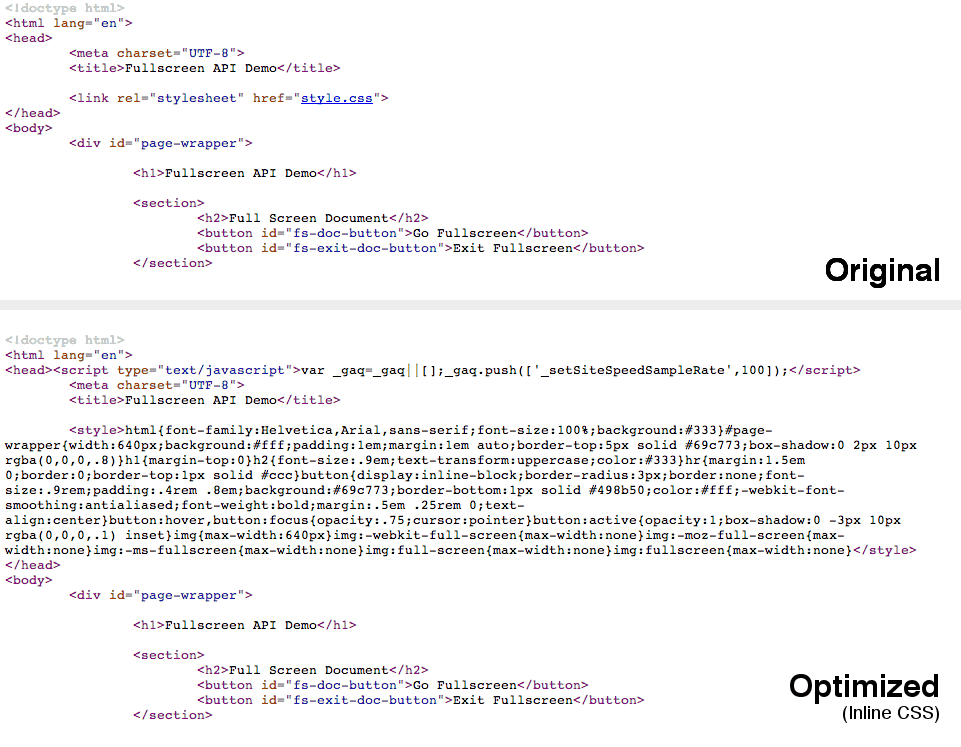
Inline CSS with mod_pagespeed
Try visiting one of the websites on your server and take a look at the source code in the browser. You’ll see that mod_pagespeed has changed things around a bit. You may now have CSS and JavaScript assets (maybe even some small images) inline within your HTML. This reduces the number of HTTP requests that are needed to load the page, resulting in faster load times.
Configuring mod_pagespeed
The mod_pagespeed module comes with some of the most commonly used filters enabled by default. In this section you’re going to learn how to enable some of the other optimization filters that are provided.
The master configuration file for mod_pagespeed can be found at /etc/apache2/mods-available/pagespeed.conf. This defines the global configuration for mod_pagespeed and therefore any changes that you make to this file will affect all of the websites on your server. This is great if you want all of your websites to use the same filters but there may be times when this is not the case.
If you’re using virtual hosts, an ideal place to put your site-specific PageSpeed filters is within the host configuration. Depending on your setup, you may find virtual hosts declared within the files in the /etc/apache2/sites-available folder.
The snippet below shows an example VirtualHost configuration with mod_pagespeed directives.
<VirtualHost *:80>
      DocumentRoot /www/example
      ServerName www.example.come

      # mod_pagespeed configuration
      ModPagespeedEnableFilters lazyload_images
      ModPagespeedDisableFilters inline_css
    </VirtualHost>
You can also use a .htaccess file if you don’t have access to the configuration for you virtual host.
Note: By default, virtual hosts will inherit the options specified in the master pagespeed.conf file. This behaviour is controlled using the ModPagespeedInheritVHostConfig directive. Setting this to off would cause each of the virtual hosts to have a completely independent PageSpeed configuration.
Rewrite Levels
PageSpeed uses two different levels to make configuration simple. The CoreFilters level enables a default set of filters that will make your website faster. You can then enable or disable filters to modify the configuration as you wish.
Alternatively you can disable CoreFilters by setting the RewriteLevel to PassThrough. You will then need to manually enable all of the filters that you wish to use.
ModPagespeedRewriteLevel PassThrough
Unless you have some very specific requirements it’s often best to leave the RewriteLevel as CoreFilters and then modify the enabled filters in the host configuration.
Enabling Filters
To enable a filter you use the ModPagespeedEnableFilters directive.
ModPagespeedEnableFilters <filter_name>,<filter2_name>
You can find a full list of the different filters available here.
Note than some filters rely on additional configuration variables, such as the insert_ga filter which will automatically insert the Google Analytics code into your pages.
ModPagespeedEnableFilters insert_ga
    ModPagespeedAnalyticsID <Analytics ID>
Refer to the documentation for each of the options to find out if you need to set additional variables.
Disabling Filters
To disable a filter you use the ModPagespeedDisableFilters directive.
ModPagespeedDisableFilters <filter_name>,<filter2_name>
Specifying this in your host config will override the options specified in pagespeed.conf.
As well as disabling filters you can also forbid virtual hosts from using specific filters. This is done using the ModPagespeedForbidFilters directive.
ModPagespeedForbidFilters <filter_name>,<filter2_name>
Forbidding access to filters can be useful if you manage a server that hosts many different websites.
Disabling mod_pagespeed for a Website
You can disable the PageSpeed module completely for a specific website by setting ModPagespeed to off in your host configuration.
ModPagespeed off
If you only need to temporarily disable mod_pagespeed for testing purposes, you can just add the ModPagespeed=off query parameter to the URL.
http://example.com/index.html?ModPagespeed=off
Final Thoughts
We all know that optimizing websites for performance is a big part of web development today, but taking care of all the different optimization tasks can often become tedious. The PageSpeed module you’ve learned about here takes care of much of this headache; leaving you to do what you do best – build great websites.
I highly recommend that you take a little time to install this module on your web servers. For a minimal amount of effort you can unlock a wide range of performance gains and supercharge your websites.
Useful Links
The post Automating Web Performance Best Practices with mod_pagespeed appeared first on Treehouse Blog.
]]>
Web performance is a brilliant, but sometimes complex world. Concatenating and minifying files, optimizing images, setting up caching, these are all tasks that can lead to great performance wins....
http://blog.teamtreehouse.com/automating-web-performance-best-practices-mod_pagespeed?utm_source=rss&utm_medium=rss&utm_campaign=automating-web-performance-best-practices-mod_pagespeed
https://my3.my.umbc.edu/api/v0/pixel/news/39969/guest@my.umbc.edu/c640a935d63b8021d1ee05550a6fd055/api/pixel
android
code
css
design
development
html
ios
javascript
responsive
web
web-apps
Web Developer - Build Group
https://my3.my.umbc.edu/groups/retired-583
https://assets3-my.umbc.edu/system/shared/avatars/groups/000/000/583/fc60f5d7abc2e080599bb6dc465db54d/xsmall.png?1363101197
https://assets4-my.umbc.edu/system/shared/avatars/groups/000/000/583/fc60f5d7abc2e080599bb6dc465db54d/original.jpg?1363101197
https://assets4-my.umbc.edu/system/shared/avatars/groups/000/000/583/fc60f5d7abc2e080599bb6dc465db54d/xxlarge.png?1363101197
https://assets4-my.umbc.edu/system/shared/avatars/groups/000/000/583/fc60f5d7abc2e080599bb6dc465db54d/xlarge.png?1363101197
https://assets3-my.umbc.edu/system/shared/avatars/groups/000/000/583/fc60f5d7abc2e080599bb6dc465db54d/large.png?1363101197
https://assets3-my.umbc.edu/system/shared/avatars/groups/000/000/583/fc60f5d7abc2e080599bb6dc465db54d/medium.png?1363101197
https://assets4-my.umbc.edu/system/shared/avatars/groups/000/000/583/fc60f5d7abc2e080599bb6dc465db54d/small.png?1363101197
https://assets3-my.umbc.edu/system/shared/avatars/groups/000/000/583/fc60f5d7abc2e080599bb6dc465db54d/xsmall.png?1363101197
https://assets4-my.umbc.edu/system/shared/avatars/groups/000/000/583/fc60f5d7abc2e080599bb6dc465db54d/xxsmall.png?1363101197
Web Developer - Build Group
0
0
true
Mon, 06 Jan 2014 14:54:13 -0500
Automating Web Performance Best Practices with mod_pagespeed
Web performance is a brilliant, but sometimes complex world. Concatenating and minifying files, optimizing images, setting up caching, these are all tasks that can lead to great performance wins. We know that this stuff is good for performance but actually putting these strategies into practice can sometimes be tedious. A team at Google recognized this problem and came up with the idea of creating a web server module that would take of a whole bunch of performance optimizations for you; thus mod_pagespeed was born.
In this post you’re going to learn how to set up mod_pagespeed on an Apache web server. You’ll also be learning how to configure optimization filters that are provided by the module.
Note: This post assumes a familiarity with using the command line, SSH, and basic Apache configurations.
Performance Optimizations Covered by mod_pagespeed
The PageSpeed module (mod_pagespeed) contains a number of filters that are each responsible for taking care of an optimization task. By default, filters are enabled that handle:
- Image Optimization (Compression and Resizing)
- CSS & JavaScript Concatenation, Minification, and Inlining
- Asset Caching
As well as these common optimizations there are filters available for a wide range of other tasks, including:
- Deferred Loading of JavaScript and Images
- Removal of HTML Comments and Whitespace
- Lazy-loading Images (only loaded when they become visible in the viewport)
- Google Analytics Injection
- and more…
Later in this post you’ll learn how to enable these additional filters in the PageSpeed configuration.
Installing mod_pagespeed For Apache
In this post we’re going to focussing on setting up the PageSpeed module for an Apache web server. It’s worth noting that there is also an equivalent module available for nginx.
Note: In order to install the mod_pagespeed module you will need to have SSH access to your web server. If you use a shared hosting service this may not be the case, and therefore I’d advise you to contact your hosting provider and enquire if they have support for mod_pagespeed. You can also check to see if the module is enabled using a phpinfo file.
To install the mod_pagespeed module follow these steps.
1. Open a Connection to Your Server
Start by opening up Terminal and creating a new SSH connection to your server.
ssh user@hostname # e.g. ssh root@127.0.0.1
2. Download the Package
Download the appropriate package for your server environment. You can use the wget program to save this file directly to your server.
wget <package url>
3. Install the Package
Next you need to install the package. Instructions for doing this vary depending on what type of server you are using.
For Debian/Ubuntu servers:
sudo dpkg -i mod-pagespeed-*.deb
    sudo apt-get -f install
For CentOS/Fedora servers:
# only if 'at' is not installed
    sudo yum install at

    # install the package
    sudo rpm -U mod-pagespeed-*.rpm
4. Restart Apache
The mod_pagespeed module should now be installed on your server. All you need to do now is restart Apache.
service apache2 restart
The installation process should have enabled the new module for you. You can check this by looking for the pagespeed.conf and pagespeed.load files in the /etc/apache2/mods-enabled directory. If these two files are present the module will be loaded by Apache and you’re good to go!
If you can’t find thesefiles in themods-enabled` folder, execute the following commands to enable the module and restart the web server.
cd /etc/apache2/mods-enabled
    ln -s ../mods-available/pagespeed.* ./

    # Restart Apache
    service apache2 restart
Simply by installing mod_pagespeed you’ve bagged yourself a bunch of great performance wins. By default, mod_pagespeed will be enabled for all of the websites on your server.
Inline CSS with mod_pagespeed
Try visiting one of the websites on your server and take a look at the source code in the browser. You’ll see that mod_pagespeed has changed things around a bit. You may now have CSS and JavaScript assets (maybe even some small images) inline within your HTML. This reduces the number of HTTP requests that are needed to load the page, resulting in faster load times.
Configuring mod_pagespeed
The mod_pagespeed module comes with some of the most commonly used filters enabled by default. In this section you’re going to learn how to enable some of the other optimization filters that are provided.
The master configuration file for mod_pagespeed can be found at /etc/apache2/mods-available/pagespeed.conf. This defines the global configuration for mod_pagespeed and therefore any changes that you make to this file will affect all of the websites on your server. This is great if you want all of your websites to use the same filters but there may be times when this is not the case.
If you’re using virtual hosts, an ideal place to put your site-specific PageSpeed filters is within the host configuration. Depending on your setup, you may find virtual hosts declared within the files in the /etc/apache2/sites-available folder.
The snippet below shows an example VirtualHost configuration with mod_pagespeed directives.
<VirtualHost *:80>
      DocumentRoot /www/example
      ServerName www.example.come

      # mod_pagespeed configuration
      ModPagespeedEnableFilters lazyload_images
      ModPagespeedDisableFilters inline_css
    </VirtualHost>
You can also use a .htaccess file if you don’t have access to the configuration for you virtual host.
Note: By default, virtual hosts will inherit the options specified in the master pagespeed.conf file. This behaviour is controlled using the ModPagespeedInheritVHostConfig directive. Setting this to off would cause each of the virtual hosts to have a completely independent PageSpeed configuration.
Rewrite Levels
PageSpeed uses two different levels to make configuration simple. The CoreFilters level enables a default set of filters that will make your website faster. You can then enable or disable filters to modify the configuration as you wish.
Alternatively you can disable CoreFilters by setting the RewriteLevel to PassThrough. You will then need to manually enable all of the filters that you wish to use.
ModPagespeedRewriteLevel PassThrough
Unless you have some very specific requirements it’s often best to leave the RewriteLevel as CoreFilters and then modify the enabled filters in the host configuration.
Enabling Filters
To enable a filter you use the ModPagespeedEnableFilters directive.
ModPagespeedEnableFilters <filter_name>,<filter2_name>
You can find a full list of the different filters available here.
Note than some filters rely on additional configuration variables, such as the insert_ga filter which will automatically insert the Google Analytics code into your pages.
ModPagespeedEnableFilters insert_ga
    ModPagespeedAnalyticsID <Analytics ID>
Refer to the documentation for each of the options to find out if you need to set additional variables.
Disabling Filters
To disable a filter you use the ModPagespeedDisableFilters directive.
ModPagespeedDisableFilters <filter_name>,<filter2_name>
Specifying this in your host config will override the options specified in pagespeed.conf.
As well as disabling filters you can also forbid virtual hosts from using specific filters. This is done using the ModPagespeedForbidFilters directive.
ModPagespeedForbidFilters <filter_name>,<filter2_name>
Forbidding access to filters can be useful if you manage a server that hosts many different websites.
Disabling mod_pagespeed for a Website
You can disable the PageSpeed module completely for a specific website by setting ModPagespeed to off in your host configuration.
ModPagespeed off
If you only need to temporarily disable mod_pagespeed for testing purposes, you can just add the ModPagespeed=off query parameter to the URL.
http://example.com/index.html?ModPagespeed=off
Final Thoughts
We all know that optimizing websites for performance is a big part of web development today, but taking care of all the different optimization tasks can often become tedious. The PageSpeed module you’ve learned about here takes care of much of this headache; leaving you to do what you do best – build great websites.
I highly recommend that you take a little time to install this module on your web servers. For a minimal amount of effort you can unlock a wide range of performance gains and supercharge your websites.
Useful Links
The post Automating Web Performance Best Practices with mod_pagespeed appeared first on Treehouse Blog.
]]>
Web performance is a brilliant, but sometimes complex world. Concatenating and minifying files, optimizing images, setting up caching, these are all tasks that can lead to great performance wins....
http://feedproxy.google.com/~r/teamtreehouse/~3/0lh2qtt1LpE/automating-web-performance-best-practices-mod_pagespeed
https://my3.my.umbc.edu/api/v0/pixel/news/40317/guest@my.umbc.edu/10dff16b2d611301fb21cd3c879210ab/api/pixel
android
code
css
design
development
html
ios
javascript
responsive
web
web-apps
Web Developer - Build Group
https://my3.my.umbc.edu/groups/retired-583
https://assets3-my.umbc.edu/system/shared/avatars/groups/000/000/583/fc60f5d7abc2e080599bb6dc465db54d/xsmall.png?1363101197
https://assets4-my.umbc.edu/system/shared/avatars/groups/000/000/583/fc60f5d7abc2e080599bb6dc465db54d/original.jpg?1363101197
https://assets4-my.umbc.edu/system/shared/avatars/groups/000/000/583/fc60f5d7abc2e080599bb6dc465db54d/xxlarge.png?1363101197
https://assets4-my.umbc.edu/system/shared/avatars/groups/000/000/583/fc60f5d7abc2e080599bb6dc465db54d/xlarge.png?1363101197
https://assets3-my.umbc.edu/system/shared/avatars/groups/000/000/583/fc60f5d7abc2e080599bb6dc465db54d/large.png?1363101197
https://assets3-my.umbc.edu/system/shared/avatars/groups/000/000/583/fc60f5d7abc2e080599bb6dc465db54d/medium.png?1363101197
https://assets4-my.umbc.edu/system/shared/avatars/groups/000/000/583/fc60f5d7abc2e080599bb6dc465db54d/small.png?1363101197
https://assets3-my.umbc.edu/system/shared/avatars/groups/000/000/583/fc60f5d7abc2e080599bb6dc465db54d/xsmall.png?1363101197
https://assets4-my.umbc.edu/system/shared/avatars/groups/000/000/583/fc60f5d7abc2e080599bb6dc465db54d/xxsmall.png?1363101197
Web Developer - Build Group
0
0
true
Mon, 06 Jan 2014 14:54:13 -0500


 Web performance is a brilliant, but sometimes complex world. Concatenating and minifying files, optimizing images, setting up caching, these are all tasks that can lead to great performance wins. We know that this stuff is good for performance but actually putting these strategies into practice can sometimes be tedious. A team at Google recognized this problem and came up with the idea of creating a web server module that would take of a whole bunch of performance optimizations for you; thus mod_pagespeed was born.