Building Multi-Touch Web Applications
With mobile web browsing now accounting for 15% of all global internet traffic building web applications targeted at mobile has become more important than ever. Building for mobile is very different to creating web applications targeted at the desktop environment. The way in which we interact with mobile devices is inherently different and therefore requires a different approach when it comes to designing our applications.
In this blog post we are going to be focussing on the how we interact with multi-touch displays. You are going to be learning about the APIs that are available for building multi-touch web applications. After a quick bit of initial theory you’ll build a fully-functional multi-touch drawing app that works great on your phone or tablet.
Lets get started!
A Primer on Touch Events
Before we dive into the demo, lets quickly take a look at the events and objects that you will be using to create multi-touch web applications.
Types of Touch Events
There a six types of touch events:
-
touchstart – Triggered when a pointer first touches the screen.
-
touchmove – Triggered when a pointer is moved on the screen.
-
touchend – Triggered when a pointer leaves the screen.
-
touchcancel – Triggered when a pointer is disrupted. This could be for a number of reasons:
- Another event occurred that disrupted the touch.
- The pointer left the window and entered another area, such as the browser’s UI.
- There are more pointers on the screen than the browser supports. If this happens the first touch that is being tracked will be cancelled.
-
touchenter – Triggered when the pointer enters the target element.
-
touchleave – Triggered when the pointer leaves the target element.
Note: Both touch and mouse events are triggered to make sure that non-touch-specific code still runs correctly on mobile devices. If you don’t want the mouse events to be triggered make sure that you use event.preventDefault() in your event handlers.
Each TouchEvent has a number of properties. For the purpose of this post we’re just interested in one, changedTouches. This property contains a list of all the Touch objects that changed with the event.
There is also a property named touches which contains a full list of all the active touch points.
Touch Objects
Each Touch object includes a number of properties that provide information about the position of the pointer on the screen. For this blog post you are just going to focus on three properties: identifier, pageX, and pageY.
-
identifier – A unique ID for the touch object. This allows you to track an individual pointer throughout an interaction with the device.
-
pageX – The position of the touch point relative to the left of the screen. This property includes any scroll offset.
-
pageY – The position of the touch point relative to the top of the screen, including any scroll offset.
Note: Take a look at the documentation for a full list of properties that are available on Touch objects.
Browser Support
Chrome, Firefox and Opera all include support for touch events on the desktop. Chrome even includes a method of emulating touch events using non-touch devices (i.e. a mouse). This comes in handy when testing your applications. You’ll learn how to enable that feature later in this post.
| IE |
Firefox |
Chrome |
Safari |
Opera |
| - |
18.0+ |
22.0+ |
- |
15+ |
As you might expect, support for touch events across mobile browsers is very good. All the major mobile browsers support touch events. The outlier is in IE which supports Pointer Events instead.
| iOS Safari |
Android Browser |
Blackberry Browser |
Opera Mobile |
Chrome for Android |
Firefox for Android |
IE Mobile |
| 3.2+ |
2.1+ |
7.0+ |
11.0+ |
31.0 |
25.0 |
- |
Source: http://caniuse.com/touch
Building a Multi-Touch Drawing App

For the remainder of this post you’re going to build a multi-touch drawing app using touch events and the Canvas API. The primer on touch events has already covered all of the things that you need to know to handle interactions. Don’t worry if you haven’t worked with the Canvas API before, I’ll walk you through all the code as we go.
See the Demo Download The Code View on CodePen
Note: If you want to learn more about the 2D Canvas API check out my previous article on the subject.
Setting up the HTML and CSS
The first job is to set up the HTML and CSS for your application. Create a new file called index.html and copy in the following code.
<!doctype html>
    <html lang="en">
    <head>
        <meta charset="UTF-8">
        <title>Touch Event Demo</title>

        <meta name="viewport" content="width=device-width, initial-scale=1.0, user-scalable=no">

        <style>
        body, html {
            margin: 0;
        }
        </style>
    </head>
    <body>
        <canvas id="myCanvas" width="500" height="500"></canvas>
        <script src="app.js"></script>
    </body>
    </html>
Here you’ve set up a simple page that contains a <canvas> element. You don’t need much CSS for this demo so you’ve placed this with the <head>.
A key element in this markup is the meta viewport tag.
<meta name="viewport" content="width=device-width, initial-scale=1.0, user-scalable=no">
This tag will disable pinch-zoom on mobile devices; that feature can often get in the way when creating multi-touch applications.
Emulating Touch Events with Chrome Dev Tools
Before we go any further lets quickly take a look at how you can emulate touch events in Google Chrome. This will come in handy when testing your applications.
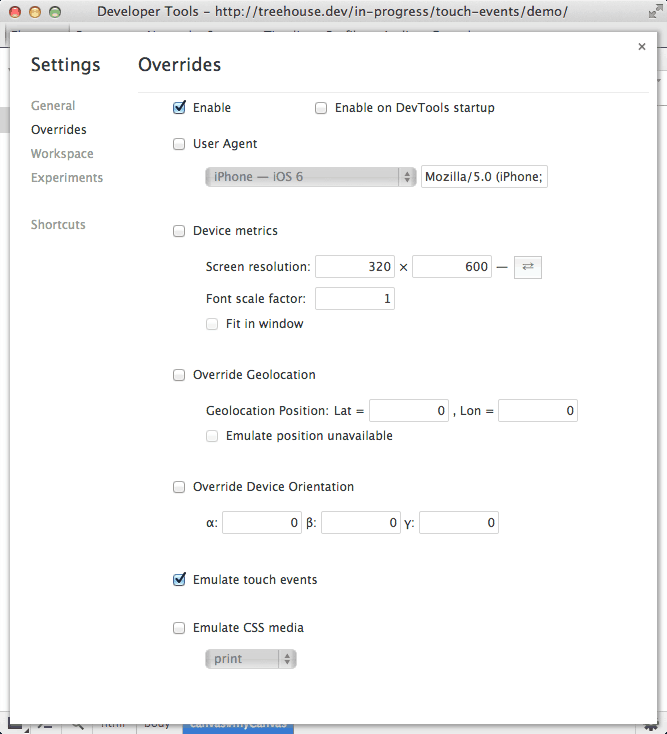
Emulating touch events using Chrome dev tools.
- Launch the Chrome Developer Tools.
- Mac:
Command + Option + I
- Windows:
Ctrl + Shift + I
- Now open the settings page (cog in bottom right corner).
- Click on the Overrides tab on the left-hand side.
- Tick Enable.
- Tick Emulate touch events.
Enabling this feature will cause Chrome to fire touch events as you interact with the app using your mouse. As you build the demo application you will want to have this feature enabled.
Getting Started on the JavaScript
In this section you are going to make a start on the JavaScript that will power your multi-touch application.
Create a new file called app.js and save it in the same folder as your index.html file.
Copy the following code into your app.js file.
(function(){

        // Get the canvas.
        var canvas = document.getElementById('myCanvas');

        // Set the canvas to fill the screen.
        canvas.width = window.outerWidth;
        canvas.height = window.outerHeight;

        // Get a 2d drawing context.
        var ctx = canvas.getContext('2d');

        // Used to keep track of active touches.
        var currentTouches = new Array;

        // The rest of the code goes here...

    }());
This code mainly handles setting up the canvas. You have created a canvas variable and initialized it by fetching the <canvas> element in your HTML markup.
You then set the width and height properties of the canvas so that it fills the entire window.
Next you create a 2D drawing context by calling the getContext('2d') method on your canvas. This is then stored in the ctx variable. If you’re not familiar with the Canvas API think of the drawing context like you would a pen or pencil when drawing on paper. It provides a number of methods that can be used for drawing objects on your canvas.
Finally, you create an array called currentTouches. This will be used to keep track of the touch points that are currently active on the screen.
Now add the following code to your app.js file. This should replace the last comment in your current code.
// Returns a random color from an array.
    var randomColor = function () {
        var colors = ['#3F3F3F', '#929292', '#00A3EE', '#F5D908', '#D80351'];
        return colors[Math.floor(Math.random() * colors.length)];
    };

    // Finds the array index of a touch in the currentTouches array.
    var findCurrentTouchIndex = function (id) {
        for (var i=0; i < currentTouches.length; i++) {
            if (currentTouches[i].id === id) {
                return i;
            }
        }

        // Touch not found! Return -1.
        return -1;
    };
In this code snippet you have created two helper functions, randomColor and findCurrentTouchIndex. You will be using these later on.
The randomColor function will return a color from the colors array. Every new touch on the screen will be assigned a color using this function.
The findCurrentTouchIndex function will loop through the currentTouches array until it finds an object with the desired id. The position of that object in the array is then returned. We can’t modify a Touch object itself so in order to store the color that is associated with a pointer we have to save this information in a separate array.
Handling New Touches
In this section you’re going to be writing the code that will handle new touch events. Lets start by defining the touchStart function.
Add the following code to your app.js file.
// Creates a new touch in the currentTouches array and draws the starting
    // point on the canvas.
    var touchStarted = function (event) {
        var touches = event.changedTouches;

        for (var i=0; i < touches.length; i++) {
            var touch = touches[i];
            var touchColor = randomColor();

            currentTouches.push({
                id: touch.identifier,
                pageX: touch.pageX,
                pageY: touch.pageY,
                color: touchColor
            });

            ctx.beginPath();
            ctx.arc(touch.pageX, touch.pageY, 2.5, Math.PI*2, false);
            ctx.fillStyle = touchColor;
            ctx.fill();
        }
    };
Here you have started by accessing the changedTouches array that is present on the TouchEvent object. You then loop through this array to access each of the individual Touch objects.
For each touch you first generate a random color using the randomColor function you created earlier. You then push a new object into the currentTouches array. This object contains four properties: id, pageX, pageY, and color. The first three of these are set using the corresponding properties from the Touch object.
The code will then draw the initial touch point on the canvas. The call to beginPathcreates a new path to draw from.
Note: Objects on the canvas are mainly drawn using lines (with a few exceptions), just as you would if you were drawing with a pen and paper.
The call to the arc method draws the outline of a circle. Don’t worry too much about the syntax here. It looks a bit funky because this method is used to draw more than just circles.
You then set the fillStyle property of the drawing context using the color that you generated for this touch. The call to fill will color in the circle and close the path.
Now all that’s left is to add the event listener that will call the touchStarted function when the touchstart event is fired.
Add the following to your app.js file.
// Set up an event listener for new touches.
    canvas.addEventListener('touchstart', function(e) {
        e.preventDefault();
        touchStarted(event);
    });
Drawing on The Move
Your next task is to write the code that will draw a line as the user drags their finger (or other touch pointer) across the screen.
Copy this code into your app.js file.
// Draws a line on the canvas between the previous touch location and
    // the new location.
    var touchMoved = function (event) {
        var touches = event.changedTouches;

        for (var i=0; i < touches.length; i++) {
            var touch = touches[i];
            var currentTouchIndex = findCurrentTouchIndex(touch.identifier);

            if (currentTouchIndex >= 0) {
                var currentTouch = currentTouches[currentTouchIndex];

                ctx.beginPath();
                ctx.moveTo(currentTouch.pageX, currentTouch.pageY);
                ctx.lineTo(touch.pageX, touch.pageY);
                ctx.lineWidth = 4;
                ctx.strokeStyle = currentTouch.color;
                ctx.stroke();

                // Update the touch record.
                currentTouch.pageX = touch.pageX;
                currentTouch.pageY = touch.pageY;

                // Store the record.
                currentTouches.splice(currentTouchIndex, 1, currentTouch);
            } else {
                console.log('Touch was not found!');
            }

        }
    };
The touchMoved function again starts by fetching the changedTouches array and then looping through each of the Touch objects.
For each Touch object we start by using the findCurrentTouchIndex function to find the position of the corresponding object in the currentTouches array. If the object exists, a value larger or equal to zero will be returned. You can then retrieve the stored object from the currentTouches array using this index. This object contains the color that will be used for the line as well as the pageX and pageY coordinates that represent the position of the previous touch point.
You then call beginPath to create a new path to draw from. The call to moveTo sets the start position for this path to the location of the previous touch point (i.e. the current end of the line on the canvas). Using the lineTo method you draw a path from the start point to the new touch position.
For this path to become visible you set the lineWidth and strokeStyle properties of the drawing context and then call the stroke method to color the path.
Now you’re done drawing on the canvas, you update the pageX and pageY properties of the currentTouch object and store this back in the currentTouches array. This is so that you know where to draw the next part of the line from when the pointer moves.
To finish up you just need to add an event listener that will call the touchMoved function when the touchmove event is fired.
// Set up an event listener for when the touch instrument is moved.
    canvas.addEventListener('touchmove', function(e) {
        e.preventDefault();
        touchMoved(e);
    });
Letting Go
When the user removes the pointer from the screen you need to draw the final touch position and then remove the corresponding object from the currentTouches array.
Start by adding the following code to your app.js file.
// Draws a line to the final touch position on the canvas and then
    // removes the touh from the currentTouches array.
    var touchEnded = function (event) {
        var touches = event.changedTouches;

        for (var i=0; i < touches.length; i++) {
            var touch = touches[i];
            var currentTouchIndex = findCurrentTouchIndex(touch.identifier);

            if (currentTouchIndex >= 0) {
                var currentTouch = currentTouches[currentTouchIndex];

                ctx.beginPath();
                ctx.moveTo(currentTouch.pageX, currentTouch.pageY);
                ctx.lineTo(touch.pageX, touch.pageY);
                ctx.lineWidth = 4;
                ctx.strokeStyle = currentTouch.color;
                ctx.stroke();

                // Remove the record.
                currentTouches.splice(currentTouchIndex, 1);
            } else {
                console.log('Touch was not found!');
            }

        }
    };
The code here is much the same as in touchMoved. However instead of updating and storing the currentTouch object you remove it from the currentTouches array.
The touchEnded function should be called if either the touchend or touchleave event is fired.
Add the following event listeners to your app.js file.
// Set up an event listener for when a touch ends.
    canvas.addEventListener('touchend', function(e) {
        e.preventDefault();
        touchEnded(e);
    });

    // Set up an event listener for when a touch leaves the canvas.
    canvas.addEventListener('touchleave', function(e) {
        e.preventDefault();
        touchEnded(e);
    });
Handling Cancelled Touches
The last event you need to deal with is cancelled touches. A touch can be cancelled for a number of reasons. This usually happens if something else takes control of the touch (like the browser UI), or if there are too many touch points on the screen (in which case the first touch point gets cancelled).
If a touch gets cancelled you want to immediately remove the corresponding object from the currentTouches array. There’s no need to draw anything on the canvas.
Copy the following JavaScript code into your app.js file.
// Removes cancelled touches from the currentTouches array.
    var touchCancelled = function (event) {
        var touches = event.changedTouches;

        for (var i=0; i < touches.length; i++) {
            var currentTouchIndex = findCurrentTouchIndex(touches[i].identifier);

            if (currentTouchIndex >= 0) {
                // Remove the touch record.
                currentTouches.splice(currentTouchIndex, 1);
            } else {
                console.log('Touch was not found!');
            }
        }
    };
This touchCancelled function will loop through each of the changedTouches and remove the corresponding objects from the currentTouches array.
Now you just need to add an event listener that calls touchCancelled when the touchcancel event is fired.
// Set up an event listener to catch cancelled touches.
    canvas.addEventListener('touchcancel', function(e) {
        touchCancelled(e);
    });
Finishing Up
That completes your multi-touch drawing application. Fire it up on a mobile device and give it a go!
See the Demo Download The Code View on CodePen
For extra credit you could try adding UI elements that allow you to manipulate the width of the lines, or the colors that are available.
Summary
In this blog post you’ve learned about touch events, and have created your very own multi-touch drawing application.
Mobile web usage is growing at a staggering pace. Taking full advantage of this platform shift goes way beyond just responsive design. By using these platform-specific APIs we can make sure that our web applications are delivering a great user experience across multiple devices.
Useful Links
The post Building Multi-Touch Web Applications appeared first on Treehouse Blog.
]]>
With mobile web browsing now accounting for 15% of all global internet traffic building web applications targeted at mobile has become more important than ever. Building for mobile is very...
http://feedproxy.google.com/~r/teamtreehouse/~3/td1phUft33g/building-multi-touch-web-applications
https://my3.my.umbc.edu/api/v0/pixel/news/39723/guest@my.umbc.edu/b6a8e464c9121d2a53be00d1835466e9/api/pixel
android
code
css
design
development
html
html5
ios
javascript
learn-to-code
mobile
multi-touch
responsive
touch
web
web-apps
Web Developer - Build Group
https://my3.my.umbc.edu/groups/retired-583
https://assets3-my.umbc.edu/system/shared/avatars/groups/000/000/583/fc60f5d7abc2e080599bb6dc465db54d/xsmall.png?1363101197
https://assets4-my.umbc.edu/system/shared/avatars/groups/000/000/583/fc60f5d7abc2e080599bb6dc465db54d/original.jpg?1363101197
https://assets4-my.umbc.edu/system/shared/avatars/groups/000/000/583/fc60f5d7abc2e080599bb6dc465db54d/xxlarge.png?1363101197
https://assets4-my.umbc.edu/system/shared/avatars/groups/000/000/583/fc60f5d7abc2e080599bb6dc465db54d/xlarge.png?1363101197
https://assets3-my.umbc.edu/system/shared/avatars/groups/000/000/583/fc60f5d7abc2e080599bb6dc465db54d/large.png?1363101197
https://assets3-my.umbc.edu/system/shared/avatars/groups/000/000/583/fc60f5d7abc2e080599bb6dc465db54d/medium.png?1363101197
https://assets4-my.umbc.edu/system/shared/avatars/groups/000/000/583/fc60f5d7abc2e080599bb6dc465db54d/small.png?1363101197
https://assets3-my.umbc.edu/system/shared/avatars/groups/000/000/583/fc60f5d7abc2e080599bb6dc465db54d/xsmall.png?1363101197
https://assets4-my.umbc.edu/system/shared/avatars/groups/000/000/583/fc60f5d7abc2e080599bb6dc465db54d/xxsmall.png?1363101197
Web Developer - Build Group
0
0
true
Mon, 23 Dec 2013 13:02:20 -0500
Empty Shelves Signal Revival in Game Consoles
Those sales bolster the view that the console business is turning into a two-horse race, with Nintendo a distant third.


 ]]>
Those sales bolster the view that the console business is turning into a two-horse race, with Nintendo a distant third.
http://www.nytimes.com/2013/12/24/technology/strong-sales-make-xbox-one-and-playstation-4-hard-to-find.html?partner=rss&emc=rss
https://my3.my.umbc.edu/api/v0/pixel/news/39722/guest@my.umbc.edu/46be971ec755e3ab4f8b063c7adc5e7d/api/pixel
best-buy-company-inc-bby-nyse
computer-and-video-games
microsoft-corporation-msft-nasdaq
new
nintendo-co-ltd
shopping-and-retail
sony-corporation-sne-nyse
technology
twitter-twtr-nyse
verizon-communications-inc-vz-nyse
york
Web Developer - Build Group
https://my3.my.umbc.edu/groups/retired-583
https://assets3-my.umbc.edu/system/shared/avatars/groups/000/000/583/fc60f5d7abc2e080599bb6dc465db54d/xsmall.png?1363101197
https://assets4-my.umbc.edu/system/shared/avatars/groups/000/000/583/fc60f5d7abc2e080599bb6dc465db54d/original.jpg?1363101197
https://assets4-my.umbc.edu/system/shared/avatars/groups/000/000/583/fc60f5d7abc2e080599bb6dc465db54d/xxlarge.png?1363101197
https://assets4-my.umbc.edu/system/shared/avatars/groups/000/000/583/fc60f5d7abc2e080599bb6dc465db54d/xlarge.png?1363101197
https://assets3-my.umbc.edu/system/shared/avatars/groups/000/000/583/fc60f5d7abc2e080599bb6dc465db54d/large.png?1363101197
https://assets3-my.umbc.edu/system/shared/avatars/groups/000/000/583/fc60f5d7abc2e080599bb6dc465db54d/medium.png?1363101197
https://assets4-my.umbc.edu/system/shared/avatars/groups/000/000/583/fc60f5d7abc2e080599bb6dc465db54d/small.png?1363101197
https://assets3-my.umbc.edu/system/shared/avatars/groups/000/000/583/fc60f5d7abc2e080599bb6dc465db54d/xsmall.png?1363101197
https://assets4-my.umbc.edu/system/shared/avatars/groups/000/000/583/fc60f5d7abc2e080599bb6dc465db54d/xxsmall.png?1363101197
Web Developer - Build Group
0
0
true
Mon, 23 Dec 2013 12:46:28 -0500
Mon, 23 Dec 2013 12:46:28 -0500
The Appraisal: Still Unconvinced, Home Buyer? Check Out the View From the Drone
When terrestrial images simply cannot do multimillion-dollar homes justice, more agents are capturing aerial views and luring buyers with drones.
]]>
Those sales bolster the view that the console business is turning into a two-horse race, with Nintendo a distant third.
http://www.nytimes.com/2013/12/24/technology/strong-sales-make-xbox-one-and-playstation-4-hard-to-find.html?partner=rss&emc=rss
https://my3.my.umbc.edu/api/v0/pixel/news/39722/guest@my.umbc.edu/46be971ec755e3ab4f8b063c7adc5e7d/api/pixel
best-buy-company-inc-bby-nyse
computer-and-video-games
microsoft-corporation-msft-nasdaq
new
nintendo-co-ltd
shopping-and-retail
sony-corporation-sne-nyse
technology
twitter-twtr-nyse
verizon-communications-inc-vz-nyse
york
Web Developer - Build Group
https://my3.my.umbc.edu/groups/retired-583
https://assets3-my.umbc.edu/system/shared/avatars/groups/000/000/583/fc60f5d7abc2e080599bb6dc465db54d/xsmall.png?1363101197
https://assets4-my.umbc.edu/system/shared/avatars/groups/000/000/583/fc60f5d7abc2e080599bb6dc465db54d/original.jpg?1363101197
https://assets4-my.umbc.edu/system/shared/avatars/groups/000/000/583/fc60f5d7abc2e080599bb6dc465db54d/xxlarge.png?1363101197
https://assets4-my.umbc.edu/system/shared/avatars/groups/000/000/583/fc60f5d7abc2e080599bb6dc465db54d/xlarge.png?1363101197
https://assets3-my.umbc.edu/system/shared/avatars/groups/000/000/583/fc60f5d7abc2e080599bb6dc465db54d/large.png?1363101197
https://assets3-my.umbc.edu/system/shared/avatars/groups/000/000/583/fc60f5d7abc2e080599bb6dc465db54d/medium.png?1363101197
https://assets4-my.umbc.edu/system/shared/avatars/groups/000/000/583/fc60f5d7abc2e080599bb6dc465db54d/small.png?1363101197
https://assets3-my.umbc.edu/system/shared/avatars/groups/000/000/583/fc60f5d7abc2e080599bb6dc465db54d/xsmall.png?1363101197
https://assets4-my.umbc.edu/system/shared/avatars/groups/000/000/583/fc60f5d7abc2e080599bb6dc465db54d/xxsmall.png?1363101197
Web Developer - Build Group
0
0
true
Mon, 23 Dec 2013 12:46:28 -0500
Mon, 23 Dec 2013 12:46:28 -0500
The Appraisal: Still Unconvinced, Home Buyer? Check Out the View From the Drone
When terrestrial images simply cannot do multimillion-dollar homes justice, more agents are capturing aerial views and luring buyers with drones.
]]>
When terrestrial images simply cannot do multimillion-dollar homes justice, more agents are capturing aerial views and luring buyers with drones.
http://www.nytimes.com/2013/12/24/nyregion/still-unconvinced-home-buyer-check-out-the-view-from-the-drone.html?partner=rss&emc=rss
https://my3.my.umbc.edu/api/v0/pixel/news/39728/guest@my.umbc.edu/0362e61ca6b856314c86c3b8cbe1e884/api/pixel
alchemy-properties-inc
amazon-com-inc-amzn-nasdaq
brown-harris-stevens
drones-pilotless-planes
federal-aviation-administration
greenwich-conn
halstead-property-company
new
photography
real-estate-and-housing-residential
real-estate-brokers
technology
york
Web Developer - Build Group
https://my3.my.umbc.edu/groups/retired-583
https://assets3-my.umbc.edu/system/shared/avatars/groups/000/000/583/fc60f5d7abc2e080599bb6dc465db54d/xsmall.png?1363101197
https://assets4-my.umbc.edu/system/shared/avatars/groups/000/000/583/fc60f5d7abc2e080599bb6dc465db54d/original.jpg?1363101197
https://assets4-my.umbc.edu/system/shared/avatars/groups/000/000/583/fc60f5d7abc2e080599bb6dc465db54d/xxlarge.png?1363101197
https://assets4-my.umbc.edu/system/shared/avatars/groups/000/000/583/fc60f5d7abc2e080599bb6dc465db54d/xlarge.png?1363101197
https://assets3-my.umbc.edu/system/shared/avatars/groups/000/000/583/fc60f5d7abc2e080599bb6dc465db54d/large.png?1363101197
https://assets3-my.umbc.edu/system/shared/avatars/groups/000/000/583/fc60f5d7abc2e080599bb6dc465db54d/medium.png?1363101197
https://assets4-my.umbc.edu/system/shared/avatars/groups/000/000/583/fc60f5d7abc2e080599bb6dc465db54d/small.png?1363101197
https://assets3-my.umbc.edu/system/shared/avatars/groups/000/000/583/fc60f5d7abc2e080599bb6dc465db54d/xsmall.png?1363101197
https://assets4-my.umbc.edu/system/shared/avatars/groups/000/000/583/fc60f5d7abc2e080599bb6dc465db54d/xxsmall.png?1363101197
Web Developer - Build Group
0
0
true
Mon, 23 Dec 2013 12:41:10 -0500
BDD With Behat

The BDD PHP framework Behat, allows you to test your PHP applications using human-readable sentences to write features and scenarios about how your applications should behave in order to test out its functionality. We can then run these tests to see if our application is behaving as expected. Let’s spend about 15 minutes quickly going over Behat’s installation process and learn how we can test our PHP applications behavior using the basics.
Installation
To begin testing with Behat, we just need to install it on our local development machine. I’ll be using Composer, but you can take a look at a the documentation for additional installation methods.
Within your PHP application (I have a blank PHP app named phpbehat created in advance) create a composer.json file with the following code to load in Behat:
{
    	"require": {
    		"behat/behat": "2.4.*@stable"
    	},
    	"minimum-stability": "dev",
    	"config": {
    		"bin-dir": "bin/"
    	}
    }
In your terminal we can install it using the following command:
composer update
We should now be able to run the bin/behat command to work with Behat.
Creating Features
We always begin by creating a new feature. A feature is something that we can use to describe a feature of our application and then implement it to get the test to pass.
A feature, at its simplest, consists of:
- Human-readable, plain text.
- Uses a
.feature extension.
- Contains the feature’s benefit, role, and the feature itself.
- May hold a list of scenarios.
Now I can’t show you how to test all possible features for an application, as that would take far too long. But what I can do is show you how to go about writing a basic feature and you can adapt this code to make it work for your specific application.
Testing the Phpadder Class
To avoid complicating the learning process, let’s create a very simple Phpadder.php file which contains a couple methods that we can use to add two numbers together and display their sum.
class Phpadder {

    	private $a;
    	private $b;
    	public $sum;

    	public function __construct($a, $b) {
    		$this->a = $a;
    		$this->b = $b;
    	}

    	public function add() {
    		$this->sum = $this->a + $this->b;
    	}

    	public function display() {
    		return $this->sum;
    	}
    }
This creates a new class named Phpadder. We have a few properties to hold the first ($a) and second ($b) numbers to be added, as well as a $sum property to hold the values’s sum.
Next, we have our constructor which initializes our properties. Then we have an add method to add the two numbers together and finally a display method to display the sum of the two numbers.
Adder Feature
Let’s now test this Phpadder class. Create a new .feature file along with the following code:
# features/phpadder.feature
    Feature: adder
    	In order to display the sum of two numbers
    	As anybody
    	I need to provide two numbers
We start out by giving our feature a name of adder. Then we specify, on three lines, the feature’s benefit, role, and finally the feature itself. It should be fairly self explanatory.
Now that we have our feature, let’s start writing our scenarios.
Creating Scenarios
Anytime we create a feature we can define scenarios that describe how that feature behaves given certain conditions. Scenario’s follow the same basic layout consisting of the scenario’s description, a context, an event, and an outcome.
Let’s create a scenario to test out our Phpadder application:
Scenario: Display the sum of two provided numbers
    	Given I have the number 50 and the number 25
    	When I add them together
    	Then I should get 75
We begin with our scenario description, we then list out that we start with the two numbers of 50 and 25 and when they are added together it should display the sum of 75.
You can also have multiple contexts, events, and outcomes as well using the following keywords: And and But. Here’s a modified example of the previous scenario where we’ll use And:
Scenario: Display the sum of two provided numbers
    	Given I have the number 50 and the number 25
    	And I have a third number of 25
    	When I add them together
    	Then I should get 100
Creating Step Definitions
A step is nothing more than a PHP function which is made up of a keyword, a regular expression, and a callback function. Each statement within your scenario will be matched to a step. These steps define what should happen given one of your statements are called within a scenario. You store all of your steps within the features/bootstrap/FeatureContext.php file.
The “Given” Step
In our FeatureContext.php file (you may need to create this), we need to write a step for each of our statements, using its name as the function name. We’ll start with the "Given I have the number" statement:
# features/bootstrap/FeaturesContext.php

    require("Phpadder.php");

    use Behat\Behat\Context\BehatContext,
    	Behat\Behat\Exception\PendingException;

    use Behat\Gherkin\Node\PyStringNode,
    	Behat\Gherkin\Node\TableNode;

    class FeatureContext extends BehatContext {

    	private $Adder;

    	/**
    	 * @Given /^I have the number (\d+) and the number (\d+)$/
    	 */
    	public function iHaveTheNumberAndTheNumber($a, $b) {
    		$this->Adder = new Phpadder($a, $b);
    	}
First, we create a new PHP file, require in our Phpadder.php file (the file that we’re testing), and then we use a few Behat classes with use statements, right after.
Next, we create our FeatureContext class and have it extend the BehatContext class.
Our class has only one property, $Adder, which will hold a Phpadder object.
Finally, we create a method for our first step using the same name as the statement. Our step has a regular expression, found within the method’s comment. This regular expression is used to match the step to a scenario statement. Within this method we simply assign a new Phpadder object to our $this->Adder property so that the rest of our methods have access to the same Phpadder object.
Now, you’ve probably noticed the @Given keyword within your function’s comment, this is actually an annotation so that the different types of steps can be identified. You can use @Given, @When, and @Then.
Now we just need to write the last two steps.
The “When” Step
/**
     * @When /^I add them together$/
     */
    public function iAddThemTogether() {
    	$this->Adder->add();
    }
This step simply uses our $this->Adder object’s add method to add the two numbers together.
The “Then” Step
/**
     * @Then /^I should get (\d+)$/
     */
    public function iShouldGet($sum) {
    	if ($this->Adder->sum != $sum) {
    		throw new Exception("Actual sum: ".$this->Adder->sum);
    	}
    	$this->Adder->display();
    }
This step starts off by checking if the actual sum (retrieved using our $this->Adder object and its sum property) is not equal to the expected sum. If this evaluates to true that means we need to have Behat show a failure. To do so, we’ll just throw a new exception displaying the actual sum so we can compare. Otherwise, we call our display method.
Time to run the tests.
Running the Tests
Now that we have our features, scenarios, and steps laid out, let’s run our tests using the following command:
bin/behat
You should see the following success messages inside of your terminal:

You can ensure that your tests are running correctly, by simply breaking something in your Phpadder.php file so that it doesn’t run quite the same way your test expects it to. For example, if we change the add method to instead use subtraction, like so:
public function add() {
    	$this->sum = $this->a - $this->b;
    }
And then we rerun our tests: bin/behat. You can see in our terminal, we now have a failing test, because it’s no longer adding our numbers but subtracting them:

Conclusion
In conclusion, you can follow a small four step process for testing your PHP apps using Behat:
- Define a Feature
- Define a Scenario
- Define Step Definitions
- Run the tests using
bin/behat
So, with just that small amount of code, we should now have a basic understanding of how to work with Behat to test our PHP applications. For more information about working with Behat please checkout their documentation.
]]>
The BDD PHP framework Behat, allows you to test your PHP applications using human-readable sentences to write features and scenarios about how your applications should behave in order to test out...
http://feedproxy.google.com/~r/nettuts/~3/7YvArN5gNz8/
https://my3.my.umbc.edu/api/v0/pixel/news/39720/guest@my.umbc.edu/d89d9dc61374bbb9643b27c1fbe3a2b0/api/pixel
bdd
behat
css
development
html
javascript
mysql
php
sql
tutorials
wed
Web Developer - Build Group
https://my3.my.umbc.edu/groups/retired-583
https://assets3-my.umbc.edu/system/shared/avatars/groups/000/000/583/fc60f5d7abc2e080599bb6dc465db54d/xsmall.png?1363101197
https://assets4-my.umbc.edu/system/shared/avatars/groups/000/000/583/fc60f5d7abc2e080599bb6dc465db54d/original.jpg?1363101197
https://assets4-my.umbc.edu/system/shared/avatars/groups/000/000/583/fc60f5d7abc2e080599bb6dc465db54d/xxlarge.png?1363101197
https://assets4-my.umbc.edu/system/shared/avatars/groups/000/000/583/fc60f5d7abc2e080599bb6dc465db54d/xlarge.png?1363101197
https://assets3-my.umbc.edu/system/shared/avatars/groups/000/000/583/fc60f5d7abc2e080599bb6dc465db54d/large.png?1363101197
https://assets3-my.umbc.edu/system/shared/avatars/groups/000/000/583/fc60f5d7abc2e080599bb6dc465db54d/medium.png?1363101197
https://assets4-my.umbc.edu/system/shared/avatars/groups/000/000/583/fc60f5d7abc2e080599bb6dc465db54d/small.png?1363101197
https://assets3-my.umbc.edu/system/shared/avatars/groups/000/000/583/fc60f5d7abc2e080599bb6dc465db54d/xsmall.png?1363101197
https://assets4-my.umbc.edu/system/shared/avatars/groups/000/000/583/fc60f5d7abc2e080599bb6dc465db54d/xxsmall.png?1363101197
Web Developer - Build Group
0
0
true
Mon, 23 Dec 2013 11:24:44 -0500
Mon, 23 Dec 2013 11:24:44 -0500
Bits Blog: A Start-Up Moves Teachers Past Data Entry
Clever, a San Francisco start-up, enables teachers to enroll and track students, normally a time-consuming process. Its software is now in 15,000 schools.


 ]]>
Clever, a San Francisco start-up, enables teachers to enroll and track students, normally a time-consuming process. Its software is now in 15,000 schools.
http://bits.blogs.nytimes.com/2013/12/23/a-start-up-moves-teachers-past-data-entry/?partner=rss&emc=rss
https://my3.my.umbc.edu/api/v0/pixel/news/39721/guest@my.umbc.edu/6e97d0b00aea9d3b07d7b6d8b47a1726/api/pixel
computers-and-the-internet
education
education-k-12
new
teachers-and-school-employees
technology
york
Web Developer - Build Group
https://my3.my.umbc.edu/groups/retired-583
https://assets3-my.umbc.edu/system/shared/avatars/groups/000/000/583/fc60f5d7abc2e080599bb6dc465db54d/xsmall.png?1363101197
https://assets4-my.umbc.edu/system/shared/avatars/groups/000/000/583/fc60f5d7abc2e080599bb6dc465db54d/original.jpg?1363101197
https://assets4-my.umbc.edu/system/shared/avatars/groups/000/000/583/fc60f5d7abc2e080599bb6dc465db54d/xxlarge.png?1363101197
https://assets4-my.umbc.edu/system/shared/avatars/groups/000/000/583/fc60f5d7abc2e080599bb6dc465db54d/xlarge.png?1363101197
https://assets3-my.umbc.edu/system/shared/avatars/groups/000/000/583/fc60f5d7abc2e080599bb6dc465db54d/large.png?1363101197
https://assets3-my.umbc.edu/system/shared/avatars/groups/000/000/583/fc60f5d7abc2e080599bb6dc465db54d/medium.png?1363101197
https://assets4-my.umbc.edu/system/shared/avatars/groups/000/000/583/fc60f5d7abc2e080599bb6dc465db54d/small.png?1363101197
https://assets3-my.umbc.edu/system/shared/avatars/groups/000/000/583/fc60f5d7abc2e080599bb6dc465db54d/xsmall.png?1363101197
https://assets4-my.umbc.edu/system/shared/avatars/groups/000/000/583/fc60f5d7abc2e080599bb6dc465db54d/xxsmall.png?1363101197
Web Developer - Build Group
0
0
true
Mon, 23 Dec 2013 11:19:44 -0500
Mon, 23 Dec 2013 14:33:33 -0500
CFP: Buffy to Batgirl
Women and Gender in Science Fiction, Fantasy, and Comics
Interdisciplinary conference being held this May on the Camden campus
of Rutgers University - "Buffy to Batgirl: Women and Gender in Science Fiction, Fantasy, and
Comics."
]]>
Clever, a San Francisco start-up, enables teachers to enroll and track students, normally a time-consuming process. Its software is now in 15,000 schools.
http://bits.blogs.nytimes.com/2013/12/23/a-start-up-moves-teachers-past-data-entry/?partner=rss&emc=rss
https://my3.my.umbc.edu/api/v0/pixel/news/39721/guest@my.umbc.edu/6e97d0b00aea9d3b07d7b6d8b47a1726/api/pixel
computers-and-the-internet
education
education-k-12
new
teachers-and-school-employees
technology
york
Web Developer - Build Group
https://my3.my.umbc.edu/groups/retired-583
https://assets3-my.umbc.edu/system/shared/avatars/groups/000/000/583/fc60f5d7abc2e080599bb6dc465db54d/xsmall.png?1363101197
https://assets4-my.umbc.edu/system/shared/avatars/groups/000/000/583/fc60f5d7abc2e080599bb6dc465db54d/original.jpg?1363101197
https://assets4-my.umbc.edu/system/shared/avatars/groups/000/000/583/fc60f5d7abc2e080599bb6dc465db54d/xxlarge.png?1363101197
https://assets4-my.umbc.edu/system/shared/avatars/groups/000/000/583/fc60f5d7abc2e080599bb6dc465db54d/xlarge.png?1363101197
https://assets3-my.umbc.edu/system/shared/avatars/groups/000/000/583/fc60f5d7abc2e080599bb6dc465db54d/large.png?1363101197
https://assets3-my.umbc.edu/system/shared/avatars/groups/000/000/583/fc60f5d7abc2e080599bb6dc465db54d/medium.png?1363101197
https://assets4-my.umbc.edu/system/shared/avatars/groups/000/000/583/fc60f5d7abc2e080599bb6dc465db54d/small.png?1363101197
https://assets3-my.umbc.edu/system/shared/avatars/groups/000/000/583/fc60f5d7abc2e080599bb6dc465db54d/xsmall.png?1363101197
https://assets4-my.umbc.edu/system/shared/avatars/groups/000/000/583/fc60f5d7abc2e080599bb6dc465db54d/xxsmall.png?1363101197
Web Developer - Build Group
0
0
true
Mon, 23 Dec 2013 11:19:44 -0500
Mon, 23 Dec 2013 14:33:33 -0500
CFP: Buffy to Batgirl
Women and Gender in Science Fiction, Fantasy, and Comics
Interdisciplinary conference being held this May on the Camden campus
of Rutgers University - "Buffy to Batgirl: Women and Gender in Science Fiction, Fantasy, and
Comics."
We invite paper or panel submissions on any aspect of
female representation in science fiction and fantasy books, television
shows, films, and comics. The conference is open to faculty, graduate
students, and undergraduate students, although we ask that undergraduate
students submit the name of a faculty mentor who will assist them in
developing their presentation.
Please distribute this call to anyone who might be interested.
The CFP can be found here: http://libguides.rutgers.edu/buffytobatgirl
]]>
Interdisciplinary conference being held this May on the Camden campus of Rutgers University - "Buffy to Batgirl: Women and Gender in Science Fiction, Fantasy, and Comics." We invite paper or...
https://my3.my.umbc.edu/api/v0/pixel/news/39719/guest@my.umbc.edu/fa1b649b740c62b707addfc455a399d2/api/pixel
Language, Literacy and Culture Doctoral Program
https://my3.my.umbc.edu/groups/llc
https://assets4-my.umbc.edu/system/shared/avatars/groups/000/000/537/e594b22cf15b445f7476775aa508e9c3/xsmall.png?1375383725
https://assets4-my.umbc.edu/system/shared/avatars/groups/000/000/537/e594b22cf15b445f7476775aa508e9c3/original.jpg?1375383725
https://assets3-my.umbc.edu/system/shared/avatars/groups/000/000/537/e594b22cf15b445f7476775aa508e9c3/xxlarge.png?1375383725
https://assets1-my.umbc.edu/system/shared/avatars/groups/000/000/537/e594b22cf15b445f7476775aa508e9c3/xlarge.png?1375383725
https://assets4-my.umbc.edu/system/shared/avatars/groups/000/000/537/e594b22cf15b445f7476775aa508e9c3/large.png?1375383725
https://assets1-my.umbc.edu/system/shared/avatars/groups/000/000/537/e594b22cf15b445f7476775aa508e9c3/medium.png?1375383725
https://assets1-my.umbc.edu/system/shared/avatars/groups/000/000/537/e594b22cf15b445f7476775aa508e9c3/small.png?1375383725
https://assets4-my.umbc.edu/system/shared/avatars/groups/000/000/537/e594b22cf15b445f7476775aa508e9c3/xsmall.png?1375383725
https://assets2-my.umbc.edu/system/shared/avatars/groups/000/000/537/e594b22cf15b445f7476775aa508e9c3/xxsmall.png?1375383725
Language, Literacy and Culture Doctoral Program
0
0
true
Mon, 23 Dec 2013 11:10:37 -0500
The bwtech@UMBC CyberHive Welcomes Its First Four Companies
Three new companies, one expanding company move to CyberHive
NEWS
RELEASE –December 2013
Contact:
Alexandra Gold
bwtech@UMBC Research and Technology Park
443.543.5047
alexandragold@umbc.edu
CyberHive Welcomes First
Four Companies
Three new companies and one expanding
company move into bwtech@UMBC’s newest space
Baltimore, MD (December 23, 2013) – bwtech@UMBC is pleased to announce the
arrival of the first four companies to its newest space, the CyberHive.
ParaTools, Inc., Integrata Security, LLC, and CloudCover, Ltd. have moved into
the recently completed space down the hall from the Cyber Incubator located at
5520 Research Park Drive, Baltimore, Maryland. The fourth new CyberHive tenant
is current Cyber Incubator company Fearless Solutions, LLC, who has expanded
into the new CyberHive office.
The CyberHive was developed to
accommodate bwtech@UMBC’s growing incubator program, which continues to accept,
nurture, and graduate companies on a regular basis. The first company to join
the CyberHive was ParaTools, Inc.,
www.paratools.com, devoted to the development and application of tools for
parallel computing systems, with specific expertise in high performance
computing and performance analysis. Most notable in their parallel tool
development portfolio is the TAU Performance System® in use at research
laboratories across the United States.
The second, Integrata
Security, LLC, www.integratasecurity.com, has developed the world's most
advanced and effective system for protecting wireless networks. With
technology exclusively licensed from the Department of Defense, Integrata's
solution allows enterprises and governments to finally take advantage of safe
wireless networking and safely manage the bring-your-own-device (BYOD)
movement.
The third new company to call CyberHive home is CloudCover, Ltd. Headquartered in Burnsville,
MN, CloudCover, www.cloudcover.net, is a cyber-risk insurance entity
uniquely aligned with cyber security technology focused on underwriting
and insuring data security and privacy within online networks. The company’s
core solution, known as CloudCover Data Insurance™(CDI), represents a
new category of insurance providing continuous data risk governance, as
well as active risk transfer protection collectively known as the CloudCover Protocol™.
“CloudCover is excited and feels
honored to participate in one of the most advanced, if not the best
cyber-technology development incubator, whose primary focus is protecting our
country's cyber security and privacy,” said Stephen Cardot, President of
CloudCover.
Fearless Solutions joined the Cyber Incubator in June 2010
with one employee, the founder, President, and UMBC graduate, Delali Dzirasa. Since
its inception, the company has grown to twelve employees and has won several
large contracts in the federal space. “Despite government shutdowns and
sequestration, we still managed to grow in the Cyber Incubator and that has
been the direct result of our partnership with bwtech@UMBC. We're excited to expand into the CyberHive
and further benefit from the resources that the incubator has to offer,”
said Dzirasa.
Fearless Solutions, LLC, www.fearlesssolutions.com, is a minority-owned business that serves a
variety of federal, state and local government clients as well as commercial
sector clients. The company's core competencies include: visualization, rapid
prototyping / proof of concept, software engineering / web application
development, development infrastructure setup, project and program management,
and equipment procurement.
"We are very excited that
ParaTools, Integrata and CloudCover have joined the CyberHive here at the Cyber
Incubator@bwtech, and that Fearless Solutions is expanding into this new space
as well,” said Jennifer Reynolds, the Director of Venture Creation at
bwtech@UMBC. “We are always looking for new, innovative cyber businesses and
technologies to add to bwtech’s already large cyber security community.
We are eager to support each of these companies and look forward to their
growth and anticipated positive impact on economic development for the
region."
About CyberHive: The CyberHive, located at the Cyber Incubator at
bwtech@UMBC, offers a unique business development co-working environment for
cyber companies seeking opportunities with the government, military and
commercial sectors. CyberHive participants enjoy business support services from
bwtech@UMBC’s experienced entrepreneurial services team, robust and redundant
data connectivity, shared reception areas, private phone booths, coffee lounge,
and conference rooms. "Hive" participants also have the opportunity
to regularly interact with bwtech@UMBC's cyber security community, which
includes over 45 companies and agencies at bwtech@UMBC, as well as UMBC
students, faculty and other resources
About bwtech@UMBC: bwtech@UMBC, www.bwtechumbc.com,
is a 71-acre research and technology community at the University of Maryland,
Baltimore County (UMBC). With over 500,000 square feet of office and laboratory
space, it is home to nearly 120 technology and life science companies at all
stages of development. bwtech@UMBC offers collaboration with university faculty
and students and enjoys a strategic and convenient location, close to downtown
Baltimore, BWI Thurgood Marshall Airport, and Washington, D.C. Its annual
economic impact on the state is estimated to be over $300 million.
]]>
NEWS RELEASE –December 2013 Contact: Alexandra Gold bwtech@UMBC Research and Technology Park 443.543.5047 alexandragold@umbc.edu CyberHive Welcomes First Four Companies Three new...
https://my3.my.umbc.edu/api/v0/pixel/news/39718/guest@my.umbc.edu/656db4b3f17ed5c69205b6f71831c4d3/api/pixel
bwtech@UMBC Research and Technology Park
https://my3.my.umbc.edu/groups/bwtech
https://assets1-my.umbc.edu/system/shared/avatars/groups/000/000/410/afff9420ec03574fa84c6bb85b54a3e3/xsmall.png?1760034935
https://assets2-my.umbc.edu/system/shared/avatars/groups/000/000/410/afff9420ec03574fa84c6bb85b54a3e3/original.png?1760034935
https://assets4-my.umbc.edu/system/shared/avatars/groups/000/000/410/afff9420ec03574fa84c6bb85b54a3e3/xxlarge.png?1760034935
https://assets3-my.umbc.edu/system/shared/avatars/groups/000/000/410/afff9420ec03574fa84c6bb85b54a3e3/xlarge.png?1760034935
https://assets4-my.umbc.edu/system/shared/avatars/groups/000/000/410/afff9420ec03574fa84c6bb85b54a3e3/large.png?1760034935
https://assets1-my.umbc.edu/system/shared/avatars/groups/000/000/410/afff9420ec03574fa84c6bb85b54a3e3/medium.png?1760034935
https://assets4-my.umbc.edu/system/shared/avatars/groups/000/000/410/afff9420ec03574fa84c6bb85b54a3e3/small.png?1760034935
https://assets1-my.umbc.edu/system/shared/avatars/groups/000/000/410/afff9420ec03574fa84c6bb85b54a3e3/xsmall.png?1760034935
https://assets3-my.umbc.edu/system/shared/avatars/groups/000/000/410/afff9420ec03574fa84c6bb85b54a3e3/xxsmall.png?1760034935
bwtech@UMBC
https://assets3-my.umbc.edu/system/shared/thumbnails/news/000/039/718/8f710edafdc90994483871689f56d98c/xxlarge.jpg?1387814786
https://assets4-my.umbc.edu/system/shared/thumbnails/news/000/039/718/8f710edafdc90994483871689f56d98c/xlarge.jpg?1387814786
https://assets1-my.umbc.edu/system/shared/thumbnails/news/000/039/718/8f710edafdc90994483871689f56d98c/large.jpg?1387814786
https://assets2-my.umbc.edu/system/shared/thumbnails/news/000/039/718/8f710edafdc90994483871689f56d98c/medium.jpg?1387814786
https://assets2-my.umbc.edu/system/shared/thumbnails/news/000/039/718/8f710edafdc90994483871689f56d98c/small.jpg?1387814786
https://assets4-my.umbc.edu/system/shared/thumbnails/news/000/039/718/8f710edafdc90994483871689f56d98c/xsmall.jpg?1387814786
https://assets2-my.umbc.edu/system/shared/thumbnails/news/000/039/718/8f710edafdc90994483871689f56d98c/xxsmall.jpg?1387814786
0
0
true
Mon, 23 Dec 2013 11:04:57 -0500
Mon, 23 Dec 2013 11:07:37 -0500
Reminder: TOEFL Grants and Awards
This is a reminder that the deadline for applications for TOEFL Grants and Awards is February 15th, 2014. Awards are available in a variety of categories and provide funding for
activities, projects and research in the field of international
education and foreign or second language assessment. Among them are the Small Grants for Doctoral Research in Second or Foreign Language Assessment to help students complete the research for their dissertations in a timely manner. The others include:
· TOEFL Board Grants
· TOEFL International Speaker Grants
· Library and Resource Center Award
· TOEFL Outstanding Young Scholar Award
Applications received after February 15th will be considered for the next application deadline in October.
For more information about the awards, please visit www.ets.org/toefl/awards.
]]>
This is a reminder that the deadline for applications for TOEFL Grants and Awards is February 15th, 2014. Awards are available in a variety of categories and provide funding for activities,...
https://my3.my.umbc.edu/api/v0/pixel/news/39717/guest@my.umbc.edu/8db2a20deeca7402fd3b4bd1e4c59659/api/pixel
Language, Literacy and Culture Doctoral Program
https://my3.my.umbc.edu/groups/llc
https://assets4-my.umbc.edu/system/shared/avatars/groups/000/000/537/e594b22cf15b445f7476775aa508e9c3/xsmall.png?1375383725
https://assets4-my.umbc.edu/system/shared/avatars/groups/000/000/537/e594b22cf15b445f7476775aa508e9c3/original.jpg?1375383725
https://assets3-my.umbc.edu/system/shared/avatars/groups/000/000/537/e594b22cf15b445f7476775aa508e9c3/xxlarge.png?1375383725
https://assets1-my.umbc.edu/system/shared/avatars/groups/000/000/537/e594b22cf15b445f7476775aa508e9c3/xlarge.png?1375383725
https://assets4-my.umbc.edu/system/shared/avatars/groups/000/000/537/e594b22cf15b445f7476775aa508e9c3/large.png?1375383725
https://assets1-my.umbc.edu/system/shared/avatars/groups/000/000/537/e594b22cf15b445f7476775aa508e9c3/medium.png?1375383725
https://assets1-my.umbc.edu/system/shared/avatars/groups/000/000/537/e594b22cf15b445f7476775aa508e9c3/small.png?1375383725
https://assets4-my.umbc.edu/system/shared/avatars/groups/000/000/537/e594b22cf15b445f7476775aa508e9c3/xsmall.png?1375383725
https://assets2-my.umbc.edu/system/shared/avatars/groups/000/000/537/e594b22cf15b445f7476775aa508e9c3/xxsmall.png?1375383725
Language, Literacy and Culture Doctoral Program
0
0
true
Mon, 23 Dec 2013 11:03:19 -0500
Mon, 23 Dec 2013 11:03:44 -0500
HTML5 Canvas : Gradients and Patterns
In HTML5 canvas, you can fill or stroke shapes and text using stroke() or fill() method. When we draw on text or shapes it uses the current stroke or fill style. The stroke or fill style can be set to a color, a pattern, or a gradient.
]]>
In HTML5 canvas, you can fill or stroke shapes and text using stroke() or fill() method. When we draw on text or shapes it uses the current stroke or fill style. The stroke or fill style can be...
http://feedproxy.google.com/~r/w3resource/~3/Poab3v0KxKQ/html5-canvas-gradients-patterns.php
https://my3.my.umbc.edu/api/v0/pixel/news/39715/guest@my.umbc.edu/1c82f6629c57c6ea58d52d844667cd51/api/pixel
backend
css
frontend
html
html5
javascript
nosql
sql
xhtml
xml
Web Developer - Build Group
https://my3.my.umbc.edu/groups/retired-583
https://assets3-my.umbc.edu/system/shared/avatars/groups/000/000/583/fc60f5d7abc2e080599bb6dc465db54d/xsmall.png?1363101197
https://assets4-my.umbc.edu/system/shared/avatars/groups/000/000/583/fc60f5d7abc2e080599bb6dc465db54d/original.jpg?1363101197
https://assets4-my.umbc.edu/system/shared/avatars/groups/000/000/583/fc60f5d7abc2e080599bb6dc465db54d/xxlarge.png?1363101197
https://assets4-my.umbc.edu/system/shared/avatars/groups/000/000/583/fc60f5d7abc2e080599bb6dc465db54d/xlarge.png?1363101197
https://assets3-my.umbc.edu/system/shared/avatars/groups/000/000/583/fc60f5d7abc2e080599bb6dc465db54d/large.png?1363101197
https://assets3-my.umbc.edu/system/shared/avatars/groups/000/000/583/fc60f5d7abc2e080599bb6dc465db54d/medium.png?1363101197
https://assets4-my.umbc.edu/system/shared/avatars/groups/000/000/583/fc60f5d7abc2e080599bb6dc465db54d/small.png?1363101197
https://assets3-my.umbc.edu/system/shared/avatars/groups/000/000/583/fc60f5d7abc2e080599bb6dc465db54d/xsmall.png?1363101197
https://assets4-my.umbc.edu/system/shared/avatars/groups/000/000/583/fc60f5d7abc2e080599bb6dc465db54d/xxsmall.png?1363101197
Web Developer - Build Group
0
0
true
Mon, 23 Dec 2013 11:01:25 -0500
Thu, 15 May 2014 09:16:23 -0400
HTML5 Canvas Rectangle
To draw a rectangle, specify the x and y coordinates (upper-left corner) and the height and width of the rectangle.
]]>
To draw a rectangle, specify the x and y coordinates (upper-left corner) and the height and width of the rectangle.
http://feedproxy.google.com/~r/w3resource/~3/uNkCkBPzEo0/html5-canvas-rectangle.php
https://my3.my.umbc.edu/api/v0/pixel/news/39716/guest@my.umbc.edu/e7490a81941945a5a7f6af25f2371062/api/pixel
backend
css
frontend
html
html5
javascript
nosql
sql
xhtml
xml
Web Developer - Build Group
https://my3.my.umbc.edu/groups/retired-583
https://assets3-my.umbc.edu/system/shared/avatars/groups/000/000/583/fc60f5d7abc2e080599bb6dc465db54d/xsmall.png?1363101197
https://assets4-my.umbc.edu/system/shared/avatars/groups/000/000/583/fc60f5d7abc2e080599bb6dc465db54d/original.jpg?1363101197
https://assets4-my.umbc.edu/system/shared/avatars/groups/000/000/583/fc60f5d7abc2e080599bb6dc465db54d/xxlarge.png?1363101197
https://assets4-my.umbc.edu/system/shared/avatars/groups/000/000/583/fc60f5d7abc2e080599bb6dc465db54d/xlarge.png?1363101197
https://assets3-my.umbc.edu/system/shared/avatars/groups/000/000/583/fc60f5d7abc2e080599bb6dc465db54d/large.png?1363101197
https://assets3-my.umbc.edu/system/shared/avatars/groups/000/000/583/fc60f5d7abc2e080599bb6dc465db54d/medium.png?1363101197
https://assets4-my.umbc.edu/system/shared/avatars/groups/000/000/583/fc60f5d7abc2e080599bb6dc465db54d/small.png?1363101197
https://assets3-my.umbc.edu/system/shared/avatars/groups/000/000/583/fc60f5d7abc2e080599bb6dc465db54d/xsmall.png?1363101197
https://assets4-my.umbc.edu/system/shared/avatars/groups/000/000/583/fc60f5d7abc2e080599bb6dc465db54d/xxsmall.png?1363101197
Web Developer - Build Group
0
0
true
Mon, 23 Dec 2013 11:01:25 -0500
Thu, 15 May 2014 09:16:23 -0400


