<?xml version="1.0"?>
<News hasArchived="true" page="8058" pageCount="10743" pageSize="10" timestamp="Thu, 06 Aug 2026 16:24:12 -0400" url="https://my3.my.umbc.edu/posts.xml?mode=activity&amp;page=8058">
<NewsItem contentIssues="true" id="38443" important="false" status="posted" url="https://my3.my.umbc.edu/posts/38443">
<Title>New Tickets on Sale at the CIC!</Title>
<Tagline>Paksa Night featuring Culture Shock</Tagline>
<Body>
<![CDATA[
    <div class="html-content">
    <div><strong>Stop by the Campus Information Center in The Commons to purchase the tickets listed below!</strong></div>
    <div><em><strong><br></strong></em></div>
    <div><strong><a href="http://my.umbc.edu/groups/seb/events/18885" rel="nofollow external" class="bo">Midnight Premiere: Catching Fire</a></strong></div>
    <div><em>     Thursday, November 21st</em></div>
    <div><em>     Bus departs: Commons Loop @ 10:45pm</em></div>
    <div><em>     All Guests = $5.00</em></div>
    <div><em><strong>     We are on Ticket 197 of 256</strong></em></div>
    <div><em><strong><br></strong></em></div>
    <div><strong>Broadway Through the Ages</strong></div>
    <div><em>     November 21, 22, &amp; 23</em></div>
    <div><em>     Sports Zone @ 8pm</em></div>
    <div><em>     UMBC Students = Free!</em></div>
    <div><em>     General Admission = $5.00</em></div>
    <div><em><strong>     We are on Ticket 15 of 125 (Thursday)</strong></em></div>
    <div><em><strong>     We are on Ticket 36 of 125 (Friday)</strong></em></div>
    <div><em><strong>     We are on Ticket 48 of 125 (Saturday)</strong></em></div>
    <div><em><strong><br></strong></em></div>
    <div><strong>Paksa Night ft. Culture Shock</strong></div>
    <div>
    <strong>     </strong><em>Friday, November 22nd</em>
    </div>
    <div><em>     U.C. Ballroom @ 8pm</em></div>
    <div><em>     UMBC Students = Free!</em></div>
    <div><em>     General Admission = $20.00</em></div>
    <div><em>     <strong>We are on Ticket 153 of 416</strong></em></div>
    <div><em><strong><br></strong></em></div>
    <div><strong>AIDS Banquet</strong></div>
    <div><em>     Saturday, November 23rd</em></div>
    <div><em>     U.C. Ballroom @ 6:30pm</em></div>
    <div><em>     UMBC Students = Free!</em></div>
    <div><em>     General Admission = $8.00</em></div>
    <div><em><strong>     We are on Ticket 61 of 187</strong></em></div>
    <div><em><strong><br></strong></em></div>
    <div>
    <div><strong><a href="http://my.umbc.edu/events/18896" rel="nofollow external" class="bo">New York City Bus Trip</a></strong></div>
    <div><em>     Saturday December 7th</em></div>
    <div><em>     Bus Departs: Commons Loop @ 7:45am</em></div>
    <div><em>     All Guests = $35.00</em></div>
    <div><em><strong>     We are on Ticket 81 of 104</strong></em></div>
    </div>
    <div><br></div>
    <div><strong><a href="http://my.umbc.edu/events/18902" rel="nofollow external" class="bo">Midnight Premiere: The Hobbit</a></strong></div>
    <div><em>     Thursday, December 12th</em></div>
    <div><em>     Bus Departs: Commons Loop @10:45pm</em></div>
    <div><em>     All Guests = $5.00</em></div>
    <div><em><strong>     We are on Ticket 14 of 259</strong></em></div>
    <div><em><strong><br></strong></em></div>
    <div><span><span><div><strong>Also, don't forget to check out these events happening this week!</strong></div>
    <div><br></div>
    <div>
    <strong><a href="http://my.umbc.edu/events/18875" rel="nofollow external" class="bo">Weekly Movie: Kick Ass 2</a> - </strong>Come out Thursday at 9 pm, Friday at 8 pm, or Saturday at 8 pm to see Kick-Ass 2! <span>Tickets for the Thursday and Friday showings are $2 and available at the CIC. Saturday's showing is free!</span>
    </div>
    <div><span><br></span></div>
    <div>
    <strong><a href="http://my.umbc.edu/events/18880" rel="nofollow external" class="bo">Breakfast &amp; Bingo (seb)</a> - </strong>Saturday, November 16th 7pm-9pm. <span>Stop by the Sports Zone on 11/16 and play some bingo, eat a hearty breakfast, and win comic book themed prizes!! Sorry to all the DC, Dark Horse, and Image fans but this one is strictly Marvel. Expect props, books, and other goodies at this awesome B&amp;B!! Excelsior!</span>
    </div>
    <div><span><br></span></div>
    <div>
    <strong><a href="http://my.umbc.edu/events/18881" rel="nofollow external" class="bo">Football &amp; Wings: Ravens v. Bears</a> - </strong>Sunday, November 17th 1pm-4pm. <span>Come watch the Ravens in the Sports Zone on the big screen! Free wings too!</span>
    </div></span></span></div>
    </div>
]]>
</Body>
<Summary>Stop by the Campus Information Center in The Commons to purchase the tickets listed below!     Midnight Premiere: Catching Fire       Thursday, November 21st       Bus departs: Commons Loop @...</Summary>
<Website>https://www.facebook.com/UMBC.CIC</Website>
<TrackingUrl>https://my3.my.umbc.edu/api/v0/pixel/news/38443/guest@my.umbc.edu/30358957e01df7895f1248232edd84a6/api/pixel</TrackingUrl>
<Group token="cic">Campus Information Center (CIC)</Group>
<GroupUrl>https://my3.my.umbc.edu/groups/cic</GroupUrl>
<AvatarUrl>https://assets2-my.umbc.edu/system/shared/avatars/groups/000/000/311/7180ee78abc8c4401d89f708582062e4/xsmall.png?1318518699</AvatarUrl>
<AvatarUrl size="original">https://assets3-my.umbc.edu/system/shared/avatars/groups/000/000/311/7180ee78abc8c4401d89f708582062e4/original.png?1318518699</AvatarUrl>
<AvatarUrl size="xxlarge">https://assets4-my.umbc.edu/system/shared/avatars/groups/000/000/311/7180ee78abc8c4401d89f708582062e4/xxlarge.png?1318518699</AvatarUrl>
<AvatarUrl size="xlarge">https://assets4-my.umbc.edu/system/shared/avatars/groups/000/000/311/7180ee78abc8c4401d89f708582062e4/xlarge.png?1318518699</AvatarUrl>
<AvatarUrl size="large">https://assets3-my.umbc.edu/system/shared/avatars/groups/000/000/311/7180ee78abc8c4401d89f708582062e4/large.png?1318518699</AvatarUrl>
<AvatarUrl size="medium">https://assets2-my.umbc.edu/system/shared/avatars/groups/000/000/311/7180ee78abc8c4401d89f708582062e4/medium.png?1318518699</AvatarUrl>
<AvatarUrl size="small">https://assets4-my.umbc.edu/system/shared/avatars/groups/000/000/311/7180ee78abc8c4401d89f708582062e4/small.png?1318518699</AvatarUrl>
<AvatarUrl size="xsmall">https://assets2-my.umbc.edu/system/shared/avatars/groups/000/000/311/7180ee78abc8c4401d89f708582062e4/xsmall.png?1318518699</AvatarUrl>
<AvatarUrl size="xxsmall">https://assets2-my.umbc.edu/system/shared/avatars/groups/000/000/311/7180ee78abc8c4401d89f708582062e4/xxsmall.png?1318518699</AvatarUrl>
<Sponsor>Campus Information Center (CIC)</Sponsor>
<ThumbnailUrl size="xxlarge">https://assets4-my.umbc.edu/system/shared/thumbnails/news/000/038/443/f2258c61a8b46c0620005f5949fb11b8/xxlarge.jpg?1384547359</ThumbnailUrl>
<ThumbnailUrl size="xlarge">https://assets3-my.umbc.edu/system/shared/thumbnails/news/000/038/443/f2258c61a8b46c0620005f5949fb11b8/xlarge.jpg?1384547359</ThumbnailUrl>
<ThumbnailUrl size="large">https://assets2-my.umbc.edu/system/shared/thumbnails/news/000/038/443/f2258c61a8b46c0620005f5949fb11b8/large.jpg?1384547359</ThumbnailUrl>
<ThumbnailUrl size="medium">https://assets1-my.umbc.edu/system/shared/thumbnails/news/000/038/443/f2258c61a8b46c0620005f5949fb11b8/medium.jpg?1384547359</ThumbnailUrl>
<ThumbnailUrl size="small">https://assets4-my.umbc.edu/system/shared/thumbnails/news/000/038/443/f2258c61a8b46c0620005f5949fb11b8/small.jpg?1384547359</ThumbnailUrl>
<ThumbnailUrl size="xsmall">https://assets1-my.umbc.edu/system/shared/thumbnails/news/000/038/443/f2258c61a8b46c0620005f5949fb11b8/xsmall.jpg?1384547359</ThumbnailUrl>
<ThumbnailUrl size="xxsmall">https://assets2-my.umbc.edu/system/shared/thumbnails/news/000/038/443/f2258c61a8b46c0620005f5949fb11b8/xxsmall.jpg?1384547359</ThumbnailUrl>
<PawCount>1</PawCount>
<CommentCount>0</CommentCount>
<CommentsAllowed>true</CommentsAllowed>
<PostedAt>Fri, 15 Nov 2013 15:29:54 -0500</PostedAt>
</NewsItem>

<NewsItem contentIssues="true" id="38444" important="false" status="posted" url="https://my3.my.umbc.edu/posts/38444">
<Title>Bits Blog: Amazon Bares Its Computers</Title>
<Body>
<![CDATA[
    <div class="html-content">In an unusually detailed presentation, one of the brains behind Amazon Web Services described how it was remaking computers for a global scale.<br><div><table border="0"><tbody><tr><td>
    <a href="http://share.feedsportal.com/share/twitter/?u=http%3A%2F%2Fbits.blogs.nytimes.com%2F2013%2F11%2F15%2Famazon-bares-its-computers%2F%3Fpartner%3Drss%26emc%3Drss&amp;t=Bits+Blog%3A+Amazon+Bares+Its+Computers" rel="nofollow external" class="bo"><img src="http://res3.feedsportal.com/social/twitter.png" style="max-width: 100%; height: auto;"></a> <a href="http://share.feedsportal.com/share/facebook/?u=http%3A%2F%2Fbits.blogs.nytimes.com%2F2013%2F11%2F15%2Famazon-bares-its-computers%2F%3Fpartner%3Drss%26emc%3Drss&amp;t=Bits+Blog%3A+Amazon+Bares+Its+Computers" rel="nofollow external" class="bo"><img src="http://res3.feedsportal.com/social/facebook.png" style="max-width: 100%; height: auto;"></a> <a href="http://share.feedsportal.com/share/linkedin/?u=http%3A%2F%2Fbits.blogs.nytimes.com%2F2013%2F11%2F15%2Famazon-bares-its-computers%2F%3Fpartner%3Drss%26emc%3Drss&amp;t=Bits+Blog%3A+Amazon+Bares+Its+Computers" rel="nofollow external" class="bo"><img src="http://res3.feedsportal.com/social/linkedin.png" style="max-width: 100%; height: auto;"></a> <a href="http://share.feedsportal.com/share/gplus/?u=http%3A%2F%2Fbits.blogs.nytimes.com%2F2013%2F11%2F15%2Famazon-bares-its-computers%2F%3Fpartner%3Drss%26emc%3Drss&amp;t=Bits+Blog%3A+Amazon+Bares+Its+Computers" rel="nofollow external" class="bo"><img src="http://res3.feedsportal.com/social/googleplus.png" style="max-width: 100%; height: auto;"></a> <a href="http://share.feedsportal.com/share/email/?u=http%3A%2F%2Fbits.blogs.nytimes.com%2F2013%2F11%2F15%2Famazon-bares-its-computers%2F%3Fpartner%3Drss%26emc%3Drss&amp;t=Bits+Blog%3A+Amazon+Bares+Its+Computers" rel="nofollow external" class="bo"><img src="http://res3.feedsportal.com/social/email.png" style="max-width: 100%; height: auto;"></a>
    </td></tr></tbody></table></div>
    <br><br><a href="http://da.feedsportal.com/r/180264296479/u/0/f/640387/c/34625/s/33bbdfee/sc/5/rc/1/rc.htm" rel="nofollow external" class="bo"><img src="http://da.feedsportal.com/r/180264296479/u/0/f/640387/c/34625/s/33bbdfee/sc/5/rc/1/rc.img" style="max-width: 100%; height: auto;"></a><br><a href="http://da.feedsportal.com/r/180264296479/u/0/f/640387/c/34625/s/33bbdfee/sc/5/rc/2/rc.htm" rel="nofollow external" class="bo"><img src="http://da.feedsportal.com/r/180264296479/u/0/f/640387/c/34625/s/33bbdfee/sc/5/rc/2/rc.img" style="max-width: 100%; height: auto;"></a><br><a href="http://da.feedsportal.com/r/180264296479/u/0/f/640387/c/34625/s/33bbdfee/sc/5/rc/3/rc.htm" rel="nofollow external" class="bo"><img src="http://da.feedsportal.com/r/180264296479/u/0/f/640387/c/34625/s/33bbdfee/sc/5/rc/3/rc.img" style="max-width: 100%; height: auto;"></a><br><br><a href="http://da.feedsportal.com/r/180264296479/u/0/f/640387/c/34625/s/33bbdfee/a2.htm" rel="nofollow external" class="bo"><img src="http://da.feedsportal.com/r/180264296479/u/0/f/640387/c/34625/s/33bbdfee/a2.img" style="max-width: 100%; height: auto;"></a>
    </div>
]]>
</Body>
<Summary>In an unusually detailed presentation, one of the brains behind Amazon Web Services described how it was remaking computers for a global scale.      </Summary>
<Website>http://bits.blogs.nytimes.com/2013/11/15/amazon-bares-its-computers/?partner=rss&amp;emc=rss</Website>
<TrackingUrl>https://my3.my.umbc.edu/api/v0/pixel/news/38444/guest@my.umbc.edu/b115bf91ec9a40d7a733d3cd7149de75/api/pixel</TrackingUrl>
<Tag>amazon-com-inc</Tag>
<Tag>amazon-com-inc-amzn-nasdaq</Tag>
<Tag>cloud-computing</Tag>
<Tag>hamilton-james</Tag>
<Tag>new</Tag>
<Tag>technology</Tag>
<Tag>york</Tag>
<Group token="retired-583">Web Developer - Build Group</Group>
<GroupUrl>https://my3.my.umbc.edu/groups/retired-583</GroupUrl>
<AvatarUrl>https://assets3-my.umbc.edu/system/shared/avatars/groups/000/000/583/fc60f5d7abc2e080599bb6dc465db54d/xsmall.png?1363101197</AvatarUrl>
<AvatarUrl size="original">https://assets4-my.umbc.edu/system/shared/avatars/groups/000/000/583/fc60f5d7abc2e080599bb6dc465db54d/original.jpg?1363101197</AvatarUrl>
<AvatarUrl size="xxlarge">https://assets4-my.umbc.edu/system/shared/avatars/groups/000/000/583/fc60f5d7abc2e080599bb6dc465db54d/xxlarge.png?1363101197</AvatarUrl>
<AvatarUrl size="xlarge">https://assets4-my.umbc.edu/system/shared/avatars/groups/000/000/583/fc60f5d7abc2e080599bb6dc465db54d/xlarge.png?1363101197</AvatarUrl>
<AvatarUrl size="large">https://assets3-my.umbc.edu/system/shared/avatars/groups/000/000/583/fc60f5d7abc2e080599bb6dc465db54d/large.png?1363101197</AvatarUrl>
<AvatarUrl size="medium">https://assets3-my.umbc.edu/system/shared/avatars/groups/000/000/583/fc60f5d7abc2e080599bb6dc465db54d/medium.png?1363101197</AvatarUrl>
<AvatarUrl size="small">https://assets4-my.umbc.edu/system/shared/avatars/groups/000/000/583/fc60f5d7abc2e080599bb6dc465db54d/small.png?1363101197</AvatarUrl>
<AvatarUrl size="xsmall">https://assets3-my.umbc.edu/system/shared/avatars/groups/000/000/583/fc60f5d7abc2e080599bb6dc465db54d/xsmall.png?1363101197</AvatarUrl>
<AvatarUrl size="xxsmall">https://assets4-my.umbc.edu/system/shared/avatars/groups/000/000/583/fc60f5d7abc2e080599bb6dc465db54d/xxsmall.png?1363101197</AvatarUrl>
<Sponsor>Web Developer - Build Group</Sponsor>
<PawCount>0</PawCount>
<CommentCount>0</CommentCount>
<CommentsAllowed>true</CommentsAllowed>
<PostedAt>Fri, 15 Nov 2013 15:11:05 -0500</PostedAt>
<EditAt>Fri, 15 Nov 2013 18:50:53 -0500</EditAt>
</NewsItem>

<NewsItem contentIssues="false" id="38438" important="false" status="posted" url="https://my3.my.umbc.edu/posts/38438">
<Title>Vinyasa Yoga has been cancelled for the evening</Title>
<Tagline>Vinyasa Yoga, scheduled this evening has been cancelled.</Tagline>
<Body>
<![CDATA[
    <div class="html-content">
    <p>Class has been cancelled this evening. We apologize for the inconvenience and hope to have yoga back on Monday the 18th at 6:00pm. </p>
    <p> </p>
    <p>Thank you. </p>
    </div>
]]>
</Body>
<Summary>Class has been cancelled this evening. We apologize for the inconvenience and hope to have yoga back on Monday the 18th at 6:00pm.      Thank you.</Summary>
<TrackingUrl>https://my3.my.umbc.edu/api/v0/pixel/news/38438/guest@my.umbc.edu/20298da3d295552bc281aa1a59000735/api/pixel</TrackingUrl>
<Group token="fitness-at-therac">Fitness and Wellness</Group>
<GroupUrl>https://my3.my.umbc.edu/groups/fitness-at-therac</GroupUrl>
<AvatarUrl>https://assets1-my.umbc.edu/system/shared/avatars/groups/000/000/161/ddb53d2daaf1e43c35a2cf744997d6b0/xsmall.png?1661190221</AvatarUrl>
<AvatarUrl size="original">https://assets4-my.umbc.edu/system/shared/avatars/groups/000/000/161/ddb53d2daaf1e43c35a2cf744997d6b0/original.png?1661190221</AvatarUrl>
<AvatarUrl size="xxlarge">https://assets4-my.umbc.edu/system/shared/avatars/groups/000/000/161/ddb53d2daaf1e43c35a2cf744997d6b0/xxlarge.png?1661190221</AvatarUrl>
<AvatarUrl size="xlarge">https://assets1-my.umbc.edu/system/shared/avatars/groups/000/000/161/ddb53d2daaf1e43c35a2cf744997d6b0/xlarge.png?1661190221</AvatarUrl>
<AvatarUrl size="large">https://assets4-my.umbc.edu/system/shared/avatars/groups/000/000/161/ddb53d2daaf1e43c35a2cf744997d6b0/large.png?1661190221</AvatarUrl>
<AvatarUrl size="medium">https://assets4-my.umbc.edu/system/shared/avatars/groups/000/000/161/ddb53d2daaf1e43c35a2cf744997d6b0/medium.png?1661190221</AvatarUrl>
<AvatarUrl size="small">https://assets3-my.umbc.edu/system/shared/avatars/groups/000/000/161/ddb53d2daaf1e43c35a2cf744997d6b0/small.png?1661190221</AvatarUrl>
<AvatarUrl size="xsmall">https://assets1-my.umbc.edu/system/shared/avatars/groups/000/000/161/ddb53d2daaf1e43c35a2cf744997d6b0/xsmall.png?1661190221</AvatarUrl>
<AvatarUrl size="xxsmall">https://assets4-my.umbc.edu/system/shared/avatars/groups/000/000/161/ddb53d2daaf1e43c35a2cf744997d6b0/xxsmall.png?1661190221</AvatarUrl>
<Sponsor>UMBC Fitness and Wellness</Sponsor>
<PawCount>1</PawCount>
<CommentCount>0</CommentCount>
<CommentsAllowed>false</CommentsAllowed>
<PostedAt>Fri, 15 Nov 2013 15:01:28 -0500</PostedAt>
</NewsItem>

<NewsItem contentIssues="true" id="38440" important="false" status="posted" url="https://my3.my.umbc.edu/posts/38440">
<Title>Efficient Animations with requestAnimationFrame</Title>
<Body>
<![CDATA[
    <div class="html-content">
    <p>If you are using animations in your web apps you’ll want to make sure that they run smoothly. The easiest way of doing this is to use <code>requestAnimationFrame</code> (sometimes referred to as <em>rAF</em>), a method that makes creating smooth animations effortless.</p>
    <p>Using the <code>requestAnimationFrame</code> method allows the browser to handle some of the complicated animation tasks for you, such as managing the frame rate.</p>
    <p>Developers have previously used <code>setTimeout</code> and <code>setInterval</code> to create animations. The problem here is that in order for the animations to be smooth the browser often has to paint frames quicker than the screen can display then (most computer screens have a refresh rate of 60 frames per second or <em>FPS</em>). This results in unnecessary computation. Another problem with using <code>setInterval</code> or <code>setTimeout</code> is that the animations will continue to run even if the page is not visible to the user.</p>
    <h2>Why use requestAnimationFrame?</h2>
    <p>So why is <code>requestAnimationFrame</code> so great? Lets take a look at some of the things that make <code>requestAnimationFrame</code> superior to using <code>setInterval</code> or <code>setTimeout</code>.</p>
    <h3>Browser Optimizations</h3>
    <p>Using <code>requestAnimationFrame</code> gives the browser the ability to optimize your animations to make them smoother and more resource efficient. I won’t go into too much detail on exactly how the browser makes these optimizations, just know that it eliminates the possibility of unnecessary draws and can bunch together multiple animations into a single reflow and repaint cycle.</p>
    <h3>Animations Only Run When Visible</h3>
    <p>When using <code>requestAnimationFrame</code> your animations will only run when the tab (or window) is visible to the user. This means less CPU, GPU and memory usage – which brings us on to our final point.</p>
    <h3>Battery Friendly</h3>
    <p>The optimizations mentioned in the previous two points all help to reduce the amount of ‘stuff’ that a device has to do to create your animations and therefore helps to conserve battery power. This is especially important for mobile devices that typically have a relatively short battery life.</p>
    <h2>Using requestAnimationFrame</h2>
    <p>The <code>requestAnimationFrame</code> method should be passed a callback function that is responsible for drawing a single frame of your animation. In order to create a full animation you will need to make this callback <a href="http://en.wikipedia.org/wiki/Recursive_function" rel="nofollow external" class="bo">recursive</a>.</p>
    <p>A high resolution timestamp (<a href="https://developer.mozilla.org/en-US/docs/Web/API/DOMHighResTimeStamp" rel="nofollow external" class="bo">DOMHighResTimeStamp</a>) is passed to the callback function. You won’t always need to use this but it can come in handy for some animations.</p>
    <p>The example below shows how to set up a recursive function that uses <code>requestAnimationFrame</code>.</p>
    <pre><code>// Animate.&#x000A;    function animate(highResTimestamp) {&#x000A;      requestAnimationFrame(animate);&#x000A;      // Animate something...&#x000A;    }&#x000A;    &#x000A;    // Start the animation.&#x000A;    requestAnimationFrame(animate);&#x000A;    </code></pre>
    <p>It’s worth noting that you only have 16.67ms to render each frame. This isn’t a great deal of time so you should be careful about what you decide to execute inside the callback function. If your frame takes longer than 16.67ms to render, the animation may not appear as smooth.</p>
    <p>The <code>requestAnimationFrame</code> method will return a <code>requestID</code> that can be used for cancelling the scheduled animation frame.</p>
    <pre><code>var requestID = requestAnimationFrame(animate);&#x000A;    </code></pre>
    <h2>Cancelling Animation Frames</h2>
    <p>To cancel a scheduled animation frame you can use the <code>cancelAnimationFrame</code> method. This method should be passed the <code>requestID</code> for the frame you wish to cancel.</p>
    <pre><code>cancelAnimationFrame(requestID);&#x000A;    </code></pre>
    <p>You’ll see how to keep track of the current <code>requestID</code> later.</p>
    <h2>Polyfill</h2>
    <p>There’s a great polyfill for <code>requestAnimationFrame</code> that was developed by Erik Möller of Opera (and later worked on by Paul Irish and Tino Zijdel).</p>
    <p>You can find the code in <a href="https://gist.github.com/paulirish/1579671" rel="nofollow external" class="bo">this gist</a>.</p>
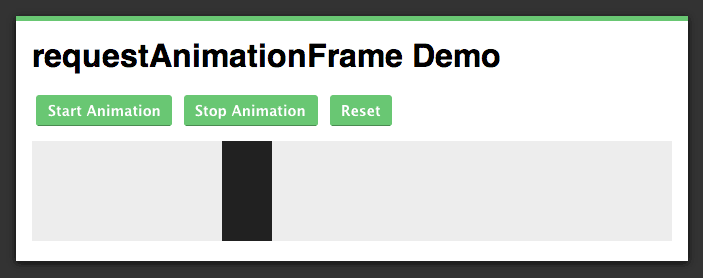
    <h2>Creating a Simple requestAnimationFrame Demo</h2>
    <p><a href="http://blog.teamtreehouse.com/wp-content/uploads/2013/11/raf-demo-screenshot.png" rel="nofollow external" class="bo"><img alt="Efficient Animations with requestAnimationFrame" src="http://blog.teamtreehouse.com/wp-content/uploads/2013/11/raf-demo-screenshot.png" width="703" height="278" style="max-width: 100%; height: auto;"></a></p>
    <p>Now that you understand the theory behind using <code>requestAnimationFrame</code> lets create a simple demo.</p>
    <p><a href="http://codepen.io/matt-west/full/bGdEC" rel="nofollow external" class="bo">See the Demo</a> <a href="http://cl.ly/3h020t143Y19" rel="nofollow external" class="bo">Download the Code</a> <a href="http://codepen.io/matt-west/pen/bGdEC" rel="nofollow external" class="bo">View on CodePen</a></p>
    <h3>Setting up the HTML and CSS</h3>
    <p>Open up your favorite text editor and create a file called <code>index.html</code>. Once you’re done, add the following code to the new file.</p>
    <pre><code>&lt;!DOCTYPE html&gt;&#x000A;    &lt;html lang="en"&gt;&#x000A;    &lt;head&gt;&#x000A;      &lt;meta charset="UTF-8"&gt;&#x000A;      &lt;title&gt;requestAnimationFrame Demo&lt;/title&gt;&#x000A;    &#x000A;      &lt;link rel="stylesheet" href="style.css"&gt;&#x000A;    &lt;/head&gt;&#x000A;    &lt;body&gt;&#x000A;      &lt;div id="page-wrapper"&gt;&#x000A;        &lt;h1&gt;requestAnimationFrame Demo&lt;/h1&gt;&#x000A;    &#x000A;        &lt;div class="controls"&gt;&#x000A;          &lt;button type="button" id="startBtn"&gt;Start Animation&lt;/button&gt;&#x000A;          &lt;button type="button" id="stopBtn"&gt;Stop Animation&lt;/button&gt;&#x000A;          &lt;button type="button" id="resetBtn"&gt;Reset&lt;/button&gt;&#x000A;        &lt;/div&gt;&#x000A;    &#x000A;        &lt;canvas id="stage" width="640" height="100"&gt;&lt;/canvas&gt;&#x000A;      &lt;/div&gt;&#x000A;    &#x000A;      &lt;script src="raf-polyfill.js"&gt;&lt;/script&gt;&#x000A;      &lt;script src="script.js"&gt;&lt;/script&gt;&#x000A;    &lt;/body&gt;&#x000A;    &lt;/html&gt;&#x000A;    </code></pre>
    <p>In this markup you define a number of buttons that will be used for starting, stopping, and resetting the animation. You also define the canvas where the animation will take place.</p>
    <p>You may notice that there are two files referenced in <code>&lt;script&gt;</code> elements towards the end of this markup. The <code>raf-polyfill.js</code> file contains the <a href="https://gist.github.com/paulirish/1579671" rel="nofollow external" class="bo">polyfill</a> that we looked at in the previous section. Make sure that you download this file and save it in the same folder as your <code>index.html</code> file. You will also need to copy the <code>style.css</code> file from the <a href="http://cl.ly/3h020t143Y19" rel="nofollow external" class="bo">code download</a> into your project folder.</p>
    <h3>Setting up the JavaScript</h3>
    <p>Now that you have your HTML and CSS sorted, it’s time to start writing the JavaScript code that will handle drawing the animation on the canvas. If you haven’t used the Canvas API before, don’t worry, I will explain everything you need to know as we go.</p>
    <p>Create a new file in your project folder called <code>script.js</code> and add the following code to it.</p>
    <pre><code>(function() {&#x000A;    &#x000A;      // Get the buttons.&#x000A;      var startBtn = document.getElementById('startBtn');&#x000A;      var stopBtn = document.getElementById('stopBtn');&#x000A;      var resetBtn = document.getElementById('resetBtn');&#x000A;    &#x000A;      // The rest of the code goes here...&#x000A;    }());&#x000A;    </code></pre>
    <p>Here you have created three variables and initialized them by fetching the buttons in your markup.</p>
    <p>Next you need to write some code to set up the canvas. Copy this code into your <code>script.js</code> file.</p>
    <pre><code>// Canvas&#x000A;    var canvas = document.getElementById('stage');&#x000A;    &#x000A;    // 2d Drawing Context.&#x000A;    var ctx = canvas.getContext('2d');&#x000A;    &#x000A;    // Set the fill style for the drawing context.&#x000A;    ctx.fillStyle = '#212121';&#x000A;    &#x000A;    // A variable to store the requestID.&#x000A;    var requestID;&#x000A;    &#x000A;    // Variables to for the drawing position and object.&#x000A;    var posX = 0;&#x000A;    var boxWidth = 50;&#x000A;    var pixelsPerFrame = 5; // How many pixels the box should move per frame.&#x000A;    &#x000A;    // Draw the initial box on the canvas.&#x000A;    ctx.fillRect(posX, 0, boxWidth, canvas.height);&#x000A;    </code></pre>
    <p>Here you first create a variable called <code>canvas</code> and initialize it by fetching the <code>&lt;canvas&gt;</code> element in your markup. You then get a 2d drawing context for the canvas. This provides methods for drawing objects on the canvas as well as controlling the styling of those objects.</p>
    <p>The next line of code sets the <code>fillStyle</code> property on the drawing context to <code>#212121</code>.</p>
    <p>The <code>requestID</code> variable will be used to keep track of the <code>requestID</code> returned by the <code>requestAnimationFrame</code> method.</p>
    <p>The <code>posX</code>, <code>boxWidth</code>, and <code>pixelsPerFrame</code> variables are used to set the position the box should be drawn on the canvas; the width of the box; and the number of pixels the box should be moved in each frame.</p>
    <p>Finally you call the drawing contexts <code>fillRect</code> method, passing in the X and Y coordinates of the location the rectangle should be drawn along with its height and width.</p>
    <h3>Writing the animate Function</h3>
    <p>Next up you need to write the <code>animate</code> function which will be responsible for drawing frames.</p>
    <p>Copy the following code into your <code>script.js</code> file.</p>
    <pre><code>// Animate.&#x000A;    function animate() {&#x000A;      requestID = requestAnimationFrame(animate);&#x000A;    &#x000A;      // If the box has not reached the end draw on the canvas.&#x000A;      // Otherwise stop the animation.&#x000A;      if (posX &lt;= (canvas.width - boxWidth)) {&#x000A;        ctx.clearRect((posX - pixelsPerFrame), 0, boxWidth, canvas.height);&#x000A;        ctx.fillRect(posX, 0, boxWidth, canvas.height);&#x000A;        posX += pixelsPerFrame;&#x000A;      } else {&#x000A;        cancelAnimationFrame(requestID);&#x000A;      }&#x000A;    }&#x000A;    </code></pre>
    <p>The call to <code>requestAnimateFrame</code> at the top of this function will schedule the next animation frame. This is placed first so that we can get as close to 60FPS as possible when using the <code>setTimeout</code> fallback provided by the polyfill.</p>
    <p>You then have an if statement that checks to see if the box has reached the right side of the canvas. If the box has not yet reached the end you use the <code>clearRect</code> method to remove the box drawn in the previous frame and then draw the box at it’s new position using <code>fillRect</code>. If the box has reached the end of the canvas, you call <code>cancelAnimationFrame</code> in order to cancel the frame scheduled at the start of the <code>animate</code> function. Finally, you update the <code>posX</code> variable with the position that the box should be drawn in the next frame.</p>
    <hr>
    <p><strong>Note</strong>: Notice that the parameters passed to <code>clearRect</code> only cover the position of the box in the previous frame. As we only have 16.67ms to finish drawing the frame it is best to do as little work as possible. Clearing the whole canvas (read: <em>the lazy way</em>) would take much longer than clearing just a small section of it.</p>
    <p>We could have actually optimized this even further. How do you think this could have been achieved? Share your solutions in the comments.</p>
    <hr>
    <h3>Hooking up the Buttons</h3>
    <p>The final task you need to complete to get your demo working is to set up some event listeners for the start, stop, and reset buttons.</p>
    <p>Add the following code into your <code>script.js</code> file.</p>
    <pre><code>// Event listener for the start button.&#x000A;    startBtn.addEventListener('click', function(e) {&#x000A;      e.preventDefault();&#x000A;    &#x000A;      // Start the animation.&#x000A;      requestID = requestAnimationFrame(animate);&#x000A;    });&#x000A;    &#x000A;    // Event listener for the stop button.&#x000A;    stopBtn.addEventListener('click', function(e) {&#x000A;      e.preventDefault();&#x000A;    &#x000A;      // Stop the animation;&#x000A;      cancelAnimationFrame(requestID);&#x000A;    });&#x000A;    &#x000A;    // Event listener for the reset button.&#x000A;    resetBtn.addEventListener('click', function(e) {&#x000A;      e.preventDefault();&#x000A;    &#x000A;      // Reset the X position to 0.&#x000A;      posX = 0;&#x000A;    &#x000A;      // Clear the canvas.&#x000A;      ctx.clearRect(0, 0, canvas.width, canvas.height);&#x000A;    &#x000A;      // Draw the initial box on the canvas.&#x000A;      ctx.fillRect(posX, 0, boxWidth, canvas.height);&#x000A;    });&#x000A;    </code></pre>
    <p>Here you have set up three event listeners. The first two are for starting and stopping the animation. The final event listener is fired when the reset button is clicked. This will set the <code>posX</code> variable to 0. It also clears the canvas – we’re not as concerned about performance so it’s okay to do this the lazy way – and draws the box back at it’s start position.</p>
    <p>Your demo app is now complete! Open the <code>index.html</code> file in your browser and click the start button to see the animation.</p>
    <p><a href="http://codepen.io/matt-west/full/bGdEC" rel="nofollow external" class="bo">See the Demo</a> <a href="http://cl.ly/3h020t143Y19" rel="nofollow external" class="bo">Download the Code</a> <a href="http://codepen.io/matt-west/pen/bGdEC" rel="nofollow external" class="bo">View on CodePen</a></p>
    <h2>Browser Support</h2>
    <p>Browser support for <code>requestAnimationFrame</code> is reasonably good. Firefox and Chrome have had support for a while now with Opera and IE adding support more recently. As long as you’re including the <a href="https://gist.github.com/paulirish/1579671" rel="nofollow external" class="bo">polyfill</a> mentioned earlier in this post you should be okay to use <code>requestAnimationFrame</code> in your projects today.</p>
    <table>
    <thead>
    <tr>
    <th>IE</th>
    <th>Firefox</th>
    <th>Chrome</th>
    <th>Safari</th>
    <th>Opera</th>
    </tr>
    </thead>
    <tbody>
    <tr>
    <td>10+</td>
    <td>4.0+</td>
    <td>10.0+</td>
    <td>6.0+</td>
    <td>15.0+</td>
    </tr>
    </tbody>
    </table>
    <p>Source: <a href="http://caniuse.com/requestanimationframe" rel="nofollow external" class="bo">http://caniuse.com/requestanimationframe</a></p>
    <h2>Summary</h2>
    <p>The <code>requestAnimationFrame</code> method makes it really easy for developers to create smooth JavaScript animations for their websites. By delegating the handling of animation frames to the browser you are able to take advantage of a number of optimizations, all of which result in less resource usage and extended battery life on mobile devices.</p>
    <p>What do you think about <code>requestAnimationFrame</code>? Share your thoughts in the comments.</p>
    <h2>Useful Links</h2>
    <ul>
    <li><a href="http://caniuse.com/requestanimationframe" rel="nofollow external" class="bo">Can I use requestAnimationFrame</a></li>
    <li><a href="https://gist.github.com/paulirish/1579671" rel="nofollow external" class="bo">requestAnimationFrame Polyfill</a></li>
    <li><a href="https://developer.mozilla.org/en-US/docs/Web/API/window.requestAnimationFrame" rel="nofollow external" class="bo">MDN requestAnimationFrame Docs</a></li>
    <li><a href="http://dev.opera.com/articles/view/better-performance-with-requestanimationframe/" rel="nofollow external" class="bo">Better performance with requestAnimationFrame</a></li>
    <li><a href="http://www.w3.org/TR/2013/CR-animation-timing-20131031/" rel="nofollow external" class="bo">Timing control fro script-based animations (W3C)</a></li>
    </ul>
    <p>The post <a href="http://blog.teamtreehouse.com/efficient-animations-with-requestanimationframe" rel="nofollow external" class="bo">Efficient Animations with requestAnimationFrame</a> appeared first on <a href="http://blog.teamtreehouse.com" rel="nofollow external" class="bo">Treehouse Blog</a>.</p>
    </div>
]]>
</Body>
<Summary>If you are using animations in your web apps you’ll want to make sure that they run smoothly. The easiest way of doing this is to use requestAnimationFrame (sometimes referred to as rAF), a method...</Summary>
<Website>http://feedproxy.google.com/~r/teamtreehouse/~3/RlC9ELWtTWg/efficient-animations-with-requestanimationframe</Website>
<TrackingUrl>https://my3.my.umbc.edu/api/v0/pixel/news/38440/guest@my.umbc.edu/ef65995292689dbd36d419fb3c35dc8c/api/pixel</TrackingUrl>
<Tag>android</Tag>
<Tag>code</Tag>
<Tag>css</Tag>
<Tag>design</Tag>
<Tag>development</Tag>
<Tag>html</Tag>
<Tag>html5</Tag>
<Tag>ios</Tag>
<Tag>javascript</Tag>
<Tag>learn-to-code</Tag>
<Tag>requestanimationframe</Tag>
<Tag>responsive</Tag>
<Tag>ux</Tag>
<Tag>web</Tag>
<Tag>web-apps</Tag>
<Group token="retired-583">Web Developer - Build Group</Group>
<GroupUrl>https://my3.my.umbc.edu/groups/retired-583</GroupUrl>
<AvatarUrl>https://assets3-my.umbc.edu/system/shared/avatars/groups/000/000/583/fc60f5d7abc2e080599bb6dc465db54d/xsmall.png?1363101197</AvatarUrl>
<AvatarUrl size="original">https://assets4-my.umbc.edu/system/shared/avatars/groups/000/000/583/fc60f5d7abc2e080599bb6dc465db54d/original.jpg?1363101197</AvatarUrl>
<AvatarUrl size="xxlarge">https://assets4-my.umbc.edu/system/shared/avatars/groups/000/000/583/fc60f5d7abc2e080599bb6dc465db54d/xxlarge.png?1363101197</AvatarUrl>
<AvatarUrl size="xlarge">https://assets4-my.umbc.edu/system/shared/avatars/groups/000/000/583/fc60f5d7abc2e080599bb6dc465db54d/xlarge.png?1363101197</AvatarUrl>
<AvatarUrl size="large">https://assets3-my.umbc.edu/system/shared/avatars/groups/000/000/583/fc60f5d7abc2e080599bb6dc465db54d/large.png?1363101197</AvatarUrl>
<AvatarUrl size="medium">https://assets3-my.umbc.edu/system/shared/avatars/groups/000/000/583/fc60f5d7abc2e080599bb6dc465db54d/medium.png?1363101197</AvatarUrl>
<AvatarUrl size="small">https://assets4-my.umbc.edu/system/shared/avatars/groups/000/000/583/fc60f5d7abc2e080599bb6dc465db54d/small.png?1363101197</AvatarUrl>
<AvatarUrl size="xsmall">https://assets3-my.umbc.edu/system/shared/avatars/groups/000/000/583/fc60f5d7abc2e080599bb6dc465db54d/xsmall.png?1363101197</AvatarUrl>
<AvatarUrl size="xxsmall">https://assets4-my.umbc.edu/system/shared/avatars/groups/000/000/583/fc60f5d7abc2e080599bb6dc465db54d/xxsmall.png?1363101197</AvatarUrl>
<Sponsor>Web Developer - Build Group</Sponsor>
<PawCount>0</PawCount>
<CommentCount>0</CommentCount>
<CommentsAllowed>true</CommentsAllowed>
<PostedAt>Fri, 15 Nov 2013 15:00:30 -0500</PostedAt>
</NewsItem>

<NewsItem contentIssues="true" id="38439" important="false" status="posted" url="https://my3.my.umbc.edu/posts/38439">
<Title>Finance Industry Grapples With Cyber Threats via Forbes</Title>
<Body>
<![CDATA[
    <div class="html-content">Finance Industry Grapples With Cyber Threats via <a href="/profile.php?id=30911162508" title="To tag someone, type @ and then the friend's name" rel="nofollow external" class="bo">Forbes</a><br><br><a href="http://www.facebook.com/l.php?u=http%3A%2F%2Fwww.forbes.com%2Fsites%2Fchrisclearfield%2F2013%2F11%2F15%2Ffinance-industry-grapples-with-cyber-threats%2F&amp;h=nAQGsui0A&amp;s=1" title="" rel="nofollow external" class="bo"><img src="https://fbexternal-a.akamaihd.net/safe_image.php?d=AQBWl9W-hqH889Do&amp;w=154&amp;h=154&amp;url=http%3A%2F%2Fi.forbesimg.com%2Fimages%2Fchannels%2Ffooterpromo_panel7_0_footer-1383154307.jpg" alt="" style="max-width: 100%; height: auto;"></a><br><a href="http://www.facebook.com/l.php?u=http%3A%2F%2Fwww.forbes.com%2Fsites%2Fchrisclearfield%2F2013%2F11%2F15%2Ffinance-industry-grapples-with-cyber-threats%2F&amp;h=sAQGskaQ6&amp;s=1" rel="nofollow external" class="bo">Finance Industry Grapples With Cyber Threats</a><br><a href="http://www.forbes.com">www.forbes.com</a><br>Cyber attacks are increasingly thought of as a threat to modern society. Fears that attackers will use computers to disable critical infrastructure, like the power grid or transportation networks, crippling everyday functions, are touted as the next frontier in threats to security. However, such thr...</div>
]]>
</Body>
<Summary>Finance Industry Grapples With Cyber Threats via Forbes   Finance Industry Grapples With Cyber Threats www.forbes.com Cyber attacks are increasingly thought of as a threat to modern society. Fears...</Summary>
<Website>http://www.facebook.com/umbctraining/posts/10151696622626076</Website>
<TrackingUrl>https://my3.my.umbc.edu/api/v0/pixel/news/38439/guest@my.umbc.edu/b5bd5d7c10386aaa2ca99c40d3287d5c/api/pixel</TrackingUrl>
<Tag>ccna</Tag>
<Tag>ceh</Tag>
<Tag>centers</Tag>
<Tag>cisco</Tag>
<Tag>cyber</Tag>
<Tag>cybersecurity</Tag>
<Tag>information</Tag>
<Tag>it</Tag>
<Tag>leadership</Tag>
<Tag>management</Tag>
<Tag>microsoft</Tag>
<Tag>project</Tag>
<Tag>security</Tag>
<Tag>technology</Tag>
<Tag>training</Tag>
<Tag>umbc</Tag>
<Group token="retired-575">UMBC Training Centers</Group>
<GroupUrl>https://my3.my.umbc.edu/groups/retired-575</GroupUrl>
<AvatarUrl>https://assets1-my.umbc.edu/system/shared/avatars/groups/000/000/575/83756b985266168d0d29c6c9a146db50/xsmall.png?1361981335</AvatarUrl>
<AvatarUrl size="original">https://assets4-my.umbc.edu/system/shared/avatars/groups/000/000/575/83756b985266168d0d29c6c9a146db50/original.jpg?1361981335</AvatarUrl>
<AvatarUrl size="xxlarge">https://assets3-my.umbc.edu/system/shared/avatars/groups/000/000/575/83756b985266168d0d29c6c9a146db50/xxlarge.png?1361981335</AvatarUrl>
<AvatarUrl size="xlarge">https://assets4-my.umbc.edu/system/shared/avatars/groups/000/000/575/83756b985266168d0d29c6c9a146db50/xlarge.png?1361981335</AvatarUrl>
<AvatarUrl size="large">https://assets1-my.umbc.edu/system/shared/avatars/groups/000/000/575/83756b985266168d0d29c6c9a146db50/large.png?1361981335</AvatarUrl>
<AvatarUrl size="medium">https://assets2-my.umbc.edu/system/shared/avatars/groups/000/000/575/83756b985266168d0d29c6c9a146db50/medium.png?1361981335</AvatarUrl>
<AvatarUrl size="small">https://assets4-my.umbc.edu/system/shared/avatars/groups/000/000/575/83756b985266168d0d29c6c9a146db50/small.png?1361981335</AvatarUrl>
<AvatarUrl size="xsmall">https://assets1-my.umbc.edu/system/shared/avatars/groups/000/000/575/83756b985266168d0d29c6c9a146db50/xsmall.png?1361981335</AvatarUrl>
<AvatarUrl size="xxsmall">https://assets2-my.umbc.edu/system/shared/avatars/groups/000/000/575/83756b985266168d0d29c6c9a146db50/xxsmall.png?1361981335</AvatarUrl>
<Sponsor>UMBC Training Centers</Sponsor>
<PawCount>0</PawCount>
<CommentCount>0</CommentCount>
<CommentsAllowed>true</CommentsAllowed>
<PostedAt>Fri, 15 Nov 2013 14:55:05 -0500</PostedAt>
<EditAt>Fri, 15 Nov 2013 14:55:05 -0500</EditAt>
</NewsItem>

<NewsItem contentIssues="true" id="38441" important="false" status="posted" url="https://my3.my.umbc.edu/posts/38441">
<Title>Intro to the React Framework</Title>
<Body>
<![CDATA[
    <div class="html-content">
    <a href="http://rss.buysellads.com/click.php?z=1260013&amp;k=d754f1e9ba63a736ba8ff5ece958f7dd&amp;a=35660&amp;c=1997418569" rel="nofollow external" class="bo"><img src="http://rss.buysellads.com/img.php?z=1260013&amp;k=d754f1e9ba63a736ba8ff5ece958f7dd&amp;a=35660&amp;c=1997418569" alt="" style="max-width: 100%; height: auto;"></a><p>In today’s world of Javascript Application frameworks, design philosophy is the key differentiating factor. If you compare the popular JS frameworks, such as EmberJS, AngularJS, Backbone, Knockout, etc. you are sure to find differences in their abstractions, thinking models, and of course the terminology. This is a direct consequence of the underlying design philosophy. But, in principle, they all do one thing, which is to abstract out the DOM in such a way that you don’t deal directly with HTML Elements.</p>
    <p>I personally think that a framework becomes interesting when it provides a set of abstractions that enable a different mode of thinking. In this aspect, <a href="http://facebook.github.io/react/index.html" rel="nofollow external" class="bo">react</a>, the new JS framework from the folks at Facebook, will force you to rethink (to some extent) how you decompose the UI and interactions of your application. Having reached version <a href="http://facebook.github.io/react/downloads.html" rel="nofollow external" class="bo">0.4.1</a> (as of this writing), React provides a surprisingly simple, yet effective model for building JS apps that mixes a delightful cocktail of a different kind.</p>
    <p>In this article, we’ll explore the building blocks of React and embrace a style of thinking that may seem counter-intuitive on the first go. But, as the React docs say: <a href="http://facebook.github.io/react/docs/why-react.html" rel="nofollow external" class="bo">“Give it Five Minutes”</a> and then you will see how this approach will become more natural.</p>
    <p></p>
    <hr>
    <h2> Motivations</h2>
    <p>The story of <a href="http://facebook.github.io/react/index.html" rel="nofollow external" class="bo">React</a> started within the confines of Facebook, where it brewed for a while. Having reached a stable-enough state, the developers decided to open-source it a few months back. Interestingly the Instagram website is also powered by the React Framework.</p>
    <p>React approaches the DOM-abstraction problem with a slightly different take. To understand how this is different, lets quickly gloss over the techniques adopted by the frameworks I mentioned earlier.</p>
    <h3>A High Level Overview of JS Application Frameworks</h3>
    <p>The MVC (Model-View-Controller) design pattern is fundamental to UI development, not just in web apps, but in front-end applications on any platform. In case of web apps, the DOM is the physical representation of a View. The DOM itself is generated from a textual html-template that is pulled from a different file, script-block or a precompiled template function. The <code>View</code> is an entity that brings the textual template to life as a DOM fragment. It also sets up event-handlers and takes care of manipulating the DOM tree as part of its lifecycle.</p>
    <p>For the <code>View</code> to be useful, it needs to show some data, and possibly allow user interaction. The data is the <code>Model</code>, which comes from some data-source (a database, web-service, local-storage, etc.). Frameworks provide a way of “binding” the data to the view, such that changes in data are automatically reflected with changes on the view. This automatic process is called <em>data-binding</em> and there are APIs/techniques to make this as seamless as possible.</p>
    <p>The MVC triad is completed by the <code>Controller</code>, which engages the <code>View</code> and the <code>Model</code> and orchestrates the flow of data (<code>Model</code>) into the <code>View</code> and user-events out from the <code>View</code>, possibly leading to changes in the <code>Model</code>.</p>  <img src="http://cdn.tutsplus.com/net/uploads/2013/11/mvc-flow.png" alt="mvc-flow" width="546" height="588" style="max-width: 100%; height: auto;"><br> <p>Frameworks that automatically handle the flow of data back and forth between the View and Model maintain an internal event-loop. This event-loop is needed to listen to certain user events, data-change events, external triggers, etc and then determine if there is any change from the previous run of the loop. If there are changes, at either end (View or Model), the framework ensures that both are brought back in sync.</p>
    <h3>What Makes React Different?</h3>
    <p>With React, the View-part of the MVC triad takes prominence and is rolled into an entity called the <code>Component</code>. The Component maintains an immutable property bag called <code>props</code>, and a <code>state</code> that represents the user-driven state of the UI. The view-generation part of the <code>Component</code> is rather interesting and possibly the reason that makes React stand out compared to other frameworks. Instead of constructing a physical DOM directly from a template file/script/function, the <code>Component</code> generates an intermediate DOM that is a stand-in for the real HTML DOM. An additional step is then taken to translate this intermediate DOM into the real HTML DOM.</p>
    <p>As part of the intermediate DOM generation, the <code>Component</code> also attaches event-handlers and binds the data contained in <code>props</code> and <code>state</code>.</p>If the idea of an intermediate-DOM sounds a little alien, don’t be too alarmed. You have already seen this strategy adopted by language runtimes (aka Virtual Machines) for interpreted languages. Our very own JavaScript runtime, first generates an intermediate representation before spitting out the native code. This is also true for other VM-based languages such as Java, C#, Ruby, Python, etc.<p>React cleverly adopts this strategy to create an intermediate DOM before generating the final HTML DOM. The intermediate-DOM is just a JavaScript object graph and is not rendered directly. There is a translation step that creates the real DOM. This is the underlying technique that makes React do fast DOM manipulations.<br></p>
    <hr>
    <h2> React In Depth</h2>
    <p>To get a better picture of how React makes it all work, let’s dive a little deeper; starting with the <code>Component</code>. The Component is the primary building block in React. You can compose the UI of your application by assembling a tree of Components. Each Component provides an implementation for the <code>render()</code> method, where it creates the intermediate-DOM. Calling <code>React.renderComponent()</code> on the root Component results in recursively going down the Component-tree and building up the intermediate-DOM. The intermediate-DOM is then converted into the real HTML DOM.</p>  <img src="http://cdn.tutsplus.com/net/uploads/2013/11/component-dom-tree.png" alt="component-dom-tree" width="600" height="311" style="max-width: 100%; height: auto;"><br> <p>Since the intermediate-DOM creation is an integral part of the Component, React provides a convenient XML-based extension to JavaScript, called JSX, to build the component tree as a set of XML nodes. This makes it easier to visualize and reason about the DOM. JSX also simplifies the association of event-handlers and properties as xml attributes. Since JSX is an extension language, there is a tool (command-line and in-browser) to generate the final JavaScript. A JSX XML node maps directly to a Component. It is worth pointing out that React works independent of JSX and the JSX language only makes it easy to create the intermediate DOM.</p>
    <h3>Tooling</h3>
    <p>The core React framework can be downloaded from their <a href="http://facebook.github.io/react/index.html" rel="nofollow external" class="bo">website</a>. Additionally, for the JSX → JS transformation, you can either use the in-browser <a href="http://facebook.github.io/react/downloads.html" rel="nofollow external" class="bo">JSXTransformer</a> or use the command line tool, called <a href="http://facebook.github.io/react/downloads.html" rel="nofollow external" class="bo">react-tools</a> (installed via NPM). You will need an installation of Node.js to download it. The command-line tool allows you to precompile the JSX files and avoid the translation within the browser. This is definitely recommended if your JSX files are large or many in number.</p>
    <h3>A Simple Component</h3>
    <p>Alright, we have seen a lot of theory so far, and I am sure you are itching to see some real code. Let’s dive into our first example:</p>
    <pre>/** @jsx React.DOM */&#x000A;    &#x000A;    var Simple = React.createClass({&#x000A;    &#x000A;      getInitialState: function(){&#x000A;        return { count: 0 };&#x000A;      },&#x000A;    &#x000A;      handleMouseDown: function(){&#x000A;        alert('I was told: ' + this.props.message);&#x000A;        this.setState({ count: this.state.count + 1});&#x000A;      },&#x000A;    &#x000A;      render: function(){&#x000A;    &#x000A;        return &lt;div&gt;&#x000A;          &lt;div class="clicker" onMouseDown={this.handleMouseDown}&gt;&#x000A;            Give me the message!&#x000A;          &lt;/div&gt;&#x000A;          &lt;div class="message"&gt;Message conveyed&#x000A;            &lt;span class="count"&gt;{this.state.count}&lt;/span&gt; time(s)&lt;/div&gt;&#x000A;        &lt;/div&gt;&#x000A;        ;&#x000A;      }&#x000A;    });&#x000A;    &#x000A;    React.renderComponent(&lt;Simple message="Keep it Simple"/&gt;,&#x000A;                      document.body);&#x000A;    </pre>
    <p>Although simple, the code above does cover a good amount of the React surface area:</p>
    <ul>
    <li>We create the Simple component by using <code>React.createClass</code> and passing in an object that implements some core functions. The most important one is the <code>render()</code>, which generates the intermediate-DOM.</li>
    <li>Here we are using JSX to define the DOM and also attach the mousedown event-handler. The <code>{}</code> syntax is useful for incorporating JavaScript expressions for attributes (<code>onMouseDown={this.handleClick}</code>) and child-nodes (<code>&lt;span class="count"&gt;{this.state.count}&lt;/span&gt;</code>). Event handlers associated using the {} syntax are automatically bound to the instance of the component. Thus <code>this</code> inside the event-handler function refers to the component instance. The comment on the first line <code>/** @jsx React.DOM */</code> is a cue for the JSX transformer to do the translation to JS. <em>Without this comment line, no translation will take place</em>.</li>
    </ul>
    <p>We can run the command-line tool (<em>jsx</em>) in watch mode and auto-compile changes from JSX → JS. The source files are in <em>/src</em> folder and the output is generated in <em>/build</em>.</p>
    <pre>jsx --watch src/ build/&#x000A;    </pre>
    <p>Here is the generated JS file:</p>
    <pre>/** @jsx React.DOM */&#x000A;    &#x000A;    var Simple = React.createClass({displayName: 'Simple',&#x000A;    &#x000A;      getInitialState: function(){&#x000A;        return { count: 0 };&#x000A;      },&#x000A;    &#x000A;      handleMouseDown: function(){&#x000A;        alert('I was told: ' + this.props.message);&#x000A;        this.setState({ count: this.state.count + 1});&#x000A;      },&#x000A;    &#x000A;      render: function(){&#x000A;    &#x000A;        return React.DOM.div(null, &#x000A;          React.DOM.div( {className:"clicker", onMouseDown:this.handleMouseDown}, &#x000A;    " Give me the message! "      ),&#x000A;          React.DOM.div( {className:"message"}, "Message conveyed ",        React.DOM.span( {className:"count"}, this.state.count), " time(s)")&#x000A;        )&#x000A;        ;&#x000A;      }&#x000A;    });&#x000A;    &#x000A;    React.renderComponent(Simple( {message:"Keep it Simple"}),&#x000A;                      document.body);&#x000A;    </pre>
    <p>Notice how the <code>&lt;div/&gt;</code> and <code>&lt;span/&gt;</code> tags map to instances of <code>React.DOM.div</code> and <code>React.DOM.span</code>.</p>
    <ul>
    <li>Now let’s get back to our code example. Inside <code>handleMouseDown</code>, we make use of <code>this.props</code> to read the <em>message</em> property that was passed in. We set the <em>message</em> on the last line of the snippet, in the call to <code>React.renderComponent()</code> where we create the <code>&lt;Simple/&gt;</code> component. The purpose of <code>this.props</code> is to store the data that was passed in to the component. It is considered immutable and only a higher-level component is allowed to make changes and pass it down the component tree.</li>
    <li>Inside <code>handleMouseDown</code> we also set some user state with <code>this.setState()</code> to track the number of times the message was displayed. You will notice that we use <code>this.state</code> in the <code>render()</code> method. Anytime you call <code>setState()</code>, React also triggers the <code>render()</code> method to keep the DOM in sync. Besides <code>React.renderComponent()</code>, <code>setState()</code> is another way to force a visual refresh.</li>
    </ul>
    <h3>Synthetic Events</h3>
    <p>The events exposed on the intermediate-DOM, such as the <code>onMouseDown</code>, also act as a layer of indirection before they get set on the real-DOM. These events are thus refered to as <em>Synthetic Events</em>. React adopts <a href="http://davidwalsh.name/event-delegate" rel="nofollow external" class="bo">event-delegation</a>, which is a well-known technique, and attaches events only at the root-level of the real-DOM. Thus there is only one true event-handler on the real-DOM. Additionally these synthetic events also provide a level of consistency by hiding browser and element differences.</p>
    <p>The combination of the intermediate-DOM and synthetic events gives you a standard and consistent way of defining UIs across different browsers and even devices.</p>
    <h3>Component Lifecycle</h3>
    <p>Components in the React framework have a specific lifecycle and embody a state-machine that has three distinct states.</p>  <img src="http://cdn.tutsplus.com/net/uploads/2013/11/component-lifecycle.png" alt="component-lifecycle" width="600" height="389" style="max-width: 100%; height: auto;"><br> <p>The Component comes to life after being <em>Mounted</em>. Mounting results in going through a render-pass that generates the component-tree (intermediate-DOM). This tree is converted and placed into a container-node of the real DOM. This is a direct outcome of the call to <code>React.renderComponent()</code>.</p>
    <p>Once mounted, the component stays in the <em>Update</em> state. A component gets updated when you change state using <code>setState()</code> or change props using <code>setProps()</code>. This in turn results in calling <code>render()</code>, which brings the DOM in sync with the data (<code>props</code> + <code>state</code>). Between subsequent updates, React will calculate the delta between the previous component-tree and the newly generated tree. This is a highly optimized step (and a flagship feature) that minimizes the manipulation on the real DOM.</p>
    <p>The final state is <em>Unmounted</em>. This happens when you explicitly call <code>React.unmountAndReleaseReactRootNode()</code> or automatically if a component was a child that was no longer generated in a <code>render()</code> call. Most often you don’t have to deal with this and just let React do the proper thing.</p>
    <p>Now it would have been a big remiss, if React didn’t tell you when it moved between the <em>Mounted-Update-Unmounted</em> states. Thankfully that is not the case and there are hooks you can override to get notified of lifecycle changes. The names speak for themselves:</p>
    <ul>
    <li>
    <code>getInitialState()</code>: prepare initial state of the Component</li>
    <li><code>componentWillMount()</code></li>
    <li><code>componentDidMount()</code></li>
    <li><code>componentWillReceiveProps()</code></li>
    <li>
    <code>shouldComponentUpdate()</code>: useful if you want to control when a render should be skipped.</li>
    <li><code>componentWillUpdate()</code></li>
    <li><code>render()</code></li>
    <li><code>componentDidUpdate()</code></li>
    <li><code>componentWillUnmount()</code></li>
    </ul>
    <p>The <code>componentWill*</code> methods are called before the state change and the <code>componentDid*</code> methods are called after.</p> Some of the method names do seem to have taken a cue from the Cocoa frameworks in Mac and iOS<h3>Miscellaneous Features</h3>
    <p>Within a component-tree, data should always flow down. A parent-component should set the <code>props</code> of a child-component to pass any data from the parent to the child. This is termed as the <em>Owner-Owned</em> pair. On the other hand user-events (mouse, keyboard, touches) will always bubble up from the child all the way to the root component, unless handled in between.</p>  <img src="http://cdn.tutsplus.com/net/uploads/2013/11/data-event-flow.png" alt="data-event-flow" width="591" height="344" style="max-width: 100%; height: auto;"><br> <p>When you create the intermediate-DOM in <code>render()</code>, you can also assign a <code>ref</code> property to a child component. You can then refer to it from the parent using the <code>refs</code> property. This is depicted in the snippet below.</p>
    <pre>  render: function(){&#x000A;        // Set a ref &#x000A;        return &lt;div&gt;&#x000A;            &lt;span ref="counter" class="count"&gt;{this.state.count}&lt;/span&gt;&#x000A;            &lt;/div&gt;;&#x000A;      }&#x000A;    &#x000A;      handleMouseDown: function(){&#x000A;        // Use the ref&#x000A;        console.log(this.refs.counter.innerHTML);&#x000A;      },&#x000A;    </pre>
    <p>As part of the component metadata, you can set the initial-state (<code>getInitialState()</code>), which we saw earlier within the lifecycle methods. You can also set the default values of the props with <code>getDefaultProps()</code> and also establish some validation rules on these props using <code>propTypes</code>. The <a href="http://facebook.github.io/react/docs/reusable-components.html" rel="nofollow external" class="bo">docs</a> give a nice overview of the different kinds of validations (type checks, required, etc.) you can perform.</p>
    <p>React also supports the concept of a <em>Mixin</em> to extract reusable pieces of behavior that can be injected into disparate Components. You can pass the mixins using the <code>mixins</code> property of a Component.</p>
    <p>Now, lets get real and build a more comprehensive Component that uses these features.</p>
    <hr>
    <h2> A Shape Editor Built Using React</h2>
    <p>In this example, we will build an editor that accepts a simple DSL (Domain Specific Language) for creating shapes. As you type in, you will see the corresponding output on the side, giving you live feedback.</p>
    <p>The DSL allows you to create three kinds of shapes: Ellipse, Rectangle and Text. Each shape is specified on a separate line along with a bunch of styling properties. The syntax is straightforward and borrows a bit from CSS. To parse a line, we use a Regex that looks like:</p>
    <pre>  var shapeRegex = /(rect|ellipse|text)(\s[a-z]+:\s[a-z0-9]+;)*/i;&#x000A;    </pre>
    <p>As an example, the following set of lines describe two rectangles and a text label…</p>
    <pre>// React label&#x000A;    text value:React; color: #00D8FF; font-size: 48px; text-shadow: 1px 1px 3px #555; padding: 10px; left: 100px; top: 100px;&#x000A;    &#x000A;    // left logo&#x000A;    rect background:url(react.png) no-repeat; border: none; width: 38; height: 38; left: 60px; top: 120px;&#x000A;    &#x000A;    // right logo&#x000A;    rect background:url(react.png) no-repeat; border: none; width: 38; height: 38; left: 250px; top: 120px;&#x000A;    </pre>
    <p>…generating the output shown below:</p>  <img src="http://cdn.tutsplus.com/net/uploads/2013/11/react-shapes.png" alt="react-shapes" width="283" height="84" style="max-width: 100%; height: auto;"><br> <h3>Setting Up</h3>
    <p>Alright, lets go ahead and build this editor. We will start out with the HTML file (<code>index.html</code>), where we put in the top-level markup and include the libraries and application scripts. I am only showing the relevant parts here:</p>
    <pre>&lt;body&gt;&#x000A;    &lt;select class="shapes-picker"&gt;&#x000A;      &lt;option value="--"&gt;-- Select a sample --&lt;/option&gt;&#x000A;      &lt;option value="react"&gt;React&lt;/option&gt;&#x000A;      &lt;option value="robot"&gt;Robot&lt;/option&gt;&#x000A;    &lt;/select&gt;&#x000A;    &lt;div class="container"&gt;&lt;/div&gt;&#x000A;    &#x000A;    &lt;!-- Libraries --&gt;&#x000A;    &lt;script src="../../lib/jquery-2.0.3.min.js"&gt;&lt;/script&gt;&#x000A;    &lt;script src="../../lib/react.js"&gt;&lt;/script&gt;&#x000A;    &lt;!-- Application Scripts --&gt;&#x000A;    &lt;script src="../../build/shape-editor/ShapePropertyMixin.js"&gt;&lt;/script&gt;&#x000A;    &lt;script src="../../build/shape-editor/shapes/Ellipse.js"&gt;&lt;/script&gt;&#x000A;    &lt;script src="../../build/shape-editor/shapes/Rectangle.js"&gt;&lt;/script&gt;&#x000A;    &lt;script src="../../build/shape-editor/shapes/Text.js"&gt;&lt;/script&gt;&#x000A;    &#x000A;    &lt;script src="../../build/shape-editor/ShapeParser.js"&gt;&lt;/script&gt;&#x000A;    &lt;script src="../../build/shape-editor/ShapeCanvas.js"&gt;&lt;/script&gt;&#x000A;    &lt;script src="../../build/shape-editor/ShapeEditor.js"&gt;&lt;/script&gt;&#x000A;    &#x000A;    &lt;script src="../../build/shape-editor/shapes.js"&gt;&lt;/script&gt;&#x000A;    &lt;script src="../../build/shape-editor/app.js"&gt;&lt;/script&gt;&#x000A;    &lt;/body&gt;&#x000A;    </pre>
    <p>In the above snippet, the <code>container</code> div holds our React generated DOM. Our application scripts are included from the <code>/build</code> directory. We are using JSX within our components and the command line watcher (<code>jsx</code>), puts the converted JS files into <code>/build</code>. Note that this watcher command is part of the <code>react-tools</code> NPM module.</p>
    <pre>jsx --watch src/ build/&#x000A;    </pre>
    <p>The editor is broken down into a set of components, which are listed below:</p>
    <ul>
    <li>
    <strong>ShapeEditor</strong>: the root Component in the component tree</li>
    <li>
    <strong>ShapeCanvas</strong>: responsible for generating the shape-Components (Ellipse, Rectangle, Text). It is contained within the ShapeEditor.</li>
    <li>
    <strong>ShapeParser</strong>: responsible for parsing text and extracting the list of shape definitions. It parses line by line with the Regex we saw earlier. Invalid lines are ignored. This is not really a component, but a helper JS object, used by the ShapeEditor.</li>
    <li>
    <strong>Ellipse, Rectangle, Text</strong>: the shape Components. These become children of the ShapeCanvas.</li>
    <li>
    <strong>ShapePropertyMixin</strong>: provides helper functions for extracting styles found in the shape definitions. This is mixed-into the three shape-Components using the <code>mixins</code> property.</li>
    <li>
    <strong>app</strong>: the entry-point for the editor. It generates the root component (ShapeEditor) and allows you to pick a shape sample from the drop-down.</li>
    </ul>
    <p>The relationship of these entities is shown in the annotated component-tree:</p>  <img src="http://cdn.tutsplus.com/net/uploads/2013/11/component-tree.png" alt="component-tree" width="487" height="580" style="max-width: 100%; height: auto;"><br> <h3>The ShapeEditor Component</h3>
    <p>Lets look at the implementation of some of these components, starting with the ShapeEditor.</p>
    <pre>/** @jsx React.DOM */&#x000A;    var ShapeEditor = React.createClass({&#x000A;    &#x000A;      componentWillMount: function () {&#x000A;        this._parser = new ShapeParser();&#x000A;      },&#x000A;    &#x000A;      getInitialState: function () {&#x000A;        return { text: '' };&#x000A;      },&#x000A;    &#x000A;      render: function () {&#x000A;        var shapes = this._parser.parse(this.state.text);&#x000A;    &#x000A;        var tree = (&#x000A;          &lt;div&gt;&#x000A;            &lt;textarea class="editor" onChange={this.handleTextChange} /&gt;&#x000A;            &lt;ShapeCanvas shapes={shapes} /&gt;&#x000A;          &lt;/div&gt;);&#x000A;    &#x000A;        return tree;&#x000A;      },&#x000A;    &#x000A;      handleTextChange: function (event) {&#x000A;        this.setState({ text: event.target.value })&#x000A;      }&#x000A;    &#x000A;    });&#x000A;    </pre>
    <p>As the name suggests, the ShapeEditor provides the editing experience by generating the <code>&lt;textarea/&gt;</code> and the live feedback on the <code>&lt;ShapeCanvas/&lt;</code>. It listens to the <code>onChange</code> event (events in React are always named with camel case) on the <code>&lt;textarea/&gt;</code> and on every change, sets the <code>text</code> property of the component’s <code>state</code>. As mentioned earlier, whenever you set the state using <code>setState()</code>, render is called automatically. In this case, the <code>render()</code> of the ShapeEditor gets called where we parse the text from the state and rebuild the shapes. Note that we are starting with an initial state of empty text, which is set in the <code>getInitialState()</code> hook.</p>
    <p>For parsing the text into a set of shapes, We use an instance of the <code>ShapeParser</code>. I’ve left out the details of the parser to keep the discussion focused on React. The parser instance is created in the <code>componentWillMount()</code> hook. This is called just before the component mounts and is a good place to do any initializations before the first render happens.</p>
    <p>It is generally recommended that you funnel all your complex processing through the <code>render()</code> method. Event handlers just set the state while <code>render()</code> is the hub for all your core logic.</p>
    <p>The <code>ShapeEditor</code> uses this idea to do the parsing inside of its <code>render()</code> and forwards the detected shapes by setting the <code>shapes</code> property of the <code>ShapeCanvas</code>. This is how data flows down into the component tree, from the owner (<code>ShapeEditor</code>) to the owned (<code>ShapeCanvas</code>).</p>
    <p>One last thing to note in here is that we have the first line comment to indicate JSX → JS translation.</p>
    <h3>ShapeCanvas to Generate the Shapes</h3>
    <p>Next, we will move on to the ShapeCanvas and the Ellipse, Rectangle and Text components.</p>
    <p>p&gt;The <code>ShapeCanvas</code> is rather straightforward with its core responsibility of generating the respective <code>&lt;Ellipse/&gt;</code>, <code>&lt;Rectangle/&gt;</code> and <code>&lt;Text/&gt;</code> components from the passed in shape definitions (<code>this.props.shapes</code>). For each shape, we pass in the parsed properties with the attribute expression: <code>properties={shape.properties}</code>.</p>
    <pre>/** @jsx React.DOM */&#x000A;    var ShapeCanvas = React.createClass({&#x000A;    &#x000A;      getDefaultProps: function(){&#x000A;        return {&#x000A;          shapes: []&#x000A;        };&#x000A;      },&#x000A;    &#x000A;      render: function () {&#x000A;        var self = this;&#x000A;        var shapeTree = &lt;div class="shape-canvas"&gt;&#x000A;        {&#x000A;          this.props.shapes.map(function(s) {&#x000A;            return self._createShape(s);&#x000A;          })&#x000A;        }&#x000A;          &lt;/div&gt;;&#x000A;    &#x000A;        var noTree = &lt;div class="shape-canvas no-shapes"&gt;No Shapes Found&lt;/div&gt;;&#x000A;    &#x000A;        return this.props.shapes.length &gt; 0 ? shapeTree : noTree;&#x000A;      },&#x000A;    &#x000A;      _createShape: function(shape) {&#x000A;        return this._shapeMap[shape.type](shape);&#x000A;      },&#x000A;    &#x000A;      _shapeMap: {&#x000A;        ellipse: function (shape) {&#x000A;          return &lt;Ellipse properties={shape.properties} /&gt;;&#x000A;        },&#x000A;    &#x000A;        rect: function (shape) {&#x000A;          return &lt;Rectangle properties={shape.properties} /&gt;;&#x000A;        },&#x000A;    &#x000A;        text: function (shape) {&#x000A;          return &lt;Text properties={shape.properties} /&gt;;&#x000A;        }&#x000A;      }&#x000A;    &#x000A;    });&#x000A;    </pre>
    <p>One thing different here is that our component tree is not static, like we have in ShapeEditor. Instead it’s dynamically generated by looping over the passed in shapes. We also show the <code>"No Shapes Found"</code> message if there is nothing to show.</p>
    <h3>The Shapes: Ellipse, Rectangle, Text</h3>
    <p>All of the shapes have a similar structure and differ only in the styling. They also make use of the <code>ShapePropertyMixin</code> to handle the style generation.</p>
    <p>Here’s Ellipse:</p>
    <pre>/** @jsx React.DOM */&#x000A;    &#x000A;    var Ellipse = React.createClass({&#x000A;      mixins: [ShapePropertyMixin],&#x000A;    &#x000A;      render:function(){&#x000A;        var style = this.extractStyle(true);&#x000A;        style['border-radius'] = '50% 50%';&#x000A;    &#x000A;        return &lt;div style={style} class="shape" /&gt;;&#x000A;      }&#x000A;    });&#x000A;    </pre>
    <p>The implementation for <code>extractStyle()</code> is provided by the <code>ShapePropertyMixin</code>.</p>
    <p>The Rectangle component follows suit, of course without the <em>border-radius</em> style. The Text component has an extra property called <code>value</code> which sets the inner text for the <code>&lt;div/&gt;</code>.</p>
    <p>Here’s Text, to make this clear:</p>
    <pre>/** @jsx React.DOM */&#x000A;    &#x000A;    var Text = React.createClass({&#x000A;    &#x000A;      mixins: [ShapePropertyMixin],&#x000A;    &#x000A;      render:function(){&#x000A;        var style = this.extractStyle(false);&#x000A;        return &lt;div style={style} class="shape"&gt;{this.props.properties.value}&lt;/div&gt;;&#x000A;      }&#x000A;    &#x000A;    });&#x000A;    </pre>
    <h3>Tying It All Together With App.js</h3>
    <p><code>app.js</code> is where we bring it all together. Here we render the root component, the <code>ShapeEditor</code> and also provide support to switch between a few sample shapes. When you pick a different sample from the drop down, we load some predefined text into the <code>ShapeEditor</code> and cause the <code>ShapeCanvas</code> to update. This happens in the <code>readShapes()</code> method.</p>
    <pre>/** @jsx React.DOM */&#x000A;    &#x000A;    var shapeEditor = &lt;ShapeEditor /&gt;;&#x000A;    React.renderComponent(&#x000A;      shapeEditor,&#x000A;      document.getElementsByClassName('container')[0]&#x000A;    );&#x000A;    function readShapes() {&#x000A;      var file = $('.shapes-picker').val(),&#x000A;        text = SHAPES[file] || '';&#x000A;    &#x000A;      $('.editor').val(text);&#x000A;      shapeEditor.setState({ text: text }); // force a render&#x000A;    }&#x000A;    &#x000A;    $('.shapes-picker').change(readShapes);&#x000A;    readShapes(); // load time&#x000A;    </pre>
    <p>To exercise the creative side, here is a robot built using the Shape Editor:</p>  <img src="http://cdn.tutsplus.com/net/uploads/2013/11/robot.png" alt="robot" width="219" height="386" style="max-width: 100%; height: auto;"><br> <hr>
    <h2>And That’s React for you!</h2>
    <p>Phew! This has been a rather long article and having reached this point, you should have a sense of achievement!</p>
    <p>We have explored a lot of concepts here: the integral role of Components in the framework, use of JSX to easily describe a component tree (aka intermediate-DOM), various hooks to plug into the component lifecyle, use of <code>state</code> and <code>props</code> to drive the render process, use of Mixins to factor out reusable behavior and finally pulling all of this together with the Shape Editor example.</p>
    <p>I hope this article gives you enough boost to build a few React apps for yourself. To continue your exploration, here are few handy links:</p>
    <ul>
    <li><a href="http://facebook.github.io/react/docs/getting-started.html" rel="nofollow external" class="bo">Docs</a></li>
    <li><a href="https://github.com/facebook/react" rel="nofollow external" class="bo">Source on Github</a></li>
    <li><a href="http://facebook.github.io/react/blog/" rel="nofollow external" class="bo">Blog</a></li>
    </ul>
    </div>
]]>
</Body>
<Summary>In today’s world of Javascript Application frameworks, design philosophy is the key differentiating factor. If you compare the popular JS frameworks, such as EmberJS, AngularJS, Backbone,...</Summary>
<Website>http://feedproxy.google.com/~r/nettuts/~3/M5E4wfqCIcg/</Website>
<TrackingUrl>https://my3.my.umbc.edu/api/v0/pixel/news/38441/guest@my.umbc.edu/c7be8652450da747e02a6064c7d3c8d6/api/pixel</TrackingUrl>
<Tag>css</Tag>
<Tag>development</Tag>
<Tag>html</Tag>
<Tag>javascript</Tag>
<Tag>javascript-and-ajax</Tag>
<Tag>mysql</Tag>
<Tag>php</Tag>
<Tag>react</Tag>
<Tag>sql</Tag>
<Tag>tutorials</Tag>
<Tag>wed</Tag>
<Group token="retired-583">Web Developer - Build Group</Group>
<GroupUrl>https://my3.my.umbc.edu/groups/retired-583</GroupUrl>
<AvatarUrl>https://assets3-my.umbc.edu/system/shared/avatars/groups/000/000/583/fc60f5d7abc2e080599bb6dc465db54d/xsmall.png?1363101197</AvatarUrl>
<AvatarUrl size="original">https://assets4-my.umbc.edu/system/shared/avatars/groups/000/000/583/fc60f5d7abc2e080599bb6dc465db54d/original.jpg?1363101197</AvatarUrl>
<AvatarUrl size="xxlarge">https://assets4-my.umbc.edu/system/shared/avatars/groups/000/000/583/fc60f5d7abc2e080599bb6dc465db54d/xxlarge.png?1363101197</AvatarUrl>
<AvatarUrl size="xlarge">https://assets4-my.umbc.edu/system/shared/avatars/groups/000/000/583/fc60f5d7abc2e080599bb6dc465db54d/xlarge.png?1363101197</AvatarUrl>
<AvatarUrl size="large">https://assets3-my.umbc.edu/system/shared/avatars/groups/000/000/583/fc60f5d7abc2e080599bb6dc465db54d/large.png?1363101197</AvatarUrl>
<AvatarUrl size="medium">https://assets3-my.umbc.edu/system/shared/avatars/groups/000/000/583/fc60f5d7abc2e080599bb6dc465db54d/medium.png?1363101197</AvatarUrl>
<AvatarUrl size="small">https://assets4-my.umbc.edu/system/shared/avatars/groups/000/000/583/fc60f5d7abc2e080599bb6dc465db54d/small.png?1363101197</AvatarUrl>
<AvatarUrl size="xsmall">https://assets3-my.umbc.edu/system/shared/avatars/groups/000/000/583/fc60f5d7abc2e080599bb6dc465db54d/xsmall.png?1363101197</AvatarUrl>
<AvatarUrl size="xxsmall">https://assets4-my.umbc.edu/system/shared/avatars/groups/000/000/583/fc60f5d7abc2e080599bb6dc465db54d/xxsmall.png?1363101197</AvatarUrl>
<Sponsor>Web Developer - Build Group</Sponsor>
<PawCount>0</PawCount>
<CommentCount>0</CommentCount>
<CommentsAllowed>true</CommentsAllowed>
<PostedAt>Fri, 15 Nov 2013 14:22:53 -0500</PostedAt>
<EditAt>Fri, 15 Nov 2013 14:22:53 -0500</EditAt>
</NewsItem>

<NewsItem contentIssues="true" id="38436" important="false" status="posted" url="https://my3.my.umbc.edu/posts/38436">
<Title>Facebook Reasserts Posts Can Be Used to Advertise</Title>
<Body>
<![CDATA[
    <div class="html-content">The company says it made more clear that postings and other personal data can be used in advertising on the site and reiterated that includes information from teenage users.<br><div><table border="0"><tbody><tr><td>
    <a href="http://share.feedsportal.com/share/twitter/?u=http%3A%2F%2Fwww.nytimes.com%2F2013%2F11%2F16%2Ftechnology%2Ffacebook-amends-privacy-policies.html%3Fpartner%3Drss%26emc%3Drss&amp;t=Facebook+Reasserts+Posts+Can+Be+Used+to+Advertise" rel="nofollow external" class="bo"><img src="http://res3.feedsportal.com/social/twitter.png" style="max-width: 100%; height: auto;"></a> <a href="http://share.feedsportal.com/share/facebook/?u=http%3A%2F%2Fwww.nytimes.com%2F2013%2F11%2F16%2Ftechnology%2Ffacebook-amends-privacy-policies.html%3Fpartner%3Drss%26emc%3Drss&amp;t=Facebook+Reasserts+Posts+Can+Be+Used+to+Advertise" rel="nofollow external" class="bo"><img src="http://res3.feedsportal.com/social/facebook.png" style="max-width: 100%; height: auto;"></a> <a href="http://share.feedsportal.com/share/linkedin/?u=http%3A%2F%2Fwww.nytimes.com%2F2013%2F11%2F16%2Ftechnology%2Ffacebook-amends-privacy-policies.html%3Fpartner%3Drss%26emc%3Drss&amp;t=Facebook+Reasserts+Posts+Can+Be+Used+to+Advertise" rel="nofollow external" class="bo"><img src="http://res3.feedsportal.com/social/linkedin.png" style="max-width: 100%; height: auto;"></a> <a href="http://share.feedsportal.com/share/gplus/?u=http%3A%2F%2Fwww.nytimes.com%2F2013%2F11%2F16%2Ftechnology%2Ffacebook-amends-privacy-policies.html%3Fpartner%3Drss%26emc%3Drss&amp;t=Facebook+Reasserts+Posts+Can+Be+Used+to+Advertise" rel="nofollow external" class="bo"><img src="http://res3.feedsportal.com/social/googleplus.png" style="max-width: 100%; height: auto;"></a> <a href="http://share.feedsportal.com/share/email/?u=http%3A%2F%2Fwww.nytimes.com%2F2013%2F11%2F16%2Ftechnology%2Ffacebook-amends-privacy-policies.html%3Fpartner%3Drss%26emc%3Drss&amp;t=Facebook+Reasserts+Posts+Can+Be+Used+to+Advertise" rel="nofollow external" class="bo"><img src="http://res3.feedsportal.com/social/email.png" style="max-width: 100%; height: auto;"></a>
    </td></tr></tbody></table></div>
    <br><br><a href="http://da.feedsportal.com/r/180264381849/u/0/f/640387/c/34625/s/33bb5d19/sc/4/rc/1/rc.htm" rel="nofollow external" class="bo"><img src="http://da.feedsportal.com/r/180264381849/u/0/f/640387/c/34625/s/33bb5d19/sc/4/rc/1/rc.img" style="max-width: 100%; height: auto;"></a><br><a href="http://da.feedsportal.com/r/180264381849/u/0/f/640387/c/34625/s/33bb5d19/sc/4/rc/2/rc.htm" rel="nofollow external" class="bo"><img src="http://da.feedsportal.com/r/180264381849/u/0/f/640387/c/34625/s/33bb5d19/sc/4/rc/2/rc.img" style="max-width: 100%; height: auto;"></a><br><a href="http://da.feedsportal.com/r/180264381849/u/0/f/640387/c/34625/s/33bb5d19/sc/4/rc/3/rc.htm" rel="nofollow external" class="bo"><img src="http://da.feedsportal.com/r/180264381849/u/0/f/640387/c/34625/s/33bb5d19/sc/4/rc/3/rc.img" style="max-width: 100%; height: auto;"></a><br><br><a href="http://da.feedsportal.com/r/180264381849/u/0/f/640387/c/34625/s/33bb5d19/a2.htm" rel="nofollow external" class="bo"><img src="http://da.feedsportal.com/r/180264381849/u/0/f/640387/c/34625/s/33bb5d19/a2.img" style="max-width: 100%; height: auto;"></a>
    </div>
]]>
</Body>
<Summary>The company says it made more clear that postings and other personal data can be used in advertising on the site and reiterated that includes information from teenage users.      </Summary>
<Website>http://www.nytimes.com/2013/11/16/technology/facebook-amends-privacy-policies.html?partner=rss&amp;emc=rss</Website>
<TrackingUrl>https://my3.my.umbc.edu/api/v0/pixel/news/38436/guest@my.umbc.edu/40ac5674148c1e80a5c7dc1ecc1f315f/api/pixel</TrackingUrl>
<Tag>facebook-inc-fb-nasdaq</Tag>
<Tag>new</Tag>
<Tag>online-advertising</Tag>
<Tag>privacy</Tag>
<Tag>technology</Tag>
<Tag>teenagers-and-adolescence</Tag>
<Tag>york</Tag>
<Group token="retired-583">Web Developer - Build Group</Group>
<GroupUrl>https://my3.my.umbc.edu/groups/retired-583</GroupUrl>
<AvatarUrl>https://assets3-my.umbc.edu/system/shared/avatars/groups/000/000/583/fc60f5d7abc2e080599bb6dc465db54d/xsmall.png?1363101197</AvatarUrl>
<AvatarUrl size="original">https://assets4-my.umbc.edu/system/shared/avatars/groups/000/000/583/fc60f5d7abc2e080599bb6dc465db54d/original.jpg?1363101197</AvatarUrl>
<AvatarUrl size="xxlarge">https://assets4-my.umbc.edu/system/shared/avatars/groups/000/000/583/fc60f5d7abc2e080599bb6dc465db54d/xxlarge.png?1363101197</AvatarUrl>
<AvatarUrl size="xlarge">https://assets4-my.umbc.edu/system/shared/avatars/groups/000/000/583/fc60f5d7abc2e080599bb6dc465db54d/xlarge.png?1363101197</AvatarUrl>
<AvatarUrl size="large">https://assets3-my.umbc.edu/system/shared/avatars/groups/000/000/583/fc60f5d7abc2e080599bb6dc465db54d/large.png?1363101197</AvatarUrl>
<AvatarUrl size="medium">https://assets3-my.umbc.edu/system/shared/avatars/groups/000/000/583/fc60f5d7abc2e080599bb6dc465db54d/medium.png?1363101197</AvatarUrl>
<AvatarUrl size="small">https://assets4-my.umbc.edu/system/shared/avatars/groups/000/000/583/fc60f5d7abc2e080599bb6dc465db54d/small.png?1363101197</AvatarUrl>
<AvatarUrl size="xsmall">https://assets3-my.umbc.edu/system/shared/avatars/groups/000/000/583/fc60f5d7abc2e080599bb6dc465db54d/xsmall.png?1363101197</AvatarUrl>
<AvatarUrl size="xxsmall">https://assets4-my.umbc.edu/system/shared/avatars/groups/000/000/583/fc60f5d7abc2e080599bb6dc465db54d/xxsmall.png?1363101197</AvatarUrl>
<Sponsor>Web Developer - Build Group</Sponsor>
<PawCount>0</PawCount>
<CommentCount>0</CommentCount>
<CommentsAllowed>true</CommentsAllowed>
<PostedAt>Fri, 15 Nov 2013 13:13:24 -0500</PostedAt>
<EditAt>Fri, 15 Nov 2013 20:19:39 -0500</EditAt>
</NewsItem>

<NewsItem contentIssues="false" id="38433" important="false" status="posted" url="https://my3.my.umbc.edu/posts/38433">
<Title>GBC honors winners of Bridging the Gap Awards</Title>
<Body>
<![CDATA[
    <div class="html-content">
    <h5>GBC honors winners of Bridging the Gap Awards</h5>
    					<div> <em>Posted: November 14, 2013</em> </div> <p>The Greater Baltimore Committee honored 13 winners of 2013 Bridging the Gap
     Awards for outstanding achievement by minority-owned and women-owned 
    businesses and for exemplary support of minority business development 
    during November 14 awards ceremonies at the Grand Historic Venue in 
    Baltimore, Maryland.</p>
    <p>Bridging the Gap finalists in four award categories are:</p>
    <p><strong>Achievement by a minority- or woman-owned business</strong></p> <ul>
    <li>ACL Computers and Software, Inc.</li>
    <li>Axiom Engineering Design</li>
    <li>Baltimore Window Factory</li>
    <li>BottomLine Growth Strategies, Inc.</li>
    <li>Daytner Construction Group</li>
    <li>Intelect Corporation</li>
    <li>Point.Click.Switch</li>
    <li>Proove Biosciences, Inc.</li>
    </ul>
    <p><strong>Majority-owned business demonstrating inclusive business practices</strong></p> <ul><li>Bon Secours Health System, Inc.</li></ul>
    <p><strong>Partnerships/strategic alliances</strong></p> <ul><li>TargetGov and bwtech@UMBC Research and Technology Park</li></ul> <p><strong>President's Award</strong></p>
    <ul>
    <li>Stephanie Hill, president, Lockheed Martin IS&amp;GS-Civil</li>
    <li>Senator Verna Jones-Rodwell </li>
    </ul>
    <p>Also recognized as award finalists were:</p> <ul>
    <li>Keller      Professional Services, Baltimore Md., for business achievement;</li>
    <li>REJ      &amp; Associates, Baltimore, Md., for business achievement;</li>
    <li>Sheila      Lee &amp; Associates, LLC, Baltimore, Md., for business achievement;</li>
    <li>RK&amp;K      Engineers, Baltimore, Md., as a majority-owned business demonstrating inclusive business practices;</li>
    <li>University      of Maryland Medical System, as a majority-owned business demonstrating inclusive business practices;</li>
    <li>Mimar      McKissick Education, for its majority-owned/minority-owned partnership or strategic alliance;</li>
    <li>Johns      Hopkins Medicine and Mahogany, Inc., for its majority-owned/minority-owned partnership or strategic alliance;</li>
    </ul> <p>The GBC also recognized Renee      Sprow, director of the Maryland Small 
    Business Development Technology Resource Center, as a finalist for the 
    President's Award.</p>
    <p><a href="http://www.gbc.org/news/2600/" rel="nofollow external" class="bo">More information on Bridging the Gap Award winners</a></p>
    </div>
]]>
</Body>
<Summary>GBC honors winners of Bridging the Gap Awards         Posted: November 14, 2013    The Greater Baltimore Committee honored 13 winners of 2013 Bridging the Gap  Awards for outstanding achievement...</Summary>
<Website>http://www.gbc.org/news/2598/</Website>
<TrackingUrl>https://my3.my.umbc.edu/api/v0/pixel/news/38433/guest@my.umbc.edu/12333b37ef35b0dd8c9c6d4463cd8b3e/api/pixel</TrackingUrl>
<Group token="bwtech">bwtech@UMBC Research and Technology Park</Group>
<GroupUrl>https://my3.my.umbc.edu/groups/bwtech</GroupUrl>
<AvatarUrl>https://assets1-my.umbc.edu/system/shared/avatars/groups/000/000/410/afff9420ec03574fa84c6bb85b54a3e3/xsmall.png?1760034935</AvatarUrl>
<AvatarUrl size="original">https://assets2-my.umbc.edu/system/shared/avatars/groups/000/000/410/afff9420ec03574fa84c6bb85b54a3e3/original.png?1760034935</AvatarUrl>
<AvatarUrl size="xxlarge">https://assets4-my.umbc.edu/system/shared/avatars/groups/000/000/410/afff9420ec03574fa84c6bb85b54a3e3/xxlarge.png?1760034935</AvatarUrl>
<AvatarUrl size="xlarge">https://assets3-my.umbc.edu/system/shared/avatars/groups/000/000/410/afff9420ec03574fa84c6bb85b54a3e3/xlarge.png?1760034935</AvatarUrl>
<AvatarUrl size="large">https://assets4-my.umbc.edu/system/shared/avatars/groups/000/000/410/afff9420ec03574fa84c6bb85b54a3e3/large.png?1760034935</AvatarUrl>
<AvatarUrl size="medium">https://assets1-my.umbc.edu/system/shared/avatars/groups/000/000/410/afff9420ec03574fa84c6bb85b54a3e3/medium.png?1760034935</AvatarUrl>
<AvatarUrl size="small">https://assets4-my.umbc.edu/system/shared/avatars/groups/000/000/410/afff9420ec03574fa84c6bb85b54a3e3/small.png?1760034935</AvatarUrl>
<AvatarUrl size="xsmall">https://assets1-my.umbc.edu/system/shared/avatars/groups/000/000/410/afff9420ec03574fa84c6bb85b54a3e3/xsmall.png?1760034935</AvatarUrl>
<AvatarUrl size="xxsmall">https://assets3-my.umbc.edu/system/shared/avatars/groups/000/000/410/afff9420ec03574fa84c6bb85b54a3e3/xxsmall.png?1760034935</AvatarUrl>
<Sponsor>bwtech@UMBC</Sponsor>
<PawCount>0</PawCount>
<CommentCount>0</CommentCount>
<CommentsAllowed>true</CommentsAllowed>
<PostedAt>Fri, 15 Nov 2013 13:11:30 -0500</PostedAt>
<EditAt>Fri, 15 Nov 2013 13:11:59 -0500</EditAt>
</NewsItem>

<NewsItem contentIssues="false" id="109931" important="false" status="posted" url="https://my3.my.umbc.edu/posts/109931">
<Title>Maurice Berger, CADVC, Latest Essay in New York Times</Title>
<Body>
<![CDATA[
    <div class="html-content">In the latest essay for his Race Stories column for the New York Times, Maurice Berger, CADVC, discusses Civil Rights Photographer Jon Lewis’ pictures of farm workers outside of the Jim Crow South. Berger writes about Lewis’ “precise and moving” documentation of the Delano Grape Strike that, “offers great insights about the strike and the canny understanding of photography of its leader, Cesar Chavez.” Read “A Civil Rights Photographer, and a Struggle, Are Remembered” at the New York Times Lens Blog. Berger’s Race Stories column has featured several essays centered upon race and photography including, Malcolm X as image maker, Ken Gonzales-Day, images of emancipation, the photographs of Deborah …</div>
]]>
</Body>
<Summary>In the latest essay for his Race Stories column for the New York Times, Maurice Berger, CADVC, discusses Civil Rights Photographer Jon Lewis’ pictures of farm workers outside of the Jim Crow...</Summary>
<Website>https://news.umbc.edu/maurice-berger-cadvc-latest-essay-in-new-york-times-2/</Website>
<TrackingUrl>https://my3.my.umbc.edu/api/v0/pixel/news/109931/guest@my.umbc.edu/e430b4044a7d1df1240cbeb4cf6b12b2/api/pixel</TrackingUrl>
<Tag>arts-and-culture</Tag>
<Tag>cadvc</Tag>
<Tag>cahss</Tag>
<Tag>engage</Tag>
<Tag>visualarts</Tag>
<Group token="umbc-news">UMBC News</Group>
<GroupUrl>https://my3.my.umbc.edu/groups/umbc-news</GroupUrl>
<AvatarUrl>https://assets2-my.umbc.edu/system/shared/avatars/groups/000/001/944/2c79aeea85b1abb37f8cf9fbcdc382b0/xsmall.png?1632921809</AvatarUrl>
<AvatarUrl size="original">https://assets4-my.umbc.edu/system/shared/avatars/groups/000/001/944/2c79aeea85b1abb37f8cf9fbcdc382b0/original.png?1632921809</AvatarUrl>
<AvatarUrl size="xxlarge">https://assets4-my.umbc.edu/system/shared/avatars/groups/000/001/944/2c79aeea85b1abb37f8cf9fbcdc382b0/xxlarge.png?1632921809</AvatarUrl>
<AvatarUrl size="xlarge">https://assets1-my.umbc.edu/system/shared/avatars/groups/000/001/944/2c79aeea85b1abb37f8cf9fbcdc382b0/xlarge.png?1632921809</AvatarUrl>
<AvatarUrl size="large">https://assets1-my.umbc.edu/system/shared/avatars/groups/000/001/944/2c79aeea85b1abb37f8cf9fbcdc382b0/large.png?1632921809</AvatarUrl>
<AvatarUrl size="medium">https://assets1-my.umbc.edu/system/shared/avatars/groups/000/001/944/2c79aeea85b1abb37f8cf9fbcdc382b0/medium.png?1632921809</AvatarUrl>
<AvatarUrl size="small">https://assets4-my.umbc.edu/system/shared/avatars/groups/000/001/944/2c79aeea85b1abb37f8cf9fbcdc382b0/small.png?1632921809</AvatarUrl>
<AvatarUrl size="xsmall">https://assets2-my.umbc.edu/system/shared/avatars/groups/000/001/944/2c79aeea85b1abb37f8cf9fbcdc382b0/xsmall.png?1632921809</AvatarUrl>
<AvatarUrl size="xxsmall">https://assets4-my.umbc.edu/system/shared/avatars/groups/000/001/944/2c79aeea85b1abb37f8cf9fbcdc382b0/xxsmall.png?1632921809</AvatarUrl>
<Sponsor>UMBC News</Sponsor>
<PawCount>0</PawCount>
<CommentCount>0</CommentCount>
<CommentsAllowed>false</CommentsAllowed>
<PostedAt>Fri, 15 Nov 2013 12:35:06 -0500</PostedAt>
</NewsItem>

<NewsItem contentIssues="false" id="109932" important="false" status="posted" url="https://my3.my.umbc.edu/posts/109932">
<Title>John Rennie Short, Public Policy, on Radio New Zealand</Title>
<Body>
<![CDATA[
    <div class="html-content">Tokyo recently won the right to host the 2020 Summer Olympic Games, and the start of the 2014 Winter Olympics in Sochi, Russia is just a few months away. As the Olympics have made headlines in recent weeks, Public Policy Professor John Rennie Short has been in the news for his proposal that the Summer Olympics should be held at a permanent site every four years.  He was recently interviewed by Radio New Zealand on its award-winning program “This Way Up” about the idea. “Moving it every four years seems to be incredibly expensive and socially disruptive when why don’t …</div>
]]>
</Body>
<Summary>Tokyo recently won the right to host the 2020 Summer Olympic Games, and the start of the 2014 Winter Olympics in Sochi, Russia is just a few months away. As the Olympics have made headlines in...</Summary>
<Website>https://news.umbc.edu/john-rennie-short-public-policy-on-radio-new-zealand/</Website>
<TrackingUrl>https://my3.my.umbc.edu/api/v0/pixel/news/109932/guest@my.umbc.edu/6e063e077bc5b8ef005fa573d68d775d/api/pixel</TrackingUrl>
<Tag>cahss</Tag>
<Tag>policy-and-society</Tag>
<Tag>publicpolicy</Tag>
<Group token="umbc-news">UMBC News</Group>
<GroupUrl>https://my3.my.umbc.edu/groups/umbc-news</GroupUrl>
<AvatarUrl>https://assets2-my.umbc.edu/system/shared/avatars/groups/000/001/944/2c79aeea85b1abb37f8cf9fbcdc382b0/xsmall.png?1632921809</AvatarUrl>
<AvatarUrl size="original">https://assets4-my.umbc.edu/system/shared/avatars/groups/000/001/944/2c79aeea85b1abb37f8cf9fbcdc382b0/original.png?1632921809</AvatarUrl>
<AvatarUrl size="xxlarge">https://assets4-my.umbc.edu/system/shared/avatars/groups/000/001/944/2c79aeea85b1abb37f8cf9fbcdc382b0/xxlarge.png?1632921809</AvatarUrl>
<AvatarUrl size="xlarge">https://assets1-my.umbc.edu/system/shared/avatars/groups/000/001/944/2c79aeea85b1abb37f8cf9fbcdc382b0/xlarge.png?1632921809</AvatarUrl>
<AvatarUrl size="large">https://assets1-my.umbc.edu/system/shared/avatars/groups/000/001/944/2c79aeea85b1abb37f8cf9fbcdc382b0/large.png?1632921809</AvatarUrl>
<AvatarUrl size="medium">https://assets1-my.umbc.edu/system/shared/avatars/groups/000/001/944/2c79aeea85b1abb37f8cf9fbcdc382b0/medium.png?1632921809</AvatarUrl>
<AvatarUrl size="small">https://assets4-my.umbc.edu/system/shared/avatars/groups/000/001/944/2c79aeea85b1abb37f8cf9fbcdc382b0/small.png?1632921809</AvatarUrl>
<AvatarUrl size="xsmall">https://assets2-my.umbc.edu/system/shared/avatars/groups/000/001/944/2c79aeea85b1abb37f8cf9fbcdc382b0/xsmall.png?1632921809</AvatarUrl>
<AvatarUrl size="xxsmall">https://assets4-my.umbc.edu/system/shared/avatars/groups/000/001/944/2c79aeea85b1abb37f8cf9fbcdc382b0/xxsmall.png?1632921809</AvatarUrl>
<Sponsor>UMBC News</Sponsor>
<PawCount>0</PawCount>
<CommentCount>0</CommentCount>
<CommentsAllowed>false</CommentsAllowed>
<PostedAt>Fri, 15 Nov 2013 12:32:27 -0500</PostedAt>
</NewsItem>

</News>