<?xml version="1.0"?>
<News hasArchived="true" page="8089" pageCount="10851" pageSize="10" timestamp="Sun, 04 Oct 2026 21:24:01 -0400" url="https://my3.my.umbc.edu/posts.xml?mode=activity&amp;page=8089&amp;range=2">
<NewsItem contentIssues="true" id="39307" important="false" status="posted" url="https://my3.my.umbc.edu/posts/39307">
<Title>Statamic 101</Title>
<Body>
<![CDATA[
    <div class="html-content">
    <a href="http://rss.buysellads.com/click.php?z=1260013&amp;k=d754f1e9ba63a736ba8ff5ece958f7dd&amp;a=34632&amp;c=1560057160" rel="nofollow external" class="bo"><img src="http://rss.buysellads.com/img.php?z=1260013&amp;k=d754f1e9ba63a736ba8ff5ece958f7dd&amp;a=34632&amp;c=1560057160" alt="" style="max-width: 100%; height: auto;"></a><p>Statamic is a modern PHP CMS which really makes an effort to be easy and intuitive to use. From its flat-file design to its use of technologies like Markdown and YAML, you can accomplish an outstanding amount of work without writing any code at all.</p>
    <p>In this article we will take a look at the process from installation to setting up a basic portfolio.</p>
    <p></p>
    <p>Having a flat-file design, setup is as simple as extracting the zip file you download from the <a title="Site" href="http://www.statamic.com/" rel="nofollow external" class="bo">Statamic website</a>. There is no database involved, all the content and settings are stored locally in a host of different files, which also means you have automatic backups and versioning on all of your content if you use something like Git.</p>
    <p>With the contents extracted, let’s take a look at Statamic’s structure.</p>
    <hr>
    <h2>The File Structure</h2>
    <p>There are more or less five different folders you will most likely be interacting with, and they are:</p>
    <ul>
    <li>
    <strong>_config</strong> is where all your settings are held</li>
    <li>
    <strong>_content</strong> is where you will put your Markdown files</li>
    <li>
    <strong>_add-ons</strong> is for Statamic add-ons</li>
    <li>
    <strong>_themes</strong> is where you build your theme</li>
    <li>
    <strong>assets</strong> is where you can stick resources for your site</li>
    </ul>
    <p>Besides these, you have the following four folders that you probably won’t touch directly:</p>
    <ul>
    <li>
    <strong>_app</strong> is home to Statamic’s own source code</li>
    <li>
    <strong>_cache</strong> is where Statamic caches all your content</li>
    <li>
    <strong>_logs</strong> is where Statamic will store your logs</li>
    <li>
    <strong>admin</strong> is the Statamic admin panel</li>
    </ul>
    <p>The first step in every Statamic site is to configure its options.</p>
    <hr>
    <h2>Configuration</h2>
    <p>All the configuration files are inside the _config folder as described above. The main file you should take a look at is the <code>settings.yaml</code>.</p>
    <p>If you are new to YAML, then all you really need to know is that it’s a data format similar to JSON except that it’s meant to be a more human-readable format. It accomplishes this by not requiring any separating characters like semi-colons or quotation marks, instead it gets its structure from placement and indentation.</p>
    <p>The <code>settings.yaml</code> file is really well documented so you shouldn’t have a problem filling it out. Some of the options you will probably want to look at are the following:</p>
    <pre>_license_key: Enter your License Key&#x000A;    _site_name: My Portfolio&#x000A;    _site_url: <a href="http://localhost:7000">http://localhost:7000</a>&#x000A;    _theme: portfolio&#x000A;    _taxonomy:&#x000A;       - language&#x000A;    _log_enabled: true&#x000A;    _cookies.secret_key: Some Random Key&#x000A;    </pre>
    <p>Most of these are pretty straightforward, like setting the license key, your site’s name and URL. The <code>theme</code> option sets which theme folder to load. We will get into this in a moment, but a theme is essentially the place where you specify how the different pages on your site will work. We will be creating our own theme so you can name it whatever you want. I chose ‘portfolio’.</p>
    <p>The next option is an array called taxonomy. If you have ever used something like WordPress, then you should know what this is for. Basically, it allows you to add a setting or ‘type’ to each post, and you can then use these taxonomies to filter your content and create custom pages for these groupings.</p>
    <p>I am only adding one taxonomy; the language taxonomy, because in our example portfolio we are going to specify each work’s programming languages. You don’t need to create a taxonomy for each custom property. We are going to want other things in our portfolio, like links and descriptions. A taxonomy is for fields that multiple entries have in common, and for fields that you may want to create a custom page for.</p>
    <p>The <code>log_enabled</code> setting turns on logging, so you can view problems which come up from the admin panel. They will be stored in the <code>_logs</code> folder we saw earlier. Finally the last option I mentioned is the secret key used to encrypt the cookie.</p>
    <p>This file can now be saved out, but before we move onto content, let’s take a moment to set up the portfolio template so we can see what we are doing.</p>
    <hr>
    <h2>Theme Basics</h2>
    <p>Like most modern frameworks, when you load a page, you can build it up from multiple reusable components. A page in Statamic is made up of a <code>layout</code>, a <code>template</code>, and a <code>content file</code>. Both the layout files and templates can optionally also be made of even more pieces called partials.</p>
    <p>The <code>layout</code> is the outer shell in which your template will be placed. This is usually used to hold the boilerplate HTML code like the head section, as well as the basic body that all the pages using this layout will need, like adding common libraries at the bottom of your file.</p>
    <p>The <code>template</code> is a specific view for a single page. You can have a home page template, a contact page template, and so on. You don’t need to create one per page, but I would recommend one per <em>type</em> of page.</p>
    <p>In these templates you have the ability to use variables stored in the actual content files. For example, say you need a page which displays an index of books you are reading, and then another page to display a list of shows you are watching. Instead of replicating most of the code for each page, you can create one template for displaying a list of objects, and then pull in the specifics of which list to retrieve from the content file itself.</p>
    <p>The <code>content file</code>—like its name suggests—is the actual resource being displayed. This can range from things like an actual unique web page, to a single blog entry. We will get to these in more details in a moment.</p>
    <p>Now instead of manually creating all these different components, Statamic provides a sort of starter template, giving you a basic structure to get started. You can download the theme folder from <a title="Kindling Theme" href="https://github.com/statamic/Theme-Kindling" rel="nofollow external" class="bo">Github</a>.</p>
    <p>Just place the entire folder into the <code>_themes</code> directory, and rename the folder to ‘portfolio’ (as that’s the theme name we declared in the settings file). You also need to rename the <code>kindling.js</code> file from the js folder and the <code>kindling.css</code> file from the css directory, to <code>portfolio.js</code> and <code>portfolio.css</code> respectively, as there is a special tag to pull these in automatically.</p>
    <p>That’s all the setup we need now, but to get a better idea of what I was talking about regarding the layout and template, let’s take a look at those files. To begin with, open up the file named <code>default.html</code> from the <code>layouts</code> folder. This corresponds to the default layout as you may have guessed.</p>
    <pre>&lt;!DOCTYPE html&gt;&#x000A;    &lt;html lang="en"&gt;&#x000A;        &lt;head&gt;&#x000A;            &lt;meta charset="utf-8" /&gt;&#x000A;            &lt;title&gt;{{ _site_name }}&lt;/title&gt;&#x000A;            &lt;link rel="stylesheet" href="{{ theme:css }}"&gt;&#x000A;        &lt;/head&gt;&#x000A;        &lt;body&gt;&#x000A;    &#x000A;            {{ layout_content }}&#x000A;    &#x000A;            &lt;script src="<a href="http://ajax.googleapis.com/ajax/libs/jquery/1/jquery.min.js%22&gt;&lt;/script&amp;gt">http://ajax.googleapis.com/ajax/libs/jquery/1/jquery.min.js"&gt;&lt;/script&amp;gt</a>;&#x000A;            &lt;script src="{{ theme:js }}"&gt;&lt;/script&gt;&#x000A;    &#x000A;        &lt;/body&gt;&#x000A;    &lt;/html&gt;&#x000A;    </pre>
    <p>Like I mentioned earlier, the layout is a good place to put code that is required on multiple pages (or templates rather), which is why the default layout in this file just contains the basic outline of an HTML file. Now we haven’t really talked about it yet, but Statamic comes with its own templating engine, which is fairly easy to pick up. You basically just place a tag where you want something to be inserted, similar to Handlebars if you’re familiar with that.</p>
    <p>This layout contains a couple of tags which I thought I would go through, the first of which is <code>_site_name</code>. This tag actually refers to the property we set up inside of the <code>settings.yaml</code> file. You will find this convention all throughout Statamic. You can set YAML options either globally like this, or even on a per-file basis, and you can then get these options just by placing a tag with their names into your templates.</p>
    <p>The next tag, which actually comes up twice, is the <a title="Theme Tag" href="http://statamic.com/learn/documentation/tags/theme" rel="nofollow external" class="bo"><code>theme</code></a> tag. Helpers in Statamic are more like independent modules, so they can have multiple different functions attached to the same name; you access the individual functions with a colon and then the name of the command you want.</p>
    <p>The <code>theme</code> tag is all about loading in resources specific to this theme. It can be used to pull in things like scripts and stylesheets, but also things like images and partials. It’s a helper function that basically allows you to just provide the name of the resource you want and it will fill in the path to the current templates directory. So for instance if you were to write:</p>
    <pre>{{ theme:js src="underscore.js" }}&#x000A;    </pre>
    <p>It would replace that with a link to a file named <strong>underscore.js</strong> inside of the current theme’s js folder. By default if no src parameter is set for the js or css command, it will assume you are referring to a js or css file with the name of the current theme, which is why we renamed those files to match; it’s just a matter of convenience so we don’t need to specify them and it cleans up the source a little bit.</p>
    <p>The next tag that comes up is <code>{{ layout_content }}</code>. This is similar to <code>yield</code> in other templating engines, and it basically signifies where the inner template should be inserted.</p>
    <p>The last thing I want to do in this file is remove the link to jQuery, because I won’t be using it (if you will then you can of course leave it).</p>
    <p>Next let’s move onto the default template file (<code>templates/default.html</code>). It should be blank. For education’s sake, let’s add a tag called <code>{{content}}</code> which just inserts the contents of the current page being loaded.</p>
    <p>So to recap, when you go to a page it will first load the layout file, and then wherever the <code>{{layout_content}}</code> tag is placed this template will get inserted. This template will then just output whatever the current page has inside.</p>
    <p>With that done, save out these files and let’s move on to content.</p>
    <hr>
    <h2>The Content</h2>
    <p>Content in Statamic is specified in Markdown files by default, and the default file loaded is called <code>page.md</code>. The same way a standard web server will load index.html if no file is specified, Statamic will load page.md.</p>
    <p>It’s also worth noting that routes, or URL links in your site, will be defined by the <code>_content</code> directory. For example, if you create a folder named <code>demo</code> in the <code>_content</code> directory, and in it place a file named <code>link.md</code>, this will correspond to the URL <code>/demo/link</code>. If you place a <code>page.md</code> file inside, it will be loaded if you navigate to <code>/demo/</code> since it is the default file name.</p>
    <p>Statamic comes with some demo content, but you can just delete everything inside the <code>_content</code> directory for this example (or move it aside for now).</p>
    <p>Let’s start with a basic home page. At the root of the <code>_content</code> directory, create a file named <code>page.md</code> with the following:</p>
    <pre>---&#x000A;    title: Home&#x000A;    ---&#x000A;    &#x000A;    # Welcome to the {{title}} Page&#x000A;    </pre>
    <p>All content files are split into two sections; the YAML front-matter and the contents. The top part (between the dashed lines) is where you can put standard YAML specific to this file, and is a good way to set options to adjust your template files. The second part is the Markdown area, where you put the contents of the actual page. You can use standard Markdown as well as Statamic helper tags.</p>
    <p>This page will load with the default layout and template files we just set up, but if you want it to use different ones, you can specify these as options in the YAML section at the top using <code>_layout</code> and <code>_template</code> respectively.</p>
    <p>If you create a server at the root of your Statamic directory:</p>
    <pre>php -S localhost:7000&#x000A;    </pre>
    <p>…and then navigate to <code><a href="http://localhost:7000">http://localhost:7000</a></code> in your browser you should see the H1 tag with our welcome message.</p>
    <p>This is all you need to know to create pages in Statamic, and if you are building a fairly static site, this would be enough. But for a lot of sites we need to be able to add dynamic data, which can take the form of blog posts, shop items, or in our case portfolio works.</p>
    <hr>
    <h2>Entries</h2>
    <p>There is no database in Statamic, so these kinds of entries are stored in Markdown files just like the page we just built, although a couple of things were done to subtly introduce multiple features to optimize things and to make it work in the admin.</p>
    <p>First off you can name the files with a special date format so they can be sorted and filtered by date. You do this by pre-pending the title with a <code>year-month-day</code> pattern. If you wanted to create a post named ‘foobar’ you would name it something like:</p>
    <pre>2013-09-15-foobar.md&#x000A;    </pre>
    <p>Any settings the post requires go inside the front-matter section at the top, and then the content is placed underneath. This follows the format of pages as outlined above.</p>
    <p>While this is pretty cool, it’s the equivalent of manually entering posts into a database of a traditional system. There is another option!</p>
    <p>Statamic comes bundled with a really nice admin which can do all this for you, but in order to get it set up we need to tell it which fields this type of entry is supposed to have. This is done in a file appropriately named <code>fields.yaml</code>.</p>
    <p>So for our example let’s create a folder inside the _content directory named <code>works</code>, and inside the <code>works</code> folder let’s create a file named <code>fields.yaml</code>. Inside the <code>fields.yaml</code> file we need to specify which properties our ‘entries’ will contain and the individual types for each of these settings.</p>
    <p>You can either specify your fieldset (the list of fields) in the <code>_config/fieldsets/</code> directory and pull in a definition, or you can just enter the definition here (or you can do both to extend an existing definition). For our simple example I am just going to put the definition here since we won’t be reusing it anywhere:</p>
    <pre>type: date&#x000A;    fields:&#x000A;     language:&#x000A;       type: tags&#x000A;       display: Programming Language&#x000A;       required: true&#x000A;    &#x000A;     description:&#x000A;        type: text&#x000A;        display: Description&#x000A;        required: false&#x000A;    &#x000A;     link:&#x000A;        type: text&#x000A;        display: Link&#x000A;        required: true&#x000A;    &#x000A;     content:&#x000A;        type: hidden&#x000A;    </pre>
    <p>The first property just tells Statamic that we want these entry files to have a date property and to be named appropriately. Next we open up a YAML object named <code>fields</code> containing all the properties of our entries.</p>
    <p>The first is the <code>language</code> field, which if you remember is the taxonomy we created in the <code>settings.yaml</code>. Inside each property we need to specify its type (or it defaults to a text box), its display text (which will default to the property name), and whether it is required. There are other options you can set, including instructions and the default value, You can view more information about these options <a title="Fieldset Options" href="http://statamic.com/learn/control-panel/fields-and-fieldsets" rel="nofollow external" class="bo">on Statamic’s website</a>. Alongside these settings, different field types can have their own custom options.</p>
    <p>For the <code>language</code> input, I set it to use the <code>tag</code> type, which allows you to set multiple tags for this option. It’s just a different type of input for entering its value in the admin. You can view all the different fieldtypes in <a title="Fieldtypes" href="http://statamic.com/learn/documentation/fieldtypes" rel="nofollow external" class="bo">Statamic’s documentation</a> or on the official <a title="Cheat Sheet" href="http://statamic.github.io/statamic-cheat-sheet/" rel="nofollow external" class="bo">Statamic Cheat Sheet</a> under ‘Fieldtypes’.</p>
    <p>The <code>description</code> and <code>link</code> are pretty much the same. They will both be text boxes, except one will be required and the other won’t be. Besides the fields you specify, all entries will come with a title and content field. We don’t really want a content field—in our works they will be more like links—so I have set it to <code>hidden</code>.</p>
    <p>The last step before we go to the admin is to create a <code>page.md</code> file inside the <code>works</code> directory. This isn’t required, but the admin will attempt to get the title of this entry type from here so it’s a good idea to just place it. To do this, create a <code>page.md</code> file inside the <code>works</code> folder with just the title set to ‘Works’:</p>
    <pre>---&#x000A;    title: Works&#x000A;    ---&#x000A;    </pre>
    <hr>
    <h2>The Admin</h2>
    <p>To get into the admin we need to first create a user. This is a simple YAML file inside of the <code>config</code> folder. The name of the file is the username you will use to log in, and inside the file you configure the user’s details and password.</p>
    <p>Let’s create a new user with a username of <code>editor</code>. We do this by creating a file called <code>editor.yaml</code> inside of the <code>_config/users/</code> folder. Insert the following data (except with your info instead of mine):</p>
    <pre>---&#x000A;    first_name: Gabriel&#x000A;    last_name: Manricks&#x000A;    roles: [admin]&#x000A;    email: <a href="mailto:gmanricks@gmail.com">gmanricks@gmail.com</a>&#x000A;    password: password&#x000A;    ---&#x000A;    &#x000A;    The Editor of this Portfolio&#x000A;    </pre>
    <p>Most of these columns are pretty straight forward and I don’t think they require any explanation. The only field worth mentioning is the <code>roles</code> setting. Currently <code>admin</code> is the only option available, but in the future this will be where you would be able to adjust the user’s editing permissions.</p>
    <p>It’s also worth mentioning that the password will not stay in plain-text. After the first login, Statamic will hash the password along with a salt and include those here instead.</p>
    <p>Everything after the dashed lines will be stored as the content for this user, and can be used as a sort of bio for them.</p>
    <p>Now save this file, and if your web server is still running, navigate to <code>/admin</code> in your browser. This will open up the login console where you can enter these properties. The first time you log in you will need to do this twice, once to hash the password, and the second time to actually log in.</p> <img alt="Admin Login" src="http://cdn.tutsplus.com/net/uploads/2013/09/statamic_1.png" style="max-width: 100%; height: auto;"><br> The Statamic Login <p>Once you’re logged in you will see a list of our pages. Included is our home page as well as the ‘Works’ entry type. Let’s take a look at what our fields declaration did for us. Click on the <strong>Create</strong> link inside of the <strong>Works</strong> bar.</p> <img alt="Pages Admin" src="http://cdn.tutsplus.com/net/uploads/2013/09/statamic_2.png" style="max-width: 100%; height: auto;"><p>You should see a nice form which includes all the fields we specified, and the title. Try adding a few posts to test it out.</p> <img alt="Demo Post" src="http://cdn.tutsplus.com/net/uploads/2013/09/statamic_3.png" style="max-width: 100%; height: auto;"><p>With some posts stored, we have completed round one. You now know how to create pages, themes, users, and entries, it’s a great first step. But there is a lot more Statamic has to offer.</p>
    <hr>
    <h2>The Templating Engine</h2>
    <p>Having some posts created is nice, but what would be better is if we could actually display them on a page. For this we will need to edit the default template.</p>
    <p>This will be our first real interaction with the included templating engine, but not to worry, Statamic’s intuitive design makes it easy to pick up.</p>
    <p>To view a full list of the available tags you can take a look at <a title="Tags" href="http://statamic.com/learn/documentation/tags" rel="nofollow external" class="bo">Statamic’s documentation</a>. All we really need for this example is the <code>entries</code> tag, which is used to pull in entries from a specific folder in the <code>_content</code> directory. There are a lot of optional properties, allowing you to filter by date, or by conditions like taxonomies or even standard properties. We are going to keep it simple and just list the properties by date (which is the default).</p>
    <p>Here is the complete new default template (<code>templates/default.html</code>):</p>
    <pre>&lt;h1&gt;Portfolio&lt;/h1&gt;&#x000A;    &#x000A;    &lt;table&gt;&#x000A;     {{ entries:listing folder="works" }}&#x000A;         &lt;tr&gt;&#x000A;             &lt;td class="lang"&gt;&lt;p&gt;{{ language }}&lt;/p&gt;&lt;/td&gt;&#x000A;             &lt;td class="work"&gt;&#x000A;                 &lt;a href="{{ link }}"&gt;&#x000A;                     &lt;span class="title"&gt;{{ title }} - &lt;/span&gt;&#x000A;                     &lt;span class="desc"&gt;{{ description }}&lt;/span&gt;&#x000A;                 &lt;/a&gt;&#x000A;             &lt;/td&gt;&#x000A;         &lt;/tr&gt;&#x000A;     {{ /entries:listing }}&#x000A;    &lt;/table&gt;&#x000A;    </pre>
    <p>In this code we are creating a table and looping through all posts in the ‘works’ directory. These kind of block tags, where you place more HTML inside, assign new placeholders. Aside from providing access to things like all the post’s attributes, you also get special helper variables which can tell you things like the current index, or whether this is the first or last post. We won’t be using any of those variables. All we need is to display the title, language, description and link. However if you load up the page in your browser, you will probably realize that instead of showing the language it just says “Array”.</p>
    <p>This is because we set this property to be a type tag, which means it could hold more than one language. So even though you may have only put one language, it is still being stored in an array. Luckily, Statamic comes with modifiers.</p>
    <hr>
    <h2>Modifiers</h2>
    <p>To finish off this guide, let’s take a look at a few modifiers which will allow us to make this page even better.</p>
    <p>The first and biggest problem is making the language show up. If you take a look at the <a title="Cheat Sheet" href="http://statamic.github.io/statamic-cheat-sheet/" rel="nofollow external" class="bo">Statamic Cheat Sheet</a>, all the way at the bottom left, you will see a section named <strong>List Shortcuts</strong>. While not technically being modifiers, Statamic allows you to append these words to the end of a list variable, and it will instead return a string representation. The one I want to use in this situation is the standard <code>_list</code> helper. What this will do is separate multiple values in the array with a comma and space, and is what we would want in our situation.</p>
    <p>To try it out, replace the <code>{{ language }}</code> tag with <code>{{ language_list }}</code>. Refresh your browser and it should now be displaying the languages correctly.</p>
    <p>Next let’s add a modifier to the title to make it all uppercase. If you have ever used something like the Smarty templating engine, this works the same way. You add a pipe to the end of the variable name and then add a modifier. In our example you just need to replace the call to <code>{{ title }}</code> with <code>{{ title|upper }}</code> and these are chainable so you can keep adding pipes indefinitely.</p>
    <p>Now let’s just add some CSS to style everything up. Remember, this goes in the <code>css/portfolio.css</code> file:</p>
    <pre>body { background: #FAFAF5; }&#x000A;    &#x000A;    h1 {&#x000A;     font: 800 64px 'Raleway', sans-serif;&#x000A;     margin-bottom: 28px;&#x000A;    }&#x000A;    &#x000A;    table { font: 15px 'Coustard', serif; }&#x000A;    &#x000A;    td { padding: 10px 10px 0 10px; }&#x000A;    p { margin-bottom: 15px; }&#x000A;    &#x000A;    .lang p {&#x000A;     background: #CA9F53;&#x000A;     color: #FFF;&#x000A;     padding: 3px 5px;&#x000A;     text-align: right;&#x000A;    }&#x000A;    &#x000A;    .work { text-align:left; }&#x000A;    .work a{&#x000A;     border-bottom: 1px solid #000;&#x000A;     text-decoration: none;&#x000A;    }&#x000A;    &#x000A;    .title {&#x000A;     font-weight: 600;&#x000A;     color: #000;&#x000A;    }&#x000A;    &#x000A;    .desc { color: #666; }&#x000A;    </pre>
    <p>And these two fonts are from Google Fonts, so you will need to add the following link at the top of your default layout file:</p>
    <pre>&lt;!DOCTYPE html&gt;&#x000A;    &lt;html lang="en"&gt;&#x000A;    &lt;head&gt;&#x000A;     &lt;meta charset="utf-8" /&gt;&#x000A;     &lt;title&gt;{{ _site_name }}&lt;/title&gt;&#x000A;     &lt;link href='<a href="http://fonts.googleapis.com/css?family=Coustard%7CRaleway:800">http://fonts.googleapis.com/css?family=Coustard|Raleway:800</a>' rel='stylesheet' type='text/css'&gt;&#x000A;     &lt;link rel="stylesheet" href="{{ theme:css }}"&gt;&#x000A;    &lt;/head&gt;&#x000A;    &lt;body&gt;&#x000A;    &#x000A;     {{ layout_content }}&#x000A;    &#x000A;     &lt;script src="{{ theme:js }}"&gt;&lt;/script&gt;&#x000A;    &#x000A;    &lt;/body&gt;&#x000A;    &lt;/html&gt;&#x000A;    </pre>
    <p>If everything worked out you should see the following page (except with the works you added):</p> <img alt="The Demo" src="http://cdn.tutsplus.com/net/uploads/2013/09/statamic_4.png" style="max-width: 100%; height: auto;"><hr>
    <h2>Conclusion</h2>
    <p>In this tutorial I’ve taken you through the entire process from installing the framework, to setting everything up, creating a new entry type, and building a custom theme. It’s a lot to do, and it’s only possible because of how easy Statamic makes things.</p>
    <p>We have seen a lot of functionality already and we haven’t even touched on creating your own modules and extending Statamic with PHP, but I think the most amazing thing so far is that we haven’t had to write a single line of PHP in this entire tutorial! That’s something to brag about.</p>
    <p>So I think the main question people might have is, “Should I use it?”, or, “What should this replace in my current repertoire?” It’s important to gauge what Statamic is for. If you are building a new startup and need the flexibility of a fully fledged framework, I am sure you would be able to get it running in Statamic, but it would be a lot of custom code, which might defeat the purpose. Where I think this will thrive is as a blogging platform or CMS.</p>
    <p>Coming from a background in WordPress, this feels like a direct successor. It follows a lot of the same conventions in theory, but they are all implemented in a much smarter way. Comparing the amount of code required in each becomes a joke. Moving forward, Statamic has an incredible API for building custom tags, hooks, new fieldtypes and more, and you can imagine Statamic makes it as lean and simple to do as you might have come to expect.</p>
    <p>I hope you enjoyed this article, if you have any questions feel free to ask me below, on twitter <a title="Twitter" href="https://twitter.com/gabrielmanricks" rel="nofollow external" class="bo">@gabrielmanricks</a>, or on the Tuts+ web dev IRC channel on freenode (#nettuts).</p>
    </div>
]]>
</Body>
<Summary>Statamic is a modern PHP CMS which really makes an effort to be easy and intuitive to use. From its flat-file design to its use of technologies like Markdown and YAML, you can accomplish an...</Summary>
<Website>http://feedproxy.google.com/~r/nettuts/~3/7ZNF_kbkIxo/</Website>
<TrackingUrl>https://my3.my.umbc.edu/api/v0/pixel/news/39307/guest@my.umbc.edu/274f7c50005bcf330b783e6d03ee0690/api/pixel</TrackingUrl>
<Tag>cmss</Tag>
<Tag>css</Tag>
<Tag>development</Tag>
<Tag>html</Tag>
<Tag>javascript</Tag>
<Tag>mysql</Tag>
<Tag>php</Tag>
<Tag>sql</Tag>
<Tag>statamic</Tag>
<Tag>tutorials</Tag>
<Tag>wed</Tag>
<Group token="retired-583">Web Developer - Build Group</Group>
<GroupUrl>https://my3.my.umbc.edu/groups/retired-583</GroupUrl>
<AvatarUrl>https://assets3-my.umbc.edu/system/shared/avatars/groups/000/000/583/fc60f5d7abc2e080599bb6dc465db54d/xsmall.png?1363101197</AvatarUrl>
<AvatarUrl size="original">https://assets4-my.umbc.edu/system/shared/avatars/groups/000/000/583/fc60f5d7abc2e080599bb6dc465db54d/original.jpg?1363101197</AvatarUrl>
<AvatarUrl size="xxlarge">https://assets4-my.umbc.edu/system/shared/avatars/groups/000/000/583/fc60f5d7abc2e080599bb6dc465db54d/xxlarge.png?1363101197</AvatarUrl>
<AvatarUrl size="xlarge">https://assets4-my.umbc.edu/system/shared/avatars/groups/000/000/583/fc60f5d7abc2e080599bb6dc465db54d/xlarge.png?1363101197</AvatarUrl>
<AvatarUrl size="large">https://assets3-my.umbc.edu/system/shared/avatars/groups/000/000/583/fc60f5d7abc2e080599bb6dc465db54d/large.png?1363101197</AvatarUrl>
<AvatarUrl size="medium">https://assets3-my.umbc.edu/system/shared/avatars/groups/000/000/583/fc60f5d7abc2e080599bb6dc465db54d/medium.png?1363101197</AvatarUrl>
<AvatarUrl size="small">https://assets4-my.umbc.edu/system/shared/avatars/groups/000/000/583/fc60f5d7abc2e080599bb6dc465db54d/small.png?1363101197</AvatarUrl>
<AvatarUrl size="xsmall">https://assets3-my.umbc.edu/system/shared/avatars/groups/000/000/583/fc60f5d7abc2e080599bb6dc465db54d/xsmall.png?1363101197</AvatarUrl>
<AvatarUrl size="xxsmall">https://assets4-my.umbc.edu/system/shared/avatars/groups/000/000/583/fc60f5d7abc2e080599bb6dc465db54d/xxsmall.png?1363101197</AvatarUrl>
<Sponsor>Web Developer - Build Group</Sponsor>
<PawCount>0</PawCount>
<CommentCount>0</CommentCount>
<CommentsAllowed>true</CommentsAllowed>
<PostedAt>Tue, 10 Dec 2013 15:00:09 -0500</PostedAt>
<EditAt>Tue, 10 Dec 2013 15:00:09 -0500</EditAt>
</NewsItem>

<NewsItem contentIssues="true" id="39304" important="false" status="posted" url="https://my3.my.umbc.edu/posts/39304">
<Title>#GivingTuesday: Thank You for Your Support!</Title>
<Body>
<![CDATA[
    <div class="html-content">
    <p><a href="http://umbcgiving.files.wordpress.com/2013/11/givingtuesday2.jpg" rel="nofollow external" class="bo"><img alt="givingtuesday2" src="http://umbcgiving.files.wordpress.com/2013/11/givingtuesday2.jpg?w=640&amp;h=146" style="max-width: 100%; height: auto;"></a></p>
    <p><a href="http://umbcgiving.files.wordpress.com/2013/11/thankyou2_112813.jpg" rel="nofollow external" class="bo"><img alt="ThankYou2_112813" src="http://umbcgiving.files.wordpress.com/2013/11/thankyou2_112813.jpg?w=299&amp;h=221" width="299" height="221" style="max-width: 100%; height: auto;"></a>Thank you so much to everyone who made a gift to UMBC and our awesome student projects on #GivingTuesday! It was an incredible day for philanthropy–both throughout Baltimore and across the country–and we are proud to have been a part of it. We already knew that Retrievers are some of the best and most loyal folks, but you proved it all over again with your support on December 3.</p>
    <p>Here’s a quick update on our featured #GivingTuesday projects:</p>
    <hr>
    <p><a href="http://umbcgiving.files.wordpress.com/2013/11/ewb-umbc_111213.jpg" rel="nofollow external" class="bo"><img alt="EWB-UMBC_111213" src="http://umbcgiving.files.wordpress.com/2013/11/ewb-umbc_111213.jpg?w=221&amp;h=166" width="221" height="166" style="max-width: 100%; height: auto;"></a>Thanks to you, Engineers Without Borders (EWB) has raised $1,535 toward their January trip to Isongo, Kenya. They still need to raise a bit more, but we’ve made a good start. We hope you’ll help us spread the word and <a href="https://givecorps.com/en/umbc/projects/457-annual-giving-causes-ewb-umbc" rel="nofollow external" class="bo">continue to gather support for EWB. </a></p>
    <hr>
    <p><a href="http://umbcgiving.files.wordpress.com/2013/11/dawgband_gt111913.jpg" rel="nofollow external" class="bo"><img alt="DawgBand_GT111913" src="http://umbcgiving.files.wordpress.com/2013/11/dawgband_gt111913.jpg?w=221&amp;h=164" width="221" height="164" style="max-width: 100%; height: auto;"></a>Success! Thanks to your support, <a href="https://givecorps.com/en/umbc/projects/653-student-organizations-black-and-gold-cd-down-and-dirty-dawg-band" rel="nofollow external" class="bo">the Down and Dirty Dawg Band</a> not only reached their goal of $2,500, but have exceeded it by over $300 (via online and offline donations). Additionally, their CD, “Black &amp; Gold” is<a href="http://www.umbc.edu/pepband/index.php/page/store" rel="nofollow external" class="bo"> now available for purchase online.</a></p>
    <hr>
    <p><a href="http://umbcgiving.files.wordpress.com/2013/11/gt_rainbow-flag_square.jpg" rel="nofollow external" class="bo"><img alt="GT_rainbow flag_square" src="http://umbcgiving.files.wordpress.com/2013/11/gt_rainbow-flag_square.jpg?w=174&amp;h=174" width="174" height="174" style="max-width: 100%; height: auto;"></a>So far, you’ve helped us raise $500 toward <a href="https://givecorps.com/en/umbc/projects/448-campus-life-lgbtq-outreach-and-support" rel="nofollow external" class="bo">new projects and initiatives for our LGBTQ students.</a> With that money, UMBC will be able to fund a few workshops or guest lectures on campus. It’s a great start, and we hope to raise more in the coming months.</p>
    <hr>
    <h2><a href="https://givecorps.com/en/umbc" rel="nofollow external" class="bo">Thank you for your continued support!</a></h2>
    <br>   </div>
]]>
</Body>
<Summary>Thank you so much to everyone who made a gift to UMBC and our awesome student projects on #GivingTuesday! It was an incredible day for philanthropy–both throughout Baltimore and across the...</Summary>
<Website>http://umbcgiving.wordpress.com/2013/12/10/givingtuesday-thank-you-for-your-support/</Website>
<TrackingUrl>https://my3.my.umbc.edu/api/v0/pixel/news/39304/guest@my.umbc.edu/41d55ff80894ca4c09875bd6413261f9/api/pixel</TrackingUrl>
<Tag>annual-giving</Tag>
<Tag>bmore-gives-more</Tag>
<Tag>down-and-dirty-dawg-band</Tag>
<Tag>engineers-without-borders</Tag>
<Tag>giving-tuesday</Tag>
<Tag>how-you-make-a-difference</Tag>
<Tag>lgbtq</Tag>
<Tag>retrievers</Tag>
<Tag>teaching-and-learning-innovation</Tag>
<Tag>umbc</Tag>
<Tag>university-of-maryland-baltimore-county</Tag>
<Tag>ways-to-give</Tag>
<Group token="retired-548">UMBC Giving</Group>
<GroupUrl>https://my3.my.umbc.edu/groups/retired-548</GroupUrl>
<AvatarUrl>https://assets2-my.umbc.edu/images/avatars/group/11/xsmall.png?1790700049</AvatarUrl>
<AvatarUrl size="original">https://assets4-my.umbc.edu/images/avatars/group/11/original.png?1790700049</AvatarUrl>
<AvatarUrl size="xxlarge">https://assets1-my.umbc.edu/images/avatars/group/11/xxlarge.png?1790700049</AvatarUrl>
<AvatarUrl size="xlarge">https://assets2-my.umbc.edu/images/avatars/group/11/xlarge.png?1790700049</AvatarUrl>
<AvatarUrl size="large">https://assets4-my.umbc.edu/images/avatars/group/11/large.png?1790700049</AvatarUrl>
<AvatarUrl size="medium">https://assets4-my.umbc.edu/images/avatars/group/11/medium.png?1790700049</AvatarUrl>
<AvatarUrl size="small">https://assets1-my.umbc.edu/images/avatars/group/11/small.png?1790700049</AvatarUrl>
<AvatarUrl size="xsmall">https://assets2-my.umbc.edu/images/avatars/group/11/xsmall.png?1790700049</AvatarUrl>
<AvatarUrl size="xxsmall">https://assets3-my.umbc.edu/images/avatars/group/11/xxsmall.png?1790700049</AvatarUrl>
<Sponsor>UMBC Giving</Sponsor>
<PawCount>0</PawCount>
<CommentCount>0</CommentCount>
<CommentsAllowed>false</CommentsAllowed>
<PostedAt>Tue, 10 Dec 2013 14:57:53 -0500</PostedAt>
</NewsItem>

<NewsItem contentIssues="true" id="39303" important="false" status="posted" url="https://my3.my.umbc.edu/posts/39303">
<Title>JavaScript footnotes, geographic auto completion, sortable lists | Treehouse Show Episode 69</Title>
<Body>
<![CDATA[
    <div class="html-content">
    <p>It’s Tuesday which means that the Treehouse Show is back! In episode 70 of The Treehouse Show, Nick and Jason (<a href="http://twitter.com/jseifer" rel="nofollow external" class="bo">@jseifer</a>) talk about JavaScript footnotes, geographic auto completion, sortable lists, and more!</p>
    <p></p>
    <div class="embed-container"><iframe src="//www.youtube.com/embed/G1xhdkSNjvw" frameborder="0" webkitallowfullscreen="webkitAllowFullScreen" mozallowfullscreen="mozallowfullscreen" allowfullscreen="allowFullScreen">[Video]</iframe></div>
    <h3>This Week’s Links</h3>
    <ul>
    <li>
    <p><a href="http://24ways.org/2013/url-rewriting-for-the-fearful/" rel="nofollow external" class="bo">URL Rewriting for the Fearful ◆ 24 ways</a></p>
    </li>
    <li>
    <p><a href="http://resume.github.io/" rel="nofollow external" class="bo">GitHub Résumé</a></p>
    </li>
    <li>
    <p><a href="http://atmb4u.github.io/AutoJS/" rel="nofollow external" class="bo">AutoJS by atmb4u</a></p>
    </li>
    <li>
    <p><a href="http://zurb.com/ink/" rel="nofollow external" class="bo">Ink: A Responsive Email Framework from ZURB</a></p>
    </li>
    <li>
    <p><a href="http://davidshimjs.github.io/qrcodejs/" rel="nofollow external" class="bo">qrcode.js</a></p>
    </li>
    <li>
    <p><a href="http://css-tricks.com/html5-meter-element/" rel="nofollow external" class="bo">The HTML5 meter Element | CSS-Tricks</a></p>
    </li>
    <li>
    <p><a href="http://prismjs.com/" rel="nofollow external" class="bo">Prism</a></p>
    </li>
    <li>
    <p><a href="http://tympanus.net/Development/SectionSeparators/" rel="nofollow external" class="bo">A Collection of Section Separators</a></p>
    </li>
    <p>The post <a href="http://blog.teamtreehouse.com/javascript-footnotes-geographic-auto-completion-sortable-lists-treehouse-show-episode-69" rel="nofollow external" class="bo">JavaScript footnotes, geographic auto completion, sortable lists | Treehouse Show Episode 69</a> appeared first on <a href="http://blog.teamtreehouse.com" rel="nofollow external" class="bo">Treehouse Blog</a>.</p>
    </ul>
    </div>
]]>
</Body>
<Summary>It’s Tuesday which means that the Treehouse Show is back! In episode 70 of The Treehouse Show, Nick and Jason (@jseifer) talk about JavaScript footnotes, geographic auto completion, sortable...</Summary>
<Website>http://feedproxy.google.com/~r/teamtreehouse/~3/fv569x7tVZY/javascript-footnotes-geographic-auto-completion-sortable-lists-treehouse-show-episode-69</Website>
<TrackingUrl>https://my3.my.umbc.edu/api/v0/pixel/news/39303/guest@my.umbc.edu/b836d025899501cc233e0daaa5dc28ac/api/pixel</TrackingUrl>
<Tag>android</Tag>
<Tag>css</Tag>
<Tag>design</Tag>
<Tag>development</Tag>
<Tag>html</Tag>
<Tag>ios</Tag>
<Tag>javascript</Tag>
<Tag>responsive</Tag>
<Tag>treehouse-show</Tag>
<Tag>web</Tag>
<Group token="retired-583">Web Developer - Build Group</Group>
<GroupUrl>https://my3.my.umbc.edu/groups/retired-583</GroupUrl>
<AvatarUrl>https://assets3-my.umbc.edu/system/shared/avatars/groups/000/000/583/fc60f5d7abc2e080599bb6dc465db54d/xsmall.png?1363101197</AvatarUrl>
<AvatarUrl size="original">https://assets4-my.umbc.edu/system/shared/avatars/groups/000/000/583/fc60f5d7abc2e080599bb6dc465db54d/original.jpg?1363101197</AvatarUrl>
<AvatarUrl size="xxlarge">https://assets4-my.umbc.edu/system/shared/avatars/groups/000/000/583/fc60f5d7abc2e080599bb6dc465db54d/xxlarge.png?1363101197</AvatarUrl>
<AvatarUrl size="xlarge">https://assets4-my.umbc.edu/system/shared/avatars/groups/000/000/583/fc60f5d7abc2e080599bb6dc465db54d/xlarge.png?1363101197</AvatarUrl>
<AvatarUrl size="large">https://assets3-my.umbc.edu/system/shared/avatars/groups/000/000/583/fc60f5d7abc2e080599bb6dc465db54d/large.png?1363101197</AvatarUrl>
<AvatarUrl size="medium">https://assets3-my.umbc.edu/system/shared/avatars/groups/000/000/583/fc60f5d7abc2e080599bb6dc465db54d/medium.png?1363101197</AvatarUrl>
<AvatarUrl size="small">https://assets4-my.umbc.edu/system/shared/avatars/groups/000/000/583/fc60f5d7abc2e080599bb6dc465db54d/small.png?1363101197</AvatarUrl>
<AvatarUrl size="xsmall">https://assets3-my.umbc.edu/system/shared/avatars/groups/000/000/583/fc60f5d7abc2e080599bb6dc465db54d/xsmall.png?1363101197</AvatarUrl>
<AvatarUrl size="xxsmall">https://assets4-my.umbc.edu/system/shared/avatars/groups/000/000/583/fc60f5d7abc2e080599bb6dc465db54d/xxsmall.png?1363101197</AvatarUrl>
<Sponsor>Web Developer - Build Group</Sponsor>
<PawCount>0</PawCount>
<CommentCount>0</CommentCount>
<CommentsAllowed>true</CommentsAllowed>
<PostedAt>Tue, 10 Dec 2013 14:25:29 -0500</PostedAt>
</NewsItem>

<NewsItem contentIssues="false" id="39302" important="false" status="posted" url="https://my3.my.umbc.edu/posts/39302">
<Title>RT ticket system downtime notice for 12-14-2013</Title>
<Body>
<![CDATA[
    <div class="html-content">Request Tracker (RT) has been in place almost 5 years now running on the same hardware. 
    <br><br>Over the next 6 months DoIT will be upgrading the hardware and application staring with Phase 1 for the database server hardware. This will require downtime this coming Saturday, December 14, 2013 from 6am to 2pm. <br><br>Phase 2 is currently scheduled for March 2014 to upgrade the web and application hardware.<br><br>Phase 3 is currently scheduled for June 2014 to upgrade the actual RT software application.<br><br>If an issue arises during the downtime please call the Technology Support Center (TSC) at 410-455-3838. The Saturday hours are from noon until 6pm however you can leave a voice mail and someone will get back to you during the normal Saturday operating hours.<br><br>Joe Kirby ,  Assistant Vice President, Business Systems<br>Division of Information Technology (DoIT) <br>Support Response -   <a href="http://www.umbc.edu/doit">http://www.umbc.edu/doit</a> <br>Administration 627<br>Office - 410-455-3020 <br>Email - <a href="mailto:kirby@umbc.edu">kirby@umbc.edu</a><br><br>
    </div>
]]>
</Body>
<Summary>Request Tracker (RT) has been in place almost 5 years now running on the same hardware.    Over the next 6 months DoIT will be upgrading the hardware and application staring with Phase 1 for the...</Summary>
<TrackingUrl>https://my3.my.umbc.edu/api/v0/pixel/news/39302/guest@my.umbc.edu/0c253f02b39e6a04dd3adf4385606aa8/api/pixel</TrackingUrl>
<Group token="doit">Division of Information Technology (DoIT)</Group>
<GroupUrl>https://my3.my.umbc.edu/groups/doit</GroupUrl>
<AvatarUrl>https://assets2-my.umbc.edu/system/shared/avatars/groups/000/000/021/d27760c5de12c74b73faec8d0e631acf/xsmall.png?1727453227</AvatarUrl>
<AvatarUrl size="original">https://assets2-my.umbc.edu/system/shared/avatars/groups/000/000/021/d27760c5de12c74b73faec8d0e631acf/original.JPG?1727453227</AvatarUrl>
<AvatarUrl size="xxlarge">https://assets1-my.umbc.edu/system/shared/avatars/groups/000/000/021/d27760c5de12c74b73faec8d0e631acf/xxlarge.png?1727453227</AvatarUrl>
<AvatarUrl size="xlarge">https://assets3-my.umbc.edu/system/shared/avatars/groups/000/000/021/d27760c5de12c74b73faec8d0e631acf/xlarge.png?1727453227</AvatarUrl>
<AvatarUrl size="large">https://assets2-my.umbc.edu/system/shared/avatars/groups/000/000/021/d27760c5de12c74b73faec8d0e631acf/large.png?1727453227</AvatarUrl>
<AvatarUrl size="medium">https://assets2-my.umbc.edu/system/shared/avatars/groups/000/000/021/d27760c5de12c74b73faec8d0e631acf/medium.png?1727453227</AvatarUrl>
<AvatarUrl size="small">https://assets2-my.umbc.edu/system/shared/avatars/groups/000/000/021/d27760c5de12c74b73faec8d0e631acf/small.png?1727453227</AvatarUrl>
<AvatarUrl size="xsmall">https://assets2-my.umbc.edu/system/shared/avatars/groups/000/000/021/d27760c5de12c74b73faec8d0e631acf/xsmall.png?1727453227</AvatarUrl>
<AvatarUrl size="xxsmall">https://assets4-my.umbc.edu/system/shared/avatars/groups/000/000/021/d27760c5de12c74b73faec8d0e631acf/xxsmall.png?1727453227</AvatarUrl>
<Sponsor>Division of Information Technology</Sponsor>
<PawCount>0</PawCount>
<CommentCount>0</CommentCount>
<CommentsAllowed>true</CommentsAllowed>
<PostedAt>Tue, 10 Dec 2013 14:24:05 -0500</PostedAt>
</NewsItem>

<NewsItem contentIssues="false" id="39301" important="false" status="posted" url="https://my3.my.umbc.edu/posts/39301">
<Title>Reminder - RT Downtime Notice for 12-14-2013</Title>
<Body>
<![CDATA[
    <div class="html-content">This is a reminder that the database server will be updated the morning of December 14, 2013 starting at 6am 
    with an anticipated completion by 2pm. <br><br>A version of this new setup is available for testing. You can access the test RT system by:<br><br>1. Get into the VPN. (vpn.umbc.edu). This is for non-production only<br>2. Go to rt-dev.core.umbc.edu. You should see a different color theme for this system to ensure you are not in RT production. The data is a few weeks old but should still provide adequate scenarios for testing.<br><br>Please share any issues 
    you may find asap so we can do our best to remedy the problem.<br><br>Thanks<br><br>Joe Kirby<br>
    </div>
]]>
</Body>
<Summary>This is a reminder that the database server will be updated the morning of December 14, 2013 starting at 6am  with an anticipated completion by 2pm.   A version of this new setup is available for...</Summary>
<TrackingUrl>https://my3.my.umbc.edu/api/v0/pixel/news/39301/guest@my.umbc.edu/5fa658ff63d329d3af1c791bae2854a2/api/pixel</TrackingUrl>
<Group token="rt">RT - Request Tracker</Group>
<GroupUrl>https://my3.my.umbc.edu/groups/rt</GroupUrl>
<AvatarUrl>https://assets3-my.umbc.edu/system/shared/avatars/groups/000/000/434/608c52894a47a2e6e35b9c555500b1e8/xsmall.png?1343496195</AvatarUrl>
<AvatarUrl size="original">https://assets4-my.umbc.edu/system/shared/avatars/groups/000/000/434/608c52894a47a2e6e35b9c555500b1e8/original.png?1343496195</AvatarUrl>
<AvatarUrl size="xxlarge">https://assets1-my.umbc.edu/system/shared/avatars/groups/000/000/434/608c52894a47a2e6e35b9c555500b1e8/xxlarge.png?1343496195</AvatarUrl>
<AvatarUrl size="xlarge">https://assets1-my.umbc.edu/system/shared/avatars/groups/000/000/434/608c52894a47a2e6e35b9c555500b1e8/xlarge.png?1343496195</AvatarUrl>
<AvatarUrl size="large">https://assets1-my.umbc.edu/system/shared/avatars/groups/000/000/434/608c52894a47a2e6e35b9c555500b1e8/large.png?1343496195</AvatarUrl>
<AvatarUrl size="medium">https://assets3-my.umbc.edu/system/shared/avatars/groups/000/000/434/608c52894a47a2e6e35b9c555500b1e8/medium.png?1343496195</AvatarUrl>
<AvatarUrl size="small">https://assets3-my.umbc.edu/system/shared/avatars/groups/000/000/434/608c52894a47a2e6e35b9c555500b1e8/small.png?1343496195</AvatarUrl>
<AvatarUrl size="xsmall">https://assets3-my.umbc.edu/system/shared/avatars/groups/000/000/434/608c52894a47a2e6e35b9c555500b1e8/xsmall.png?1343496195</AvatarUrl>
<AvatarUrl size="xxsmall">https://assets2-my.umbc.edu/system/shared/avatars/groups/000/000/434/608c52894a47a2e6e35b9c555500b1e8/xxsmall.png?1343496195</AvatarUrl>
<Sponsor>DoIT</Sponsor>
<PawCount>0</PawCount>
<CommentCount>0</CommentCount>
<CommentsAllowed>true</CommentsAllowed>
<PostedAt>Tue, 10 Dec 2013 13:58:51 -0500</PostedAt>
</NewsItem>

<NewsItem contentIssues="false" id="39300" important="false" status="posted" url="https://my3.my.umbc.edu/posts/39300">
<Title>An Engineer's guide to Stock Options</Title>
<Body>
<![CDATA[
    <div class="html-content">
    <p>There’s a lot of fear, uncertainty and doubt when it comes to stock options, and I’d like to try and clear some of that up today. As an engineer, you may be more interested in getting on with your job than compensation. However, if you’re working at a fast growing startup, with a little luck and the right planning you can walk away from a liquidity event with a significant amount of money. </p>
    
    <p>On the other hand I have friends who have literally lost out on millions of dollars because the process of exercising stock options was so complicated, opaque and expensive. Believe me, you’ll be kicking yourself if this happens to you, so why not arm yourself with some knowledge and make informed decisions.</p>
    
    <p>This guide is an attempt to correct some of the imbalance in information between companies and employees, and explain in plain English the whole stock option process. </p>
    
    <h2>Shares 101</h2>
    
    <p>I like thinking about shares as a virtual currency. Shareholders are speculating on that currency, and the company is trying to increase its value. Companies can inflate or deflate this currency depending on their performance, perceived potential or by issuing new shares. </p>
    
    <p>When companies are formed, they typically issue around 10 million shares. These are split between members of the founding team and are diluted in subsequent investment rounds. A portion of these shares are put aside into an option pool, a group of shares dedicated for employees. Any shares you receive will probably come out of this pool. </p>
    
    <h2>Stock Options</h2>
    
    <p>When you join a company, you probably won’t receive any shares though, but rather the <em>option</em> to buy shares. This is a contract which states you have the ‘option’ to buy shares at a specific price.</p>
    
    <p>You can think of a stock option as a Future. The company is basically saying: “Here’s our current valuation. We hope it’ll go up. In a year or so, once you’ve worked at the company for a while, we’ll give you the option to buy shares in the company at the price when you joined, even if our valuation has subsequently increased.”</p>
    
    <h3>Vesting schedules</h3>
    
    <p>Option agreements typically have a four-year vesting schedule, with a one year cliff. In plain English this means that you will receive all your stock options over a period of four years, but if you leave in less than a year (or are fired) then you won’t receive any options at all. </p>
    
    <p>The ‘cliff’ is included to incentivize employees to stay at least a year, and to protect the company’s shareholders if the founders decide that you’re not a good fit. </p>
    
    <p>Typically you see your shares broken up into 1/48ths. You get 12/48 at
    your 1 year mark, and each month after that you’ll vest another 1/48.</p>
    
    <h2>Exercising</h2>
    
    <p>Once you’ve <em>cliffed</em>, you have the right to buy shares in the company. There are few ways in which you can benefit from this right:</p>
    
    <ul>
    <li><p><strong>Acquisition:</strong> Hope that the company is acquired and the shares are sold at a large multiple of the exercise price in your option agreement. Investors pay a premium and their shares are <em>preferred</em> for a reason — if the company is sold for less than the value placed on it at the last round of investment, your shares will probably be worth next to nothing.</p></li>
    <li><p><strong>Secondary market:</strong> Stock option agreements usually give the company a <em>right of first refusal</em>. This means that you cannot sell the shares to a third party without giving the company the opportunity to buy them first. However, once a company reaches a certain stage, the board may allow you to sell your shares through an exchange like Second Market or some other mechanism. At this stage you can cash-out by selling your vested shares to outside investors.</p></li>
    <li><p><strong>Cashless exercise:</strong> In the event of an IPO, you can work with a broker to exercise all of your vested options and immediately selling a portion of them into the public market. This means you can afford both the shares, and the tax without having to invest money yourself. </p></li>
    <li><p><strong>Exercise before leaving:</strong> You can write your company a check and pay any taxes due — in return, you’ll get a stock certificate and become a shareholder in the company. You can carry on working at the company (and exercise more shares as they vest) or leave whenever you want.</p></li>
    <li><p><strong>Exercise after leaving:</strong> You leave the company, and send a check for all your vested shares before 90 days is up. This, combined with a cashless exercise, are probably the two most common scenarios. </p></li>
    </ul>
    
    <p>Each route has different tax implications that can depend on the timing of the sale and the amounts involved. As a general rule, if the company you’re working for is growing like crazy (and you think it might go public someday) it makes a lot of sense to exercise your right to become a shareholder as soon as possible.</p>
    
    <p>Depending on your personal financial situation, the number of options granted to you, their exercise price, and their change in value, exercising the right to buy all of your vested shares may be prohibitively expensive.</p>
    
    <p>Even if you have the cash, you may not want to spend your life savings on a stock certificate and a tax bill. The earlier you joined the company, the cheaper these shares will have been. If the value of those shares have increased considerably there will be signifiant tax liabilities. Furthermore you’ll probably only make money on the investment if there’s a liquidity event. This is why early employees at fast-growing startups essentially have a pair of <em>golden handcuffs</em> on and cannot leave — they’re paper millionaires but they’re not able to exercise their right to buy the shares and therefore have to stick around until the company is sold or goes public. </p>
    
    <p>If you decide that you want to leave (and you think the company has a great future ahead) you typically have about 90 days to decide whether you want to exercise your vested shares and come up with the cash to buy the shares and the associated taxes. If you can’t afford to exercise, or decide not take the risk, then the option expires.</p>
    
    <h2>Questions you should ask going in</h2>
    
    <p>When you join a company, there are some important questions you should ask:</p>
    
    <ul>
    <li>How many shares will I have the option to exercise?</li>
    <li>How many shares are there in outstanding? (or what is the total number of shares?)</li>
    <li>What is the exercise price per share? (Or what price can I buy them for?)</li>
    <li>What is the preferred share price? (Or what have investors paid for their shares)?</li>
    <li>What does my vesting schedule look like?</li>
    </ul>
    
    <p>These questions will let you figure what it would cost to buy the shares and the current valuation of the company. Crucially, you’ll be able to calculate the percentage of the company your shares would represent if they were all vested today. As a company grows and issues more shares this percentage will decrease as your shares are diluted. Nevertheless, it’s still good to have a rough idea of the percentage of the company you own when you start. </p>
    
    <p>Don’t be deceived if you’re offered a large number of shares without any mention of the number of shares currently outstanding. Many companies are reluctant to share this kind of information and claim it’s confidential. </p>
    
    <p>If the company seems reluctant to answer these questions, keep pressing and don’t take ‘no’ for an answer. If you’re going to factor in your options into any compensation considerations, you deserve to know what percentage of the company you’re getting, and its value.</p>
    
    <p>I’d be wary of compromising on salary for shares, unless you’re one of the first few employees or founders. It’s often a red flag if the founders are willing to give up a large percentage of their company when they could otherwise afford to pay you. Sometimes you can negotiate a tiered offer, and decide what ratio of salary to equity is right for you.</p>
    
    <p>Likewise, I’d take into consideration the likelihood of an IPO when estimating how valuable your options are.  Companies such as small consultancies or lifestyle businesses may offer you shares, but a return is unlikely. Having a small slice of ownership may feel good, but may ultimately be worthless. If the company has been around for a few years without a clear upward trajectory, an IPO is probably unlikely. </p>
    
    <h3>Other questions</h3>
    
    <p>There are some other questions you should ask, but may have a harder time getting a straight answer:</p>
    
    <ul>
    <li>How many shares is the company authorized to issue?</li>
    <li>Have any shares been issued with a liquidation preference greater than 1x?</li>
    </ul>
    
    <p>The answers to these questions could affect any returns. For example, if the company dilutes the stock pool, then the value of your shares will decrease. Additionally, if some investors have a preferred liquidation preference, then they have the right to cash out first if there’s a liquidity event.</p>
    
    <h2>Example scenario #1</h2>
    
    <p>Let’s say the company gives you the option to buy 100,000 shares at an exercise price (or strike price) of $0.50 per share. If the company has 10,000,000 shares outstanding, then you have the option to buy 1% of the company when fully vested. It also means the current valuation of the company is five million dollars. </p>
    
    <p>Let’s say you leave the company after the first year, meaning you have only vested 25,000 shares (100,000 / 4), which will cost you $12,500 USD to purchase. This is a highly simplified example which doesn’t include any tax liabilities, but it gives you the general idea.</p>
    
    <h3>409A valuations &amp; tax</h3>
    
    <p>A <a href="http://en.wikipedia.org/wiki/Internal_Revenue_Code_section_409A" rel="nofollow external" class="bo">409A valuation</a> is a fair market valuation of a company as determined by an accountant and is reported to the IRS. This valuation is often lower than the valuation at the last investment round because investors are more optimistic about the company’s future, and are speculating on its potential. As a company approaches an IPO, the delta between these two valuations will shrink and eventually disappear.</p>
    
    <p>By comparing the company’s 409A valuation when you were granted the options and the 409A valuation when you purchase the stock, you can get a good indication of your tax liabilities. If you’ve only been at the company for a year (or the company hasn’t grown materially) the 409A valuation may not have changed, and if you decide to buy shares you’ll have no tax liability.</p>
    
    <p>However, if the difference is significant, the IRS will treat this gain as an <a href="http://en.wikipedia.org/wiki/Alternative_Minimum_Tax" rel="nofollow external" class="bo">“AMT preference”</a>, and tax you on the spread. The tax bill can often be greater than the check you have to write to your company. You have to pay real money for gains that only exist on paper. What’s more, if the company fails then you don’t get the tax refunded – only credits towards your next tax return. This can substantially increase the risk on the investment.</p>
    
    <p>The last thing worth mentioning here is that if you’re buying vested shares before you leave the company, than I strongly suggest you look into filing a <a href="http://ayrlaw.com/what-is-an-83b-election-and-when-do-i-make-it-part-1-with-graphic/" rel="nofollow external" class="bo">“83(b) election”</a>, which could significantly decrease the amount of tax you have to pay. A full explanation of 83(b) elections is a guide in itself, but essentially they let you pay all your tax liabilities for both vested and un-vested stock early, at the current 409A valuation (even if the valuation subsequently increases).</p>
    
    <h2>Things you should know going out</h2>
    
    <p>If you’re thinking about leaving and you haven’t bought any shares, you should decide whether or not you’d like to become a shareholder. If you think the company’s going to be wildly successful, then it might be worth the risk. Assuming you decide to go ahead and purchase the stock, you have three months to give the company a check.</p>
    
    <p>Ideally, you should know the following:</p>
    
    <ul>
    <li>How many shares have been issued</li>
    <li>The current 409A valuation</li>
    <li>Preferred share price of the last round</li>
    </ul>
    
    <p>It’s much easier to find out the answers to these questions when you’re still at the company, so I suggest you get this information before you leave if at all possible. </p>
    
    <h2>Example scenario #2</h2>
    
    <p>You’ve left the company after a year and decided that you want to become a shareholder. Your option to buy the shares will expire 90 days after you’ve stopped working at the company, so you have to get the money together and give the company a check before that date. You know that the 409A valuation has increased from $0.50 a share to $5. Since you have the option to buy 25,000 shares (you vested a quarter of your 100,000 shares), this is going to cost you $12,500 to purchase. </p>
    
    <p>However, since the 409A valuation of the company has increased to $5, the IRS will see the current valuation of your stock as $125,000, and you’ll have to report a gain of $112,500 ($125,000 - $12,500). As income, this will be taxed at around 40% (~20% federal, ~20% state). Obviously this tax level will vary vastly between individuals, but let’s just take 40% for arguments sake.</p>
    
    <p>So your total cost to exercise is $12,500 to the company, and $45,000 to the government for a total of 25,000 shares. </p>
    
    <h2>Financing options</h2>
    
    <p>If you can’t afford to exercise your right to buy your vested shares (or don’t want to take the risk) then there’s no need to despair – there are still alternatives. There are a few funds and a number of angel investors who will front you all the cash to purchase the shares and cover all of your tax liabilities. You hold the shares in your name and if there’s a liquidity event you distribute a percentage of the profits to them. They’ll typically ask for somewhere between 20-50% of the upside depending on the company, the taxes, and the size of the investment. It’s an interest-free loan without a personal guarantee. If the company fails, you don’t owe anyone anything; if it succeeds, you’ll be rewarded for the value you created whilst working there.</p>
    
    <p>If you’re interested in learning more about financing your stock options then send <a href="mailto:alex@alexmaccaw.com" rel="nofollow external" class="bo">me an email</a> and I’ll make some introductions. I’ve set up an informal mailing list, and have a group of angel investors subscribed who do these kinds of deals all the time.</p>
    
    <h2>Conclusion</h2>
    
    <p>The reason why I wrote this guide is that engineers are often the unsung heroes at startups, and they too deserve to benefit from the upside in any value they create. It’s also why I’m excited about stock option financing, which serves to level the playing field a bit and make exercising affordable, whilst removing the risk for the engineer.</p>
    
    <hr>
    
    <p><em>Thanks to <a href="https://twitter.com/ricburton" rel="nofollow external" class="bo">Richard Burton</a>,  <a href="https://twitter.com/khaullen" rel="nofollow external" class="bo">Colin Regan</a>,  <a href="https://twitter.com/adamfraser_" rel="nofollow external" class="bo">Adam Fraser</a>, <a href="https://twitter.com/joshbuckley" rel="nofollow external" class="bo">Josh Buckley</a>, <a href="https://twitter.com/KipKaehler" rel="nofollow external" class="bo">Kip Kaehler</a>, <a href="https://twitter.com/timothyoshea" rel="nofollow external" class="bo">Tim O'Shea</a>, and <a href="https://twitter.com/mccaly1" rel="nofollow external" class="bo">Andrew McCalister</a> for helping with drafts of this article. If you have questions or feedback, then feel free to <a href="mailto:alex@alexmaccaw.com" rel="nofollow external" class="bo">email me</a>.</em></p>
    
    <p><em>As with all information on the internet, take this with a pinch of salt and get advice from a professional CPA before making any decisions. None of this article is to be construed as legal or financial advice.</em></p>
    </div>
]]>
</Body>
<Summary>There’s a lot of fear, uncertainty and doubt when it comes to stock options, and I’d like to try and clear some of that up today. As an engineer, you may be more interested in getting on with your...</Summary>
<Website>http://blog.alexmaccaw.com/an-engineers-guide-to-stock-options</Website>
<TrackingUrl>https://my3.my.umbc.edu/api/v0/pixel/news/39300/guest@my.umbc.edu/423938da6a1618728915f47c64e52dc6/api/pixel</TrackingUrl>
<Group token="retired-583">Web Developer - Build Group</Group>
<GroupUrl>https://my3.my.umbc.edu/groups/retired-583</GroupUrl>
<AvatarUrl>https://assets3-my.umbc.edu/system/shared/avatars/groups/000/000/583/fc60f5d7abc2e080599bb6dc465db54d/xsmall.png?1363101197</AvatarUrl>
<AvatarUrl size="original">https://assets4-my.umbc.edu/system/shared/avatars/groups/000/000/583/fc60f5d7abc2e080599bb6dc465db54d/original.jpg?1363101197</AvatarUrl>
<AvatarUrl size="xxlarge">https://assets4-my.umbc.edu/system/shared/avatars/groups/000/000/583/fc60f5d7abc2e080599bb6dc465db54d/xxlarge.png?1363101197</AvatarUrl>
<AvatarUrl size="xlarge">https://assets4-my.umbc.edu/system/shared/avatars/groups/000/000/583/fc60f5d7abc2e080599bb6dc465db54d/xlarge.png?1363101197</AvatarUrl>
<AvatarUrl size="large">https://assets3-my.umbc.edu/system/shared/avatars/groups/000/000/583/fc60f5d7abc2e080599bb6dc465db54d/large.png?1363101197</AvatarUrl>
<AvatarUrl size="medium">https://assets3-my.umbc.edu/system/shared/avatars/groups/000/000/583/fc60f5d7abc2e080599bb6dc465db54d/medium.png?1363101197</AvatarUrl>
<AvatarUrl size="small">https://assets4-my.umbc.edu/system/shared/avatars/groups/000/000/583/fc60f5d7abc2e080599bb6dc465db54d/small.png?1363101197</AvatarUrl>
<AvatarUrl size="xsmall">https://assets3-my.umbc.edu/system/shared/avatars/groups/000/000/583/fc60f5d7abc2e080599bb6dc465db54d/xsmall.png?1363101197</AvatarUrl>
<AvatarUrl size="xxsmall">https://assets4-my.umbc.edu/system/shared/avatars/groups/000/000/583/fc60f5d7abc2e080599bb6dc465db54d/xxsmall.png?1363101197</AvatarUrl>
<Sponsor>Web Developer - Build Group</Sponsor>
<PawCount>0</PawCount>
<CommentCount>0</CommentCount>
<CommentsAllowed>true</CommentsAllowed>
<PostedAt>Tue, 10 Dec 2013 13:40:15 -0500</PostedAt>
<EditAt>Tue, 10 Dec 2013 13:40:15 -0500</EditAt>
</NewsItem>

<NewsItem contentIssues="true" id="39298" important="false" status="posted" url="https://my3.my.umbc.edu/posts/39298">
<Title>First hackUMBC concludes successfully</Title>
<Body>
<![CDATA[
    <div class="html-content">
    <img src="http://www.csee.umbc.edu/~rforno/photos/hackumbc1.png" alt="" style="max-width: 100%; height: auto;">
    <p>The inaugural <a href="http://hackumbc.org/" rel="nofollow external" class="bo">hackUMBC</a> hackathon was a smashing success!</p>
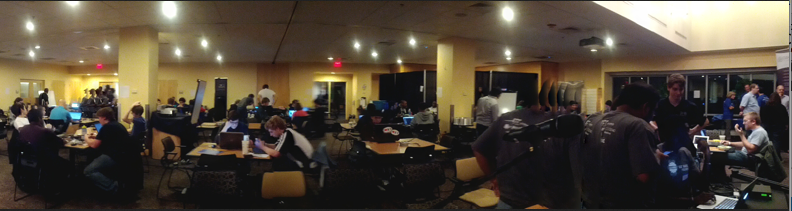
    <p>Held in the UMBC Skylight Room from 7:00pm Friday to 7:00pm Saturday this past weekend, UMBC’s first-ever <a href="http://en.wikipedia.org/wiki/Hackathon" rel="nofollow external" class="bo">hackathon</a> was open to all UMBC students of any skill level, from innovators and explorers to designers and hardcore coders. Its purpose was to allow students to mingle and collaborate for 24 continuous hours of community exploration to grow technology projects from scratch while expanding their connections to other students, industry leaders, and faculty. Admission was free and attracted students from across the UMBC campus community, including CS, CE, EE, IS, Biology, Biotechnology, Math, Physics, and Media Studies. </p>
    <p>The term ‘hackathon’ hearkens back to the original meaning of “hacker” and “hacking” in early Internet history — namely, to “hack together (create) something quickly” instead of their current interpretations typically referring to illegal cybersecurity activities.</p>
    <p>The theme for hackUMBC 2013 was “Hacking to Improve Campus Life” with the goal of ‘hacking together’ any sort of hardware or software project that helps students, teachers, or schools. Accordingly, projects developed during the event included a textbook resale service, realtime intelligent parking space sensors, Peoplesoft interface refinements, and mobile apps to help UMBC students network, socialize, and  monitor class schedules, among many others.</p>
    <p>Throughout the event, volunteer mentors from UMBC and local industry circulated amongst the teams to offer advice and guidance on their efforts, including how to successfully ‘pitch’ their products to the judges. </p>
    <p>UMBC President Freeman Hrabowski joined the festivities early Friday evening to offer words of encouragement and motivation for the nearly 100 UMBC students competing in this innovative and highly charged event. </p>
    <p>hackUMBC was conceived by CSEE students Perry Ogwuche and Randi Williams following their summer experience as fellows at <a href="http://code2040.org/" rel="nofollow external" class="bo">CODE2040</a>.  Assisting in the effort was Prajit Kumar Das, CS PhD student and president of UMBC’s ACM chapter, and Alexander Morrow, a senior CS student and president of UMBC’s Cryptocurrency Club.  CSEE’s Dr. Rick Forno served as faculty advisor to the event.</p>
    <p>Projects were evaluated by several faculty and staff judges based on creativity, technical difficulty, polish, relevance, and usefulness. More than $2500 in prizes were awarded!</p>
    <br>
    <strong>First Place: BookSwap </strong>(Rostislav Tsiomenko, Ilya Dynin)<br>
    <img src="http://www.csee.umbc.edu/~rforno/photos/first.jpg" width="50%" height="50%" alt="" style="max-width: 100%; height: auto;">
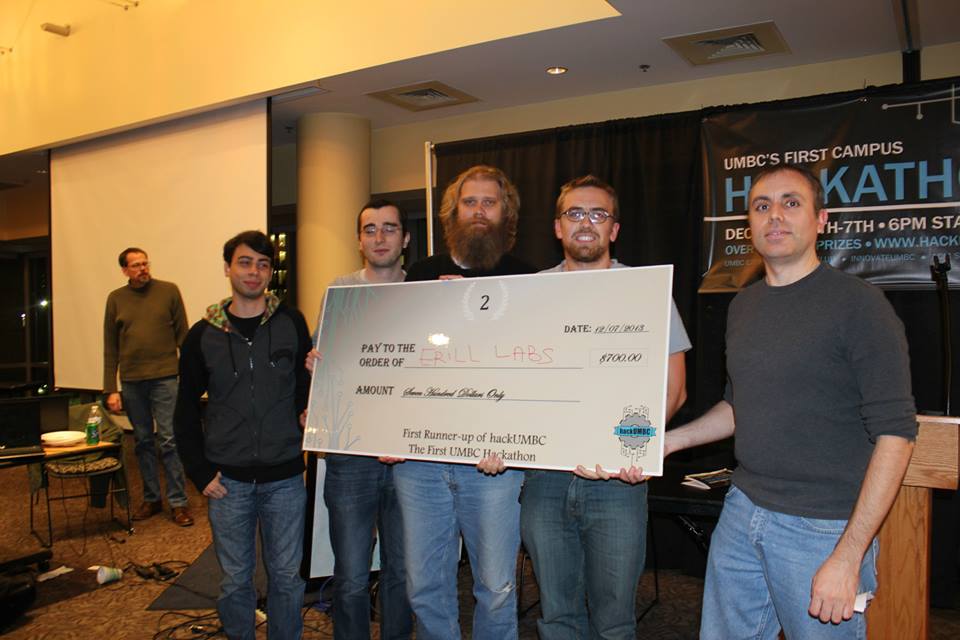
    <p><strong>Second Place: Erill Labs</strong> (Robert Forder, Talmo Pereira, Patrick O’Neill, Sefa Kilic)<br>
    <img src="http://www.csee.umbc.edu/~rforno/photos/second.jpg" width="50%" height="50%" alt="" style="max-width: 100%; height: auto;"></p>
    <p><strong>Third Place: Clever Source Solutions</strong> (Edward Mukasey, Ian Shefferman, Chinonso Ugwu)</p>
    <p><img src="http://www.csee.umbc.edu/~rforno/photos/third.jpg" width="50%" height="50%" alt="" style="max-width: 100%; height: auto;">  </p>
    <p>hackUMBC Judges: Tim Oates, Rick Forno, Wesley Griffin, Dan Hood, Shawn Lupoli, Valerie Thomas, Geoffrey Weiss, and Ashwinkumar Ganesan.</p>
    <p>hackUMBC was sponsored by Northrop Grumman, the UMBC Department of Computer Science and Electrical Engineering, ClearEdge IT Solutions, Independent Security Evaluators, Next Century Corporation, TriTech Systems, Github, CODE2040, the UMBC BWTech Cync Program, and the UMBC Alex Brown Center.</p>
    <p>More information can be found at the <a href="http://hackumbc.org/home.html" rel="nofollow external" class="bo">hackUMBC page</a>.  </p>
    <p><img src="http://www.csee.umbc.edu/~rforno/photos/micro2.png" alt="" style="max-width: 100%; height: auto;"></p>
    </div>
]]>
</Body>
<Summary>The inaugural hackUMBC hackathon was a smashing success!   Held in the UMBC Skylight Room from 7:00pm Friday to 7:00pm Saturday this past weekend, UMBC’s first-ever hackathon was open to all UMBC...</Summary>
<Website>http://www.csee.umbc.edu/2013/12/first-hackumbc-concludes-successfully/</Website>
<TrackingUrl>https://my3.my.umbc.edu/api/v0/pixel/news/39298/guest@my.umbc.edu/ccda83873ec78b746e51f5ad4c59a0c7/api/pixel</TrackingUrl>
<Tag>computer-engineering</Tag>
<Tag>computer-science</Tag>
<Tag>csee</Tag>
<Tag>electrical-engineering</Tag>
<Tag>news</Tag>
<Group token="csee">Computer Science and Electrical Engineering</Group>
<GroupUrl>https://my3.my.umbc.edu/groups/csee</GroupUrl>
<AvatarUrl>https://assets3-my.umbc.edu/system/shared/avatars/groups/000/000/099/d117dca133c64bf78a4b7696dd007189/xsmall.png?1314043393</AvatarUrl>
<AvatarUrl size="original">https://assets1-my.umbc.edu/system/shared/avatars/groups/000/000/099/d117dca133c64bf78a4b7696dd007189/original.png?1314043393</AvatarUrl>
<AvatarUrl size="xxlarge">https://assets1-my.umbc.edu/system/shared/avatars/groups/000/000/099/d117dca133c64bf78a4b7696dd007189/xxlarge.png?1314043393</AvatarUrl>
<AvatarUrl size="xlarge">https://assets4-my.umbc.edu/system/shared/avatars/groups/000/000/099/d117dca133c64bf78a4b7696dd007189/xlarge.png?1314043393</AvatarUrl>
<AvatarUrl size="large">https://assets3-my.umbc.edu/system/shared/avatars/groups/000/000/099/d117dca133c64bf78a4b7696dd007189/large.png?1314043393</AvatarUrl>
<AvatarUrl size="medium">https://assets1-my.umbc.edu/system/shared/avatars/groups/000/000/099/d117dca133c64bf78a4b7696dd007189/medium.png?1314043393</AvatarUrl>
<AvatarUrl size="small">https://assets2-my.umbc.edu/system/shared/avatars/groups/000/000/099/d117dca133c64bf78a4b7696dd007189/small.png?1314043393</AvatarUrl>
<AvatarUrl size="xsmall">https://assets3-my.umbc.edu/system/shared/avatars/groups/000/000/099/d117dca133c64bf78a4b7696dd007189/xsmall.png?1314043393</AvatarUrl>
<AvatarUrl size="xxsmall">https://assets3-my.umbc.edu/system/shared/avatars/groups/000/000/099/d117dca133c64bf78a4b7696dd007189/xxsmall.png?1314043393</AvatarUrl>
<Sponsor>Computer Science and Electrical Engineering</Sponsor>
<PawCount>49</PawCount>
<CommentCount>7</CommentCount>
<CommentsAllowed>true</CommentsAllowed>
<PostedAt>Tue, 10 Dec 2013 13:17:53 -0500</PostedAt>
<EditAt>Tue, 10 Dec 2013 13:17:53 -0500</EditAt>
</NewsItem>

<NewsItem contentIssues="false" id="39299" important="false" status="posted" url="https://my3.my.umbc.edu/posts/39299">
<Title>Plan Emerges to Make Internet-Enabled Devices Play Nicely</Title>
<Body>
<![CDATA[
    <div class="html-content">
    <p>An industry hopes to make Web-connected gadgets from different makers work well together.</p>
    <p>Before you know it, you may be able to connect your “smart” coffeemaker to your “smart” toaster to ensure a properly timed java and bagel.</p>
    </div>
]]>
</Body>
<Summary>An industry hopes to make Web-connected gadgets from different makers work well together.  Before you know it, you may be able to connect your “smart” coffeemaker to your “smart” toaster to ensure...</Summary>
<Website>http://www.technologyreview.com/news/522406/plan-emerges-to-make-internet-enabled-devices-play-nicely/</Website>
<TrackingUrl>https://my3.my.umbc.edu/api/v0/pixel/news/39299/guest@my.umbc.edu/5f125472c3305deb73f1d0f7abfa18be/api/pixel</TrackingUrl>
<Tag>development</Tag>
<Tag>internet</Tag>
<Tag>mit</Tag>
<Tag>technology</Tag>
<Tag>web</Tag>
<Group token="retired-583">Web Developer - Build Group</Group>
<GroupUrl>https://my3.my.umbc.edu/groups/retired-583</GroupUrl>
<AvatarUrl>https://assets3-my.umbc.edu/system/shared/avatars/groups/000/000/583/fc60f5d7abc2e080599bb6dc465db54d/xsmall.png?1363101197</AvatarUrl>
<AvatarUrl size="original">https://assets4-my.umbc.edu/system/shared/avatars/groups/000/000/583/fc60f5d7abc2e080599bb6dc465db54d/original.jpg?1363101197</AvatarUrl>
<AvatarUrl size="xxlarge">https://assets4-my.umbc.edu/system/shared/avatars/groups/000/000/583/fc60f5d7abc2e080599bb6dc465db54d/xxlarge.png?1363101197</AvatarUrl>
<AvatarUrl size="xlarge">https://assets4-my.umbc.edu/system/shared/avatars/groups/000/000/583/fc60f5d7abc2e080599bb6dc465db54d/xlarge.png?1363101197</AvatarUrl>
<AvatarUrl size="large">https://assets3-my.umbc.edu/system/shared/avatars/groups/000/000/583/fc60f5d7abc2e080599bb6dc465db54d/large.png?1363101197</AvatarUrl>
<AvatarUrl size="medium">https://assets3-my.umbc.edu/system/shared/avatars/groups/000/000/583/fc60f5d7abc2e080599bb6dc465db54d/medium.png?1363101197</AvatarUrl>
<AvatarUrl size="small">https://assets4-my.umbc.edu/system/shared/avatars/groups/000/000/583/fc60f5d7abc2e080599bb6dc465db54d/small.png?1363101197</AvatarUrl>
<AvatarUrl size="xsmall">https://assets3-my.umbc.edu/system/shared/avatars/groups/000/000/583/fc60f5d7abc2e080599bb6dc465db54d/xsmall.png?1363101197</AvatarUrl>
<AvatarUrl size="xxsmall">https://assets4-my.umbc.edu/system/shared/avatars/groups/000/000/583/fc60f5d7abc2e080599bb6dc465db54d/xxsmall.png?1363101197</AvatarUrl>
<Sponsor>Web Developer - Build Group</Sponsor>
<PawCount>0</PawCount>
<CommentCount>0</CommentCount>
<CommentsAllowed>true</CommentsAllowed>
<PostedAt>Tue, 10 Dec 2013 13:00:00 -0500</PostedAt>
</NewsItem>

<NewsItem contentIssues="false" id="39297" important="false" status="posted" url="https://my3.my.umbc.edu/posts/39297">
<Title>Extreme Reality&#8217;s Announces New Partnership with AngleHack for Extreme Motion SDK</Title>
<Body>
<![CDATA[
    <div class="html-content"><p>Extreme Reality announced its partnership with AngelHack for the  Barcelona and Silicon Valley AngelHack Hackthons coming this week.</p></div>
]]>
</Body>
<Summary>Extreme Reality announced its partnership with AngelHack for the  Barcelona and Silicon Valley AngelHack Hackthons coming this week.</Summary>
<Website>http://www.htmlgoodies.com/daily_news/extreme-realitys-announces-new-partnership-with-anglehack-for-extreme-motion-sdk.html</Website>
<TrackingUrl>https://my3.my.umbc.edu/api/v0/pixel/news/39297/guest@my.umbc.edu/9f65cc92cc23779e5369957183200e85/api/pixel</TrackingUrl>
<Tag>html</Tag>
<Tag>htmlgoodies</Tag>
<Tag>learning</Tag>
<Group token="retired-583">Web Developer - Build Group</Group>
<GroupUrl>https://my3.my.umbc.edu/groups/retired-583</GroupUrl>
<AvatarUrl>https://assets3-my.umbc.edu/system/shared/avatars/groups/000/000/583/fc60f5d7abc2e080599bb6dc465db54d/xsmall.png?1363101197</AvatarUrl>
<AvatarUrl size="original">https://assets4-my.umbc.edu/system/shared/avatars/groups/000/000/583/fc60f5d7abc2e080599bb6dc465db54d/original.jpg?1363101197</AvatarUrl>
<AvatarUrl size="xxlarge">https://assets4-my.umbc.edu/system/shared/avatars/groups/000/000/583/fc60f5d7abc2e080599bb6dc465db54d/xxlarge.png?1363101197</AvatarUrl>
<AvatarUrl size="xlarge">https://assets4-my.umbc.edu/system/shared/avatars/groups/000/000/583/fc60f5d7abc2e080599bb6dc465db54d/xlarge.png?1363101197</AvatarUrl>
<AvatarUrl size="large">https://assets3-my.umbc.edu/system/shared/avatars/groups/000/000/583/fc60f5d7abc2e080599bb6dc465db54d/large.png?1363101197</AvatarUrl>
<AvatarUrl size="medium">https://assets3-my.umbc.edu/system/shared/avatars/groups/000/000/583/fc60f5d7abc2e080599bb6dc465db54d/medium.png?1363101197</AvatarUrl>
<AvatarUrl size="small">https://assets4-my.umbc.edu/system/shared/avatars/groups/000/000/583/fc60f5d7abc2e080599bb6dc465db54d/small.png?1363101197</AvatarUrl>
<AvatarUrl size="xsmall">https://assets3-my.umbc.edu/system/shared/avatars/groups/000/000/583/fc60f5d7abc2e080599bb6dc465db54d/xsmall.png?1363101197</AvatarUrl>
<AvatarUrl size="xxsmall">https://assets4-my.umbc.edu/system/shared/avatars/groups/000/000/583/fc60f5d7abc2e080599bb6dc465db54d/xxsmall.png?1363101197</AvatarUrl>
<Sponsor>Web Developer - Build Group</Sponsor>
<PawCount>0</PawCount>
<CommentCount>0</CommentCount>
<CommentsAllowed>true</CommentsAllowed>
<PostedAt>Tue, 10 Dec 2013 12:47:00 -0500</PostedAt>
</NewsItem>

<NewsItem contentIssues="false" id="39294" important="false" status="posted" url="https://my3.my.umbc.edu/posts/39294">
<Title>Countdown to finals: 3 days and counting...</Title>
<Tagline>Smart Students at UMBC Use Study Groups - join one today!!!</Tagline>
<Body>
<![CDATA[
    <div class="html-content">
    <span>Hello All!  </span><div><br></div>
    <div><span>Happy Snow Day!  I hope that you all were able to take advantage of our delay (for extra studying time).</span></div>
    <div><span><br></span></div>
    <div>
    <span>Just a reminder that there are  <strong>3</strong></span> days until the start of final exams!</div>
    <div><br></div>
    <div><br></div>
    <div><span>Fact:  Study groups are a great strategy to prepare for exams.</span></div>
    <div><br></div>
    <div>The good news:  It's never too late to join one...</div>
    <div><br></div>
    <div><span><br></span></div>
    <div><span>FYI:  I will announce the winners of the Fall 2013 Pizza Raffle tomorrow.</span></div>
    <div><br></div>
    <div>Enjoy the rest of your day!</div>
    <div><br></div>
    <div><br></div>
    <div>Tashauna Felix</div>
    <div>iCubed Study Group Coordinator</div>
    <div><a href="mailto:tfelix1@umbc.edu" rel="nofollow external" class="bo">tfelix1@umbc.edu</a></div>
    <div>410.455.3173</div>
    </div>
]]>
</Body>
<Summary>Hello All!      Happy Snow Day!  I hope that you all were able to take advantage of our delay (for extra studying time).     Just a reminder that there are  3 days until the start of final exams!...</Summary>
<TrackingUrl>https://my3.my.umbc.edu/api/v0/pixel/news/39294/guest@my.umbc.edu/b87a418f8f19af90c49bd0d24072cdfa/api/pixel</TrackingUrl>
<Group token="retired-635">iCubed Cohort 3: Team Study Groups</Group>
<GroupUrl>https://my3.my.umbc.edu/groups/retired-635</GroupUrl>
<AvatarUrl>https://assets4-my.umbc.edu/system/shared/avatars/groups/000/000/635/8e47b6819f70d10722612702859d8ae2/xsmall.png?1375732423</AvatarUrl>
<AvatarUrl size="original">https://assets3-my.umbc.edu/system/shared/avatars/groups/000/000/635/8e47b6819f70d10722612702859d8ae2/original.png?1375732423</AvatarUrl>
<AvatarUrl size="xxlarge">https://assets2-my.umbc.edu/system/shared/avatars/groups/000/000/635/8e47b6819f70d10722612702859d8ae2/xxlarge.png?1375732423</AvatarUrl>
<AvatarUrl size="xlarge">https://assets3-my.umbc.edu/system/shared/avatars/groups/000/000/635/8e47b6819f70d10722612702859d8ae2/xlarge.png?1375732423</AvatarUrl>
<AvatarUrl size="large">https://assets2-my.umbc.edu/system/shared/avatars/groups/000/000/635/8e47b6819f70d10722612702859d8ae2/large.png?1375732423</AvatarUrl>
<AvatarUrl size="medium">https://assets2-my.umbc.edu/system/shared/avatars/groups/000/000/635/8e47b6819f70d10722612702859d8ae2/medium.png?1375732423</AvatarUrl>
<AvatarUrl size="small">https://assets2-my.umbc.edu/system/shared/avatars/groups/000/000/635/8e47b6819f70d10722612702859d8ae2/small.png?1375732423</AvatarUrl>
<AvatarUrl size="xsmall">https://assets4-my.umbc.edu/system/shared/avatars/groups/000/000/635/8e47b6819f70d10722612702859d8ae2/xsmall.png?1375732423</AvatarUrl>
<AvatarUrl size="xxsmall">https://assets4-my.umbc.edu/system/shared/avatars/groups/000/000/635/8e47b6819f70d10722612702859d8ae2/xxsmall.png?1375732423</AvatarUrl>
<Sponsor>iCubed Cohort 3: Team Study Groups</Sponsor>
<PawCount>0</PawCount>
<CommentCount>0</CommentCount>
<CommentsAllowed>true</CommentsAllowed>
<PostedAt>Tue, 10 Dec 2013 12:34:09 -0500</PostedAt>
</NewsItem>

</News>