<?xml version="1.0"?>
<News hasArchived="true" page="8210" pageCount="10747" pageSize="10" timestamp="Wed, 12 Aug 2026 16:04:12 -0400" url="https://my3.my.umbc.edu/posts.xml?mode=activity&amp;page=8210">
<NewsItem contentIssues="false" id="36858" important="false" status="posted" url="https://my3.my.umbc.edu/posts/36858">
<Title>Meeting Minutes from 10-7-13</Title>
<Tagline>The recap of what was discussed at last General Body Meetin</Tagline>
<Body>
<![CDATA[
    <div class="html-content">
    <h1><span>Meeting Minutes 10/7/13</span></h1>
    
    <p> </p>
    
    <h2>General:</h2>
    
    <p><span>·<span>        
    </span></span>Introduced e-board members (Present: Aaron,
    Brenden, Mo, Kevin)</p>
    
    <p><span>·<span>        
    </span></span>If you want to be an official member, email
    Catherine Wofford at <a href="mailto:cwofford@salhonors.org" rel="nofollow external" class="bo">cwofford@salhonors.org</a></p>
    
    <p><span>·<span>        
    </span></span>Meetings are biweekly</p>
    
    <p><span>·<span>        
    </span></span>Discussed point system – may need to revise
    point system in the case for people who already volunteer several hours a week.
    1 point per event or per organization?</p>
    
    <p><span>·<span>        
    </span></span>For t-shirts, talk with Mo</p>
    
    <h2>Events:</h2>
    
    <p><span>·<span>        
    </span></span>Food Bank last week was a success</p>
    
    <p><span>·<span>        
    </span></span>We aim to have 1 volunteer event and 1 social
    event every month.</p>
    
    <p><span>·<span>        
    </span></span>Asked the member present whether Saturday is a
    good day for volunteering events, Saturday is generally the best</p>
    
    <p><span>·<span>        
    </span></span>For non-campus volunteer events: Fill out form
    the volunteer form, give it to an e-board member.</p>
    
    <p><span>·<span>        
    </span></span><strong>Social
    Event:</strong></p>
    
    <p><span>o<span>  
    </span></span>SAL Game Night!!</p>
    
    <p><span>§<span> 
    </span></span>Location: TBA (Possibly at Lower flat Tuesday,
    Harbor Multipurpose room?)</p>
    
    <p><span>§<span> 
    </span></span>Time: 7:30-9:30pm, October 17<sup>th</sup></p>
    
    <p><span>·<span>        
    </span></span><strong>Volunteer
    Event: (volunteering opportunities for individuals)</strong></p>
    
    <p><span>o<span>  
    </span></span>Be Great: Graduate</p>
    
    <p><span>§<span> 
    </span></span>Tutoring kids in Baltimore City, must be available
    all-year round during weekly evenings</p>
    
    <p><span>o<span>  
    </span></span>Soccer w/o Borders</p>
    
    <p><span>§<span> 
    </span></span>Academic tutoring, must be free weekly evenings</p>
    
    <p><span>·<span>        
    </span></span>We will 
    mention any group or on-campus volunteering events </p>
    </div>
]]>
</Body>
<Summary>Meeting Minutes 10/7/13         General:    ·         Introduced e-board members (Present: Aaron, Brenden, Mo, Kevin)    ·         If you want to be an official member, email Catherine Wofford at...</Summary>
<TrackingUrl>https://my3.my.umbc.edu/api/v0/pixel/news/36858/guest@my.umbc.edu/865c5010bde5bd58bbb0019d21853b1e/api/pixel</TrackingUrl>
<Group token="retired-559">Sigma Alpha Lambda</Group>
<GroupUrl>https://my3.my.umbc.edu/groups/retired-559</GroupUrl>
<AvatarUrl>https://assets4-my.umbc.edu/images/avatars/group/3/xsmall.png?1786447729</AvatarUrl>
<AvatarUrl size="original">https://assets4-my.umbc.edu/images/avatars/group/3/original.png?1786447729</AvatarUrl>
<AvatarUrl size="xxlarge">https://assets1-my.umbc.edu/images/avatars/group/3/xxlarge.png?1786447729</AvatarUrl>
<AvatarUrl size="xlarge">https://assets4-my.umbc.edu/images/avatars/group/3/xlarge.png?1786447729</AvatarUrl>
<AvatarUrl size="large">https://assets1-my.umbc.edu/images/avatars/group/3/large.png?1786447729</AvatarUrl>
<AvatarUrl size="medium">https://assets1-my.umbc.edu/images/avatars/group/3/medium.png?1786447729</AvatarUrl>
<AvatarUrl size="small">https://assets1-my.umbc.edu/images/avatars/group/3/small.png?1786447729</AvatarUrl>
<AvatarUrl size="xsmall">https://assets4-my.umbc.edu/images/avatars/group/3/xsmall.png?1786447729</AvatarUrl>
<AvatarUrl size="xxsmall">https://assets4-my.umbc.edu/images/avatars/group/3/xxsmall.png?1786447729</AvatarUrl>
<Sponsor>Sigma Alpha Lambda</Sponsor>
<PawCount>0</PawCount>
<CommentCount>0</CommentCount>
<CommentsAllowed>true</CommentsAllowed>
<PostedAt>Thu, 10 Oct 2013 20:50:53 -0400</PostedAt>
</NewsItem>

<NewsItem contentIssues="false" id="123030" important="false" status="posted" url="https://my3.my.umbc.edu/posts/123030">
<Title>Jason Schiffman, Psychology, in USA Today/The Pew Charitable Trusts</Title>
<Body>
<![CDATA[
    <div class="html-content">
    <p>The Maryland General Assembly approved funding this year to establish a “Center for Excellence on Early Intervention for Serious Mental Illness” to identify young people with psychosis or at risk for the specific symptom that makes violence more likely. The program aims to get them into immediate treatment.</p>
    <p><a href="/wp-content/uploads/2013/10/campusviewbookwork-3315-199x300.jpg" rel="nofollow external" class="bo"><img alt="Jason Schiffman" src="/wp-content/uploads/2013/10/campusviewbookwork-3315-199x300.jpg" width="199" height="300" style="max-width: 100%; height: auto;"></a></p>
    <p>Psychology Associate Professor Jason Schiffman is a member of the new center’s staff and is quoted in a <a href="http://www.usatoday.com/story/news/nation/2013/10/09/psychosis-mental-health-violence/2950937/" rel="nofollow external" class="bo">USA Today/The Pew Charitable Trusts</a> article. He describes how early treatment for people with psychosis can be pivotal.</p>
    <p>“There’s a lot of evidence to suggest that the sooner a person with psychosis gets into treatment, the better the outcome for that person’s well-being, for that person’s chances of living and working in the community, for them living the life they want to live,” Schiffman said.</p>
    <p>He also provides insight on how certain symptoms present in childhood can put a person at high risk to develop psychosis later in life.</p>
    <p>“The person may say that the passage of time feels faster or slower than usual,” Schiffman said. “Familiar surroundings can seem strange, confusing or unreal. They might say they’ve heard things others can’t hear like people whispering or talking. They might say they mistake shadows for people or noises for voices. They might report seeing things on TV or reading in the newspaper that they think has special meaning to them. They often pick up hidden threats or putdowns in what people say or do. Some say they sometimes use words in unusual ways.”</p>
    <p>You can read the full article <a href="http://www.usatoday.com/story/news/nation/2013/10/09/psychosis-mental-health-violence/2950937/" rel="nofollow external" class="bo">here</a>.</p>
    </div>
]]>
</Body>
<Summary>The Maryland General Assembly approved funding this year to establish a “Center for Excellence on Early Intervention for Serious Mental Illness” to identify young people with psychosis or at risk...</Summary>
<Website>https://umbc.edu/stories/jason-schiffman-psychology-in-usa-todaythe-pew-charitable-trusts/</Website>
<TrackingUrl>https://my3.my.umbc.edu/api/v0/pixel/news/123030/guest@my.umbc.edu/1b9e62e24460616acdd16eb11e9da93c/api/pixel</TrackingUrl>
<Tag>cahss</Tag>
<Tag>policy-and-society</Tag>
<Tag>psychology</Tag>
<Tag>research</Tag>
<Group token="umbc-news-magazine">UMBC News &amp;amp; Magazine</Group>
<GroupUrl>https://my3.my.umbc.edu/groups/umbc-news-magazine</GroupUrl>
<AvatarUrl>https://assets1-my.umbc.edu/system/shared/avatars/groups/000/001/943/24435aa6207c452e7bc15cc74b42c7bb/xsmall.png?1748556657</AvatarUrl>
<AvatarUrl size="original">https://assets1-my.umbc.edu/system/shared/avatars/groups/000/001/943/24435aa6207c452e7bc15cc74b42c7bb/original.png?1748556657</AvatarUrl>
<AvatarUrl size="xxlarge">https://assets2-my.umbc.edu/system/shared/avatars/groups/000/001/943/24435aa6207c452e7bc15cc74b42c7bb/xxlarge.png?1748556657</AvatarUrl>
<AvatarUrl size="xlarge">https://assets2-my.umbc.edu/system/shared/avatars/groups/000/001/943/24435aa6207c452e7bc15cc74b42c7bb/xlarge.png?1748556657</AvatarUrl>
<AvatarUrl size="large">https://assets3-my.umbc.edu/system/shared/avatars/groups/000/001/943/24435aa6207c452e7bc15cc74b42c7bb/large.png?1748556657</AvatarUrl>
<AvatarUrl size="medium">https://assets1-my.umbc.edu/system/shared/avatars/groups/000/001/943/24435aa6207c452e7bc15cc74b42c7bb/medium.png?1748556657</AvatarUrl>
<AvatarUrl size="small">https://assets2-my.umbc.edu/system/shared/avatars/groups/000/001/943/24435aa6207c452e7bc15cc74b42c7bb/small.png?1748556657</AvatarUrl>
<AvatarUrl size="xsmall">https://assets1-my.umbc.edu/system/shared/avatars/groups/000/001/943/24435aa6207c452e7bc15cc74b42c7bb/xsmall.png?1748556657</AvatarUrl>
<AvatarUrl size="xxsmall">https://assets2-my.umbc.edu/system/shared/avatars/groups/000/001/943/24435aa6207c452e7bc15cc74b42c7bb/xxsmall.png?1748556657</AvatarUrl>
<Sponsor>UMBC News &amp; Magazine</Sponsor>
<PawCount>0</PawCount>
<CommentCount>0</CommentCount>
<CommentsAllowed>false</CommentsAllowed>
<PostedAt>Thu, 10 Oct 2013 20:48:25 -0400</PostedAt>
</NewsItem>

<NewsItem contentIssues="true" id="36861" important="false" status="posted" url="https://my3.my.umbc.edu/posts/36861">
<Title>Bits Blog: A Senator Raises Privacy Questions About Cross-Device Tracking</Title>
<Body>
<![CDATA[
    <div class="html-content">Senator Edward J. Markey asked the Federal Trade Commission to investigate mobile ad companies that track consumers to show them ads based on their browsing habits.<br><div><table border="0"><tbody><tr><td>
    <a href="http://share.feedsportal.com/share/twitter/?u=http%3A%2F%2Fbits.blogs.nytimes.com%2F2013%2F10%2F10%2Fa-senator-raises-privacy-questions-about-cross-device-tracking%2F%3Fpartner%3Drss%26emc%3Drss&amp;t=Bits+Blog%3A+A+Senator+Raises+Privacy+Questions+About+Cross-Device+Tracking" rel="nofollow external" class="bo"><img src="http://res3.feedsportal.com/social/twitter.png" style="max-width: 100%; height: auto;"></a> <a href="http://share.feedsportal.com/share/facebook/?u=http%3A%2F%2Fbits.blogs.nytimes.com%2F2013%2F10%2F10%2Fa-senator-raises-privacy-questions-about-cross-device-tracking%2F%3Fpartner%3Drss%26emc%3Drss&amp;t=Bits+Blog%3A+A+Senator+Raises+Privacy+Questions+About+Cross-Device+Tracking" rel="nofollow external" class="bo"><img src="http://res3.feedsportal.com/social/facebook.png" style="max-width: 100%; height: auto;"></a> <a href="http://share.feedsportal.com/share/linkedin/?u=http%3A%2F%2Fbits.blogs.nytimes.com%2F2013%2F10%2F10%2Fa-senator-raises-privacy-questions-about-cross-device-tracking%2F%3Fpartner%3Drss%26emc%3Drss&amp;t=Bits+Blog%3A+A+Senator+Raises+Privacy+Questions+About+Cross-Device+Tracking" rel="nofollow external" class="bo"><img src="http://res3.feedsportal.com/social/linkedin.png" style="max-width: 100%; height: auto;"></a> <a href="http://share.feedsportal.com/share/gplus/?u=http%3A%2F%2Fbits.blogs.nytimes.com%2F2013%2F10%2F10%2Fa-senator-raises-privacy-questions-about-cross-device-tracking%2F%3Fpartner%3Drss%26emc%3Drss&amp;t=Bits+Blog%3A+A+Senator+Raises+Privacy+Questions+About+Cross-Device+Tracking" rel="nofollow external" class="bo"><img src="http://res3.feedsportal.com/social/googleplus.png" style="max-width: 100%; height: auto;"></a> <a href="http://share.feedsportal.com/share/email/?u=http%3A%2F%2Fbits.blogs.nytimes.com%2F2013%2F10%2F10%2Fa-senator-raises-privacy-questions-about-cross-device-tracking%2F%3Fpartner%3Drss%26emc%3Drss&amp;t=Bits+Blog%3A+A+Senator+Raises+Privacy+Questions+About+Cross-Device+Tracking" rel="nofollow external" class="bo"><img src="http://res3.feedsportal.com/social/email.png" style="max-width: 100%; height: auto;"></a>
    </td></tr></tbody></table></div>
    <br><br><a href="http://da.feedsportal.com/r/176965796139/u/0/f/640387/c/34625/s/32504eb2/sc/15/rc/1/rc.htm" rel="nofollow external" class="bo"><img src="http://da.feedsportal.com/r/176965796139/u/0/f/640387/c/34625/s/32504eb2/sc/15/rc/1/rc.img" style="max-width: 100%; height: auto;"></a><br><a href="http://da.feedsportal.com/r/176965796139/u/0/f/640387/c/34625/s/32504eb2/sc/15/rc/2/rc.htm" rel="nofollow external" class="bo"><img src="http://da.feedsportal.com/r/176965796139/u/0/f/640387/c/34625/s/32504eb2/sc/15/rc/2/rc.img" style="max-width: 100%; height: auto;"></a><br><a href="http://da.feedsportal.com/r/176965796139/u/0/f/640387/c/34625/s/32504eb2/sc/15/rc/3/rc.htm" rel="nofollow external" class="bo"><img src="http://da.feedsportal.com/r/176965796139/u/0/f/640387/c/34625/s/32504eb2/sc/15/rc/3/rc.img" style="max-width: 100%; height: auto;"></a><br><br><a href="http://da.feedsportal.com/r/176965796139/u/0/f/640387/c/34625/s/32504eb2/a2.htm" rel="nofollow external" class="bo"><img src="http://da.feedsportal.com/r/176965796139/u/0/f/640387/c/34625/s/32504eb2/a2.img" style="max-width: 100%; height: auto;"></a>
    </div>
]]>
</Body>
<Summary>Senator Edward J. Markey asked the Federal Trade Commission to investigate mobile ad companies that track consumers to show them ads based on their browsing habits.      </Summary>
<Website>http://bits.blogs.nytimes.com/2013/10/10/a-senator-raises-privacy-questions-about-cross-device-tracking/?partner=rss&amp;emc=rss</Website>
<TrackingUrl>https://my3.my.umbc.edu/api/v0/pixel/news/36861/guest@my.umbc.edu/900d2b95a6ceee031feaf7aa35a5a97b/api/pixel</TrackingUrl>
<Tag>computers-and-the-internet</Tag>
<Tag>devices</Tag>
<Tag>federal-trade-commission</Tag>
<Tag>internet</Tag>
<Tag>markey-edward-j</Tag>
<Tag>mobile</Tag>
<Tag>new</Tag>
<Tag>online-advertising</Tag>
<Tag>policy</Tag>
<Tag>privacy</Tag>
<Tag>ramirez-edith</Tag>
<Tag>technology</Tag>
<Tag>york</Tag>
<Group token="retired-583">Web Developer - Build Group</Group>
<GroupUrl>https://my3.my.umbc.edu/groups/retired-583</GroupUrl>
<AvatarUrl>https://assets3-my.umbc.edu/system/shared/avatars/groups/000/000/583/fc60f5d7abc2e080599bb6dc465db54d/xsmall.png?1363101197</AvatarUrl>
<AvatarUrl size="original">https://assets4-my.umbc.edu/system/shared/avatars/groups/000/000/583/fc60f5d7abc2e080599bb6dc465db54d/original.jpg?1363101197</AvatarUrl>
<AvatarUrl size="xxlarge">https://assets4-my.umbc.edu/system/shared/avatars/groups/000/000/583/fc60f5d7abc2e080599bb6dc465db54d/xxlarge.png?1363101197</AvatarUrl>
<AvatarUrl size="xlarge">https://assets4-my.umbc.edu/system/shared/avatars/groups/000/000/583/fc60f5d7abc2e080599bb6dc465db54d/xlarge.png?1363101197</AvatarUrl>
<AvatarUrl size="large">https://assets3-my.umbc.edu/system/shared/avatars/groups/000/000/583/fc60f5d7abc2e080599bb6dc465db54d/large.png?1363101197</AvatarUrl>
<AvatarUrl size="medium">https://assets3-my.umbc.edu/system/shared/avatars/groups/000/000/583/fc60f5d7abc2e080599bb6dc465db54d/medium.png?1363101197</AvatarUrl>
<AvatarUrl size="small">https://assets4-my.umbc.edu/system/shared/avatars/groups/000/000/583/fc60f5d7abc2e080599bb6dc465db54d/small.png?1363101197</AvatarUrl>
<AvatarUrl size="xsmall">https://assets3-my.umbc.edu/system/shared/avatars/groups/000/000/583/fc60f5d7abc2e080599bb6dc465db54d/xsmall.png?1363101197</AvatarUrl>
<AvatarUrl size="xxsmall">https://assets4-my.umbc.edu/system/shared/avatars/groups/000/000/583/fc60f5d7abc2e080599bb6dc465db54d/xxsmall.png?1363101197</AvatarUrl>
<Sponsor>Web Developer - Build Group</Sponsor>
<PawCount>0</PawCount>
<CommentCount>0</CommentCount>
<CommentsAllowed>true</CommentsAllowed>
<PostedAt>Thu, 10 Oct 2013 20:14:45 -0400</PostedAt>
<EditAt>Mon, 14 Oct 2013 09:24:04 -0400</EditAt>
</NewsItem>

<NewsItem contentIssues="false" id="36854" important="false" status="posted" url="https://my3.my.umbc.edu/posts/36854">
<Title>Monthly Update!</Title>
<Tagline>A summary of October's events</Tagline>
<Body>
<![CDATA[
    <div class="html-content">Hey all you people,<div><br></div>
    <div>Just wanted to send out an update on the events coming up during the rest of October. <strong>Please read all of this news post. </strong>If you don't, I hate you (JK, I love you) (JK, I hate you).</div>
    <div><br></div>
    <div>
    <strong>October 11th: </strong>We are having a Field Day with Volleyball on Erickson Field starting at 1PM and ending at 6PM. This will be going on despite the rain situation that has plagued Maryland this week. I know all of you are available for practice, so it would be great to see you there as well. It will constitute of fun ultimate and volleyball related games and activities. So much room for activities!</div>
    <div><br></div>
    <div>
    <strong>October 12th: </strong>There will be a UMBC Alumni vs. Current ultimate game at 1PM on Field 1 (West of the stadium, next to the baseball field). This is a great opportunity to meet and play against the individuals that shaped Booya into what it is now (a team that cheers "ballsack"). There's a chance rain could cause this game to be delayed so keep up to date on your emails as a message will be sent out prior to 11 AM with a status on any cancellations.</div>
    <div><br></div>
    <div>
    <strong>October 22nd</strong>: As opposed to having our regularly scheduled practice on Tuesday, October 22nd, we'll be heading up to Towson University to scrimmage against our friendly neighbors. We will be leaving at 8PM and getting back around midnight. I hope to see everyone that regularly attends Tuesday night practices to come out for this game. Should be a great night.</div>
    <div><br></div>
    <div>
    <strong>October 26th/27th: </strong>Our final tournament of the Fall season will be the weekend of the 26th. The tournament is titled Hucks Off The Hilltop and is hosted in Virginia. This tournament is a tad more competitive so we hope to be making a roster of wonderful faces that want to score some points. I need everyone to post whether they are able to attend or not on the Events page of the myUMBC group and if you can drive. I'll be making a roster in a little over one week. If you have not signed up by then, you will be getting a lot of studying done that weekend.</div>
    <div><br></div>
    <div>
    <strong>High Tide: </strong>I want to send out a minor notification regarding a tournament we attend over Spring Break every year. The team gets a number of cars together every break to drive down to Southern Georgia and play in a very fun tournament called High Tide. We rent a house and have a merry old time playing flatball and sitting on couches. This is a very popular tournament, but the roster can only constitute of about 20 people. That should not cause you to sign up for it! If you do not have anything going on that week, I would highly suggest you consider coming with us to this great vacation. Just mark it on your calendars for now.</div>
    <div><br></div>
    <div>That about does it for October events. Thanks for sticking with me to the end and I'll be sure to send out details regarding the Hucks tournament soon. Thanks and see you soon!</div>
    <div><br></div>
    <div>-Clarkson</div>
    <div><br></div>
    <div>Contact Info:</div>
    <div>Email - <a href="mailto:booya.ultimate@gmail.com">booya.ultimate@gmail.com</a>
    </div>
    <div>Personal Cell - 410-300-7306</div>
    </div>
]]>
</Body>
<Summary>Hey all you people,    Just wanted to send out an update on the events coming up during the rest of October. Please read all of this news post. If you don't, I hate you (JK, I love you) (JK, I...</Summary>
<TrackingUrl>https://my3.my.umbc.edu/api/v0/pixel/news/36854/guest@my.umbc.edu/38b06bc6cd62217142d448ab44151908/api/pixel</TrackingUrl>
<Group token="retired-70">UMBC Men's Ultimate</Group>
<GroupUrl>https://my3.my.umbc.edu/groups/retired-70</GroupUrl>
<AvatarUrl>https://assets1-my.umbc.edu/system/shared/avatars/groups/000/000/070/032dd17b77fab7d51a476c5ff2b5659c/xsmall.png?1283625337</AvatarUrl>
<AvatarUrl size="original">https://assets1-my.umbc.edu/system/shared/avatars/groups/000/000/070/032dd17b77fab7d51a476c5ff2b5659c/original.png?1283625337</AvatarUrl>
<AvatarUrl size="xxlarge">https://assets4-my.umbc.edu/system/shared/avatars/groups/000/000/070/032dd17b77fab7d51a476c5ff2b5659c/xxlarge.png?1283625337</AvatarUrl>
<AvatarUrl size="xlarge">https://assets2-my.umbc.edu/system/shared/avatars/groups/000/000/070/032dd17b77fab7d51a476c5ff2b5659c/xlarge.png?1283625337</AvatarUrl>
<AvatarUrl size="large">https://assets2-my.umbc.edu/system/shared/avatars/groups/000/000/070/032dd17b77fab7d51a476c5ff2b5659c/large.png?1283625337</AvatarUrl>
<AvatarUrl size="medium">https://assets4-my.umbc.edu/system/shared/avatars/groups/000/000/070/032dd17b77fab7d51a476c5ff2b5659c/medium.png?1283625337</AvatarUrl>
<AvatarUrl size="small">https://assets3-my.umbc.edu/system/shared/avatars/groups/000/000/070/032dd17b77fab7d51a476c5ff2b5659c/small.png?1283625337</AvatarUrl>
<AvatarUrl size="xsmall">https://assets1-my.umbc.edu/system/shared/avatars/groups/000/000/070/032dd17b77fab7d51a476c5ff2b5659c/xsmall.png?1283625337</AvatarUrl>
<AvatarUrl size="xxsmall">https://assets3-my.umbc.edu/system/shared/avatars/groups/000/000/070/032dd17b77fab7d51a476c5ff2b5659c/xxsmall.png?1283625337</AvatarUrl>
<Sponsor>Booya Men's Ultimate</Sponsor>
<PawCount>0</PawCount>
<CommentCount>0</CommentCount>
<CommentsAllowed>true</CommentsAllowed>
<PostedAt>Thu, 10 Oct 2013 19:03:23 -0400</PostedAt>
</NewsItem>

<NewsItem contentIssues="true" id="36855" important="false" status="posted" url="https://my3.my.umbc.edu/posts/36855">
<Title>DealBook: 2 Founders of BlackBerry Weighing a Takeover Offer</Title>
<Body>
<![CDATA[
    <div class="html-content">Mike Lazaridis and Douglas E. Fregin say that they are weighing a bid for 92 percent of the company that they don’t already own.<br><div><table border="0"><tbody><tr><td>
    <a href="http://share.feedsportal.com/share/twitter/?u=http%3A%2F%2Fdealbook.nytimes.com%2F2013%2F10%2F10%2Fblackberry-founders-explore-bid-for-company%2F%3Fpartner%3Drss%26emc%3Drss&amp;t=DealBook%3A+2+Founders+of+BlackBerry+Weighing+a+Takeover+Offer" rel="nofollow external" class="bo"><img src="http://res3.feedsportal.com/social/twitter.png" style="max-width: 100%; height: auto;"></a> <a href="http://share.feedsportal.com/share/facebook/?u=http%3A%2F%2Fdealbook.nytimes.com%2F2013%2F10%2F10%2Fblackberry-founders-explore-bid-for-company%2F%3Fpartner%3Drss%26emc%3Drss&amp;t=DealBook%3A+2+Founders+of+BlackBerry+Weighing+a+Takeover+Offer" rel="nofollow external" class="bo"><img src="http://res3.feedsportal.com/social/facebook.png" style="max-width: 100%; height: auto;"></a> <a href="http://share.feedsportal.com/share/linkedin/?u=http%3A%2F%2Fdealbook.nytimes.com%2F2013%2F10%2F10%2Fblackberry-founders-explore-bid-for-company%2F%3Fpartner%3Drss%26emc%3Drss&amp;t=DealBook%3A+2+Founders+of+BlackBerry+Weighing+a+Takeover+Offer" rel="nofollow external" class="bo"><img src="http://res3.feedsportal.com/social/linkedin.png" style="max-width: 100%; height: auto;"></a> <a href="http://share.feedsportal.com/share/gplus/?u=http%3A%2F%2Fdealbook.nytimes.com%2F2013%2F10%2F10%2Fblackberry-founders-explore-bid-for-company%2F%3Fpartner%3Drss%26emc%3Drss&amp;t=DealBook%3A+2+Founders+of+BlackBerry+Weighing+a+Takeover+Offer" rel="nofollow external" class="bo"><img src="http://res3.feedsportal.com/social/googleplus.png" style="max-width: 100%; height: auto;"></a> <a href="http://share.feedsportal.com/share/email/?u=http%3A%2F%2Fdealbook.nytimes.com%2F2013%2F10%2F10%2Fblackberry-founders-explore-bid-for-company%2F%3Fpartner%3Drss%26emc%3Drss&amp;t=DealBook%3A+2+Founders+of+BlackBerry+Weighing+a+Takeover+Offer" rel="nofollow external" class="bo"><img src="http://res3.feedsportal.com/social/email.png" style="max-width: 100%; height: auto;"></a>
    </td></tr></tbody></table></div>
    <br><br><a href="http://da.feedsportal.com/r/176967969268/u/0/f/640387/c/34625/s/324fc789/sc/21/rc/1/rc.htm" rel="nofollow external" class="bo"><img src="http://da.feedsportal.com/r/176967969268/u/0/f/640387/c/34625/s/324fc789/sc/21/rc/1/rc.img" style="max-width: 100%; height: auto;"></a><br><a href="http://da.feedsportal.com/r/176967969268/u/0/f/640387/c/34625/s/324fc789/sc/21/rc/2/rc.htm" rel="nofollow external" class="bo"><img src="http://da.feedsportal.com/r/176967969268/u/0/f/640387/c/34625/s/324fc789/sc/21/rc/2/rc.img" style="max-width: 100%; height: auto;"></a><br><a href="http://da.feedsportal.com/r/176967969268/u/0/f/640387/c/34625/s/324fc789/sc/21/rc/3/rc.htm" rel="nofollow external" class="bo"><img src="http://da.feedsportal.com/r/176967969268/u/0/f/640387/c/34625/s/324fc789/sc/21/rc/3/rc.img" style="max-width: 100%; height: auto;"></a><br><br><a href="http://da.feedsportal.com/r/176967969268/u/0/f/640387/c/34625/s/324fc789/a2.htm" rel="nofollow external" class="bo"><img src="http://da.feedsportal.com/r/176967969268/u/0/f/640387/c/34625/s/324fc789/a2.img" style="max-width: 100%; height: auto;"></a>
    </div>
]]>
</Body>
<Summary>Mike Lazaridis and Douglas E. Fregin say that they are weighing a bid for 92 percent of the company that they don’t already own.      </Summary>
<Website>http://dealbook.nytimes.com/2013/10/10/blackberry-founders-explore-bid-for-company/?partner=rss&amp;emc=rss</Website>
<TrackingUrl>https://my3.my.umbc.edu/api/v0/pixel/news/36855/guest@my.umbc.edu/c0fb1a70503384967c3c7be1443a6998/api/pixel</TrackingUrl>
<Tag>blackberry</Tag>
<Tag>blackberry-bbry-nasdaq</Tag>
<Tag>lazaridis-michael</Tag>
<Tag>mergers-acquisitions-and-divestitures</Tag>
<Tag>mergers-and-acquisitions</Tag>
<Tag>new</Tag>
<Tag>technology</Tag>
<Tag>top-headline-2</Tag>
<Tag>york</Tag>
<Group token="retired-583">Web Developer - Build Group</Group>
<GroupUrl>https://my3.my.umbc.edu/groups/retired-583</GroupUrl>
<AvatarUrl>https://assets3-my.umbc.edu/system/shared/avatars/groups/000/000/583/fc60f5d7abc2e080599bb6dc465db54d/xsmall.png?1363101197</AvatarUrl>
<AvatarUrl size="original">https://assets4-my.umbc.edu/system/shared/avatars/groups/000/000/583/fc60f5d7abc2e080599bb6dc465db54d/original.jpg?1363101197</AvatarUrl>
<AvatarUrl size="xxlarge">https://assets4-my.umbc.edu/system/shared/avatars/groups/000/000/583/fc60f5d7abc2e080599bb6dc465db54d/xxlarge.png?1363101197</AvatarUrl>
<AvatarUrl size="xlarge">https://assets4-my.umbc.edu/system/shared/avatars/groups/000/000/583/fc60f5d7abc2e080599bb6dc465db54d/xlarge.png?1363101197</AvatarUrl>
<AvatarUrl size="large">https://assets3-my.umbc.edu/system/shared/avatars/groups/000/000/583/fc60f5d7abc2e080599bb6dc465db54d/large.png?1363101197</AvatarUrl>
<AvatarUrl size="medium">https://assets3-my.umbc.edu/system/shared/avatars/groups/000/000/583/fc60f5d7abc2e080599bb6dc465db54d/medium.png?1363101197</AvatarUrl>
<AvatarUrl size="small">https://assets4-my.umbc.edu/system/shared/avatars/groups/000/000/583/fc60f5d7abc2e080599bb6dc465db54d/small.png?1363101197</AvatarUrl>
<AvatarUrl size="xsmall">https://assets3-my.umbc.edu/system/shared/avatars/groups/000/000/583/fc60f5d7abc2e080599bb6dc465db54d/xsmall.png?1363101197</AvatarUrl>
<AvatarUrl size="xxsmall">https://assets4-my.umbc.edu/system/shared/avatars/groups/000/000/583/fc60f5d7abc2e080599bb6dc465db54d/xxsmall.png?1363101197</AvatarUrl>
<Sponsor>Web Developer - Build Group</Sponsor>
<PawCount>0</PawCount>
<CommentCount>0</CommentCount>
<CommentsAllowed>true</CommentsAllowed>
<PostedAt>Thu, 10 Oct 2013 18:27:59 -0400</PostedAt>
<EditAt>Fri, 11 Oct 2013 17:23:53 -0400</EditAt>
</NewsItem>

<NewsItem contentIssues="true" id="36856" important="false" status="posted" url="https://my3.my.umbc.edu/posts/36856">
<Title>Bits Blog: For Silicon Valley Novels, Blurring Fiction and Nonfiction</Title>
<Body>
<![CDATA[
    <div class="html-content">While some people debate the possible reality of Dave Eggers’s new book, “The Circle,” here are a few other novels that have delved into Silicon Valley life, some with surprising accuracy.<br><div><table border="0"><tbody><tr><td>
    <a href="http://share.feedsportal.com/share/twitter/?u=http%3A%2F%2Fbits.blogs.nytimes.com%2F2013%2F10%2F10%2Ffor-silicon-valley-novels-blurring-fiction-and-non-fiction%2F%3Fpartner%3Drss%26emc%3Drss&amp;t=Bits+Blog%3A+For+Silicon+Valley+Novels%2C+Blurring+Fiction+and+Nonfiction" rel="nofollow external" class="bo"><img src="http://res3.feedsportal.com/social/twitter.png" style="max-width: 100%; height: auto;"></a> <a href="http://share.feedsportal.com/share/facebook/?u=http%3A%2F%2Fbits.blogs.nytimes.com%2F2013%2F10%2F10%2Ffor-silicon-valley-novels-blurring-fiction-and-non-fiction%2F%3Fpartner%3Drss%26emc%3Drss&amp;t=Bits+Blog%3A+For+Silicon+Valley+Novels%2C+Blurring+Fiction+and+Nonfiction" rel="nofollow external" class="bo"><img src="http://res3.feedsportal.com/social/facebook.png" style="max-width: 100%; height: auto;"></a> <a href="http://share.feedsportal.com/share/linkedin/?u=http%3A%2F%2Fbits.blogs.nytimes.com%2F2013%2F10%2F10%2Ffor-silicon-valley-novels-blurring-fiction-and-non-fiction%2F%3Fpartner%3Drss%26emc%3Drss&amp;t=Bits+Blog%3A+For+Silicon+Valley+Novels%2C+Blurring+Fiction+and+Nonfiction" rel="nofollow external" class="bo"><img src="http://res3.feedsportal.com/social/linkedin.png" style="max-width: 100%; height: auto;"></a> <a href="http://share.feedsportal.com/share/gplus/?u=http%3A%2F%2Fbits.blogs.nytimes.com%2F2013%2F10%2F10%2Ffor-silicon-valley-novels-blurring-fiction-and-non-fiction%2F%3Fpartner%3Drss%26emc%3Drss&amp;t=Bits+Blog%3A+For+Silicon+Valley+Novels%2C+Blurring+Fiction+and+Nonfiction" rel="nofollow external" class="bo"><img src="http://res3.feedsportal.com/social/googleplus.png" style="max-width: 100%; height: auto;"></a> <a href="http://share.feedsportal.com/share/email/?u=http%3A%2F%2Fbits.blogs.nytimes.com%2F2013%2F10%2F10%2Ffor-silicon-valley-novels-blurring-fiction-and-non-fiction%2F%3Fpartner%3Drss%26emc%3Drss&amp;t=Bits+Blog%3A+For+Silicon+Valley+Novels%2C+Blurring+Fiction+and+Nonfiction" rel="nofollow external" class="bo"><img src="http://res3.feedsportal.com/social/email.png" style="max-width: 100%; height: auto;"></a>
    </td></tr></tbody></table></div>
    <br><br><a href="http://da.feedsportal.com/r/176967969267/u/0/f/640387/c/34625/s/324fc793/sc/38/rc/1/rc.htm" rel="nofollow external" class="bo"><img src="http://da.feedsportal.com/r/176967969267/u/0/f/640387/c/34625/s/324fc793/sc/38/rc/1/rc.img" style="max-width: 100%; height: auto;"></a><br><a href="http://da.feedsportal.com/r/176967969267/u/0/f/640387/c/34625/s/324fc793/sc/38/rc/2/rc.htm" rel="nofollow external" class="bo"><img src="http://da.feedsportal.com/r/176967969267/u/0/f/640387/c/34625/s/324fc793/sc/38/rc/2/rc.img" style="max-width: 100%; height: auto;"></a><br><a href="http://da.feedsportal.com/r/176967969267/u/0/f/640387/c/34625/s/324fc793/sc/38/rc/3/rc.htm" rel="nofollow external" class="bo"><img src="http://da.feedsportal.com/r/176967969267/u/0/f/640387/c/34625/s/324fc793/sc/38/rc/3/rc.img" style="max-width: 100%; height: auto;"></a><br><br><a href="http://da.feedsportal.com/r/176967969267/u/0/f/640387/c/34625/s/324fc793/a2.htm" rel="nofollow external" class="bo"><img src="http://da.feedsportal.com/r/176967969267/u/0/f/640387/c/34625/s/324fc793/a2.img" style="max-width: 100%; height: auto;"></a>
    </div>
]]>
</Body>
<Summary>While some people debate the possible reality of Dave Eggers’s new book, “The Circle,” here are a few other novels that have delved into Silicon Valley life, some with surprising accuracy.      </Summary>
<Website>http://bits.blogs.nytimes.com/2013/10/10/for-silicon-valley-novels-blurring-fiction-and-non-fiction/?partner=rss&amp;emc=rss</Website>
<TrackingUrl>https://my3.my.umbc.edu/api/v0/pixel/news/36856/guest@my.umbc.edu/f1d18a1e88e56e302652921563abbcd7/api/pixel</TrackingUrl>
<Tag>books-and-literature</Tag>
<Tag>bronson-po</Tag>
<Tag>computers-and-the-internet</Tag>
<Tag>eggers-dave</Tag>
<Tag>new</Tag>
<Tag>silicon-valley-calif</Tag>
<Tag>sloan-robin</Tag>
<Tag>social</Tag>
<Tag>start-ups</Tag>
<Tag>technology</Tag>
<Tag>the-first-20-million-is-always-the-hardest-movie</Tag>
<Tag>york</Tag>
<Group token="retired-583">Web Developer - Build Group</Group>
<GroupUrl>https://my3.my.umbc.edu/groups/retired-583</GroupUrl>
<AvatarUrl>https://assets3-my.umbc.edu/system/shared/avatars/groups/000/000/583/fc60f5d7abc2e080599bb6dc465db54d/xsmall.png?1363101197</AvatarUrl>
<AvatarUrl size="original">https://assets4-my.umbc.edu/system/shared/avatars/groups/000/000/583/fc60f5d7abc2e080599bb6dc465db54d/original.jpg?1363101197</AvatarUrl>
<AvatarUrl size="xxlarge">https://assets4-my.umbc.edu/system/shared/avatars/groups/000/000/583/fc60f5d7abc2e080599bb6dc465db54d/xxlarge.png?1363101197</AvatarUrl>
<AvatarUrl size="xlarge">https://assets4-my.umbc.edu/system/shared/avatars/groups/000/000/583/fc60f5d7abc2e080599bb6dc465db54d/xlarge.png?1363101197</AvatarUrl>
<AvatarUrl size="large">https://assets3-my.umbc.edu/system/shared/avatars/groups/000/000/583/fc60f5d7abc2e080599bb6dc465db54d/large.png?1363101197</AvatarUrl>
<AvatarUrl size="medium">https://assets3-my.umbc.edu/system/shared/avatars/groups/000/000/583/fc60f5d7abc2e080599bb6dc465db54d/medium.png?1363101197</AvatarUrl>
<AvatarUrl size="small">https://assets4-my.umbc.edu/system/shared/avatars/groups/000/000/583/fc60f5d7abc2e080599bb6dc465db54d/small.png?1363101197</AvatarUrl>
<AvatarUrl size="xsmall">https://assets3-my.umbc.edu/system/shared/avatars/groups/000/000/583/fc60f5d7abc2e080599bb6dc465db54d/xsmall.png?1363101197</AvatarUrl>
<AvatarUrl size="xxsmall">https://assets4-my.umbc.edu/system/shared/avatars/groups/000/000/583/fc60f5d7abc2e080599bb6dc465db54d/xxsmall.png?1363101197</AvatarUrl>
<Sponsor>Web Developer - Build Group</Sponsor>
<PawCount>0</PawCount>
<CommentCount>0</CommentCount>
<CommentsAllowed>true</CommentsAllowed>
<PostedAt>Thu, 10 Oct 2013 17:58:25 -0400</PostedAt>
<EditAt>Sun, 13 Oct 2013 16:10:52 -0400</EditAt>
</NewsItem>

<NewsItem contentIssues="true" id="36853" important="false" status="posted" url="https://my3.my.umbc.edu/posts/36853">
<Title>Last Chance for Nick Offerman &amp; Jeffrey Tambor Tickets!</Title>
<Tagline>Event Tickets Remaining on October 10th, 2013</Tagline>
<Body>
<![CDATA[
    <div class="html-content">
    <div><strong>Stop by the Campus Information Center in The Commons to purchase the tickets listed below!</strong></div>
    <div><br></div>
    <div><strong><a href="http://homecoming.umbc.edu/whats-going-on/full-events-listing/#SaturdayOct12" rel="nofollow external" class="bo">A Morning with <em>Arrested Development</em> Star Jeffrey Tambor</a></strong></div>
    <div><em>    Saturday, October 12th</em></div>
    <div><em>    UC Ballroom. Breakfast @ 9:15am &amp; Lecture @ 10am</em></div>
    <div><em>    Students = $5.00</em></div>
    <div><em><strong>    We are on Ticket 115 of 197</strong></em></div>
    <div><br></div>
    <div><strong><a href="http://my.umbc.edu/events/19003" rel="nofollow external" class="bo">Homecoming Comedian: Nick Offerman (seb)</a></strong></div>
    <div><em>    Saturday, October 12th</em></div>
    <div><em>    The RAC @ 8pm</em></div>
    <div><em>    All Guests = $12.00</em></div>
    <div><em><strong>    We are on Ticket 1030 of 1980</strong></em></div>
    <div><em><strong><br></strong></em></div>
    <div><strong><a href="http://my.umbc.edu/events/18960" rel="nofollow external" class="bo">Midnight Premiere: Thor The Dark World</a></strong></div>
    <div><em>    Thursday, November 7th</em></div>
    <div><em>    Bus departs: Commons Loop @ 10:45pm</em></div>
    <div><em>    All Guests = $5.00</em></div>
    <div><em><strong>    We are on Ticket 15 of 260</strong></em></div>
    <div><em><strong><br></strong></em></div>
    <div><strong><a href="http://my.umbc.edu/events/18963" rel="nofollow external" class="bo">Luray Caverns Bus Trip</a></strong></div>
    <div><em>    Saturday, November 9th</em></div>
    <div><em>    Bus departs: Commons Loop @ 7:45am</em></div>
    <div><em>    All Guests = $10.00</em></div>
    <div><em><strong>    We are Sold Out!</strong></em></div>
    <div>
    <div><strong><br></strong></div>
    <div><strong><span>Also, d</span><span>on't forget to check out these events happening this week!</span></strong></div>
    <div><br></div>
    <div>
    <span><strong><a href="http://my.umbc.edu/events/20098" rel="nofollow external" class="bo">Homecoming Talent Show</a></strong> - Thursday, October 10th 2013 9pm - 11pm in the University Center Ballroom. </span>Witness UMBC’s finest performers as they take the stage at this annual competition. Singers, dancers, comedians, athletes and many more compete to be crowned UMBC’s most talented. Contact at<a href="mailto:studentevents@umbc.edu" rel="nofollow external" class="bo">studentevents@umbc.edu</a><span>for information on how to sign up.</span>
    </div>
    <div><span><br></span></div>
    <div>
    <span><strong><a href="http://my.umbc.edu/events/20102" rel="nofollow external" class="bo">Retriever Rally</a></strong> - Friday, October 11th 2013 9pm - 10:30pm. </span><span>Pack the RAC and show your Retriever Pride!  Tons of freebies, food, t-shirts, games, and the introduction of this year’s basketball teams. Activities begin at 9pm sharp and you need to get to your seat by 9:30pm to not miss the spectacle!</span>
    </div>
    </div>
    </div>
]]>
</Body>
<Summary>Stop by the Campus Information Center in The Commons to purchase the tickets listed below!     A Morning with Arrested Development Star Jeffrey Tambor      Saturday, October 12th      UC Ballroom....</Summary>
<Website>https://www.facebook.com/UMBC.CIC</Website>
<TrackingUrl>https://my3.my.umbc.edu/api/v0/pixel/news/36853/guest@my.umbc.edu/19ac1c604c3e12f9b4485d8dc577cc0e/api/pixel</TrackingUrl>
<Group token="cic">Campus Information Center (CIC)</Group>
<GroupUrl>https://my3.my.umbc.edu/groups/cic</GroupUrl>
<AvatarUrl>https://assets2-my.umbc.edu/system/shared/avatars/groups/000/000/311/7180ee78abc8c4401d89f708582062e4/xsmall.png?1318518699</AvatarUrl>
<AvatarUrl size="original">https://assets3-my.umbc.edu/system/shared/avatars/groups/000/000/311/7180ee78abc8c4401d89f708582062e4/original.png?1318518699</AvatarUrl>
<AvatarUrl size="xxlarge">https://assets4-my.umbc.edu/system/shared/avatars/groups/000/000/311/7180ee78abc8c4401d89f708582062e4/xxlarge.png?1318518699</AvatarUrl>
<AvatarUrl size="xlarge">https://assets4-my.umbc.edu/system/shared/avatars/groups/000/000/311/7180ee78abc8c4401d89f708582062e4/xlarge.png?1318518699</AvatarUrl>
<AvatarUrl size="large">https://assets3-my.umbc.edu/system/shared/avatars/groups/000/000/311/7180ee78abc8c4401d89f708582062e4/large.png?1318518699</AvatarUrl>
<AvatarUrl size="medium">https://assets2-my.umbc.edu/system/shared/avatars/groups/000/000/311/7180ee78abc8c4401d89f708582062e4/medium.png?1318518699</AvatarUrl>
<AvatarUrl size="small">https://assets4-my.umbc.edu/system/shared/avatars/groups/000/000/311/7180ee78abc8c4401d89f708582062e4/small.png?1318518699</AvatarUrl>
<AvatarUrl size="xsmall">https://assets2-my.umbc.edu/system/shared/avatars/groups/000/000/311/7180ee78abc8c4401d89f708582062e4/xsmall.png?1318518699</AvatarUrl>
<AvatarUrl size="xxsmall">https://assets2-my.umbc.edu/system/shared/avatars/groups/000/000/311/7180ee78abc8c4401d89f708582062e4/xxsmall.png?1318518699</AvatarUrl>
<Sponsor>Campus Information Center (CIC)</Sponsor>
<ThumbnailUrl size="xxlarge">https://assets3-my.umbc.edu/system/shared/thumbnails/news/000/036/853/2191b0457b51692049fca7e1bb5c4aca/xxlarge.jpg?1381440163</ThumbnailUrl>
<ThumbnailUrl size="xlarge">https://assets3-my.umbc.edu/system/shared/thumbnails/news/000/036/853/2191b0457b51692049fca7e1bb5c4aca/xlarge.jpg?1381440163</ThumbnailUrl>
<ThumbnailUrl size="large">https://assets1-my.umbc.edu/system/shared/thumbnails/news/000/036/853/2191b0457b51692049fca7e1bb5c4aca/large.jpg?1381440163</ThumbnailUrl>
<ThumbnailUrl size="medium">https://assets4-my.umbc.edu/system/shared/thumbnails/news/000/036/853/2191b0457b51692049fca7e1bb5c4aca/medium.jpg?1381440163</ThumbnailUrl>
<ThumbnailUrl size="small">https://assets2-my.umbc.edu/system/shared/thumbnails/news/000/036/853/2191b0457b51692049fca7e1bb5c4aca/small.jpg?1381440163</ThumbnailUrl>
<ThumbnailUrl size="xsmall">https://assets1-my.umbc.edu/system/shared/thumbnails/news/000/036/853/2191b0457b51692049fca7e1bb5c4aca/xsmall.jpg?1381440163</ThumbnailUrl>
<ThumbnailUrl size="xxsmall">https://assets3-my.umbc.edu/system/shared/thumbnails/news/000/036/853/2191b0457b51692049fca7e1bb5c4aca/xxsmall.jpg?1381440163</ThumbnailUrl>
<PawCount>0</PawCount>
<CommentCount>0</CommentCount>
<CommentsAllowed>true</CommentsAllowed>
<PostedAt>Thu, 10 Oct 2013 17:26:24 -0400</PostedAt>
</NewsItem>

<NewsItem contentIssues="false" id="109982" important="false" status="posted" url="https://my3.my.umbc.edu/posts/109982">
<Title>Jason Schiffman, Psychology, in USA Today/The Pew Charitable Trusts</Title>
<Body>
<![CDATA[
    <div class="html-content">The Maryland General Assembly approved funding this year to establish a “Center for Excellence on Early Intervention for Serious Mental Illness” to identify young people with psychosis or at risk for the specific symptom that makes violence more likely. The program aims to get them into immediate treatment. Psychology Associate Professor Jason Schiffman is a member of the new center’s staff and is quoted in a USA Today/The Pew Charitable Trusts article. He describes how early treatment for people with psychosis can be pivotal. “There’s a lot of evidence to suggest that the sooner a person with psychosis gets into …</div>
]]>
</Body>
<Summary>The Maryland General Assembly approved funding this year to establish a “Center for Excellence on Early Intervention for Serious Mental Illness” to identify young people with psychosis or at risk...</Summary>
<Website>https://news.umbc.edu/jason-schiffman-psychology-in-usa-todaythe-pew-charitable-trusts/</Website>
<TrackingUrl>https://my3.my.umbc.edu/api/v0/pixel/news/109982/guest@my.umbc.edu/64bf8825300cec110ac0bc69cf3b32e6/api/pixel</TrackingUrl>
<Tag>cahss</Tag>
<Tag>policy-and-society</Tag>
<Tag>psychology</Tag>
<Tag>research</Tag>
<Group token="umbc-news">UMBC News</Group>
<GroupUrl>https://my3.my.umbc.edu/groups/umbc-news</GroupUrl>
<AvatarUrl>https://assets2-my.umbc.edu/system/shared/avatars/groups/000/001/944/2c79aeea85b1abb37f8cf9fbcdc382b0/xsmall.png?1632921809</AvatarUrl>
<AvatarUrl size="original">https://assets4-my.umbc.edu/system/shared/avatars/groups/000/001/944/2c79aeea85b1abb37f8cf9fbcdc382b0/original.png?1632921809</AvatarUrl>
<AvatarUrl size="xxlarge">https://assets4-my.umbc.edu/system/shared/avatars/groups/000/001/944/2c79aeea85b1abb37f8cf9fbcdc382b0/xxlarge.png?1632921809</AvatarUrl>
<AvatarUrl size="xlarge">https://assets1-my.umbc.edu/system/shared/avatars/groups/000/001/944/2c79aeea85b1abb37f8cf9fbcdc382b0/xlarge.png?1632921809</AvatarUrl>
<AvatarUrl size="large">https://assets1-my.umbc.edu/system/shared/avatars/groups/000/001/944/2c79aeea85b1abb37f8cf9fbcdc382b0/large.png?1632921809</AvatarUrl>
<AvatarUrl size="medium">https://assets1-my.umbc.edu/system/shared/avatars/groups/000/001/944/2c79aeea85b1abb37f8cf9fbcdc382b0/medium.png?1632921809</AvatarUrl>
<AvatarUrl size="small">https://assets4-my.umbc.edu/system/shared/avatars/groups/000/001/944/2c79aeea85b1abb37f8cf9fbcdc382b0/small.png?1632921809</AvatarUrl>
<AvatarUrl size="xsmall">https://assets2-my.umbc.edu/system/shared/avatars/groups/000/001/944/2c79aeea85b1abb37f8cf9fbcdc382b0/xsmall.png?1632921809</AvatarUrl>
<AvatarUrl size="xxsmall">https://assets4-my.umbc.edu/system/shared/avatars/groups/000/001/944/2c79aeea85b1abb37f8cf9fbcdc382b0/xxsmall.png?1632921809</AvatarUrl>
<Sponsor>UMBC News</Sponsor>
<PawCount>0</PawCount>
<CommentCount>0</CommentCount>
<CommentsAllowed>false</CommentsAllowed>
<PostedAt>Thu, 10 Oct 2013 16:48:25 -0400</PostedAt>
</NewsItem>

<NewsItem contentIssues="false" id="36902" important="false" status="posted" url="https://my3.my.umbc.edu/posts/36902">
<Title>Community Bulletin</Title>
<Body>
<![CDATA[
    <div class="html-content">As of June 2013, the Oracle Discussion Forums are better than ever.</div>
]]>
</Body>
<Summary>As of June 2013, the Oracle Discussion Forums are better than ever.</Summary>
<Website>http://www.oracle.com/technetwork/issue-archive/2013/13-sep/o53community-bulletin-1998316.html</Website>
<TrackingUrl>https://my3.my.umbc.edu/api/v0/pixel/news/36902/guest@my.umbc.edu/dfa7aeb5f00ecc3e69cc97e8c4c93171/api/pixel</TrackingUrl>
<Tag>css</Tag>
<Tag>design</Tag>
<Tag>development</Tag>
<Tag>html</Tag>
<Tag>javascript</Tag>
<Tag>mysql</Tag>
<Tag>oracle</Tag>
<Tag>pl-sql</Tag>
<Tag>sql</Tag>
<Group token="retired-583">Web Developer - Build Group</Group>
<GroupUrl>https://my3.my.umbc.edu/groups/retired-583</GroupUrl>
<AvatarUrl>https://assets3-my.umbc.edu/system/shared/avatars/groups/000/000/583/fc60f5d7abc2e080599bb6dc465db54d/xsmall.png?1363101197</AvatarUrl>
<AvatarUrl size="original">https://assets4-my.umbc.edu/system/shared/avatars/groups/000/000/583/fc60f5d7abc2e080599bb6dc465db54d/original.jpg?1363101197</AvatarUrl>
<AvatarUrl size="xxlarge">https://assets4-my.umbc.edu/system/shared/avatars/groups/000/000/583/fc60f5d7abc2e080599bb6dc465db54d/xxlarge.png?1363101197</AvatarUrl>
<AvatarUrl size="xlarge">https://assets4-my.umbc.edu/system/shared/avatars/groups/000/000/583/fc60f5d7abc2e080599bb6dc465db54d/xlarge.png?1363101197</AvatarUrl>
<AvatarUrl size="large">https://assets3-my.umbc.edu/system/shared/avatars/groups/000/000/583/fc60f5d7abc2e080599bb6dc465db54d/large.png?1363101197</AvatarUrl>
<AvatarUrl size="medium">https://assets3-my.umbc.edu/system/shared/avatars/groups/000/000/583/fc60f5d7abc2e080599bb6dc465db54d/medium.png?1363101197</AvatarUrl>
<AvatarUrl size="small">https://assets4-my.umbc.edu/system/shared/avatars/groups/000/000/583/fc60f5d7abc2e080599bb6dc465db54d/small.png?1363101197</AvatarUrl>
<AvatarUrl size="xsmall">https://assets3-my.umbc.edu/system/shared/avatars/groups/000/000/583/fc60f5d7abc2e080599bb6dc465db54d/xsmall.png?1363101197</AvatarUrl>
<AvatarUrl size="xxsmall">https://assets4-my.umbc.edu/system/shared/avatars/groups/000/000/583/fc60f5d7abc2e080599bb6dc465db54d/xxsmall.png?1363101197</AvatarUrl>
<Sponsor>Web Developer - Build Group</Sponsor>
<PawCount>0</PawCount>
<CommentCount>0</CommentCount>
<CommentsAllowed>true</CommentsAllowed>
<PostedAt>Thu, 10 Oct 2013 16:40:26 -0400</PostedAt>
</NewsItem>

<NewsItem contentIssues="true" id="36851" important="false" status="posted" url="https://my3.my.umbc.edu/posts/36851">
<Title>Building an HTML5 Text Editor with the FileSystem APIs</Title>
<Body>
<![CDATA[
    <div class="html-content">
    <p>In recent years we have seen the introduction of a whole new set of APIs that aim to give developers the power to store data on a user’s machine. In this blog post you are going to learn how to utilize the FileSystem API to create a virtual filesystem on the user’s machine that you can then use for storing files.</p>
    <p>By the end of this blog post you will have created a simple HTML5 text editor that allows you to create, read, edit, and delete files that are stored in the app’s filesystem.</p>
    <p>Lets get going!</p>
    <h2>Key Concepts and Restrictions</h2>
    <p>Before we dive into looking at some code, I first want to cover a few of the key concepts and restrictions that you need to keep in mind when using the FileSystem API.</p>
    <h3>Asynchronous vs Synchronous</h3>
    <p>There are two versions of the FileSystem API. One for <em>synchronous</em> calls and another for <em>asynchronous</em> calls. In this blog post I am going to be focusing on the asynchronous version of the API. Whilst it is sometimes useful to have the ability to execute operations synchronously, you will usually want to use the asynchronous API so that you don’t hold up any other code that needs to be executed.</p>
    <h3>Storage Types and Quotas</h3>
    <p>There are two types of storage that you can request from the browser: <em>temporary</em> or <em>persistent</em>.</p>
    <p>Data stored in a <strong>temporary</strong> filesystem may be deleted by the browser to free up space for another application. The advantage of using a temporary filesystem is that it is automatically granted by the browser; the user does not have to explicitly allow the browser to store data on their machine. Temporary storage is great for storing data that will not break the app if it is suddenly removed. Caching data fetched from an API could be an example.</p>
    <p>Data stored in a <strong>persistent</strong> filesystem is held in the browser until the user deletes it. You should use persistent storage if you plan to store data that is essential to your app. The slight downside of using a persistent filesystem is that the user has to grant you permission to store data. When your app first requests a filesystem a banner will be displayed asking for permission. Once the user has granted permission they will not be shown the banner again unless you request more storage space.</p>
    <p>For more information about offline storage check out this whitepaper by Google: <a href="https://developers.google.com/chrome/whitepapers/storage" rel="nofollow external" class="bo">Managing HTML5 Offline Storage</a></p>
    <p>Your filesystem is assigned a chunk of space to store data. This is known as the <em>quota</em>. You can request more storage if needed. In Chrome this is done using the <a href="https://developers.google.com/chrome/whitepapers/storage#managing_quota" rel="nofollow external" class="bo">Quota Management API</a>. We will look at an example of how to request more storage later in this post.</p>
    <h3>Handling Errors</h3>
    <p>Many of the methods provided by the FileSystem API support an error callback. Whilst this is technically optional, you will want to include an error handler so that you can debug your application if something goes wrong.</p>
    <p>You’ll see an example of an error handler later in this post.</p>
    <h3>Sandboxing</h3>
    <p>Filesytems are <em>sandboxed</em>. This means that you can only access files that exist within your app’s filesystem. The files in your app’s filesystem are also protected from being accessed by any other applications. This is an important security feature.</p>
    <hr>
    <p><strong>Note</strong>: A common misconception about the FileSystem API is that it can be used to access any file on the user’s hard drive. There are a number of reasons why this is not possible, but it ultimately comes down to security.</p>
    <hr>
    <h3>Same-Origin Policy</h3>
    <p>Each sandboxed filesystem is linked to a specific origin. An origin is defined as the combination of the protocol, domain and port that the app is served from.</p>
    <p>You cannot access filesystems that belong to a different origin.</p>
    <h3>Apps must be served over HTTP or HTTPS</h3>
    <p>If you want to use the FileSystem API you must serve your application using <code>http://</code> or <code>https://</code>. Apps served using <code>file://</code> cannot access the API.</p>
    <h3>No Executable Files</h3>
    <p>For security purposes you cannot create executable files within the filesystem.</p>
    <h2>Browser Support</h2>
    <p>Support for the FileSystem API is currently restricted to Google Chrome and Opera. Both of these browsers currently use the <code>webkit</code> prefix. A <a href="http://www.w3.org/TR/file-system-api/" rel="nofollow external" class="bo">specification</a> for the FileSystem API has been submitted to the W3C and is currently a working draft.</p>
    <table>
    <thead>
    <tr>
    <th>IE</th>
    <th>Firefox</th>
    <th>Chrome</th>
    <th>Safari</th>
    <th>Opera</th>
    </tr>
    </thead>
    <tbody>
    <tr>
    <td>-</td>
    <td>-</td>
    <td>13.0+</td>
    <td>-</td>
    <td>15.0+</td>
    </tr>
    </tbody>
    </table>
    <p>Source: <a href="http://caniuse.com/filesystem" rel="nofollow external" class="bo">Can I use – FileSystem API</a></p>
    <hr>
    <p><strong>Note</strong>: Google Chrome originally introduced partial support for the FileSystem API in version 8.0.</p>
    <hr>
    <h3>How To Detect Browser Support</h3>
    <p>A simple way of detecting support for the FileSystem API is to look for the <code>requestFileSystem</code> method on the <code>window</code> object. Keep in mind that the API is currently prefixed in Chrome and Opera.</p>
    <pre>// Handle vendor prefixes.&#x000A;    window.requestFileSystem = window.requestFileSystem || &#x000A;                               window.webkitRequestFileSystem;&#x000A;    &#x000A;    // Check for support.&#x000A;    if (window.requestFileSystem) {&#x000A;      // FileSystem Supported&#x000A;    } else {&#x000A;      // FileSystem Not Supported&#x000A;    }</pre>
    <h2>Inspecting the FileSystem with Chrome Dev Tools</h2>
    <div>
    <a href="http://blog.teamtreehouse.com/wp-content/uploads/2013/10/chrome-dev-tools-filesystem-inspector.png" rel="nofollow external" class="bo"><img alt="A Screenshot of The FileSystem Inspector in Chrome Dev Tools" src="http://blog.teamtreehouse.com/wp-content/uploads/2013/10/chrome-dev-tools-filesystem-inspector.png" width="866" height="448" style="max-width: 100%; height: auto;"></a><p>The FileSystem Inspector in Chrome Dev Tools</p>
    </div>
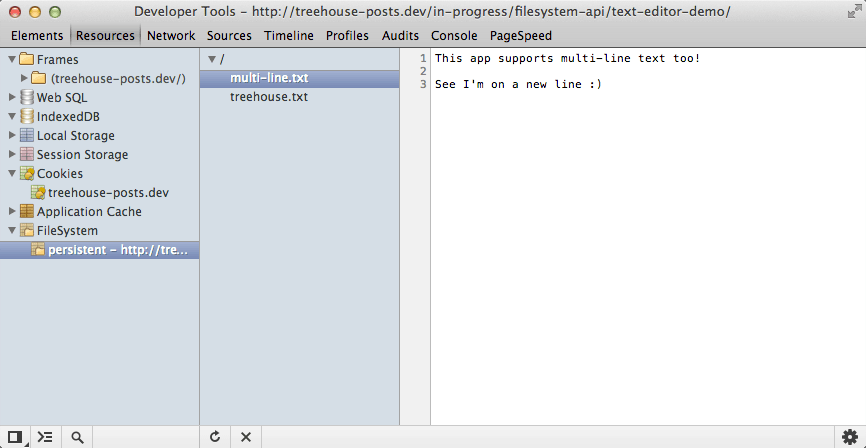
    <p>It can be really useful to inspect files and directories in the filesystem when you are building your applications. Luckily Chrome Dev Tools has a dedicated UI for doing just that.</p>
    <p>Follow these steps to enable the FileSystem inspector:</p>
    <ol>
    <li>Go to <code><a href="chrome://flags">chrome://flags</a></code>.</li>
    <li>Enable the <code>Enable Developer Tools experiments</code> flag.</li>
    <li>Reload your web browser.</li>
    <li>Open Chrome Dev Tools (right-click anywhere on the page and select <code>Inspect Element</code>).</li>
    <li>Click the cog in the bottom right-hand corner to open the settings.</li>
    <li>Click on the <code>Experiments</code> tab in the sidebar.</li>
    <li>Check the box next to <code>FileSystem inspection</code>.</li>
    <li>Now close the settings pane and select the <code>Resources</code> tab.</li>
    <li>You should now see a <code>FileSystem</code> listing in the sidebar!</li>
    </ol>
    <p>The FileSystem inspector can also be used to delete stored data.</p>
    <h2>Building the Text Editor Application</h2>
    <div>
    <a href="http://blog.teamtreehouse.com/wp-content/uploads/2013/10/text-editor-app.png" rel="nofollow external" class="bo"><img alt="HTML5 Text Editor Screenshot" src="http://blog.teamtreehouse.com/wp-content/uploads/2013/10/text-editor-app.png" width="1003" height="599" style="max-width: 100%; height: auto;"></a><p>The text editor application you are going to build.</p>
    </div>
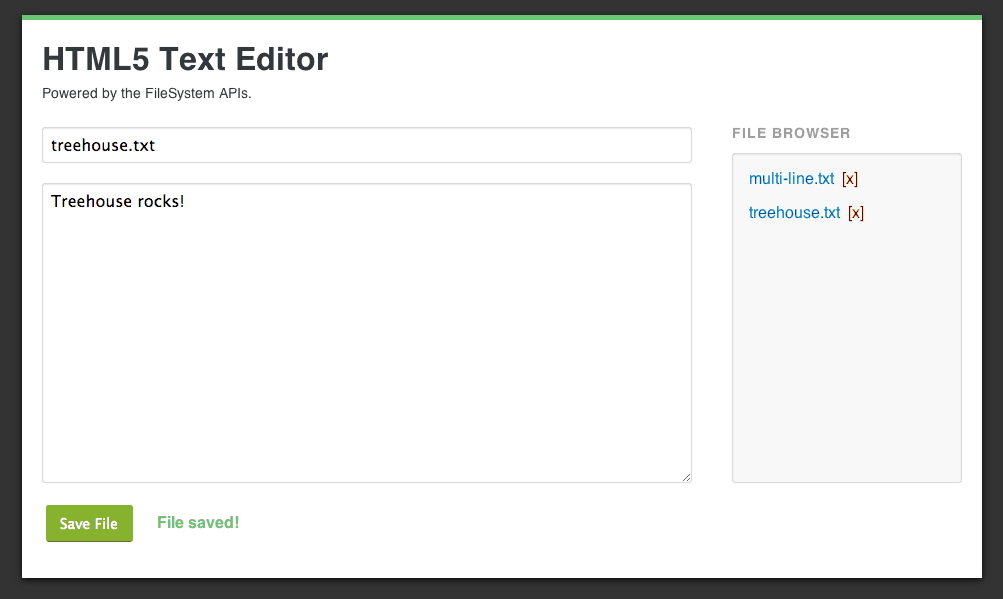
    <p>Okay, so now that you have an understanding of some of the key concepts and restrictions of the FileSystem API we’re going to dive straight into building the text editor application.</p>
    <p>You’ll be learning about various parts of the FileSystem API along the way. The API covers a lot of ground, so you won’t be learning all of it here today. I have included a <code>snippets</code> folder in the code assets that includes examples of how to use other parts of the API.</p>
    <p>Lets get coding!</p>
    <p><a href="http://codepen.io/matt-west/full/CrfKh" rel="nofollow external" class="bo">See the Demo</a> <a href="http://cl.ly/1L3Z2h0f1X26" rel="nofollow external" class="bo">Download The Code</a> <a href="http://codepen.io/matt-west/pen/CrfKh" rel="nofollow external" class="bo">View on CodePen</a></p>
    <h2>Step 1: Setting up the HTML and CSS</h2>
    <p>To get started you first need to setup the HTML and CSS for your application. The CSS stylesheet that you are going to use is available in the code resources download.</p>
    <hr>
    <p><strong>Note</strong>: As we looked at earlier, the FileSystem API is only available to apps served using <code>http://</code> or <code>https://</code> so you will need to be using a local development server for this tutorial. If you don’t already have one installed on your computer take a look at <a href="http://www.apachefriends.org/en/xampp.html" rel="nofollow external" class="bo">XAMPP</a>.</p>
    <hr>
    <p>Create a file called <code>index.html</code> and save it in a place that is accessible by your local development server. Next, open up that file in your favorite text editor and add the following code.</p>
    <pre>&lt;!DOCTYPE html&gt;&#x000A;    &lt;html lang="en"&gt;&#x000A;    &lt;head&gt;&#x000A;      &lt;meta charset="utf-8"&gt;&#x000A;      &lt;title&gt;FileSystem APIs Demo&lt;/title&gt;&#x000A;    &#x000A;      &lt;link rel="stylesheet" href="style.css"&gt;&#x000A;    &lt;/head&gt;&#x000A;    &lt;body&gt;&#x000A;    &#x000A;      &lt;div id="page-wrapper" class="clearfix"&gt;&#x000A;        &lt;h1&gt;HTML5 Text Editor&lt;/h1&gt;&#x000A;        &lt;p&gt;Powered by the FileSystem APIs.&lt;/p&gt;&#x000A;    &#x000A;        &lt;form action="#" method="POST" id="file-form"&gt;&#x000A;          &lt;div class="field"&gt;&#x000A;            &lt;input type="text" name="filename" id="filename" placeholder="Filename (e.g. treehouse.txt)"&gt;&#x000A;          &lt;/div&gt;&#x000A;          &lt;div class="field"&gt;&#x000A;            &lt;textarea name="content" id="content" placeholder="Type your content here..."&gt;&lt;/textarea&gt;&#x000A;          &lt;/div&gt;&#x000A;          &lt;div class="field"&gt;&#x000A;            &lt;button type="submit"&gt;Save File&lt;/button&gt;&#x000A;            &lt;div id="messages"&gt;&lt;/div&gt;&#x000A;          &lt;/div&gt;&#x000A;        &lt;/form&gt;&#x000A;    &#x000A;        &lt;div id="files"&gt;&#x000A;          &lt;h2&gt;File Browser&lt;/h2&gt;&#x000A;          &lt;ul id="file-list"&gt;&lt;/ul&gt;&#x000A;        &lt;/div&gt;&#x000A;    &#x000A;      &lt;/div&gt;&#x000A;    &#x000A;      &lt;script src="app.js"&gt;&lt;/script&gt;&#x000A;    &lt;/body&gt;&#x000A;    &lt;/html&gt;</pre>
    <p>Here you have created a few key HTML elements for your application. The <code>&lt;form&gt;</code> will be used for creating and saving files and the <code>&lt;ul&gt;</code> element will be used to display a list of files in the filesystem. You’ve also added a messages <code>&lt;div&gt;</code> next to the save button. This will be used to give feedback to the user when a file is saved or deleted.</p>
    <p>Make sure that you copy the <code>style.css</code> file from the code resources and add this to the same directory as your <code>index.html</code> file.</p>
    <h2>Step 2: Setting up the JavaScript</h2>
    <p>The next task is to setup the JavaScript file that will contain all of the code that powers your application. Create a new file called <code>app.js</code> and save it in the same directory as your <code>index.html</code> file.</p>
    <p>Copy the following code into your new <code>app.js</code> file.</p>
    <pre>window.onload = function() {&#x000A;    &#x000A;      // Allow for vendor prefixes.&#x000A;      window.requestFileSystem = window.requestFileSystem ||&#x000A;                                 window.webkitRequestFileSystem;&#x000A;    &#x000A;      // Create a variable that will store a reference to the FileSystem.&#x000A;      var filesystem = null;&#x000A;    &#x000A;      // Get references to the page elements.&#x000A;      var form = document.getElementById('file-form');&#x000A;      var filenameInput = document.getElementById('filename');&#x000A;      var contentTextArea = document.getElementById('content');&#x000A;      var fileList = document.getElementById('file-list');&#x000A;      var messageBox = document.getElementById('messages');&#x000A;    &#x000A;      // The rest of the code goes here...&#x000A;    };</pre>
    <p>Here you have created a variable called <code>filesystem</code> that will be used to store a reference to the filesystem object.</p>
    <p>You have also created a number of variables that contain references to key elements on the page like the form, file list and message <code>&lt;div&gt;</code>.</p>
    <h2>Step 3: Handling Errors</h2>
    <p>Before we go any further it’s a good idea to create an error handler that you can use when interacting with the filesystem.</p>
    <p>Copy the following code into your <code>app.js</code> file.</p>
    <pre>// A simple error handler to be used throughout this demo.&#x000A;    function errorHandler(error) {&#x000A;      var message = '';&#x000A;    &#x000A;      switch (error.code) {&#x000A;        case FileError.SECURITY_ERR:&#x000A;          message = 'Security Error';&#x000A;          break;&#x000A;        case FileError.NOT_FOUND_ERR:&#x000A;          message = 'Not Found Error';&#x000A;          break;&#x000A;        case FileError.QUOTA_EXCEEDED_ERR:&#x000A;          message = 'Quota Exceeded Error';&#x000A;          break;&#x000A;        case FileError.INVALID_MODIFICATION_ERR:&#x000A;          message = 'Invalid Modification Error';&#x000A;          break;&#x000A;        case FileError.INVALID_STATE_ERR:&#x000A;          message = 'Invalid State Error';&#x000A;          break;&#x000A;        default:&#x000A;          message = 'Unknown Error';&#x000A;          break;&#x000A;      }&#x000A;    &#x000A;      console.log(message);&#x000A;    }</pre>
    <p>This error handler simply examines the type of error that occurred and logs a message to the browser console.</p>
    <h2>Step 4: Requesting a FileSystem</h2>
    <p>Next up you need to request a filesystem from the browser. First we’re going to cover a bit of theory on how to do this and then go back to building the text editor at the end of this section.</p>
    <h3>Requesting a FileSystem from the Browser</h3>
    <p>To request a filesystem from the browser you use the <code>requestFileSystem</code> method. This method is prefixed as <code>webkitRequestFileSystem</code> in Chrome and Opera.</p>
    <p>The <code>requestFileSystem</code> method has four parameters:</p>
    <ul>
    <li>
    <code>type</code> – The type of storage (<code>TEMPORARY</code> or <code>PERSISTENT</code>).</li>
    <li>
    <code>size</code> – The amount of storage space you need (in bytes).</li>
    <li>
    <code>successCallback</code> – A callback that is executed when the browser grants access to the filesystem.</li>
    <li>
    <code>errorCallback</code> (optional) – A callback that is executed if an error occurs.</li>
    </ul>
    <p>Here is an example of how you might request a filesystem with persistent storage. The first line here just adds cross-browser support.</p>
    <pre>// requestFileSystem is prefixed in Google Chrome and Opera.&#x000A;    window.requestFileSystem = window.requestFileSystem || window.webkitRequestFileSystem;&#x000A;    &#x000A;    // Request a FileSystem&#x000A;    window.requestFileSystem(window.TEMPORARY, 1024 * 1024, successCallback, errorCallback);</pre>
    <h3>Managing Your Storage Quota</h3>
    <p>Earlier we saw that filesystems are given a quota that determines how much data they can store. If you want to request more space for your application you need to use the <code>requestQuota</code> method. This is called on <code>navigator.webkitPersistentStorage</code> or <code>navigator.webkitTemporaryStorage</code> depending on what type of storage you are using.</p>
    <p>The <code>requestQuota</code> method has three parameters:</p>
    <ul>
    <li>
    <code>size</code> – The amount of space you are requesting (in bytes).</li>
    <li>
    <code>successCallback</code> – This will be executed when the browser grants the request for more space. An object will be passed into this callback function that specifies exactly how much space was granted.</li>
    <li>
    <code>errorCallback</code> – A callback that is executed if an error occurs.</li>
    </ul>
    <pre>navigator.webkitPersistentStorage.requestQuota(&#x000A;      1024 * 1024 * 10,&#x000A;      function(grantedSize) {&#x000A;    &#x000A;        // Request a file system with the new size.&#x000A;        window.requestFileSystem(window.PERSISTENT, grantedSize, function(filesystem) {&#x000A;    &#x000A;          // Do something with your new (larger) filesystem&#x000A;    &#x000A;        }, errorHandler);&#x000A;    &#x000A;      }, errorHandler);</pre>
    <h3>Updating the Text Editor Application</h3>
    <p>Great, so now that you understand how to request a filesystem from the browser it’s time to get back to your text editor application.</p>
    <p>Add the following code below your error handler in <code>app.js</code>.</p>
    <pre>// Request a FileSystem and set the filesystem variable.&#x000A;    function initFileSystem() {&#x000A;      navigator.webkitPersistentStorage.requestQuota(1024 * 1024 * 5,&#x000A;        function(grantedSize) {&#x000A;    &#x000A;          // Request a file system with the new size.&#x000A;          window.requestFileSystem(window.PERSISTENT, grantedSize, function(fs) {&#x000A;    &#x000A;            // Set the filesystem variable.&#x000A;            filesystem = fs;&#x000A;    &#x000A;            // Setup event listeners on the form.&#x000A;            setupFormEventListener();&#x000A;    &#x000A;            // Update the file browser.&#x000A;            listFiles();&#x000A;    &#x000A;          }, errorHandler);&#x000A;    &#x000A;        }, errorHandler);&#x000A;    }</pre>
    <p>The <code>initFileSystem</code> function you have defined here first requests that your app is given 5MB of persistent storage space. You then request the filesystem, passing in the amount of space that was granted by the browser. Inside the success callback of <code>requestFileSystem</code> you set the <code>filesystem</code> variable you created earlier using the filesystem object that is passed into the callback (<code>fs</code>).</p>
    <p>You also issue calls to <code>setupFormListener</code> and <code>listFiles</code>. These functions don’t exist just yet but you will be creating them soon.</p>
    <p>The final task for this section is to issue a call to your new <code>initFileSystem</code> function if the user’s browser supports the FileSystem API.</p>
    <p>Add the following code to your <code>app.js</code> file.</p>
    <pre>// Start the app by requesting a FileSystem (if the browser supports the API)&#x000A;    if (window.requestFileSystem) {&#x000A;      initFileSystem();&#x000A;    } else {&#x000A;      alert('Sorry! Your browser doesn\'t support the FileSystem API');&#x000A;    }</pre>
    <h2>Step 5: Saving Files</h2>
    <p>To create a new file you need to first get a <code>FileEntry</code> object that represents a file in the filesystem. You then create a <code>FileWriter</code> that will be used to write content to the file. We are going to cover both of these things in this section.</p>
    <h3>Creating Files</h3>
    <p>The <code>getFile</code> method can be used to obtain a <code>FileEntry</code> object for the file you wish to write to. This should be called on <code>filesystem.root</code>, where <code>filesystem</code> is the object returned in the <code>requestFileSystem</code> callback. The <code>root</code> property represents a <code>DirectoryEntry</code> for the root of your filesystem.</p>
    <hr>
    <p><strong>Note:</strong> We’re not going to be dealing with directories much in this blog post. Check out the snippets folder in the code resources for examples of how to create, modify and delete directories.</p>
    <hr>
    <p>The <code>getFile</code> method has four parameters:</p>
    <ul>
    <li>
    <code>path</code> – The path to the file that you want to use.</li>
    <li>
    <code>options</code> – An options object can contain flags that specify whether or not the file should be created if it does not exist already.</li>
    <li>
    <code>successCallback</code> – This callback will be passed a <code>FileEntry</code> object.</li>
    <li>
    <code>errorCallback</code> – For handling errors.</li>
    </ul>
    <p>Here is a simple example of how you might use <code>getFile</code> to create a new file in the filesystem.</p>
    <pre>filesystem.root.getFile('treehouse.txt', {create: true}, function(fileEntry) {&#x000A;      // Do something with fileEntry.&#x000A;    }, errorHandler);</pre>
    <p>Setting the <code>create</code> option to <code>true</code> here tells the browser to create the file if it does not already exist.</p>
    <h3>Writing to Files</h3>
    <p>Once you have got a <code>FileEntry</code> that represents your file you can use it to create a <code>FileWriter</code>. This is what is responsible for writing bytes to your file.</p>
    <p>You can create a <code>FileWriter</code> object by calling the <code>createWriter</code> method on your <code>FileEntry</code>. This method takes success and error callbacks as it’s parameters.</p>
    <pre>fileEntry.createWriter(successCallback, errorCallback);</pre>
    <p>Once you have your <code>FileWriter</code> you next need to create a <code>Blob</code> that will be written to the file. A <code>Blob</code> is simply an object that contains raw data.</p>
    <p>To write your data to the file you pass the blob into the <code>fileWriter.write</code> method. The <code>FileWriter</code> will fire <code>writeend</code> and <code>error</code> events that you can attach event listeners to.</p>
    <pre>fileEntry.createWriter(function(fileWriter) {&#x000A;    &#x000A;      fileWriter.onwriteend = function(e) {&#x000A;       // The write finished.&#x000A;      };&#x000A;    &#x000A;      fileWriter.onerror = function(e) {&#x000A;        // An error occurred.&#x000A;      };&#x000A;    &#x000A;      var contentBlob = new Blob(['Hello Treehouse!'], {type: 'text/plain'});&#x000A;    &#x000A;      fileWriter.write(contentBlob);&#x000A;    &#x000A;    }, errorHandler);</pre>
    <p>Now that you understand how to create, and write to, new files lets put all this together in the text editor application.</p>
    <h3>Updating the Text Editor Application</h3>
    <p>Copy the following code into your <code>app.js</code> file.</p>
    <pre>// Save a file in the FileSystem.&#x000A;    function saveFile(filename, content) {&#x000A;      filesystem.root.getFile(filename, {create: true}, function(fileEntry) {&#x000A;    &#x000A;        fileEntry.createWriter(function(fileWriter) {&#x000A;    &#x000A;          fileWriter.onwriteend = function(e) {&#x000A;            // Update the file browser.&#x000A;            listFiles();&#x000A;    &#x000A;            // Clean out the form field.&#x000A;            filenameInput.value = '';&#x000A;            contentTextArea.value = '';&#x000A;    &#x000A;            // Show a saved message.&#x000A;            messageBox.innerHTML = 'File saved!';&#x000A;          };&#x000A;    &#x000A;          fileWriter.onerror = function(e) {&#x000A;            console.log('Write error: ' + e.toString());&#x000A;            alert('An error occurred and your file could not be saved!');&#x000A;          };&#x000A;    &#x000A;          var contentBlob = new Blob([content], {type: 'text/plain'});&#x000A;    &#x000A;          fileWriter.write(contentBlob);&#x000A;    &#x000A;        }, errorHandler);&#x000A;    &#x000A;      }, errorHandler);&#x000A;    }</pre>
    <p>This <code>saveFile</code> function will use the <code>getFile</code>, <code>createWriter</code> and <code>write</code> methods you learned about earlier to save a file in the filesystem. If you call the <code>saveFile</code> function with a filename that already exists, the existing file will be overwritten.</p>
    <p>You’ve attached an event listener to the <code>writeend</code> event that will update the file list; clean out the form fields; and display a ‘File saved!’ message to the user once the file has been saved. Similarly you have also attached an event listener to the <code>error</code> event which will display an error message to the user if something goes wrong.</p>
    <p>Next up you need to add an event listener to the form that will fetch the data from the form fields and issue a call to your new <code>saveFile</code> function.</p>
    <p>Add the following code to your <code>app.js</code> file.</p>
    <pre>// Add event listeners on the form.&#x000A;    function setupFormEventListener() {&#x000A;    &#x000A;      form.addEventListener('submit', function(e) {&#x000A;        e.preventDefault();&#x000A;    &#x000A;        // Get the form data.&#x000A;        var filename = filenameInput.value;&#x000A;        var content = contentTextArea.value;&#x000A;    &#x000A;        // Save the file.&#x000A;        saveFile(filename, content);&#x000A;      });&#x000A;    &#x000A;    }</pre>
    <p>Here you retrieve the data from the form using the <code>filenameInput</code> and <code>contentTextArea</code> variables you created earlier and then pass this data to the <code>saveFile</code> function.</p>
    <h2>Step 6: Creating the File Browser</h2>
    <p>Listing the files in the filesystem is where it starts to get a little bit tricky. You first need to create a <code>DirectoryReader</code> by calling the <code>createReader</code> method on the directory you wish to get the contents of. In your case this would be <code>filesystem.root</code>.</p>
    <p>You can then call the <code>readEntries</code> method on your <code>DirectoryReader</code> to get a list of entries in the directory. The caveat here is that <code>readEntries</code> does not return all of the entries in a directory at once so you will need to keep calling it until no more entries are returned.</p>
    <p>We’re going to dive straight into writing the code for the text editor here. I’ll walk you through the theory as we go.</p>
    <p>First you need to create a <code>listFiles</code> function that will be called when the file browser needs to be updated.</p>
    <p>Copy the following code into your <code>app.js</code> file.</p>
    <pre>function listFiles() {&#x000A;      var dirReader = filesystem.root.createReader();&#x000A;      var entries = [];&#x000A;    &#x000A;      var fetchEntries = function() {&#x000A;        dirReader.readEntries(function(results) {&#x000A;          if (!results.length) {&#x000A;            displayEntries(entries.sort().reverse());&#x000A;          } else {&#x000A;            entries = entries.concat(results);&#x000A;            fetchEntries();&#x000A;          }&#x000A;        }, errorHandler);&#x000A;      };&#x000A;    &#x000A;      fetchEntries();&#x000A;    }</pre>
    <p>Here you first create a <code>DirectoryReader</code> by calling <code>createReader</code> on <code>filesystem.root</code>. Next you create a variable called <code>entries</code> that will hold all of the returned FileEntries in an array.</p>
    <p>You then define another function within <code>listFiles</code> that is called <code>fetchEntries</code>. This <code>fetchEntries</code> function will be called over and over until no more entries are returned.</p>
    <p>Within <code>fetchEntries</code> you call the <code>dirReader.readEntries</code> method to fetch a block of entries. If no results are returned you can call the <code>displayEntries</code> method which will handle displaying the files in the file browser. If results <em>are</em> returned you need to add these results to the <code>entries</code> array and call <code>fetchEntries</code> again.</p>
    <p>To complete the file browser you need to create the <code>displayEntries</code> function.</p>
    <p>Copy the following code into your <code>app.js</code> file above the <code>listFiles</code> function you just created.</p>
    <pre>function displayEntries(entries) {&#x000A;      // Clear out the current file browser entries.&#x000A;      fileList.innerHTML = '';&#x000A;    &#x000A;      entries.forEach(function(entry, i) {&#x000A;        // Create an li element.&#x000A;        var li = document.createElement('li');&#x000A;    &#x000A;        // Create a read link for the file.&#x000A;        var link = document.createElement('a');&#x000A;        link.innerHTML = entry.name;&#x000A;        link.className = 'edit-file';&#x000A;        li.appendChild(link);&#x000A;    &#x000A;        // Create a delete link for the file.&#x000A;        var delLink = document.createElement('a');&#x000A;        delLink.innerHTML = '[x]';&#x000A;        delLink.className = 'delete-file';&#x000A;        li.appendChild(delLink);&#x000A;    &#x000A;        // Add this li to the fileList.&#x000A;        fileList.appendChild(li);&#x000A;    &#x000A;        // Setup an event listener that will load the file when the link&#x000A;        // is clicked.&#x000A;        link.addEventListener('click', function(e) {&#x000A;          e.preventDefault();&#x000A;          loadFile(entry.name);&#x000A;        });&#x000A;    &#x000A;        // Setup an event listener that will delete the file when the delete link&#x000A;        // is clicked.&#x000A;        delLink.addEventListener('click', function(e) {&#x000A;          e.preventDefault();&#x000A;          deleteFile(entry.name);&#x000A;        });&#x000A;      });&#x000A;    }</pre>
    <p>Here you start by clearing out any content that might already be in the file list.</p>
    <p>Next you loop through each of the files in the <code>entries</code> array. Each time you create a new <code>&lt;li&gt;</code> element and two links. The first link will be used to read the file, the second to delete it. You then add the two links to the <code>&lt;li&gt;</code> element and then add that <code>&lt;li&gt;</code> to the <code>fileList</code>.</p>
    <p>Finally you setup an event listener for each of the links. The first will call <code>loadFile</code> when the user clicks on the filename link. The second will call <code>deleteFile</code> when the user clicks on the delete link. You will be creating the <code>loadFile</code> and <code>deleteFile</code> functions next.</p>
    <h2>Step 7: Loading Files</h2>
    <p>Next up you need to write the <code>loadFile</code> function. This will be responsible for reading the contents of a file in the filesystem and then populating the form with the data that has been retrieved.</p>
    <hr>
    <p><strong>Note:</strong> In this section you will be using the FileReader API. I’m not going to go into too much detail on this but if you’re curious check out <a href="http://blog.teamtreehouse.com/reading-files-using-the-html5-filereader-api" rel="nofollow external" class="bo">this post</a>.</p>
    <hr>
    <p>To get the contents of the file you need to first retrieve a <code>File</code> object for your <code>FileEntry</code>. This is done using the <code>file</code> method. This method takes success and error callbacks.</p>
    <pre>fileEntry.file(successCallback, errorCallback);</pre>
    <p>Once you have retrieved your <code>File</code> object you can pass this to a <code>FileReader</code> that will read the raw data and give you text that you can use to update the form.</p>
    <p>Lets code this up.</p>
    <p>Copy the following code into your <code>app.js</code> file.</p>
    <pre>function loadFile(filename) {&#x000A;      filesystem.root.getFile(filename, {}, function(fileEntry) {&#x000A;    &#x000A;        fileEntry.file(function(file) {&#x000A;          var reader = new FileReader();&#x000A;    &#x000A;          reader.onload = function(e) {&#x000A;            // Update the form fields.&#x000A;            filenameInput.value = filename;&#x000A;            contentTextArea.value = this.result;&#x000A;          };&#x000A;    &#x000A;          reader.readAsText(file);&#x000A;        }, errorHandler);&#x000A;    &#x000A;      }, errorHandler);&#x000A;    }</pre>
    <p>Within your <code>loadFile</code> function you first use the <code>getFile</code> method you learned about earlier to retrieve a <code>FileEntry</code> for the file. Notice that no options have been specified.</p>
    <p>Once the <code>FileEntry</code> has been retrieved you use the <code>file</code> method to get a <code>File</code> object.</p>
    <p>You then create a new <code>FileReader</code> and store this in a variable called <code>reader</code>. Next you attach an event listener to the <code>load</code> event for the <code>FileReader</code> that will be passed the text content from the file. Within this event listener you’ve added some code that will update the fields in the form. Finally you call the <code>readAsText</code> method on <code>reader</code> and pass in the <code>File</code> object that you retrieved earlier.</p>
    <h2>Step 8: Deleting Files</h2>
    <p>The final piece of code that you need to write for the text editor will handle deleting files.</p>
    <p>To delete a file you must first retrieve the <code>FileEntry</code> object for the file you wish to delete. You can then call the <code>remove</code> method on the <code>FileEntry</code>, passing in success and error callbacks as you have done before.</p>
    <pre>fileEntry.remove(successCallback, errorCallback);</pre>
    <p>Add this <code>deleteFile</code> function to your <code>app.js</code> file.</p>
    <pre>function deleteFile(filename) {&#x000A;      filesystem.root.getFile(filename, {create: false}, function(fileEntry) {&#x000A;    &#x000A;        fileEntry.remove(function(e) {&#x000A;          // Update the file browser.&#x000A;          listFiles();&#x000A;    &#x000A;          // Show a deleted message.&#x000A;          messageBox.innerHTML = 'File deleted!';&#x000A;        }, errorHandler);&#x000A;    &#x000A;      }, errorHandler);&#x000A;    }</pre>
    <p>Here you first retrieved the <code>FileEntry</code> object using <code>getFile</code>. Notice that <code>create</code> has been set to <code>false</code> here because you don’t want to create a new entry if it doesn’t already exist.</p>
    <p>Once the <code>FileEntry</code> has been retrieved you call the <code>remove</code> method to delete it from the filesystem. The success callback will use the <code>listFiles</code> function to update the file browser and then present a <code>File deleted!</code> message to the user.</p>
    <h2>Step 9: You’re Done!</h2>
    <p>Congratulations! You have just built a working text editor using the FileSystem APIs.</p>
    <div>
    <a href="http://blog.teamtreehouse.com/wp-content/uploads/2013/10/text-editor-app.png" rel="nofollow external" class="bo"><img alt="HTML5 Text Editor Screenshot" src="http://blog.teamtreehouse.com/wp-content/uploads/2013/10/text-editor-app.png" width="1003" height="599" style="max-width: 100%; height: auto;"></a><p>The text editor application you have built.</p>
    </div>
    <p><a href="http://codepen.io/matt-west/full/CrfKh" rel="nofollow external" class="bo">See the Demo</a> <a href="http://cl.ly/1L3Z2h0f1X26" rel="nofollow external" class="bo">Download The Code</a> <a href="http://codepen.io/matt-west/pen/CrfKh" rel="nofollow external" class="bo">View on CodePen</a></p>
    <p>Try expanding your application by adding support for directories or renaming files. Be sure to let us know what you come up with in the comments below.</p>
    <p>The FileSystem APIs have much more to offer than what we have covered in this blog post. I encourage you to visit some of the links listed at the bottom of this post to learn more about the various things that you can do with these APIs. I’ve also included some snippets in the code download that provide examples of how to use other aspects of the API.</p>
    <h2>A Note on Building Offline Web Applications</h2>
    <p>Before we finish up I just want to share a quick note on building web applications that work offline.</p>
    <blockquote><p>If you want to make something work offline, it has to be offline first.</p></blockquote>
    <p><a href="https://twitter.com/jaffathecake" rel="nofollow external" class="bo">Jake Archibald</a>, Developer Advocate @ Google</p>
    <p>Source: <em><a href="http://5by5.tv/bigwebshow/95" rel="nofollow external" class="bo">The Big Web Show: Episode #95</a></em></p>
    <p>If you’re building a web app that you want to work offline you need to start by assuming that your app is offline to begin with. View the internet connection as an add-on that won’t always be available.</p>
    <p>I know that this is counter to the usual way of doing things but it will really help you to make smarter decisions when designing your applications. Build strategies for storing and synchronizing data from the start, don’t try and bolt them on later.</p>
    <h2>Useful Links</h2>
    <ul>
    <li><a href="http://caniuse.com/filesystem" rel="nofollow external" class="bo">Can I use: Filesystem &amp; FileWriter API</a></li>
    <li><a href="http://www.w3.org/TR/file-system-api/" rel="nofollow external" class="bo">File API: Directories and System Specification (W3C)</a></li>
    <li><a href="http://www.w3.org/TR/quota-api/" rel="nofollow external" class="bo">Quota Management API Specification (W3C)</a></li>
    <li><a href="https://developers.google.com/chrome/whitepapers/storage" rel="nofollow external" class="bo">Managing HTML5 Offline Storage</a></li>
    <li><a href="http://www.html5rocks.com/en/tutorials/file/filesystem/" rel="nofollow external" class="bo">Exploring the FileSystem APIs (HTML5Rocks)</a></li>
    </ul>
    <p>The post <a href="http://blog.teamtreehouse.com/building-an-html5-text-editor-with-the-filesystem-apis" rel="nofollow external" class="bo">Building an HTML5 Text Editor with the FileSystem APIs</a> appeared first on <a href="http://blog.teamtreehouse.com" rel="nofollow external" class="bo">Treehouse Blog</a>.</p>
    </div>
]]>
</Body>
<Summary>In recent years we have seen the introduction of a whole new set of APIs that aim to give developers the power to store data on a user’s machine. In this blog post you are going to learn how to...</Summary>
<Website>http://feedproxy.google.com/~r/teamtreehouse/~3/sPo5KAmgKhA/building-an-html5-text-editor-with-the-filesystem-apis</Website>
<TrackingUrl>https://my3.my.umbc.edu/api/v0/pixel/news/36851/guest@my.umbc.edu/3d59fc64fb477d141690753c41d5aff5/api/pixel</TrackingUrl>
<Tag>android</Tag>
<Tag>code</Tag>
<Tag>css</Tag>
<Tag>design</Tag>
<Tag>development</Tag>
<Tag>directoryentry</Tag>
<Tag>fileentry</Tag>
<Tag>filereader</Tag>
<Tag>filesystem-apis</Tag>
<Tag>filewriter</Tag>
<Tag>html</Tag>
<Tag>html5</Tag>
<Tag>ios</Tag>
<Tag>javascript</Tag>
<Tag>responsive</Tag>
<Tag>web</Tag>
<Tag>web-apps</Tag>
<Group token="retired-583">Web Developer - Build Group</Group>
<GroupUrl>https://my3.my.umbc.edu/groups/retired-583</GroupUrl>
<AvatarUrl>https://assets3-my.umbc.edu/system/shared/avatars/groups/000/000/583/fc60f5d7abc2e080599bb6dc465db54d/xsmall.png?1363101197</AvatarUrl>
<AvatarUrl size="original">https://assets4-my.umbc.edu/system/shared/avatars/groups/000/000/583/fc60f5d7abc2e080599bb6dc465db54d/original.jpg?1363101197</AvatarUrl>
<AvatarUrl size="xxlarge">https://assets4-my.umbc.edu/system/shared/avatars/groups/000/000/583/fc60f5d7abc2e080599bb6dc465db54d/xxlarge.png?1363101197</AvatarUrl>
<AvatarUrl size="xlarge">https://assets4-my.umbc.edu/system/shared/avatars/groups/000/000/583/fc60f5d7abc2e080599bb6dc465db54d/xlarge.png?1363101197</AvatarUrl>
<AvatarUrl size="large">https://assets3-my.umbc.edu/system/shared/avatars/groups/000/000/583/fc60f5d7abc2e080599bb6dc465db54d/large.png?1363101197</AvatarUrl>
<AvatarUrl size="medium">https://assets3-my.umbc.edu/system/shared/avatars/groups/000/000/583/fc60f5d7abc2e080599bb6dc465db54d/medium.png?1363101197</AvatarUrl>
<AvatarUrl size="small">https://assets4-my.umbc.edu/system/shared/avatars/groups/000/000/583/fc60f5d7abc2e080599bb6dc465db54d/small.png?1363101197</AvatarUrl>
<AvatarUrl size="xsmall">https://assets3-my.umbc.edu/system/shared/avatars/groups/000/000/583/fc60f5d7abc2e080599bb6dc465db54d/xsmall.png?1363101197</AvatarUrl>
<AvatarUrl size="xxsmall">https://assets4-my.umbc.edu/system/shared/avatars/groups/000/000/583/fc60f5d7abc2e080599bb6dc465db54d/xxsmall.png?1363101197</AvatarUrl>
<Sponsor>Web Developer - Build Group</Sponsor>
<PawCount>0</PawCount>
<CommentCount>0</CommentCount>
<CommentsAllowed>true</CommentsAllowed>
<PostedAt>Thu, 10 Oct 2013 16:34:39 -0400</PostedAt>
<EditAt>Thu, 10 Oct 2013 16:34:39 -0400</EditAt>
</NewsItem>

</News>