<?xml version="1.0"?>
<News hasArchived="true" page="8404" pageCount="10793" pageSize="10" timestamp="Sat, 05 Sep 2026 09:44:20 -0400" url="https://my3.my.umbc.edu/posts.xml?mode=activity&amp;page=8404&amp;range=2">
<NewsItem contentIssues="true" id="35218" important="false" status="posted" url="https://my3.my.umbc.edu/posts/35218">
<Title>Implementing Native Drag and Drop</Title>
<Body>
<![CDATA[
    <div class="html-content">
    <p>Drag and Drop is one of those interactions that can really help to make an interface simple to use. There are plenty of JavaScript libraries that can be used to create drag and drop interfaces but what many people don’t know is that all of the major browsers actually have native support for drag and drop.</p>
    <p>In this blog post you are going to learn how to make use of the native Drag and Drop API in order to create your own Drag and Drop interfaces.</p>
    <h2>Making Elements Draggable</h2>
    <p>To get us started we are first going to take a look at how to make HTML elements draggable. This is done using the <code>draggable</code> attribute.</p>
    <p>Setting the value of the <code>draggable</code> attribute to <code>true</code> informs the browser that this element can be dragged.</p>
    <pre>&lt;div draggable="true"&gt;Draggable Div&lt;/div&gt;</pre>
    <hr>
    <p><strong>Note</strong>: Some elements such as <code>&lt;a&gt;</code> and <code>&lt;img&gt;</code> are draggable by default in many browsers. It’s best to explicitly add a <code>draggable</code> attribute just to be safe though.</p>
    <hr>
    <h2>Listening for Drag Events</h2>
    <p>There are a number of events that are fired during a drag interaction. Some of these events are fired on the element that is being dragged and others are fired on elements on the page that serve as drop targets.</p>
    <ul>
    <li>
    <code>dragstart</code> – This event is fired on an element when it starts to be dragged by the user. It is not fired when dragging a file into the browser from the file system.</li>
    <li>
    <code>drag</code> – This event is continuously fired on the element being dragged during the interaction.</li>
    <li>
    <code>dragenter</code> – This event is fired when the dragged element enters a target element. The event listener should be setup on the target.</li>
    <li>
    <code>dragleave</code> – This event is fired when the dragged element leaves the target element.</li>
    <li>
    <code>dragover</code> – This event is continuously fired whilst the dragged element is over the target element.</li>
    <li>
    <code>drop</code> – This event is fired when the dragged element or file is dropped.</li>
    <li>
    <code>dragend</code> – This event is fired once the drag interaction has completed. It applies to the element that was dragged.</li>
    </ul>
    <hr>
    <p><strong>Note</strong>: Mouse events (such as <code>mousemove</code>) are not fired during a drag and drop interaction.</p>
    <hr>
    <p>You can use a simple event listener to execute some code when one of these events is fired. For example the following would print out the text ‘Drag Interaction Started!’ to the console when the user initiated a drag interaction.</p>
    <pre>draggableElement.addEventListener('dragstart', function(e) {&#x000A;      console.log('Drag Interaction Started!');&#x000A;    });</pre>
    <h2>The DataTransfer Object</h2>
    <p>When a drag interaction is initiated a <code>DataTransfer</code> object is created that is associated with the interaction. This object is used to store information about the drag interaction as well as data items.</p>
    <p>Lets take a look at some of the properties and methods that the <code>DataTransfer</code> object has.</p>
    <ul>
    <li>
    <code>dropEffect</code> – The type of drag and drop interaction. This determines which cursor the browser should display during the interaction. Possibly values are: copy, move, link and none.</li>
    <li>
    <code>effectAllowed</code> – Specifies which types are allowed for this interaction. Possibly values are: copy, move, link, copyLink, copyMove, linkMove, all, none and uninitialized (the default, treated the same as all).</li>
    <li>
    <code>files</code> – A <code>FileList</code> containing <code>File</code> objects associated with this drag. This property comes in handy when dragging files into the browser.</li>
    <li>
    <code>types</code> – A list of format types for the data stored in the <code>DataTransfer</code> object.</li>
    <li>
    <code>setData(format, data)</code> – This method is used to store some data within the <code>DataTransfer</code> object. The format string should be used to specify the format of the data being stored (i.e. ‘text’, ‘url’, ‘text/html’).</li>
    <li>
    <code>getData(format)</code> – This method is used to retrieve data from the <code>DataTransfer</code> object.</li>
    <li>
    <code>clearData(format)</code> – This method is used to clear out data stored in the <code>DataTransfer</code> object. Specifying the optional <code>format</code> parameter will only delete data that matches that format, otherwise all data will be deleted.</li>
    <li>
    <code>setDragImage(imgElement, x, y)</code> – This method is used to specify a custom image that should be displayed when the element is being dragged. By default, many browsers will just display a semi-transparent version of the source element. You should pass in an <code>img</code> element (not a path to an image) as well as <code>x</code> and <code>y</code> parameters that specify the position of the image relative to the mouse cursor.</li>
    </ul>
    <p>The <code>dataTransfer</code> object is accessible on the event that is passed into your event listener function blocks. For example:</p>
    <pre>draggableElement.addEventListener('dragstart', function(event) {&#x000A;      event.dataTransfer.setData('text', 'Hello World!');&#x000A;    });</pre>
    <h2>Drag and Drop with Page Elements</h2>
    <div>
    <a href="http://blog.teamtreehouse.com/wp-content/uploads/2013/09/dnd-elements.png" rel="nofollow external" class="bo"><img alt="Drag and Drop with Elements" src="http://blog.teamtreehouse.com/wp-content/uploads/2013/09/dnd-elements.png" width="760" height="221" style="max-width: 100%; height: auto;"></a><p>Drag and Drop with Elements</p>
    </div>
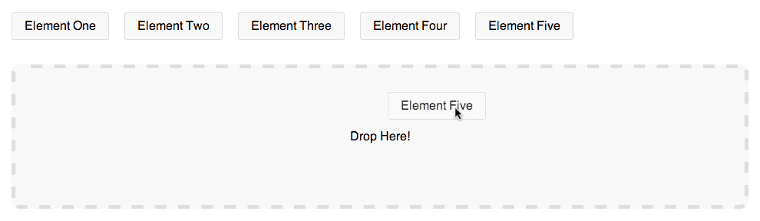
    <p>Now that you have some knowledge about the Drag and Drop API lets take a look at an example. Here we are going to keep things relatively simple and just focus on moving page elements, later you’ll learn how to drag files into the browser.</p>
    <p><a href="http://demos.matt-west.com/drag-and-drop/" rel="nofollow external" class="bo">See The Demo</a> <a href="http://cl.ly/1O223a1k1t00" rel="nofollow external" class="bo">Download The Code</a></p>
    <p>First we need to write a bit of HTML that includes some draggable elements and a <code>&lt;div&gt;</code> element that will act as our drop target.</p>
    <pre>&lt;ul id="drag-elements"&gt;&#x000A;      &lt;li draggable="true"&gt;Element One&lt;/li&gt;&#x000A;      &lt;li draggable="true"&gt;Element Two&lt;/li&gt;&#x000A;      &lt;li draggable="true"&gt;Element Three&lt;/li&gt;&#x000A;      &lt;li draggable="true"&gt;Element Four&lt;/li&gt;&#x000A;      &lt;li draggable="true"&gt;Element Five&lt;/li&gt;&#x000A;    &lt;/ul&gt;&#x000A;    &#x000A;    &lt;div id="drop-target-one"&gt;&#x000A;      Drop Here!&#x000A;    &lt;/div&gt;</pre>
    <p>Now that the HTML is setup we need to switch over to a JavaScript file and start writing some code to handle the Drag and Drop interaction.</p>
    <p>Lets start by creating some variables and initializing them with the elements in our markup. The <code>elementDragged</code> variable will be used to track which of the elements is currently being dragged (this will come in handy later).</p>
    <pre>// Get the div element that will serve as the drop target.&#x000A;    var dropZoneOne = document.querySelector('#drop-target-one');&#x000A;    &#x000A;    // Get the draggable elements.&#x000A;    var dragElements = document.querySelectorAll('#drag-elements li');&#x000A;    &#x000A;    // Track the element that is being dragged.&#x000A;    var elementDragged = null;</pre>
    <p>The next thing to do is to setup event listeners for when the drag interaction starts and ends. These event listeners should be applied to each of the draggable elements so I’ve setup a <code>for</code> loop that will cycle through all of the elements stored in the <code>dragElements</code> variable.</p>
    <p>When the <code>dragstart</code> event is fired we need to set the value of the <code>effectAllowed</code> property to <code>move</code>. We are also going to store the text content of the dragged element within our <code>dataTransfer</code> object. Finally we’ll set the <code>elementDragged</code> variable that we created earlier to the element that is being dragged.</p>
    <p>For the <code>dragend</code> event we just need to do a little cleanup and set the <code>elementDragged</code> variable back to <code>null</code>.</p>
    <pre>for (var i = 0; i &lt; dragElements.length; i++) {&#x000A;    &#x000A;      // Event Listener for when the drag interaction starts.&#x000A;      dragElements[i].addEventListener('dragstart', function(e) {&#x000A;        e.dataTransfer.effectAllowed = 'move';&#x000A;        e.dataTransfer.setData('text', this.innerHTML);&#x000A;        elementDragged = this;&#x000A;      });&#x000A;    &#x000A;      // Event Listener for when the drag interaction finishes.&#x000A;      dragElements[i].addEventListener('dragend', function(e) {&#x000A;        elementDragged = null;&#x000A;      });&#x000A;    &#x000A;    };</pre>
    <p>Next we need to create an event listener that will fire when the element is dragged over the drop target. This should set the <code>dropEffect</code> property of the <code>dataTransfer</code> object to <code>move</code>, prompting the browser to update the cursor style.</p>
    <p>Make sure to setup this event listener outside of the <code>for</code> loop used previously, and using the <code>dropZoneOne</code> variable.</p>
    <pre>// Event Listener for when the dragged element is over the drop zone.&#x000A;    dropZoneOne.addEventListener('dragover', function(e) {&#x000A;      if (e.preventDefault) {&#x000A;        e.preventDefault();&#x000A;      }&#x000A;    &#x000A;      e.dataTransfer.dropEffect = 'move';&#x000A;    &#x000A;      return false;&#x000A;    });</pre>
    <hr>
    <p><strong>Note</strong>: Calling <code>e.preventDefault()</code> and <code>e.stopPropagation()</code> (used later in this post) just stops the browser from executing any default behaviour that might mess with our drag interaction.</p>
    <hr>
    <p>It would be nice if the styling of the drop zone changed when the element was dragged over it. To do this we need to apply a class to the drop target when the <code>dragenter</code> event is fired and then remove this class when <code>dragleave</code> is fired.</p>
    <hr>
    <p><strong>Note</strong>: We use <code>dragenter</code> and <code>dragleave</code> rather than <code>dragover</code> because <code>dragover</code> is called continuously whilst this element is over the target. <code>dragenter</code> and <code>dragleave</code> are only called once each. It’s best to minimize the amount of work the browser has to do wherever possible.</p>
    <hr>
    <pre>// Event Listener for when the dragged element enters the drop zone.&#x000A;    dropZoneOne.addEventListener('dragenter', function(e) {&#x000A;      this.className = "over";&#x000A;    });&#x000A;    &#x000A;    // Event Listener for when the dragged element leaves the drop zone.&#x000A;    dropZoneOne.addEventListener('dragleave', function(e) {&#x000A;      this.className = "";&#x000A;    });</pre>
    <p>The final event listener we need to setup is for the <code>drop</code> event. When this is fired we need to do a few things. First we need to remove the <code>over</code> class from the drop target. We then need to retrieve the data that we stored in the <code>dataTransfer</code> object and use it to update the text displayed in the drop target. Finally we need to remove the dragged element from the DOM.</p>
    <pre>// Event Listener for when the dragged element dropped in the drop zone.&#x000A;    dropZoneOne.addEventListener('drop', function(e) {&#x000A;      if (e.preventDefault) e.preventDefault(); &#x000A;      if (e.stopPropagation) e.stopPropagation();&#x000A;    &#x000A;      this.className = "";&#x000A;      this.innerHTML = "Dropped " + e.dataTransfer.getData('text');&#x000A;    &#x000A;      // Remove the element from the list.&#x000A;      document.querySelector('#drag-elements').removeChild(elementDragged);&#x000A;    &#x000A;      return false;&#x000A;    });</pre>
    <p>If you’ve been coding along you should now have a working Drag and Drop UI!</p>
    <p>For those that haven’t, you can always check out the live demo.</p>
    <p><a href="http://demos.matt-west.com/drag-and-drop/" rel="nofollow external" class="bo">See the Demo</a></p>
    <h2>Drag and Drop with Files</h2>
    <div>
    <a href="http://blog.teamtreehouse.com/wp-content/uploads/2013/09/dnd-files.png" rel="nofollow external" class="bo"><img alt="Drag and Drop with Files" src="http://blog.teamtreehouse.com/wp-content/uploads/2013/09/dnd-files.png" width="559" height="218" style="max-width: 100%; height: auto;"></a><p>Drag and Drop with Files</p>
    </div>
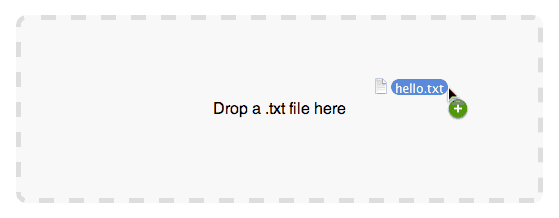
    <p>Now that you’re feeling a bit more confident with the Drag and Drop API lets take a look at an example that is a little more complex.</p>
    <p>In this section you are going to learn how to drag a text file into the browser, read the contents of that file and the display the contents on the page.</p>
    <p>To get started we first need to write some HTML. This time we just need a drop target and a <code>&lt;pre&gt;</code> element that will be used to display the contents of the file.</p>
    <pre>&lt;div id="dd-files"&gt;Drop a .txt file here&lt;/div&gt;&#x000A;    &lt;pre id="file-content"&gt;&lt;/pre&gt;</pre>
    <p>As we did before, lets start the JavaScript code by getting references to the two elements in our markup.</p>
    <pre>var dropZoneTwo = document.querySelector('#dd-files');&#x000A;    var fileContentPane = document.querySelector('#file-content');</pre>
    <p>Next we need to setup an event listener that will set the <code>dropEffect</code> to <code>copy</code> when the file is dragged over the drop target.</p>
    <hr>
    <p><strong>Note</strong>: The <code>dragstart</code> event is not fired when dragging a file into the browser.</p>
    <hr>
    <pre>// Event Listener for when the dragged file is over the drop zone.&#x000A;    dropZoneTwo.addEventListener('dragover', function(e) {&#x000A;      if (e.preventDefault) e.preventDefault(); &#x000A;      if (e.stopPropagation) e.stopPropagation();&#x000A;    &#x000A;      e.dataTransfer.dropEffect = 'copy';&#x000A;    });</pre>
    <p>Now we need to setup an event listener for <code>dragenter</code> that will add a class to the drop target when the file enters the element. We also need an event listener for <code>dragleave</code> to remove that class when the dragged file leaves.</p>
    <pre>// Event Listener for when the dragged file enters the drop zone.&#x000A;    dropZoneTwo.addEventListener('dragenter', function(e) {&#x000A;      this.className = "over";&#x000A;    });&#x000A;    &#x000A;    // Event Listener for when the dragged file leaves the drop zone.&#x000A;    dropZoneTwo.addEventListener('dragleave', function(e) {&#x000A;      this.className = "";&#x000A;    });</pre>
    <p>When the file is dropped in the target element we need to remove the class, read the file and then display the file’s contents on the screen.</p>
    <p>We can access the file by taking a look at the <code>dataTransfer</code> object’s <code>files</code> property.</p>
    <p>First we use an <code>if</code> statement to check that there are files associated with this drag interaction. Then we retrieve the first file and pass this to the <code>readTextFile</code> function that we will write next.</p>
    <pre>// Event Listener for when the dragged file dropped in the drop zone.&#x000A;    dropZoneTwo.addEventListener('drop', function(e) {&#x000A;      if (e.preventDefault) e.preventDefault(); &#x000A;      if (e.stopPropagation) e.stopPropagation();&#x000A;    &#x000A;      this.className = "";&#x000A;    &#x000A;      var fileList = e.dataTransfer.files;&#x000A;    &#x000A;      if (fileList.length &gt; 0) {&#x000A;        readTextFile(fileList[0]);&#x000A;      }&#x000A;    });</pre>
    <p>The final piece of the puzzle is the <code>readTextFile</code> function. This is responsible for reading the contents of a file and adding it to the <code>&lt;pre&gt;</code> element in your markup.</p>
    <p>If you haven’t dealt with the <code>FileReader</code> API before the following code may look a bit alien.</p>
    <p>First we create a new instance of <code>FileReader</code> (<code>reader</code>) and then define a callback that should be executed when the file has loaded. Inside this callback we first examine the event to check if the FileReader is done. If it is, we get the content from <code>reader.result</code> and update the <code>innerHTML</code> property of the <code>fileContentPane</code> to include the file name and content.</p>
    <p>Now that we have the callback sorted we just have to pass the file that was dragged into the browser to the <code>reader.readAsBinaryString()</code> function.</p>
    <pre>// Read the contents of a file.&#x000A;    function readTextFile(file) {&#x000A;      var reader = new FileReader();&#x000A;    &#x000A;      reader.onloadend = function(e) {&#x000A;        if (e.target.readyState == FileReader.DONE) {&#x000A;          var content = reader.result;&#x000A;          fileContentPane.innerHTML = "File: " + file.name + "\n\n" + content;&#x000A;        }&#x000A;      }&#x000A;    &#x000A;      reader.readAsBinaryString(file);&#x000A;    }</pre>
    <p>If you open up the live demo you should be able to drop a .txt file onto the target and see the contents of the file displayed in the <code>&lt;pre&gt;</code> element below.</p>
    <p><a href="http://demos.matt-west.com/drag-and-drop/" rel="nofollow external" class="bo">See The Demo</a> <a href="http://cl.ly/1O223a1k1t00" rel="nofollow external" class="bo">Download The Code</a></p>
    <h2>Browser Compatibility</h2>
    <p>Browser support for native drag and drop is actually pretty good. All the major desktop browsers support the API. Support amongst mobile browsers is poor though, with only IE Mobile supporting native drag and drop.</p>
    <ul>
    <li>IE 10+ – Partially supported in versions 5.5 and up (no files)</li>
    <li>IE Mobile 10</li>
    <li>Firefox 3.5+</li>
    <li>Chrome 4.0+</li>
    <li>Safari 3.1+</li>
    <li>Opera 12+</li>
    </ul>
    <p>You can find a comprehensive list of supported browsers at <a href="http://caniuse.com/#feat=dragndrop" rel="nofollow external" class="bo">caniuse.com</a>.</p>
    <h2>Final Thoughts</h2>
    <p>The Drag and Drop API has a lot of possible uses within modern web applications. With pretty robust browser support on desktop it seems that we could be seeing it used a lot more in the future.</p>
    <p>The future is a little more blurry for mobile devices. Touch screen devices are a natural environment for drag and drop interfaces and yet (despite significant advances in other areas related to touch) native drag and drop is still missing from many mobile browsers.</p>
    <p>I’m interested to hear your thoughts on the Drag and Drop API. How do you see yourself using the API in your projects? and what are your thoughts about Drag and Drop on mobile?</p>
    <h2>Useful Links</h2>
    <ul>
    <li><a href="http://www.whatwg.org/specs/web-apps/current-work/multipage/dnd.html" rel="nofollow external" class="bo">Drag and Drop Specification (WHATWG)</a></li>
    <li><a href="https://developer.mozilla.org/en-US/docs/DragDrop/Drag_and_Drop" rel="nofollow external" class="bo">Drag and Drop Documentation (MDN)</a></li>
    <li><a href="http://caniuse.com/#feat=dragndrop" rel="nofollow external" class="bo">Can I use… Drag and Drop</a></li>
    </ul>
    <p>The post <a href="http://blog.teamtreehouse.com/implementing-native-drag-and-drop" rel="nofollow external" class="bo">Implementing Native Drag and Drop</a> appeared first on <a href="http://blog.teamtreehouse.com" rel="nofollow external" class="bo">Treehouse Blog</a>.</p>
    </div>
]]>
</Body>
<Summary>Drag and Drop is one of those interactions that can really help to make an interface simple to use. There are plenty of JavaScript libraries that can be used to create drag and drop interfaces but...</Summary>
<Website>http://feedproxy.google.com/~r/teamtreehouse/~3/YTxwOlv1LMc/implementing-native-drag-and-drop</Website>
<TrackingUrl>https://my3.my.umbc.edu/api/v0/pixel/news/35218/guest@my.umbc.edu/1835ec1113f8eba6fbf20d76104e9080/api/pixel</TrackingUrl>
<Tag>android</Tag>
<Tag>code</Tag>
<Tag>css</Tag>
<Tag>design</Tag>
<Tag>development</Tag>
<Tag>drag-and-drop</Tag>
<Tag>html</Tag>
<Tag>html5</Tag>
<Tag>ios</Tag>
<Tag>javascript</Tag>
<Tag>responsive</Tag>
<Tag>web</Tag>
<Tag>web-apps</Tag>
<Group token="retired-583">Web Developer - Build Group</Group>
<GroupUrl>https://my3.my.umbc.edu/groups/retired-583</GroupUrl>
<AvatarUrl>https://assets3-my.umbc.edu/system/shared/avatars/groups/000/000/583/fc60f5d7abc2e080599bb6dc465db54d/xsmall.png?1363101197</AvatarUrl>
<AvatarUrl size="original">https://assets4-my.umbc.edu/system/shared/avatars/groups/000/000/583/fc60f5d7abc2e080599bb6dc465db54d/original.jpg?1363101197</AvatarUrl>
<AvatarUrl size="xxlarge">https://assets4-my.umbc.edu/system/shared/avatars/groups/000/000/583/fc60f5d7abc2e080599bb6dc465db54d/xxlarge.png?1363101197</AvatarUrl>
<AvatarUrl size="xlarge">https://assets4-my.umbc.edu/system/shared/avatars/groups/000/000/583/fc60f5d7abc2e080599bb6dc465db54d/xlarge.png?1363101197</AvatarUrl>
<AvatarUrl size="large">https://assets3-my.umbc.edu/system/shared/avatars/groups/000/000/583/fc60f5d7abc2e080599bb6dc465db54d/large.png?1363101197</AvatarUrl>
<AvatarUrl size="medium">https://assets3-my.umbc.edu/system/shared/avatars/groups/000/000/583/fc60f5d7abc2e080599bb6dc465db54d/medium.png?1363101197</AvatarUrl>
<AvatarUrl size="small">https://assets4-my.umbc.edu/system/shared/avatars/groups/000/000/583/fc60f5d7abc2e080599bb6dc465db54d/small.png?1363101197</AvatarUrl>
<AvatarUrl size="xsmall">https://assets3-my.umbc.edu/system/shared/avatars/groups/000/000/583/fc60f5d7abc2e080599bb6dc465db54d/xsmall.png?1363101197</AvatarUrl>
<AvatarUrl size="xxsmall">https://assets4-my.umbc.edu/system/shared/avatars/groups/000/000/583/fc60f5d7abc2e080599bb6dc465db54d/xxsmall.png?1363101197</AvatarUrl>
<Sponsor>Web Developer - Build Group</Sponsor>
<PawCount>0</PawCount>
<CommentCount>0</CommentCount>
<CommentsAllowed>true</CommentsAllowed>
<PostedAt>Thu, 05 Sep 2013 14:30:29 -0400</PostedAt>
</NewsItem>

<NewsItem contentIssues="false" id="35219" important="false" status="posted" url="https://my3.my.umbc.edu/posts/35219">
<Title>WordPress Fragment Caching Revisited</Title>
<Body>
<![CDATA[
    <div class="html-content">
    <p><em>The following is a guest post by <a href="http://ryanburnette.com/" rel="nofollow external" class="bo">Ryan Burnette</a>. As you'll read below, Ryan was working on a WordPress site that utilized a plugin that used the Instagram API to pull down photos. He was using it in a bit of a non-standard way that lead to lots of requests and a very slow site. In poking around at different solutions, he came across fragment caching. But unfortunately some of the information he found was outdated, so, like a good developer, he updated it. Here's the backstory and journey.</em></p>
    <p></p>
    <p>We all know web performance is important. For developers who build custom WordPress themes, however, it's pretty far down on the priority list when actually writing code. The code which renders elements on the page is usually written in the simplest, most friendly way possible using the functions that are available. This leads to code that is easily created, read, and maintained. It also leads to elements which have a very inefficient rendering process with extraneous loops and database queries.</p>
    <p>A few extra milliseconds really start to add up. Compound this with increases in site traffic and major performance problems can arise.</p>
    <p>Lots of really smart people have already applied their brains to this problem. The WordPress community has produced some great caching plugins. <a href="http://wordpress.org/plugins/w3-total-cache/" rel="nofollow external" class="bo">W3 Total Cache</a> is one of them. I love them and use them frequently, but sometimes I don't need all that power. I might want to avoid configuration or have elements which aren't cache-friendly. It's also nice to keep plugins to a minimum to avoid maintenance hassles down the road.</p>
    <p>This led to me pursue a different approach. I wanted to use a very small amount of code to cache just a few elements on the page which are too clumsy to render on every load.</p>
    <h3>Fragment Caching</h3>
    <p>When a WordPress page loads, PHP is processed and the MySQL database is queried. Sometimes a block of code makes many queries and takes a while to run. Fragment caching takes the output of a code block and stores it so for a predetermined amount of time. When the code runs, as long as the time limit hasn't elapsed, the block is ignored and the stored output is returned and printed onto the page.</p>
    <p>Fragment caching is nothing new. WordPress core developer <a href="http://markjaquith.wordpress.com/2013/04/26/fragment-caching-in-wordpress/" rel="nofollow external" class="bo">Marc Jaquith wrote about fragment caching</a>. I later found a Gist that simplified Jaquith's class into a function. I forked that and modified from there.</p>
    <p>In WordPress versions before 2.5, WP_Cache objects could be used as Jaquith's example demonstrates for persistent caching, or caching that lasts longer than one page load. The <a href="http://codex.wordpress.org/Transients_API" rel="nofollow external" class="bo">Transients API</a> can create persistent database objects with a convenient expiration feature. My fragment caching snippet uses this method to store fragments.</p>
    <p>Here is few lines of code can be included in the functions.php file, allowing any output to be cached as a fragment. Here's the code.</p>
    <pre><code>function fragment_cache($key, $ttl, $function) {&#x000A;      if ( is_user_logged_in() ) {&#x000A;        call_user_func($function);&#x000A;        return;&#x000A;      }&#x000A;      $key = apply_filters('fragment_cache_prefix','fragment_cache_').$key;&#x000A;      $output = get_transient($key);&#x000A;      if ( empty($output) ) {&#x000A;        ob_start();&#x000A;        call_user_func($function);&#x000A;        $output = ob_get_clean();&#x000A;        set_transient($key, $output, $ttl);&#x000A;      }&#x000A;      echo $output;&#x000A;    }</code></pre>
    <p>The function takes three arguments:</p>
    <ul>
    <li>
    <p><strong>Key:</strong> a simple string which identifies the fragment. Notice that the function adds a prefix to avoid colliding with other transients. You can alter the prefix by editing the function or adding a filter that matches the 'fragment<em>cache</em>prefix' tag.</p>
    </li>
    <li>
    <p><strong>Time to live:</strong> a time in seconds for the cache to live. I usually make use of <a href="http://codex.wordpress.org/Transients_API#Using_Time_Constants" rel="nofollow external" class="bo">time constants</a>. For example, DAY<em>IN</em>SECONDS is 86400, the number of seconds in a day. This helps those of us who are too lazy for some simple math.</p>
    </li>
    <li>
    <p><strong>Function:</strong> the function which creates the output. This can be anything as the examples in this post show.</p>
    </li>
    </ul>
    <h3>Usage Examples</h3>
    <p>Using fragment caching is as easy as wrapping some HTML and PHP in function.</p>
    <p>Here's some code that a developer might write on a WordPress site or application.</p>
    <pre><code>&lt;p&gt;Here's some HTML.&lt;/p&gt;&#x000A;    &#x000A;    &lt;?php&#x000A;    // Here's some PHP&#x000A;    $args = array(&#x000A;      'post_type' =&gt; 'my_data',&#x000A;      'posts_per_page' =&gt; -1&#x000A;    );&#x000A;    $posts = get_posts($args);&#x000A;    foreach ( $posts as $p ) {&#x000A;      echo '&lt;pre&gt;';&#x000A;      echo get_post_meta($p,'some_meta',true);&#x000A;      echo '&lt;/pre&gt;';&#x000A;    }?&gt;&#x000A;    &#x000A;    &lt;p&gt;The PHP in this block runs and executes queries with every page load. :(&lt;/p&gt;</code></pre>
    <p>Here's the same code implemented using the fragment caching snippet. Notice we're using HTML and PHP and that gets caught by the function and cached.</p>
    <p>Let's recap the function's three arguments:</p>
    <ul>
    <li>A tag to represent the cache. Here's a tip. If this code varies per page, concatenate the post ID into the tag to create a separate cache for each page. This would be important if the main loop is being fragment cached.</li>
    <li>The timeout. I usually use <a href="http://codex.wordpress.org/Transients_API#Using_Time_Constants" rel="nofollow external" class="bo">WordPress time constants</a>, but any amount of time in seconds can be used.</li>
    <li>The output code itself. Notice that it's kept inside a function. This function is passed into the fragment cache function. That's right, you can pass a function as an argument in PHP.</li>
    </ul>
    <pre><code>&lt;?php&#x000A;    // After&#x000A;    fragment_cache('my_footer', DAY_IN_SECONDS, function() { ?&gt;&#x000A;    &#x000A;    &lt;p&gt;Here's some HTML.&lt;/p&gt;&#x000A;    &#x000A;    &lt;?php&#x000A;    // Here's some PHP&#x000A;    $args = array(&#x000A;      'post_type' =&gt; 'my_data',&#x000A;      'posts_per_page' =&gt; -1&#x000A;    );&#x000A;    $posts = get_posts($args);&#x000A;    foreach ( $posts as $p ) {&#x000A;      echo '&lt;pre&gt;';&#x000A;      echo get_post_meta($p,'some_meta',true);&#x000A;      echo '&lt;/pre&gt;';&#x000A;    }&#x000A;    ?&gt;&#x000A;    &#x000A;    &lt;p&gt;And everything this block outputs will be fragment cached. :)&lt;/p&gt;&#x000A;    &#x000A;    &lt;?php }); ?&gt;</code></pre>
    <h3>Examples</h3>
    <p>Here are a few examples of places where I spare my database the effort of rendering an element more often than it really needs to.</p>
    <h4>Custom Footers</h4>
    <p>The most common place where I implement this function is in a custom footer. I'll often make a footer that contains not only WordPress menus, but menus I'm generating based on the <a href="http://codex.wordpress.org/Template_Tags/get_posts" rel="nofollow external" class="bo">get_posts()</a> function and additional <a href="http://codex.wordpress.org/Function_Reference/get_post_meta" rel="nofollow external" class="bo">get_post_meta()</a> functions for each iterated post. I've found many cases where it's taking 100-200 milliseconds to render a big footer. Fragment caching makes the load time of such elements irrelevant.</p>
    <h4>Tables Of Data</h4>
    <p>WordPress has been gaining popularity as an application development platform. There's a lot of buzz about this right now. Like it or not, people are going to build apps in WordPress. This often leads to situation where what would normally be a group of database objects are stored as posts in a custom post type. Each attribute becomes a piece of meta on that post rather than an attribute of a true database object. Querying and rendering a table of data stored in this way takes a long time. Fragment caching it can solve the problem.</p>
    <h4>Embarrassingly Long Loops</h4>
    <p>There are thousands of embarrassingly long and convoluted loops out there. I've written a few of them. No matter what inefficient piece of code you have written, you can stick it in a fragment cache and it will load fast.</p>
    <h3>A Test Case</h3>
    <p>I'm the webmaster for <a href="http://studiocrime.com" rel="nofollow external" class="bo">STUDIOCRIME</a>, a site which aggregates <a href="http://studiocrime.com." rel="nofollow external" class="bo">street art videos</a>. WordPress provides a fantastic, simple CMS for our curators to use when posting and organizing video content for the site. The video collection pages load over 80 posts each time they viewed. Each of these iterations also queries the database for post meta.</p>
    <p>We're also displaying a lot of content in the sidebar using a plugin authenticates and pulls data from the Instagram API. The plugin wasn't meant to be used in quite the way we're using it. Each Widget instantiates the plugin separately. This leads to very long load times.</p>
    <p>It sure was quick and easy to build, but milliseconds here and there added up to a page which takes between 1500 and 5000 milliseconds to render. Five seconds is a long time when waiting for a web page to load.</p>
    <p>We chose not to use a caching plugin like W3 Total Cache because decisions about how a page should load and track user data within the PHP. Page caching would keep this PHP from running.</p>
    <p>This presented the perfect opportunity to both use fragment caching and to test the gains that can be realized by caching fragments which are slow to load.</p>
    <p>I ran these tests using <a href="http://www.petefreitag.com/item/689.cfm" rel="nofollow external" class="bo">Apache Bench</a>. Apache Bench makes one or more requests either concurrently or back-to-back and reports the time it took the web server to serve the pages. Note that without caching a single request took about three times longer to load. Compound this with multiple requests and the time it takes to get a response gets pretty high, 3 to 5 seconds. Fragment caching the slow parts of the site got the times back down and gave us the performance we needed under heavier loads.</p>
    <p>These test show the rendering times for a single page under a concurrent load of 10, 100 and 1000 requests.</p>
    <table>
    <tbody>
    <tr>
    <th>Apache Bench Test</th>
    <th>Without Caching</th>
    <th>With Caching</th>
    </tr>
    <tr>
    <td>10 Requests</td>
    <td>1426 ms</td>
    <td>518 ms</td>
    </tr>
    <tr>
    <td>100 Requests</td>
    <td>3498 ms</td>
    <td>658 ms</td>
    </tr>
    <tr>
    <td>1000 Requests</td>
    <td>5116 ms</td>
    <td>895 ms</td>
    </tr>
    </tbody>
    </table>
    <p>Happy caching!</p>
    <hr>
    
    <p><small><a href="http://css-tricks.com/wordpress-fragment-caching-revisited/" rel="nofollow external" class="bo">WordPress Fragment Caching Revisited</a> is a post from <a href="http://css-tricks.com" rel="nofollow external" class="bo">CSS-Tricks</a></small></p>
    </div>
]]>
</Body>
<Summary>The following is a guest post by Ryan Burnette. As you'll read below, Ryan was working on a WordPress site that utilized a plugin that used the Instagram API to pull down photos. He was using it...</Summary>
<Website>http://css-tricks.com/wordpress-fragment-caching-revisited/</Website>
<TrackingUrl>https://my3.my.umbc.edu/api/v0/pixel/news/35219/guest@my.umbc.edu/e1320f1c50c89338f8b23157d576bf88/api/pixel</TrackingUrl>
<Tag>article</Tag>
<Tag>css</Tag>
<Tag>html</Tag>
<Tag>javascript</Tag>
<Tag>mysql</Tag>
<Tag>php</Tag>
<Tag>sql</Tag>
<Tag>tricks</Tag>
<Group token="retired-583">Web Developer - Build Group</Group>
<GroupUrl>https://my3.my.umbc.edu/groups/retired-583</GroupUrl>
<AvatarUrl>https://assets3-my.umbc.edu/system/shared/avatars/groups/000/000/583/fc60f5d7abc2e080599bb6dc465db54d/xsmall.png?1363101197</AvatarUrl>
<AvatarUrl size="original">https://assets4-my.umbc.edu/system/shared/avatars/groups/000/000/583/fc60f5d7abc2e080599bb6dc465db54d/original.jpg?1363101197</AvatarUrl>
<AvatarUrl size="xxlarge">https://assets4-my.umbc.edu/system/shared/avatars/groups/000/000/583/fc60f5d7abc2e080599bb6dc465db54d/xxlarge.png?1363101197</AvatarUrl>
<AvatarUrl size="xlarge">https://assets4-my.umbc.edu/system/shared/avatars/groups/000/000/583/fc60f5d7abc2e080599bb6dc465db54d/xlarge.png?1363101197</AvatarUrl>
<AvatarUrl size="large">https://assets3-my.umbc.edu/system/shared/avatars/groups/000/000/583/fc60f5d7abc2e080599bb6dc465db54d/large.png?1363101197</AvatarUrl>
<AvatarUrl size="medium">https://assets3-my.umbc.edu/system/shared/avatars/groups/000/000/583/fc60f5d7abc2e080599bb6dc465db54d/medium.png?1363101197</AvatarUrl>
<AvatarUrl size="small">https://assets4-my.umbc.edu/system/shared/avatars/groups/000/000/583/fc60f5d7abc2e080599bb6dc465db54d/small.png?1363101197</AvatarUrl>
<AvatarUrl size="xsmall">https://assets3-my.umbc.edu/system/shared/avatars/groups/000/000/583/fc60f5d7abc2e080599bb6dc465db54d/xsmall.png?1363101197</AvatarUrl>
<AvatarUrl size="xxsmall">https://assets4-my.umbc.edu/system/shared/avatars/groups/000/000/583/fc60f5d7abc2e080599bb6dc465db54d/xxsmall.png?1363101197</AvatarUrl>
<Sponsor>Web Developer - Build Group</Sponsor>
<PawCount>0</PawCount>
<CommentCount>0</CommentCount>
<CommentsAllowed>true</CommentsAllowed>
<PostedAt>Thu, 05 Sep 2013 14:27:07 -0400</PostedAt>
<EditAt>Thu, 05 Sep 2013 14:27:07 -0400</EditAt>
</NewsItem>

<NewsItem contentIssues="true" id="35217" important="false" status="posted" url="https://my3.my.umbc.edu/posts/35217">
<Title>PHP Exercises, Practice, Solution - PHP Arrays</Title>
<Body>
<![CDATA[
    <div class="html-content">PHP Exercises for practicing with Solution on PHP Arrays...</div>
]]>
</Body>
<Summary>PHP Exercises for practicing with Solution on PHP Arrays...</Summary>
<Website>http://feedproxy.google.com/~r/w3resource/~3/uVETWbq8668/php-array-exercises.php</Website>
<TrackingUrl>https://my3.my.umbc.edu/api/v0/pixel/news/35217/guest@my.umbc.edu/b94b6e167bfa560de1c891b944888239/api/pixel</TrackingUrl>
<Tag>backend</Tag>
<Tag>css</Tag>
<Tag>frontend</Tag>
<Tag>html</Tag>
<Tag>html5</Tag>
<Tag>javascript</Tag>
<Tag>nosql</Tag>
<Tag>sql</Tag>
<Tag>xhtml</Tag>
<Tag>xml</Tag>
<Group token="retired-583">Web Developer - Build Group</Group>
<GroupUrl>https://my3.my.umbc.edu/groups/retired-583</GroupUrl>
<AvatarUrl>https://assets3-my.umbc.edu/system/shared/avatars/groups/000/000/583/fc60f5d7abc2e080599bb6dc465db54d/xsmall.png?1363101197</AvatarUrl>
<AvatarUrl size="original">https://assets4-my.umbc.edu/system/shared/avatars/groups/000/000/583/fc60f5d7abc2e080599bb6dc465db54d/original.jpg?1363101197</AvatarUrl>
<AvatarUrl size="xxlarge">https://assets4-my.umbc.edu/system/shared/avatars/groups/000/000/583/fc60f5d7abc2e080599bb6dc465db54d/xxlarge.png?1363101197</AvatarUrl>
<AvatarUrl size="xlarge">https://assets4-my.umbc.edu/system/shared/avatars/groups/000/000/583/fc60f5d7abc2e080599bb6dc465db54d/xlarge.png?1363101197</AvatarUrl>
<AvatarUrl size="large">https://assets3-my.umbc.edu/system/shared/avatars/groups/000/000/583/fc60f5d7abc2e080599bb6dc465db54d/large.png?1363101197</AvatarUrl>
<AvatarUrl size="medium">https://assets3-my.umbc.edu/system/shared/avatars/groups/000/000/583/fc60f5d7abc2e080599bb6dc465db54d/medium.png?1363101197</AvatarUrl>
<AvatarUrl size="small">https://assets4-my.umbc.edu/system/shared/avatars/groups/000/000/583/fc60f5d7abc2e080599bb6dc465db54d/small.png?1363101197</AvatarUrl>
<AvatarUrl size="xsmall">https://assets3-my.umbc.edu/system/shared/avatars/groups/000/000/583/fc60f5d7abc2e080599bb6dc465db54d/xsmall.png?1363101197</AvatarUrl>
<AvatarUrl size="xxsmall">https://assets4-my.umbc.edu/system/shared/avatars/groups/000/000/583/fc60f5d7abc2e080599bb6dc465db54d/xxsmall.png?1363101197</AvatarUrl>
<Sponsor>Web Developer - Build Group</Sponsor>
<PawCount>0</PawCount>
<CommentCount>0</CommentCount>
<CommentsAllowed>true</CommentsAllowed>
<PostedAt>Thu, 05 Sep 2013 14:16:50 -0400</PostedAt>
<EditAt>Thu, 15 May 2014 09:16:23 -0400</EditAt>
</NewsItem>

<NewsItem contentIssues="true" id="35215" important="false" status="posted" url="https://my3.my.umbc.edu/posts/35215">
<Title>Here's your sneak peek of the #Rockville lab space. Ready to go for A+, Network+...</Title>
<Body>
<![CDATA[
    <div class="html-content">Here's your sneak peek of the #Rockville lab space. Ready to go for A+, Network+, and Security+!<br><br><a href="https://www.facebook.com/photo.php?fbid=10151561041061076&amp;set=a.10150211271956076.315093.82137826075&amp;type=1&amp;relevant_count=1" title="" rel="nofollow external" class="bo"><img src="https://fbcdn-photos-b-a.akamaihd.net/hphotos-ak-prn2/1238313_10151561041061076_1358033638_s.jpg" alt="" style="max-width: 100%; height: auto;"></a>
    </div>
]]>
</Body>
<Summary>Here's your sneak peek of the #Rockville lab space. Ready to go for A+, Network+, and Security+!</Summary>
<Website>https://www.facebook.com/photo.php?fbid=10151561041061076&amp;set=a.10150211271956076.315093.82137826075&amp;type=1</Website>
<TrackingUrl>https://my3.my.umbc.edu/api/v0/pixel/news/35215/guest@my.umbc.edu/b6079605254bcd780f480df01f5aab9d/api/pixel</TrackingUrl>
<Tag>ccna</Tag>
<Tag>ceh</Tag>
<Tag>centers</Tag>
<Tag>cisco</Tag>
<Tag>cyber</Tag>
<Tag>cybersecurity</Tag>
<Tag>information</Tag>
<Tag>it</Tag>
<Tag>leadership</Tag>
<Tag>management</Tag>
<Tag>microsoft</Tag>
<Tag>project</Tag>
<Tag>security</Tag>
<Tag>technology</Tag>
<Tag>training</Tag>
<Tag>umbc</Tag>
<Group token="retired-575">UMBC Training Centers</Group>
<GroupUrl>https://my3.my.umbc.edu/groups/retired-575</GroupUrl>
<AvatarUrl>https://assets1-my.umbc.edu/system/shared/avatars/groups/000/000/575/83756b985266168d0d29c6c9a146db50/xsmall.png?1361981335</AvatarUrl>
<AvatarUrl size="original">https://assets4-my.umbc.edu/system/shared/avatars/groups/000/000/575/83756b985266168d0d29c6c9a146db50/original.jpg?1361981335</AvatarUrl>
<AvatarUrl size="xxlarge">https://assets3-my.umbc.edu/system/shared/avatars/groups/000/000/575/83756b985266168d0d29c6c9a146db50/xxlarge.png?1361981335</AvatarUrl>
<AvatarUrl size="xlarge">https://assets4-my.umbc.edu/system/shared/avatars/groups/000/000/575/83756b985266168d0d29c6c9a146db50/xlarge.png?1361981335</AvatarUrl>
<AvatarUrl size="large">https://assets1-my.umbc.edu/system/shared/avatars/groups/000/000/575/83756b985266168d0d29c6c9a146db50/large.png?1361981335</AvatarUrl>
<AvatarUrl size="medium">https://assets2-my.umbc.edu/system/shared/avatars/groups/000/000/575/83756b985266168d0d29c6c9a146db50/medium.png?1361981335</AvatarUrl>
<AvatarUrl size="small">https://assets4-my.umbc.edu/system/shared/avatars/groups/000/000/575/83756b985266168d0d29c6c9a146db50/small.png?1361981335</AvatarUrl>
<AvatarUrl size="xsmall">https://assets1-my.umbc.edu/system/shared/avatars/groups/000/000/575/83756b985266168d0d29c6c9a146db50/xsmall.png?1361981335</AvatarUrl>
<AvatarUrl size="xxsmall">https://assets2-my.umbc.edu/system/shared/avatars/groups/000/000/575/83756b985266168d0d29c6c9a146db50/xxsmall.png?1361981335</AvatarUrl>
<Sponsor>UMBC Training Centers</Sponsor>
<PawCount>0</PawCount>
<CommentCount>0</CommentCount>
<CommentsAllowed>true</CommentsAllowed>
<PostedAt>Thu, 05 Sep 2013 12:50:06 -0400</PostedAt>
<EditAt>Thu, 05 Sep 2013 12:50:06 -0400</EditAt>
</NewsItem>

<NewsItem contentIssues="true" id="35214" important="false" status="posted" url="https://my3.my.umbc.edu/posts/35214">
<Title>Exploration Opportunity for STEM Grad Students &amp; Post-Docs</Title>
<Body>
<![CDATA[
    <div class="html-content">On December 9, 2013, the New York Academy of Sciences and PepsiCo will host a special Journey through Science Day at the Academy's headquarters in New York City. Fifty exceptional students and early career scientists (MS, PhD, postdoc) will be selected for this unique opportunity to interact with PepsiCo's R&amp;D leadership, learn about their efforts to develop products rooted in science-based nutrition, and get an exclusive glimpse of how science has shaped their careers. Additionally, each participant will be asked to present a poster on their research to highlight and share their own activities and interests with PepsiCo. <br><br>For more information about the agenda or for application information, please visit<br><a href="http://www.nyas.org/PepsiCO" rel="nofollow external" class="bo">www.nyas.org/PepsiCO</a><br><br>We are looking to invite individuals with experience in the following key areas:<br>Life Sciences: Nutrition, Biochemistry, Toxicology, Biology, and Pharmacology<br>Engineering: Chemical Engineering, Mechanical Engineering, Plastics Engineering, Packaging Engineering<br>Food Science: Food Science specialties, Agriculture and Analytical Chemistry<br>Material Science: Material Science, Polymer Science<br><br>We invite graduate students and postdocs to apply by submitting an application form to <a href="mailto:sciencealliance@nyas.org">sciencealliance@nyas.org</a>. Early submissions are strongly encouraged. Applicants should label the subject line of their emails "December Career Day". Limited travel awards will be handled on a case-by-case basis in order to facilitate national and international participation. <br><br>**Application Deadline: September 16, 2013** <a href="http://www.nyas.org/pepsicoapplication">http://www.nyas.org/pepsicoapplication</a><br><br><strong>About Science Alliance</strong><br>The Science Alliance is a consortium of universities, teaching hospitals, and independent research facilities committed to advancing the careers of students and postdocs in science, technology, engineering, and mathematics. The Science Alliance provides career advice and opportunities to network and interact with investigators across many institutions and disciplines. <br>
    </div>
]]>
</Body>
<Summary>On December 9, 2013, the New York Academy of Sciences and PepsiCo will host a special Journey through Science Day at the Academy's headquarters in New York City. Fifty exceptional students and...</Summary>
<TrackingUrl>https://my3.my.umbc.edu/api/v0/pixel/news/35214/guest@my.umbc.edu/1d255929e294d95acd3cd992516f80c3/api/pixel</TrackingUrl>
<Group token="shriver">The Shriver Center</Group>
<GroupUrl>https://my3.my.umbc.edu/groups/shriver</GroupUrl>
<AvatarUrl>https://assets2-my.umbc.edu/system/shared/avatars/groups/000/000/008/0bfad113286cf6b1bc6dedbdbfc7e5ef/xsmall.png?1441293069</AvatarUrl>
<AvatarUrl size="original">https://assets1-my.umbc.edu/system/shared/avatars/groups/000/000/008/0bfad113286cf6b1bc6dedbdbfc7e5ef/original.jpg?1441293069</AvatarUrl>
<AvatarUrl size="xxlarge">https://assets3-my.umbc.edu/system/shared/avatars/groups/000/000/008/0bfad113286cf6b1bc6dedbdbfc7e5ef/xxlarge.png?1441293069</AvatarUrl>
<AvatarUrl size="xlarge">https://assets2-my.umbc.edu/system/shared/avatars/groups/000/000/008/0bfad113286cf6b1bc6dedbdbfc7e5ef/xlarge.png?1441293069</AvatarUrl>
<AvatarUrl size="large">https://assets1-my.umbc.edu/system/shared/avatars/groups/000/000/008/0bfad113286cf6b1bc6dedbdbfc7e5ef/large.png?1441293069</AvatarUrl>
<AvatarUrl size="medium">https://assets1-my.umbc.edu/system/shared/avatars/groups/000/000/008/0bfad113286cf6b1bc6dedbdbfc7e5ef/medium.png?1441293069</AvatarUrl>
<AvatarUrl size="small">https://assets4-my.umbc.edu/system/shared/avatars/groups/000/000/008/0bfad113286cf6b1bc6dedbdbfc7e5ef/small.png?1441293069</AvatarUrl>
<AvatarUrl size="xsmall">https://assets2-my.umbc.edu/system/shared/avatars/groups/000/000/008/0bfad113286cf6b1bc6dedbdbfc7e5ef/xsmall.png?1441293069</AvatarUrl>
<AvatarUrl size="xxsmall">https://assets3-my.umbc.edu/system/shared/avatars/groups/000/000/008/0bfad113286cf6b1bc6dedbdbfc7e5ef/xxsmall.png?1441293069</AvatarUrl>
<Sponsor>Intern, Co-op, Research &amp; Service-Learning</Sponsor>
<ThumbnailUrl size="xxlarge">https://assets2-my.umbc.edu/system/shared/thumbnails/news/000/035/214/0ed92efc84e18342604f8d9e2b1b2496/xxlarge.jpg?1378399778</ThumbnailUrl>
<ThumbnailUrl size="xlarge">https://assets2-my.umbc.edu/system/shared/thumbnails/news/000/035/214/0ed92efc84e18342604f8d9e2b1b2496/xlarge.jpg?1378399778</ThumbnailUrl>
<ThumbnailUrl size="large">https://assets1-my.umbc.edu/system/shared/thumbnails/news/000/035/214/0ed92efc84e18342604f8d9e2b1b2496/large.jpg?1378399778</ThumbnailUrl>
<ThumbnailUrl size="medium">https://assets2-my.umbc.edu/system/shared/thumbnails/news/000/035/214/0ed92efc84e18342604f8d9e2b1b2496/medium.jpg?1378399778</ThumbnailUrl>
<ThumbnailUrl size="small">https://assets3-my.umbc.edu/system/shared/thumbnails/news/000/035/214/0ed92efc84e18342604f8d9e2b1b2496/small.jpg?1378399778</ThumbnailUrl>
<ThumbnailUrl size="xsmall">https://assets1-my.umbc.edu/system/shared/thumbnails/news/000/035/214/0ed92efc84e18342604f8d9e2b1b2496/xsmall.jpg?1378399778</ThumbnailUrl>
<ThumbnailUrl size="xxsmall">https://assets1-my.umbc.edu/system/shared/thumbnails/news/000/035/214/0ed92efc84e18342604f8d9e2b1b2496/xxsmall.jpg?1378399778</ThumbnailUrl>
<PawCount>0</PawCount>
<CommentCount>0</CommentCount>
<CommentsAllowed>true</CommentsAllowed>
<PostedAt>Thu, 05 Sep 2013 12:49:55 -0400</PostedAt>
</NewsItem>

<NewsItem contentIssues="true" id="35213" important="false" status="posted" url="https://my3.my.umbc.edu/posts/35213">
<Title>Bits Blog: Americans Go to Great Lengths to Mask Web Travels, Survey Finds</Title>
<Body>
<![CDATA[
    <div class="html-content">Ordinary Americans seem to be going to great lengths to keep some of their online behavior to themselves, challenging the “if you’ve got nothing to hide” conventional wisdom.<br><div><table border="0"><tbody><tr><td>
    <a href="http://share.feedsportal.com/share/twitter/?u=http%3A%2F%2Fbits.blogs.nytimes.com%2F2013%2F09%2F05%2Famericans-go-to-great-lengths-to-mask-their-web-travels-survey-finds%2F%3Fpartner%3Drss%26emc%3Drss&amp;t=Bits+Blog%3A+Americans+Go+to+Great+Lengths+to+Mask+Web+Travels%2C+Survey+Finds" rel="nofollow external" class="bo"><img src="http://res3.feedsportal.com/social/twitter.png" style="max-width: 100%; height: auto;"></a> <a href="http://share.feedsportal.com/share/facebook/?u=http%3A%2F%2Fbits.blogs.nytimes.com%2F2013%2F09%2F05%2Famericans-go-to-great-lengths-to-mask-their-web-travels-survey-finds%2F%3Fpartner%3Drss%26emc%3Drss&amp;t=Bits+Blog%3A+Americans+Go+to+Great+Lengths+to+Mask+Web+Travels%2C+Survey+Finds" rel="nofollow external" class="bo"><img src="http://res3.feedsportal.com/social/facebook.png" style="max-width: 100%; height: auto;"></a> <a href="http://share.feedsportal.com/share/linkedin/?u=http%3A%2F%2Fbits.blogs.nytimes.com%2F2013%2F09%2F05%2Famericans-go-to-great-lengths-to-mask-their-web-travels-survey-finds%2F%3Fpartner%3Drss%26emc%3Drss&amp;t=Bits+Blog%3A+Americans+Go+to+Great+Lengths+to+Mask+Web+Travels%2C+Survey+Finds" rel="nofollow external" class="bo"><img src="http://res3.feedsportal.com/social/linkedin.png" style="max-width: 100%; height: auto;"></a> <a href="http://share.feedsportal.com/share/gplus/?u=http%3A%2F%2Fbits.blogs.nytimes.com%2F2013%2F09%2F05%2Famericans-go-to-great-lengths-to-mask-their-web-travels-survey-finds%2F%3Fpartner%3Drss%26emc%3Drss&amp;t=Bits+Blog%3A+Americans+Go+to+Great+Lengths+to+Mask+Web+Travels%2C+Survey+Finds" rel="nofollow external" class="bo"><img src="http://res3.feedsportal.com/social/googleplus.png" style="max-width: 100%; height: auto;"></a> <a href="http://share.feedsportal.com/share/email/?u=http%3A%2F%2Fbits.blogs.nytimes.com%2F2013%2F09%2F05%2Famericans-go-to-great-lengths-to-mask-their-web-travels-survey-finds%2F%3Fpartner%3Drss%26emc%3Drss&amp;t=Bits+Blog%3A+Americans+Go+to+Great+Lengths+to+Mask+Web+Travels%2C+Survey+Finds" rel="nofollow external" class="bo"><img src="http://res3.feedsportal.com/social/email.png" style="max-width: 100%; height: auto;"></a>
    </td></tr></tbody></table></div>
    <br><br><a href="http://da.feedsportal.com/r/173608752693/u/0/f/640387/c/34625/s/30d901f6/sc/4/rc/1/rc.htm" rel="nofollow external" class="bo"><img src="http://da.feedsportal.com/r/173608752693/u/0/f/640387/c/34625/s/30d901f6/sc/4/rc/1/rc.img" style="max-width: 100%; height: auto;"></a><br><a href="http://da.feedsportal.com/r/173608752693/u/0/f/640387/c/34625/s/30d901f6/sc/4/rc/2/rc.htm" rel="nofollow external" class="bo"><img src="http://da.feedsportal.com/r/173608752693/u/0/f/640387/c/34625/s/30d901f6/sc/4/rc/2/rc.img" style="max-width: 100%; height: auto;"></a><br><a href="http://da.feedsportal.com/r/173608752693/u/0/f/640387/c/34625/s/30d901f6/sc/4/rc/3/rc.htm" rel="nofollow external" class="bo"><img src="http://da.feedsportal.com/r/173608752693/u/0/f/640387/c/34625/s/30d901f6/sc/4/rc/3/rc.img" style="max-width: 100%; height: auto;"></a><br><br><a href="http://da.feedsportal.com/r/173608752693/u/0/f/640387/c/34625/s/30d901f6/a2.htm" rel="nofollow external" class="bo"><img src="http://da.feedsportal.com/r/173608752693/u/0/f/640387/c/34625/s/30d901f6/a2.img" style="max-width: 100%; height: auto;"></a>
    </div>
]]>
</Body>
<Summary>Ordinary Americans seem to be going to great lengths to keep some of their online behavior to themselves, challenging the “if you’ve got nothing to hide” conventional wisdom.      </Summary>
<Website>http://bits.blogs.nytimes.com/2013/09/05/americans-go-to-great-lengths-to-mask-their-web-travels-survey-finds/?partner=rss&amp;emc=rss</Website>
<TrackingUrl>https://my3.my.umbc.edu/api/v0/pixel/news/35213/guest@my.umbc.edu/2935350b6e2b4038ccd051c5e40885f4/api/pixel</TrackingUrl>
<Tag>carnegie-mellon-university</Tag>
<Tag>forrester-research-inc</Tag>
<Tag>new</Tag>
<Tag>online-advertising</Tag>
<Tag>privacy</Tag>
<Tag>surveillance-of-citizens-by-government</Tag>
<Tag>technology</Tag>
<Tag>york</Tag>
<Group token="retired-583">Web Developer - Build Group</Group>
<GroupUrl>https://my3.my.umbc.edu/groups/retired-583</GroupUrl>
<AvatarUrl>https://assets3-my.umbc.edu/system/shared/avatars/groups/000/000/583/fc60f5d7abc2e080599bb6dc465db54d/xsmall.png?1363101197</AvatarUrl>
<AvatarUrl size="original">https://assets4-my.umbc.edu/system/shared/avatars/groups/000/000/583/fc60f5d7abc2e080599bb6dc465db54d/original.jpg?1363101197</AvatarUrl>
<AvatarUrl size="xxlarge">https://assets4-my.umbc.edu/system/shared/avatars/groups/000/000/583/fc60f5d7abc2e080599bb6dc465db54d/xxlarge.png?1363101197</AvatarUrl>
<AvatarUrl size="xlarge">https://assets4-my.umbc.edu/system/shared/avatars/groups/000/000/583/fc60f5d7abc2e080599bb6dc465db54d/xlarge.png?1363101197</AvatarUrl>
<AvatarUrl size="large">https://assets3-my.umbc.edu/system/shared/avatars/groups/000/000/583/fc60f5d7abc2e080599bb6dc465db54d/large.png?1363101197</AvatarUrl>
<AvatarUrl size="medium">https://assets3-my.umbc.edu/system/shared/avatars/groups/000/000/583/fc60f5d7abc2e080599bb6dc465db54d/medium.png?1363101197</AvatarUrl>
<AvatarUrl size="small">https://assets4-my.umbc.edu/system/shared/avatars/groups/000/000/583/fc60f5d7abc2e080599bb6dc465db54d/small.png?1363101197</AvatarUrl>
<AvatarUrl size="xsmall">https://assets3-my.umbc.edu/system/shared/avatars/groups/000/000/583/fc60f5d7abc2e080599bb6dc465db54d/xsmall.png?1363101197</AvatarUrl>
<AvatarUrl size="xxsmall">https://assets4-my.umbc.edu/system/shared/avatars/groups/000/000/583/fc60f5d7abc2e080599bb6dc465db54d/xxsmall.png?1363101197</AvatarUrl>
<Sponsor>Web Developer - Build Group</Sponsor>
<PawCount>0</PawCount>
<CommentCount>0</CommentCount>
<CommentsAllowed>true</CommentsAllowed>
<PostedAt>Thu, 05 Sep 2013 12:09:49 -0400</PostedAt>
<EditAt>Thu, 05 Sep 2013 13:21:45 -0400</EditAt>
</NewsItem>

<NewsItem contentIssues="false" id="35211" important="false" status="posted" url="https://my3.my.umbc.edu/posts/35211">
<Title>Recycling promotions &amp; events team mtng today! All welcome!</Title>
<Tagline>Join ReSET at 12:30pm today in Commons 327!</Tagline>
<Body>
<![CDATA[
    <div class="html-content">Join ReSET at 12:30pm today in Commons 327! With your help we can 
    expand, improve and promote reducing, reusing and recycling on campus!<br><br><a href="http://my.umbc.edu/groups/reset/news/35210">http://my.umbc.edu/groups/reset/news/35210</a> <br><br>With your help we can expand, improve and promote reducing, reusing and recycling waste on campus! <br><br>ReCET
     is a collaboration for staff to provide support, information and 
    guidance to student groups and volunteers interested in helping to 
    promote and improve recycling on campus through awareness, events and 
    initiatives! <br><br>Join today for the inside scoop on what's going on and how to help! <br>
    </div>
]]>
</Body>
<Summary>Join ReSET at 12:30pm today in Commons 327! With your help we can  expand, improve and promote reducing, reusing and recycling on campus!  http://my.umbc.edu/groups/reset/news/35210   With your...</Summary>
<TrackingUrl>https://my3.my.umbc.edu/api/v0/pixel/news/35211/guest@my.umbc.edu/542534e9a016cffd4a1299efdf09c7df/api/pixel</TrackingUrl>
<Group token="retired-313">Students for Environmental Awareness</Group>
<GroupUrl>https://my3.my.umbc.edu/groups/retired-313</GroupUrl>
<AvatarUrl>https://assets4-my.umbc.edu/system/shared/avatars/groups/000/000/313/9c9050ce6b23581dbe705de1479791c0/xsmall.png?1386532183</AvatarUrl>
<AvatarUrl size="original">https://assets2-my.umbc.edu/system/shared/avatars/groups/000/000/313/9c9050ce6b23581dbe705de1479791c0/original.png?1386532183</AvatarUrl>
<AvatarUrl size="xxlarge">https://assets1-my.umbc.edu/system/shared/avatars/groups/000/000/313/9c9050ce6b23581dbe705de1479791c0/xxlarge.png?1386532183</AvatarUrl>
<AvatarUrl size="xlarge">https://assets2-my.umbc.edu/system/shared/avatars/groups/000/000/313/9c9050ce6b23581dbe705de1479791c0/xlarge.png?1386532183</AvatarUrl>
<AvatarUrl size="large">https://assets1-my.umbc.edu/system/shared/avatars/groups/000/000/313/9c9050ce6b23581dbe705de1479791c0/large.png?1386532183</AvatarUrl>
<AvatarUrl size="medium">https://assets1-my.umbc.edu/system/shared/avatars/groups/000/000/313/9c9050ce6b23581dbe705de1479791c0/medium.png?1386532183</AvatarUrl>
<AvatarUrl size="small">https://assets4-my.umbc.edu/system/shared/avatars/groups/000/000/313/9c9050ce6b23581dbe705de1479791c0/small.png?1386532183</AvatarUrl>
<AvatarUrl size="xsmall">https://assets4-my.umbc.edu/system/shared/avatars/groups/000/000/313/9c9050ce6b23581dbe705de1479791c0/xsmall.png?1386532183</AvatarUrl>
<AvatarUrl size="xxsmall">https://assets2-my.umbc.edu/system/shared/avatars/groups/000/000/313/9c9050ce6b23581dbe705de1479791c0/xxsmall.png?1386532183</AvatarUrl>
<Sponsor>Students for Environmental Awareness</Sponsor>
<PawCount>0</PawCount>
<CommentCount>0</CommentCount>
<CommentsAllowed>true</CommentsAllowed>
<PostedAt>Thu, 05 Sep 2013 11:53:38 -0400</PostedAt>
</NewsItem>

<NewsItem contentIssues="false" id="35210" important="false" status="posted" url="https://my3.my.umbc.edu/posts/35210">
<Title>Interested in promoting recycling? First Fall Meeting today!</Title>
<Tagline>Join ReSET at 12:30pm today in Commons 327!</Tagline>
<Body>
<![CDATA[
    <div class="html-content">With your help we can 
    expand, improve and promote reducing, reusing and recycling on campus! <br><br>ReCET is a collaboration for staff to provide support, information and guidance to student groups and volunteers interested in helping to promote and improve recycling on campus through awareness, events and initiatives! <br><br>Join today for the inside scoop on what's going on and how to help! <br>
    </div>
]]>
</Body>
<Summary>With your help we can  expand, improve and promote reducing, reusing and recycling on campus!   ReCET is a collaboration for staff to provide support, information and guidance to student groups...</Summary>
<TrackingUrl>https://my3.my.umbc.edu/api/v0/pixel/news/35210/guest@my.umbc.edu/b35750097e44ed558f8bf4d77e6bac98/api/pixel</TrackingUrl>
<Group token="retired-401">ReSET- Retriever Recycling team </Group>
<GroupUrl>https://my3.my.umbc.edu/groups/retired-401</GroupUrl>
<AvatarUrl>https://assets4-my.umbc.edu/system/shared/avatars/groups/000/000/401/cd50a6640d6284992905dc447fd7701d/xsmall.png?1337614255</AvatarUrl>
<AvatarUrl size="original">https://assets1-my.umbc.edu/system/shared/avatars/groups/000/000/401/cd50a6640d6284992905dc447fd7701d/original.jpg?1337614255</AvatarUrl>
<AvatarUrl size="xxlarge">https://assets1-my.umbc.edu/system/shared/avatars/groups/000/000/401/cd50a6640d6284992905dc447fd7701d/xxlarge.png?1337614255</AvatarUrl>
<AvatarUrl size="xlarge">https://assets2-my.umbc.edu/system/shared/avatars/groups/000/000/401/cd50a6640d6284992905dc447fd7701d/xlarge.png?1337614255</AvatarUrl>
<AvatarUrl size="large">https://assets2-my.umbc.edu/system/shared/avatars/groups/000/000/401/cd50a6640d6284992905dc447fd7701d/large.png?1337614255</AvatarUrl>
<AvatarUrl size="medium">https://assets2-my.umbc.edu/system/shared/avatars/groups/000/000/401/cd50a6640d6284992905dc447fd7701d/medium.png?1337614255</AvatarUrl>
<AvatarUrl size="small">https://assets3-my.umbc.edu/system/shared/avatars/groups/000/000/401/cd50a6640d6284992905dc447fd7701d/small.png?1337614255</AvatarUrl>
<AvatarUrl size="xsmall">https://assets4-my.umbc.edu/system/shared/avatars/groups/000/000/401/cd50a6640d6284992905dc447fd7701d/xsmall.png?1337614255</AvatarUrl>
<AvatarUrl size="xxsmall">https://assets1-my.umbc.edu/system/shared/avatars/groups/000/000/401/cd50a6640d6284992905dc447fd7701d/xxsmall.png?1337614255</AvatarUrl>
<Sponsor>ReSET</Sponsor>
<PawCount>0</PawCount>
<CommentCount>0</CommentCount>
<CommentsAllowed>true</CommentsAllowed>
<PostedAt>Thu, 05 Sep 2013 11:51:32 -0400</PostedAt>
</NewsItem>

<NewsItem contentIssues="true" id="35206" important="false" status="posted" url="https://my3.my.umbc.edu/posts/35206">
<Title>Bits: PayPal Refreshes Mobile App to Woo Shoppers and Fight Off Rivals</Title>
<Body>
<![CDATA[
    <div class="html-content">On Thursday, PayPal released an update to its mobile application as the mobile-commerce market continues to heat up.<br><div><table border="0"><tbody><tr><td>
    <a href="http://share.feedsportal.com/share/twitter/?u=http%3A%2F%2Fbits.blogs.nytimes.com%2F2013%2F09%2F05%2Fpaypal-refreshes-mobile-app-to-woo-shoppers-and-fight-off-rivals%2F%3Fpartner%3Drss%26emc%3Drss&amp;t=Bits%3A+PayPal+Refreshes+Mobile+App+to+Woo+Shoppers+and+Fight+Off+Rivals" rel="nofollow external" class="bo"><img src="http://res3.feedsportal.com/social/twitter.png" style="max-width: 100%; height: auto;"></a> <a href="http://share.feedsportal.com/share/facebook/?u=http%3A%2F%2Fbits.blogs.nytimes.com%2F2013%2F09%2F05%2Fpaypal-refreshes-mobile-app-to-woo-shoppers-and-fight-off-rivals%2F%3Fpartner%3Drss%26emc%3Drss&amp;t=Bits%3A+PayPal+Refreshes+Mobile+App+to+Woo+Shoppers+and+Fight+Off+Rivals" rel="nofollow external" class="bo"><img src="http://res3.feedsportal.com/social/facebook.png" style="max-width: 100%; height: auto;"></a> <a href="http://share.feedsportal.com/share/linkedin/?u=http%3A%2F%2Fbits.blogs.nytimes.com%2F2013%2F09%2F05%2Fpaypal-refreshes-mobile-app-to-woo-shoppers-and-fight-off-rivals%2F%3Fpartner%3Drss%26emc%3Drss&amp;t=Bits%3A+PayPal+Refreshes+Mobile+App+to+Woo+Shoppers+and+Fight+Off+Rivals" rel="nofollow external" class="bo"><img src="http://res3.feedsportal.com/social/linkedin.png" style="max-width: 100%; height: auto;"></a> <a href="http://share.feedsportal.com/share/gplus/?u=http%3A%2F%2Fbits.blogs.nytimes.com%2F2013%2F09%2F05%2Fpaypal-refreshes-mobile-app-to-woo-shoppers-and-fight-off-rivals%2F%3Fpartner%3Drss%26emc%3Drss&amp;t=Bits%3A+PayPal+Refreshes+Mobile+App+to+Woo+Shoppers+and+Fight+Off+Rivals" rel="nofollow external" class="bo"><img src="http://res3.feedsportal.com/social/googleplus.png" style="max-width: 100%; height: auto;"></a> <a href="http://share.feedsportal.com/share/email/?u=http%3A%2F%2Fbits.blogs.nytimes.com%2F2013%2F09%2F05%2Fpaypal-refreshes-mobile-app-to-woo-shoppers-and-fight-off-rivals%2F%3Fpartner%3Drss%26emc%3Drss&amp;t=Bits%3A+PayPal+Refreshes+Mobile+App+to+Woo+Shoppers+and+Fight+Off+Rivals" rel="nofollow external" class="bo"><img src="http://res3.feedsportal.com/social/email.png" style="max-width: 100%; height: auto;"></a>
    </td></tr></tbody></table></div>
    <br><br><a href="http://da.feedsportal.com/r/173608617844/u/0/f/640387/c/34625/s/30d84be8/sc/5/rc/1/rc.htm" rel="nofollow external" class="bo"><img src="http://da.feedsportal.com/r/173608617844/u/0/f/640387/c/34625/s/30d84be8/sc/5/rc/1/rc.img" style="max-width: 100%; height: auto;"></a><br><a href="http://da.feedsportal.com/r/173608617844/u/0/f/640387/c/34625/s/30d84be8/sc/5/rc/2/rc.htm" rel="nofollow external" class="bo"><img src="http://da.feedsportal.com/r/173608617844/u/0/f/640387/c/34625/s/30d84be8/sc/5/rc/2/rc.img" style="max-width: 100%; height: auto;"></a><br><a href="http://da.feedsportal.com/r/173608617844/u/0/f/640387/c/34625/s/30d84be8/sc/5/rc/3/rc.htm" rel="nofollow external" class="bo"><img src="http://da.feedsportal.com/r/173608617844/u/0/f/640387/c/34625/s/30d84be8/sc/5/rc/3/rc.img" style="max-width: 100%; height: auto;"></a><br><br><a href="http://da.feedsportal.com/r/173608617844/u/0/f/640387/c/34625/s/30d84be8/a2.htm" rel="nofollow external" class="bo"><img src="http://da.feedsportal.com/r/173608617844/u/0/f/640387/c/34625/s/30d84be8/a2.img" style="max-width: 100%; height: auto;"></a>
    </div>
]]>
</Body>
<Summary>On Thursday, PayPal released an update to its mobile application as the mobile-commerce market continues to heat up.      </Summary>
<Website>http://bits.blogs.nytimes.com/2013/09/05/paypal-refreshes-mobile-app-to-woo-shoppers-and-fight-off-rivals/?partner=rss&amp;emc=rss</Website>
<TrackingUrl>https://my3.my.umbc.edu/api/v0/pixel/news/35206/guest@my.umbc.edu/fca57c0d8e11aedcfa7f7e5d584dd2b9/api/pixel</TrackingUrl>
<Tag>internet</Tag>
<Tag>mobile</Tag>
<Tag>mobile-applications</Tag>
<Tag>mobile-commerce</Tag>
<Tag>new</Tag>
<Tag>paypal</Tag>
<Tag>technology</Tag>
<Tag>york</Tag>
<Group token="retired-583">Web Developer - Build Group</Group>
<GroupUrl>https://my3.my.umbc.edu/groups/retired-583</GroupUrl>
<AvatarUrl>https://assets3-my.umbc.edu/system/shared/avatars/groups/000/000/583/fc60f5d7abc2e080599bb6dc465db54d/xsmall.png?1363101197</AvatarUrl>
<AvatarUrl size="original">https://assets4-my.umbc.edu/system/shared/avatars/groups/000/000/583/fc60f5d7abc2e080599bb6dc465db54d/original.jpg?1363101197</AvatarUrl>
<AvatarUrl size="xxlarge">https://assets4-my.umbc.edu/system/shared/avatars/groups/000/000/583/fc60f5d7abc2e080599bb6dc465db54d/xxlarge.png?1363101197</AvatarUrl>
<AvatarUrl size="xlarge">https://assets4-my.umbc.edu/system/shared/avatars/groups/000/000/583/fc60f5d7abc2e080599bb6dc465db54d/xlarge.png?1363101197</AvatarUrl>
<AvatarUrl size="large">https://assets3-my.umbc.edu/system/shared/avatars/groups/000/000/583/fc60f5d7abc2e080599bb6dc465db54d/large.png?1363101197</AvatarUrl>
<AvatarUrl size="medium">https://assets3-my.umbc.edu/system/shared/avatars/groups/000/000/583/fc60f5d7abc2e080599bb6dc465db54d/medium.png?1363101197</AvatarUrl>
<AvatarUrl size="small">https://assets4-my.umbc.edu/system/shared/avatars/groups/000/000/583/fc60f5d7abc2e080599bb6dc465db54d/small.png?1363101197</AvatarUrl>
<AvatarUrl size="xsmall">https://assets3-my.umbc.edu/system/shared/avatars/groups/000/000/583/fc60f5d7abc2e080599bb6dc465db54d/xsmall.png?1363101197</AvatarUrl>
<AvatarUrl size="xxsmall">https://assets4-my.umbc.edu/system/shared/avatars/groups/000/000/583/fc60f5d7abc2e080599bb6dc465db54d/xxsmall.png?1363101197</AvatarUrl>
<Sponsor>Web Developer - Build Group</Sponsor>
<PawCount>0</PawCount>
<CommentCount>0</CommentCount>
<CommentsAllowed>true</CommentsAllowed>
<PostedAt>Thu, 05 Sep 2013 11:36:02 -0400</PostedAt>
<EditAt>Thu, 05 Sep 2013 18:16:06 -0400</EditAt>
</NewsItem>

<NewsItem contentIssues="false" id="36113" important="false" status="posted" url="https://my3.my.umbc.edu/posts/36113">
<Title>Updated Techniques for Web Content Accessibility Guidelines (WCAG) 2.0 and Understanding WCAG 2.0</Title>
<Body>
<![CDATA[
    <div class="html-content"><p>The <a href="http://www.w3.org/WAI/GL/" rel="nofollow external" class="bo">Web Content Accessibility Guidelines Working Group</a> today published updates of two Notes that accompany WCAG 2.0: <a href="http://www.w3.org/TR/2013/NOTE-WCAG20-TECHS-20130905/" rel="nofollow external" class="bo">Techniques for WCAG 2.0</a> and <a href="http://www.w3.org/TR/2013/NOTE-UNDERSTANDING-WCAG20-20130905/" rel="nofollow external" class="bo">Understanding WCAG 2.0</a>. (This is not an update to WCAG 2.0, which is a stable document.) For background, important information about techniques, and opportunities to contribute to future updates, please see the <a href="http://lists.w3.org/Archives/Public/w3c-wai-ig/2013JulSep/0098.html" rel="nofollow external" class="bo">Understanding Techniques for WCAG Success Criteria e-mail</a>. Read about the <a href="http://www.w3.org/WAI/" rel="nofollow external" class="bo">Web Accessibility Initiative (WAI)</a>.</p></div>
]]>
</Body>
<Summary>The Web Content Accessibility Guidelines Working Group today published updates of two Notes that accompany WCAG 2.0: Techniques for WCAG 2.0 and Understanding WCAG 2.0. (This is not an update to...</Summary>
<Website>http://www.w3.org/blog/news/archives/3162</Website>
<TrackingUrl>https://my3.my.umbc.edu/api/v0/pixel/news/36113/guest@my.umbc.edu/66196cf00fcbfa7359c9fe88454da6c2/api/pixel</TrackingUrl>
<Tag>css</Tag>
<Tag>design</Tag>
<Tag>development</Tag>
<Tag>html</Tag>
<Tag>javascript</Tag>
<Tag>mysql</Tag>
<Tag>publication</Tag>
<Tag>sql</Tag>
<Tag>w3</Tag>
<Tag>web</Tag>
<Tag>web-design-and-applications</Tag>
<Group token="retired-583">Web Developer - Build Group</Group>
<GroupUrl>https://my3.my.umbc.edu/groups/retired-583</GroupUrl>
<AvatarUrl>https://assets3-my.umbc.edu/system/shared/avatars/groups/000/000/583/fc60f5d7abc2e080599bb6dc465db54d/xsmall.png?1363101197</AvatarUrl>
<AvatarUrl size="original">https://assets4-my.umbc.edu/system/shared/avatars/groups/000/000/583/fc60f5d7abc2e080599bb6dc465db54d/original.jpg?1363101197</AvatarUrl>
<AvatarUrl size="xxlarge">https://assets4-my.umbc.edu/system/shared/avatars/groups/000/000/583/fc60f5d7abc2e080599bb6dc465db54d/xxlarge.png?1363101197</AvatarUrl>
<AvatarUrl size="xlarge">https://assets4-my.umbc.edu/system/shared/avatars/groups/000/000/583/fc60f5d7abc2e080599bb6dc465db54d/xlarge.png?1363101197</AvatarUrl>
<AvatarUrl size="large">https://assets3-my.umbc.edu/system/shared/avatars/groups/000/000/583/fc60f5d7abc2e080599bb6dc465db54d/large.png?1363101197</AvatarUrl>
<AvatarUrl size="medium">https://assets3-my.umbc.edu/system/shared/avatars/groups/000/000/583/fc60f5d7abc2e080599bb6dc465db54d/medium.png?1363101197</AvatarUrl>
<AvatarUrl size="small">https://assets4-my.umbc.edu/system/shared/avatars/groups/000/000/583/fc60f5d7abc2e080599bb6dc465db54d/small.png?1363101197</AvatarUrl>
<AvatarUrl size="xsmall">https://assets3-my.umbc.edu/system/shared/avatars/groups/000/000/583/fc60f5d7abc2e080599bb6dc465db54d/xsmall.png?1363101197</AvatarUrl>
<AvatarUrl size="xxsmall">https://assets4-my.umbc.edu/system/shared/avatars/groups/000/000/583/fc60f5d7abc2e080599bb6dc465db54d/xxsmall.png?1363101197</AvatarUrl>
<Sponsor>Web Developer - Build Group</Sponsor>
<PawCount>0</PawCount>
<CommentCount>0</CommentCount>
<CommentsAllowed>true</CommentsAllowed>
<PostedAt>Thu, 05 Sep 2013 11:26:31 -0400</PostedAt>
</NewsItem>

</News>