<?xml version="1.0"?>
<News hasArchived="true" page="8997" pageCount="10790" pageSize="10" timestamp="Fri, 04 Sep 2026 04:36:37 -0400" url="https://my3.my.umbc.edu/posts.xml?mode=activity&amp;page=8997&amp;range=30">
<NewsItem contentIssues="true" id="26764" important="false" status="posted" url="https://my3.my.umbc.edu/posts/26764">
<Title>Prototyping With Meteor</Title>
<Body>
<![CDATA[
    <div class="html-content">
    <a href="http://rss.buysellads.com/click.php?z=1260013&amp;k=d754f1e9ba63a736ba8ff5ece958f7dd&amp;a=30915&amp;c=892790190" rel="nofollow external" class="bo"><img src="http://rss.buysellads.com/img.php?z=1260013&amp;k=d754f1e9ba63a736ba8ff5ece958f7dd&amp;a=30915&amp;c=892790190" alt="" style="max-width: 100%; height: auto;"></a><p><a href="http://meteor.com" rel="nofollow external" class="bo">Meteor</a> is far more than a quick prototyping tool, but it sure is great for prototyping. In this tutorial, we’ll walk through the process of turning a simple HTML wireframe into a functional application in a surprisingly simple number of steps.</p>
    <p></p>
    <p>We’ll be creating a simple wireframe of a chatroom application. The process we are trying to demonstrate is starting with a pure HTML/CSS wireframe, done in Meteor for convenience, which can then very easily be transformed into a real application, thanks to the ease of Meteor development.</p>
    <div> <img src="http://cdn.tutsplus.com/net.tutsplus.com/authors/jeffreyway/meteor-avatar.jpg" alt="The Meteor Book" style="max-width: 100%; height: auto;"><p><strong>Note:</strong> This tutorial is adapted from <a href="http://themeteorbook.com" rel="nofollow external" class="bo">The Meteor Book</a>, an upcoming step by step guide to building Meteor apps from scratch. The book will walk you through building a complete multi-user social news site (think Reddit or Digg), starting from setting up user accounts and user permissions, all the way to managing real-time voting and ranking. </p>
    </div>
    <hr>
    <h2>Setting up a More Complex App</h2>
    <p>A <a href="http://net.tutsplus.com/tutorials/javascript-ajax/whats-this-meteor-thing/" rel="nofollow external" class="bo">previous Meteor tutorial</a> here on Nettuts+ demonstrated how to install Meteor and build a simple application using the <code>meteor</code> command line tool. In this tutorial, we are going to do things a bit differently, and use <a href="http://oortcloud.github.com/Meteorite" rel="nofollow external" class="bo">Meteorite</a>.</p>
    <p>Meteorite is a community created wrapper for Meteor that allows us to use non-core packages created by other members of the Meteor community. Although a built-in third party package system is planned for Meteor itself, as of the time of this writing, there is no support, bar the set of packages that are supported by the Meteor core team. So Meteorite was created to allow us (the community) to work around this limitation, and publish our packages on <a href="http://atmosphere.Meteor.com/" rel="nofollow external" class="bo">Atmosphere</a>, the Meteor package repository.</p>
    <p>For this tutorial, we are going to use some of those community written packages, so we are going to need to use Meteorite. To begin, let’s get it installed, using npm.</p>
    <blockquote><p>Note: You’ll need to have a copy of Node and npm installed on your system. If you need assistance with this process, <a href="https://github.com/oortcloud/Meteorite#installing-Meteorite" rel="nofollow external" class="bo">Meteorite’s install instructions</a> is a good place to start.</p></blockquote>
    <pre>npm install Meteorite -g&#x000A;    </pre>
    <p><em>If you’re on Windows, setting things up is a bit more complex. We’ve written <a href="http://themeteorbook.com/2013/03/20/using-meteor-and-atmopshere-on-windows" rel="nofollow external" class="bo">a detailed tutorial</a> on our site to help you out.</em></p>
    <p>Now that Meteorite is installed, we use the <code>mrt</code> command-line tool (which it installs for us) in place of <code>meteor</code>. So let’s get started! We’ll create an app:</p>
    <pre>mrt create chat&#x000A;    </pre>
    <hr>
    <h2>Packages and Wireframes</h2>
    <p>To create our wireframe app, we’ll use some basic packages that allow us to develop simple laid out pages quickly and route between them. Let’s add the packages now:</p>
    <pre>mrt add bootstrap-updated&#x000A;    mrt add font-awesome&#x000A;    mrt add router&#x000A;    </pre>
    <hr>
    <h2>
    <span>Step 1:</span> A Front Page</h2>
    <p>Now that we’ve picked up some nice styling for our app, we can make a mockup of the landing screen. Delete the initial HTML, CSS and JS files created by Meteor and create the following two files within a <code>client</code> directory (we aren’t doing anything on the server yet).</p>
    <p>(Alternatively, follow along with the steps from <a href="https://github.com/tmeasday/prototyping-with-meteor" rel="nofollow external" class="bo">this repository</a>.)</p>
    <pre>&lt;head&gt;&#x000A;      &lt;title&gt;chat&lt;/title&gt;&#x000A;    &lt;/head&gt;&#x000A;    &#x000A;    &lt;body&gt;&#x000A;      &lt;div class="row"&gt;&#x000A;        {{&gt; rooms}}&#x000A;        &lt;div class="span6"&gt;&#x000A;          &lt;h1&gt;Welcome to Meteor Chat&lt;/h1&gt;&#x000A;          &lt;p&gt;Please a select a room to chat in, or create a new one&lt;/p&gt;&#x000A;        &lt;/div&gt;&#x000A;      &lt;/div&gt;&#x000A;    &lt;/body&gt;&#x000A;    &#x000A;    &lt;template name="rooms"&gt;&#x000A;      &lt;form name="new_row"&gt;&#x000A;        &lt;table id="rooms" class="table table-striped span6"&gt;&#x000A;          &lt;thead&gt;&#x000A;            &lt;tr&gt;&#x000A;              &lt;th&gt;Room Name&lt;/th&gt;&#x000A;              &lt;th&gt;Members online&lt;/th&gt;&#x000A;              &lt;th&gt;Last activity&lt;/th&gt;&#x000A;            &lt;/tr&gt;&#x000A;          &lt;/thead&gt;&#x000A;            &lt;tbody&gt;&#x000A;            {{#each rooms}}&#x000A;              &lt;tr&gt;&#x000A;                &lt;td&gt;{{name}}&lt;/td&gt;&#x000A;                &lt;td&gt;{{members}}&lt;/td&gt;&#x000A;                &lt;td&gt;{{last_activity}}&lt;/td&gt;&#x000A;              &lt;/tr&gt;&#x000A;            {{/each}}&#x000A;            &lt;tr&gt;&#x000A;              &lt;td colspan="3"&gt;&#x000A;                &lt;input type="text" name="name" placeholder="Enter your chatroom name"&gt;&lt;/input&gt;&#x000A;                &lt;button type="submit" class="btn btn-primary pull-right"&gt;&#x000A;                  &lt;i class="icon-plus"&gt;&lt;/i&gt; Create Room&#x000A;                &lt;/button&gt;&#x000A;              &lt;/td&gt;&#x000A;            &lt;/tr&gt;&#x000A;          &lt;/tbody&gt;&#x000A;        &lt;/table&gt;&#x000A;      &lt;/form&gt;&#x000A;    &lt;/template&gt;&#x000A;    </pre>
    <p><em>client/chat.html</em></p>
    <pre>var rooms = [&#x000A;      {name: 'Meteor Talk', members: 3, last&lt;em&gt;activity: '1 minute ago'},&#x000A;      {name: 'Meteor Development', members: 2, last&lt;/em&gt;activity: '5 minutes ago'},&#x000A;      {name: 'Meteor Core', members: 0, last_activity: '3 days ago'}&#x000A;    ];&#x000A;    &#x000A;    Template.rooms.helpers({&#x000A;      rooms: rooms&#x000A;    });&#x000A;    </pre>
    <p><em>client/chat.js</em></p>
    <p>After adding this, you should see the following simple (if fake) application, when you browse to <a href="http://localhost:3000" rel="nofollow external" class="bo">http://localhost:3000</a>:</p>
    <div><img src="http://cdn.tutsplus.com/net.tutsplus.com/authors/jeffreyway/app-with-room-list.png" style="max-width: 100%; height: auto;"></div>
    <p>The data in the table of rooms is <em>fixed</em> data that we have manually entered into <code>client/chat.js</code>, but the advantage to this approach is that it allows us to repeat HTML in our wireframe without having to cut and paste (which is almost universally a bad idea).</p>
    <hr>
    <h2>
    <span>Step 2:</span> A Chat Room Page</h2>
    <p>Now, let’s hook up a second page. We are going to use the router to select between two page templates; one with the welcome message, and the other with a message list for the selected room.</p>
    <p>Let’s start by adding some simple routes. The <a href="https://github.com/tmeasday/Meteor-router" rel="nofollow external" class="bo">Router</a> works by mapping URLs to template names. Our case is fairly simple; here’s what we add:</p>
    <pre>Meteor.Router.add({&#x000A;      '/': 'home',&#x000A;      '/rooms/:id': 'room'&#x000A;    });&#x000A;    </pre>
    <p><em>client/chat.js</em></p>
    <pre>&lt;body&gt;&#x000A;      &lt;div class="row"&gt;&#x000A;        {{&gt; rooms}}&#x000A;        {{renderPage}}&#x000A;      &lt;/div&gt;&#x000A;    &lt;/body&gt;&#x000A;    &#x000A;    &lt;template name="home"&gt;&#x000A;      &lt;div class="span6"&gt;&#x000A;        &lt;h1&gt;Welcome to Meteor Chat&lt;/h1&gt;&#x000A;        &lt;p&gt;Please a select a room to chat in, or create a new one&lt;/p&gt;&#x000A;      &lt;/div&gt;&#x000A;    &lt;/template&gt;&#x000A;    </pre>
    <p><em>client/chat.html</em></p>
    <p>We use the <code>{{renderPage}}</code> helper in our HTML file to indicate where we want that selected template to draw, and, just like that, we can browse between the two URLs and see the content on the right-hand side change. By default, we see the <code>'home'</code> template, which is mapped to the route <code>/</code>, and shows us a nice message.</p>
    <p>If we add a template from the <code>'room'</code> route and add some links to specific rooms, we can now follow links:</p>
    <pre>&lt;td&gt;&lt;a href="/rooms/7"&gt;{{name}}&lt;/a&gt;&lt;/td&gt;&#x000A;    </pre>
    <p><em>client/chat.html ‘rooms’ template</em></p>
    <pre>&lt;template name="room"&gt;&#x000A;      &lt;div class="span6"&gt;&#x000A;        &lt;h1&gt;Welcome to a chatroom!&lt;/h1&gt;&#x000A;      &lt;/div&gt;&#x000A;    &lt;/template&gt;&#x000A;    </pre>
    <p><em>client/chat.html</em></p>
    <p>This works because the router maps urls, like <a href="http://localhost:3000/rooms/7" rel="nofollow external" class="bo">localhost:3000/rooms/7</a>, to the <code>'room'</code> template. For now, we won’t look at the id (7, in this case), but we will soon!</p>
    <hr>
    <h2>
    <span>Step 3:</span> Putting Some Data in the Chat Room</h2>
    <p>Now that we’ve routed a URL chatroom, let’s actually draw a chat in the room. Again, we are still mocking up, so we’ll continue to create fake data in our JavaScript file, and draw it with Handlebars:</p>
    <pre>var rooms = [&#x000A;      {name: 'Meteor Talk', members: 3, last&lt;em&gt;activity: '1 minute ago',&#x000A;        messages: [&#x000A;          {author: 'Tom', text: 'Hi there Sacha!'},&#x000A;          {author: 'Sacha', text: 'Hey Tom, how are you?'},&#x000A;          {author: 'Tom', text: 'Good thanks!'},&#x000A;        ]},&#x000A;      {name: 'Meteor Development', members: 2, last&lt;/em&gt;activity: '5 minutes ago'},&#x000A;      {name: 'Meteor Core', members: 0, last_activity: '3 days ago'}&#x000A;    ];&#x000A;    &#x000A;    Template.room.helpers({&#x000A;      room: rooms[0]&#x000A;    });&#x000A;    </pre>
    <p><em>client/chat.js</em></p>
    <p>So we’ve added some chat data to the first room, and we’ll simply render it every time (for the moment) on the room template. So:</p>
    <pre>&lt;template name="room"&gt;&#x000A;      &lt;div class="span6"&gt;&#x000A;        {{#with room}}&#x000A;          &lt;h1&gt;Welcome to {{name}}&lt;/h1&gt;&lt;/p&gt;&#x000A;          &lt;table id="chat" class="table table-striped"&gt;&#x000A;            &lt;tbody&gt;&#x000A;              {{#each messages}}&#x000A;                &lt;tr&gt;&#x000A;                  &lt;td&gt;{{author}} :&lt;/td&gt;&#x000A;                  &lt;td&gt;{{text}}&lt;/td&gt;&#x000A;                &lt;/tr&gt;&#x000A;              {{/each}}&#x000A;              &lt;tr&gt;&#x000A;                &lt;td colspan="2"&gt;&#x000A;                  &lt;form name="new_message"&gt;&#x000A;                    &lt;input type="text" name="text"&gt;&lt;/input&gt;&#x000A;                    &lt;button type="submit" class="btn btn-primary pull-right"&gt;&#x000A;                      &lt;i class="icon-envelope"&gt;&lt;/i&gt; Send message&#x000A;                    &lt;/button&gt;&#x000A;                  &lt;/form&gt;&#x000A;                &lt;/td&gt;&#x000A;              &lt;/tr&gt;&#x000A;            &lt;/tbody&gt;&#x000A;          &lt;/table&gt;&#x000A;        {{/with}}&#x000A;      &lt;/div&gt;&#x000A;    &lt;/template&gt;&#x000A;    </pre>
    <p><em>client/chat.html</em></p>
    <p>Voila! A working demonstration of our chatroom application:</p>
    <div><img src="http://cdn.tutsplus.com/net.tutsplus.com/authors/jeffreyway/app-with-room-list-and-chat.png" style="max-width: 100%; height: auto;"></div>
    <hr>
    <h2>
    <span>Step 4:</span> Using Real Data Backed by a Collection</h2>
    <p>Now comes the fun part; we’ve built a simple wireframe of static data simply enough, but thanks to the power of Meteor <code>Collections</code>, we can make it functional in no time at all.</p>
    <p>Remember that a Collection takes care of syncing data between the browser and the server, writing that data to a Mongo database on the server, and distributing it to all other connected clients. This sounds like exactly what we need for a chat room!</p>
    <p>First, let’s add a collection on the client and server, and add some simple fixture data to it:</p>
    <p>(Note: We’ll put the collections file in the <code>lib/</code> directory, so that the code is available both on the client and the server.)</p>
    <pre>var Rooms = new Meteor.Collection('rooms');&#x000A;    &#x000A;    if (Meteor.isServer &amp;&amp; Rooms.find().count() == 0) {&#x000A;      var rooms = [&#x000A;        {name: 'Meteor Talk', members: 3, last&lt;em&gt;activity: '1 minute ago',&#x000A;          messages: [&#x000A;            {author: 'Tom', text: 'Hi there Sacha!'},&#x000A;            {author: 'Sacha', text: 'Hey Tom, how are you?'},&#x000A;            {author: 'Tom', text: 'Good thanks!'},&#x000A;          ]},&#x000A;        {name: 'Meteor Development', members: 2, last&lt;/em&gt;activity: '5 minutes ago'},&#x000A;        {name: 'Meteor Core', members: 0, last_activity: '3 days ago'}&#x000A;      ];&#x000A;      _.each(rooms, function(room) {&#x000A;        Rooms.insert(room);&#x000A;      });&#x000A;    }  &#x000A;    </pre>
    <p><em>lib/collections.js</em></p>
    <p>We’ve moved our data into the collection, so we no longer need to manually wire it up within our template helpers. Instead, we can simply grab what we want out of the collection:</p>
    <pre>Meteor.Router.add({&#x000A;      '/': 'home',&#x000A;      '/rooms/:id': function(id) {&#x000A;        Session.set('currentRoomId', id);&#x000A;        return 'room'&#x000A;      }&#x000A;    });&#x000A;    &#x000A;    Template.rooms.helpers({&#x000A;      rooms: function() { return Rooms.find(); }&#x000A;    });&#x000A;    &#x000A;    Template.room.helpers({&#x000A;      room: function() { return Rooms.findOne(Session.get('currentRoomId')); }&#x000A;    })&#x000A;    </pre>
    <p><em>client/chat.js</em></p>
    <p>We’ve made a couple of changes here; Firstly, we use <code>Rooms.find()</code> to select all rooms to pass into the <code>'rooms'</code> template. Secondly, in the <code>'room'</code> template, we just select the single room that we are interested in (<code>Rooms.findOne()</code>), using the session to pass through the correct <code>id</code>.</p>
    <p>Hold on! What’s the session? How did we pass the <code>id</code>? The session is Meteor’s global store of <em>application state</em>. The contents of the session should contain all that Meteor needs to know in order to re-draw the application in exactly the same state as it is in right now.</p>
    <p>One of the primary purposes of the router is to get the session into such a state when parsing URLs. For this reason, we can provide routing functions as endpoints for URLs; and we use those functions to set session variables based on the content of the URL. In our case, the only state our app requires is which room we are currently in – which we parse out of the URL and store in the <code>'currentRoomId'</code> session variable. And it works!</p>
    <p>Finally, we need to get our links right; so we can do:</p>
    <pre>&lt;td&gt;&lt;a href="/rooms/{{_id}}"&gt;{{name}}&lt;/a&gt;&lt;/td&gt;&#x000A;    </pre>
    <p><em>client/chat.html</em></p>
    <h3>Modifying the data</h3>
    <p>Now that we have a collection holding our room data, we can begin changing it as we see fit. We can add new chats to a room, like so:</p>
    <pre>Rooms.update(Session.get('currentRoomId'), {$push: {messages: {author: 'Sacha', text: 'Good to hear..'}}});&#x000A;    </pre>
    <div><img src="http://cdn.tutsplus.com/net.tutsplus.com/authors/jeffreyway/add-message-to-room.png" style="max-width: 100%; height: auto;"></div>
    <p>Or, we can even add a new room:</p>
    <pre>Rooms.insert({name: 'A New Room', members: 0, last_activity: 'Never'});&#x000A;    </pre>
    <div><img src="http://cdn.tutsplus.com/net.tutsplus.com/authors/jeffreyway/add-new-room.png" style="max-width: 100%; height: auto;"></div>
    <p>The next challenge is to wire up the forms to perform such transformations, which we’ll leave as an exercise to the reader (or perhaps the next tutorial)!</p>
    <blockquote><p> If you’d like to learn more about Meteor, be sure to check out <a href="http://themeteorbook.com" rel="nofollow external" class="bo">our upcoming book</a>!</p></blockquote>
    </div>
]]>
</Body>
<Summary>Meteor is far more than a quick prototyping tool, but it sure is great for prototyping. In this tutorial, we’ll walk through the process of turning a simple HTML wireframe into a functional...</Summary>
<Website>http://feedproxy.google.com/~r/nettuts/~3/EmKMFI-lvBM/</Website>
<TrackingUrl>https://my3.my.umbc.edu/api/v0/pixel/news/26764/guest@my.umbc.edu/51496e558feee7db998193f19f91ca25/api/pixel</TrackingUrl>
<Tag>css</Tag>
<Tag>development</Tag>
<Tag>html</Tag>
<Tag>javascript</Tag>
<Tag>javascript-and-ajax</Tag>
<Tag>meteor</Tag>
<Tag>mysql</Tag>
<Tag>php</Tag>
<Tag>sql</Tag>
<Tag>wed</Tag>
<Group token="retired-583">Web Developer - Build Group</Group>
<GroupUrl>https://my3.my.umbc.edu/groups/retired-583</GroupUrl>
<AvatarUrl>https://assets3-my.umbc.edu/system/shared/avatars/groups/000/000/583/fc60f5d7abc2e080599bb6dc465db54d/xsmall.png?1363101197</AvatarUrl>
<AvatarUrl size="original">https://assets4-my.umbc.edu/system/shared/avatars/groups/000/000/583/fc60f5d7abc2e080599bb6dc465db54d/original.jpg?1363101197</AvatarUrl>
<AvatarUrl size="xxlarge">https://assets4-my.umbc.edu/system/shared/avatars/groups/000/000/583/fc60f5d7abc2e080599bb6dc465db54d/xxlarge.png?1363101197</AvatarUrl>
<AvatarUrl size="xlarge">https://assets4-my.umbc.edu/system/shared/avatars/groups/000/000/583/fc60f5d7abc2e080599bb6dc465db54d/xlarge.png?1363101197</AvatarUrl>
<AvatarUrl size="large">https://assets3-my.umbc.edu/system/shared/avatars/groups/000/000/583/fc60f5d7abc2e080599bb6dc465db54d/large.png?1363101197</AvatarUrl>
<AvatarUrl size="medium">https://assets3-my.umbc.edu/system/shared/avatars/groups/000/000/583/fc60f5d7abc2e080599bb6dc465db54d/medium.png?1363101197</AvatarUrl>
<AvatarUrl size="small">https://assets4-my.umbc.edu/system/shared/avatars/groups/000/000/583/fc60f5d7abc2e080599bb6dc465db54d/small.png?1363101197</AvatarUrl>
<AvatarUrl size="xsmall">https://assets3-my.umbc.edu/system/shared/avatars/groups/000/000/583/fc60f5d7abc2e080599bb6dc465db54d/xsmall.png?1363101197</AvatarUrl>
<AvatarUrl size="xxsmall">https://assets4-my.umbc.edu/system/shared/avatars/groups/000/000/583/fc60f5d7abc2e080599bb6dc465db54d/xxsmall.png?1363101197</AvatarUrl>
<Sponsor>Web Developer - Build Group</Sponsor>
<PawCount>0</PawCount>
<CommentCount>0</CommentCount>
<CommentsAllowed>true</CommentsAllowed>
<PostedAt>Tue, 26 Mar 2013 15:36:23 -0400</PostedAt>
<EditAt>Tue, 26 Mar 2013 15:36:23 -0400</EditAt>
</NewsItem>

<NewsItem contentIssues="true" id="26753" important="false" status="posted" url="https://my3.my.umbc.edu/posts/26753">
<Title>Researcher of the Week: Andrew Dillon</Title>
<Tagline>Undergraduate researchers explore their interests!</Tagline>
<Body>
<![CDATA[
    <div class="html-content">
    <strong>How did you find your mentor for year research, scholarship, or artistic project?</strong><br>
    I took a course with my mentor, and during one of the classes she strongly encouraged students who wanted to go to graduate school to seek out on-campus research. I talked to my mentor right after class, and it turned out we had similar research interests.<br><br>
    <strong>How did you know this was the project you wanted to do?</strong><br>
    I am hoping to do research in the field of alternative energy in graduate school while I pursue a Ph.D. I knew doing alternative energy research at UMBC would better prepare me for graduate school.<br><br>
    <strong>Do you get course credit for this work? How much time do you put into it?</strong><br>
    I don’t get credit right now. Maybe in the future, though! I work 10 to 20 hours a week in the lab.<br><br>
    <strong>How did you hear about the Undergraduate Research Award (URA) program?</strong><br>
    The mentor I am working with has had URA scholars work with her before, so she encouraged me to apply.<br><br>
    <strong>Was the application difficult to do?</strong><br>
    Not at all. Some aspects of the application were time consuming, but it wasn’t difficult. It was definitely worth my time!<br><br>
    <strong>How much did your mentor help you with the application?</strong><br>
    My mentor was very helpful. Since she has had URA scholars work with her before, she knew a lot of what went into a solid application. I wrote the application, and then we went through the application together. She was able to point out areas in the application that needed to be strengthened. After several drafts, we had a really solid application.<br><br>
    <strong>What has been the hardest part about your research?</strong><br>
    The time commitment. As a full-time student in an extremely demanding major and a member of a couple of clubs, balancing time has always been a challenge. Research was the priority and so I had to cut back on a lot of extra-curricular activities.<br><br>
    <strong>What was the most unexpected thing?</strong><br>
    The most unexpected good thing was how much fun research is. I know it’s a cheesy answer, but it’s true. In just preparing for research, I have learned a lot of cool things relating to my field of interest.<br><br>
    The most unexpected negative thing was how long it takes to get results. When I started, I looked at all the different steps and said to myself “Yeah, I’ll have this project done by the end of the semester.” I was mistaken! More than a semester later I am maybe halfway done with my project!<br><br>
    <strong>How does your research relate to your work in other classes?</strong><br>
    My research directly uses ideas, problem solving strategies, and equations I have been learning in my classes, especially my major-specific classes. It also is preparing me for work I will be doing in future classes!<br><br>
    <strong>What else are you involved in on campus?</strong><br>
    In the past I have been in leadership positions in both Intervarsity Christian Fellowship and the UMBC Humans vs. Zombies club, although I am currently only a member in these clubs.<br><br>
    <strong>What is your advice to other students about getting involved in research?</strong><br>
    To all the people who think they’d like to get involved in research, but haven’t done it yet: Just do it. It’s totally worth it. Talk to advisors, professors, and mentors about how to make your research be more than just a good experience that beefs up your resume. You can easily get class credit and funding for on-campus research if you search for it.
    <br>
    Lastly, find research you want to do. Research can be challenging at times, and if you’re doing something you hate, it will be harder through those tough times. If you like your research, then you will find the challenges become puzzles (fun!) rather than problems.<br><br>
    <strong>What are your career goals?</strong><br>
    My long-term goals are to do alternative energy research and development in a corporate setting. After graduating from UMBC, I plan to pursue a Ph.D. in the field of alternative energy.<br><br>
    <strong>Did you transfer to UMBC from another institution? Where?</strong><br>
    Yes, I did! I spent two years at Montgomery College (both Germantown and Rockville campuses) before I transferred to UMBC. I actually met several UMBC students the summer before I transferred through an internship at the National Institute of Standards and Technology (NIST) in their SURF program.</div>
]]>
</Body>
<Summary>How did you find your mentor for year research, scholarship, or artistic project?  I took a course with my mentor, and during one of the classes she strongly encouraged students who wanted to go...</Summary>
<Website>http://www.umbc.edu/undergrad_ed/research/ResearcherProfiles/andrewDillon.htm</Website>
<TrackingUrl>https://my3.my.umbc.edu/api/v0/pixel/news/26753/guest@my.umbc.edu/26837cbd43c3e8661b3e3ec65ad4648a/api/pixel</TrackingUrl>
<Group token="undergradresearch">Undergraduate Research</Group>
<GroupUrl>https://my3.my.umbc.edu/groups/undergradresearch</GroupUrl>
<AvatarUrl>https://assets2-my.umbc.edu/system/shared/avatars/groups/000/000/006/875606ced2b629148af4caa1a4e8dd3c/xsmall.png?1600355057</AvatarUrl>
<AvatarUrl size="original">https://assets3-my.umbc.edu/system/shared/avatars/groups/000/000/006/875606ced2b629148af4caa1a4e8dd3c/original.jpg?1600355057</AvatarUrl>
<AvatarUrl size="xxlarge">https://assets4-my.umbc.edu/system/shared/avatars/groups/000/000/006/875606ced2b629148af4caa1a4e8dd3c/xxlarge.png?1600355057</AvatarUrl>
<AvatarUrl size="xlarge">https://assets1-my.umbc.edu/system/shared/avatars/groups/000/000/006/875606ced2b629148af4caa1a4e8dd3c/xlarge.png?1600355057</AvatarUrl>
<AvatarUrl size="large">https://assets2-my.umbc.edu/system/shared/avatars/groups/000/000/006/875606ced2b629148af4caa1a4e8dd3c/large.png?1600355057</AvatarUrl>
<AvatarUrl size="medium">https://assets2-my.umbc.edu/system/shared/avatars/groups/000/000/006/875606ced2b629148af4caa1a4e8dd3c/medium.png?1600355057</AvatarUrl>
<AvatarUrl size="small">https://assets4-my.umbc.edu/system/shared/avatars/groups/000/000/006/875606ced2b629148af4caa1a4e8dd3c/small.png?1600355057</AvatarUrl>
<AvatarUrl size="xsmall">https://assets2-my.umbc.edu/system/shared/avatars/groups/000/000/006/875606ced2b629148af4caa1a4e8dd3c/xsmall.png?1600355057</AvatarUrl>
<AvatarUrl size="xxsmall">https://assets4-my.umbc.edu/system/shared/avatars/groups/000/000/006/875606ced2b629148af4caa1a4e8dd3c/xxsmall.png?1600355057</AvatarUrl>
<Sponsor>Undergraduate Research</Sponsor>
<ThumbnailUrl size="xxlarge">https://assets4-my.umbc.edu/system/shared/thumbnails/news/000/026/753/197b422c8f32c16605c5a4a1b25659b5/xxlarge.jpg?1364323965</ThumbnailUrl>
<ThumbnailUrl size="xlarge">https://assets1-my.umbc.edu/system/shared/thumbnails/news/000/026/753/197b422c8f32c16605c5a4a1b25659b5/xlarge.jpg?1364323965</ThumbnailUrl>
<ThumbnailUrl size="large">https://assets4-my.umbc.edu/system/shared/thumbnails/news/000/026/753/197b422c8f32c16605c5a4a1b25659b5/large.jpg?1364323965</ThumbnailUrl>
<ThumbnailUrl size="medium">https://assets4-my.umbc.edu/system/shared/thumbnails/news/000/026/753/197b422c8f32c16605c5a4a1b25659b5/medium.jpg?1364323965</ThumbnailUrl>
<ThumbnailUrl size="small">https://assets4-my.umbc.edu/system/shared/thumbnails/news/000/026/753/197b422c8f32c16605c5a4a1b25659b5/small.jpg?1364323965</ThumbnailUrl>
<ThumbnailUrl size="xsmall">https://assets2-my.umbc.edu/system/shared/thumbnails/news/000/026/753/197b422c8f32c16605c5a4a1b25659b5/xsmall.jpg?1364323965</ThumbnailUrl>
<ThumbnailUrl size="xxsmall">https://assets3-my.umbc.edu/system/shared/thumbnails/news/000/026/753/197b422c8f32c16605c5a4a1b25659b5/xxsmall.jpg?1364323965</ThumbnailUrl>
<PawCount>40</PawCount>
<CommentCount>4</CommentCount>
<CommentsAllowed>true</CommentsAllowed>
<PostedAt>Tue, 26 Mar 2013 14:53:38 -0400</PostedAt>
<EditAt>Tue, 26 Mar 2013 14:56:08 -0400</EditAt>
</NewsItem>

<NewsItem contentIssues="false" id="110233" important="false" status="posted" url="https://my3.my.umbc.edu/posts/110233">
<Title>Wax Figure of Freeman Hrabowski to Be Unveiled</Title>
<Body>
<![CDATA[
    <div class="html-content">On Saturday, April 20, the National Great Blacks in Wax Museum will unveil a wax figure of Freeman Hrabowski during a ceremony at Morgan State University.  The figure is part of a salute to educators, and Hrabowski’s likeness will be joined by figures of Mary Jane McLeod Bethune, the founder of Bethune-Cookman University and the National Council of Negro Women; Benjamin Mays, the former president of Morehouse College; and Benjamin Quarles, the former chair of the history department at Morgan State University. For more information about the event, including information on ordering tickets click here.</div>
]]>
</Body>
<Summary>On Saturday, April 20, the National Great Blacks in Wax Museum will unveil a wax figure of Freeman Hrabowski during a ceremony at Morgan State University.  The figure is part of a salute to...</Summary>
<Website>https://news.umbc.edu/wax-figure-of-freeman-hrabowski-to-be-unveiled/</Website>
<TrackingUrl>https://my3.my.umbc.edu/api/v0/pixel/news/110233/guest@my.umbc.edu/6bf507383d1c9949aa6cce4184dd10b7/api/pixel</TrackingUrl>
<Tag>community</Tag>
<Group token="umbc-news">UMBC News</Group>
<GroupUrl>https://my3.my.umbc.edu/groups/umbc-news</GroupUrl>
<AvatarUrl>https://assets2-my.umbc.edu/system/shared/avatars/groups/000/001/944/2c79aeea85b1abb37f8cf9fbcdc382b0/xsmall.png?1632921809</AvatarUrl>
<AvatarUrl size="original">https://assets4-my.umbc.edu/system/shared/avatars/groups/000/001/944/2c79aeea85b1abb37f8cf9fbcdc382b0/original.png?1632921809</AvatarUrl>
<AvatarUrl size="xxlarge">https://assets4-my.umbc.edu/system/shared/avatars/groups/000/001/944/2c79aeea85b1abb37f8cf9fbcdc382b0/xxlarge.png?1632921809</AvatarUrl>
<AvatarUrl size="xlarge">https://assets1-my.umbc.edu/system/shared/avatars/groups/000/001/944/2c79aeea85b1abb37f8cf9fbcdc382b0/xlarge.png?1632921809</AvatarUrl>
<AvatarUrl size="large">https://assets1-my.umbc.edu/system/shared/avatars/groups/000/001/944/2c79aeea85b1abb37f8cf9fbcdc382b0/large.png?1632921809</AvatarUrl>
<AvatarUrl size="medium">https://assets1-my.umbc.edu/system/shared/avatars/groups/000/001/944/2c79aeea85b1abb37f8cf9fbcdc382b0/medium.png?1632921809</AvatarUrl>
<AvatarUrl size="small">https://assets4-my.umbc.edu/system/shared/avatars/groups/000/001/944/2c79aeea85b1abb37f8cf9fbcdc382b0/small.png?1632921809</AvatarUrl>
<AvatarUrl size="xsmall">https://assets2-my.umbc.edu/system/shared/avatars/groups/000/001/944/2c79aeea85b1abb37f8cf9fbcdc382b0/xsmall.png?1632921809</AvatarUrl>
<AvatarUrl size="xxsmall">https://assets4-my.umbc.edu/system/shared/avatars/groups/000/001/944/2c79aeea85b1abb37f8cf9fbcdc382b0/xxsmall.png?1632921809</AvatarUrl>
<Sponsor>UMBC News</Sponsor>
<PawCount>0</PawCount>
<CommentCount>0</CommentCount>
<CommentsAllowed>false</CommentsAllowed>
<PostedAt>Tue, 26 Mar 2013 14:47:55 -0400</PostedAt>
</NewsItem>

<NewsItem contentIssues="false" id="110234" important="false" status="posted" url="https://my3.my.umbc.edu/posts/110234">
<Title>UMBC English in the Chronicle of Higher Education</Title>
<Body>
<![CDATA[
    <div class="html-content">The UMBC English department’s composition course redesign was recently profiled by the Chronicle of Higher Education. “In an age when many educators are promoting active learning by “flipping” classrooms, instructors here are rotating them instead. In a novel twist, they are providing composition instruction in three distinct venues. Previously the classes, of 24 students each, met twice a week in a classroom for 75-minute sessions. The instruction was lecture-based, with time allotted for small-group activities. Now each section, of two dozen students, meets as a group only once a week. On the other day of class, a dozen students gather …</div>
]]>
</Body>
<Summary>The UMBC English department’s composition course redesign was recently profiled by the Chronicle of Higher Education. “In an age when many educators are promoting active learning by “flipping”...</Summary>
<Website>https://news.umbc.edu/umbc-english-in-the-chronicle-of-higher-education/</Website>
<TrackingUrl>https://my3.my.umbc.edu/api/v0/pixel/news/110234/guest@my.umbc.edu/5e6e38832c154d8d698420f474cfd831/api/pixel</TrackingUrl>
<Tag>cahss</Tag>
<Tag>community</Tag>
<Tag>english</Tag>
<Group token="umbc-news">UMBC News</Group>
<GroupUrl>https://my3.my.umbc.edu/groups/umbc-news</GroupUrl>
<AvatarUrl>https://assets2-my.umbc.edu/system/shared/avatars/groups/000/001/944/2c79aeea85b1abb37f8cf9fbcdc382b0/xsmall.png?1632921809</AvatarUrl>
<AvatarUrl size="original">https://assets4-my.umbc.edu/system/shared/avatars/groups/000/001/944/2c79aeea85b1abb37f8cf9fbcdc382b0/original.png?1632921809</AvatarUrl>
<AvatarUrl size="xxlarge">https://assets4-my.umbc.edu/system/shared/avatars/groups/000/001/944/2c79aeea85b1abb37f8cf9fbcdc382b0/xxlarge.png?1632921809</AvatarUrl>
<AvatarUrl size="xlarge">https://assets1-my.umbc.edu/system/shared/avatars/groups/000/001/944/2c79aeea85b1abb37f8cf9fbcdc382b0/xlarge.png?1632921809</AvatarUrl>
<AvatarUrl size="large">https://assets1-my.umbc.edu/system/shared/avatars/groups/000/001/944/2c79aeea85b1abb37f8cf9fbcdc382b0/large.png?1632921809</AvatarUrl>
<AvatarUrl size="medium">https://assets1-my.umbc.edu/system/shared/avatars/groups/000/001/944/2c79aeea85b1abb37f8cf9fbcdc382b0/medium.png?1632921809</AvatarUrl>
<AvatarUrl size="small">https://assets4-my.umbc.edu/system/shared/avatars/groups/000/001/944/2c79aeea85b1abb37f8cf9fbcdc382b0/small.png?1632921809</AvatarUrl>
<AvatarUrl size="xsmall">https://assets2-my.umbc.edu/system/shared/avatars/groups/000/001/944/2c79aeea85b1abb37f8cf9fbcdc382b0/xsmall.png?1632921809</AvatarUrl>
<AvatarUrl size="xxsmall">https://assets4-my.umbc.edu/system/shared/avatars/groups/000/001/944/2c79aeea85b1abb37f8cf9fbcdc382b0/xxsmall.png?1632921809</AvatarUrl>
<Sponsor>UMBC News</Sponsor>
<PawCount>0</PawCount>
<CommentCount>0</CommentCount>
<CommentsAllowed>false</CommentsAllowed>
<PostedAt>Tue, 26 Mar 2013 14:37:20 -0400</PostedAt>
</NewsItem>

<NewsItem contentIssues="false" id="110235" important="false" status="posted" url="https://my3.my.umbc.edu/posts/110235">
<Title>Robert Provine, Psychology, in New Scientist</Title>
<Body>
<![CDATA[
    <div class="html-content">Robert Provine, professor of psychology, is a contributor to the recent “Body Issue” of New Scientist magazine. Provine’s piece, “It’s Only Natural,” discusses the curious behaviors of our bodies. “It’s your body, and you like to think you’ve got it under control. But underneath the calm exterior lurk unruly instincts and urges that are struggling to escape, putting you at risk of embarrassment or ridicule. These disreputable behaviours – the likes of the fart, hiccup, itch and yawn – are familiar to us all, yet they are also decidedly curious. Although they have been the source of folklore and puzzlement since antiquity, …</div>
]]>
</Body>
<Summary>Robert Provine, professor of psychology, is a contributor to the recent “Body Issue” of New Scientist magazine. Provine’s piece, “It’s Only Natural,” discusses the curious behaviors of our bodies....</Summary>
<Website>https://news.umbc.edu/robert-provine-psychology-in-new-scientist/</Website>
<TrackingUrl>https://my3.my.umbc.edu/api/v0/pixel/news/110235/guest@my.umbc.edu/2382483737c34ef21c6d201080ae1858/api/pixel</TrackingUrl>
<Tag>cahss</Tag>
<Tag>policy-and-society</Tag>
<Tag>psychology</Tag>
<Group token="umbc-news">UMBC News</Group>
<GroupUrl>https://my3.my.umbc.edu/groups/umbc-news</GroupUrl>
<AvatarUrl>https://assets2-my.umbc.edu/system/shared/avatars/groups/000/001/944/2c79aeea85b1abb37f8cf9fbcdc382b0/xsmall.png?1632921809</AvatarUrl>
<AvatarUrl size="original">https://assets4-my.umbc.edu/system/shared/avatars/groups/000/001/944/2c79aeea85b1abb37f8cf9fbcdc382b0/original.png?1632921809</AvatarUrl>
<AvatarUrl size="xxlarge">https://assets4-my.umbc.edu/system/shared/avatars/groups/000/001/944/2c79aeea85b1abb37f8cf9fbcdc382b0/xxlarge.png?1632921809</AvatarUrl>
<AvatarUrl size="xlarge">https://assets1-my.umbc.edu/system/shared/avatars/groups/000/001/944/2c79aeea85b1abb37f8cf9fbcdc382b0/xlarge.png?1632921809</AvatarUrl>
<AvatarUrl size="large">https://assets1-my.umbc.edu/system/shared/avatars/groups/000/001/944/2c79aeea85b1abb37f8cf9fbcdc382b0/large.png?1632921809</AvatarUrl>
<AvatarUrl size="medium">https://assets1-my.umbc.edu/system/shared/avatars/groups/000/001/944/2c79aeea85b1abb37f8cf9fbcdc382b0/medium.png?1632921809</AvatarUrl>
<AvatarUrl size="small">https://assets4-my.umbc.edu/system/shared/avatars/groups/000/001/944/2c79aeea85b1abb37f8cf9fbcdc382b0/small.png?1632921809</AvatarUrl>
<AvatarUrl size="xsmall">https://assets2-my.umbc.edu/system/shared/avatars/groups/000/001/944/2c79aeea85b1abb37f8cf9fbcdc382b0/xsmall.png?1632921809</AvatarUrl>
<AvatarUrl size="xxsmall">https://assets4-my.umbc.edu/system/shared/avatars/groups/000/001/944/2c79aeea85b1abb37f8cf9fbcdc382b0/xxsmall.png?1632921809</AvatarUrl>
<Sponsor>UMBC News</Sponsor>
<PawCount>0</PawCount>
<CommentCount>0</CommentCount>
<CommentsAllowed>false</CommentsAllowed>
<PostedAt>Tue, 26 Mar 2013 14:13:59 -0400</PostedAt>
</NewsItem>

<NewsItem contentIssues="true" id="26748" important="false" status="posted" url="https://my3.my.umbc.edu/posts/26748">
<Title>Biotech &amp; Cybersecurity Grad Programs Arrive at Shady Grove</Title>
<Tagline>Learn about the Programs on April 24</Tagline>
<Body>
<![CDATA[
    <div class="html-content">
    <div>The University of Maryland, Baltimore County (UMBC) will offer two new Master of Professional Studies (M.P.S) programs in <a href="http://www.umbc.edu/shadygrove/biotech/" rel="nofollow external" class="bo">Biotechnology</a> and <a href="http://www.umbc.edu/shadygrove/cyber/" rel="nofollow external" class="bo">Cybersecurity</a> at the USG campus, beginning Fall 2013. With a focus on management, these programs will prepare local students for leadership roles in two of the region’s fastest growing industries.</div>
    <div><br></div>
    <div>The M.P.S. in Biotechnology will provide students with advanced knowledge of the life sciences as well as highly developed organizational and project management skills. Graduates of this program will be prepared to fill the growing need for managerial professionals in Montgomery County’s concentration of life-science oriented businesses and agencies.</div>
    <div><br></div>
    <div>“UMBC at the Universities at Shady Grove is the ideal location for the M.P.S. in Biotechnology because two-thirds of Maryland’s biotech industry is in Montgomery County, along the I-270 corridor,” said Dr. Sheldon Broedel, associate graduate program director for the M.P.S. in Biotechnology program. “With over 50,000 life sciences professionals in this region, UMBC is poised to educate and train individuals in the science and business of biotechnology, breaking the mold of classic academic training. Our faculty consists of full-time industry professionals who bring tremendous background and experience in the life sciences and management.”</div>
    <div><br></div>
    <div>Students will graduate as experts in the fundamentals that underlie biotechnology applications and product development. They will be able to analyze and interpret emerging technologies and lead commercial development, including clinical trials, inspections, and regulatory filing processes as well as budget and resource allocation.</div>
    <div><br></div>
    <div>The M.P.S. in Cybersecurity will follow a similar model in preparing students with the most up-to-date subject knowledge, combined with managerial skills. This curriculum will allow graduates to serve in leadership and operational roles throughout Montgomery County and the national capital region’s roster of government and industrial entities with deep interests in Cybersecurity.</div>
    <div><br></div>
    <div>"Through a combination of dynamic, adaptable program offerings and a highly recognized faculty consisting of thought leaders and industry practitioners, this program will serve a critical need in Montgomery County,” said Dr. Rick Forno, graduate program director for the M.P.S. in Cybersecurity program. “Cybersecurity is risk management at the highest level, and we are here to develop the next generation of professionals managing those risks.”</div>
    <div><br></div>
    <div>Gruaduates of the M.P.S. Cybersecurity program will be equipped with precise knowledge of the origins, nature, and current issues in cyberscecurity, and be able to identify ways to mitigate risks. They will be prepared to advance and manage cybersecurity capabilities and standards, including the development of an effective workforce in this rapidly expanding field.</div>
    <div><br></div>
    <div>Attend an Information Session!</div>
    <div>Join UMBC staff and faculty to learn more about these exciting programs and career paths.</div>
    <div><br></div>
    <div><strong>Biotechnology and Cybersecurity Information Session</strong></div>
    <div><strong>Wednesday, April 24th</strong></div>
    <div><strong>6:30 pm - 8:00 pm</strong></div>
    <div><a href="http://www.umbc.edu/shadygrove/rsvp/" rel="nofollow external" class="bo"><strong>Please RSVP to attend here.</strong></a></div>
    <div>
    <br><a href="http://www.shadygrove.umd.edu/news/9412" rel="nofollow external" class="bo">This story originally appeared on The Universities at Shady Grove website. </a>
    </div>
    </div>
]]>
</Body>
<Summary>The University of Maryland, Baltimore County (UMBC) will offer two new Master of Professional Studies (M.P.S) programs in Biotechnology and Cybersecurity at the USG campus, beginning Fall 2013....</Summary>
<Website>http://www.umbc.edu/shadygrove/rsvp/</Website>
<TrackingUrl>https://my3.my.umbc.edu/api/v0/pixel/news/26748/guest@my.umbc.edu/5e4bb9eda453b7d72d2c7e91a90fe97f/api/pixel</TrackingUrl>
<Tag>bio</Tag>
<Tag>cyber</Tag>
<Tag>grove</Tag>
<Tag>masters</Tag>
<Tag>shady</Tag>
<Group token="dps">UMBC Professional Programs</Group>
<GroupUrl>https://my3.my.umbc.edu/groups/dps</GroupUrl>
<AvatarUrl>https://assets2-my.umbc.edu/system/shared/avatars/groups/000/000/513/2e72ed76b7b3b9ce2f15fce64178dfaf/xsmall.png?1642086701</AvatarUrl>
<AvatarUrl size="original">https://assets2-my.umbc.edu/system/shared/avatars/groups/000/000/513/2e72ed76b7b3b9ce2f15fce64178dfaf/original.png?1642086701</AvatarUrl>
<AvatarUrl size="xxlarge">https://assets2-my.umbc.edu/system/shared/avatars/groups/000/000/513/2e72ed76b7b3b9ce2f15fce64178dfaf/xxlarge.png?1642086701</AvatarUrl>
<AvatarUrl size="xlarge">https://assets4-my.umbc.edu/system/shared/avatars/groups/000/000/513/2e72ed76b7b3b9ce2f15fce64178dfaf/xlarge.png?1642086701</AvatarUrl>
<AvatarUrl size="large">https://assets2-my.umbc.edu/system/shared/avatars/groups/000/000/513/2e72ed76b7b3b9ce2f15fce64178dfaf/large.png?1642086701</AvatarUrl>
<AvatarUrl size="medium">https://assets2-my.umbc.edu/system/shared/avatars/groups/000/000/513/2e72ed76b7b3b9ce2f15fce64178dfaf/medium.png?1642086701</AvatarUrl>
<AvatarUrl size="small">https://assets3-my.umbc.edu/system/shared/avatars/groups/000/000/513/2e72ed76b7b3b9ce2f15fce64178dfaf/small.png?1642086701</AvatarUrl>
<AvatarUrl size="xsmall">https://assets2-my.umbc.edu/system/shared/avatars/groups/000/000/513/2e72ed76b7b3b9ce2f15fce64178dfaf/xsmall.png?1642086701</AvatarUrl>
<AvatarUrl size="xxsmall">https://assets1-my.umbc.edu/system/shared/avatars/groups/000/000/513/2e72ed76b7b3b9ce2f15fce64178dfaf/xxsmall.png?1642086701</AvatarUrl>
<Sponsor>Division of Professional Studies</Sponsor>
<ThumbnailUrl size="xxlarge">https://assets1-my.umbc.edu/system/shared/thumbnails/news/000/026/748/d37a4794d6e3e3136f27b5e6ac12aca1/xxlarge.jpg?1364321270</ThumbnailUrl>
<ThumbnailUrl size="xlarge">https://assets4-my.umbc.edu/system/shared/thumbnails/news/000/026/748/d37a4794d6e3e3136f27b5e6ac12aca1/xlarge.jpg?1364321270</ThumbnailUrl>
<ThumbnailUrl size="large">https://assets1-my.umbc.edu/system/shared/thumbnails/news/000/026/748/d37a4794d6e3e3136f27b5e6ac12aca1/large.jpg?1364321270</ThumbnailUrl>
<ThumbnailUrl size="medium">https://assets3-my.umbc.edu/system/shared/thumbnails/news/000/026/748/d37a4794d6e3e3136f27b5e6ac12aca1/medium.jpg?1364321270</ThumbnailUrl>
<ThumbnailUrl size="small">https://assets4-my.umbc.edu/system/shared/thumbnails/news/000/026/748/d37a4794d6e3e3136f27b5e6ac12aca1/small.jpg?1364321270</ThumbnailUrl>
<ThumbnailUrl size="xsmall">https://assets4-my.umbc.edu/system/shared/thumbnails/news/000/026/748/d37a4794d6e3e3136f27b5e6ac12aca1/xsmall.jpg?1364321270</ThumbnailUrl>
<ThumbnailUrl size="xxsmall">https://assets3-my.umbc.edu/system/shared/thumbnails/news/000/026/748/d37a4794d6e3e3136f27b5e6ac12aca1/xxsmall.jpg?1364321270</ThumbnailUrl>
<PawCount>0</PawCount>
<CommentCount>0</CommentCount>
<CommentsAllowed>false</CommentsAllowed>
<PostedAt>Tue, 26 Mar 2013 14:08:31 -0400</PostedAt>
</NewsItem>

<NewsItem contentIssues="true" id="26751" important="false" status="posted" url="https://my3.my.umbc.edu/posts/26751">
<Title>Zappos&#8217; Secrets to Building an Empowering Company Culture</Title>
<Body>
<![CDATA[
    <div class="html-content">Five key elements to building a customer and employee-centric culture from Zappos' culture coach.</div>
]]>
</Body>
<Summary>Five key elements to building a customer and employee-centric culture from Zappos' culture coach.</Summary>
<Website>http://feedproxy.google.com/~r/YoungentrepreneurcomBlog/~3/0FaK8Hq1rbY/</Website>
<TrackingUrl>https://my3.my.umbc.edu/api/v0/pixel/news/26751/guest@my.umbc.edu/5cefa220ad97fa460d554aab47f8d29f/api/pixel</TrackingUrl>
<Tag>business-growth-strategies</Tag>
<Tag>business-planning</Tag>
<Tag>company-culture</Tag>
<Tag>how-to-guides</Tag>
<Tag>managing-employees</Tag>
<Tag>zappos</Tag>
<Group token="entrepreneurship">Alex. Brown Center for Entrepreneurship</Group>
<GroupUrl>https://my3.my.umbc.edu/groups/entrepreneurship</GroupUrl>
<AvatarUrl>https://assets2-my.umbc.edu/system/shared/avatars/groups/000/000/092/53c03b106bdc6e19e4bf0a41b5a37add/xsmall.png?1771000363</AvatarUrl>
<AvatarUrl size="original">https://assets3-my.umbc.edu/system/shared/avatars/groups/000/000/092/53c03b106bdc6e19e4bf0a41b5a37add/original.jpg?1771000363</AvatarUrl>
<AvatarUrl size="xxlarge">https://assets2-my.umbc.edu/system/shared/avatars/groups/000/000/092/53c03b106bdc6e19e4bf0a41b5a37add/xxlarge.png?1771000363</AvatarUrl>
<AvatarUrl size="xlarge">https://assets1-my.umbc.edu/system/shared/avatars/groups/000/000/092/53c03b106bdc6e19e4bf0a41b5a37add/xlarge.png?1771000363</AvatarUrl>
<AvatarUrl size="large">https://assets4-my.umbc.edu/system/shared/avatars/groups/000/000/092/53c03b106bdc6e19e4bf0a41b5a37add/large.png?1771000363</AvatarUrl>
<AvatarUrl size="medium">https://assets1-my.umbc.edu/system/shared/avatars/groups/000/000/092/53c03b106bdc6e19e4bf0a41b5a37add/medium.png?1771000363</AvatarUrl>
<AvatarUrl size="small">https://assets3-my.umbc.edu/system/shared/avatars/groups/000/000/092/53c03b106bdc6e19e4bf0a41b5a37add/small.png?1771000363</AvatarUrl>
<AvatarUrl size="xsmall">https://assets2-my.umbc.edu/system/shared/avatars/groups/000/000/092/53c03b106bdc6e19e4bf0a41b5a37add/xsmall.png?1771000363</AvatarUrl>
<AvatarUrl size="xxsmall">https://assets3-my.umbc.edu/system/shared/avatars/groups/000/000/092/53c03b106bdc6e19e4bf0a41b5a37add/xxsmall.png?1771000363</AvatarUrl>
<Sponsor>The Alex. Brown Center for Entrepreneurship</Sponsor>
<PawCount>0</PawCount>
<CommentCount>0</CommentCount>
<CommentsAllowed>true</CommentsAllowed>
<PostedAt>Tue, 26 Mar 2013 13:51:03 -0400</PostedAt>
<EditAt>Tue, 26 Mar 2013 16:00:03 -0400</EditAt>
</NewsItem>

<NewsItem contentIssues="false" id="110236" important="false" status="posted" url="https://my3.my.umbc.edu/posts/110236">
<Title>Christopher Corbett, English, in the Washington Post</Title>
<Body>
<![CDATA[
    <div class="html-content">Christopher Corbett, professor of the practice of English, recently reviewed a new book about Davy Crockett for the Washington Post. In “Born on a Mountaintop,” author Bob Thompson visits sites associated with Crockett to discover the man behind the legend. Corbett, who is the author of “Orphans Preferred: The Twisted Truth and Lasting Legend of the Pony Express” and “The Poker Bride: The First Chinese in the Wild West,” used his own knowledge of the West’s legends to evaluate the book. “[Thompson’s] book also shows a fine appreciation of the truth, half-truth and no truth at all that connoisseurs of …</div>
]]>
</Body>
<Summary>Christopher Corbett, professor of the practice of English, recently reviewed a new book about Davy Crockett for the Washington Post. In “Born on a Mountaintop,” author Bob Thompson visits sites...</Summary>
<Website>https://news.umbc.edu/christopher-corbett-english-in-the-washington-post/</Website>
<TrackingUrl>https://my3.my.umbc.edu/api/v0/pixel/news/110236/guest@my.umbc.edu/51575e5f108c0519afea690e971730ba/api/pixel</TrackingUrl>
<Tag>cahss</Tag>
<Tag>english</Tag>
<Tag>policy-and-society</Tag>
<Group token="umbc-news">UMBC News</Group>
<GroupUrl>https://my3.my.umbc.edu/groups/umbc-news</GroupUrl>
<AvatarUrl>https://assets2-my.umbc.edu/system/shared/avatars/groups/000/001/944/2c79aeea85b1abb37f8cf9fbcdc382b0/xsmall.png?1632921809</AvatarUrl>
<AvatarUrl size="original">https://assets4-my.umbc.edu/system/shared/avatars/groups/000/001/944/2c79aeea85b1abb37f8cf9fbcdc382b0/original.png?1632921809</AvatarUrl>
<AvatarUrl size="xxlarge">https://assets4-my.umbc.edu/system/shared/avatars/groups/000/001/944/2c79aeea85b1abb37f8cf9fbcdc382b0/xxlarge.png?1632921809</AvatarUrl>
<AvatarUrl size="xlarge">https://assets1-my.umbc.edu/system/shared/avatars/groups/000/001/944/2c79aeea85b1abb37f8cf9fbcdc382b0/xlarge.png?1632921809</AvatarUrl>
<AvatarUrl size="large">https://assets1-my.umbc.edu/system/shared/avatars/groups/000/001/944/2c79aeea85b1abb37f8cf9fbcdc382b0/large.png?1632921809</AvatarUrl>
<AvatarUrl size="medium">https://assets1-my.umbc.edu/system/shared/avatars/groups/000/001/944/2c79aeea85b1abb37f8cf9fbcdc382b0/medium.png?1632921809</AvatarUrl>
<AvatarUrl size="small">https://assets4-my.umbc.edu/system/shared/avatars/groups/000/001/944/2c79aeea85b1abb37f8cf9fbcdc382b0/small.png?1632921809</AvatarUrl>
<AvatarUrl size="xsmall">https://assets2-my.umbc.edu/system/shared/avatars/groups/000/001/944/2c79aeea85b1abb37f8cf9fbcdc382b0/xsmall.png?1632921809</AvatarUrl>
<AvatarUrl size="xxsmall">https://assets4-my.umbc.edu/system/shared/avatars/groups/000/001/944/2c79aeea85b1abb37f8cf9fbcdc382b0/xxsmall.png?1632921809</AvatarUrl>
<Sponsor>UMBC News</Sponsor>
<PawCount>0</PawCount>
<CommentCount>0</CommentCount>
<CommentsAllowed>false</CommentsAllowed>
<PostedAt>Tue, 26 Mar 2013 13:46:46 -0400</PostedAt>
</NewsItem>

<NewsItem contentIssues="true" id="26761" important="false" status="posted" url="https://my3.my.umbc.edu/posts/26761">
<Title>Dynamic jQuery Image Avatar Cropping Effect</Title>
<Body>
<![CDATA[
    <div class="html-content">
    <p>I can still remember the <a href="http://wayback.archive.org/web/20071017122149/http://www.digg.com/users/kevinrose" rel="nofollow external" class="bo">old digg.com user profiles</a> with dynamic avatar cropping via JavaScript. Their user interface was clean, easy to use, displayed a sample before you cropped, and would auto-update as you changed the selection box. I have always admired this design and have been on the lookout for a great jQuery plugin which can offer similar features with less custom code.</p>
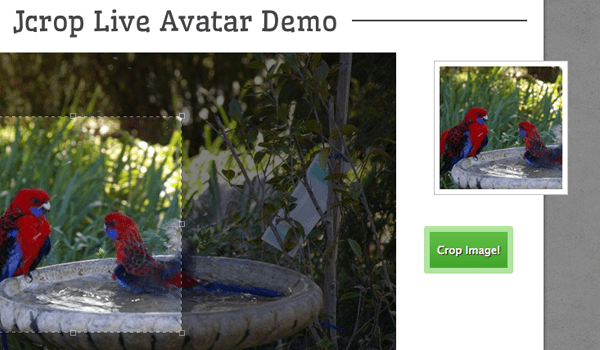
    <p>After toying with <a href="http://deepliquid.com/content/Jcrop.html" rel="nofollow external" class="bo">Jcrop</a> I have come to really support this plugin. The codes are very small and do not require a whole lot of setup (although there are plenty of optional settings). My demo example will include dynamic avatar updating in real-time, along with a PHP rendering script. I think the amount of new social networks and websites offering user profiles should definitely take this UX technique into consideration.</p>
    <p></p>
    <p><a href="http://byjakewithlove.com/treehouse/jcrop/" rel="nofollow external" class="bo"><img src="http://blog.teamtreehouse.com/wp-content/uploads/2013/03/featured-image-jquery-jcrop-cropping-photo.png" alt="preview tutorial jcrop plugin avatar cropping effect" style="max-width: 100%; height: auto;"></a></p>
    <p><strong><a href="http://byjakewithlove.com/treehouse/jcrop/" rel="nofollow external" class="bo">Live Demo</a></strong> – <strong><a href="http://blog.teamtreehouse.com/wp-content/uploads/2013/03/avatar-crop-jquery-source.zip" rel="nofollow external" class="bo">Download Source Code</a></strong></p>
    <h2>Setup the Project</h2>
    <p>First you should <a href="http://deepliquid.com/content/Jcrop_Download.html" rel="nofollow external" class="bo">download a copy of Jcrop</a> which includes a series of files we will need. The core will require a CSS and JS file, along with a copy of jQuery. The plugin will require more JavaScript for running the plugin and I have moved these codes into a separate file named <em>cropsetup.js</em>.</p>
    <pre>&lt;!DOCTYPE html&gt;&#x000A;    &lt;html lang="en"&gt;&#x000A;    &lt;head&gt;&#x000A;      &lt;meta http-equiv="Content-type" content="text/html;charset=utf-8"&gt;&#x000A;      &lt;title&gt;Jcrop Dynamic Avatar JS/PHP Demo&lt;/title&gt;&#x000A;      &lt;link rel="shortcut icon" href="<a href="http://teamtreehouse.com/assets/favicon.ico%22&amp;gt">http://teamtreehouse.com/assets/favicon.ico"&amp;gt</a>;&#x000A;      &lt;link rel="icon" href="<a href="http://teamtreehouse.com/assets/favicon.ico%22&amp;gt">http://teamtreehouse.com/assets/favicon.ico"&amp;gt</a>;&#x000A;      &lt;link rel="stylesheet" type="text/css" href="css/styles.css"&gt;&#x000A;      &lt;link rel="stylesheet" type="text/css" href="css/jquery.Jcrop.css"&gt;&#x000A;      &lt;link rel="stylesheet" type="text/css" href="<a href="http://fonts.googleapis.com/css?family=Wellfleet%22&amp;gt">http://fonts.googleapis.com/css?family=Wellfleet"&amp;gt</a>;&#x000A;      &lt;script type="text/javascript" src="<a href="https://ajax.googleapis.com/ajax/libs/jquery/1.9.1/jquery.min.js%22&gt;&lt;/script&amp;gt">https://ajax.googleapis.com/ajax/libs/jquery/1.9.1/jquery.min.js"&gt;&lt;/script&amp;gt</a>;&#x000A;      &lt;script type="text/javascript" src="js/jquery.Jcrop.js"&gt;&lt;/script&gt;&#x000A;      &lt;script type="text/javascript" src="js/cropsetup.js"&gt;&lt;/script&gt;&#x000A;    &lt;/head&gt;&#x000A;    </pre>
    <p>This is my document header which contains a decent number of resources we need to include. Notice I have split everything into folders using js and css which typically makes organizing projects a whole lot easier. The crop.php file is only in the root for convenience of this demo.</p>
    <pre>&lt;div id="wrapper"&gt;&#x000A;      &lt;div class="jc-demo-box"&gt;&#x000A;        &lt;header&gt;&#x000A;          &lt;h1&gt;&lt;span&gt;Jcrop Live Avatar Demo&lt;/span&gt;&lt;/h1&gt;&#x000A;        &lt;/header&gt;&#x000A;    &#x000A;        &lt;img src="images/cropimg.jpg" id="target" alt="[Jcrop Example]" /&gt;&#x000A;    &#x000A;        &lt;div id="preview-pane"&gt;&#x000A;          &lt;div class="preview-container"&gt;&#x000A;            &lt;img src="images/cropimg.jpg" class="jcrop-preview" alt="Preview" /&gt;&#x000A;          &lt;/div&gt;&#x000A;        &lt;/div&gt;&lt;!-- @end #preview-pane --&gt;&#x000A;        &#x000A;        &lt;div id="form-container"&gt;&#x000A;          &lt;form id="cropimg" name="cropimg" method="post" action="crop.php" target="_blank"&gt;&#x000A;            &lt;input type="hidden" id="x" name="x"&gt;&#x000A;            &lt;input type="hidden" id="y" name="y"&gt;&#x000A;            &lt;input type="hidden" id="w" name="w"&gt;&#x000A;            &lt;input type="hidden" id="h" name="h"&gt;&#x000A;            &lt;input type="submit" id="submit" value="Crop Image!"&gt;&#x000A;          &lt;/form&gt;&#x000A;        &lt;/div&gt;&lt;!-- @end #form-container --&gt;&#x000A;      &lt;/div&gt;&lt;!-- @end .jc-demo-box --&gt;&#x000A;    &lt;/div&gt;&lt;!-- @end #wrapper --&gt;&#x000A;    </pre>
    <p>The code block above holds the entirety of my demo page body content. I have setup an outer wrapper and I’ve kept the container class <strong>.jc-demo-box</strong> as well. This could be changed to anything as long as the image and preview page will fit properly within the content area. Just reuse the same CSS properties and it will be all set. The img tag with the ID <strong>#target</strong> will display the full-sized image where a Jcrop selection can be drawn.</p>
    <p>Underneath the main image there is a div with the ID <strong>#preview-pane</strong> and this holds another image tag. For this demo I set the aspect ratio at 1:1 so the avatar will always come out square. This aspect ratio requires an avatar container with the same square dimensions. We can see how this is accomplished in the stylesheet.</p>
    <h2>Common Page CSS</h2>
    <p>I will not go over much in the <em>jquery.Jcrop.css</em> file because these codes are traditional for the crop interface, so there are no customizations required, but elements within the content area need to be styled in a very specific fashion. )As a side note, the background tiling is called <a href="http://subtlepatterns.com/mocha-grunge/" rel="nofollow external" class="bo">Mocha Grunge</a> downloaded from Subtle Patterns.</p>
    <p>)</p>
    <pre>/* jcrop styles */&#x000A;    .jc-demo-box {&#x000A;      position: relative;&#x000A;      text-align: left;&#x000A;      margin: 1.5em auto;&#x000A;      background: #fff;&#x000A;      -webkit-box-shadow: 0 3px 9px -1px rgba(0,0,0,0.75);&#x000A;      -moz-box-shadow: 0 3px 9px -1px rgba(0,0,0,0.75);&#x000A;      box-shadow: 0 3px 9px -1px rgba(0,0,0,0.75);&#x000A;      padding: 1em 2em 2em;&#x000A;    }&#x000A;    &#x000A;    &#x000A;    /* Apply these styles only when #preview-pane has&#x000A;       been placed within the Jcrop widget */&#x000A;    .jcrop-holder #preview-pane {&#x000A;      display: block;&#x000A;      position: absolute;&#x000A;      z-index: 2000;&#x000A;      top: 10px;&#x000A;      right: -210px;&#x000A;      background-color: #fff;&#x000A;      padding: 6px;&#x000A;      border: 1px solid #bcbcbc;&#x000A;    }&#x000A;    &#x000A;    /* The Javascript code will set the aspect ratio of the crop&#x000A;       area based on the size of the thumbnail preview,&#x000A;       specified here */&#x000A;    #preview-pane .preview-container {&#x000A;      width: 150px;&#x000A;      height: 150px;&#x000A;      overflow: hidden;&#x000A;    }&#x000A;    </pre>
    <p>These blocks are default settings which can be found in the original Jcrop demo page. The <strong>#preview-pane</strong> div is specifically important because we are using absolute positioning on the element. The internal preview div is fixed at 150×150 pixels so this is ultimately our final avatar size. We can always go back and edit the values to fit another style, just be sure and update the <strong>.preview-container</strong> properties.</p>
    <pre>#form-container {&#x000A;      display: block;&#x000A;      position: absolute; &#x000A;      top: 300px; &#x000A;      right: 35px;&#x000A;    }&#x000A;    &#x000A;    #submit {&#x000A;      color: #fff;&#x000A;      font-size: 1.3em;&#x000A;      text-shadow: 1px 1px 1px #131313;&#x000A;      border: 7px solid #b0e49f;&#x000A;      padding: 14px 9px;&#x000A;      cursor: pointer;&#x000A;      background-color: #62be46;&#x000A;      background-image: -webkit-gradient(linear, left top, left bottom, from(#62be46), to(#41a62b));&#x000A;      background-image: -webkit-linear-gradient(top, #62be46, #41a62b);&#x000A;      background-image: -moz-linear-gradient(top, #62be46, #41a62b);&#x000A;      background-image: -ms-linear-gradient(top, #62be46, #41a62b);&#x000A;      background-image: -o-linear-gradient(top, #62be46, #41a62b);&#x000A;      background-image: linear-gradient(top, #62be46, #41a62b);&#x000A;      -webkit-border-radius: 3px;&#x000A;      -moz-border-radius: 3px;&#x000A;      border-radius: 3px;&#x000A;    }&#x000A;    #submit:hover {&#x000A;      background-color: #72ce54;&#x000A;      background-image: -webkit-gradient(linear, left top, left bottom, from(#72ce54), to(#49b233));&#x000A;      background-image: -webkit-linear-gradient(top, #72ce54, #49b233);&#x000A;      background-image: -moz-linear-gradient(top, #72ce54, #49b233);&#x000A;      background-image: -ms-linear-gradient(top, #72ce54, #49b233);&#x000A;      background-image: -o-linear-gradient(top, #72ce54, #49b233);&#x000A;      background-image: linear-gradient(top, #72ce54, #49b233);&#x000A;    }&#x000A;    #submit:active {&#x000A;      -webkit-box-shadow: inset 0 2px 13px -1px rgba(0,0,0,0.35);&#x000A;      -moz-box-shadow: inset 0 2px 13px -1px rgba(0,0,0,0.35);&#x000A;      box-shadow: inset 0 2px 13px -1px rgba(0,0,0,0.35);&#x000A;    }&#x000A;    </pre>
    <p>Since the container div is set to a relative position we are using substantial absolute positioning to squeeze the dynamic elements inside any layout. Particularly the preview image and crop button which are both located to the right-hand side. I have attached the attribute <strong>target=”_blank”</strong> so the cropped avatar PHP script will open in a new browser tab.</p>
    <h2>Configuring the jQuery Method</h2>
    <p>This final chunk of code is what will get Jcrop running and working properly in the layout. I have copied over the basic function template from the original demo, but I’ve enhanced the features so we can see a live update preview along with the final cropped image. This is my default method call but you may implement something much simpler if needed:</p>
    <pre>  $('#target').Jcrop({&#x000A;        onChange: updatePreview,&#x000A;        onSelect: updatePreview,&#x000A;        bgOpacity: 0.5,&#x000A;        aspectRatio: xsize / ysize&#x000A;      },function(){&#x000A;        // Use the API to get the real image size&#x000A;        var bounds = this.getBounds();&#x000A;        boundx = bounds[0];&#x000A;        boundy = bounds[1];&#x000A;    &#x000A;        jcrop_api = this; // Store the API in the jcrop_api variable&#x000A;    &#x000A;        // Move the preview into the jcrop container for css positioning&#x000A;        $preview.appendTo(jcrop_api.ui.holder);&#x000A;      });&#x000A;    </pre>
    <p>Inside the method I am passing a number of unique parameters. Specifically these are <strong>onChange</strong>, <strong>onSelect</strong>, <strong>bgOpacity</strong>, and <strong>aspectRatio</strong>. The first two will call the custom function updatePreview() every time the user changes or adjusts the crop selection. bgOpacity allows you to set the level of transparency for the darker background. And obviously aspectRatio will configure the selection box dimensions. We are passing in some variables for this setting which can be explained by the earlier setup variables.</p>
    <pre>  // Create variables (in this scope) to hold the API and image size&#x000A;      var jcrop_api,&#x000A;          boundx,&#x000A;          boundy,&#x000A;          // Grab some information about the preview pane&#x000A;          $preview = $('#preview-pane'),&#x000A;          $pcnt = $('#preview-pane .preview-container'),&#x000A;          $pimg = $('#preview-pane .preview-container img'),&#x000A;          xsize = $pcnt.width(),&#x000A;          ysize = $pcnt.height();&#x000A;    </pre>
    <p>Inside the Jcrop API we can use a number of these variables for handling custom data. The final function clause from earlier will only call after the user has finished making their selection. It will update the preview image so that we can see it resized properly on the screen in real time.</p>
    <pre>  function updatePreview(c) {&#x000A;        if (parseInt(c.w) &gt; 0) {&#x000A;          var rx = xsize / c.w;&#x000A;          var ry = ysize / c.h;&#x000A;            &#x000A;          $('#x').val(c.x);&#x000A;          $('#y').val(c.y);&#x000A;          $('#w').val(c.w);&#x000A;          $('#h').val(c.h);&#x000A;    &#x000A;          $pimg.css({&#x000A;            width: Math.round(rx * boundx) + 'px',&#x000A;            height: Math.round(ry * boundy) + 'px',&#x000A;            marginLeft: '-' + Math.round(rx * c.x) + 'px',&#x000A;            marginTop: '-' + Math.round(ry * c.y) + 'px'&#x000A;          });&#x000A;        }&#x000A;      }&#x000A;    </pre>
    <p>The updatePreview() function is long-winded but necessary for getting the form inputs to work properly. I am targeting a series of hidden input fields which get passed along into PHP on submission. We can check the x/y coordinates and the width/height values to determine where PHP should crop the new avatar image.</p>
    <h2>Cropping and Saving in PHP</h2>
    <p>Although you do not need to use PHP as the backend language I chose this because of its popularity among open source web developers. Also the demo Jcrop files will include a similar crop file which is mixed inside another webpage. My edits have removed this PHP process into a new script that the user would likely never see(if using Ajax).</p>
    <pre>$targ_w = $targ_h = 150;&#x000A;    $jpeg_quality = 90;&#x000A;    &#x000A;    if(!isset($_POST['x']) || !is_numeric($_POST['x'])) {&#x000A;      die('Please select a crop area.');&#x000A;    }&#x000A;    &#x000A;    $src = 'images/cropimg.jpg';&#x000A;    $img_r = imagecreatefromjpeg($src);&#x000A;    $dst_r = ImageCreateTrueColor($targ_w, $targ_h);&#x000A;    &#x000A;    imagecopyresampled($dst_r,$img_r,0,0,$_POST['x'],$_POST['y'],&#x000A;    $targ_w,$targ_h,$_POST['w'],$_POST['h']);&#x000A;    &#x000A;    header('Content-type: image/jpeg');&#x000A;    imagejpeg($dst_r,null,$jpeg_quality); // NULL will output the image directly&#x000A;    &#x000A;    exit;&#x000A;    </pre>
    <p>The code is a lot easier than it looks since we do not need to perform much functionality. After creating a variable to hold the image contents via <a href="http://php.net/manual/en/function.imagecreatefromjpeg.php" rel="nofollow external" class="bo">imagecreatefromjpeg()</a> then we can make a copy and further clip out exactly what we need for the avatar. I want to focus on the final two lines which send out a header of image/jpeg followed by the image itself.</p>
    <p>The <a href="http://php.net/manual/en/function.header.php" rel="nofollow external" class="bo">header()</a> function is only needed because the page isn’t outputting text/HTML code, it is outputting JPEG information. Otherwise we would not need to include this at all. If we look at the imagejpeg() function there are 3 parameters being passed – the newly cropped image, the save path, and the quality. Using NULL for the path will output the image directly but you can include a local relative path like <strong>/public_html/avatars/newimg1.jpg</strong>.</p>
    <p>The only problem is that you also need a method of distinguishing various avatars from each other. The folder will appear crowded and confusing if you just append another number to the end of the filename. Even organizing by user ID can get messy. However this is obviously a much deeper topic, so I hope this tutorial can offer a good starting point for developers interested in creating such a dynamic user interface. Be sure to check out my live demo and catch a glimpse of this effect in action.</p>
    <p><a href="http://byjakewithlove.com/treehouse/jcrop/" rel="nofollow external" class="bo"><img src="http://blog.teamtreehouse.com/wp-content/uploads/2013/03/featured-image-jquery-jcrop-cropping-photo.png" alt="preview tutorial jcrop plugin avatar cropping effect" style="max-width: 100%; height: auto;"></a></p>
    <p><strong><a href="http://byjakewithlove.com/treehouse/jcrop/" rel="nofollow external" class="bo">Live Demo</a></strong> – <strong><a href="http://blog.teamtreehouse.com/wp-content/uploads/2013/03/avatar-crop-jquery-source.zip" rel="nofollow external" class="bo">Download Source Code</a></strong></p>
    <h2>Closing</h2>
    <p>Be aware that this script does require hosting on some type of PHP-supported web server to handle the actual image cropping, and please note the demo PHP script uses <a href="http://php.net/manual/en/function.imagejpeg.php" rel="nofollow external" class="bo">imagejpeg()</a> to output the codes directly to the browser, instead of saving to a new image file. This was done to spare my server from handling loads of new files and HDD space. But these minor changes would require just a few code edits and the whole script is versatile enough for porting into your own website layout with ease.</p>
    <p>The post <a href="http://blog.teamtreehouse.com/dynamic-jquery-image-avatar-cropping-effect" rel="nofollow external" class="bo">Dynamic jQuery Image Avatar Cropping Effect</a> appeared first on <a href="http://blog.teamtreehouse.com" rel="nofollow external" class="bo">Treehouse Blog</a>.</p>
    </div>
]]>
</Body>
<Summary>I can still remember the old digg.com user profiles with dynamic avatar cropping via JavaScript. Their user interface was clean, easy to use, displayed a sample before you cropped, and would...</Summary>
<Website>http://feedproxy.google.com/~r/teamtreehouse/~3/0qWOhf1E-F0/dynamic-jquery-image-avatar-cropping-effect</Website>
<TrackingUrl>https://my3.my.umbc.edu/api/v0/pixel/news/26761/guest@my.umbc.edu/3e208d9b06e36f7ac58cbcf6892d810f/api/pixel</TrackingUrl>
<Tag>android</Tag>
<Tag>cropping</Tag>
<Tag>css</Tag>
<Tag>css3</Tag>
<Tag>design</Tag>
<Tag>development</Tag>
<Tag>dynamic</Tag>
<Tag>html</Tag>
<Tag>images</Tag>
<Tag>ios</Tag>
<Tag>javascript</Tag>
<Tag>jquery</Tag>
<Tag>learn-to-code</Tag>
<Tag>php</Tag>
<Tag>responsive</Tag>
<Tag>ui</Tag>
<Tag>web</Tag>
<Group token="retired-583">Web Developer - Build Group</Group>
<GroupUrl>https://my3.my.umbc.edu/groups/retired-583</GroupUrl>
<AvatarUrl>https://assets3-my.umbc.edu/system/shared/avatars/groups/000/000/583/fc60f5d7abc2e080599bb6dc465db54d/xsmall.png?1363101197</AvatarUrl>
<AvatarUrl size="original">https://assets4-my.umbc.edu/system/shared/avatars/groups/000/000/583/fc60f5d7abc2e080599bb6dc465db54d/original.jpg?1363101197</AvatarUrl>
<AvatarUrl size="xxlarge">https://assets4-my.umbc.edu/system/shared/avatars/groups/000/000/583/fc60f5d7abc2e080599bb6dc465db54d/xxlarge.png?1363101197</AvatarUrl>
<AvatarUrl size="xlarge">https://assets4-my.umbc.edu/system/shared/avatars/groups/000/000/583/fc60f5d7abc2e080599bb6dc465db54d/xlarge.png?1363101197</AvatarUrl>
<AvatarUrl size="large">https://assets3-my.umbc.edu/system/shared/avatars/groups/000/000/583/fc60f5d7abc2e080599bb6dc465db54d/large.png?1363101197</AvatarUrl>
<AvatarUrl size="medium">https://assets3-my.umbc.edu/system/shared/avatars/groups/000/000/583/fc60f5d7abc2e080599bb6dc465db54d/medium.png?1363101197</AvatarUrl>
<AvatarUrl size="small">https://assets4-my.umbc.edu/system/shared/avatars/groups/000/000/583/fc60f5d7abc2e080599bb6dc465db54d/small.png?1363101197</AvatarUrl>
<AvatarUrl size="xsmall">https://assets3-my.umbc.edu/system/shared/avatars/groups/000/000/583/fc60f5d7abc2e080599bb6dc465db54d/xsmall.png?1363101197</AvatarUrl>
<AvatarUrl size="xxsmall">https://assets4-my.umbc.edu/system/shared/avatars/groups/000/000/583/fc60f5d7abc2e080599bb6dc465db54d/xxsmall.png?1363101197</AvatarUrl>
<Sponsor>Web Developer - Build Group</Sponsor>
<PawCount>0</PawCount>
<CommentCount>0</CommentCount>
<CommentsAllowed>true</CommentsAllowed>
<PostedAt>Tue, 26 Mar 2013 13:30:38 -0400</PostedAt>
<EditAt>Tue, 26 Mar 2013 13:30:38 -0400</EditAt>
</NewsItem>

<NewsItem contentIssues="true" id="26744" important="false" status="posted" url="https://my3.my.umbc.edu/posts/26744">
<Title>UMBC Engineering Students Tackle Water Quality in Kenya</Title>
<Body>
<![CDATA[
    <div class="html-content">
    <h5><span>by Lee Blaney</span></h5>
    <div><span><br></span></div>
    <div>
    <span>This past January, a </span><a href="http://ewbatumbc.tumblr.com/" rel="nofollow external" class="bo">UMBC Engineers Without Borders</a><span> team left the blustery winds of Baltimore and travelled for two days by plane, van and motorbike to Isongo, Kenya, a community of 500 people in need of a clean water source. </span><span>One of our first interactions with community leaders came after a church service led by Fr. Chris, when we enjoyed a meal together, sharing our backgrounds and dreaming about the potential of our partnership. ... <a href="http://umbcbreakingground.wordpress.com/2013/03/26/umbc-engineering-students-foster-development-of-clean-water-in-kenya/" rel="nofollow external" class="bo">(continue reading)</a></span>
    </div>
    </div>
]]>
</Body>
<Summary>by Lee Blaney     This past January, a UMBC Engineers Without Borders team left the blustery winds of Baltimore and travelled for two days by plane, van and motorbike to Isongo, Kenya, a community...</Summary>
<Website>http://umbcbreakingground.wordpress.com/2013/03/26/umbc-engineering-students-foster-development-of-clean-water-in-kenya/</Website>
<TrackingUrl>https://my3.my.umbc.edu/api/v0/pixel/news/26744/guest@my.umbc.edu/a1ea662604b284e4af8dd929f9034686/api/pixel</TrackingUrl>
<Group token="bg">UMBC BreakingGround</Group>
<GroupUrl>https://my3.my.umbc.edu/groups/bg</GroupUrl>
<AvatarUrl>https://assets3-my.umbc.edu/system/shared/avatars/groups/000/000/493/e0dc61eceffa1a7dff9d396b4b7c5011/xsmall.png?1360169927</AvatarUrl>
<AvatarUrl size="original">https://assets2-my.umbc.edu/system/shared/avatars/groups/000/000/493/e0dc61eceffa1a7dff9d396b4b7c5011/original.png?1360169927</AvatarUrl>
<AvatarUrl size="xxlarge">https://assets3-my.umbc.edu/system/shared/avatars/groups/000/000/493/e0dc61eceffa1a7dff9d396b4b7c5011/xxlarge.png?1360169927</AvatarUrl>
<AvatarUrl size="xlarge">https://assets1-my.umbc.edu/system/shared/avatars/groups/000/000/493/e0dc61eceffa1a7dff9d396b4b7c5011/xlarge.png?1360169927</AvatarUrl>
<AvatarUrl size="large">https://assets4-my.umbc.edu/system/shared/avatars/groups/000/000/493/e0dc61eceffa1a7dff9d396b4b7c5011/large.png?1360169927</AvatarUrl>
<AvatarUrl size="medium">https://assets2-my.umbc.edu/system/shared/avatars/groups/000/000/493/e0dc61eceffa1a7dff9d396b4b7c5011/medium.png?1360169927</AvatarUrl>
<AvatarUrl size="small">https://assets4-my.umbc.edu/system/shared/avatars/groups/000/000/493/e0dc61eceffa1a7dff9d396b4b7c5011/small.png?1360169927</AvatarUrl>
<AvatarUrl size="xsmall">https://assets3-my.umbc.edu/system/shared/avatars/groups/000/000/493/e0dc61eceffa1a7dff9d396b4b7c5011/xsmall.png?1360169927</AvatarUrl>
<AvatarUrl size="xxsmall">https://assets4-my.umbc.edu/system/shared/avatars/groups/000/000/493/e0dc61eceffa1a7dff9d396b4b7c5011/xxsmall.png?1360169927</AvatarUrl>
<Sponsor>UMBC BreakingGround</Sponsor>
<ThumbnailUrl size="xxlarge">https://assets4-my.umbc.edu/system/shared/thumbnails/news/000/026/744/d2804bda02d05ee5868227fb24f13c98/xxlarge.jpg?1364318037</ThumbnailUrl>
<ThumbnailUrl size="xlarge">https://assets3-my.umbc.edu/system/shared/thumbnails/news/000/026/744/d2804bda02d05ee5868227fb24f13c98/xlarge.jpg?1364318037</ThumbnailUrl>
<ThumbnailUrl size="large">https://assets1-my.umbc.edu/system/shared/thumbnails/news/000/026/744/d2804bda02d05ee5868227fb24f13c98/large.jpg?1364318037</ThumbnailUrl>
<ThumbnailUrl size="medium">https://assets3-my.umbc.edu/system/shared/thumbnails/news/000/026/744/d2804bda02d05ee5868227fb24f13c98/medium.jpg?1364318037</ThumbnailUrl>
<ThumbnailUrl size="small">https://assets3-my.umbc.edu/system/shared/thumbnails/news/000/026/744/d2804bda02d05ee5868227fb24f13c98/small.jpg?1364318037</ThumbnailUrl>
<ThumbnailUrl size="xsmall">https://assets1-my.umbc.edu/system/shared/thumbnails/news/000/026/744/d2804bda02d05ee5868227fb24f13c98/xsmall.jpg?1364318037</ThumbnailUrl>
<ThumbnailUrl size="xxsmall">https://assets2-my.umbc.edu/system/shared/thumbnails/news/000/026/744/d2804bda02d05ee5868227fb24f13c98/xxsmall.jpg?1364318037</ThumbnailUrl>
<PawCount>111</PawCount>
<CommentCount>8</CommentCount>
<CommentsAllowed>true</CommentsAllowed>
<PostedAt>Tue, 26 Mar 2013 13:15:17 -0400</PostedAt>
</NewsItem>

</News>