Helen Burgess, English, Selected for NEH Review Panel
English Associate Professor Helen Burgess has been selected for a National Endowment for the Humanities (NEH) review panel for the Digital Humanities Start-Up Grant Program. The grant program is designed to encourage innovation in all aspects of the digital humanities. The panel reviews proposals that involve approaches to new media, e-literature, innovative uses of technology, and new digital modes of publication. The NEH Digital Humanities Start-Up Grants have averaged 151 applications per competition over the last five years, and the program has issued an average of 26 awards each year. You can find more information about the grant program here.
]]>
English Associate Professor Helen Burgess has been selected for a National Endowment for the Humanities (NEH) review panel for the Digital Humanities Start-Up Grant Program. The grant program is...
https://news.umbc.edu/helen-burgess-english-selected-for-neh-review-panel/
https://my3.my.umbc.edu/api/v0/pixel/news/109958/guest@my.umbc.edu/aa2bae41b625be5ac79d94f97d241f92/api/pixel
arts-and-culture
cahss
english
UMBC News
https://my3.my.umbc.edu/groups/umbc-news
https://assets2-my.umbc.edu/system/shared/avatars/groups/000/001/944/2c79aeea85b1abb37f8cf9fbcdc382b0/xsmall.png?1632921809
https://assets4-my.umbc.edu/system/shared/avatars/groups/000/001/944/2c79aeea85b1abb37f8cf9fbcdc382b0/original.png?1632921809
https://assets4-my.umbc.edu/system/shared/avatars/groups/000/001/944/2c79aeea85b1abb37f8cf9fbcdc382b0/xxlarge.png?1632921809
https://assets1-my.umbc.edu/system/shared/avatars/groups/000/001/944/2c79aeea85b1abb37f8cf9fbcdc382b0/xlarge.png?1632921809
https://assets1-my.umbc.edu/system/shared/avatars/groups/000/001/944/2c79aeea85b1abb37f8cf9fbcdc382b0/large.png?1632921809
https://assets1-my.umbc.edu/system/shared/avatars/groups/000/001/944/2c79aeea85b1abb37f8cf9fbcdc382b0/medium.png?1632921809
https://assets4-my.umbc.edu/system/shared/avatars/groups/000/001/944/2c79aeea85b1abb37f8cf9fbcdc382b0/small.png?1632921809
https://assets2-my.umbc.edu/system/shared/avatars/groups/000/001/944/2c79aeea85b1abb37f8cf9fbcdc382b0/xsmall.png?1632921809
https://assets4-my.umbc.edu/system/shared/avatars/groups/000/001/944/2c79aeea85b1abb37f8cf9fbcdc382b0/xxsmall.png?1632921809
UMBC News
0
0
false
Fri, 01 Nov 2013 15:33:57 -0400
Native Rich-Text Editing with the contenteditable Attribute
One of the lesser-known HTML attributes is contenteditable. This attribute allows you to turn a standard read-only HTML element into an interactive, rich-text editor.
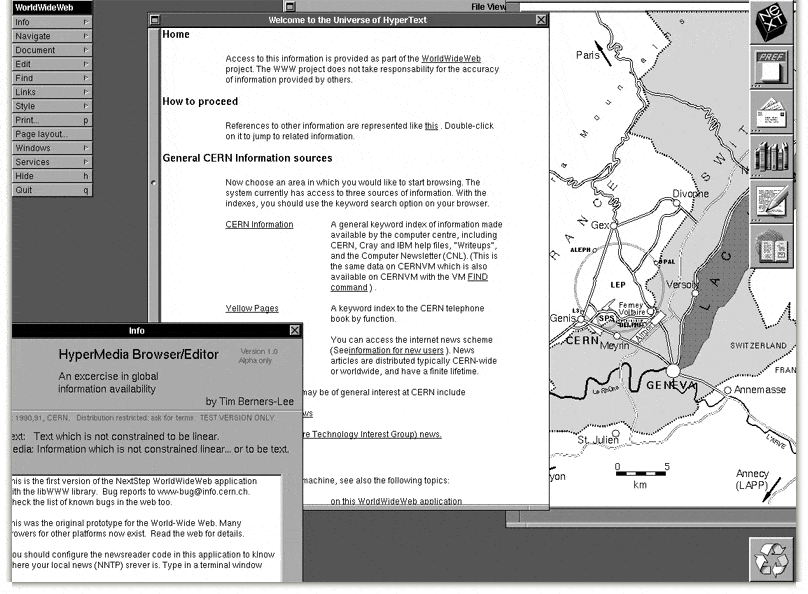
When Tim Berners-Lee built the first web browser in 1990, he created modes for both browsing and editing HTML documents. However as the web grew, browsers transitioned to a more read-only state. The contenteditable attribute and associated element properties bring native content editing back to the browser.
In this blog post you are going to learn how to use the contenteditable attribute to allow users to edit page content directly within their browser. You’ll also be taking a look at the properties that allow you to manipulate an element’s editable state using JavaScript.
The contenteditable Attribute

You can make an element editable by adding the contenteditable attribute in your markup. This attribute has three possible values: true, false, and inherit. Specifying inherit will make the element editable if it’s immediate parent is editable.
<div id="editor" contenteditable="true">
      ...
    </div>
See the Demo View on CodePen
Note: Editable elements are included in the tab order and can therefore be focussed using the tab key. This makes them accessible to users that might not be able to use a mouse. The tabindex attribute can be used to specify where in the tab order the editable element should fall.
Making Elements Editable in JavaScript

As well as the contenteditable HTML attribute it is also possible to make an element editable using JavaScript. This involves two element properties:
-
isContentEditable – This property will return true if the element is editable and false if it is not.
-
contentEditable – This property can be used to set the editable status of an element. Supported values are the same as those used for the contenteditable attribute: true, false, and inherit.
var editor = document.getElementById('editor');
    editor.isContentEditable;
    editor.contentEditable = true;
Lets take a look at an example of how you could use a button to toggle an element’s editable state.
<button id="editorBtn" type="button">Enable Editing</button>
    <div id="editor">
      ...
    </div>
Here you’ve created simple <button> and <div> elements. Notice that the <div> doesn’t have a contenteditable attribute.
var editorBtn = document.getElementById('editorBtn');
    var element = document.getElementById('editor');

    editorBtn.addEventListener('click', function(e) {
      e.preventDefault();

      if (element.isContentEditable) {
        // Disable Editing
        element.contentEditable = 'false';
        editorBtn.innerHTML = 'Enable Editing';

        // You could save any changes here.
      } else {
        element.contentEditable = 'true';
        editorBtn.innerHTML = 'Disable Editing';
      }
    });
In this JavaScript code you start by creating two variables that represent the <button> and <div> elements on the page. You then attach an event listener to the editorBtn that will be fired when the user clicks the button. Inside the callback function of this event listener you examine the <div> element’s isContentEditable property to determine whether the element is currently editable. If it is, you disable editing by setting the element’s contentEditable property to false, and update the button text to Enable Editing. If the element is not editable you first enable editing and then change the button text to Disable Editing.
See the Demo View on CodePen
Making an Entire Page Editable
If you’d like to make an entire web page editable you can use the designMode property of the document object. Setting this property to 'on' will enable editing. This also works on documents within iframes.
document.designMode = 'on';
Try turning on designMode for this page using your browser’s dev tools. Once enabled you should be able to edit all of the page content.
If you’re not familiar with using your browser’s dev tools, here’s some steps to get you going.
- Open up your browser’s dev tools. (Right-click anywhere on the page and select ‘Inspect Element’)
- Switch to the Console tab.
- Type the following into the console and press enter:
document.designMode = 'on';
Browser Support for contenteditable
Support for contenteditable is very good. Internet Explorer was the first browser to implement this technology, way back in IE 5.5 (circa 2000). Since then, contenteditable has been standardized by the WHATWG.
| IE |
Firefox |
Chrome |
Safari |
Opera |
| 5.5+ |
3.5+ |
4.0+ |
3.1+ |
9.0+ |
Source: http://caniuse.com/#feat=contenteditable
Final Thoughts
Enabling the ability to simply click an element and make an update enables a really enjoyable editing experience for the user. The contenteditable attribute makes implementing this interaction effortless.
You could enable this same behaviour by cleverly swapping in an <input> or <textarea> when an element is clicked. This is in fact the way that a number of websites still handle inline editing. The problem with this approach is that it involves writing a load of JavaScript to switch in the new <input> or <textarea>, and CSS to match it’s styling to the original element. Using contenteditable solves both of these issues.
How do you see yourself using contenteditable in your projects? Share your thoughts in the comments below.
Useful Links
The post Native Rich-Text Editing with the contenteditable Attribute appeared first on Treehouse Blog.
]]>
One of the lesser-known HTML attributes is contenteditable. This attribute allows you to turn a standard read-only HTML element into an interactive, rich-text editor. When Tim Berners-Lee built...
http://feedproxy.google.com/~r/teamtreehouse/~3/MoPFnnGNe-4/native-rich-text-editing-with-the-contenteditable-attribute
https://my3.my.umbc.edu/api/v0/pixel/news/37843/guest@my.umbc.edu/95f697eee310b146fed55d3aaba263eb/api/pixel
android
code
contenteditable
css
design
development
html
html5
ios
iscontenteditable
javascript
responsive
web
web-apps
Web Developer - Build Group
https://my3.my.umbc.edu/groups/retired-583
https://assets3-my.umbc.edu/system/shared/avatars/groups/000/000/583/fc60f5d7abc2e080599bb6dc465db54d/xsmall.png?1363101197
https://assets4-my.umbc.edu/system/shared/avatars/groups/000/000/583/fc60f5d7abc2e080599bb6dc465db54d/original.jpg?1363101197
https://assets4-my.umbc.edu/system/shared/avatars/groups/000/000/583/fc60f5d7abc2e080599bb6dc465db54d/xxlarge.png?1363101197
https://assets4-my.umbc.edu/system/shared/avatars/groups/000/000/583/fc60f5d7abc2e080599bb6dc465db54d/xlarge.png?1363101197
https://assets3-my.umbc.edu/system/shared/avatars/groups/000/000/583/fc60f5d7abc2e080599bb6dc465db54d/large.png?1363101197
https://assets3-my.umbc.edu/system/shared/avatars/groups/000/000/583/fc60f5d7abc2e080599bb6dc465db54d/medium.png?1363101197
https://assets4-my.umbc.edu/system/shared/avatars/groups/000/000/583/fc60f5d7abc2e080599bb6dc465db54d/small.png?1363101197
https://assets3-my.umbc.edu/system/shared/avatars/groups/000/000/583/fc60f5d7abc2e080599bb6dc465db54d/xsmall.png?1363101197
https://assets4-my.umbc.edu/system/shared/avatars/groups/000/000/583/fc60f5d7abc2e080599bb6dc465db54d/xxsmall.png?1363101197
Web Developer - Build Group
0
0
true
Fri, 01 Nov 2013 15:00:59 -0400
Customer Feature: The Business of Growing
The second-largest cooperative in the United States, Land O'Lakes invests in Oracle engineered systems to plant the seeds of change.
]]>
The second-largest cooperative in the United States, Land O'Lakes invests in Oracle engineered systems to plant the seeds of change.
http://www.oracle.com/technetwork/issue-archive/2013/13-nov/o63lol-2034253.html
https://my3.my.umbc.edu/api/v0/pixel/news/37842/guest@my.umbc.edu/80fa953f206cd09a37bd8f92906ba6e8/api/pixel
css
design
development
html
javascript
mysql
oracle
pl-sql
sql
Web Developer - Build Group
https://my3.my.umbc.edu/groups/retired-583
https://assets3-my.umbc.edu/system/shared/avatars/groups/000/000/583/fc60f5d7abc2e080599bb6dc465db54d/xsmall.png?1363101197
https://assets4-my.umbc.edu/system/shared/avatars/groups/000/000/583/fc60f5d7abc2e080599bb6dc465db54d/original.jpg?1363101197
https://assets4-my.umbc.edu/system/shared/avatars/groups/000/000/583/fc60f5d7abc2e080599bb6dc465db54d/xxlarge.png?1363101197
https://assets4-my.umbc.edu/system/shared/avatars/groups/000/000/583/fc60f5d7abc2e080599bb6dc465db54d/xlarge.png?1363101197
https://assets3-my.umbc.edu/system/shared/avatars/groups/000/000/583/fc60f5d7abc2e080599bb6dc465db54d/large.png?1363101197
https://assets3-my.umbc.edu/system/shared/avatars/groups/000/000/583/fc60f5d7abc2e080599bb6dc465db54d/medium.png?1363101197
https://assets4-my.umbc.edu/system/shared/avatars/groups/000/000/583/fc60f5d7abc2e080599bb6dc465db54d/small.png?1363101197
https://assets3-my.umbc.edu/system/shared/avatars/groups/000/000/583/fc60f5d7abc2e080599bb6dc465db54d/xsmall.png?1363101197
https://assets4-my.umbc.edu/system/shared/avatars/groups/000/000/583/fc60f5d7abc2e080599bb6dc465db54d/xxsmall.png?1363101197
Web Developer - Build Group
0
0
true
Fri, 01 Nov 2013 14:58:22 -0400
Retrievers: Ready to Fall Back?
Hey Retrievers, just a friendly reminder to turn your clocks back this weekend. And you know what that means… an extra hour of sleep! P.S. UMBC is full of helpful tips and tricks!
]]>
Hey Retrievers, just a friendly reminder to turn your clocks back this weekend. And you know what that means… an extra hour of sleep! P.S. UMBC is full of helpful tips and tricks!
http://umbcalumni.wordpress.com/2013/11/01/daylight-saving-time/
https://my3.my.umbc.edu/api/v0/pixel/news/37839/guest@my.umbc.edu/74dc7a4ffcc79c6b1e3183895d4789a1/api/pixel
chesapeake-bay-retrievers
daylight-saving-time
fall-back
news-and-updates
umbc
university-of-maryland-baltimore-county
UMBC Alumni
https://my3.my.umbc.edu/groups/retired-20
https://assets4-my.umbc.edu/system/shared/avatars/groups/000/000/020/08fe2621d8e716b02ec0da35256a998d/xsmall.png?1280681147
https://assets4-my.umbc.edu/system/shared/avatars/groups/000/000/020/08fe2621d8e716b02ec0da35256a998d/original.png?1280681147
https://assets4-my.umbc.edu/system/shared/avatars/groups/000/000/020/08fe2621d8e716b02ec0da35256a998d/xxlarge.png?1280681147
https://assets4-my.umbc.edu/system/shared/avatars/groups/000/000/020/08fe2621d8e716b02ec0da35256a998d/xlarge.png?1280681147
https://assets1-my.umbc.edu/system/shared/avatars/groups/000/000/020/08fe2621d8e716b02ec0da35256a998d/large.png?1280681147
https://assets4-my.umbc.edu/system/shared/avatars/groups/000/000/020/08fe2621d8e716b02ec0da35256a998d/medium.png?1280681147
https://assets4-my.umbc.edu/system/shared/avatars/groups/000/000/020/08fe2621d8e716b02ec0da35256a998d/small.png?1280681147
https://assets4-my.umbc.edu/system/shared/avatars/groups/000/000/020/08fe2621d8e716b02ec0da35256a998d/xsmall.png?1280681147
https://assets4-my.umbc.edu/system/shared/avatars/groups/000/000/020/08fe2621d8e716b02ec0da35256a998d/xxsmall.png?1280681147
UMBC Alumni
0
0
false
Fri, 01 Nov 2013 14:45:02 -0400
Retrievers: Ready to Fall Back?
Hey Retrievers, just a friendly reminder to turn your clocks back this weekend. And you know what that means… an …
]]>
Hey Retrievers, just a friendly reminder to turn your clocks back this weekend. And you know what that means… an …
https://magazine.umbc.edu/daylight-saving-time/
https://my3.my.umbc.edu/api/v0/pixel/news/106908/guest@my.umbc.edu/c7f0ab3c8870a64adb4e0b52905c63ad/api/pixel
alumni
chesapeake-bay-retrievers
daylight-saving-time
fall-back
umbc
university-of-maryland-baltimore-county
UMBC Magazine
https://my3.my.umbc.edu/groups/retired-1945
https://assets4-my.umbc.edu/images/avatars/group/8/xsmall.png?1790700049
https://assets4-my.umbc.edu/images/avatars/group/8/original.png?1790700049
https://assets3-my.umbc.edu/images/avatars/group/8/xxlarge.png?1790700049
https://assets3-my.umbc.edu/images/avatars/group/8/xlarge.png?1790700049
https://assets4-my.umbc.edu/images/avatars/group/8/large.png?1790700049
https://assets2-my.umbc.edu/images/avatars/group/8/medium.png?1790700049
https://assets4-my.umbc.edu/images/avatars/group/8/small.png?1790700049
https://assets4-my.umbc.edu/images/avatars/group/8/xsmall.png?1790700049
https://assets4-my.umbc.edu/images/avatars/group/8/xxsmall.png?1790700049
UMBC Magazine
0
0
false
Fri, 01 Nov 2013 14:45:02 -0400
Marjoleine Kars, History, on WAMU’s The Diane Rehm Show
A movie released last month tells the story of Solomon Northup, a free black man from upstate New York who was kidnapped and sold into slavery. “Twelve Years a Slave” powerfully depicts that slavery was driven by violence and examines its moral and economic costs.

History Associate Professor and Chair Marjoleine Kars participated in a panel discussion about the movie Thursday on nationally-syndicated The Diane Rehm Show. During the discussion, Kars commented on the significance of the film and why it’s important in understanding slavery.
“This culture of terror that it produces almost makes it almost impossible for people to resist, and makes large slave rebellions like the one I’m studying in the Caribbean so rare, and it shows that terror in a way that I think audiences can really identify with,” Kars said.
Other panelists included David Blight, professor and director, Gilder Lehrman Center for the Study of Slavery, Resistance, and Abolition at Yale University, Richard America, adjunct professor, Georgetown University Business School, and Laurent Dubois, director, the Forum for Scholars and Publics at Duke University.
Dr. Kars is currently working on a book about a massive slave rebellion in the 1760s in the Dutch colony of Berbice (now part of the Republic of Guyana).
You can listen to the full segment on The Diane Rehm Show here.
]]>
A movie released last month tells the story of Solomon Northup, a free black man from upstate New York who was kidnapped and sold into slavery. “Twelve Years a Slave” powerfully depicts that...
https://umbc.edu/stories/marjoleine-kars-history-on-wamus-the-diane-rehm-show/
https://my3.my.umbc.edu/api/v0/pixel/news/122996/guest@my.umbc.edu/3d6d97d06fd1d41bbcb1cc2b43b2cbf5/api/pixel
cahss
history
policy-and-society
research
UMBC News & Magazine
https://my3.my.umbc.edu/groups/umbc-news-magazine
https://assets1-my.umbc.edu/system/shared/avatars/groups/000/001/943/24435aa6207c452e7bc15cc74b42c7bb/xsmall.png?1748556657
https://assets1-my.umbc.edu/system/shared/avatars/groups/000/001/943/24435aa6207c452e7bc15cc74b42c7bb/original.png?1748556657
https://assets2-my.umbc.edu/system/shared/avatars/groups/000/001/943/24435aa6207c452e7bc15cc74b42c7bb/xxlarge.png?1748556657
https://assets2-my.umbc.edu/system/shared/avatars/groups/000/001/943/24435aa6207c452e7bc15cc74b42c7bb/xlarge.png?1748556657
https://assets3-my.umbc.edu/system/shared/avatars/groups/000/001/943/24435aa6207c452e7bc15cc74b42c7bb/large.png?1748556657
https://assets1-my.umbc.edu/system/shared/avatars/groups/000/001/943/24435aa6207c452e7bc15cc74b42c7bb/medium.png?1748556657
https://assets2-my.umbc.edu/system/shared/avatars/groups/000/001/943/24435aa6207c452e7bc15cc74b42c7bb/small.png?1748556657
https://assets1-my.umbc.edu/system/shared/avatars/groups/000/001/943/24435aa6207c452e7bc15cc74b42c7bb/xsmall.png?1748556657
https://assets2-my.umbc.edu/system/shared/avatars/groups/000/001/943/24435aa6207c452e7bc15cc74b42c7bb/xxsmall.png?1748556657
UMBC News & Magazine
0
0
false
Fri, 01 Nov 2013 14:24:02 -0400
NHA Position
Interested applicants may apply online at the Sunrise Senior Living website at
www.sunriseseniorliving.com. Included is a snapshot of Maplewood and a copy of the Job description for anyone who would like to have more details.
]]>
Interested applicants may apply online at the Sunrise Senior Living website at www.sunriseseniorliving.com. Included is a snapshot of Maplewood and a copy of the Job description for anyone who...
Document
https://assets4-my.umbc.edu/system/shared/attachments/ca85952f85a2585e19732f76e83dc339/6ac20793/news/000/037/833/9c453cf6194406f48a40272eec8de2a8/Skilled Nursing Administrator Job Description.pdf?1383329453
https://my3.my.umbc.edu/api/v0/pixel/news/37833/guest@my.umbc.edu/dbfde543ae70f454645a0a1957bd70bc/api/pixel
Management of Aging Services Council of Majors
https://my3.my.umbc.edu/groups/mags
https://assets1-my.umbc.edu/system/shared/avatars/groups/000/000/599/8e4e56370bcbc15a4fa145816c52f32a/xsmall.png?1469134130
https://assets2-my.umbc.edu/system/shared/avatars/groups/000/000/599/8e4e56370bcbc15a4fa145816c52f32a/original.jpg?1469134130
https://assets1-my.umbc.edu/system/shared/avatars/groups/000/000/599/8e4e56370bcbc15a4fa145816c52f32a/xxlarge.png?1469134130
https://assets2-my.umbc.edu/system/shared/avatars/groups/000/000/599/8e4e56370bcbc15a4fa145816c52f32a/xlarge.png?1469134130
https://assets3-my.umbc.edu/system/shared/avatars/groups/000/000/599/8e4e56370bcbc15a4fa145816c52f32a/large.png?1469134130
https://assets2-my.umbc.edu/system/shared/avatars/groups/000/000/599/8e4e56370bcbc15a4fa145816c52f32a/medium.png?1469134130
https://assets4-my.umbc.edu/system/shared/avatars/groups/000/000/599/8e4e56370bcbc15a4fa145816c52f32a/small.png?1469134130
https://assets1-my.umbc.edu/system/shared/avatars/groups/000/000/599/8e4e56370bcbc15a4fa145816c52f32a/xsmall.png?1469134130
https://assets1-my.umbc.edu/system/shared/avatars/groups/000/000/599/8e4e56370bcbc15a4fa145816c52f32a/xxsmall.png?1469134130
Aging Council of Majors [MAgS]
https://assets1-my.umbc.edu/system/shared/thumbnails/news/000/037/833/e1ad6ffc6195076ffef9077d6f57e4ed/xxlarge.jpg?1383329488
https://assets4-my.umbc.edu/system/shared/thumbnails/news/000/037/833/e1ad6ffc6195076ffef9077d6f57e4ed/xlarge.jpg?1383329488
https://assets1-my.umbc.edu/system/shared/thumbnails/news/000/037/833/e1ad6ffc6195076ffef9077d6f57e4ed/large.jpg?1383329488
https://assets4-my.umbc.edu/system/shared/thumbnails/news/000/037/833/e1ad6ffc6195076ffef9077d6f57e4ed/medium.jpg?1383329488
https://assets3-my.umbc.edu/system/shared/thumbnails/news/000/037/833/e1ad6ffc6195076ffef9077d6f57e4ed/small.jpg?1383329488
https://assets1-my.umbc.edu/system/shared/thumbnails/news/000/037/833/e1ad6ffc6195076ffef9077d6f57e4ed/xsmall.jpg?1383329488
https://assets1-my.umbc.edu/system/shared/thumbnails/news/000/037/833/e1ad6ffc6195076ffef9077d6f57e4ed/xxsmall.jpg?1383329488
0
0
true
Fri, 01 Nov 2013 14:12:03 -0400
Bookmarklet to Colorize Text Between 45 and 75 Characters (for line-length testing)
Recently at the CSS Dev Talk, I attended Clarissa Peterson's talk on responsive web typography. One part of it was about line length and readability. Of course, there are exceptions to every rule and your mileage may vary, but the traditional thinking is that body copy (long text, multiple paragraphs, takes more than a glance to read...) should be between 45 and 75 characters per line to be comfortable. Shorter is awkward, longer makes it easy to lose your place and find the next line.
In a world of fixed width designs, getting that text to be between 45-75 characters per line is fairly easy. You pick a goody body copy font, you adjust the size of the font and width of the container to be about right.
But what do you do in a world of flexy widths?
Well, just because the container width might flex in width, it doesn't mean you have to sacrifice a comfortable reading line length. You can adjust the width of the container as well as the font-size at certain breakpoints (media queries) to get it as close as possible. Remember it doesn't need to be exact, this isn't a hard science.
But how do you test how many characters are on a particular line? Clarissa's had a clever idea to just count over 45 characters and put a span that you style to change the color of the text, and then close that span at 75 characters. That way you can visually see where those breaks are. Here's Clarissa's slides (embedded), on the slide with the span idea:
I thought that might be a neat thing to automate, so you could use it on any site. Bookmarklet's are great for that. So here we are:
See the Pen Bookmarklet to make the text between 45 and 75 characters turn red. by Chris Coyier (@chriscoyier) on CodePen
You drag that button up to your bookmarks bar, then click it on any site you want to use it on. First you click it to activate it, then you click it on a body copy element (like a paragraph). Then you can resize the window around to see where the line is breaking and try to get it close.
I didn't use any fancy algorithms here, but just by tweaking things around I got pretty close on a simple centered column of text:

Which comes from this CSS:
body {
      font-family: "Lucida Grande", sans-serif;
      margin: 20px auto;
      width: 95%;
      font-size: 70%;
      line-height: 1.4;
    }
    @media (min-width: 400px) {
      body { width: 90%; font-size: 75%; }
    }
    @media (min-width: 700px) {
      body { width: 80%; font-size: 90%; }
    }
    @media (min-width: 850px) {
      body { width: 70%; font-size: 100%; }
    }
    @media (min-width: 1000px) {
      body { width: 60%; font-size: 110%; }
    }
    @media (min-width: 1100px) {
      body { width: 50%; font-size: 115%;}
    }
    @media (min-width: 1450px) {
      body { width: 40%; font-size: 125%; }
    }
Bookmarklet to Colorize Text Between 45 and 75 Characters (for line-length testing) is a post from CSS-Tricks
]]>
Recently at the CSS Dev Talk, I attended Clarissa Peterson's talk on responsive web typography. One part of it was about line length and readability. Of course, there are exceptions to every rule...
http://css-tricks.com/bookmarklet-colorize-text-45-75-characters-line-length-testing/
https://my3.my.umbc.edu/api/v0/pixel/news/37836/guest@my.umbc.edu/403c99194fd04b7d8f4f9c470ca4963e/api/pixel
article
css
html
javascript
mysql
php
sql
tricks
Web Developer - Build Group
https://my3.my.umbc.edu/groups/retired-583
https://assets3-my.umbc.edu/system/shared/avatars/groups/000/000/583/fc60f5d7abc2e080599bb6dc465db54d/xsmall.png?1363101197
https://assets4-my.umbc.edu/system/shared/avatars/groups/000/000/583/fc60f5d7abc2e080599bb6dc465db54d/original.jpg?1363101197
https://assets4-my.umbc.edu/system/shared/avatars/groups/000/000/583/fc60f5d7abc2e080599bb6dc465db54d/xxlarge.png?1363101197
https://assets4-my.umbc.edu/system/shared/avatars/groups/000/000/583/fc60f5d7abc2e080599bb6dc465db54d/xlarge.png?1363101197
https://assets3-my.umbc.edu/system/shared/avatars/groups/000/000/583/fc60f5d7abc2e080599bb6dc465db54d/large.png?1363101197
https://assets3-my.umbc.edu/system/shared/avatars/groups/000/000/583/fc60f5d7abc2e080599bb6dc465db54d/medium.png?1363101197
https://assets4-my.umbc.edu/system/shared/avatars/groups/000/000/583/fc60f5d7abc2e080599bb6dc465db54d/small.png?1363101197
https://assets3-my.umbc.edu/system/shared/avatars/groups/000/000/583/fc60f5d7abc2e080599bb6dc465db54d/xsmall.png?1363101197
https://assets4-my.umbc.edu/system/shared/avatars/groups/000/000/583/fc60f5d7abc2e080599bb6dc465db54d/xxsmall.png?1363101197
Web Developer - Build Group
0
0
true
Fri, 01 Nov 2013 13:42:07 -0400
Seven Must-Read Stories (Week Ending November 1, 2013)
Another chance to catch the most interesting, and important, articles from the previous week on MIT Technology Review.
]]>
Another chance to catch the most interesting, and important, articles from the previous week on MIT Technology Review.
http://www.technologyreview.com/view/520881/seven-must-read-stories-week-ending-november-1-2013/
https://my3.my.umbc.edu/api/v0/pixel/news/37835/guest@my.umbc.edu/1a210635898df6a1d7d5bad1a09ca21a/api/pixel
development
internet
mit
technology
web
Web Developer - Build Group
https://my3.my.umbc.edu/groups/retired-583
https://assets3-my.umbc.edu/system/shared/avatars/groups/000/000/583/fc60f5d7abc2e080599bb6dc465db54d/xsmall.png?1363101197
https://assets4-my.umbc.edu/system/shared/avatars/groups/000/000/583/fc60f5d7abc2e080599bb6dc465db54d/original.jpg?1363101197
https://assets4-my.umbc.edu/system/shared/avatars/groups/000/000/583/fc60f5d7abc2e080599bb6dc465db54d/xxlarge.png?1363101197
https://assets4-my.umbc.edu/system/shared/avatars/groups/000/000/583/fc60f5d7abc2e080599bb6dc465db54d/xlarge.png?1363101197
https://assets3-my.umbc.edu/system/shared/avatars/groups/000/000/583/fc60f5d7abc2e080599bb6dc465db54d/large.png?1363101197
https://assets3-my.umbc.edu/system/shared/avatars/groups/000/000/583/fc60f5d7abc2e080599bb6dc465db54d/medium.png?1363101197
https://assets4-my.umbc.edu/system/shared/avatars/groups/000/000/583/fc60f5d7abc2e080599bb6dc465db54d/small.png?1363101197
https://assets3-my.umbc.edu/system/shared/avatars/groups/000/000/583/fc60f5d7abc2e080599bb6dc465db54d/xsmall.png?1363101197
https://assets4-my.umbc.edu/system/shared/avatars/groups/000/000/583/fc60f5d7abc2e080599bb6dc465db54d/xxsmall.png?1363101197
Web Developer - Build Group
0
0
true
Fri, 01 Nov 2013 13:10:00 -0400
Using BrowserStack for Cross-Browser Testing

Browser testing is the bane of our existence. Well, that's a bit of an exaggeration, but not by much. Multiple browser versions and browser fragmentation can make it difficult to get good test coverage for your sites especially when you factor in the different operating systems developers use to build with.
Over the years, we've relied on a variety of tools to help us with this challenge including virtual machines, tools that simulate browsers and even having multiple devices on hand to work with. It'd be great if there were a way to have one viewport that allowed us to easily test across any major browser and their individual versions without jumping through hoops.
BrowserStack.com aims to offer this via it's browser-based virtualization service and in this article we'll cover the service and how it helps tackle the cross-browser testing problem.
Browsers Inside Your Browser
I mentioned that BrowserStack offers a virtualization service. What most developers think of when they hear that is "virtual machines" and not in a fond way. Virtual machines, while certainly useful, require valuable disk space and resources to be useful and most developers loathe having to run them because of that. BrowserStack takes a different approach by leveraging Adobe Flash to provide a virtualized browser within your own browser. You're not required to install anything and you're getting access to real virtual browsers in the cloud.
To give you an example, using the service I pulled up the Nettuts+ main page via Safari 5.1 on OSX Lion while using Internet Explorer 11.

That's pretty powerful functionality and the key thing is that it's all done within your browser. And of course you're not limited in OS choice or browser versions. BrowserStack offers virtulization for:
- Windows XP, 7 and 8
- OSX Snow Leopard, Lion and Mountain Lion
- iOS
- Android
- Opera Mobile

That's right, they offer mobile browser virtualization. We're in a mobile world, so I'd expect nothing less.
Depending on the operating system you choose, BrowserStack offers up a number of supported browsers for the specific OS including betas and nightlies in some cases.

Yes, even the dreaded IE6 is available. It can't die soon enough.
Apart from the OS and browser options, you can also choose the screen resolution you'd like to test with which is especially useful for checking out your responsive layouts. Just know that BrowserStack also has a complementary service to tackle responsive designs which generates screenshots for different devices and sizes.
The main point is that there's extensive test coverage here without the need to install anything to use it.
How Does It Work?
The first thing you need to do is register for the service. BrowserStack is a for-pay service and I think the pricing is very reasonable for the functionality you're getting and yes there's a whole lot more features.
Once you've registered and signed in, you'll be at the dashboard which offers a quick start dialog.

This allows you to easily enter the URL you'd like to test and via the dropdowns, the target OS and browser version. You can fine tune things via the left panel which offers screen resolution choices and page rendering speed simulation.
Clicking start kicks off the process of establishing the connection via Flash to the remote server and rendering the virtualized browser:

What I'd like to emphasize here is that this is not a screenshot grabber or some fake session. You have full access to the web page's functionality including menus, buttons, and so on. This also includes the developer tools that come with browsers. Yes, you read correctly. You have access to tools like Firefox Web Developer Tools, the IE F12 Tools and the Chrome Developer Tools. In this screenshot, I'm in a session running Firefox on Mountain Lion and using the Firefox Web Developer Tools.

So not only can you see how your pages will render across browsers but you can also use the existing tools to debug common issues. Very cool!
Going Local
It's definitely awesome to be able to check out your pages once they're publicly available but in most cases, you're going to be developing locally and will want to checkout your pages way before pushing your code to production.
BrowserStack has addressed this by providing a tunneling capability that allows you to test your local pages remotely. It uses a Java applet to act as a proxy between your directory or web server and the cloud-based service. Yes, this means you'll need to install Java and while I tend to not recommend installation of the Java browser plugins, in this case it's a necessity and worthwhile. BrowserStack isn't installing a plugin though. It's serving an applet that leverages Java's applet browser plugin. Just be sure to disable the browser plugins after you're done testing. A thing to note is that during my testing on Windows 8.1, I needed to use the 32-bit version of the Java JRE as the 64-bit didn't seem to work nor would it install the browser plugins into Firefox or Chrome. To get the 32-bit version, go to Oracle's manual download page. Also be aware that Firefox will not enable the plugin by default so you'll need to go in and activate it.
Looking at the left panel on the BrowserStack dashboard, you should see a section titled "Local Testing" with two buttons labeled "Web tunnel" and "Command line".

The "Web Tunnel" option leverages the Java applet to establish the tunnel between your computer and the remote service. This could be done at the file system level where you would select a specific directory with your pages or a local server URL (example: localhost). To illustrate this, I’ve installed WAMP on my PC to have a local webserver to use with BrowserStack. WAMP by default also installs phpMyAdmin which is accessible via:
http://localhost:81/phpmyadmin/
I'm using port 81 as to not conflict with another process I'm running. Clicking the "Web Tunnel" option opens the following dialog letting you know that the applet is loading:

Because Oracle has worked to secure Java, especially their browser plugins, you should be prompted to run the applet. My advice is to never allow any unsigned applet from a website to run on your PC so I always set my Java security setting to "High". There's also an option called "Very High" but using that will prevent the BrowserStack applet from connecting remotely.

Once the applet is running, you'll be presented with a dialog asking for your local server address or folder.

As you can see, I entered my local URL and it detected the port number. You can also use SSL if you need to. From there, I kick off the connection and I'm able to see my local copy of phpMyAdmin on the BrowserStack remote server.

Now, if you don't want to use the Java applet in the browser or for some reason it doesn't work, you can use the "Command line" option which requires that you download the a .jar file which is called via the command line to establish the connection:
java -jar BrowserStackTunnel.jar <key> localhost,3000,0
The <key> would be a BrowserStack access key that you'd have to enter. Once the connection is established, you then return to the dashboard to begin testing.
Personally, I prefer the applet approach since it's dead simple. You can get a ton more details on BrowserStack's local testing on this page.
A Whole Lot More
I think you'd agree that from a browser testing perspective, this is a very cool service that makes it substantially easier to do cross-browser testing, even locally. And it's certainly a viable alternative to virtual machines for those running short on system resources.
But BrowserStack offers a lot more including automated functional testing, browser screenshot capture and a responsive design testing service that lets you see how your site will look across multiple devices (not just browsers).
It's one of those services that as a professional developer is certainly worth the investment.
]]>
Browser testing is the bane of our existence. Well, that's a bit of an exaggeration, but not by much. Multiple browser versions and browser fragmentation can make it difficult to get good test...
http://feedproxy.google.com/~r/nettuts/~3/DCfS4Z0_NiI/
https://my3.my.umbc.edu/api/v0/pixel/news/37831/guest@my.umbc.edu/daa365e3e332f2047e26f154f00e498a/api/pixel
browserstack
css
development
html
javascript
mysql
php
sql
tools-and-tips
tutorials
wed
Web Developer - Build Group
https://my3.my.umbc.edu/groups/retired-583
https://assets3-my.umbc.edu/system/shared/avatars/groups/000/000/583/fc60f5d7abc2e080599bb6dc465db54d/xsmall.png?1363101197
https://assets4-my.umbc.edu/system/shared/avatars/groups/000/000/583/fc60f5d7abc2e080599bb6dc465db54d/original.jpg?1363101197
https://assets4-my.umbc.edu/system/shared/avatars/groups/000/000/583/fc60f5d7abc2e080599bb6dc465db54d/xxlarge.png?1363101197
https://assets4-my.umbc.edu/system/shared/avatars/groups/000/000/583/fc60f5d7abc2e080599bb6dc465db54d/xlarge.png?1363101197
https://assets3-my.umbc.edu/system/shared/avatars/groups/000/000/583/fc60f5d7abc2e080599bb6dc465db54d/large.png?1363101197
https://assets3-my.umbc.edu/system/shared/avatars/groups/000/000/583/fc60f5d7abc2e080599bb6dc465db54d/medium.png?1363101197
https://assets4-my.umbc.edu/system/shared/avatars/groups/000/000/583/fc60f5d7abc2e080599bb6dc465db54d/small.png?1363101197
https://assets3-my.umbc.edu/system/shared/avatars/groups/000/000/583/fc60f5d7abc2e080599bb6dc465db54d/xsmall.png?1363101197
https://assets4-my.umbc.edu/system/shared/avatars/groups/000/000/583/fc60f5d7abc2e080599bb6dc465db54d/xxsmall.png?1363101197
Web Developer - Build Group
0
0
true
Fri, 01 Nov 2013 12:18:34 -0400
Fri, 01 Nov 2013 12:18:34 -0400