<?xml version="1.0"?>
<News hasArchived="true" page="8714" pageCount="10793" pageSize="10" timestamp="Sat, 05 Sep 2026 19:44:25 -0400" url="https://my3.my.umbc.edu/posts.xml?mode=recent&amp;page=8714">
<NewsItem contentIssues="true" id="31046" important="false" status="posted" url="https://my3.my.umbc.edu/posts/31046">
<Title>WWDC 2013: the iOS and OS X Safari wish list</Title>
<Body>
<![CDATA[
    <div class="html-content">Better dev tools, WebGL, iOS uploads and more iOS browser engines<div><table border="0"><tbody><tr><td>
    <a href="http://share.feedsportal.com/share/twitter/?u=http%3A%2F%2Fwww.netmagazine.com%2Fnews%2Fwwdc-2013-ios-and-os-x-safari-wish-list-132804&amp;t=WWDC+2013%3A+the+iOS+and+OS+X+Safari+wish+list" rel="nofollow external" class="bo"><img src="http://res3.feedsportal.com/social/twitter.png" style="max-width: 100%; height: auto;"></a> <a href="http://share.feedsportal.com/share/facebook/?u=http%3A%2F%2Fwww.netmagazine.com%2Fnews%2Fwwdc-2013-ios-and-os-x-safari-wish-list-132804&amp;t=WWDC+2013%3A+the+iOS+and+OS+X+Safari+wish+list" rel="nofollow external" class="bo"><img src="http://res3.feedsportal.com/social/facebook.png" style="max-width: 100%; height: auto;"></a> <a href="http://share.feedsportal.com/share/linkedin/?u=http%3A%2F%2Fwww.netmagazine.com%2Fnews%2Fwwdc-2013-ios-and-os-x-safari-wish-list-132804&amp;t=WWDC+2013%3A+the+iOS+and+OS+X+Safari+wish+list" rel="nofollow external" class="bo"><img src="http://res3.feedsportal.com/social/linkedin.png" style="max-width: 100%; height: auto;"></a> <a href="http://share.feedsportal.com/share/gplus/?u=http%3A%2F%2Fwww.netmagazine.com%2Fnews%2Fwwdc-2013-ios-and-os-x-safari-wish-list-132804&amp;t=WWDC+2013%3A+the+iOS+and+OS+X+Safari+wish+list" rel="nofollow external" class="bo"><img src="http://res3.feedsportal.com/social/googleplus.png" style="max-width: 100%; height: auto;"></a> <a href="http://share.feedsportal.com/share/email/?u=http%3A%2F%2Fwww.netmagazine.com%2Fnews%2Fwwdc-2013-ios-and-os-x-safari-wish-list-132804&amp;t=WWDC+2013%3A+the+iOS+and+OS+X+Safari+wish+list" rel="nofollow external" class="bo"><img src="http://res3.feedsportal.com/social/email.png" style="max-width: 100%; height: auto;"></a>
    </td></tr></tbody></table></div>
    <br><br><a href="http://da.feedsportal.com/r/165665386166/u/49/f/502346/c/32632/s/2d18659f/a2.htm" rel="nofollow external" class="bo"><img src="http://da.feedsportal.com/r/165665386166/u/49/f/502346/c/32632/s/2d18659f/a2.img" style="max-width: 100%; height: auto;"></a>
    </div>
]]>
</Body>
<Summary>Better dev tools, WebGL, iOS uploads and more iOS browser engines     </Summary>
<Website>http://feedproxy.google.com/~r/net/topstories/~3/ft8Mqs5xW1M/story01.htm</Website>
<TrackingUrl>https://my3.my.umbc.edu/api/v0/pixel/news/31046/guest@my.umbc.edu/56e65aae7b398bff31c8ff7ae8183a3b/api/pixel</TrackingUrl>
<Tag>css</Tag>
<Tag>development</Tag>
<Tag>html</Tag>
<Tag>javascript</Tag>
<Tag>mysql</Tag>
<Tag>net</Tag>
<Tag>php</Tag>
<Tag>sql</Tag>
<Tag>web</Tag>
<Group token="retired-583">Web Developer - Build Group</Group>
<GroupUrl>https://my3.my.umbc.edu/groups/retired-583</GroupUrl>
<AvatarUrl>https://assets3-my.umbc.edu/system/shared/avatars/groups/000/000/583/fc60f5d7abc2e080599bb6dc465db54d/xsmall.png?1363101197</AvatarUrl>
<AvatarUrl size="original">https://assets4-my.umbc.edu/system/shared/avatars/groups/000/000/583/fc60f5d7abc2e080599bb6dc465db54d/original.jpg?1363101197</AvatarUrl>
<AvatarUrl size="xxlarge">https://assets4-my.umbc.edu/system/shared/avatars/groups/000/000/583/fc60f5d7abc2e080599bb6dc465db54d/xxlarge.png?1363101197</AvatarUrl>
<AvatarUrl size="xlarge">https://assets4-my.umbc.edu/system/shared/avatars/groups/000/000/583/fc60f5d7abc2e080599bb6dc465db54d/xlarge.png?1363101197</AvatarUrl>
<AvatarUrl size="large">https://assets3-my.umbc.edu/system/shared/avatars/groups/000/000/583/fc60f5d7abc2e080599bb6dc465db54d/large.png?1363101197</AvatarUrl>
<AvatarUrl size="medium">https://assets3-my.umbc.edu/system/shared/avatars/groups/000/000/583/fc60f5d7abc2e080599bb6dc465db54d/medium.png?1363101197</AvatarUrl>
<AvatarUrl size="small">https://assets4-my.umbc.edu/system/shared/avatars/groups/000/000/583/fc60f5d7abc2e080599bb6dc465db54d/small.png?1363101197</AvatarUrl>
<AvatarUrl size="xsmall">https://assets3-my.umbc.edu/system/shared/avatars/groups/000/000/583/fc60f5d7abc2e080599bb6dc465db54d/xsmall.png?1363101197</AvatarUrl>
<AvatarUrl size="xxsmall">https://assets4-my.umbc.edu/system/shared/avatars/groups/000/000/583/fc60f5d7abc2e080599bb6dc465db54d/xxsmall.png?1363101197</AvatarUrl>
<Sponsor>Web Developer - Build Group</Sponsor>
<PawCount>0</PawCount>
<CommentCount>0</CommentCount>
<CommentsAllowed>true</CommentsAllowed>
<PostedAt>Mon, 10 Jun 2013 09:00:11 -0400</PostedAt>
</NewsItem>

<NewsItem contentIssues="true" id="31038" important="false" status="posted" url="https://my3.my.umbc.edu/posts/31038">
<Title>Why data is your greatest asset (after people)</Title>
<Body>
<![CDATA[
    <div class="html-content">Tom Barker on using data to identify blind spots in your workflow and maximise your efficiency<div><table border="0"><tbody><tr><td>
    <a href="http://share.feedsportal.com/share/twitter/?u=http%3A%2F%2Fwww.netmagazine.com%2Ffeatures%2Fwhy-data-your-greatest-asset-after-people&amp;t=Why+data+is+your+greatest+asset+%28after+people%29" rel="nofollow external" class="bo"><img src="http://res3.feedsportal.com/social/twitter.png" style="max-width: 100%; height: auto;"></a> <a href="http://share.feedsportal.com/share/facebook/?u=http%3A%2F%2Fwww.netmagazine.com%2Ffeatures%2Fwhy-data-your-greatest-asset-after-people&amp;t=Why+data+is+your+greatest+asset+%28after+people%29" rel="nofollow external" class="bo"><img src="http://res3.feedsportal.com/social/facebook.png" style="max-width: 100%; height: auto;"></a> <a href="http://share.feedsportal.com/share/linkedin/?u=http%3A%2F%2Fwww.netmagazine.com%2Ffeatures%2Fwhy-data-your-greatest-asset-after-people&amp;t=Why+data+is+your+greatest+asset+%28after+people%29" rel="nofollow external" class="bo"><img src="http://res3.feedsportal.com/social/linkedin.png" style="max-width: 100%; height: auto;"></a> <a href="http://share.feedsportal.com/share/gplus/?u=http%3A%2F%2Fwww.netmagazine.com%2Ffeatures%2Fwhy-data-your-greatest-asset-after-people&amp;t=Why+data+is+your+greatest+asset+%28after+people%29" rel="nofollow external" class="bo"><img src="http://res3.feedsportal.com/social/googleplus.png" style="max-width: 100%; height: auto;"></a> <a href="http://share.feedsportal.com/share/email/?u=http%3A%2F%2Fwww.netmagazine.com%2Ffeatures%2Fwhy-data-your-greatest-asset-after-people&amp;t=Why+data+is+your+greatest+asset+%28after+people%29" rel="nofollow external" class="bo"><img src="http://res3.feedsportal.com/social/email.png" style="max-width: 100%; height: auto;"></a>
    </td></tr></tbody></table></div>
    <br><br><a href="http://da.feedsportal.com/r/165665024874/u/49/f/502346/c/32632/s/2d173cb3/kg/342-363/a2.htm" rel="nofollow external" class="bo"><img src="http://da.feedsportal.com/r/165665024874/u/49/f/502346/c/32632/s/2d173cb3/kg/342-363/a2.img" style="max-width: 100%; height: auto;"></a>
    </div>
]]>
</Body>
<Summary>Tom Barker on using data to identify blind spots in your workflow and maximise your efficiency     </Summary>
<Website>http://feedproxy.google.com/~r/net/topstories/~3/2FwXAkw7qT0/story01.htm</Website>
<TrackingUrl>https://my3.my.umbc.edu/api/v0/pixel/news/31038/guest@my.umbc.edu/cd0a1caaf960d3e31ae258e0fd2f41bc/api/pixel</TrackingUrl>
<Tag>css</Tag>
<Tag>development</Tag>
<Tag>html</Tag>
<Tag>javascript</Tag>
<Tag>mysql</Tag>
<Tag>net</Tag>
<Tag>php</Tag>
<Tag>sql</Tag>
<Tag>web</Tag>
<Group token="retired-583">Web Developer - Build Group</Group>
<GroupUrl>https://my3.my.umbc.edu/groups/retired-583</GroupUrl>
<AvatarUrl>https://assets3-my.umbc.edu/system/shared/avatars/groups/000/000/583/fc60f5d7abc2e080599bb6dc465db54d/xsmall.png?1363101197</AvatarUrl>
<AvatarUrl size="original">https://assets4-my.umbc.edu/system/shared/avatars/groups/000/000/583/fc60f5d7abc2e080599bb6dc465db54d/original.jpg?1363101197</AvatarUrl>
<AvatarUrl size="xxlarge">https://assets4-my.umbc.edu/system/shared/avatars/groups/000/000/583/fc60f5d7abc2e080599bb6dc465db54d/xxlarge.png?1363101197</AvatarUrl>
<AvatarUrl size="xlarge">https://assets4-my.umbc.edu/system/shared/avatars/groups/000/000/583/fc60f5d7abc2e080599bb6dc465db54d/xlarge.png?1363101197</AvatarUrl>
<AvatarUrl size="large">https://assets3-my.umbc.edu/system/shared/avatars/groups/000/000/583/fc60f5d7abc2e080599bb6dc465db54d/large.png?1363101197</AvatarUrl>
<AvatarUrl size="medium">https://assets3-my.umbc.edu/system/shared/avatars/groups/000/000/583/fc60f5d7abc2e080599bb6dc465db54d/medium.png?1363101197</AvatarUrl>
<AvatarUrl size="small">https://assets4-my.umbc.edu/system/shared/avatars/groups/000/000/583/fc60f5d7abc2e080599bb6dc465db54d/small.png?1363101197</AvatarUrl>
<AvatarUrl size="xsmall">https://assets3-my.umbc.edu/system/shared/avatars/groups/000/000/583/fc60f5d7abc2e080599bb6dc465db54d/xsmall.png?1363101197</AvatarUrl>
<AvatarUrl size="xxsmall">https://assets4-my.umbc.edu/system/shared/avatars/groups/000/000/583/fc60f5d7abc2e080599bb6dc465db54d/xxsmall.png?1363101197</AvatarUrl>
<Sponsor>Web Developer - Build Group</Sponsor>
<PawCount>0</PawCount>
<CommentCount>0</CommentCount>
<CommentsAllowed>true</CommentsAllowed>
<PostedAt>Mon, 10 Jun 2013 07:26:54 -0400</PostedAt>
</NewsItem>

<NewsItem contentIssues="true" id="31022" important="false" status="posted" url="https://my3.my.umbc.edu/posts/31022">
<Title>Gadgetwise Blog: Q&amp;A: Finding a Long-Lost Web Site</Title>
<Body>
<![CDATA[
    <div class="html-content">The Internet Archive Wayback Machine has been collecting and preserving past and present Web sites since 1996, and can be used for both research and amusement.<div><table border="0"><tbody><tr><td>
    <a href="http://share.feedsportal.com/share/twitter/?u=http%3A%2F%2Fgadgetwise.blogs.nytimes.com%2F2013%2F06%2F10%2Fqa-finding-a-long-lost-web-site%2F%3Fpartner%3Drss%26emc%3Drss&amp;t=Gadgetwise+Blog%3A+Q%26A%3A+Finding+a+Long-Lost+Web+Site" rel="nofollow external" class="bo"><img src="http://res3.feedsportal.com/social/twitter.png" style="max-width: 100%; height: auto;"></a> <a href="http://share.feedsportal.com/share/facebook/?u=http%3A%2F%2Fgadgetwise.blogs.nytimes.com%2F2013%2F06%2F10%2Fqa-finding-a-long-lost-web-site%2F%3Fpartner%3Drss%26emc%3Drss&amp;t=Gadgetwise+Blog%3A+Q%26A%3A+Finding+a+Long-Lost+Web+Site" rel="nofollow external" class="bo"><img src="http://res3.feedsportal.com/social/facebook.png" style="max-width: 100%; height: auto;"></a> <a href="http://share.feedsportal.com/share/linkedin/?u=http%3A%2F%2Fgadgetwise.blogs.nytimes.com%2F2013%2F06%2F10%2Fqa-finding-a-long-lost-web-site%2F%3Fpartner%3Drss%26emc%3Drss&amp;t=Gadgetwise+Blog%3A+Q%26A%3A+Finding+a+Long-Lost+Web+Site" rel="nofollow external" class="bo"><img src="http://res3.feedsportal.com/social/linkedin.png" style="max-width: 100%; height: auto;"></a> <a href="http://share.feedsportal.com/share/gplus/?u=http%3A%2F%2Fgadgetwise.blogs.nytimes.com%2F2013%2F06%2F10%2Fqa-finding-a-long-lost-web-site%2F%3Fpartner%3Drss%26emc%3Drss&amp;t=Gadgetwise+Blog%3A+Q%26A%3A+Finding+a+Long-Lost+Web+Site" rel="nofollow external" class="bo"><img src="http://res3.feedsportal.com/social/googleplus.png" style="max-width: 100%; height: auto;"></a> <a href="http://share.feedsportal.com/share/email/?u=http%3A%2F%2Fgadgetwise.blogs.nytimes.com%2F2013%2F06%2F10%2Fqa-finding-a-long-lost-web-site%2F%3Fpartner%3Drss%26emc%3Drss&amp;t=Gadgetwise+Blog%3A+Q%26A%3A+Finding+a+Long-Lost+Web+Site" rel="nofollow external" class="bo"><img src="http://res3.feedsportal.com/social/email.png" style="max-width: 100%; height: auto;"></a>
    </td></tr></tbody></table></div>
    </div>
]]>
</Body>
<Summary>The Internet Archive Wayback Machine has been collecting and preserving past and present Web sites since 1996, and can be used for both research and amusement.     </Summary>
<Website>http://gadgetwise.blogs.nytimes.com/2013/06/10/qa-finding-a-long-lost-web-site/?partner=rss&amp;emc=rss</Website>
<TrackingUrl>https://my3.my.umbc.edu/api/v0/pixel/news/31022/guest@my.umbc.edu/6bd44a8c9aadb5b5b689789276d878c0/api/pixel</TrackingUrl>
<Tag>archives-and-records</Tag>
<Tag>computers-and-the-internet</Tag>
<Tag>internet-archive</Tag>
<Tag>new</Tag>
<Tag>q-and-a</Tag>
<Tag>technology</Tag>
<Tag>york</Tag>
<Group token="retired-583">Web Developer - Build Group</Group>
<GroupUrl>https://my3.my.umbc.edu/groups/retired-583</GroupUrl>
<AvatarUrl>https://assets3-my.umbc.edu/system/shared/avatars/groups/000/000/583/fc60f5d7abc2e080599bb6dc465db54d/xsmall.png?1363101197</AvatarUrl>
<AvatarUrl size="original">https://assets4-my.umbc.edu/system/shared/avatars/groups/000/000/583/fc60f5d7abc2e080599bb6dc465db54d/original.jpg?1363101197</AvatarUrl>
<AvatarUrl size="xxlarge">https://assets4-my.umbc.edu/system/shared/avatars/groups/000/000/583/fc60f5d7abc2e080599bb6dc465db54d/xxlarge.png?1363101197</AvatarUrl>
<AvatarUrl size="xlarge">https://assets4-my.umbc.edu/system/shared/avatars/groups/000/000/583/fc60f5d7abc2e080599bb6dc465db54d/xlarge.png?1363101197</AvatarUrl>
<AvatarUrl size="large">https://assets3-my.umbc.edu/system/shared/avatars/groups/000/000/583/fc60f5d7abc2e080599bb6dc465db54d/large.png?1363101197</AvatarUrl>
<AvatarUrl size="medium">https://assets3-my.umbc.edu/system/shared/avatars/groups/000/000/583/fc60f5d7abc2e080599bb6dc465db54d/medium.png?1363101197</AvatarUrl>
<AvatarUrl size="small">https://assets4-my.umbc.edu/system/shared/avatars/groups/000/000/583/fc60f5d7abc2e080599bb6dc465db54d/small.png?1363101197</AvatarUrl>
<AvatarUrl size="xsmall">https://assets3-my.umbc.edu/system/shared/avatars/groups/000/000/583/fc60f5d7abc2e080599bb6dc465db54d/xsmall.png?1363101197</AvatarUrl>
<AvatarUrl size="xxsmall">https://assets4-my.umbc.edu/system/shared/avatars/groups/000/000/583/fc60f5d7abc2e080599bb6dc465db54d/xxsmall.png?1363101197</AvatarUrl>
<Sponsor>Web Developer - Build Group</Sponsor>
<PawCount>0</PawCount>
<CommentCount>0</CommentCount>
<CommentsAllowed>true</CommentsAllowed>
<PostedAt>Mon, 10 Jun 2013 07:08:06 -0400</PostedAt>
</NewsItem>

<NewsItem contentIssues="true" id="31021" important="false" status="posted" url="https://my3.my.umbc.edu/posts/31021">
<Title>Content strategy 101, Part 4: bringing your content to life</Title>
<Body>
<![CDATA[
    <div class="html-content">In the last of a four-part series of articles, Sandi Wassmer finds that interdisciplinary collaboration makes the most of your content<div><table border="0"><tbody><tr><td>
    <a href="http://share.feedsportal.com/share/twitter/?u=http%3A%2F%2Fwww.netmagazine.com%2Ffeatures%2Fcontent-strategy-101-part-4-bringing-your-content-life&amp;t=Content+strategy+101%2C+Part+4%3A+bringing+your+content+to+life" rel="nofollow external" class="bo"><img src="http://res3.feedsportal.com/social/twitter.png" style="max-width: 100%; height: auto;"></a> <a href="http://share.feedsportal.com/share/facebook/?u=http%3A%2F%2Fwww.netmagazine.com%2Ffeatures%2Fcontent-strategy-101-part-4-bringing-your-content-life&amp;t=Content+strategy+101%2C+Part+4%3A+bringing+your+content+to+life" rel="nofollow external" class="bo"><img src="http://res3.feedsportal.com/social/facebook.png" style="max-width: 100%; height: auto;"></a> <a href="http://share.feedsportal.com/share/linkedin/?u=http%3A%2F%2Fwww.netmagazine.com%2Ffeatures%2Fcontent-strategy-101-part-4-bringing-your-content-life&amp;t=Content+strategy+101%2C+Part+4%3A+bringing+your+content+to+life" rel="nofollow external" class="bo"><img src="http://res3.feedsportal.com/social/linkedin.png" style="max-width: 100%; height: auto;"></a> <a href="http://share.feedsportal.com/share/gplus/?u=http%3A%2F%2Fwww.netmagazine.com%2Ffeatures%2Fcontent-strategy-101-part-4-bringing-your-content-life&amp;t=Content+strategy+101%2C+Part+4%3A+bringing+your+content+to+life" rel="nofollow external" class="bo"><img src="http://res3.feedsportal.com/social/googleplus.png" style="max-width: 100%; height: auto;"></a> <a href="http://share.feedsportal.com/share/email/?u=http%3A%2F%2Fwww.netmagazine.com%2Ffeatures%2Fcontent-strategy-101-part-4-bringing-your-content-life&amp;t=Content+strategy+101%2C+Part+4%3A+bringing+your+content+to+life" rel="nofollow external" class="bo"><img src="http://res3.feedsportal.com/social/email.png" style="max-width: 100%; height: auto;"></a>
    </td></tr></tbody></table></div>
    <br><br><a href="http://da.feedsportal.com/r/165665375089/u/49/f/502346/c/32632/s/2d148f8b/a2.htm" rel="nofollow external" class="bo"><img src="http://da.feedsportal.com/r/165665375089/u/49/f/502346/c/32632/s/2d148f8b/a2.img" style="max-width: 100%; height: auto;"></a>
    </div>
]]>
</Body>
<Summary>In the last of a four-part series of articles, Sandi Wassmer finds that interdisciplinary collaboration makes the most of your content     </Summary>
<Website>http://feedproxy.google.com/~r/net/topstories/~3/8ckoxi2VYDA/story01.htm</Website>
<TrackingUrl>https://my3.my.umbc.edu/api/v0/pixel/news/31021/guest@my.umbc.edu/20a6ebdaab7641b9209a1a3aaf849a64/api/pixel</TrackingUrl>
<Tag>css</Tag>
<Tag>development</Tag>
<Tag>html</Tag>
<Tag>javascript</Tag>
<Tag>mysql</Tag>
<Tag>net</Tag>
<Tag>php</Tag>
<Tag>sql</Tag>
<Tag>web</Tag>
<Group token="retired-583">Web Developer - Build Group</Group>
<GroupUrl>https://my3.my.umbc.edu/groups/retired-583</GroupUrl>
<AvatarUrl>https://assets3-my.umbc.edu/system/shared/avatars/groups/000/000/583/fc60f5d7abc2e080599bb6dc465db54d/xsmall.png?1363101197</AvatarUrl>
<AvatarUrl size="original">https://assets4-my.umbc.edu/system/shared/avatars/groups/000/000/583/fc60f5d7abc2e080599bb6dc465db54d/original.jpg?1363101197</AvatarUrl>
<AvatarUrl size="xxlarge">https://assets4-my.umbc.edu/system/shared/avatars/groups/000/000/583/fc60f5d7abc2e080599bb6dc465db54d/xxlarge.png?1363101197</AvatarUrl>
<AvatarUrl size="xlarge">https://assets4-my.umbc.edu/system/shared/avatars/groups/000/000/583/fc60f5d7abc2e080599bb6dc465db54d/xlarge.png?1363101197</AvatarUrl>
<AvatarUrl size="large">https://assets3-my.umbc.edu/system/shared/avatars/groups/000/000/583/fc60f5d7abc2e080599bb6dc465db54d/large.png?1363101197</AvatarUrl>
<AvatarUrl size="medium">https://assets3-my.umbc.edu/system/shared/avatars/groups/000/000/583/fc60f5d7abc2e080599bb6dc465db54d/medium.png?1363101197</AvatarUrl>
<AvatarUrl size="small">https://assets4-my.umbc.edu/system/shared/avatars/groups/000/000/583/fc60f5d7abc2e080599bb6dc465db54d/small.png?1363101197</AvatarUrl>
<AvatarUrl size="xsmall">https://assets3-my.umbc.edu/system/shared/avatars/groups/000/000/583/fc60f5d7abc2e080599bb6dc465db54d/xsmall.png?1363101197</AvatarUrl>
<AvatarUrl size="xxsmall">https://assets4-my.umbc.edu/system/shared/avatars/groups/000/000/583/fc60f5d7abc2e080599bb6dc465db54d/xxsmall.png?1363101197</AvatarUrl>
<Sponsor>Web Developer - Build Group</Sponsor>
<PawCount>0</PawCount>
<CommentCount>0</CommentCount>
<CommentsAllowed>true</CommentsAllowed>
<PostedAt>Mon, 10 Jun 2013 06:04:27 -0400</PostedAt>
</NewsItem>

<NewsItem contentIssues="true" id="31020" important="false" status="posted" url="https://my3.my.umbc.edu/posts/31020">
<Title>Lessons I Learned from Selling My Web Design Agency</Title>
<Body>
<![CDATA[
    <div class="html-content">
    <p><a href="http://sixrevisions.com/project-management/sell-web-design-agency/" rel="nofollow external" class="bo"><img src="http://cdn.sixrevisions.com/0346-01_selling_webdesign_agency_thumbnail.jpg" width="550" height="200" alt="Lessons I Learned from Selling My Web Design Agency" style="max-width: 100%; height: auto;"></a></p>
    <p>I sold my small web design business so that I could focus on my startup, Informly. </p>
    <p>If you’re providing web design services as a solo freelancer, or are the founder of a web design agency with several employees, selling your business might be the farthest thing from your mind right now.</p>
    <p></p>
    <p>Perhaps you have never thought about it simply because you might not have realized that selling your business was even a possibility.</p>
    <p>Maybe you are too attached to your company to even consider selling it to someone else.</p>
    <p>Or the case may be that you have some fears about the things selling a business might entail.</p>
    <p>You might want to get out of the web design business entirely, but are worried of the loss of income that might follow if you leave the industry behind.</p>
    <p>Those are some of the things that might be holding you back from letting go.</p>
    <p>However, it’s always good to think about your options.</p>
    <p>Let me tell you the lessons I have acquired from selling my web design business, in case you are considering of doing the same thing. It’s not my first and only experience either, I’ve had other experiences in the area of buying and selling web design businesses prior to the sale of my own.</p>
    <h3>Lesson 1: You Don’t Have to Be Big or Well-Known to Sell Your Business</h3>
    <p>One of the biggest misconceptions I see people possessing, whenever the topic of selling a company to another is brought up, is that the company being sold has to be big and famous.</p>
    <p>In my mind, that misconception comes from the fact that business brokers and tech journalists tend to talk more about the acquisition of a large, popular company by another larger, more popular company; so many of us end up thinking that acquisitions of small- and medium-sized businesses don’t happen.</p>
    <p>In reality, there are loads of smaller acquisitions going on all the time. Like my web design business for example. It’s just that these business transactions usually don’t happen with as high a profile as, say, <a href="https://www.hnsearch.com/search#request/all&amp;q=yahoo+tumblr&amp;sortby=score+desc" rel="nofollow external" class="bo">Yahoo! buying Tumblr.</a></p>
    <p><img src="http://cdn.sixrevisions.com/0346-02_selling_webdesign_agency_yahoo_tumblr.jpg" width="550" height="561" style="max-width: 100%; height: auto;"></p>
    <p>These sorts of little transactions go on all the time because there are a lot of people who start a web design business and can’t make it work.</p>
    <p>There are also many web design agencies looking for more clients, assets, and employees — and so one of the ways they can expand is through the purchase of a smaller web design company.</p>
    <p>My web design agency wasn’t big. Not Tumblr big, anyways. Yet, I was still able to sell it.</p>
    <h3>Lesson 2: You Don’t Have to be Profitable</h3>
    <p>Many people think that you need to work your way up to being a profitable company in order for it to be appealing to a buyer.</p>
    <p>That was not the case with my web design business.</p>
    <p>In my experience, when larger web design companies buy smaller ones, more often than not, they are looking for something more than just profitability.</p>
    <p>Web design companies and entrepreneurs are looking for signs of opportunities that the company they are looking to buy will grow if they take it over.</p>
    <h3>Lesson 3: Opportunity and Potential Are Important to Buyers</h3>
    <p>If you have terrible business processes, expensive employees, undercharged clients, a lot of overhead, etc. your profits won’t be great.</p>
    <p>But another entrepreneur might look at that scenario and see opportunities. Opportunities to reduce waste. Opportunities to improve business processes. Opportunities for optimization. </p>
    <p>Entrepreneurs, by nature, are people who see opportunities in things that other people are not able to.</p>
    <p>It’s like flipping houses in the real estate business. For example, I see that in the area where I live in, houses are bought at a very low price, renovated by the new owner, and then sold at a much higher rate.</p>
    <p>Everyone wants to buy a company with potential.</p>
    <h3>Lesson 4: Upward Trends Are Important</h3>
    <p>Prospective buyers want to see metrics going up.</p>
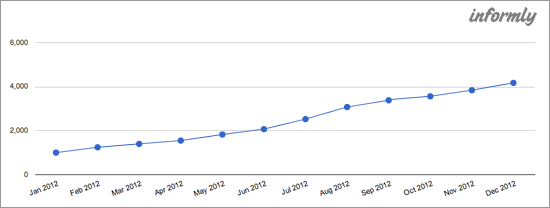
    <p>When I sold my web design agency, my <strong>site traffic had doubled in its last 6 months.</strong></p>
    <p><img src="http://cdn.sixrevisions.com/0346-03_selling_webdesign_agency_upward_trend.png" width="550" height="208" style="max-width: 100%; height: auto;"></p>
    <p>Recurring revenue was going up. The number of clients was going up.</p>
    <p>Even if you aren’t profitable, as long as important metrics exhibit upward trends, buyers will see opportunity and potential.</p>
    <p>If your profits are good, but your trend is flat or going down, that is a big problem.</p>
    <h3>Lesson 5: Your List of Clients Will Help You Sell the Business</h3>
    <p>The biggest problem for web design companies is <a href="http://sixrevisions.com/project-management/how-to-find-awesome-clients/" title="How to Find Awesome Clients" rel="nofollow external" class="bo">finding good clients.</a></p>
    <p>If you have a list of good clients regardless of whether your business is profitable or not, this is going to be appealing to a web design agency buyer.</p>
    <p>Even better than having a good set of clients is having clients that have recurring arrangements with your business. These recurring arrangements might include monthly website maintenance fees or web design service <a href="http://en.wikipedia.org/wiki/Retainer_agreement" title="Retainer agreement - wikipedia.org" rel="nofollow external" class="bo">retainer agreements</a>.</p>
    <p>I had my existing clients on support agreements.</p>
    <p>I also sent them an email each month with stats about their websites (which, by the way, was the inspiration behind <a href="http://inform.ly/" rel="nofollow external" class="bo">Informly</a>, my startup).</p>
    <p>I was hosting most of my clients’ websites.</p>
    <p>In the end, the main reason I was able to sell my web design business was that I had good clients who brought in recurring revenue into my business each month.</p>
    <h3>Lesson 6: Some of Your Assets Aren’t as Obvious as They Seem</h3>
    <p>What do you have within your business that could be appealing to a buyer? These assets might not be readily apparent.</p>
    <p>In my case, one of my assets was actually my company’s web design blog. The blog ranked #1 in Australia for the search term <em>"website design"</em> and #3 for the term <em>"web design"</em>. The blog was bringing in <strong>1 lead a day</strong> to my business, on average.</p>
    <p>My web design blog had a lot of value to someone who wanted web design leads.</p>
    <p>Why?</p>
    <p>They would have had to pay Google thousands of dollars a year through the AdSense platform to get the same amount of traffic for those keywords, so there was clear value in buying something that’s going to provide them ongoing benefits for free.</p>
    <p>You might have something completely unrelated to your web design business that would be an asset to someone else. Look for those not-so-obvious assets and use them to help you sell your web design agency.</p>
    <h3>Lesson 7: Being a Small, Personal Business Isn’t a Deal-breaker</h3>
    <p>I used to give a lot of advice to small business owners. One of the things I would always say was "be as personal as you can in your business."</p>
    <p>That means using your personal name, having pictures of yourself on your website, having transactional emails coming from your own personal email address instead of a robot like <em><a href="mailto:no-reply@webappexample.com">no-reply@webappexample.com</a></em>, and so forth.</p>
    <p>The advice about being as personal as you can is very different from what I see a lot of small businesses actually do.</p>
    <p>What I see more of is that small businesses try to be more distant from their customers and more "corporate"-looking, to appear bigger than what they really are.</p>
    <p>Often when I’d tell people their websites should be personalized, I would be met with criticism. A lot of people think that in order for something to be valuable, it needs to be some sort of impersonal machine, because being impersonal implies that the company is too big and too busy to have its founders and employees directly interacting with their customers.</p>
    <p>I couldn’t have possibly been more personalized in my business.</p>
    <p>I had a blog where all posts were by me.</p>
    <p>I had loads of face-to-camera videos.</p>
    <p>My face was all over the site of my web design company, including right at the start of the homepage in a big welcome message.</p>
    <p>All of my clients dealt with me personally as the first port of call for almost everything. </p>
    <p>When it came to selling my web design company, being small and being personal didn’t get in the way.</p>
    <p>In other words, other companies who want to buy up web design businesses aren’t looking for some huge corporation — they’re completely happy acquiring small, personal companies like mine.</p>
    <h3>Conclusion</h3>
    <p>Whether you’re planning to sell your business or not, it’s good to at least consider these things for when you might have to do so, and also just to keep in mind that what you’re building might be worth more than you think it does to someone else.</p>
    <p>If you have questions about the topic of selling a web design agency, please feel free to start a discussion in the comments below.</p>
    <h3>Related Content</h3>
    <ul>
    <li><a href="http://sixrevisions.com/project-management/web-designers-passive-income/" rel="nofollow external" class="bo">Web Designers Making Thousands of Dollars in Passive Income</a></li>
    <li><a href="http://sixrevisions.com/project-management/pricing-tips-earn-more/" rel="nofollow external" class="bo">5 Pricing Tips to Earn More on Client Projects</a></li>
    <li><a href="http://sixrevisions.com/resources/40-great-resources-for-a-complete-roadmap-to-freelancing/" rel="nofollow external" class="bo">40 Great Resources for a Complete Roadmap to Freelancing</a></li>
    <li>
    <em>Related categories</em>: <a href="http://sixrevisions.com/category/project-management/" rel="nofollow external" class="bo">Project Management</a> and <a href="http://sixrevisions.com/category/web_design/" rel="nofollow external" class="bo">Web Design</a>
    </li>
    </ul>
    <h3>About the Author</h3>
    <p><img src="http://cdn.sixrevisions.com/authors/dan_norris_small.jpg" alt="" width="80" height="80" style="max-width: 100%; height: auto;"><strong>Dan Norris</strong> is the founder of <a href="http://inform.ly/" rel="nofollow external" class="bo">Informly</a>, a startup that enables web design companies to send their clients beautiful branded reports. He’s on <a href="http://twitter.com/thedannorris" rel="nofollow external" class="bo">Twitter</a>, <a href="https://plus.google.com/102855426740464163988/posts" rel="nofollow external" class="bo">Google+</a> and <a href="http://facebook.com/likedannorris" rel="nofollow external" class="bo">Facebook</a> (a little bit too often, according to Rescue Time).</p>
    <p>The post <a href="http://sixrevisions.com/project-management/sell-web-design-agency/" rel="nofollow external" class="bo">Lessons I Learned from Selling My Web Design Agency</a> appeared first on <a href="http://sixrevisions.com" rel="nofollow external" class="bo">Six Revisions</a>.</p>
    </div>
]]>
</Body>
<Summary>I sold my small web design business so that I could focus on my startup, Informly.    If you’re providing web design services as a solo freelancer, or are the founder of a web design agency with...</Summary>
<Website>http://feedproxy.google.com/~r/SixRevisions/~3/et0G5Dud4_o/</Website>
<TrackingUrl>https://my3.my.umbc.edu/api/v0/pixel/news/31020/guest@my.umbc.edu/4292057d3780cef0b54fce566b49d633/api/pixel</TrackingUrl>
<Tag>css</Tag>
<Tag>database</Tag>
<Tag>design</Tag>
<Tag>development</Tag>
<Tag>html</Tag>
<Tag>javascript</Tag>
<Tag>mysql</Tag>
<Tag>project-management</Tag>
<Tag>sql</Tag>
<Tag>web</Tag>
<Group token="retired-583">Web Developer - Build Group</Group>
<GroupUrl>https://my3.my.umbc.edu/groups/retired-583</GroupUrl>
<AvatarUrl>https://assets3-my.umbc.edu/system/shared/avatars/groups/000/000/583/fc60f5d7abc2e080599bb6dc465db54d/xsmall.png?1363101197</AvatarUrl>
<AvatarUrl size="original">https://assets4-my.umbc.edu/system/shared/avatars/groups/000/000/583/fc60f5d7abc2e080599bb6dc465db54d/original.jpg?1363101197</AvatarUrl>
<AvatarUrl size="xxlarge">https://assets4-my.umbc.edu/system/shared/avatars/groups/000/000/583/fc60f5d7abc2e080599bb6dc465db54d/xxlarge.png?1363101197</AvatarUrl>
<AvatarUrl size="xlarge">https://assets4-my.umbc.edu/system/shared/avatars/groups/000/000/583/fc60f5d7abc2e080599bb6dc465db54d/xlarge.png?1363101197</AvatarUrl>
<AvatarUrl size="large">https://assets3-my.umbc.edu/system/shared/avatars/groups/000/000/583/fc60f5d7abc2e080599bb6dc465db54d/large.png?1363101197</AvatarUrl>
<AvatarUrl size="medium">https://assets3-my.umbc.edu/system/shared/avatars/groups/000/000/583/fc60f5d7abc2e080599bb6dc465db54d/medium.png?1363101197</AvatarUrl>
<AvatarUrl size="small">https://assets4-my.umbc.edu/system/shared/avatars/groups/000/000/583/fc60f5d7abc2e080599bb6dc465db54d/small.png?1363101197</AvatarUrl>
<AvatarUrl size="xsmall">https://assets3-my.umbc.edu/system/shared/avatars/groups/000/000/583/fc60f5d7abc2e080599bb6dc465db54d/xsmall.png?1363101197</AvatarUrl>
<AvatarUrl size="xxsmall">https://assets4-my.umbc.edu/system/shared/avatars/groups/000/000/583/fc60f5d7abc2e080599bb6dc465db54d/xxsmall.png?1363101197</AvatarUrl>
<Sponsor>Web Developer - Build Group</Sponsor>
<PawCount>0</PawCount>
<CommentCount>0</CommentCount>
<CommentsAllowed>true</CommentsAllowed>
<PostedAt>Mon, 10 Jun 2013 06:00:21 -0400</PostedAt>
<EditAt>Mon, 10 Jun 2013 06:00:21 -0400</EditAt>
</NewsItem>

<NewsItem contentIssues="true" id="31018" important="false" status="posted" url="https://my3.my.umbc.edu/posts/31018">
<Title>The trick to designing a great layout</Title>
<Body>
<![CDATA[
    <div class="html-content">
    <p><img alt="layout.featured.sm" src="http://netdna.webdesignerdepot.com/uploads/2013/05/layout.featured.sm_.jpg" width="200" height="160" style="max-width: 100%; height: auto;">Why are magazines and books always laid out the same? Even with alternative design, there is a harmony in layout or the reader’s head will explode… or they will just stop reading and skip to the next page. Successful design in publishing, advertising, web design, illustration and anything else that ties together elements depends on drawing in the reader, and leading their eyes across the page.</p>
    <p>Some people think it’s not a big deal and that designing a page comes naturally because of cultural lessons we learn growing up and looking at design from childhood, yet few, if any, understand why it works the way it does. In most societies, we read left to right. Still sound simple? Just start on the left, and it will all fall into place? Basically, but the challenge is to make the reader look at elements in the right order, or at least the order you want them to see, which is the challenging trick in layout design.</p>
    <h1>The rules</h1>
    <p>I was never one to follow the rules, but teachers, and great artists have some memorable quotes on the subject. “Before you can break the rules, you have to know the rules,” and “to create your own world you must first understand the real world”.</p>
    <p>If you study the rule breakers, you can see they all had the basis of learning from the real world, the basics, and evolving from there. The rules are the basic understanding of layout, type, elements of color, illustration, and photography, and how the eye views them, and the brain deciphers it all when put together.</p>
    <p>What most teachers try to impart in layout is called the “Z” pattern. It’s the pattern of reading (western cultures) for the strategic placement of important information. Start in the upper left corner, work across to the right, and then down and back to the left again, going top to bottom. Standard and simple.</p>
    <p>I have to laugh at the following inclusion of 1950′s “layout design rules” I found on the web. The principles are sound, however, and they still do speak of design basics.</p>
    <ul>
    <li>Use borders when you want to frame and draw attention to information (e.g., table of contents, calendars, special notes).</li>
    <li>Allow the edges of text columns, and artwork to create the illusion of borders.</li>
    <li>Draw attention to boxes, or images by using borders with a drop shadow.</li>
    <li>Draw the reader’s attention to important elements by contrasting size (scale), color, and page position. Make sure the elements have a function that supports the content.</li>
    <li>Use large, bold display type, and/or graphics for the creation of focus. Use elements with visual weight, intensity, or color for focus.</li>
    <li>Use a grid to help organize elements on the page. Make sure that the grid is flexible, but that the grid sections are not too small. Divide the page into four or five columns for most flexibility.</li>
    <li>Use multiple columns to organize text, and visuals into smaller (more easily read) blocks of information.</li>
    <li>Divide text into two, or three equal columns for best results on a standard page.</li>
    <li>Use a single, wider column with a smaller column for pullout quotes, and other types of supporting content.</li>
    </ul>
    <p>Well, those are simple rules, and still carry over into what is needed today, and in the future, but with our consumer culture, and so many great rule breakers in design these days, rules evolve. One evolution in design was the “grid system.” According to <a href="http://en.wikipedia.org/wiki/Grid_(page_layout)" rel="nofollow external" class="bo">Wikipedia</a>:</p>
    <blockquote>
    <p>After World War II, a number of graphic designers, including Max Bill, Emil Ruder, and Josef Müller-Brockmann, influenced by the modernist ideas of Jan Tschichold’s Die neue Typographie (The New Typography), began to question the relevance of the conventional page layout of the time. They began to devise a flexible system able to help designers achieve coherency in organizing the page. The result was the modern typographic grid that became associated with the International Typographic Style. The seminal work on the subject, Grid systems in graphic design by Müller-Brockmann, helped propagate the use of the grid, first in Europe, and later in North America.</p>
    <p>By the mid 1970s instruction of the typographic grid as a part of graphic design curricula had become standard in Europe, North America and much of Latin America. The graphic style of the grid was adopted as a look for corporate communication. In the early 1980s, a reaction against the entrenchment of the grid, particularly its dogmatic use, and association with corporate culture, resulted in some designers rejecting its use in favor of more organic structure. The appearance of the Apple Macintosh computer, and the resulting transition away from type being set by typographers to designers setting type themselves resulted in a wave of experimentation, much of it contrary to the precepts of Tschichold and Müller-Brockmann. The typographic grid continues to be taught today, but more as a useful tool for some projects, not as a requirement or starting point for all page design.</p>
    </blockquote>
    <p> </p>
    <h1>Rule makers and breakers</h1>
    <p>If you haven’t heard of <a href="http://www.noupe.com/design/josef-muller-brockmann-principal-of-the-swiss-school.html" rel="nofollow external" class="bo">Josef Müller-Brockmann</a>, then he is a must on your list of designers to study. Müller-Brockmann was more than just a man who sought to form what is now labeled the Swiss School; Constructivism, De Stijl, Suprematism, and the Bauhaus, all of which pushed his designs in a new direction that opened doors for creative expressions in graphic design, influenced him. Among his peers he is probably the most easily recognized when looking at that period.</p>
    <p>Müller-Brockmann was soon established as the leading practitioner, and theorist of the Swiss Style, which sought a universal graphic expression through a grid-based design, purged of extraneous illustration, and subjective feeling.</p>
    <p>The grid was the prioritization, and arrangement of typographic, and pictorial elements with the meaningful use of color, set into a semblance of order, based on left-to-right, top-to-bottom. According to Wikipedia, the grid system is, “a two-dimensional structure made up of a series of intersecting vertical, and horizontal axes used to structure content. The grid serves as an armature on which a designer can organize text, and images in a rational, easy to absorb manner.”</p>
    <p><a href="http://netdna.webdesignerdepot.com/uploads/2013/05/jmb.lg_.jpg" rel="nofollow external" class="bo"><img src="http://netdna.webdesignerdepot.com/uploads/2013/05/jmb.lg_.jpg" width="650" alt="The trick to designing a great layout" style="max-width: 100%; height: auto;"></a></p>
    <p>Müller-Brockmann is recognized for his simple designs and his clean use of typography, notably Akzidenz-Grotesk, shapes and colors, which inspires many graphic designers in the 21st century. As with the French posters in the 1890s, Müller-Brockmann, and his peers also attempted to attract customers, and sell products with bold, simplicity. The posters that served to attract an audience to events, especially music events, and museum exhibitions embraced the abstract geometrical shapes the style is noted for; but it is the public service announcement posters from this time period that have been more noted than in many other periods of design. The simple, clean, and graphic messages were, as with the music event posters, able to be understood by viewers with different languages.</p>
    <p><a href="http://www.noupe.com/inspiration/getting-it-wrong-edward-fella.html" rel="nofollow external" class="bo">Ed Fella</a>, a contemporary designer, is a real rule breaker when it comes to both layout, and design, yet he still pays strict attention to how the eye, and brain views the page. Just looking at his work, one would think that he’s a lunatic. He forces contradiction yet still plays to the grid. Not because it’s there, but because it serves his purpose to help pull the eye all over the place, and still make pleasing, readable design. There is chaos, and balance, existing side-by-side like identical Siamese twins — one good, and the other evil.</p>
    <p><a href="http://netdna.webdesignerdepot.com/uploads/2013/05/fella.lg_.jpg" rel="nofollow external" class="bo"><img src="http://netdna.webdesignerdepot.com/uploads/2013/05/fella.lg_.jpg" width="650" alt="The trick to designing a great layout" style="max-width: 100%; height: auto;"></a></p>
    <p><em>©Ed Fella</em></p>
    <p>Fella referred to his work as stylistically, “getting it wrong.” His work is raw, and obsessive. It has power, and spontaneity. Born from the knowledge of layout, typography, design, and theory, he seems to have ended up getting it very, very right. He has inspiring words every designer should read:</p>
    <blockquote>
    <p>“I am interested in graphic design as art,” he says, “This is a kind of art practice that uses forms that come out of graphic design, decorative illustration, and lettering, all mixed together-forms that come out of Twentieth Century art, out of Miró and Picasso — all of it has a genealogy, and a certain look — in the same way that artists today use comic books and graphic novels. I was an illustrator, so you see endless styles popping in, and out of the books. The drawings are an unconscious discharge of all the styles, and forms that I used as a commercial artist for 30 years — that was my profession — I did it every single day. So, my unconscious has all this stuff in it, and now, because I don’t have to make meaning anymore, I can just use the techniques, like a machine that has long ago stopped making widgets, but the machine is still running. I’m still making stuff. I love the craft of it — of carefully making some little thing.”</p>
    </blockquote>
    <p><a href="http://www.noupe.com/inspiration/paul-rand-will-change-your-life.html" rel="nofollow external" class="bo">Paul Rand</a>, famous designer, and rule breaker did this in a roundabout way. Mr. Rand, as a young designer, accepted a request to design the covers of a small, but notable publication in the late 1930s, and early 1940s. While the best advice to designers is to never work for free, there are some exceptions. Mr. Rand accepted, but demanded full creative freedom, and got it. When someone asks you for free work, they really don’t have much of a choice, do they?</p>
    <p><a href="http://netdna.webdesignerdepot.com/uploads/2013/05/rand.lg_.jpg" rel="nofollow external" class="bo"><img src="http://netdna.webdesignerdepot.com/uploads/2013/05/rand.lg_.jpg" width="650" alt="The trick to designing a great layout" style="max-width: 100%; height: auto;"></a></p>
    <p>Rand’s gamble paid off. His work for Direction caught the right attention. Success led to other successes. After being hired to design the page layout for an Apparel Arts magazine anniversary issue, an offer to take over as art director for the Esquire-Coronet magazines came his way. Initially, Rand refused this offer, claiming that he was not yet at the level the job required, but a year later he decided to accept it, taking over responsibility for Esquire’s fashion pages at the young age of twenty-three.</p>
    <p> </p>
    <h1>The coolest trick!</h1>
    <p>A former illustration teacher of mine showed me a handy tool for identifying the main focus points on a page. First, draw a diagonal line from the top left corner to the bottom right corner. The page can be vertical or horizontal. It works with any orientation.</p>
    <p>Next, draw a line from each other corner to join the previous horizontal line at a right angle. The point the lines join is the area of maximum attention. Try an experiment — take a famous painting and draw these lines upon it (no, not at a museum because you’ll be arrested). You’ll see how great art is done using this layout technique.</p>
    <p><a href="http://netdna.webdesignerdepot.com/uploads/2013/05/focal.lg_.jpg" rel="nofollow external" class="bo"><img src="http://netdna.webdesignerdepot.com/uploads/2013/05/focal.lg_.jpg" width="650" alt="The trick to designing a great layout" style="max-width: 100%; height: auto;"></a></p>
    <p>Now, take a magazine page, or web page, and do the same. First, think of how the page is designed. Does it read well? Where does your eye go while you look at the page? Do you start feeling a bit anxious while looking at the page or excited? Now draw the lines, and see where the elements fall.</p>
    <p>Chances are, if nothing of importance falls in the areas where the lines meet (general area), you were feeling anxious because your eye was fighting to look at the page, and your brain was confused as the layout was going against the flow. If the elements are laid out well, you feel excited as your eye is led across the page.</p>
    <p>When it comes to dealing with your client, or a committee bent on redesigning your choices, give this as a demonstration as to why you placed the elements where they are. People tend to understand element placement when you use such a demonstration. It quantifies a rule they don’t want to break. Show concern for the final product, and involve the team with excitement over their ideas, and how to incorporate it all into the design, and you will find more leeway in committees, and with clients. Sometimes sticking to the rules of others allows you to break rules they don’t know… or can’t see.</p>
    <p> </p>
    <p><em><strong>Do you feel this makes sense? Have you ever heard of this layout trick and if so, have you tried it? Does it work? Let us know your thoughts in the comments.</strong></em></p>
    <p><em>Featured Image ©<a href="http://graphicleftovers.com/" rel="nofollow external" class="bo">GL Stock Images</a></em></p>
    <p><br><br>
    </p>
    <table width="100%">
    <tbody>
    <tr>
    <td>
          <a href="http://www.mightydeals.com/deal/thirsty-rough-font-family.html?ref=inwidget" rel="nofollow external" class="bo"><strong>Thirsty Rough Font Family – only $9!</strong></a>
        </td>
    <td>
          <a href="http://www.mightydeals.com/?ref=inwidget" rel="nofollow external" class="bo"><br>
            <img src="http://mightydeals.com/web/images/widget-logo.png" height="40" width="90" alt="The trick to designing a great layout" style="max-width: 100%; height: auto;"><br>
          </a>
        </td>
    </tr>
    </tbody>
    </table>
    <p><br> </p>
    <a href="http://www.webdesignerdepot.com/2013/06/the-trick-to-designing-a-great-layout/" rel="nofollow external" class="bo">Source</a>
    </div>
]]>
</Body>
<Summary>Why are magazines and books always laid out the same? Even with alternative design, there is a harmony in layout or the reader’s head will explode… or they will just stop reading and skip to the...</Summary>
<Website>http://www.webdesignerdepot.com/2013/06/the-trick-to-designing-a-great-layout/</Website>
<TrackingUrl>https://my3.my.umbc.edu/api/v0/pixel/news/31018/guest@my.umbc.edu/c02edc24b968163af8b1bc30999ef5cb/api/pixel</TrackingUrl>
<Tag>art</Tag>
<Tag>css</Tag>
<Tag>design</Tag>
<Tag>development</Tag>
<Tag>graphic-design</Tag>
<Tag>grid-system</Tag>
<Tag>how-to</Tag>
<Tag>html</Tag>
<Tag>html5</Tag>
<Tag>illustration</Tag>
<Tag>illustrator</Tag>
<Tag>javascript</Tag>
<Tag>josef-muller-brockmann</Tag>
<Tag>layout</Tag>
<Tag>layout-tips</Tag>
<Tag>layout-tricks</Tag>
<Tag>mysql</Tag>
<Tag>oracle</Tag>
<Tag>paul-rand</Tag>
<Tag>photoshop</Tag>
<Tag>php</Tag>
<Tag>sql</Tag>
<Tag>typography</Tag>
<Tag>web-design</Tag>
<Group token="retired-583">Web Developer - Build Group</Group>
<GroupUrl>https://my3.my.umbc.edu/groups/retired-583</GroupUrl>
<AvatarUrl>https://assets3-my.umbc.edu/system/shared/avatars/groups/000/000/583/fc60f5d7abc2e080599bb6dc465db54d/xsmall.png?1363101197</AvatarUrl>
<AvatarUrl size="original">https://assets4-my.umbc.edu/system/shared/avatars/groups/000/000/583/fc60f5d7abc2e080599bb6dc465db54d/original.jpg?1363101197</AvatarUrl>
<AvatarUrl size="xxlarge">https://assets4-my.umbc.edu/system/shared/avatars/groups/000/000/583/fc60f5d7abc2e080599bb6dc465db54d/xxlarge.png?1363101197</AvatarUrl>
<AvatarUrl size="xlarge">https://assets4-my.umbc.edu/system/shared/avatars/groups/000/000/583/fc60f5d7abc2e080599bb6dc465db54d/xlarge.png?1363101197</AvatarUrl>
<AvatarUrl size="large">https://assets3-my.umbc.edu/system/shared/avatars/groups/000/000/583/fc60f5d7abc2e080599bb6dc465db54d/large.png?1363101197</AvatarUrl>
<AvatarUrl size="medium">https://assets3-my.umbc.edu/system/shared/avatars/groups/000/000/583/fc60f5d7abc2e080599bb6dc465db54d/medium.png?1363101197</AvatarUrl>
<AvatarUrl size="small">https://assets4-my.umbc.edu/system/shared/avatars/groups/000/000/583/fc60f5d7abc2e080599bb6dc465db54d/small.png?1363101197</AvatarUrl>
<AvatarUrl size="xsmall">https://assets3-my.umbc.edu/system/shared/avatars/groups/000/000/583/fc60f5d7abc2e080599bb6dc465db54d/xsmall.png?1363101197</AvatarUrl>
<AvatarUrl size="xxsmall">https://assets4-my.umbc.edu/system/shared/avatars/groups/000/000/583/fc60f5d7abc2e080599bb6dc465db54d/xxsmall.png?1363101197</AvatarUrl>
<Sponsor>Web Developer - Build Group</Sponsor>
<PawCount>0</PawCount>
<CommentCount>0</CommentCount>
<CommentsAllowed>true</CommentsAllowed>
<PostedAt>Mon, 10 Jun 2013 05:15:22 -0400</PostedAt>
<EditAt>Mon, 10 Jun 2013 05:15:22 -0400</EditAt>
</NewsItem>

<NewsItem contentIssues="true" id="31111" important="false" status="posted" url="https://my3.my.umbc.edu/posts/31111">
<Title>The trick to designing a great layout</Title>
<Body>
<![CDATA[
    <div class="html-content">
    <p><img alt="layout.featured.sm" src="http://netdna.webdesignerdepot.com/uploads/2013/05/layout.featured.sm_.jpg" width="200" height="160" style="max-width: 100%; height: auto;">Why are magazines and books always laid out the same? Even with alternative design, there is a harmony in layout or the reader’s head will explode… or they will just stop reading and skip to the next page. Successful design in publishing, advertising, web design, illustration and anything else that ties together elements depends on drawing in the reader, and leading their eyes across the page.</p> <p>Some people think it’s not a big deal and that designing a page comes naturally because of cultural lessons we learn growing up and looking at design from childhood, yet few, if any, understand why it works the way it does. In most societies, we read left to right. Still sound simple? Just start on the left, and it will all fall into place? Basically, but the challenge is to make the reader look at elements in the right order, or at least the order you want them to see, which is the challenging trick in layout design.</p> <h1>The rules</h1> <p>I was never one to follow the rules, but teachers, and great artists have some memorable quotes on the subject. “Before you can break the rules, you have to know the rules,” and “to create your own world you must first understand the real world”.</p> <p>If you study the rule breakers, you can see they all had the basis of learning from the real world, the basics, and evolving from there. The rules are the basic understanding of layout, type, elements of color, illustration, and photography, and how the eye views them, and the brain deciphers it all when put together.</p> <p>What most teachers try to impart in layout is called the “Z” pattern. It’s the pattern of reading (western cultures) for the strategic placement of important information. Start in the upper left corner, work across to the right, and then down and back to the left again, going top to bottom. Standard and simple.</p> <p>I have to laugh at the following inclusion of 1950′s “layout design rules” I found on the web. The principles are sound, however, and they still do speak of design basics.</p> <ul> <li>Use borders when you want to frame and draw attention to information (e.g., table of contents, calendars, special notes).</li> <li>Allow the edges of text columns, and artwork to create the illusion of borders.</li> <li>Draw attention to boxes, or images by using borders with a drop shadow.</li> <li>Draw the reader’s attention to important elements by contrasting size (scale), color, and page position. Make sure the elements have a function that supports the content.</li> <li>Use large, bold display type, and/or graphics for the creation of focus. Use elements with visual weight, intensity, or color for focus.</li> <li>Use a grid to help organize elements on the page. Make sure that the grid is flexible, but that the grid sections are not too small. Divide the page into four or five columns for most flexibility.</li> <li>Use multiple columns to organize text, and visuals into smaller (more easily read) blocks of information.</li> <li>Divide text into two, or three equal columns for best results on a standard page.</li> <li>Use a single, wider column with a smaller column for pullout quotes, and other types of supporting content.</li> </ul> <p>Well, those are simple rules, and still carry over into what is needed today, and in the future, but with our consumer culture, and so many great rule breakers in design these days, rules evolve. One evolution in design was the “grid system.” According to <a href="http://en.wikipedia.org/wiki/Grid_(page_layout)" rel="nofollow external" class="bo">Wikipedia</a>:</p> <blockquote> <p>After World War II, a number of graphic designers, including Max Bill, Emil Ruder, and Josef Müller-Brockmann, influenced by the modernist ideas of Jan Tschichold’s Die neue Typographie (The New Typography), began to question the relevance of the conventional page layout of the time. They began to devise a flexible system able to help designers achieve coherency in organizing the page. The result was the modern typographic grid that became associated with the International Typographic Style. The seminal work on the subject, Grid systems in graphic design by Müller-Brockmann, helped propagate the use of the grid, first in Europe, and later in North America.</p> <p>By the mid 1970s instruction of the typographic grid as a part of graphic design curricula had become standard in Europe, North America and much of Latin America. The graphic style of the grid was adopted as a look for corporate communication. In the early 1980s, a reaction against the entrenchment of the grid, particularly its dogmatic use, and association with corporate culture, resulted in some designers rejecting its use in favor of more organic structure. The appearance of the Apple Macintosh computer, and the resulting transition away from type being set by typographers to designers setting type themselves resulted in a wave of experimentation, much of it contrary to the precepts of Tschichold and Müller-Brockmann. The typographic grid continues to be taught today, but more as a useful tool for some projects, not as a requirement or starting point for all page design.</p> </blockquote> <p> </p> <h1>Rule makers and breakers</h1> <p>If you haven’t heard of <a href="http://www.noupe.com/design/josef-muller-brockmann-principal-of-the-swiss-school.html" rel="nofollow external" class="bo">Josef Müller-Brockmann</a>, then he is a must on your list of designers to study. Müller-Brockmann was more than just a man who sought to form what is now labeled the Swiss School; Constructivism, De Stijl, Suprematism, and the Bauhaus, all of which pushed his designs in a new direction that opened doors for creative expressions in graphic design, influenced him. Among his peers he is probably the most easily recognized when looking at that period.</p> <p>Müller-Brockmann was soon established as the leading practitioner, and theorist of the Swiss Style, which sought a universal graphic expression through a grid-based design, purged of extraneous illustration, and subjective feeling.</p> <p>The grid was the prioritization, and arrangement of typographic, and pictorial elements with the meaningful use of color, set into a semblance of order, based on left-to-right, top-to-bottom. According to Wikipedia, the grid system is, “a two-dimensional structure made up of a series of intersecting vertical, and horizontal axes used to structure content. The grid serves as an armature on which a designer can organize text, and images in a rational, easy to absorb manner.”</p> <p><a href="http://netdna.webdesignerdepot.com/uploads/2013/05/jmb.lg_.jpg" rel="nofollow external" class="bo"><img src="http://netdna.webdesignerdepot.com/uploads/2013/05/jmb.lg_.jpg" width="650" alt="The trick to designing a great layout" style="max-width: 100%; height: auto;"></a></p> <p>Müller-Brockmann is recognized for his simple designs and his clean use of typography, notably Akzidenz-Grotesk, shapes and colors, which inspires many graphic designers in the 21st century. As with the French posters in the 1890s, Müller-Brockmann, and his peers also attempted to attract customers, and sell products with bold, simplicity. The posters that served to attract an audience to events, especially music events, and museum exhibitions embraced the abstract geometrical shapes the style is noted for; but it is the public service announcement posters from this time period that have been more noted than in many other periods of design. The simple, clean, and graphic messages were, as with the music event posters, able to be understood by viewers with different languages.</p> <p><a href="http://www.noupe.com/inspiration/getting-it-wrong-edward-fella.html" rel="nofollow external" class="bo">Ed Fella</a>, a contemporary designer, is a real rule breaker when it comes to both layout, and design, yet he still pays strict attention to how the eye, and brain views the page. Just looking at his work, one would think that he’s a lunatic. He forces contradiction yet still plays to the grid. Not because it’s there, but because it serves his purpose to help pull the eye all over the place, and still make pleasing, readable design. There is chaos, and balance, existing side-by-side like identical Siamese twins — one good, and the other evil.</p> <p><a href="http://netdna.webdesignerdepot.com/uploads/2013/05/fella.lg_.jpg" rel="nofollow external" class="bo"><img src="http://netdna.webdesignerdepot.com/uploads/2013/05/fella.lg_.jpg" width="650" alt="The trick to designing a great layout" style="max-width: 100%; height: auto;"></a></p> <p><em>©Ed Fella</em></p> <p>Fella referred to his work as stylistically, “getting it wrong.” His work is raw, and obsessive. It has power, and spontaneity. Born from the knowledge of layout, typography, design, and theory, he seems to have ended up getting it very, very right. He has inspiring words every designer should read:</p> <blockquote> <p>“I am interested in graphic design as art,” he says, “This is a kind of art practice that uses forms that come out of graphic design, decorative illustration, and lettering, all mixed together-forms that come out of Twentieth Century art, out of Miró and Picasso — all of it has a genealogy, and a certain look — in the same way that artists today use comic books and graphic novels. I was an illustrator, so you see endless styles popping in, and out of the books. The drawings are an unconscious discharge of all the styles, and forms that I used as a commercial artist for 30 years — that was my profession — I did it every single day. So, my unconscious has all this stuff in it, and now, because I don’t have to make meaning anymore, I can just use the techniques, like a machine that has long ago stopped making widgets, but the machine is still running. I’m still making stuff. I love the craft of it — of carefully making some little thing.”</p> </blockquote> <p><a href="http://www.noupe.com/inspiration/paul-rand-will-change-your-life.html" rel="nofollow external" class="bo">Paul Rand</a>, famous designer, and rule breaker did this in a roundabout way. Mr. Rand, as a young designer, accepted a request to design the covers of a small, but notable publication in the late 1930s, and early 1940s. While the best advice to designers is to never work for free, there are some exceptions. Mr. Rand accepted, but demanded full creative freedom, and got it. When someone asks you for free work, they really don’t have much of a choice, do they?</p> <p><a href="http://netdna.webdesignerdepot.com/uploads/2013/05/rand.lg_.jpg" rel="nofollow external" class="bo"><img src="http://netdna.webdesignerdepot.com/uploads/2013/05/rand.lg_.jpg" width="650" alt="The trick to designing a great layout" style="max-width: 100%; height: auto;"></a></p> <p>Rand’s gamble paid off. His work for Direction caught the right attention. Success led to other successes. After being hired to design the page layout for an Apparel Arts magazine anniversary issue, an offer to take over as art director for the Esquire-Coronet magazines came his way. Initially, Rand refused this offer, claiming that he was not yet at the level the job required, but a year later he decided to accept it, taking over responsibility for Esquire’s fashion pages at the young age of twenty-three.</p> <p> </p> <h1>The coolest trick!</h1> <p>A former illustration teacher of mine showed me a handy tool for identifying the main focus points on a page. First, draw a diagonal line from the top left corner to the bottom right corner. The page can be vertical or horizontal. It works with any orientation.</p> <p>Next, draw a line from each other corner to join the previous horizontal line at a right angle. The point the lines join is the area of maximum attention. Try an experiment — take a famous painting and draw these lines upon it (no, not at a museum because you’ll be arrested). You’ll see how great art is done using this layout technique.</p> <p><a href="http://netdna.webdesignerdepot.com/uploads/2013/05/focal.lg_.jpg" rel="nofollow external" class="bo"><img src="http://netdna.webdesignerdepot.com/uploads/2013/05/focal.lg_.jpg" width="650" alt="The trick to designing a great layout" style="max-width: 100%; height: auto;"></a></p> <p>Now, take a magazine page, or web page, and do the same. First, think of how the page is designed. Does it read well? Where does your eye go while you look at the page? Do you start feeling a bit anxious while looking at the page or excited? Now draw the lines, and see where the elements fall.</p> <p>Chances are, if nothing of importance falls in the areas where the lines meet (general area), you were feeling anxious because your eye was fighting to look at the page, and your brain was confused as the layout was going against the flow. If the elements are laid out well, you feel excited as your eye is led across the page.</p> <p>When it comes to dealing with your client, or a committee bent on redesigning your choices, give this as a demonstration as to why you placed the elements where they are. People tend to understand element placement when you use such a demonstration. It quantifies a rule they don’t want to break. Show concern for the final product, and involve the team with excitement over their ideas, and how to incorporate it all into the design, and you will find more leeway in committees, and with clients. Sometimes sticking to the rules of others allows you to break rules they don’t know… or can’t see.</p> <p> </p> <p><em><strong>Do you feel this makes sense? Have you ever heard of this layout trick and if so, have you tried it? Does it work? Let us know your thoughts in the comments.</strong></em></p> <p><em>Featured Image ©<a href="http://graphicleftovers.com/" rel="nofollow external" class="bo">GL Stock Images</a></em></p> <p><br><br> </p>
    <table width="100%"> <tbody>
    <tr> <td> <a href="http://www.mightydeals.com/deal/mac-blu-ray-player.html?ref=inwidget" rel="nofollow external" class="bo"><strong>Play Blu-ray Movies on Your Mac – only $25!</strong></a> </td> <td> <a href="http://www.mightydeals.com/?ref=inwidget" rel="nofollow external" class="bo"><br> <img src="http://mightydeals.com/web/images/widget-logo.png" height="40" width="90" alt="The trick to designing a great layout" style="max-width: 100%; height: auto;"><br> </a> </td> </tr> </tbody>
    </table> <p><br> </p> <a href="http://www.webdesignerdepot.com/2013/06/the-trick-to-designing-a-great-layout/" rel="nofollow external" class="bo">Source</a> <br><br><a href="http://da.feedsportal.com/r/165665014342/u/49/f/661066/c/35285/s/2d12f822/a2.htm" rel="nofollow external" class="bo"><img src="http://da.feedsportal.com/r/165665014342/u/49/f/661066/c/35285/s/2d12f822/a2.img" style="max-width: 100%; height: auto;"></a>
    </div>
]]>
</Body>
<Summary>Why are magazines and books always laid out the same? Even with alternative design, there is a harmony in layout or the reader’s head will explode… or they will just stop reading and skip to the...</Summary>
<Website>http://rss.feedsportal.com/c/35285/f/661066/s/2d12f822/l/0L0Swebdesignerdepot0N0C20A130C0A60Cthe0Etrick0Eto0Edesigning0Ea0Egreat0Elayout0C/story01.htm</Website>
<TrackingUrl>https://my3.my.umbc.edu/api/v0/pixel/news/31111/guest@my.umbc.edu/8efe1c012b52ada361ba2c48a220d1dc/api/pixel</TrackingUrl>
<Tag>art</Tag>
<Tag>css</Tag>
<Tag>design</Tag>
<Tag>development</Tag>
<Tag>graphic-design</Tag>
<Tag>grid-system</Tag>
<Tag>how-to</Tag>
<Tag>html</Tag>
<Tag>html5</Tag>
<Tag>illustration</Tag>
<Tag>illustrator</Tag>
<Tag>javascript</Tag>
<Tag>josef-muller-brockmann</Tag>
<Tag>layout</Tag>
<Tag>layout-tips</Tag>
<Tag>layout-tricks</Tag>
<Tag>mysql</Tag>
<Tag>oracle</Tag>
<Tag>paul-rand</Tag>
<Tag>photoshop</Tag>
<Tag>php</Tag>
<Tag>sql</Tag>
<Tag>typography</Tag>
<Tag>web-design</Tag>
<Group token="retired-583">Web Developer - Build Group</Group>
<GroupUrl>https://my3.my.umbc.edu/groups/retired-583</GroupUrl>
<AvatarUrl>https://assets3-my.umbc.edu/system/shared/avatars/groups/000/000/583/fc60f5d7abc2e080599bb6dc465db54d/xsmall.png?1363101197</AvatarUrl>
<AvatarUrl size="original">https://assets4-my.umbc.edu/system/shared/avatars/groups/000/000/583/fc60f5d7abc2e080599bb6dc465db54d/original.jpg?1363101197</AvatarUrl>
<AvatarUrl size="xxlarge">https://assets4-my.umbc.edu/system/shared/avatars/groups/000/000/583/fc60f5d7abc2e080599bb6dc465db54d/xxlarge.png?1363101197</AvatarUrl>
<AvatarUrl size="xlarge">https://assets4-my.umbc.edu/system/shared/avatars/groups/000/000/583/fc60f5d7abc2e080599bb6dc465db54d/xlarge.png?1363101197</AvatarUrl>
<AvatarUrl size="large">https://assets3-my.umbc.edu/system/shared/avatars/groups/000/000/583/fc60f5d7abc2e080599bb6dc465db54d/large.png?1363101197</AvatarUrl>
<AvatarUrl size="medium">https://assets3-my.umbc.edu/system/shared/avatars/groups/000/000/583/fc60f5d7abc2e080599bb6dc465db54d/medium.png?1363101197</AvatarUrl>
<AvatarUrl size="small">https://assets4-my.umbc.edu/system/shared/avatars/groups/000/000/583/fc60f5d7abc2e080599bb6dc465db54d/small.png?1363101197</AvatarUrl>
<AvatarUrl size="xsmall">https://assets3-my.umbc.edu/system/shared/avatars/groups/000/000/583/fc60f5d7abc2e080599bb6dc465db54d/xsmall.png?1363101197</AvatarUrl>
<AvatarUrl size="xxsmall">https://assets4-my.umbc.edu/system/shared/avatars/groups/000/000/583/fc60f5d7abc2e080599bb6dc465db54d/xxsmall.png?1363101197</AvatarUrl>
<Sponsor>Web Developer - Build Group</Sponsor>
<PawCount>0</PawCount>
<CommentCount>0</CommentCount>
<CommentsAllowed>true</CommentsAllowed>
<PostedAt>Mon, 10 Jun 2013 05:15:22 -0400</PostedAt>
<EditAt>Mon, 10 Jun 2013 05:15:22 -0400</EditAt>
</NewsItem>

<NewsItem contentIssues="true" id="31017" important="false" status="posted" url="https://my3.my.umbc.edu/posts/31017">
<Title>Gone In 60 Frames Per Second: A Pinterest Paint Performance Case Study</Title>
<Body>
<![CDATA[
    <div class="html-content">
    <table width="650">
    <tbody>
    <tr>
    <td>
    <div>
    <img src="http://statisches.auslieferung.commindo-media-ressourcen.de/advertisement.gif" alt="" style="max-width: 100%; height: auto;"><br><a href="http://auslieferung.commindo-media-ressourcen.de/random.php?mode=target&amp;collection=smashing-rss&amp;position=1" rel="nofollow external" class="bo"><img src="http://auslieferung.commindo-media-ressourcen.de/random.php?mode=image&amp;collection=smashing-rss&amp;position=1" alt="" style="max-width: 100%; height: auto;"></a> <a href="http://auslieferung.commindo-media-ressourcen.de/random.php?mode=target&amp;collection=smashing-rss&amp;position=2" rel="nofollow external" class="bo"><img src="http://auslieferung.commindo-media-ressourcen.de/random.php?mode=image&amp;collection=smashing-rss&amp;position=2" alt="" style="max-width: 100%; height: auto;"></a> <a href="http://auslieferung.commindo-media-ressourcen.de/random.php?mode=target&amp;collection=smashing-rss&amp;position=3" rel="nofollow external" class="bo"><img src="http://auslieferung.commindo-media-ressourcen.de/random.php?mode=image&amp;collection=smashing-rss&amp;position=3" alt="" style="max-width: 100%; height: auto;"></a>
    </div>
    </td>
    </tr>
    </tbody>
    </table>
    <p>Today we’ll discuss how to improve the paint performance of your websites and Web apps. This is an area that we Web developers have only recently started looking at more closely, and it’s important because it could have an impact on your <strong>user engagement and user experience</strong>.</p>
    <h3>Frame Rate Applies To The Web, Too</h3>
    <p>Frame rate is the rate at which a device produces <strong>consecutive</strong> images to the screen. A low frames per second (FPS) means that individual frames can be made out by the eye. A high FPS gives users a more responsive feel. You’re probably used to this concept from the world of gaming, but it applies to the Web, too.</p>
    <p>Long image decoding, unnecessary image resizing, heavy animation and data processing can all lead to dropped frames, which reduces the frame rate, resulting in janky pages. We’ll explain what exactly we mean by “jank” shortly.</p>
    <h3>Why Care About Frame Rate?</h3>
    <p>Smooth, high frame rates drive user engagement and can affect how much users interact with your website or app.</p>
    <p>At EdgeConf earlier this year, Facebook <a href="http://www.youtube.com/watch?list=SPNYkxOF6rcICCU_UD67Ga0qLvMjnBBwft&amp;v=3-WYu_p5rdU&amp;feature=player_detailpage#t=2149s" rel="nofollow external" class="bo">confirmed</a> this when it mentioned that in an A/B test, it slowed down scrolling from 60 FPS to 30 FPS, causing engagement to collapse. That said, if you can’t do high frame rates and 60 FPS is out of reach, then you’d at least want something smooth.  If you’re doing your own animation, this is one benefit of using <a href="https://developer.mozilla.org/en-US/docs/Web/API/window.requestAnimationFrame" rel="nofollow external" class="bo"><code>requestAnimationFrame</code></a>: the browser can dynamically adjust to keep the frame rate normal.</p>
    <p>In cases where you’re concerned about scrolling, the browser can manage the frame rate for you. But if you introduce a large amount of jank, then it won’t be able to do as good a job. So, <strong>try to avoid big hitches</strong>, such as long paints, long JavaScript execution times, long anything.</p>
    <h3>Don’t Guess It, Test It!</h3>
    <p>Before getting started, we need to step back and look at our approach. We all want our websites and apps to run more quickly. In fact, we’re arguably paid to write code that runs not only correctly, but quickly. As busy developers with deadlines, we find it very easy to rely on snippets of advice that we’ve read or heard. Problems arise when we do that, though, because the internals of browsers change very rapidly, and something that’s slow today could be quick tomorrow.</p>
    <p>Another point to remember is that your app or website is unique, and, therefore, the performance issues you face will depend heavily on what you’re building. Optimizing a game is a very different beast to optimizing an app that users will have open for 200+ hours. If it’s a game, then you’ll likely need to focus your attention on the main loop and heavily optimize the chunk of code that is going to run every frame. With a DOM-heavy application, the memory usage might be the biggest performance bottleneck.</p>
    <p>Your best option is to <strong>learn how to measure your application and understand what the code is doing</strong>. That way, when browsers change, you will still be clear about what matters to you and your team and will be able to make informed decisions. So, no matter what, <a href="http://aerotwist.com/blog/dont-guess-it-test-it/" rel="nofollow external" class="bo">don’t guess it, test it!</a></p>
    <p>We’re going to discuss how to measure frame rate and paint performance shortly, so hold onto your seats!</p>
    <p><strong>Note:</strong> Some of the tools mentioned in this article require <a href="https://www.google.com/intl/en/chrome/browser/canary.html" rel="nofollow external" class="bo">Chrome Canary</a>, with the “Developer Tools experiments” enabled in <code>about:flags</code>. (We — Addy Osmani and Paul Lewis — are engineers on the Developer Relations team at Chrome.)</p>
    <h3>Case Study: Pinterest</h3>
    <p>The other day we were on <a href="http://pinterest.com/" rel="nofollow external" class="bo">Pinterest</a>, trying to find some ponies to add to our pony board (Addy loves ponies!). So, we went over to the Pinterest feed and started scrolling through, looking for some ponies to add.</p>
    <p><a href="http://media.smashingmagazine.com/wp-content/uploads/2013/05/Screen-Shot-2013-03-25-at-14.30.57.png" rel="nofollow external" class="bo"><img src="http://media.smashingmagazine.com/wp-content/uploads/2013/05/Screen-Shot-2013-03-25-at-14.30.57-500.png" alt="Screen Shot 2013-03-25 at 14.30.57-500" width="500" height="310" style="max-width: 100%; height: auto;"></a><br>
    <em>Addy adding some ponies to his Pinterest board, as one does. <a href="http://media.smashingmagazine.com/wp-content/uploads/2013/05/Screen-Shot-2013-03-25-at-14.30.57.png" rel="nofollow external" class="bo">Larger view</a>.</em></p>
    <h4>Jank Affects User Experience</h4>
    <p>The first thing we noticed as we scrolled was that scrolling on this page doesn’t perform very well — scrolling up and down takes effort, and the experience just feels sluggish. When they come up against this, users get frustrated, which means they’re more likely to leave. Of course, this is the last thing we want them to do!</p>
    <p><a href="http://media.smashingmagazine.com/wp-content/uploads/2013/05/Screen-Shot-2013-03-25-at-14.31.27.png" rel="nofollow external" class="bo"><img src="http://media.smashingmagazine.com/wp-content/uploads/2013/05/Screen-Shot-2013-03-25-at-14.31.27-500.png" alt="Screen Shot 2013-03-25 at 14.31.27-500" width="500" height="310" style="max-width: 100%; height: auto;"></a><br>
    <em>Pinterest showing a performance bottleneck when a user scrolls. <a href="http://media.smashingmagazine.com/wp-content/uploads/2013/05/Screen-Shot-2013-03-25-at-14.31.27.png" rel="nofollow external" class="bo">Larger view</a>.</em></p>
    <ul>
    <li><a href="http://media.smashingmagazine.com/wp-content/uploads/2013/05/slow_scroll2.gif" rel="nofollow external" class="bo">Animated GIF</a></li>
    </ul>
    <p>This break in consistent frame rate is something the Chrome team calls “jank,” and we’re not sure what’s causing it here. You can actually notice some of the frames being drawn as we scroll. But let’s visualize it! We’re going to open up Frames mode and show what slow looks like there in just a moment.</p>
    <p><strong>Note:</strong> What we’re really looking for is <strong>a consistently high FPS, ideally matching the refresh rate of the screen</strong>. In many cases, this will be 60 FPS, but it’s not guaranteed, so check the devices you’re targeting.</p>
    <p>Now, as JavaScript developers, our first instinct is to suspect a memory leak as being the cause. Perhaps some objects are being held around after a round of garbage collection. The reality, however, is that very often these days JavaScript is not a bottleneck. Our major performance problems come down to slow painting and rendering times. The DOM needs to be turned into pixels on the screen, and a lot of paint work when the user scrolls could result in a lot of slowing down.</p>
    <p><strong>Note:</strong> HTML5 Rocks specifically discusses some of the <a href="http://www.html5rocks.com/en/tutorials/speed/scrolling/" rel="nofollow external" class="bo">causes of slow scrolling</a>. If you think you’re running into this problem, it’s worth a read.</p>
    <h3>Measuring Paint Performance</h3>
    <h4>Frame Rate</h4>
    <p>We suspect that something on this page is affecting the frame rate. So, let’s go open up Chrome’s Developer Tools and head to the “Timeline” and “Frames” mode to record a new session. We’ll click the record button and start scrolling the page the way a normal user would. Now, to simulate a few minutes of usage, we’re going to scroll just a little faster.</p>
    <p><a href="http://media.smashingmagazine.com/wp-content/uploads/2013/05/Screen-Shot-2013-05-15-at-17.57.48.png" rel="nofollow external" class="bo"><img src="http://media.smashingmagazine.com/wp-content/uploads/2013/05/Screen-Shot-2013-05-15-at-17.57.48-500.png" alt="Screen Shot 2013-05-15 at 17.57.48-500" width="500" height="363" style="max-width: 100%; height: auto;"></a><br>
    <em>Using Chrome’s Developer Tools to profile scrolling interactions. <a href="http://media.smashingmagazine.com/wp-content/uploads/2013/05/Screen-Shot-2013-05-15-at-17.57.48.png" rel="nofollow external" class="bo">Larger view</a>.</em></p>
    <ul>
    <li><a href="http://media.smashingmagazine.com/wp-content/uploads/2013/05/performance.gif" rel="nofollow external" class="bo">Animated GIF</a></li>
    </ul>
    <p>Up, down, up, down. What you’ll notice now in the summary view up at the top is a lot of purple and green, corresponding to painting and rendering times. Let’s stop recording for now. As we flip through these various frames, we see some pretty hefty “Recalculate Styles” and a lot of “Layout.”</p>
    <p>If you look at the legend to the very right, you’ll see that we’ve actually blown our budget of 60 FPS, and we’re not even hitting 30 FPS either in many cases. It’s just performing quite poorly. Now, each of these bars in the summary view correspond to one frame — i.e. all of the work that Chrome has to do in order to be able to draw an app to the screen.</p>
    <p><a href="http://media.smashingmagazine.com/wp-content/uploads/2013/05/screen4343431.png" rel="nofollow external" class="bo"><img src="http://media.smashingmagazine.com/wp-content/uploads/2013/05/screen434343-5001.png" alt="screen434343-500" width="500" height="364" style="max-width: 100%; height: auto;"></a><br>
    <em>Chrome’s Developer Tools showing a long paint time. <a href="http://media.smashingmagazine.com/wp-content/uploads/2013/05/screen4343431.png" rel="nofollow external" class="bo">Larger view</a>.</em></p>
    <ul>
    <li><a href="http://media.smashingmagazine.com/wp-content/uploads/2013/05/selection1.gif" rel="nofollow external" class="bo">Animated GIF</a></li>
    </ul>
    <h4>Frame Budget</h4>
    <p>If you’re targeting 60 FPS, which is generally the optimal number of frames to target these days, then to match the refresh rate of the devices we commonly use, you’ll have a 16.7-millisecond budget in which to complete everything — JavaScript, layout, image decoding and resizing, painting, compositing — everything.</p>
    <p><strong>Note:</strong> A constant frame rate is our ideal here. If you can’t hit 60 FPS for whatever reason, then you’re likely better off targeting 30 FPS, rather than allowing a variable frame rate between 30 and 60 FPS. In practice, this can be challenging to code because when the JavaScript finishes executing, all of the layout, paint and compositing work still has to be done, and predicting that ahead of time is very difficult. In any case, whatever your frame rate, <strong>ensure that it is consistent and doesn’t fluctuate</strong> (which would appear as stuttering).</p>
    <p>If you’re aiming for low-end devices, such as mobile phones, then that frame budget of 16 milliseconds is really more like 8 to 10 milliseconds. This could be true on desktop as well, where your frame budget might be lowered as a result of miscellaneous browser processes. If you blow this budget, you will miss frames and see jank on the page. So, you likely have somewhere nearer 8 to 10 milliseconds, but be sure to test the devices you’re supporting to get a realistic idea of your budget.</p>
    <p><a href="http://media.smashingmagazine.com/wp-content/uploads/2013/05/Screen-Shot-2013-03-25-at-14.34.26.png" rel="nofollow external" class="bo"><img src="http://media.smashingmagazine.com/wp-content/uploads/2013/05/Screen-Shot-2013-03-25-at-14.34.26-500.png" alt="Screen Shot 2013-03-25 at 14.34.26-500" width="500" height="348" style="max-width: 100%; height: auto;"></a><br>
    <em>An extremely costly layout operation of over 500 milliseconds. <a href="http://media.smashingmagazine.com/wp-content/uploads/2013/05/Screen-Shot-2013-03-25-at-14.34.26.png" rel="nofollow external" class="bo">Larger view</a>.</em></p>
    <ul>
    <li><a href="http://media.smashingmagazine.com/wp-content/uploads/2013/05/highlight.gif" rel="nofollow external" class="bo">Animated GIF</a></li>
    </ul>
    <p><strong>Note:</strong> We’ve also got an article on how to use the Chrome Developer Tools to <a href="http://addyosmani.com/blog/performance-optimisation-with-timeline-profiles/" rel="nofollow external" class="bo">find and fix rendering performance issues</a> that focuses more on the timeline.</p>
    <p>Going back to scrolling, we have a sneaking suspicion that a number of unnecessary repaints are occurring on this page with <code>onscroll</code>.</p>
    <p>One common mistake is to stuff just way too much JavaScript into the <code>onscroll</code> handlers of a page — making it difficult to meet the frame budget at all. Aligning the work to the rendering pipeline (for example, by placing it in <code>requestAnimationFrame</code>) gives you a little more headroom, but you still have only those few milliseconds in which to get everything done.</p>
    <p>The best thing you can do is just capture values such as <code>scrollTop</code> in your scroll handlers, and then use the most recent value inside a <code>requestAnimationFrame</code> callback.</p>
    <h4>Paint Rectangles</h4>
    <p>Let’s go back to <code>Developer Tools → Settings</code> and enable “Show paint rectangles.” This visualizes the areas of the screen that are being painted with a nice red highlight. Now look at what happens as we scroll through Pinterest.</p>
    <p><a href="http://media.smashingmagazine.com/wp-content/uploads/2013/05/Screen-Shot-2013-03-25-at-14.35.17.png" rel="nofollow external" class="bo"><img src="http://media.smashingmagazine.com/wp-content/uploads/2013/05/Screen-Shot-2013-03-25-at-14.35.17-500.png" alt="Screen Shot 2013-03-25 at 14.35.17-500" width="500" height="309" style="max-width: 100%; height: auto;"></a><br>
    <em>Enabling Chrome Developer Tools’ “Paint Rectangles” feature. <a href="http://media.smashingmagazine.com/wp-content/uploads/2013/05/Screen-Shot-2013-03-25-at-14.35.17.png" rel="nofollow external" class="bo">Larger view</a>.</em></p>
    <ul>
    <li><a href="http://media.smashingmagazine.com/wp-content/uploads/2013/05/rects.gif" rel="nofollow external" class="bo">Animated GIF</a></li>
    </ul>
    <p>Every few milliseconds, we experience a big bright flash of red across the entire screen. There seems to be a paint of the whole screen every time we scroll, which is potentially very expensive. What we want to see is the browser just painting what is new to the page — so, typically just the bottom or top of the page as it gets scrolled into view. The cause of this issue seems to be the little “scroll to top” button in the lower-right corner. As the user scrolls, the fixed header at the top needs to be repainted, but so does the button. The way that Chrome deals with this is to create a union of the two areas that need to be repainted.</p>
    <p><a href="http://media.smashingmagazine.com/wp-content/uploads/2013/05/Screen-Shot-2013-05-15-at-19.00.12.png" rel="nofollow external" class="bo"><img src="http://media.smashingmagazine.com/wp-content/uploads/2013/05/Screen-Shot-2013-05-15-at-19.00.12-500.png" alt="Screen Shot 2013-05-15 at 19.00.12-500" width="500" height="361" style="max-width: 100%; height: auto;"></a><br>
    <em>Chrome shows freshly painted areas with a red box. <a href="http://media.smashingmagazine.com/wp-content/uploads/2013/05/Screen-Shot-2013-05-15-at-19.00.12.png" rel="nofollow external" class="bo">Larger view</a>.</em></p>
    <p>In this case, there is a rectangle from the top left to top right, but not very tall, plus a rectangle in the lower-right corner. This leaves us with a rectangle from the top left to bottom right, which is essentially the whole screen! If you inspect the button element in Developer Tools and either hide it (using the <code>H</code> key) or delete it and then scroll again, you will see that <strong>only the header area is repainted</strong>. The way to solve this particular problem is to move the scroll button to its own layer so that it doesn’t get unioned with the header. This essentially isolates the button so that it can be composited on top of the rest of the page. But we’ll talk about layers and compositing in more detail in a little bit.</p>
    <p>The next thing we notice has to do with hovering. When we hover over a pin, Pinterest paints an action bar containing “Repin, comment and like” buttons — let’s call this the action bar. When we hover over a single pin, it paints not just the bar but also the elements underlying it. Painting should happen only on those elements that you expect to change visually.</p>
    <p><a href="http://media.smashingmagazine.com/wp-content/uploads/2013/05/Screen-Shot-2013-03-25-at-14.35.46.png" rel="nofollow external" class="bo"><img src="http://media.smashingmagazine.com/wp-content/uploads/2013/05/Screen-Shot-2013-03-25-at-14.35.46-500.png" alt="Screen Shot 2013-03-25 at 14.35.46-500" width="500" height="179" style="max-width: 100%; height: auto;"></a><br>
    <em>A cause for concern: full-screen flashes of red indicate a lot of painting. <a href="http://media.smashingmagazine.com/wp-content/uploads/2013/05/Screen-Shot-2013-03-25-at-14.35.46.png" rel="nofollow external" class="bo">Larger view</a>.</em></p>
    <ul>
    <li><a href="http://media.smashingmagazine.com/wp-content/uploads/2013/05/scroll.gif" rel="nofollow external" class="bo">Animated GIF</a></li>
    </ul>
    <p>There’s another interesting thing about scrolling here. Let’s keep our cursor hovered over this pin and start scrolling the page again.</p>
    <p>Every time we scroll through a new row of images, this action bar gets painted on yet another pin, even though we don’t mean to hover over it. This comes down more to UX than anything else, but scrolling performance in this case might be more important than the hover effect during scrolling. Hovering amplifies jank during scrolling because the browser essentially pauses to go off and paint the effect (the same is true when we roll out of the element!). One option here is to use a <code>setTimeout</code> with a delay to ensure that the bar is painted only when the user really intends to use it, an approach we covered in “<a href="http://www.html5rocks.com/en/tutorials/speed/unnecessary-paints/" rel="nofollow external" class="bo">Avoiding Unnecessary Paints</a>.” A more aggressive approach would be to measure the <code>mouseenter</code> or the mouse’s trajectory before enabling hover behaviors. While this measure might seem rather extreme, remember that we are trying to avoid unnecessary paints at all costs, especially when the user is scrolling.</p>
    <h4>Overall Paint Cost</h4>
    <p>We now have a really great workflow for looking at the overall cost of painting on a page; go back into Developer Tools and <strong>“Enable continuous page repainting.”</strong> This feature will constantly paint to your screen so that you can find out what elements have costly paint times. You’ll get this really nice black box in the top corner that summarizes paint times, with the minimum and maximum also displayed.</p>
    <p><a href="http://media.smashingmagazine.com/wp-content/uploads/2013/05/screenshot43234242.png" rel="nofollow external" class="bo"><img src="http://media.smashingmagazine.com/wp-content/uploads/2013/05/screenshot43234242-500.png" alt="screenshot43234242-500" width="500" height="309" style="max-width: 100%; height: auto;"></a><br>
    <em>Chrome’s “Continuous Page Repainting” mode helps you to assess the overall cost of a page. <a href="http://media.smashingmagazine.com/wp-content/uploads/2013/05/screenshot43234242.png" rel="nofollow external" class="bo">Larger view</a>.</em></p>
    <ul>
    <li><a href="http://media.smashingmagazine.com/wp-content/uploads/2013/05/painthud.gif" rel="nofollow external" class="bo">Animated GIF</a></li>
    </ul>
    <p>Let’s head back to the “Elements” panel. Here, we can select a node and just use the keyboard to walk the DOM tree. If we suspect that an element has an expensive paint, we can use the <code>H</code> shortcut key (something recently added to Chrome) to toggle visibility on that element. Using the continuous paint box, we can instantly see whether this has a positive effect on our pages’ paint times. We should expect it to in many cases, because if we hide an element, we should expect a corresponding reduction in paint times. But by doing this, we might see one element that is especially expensive, which would bear further scrutiny!</p>
    <p><a href="http://media.smashingmagazine.com/wp-content/uploads/2013/06/Screen-Shot-2013-06-10-at-09.46.18_large_mini.png" rel="nofollow external" class="bo"><img src="http://media.smashingmagazine.com/wp-content/uploads/2013/06/Screen-Shot-2013-06-10-at-09.46.31_500_mini.png" alt="Screen Shot 2013-06-10 at 09.46.31_500_mini" width="500" height="326" style="max-width: 100%; height: auto;"></a><br>
    <em>The “Continuous Page Repainting” chart showing the time taken to paint the page.</em></p>
    <ul>
    <li><a href="http://media.smashingmagazine.com/wp-content/uploads/2013/05/cont.gif" rel="nofollow external" class="bo">Animated GIF</a></li>
    </ul>
    <p>For Pinterest’s website, we can do it to the categories bar or to the header, and, as you’d expect, because we don’t have to paint these elements at all, we see a drop in the time it takes to paint to the screen. If we want even more detailed insight, we can go right back to the timeline and record a new session to measure the impact. Isn’t that great? Now, while this workflow should work great for most pages, there might be times when it isn’t as useful. In Pinterest’s case, the pins are actually quite deeply nested in the page, making it hard for us to measure paint times in this workflow.</p>
    <p>Luckily, we can still get some good mileage by selecting an element (such as a pin here), going to the “Styles” panel and looking at what CSS styles are being used. <strong>We can toggle properties on and off to see how they effect the paint times.</strong> This gives us much finer-grained insight into the paint profile of the page.</p>
    <p>Here, we see that Pinterest is using <a href="http://www.html5rocks.com/en/tutorials/speed/css-paint-times/" rel="nofollow external" class="bo"><code>box-shadow</code></a> on these pins. We’ve optimized the performance of <code>box-shadow</code> in Chrome over the past two years, but in combination with other styles and when heavily used, it could cause a bottleneck, so it’s worth looking at.</p>
    <p>Pinterest has reduced continuous paint mode times by 40% by moving <code>box-shadow</code> to a separate element that doesn’t have <code>border-radius</code>. The side effect is slightly fuzzy-looking corners; however, it is barely noticeable due to the color scheme and the low <code>border-radius</code> values.</p>
    <p><strong>Note:</strong> You can read more about this topic in “<a href="http://www.html5rocks.com/en/tutorials/speed/css-paint-times/" rel="nofollow external" class="bo">CSS Paint Times and Page Render Weight</a>.”</p>
    <p><a href="http://media.smashingmagazine.com/wp-content/uploads/2013/05/Screen-Shot-2013-03-25-at-15.47.40.png" rel="nofollow external" class="bo"><img src="http://media.smashingmagazine.com/wp-content/uploads/2013/05/Screen-Shot-2013-03-25-at-15.47.40-500.png" alt="Screen Shot 2013-03-25 at 15.47.40-500" width="500" height="309" style="max-width: 100%; height: auto;"></a><br>
    <em>Toggling styles to measure their effect on page-rendering weight. <a href="http://media.smashingmagazine.com/wp-content/uploads/2013/05/Screen-Shot-2013-03-25-at-15.47.40.png" rel="nofollow external" class="bo">Larger view</a>.</em></p>
    <ul>
    <li><a href="http://media.smashingmagazine.com/wp-content/uploads/2013/05/box.gif" rel="nofollow external" class="bo">Animated GIF</a></li>
    </ul>
    <p>Let’s disable <code>box-shadow</code> to see whether it makes a difference. As you can see, it’s no longer visible on any of the pins. So, let’s go back to the timeline and record a new session in which we scroll the same way as we did before (up and down, up and down, up and down). We’re getting closer to 60 FPS now, and that’s just from one change.</p>
    <p><strong>Public service announcement:</strong> We’re absolutely not saying don’t use <code>box-shadow</code> — by all means, do! Just make sure that if you have a performance problem, measure correctly to find out what your own bottlenecks are. Always measure! Your website or application is unique, as will any performance bottleneck be. Browser internals change almost daily, so measuring is the smartest way to stay up to date on the changes, and Chrome’s Developer Tools makes this really easy to do.</p>
    <p><a href="http://media.smashingmagazine.com/wp-content/uploads/2013/05/Screen-Shot-2013-03-25-at-14.39.25.png" rel="nofollow external" class="bo"><img src="http://media.smashingmagazine.com/wp-content/uploads/2013/05/Screen-Shot-2013-03-25-at-14.39.25.png" alt="Screen Shot 2013-03-25 at 15.50.25-500" width="500" height="309" style="max-width: 100%; height: auto;"></a><br>
    <em>Using Chrome Developer Tools to profile is the best way to track browser performance changes. <a href="http://media.smashingmagazine.com/wp-content/uploads/2013/05/Screen-Shot-2013-03-25-at-14.39.25.png" rel="nofollow external" class="bo">Larger view</a>.</em></p>
    <p><strong>Note:</strong> Eberhard Grather recently wrote a detailed post on “<a href="http://updates.html5rocks.com/2013/02/Profiling-Long-Paint-Times-with-DevTools-Continuous-Painting-Mode" rel="nofollow external" class="bo">Profiling Long Paint Times With DevTools’ Continuous Painting Mode</a>,” which you should spend some quality time with.</p>
    <p>Another thing we noticed is that if you click on the “Repin” button, do you see the animated effect and the lightbox being painted? There’s a big red flash of repaint in the background. It’s not clear from the tooling if the paint is the white cover or some other affected being area. Be sure to double check that the paint rectangles correspond to the element or elements that you think are being repainted, and not just what it looks like. In this case, it looks like the whole screen is being repainted, but it could well be just the white cover, which might not be all that expensive. It’s nuanced; the important thing is to understand what you’re seeing and why.</p>
    <h4>Hardware Compositing (GPU Acceleration)</h4>
    <p>The last thing we’re going to look at on Pinterest is GPU acceleration. In the past, Web browsers have relied pretty heavily on the CPU to render pages. This involved two things: firstly, painting elements into a bunch of textures, called layers; and secondly, compositing all of those layers together to the final picture seen on screen.</p>
    <p>Over the past few years, however, we’ve found that getting the GPU involved in the compositing process <strong>can lead to some significant speeding up</strong>. The premise is that, while the textures are still painted on the CPU, they can be uploaded to the GPU for compositing. Assuming that all we do on future frames is move elements around (using CSS transitions or animations) or change their opacity, we simply provide these changes to the GPU and it takes care of the rest. We essentially avoid having to give the GPU any new graphics; rather, we just ask it to move existing ones around. This is something that the GPU is exceptionally quick at doing, thus improving performance overall.</p>
    <p>There is no guarantee that this hardware compositing will be available and enabled on a given platform, but if it is available the first time you use, say, a 3D transform on an element, then it will be enabled in Chrome. Many developers use the <code>translateZ</code> hack to do just that. The other side effect of using this hack is that the element in question will get its own layer, which may or may not be what you want. It can be very useful to effectively isolate an element so that it doesn’t affect others as and when it gets repainted. It’s worth remembering that the uploading of these textures from system memory to the video memory is not necessarily very quick. <strong>The more layers you have, the more textures need to be uploaded</strong> and the more layers that will need to be managed, so it’s best <a href="https://plus.google.com/115133653231679625609/posts/gv92WXBBkgU" rel="nofollow external" class="bo">not to overdo it</a>.</p>
    <p><strong>Note:</strong> Tom Wiltzius has written about the <a href="http://www.html5rocks.com/en/tutorials/speed/layers/" rel="nofollow external" class="bo">layer model in Chrome</a>, which is a relevant read if you are interested in understanding how compositing works behind the scenes. Paul has also written a <a href="http://aerotwist.com/blog/on-translate3d-and-layer-creation-hacks/" rel="nofollow external" class="bo">post about the <code>translateZ</code> hack</a> and how to make sure you’re using it in the right ways.</p>
    <p>Another great setting in Developer Tools that can help here is “Show composited layer borders.” This feature will give you insight into those DOM elements that are being manipulated at the GPU level.</p>
    <p><a href="http://media.smashingmagazine.com/wp-content/uploads/2013/05/layer_folders_addy_mini.png" rel="nofollow external" class="bo"><img src="http://media.smashingmagazine.com/wp-content/uploads/2013/05/layer_folders_addy_500_mini.png" alt="layer_folders_addy_500_mini" width="500" height="321" style="max-width: 100%; height: auto;"></a><br>
    <em>Switching on composited layer borders will indicate Chrome’s rendering layers. <a href="http://media.smashingmagazine.com/wp-content/uploads/2013/05/layer_folders_addy_mini.png" rel="nofollow external" class="bo">Larger view</a>.</em></p>
    <ul>
    <li><a href="http://media.smashingmagazine.com/wp-content/uploads/2013/05/nolayers.gif" rel="nofollow external" class="bo">Animated GIF</a></li>
    </ul>
    <p>If an element is taking advantage of the GPU acceleration, you’ll see an orange border around it with this on. Now as we scroll through, we don’t really see any use of composited layers on this page — not when we click “Scroll to top” or otherwise.</p>
    <p>Chrome is getting better at automatically handling layer promotion in the background; but, as mentioned, developers sometimes use the <code>translateZ</code> hack to create a composited layer. Below is Pinterest’s feed with <code>translateZ(0)</code> applied to all pins. It’s not hitting 60 FPS, but it is getting closer to a consistent 30 FPS on desktop, which is actually not bad.</p>
    <p><a href="http://media.smashingmagazine.com/wp-content/uploads/2013/05/Screen-Shot-2013-05-15-at-19.03.13.png" rel="nofollow external" class="bo"><img src="http://media.smashingmagazine.com/wp-content/uploads/2013/05/Screen-Shot-2013-05-15-at-19.03.13-500.png" alt="Screen Shot 2013-05-15 at 19.03.13-500" width="500" height="361" style="max-width: 100%; height: auto;"></a><br>
    <em>Using the <code>translateZ(0)</code> hack on all Pinterest pins. Note the orange borders. <a href="http://media.smashingmagazine.com/wp-content/uploads/2013/05/Screen-Shot-2013-05-15-at-19.03.13.png" rel="nofollow external" class="bo">Larger view</a>.</em></p>
    <ul>
    <li><a href="http://media.smashingmagazine.com/wp-content/uploads/2013/05/transformpost.gif" rel="nofollow external" class="bo">Animated GIF</a></li>
    </ul>
    <p>Remember to test on both desktop and mobile, though; their performance characteristics vary wildly. Use the timeline in both, and watch your paint time chart in Continuous Paint mode to evaluate how fast you’re busting your budget.</p>
    <p>Again, don’t use this hack on every element on the page — it might pass muster on desktop, but it won’t on mobile. The reason is that there is increased video memory usage and an increased layer management cost, both of which could have a negative impact on performance. Instead, use hardware compositing only to isolate elements where the paint cost is measurably high.</p>
    <p><strong>Note:</strong> In the <a href="http://nightly.webkit.org/" rel="nofollow external" class="bo">WebKit nightlies</a>, the Web Inspector now also gives you the <a href="https://twitter.com/addyosmani/status/313978378220879872/photo/1" rel="nofollow external" class="bo">reasons</a> for layers being composited. To enable this, switch off the “Use WebKit Web Inspector” option and you’ll get the front end with this feature in there. Switch it on using the “Layers” button.</p>
    <h3>A Find-and-Fix Workflow</h3>
    <p>Now that we’ve concluded our Pinterest case study, what about the workflow for diagnosing and addressing your own paint problems?</p>
    <h4>Finding the Problem</h4>
    <ul>
    <li>Make sure you’re in “Incognito” mode. Extensions and apps can skew the figures that are reported when profiling performance.</li>
    <li>Open the page and the Developer Tools.</li>
    <li>In the timeline, record and interact with your page.</li>
    <li>Check for frames that go over budget (i.e. over 60 FPS).</li>
    <li>If you’re close to budget, then you’re likely way over the budget on mobile.</li>
    <li>Check the cause of the jank. Long paint? CSS layout? JavaScript?</li>
    </ul>
    <p><a href="http://media.smashingmagazine.com/wp-content/uploads/2013/05/Screen-Shot-2013-05-15-at-19.36.22.png" rel="nofollow external" class="bo"><img src="http://media.smashingmagazine.com/wp-content/uploads/2013/05/Screen-Shot-2013-05-15-at-19.36.22-500.png" alt="Screen Shot 2013-05-15 at 19.36.22-500" width="500" height="324" style="max-width: 100%; height: auto;"></a><br>
    <em>Spend some quality time with Frame mode in Chrome Developer Tools to understand your website’s runtime profile. <a href="http://media.smashingmagazine.com/wp-content/uploads/2013/05/Screen-Shot-2013-05-15-at-19.36.22.png" rel="nofollow external" class="bo">Larger view</a>.</em></p>
    <h4>Fixing the Problem</h4>
    <ul>
    <li>Go to “Settings” and enable “Continuous Page Repainting.”</li>
    <li>In the “Elements” panel, hide anything non-essential using the hide (<code>H</code>) shortcut.</li>
    <li>Walk through the DOM tree, hiding elements and checking the FPS in the timeline.</li>
    <li>See which element(s) are causing long paints.</li>
    <li>Uncheck styles that could affect paint time, and track the FPS.</li>
    <li>Continue until you’ve located the elements and styles responsible for the slow-down.</li>
    </ul>
    <p><a href="http://media.smashingmagazine.com/wp-content/uploads/2013/05/fixing_mini.jpg" rel="nofollow external" class="bo"><img src="http://media.smashingmagazine.com/wp-content/uploads/2013/05/fixing-500_mini.jpg" alt="fixing-500_mini" width="500" height="149" style="max-width: 100%; height: auto;"></a><br>
    <em>Switch on extra Developer Tools features for more insight. <a href="http://media.smashingmagazine.com/wp-content/uploads/2013/05/fixing_mini.jpg" rel="nofollow external" class="bo">Larger view</a>.</em></p>
    <h3>What About Other Browsers?</h3>
    <p>Although at the time of writing, Chrome has the best tools to profile paint performance, we strongly recommend testing and measuring your pages in other browsers to get a feel for what your own users might experience (where feasible). Performance can vary massively between them, and a performance smell in one browser might not be present in another.</p>
    <p>As we said earlier, <strong>don’t guess it, test it!</strong> Measure for yourself, understand the abstractions, know your browser’s internals. In time, we hope that the cross- browser tooling for this area improves so that developers can get an accurate picture of rendering performance, regardless of the browser being used.</p>
    <h3>Conclusion</h3>
    <p>Performance is important. Not all machines are created equal, and the fast machines that developers work on might not have the performance problems encountered on the devices of real users. Frame rate in particular can have a big impact on engagement and, consequently, on a project’s success. Luckily, a lot of great tools out there can help with that.</p>
    <p>Be sure to measure paint performance on both desktop and mobile. If all goes well, your users will end up with snappier, more silky-smooth experiences, regardless of the device they’re using.</p>
    <h4>Further Reading</h4>
    <ul>
    <li>“<a href="https://developers.google.com/chrome-developer-tools/docs/using-timeline" rel="nofollow external" class="bo">Performance Profiling With the Timeline</a>,” Chrome DevTools, Google Developers</li>
    <li>
    <a href="http://jankfree.org" rel="nofollow external" class="bo">Let’s Make the Web Jank-Free</a> (resources)</li>
    <li>“<a href="http://aerotwist.com/blog/dont-guess-it-test-it/" rel="nofollow external" class="bo">“Don’t Guess It, Test It!</a>” (article and video), Paul Lewis</li>
    <li>“<a href="http://www.html5rocks.com/en/tutorials/speed/css-paint-times/" rel="nofollow external" class="bo">CSS Paint Times and Page Render Weight</a>,” Colt McAnlis, HTML5 Rocks</li>
    <li>“<a href="http://www.html5rocks.com/en/tutorials/speed/layers/" rel="nofollow external" class="bo">Accelerated Rendering in Chrome</a>,” Tom Wiltzius, HTML5 Rocks</li>
    <li>“<a href="http://www.html5rocks.com/en/tutorials/speed/unnecessary-paints/" rel="nofollow external" class="bo">Avoiding Unnecessary Paints</a>,” Paul Lewis, HTML5 Rocks</li>
    <li>“<a href="https://speakerdeck.com/ariya/fluid-user-interface-with-hardware-acceleration" rel="nofollow external" class="bo">Fluid User Interface With Hardware Acceleration</a>” (slidedeck) Ariya Hidayat, W3Conf 2013</li>
    </ul>
    <h4>About the Authors</h4>
    <p><a href="http://twitter.com/addyosmani" rel="nofollow external" class="bo">Addy Osmani</a> and <a href="http://twitter.com/aerotwist" rel="nofollow external" class="bo">Paul Lewis</a> are engineers on the Developer Relations team at Chrome, with a focus on tooling and rendering performance, respectively. When they’re not causing trouble, they have a passion for helping developers build snappy, fluid experiences on the Web.</p>
    <p><em>(al)</em></p>
    <hr>
    <p><small>© Addy Osmani for <a href="http://www.smashingmagazine.com" rel="nofollow external" class="bo">Smashing Magazine</a>, 2013.</small></p>
    </div>
]]>
</Body>
<Summary>        Today we’ll discuss how to improve the paint performance of your websites and Web apps. This is an area that we Web developers have only recently started looking at more closely, and it’s...</Summary>
<Website>http://www.smashingmagazine.com/2013/06/10/pinterest-paint-performance-case-study/</Website>
<TrackingUrl>https://my3.my.umbc.edu/api/v0/pixel/news/31017/guest@my.umbc.edu/794daf3e8349b618d853345cfa825a39/api/pixel</TrackingUrl>
<Tag>case-studies</Tag>
<Tag>css</Tag>
<Tag>design</Tag>
<Tag>development</Tag>
<Tag>html</Tag>
<Tag>javascript</Tag>
<Tag>mysql</Tag>
<Tag>performance</Tag>
<Tag>php</Tag>
<Tag>responsive-design</Tag>
<Tag>sql</Tag>
<Tag>web</Tag>
<Group token="retired-583">Web Developer - Build Group</Group>
<GroupUrl>https://my3.my.umbc.edu/groups/retired-583</GroupUrl>
<AvatarUrl>https://assets3-my.umbc.edu/system/shared/avatars/groups/000/000/583/fc60f5d7abc2e080599bb6dc465db54d/xsmall.png?1363101197</AvatarUrl>
<AvatarUrl size="original">https://assets4-my.umbc.edu/system/shared/avatars/groups/000/000/583/fc60f5d7abc2e080599bb6dc465db54d/original.jpg?1363101197</AvatarUrl>
<AvatarUrl size="xxlarge">https://assets4-my.umbc.edu/system/shared/avatars/groups/000/000/583/fc60f5d7abc2e080599bb6dc465db54d/xxlarge.png?1363101197</AvatarUrl>
<AvatarUrl size="xlarge">https://assets4-my.umbc.edu/system/shared/avatars/groups/000/000/583/fc60f5d7abc2e080599bb6dc465db54d/xlarge.png?1363101197</AvatarUrl>
<AvatarUrl size="large">https://assets3-my.umbc.edu/system/shared/avatars/groups/000/000/583/fc60f5d7abc2e080599bb6dc465db54d/large.png?1363101197</AvatarUrl>
<AvatarUrl size="medium">https://assets3-my.umbc.edu/system/shared/avatars/groups/000/000/583/fc60f5d7abc2e080599bb6dc465db54d/medium.png?1363101197</AvatarUrl>
<AvatarUrl size="small">https://assets4-my.umbc.edu/system/shared/avatars/groups/000/000/583/fc60f5d7abc2e080599bb6dc465db54d/small.png?1363101197</AvatarUrl>
<AvatarUrl size="xsmall">https://assets3-my.umbc.edu/system/shared/avatars/groups/000/000/583/fc60f5d7abc2e080599bb6dc465db54d/xsmall.png?1363101197</AvatarUrl>
<AvatarUrl size="xxsmall">https://assets4-my.umbc.edu/system/shared/avatars/groups/000/000/583/fc60f5d7abc2e080599bb6dc465db54d/xxsmall.png?1363101197</AvatarUrl>
<Sponsor>Web Developer - Build Group</Sponsor>
<PawCount>0</PawCount>
<CommentCount>0</CommentCount>
<CommentsAllowed>true</CommentsAllowed>
<PostedAt>Mon, 10 Jun 2013 05:14:22 -0400</PostedAt>
<EditAt>Mon, 10 Jun 2013 05:14:22 -0400</EditAt>
</NewsItem>

<NewsItem contentIssues="false" id="31044" important="false" status="posted" url="https://my3.my.umbc.edu/posts/31044">
<Title>NACDA Names Dr. Charles Brown a 2012-13 Under Armour Athletics Director of the Year</Title>
<Body>
<![CDATA[
    <div class="html-content">Orlando, Fla.-- UMBC Director of Athletics Dr. Charles Brown has been named a 2012-13 Division I-AAA Under Armour Athletics Director of the Year (ADOY) Award recipient by the National Association of Collegiate Directors of Athletics (NACDA). Dr. Brown will be honored at the 2013 NACDA &amp; Affiliates Convention Week, June 10-15 at the World Center Marriott Resort in Orlando, Fla.  The ADOY award winners will be honored at the James J. Corbett Awards Luncheon on Saturday, June 15.</div>
]]>
</Body>
<Summary>Orlando, Fla.-- UMBC Director of Athletics Dr. Charles Brown has been named a 2012-13 Division I-AAA Under Armour Athletics Director of the Year (ADOY) Award recipient by the National Association...</Summary>
<Website>http://www.umbcretrievers.com/release.asp?RELEASE_ID=8046</Website>
<TrackingUrl>https://my3.my.umbc.edu/api/v0/pixel/news/31044/guest@my.umbc.edu/4879f9f7a594634d4122bdc703675e94/api/pixel</TrackingUrl>
<Group token="athletics">UMBC Athletics</Group>
<GroupUrl>https://my3.my.umbc.edu/groups/athletics</GroupUrl>
<AvatarUrl>https://assets2-my.umbc.edu/system/shared/avatars/groups/000/000/009/69595c9b99f609d75fbb8232d9bd73d3/xsmall.png?1709304849</AvatarUrl>
<AvatarUrl size="original">https://assets4-my.umbc.edu/system/shared/avatars/groups/000/000/009/69595c9b99f609d75fbb8232d9bd73d3/original.jpg?1709304849</AvatarUrl>
<AvatarUrl size="xxlarge">https://assets3-my.umbc.edu/system/shared/avatars/groups/000/000/009/69595c9b99f609d75fbb8232d9bd73d3/xxlarge.png?1709304849</AvatarUrl>
<AvatarUrl size="xlarge">https://assets3-my.umbc.edu/system/shared/avatars/groups/000/000/009/69595c9b99f609d75fbb8232d9bd73d3/xlarge.png?1709304849</AvatarUrl>
<AvatarUrl size="large">https://assets4-my.umbc.edu/system/shared/avatars/groups/000/000/009/69595c9b99f609d75fbb8232d9bd73d3/large.png?1709304849</AvatarUrl>
<AvatarUrl size="medium">https://assets4-my.umbc.edu/system/shared/avatars/groups/000/000/009/69595c9b99f609d75fbb8232d9bd73d3/medium.png?1709304849</AvatarUrl>
<AvatarUrl size="small">https://assets1-my.umbc.edu/system/shared/avatars/groups/000/000/009/69595c9b99f609d75fbb8232d9bd73d3/small.png?1709304849</AvatarUrl>
<AvatarUrl size="xsmall">https://assets2-my.umbc.edu/system/shared/avatars/groups/000/000/009/69595c9b99f609d75fbb8232d9bd73d3/xsmall.png?1709304849</AvatarUrl>
<AvatarUrl size="xxsmall">https://assets3-my.umbc.edu/system/shared/avatars/groups/000/000/009/69595c9b99f609d75fbb8232d9bd73d3/xxsmall.png?1709304849</AvatarUrl>
<Sponsor>UMBC Athletics</Sponsor>
<PawCount>0</PawCount>
<CommentCount>0</CommentCount>
<CommentsAllowed>true</CommentsAllowed>
<PostedAt>Mon, 10 Jun 2013 01:00:00 -0400</PostedAt>
</NewsItem>

<NewsItem contentIssues="false" id="31014" important="false" status="posted" url="https://my3.my.umbc.edu/posts/31014">
<Title>Other People's Breakthrough Technologies</Title>
<Body>
<![CDATA[
    <div class="html-content">
    <p>Another take on the biggest innovations to pay attention to.</p>
    <p>Putting together this publication’s annual <a href="http://www.technologyreview.com/featuredstory/513981/introduction-to-the-10-breakthrough-technologies-of-2013/" rel="nofollow external" class="bo">10 Breakthrough Technologies list</a>, which comes out each spring, is a long and involved process. So I’m exceedingly curious about what other people come up with when they take on roughly the same question, which is “what are the most important technologies to watch in the coming years?” One such <a href="http://www.mckinsey.com/insights/business_technology/disruptive_technologies" rel="nofollow external" class="bo">report is now out</a> from researchers with the McKinsey consulting company who identify 12 technologies that they think will be the most “disruptive” over the next decade.</p>
    </div>
]]>
</Body>
<Summary>Another take on the biggest innovations to pay attention to.  Putting together this publication’s annual 10 Breakthrough Technologies list, which comes out each spring, is a long and involved...</Summary>
<Website>http://www.technologyreview.com/view/515846/other-peoples-breakthrough-technologies/</Website>
<TrackingUrl>https://my3.my.umbc.edu/api/v0/pixel/news/31014/guest@my.umbc.edu/4f8a3aebb8f92b52fa517a91ec9b0b4d/api/pixel</TrackingUrl>
<Tag>development</Tag>
<Tag>internet</Tag>
<Tag>mit</Tag>
<Tag>technology</Tag>
<Tag>web</Tag>
<Group token="retired-583">Web Developer - Build Group</Group>
<GroupUrl>https://my3.my.umbc.edu/groups/retired-583</GroupUrl>
<AvatarUrl>https://assets3-my.umbc.edu/system/shared/avatars/groups/000/000/583/fc60f5d7abc2e080599bb6dc465db54d/xsmall.png?1363101197</AvatarUrl>
<AvatarUrl size="original">https://assets4-my.umbc.edu/system/shared/avatars/groups/000/000/583/fc60f5d7abc2e080599bb6dc465db54d/original.jpg?1363101197</AvatarUrl>
<AvatarUrl size="xxlarge">https://assets4-my.umbc.edu/system/shared/avatars/groups/000/000/583/fc60f5d7abc2e080599bb6dc465db54d/xxlarge.png?1363101197</AvatarUrl>
<AvatarUrl size="xlarge">https://assets4-my.umbc.edu/system/shared/avatars/groups/000/000/583/fc60f5d7abc2e080599bb6dc465db54d/xlarge.png?1363101197</AvatarUrl>
<AvatarUrl size="large">https://assets3-my.umbc.edu/system/shared/avatars/groups/000/000/583/fc60f5d7abc2e080599bb6dc465db54d/large.png?1363101197</AvatarUrl>
<AvatarUrl size="medium">https://assets3-my.umbc.edu/system/shared/avatars/groups/000/000/583/fc60f5d7abc2e080599bb6dc465db54d/medium.png?1363101197</AvatarUrl>
<AvatarUrl size="small">https://assets4-my.umbc.edu/system/shared/avatars/groups/000/000/583/fc60f5d7abc2e080599bb6dc465db54d/small.png?1363101197</AvatarUrl>
<AvatarUrl size="xsmall">https://assets3-my.umbc.edu/system/shared/avatars/groups/000/000/583/fc60f5d7abc2e080599bb6dc465db54d/xsmall.png?1363101197</AvatarUrl>
<AvatarUrl size="xxsmall">https://assets4-my.umbc.edu/system/shared/avatars/groups/000/000/583/fc60f5d7abc2e080599bb6dc465db54d/xxsmall.png?1363101197</AvatarUrl>
<Sponsor>Web Developer - Build Group</Sponsor>
<PawCount>0</PawCount>
<CommentCount>0</CommentCount>
<CommentsAllowed>true</CommentsAllowed>
<PostedAt>Mon, 10 Jun 2013 00:00:01 -0400</PostedAt>
<EditAt>Mon, 10 Jun 2013 00:00:00 -0400</EditAt>
</NewsItem>

</News>