Hiding Native HTML5 Video Controls in Full-Screen Mode
The following is a guest post by Sara Soueidan. I know Sara through all her excellent work on CodePen. She was working on some custom HTML5 video controls and noticed that the customizations were lost when the video went into full screen mode (example of that happening). Digging into the shadow DOM, Sara finds a solution...
If you’ve ever worked with HTML5 video then you have probably wondered how you get a bunch of control buttons, sliders, and slider thumbs on your page, when you’ve only added a single <video> tag to the DOM.
 Where did all these control elements come from?
Browsers add these controls as a “sub-tree” of the video tag into the rendering of the document. These elements (buttons, sliders, etc.) are part of the DOM, but you can’t actually see them in the main DOM tree, you only see them rendered onto the page. More on this shortly.
The problem of HTML5 video controls in full-screen mode
While working on a custom HTML5 video framework lately, I stumbled upon an issue which a lot of designers and developers stumble upon in this area. Instead of displaying the custom controls I was working on, native browser controls appeared on the video when it entered the full-screen mode. Like so many others, I searched around for answers to this problem but had no luck finding any. After some inspection in the dev tools, I found that:
-
The native controls were still there. By setting the
controls attribute of the video element to false, we are able to hide the controls but for some reason, when entering full-screen mode they reappear, despite being hidden in normal screen mode. (Why?)
-
The custom controls were hidden below the video in the full-screen mode. Inspecting the controls with the dev tools showed that the reason the controls were hidden below is because the user agent’s style sheet (in this case Chrome’s style sheet) was overriding the styles applied to the controls, with a very weird
z-index value, I must say!
 The high z-index applied by Chrome's user agent stylesheet
How do we make this work? How do we prevent the native controls from appearing in full-screen mode and show our own custom-styled controls instead?
The second point is easy: just override the user agent stylesheet. We do that all the time in our stylesheets. We’ll get to this shortly. But what about the first point? How can we hide elements that the browser adds but we can't see in the DOM tree we're working with?
Note that the technique explained in this article to hide the native controls works only in browsers that support the Shadow DOM.
Quick Introduction to Shadow DOM
The subtree of DOM elements generated by the browser is what we call the "Shadow DOM". Plainly speaking, it’s a bunch of DOM elements, the same as the ones you’re already familiar with, like <div>s and <span>s, which are added by the browser as a document fragment, and are rendered on the page just like the main DOM tree.
James Edwards summarizes the function of the shadow DOM perfectly in his article for SitePoint:
The Shadow DOM encapsulates content by creating document fragments. Effectively, the content of a Shadow DOM is a different document, which is merged with the main document to create the overall rendered output.
In fact some browsers already use this to render some of their native widgets.
The reason why browsers do this is because browser developers decided to encapsulate some DOM elements to hide them from us developers so we’re not concerned with the implementation details of these elements, in an attempt to make things easier for us to work with. Also, as James Edwards also said in his article:
Because it’s isolated, users can’t accidentally break it, there’s no possibility of naming conflicts with any classes or IDs you use, and the CSS on the main page won’t affect it at all.
So we know now that the controls added to the video tag are just part of the shadow DOM sub-tree generated for this tag by the browser.
Hiding the native video controls
We need to be able to style the controls which are part of the shadow DOM, but how do we do that if the regular CSS selectors we know can’t access Shadow DOM elements?
After reading this superb intro article by Dimitri Glazkov I learned that "there’s a handy pseudo attribute capability, which allows shadow DOM subtrees to associate an arbitrary pseudo-element identifier with an element in the subtree."
Which means that some elements inside the shadow DOM subtree can be styled by targeting them via their associated pseudo-element. This sounds great!
But how do we determine what pseudo-element is associated with the shadow DOM element we need to style? Some elements are more or less known, like the range input, which has a pseudo-element available to style its thumb in webkit browsers
::-webkit-slider-thumb
Firefox also provides two pseudo-elements to style range inputs now that it supports them starting from version 23.0:
::-moz-range-track
and
::-moz-range-thumb
But what about other less-known pseudo-elements associated with other shadow DOM elements? What pseudo-elements are associated with them? To find out, the Chrome dev tools come to the rescue!
Determining pseudo-elements associated with Shadow DOM elements
One of the great features of the Chrome dev tools is that you can inspect the shadow DOM subtrees in the Elements panel just like you would inspect the “regular” DOM tree. All you have to do is enable this feature:
- Go to dev tools settings (by clicking the little gear icon at the bottom right of the dev tools)
- In the General tab, check the “Show Shadow DOM” option
- Restart the dev tools (close and reopen)
Now, when u inspect the <video> element, you get something similar to the screenshot below:
 The shadow DOM sub-tree added to the
 <video> element as inspected with the Chrome dev tools reveals a new #document-fragment
Then, just like you can get the style rules for any HTML element if you click on it in the Elements panel, you can see the pseudo-elements associated with the subtree of the shadow DOM too. Pretty neat, huh? :)
 The CSS panel in the Chrome dev tools shows the pseudo-element name associated with the
 <div> inside the shadow DOM sub-tree
So for the video controls we can see from the screenshot that there’s a pseudo-element called ::-webkit-media-controls, which as the name clearly indicates, is associated with tags containing media controls.
Setting a display:none !important; on this pseudo-element hides the element completely in normal and full-screen mode.
::-webkit-media-controls {
      display:none !important;
    }
But bear in mind that this pseudo-element is associated with the outermost <div> in the subtree, which will contain media controls, all kinds of media controls, which means that if you have an <audio> tag somewhere on the page, you’ll be hiding the controls for that media element as well.
So, unless you want to hide all browser native media controls, you’ll need to specify which type of media controls to hide, which are those associated with the video element, and you’d target them by specifying the “scope” for this pseudo-element:
video::-webkit-media-controls {
      display:none !important;
    }
This will hide the native controls completely.
Another options is that you could go deeper in the sub-tree to find the pseudo-element associated with the inner and more specific div containing the actual controls: buttons, sliders, etc., and hide that.
So going one level deeper we get the pseudo-element associated with the inner div:
video::-webkit-media-controls-enclosure {
      display:none !important;
    }
Setting the display property of this pseudo-element to none will hide the native controls completely, in both normal and full-screen mode. You can also see that this pseudo-element is more specific in terms of scope (the video element) and the div it’s associated with: the div “enclosing” the actual control elements.
And that’s pretty much all you need to do to hide the native controls in full-screen mode. Simple, right?
Showing the custom video controls
As for the custom controls, they still didn’t appear in my demo after hiding the native ones, because, as you’ve seen in the screenshot above, the user agent style sheet had a value for z-index set to the full-screen mode:
 The high z-index applied by Chrome's user agent style sheet
I have no idea why the developers chose this value in particular, but it could be because, as Nate Volker pointed out in his comment below that this number is the maximum value for a 32-bit signed integer, which could be the datatype the browser developers use to represent values for z-index. So in order to make sure the custom controls are visible you need to set the z-index for the custom controls to be equal to or higher than this value.
Setting it to 2147483646 made the controls disappear in full-screen mode on Firefox and, sometimes (a bug?), in Chrome, so the z-index for the controls container should be >= 2147483647.
.custom-video-controls {
      z-index: 2147483647;
    }
Summary
In order to hide the native controls in full-screen mode in browsers supporting the Shadow DOM you need to:
- target the pseudo-element associated with them:
video::-webkit-media-controls-enclosure, which you can find by using Chrome’s dev tools and inspecting the shadow DOM, and set it's display to none, and then to show your custom-styled controls
- set the z-index of your custom controls to a value higher than the z-index supplied by the user agent style sheet.
And that's pretty much it!
Demo
View Demo
What about other browsers that don't support the shadow DOM?
While working I also tested the results in Firefox. Setting the z-index to the value mentioned above makes the custom controls also appear in Firefox’s full-screen mode, so showing the controls is easy, but the shadow DOM solution doesn’t work because Firefox does not yet support it, so the native controls also still appear in full-screen mode.
Surely enough, you can expect similar behavior in other browsers that don't support the shadow DOM.
The only way that I found to hide the native controls in these browsers is to cover the native controls with the custom ones, by simply positioning the custom controls on top of them using simple and basic CSS styles targeting the full-screen mode.
This hides the native controls, but also has a limitation: the custom controls can’t have a transparent background, otherwise the native controls will show through.
There is another possible solution here. Mr. James Edwards noted in his comment below that the native controls can be hidden in full-screen mode in another way too, without having to use the shadow DOM, by applying the full-screen mode to an element, for example, a
, containing the video element. I tested his technique and it worked in Chrome, and it also worked in latest version of Firefox on Windows 7, and according to Mr. Edwards it should also work in other browsers supporting the full-screen mode
Further Reading
And if you're interested you can also see how you can use the shadow DOM API and HTML <template>s to create your own “encapsulated” code and HTML templates by watching this presentation by Peter Gasston about Web Components that he gave at this year's CSSConfEU.
Hiding Native HTML5 Video Controls in Full-Screen Mode is a post from CSS-Tricks
ISCOM Meeting Notes
Monday, September 23th, 2013
ISCOM Speaker Series: Dr. Shaun Kane
Contact Information:
Dr. Shaun Kane (http://userpages.umbc.edu/~skane/)
What is HCI? (Human Computer Interaction):
- Computer science, used “for good”
- Applying skills to developing technology to help solve real problems
- Understanding how to make things for how people work
- Adapting complex ideas from computer science for a specific user population

Sample HCI research and project:
- “Access Lens”, a gesture-based screenreader for real-world documents using a desk mounted camera that identifies and recognizes text area
- Uses computer vision finger techniques to guide user where text is located on the page
- Video: http://youtu.be/gyBT4e_PoK8
Lab for HCI Research at UMBC: The PAD (http://umbcpad.com/)
- Space where students can work on interesting research ideas with students and faculty
- Research and projects create change with populations in need and make a difference in the lives of underserved populations
How can students can get involved in HCI and HCI research?
- Apply for the Master’s program in Human Centered Computing (HCC) at UMBC
- Take related undergraduate courses such as IS 303, IS 403, and IS 448
- Contact a faculty or staff member! Be sure to do background research, read their UMBC userpages site, and start with a serious direction of your research interest.
]]>
ISCOM Meeting Notes Monday, September 23th, 2013 ISCOM Speaker Series: Dr. Shaun Kane Contact Information: Dr. Shaun Kane (http://userpages.umbc.edu/~skane/) What is HCI? (Human Computer...
Document
https://assets2-my.umbc.edu/system/shared/attachments/23be85b1af0f3a93c0bf320e123ce880/6a67937a/news/000/036/222/480eb54452f63abfa7f2eb0ffb1c62fe/ISCOMMeetingNotes9232013.pdf?1380207674
https://my3.my.umbc.edu/api/v0/pixel/news/36222/guest@my.umbc.edu/8c2fab864b9d78431c35a8c04be24217/api/pixel
Information Systems Council of Majors
https://my3.my.umbc.edu/groups/retired-182
https://assets4-my.umbc.edu/system/shared/avatars/groups/000/000/182/fef6255b484a1dc0dac35fd87bb905ae/xsmall.png?1538002028
https://assets2-my.umbc.edu/system/shared/avatars/groups/000/000/182/fef6255b484a1dc0dac35fd87bb905ae/original.png?1538002028
https://assets3-my.umbc.edu/system/shared/avatars/groups/000/000/182/fef6255b484a1dc0dac35fd87bb905ae/xxlarge.png?1538002028
https://assets2-my.umbc.edu/system/shared/avatars/groups/000/000/182/fef6255b484a1dc0dac35fd87bb905ae/xlarge.png?1538002028
https://assets3-my.umbc.edu/system/shared/avatars/groups/000/000/182/fef6255b484a1dc0dac35fd87bb905ae/large.png?1538002028
https://assets3-my.umbc.edu/system/shared/avatars/groups/000/000/182/fef6255b484a1dc0dac35fd87bb905ae/medium.png?1538002028
https://assets4-my.umbc.edu/system/shared/avatars/groups/000/000/182/fef6255b484a1dc0dac35fd87bb905ae/small.png?1538002028
https://assets4-my.umbc.edu/system/shared/avatars/groups/000/000/182/fef6255b484a1dc0dac35fd87bb905ae/xsmall.png?1538002028
https://assets1-my.umbc.edu/system/shared/avatars/groups/000/000/182/fef6255b484a1dc0dac35fd87bb905ae/xxsmall.png?1538002028
Information Systems Council of Majors (ISCOM)
0
0
true
Thu, 26 Sep 2013 11:01:14 -0400
Thu, 26 Sep 2013 11:09:27 -0400
Tyson King-Meadows, Political Science and Africana Studies, on Facing South
In “Why the 2014 Election Matters for Voting Rights,” the online magazine Facing South delves into analysis by UMBC’s Tyson King-Meadows on last week’s CBC Annual Legislative Conference panel “Protecting the Right to Vote.” King-Meadows is associate professor of political science and chair of Africana studies. The panel discussed voting rights issues in the wake of the U.S. Supreme Court’s recent invalidation of Section Five of the Voting Rights Act of 1965 (VRA). In his remarks, King-Meadows described two ways the VRA’s influence could shrink further, including underfunding for the attorneys who address claims relating to voter rights and appointing …
]]>
In “Why the 2014 Election Matters for Voting Rights,” the online magazine Facing South delves into analysis by UMBC’s Tyson King-Meadows on last week’s CBC Annual Legislative Conference panel...
https://news.umbc.edu/tyson-king-meadows-political-science-and-africana-studies-on-facing-south/
https://my3.my.umbc.edu/api/v0/pixel/news/110002/guest@my.umbc.edu/20f6f9a1b20fc83a08025550ae61aa5d/api/pixel
africanastudies
cahss
policy-and-society
politicalscience
UMBC News
https://my3.my.umbc.edu/groups/umbc-news
https://assets2-my.umbc.edu/system/shared/avatars/groups/000/001/944/2c79aeea85b1abb37f8cf9fbcdc382b0/xsmall.png?1632921809
https://assets4-my.umbc.edu/system/shared/avatars/groups/000/001/944/2c79aeea85b1abb37f8cf9fbcdc382b0/original.png?1632921809
https://assets4-my.umbc.edu/system/shared/avatars/groups/000/001/944/2c79aeea85b1abb37f8cf9fbcdc382b0/xxlarge.png?1632921809
https://assets1-my.umbc.edu/system/shared/avatars/groups/000/001/944/2c79aeea85b1abb37f8cf9fbcdc382b0/xlarge.png?1632921809
https://assets1-my.umbc.edu/system/shared/avatars/groups/000/001/944/2c79aeea85b1abb37f8cf9fbcdc382b0/large.png?1632921809
https://assets1-my.umbc.edu/system/shared/avatars/groups/000/001/944/2c79aeea85b1abb37f8cf9fbcdc382b0/medium.png?1632921809
https://assets4-my.umbc.edu/system/shared/avatars/groups/000/001/944/2c79aeea85b1abb37f8cf9fbcdc382b0/small.png?1632921809
https://assets2-my.umbc.edu/system/shared/avatars/groups/000/001/944/2c79aeea85b1abb37f8cf9fbcdc382b0/xsmall.png?1632921809
https://assets4-my.umbc.edu/system/shared/avatars/groups/000/001/944/2c79aeea85b1abb37f8cf9fbcdc382b0/xxsmall.png?1632921809
UMBC News
0
0
false
Thu, 26 Sep 2013 10:58:14 -0400
First Public Working Draft: WAI-ARIA 1.1
The Protocols and Formats Working Group today published a First Public Working Draft of Accessible Rich Internet Applications WAI-ARIA 1.1. WAI-ARIA provides an ontology of roles, states, and properties that define accessible user interface elements and it can be used to improve the accessibility and interoperability of web content, particularly web applications. It is introduced in the WAI-ARIA Overview. WAI-ARIA 1.1 is expected to include only a few changes from 1.0. The primary change in this Draft is the addition of aria-describedat. Learn about the current status of WAI-ARIA 1.0 and 1.1, and the Web Accessibility Initiative (WAI).
]]>
The Protocols and Formats Working Group today published a First Public Working Draft of Accessible Rich Internet Applications WAI-ARIA 1.1. WAI-ARIA provides an ontology of roles, states, and...
http://www.w3.org/blog/news/archives/3233
https://my3.my.umbc.edu/api/v0/pixel/news/36223/guest@my.umbc.edu/a95ab8464e3ee3640889426c26f7a305/api/pixel
css
design
development
home-page-stories
html
javascript
mysql
publication
sql
w3
web
web-design-and-applications
web-of-services
Web Developer - Build Group
https://my3.my.umbc.edu/groups/retired-583
https://assets3-my.umbc.edu/system/shared/avatars/groups/000/000/583/fc60f5d7abc2e080599bb6dc465db54d/xsmall.png?1363101197
https://assets4-my.umbc.edu/system/shared/avatars/groups/000/000/583/fc60f5d7abc2e080599bb6dc465db54d/original.jpg?1363101197
https://assets4-my.umbc.edu/system/shared/avatars/groups/000/000/583/fc60f5d7abc2e080599bb6dc465db54d/xxlarge.png?1363101197
https://assets4-my.umbc.edu/system/shared/avatars/groups/000/000/583/fc60f5d7abc2e080599bb6dc465db54d/xlarge.png?1363101197
https://assets3-my.umbc.edu/system/shared/avatars/groups/000/000/583/fc60f5d7abc2e080599bb6dc465db54d/large.png?1363101197
https://assets3-my.umbc.edu/system/shared/avatars/groups/000/000/583/fc60f5d7abc2e080599bb6dc465db54d/medium.png?1363101197
https://assets4-my.umbc.edu/system/shared/avatars/groups/000/000/583/fc60f5d7abc2e080599bb6dc465db54d/small.png?1363101197
https://assets3-my.umbc.edu/system/shared/avatars/groups/000/000/583/fc60f5d7abc2e080599bb6dc465db54d/xsmall.png?1363101197
https://assets4-my.umbc.edu/system/shared/avatars/groups/000/000/583/fc60f5d7abc2e080599bb6dc465db54d/xxsmall.png?1363101197
Web Developer - Build Group
0
0
true
Thu, 26 Sep 2013 10:49:55 -0400
Thu, 26 Sep 2013 10:49:55 -0400
Photoshop Extension: BlendMe.in: Accessing Vector Icons Without Leaving Photoshop
Update (27.09.2013): If you’re using CC, make sure that you’ve installed the latest version of PS and Extension Manager first, before installing BlendMe.in. If you should still happen to run into any issues, please kindly send an email to contact@blendme.in. Thank you for your understanding and support. – Ed.
Here at Smashing Magazine, we’re very fond of the creativity and mutual support of the Web design community. Today, we’re proud to feature a free Photoshop extension that will help everyone access those font icons they need without even leaving Photoshop. – Ed.
There is no doubt that the Web is full of websites that are packed with free icon packs, and that doesn’t necessarily make it easier for designers to find their way around when they’re looking for a particular icon for a particular project. When you’re in your creative zone and have an idea about something that would perfectly fit in your design, you don’t have time to waste and struggle with finding the right asset.
BlendMe.in is a Photoshop extension that allows you to quickly find a high-quality icon that you can simply drag and drop and then easily continue your ideation. All of the icons are vectorial and have been inserted as smart Photoshop objects, meaning that you get all the icon components as layers (vector objects, adjustment layers, etc.) so that you can easily tweak them to match your creation.

A preview of a “dog” icon in Photoshop with the help of the BlendMe.in extension.

BlendMe.in automatically suggests a number of icons that are related to the keyword you’ve typed in.

Search results when you type in “twitt” in the extension.

The Photoshop extension provides you with suggestions of icons that contain the same keywords.
Download BlendMe.in For Free!
BlendMe.in is freely available for private and commercial projects. All the assets are provided under a Creative Commons Attribution 3.0 Unported License.
Instructions:
- Close Photoshop before installing the extension.
- If you don’t have it, download and install Adobe Extension Manager.
- Unpack the ZIP file, and double click one of the
.zxp files. This will launch Adobe Extension Manager.
- Please make sure the Extension Manager version matches your Photoshop version.
- Go through the installation steps.
- Open Photoshop and choose
Window → Extensions → Blendmein.
- Browse or search icons, then drag and drop into your PSD.
Behind The Design
As always, here are some insights from the designers:
“This extension started out as a solution to a problem that we as UX designers often have: we tend to use small parts of older UIs (especially in the mock-up phase) and the process can be quite frustrating. We kept asking ourselves, ‘How difficult can it be to build an extension in which one can search layers from existing PSDs?’ After several tries, we came up with something that we kept using repeatedly, not only because it was our own tool, but because it made our lives easier.
This extension only contains icons at the moment. We do, however, plan to grow the collection and include more asset types, including filters, effects and adjustment layers.
The content inside BlendMe.in is provided under a Creative Commons Attribution 3.0 Unported License — with attribution. We’re thinking of ways to make the attribution even more prominent by default, e.g. by automatically generating a text layer with thanks to all the asset authors that have/are being used. Designers pour hours of work into these high-quality collections which they release for free, and attribution is really the least we could do to give them the credit they deserve.
Speaking about thanks, we’d like to thank Daniel Bruce (Entypo) and Visual Idiot for their early support, and to all the creatives who’re making part of their work available to others for re-use. Thank you!”
A big Thank You to the team at BlendMe.in for the fantastic Photoshop extension — we all sincerely appreciate your hard work!
(il, ea)
© The Smashing Editorial for Smashing Magazine, 2013.
]]>
Update (27.09.2013): If you’re using CC, make sure that you’ve installed the latest version of PS and Extension Manager first, before installing BlendMe.in. If you should still happen to...
http://www.smashingmagazine.com/2013/09/26/free-photoshop-extension-blendme-in/
https://my3.my.umbc.edu/api/v0/pixel/news/36220/guest@my.umbc.edu/480e0536159ea2ffa0c606cc0de0c1a1/api/pixel
css
design
development
freebies
html
javascript
mysql
php
sql
web
Web Developer - Build Group
https://my3.my.umbc.edu/groups/retired-583
https://assets3-my.umbc.edu/system/shared/avatars/groups/000/000/583/fc60f5d7abc2e080599bb6dc465db54d/xsmall.png?1363101197
https://assets4-my.umbc.edu/system/shared/avatars/groups/000/000/583/fc60f5d7abc2e080599bb6dc465db54d/original.jpg?1363101197
https://assets4-my.umbc.edu/system/shared/avatars/groups/000/000/583/fc60f5d7abc2e080599bb6dc465db54d/xxlarge.png?1363101197
https://assets4-my.umbc.edu/system/shared/avatars/groups/000/000/583/fc60f5d7abc2e080599bb6dc465db54d/xlarge.png?1363101197
https://assets3-my.umbc.edu/system/shared/avatars/groups/000/000/583/fc60f5d7abc2e080599bb6dc465db54d/large.png?1363101197
https://assets3-my.umbc.edu/system/shared/avatars/groups/000/000/583/fc60f5d7abc2e080599bb6dc465db54d/medium.png?1363101197
https://assets4-my.umbc.edu/system/shared/avatars/groups/000/000/583/fc60f5d7abc2e080599bb6dc465db54d/small.png?1363101197
https://assets3-my.umbc.edu/system/shared/avatars/groups/000/000/583/fc60f5d7abc2e080599bb6dc465db54d/xsmall.png?1363101197
https://assets4-my.umbc.edu/system/shared/avatars/groups/000/000/583/fc60f5d7abc2e080599bb6dc465db54d/xxsmall.png?1363101197
Web Developer - Build Group
0
0
true
Thu, 26 Sep 2013 10:39:31 -0400
Thu, 26 Sep 2013 10:39:31 -0400
Roy T. Meyers, Political Science, on NPR’s Morning Edition
Throughout the week, with a possible government shutdown looming, UMBC political science professor Roy T. Meyers has provided analysis for media from the Washington Post to USA Today on the costs of previous shutdowns and what is at stake this time around. On NPR’s Morning Edition today, Meyers noted that it’s hard to estimate the true cost of a shutdown: For example, what does it cost the American people when you tell somebody who leads the Centers for Disease Control and Prevention to plan for a shutdown rather than try to reduce or eliminate public health threats. To me, the …
]]>
Throughout the week, with a possible government shutdown looming, UMBC political science professor Roy T. Meyers has provided analysis for media from the Washington Post to USA Today on the costs...
https://news.umbc.edu/roy-t-meyers-political-science-on-nprs-morning-edition/
https://my3.my.umbc.edu/api/v0/pixel/news/110003/guest@my.umbc.edu/e300b5e18704aa5d7041ea34929422e6/api/pixel
cahss
policy-and-society
politicalscience
UMBC News
https://my3.my.umbc.edu/groups/umbc-news
https://assets2-my.umbc.edu/system/shared/avatars/groups/000/001/944/2c79aeea85b1abb37f8cf9fbcdc382b0/xsmall.png?1632921809
https://assets4-my.umbc.edu/system/shared/avatars/groups/000/001/944/2c79aeea85b1abb37f8cf9fbcdc382b0/original.png?1632921809
https://assets4-my.umbc.edu/system/shared/avatars/groups/000/001/944/2c79aeea85b1abb37f8cf9fbcdc382b0/xxlarge.png?1632921809
https://assets1-my.umbc.edu/system/shared/avatars/groups/000/001/944/2c79aeea85b1abb37f8cf9fbcdc382b0/xlarge.png?1632921809
https://assets1-my.umbc.edu/system/shared/avatars/groups/000/001/944/2c79aeea85b1abb37f8cf9fbcdc382b0/large.png?1632921809
https://assets1-my.umbc.edu/system/shared/avatars/groups/000/001/944/2c79aeea85b1abb37f8cf9fbcdc382b0/medium.png?1632921809
https://assets4-my.umbc.edu/system/shared/avatars/groups/000/001/944/2c79aeea85b1abb37f8cf9fbcdc382b0/small.png?1632921809
https://assets2-my.umbc.edu/system/shared/avatars/groups/000/001/944/2c79aeea85b1abb37f8cf9fbcdc382b0/xsmall.png?1632921809
https://assets4-my.umbc.edu/system/shared/avatars/groups/000/001/944/2c79aeea85b1abb37f8cf9fbcdc382b0/xxsmall.png?1632921809
UMBC News
0
0
false
Thu, 26 Sep 2013 10:14:14 -0400
Paid, On-campus Sustainability Outreach Internship
Sustainability Outreach and Communications Intern:
Intern will report to Sustainability Coordinator. The position will be 8 hours per week. Hours may vary to accommodate meetings, events, and interviews. Additional tasks may be assigned.
Intern must demonstrate evidence of interest and background in sustainability and must feel comfortable reaching out to professionals, peers, and faculty. Intern must be a current UMBC student.
Email tanvig1@umbc.edu with a resume and cover letter detailing:
Why this position interests you
Related skills and experiences you possess
Any groups, activities, jobs or time commitments you are currently engaged in
The sustainability outreach and communications intern will assist in developing communication and outreach efforts on the following topics in coordination with staff, groups, and committees on campus under the direction of the Sustainability Coordinator:
Sustainability Related Accomplishments and Champions
Energy Conservation Efforts
Transportation
Research and Education
Recycling, Waste, and Compost
Desired skills and qualifications:
Strong writing and communication skills
Strong organizational and time management skills
Familiarity with or willingness to learn HMTL, wordpress, and understanding of basic web design
Ability to work independently
Creativity and design skills
Related coursework in related area such as Environmental Studies, Communications and Design
Awareness of environmental issues
Involvement in campus sustainability
Examples of Tasks and Responsibilities:
Website:
- Increase number of hits to UMBC Website and track analytics
- Develop, format, update and edit web content
Events:
- Event planning and logistics
- Assisting with activities including tabling, coordinating sign-up sheets, pledges, and photo booths
Writing:
- Assist with writing press releases, articles and event summaries
- Assist with conduct interviews and drafting articles
Design:
- Assist with posters, designs and fliers
Social Media:
- Assist with drafting updates to myUMBC and Facebook Events Calendar
- Assist with creating and posting spotlights
- Assist with posting photos and updates following events
- Expanding followers on myUMBC and social media
Photography:
- Assist with taking photographs and editing, organizing and uploading content
]]>
Sustainability Outreach and Communications Intern: Intern will report to Sustainability Coordinator. The position will be 8 hours per week. Hours may vary to accommodate meetings, events, and...
http://sustainability.umbc.edu
https://my3.my.umbc.edu/api/v0/pixel/news/36217/guest@my.umbc.edu/5e87af6c696fda5a52cecd76c1393cf7/api/pixel
Sustainability Matters at UMBC
https://my3.my.umbc.edu/groups/sustainability
https://assets1-my.umbc.edu/system/shared/avatars/groups/000/000/086/91091ac32f525d88daa6d6b721420ac1/xsmall.png?1586269437
https://assets3-my.umbc.edu/system/shared/avatars/groups/000/000/086/91091ac32f525d88daa6d6b721420ac1/original.png?1586269437
https://assets4-my.umbc.edu/system/shared/avatars/groups/000/000/086/91091ac32f525d88daa6d6b721420ac1/xxlarge.png?1586269437
https://assets2-my.umbc.edu/system/shared/avatars/groups/000/000/086/91091ac32f525d88daa6d6b721420ac1/xlarge.png?1586269437
https://assets2-my.umbc.edu/system/shared/avatars/groups/000/000/086/91091ac32f525d88daa6d6b721420ac1/large.png?1586269437
https://assets4-my.umbc.edu/system/shared/avatars/groups/000/000/086/91091ac32f525d88daa6d6b721420ac1/medium.png?1586269437
https://assets4-my.umbc.edu/system/shared/avatars/groups/000/000/086/91091ac32f525d88daa6d6b721420ac1/small.png?1586269437
https://assets1-my.umbc.edu/system/shared/avatars/groups/000/000/086/91091ac32f525d88daa6d6b721420ac1/xsmall.png?1586269437
https://assets3-my.umbc.edu/system/shared/avatars/groups/000/000/086/91091ac32f525d88daa6d6b721420ac1/xxsmall.png?1586269437
UMBC Sustainability
https://assets1-my.umbc.edu/system/shared/thumbnails/news/000/036/217/571c1d710d8043bd13f130fbfe335ba2/xxlarge.jpg?1380204622
https://assets4-my.umbc.edu/system/shared/thumbnails/news/000/036/217/571c1d710d8043bd13f130fbfe335ba2/xlarge.jpg?1380204622
https://assets3-my.umbc.edu/system/shared/thumbnails/news/000/036/217/571c1d710d8043bd13f130fbfe335ba2/large.jpg?1380204622
https://assets1-my.umbc.edu/system/shared/thumbnails/news/000/036/217/571c1d710d8043bd13f130fbfe335ba2/medium.jpg?1380204622
https://assets4-my.umbc.edu/system/shared/thumbnails/news/000/036/217/571c1d710d8043bd13f130fbfe335ba2/small.jpg?1380204622
https://assets1-my.umbc.edu/system/shared/thumbnails/news/000/036/217/571c1d710d8043bd13f130fbfe335ba2/xsmall.jpg?1380204622
https://assets4-my.umbc.edu/system/shared/thumbnails/news/000/036/217/571c1d710d8043bd13f130fbfe335ba2/xxsmall.jpg?1380204622
0
0
false
Thu, 26 Sep 2013 10:10:53 -0400
Thu, 26 Sep 2013 10:30:17 -0400
Best Free jQuery Form Plugins to Improve User Experience
Webpage forms are quite commonplace for a number of different purposes. Some examples include user registration, e-commerce checkouts, profile settings, or even contact forms. Input fields are much easier to style with modern CSS3 techniques – but what about improving the overall user experience?
In this post I want to showcase a number of free open source jQuery plugins to help developers create easier web forms. Visitors want to fill out forms quickly and without much hesitation. You don’t want too many flashy page elements distracting from the task at hand. Think of these additional features more like guidelines to help users fill out forms concerning unique or unfamiliar content.
jQuery Autotab
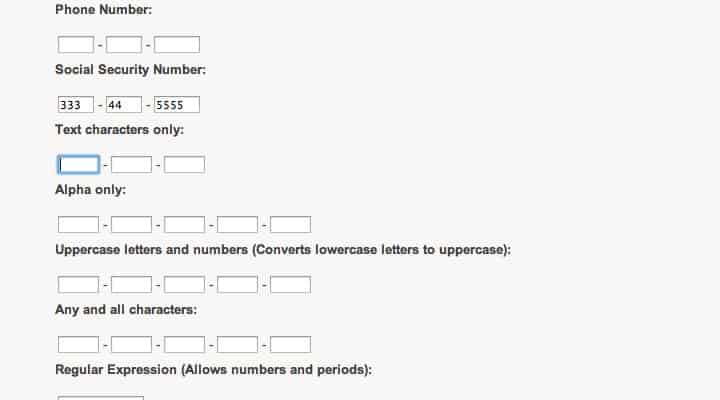
Auto-tabbing is a nifty feature which could be developed from scratch. If you would rather save time then check out this great plugin to streamline that functionality. jQuery Autotab will detect when a field has hit its maximum length and automatically move onto the next defined element in the form list.
All of the inputs are built using a long selector string in jQuery where you separate each field by commas. I would love to see this plugin work dynamically based on each field’s tabindex attribute, instead of manually defining each element. There are also cool filters you can utilize for different inputs such as numeric telephone numbers or alphanumeric street addresses. Grab a copy from the official Github repo to see how this plugin works in action.
Pickadate.js
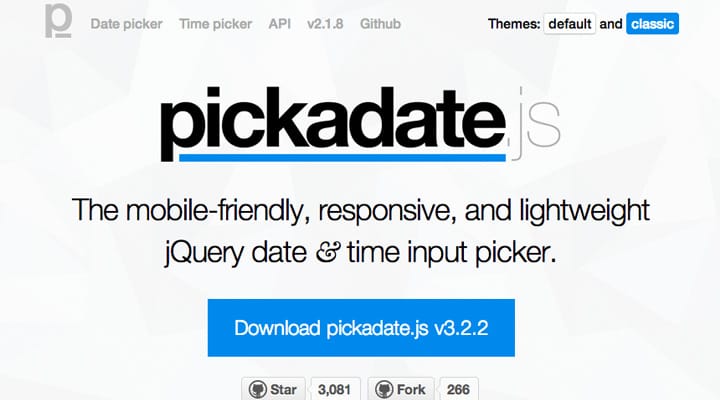
A little while ago I wrote an article detailing various date picker plugins for jQuery. The list includes a number of great choices but I miss one great solution named pickadate.js. This is a free open source plugin to use in any website project which just so happens to support mobile responsive web browsers. Pickadate allows users to pick not just a date, but also a specific time or range of times which need to be passed into the form.
Try skimming my other article if you have the time just to see what else is out there. I really love toying with pickadate.js because of the support for almost every mobile device. This doesn’t completely sell the plugin on its own, but also consider the beautiful interface which is very intuitive for first-time users. If you need a quick jQuery plugin for date selection I would suggest starting from here and branching out as you have the opportunity.
Progression.js
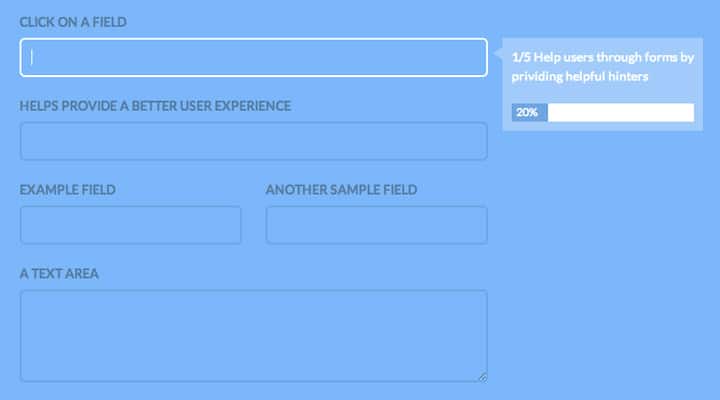
Have you ever seen guided forms which follow the user along to each input field? These can be created manually through hidden text elements or tooltips. But you may also choose to include a plugin such as Progression which can work in a similar manner.
This open source project allows developers to easily incorporate guided form fields without much setup. There are a number of parameter options which you can pass to adjust the width, animation style, and interface colors. Check out the online documentation to understand a bit more about how this works. I feel Progression.js is a simple way to get users engrossed with the process of filling out each field, and hopefully completing your form in its entirety.
Selectize.js
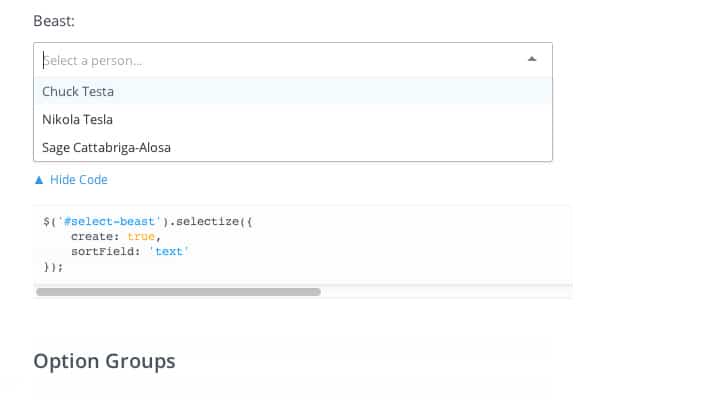
Anyone who has built web forms will recognize the ever-familiar select menu. This is a dropdown box which contains a number of options with different values, where some values are put together into option groups. Selectize.js is a free plugin which customizes your select menus to work with a more native user interface.
You have the choice of using a standard select menu with more customized design features – even where users can enter their own values into the select menu. Additionally Selectize.js allows you to turn select fields into tag-based input boxes. You’ll find these in many social networking sites like Tumblr where the already-existing tags appear in the list, and users are allowed to enter in new tags as well.
Selectize isn’t perfect for every form but it does provide a lot of circumstantial value. Tag-based inputs are tough to come around. This open source jQuery plugin offers all that functionality and even more for customizing the design of your select menus.
iCheck
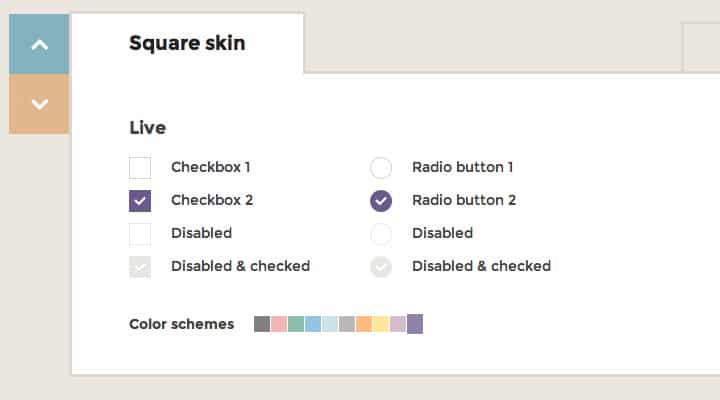
This is one of my favorite plugins because of the many different templates you can choose from right out of the box. iCheck allows developers to style radio buttons and checkboxes within forms. There are different skins like Flat, Square, or Polaris which you can initiate along with the plugin. It is also possible to change the color scheme on each of these skins.
iCheck offers a tremendous amount of control to developers who want easily customized checkboxes & radios. There are different color-based stylesheets which you also need to include depending on which skin you are using. In regards to simplicity and ease-of-use, iCheck wins my approval every time.
Colpick
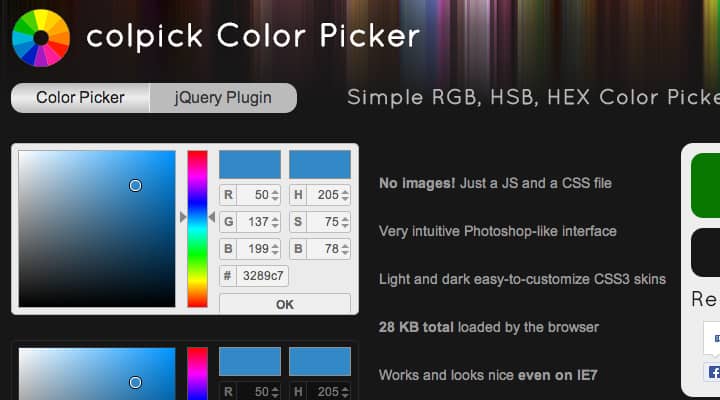
Color pickers are another fairly obscure user interface feature which are vitally important to certain web applications. There are a number of great solutions built with jQuery and I certainly couldn’t include all of them. Colpick is open source which you can download right from Github. The color picker UI is designed almost identical to Photoshop which is great for a majority of your technical users.
But even for people who have never used Adobe software before, this color picker plugin is fairly straightforward. I don’t think anyone would struggle for too long before figuring out how it works. The design is created entirely in JS/CSS and it is even supported in legacy browsers such as IE7/IE8. The latest edits are about a month old as of writing this article, so I’m sure we can expect future updates and bug fixes as time goes on.
jQuery Switchbutton
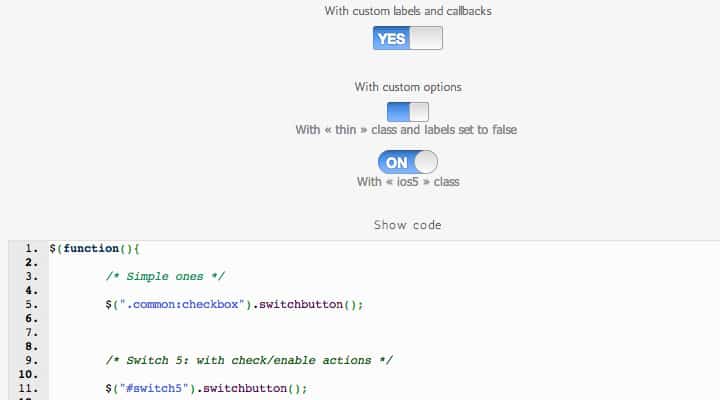
Apple iOS users must be familiar with the ON/OFF switch inputs you find on application settings pages. Many jQuery plugins(among other libraries) have been written to duplicate this effect on the web. For a natural jQuery effect Switchbutton is a really great choice. It offers plenty of custom options for changing the label text, trigger button, and how the input checkbox should pass values into the form.
You can also change up the design to look more like classic iOS, the newer iOS 5/6/7 rounded switch, or a minified version with no text. Check out the live plugin demo page to get an idea of how these switches work in a browser. This plugin is most beneficial when trying to improve user experience without re-designing large segments of the page.
Passy
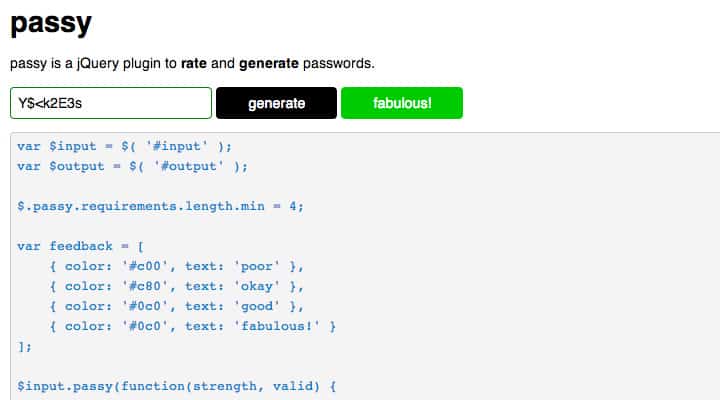
Rating user password strength has been a popular choice for almost any website registration form. Sometimes you may feel that users are turned off by this functionality and find it annoying. But it can really help people determine if their password choice is complex enough to fend off brute-force hackers.
I really like Passy for jQuery because it has this dynamic strength rating system built-in alongside the functionality to generate random password strings. When initializing the plugin you can choose how many characters should be used for any new password, which characters are allowed(or disallowed) and where the new dynamic password should appear on the page. It’s an easygoing plugin without much hassle to help users rate their chosen password or generate a new one if they prefer more security.
Nod
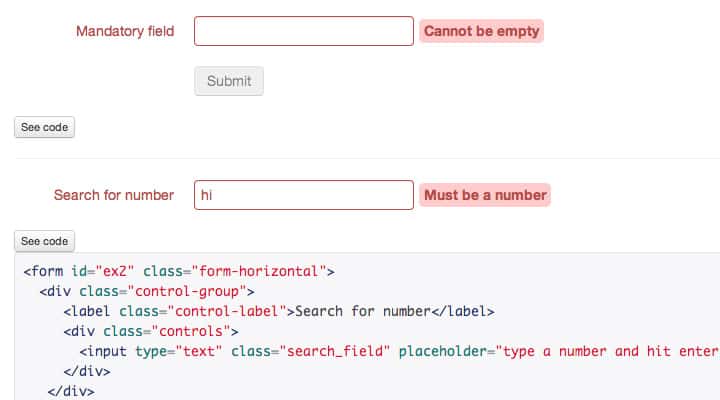
This final example is a plugin built for validating input fields. Each form typically has a number of fields with minimum requirements such as the length of a username or e-mail address. Nod is a jQuery plugin for validating any type of input you can possibly think about. Check out the live demo example to get an idea of how this validation can work in the real world.
The large metrics table on the plugin’s website will outline some of the choices you have when validating input content. There is also another table filled with options which let you choose between how the errors are handled and when the plugin should check for validation. Nod is simply one of the most conclusive jQuery plugins for basic frontend validation and it works perfectly in any type of common web form. Also check out the official Github repo if you want to learn more about the plugin’s development.
Closing
My goal here is to offer a wide variety of plugins for web designers & developers to play with and see what can work best. Each web project will be different so you may try using an assortment of these plugins over time. I do hope this collection will provide a nice starting point to increase the usability of your website forms. If you know about any similar plugins I may have forgotten feel free to share in the post discussion area below.
The post Best Free jQuery Form Plugins to Improve User Experience appeared first on Treehouse Blog.
]]>
Webpage forms are quite commonplace for a number of different purposes. Some examples include user registration, e-commerce checkouts, profile settings, or even contact forms. Input fields are...
http://feedproxy.google.com/~r/teamtreehouse/~3/Dqm5epl-6iY/best-free-jquery-form-plugins-to-improve-user-experience
https://my3.my.umbc.edu/api/v0/pixel/news/36221/guest@my.umbc.edu/1fb41d02302cb3ef329d18db43786cec/api/pixel
android
css
design
development
forms
html
ios
javascript
jquery-plugins
make-a-website
open-source
responsive
web
web-performance
Web Developer - Build Group
https://my3.my.umbc.edu/groups/retired-583
https://assets3-my.umbc.edu/system/shared/avatars/groups/000/000/583/fc60f5d7abc2e080599bb6dc465db54d/xsmall.png?1363101197
https://assets4-my.umbc.edu/system/shared/avatars/groups/000/000/583/fc60f5d7abc2e080599bb6dc465db54d/original.jpg?1363101197
https://assets4-my.umbc.edu/system/shared/avatars/groups/000/000/583/fc60f5d7abc2e080599bb6dc465db54d/xxlarge.png?1363101197
https://assets4-my.umbc.edu/system/shared/avatars/groups/000/000/583/fc60f5d7abc2e080599bb6dc465db54d/xlarge.png?1363101197
https://assets3-my.umbc.edu/system/shared/avatars/groups/000/000/583/fc60f5d7abc2e080599bb6dc465db54d/large.png?1363101197
https://assets3-my.umbc.edu/system/shared/avatars/groups/000/000/583/fc60f5d7abc2e080599bb6dc465db54d/medium.png?1363101197
https://assets4-my.umbc.edu/system/shared/avatars/groups/000/000/583/fc60f5d7abc2e080599bb6dc465db54d/small.png?1363101197
https://assets3-my.umbc.edu/system/shared/avatars/groups/000/000/583/fc60f5d7abc2e080599bb6dc465db54d/xsmall.png?1363101197
https://assets4-my.umbc.edu/system/shared/avatars/groups/000/000/583/fc60f5d7abc2e080599bb6dc465db54d/xxsmall.png?1363101197
Web Developer - Build Group
0
0
true
Thu, 26 Sep 2013 10:07:23 -0400
Solved by Flexbox
Philip Walton looks at common CSS layout issues that were a pain in the butt before Flexbox.
Direct Link to Article — Permalink
Solved by Flexbox is a post from CSS-Tricks
]]>
Philip Walton looks at common CSS layout issues that were a pain in the butt before Flexbox.
Direct Link to Article — Permalink
Solved by Flexbox is a post from CSS-Tricks
http://philipwalton.github.io/solved-by-flexbox/
https://my3.my.umbc.edu/api/v0/pixel/news/36218/guest@my.umbc.edu/0224159e9c14fa16da1c4ec60d202de2/api/pixel
css
html
javascript
link
mysql
php
sql
tricks
Web Developer - Build Group
https://my3.my.umbc.edu/groups/retired-583
https://assets3-my.umbc.edu/system/shared/avatars/groups/000/000/583/fc60f5d7abc2e080599bb6dc465db54d/xsmall.png?1363101197
https://assets4-my.umbc.edu/system/shared/avatars/groups/000/000/583/fc60f5d7abc2e080599bb6dc465db54d/original.jpg?1363101197
https://assets4-my.umbc.edu/system/shared/avatars/groups/000/000/583/fc60f5d7abc2e080599bb6dc465db54d/xxlarge.png?1363101197
https://assets4-my.umbc.edu/system/shared/avatars/groups/000/000/583/fc60f5d7abc2e080599bb6dc465db54d/xlarge.png?1363101197
https://assets3-my.umbc.edu/system/shared/avatars/groups/000/000/583/fc60f5d7abc2e080599bb6dc465db54d/large.png?1363101197
https://assets3-my.umbc.edu/system/shared/avatars/groups/000/000/583/fc60f5d7abc2e080599bb6dc465db54d/medium.png?1363101197
https://assets4-my.umbc.edu/system/shared/avatars/groups/000/000/583/fc60f5d7abc2e080599bb6dc465db54d/small.png?1363101197
https://assets3-my.umbc.edu/system/shared/avatars/groups/000/000/583/fc60f5d7abc2e080599bb6dc465db54d/xsmall.png?1363101197
https://assets4-my.umbc.edu/system/shared/avatars/groups/000/000/583/fc60f5d7abc2e080599bb6dc465db54d/xxsmall.png?1363101197
Web Developer - Build Group
0
0
true
Thu, 26 Sep 2013 09:47:38 -0400
Line Mode Browser
Revisiting the first universally accessible web browser
Direct Link to Article — Permalink
Line Mode Browser is a post from CSS-Tricks
]]>
Revisiting the first universally accessible web browser
Direct Link to Article — Permalink
Line Mode Browser is a post from CSS-Tricks
http://line-mode.cern.ch/
https://my3.my.umbc.edu/api/v0/pixel/news/36219/guest@my.umbc.edu/00153751ffc8a8622c6f5af339488327/api/pixel
css
html
javascript
link
mysql
php
sql
tricks
Web Developer - Build Group
https://my3.my.umbc.edu/groups/retired-583
https://assets3-my.umbc.edu/system/shared/avatars/groups/000/000/583/fc60f5d7abc2e080599bb6dc465db54d/xsmall.png?1363101197
https://assets4-my.umbc.edu/system/shared/avatars/groups/000/000/583/fc60f5d7abc2e080599bb6dc465db54d/original.jpg?1363101197
https://assets4-my.umbc.edu/system/shared/avatars/groups/000/000/583/fc60f5d7abc2e080599bb6dc465db54d/xxlarge.png?1363101197
https://assets4-my.umbc.edu/system/shared/avatars/groups/000/000/583/fc60f5d7abc2e080599bb6dc465db54d/xlarge.png?1363101197
https://assets3-my.umbc.edu/system/shared/avatars/groups/000/000/583/fc60f5d7abc2e080599bb6dc465db54d/large.png?1363101197
https://assets3-my.umbc.edu/system/shared/avatars/groups/000/000/583/fc60f5d7abc2e080599bb6dc465db54d/medium.png?1363101197
https://assets4-my.umbc.edu/system/shared/avatars/groups/000/000/583/fc60f5d7abc2e080599bb6dc465db54d/small.png?1363101197
https://assets3-my.umbc.edu/system/shared/avatars/groups/000/000/583/fc60f5d7abc2e080599bb6dc465db54d/xsmall.png?1363101197
https://assets4-my.umbc.edu/system/shared/avatars/groups/000/000/583/fc60f5d7abc2e080599bb6dc465db54d/xxsmall.png?1363101197
Web Developer - Build Group
0
0
true
Thu, 26 Sep 2013 09:45:30 -0400


