<?xml version="1.0"?>
<News hasArchived="true" page="8298" pageCount="10733" pageSize="10" timestamp="Sat, 25 Jul 2026 00:52:59 -0400" url="https://my3.my.umbc.edu/posts.xml?page=8298">
<NewsItem contentIssues="true" id="35750" important="false" status="posted" url="https://my3.my.umbc.edu/posts/35750">
<Title>Intern with Walter Reed Army Institute of Research!</Title>
<Body>
<![CDATA[
    <div class="html-content">This is a g<span>reat opportunity for experience in a world-renowned research institute. This position entails working with research participants on sleep &amp; performance studies. Technicians do not require any experience, as all training will be provided.</span><div><span><br></span></div>
    <div><span>This position allows up to 25+ hours a week during the school semester and up to 40 hours a week during the summer months. The location is in Silver Spring, MD, approximately 25 miles south from UMBC, with reliable transportation a MUST.</span></div>
    <div><span><br></span></div>
    <div><span>For more details and to apply, search job # 9259266 in UMBC<em>works</em>.</span></div>
    </div>
]]>
</Body>
<Summary>This is a great opportunity for experience in a world-renowned research institute. This position entails working with research participants on sleep &amp; performance studies. Technicians do not...</Summary>
<TrackingUrl>https://my3.my.umbc.edu/api/v0/pixel/news/35750/guest@my.umbc.edu/7ea2a22ca90734ca183f46789b08ceee/api/pixel</TrackingUrl>
<Tag>biochem</Tag>
<Tag>biology</Tag>
<Tag>happ</Tag>
<Tag>junior</Tag>
<Tag>master-student</Tag>
<Tag>molecular-biology</Tag>
<Tag>pre-med</Tag>
<Tag>pre-nurse</Tag>
<Tag>pre-pharm</Tag>
<Tag>psych</Tag>
<Tag>senior</Tag>
<Tag>social-work</Tag>
<Group token="careers">Career Center</Group>
<GroupUrl>https://my3.my.umbc.edu/groups/careers</GroupUrl>
<AvatarUrl>https://assets2-my.umbc.edu/system/shared/avatars/groups/000/000/018/729f2c7eeeab66f50f4ab3677539a585/xsmall.png?1411655278</AvatarUrl>
<AvatarUrl size="original">https://assets4-my.umbc.edu/system/shared/avatars/groups/000/000/018/729f2c7eeeab66f50f4ab3677539a585/original.jpg?1411655278</AvatarUrl>
<AvatarUrl size="xxlarge">https://assets2-my.umbc.edu/system/shared/avatars/groups/000/000/018/729f2c7eeeab66f50f4ab3677539a585/xxlarge.png?1411655278</AvatarUrl>
<AvatarUrl size="xlarge">https://assets1-my.umbc.edu/system/shared/avatars/groups/000/000/018/729f2c7eeeab66f50f4ab3677539a585/xlarge.png?1411655278</AvatarUrl>
<AvatarUrl size="large">https://assets2-my.umbc.edu/system/shared/avatars/groups/000/000/018/729f2c7eeeab66f50f4ab3677539a585/large.png?1411655278</AvatarUrl>
<AvatarUrl size="medium">https://assets3-my.umbc.edu/system/shared/avatars/groups/000/000/018/729f2c7eeeab66f50f4ab3677539a585/medium.png?1411655278</AvatarUrl>
<AvatarUrl size="small">https://assets3-my.umbc.edu/system/shared/avatars/groups/000/000/018/729f2c7eeeab66f50f4ab3677539a585/small.png?1411655278</AvatarUrl>
<AvatarUrl size="xsmall">https://assets2-my.umbc.edu/system/shared/avatars/groups/000/000/018/729f2c7eeeab66f50f4ab3677539a585/xsmall.png?1411655278</AvatarUrl>
<AvatarUrl size="xxsmall">https://assets2-my.umbc.edu/system/shared/avatars/groups/000/000/018/729f2c7eeeab66f50f4ab3677539a585/xxsmall.png?1411655278</AvatarUrl>
<Sponsor>Career Services Center</Sponsor>
<ThumbnailUrl size="xxlarge">https://assets3-my.umbc.edu/system/shared/thumbnails/news/000/035/750/892affbf0ca609fa5973b694e30a5791/xxlarge.jpg?1379429236</ThumbnailUrl>
<ThumbnailUrl size="xlarge">https://assets2-my.umbc.edu/system/shared/thumbnails/news/000/035/750/892affbf0ca609fa5973b694e30a5791/xlarge.jpg?1379429236</ThumbnailUrl>
<ThumbnailUrl size="large">https://assets1-my.umbc.edu/system/shared/thumbnails/news/000/035/750/892affbf0ca609fa5973b694e30a5791/large.jpg?1379429236</ThumbnailUrl>
<ThumbnailUrl size="medium">https://assets4-my.umbc.edu/system/shared/thumbnails/news/000/035/750/892affbf0ca609fa5973b694e30a5791/medium.jpg?1379429236</ThumbnailUrl>
<ThumbnailUrl size="small">https://assets2-my.umbc.edu/system/shared/thumbnails/news/000/035/750/892affbf0ca609fa5973b694e30a5791/small.jpg?1379429236</ThumbnailUrl>
<ThumbnailUrl size="xsmall">https://assets3-my.umbc.edu/system/shared/thumbnails/news/000/035/750/892affbf0ca609fa5973b694e30a5791/xsmall.jpg?1379429236</ThumbnailUrl>
<ThumbnailUrl size="xxsmall">https://assets4-my.umbc.edu/system/shared/thumbnails/news/000/035/750/892affbf0ca609fa5973b694e30a5791/xxsmall.jpg?1379429236</ThumbnailUrl>
<PawCount>1</PawCount>
<CommentCount>0</CommentCount>
<CommentsAllowed>true</CommentsAllowed>
<PostedAt>Tue, 17 Sep 2013 10:53:10 -0400</PostedAt>
</NewsItem>

<NewsItem contentIssues="true" id="35748" important="false" status="posted" url="https://my3.my.umbc.edu/posts/35748">
<Title>Make More Money as a Web Dev + Awesome Desktop Wallpaper</Title>
<Body>
<![CDATA[
    <div class="html-content">
    <a href="http://rss.buysellads.com/click.php?z=1260013&amp;k=d754f1e9ba63a736ba8ff5ece958f7dd&amp;a=34749&amp;c=1844975812" rel="nofollow external" class="bo"><img src="http://rss.buysellads.com/img.php?z=1260013&amp;k=d754f1e9ba63a736ba8ff5ece958f7dd&amp;a=34749&amp;c=1844975812" alt="" style="max-width: 100%; height: auto;"></a><p><a href="http://envato.com" rel="nofollow external" class="bo">Envato</a>, the people behind <em>Nettuts+</em>, have created a new avenue for web developers to earn an income doing what they love.</p>
    <p></p>
    <p>It’s called <strong><a href="http://microlancer.com?utm_source=nettuts&amp;utm_medium=blogpost&amp;utm_campaign=tutscode" rel="nofollow external" class="bo">Microlancer</a></strong>, and we’ve recently started allowing freelancers to offer web dev services like PSD to HTML, WordPress plug-in development, and website customization.</p>
    <p>You can set your own prices, turnaround time, and the terms of your services. We connect you with buyers who pay upfront to work with you. It’s an awesome new way to earn an income doing simple web dev jobs without having to worry about quotes, bidding, chasing up payment, invoicing, or self-promotion. We bring buyers, you do the work, Microlancer takes care of the rest, and you get paid.</p>  <img src="http://cdn.tutsplus.com/net.tutsplus.com/uploads/2013/09/microlancer_homepage1.png" alt="microlancer_homepage" width="550" height="358" style="max-width: 100%; height: auto;"><br> <p>Over $130,000 jobs have been sold to date on Microlancer, and twenty of our design service providers are into the thousands of dollars in gross earnings.</p>
    <p>If you’d like more web development work, consider joining Microlancer to <a href="https://www.microlancer.com/sell-services?utm_source=nettuts&amp;utm_medium=blogpost&amp;utm_campaign=tutscode" rel="nofollow external" class="bo">sell your web dev services</a>.</p>
    <p>If you love to code but struggle with design, Microlancer’s designers can help with things like logo design, web design, app icon design <a href="http://microlancer.com/explore?utm_source=nettuts&amp;utm_medium=blogpost&amp;utm_campaign=tutscode" rel="nofollow external" class="bo">and much more</a>.</p>
    <p>If you currently have more work than you can handle, Microlancer is an excellent place to outsource jobs.</p>
    <p><a href="http://microlancer.com?utm_source=nettuts&amp;utm_medium=blogpost&amp;utm_campaign=tutscode" rel="nofollow external" class="bo">Visit Microlancer</a></p>
    <hr>
    <h2>Why Microlancer is Better for Freelancers</h2>
    <p><strong>Other freelance marketplaces:</strong></p>
    <ul>
    <li>Bidding for jobs in a race to the bottom</li>
    <li>Sending job proposals that are never acknowledged</li>
    <li>Confusion around payment terms and payment methods</li>
    <li>Disagreements around deadlines</li>
    <li>No minimum prices, and constant undercutting as a result</li>
    <li>Chasing up clients who don’t pay, or don’t pay on time</li>
    <li>Complex time-tracking and surveillance software</li>
    </ul>
    <p><strong>Microlancer</strong></p>
    <ul>
    <li>No job bidding</li>
    <li>Clients pay for jobs upfront</li>
    <li>Microlancer handles payment collection</li>
    <li>You choose the turnaround time you’ll offer</li>
    <li>Minimum prices for each category</li>
    <li>Payment is collected upfront and released after the job is completed</li>
    <li>You choose a fixed price for each service you’ll offer</li>
    </ul>
    <hr>
    <h2>Why Microlancer is Better for Buyers</h2>
    <p><strong>Other freelance marketplaces:</strong></p>
    <ul>
    <li>No review process for freelancers</li>
    <li>Confusing payment schemes and ambiguous pricing</li>
    <li>Copy and paste job proposals and bids</li>
    <li>Hard to evaluate freelancers</li>
    <li>Unclear process for resolving disputes</li>
    </ul>
    <p><strong>Microlancer:</strong></p>
    <ul>
    <li>Freelancers are reviewed for quality work</li>
    <li>Payment is clear and upfront</li>
    <li>No bids, no proposals, buyers select freelancers</li>
    <li>Work examples provided upfront</li>
    <li>Simple and transparent dispute resolution process</li>
    </ul>
    <p><a href="http://microlancer.com?utm_source=nettuts&amp;utm_medium=blogpost&amp;utm_campaign=tutscode" rel="nofollow external" class="bo">Visit Microlancer</a></p>
    <hr>
    <h2>Freelance Nirvana Desktop Wallpaper</h2>
    <p><strong>Do work you love and we’ll take care of the rest.</strong> That’s the concept behind Microlancer’s official desktop wallpaper, available in several desktop sizes, as well as for Android, iPhone and iPad.</p>  <img src="http://cdn.tutsplus.com/net.tutsplus.com/uploads/2013/09/microlancer-wp-thumb.jpg" alt="microlancer-wp-thumb" width="550" height="344" style="max-width: 100%; height: auto;"><br> <p><a href="http://microlancer.lancerassets.com.s3.amazonaws.com/coms/microlancer-wp.zip" rel="nofollow external" class="bo">Download the Microlancer Desktop Wallpaper  Pack (.zip)</a></p>
    </div>
]]>
</Body>
<Summary>Envato, the people behind Nettuts+, have created a new avenue for web developers to earn an income doing what they love.   It’s called Microlancer, and we’ve recently started allowing freelancers...</Summary>
<Website>http://feedproxy.google.com/~r/nettuts/~3/7knXR7vRz7g/</Website>
<TrackingUrl>https://my3.my.umbc.edu/api/v0/pixel/news/35748/guest@my.umbc.edu/0d4a4b4824e6a426481e9f4e728d474f/api/pixel</TrackingUrl>
<Tag>articles</Tag>
<Tag>css</Tag>
<Tag>development</Tag>
<Tag>html</Tag>
<Tag>javascript</Tag>
<Tag>mysql</Tag>
<Tag>news</Tag>
<Tag>php</Tag>
<Tag>sql</Tag>
<Tag>wed</Tag>
<Group token="retired-583">Web Developer - Build Group</Group>
<GroupUrl>https://my3.my.umbc.edu/groups/retired-583</GroupUrl>
<AvatarUrl>https://assets3-my.umbc.edu/system/shared/avatars/groups/000/000/583/fc60f5d7abc2e080599bb6dc465db54d/xsmall.png?1363101197</AvatarUrl>
<AvatarUrl size="original">https://assets4-my.umbc.edu/system/shared/avatars/groups/000/000/583/fc60f5d7abc2e080599bb6dc465db54d/original.jpg?1363101197</AvatarUrl>
<AvatarUrl size="xxlarge">https://assets4-my.umbc.edu/system/shared/avatars/groups/000/000/583/fc60f5d7abc2e080599bb6dc465db54d/xxlarge.png?1363101197</AvatarUrl>
<AvatarUrl size="xlarge">https://assets4-my.umbc.edu/system/shared/avatars/groups/000/000/583/fc60f5d7abc2e080599bb6dc465db54d/xlarge.png?1363101197</AvatarUrl>
<AvatarUrl size="large">https://assets3-my.umbc.edu/system/shared/avatars/groups/000/000/583/fc60f5d7abc2e080599bb6dc465db54d/large.png?1363101197</AvatarUrl>
<AvatarUrl size="medium">https://assets3-my.umbc.edu/system/shared/avatars/groups/000/000/583/fc60f5d7abc2e080599bb6dc465db54d/medium.png?1363101197</AvatarUrl>
<AvatarUrl size="small">https://assets4-my.umbc.edu/system/shared/avatars/groups/000/000/583/fc60f5d7abc2e080599bb6dc465db54d/small.png?1363101197</AvatarUrl>
<AvatarUrl size="xsmall">https://assets3-my.umbc.edu/system/shared/avatars/groups/000/000/583/fc60f5d7abc2e080599bb6dc465db54d/xsmall.png?1363101197</AvatarUrl>
<AvatarUrl size="xxsmall">https://assets4-my.umbc.edu/system/shared/avatars/groups/000/000/583/fc60f5d7abc2e080599bb6dc465db54d/xxsmall.png?1363101197</AvatarUrl>
<Sponsor>Web Developer - Build Group</Sponsor>
<PawCount>0</PawCount>
<CommentCount>0</CommentCount>
<CommentsAllowed>true</CommentsAllowed>
<PostedAt>Tue, 17 Sep 2013 10:00:29 -0400</PostedAt>
<EditAt>Tue, 17 Sep 2013 10:00:29 -0400</EditAt>
</NewsItem>

<NewsItem contentIssues="true" id="35747" important="false" status="posted" url="https://my3.my.umbc.edu/posts/35747">
<Title>Reading Files Using The HTML5 FileReader API</Title>
<Body>
<![CDATA[
    <div class="html-content">
    <p>HTML5 saw the introduction of a number of new APIs that can be used to handle files in the browser. These APIs make it much easier to accomplish tasks like reading and writing files or uploading a file created using JavaScript.</p>
    <p>In this blog post you are going to learn how to use the <a href="https://developer.mozilla.org/en-US/docs/Web/API/FileReader" rel="nofollow external" class="bo">FileReader</a> API to read the contents of a file from your local hard drive. You will be creating two demo applications. The first application will handle reading and then displaying the contents of a text file. The second will read an image file and then generate a data URL that will be used to display the image on the page.</p>
    <p>Lets get going!</p>
    <h2>The FileReader Interface</h2>
    <p>The <code>FileReader</code> interface provides a number of methods that can be used to read either <code>File</code> or <code>Blob</code> objects. These methods are all <em>asynchronous</em> which means that your program will not stall whilst a file is being read. This is particularly useful when dealing with large files.</p>
    <p>The following code shows how to create a new instance of <code>FileReader</code>.</p>
    <pre>var reader = new FileReader();</pre>
    <p>In the following sections we are going to take a look at the methods provided by <code>FileReader</code>.</p>
    <h3>readAsText()</h3>
    <p>The <code>readAsText()</code> method can be used to read text files. This method has two parameters. The first parameter is for the <code>File</code> or <code>Blob</code> object that is to be read. The second parameter is used to specify the encoding of the file. This second parameter is optional. If you don’t specify an encoding <code>UTF-8</code> is assumed by default.</p>
    <p>As this is an asynchronous method we need to setup an event listener for when the file has finished loading. When the <code>onload</code> event is called we can examine the <code>result</code> property of our <code>FileReader</code> instance to get the file’s contents. You will need to use this same approach for all of the read methods provided by <code>FileReader</code>.</p>
    <pre>var reader = new FileReader();&#x000A;    &#x000A;    reader.onload = function(e) {&#x000A;      var text = reader.result;&#x000A;    }&#x000A;    &#x000A;    reader.readAsText(file, encoding);</pre>
    <h3>readAsDataURL()</h3>
    <p>The <code>readAsDataURL()</code> method takes in a <code>File</code> or <code>Blob</code> and produces a <a href="http://css-tricks.com/data-uris/" rel="nofollow external" class="bo">data URL</a>. This is basically a base64 encoded string of the file data. You can use this data URL for things like setting the <code>src</code> property for an image. We will look at how to do this later in the images demo.</p>
    <pre>var reader = new FileReader();&#x000A;    &#x000A;    reader.onload = function(e) {&#x000A;      var dataURL = reader.result;&#x000A;    }&#x000A;    &#x000A;    reader.readAsDataURL(file);</pre>
    <h3>readAsBinaryString()</h3>
    <p>The <code>readAsBinaryString()</code> method can be used to read any type of file. The method returns the raw binary data from the file. If you use <code>readAsBinaryString()</code> along with the <code>XMLHttpRequest.sendAsBinary()</code> method you can upload any file to a server using JavaScript.</p>
    <pre>var reader = new FileReader();&#x000A;    &#x000A;    reader.onload = function(e) {&#x000A;      var rawData = reader.result;&#x000A;    }&#x000A;    &#x000A;    reader.readAsBinaryString(file);</pre>
    <h3>readAsArrayBuffer()</h3>
    <p>The <code>readAsArrayBuffer()</code> method will read a <code>Blob</code> or <code>File</code> object and produce an <a href="https://developer.mozilla.org/en-US/docs/Web/API/ArrayBuffer" rel="nofollow external" class="bo"><code>ArrayBuffer</code></a>. An <code>ArrayBuffer</code> is a fixed-length binary data buffer. They can come in handy when manipulating files (like converting a JPEG image to PNG).</p>
    <pre>var reader = new FileReader();&#x000A;    &#x000A;    reader.onload = function(e) {&#x000A;      var arrayBuffer = reader.result;&#x000A;    }&#x000A;    &#x000A;    reader.readAsArrayBuffer(file);</pre>
    <h3>abort()</h3>
    <p>The <code>abort()</code> method will stop a read operation. This can come in handy when reading large files.</p>
    <pre>reader.abort();</pre>
    <p>Now that you have an understanding of how the <code>FileReader</code> API works lets take a look at a couple of examples.</p>
    <h2>Example: Reading Text Files With The FileReader API</h2>
    <div>
    <a href="http://blog.teamtreehouse.com/wp-content/uploads/2013/09/text-file-example.png" rel="nofollow external" class="bo"><img alt="Reading Text Files With The FileReader API" src="http://blog.teamtreehouse.com/wp-content/uploads/2013/09/text-file-example.png" width="665" height="369" style="max-width: 100%; height: auto;"></a><p>Reading Text Files With The FileReader API</p>
    </div>
    <p><a href="http://codepen.io/matt-west/full/KjEHg" rel="nofollow external" class="bo">See the Demo</a> <a href="http://cl.ly/3h2R222J1j47" rel="nofollow external" class="bo">Download The Code</a> <a href="http://codepen.io/matt-west/pen/KjEHg" rel="nofollow external" class="bo">View on CodePen</a></p>
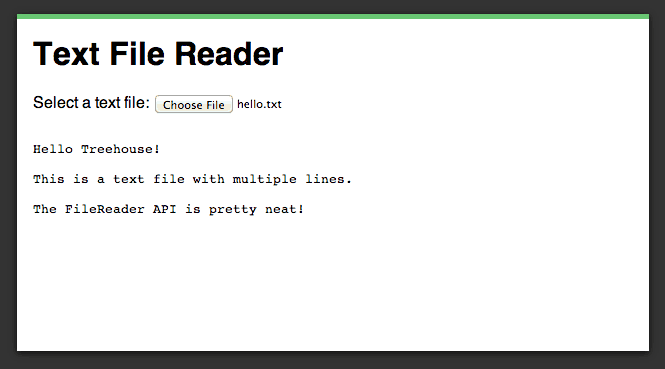
    <p>In this section you are going to learn how to build a small JavaScript application that reads a text file and displays it’s contents within a <code>&lt;pre&gt;</code> element.</p>
    <p>To get started we first need to setup the HTML for our demo. We are going to use a file <code>&lt;input&gt;</code> to handle selecting our file but you could also use <a href="http://blog.teamtreehouse.com/implementing-native-drag-and-drop" rel="nofollow external" class="bo">drag and drop</a>. We also need to add a <code>&lt;pre&gt;</code> element that will be used for displaying the file’s contents.</p>
    <pre>&lt;!DOCTYPE html&gt;&#x000A;    &lt;html lang="en"&gt;&#x000A;    &lt;head&gt;&#x000A;      &lt;meta charset="utf-8"&gt;&#x000A;      &lt;title&gt;File API&lt;/title&gt;&#x000A;    &#x000A;      &lt;link rel="stylesheet" href="style.css"&gt;&#x000A;    &lt;/head&gt;&#x000A;    &lt;body&gt;&#x000A;      &lt;div id="page-wrapper"&gt;&#x000A;    &#x000A;        &lt;h1&gt;Text File Reader&lt;/h1&gt;&#x000A;        &lt;div&gt;&#x000A;          Select a text file: &#x000A;          &lt;input type="file" id="fileInput"&gt;&#x000A;        &lt;/div&gt;&#x000A;        &lt;pre id="fileDisplayArea"&gt;&lt;/pre&gt;&#x000A;    &#x000A;      &lt;/div&gt;&#x000A;    &#x000A;      &lt;script src="text.js"&gt;&lt;/script&gt;&#x000A;    &lt;/body&gt;&#x000A;    &lt;/html&gt;</pre>
    <p>You can find a copy of the stylesheet used in this demo in the code resources.</p>
    <p>Now it’s time to start writing the JavaScript code for your application. Create a new file called <code>text.js</code> to house this code.</p>
    <p>First we need to get references to the important elements within our HTML. Here we get references to the file <code>&lt;input&gt;</code> and the <code>&lt;pre&gt;</code> element and store them in variables called <code>fileInput</code> and <code>fileDisplayArea</code>. We also setup an event listener on the <code>fileInput</code> that listens for the <code>change</code> event. This will be fired whenever the user selects a file.</p>
    <pre>window.onload = function() {&#x000A;        var fileInput = document.getElementById('fileInput');&#x000A;        var fileDisplayArea = document.getElementById('fileDisplayArea');&#x000A;    &#x000A;        fileInput.addEventListener('change', function(e) {&#x000A;          // Put the rest of the demo code here.&#x000A;        });&#x000A;    }</pre>
    <p>Now we need to write the code that will handle reading the text file. We first fetch the first file from our input by examining the <code>fileInput</code>s <code>files</code> property and store this in a variable called <code>file</code>. We then create another variable called <code>textType</code> that holds a regular expression that we will use later to test that the selected file is indeed a text file.</p>
    <pre>var file = fileInput.files[0];&#x000A;    var textType = /text.*/;</pre>
    <p>In this next block of code we first check to make sure that the selected file is a text file by testing it’s <code>type</code> property. If the file is not a text file we show a <code>File not supported!</code> message on the page.</p>
    <p>Once we have determined that the file type is correct we create a new instance of <code>FileReader</code>. Next we setup an event listener for the <code>onload</code> event. Within this event listener we add some code that will update the <code>innerText</code> property of <code>fileDisplayArea</code> using the <code>result</code> property from our <code>FileReader</code>.</p>
    <p>Finally we call the <code>readAsText()</code> method, passing in the <code>file</code> variable that we created earlier.</p>
    <pre>if (file.type.match(textType)) {&#x000A;      var reader = new FileReader();&#x000A;    &#x000A;      reader.onload = function(e) {&#x000A;        fileDisplayArea.innerText = reader.result;&#x000A;      }&#x000A;    &#x000A;      reader.readAsText(file);  &#x000A;    } else {&#x000A;      fileDisplayArea.innerText = "File not supported!";&#x000A;    }</pre>
    <p>If you load up the <a href="http://codepen.io/matt-west/full/KjEHg" rel="nofollow external" class="bo">live demo</a> you should be able to select a file from your local hard drive and see it’s contents displayed on the page.</p>
    <h2>Example: Reading Image Files With The FileReader API</h2>
    <div>
    <a href="http://blog.teamtreehouse.com/wp-content/uploads/2013/09/image-file-example.png" rel="nofollow external" class="bo"><img alt="Reading Image Files With The FileReader API" src="http://blog.teamtreehouse.com/wp-content/uploads/2013/09/image-file-example.png" width="664" height="634" style="max-width: 100%; height: auto;"></a><p>Reading Image Files With The FileReader API</p>
    </div>
    <p><a href="http://codepen.io/matt-west/full/CfilG" rel="nofollow external" class="bo">See the Demo</a> <a href="http://cl.ly/3h2R222J1j47" rel="nofollow external" class="bo">Download The Code</a> <a href="http://codepen.io/matt-west/pen/CfilG" rel="nofollow external" class="bo">View on CodePen</a></p>
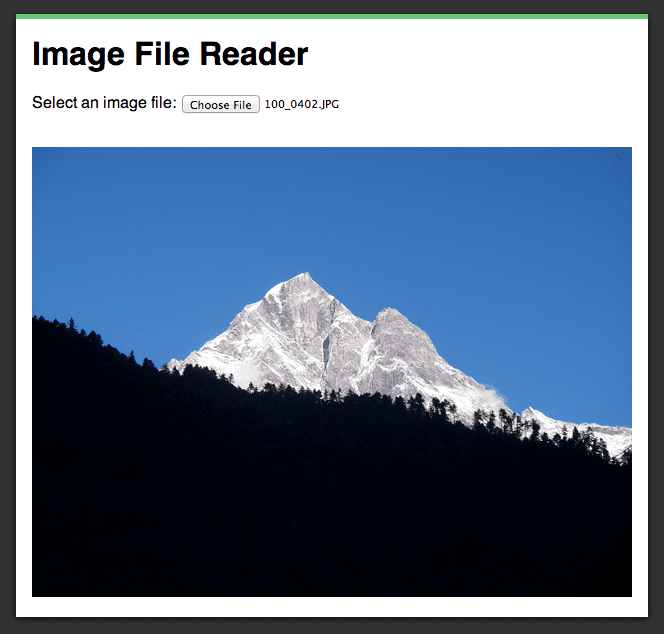
    <p>For our next demo we are going to create an application that reads an image file and then displays that image on the page. To do this we are going to be using the <code>readAsDataURL()</code> method.</p>
    <p>The HTML markup for this demo is very similar to the HTML we used before. The main difference is that we are now using a <code>&lt;div&gt;</code> element as our <code>fileDisplayArea</code> rather than a <code>&lt;pre&gt;</code>. Note that the name of the JavaScript file has also changed to <code>images.js</code>.</p>
    <pre>&lt;!DOCTYPE html&gt;&#x000A;    &lt;html lang="en"&gt;&#x000A;    &lt;head&gt;&#x000A;      &lt;meta charset="utf-8"&gt;&#x000A;      &lt;title&gt;File API&lt;/title&gt;&#x000A;    &#x000A;      &lt;link rel="stylesheet" href="style.css"&gt;&#x000A;    &lt;/head&gt;&#x000A;    &lt;body&gt;&#x000A;      &lt;div id="page-wrapper"&gt;&#x000A;    &#x000A;        &lt;h1&gt;Image File Reader&lt;/h1&gt;&#x000A;        &lt;div&gt;&#x000A;          Select an image file: &#x000A;          &lt;input type="file" id="fileInput"&gt;&#x000A;        &lt;/div&gt;&#x000A;        &lt;div id="fileDisplayArea"&gt;&lt;/div&gt;&#x000A;    &#x000A;      &lt;/div&gt;&#x000A;    &#x000A;      &lt;script src="images.js"&gt;&lt;/script&gt;&#x000A;    &lt;/body&gt;&#x000A;    &lt;/html&gt;</pre>
    <p>The initial JavaScript code for this demo is exactly the same as before. We get references to the key elements in our HTML and then setup an event listener for the file <code>&lt;input&gt;</code>.</p>
    <pre>window.onload = function() {&#x000A;        var fileInput = document.getElementById('fileInput');&#x000A;        var fileDisplayArea = document.getElementById('fileDisplayArea');&#x000A;    &#x000A;        fileInput.addEventListener('change', function(e) {&#x000A;          // Put the rest of the demo code here.&#x000A;        });&#x000A;    }</pre>
    <p>Next we start by fetching the first file from <code>fileInput</code>. We then create the regular expression for checking the file type. This time we want an image file so the regular expression is: <code>/image.*/</code>.</p>
    <p>As before, we do a check to make sure that the selected file is indeed an image.</p>
    <p>We’re now at the point where things start to get a little different. We start by creating a new instance of <code>FileReader</code> and then setting up an event listener for the <code>onload</code> event.</p>
    <p>When this event listener is called we first need to clear out <code>fileDisplayArea</code> just in case there is already an image in there. We can do this by setting <code>fileDisplayArea.innerHTML</code> to an empty string.</p>
    <p>Next we create a new <code>Image</code> instance and set it’s <code>src</code> property to the data URL that is generated by <code>readAsDataURL()</code>. Remember, the data URL can be accessed from the <code>FileReader</code>‘s <code>result</code> property. We then add <code>img</code> to the <code>fileDisplayArea</code> using <code>appendChild()</code>.</p>
    <p>Finally we issue a call to <code>readAsDataURL()</code> and pass in the selected image file.</p>
    <pre>var file = fileInput.files[0];&#x000A;    var imageType = /image.*/;&#x000A;    &#x000A;    if (file.type.match(imageType)) {&#x000A;      var reader = new FileReader();&#x000A;    &#x000A;      reader.onload = function(e) {&#x000A;        fileDisplayArea.innerHTML = "";&#x000A;    &#x000A;        // Create a new image.&#x000A;        var img = new Image();&#x000A;        // Set the img src property using the data URL.&#x000A;        img.src = reader.result;&#x000A;    &#x000A;        // Add the image to the page.&#x000A;        fileDisplayArea.appendChild(img);&#x000A;      }&#x000A;    &#x000A;      reader.readAsDataURL(file); &#x000A;    } else {&#x000A;      fileDisplayArea.innerHTML = "File not supported!";&#x000A;    }</pre>
    <p>Load up the <a rel="nofollow external" class="bo">live demo</a> and select a file from your hard drive. You should see that the file is display on the page. If you were to use the browser’s developer tools to examine the <code>&lt;img&gt;</code> element you would see that the <code>src</code> attribute has been set using the data URL for the image you selected.</p>
    <h2>Browser Support for the FileReader API</h2>
    <p>Browser support for the <code>FileReader</code> API is pretty good. The API will work in the latest versions of all the major desktop browsers. It’s worth noting that Internet Explorer only started supporting <code>FileReader</code> in IE10.</p>
    <table>
    <thead>
    <tr>
    <th>IE</th>
    <th>Firefox</th>
    <th>Chrome</th>
    <th>Safari</th>
    <th>Opera</th>
    </tr>
    </thead>
    <tbody>
    <tr>
    <td>10+</td>
    <td>3.6+</td>
    <td>6.0+</td>
    <td>6.0+</td>
    <td>11.1+</td>
    </tr>
    </tbody>
    </table>
    <p>Source: <a href="http://caniuse.com/filereader" rel="nofollow external" class="bo">http://caniuse.com/filereader</a></p>
    <h2>Final Thoughts</h2>
    <p>Historically there has been a big divide between the capabilities of a native app and that of an application built with pure web technologies. Whilst I don’t deny that this gap still exists, APIs like <code>FileReader</code> are really helping to close up the divide.</p>
    <p>In this post you have learned how to use the <code>FileReader</code> API to read a file from the user’s hard drive and display it’s contents on the page. If you feel like a challenge why not try to create an application that allows the user to drop a file onto the page rather than using an <code>&lt;input&gt;</code> element. My previous post on <a href="http://blog.teamtreehouse.com/implementing-native-drag-and-drop" rel="nofollow external" class="bo">implementing native drag and drop</a> should help to get you started.</p>
    <h2>Useful Links</h2>
    <ul>
    <li><a href="http://caniuse.com/filereader" rel="nofollow external" class="bo">Can I Use… FileReader API</a></li>
    <li><a href="https://developer.mozilla.org/en-US/docs/Web/API/FileReader" rel="nofollow external" class="bo">FileReader Docs (MDN)</a></li>
    <li><a href="http://www.w3.org/TR/FileAPI/#FileReader-interface" rel="nofollow external" class="bo">File API Specification (W3C)</a></li>
    </ul>
    <p>The post <a href="http://blog.teamtreehouse.com/reading-files-using-the-html5-filereader-api" rel="nofollow external" class="bo">Reading Files Using The HTML5 FileReader API</a> appeared first on <a href="http://blog.teamtreehouse.com" rel="nofollow external" class="bo">Treehouse Blog</a>.</p>
    </div>
]]>
</Body>
<Summary>HTML5 saw the introduction of a number of new APIs that can be used to handle files in the browser. These APIs make it much easier to accomplish tasks like reading and writing files or uploading a...</Summary>
<Website>http://feedproxy.google.com/~r/teamtreehouse/~3/jhVnxMIpdc8/reading-files-using-the-html5-filereader-api</Website>
<TrackingUrl>https://my3.my.umbc.edu/api/v0/pixel/news/35747/guest@my.umbc.edu/3543ec1568073d9a864d281a8a70c078/api/pixel</TrackingUrl>
<Tag>android</Tag>
<Tag>code</Tag>
<Tag>css</Tag>
<Tag>design</Tag>
<Tag>development</Tag>
<Tag>file-api</Tag>
<Tag>html</Tag>
<Tag>html5</Tag>
<Tag>ios</Tag>
<Tag>javascript</Tag>
<Tag>responsive</Tag>
<Tag>web</Tag>
<Tag>web-apps</Tag>
<Group token="retired-583">Web Developer - Build Group</Group>
<GroupUrl>https://my3.my.umbc.edu/groups/retired-583</GroupUrl>
<AvatarUrl>https://assets3-my.umbc.edu/system/shared/avatars/groups/000/000/583/fc60f5d7abc2e080599bb6dc465db54d/xsmall.png?1363101197</AvatarUrl>
<AvatarUrl size="original">https://assets4-my.umbc.edu/system/shared/avatars/groups/000/000/583/fc60f5d7abc2e080599bb6dc465db54d/original.jpg?1363101197</AvatarUrl>
<AvatarUrl size="xxlarge">https://assets4-my.umbc.edu/system/shared/avatars/groups/000/000/583/fc60f5d7abc2e080599bb6dc465db54d/xxlarge.png?1363101197</AvatarUrl>
<AvatarUrl size="xlarge">https://assets4-my.umbc.edu/system/shared/avatars/groups/000/000/583/fc60f5d7abc2e080599bb6dc465db54d/xlarge.png?1363101197</AvatarUrl>
<AvatarUrl size="large">https://assets3-my.umbc.edu/system/shared/avatars/groups/000/000/583/fc60f5d7abc2e080599bb6dc465db54d/large.png?1363101197</AvatarUrl>
<AvatarUrl size="medium">https://assets3-my.umbc.edu/system/shared/avatars/groups/000/000/583/fc60f5d7abc2e080599bb6dc465db54d/medium.png?1363101197</AvatarUrl>
<AvatarUrl size="small">https://assets4-my.umbc.edu/system/shared/avatars/groups/000/000/583/fc60f5d7abc2e080599bb6dc465db54d/small.png?1363101197</AvatarUrl>
<AvatarUrl size="xsmall">https://assets3-my.umbc.edu/system/shared/avatars/groups/000/000/583/fc60f5d7abc2e080599bb6dc465db54d/xsmall.png?1363101197</AvatarUrl>
<AvatarUrl size="xxsmall">https://assets4-my.umbc.edu/system/shared/avatars/groups/000/000/583/fc60f5d7abc2e080599bb6dc465db54d/xxsmall.png?1363101197</AvatarUrl>
<Sponsor>Web Developer - Build Group</Sponsor>
<PawCount>0</PawCount>
<CommentCount>0</CommentCount>
<CommentsAllowed>true</CommentsAllowed>
<PostedAt>Tue, 17 Sep 2013 09:54:45 -0400</PostedAt>
</NewsItem>

<NewsItem contentIssues="true" id="35746" important="false" status="posted" url="https://my3.my.umbc.edu/posts/35746">
<Title>The Habits of Supremely Happy People</Title>
<Tagline>Wellness Article of the Week: Huffington Post</Tagline>
<Body>
<![CDATA[
    <div class="html-content">
    <p>Martin Seligman, the father of positive psychology, theorizes that while 60 percent of happiness is determined by our genetics and environment, the remaining 40 percent is up to us. </p>
    <p>In his 2004 Ted Talk, Seligman describes three different kinds of happy lives: The pleasant life, in which you fill your life with as many pleasures as you can, the life of engagement, where you find a life in your work, parenting, love and leisure and the meaningful life, which "consists of knowing what your highest strengths are, and using them to belong to and in the service of something larger than you are." <br></p>
    <p>After exploring what accounts for ultimate satisfaction, Seligman says he was surprised. The pursuit of pleasure, research determined, has hardly any contribution to a lasting fulfillment. Instead, pleasure is "the whipped cream and the cherry" that adds a certain sweetness to satisfactory lives founded by the simultaneous pursuit of meaning and engagement. <br></p>
    <p><a href="http://www.huffingtonpost.com/2013/09/16/happiness-habits-of-exuberant-human-beings_n_3909772.html?utm_hp_ref=healthy-living" rel="nofollow external" class="bo">Read more!</a></p>
    </div>
]]>
</Body>
<Summary>Martin Seligman, the father of positive psychology, theorizes that while 60 percent of happiness is determined by our genetics and environment, the remaining 40 percent is up to us.   In his 2004...</Summary>
<TrackingUrl>https://my3.my.umbc.edu/api/v0/pixel/news/35746/guest@my.umbc.edu/bb180db093974a68eb6663c1d5e382d0/api/pixel</TrackingUrl>
<Tag>happiness</Tag>
<Tag>health</Tag>
<Tag>wellness</Tag>
<Group token="wellness">Wellness Initiative</Group>
<GroupUrl>https://my3.my.umbc.edu/groups/wellness</GroupUrl>
<AvatarUrl>https://assets2-my.umbc.edu/system/shared/avatars/groups/000/000/172/7c77f048a2d02e784926184a82686fa0/xsmall.png?1504100162</AvatarUrl>
<AvatarUrl size="original">https://assets4-my.umbc.edu/system/shared/avatars/groups/000/000/172/7c77f048a2d02e784926184a82686fa0/original.jpg?1504100162</AvatarUrl>
<AvatarUrl size="xxlarge">https://assets4-my.umbc.edu/system/shared/avatars/groups/000/000/172/7c77f048a2d02e784926184a82686fa0/xxlarge.png?1504100162</AvatarUrl>
<AvatarUrl size="xlarge">https://assets2-my.umbc.edu/system/shared/avatars/groups/000/000/172/7c77f048a2d02e784926184a82686fa0/xlarge.png?1504100162</AvatarUrl>
<AvatarUrl size="large">https://assets4-my.umbc.edu/system/shared/avatars/groups/000/000/172/7c77f048a2d02e784926184a82686fa0/large.png?1504100162</AvatarUrl>
<AvatarUrl size="medium">https://assets3-my.umbc.edu/system/shared/avatars/groups/000/000/172/7c77f048a2d02e784926184a82686fa0/medium.png?1504100162</AvatarUrl>
<AvatarUrl size="small">https://assets4-my.umbc.edu/system/shared/avatars/groups/000/000/172/7c77f048a2d02e784926184a82686fa0/small.png?1504100162</AvatarUrl>
<AvatarUrl size="xsmall">https://assets2-my.umbc.edu/system/shared/avatars/groups/000/000/172/7c77f048a2d02e784926184a82686fa0/xsmall.png?1504100162</AvatarUrl>
<AvatarUrl size="xxsmall">https://assets3-my.umbc.edu/system/shared/avatars/groups/000/000/172/7c77f048a2d02e784926184a82686fa0/xxsmall.png?1504100162</AvatarUrl>
<Sponsor>Wellness Initiative</Sponsor>
<ThumbnailUrl size="xxlarge">https://assets1-my.umbc.edu/system/shared/thumbnails/news/000/035/746/086e34bf4e3aebbb142ead2fd4901c0a/xxlarge.jpg?1379425937</ThumbnailUrl>
<ThumbnailUrl size="xlarge">https://assets4-my.umbc.edu/system/shared/thumbnails/news/000/035/746/086e34bf4e3aebbb142ead2fd4901c0a/xlarge.jpg?1379425937</ThumbnailUrl>
<ThumbnailUrl size="large">https://assets1-my.umbc.edu/system/shared/thumbnails/news/000/035/746/086e34bf4e3aebbb142ead2fd4901c0a/large.jpg?1379425937</ThumbnailUrl>
<ThumbnailUrl size="medium">https://assets4-my.umbc.edu/system/shared/thumbnails/news/000/035/746/086e34bf4e3aebbb142ead2fd4901c0a/medium.jpg?1379425937</ThumbnailUrl>
<ThumbnailUrl size="small">https://assets1-my.umbc.edu/system/shared/thumbnails/news/000/035/746/086e34bf4e3aebbb142ead2fd4901c0a/small.jpg?1379425937</ThumbnailUrl>
<ThumbnailUrl size="xsmall">https://assets2-my.umbc.edu/system/shared/thumbnails/news/000/035/746/086e34bf4e3aebbb142ead2fd4901c0a/xsmall.jpg?1379425937</ThumbnailUrl>
<ThumbnailUrl size="xxsmall">https://assets3-my.umbc.edu/system/shared/thumbnails/news/000/035/746/086e34bf4e3aebbb142ead2fd4901c0a/xxsmall.jpg?1379425937</ThumbnailUrl>
<PawCount>2</PawCount>
<CommentCount>0</CommentCount>
<CommentsAllowed>false</CommentsAllowed>
<PostedAt>Tue, 17 Sep 2013 09:53:02 -0400</PostedAt>
</NewsItem>

<NewsItem contentIssues="true" id="35745" important="false" status="posted" url="https://my3.my.umbc.edu/posts/35745">
<Title>UMBC Bookstore Twitter Hunt Featured on National Blog</Title>
<Tagline>Foreword Online Writes About Contest Success</Tagline>
<Body>
<![CDATA[
    <div class="html-content">
    <div>UMBC Bookstore's Friday the 13th Twitter Scavenger Hunt receives national exposure with a featured article on Foreword Online, a college bookstore blog/digital magazine: </div>
    <div><br></div>"<span>Friday the 13th gets a bad rap as being an unlucky day. But, that wasn’t the case at the University of Maryland – Baltimore County this year. Students had the opportunity to compete in a Twitter-based scavenger hunt; a search that led two very lucky winners to a secret location where they were awarded a special prize." - </span><div>
    <span>Read more at: </span><a href="http://foreword.mbsbooks.com/?p=7252" rel="nofollow external" class="bo">http://foreword.mbsbooks.com/?p=7252</a>
    </div>
    </div>
]]>
</Body>
<Summary>UMBC Bookstore's Friday the 13th Twitter Scavenger Hunt receives national exposure with a featured article on Foreword Online, a college bookstore blog/digital magazine:     "Friday the 13th gets...</Summary>
<Website>http://foreword.mbsbooks.com/?p=7252</Website>
<TrackingUrl>https://my3.my.umbc.edu/api/v0/pixel/news/35745/guest@my.umbc.edu/ca0cd21a4e03e2f13d3112e8fe65d5c5/api/pixel</TrackingUrl>
<Tag>bookstore</Tag>
<Tag>contest</Tag>
<Tag>twitter</Tag>
<Group token="bookstore">Bookstore</Group>
<GroupUrl>https://my3.my.umbc.edu/groups/bookstore</GroupUrl>
<AvatarUrl>https://assets4-my.umbc.edu/system/shared/avatars/groups/000/000/032/4ae67a7dd7e491f8fb6f9ea0cf25dfdb/xsmall.png?1282440796</AvatarUrl>
<AvatarUrl size="original">https://assets3-my.umbc.edu/system/shared/avatars/groups/000/000/032/4ae67a7dd7e491f8fb6f9ea0cf25dfdb/original.png?1282440796</AvatarUrl>
<AvatarUrl size="xxlarge">https://assets1-my.umbc.edu/system/shared/avatars/groups/000/000/032/4ae67a7dd7e491f8fb6f9ea0cf25dfdb/xxlarge.png?1282440796</AvatarUrl>
<AvatarUrl size="xlarge">https://assets4-my.umbc.edu/system/shared/avatars/groups/000/000/032/4ae67a7dd7e491f8fb6f9ea0cf25dfdb/xlarge.png?1282440796</AvatarUrl>
<AvatarUrl size="large">https://assets2-my.umbc.edu/system/shared/avatars/groups/000/000/032/4ae67a7dd7e491f8fb6f9ea0cf25dfdb/large.png?1282440796</AvatarUrl>
<AvatarUrl size="medium">https://assets1-my.umbc.edu/system/shared/avatars/groups/000/000/032/4ae67a7dd7e491f8fb6f9ea0cf25dfdb/medium.png?1282440796</AvatarUrl>
<AvatarUrl size="small">https://assets2-my.umbc.edu/system/shared/avatars/groups/000/000/032/4ae67a7dd7e491f8fb6f9ea0cf25dfdb/small.png?1282440796</AvatarUrl>
<AvatarUrl size="xsmall">https://assets4-my.umbc.edu/system/shared/avatars/groups/000/000/032/4ae67a7dd7e491f8fb6f9ea0cf25dfdb/xsmall.png?1282440796</AvatarUrl>
<AvatarUrl size="xxsmall">https://assets1-my.umbc.edu/system/shared/avatars/groups/000/000/032/4ae67a7dd7e491f8fb6f9ea0cf25dfdb/xxsmall.png?1282440796</AvatarUrl>
<Sponsor>Bookstore</Sponsor>
<ThumbnailUrl size="xxlarge">https://assets3-my.umbc.edu/system/shared/thumbnails/news/000/035/745/7dff6ac67c71c02e916302abc0ee5d31/xxlarge.jpg?1379424683</ThumbnailUrl>
<ThumbnailUrl size="xlarge">https://assets3-my.umbc.edu/system/shared/thumbnails/news/000/035/745/7dff6ac67c71c02e916302abc0ee5d31/xlarge.jpg?1379424683</ThumbnailUrl>
<ThumbnailUrl size="large">https://assets3-my.umbc.edu/system/shared/thumbnails/news/000/035/745/7dff6ac67c71c02e916302abc0ee5d31/large.jpg?1379424683</ThumbnailUrl>
<ThumbnailUrl size="medium">https://assets4-my.umbc.edu/system/shared/thumbnails/news/000/035/745/7dff6ac67c71c02e916302abc0ee5d31/medium.jpg?1379424683</ThumbnailUrl>
<ThumbnailUrl size="small">https://assets1-my.umbc.edu/system/shared/thumbnails/news/000/035/745/7dff6ac67c71c02e916302abc0ee5d31/small.jpg?1379424683</ThumbnailUrl>
<ThumbnailUrl size="xsmall">https://assets4-my.umbc.edu/system/shared/thumbnails/news/000/035/745/7dff6ac67c71c02e916302abc0ee5d31/xsmall.jpg?1379424683</ThumbnailUrl>
<ThumbnailUrl size="xxsmall">https://assets3-my.umbc.edu/system/shared/thumbnails/news/000/035/745/7dff6ac67c71c02e916302abc0ee5d31/xxsmall.jpg?1379424683</ThumbnailUrl>
<PawCount>0</PawCount>
<CommentCount>0</CommentCount>
<CommentsAllowed>true</CommentsAllowed>
<PostedAt>Tue, 17 Sep 2013 09:39:28 -0400</PostedAt>
<EditAt>Tue, 17 Sep 2013 09:41:34 -0400</EditAt>
</NewsItem>

<NewsItem contentIssues="true" id="35753" important="false" status="posted" url="https://my3.my.umbc.edu/posts/35753">
<Title>Microsoft Raises Dividend and Announces New Share Buyback</Title>
<Body>
<![CDATA[
    <div class="html-content">The company said it would buy back up to $40 billion of its shares and raise its quarterly dividend by 22 percent.<br><div><table border="0"><tbody><tr><td>
    <a href="http://share.feedsportal.com/share/twitter/?u=http%3A%2F%2Fwww.nytimes.com%2Freuters%2F2013%2F09%2F17%2Fbusiness%2F17reuters-microsoft-buyback.html%3Fpartner%3Drss%26emc%3Drss&amp;t=Microsoft+Raises+Dividend+and+Announces+New+Share+Buyback" rel="nofollow external" class="bo"><img src="http://res3.feedsportal.com/social/twitter.png" style="max-width: 100%; height: auto;"></a> <a href="http://share.feedsportal.com/share/facebook/?u=http%3A%2F%2Fwww.nytimes.com%2Freuters%2F2013%2F09%2F17%2Fbusiness%2F17reuters-microsoft-buyback.html%3Fpartner%3Drss%26emc%3Drss&amp;t=Microsoft+Raises+Dividend+and+Announces+New+Share+Buyback" rel="nofollow external" class="bo"><img src="http://res3.feedsportal.com/social/facebook.png" style="max-width: 100%; height: auto;"></a> <a href="http://share.feedsportal.com/share/linkedin/?u=http%3A%2F%2Fwww.nytimes.com%2Freuters%2F2013%2F09%2F17%2Fbusiness%2F17reuters-microsoft-buyback.html%3Fpartner%3Drss%26emc%3Drss&amp;t=Microsoft+Raises+Dividend+and+Announces+New+Share+Buyback" rel="nofollow external" class="bo"><img src="http://res3.feedsportal.com/social/linkedin.png" style="max-width: 100%; height: auto;"></a> <a href="http://share.feedsportal.com/share/gplus/?u=http%3A%2F%2Fwww.nytimes.com%2Freuters%2F2013%2F09%2F17%2Fbusiness%2F17reuters-microsoft-buyback.html%3Fpartner%3Drss%26emc%3Drss&amp;t=Microsoft+Raises+Dividend+and+Announces+New+Share+Buyback" rel="nofollow external" class="bo"><img src="http://res3.feedsportal.com/social/googleplus.png" style="max-width: 100%; height: auto;"></a> <a href="http://share.feedsportal.com/share/email/?u=http%3A%2F%2Fwww.nytimes.com%2Freuters%2F2013%2F09%2F17%2Fbusiness%2F17reuters-microsoft-buyback.html%3Fpartner%3Drss%26emc%3Drss&amp;t=Microsoft+Raises+Dividend+and+Announces+New+Share+Buyback" rel="nofollow external" class="bo"><img src="http://res3.feedsportal.com/social/email.png" style="max-width: 100%; height: auto;"></a>
    </td></tr></tbody></table></div>
    <br><br><a href="http://da.feedsportal.com/r/176964361903/u/0/f/640387/c/34625/s/31599707/sc/21/rc/1/rc.htm" rel="nofollow external" class="bo"><img src="http://da.feedsportal.com/r/176964361903/u/0/f/640387/c/34625/s/31599707/sc/21/rc/1/rc.img" style="max-width: 100%; height: auto;"></a><br><a href="http://da.feedsportal.com/r/176964361903/u/0/f/640387/c/34625/s/31599707/sc/21/rc/2/rc.htm" rel="nofollow external" class="bo"><img src="http://da.feedsportal.com/r/176964361903/u/0/f/640387/c/34625/s/31599707/sc/21/rc/2/rc.img" style="max-width: 100%; height: auto;"></a><br><a href="http://da.feedsportal.com/r/176964361903/u/0/f/640387/c/34625/s/31599707/sc/21/rc/3/rc.htm" rel="nofollow external" class="bo"><img src="http://da.feedsportal.com/r/176964361903/u/0/f/640387/c/34625/s/31599707/sc/21/rc/3/rc.img" style="max-width: 100%; height: auto;"></a><br><br><a href="http://da.feedsportal.com/r/176964361903/u/0/f/640387/c/34625/s/31599707/a2.htm" rel="nofollow external" class="bo"><img src="http://da.feedsportal.com/r/176964361903/u/0/f/640387/c/34625/s/31599707/a2.img" style="max-width: 100%; height: auto;"></a>
    </div>
]]>
</Body>
<Summary>The company said it would buy back up to $40 billion of its shares and raise its quarterly dividend by 22 percent.      </Summary>
<Website>http://www.nytimes.com/reuters/2013/09/17/business/17reuters-microsoft-buyback.html?partner=rss&amp;emc=rss</Website>
<TrackingUrl>https://my3.my.umbc.edu/api/v0/pixel/news/35753/guest@my.umbc.edu/3743c2e95115f6232dc8f87dc5eec81f/api/pixel</TrackingUrl>
<Tag>microsoft-corporation-msft-nasdaq</Tag>
<Tag>new</Tag>
<Tag>technology</Tag>
<Tag>york</Tag>
<Group token="retired-583">Web Developer - Build Group</Group>
<GroupUrl>https://my3.my.umbc.edu/groups/retired-583</GroupUrl>
<AvatarUrl>https://assets3-my.umbc.edu/system/shared/avatars/groups/000/000/583/fc60f5d7abc2e080599bb6dc465db54d/xsmall.png?1363101197</AvatarUrl>
<AvatarUrl size="original">https://assets4-my.umbc.edu/system/shared/avatars/groups/000/000/583/fc60f5d7abc2e080599bb6dc465db54d/original.jpg?1363101197</AvatarUrl>
<AvatarUrl size="xxlarge">https://assets4-my.umbc.edu/system/shared/avatars/groups/000/000/583/fc60f5d7abc2e080599bb6dc465db54d/xxlarge.png?1363101197</AvatarUrl>
<AvatarUrl size="xlarge">https://assets4-my.umbc.edu/system/shared/avatars/groups/000/000/583/fc60f5d7abc2e080599bb6dc465db54d/xlarge.png?1363101197</AvatarUrl>
<AvatarUrl size="large">https://assets3-my.umbc.edu/system/shared/avatars/groups/000/000/583/fc60f5d7abc2e080599bb6dc465db54d/large.png?1363101197</AvatarUrl>
<AvatarUrl size="medium">https://assets3-my.umbc.edu/system/shared/avatars/groups/000/000/583/fc60f5d7abc2e080599bb6dc465db54d/medium.png?1363101197</AvatarUrl>
<AvatarUrl size="small">https://assets4-my.umbc.edu/system/shared/avatars/groups/000/000/583/fc60f5d7abc2e080599bb6dc465db54d/small.png?1363101197</AvatarUrl>
<AvatarUrl size="xsmall">https://assets3-my.umbc.edu/system/shared/avatars/groups/000/000/583/fc60f5d7abc2e080599bb6dc465db54d/xsmall.png?1363101197</AvatarUrl>
<AvatarUrl size="xxsmall">https://assets4-my.umbc.edu/system/shared/avatars/groups/000/000/583/fc60f5d7abc2e080599bb6dc465db54d/xxsmall.png?1363101197</AvatarUrl>
<Sponsor>Web Developer - Build Group</Sponsor>
<PawCount>0</PawCount>
<CommentCount>0</CommentCount>
<CommentsAllowed>true</CommentsAllowed>
<PostedAt>Tue, 17 Sep 2013 09:25:04 -0400</PostedAt>
<EditAt>Tue, 17 Sep 2013 15:24:41 -0400</EditAt>
</NewsItem>

<NewsItem contentIssues="false" id="35744" important="false" status="posted" url="https://my3.my.umbc.edu/posts/35744">
<Title>Desktone</Title>
<Body>
<![CDATA[
    <div class="html-content"><div>    <p>
            Page
                <strong>edited</strong> by
                        <a href="https://wiki.umbc.edu/display/~amocko1%0A" rel="nofollow external" class="bo">Andrea Mocko</a>
                </p>
            <div>
            <div>
    <div>
    <div>
    <div>
    <p>Desktone is UMBC's virtual lab computing environment. From Desktone you can access virtual lab computers with all of the software available in the general use computer labs on campus.</p>
    <p>The Desktone virtual environment is available 24/7, and can support up to 100 simultaneous users. </p>
    </div>
    </div>
    </div>
    <div>
    <div>
    <div>
        <div>
                        <p>Recommended Articles</p>
                            <div>
                                <ul>
    <li><a href="https://wiki.umbc.edu/pages/viewpage.action?pageId=41190279" rel="nofollow external" class="bo">How do I install the VMWare view client on my Mac?</a></li>
    <li><a href="https://wiki.umbc.edu/pages/viewpage.action?pageId=41190272" rel="nofollow external" class="bo">How do I install the VMWare View client on my Windows PC?</a></li>
    </ul>
                        </div>
        </div>
    <h4>Browse All Articles</h4>
    <div>


        <ul>
            
        </ul>


    </div>
    
    </div>
    </div>
    <div>
    <div>
    <h4>Popular Articles</h4>
    <ol>
                            <li>
                    
                                                        <a href="/display/faq/Confluence+Wiki+at+UMBC" rel="nofollow external" class="bo">Confluence Wiki at UMBC</a>
                        
                                    (6052)
                                </li>
                            <li>
                    
                                                        <a href="/display/faq/Blackboard" rel="nofollow external" class="bo">Blackboard</a>
                        
                                    (4110)
                                </li>
                            <li>
                    
                                                        <a href="/pages/viewpage.action?pageId=1867917" rel="nofollow external" class="bo">How do I view and edit contacts in Gmail?</a>
                        
                                    (3394)
                                </li>
                            <li>
                    
                                                        <a href="/display/faq/Find+Help" rel="nofollow external" class="bo">Find Help</a>
                        
                                    (2659)
                                </li>
                            <li>
                    
                                                        <a href="/pages/viewpage.action?pageId=2851116" rel="nofollow external" class="bo">Why can't I see my Blackboard course?</a>
                        
                                    (2589)
                                </li>
                            <li>
                    
                                                        <a href="/pages/viewpage.action?pageId=31196914" rel="nofollow external" class="bo">Frequently Asked Questions (FAQs)</a>
                        
                                    (2492)
                                </li>
                            <li>
                    
                                                        <a href="/display/faq/Software+Downloads" rel="nofollow external" class="bo">Software Downloads</a>
                        
                                    (2322)
                                </li>
                            <li>
                    
                                                        <a href="/pages/viewpage.action?pageId=30541029" rel="nofollow external" class="bo">How do I change the display resolution in Mac OS X?</a>
                        
                                    (2071)
                                </li>
                            <li>
                    
                                                        <a href="/pages/viewpage.action?pageId=17171412" rel="nofollow external" class="bo">How do I remove an old Blackboard course from my list?</a>
                        
                                    (1800)
                                </li>
                            <li>
                    
                                                        <a href="/pages/viewpage.action?pageId=24478366" rel="nofollow external" class="bo">How do I add a comment on a Confluence wiki page?</a>
                        
                                    (1798)
                                </li>
                        </ol>
        </div>
    </div>
    </div>
    </div>
        </div>
            <div>
           <a href="https://wiki.umbc.edu/display/faq/Desktone" rel="nofollow external" class="bo">View Online</a>
                  ·
           <a href="https://wiki.umbc.edu/pages/diffpagesbyversion.action?pageId=41190286&amp;revisedVersion=10&amp;originalVersion=9" rel="nofollow external" class="bo">View Changes Online</a>       
                      </div>
    </div></div>
]]>
</Body>
<Summary>Page             edited by                     Andrea Mocko                                          Desktone is UMBC's virtual lab computing environment. From Desktone you can access virtual lab...</Summary>
<Website>https://wiki.umbc.edu/display/faq/Desktone</Website>
<TrackingUrl>https://my3.my.umbc.edu/api/v0/pixel/news/35744/guest@my.umbc.edu/63f32305cf8b805f8f82cff46c35c629/api/pixel</TrackingUrl>
<Tag>faq</Tag>
<Group token="retired-428">UMBC FAQ</Group>
<GroupUrl>https://my3.my.umbc.edu/groups/retired-428</GroupUrl>
<AvatarUrl>https://assets3-my.umbc.edu/images/avatars/group/1/xsmall.png?1784903092</AvatarUrl>
<AvatarUrl size="original">https://assets1-my.umbc.edu/images/avatars/group/1/original.png?1784903092</AvatarUrl>
<AvatarUrl size="xxlarge">https://assets4-my.umbc.edu/images/avatars/group/1/xxlarge.png?1784903092</AvatarUrl>
<AvatarUrl size="xlarge">https://assets3-my.umbc.edu/images/avatars/group/1/xlarge.png?1784903092</AvatarUrl>
<AvatarUrl size="large">https://assets1-my.umbc.edu/images/avatars/group/1/large.png?1784903092</AvatarUrl>
<AvatarUrl size="medium">https://assets2-my.umbc.edu/images/avatars/group/1/medium.png?1784903092</AvatarUrl>
<AvatarUrl size="small">https://assets1-my.umbc.edu/images/avatars/group/1/small.png?1784903092</AvatarUrl>
<AvatarUrl size="xsmall">https://assets3-my.umbc.edu/images/avatars/group/1/xsmall.png?1784903092</AvatarUrl>
<AvatarUrl size="xxsmall">https://assets3-my.umbc.edu/images/avatars/group/1/xxsmall.png?1784903092</AvatarUrl>
<Sponsor>UMBC FAQ</Sponsor>
<PawCount>0</PawCount>
<CommentCount>0</CommentCount>
<CommentsAllowed>true</CommentsAllowed>
<PostedAt>Tue, 17 Sep 2013 08:58:13 -0400</PostedAt>
<EditAt>Tue, 17 Sep 2013 14:55:12 -0400</EditAt>
</NewsItem>

<NewsItem contentIssues="true" id="35743" important="false" status="posted" url="https://my3.my.umbc.edu/posts/35743">
<Title>DealBook: China Internet Giant Buys Stake in Search Engine</Title>
<Body>
<![CDATA[
    <div class="html-content">Tencent Holdings, China’s biggest Internet company, invested $448 million for a 36.5 percent stake in Sogou, helping the company keep pace with its rivals, Alibaba and Baidu.<br><div><table border="0"><tbody><tr><td>
    <a href="http://share.feedsportal.com/share/twitter/?u=http%3A%2F%2Fdealbook.nytimes.com%2F2013%2F09%2F17%2Fchina-internet-giant-buys-stake-in-search-engine%2F%3Fpartner%3Drss%26emc%3Drss&amp;t=DealBook%3A+China+Internet+Giant+Buys+Stake+in+Search+Engine" rel="nofollow external" class="bo"><img src="http://res3.feedsportal.com/social/twitter.png" style="max-width: 100%; height: auto;"></a> <a href="http://share.feedsportal.com/share/facebook/?u=http%3A%2F%2Fdealbook.nytimes.com%2F2013%2F09%2F17%2Fchina-internet-giant-buys-stake-in-search-engine%2F%3Fpartner%3Drss%26emc%3Drss&amp;t=DealBook%3A+China+Internet+Giant+Buys+Stake+in+Search+Engine" rel="nofollow external" class="bo"><img src="http://res3.feedsportal.com/social/facebook.png" style="max-width: 100%; height: auto;"></a> <a href="http://share.feedsportal.com/share/linkedin/?u=http%3A%2F%2Fdealbook.nytimes.com%2F2013%2F09%2F17%2Fchina-internet-giant-buys-stake-in-search-engine%2F%3Fpartner%3Drss%26emc%3Drss&amp;t=DealBook%3A+China+Internet+Giant+Buys+Stake+in+Search+Engine" rel="nofollow external" class="bo"><img src="http://res3.feedsportal.com/social/linkedin.png" style="max-width: 100%; height: auto;"></a> <a href="http://share.feedsportal.com/share/gplus/?u=http%3A%2F%2Fdealbook.nytimes.com%2F2013%2F09%2F17%2Fchina-internet-giant-buys-stake-in-search-engine%2F%3Fpartner%3Drss%26emc%3Drss&amp;t=DealBook%3A+China+Internet+Giant+Buys+Stake+in+Search+Engine" rel="nofollow external" class="bo"><img src="http://res3.feedsportal.com/social/googleplus.png" style="max-width: 100%; height: auto;"></a> <a href="http://share.feedsportal.com/share/email/?u=http%3A%2F%2Fdealbook.nytimes.com%2F2013%2F09%2F17%2Fchina-internet-giant-buys-stake-in-search-engine%2F%3Fpartner%3Drss%26emc%3Drss&amp;t=DealBook%3A+China+Internet+Giant+Buys+Stake+in+Search+Engine" rel="nofollow external" class="bo"><img src="http://res3.feedsportal.com/social/email.png" style="max-width: 100%; height: auto;"></a>
    </td></tr></tbody></table></div>
    <br><br><a href="http://da.feedsportal.com/r/176966495637/u/0/f/640387/c/34625/s/3157c604/sc/30/rc/1/rc.htm" rel="nofollow external" class="bo"><img src="http://da.feedsportal.com/r/176966495637/u/0/f/640387/c/34625/s/3157c604/sc/30/rc/1/rc.img" style="max-width: 100%; height: auto;"></a><br><a href="http://da.feedsportal.com/r/176966495637/u/0/f/640387/c/34625/s/3157c604/sc/30/rc/2/rc.htm" rel="nofollow external" class="bo"><img src="http://da.feedsportal.com/r/176966495637/u/0/f/640387/c/34625/s/3157c604/sc/30/rc/2/rc.img" style="max-width: 100%; height: auto;"></a><br><a href="http://da.feedsportal.com/r/176966495637/u/0/f/640387/c/34625/s/3157c604/sc/30/rc/3/rc.htm" rel="nofollow external" class="bo"><img src="http://da.feedsportal.com/r/176966495637/u/0/f/640387/c/34625/s/3157c604/sc/30/rc/3/rc.img" style="max-width: 100%; height: auto;"></a><br><br><a href="http://da.feedsportal.com/r/176966495637/u/0/f/640387/c/34625/s/3157c604/a2.htm" rel="nofollow external" class="bo"><img src="http://da.feedsportal.com/r/176966495637/u/0/f/640387/c/34625/s/3157c604/a2.img" style="max-width: 100%; height: auto;"></a>
    </div>
]]>
</Body>
<Summary>Tencent Holdings, China’s biggest Internet company, invested $448 million for a 36.5 percent stake in Sogou, helping the company keep pace with its rivals, Alibaba and Baidu.      </Summary>
<Website>http://dealbook.nytimes.com/2013/09/17/china-internet-giant-buys-stake-in-search-engine/?partner=rss&amp;emc=rss</Website>
<TrackingUrl>https://my3.my.umbc.edu/api/v0/pixel/news/35743/guest@my.umbc.edu/e343bffe6160da334e6893e795a9de5a/api/pixel</TrackingUrl>
<Tag>mergers-and-acquisitions</Tag>
<Tag>new</Tag>
<Tag>technology</Tag>
<Tag>york</Tag>
<Group token="retired-583">Web Developer - Build Group</Group>
<GroupUrl>https://my3.my.umbc.edu/groups/retired-583</GroupUrl>
<AvatarUrl>https://assets3-my.umbc.edu/system/shared/avatars/groups/000/000/583/fc60f5d7abc2e080599bb6dc465db54d/xsmall.png?1363101197</AvatarUrl>
<AvatarUrl size="original">https://assets4-my.umbc.edu/system/shared/avatars/groups/000/000/583/fc60f5d7abc2e080599bb6dc465db54d/original.jpg?1363101197</AvatarUrl>
<AvatarUrl size="xxlarge">https://assets4-my.umbc.edu/system/shared/avatars/groups/000/000/583/fc60f5d7abc2e080599bb6dc465db54d/xxlarge.png?1363101197</AvatarUrl>
<AvatarUrl size="xlarge">https://assets4-my.umbc.edu/system/shared/avatars/groups/000/000/583/fc60f5d7abc2e080599bb6dc465db54d/xlarge.png?1363101197</AvatarUrl>
<AvatarUrl size="large">https://assets3-my.umbc.edu/system/shared/avatars/groups/000/000/583/fc60f5d7abc2e080599bb6dc465db54d/large.png?1363101197</AvatarUrl>
<AvatarUrl size="medium">https://assets3-my.umbc.edu/system/shared/avatars/groups/000/000/583/fc60f5d7abc2e080599bb6dc465db54d/medium.png?1363101197</AvatarUrl>
<AvatarUrl size="small">https://assets4-my.umbc.edu/system/shared/avatars/groups/000/000/583/fc60f5d7abc2e080599bb6dc465db54d/small.png?1363101197</AvatarUrl>
<AvatarUrl size="xsmall">https://assets3-my.umbc.edu/system/shared/avatars/groups/000/000/583/fc60f5d7abc2e080599bb6dc465db54d/xsmall.png?1363101197</AvatarUrl>
<AvatarUrl size="xxsmall">https://assets4-my.umbc.edu/system/shared/avatars/groups/000/000/583/fc60f5d7abc2e080599bb6dc465db54d/xxsmall.png?1363101197</AvatarUrl>
<Sponsor>Web Developer - Build Group</Sponsor>
<PawCount>0</PawCount>
<CommentCount>0</CommentCount>
<CommentsAllowed>true</CommentsAllowed>
<PostedAt>Tue, 17 Sep 2013 08:27:07 -0400</PostedAt>
<EditAt>Tue, 17 Sep 2013 12:18:29 -0400</EditAt>
</NewsItem>

<NewsItem contentIssues="true" id="35741" important="false" status="posted" url="https://my3.my.umbc.edu/posts/35741">
<Title>Morningstar &#8217;15 Recipient of Newcombe Scholarship</Title>
<Body>
<![CDATA[
    <div class="html-content">
    <div>
    <div><img alt="jf9ftt" src="http://www.csee.umbc.edu/wp-content/uploads/2013/08/jf9ftt.jpg" width="208" height="292" style="max-width: 100%; height: auto;"></div>
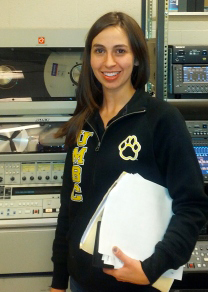
    <p>Natalie Morningstar, a junior majoring in Computer Engineering, has been awarded a <a href="http://www.newcombefoundation.org/scholarship_mws.html" rel="nofollow external" class="bo">Charlotte Newcombe Foundation Scholarship</a>. The Charlotte W. Newcombe Foundation is an independent foundation begun in 1979 by the estate of Mrs. Newcombe, a Philadelphia philanthropist.  Since 1981, the Foundation has provided scholarship funding for mature women students at UMBC.</p>
    <p>This fall, Natalie will participate in the “Returning Women Mentor Program,” which is a peer mentoring initiative that the <a href="http://www.umbc.edu/womenscenter/" rel="nofollow external" class="bo">Women’s Center at UMBC</a> is introducing to better facilitate productive and ongoing connections among the scholars in their programs.</p>
    <p>Natalie is also a CWIT Affiliate and part of the first cohort of <a href="http://www.cwit.umbc.edu/tsite/" rel="nofollow external" class="bo">Transfer Scholars in IT and Engineering</a> (T-SITE). T-SITE is funded by an NSF-funded S-STEM grant and will serve 30 transfer students as part of the larger CWIT Scholar and Affiliates community through 2017.</p>
    <p>When asked how she came to choose computer engineering as a major, Natalie said “Before transferring to UMBC I studied a mix of motion picture film, digital multimedia production and computer science. Both classroom and work experiences helped to expose me to a number of theories and applications, which ultimately lead me to my interest in computer engineering.”</p>
    <p>With such a broad range of interests, she will have many options for what to do after finishing her computer engineering degree. “Right now I have a broad interest”, she reports, “and have not decided which specific field I want to pursue. I really enjoyed my work in signal processing at my summer computer engineering internship at <a href="http://www.vsi-corp.com/" rel="nofollow external" class="bo">Ventura Solutions, Inc.</a> and I hope to gain exposure to other fields as well so I can narrow my focus.”</p>
    <p><em><a href="http://www.csee.umbc.edu/2013/08/natalie-morningstar-cmpe-15-receives-charlotte-newcombe-foundation-scholarship/" rel="nofollow external" class="bo">This post originally appeared on the CSEE news blog.</a></em></p>
    </div>
    <br>   </div>
]]>
</Body>
<Summary>Natalie Morningstar, a junior majoring in Computer Engineering, has been awarded a Charlotte Newcombe Foundation Scholarship. The Charlotte W. Newcombe Foundation is an independent foundation...</Summary>
<Website>http://umbcgiving.wordpress.com/2013/09/17/morningstar-15-recipient-of-newcombe-scholarship/</Website>
<TrackingUrl>https://my3.my.umbc.edu/api/v0/pixel/news/35741/guest@my.umbc.edu/d3b903c7ac5478264ac7b479212abbb7/api/pixel</TrackingUrl>
<Tag>corporations-and-foundations</Tag>
<Tag>engineering-and-information-technology</Tag>
<Tag>newcombe-foundation</Tag>
<Tag>student-scholarships</Tag>
<Tag>umbc</Tag>
<Group token="retired-548">UMBC Giving</Group>
<GroupUrl>https://my3.my.umbc.edu/groups/retired-548</GroupUrl>
<AvatarUrl>https://assets2-my.umbc.edu/images/avatars/group/11/xsmall.png?1784903092</AvatarUrl>
<AvatarUrl size="original">https://assets4-my.umbc.edu/images/avatars/group/11/original.png?1784903092</AvatarUrl>
<AvatarUrl size="xxlarge">https://assets3-my.umbc.edu/images/avatars/group/11/xxlarge.png?1784903092</AvatarUrl>
<AvatarUrl size="xlarge">https://assets2-my.umbc.edu/images/avatars/group/11/xlarge.png?1784903092</AvatarUrl>
<AvatarUrl size="large">https://assets4-my.umbc.edu/images/avatars/group/11/large.png?1784903092</AvatarUrl>
<AvatarUrl size="medium">https://assets1-my.umbc.edu/images/avatars/group/11/medium.png?1784903092</AvatarUrl>
<AvatarUrl size="small">https://assets4-my.umbc.edu/images/avatars/group/11/small.png?1784903092</AvatarUrl>
<AvatarUrl size="xsmall">https://assets2-my.umbc.edu/images/avatars/group/11/xsmall.png?1784903092</AvatarUrl>
<AvatarUrl size="xxsmall">https://assets4-my.umbc.edu/images/avatars/group/11/xxsmall.png?1784903092</AvatarUrl>
<Sponsor>UMBC Giving</Sponsor>
<PawCount>0</PawCount>
<CommentCount>0</CommentCount>
<CommentsAllowed>false</CommentsAllowed>
<PostedAt>Tue, 17 Sep 2013 08:08:32 -0400</PostedAt>
<EditAt>Tue, 17 Sep 2013 08:08:32 -0400</EditAt>
</NewsItem>

<NewsItem contentIssues="false" id="106943" important="false" status="posted" url="https://my3.my.umbc.edu/posts/106943">
<Title>Morningstar &#8217;15 Recipient of Newcombe Scholarship</Title>
<Body>
<![CDATA[
    <div class="html-content">Natalie Morningstar, a junior majoring in Computer Engineering, has been awarded a Charlotte Newcombe Foundation Scholarship. The Charlotte W. Newcombe Foundation …</div>
]]>
</Body>
<Summary>Natalie Morningstar, a junior majoring in Computer Engineering, has been awarded a Charlotte Newcombe Foundation Scholarship. The Charlotte W. Newcombe Foundation …</Summary>
<Website>https://magazine.umbc.edu/morningstar-15-recipient-of-newcombe-scholarship/</Website>
<TrackingUrl>https://my3.my.umbc.edu/api/v0/pixel/news/106943/guest@my.umbc.edu/6b6bd094b78d30ac31e7950a151a4317/api/pixel</TrackingUrl>
<Tag>impact</Tag>
<Tag>newcombe-foundation</Tag>
<Tag>umbc</Tag>
<Group token="retired-1945">UMBC Magazine</Group>
<GroupUrl>https://my3.my.umbc.edu/groups/retired-1945</GroupUrl>
<AvatarUrl>https://assets4-my.umbc.edu/images/avatars/group/8/xsmall.png?1784903092</AvatarUrl>
<AvatarUrl size="original">https://assets2-my.umbc.edu/images/avatars/group/8/original.png?1784903092</AvatarUrl>
<AvatarUrl size="xxlarge">https://assets3-my.umbc.edu/images/avatars/group/8/xxlarge.png?1784903092</AvatarUrl>
<AvatarUrl size="xlarge">https://assets3-my.umbc.edu/images/avatars/group/8/xlarge.png?1784903092</AvatarUrl>
<AvatarUrl size="large">https://assets2-my.umbc.edu/images/avatars/group/8/large.png?1784903092</AvatarUrl>
<AvatarUrl size="medium">https://assets2-my.umbc.edu/images/avatars/group/8/medium.png?1784903092</AvatarUrl>
<AvatarUrl size="small">https://assets3-my.umbc.edu/images/avatars/group/8/small.png?1784903092</AvatarUrl>
<AvatarUrl size="xsmall">https://assets4-my.umbc.edu/images/avatars/group/8/xsmall.png?1784903092</AvatarUrl>
<AvatarUrl size="xxsmall">https://assets3-my.umbc.edu/images/avatars/group/8/xxsmall.png?1784903092</AvatarUrl>
<Sponsor>UMBC Magazine</Sponsor>
<PawCount>0</PawCount>
<CommentCount>0</CommentCount>
<CommentsAllowed>false</CommentsAllowed>
<PostedAt>Tue, 17 Sep 2013 08:08:32 -0400</PostedAt>
</NewsItem>

</News>