<?xml version="1.0"?>
<News hasArchived="true" page="8439" pageCount="10726" pageSize="10" timestamp="Fri, 17 Jul 2026 08:18:06 -0400" url="https://my3.my.umbc.edu/posts.xml?page=8439">
<NewsItem contentIssues="true" id="33788" important="false" status="posted" url="https://my3.my.umbc.edu/posts/33788">
<Title>Amazing plug-in for live bi-directional CSS editing</Title>
<Body>
<![CDATA[
    <div class="html-content">Emmet LiveStyle is a new plug-in available for Safari and Chrome browsers<br><div><table border="0"><tbody><tr><td>
    <a href="http://share.feedsportal.com/share/twitter/?u=http%3A%2F%2Fwww.netmagazine.com%2Fnews%2Famazing-plug-live-bi-directional-css-editing-132943&amp;t=Amazing+plug-in+for+live+bi-directional+CSS+editing" rel="nofollow external" class="bo"><img src="http://res3.feedsportal.com/social/twitter.png" style="max-width: 100%; height: auto;"></a> <a href="http://share.feedsportal.com/share/facebook/?u=http%3A%2F%2Fwww.netmagazine.com%2Fnews%2Famazing-plug-live-bi-directional-css-editing-132943&amp;t=Amazing+plug-in+for+live+bi-directional+CSS+editing" rel="nofollow external" class="bo"><img src="http://res3.feedsportal.com/social/facebook.png" style="max-width: 100%; height: auto;"></a> <a href="http://share.feedsportal.com/share/linkedin/?u=http%3A%2F%2Fwww.netmagazine.com%2Fnews%2Famazing-plug-live-bi-directional-css-editing-132943&amp;t=Amazing+plug-in+for+live+bi-directional+CSS+editing" rel="nofollow external" class="bo"><img src="http://res3.feedsportal.com/social/linkedin.png" style="max-width: 100%; height: auto;"></a> <a href="http://share.feedsportal.com/share/gplus/?u=http%3A%2F%2Fwww.netmagazine.com%2Fnews%2Famazing-plug-live-bi-directional-css-editing-132943&amp;t=Amazing+plug-in+for+live+bi-directional+CSS+editing" rel="nofollow external" class="bo"><img src="http://res3.feedsportal.com/social/googleplus.png" style="max-width: 100%; height: auto;"></a> <a href="http://share.feedsportal.com/share/email/?u=http%3A%2F%2Fwww.netmagazine.com%2Fnews%2Famazing-plug-live-bi-directional-css-editing-132943&amp;t=Amazing+plug-in+for+live+bi-directional+CSS+editing" rel="nofollow external" class="bo"><img src="http://res3.feedsportal.com/social/email.png" style="max-width: 100%; height: auto;"></a>
    </td></tr></tbody></table></div>
    <br><br><a href="http://da.feedsportal.com/r/172487870437/u/49/f/502346/c/32632/s/2facf7a1/a2.htm" rel="nofollow external" class="bo"><img src="http://da.feedsportal.com/r/172487870437/u/49/f/502346/c/32632/s/2facf7a1/a2.img" style="max-width: 100%; height: auto;"></a>
    </div>
]]>
</Body>
<Summary>Emmet LiveStyle is a new plug-in available for Safari and Chrome browsers      </Summary>
<Website>http://feedproxy.google.com/~r/net/topstories/~3/GX5Uv-LBa3U/story01.htm</Website>
<TrackingUrl>https://my3.my.umbc.edu/api/v0/pixel/news/33788/guest@my.umbc.edu/3e7177460a5db75bfb6ac6a1b1a731dc/api/pixel</TrackingUrl>
<Tag>css</Tag>
<Tag>development</Tag>
<Tag>html</Tag>
<Tag>javascript</Tag>
<Tag>mysql</Tag>
<Tag>net</Tag>
<Tag>php</Tag>
<Tag>sql</Tag>
<Tag>web</Tag>
<Group token="retired-583">Web Developer - Build Group</Group>
<GroupUrl>https://my3.my.umbc.edu/groups/retired-583</GroupUrl>
<AvatarUrl>https://assets3-my.umbc.edu/system/shared/avatars/groups/000/000/583/fc60f5d7abc2e080599bb6dc465db54d/xsmall.png?1363101197</AvatarUrl>
<AvatarUrl size="original">https://assets4-my.umbc.edu/system/shared/avatars/groups/000/000/583/fc60f5d7abc2e080599bb6dc465db54d/original.jpg?1363101197</AvatarUrl>
<AvatarUrl size="xxlarge">https://assets4-my.umbc.edu/system/shared/avatars/groups/000/000/583/fc60f5d7abc2e080599bb6dc465db54d/xxlarge.png?1363101197</AvatarUrl>
<AvatarUrl size="xlarge">https://assets4-my.umbc.edu/system/shared/avatars/groups/000/000/583/fc60f5d7abc2e080599bb6dc465db54d/xlarge.png?1363101197</AvatarUrl>
<AvatarUrl size="large">https://assets3-my.umbc.edu/system/shared/avatars/groups/000/000/583/fc60f5d7abc2e080599bb6dc465db54d/large.png?1363101197</AvatarUrl>
<AvatarUrl size="medium">https://assets3-my.umbc.edu/system/shared/avatars/groups/000/000/583/fc60f5d7abc2e080599bb6dc465db54d/medium.png?1363101197</AvatarUrl>
<AvatarUrl size="small">https://assets4-my.umbc.edu/system/shared/avatars/groups/000/000/583/fc60f5d7abc2e080599bb6dc465db54d/small.png?1363101197</AvatarUrl>
<AvatarUrl size="xsmall">https://assets3-my.umbc.edu/system/shared/avatars/groups/000/000/583/fc60f5d7abc2e080599bb6dc465db54d/xsmall.png?1363101197</AvatarUrl>
<AvatarUrl size="xxsmall">https://assets4-my.umbc.edu/system/shared/avatars/groups/000/000/583/fc60f5d7abc2e080599bb6dc465db54d/xxsmall.png?1363101197</AvatarUrl>
<Sponsor>Web Developer - Build Group</Sponsor>
<PawCount>0</PawCount>
<CommentCount>0</CommentCount>
<CommentsAllowed>true</CommentsAllowed>
<PostedAt>Wed, 07 Aug 2013 09:47:36 -0400</PostedAt>
<EditAt>Wed, 07 Aug 2013 09:47:36 -0400</EditAt>
</NewsItem>

<NewsItem contentIssues="false" id="33766" important="false" status="posted" url="https://my3.my.umbc.edu/posts/33766">
<Title>Staff Awards Deadline: September 16</Title>
<Tagline>Help Celebrate Extraordinary UMBC Service</Tagline>
<Body>
<![CDATA[
    <div class="html-content">
    <p>UMBC is fortunate to have so many talented and dedicated Exempt and Non-Exempt staff working in support of our mission. We encourage administrators, faculty, and staff who are familiar with the contributions of our outstanding staff to nominate them for one of these prestigious awards:</p>
    <ul>
    <li><em><strong>UMBC Presidential Distinguished Staff Awards</strong></em></li>
    <li><em><strong>Board of Regents USM Staff Awards</strong></em></li>
    <li><em><strong>Jakubik Family Endowment Staff Award</strong></em></li>
    </ul>
    <p>Descriptions of the three different kinds of awards and the eligibility requirements for each, along with a nomination form, can be found on the <a title="UMBC Staff Awards" href="http://www.umbc.edu/provost/StaffAwards/" rel="nofollow external" class="bo">UMBC Staff Awards website</a>. The Staff Awards Committee (SAC) requires submission of only one nomination letter and completion of a brief nomination form, along with the nominee’s resume or job history form. Nominations should be forwarded to the attention of the SAC, in the Office of the Provost, by Sept. 16, 2013.</p>
    <p>If you have questions about staff awards, please address them to Beth Wells, Assistant Vice Provost for Academic Affairs, at <a title="bwells@umbc.edu" href="mailto:bwells@umbc.edu" rel="nofollow external" class="bo">bwells@umbc.edu</a> or 410-455-8907.</p>
    </div>
]]>
</Body>
<Summary>UMBC is fortunate to have so many talented and dedicated Exempt and Non-Exempt staff working in support of our mission. We encourage administrators, faculty, and staff who are familiar with the...</Summary>
<TrackingUrl>https://my3.my.umbc.edu/api/v0/pixel/news/33766/guest@my.umbc.edu/ccd0107eb58996152a1f689aa110cd51/api/pixel</TrackingUrl>
<Group token="ess">Exempt Staff Senate</Group>
<GroupUrl>https://my3.my.umbc.edu/groups/ess</GroupUrl>
<AvatarUrl>https://assets2-my.umbc.edu/system/shared/avatars/groups/000/000/133/54882d064e3d41653605a1b3fbb3bdb4/xsmall.png?1718385156</AvatarUrl>
<AvatarUrl size="original">https://assets1-my.umbc.edu/system/shared/avatars/groups/000/000/133/54882d064e3d41653605a1b3fbb3bdb4/original.png?1718385156</AvatarUrl>
<AvatarUrl size="xxlarge">https://assets1-my.umbc.edu/system/shared/avatars/groups/000/000/133/54882d064e3d41653605a1b3fbb3bdb4/xxlarge.png?1718385156</AvatarUrl>
<AvatarUrl size="xlarge">https://assets3-my.umbc.edu/system/shared/avatars/groups/000/000/133/54882d064e3d41653605a1b3fbb3bdb4/xlarge.png?1718385156</AvatarUrl>
<AvatarUrl size="large">https://assets4-my.umbc.edu/system/shared/avatars/groups/000/000/133/54882d064e3d41653605a1b3fbb3bdb4/large.png?1718385156</AvatarUrl>
<AvatarUrl size="medium">https://assets4-my.umbc.edu/system/shared/avatars/groups/000/000/133/54882d064e3d41653605a1b3fbb3bdb4/medium.png?1718385156</AvatarUrl>
<AvatarUrl size="small">https://assets4-my.umbc.edu/system/shared/avatars/groups/000/000/133/54882d064e3d41653605a1b3fbb3bdb4/small.png?1718385156</AvatarUrl>
<AvatarUrl size="xsmall">https://assets2-my.umbc.edu/system/shared/avatars/groups/000/000/133/54882d064e3d41653605a1b3fbb3bdb4/xsmall.png?1718385156</AvatarUrl>
<AvatarUrl size="xxsmall">https://assets4-my.umbc.edu/system/shared/avatars/groups/000/000/133/54882d064e3d41653605a1b3fbb3bdb4/xxsmall.png?1718385156</AvatarUrl>
<Sponsor>Professional Staff Senate</Sponsor>
<PawCount>0</PawCount>
<CommentCount>0</CommentCount>
<CommentsAllowed>true</CommentsAllowed>
<PostedAt>Wed, 07 Aug 2013 09:43:13 -0400</PostedAt>
</NewsItem>

<NewsItem contentIssues="true" id="33771" important="false" status="posted" url="https://my3.my.umbc.edu/posts/33771">
<Title>Helpful Tools and Resources for Managing a New Internet Business</Title>
<Body>
<![CDATA[
    <div class="html-content">
    <p>Whether you are working alone or with a team of people, launching a new business will take lots of time and effort. Internet-based companies are somewhat easier because there are no requirements to handle physical products. Granted, physical products come into play if you are managing an e-commerce store. However creating digital products on the Internet provides a more lucrative method of launching and scaling quickly.</p>
    <p>But what type of tools would be useful when just getting started? I have put together a collection of webapps and resources that you can use for any new project launch. There are often so many details to remember and it is easy to get lost in the myriad of choices. But you should make the time for testing these different tools and see which ones provide the most benefit to your workday.</p>
    <h2>Task Management</h2>
    <p>The biggest problem I always run into is keeping everything organized. What needs to be done and what order should these to-dos be completed? The best way to keep yourself organized is by using a task management system. But there are countless solutions out there, so it’s tough deciding which is best. It all comes down to what you are personally looking for and how much functionality is required for yourself or a team.</p>
    <p><a href="http://asana.com/" rel="nofollow external" class="bo"><img src="http://blog.teamtreehouse.com/wp-content/uploads/2013/08/asana-webapp-tools-tasks.png" alt="asana task management screenshot demo preview" style="max-width: 100%; height: auto;"></a></p>
    <p>The task management tool <a href="http://asana.com/" rel="nofollow external" class="bo">Asana</a> works great for any type of company. Even if you are working alone by yourself, their interface is really simple for managing project tasks. Plus you can invite people into specific tasks as needed. I think it is a great place to start with a free account and see how you like the features.</p>
    <p><a href="http://teambox.com/" rel="nofollow external" class="bo"><img src="http://blog.teamtreehouse.com/wp-content/uploads/2013/08/teambox-website-webapp-tasks.png" alt="teambox tasks management screenshot demo" style="max-width: 100%; height: auto;"></a></p>
    <p>Another free solution <a href="http://teambox.com/" rel="nofollow external" class="bo">Teambox</a> also puts a lot on the table. I am enticed by their backend interface features which allow for multiple project workspaces. This means you can organize tasks between different online products or even completely different companies. Also Teambox has a conversation feature where you can message other members on your team. It is definitely worth some consideration if you are looking for a free tool that’s also easy to learn.</p>
    <p><a href="https://trello.com/" rel="nofollow external" class="bo"><img src="http://blog.teamtreehouse.com/wp-content/uploads/2013/08/trello-task-management-dashboard.png" alt="trello task management dashboard screenshot" style="max-width: 100%; height: auto;"></a></p>
    <p>To mention just one more resource <a href="https://trello.com/" rel="nofollow external" class="bo">Trello</a> is a great webapp that comes attached with a free price tag. You can signup and invite team members to your projects forever on this free account. It does not offer as many features as you will find in other project management tools. The interface is a bit simpler and much more focused on tasks/projects rather than team collaboration. But if you like the interface then it is a wonderful solution for any new business.</p>
    <h2>Cloud Storage</h2>
    <p>Online cloud hosting platforms are often much more agile for sharing files between computers. It’s a different story when you consider web hosting and CDNs. But consider sharing a .zip of your latest website HTML with two co-workers located at different places around the world. It would be easiest to upload the zip archive onto a hosting client and then share your link with both people.</p>
    <p><a href="http://dropbox.com/" rel="nofollow external" class="bo"><img src="http://blog.teamtreehouse.com/wp-content/uploads/2013/08/dropbox-cloud-logo.png" alt="dropbox preview file hosting cloud storage" style="max-width: 100%; height: auto;"></a></p>
    <p><a href="http://dropbox.com/" rel="nofollow external" class="bo">Dropbox</a> is a powerful solution for keeping your files organized and sharing entire folders with other people. It also offers a free plan which does limit the amount of files you can host. But this storage space limitation can be upgraded by inviting new people onto the service. I really like their web interface because you can drag-and-drop files to upload into your account. Also you can download entire folders of content as .zip containers right from the website! It has a great system for collaborating with other teammates and I highly recommend that everyone should have a Dropbox account.</p>
    <p><a href="https://drive.google.com/" rel="nofollow external" class="bo"><img src="http://blog.teamtreehouse.com/wp-content/uploads/2013/08/google-docs-drive.png" alt="google drive documents hosting cloud storage" style="max-width: 100%; height: auto;"></a></p>
    <p>People often forget about Google Drive, which comes out-of-the-box offering 15GB of free storage space with every Google account. Drive is generally meant for handling online documents including spreadsheets and presentations. But you can also upload other types of media for sharing with your team members. For a free service run by Google it does provide a nice allotment of features. But just the document viewing &amp; sharing functionality puts Drive well above many other competitors. <a href="https://www.box.com/" rel="nofollow external" class="bo">Box.net</a> is another similar webapp you might consider.</p>
    <h2>Social Media Accounts</h2>
    <p>If you have a great product then you will likely want to create an online presence. Consider registering a new account on networks like Twitter, Pinterest, Facebook, and and others. It will boost your website’s visibility and help people find you quicker. But what kinds of tools are useful for managing all of these profiles?</p>
    <p><a href="http://www.grabinbox.com/" rel="nofollow external" class="bo"><img src="http://blog.teamtreehouse.com/wp-content/uploads/2013/08/grabinbox-social-media-homepage.png" alt="grabinbox social media marketing webapp tools" style="max-width: 100%; height: auto;"></a></p>
    <p>This newer product <a href="http://www.grabinbox.com/" rel="nofollow external" class="bo">GrabInbox</a> has not been online for too long. It is a service which allows you to manage a set network of accounts from Twitter, Facebook, and LinkedIn. You can schedule messages to post at certain times while also checking user responses. Signup is free but for now it’s difficult to tell how the company will progress. If you like demoing these tools as an early adopter then I say go for it!</p>
    <p><a href="https://hootsuite.com/" rel="nofollow external" class="bo"><img src="http://blog.teamtreehouse.com/wp-content/uploads/2013/08/hootsuite-social-media-management.png" alt="hootsuite internet marketing accounts management" style="max-width: 100%; height: auto;"></a></p>
    <p>Now <a href="https://hootsuite.com/" rel="nofollow external" class="bo">HootSuite</a> is a much more professional solution which has been tried &amp; tested by many other companies. Their free service is phenomenal when you don’t have money to pay for a pro or enterprise account. You can easily manage social profiles from Twitter, Facebook, Google+, and other common networks. I would recommend trying HootSuite and sticking to them if you like the service. It is simple to use and you’ll never be forced to upgrade from a free account.</p>
    <h2>UI/UX Testing</h2>
    <p>Throughout the early phase of launching your product there will always tweaks worth making to the user interface. Nothing is perfect during its first inception, but how do you know exactly what needs to be retouched? There are plenty of tools online for testing various analytics and UX ideas. I want to share just a couple that may prove useful to a majority of Internet projects.</p>
    <p><a href="http://www.browserstack.com/" rel="nofollow external" class="bo"><img src="http://blog.teamtreehouse.com/wp-content/uploads/2013/08/browserstack-rendering-testing-webapp.png" alt="browserstack browsers testing javascript html5 css3" style="max-width: 100%; height: auto;"></a></p>
    <p><a href="http://www.browserstack.com/" rel="nofollow external" class="bo">BrowserStack</a> is not a free service but it does provide great support for browser testing. You can quickly generate screenshots from any web browser over the various Operating Systems. It will save time when squashing bugs if your site isn’t rendering properly for a certain browser version. Plus you can run tests on more complicated features like JavaScript or responsive CSS within legacy browsers.</p>
    <p><a href="http://visualwebsiteoptimizer.com/" rel="nofollow external" class="bo"><img src="http://blog.teamtreehouse.com/wp-content/uploads/2013/08/visual-website-optimizer-homepage.png" alt="vwo visual websites optimizer a/b split testing" style="max-width: 100%; height: auto;"></a></p>
    <p>One tool I can really get excited about is <a href="http://visualwebsiteoptimizer.com/" rel="nofollow external" class="bo">Visual Website Optimizer</a>. This allows you to run A/B split testing on your website and track user analytics to learn from the results. I have been very impressed with the many <a href="http://visualwebsiteoptimizer.com/case-studies.php" rel="nofollow external" class="bo">case studies</a> involving big-named corporations. When first getting started you may not have a need for A/B testing – or even understand why it’s helpful. But optimizing the user experience is crucial for obtaining the best results and delivering the best product out to your visitors.</p>
    <h2>Support &amp; User Feedback</h2>
    <p>If you are working with customers then it is best to have some type of support management application. Even if you are building a startup or webapp for people to use freely, it helps to garner feedback. Your audience knows what they like and what they don’t like. So with enough testing and great feedback you can fine-tune any project to be working as efficiently as possible.</p>
    <p><a href="https://www.intercom.io/" rel="nofollow external" class="bo"><img src="http://blog.teamtreehouse.com/wp-content/uploads/2013/08/intercom-io-webapp-dashboard.png" alt="intercom.io tickets helpdesk support saas screenshot" style="max-width: 100%; height: auto;"></a></p>
    <p><a href="https://www.intercom.io/" rel="nofollow external" class="bo">Intercom</a> is an online service for handling user support problems. This includes a typical web-based helpdesk along with customer relationship management tools. Intercom is a beautiful system for overseeing a project with clients or customers. Even a free social networking site may find Intercom useful for managing support questions. Their free plan is a great way to play around with the features and determine if Intercom can really benefit your project.</p>
    <p><a href="https://www.uservoice.com/" rel="nofollow external" class="bo"><img src="http://blog.teamtreehouse.com/wp-content/uploads/2013/08/uservoice-feedback-screenshot-demo.png" alt="uservoice support feedback user testing saas" style="max-width: 100%; height: auto;"></a></p>
    <p>The web application <a href="https://www.uservoice.com/" rel="nofollow external" class="bo">UserVoice</a> is perfect for handling more direct feedback. You can setup a tiny widget on your site where visitors may directly send messages to your account. It also works as a support system with organized backend tickets. This is a great all-around solution for handling feedback and support problems within a project. Their plans can range up to $100/month but you may also keep the free plan indefinitely for one account.</p>
    <p><a href="http://trackduck.com/" rel="nofollow external" class="bo"><img src="http://blog.teamtreehouse.com/wp-content/uploads/2013/08/trackduck-demo-screenshot-preview.png" alt="trackduck user feedback screenshot webapp saas" style="max-width: 100%; height: auto;"></a></p>
    <p>Lastly the startup <a href="http://trackduck.com/" rel="nofollow external" class="bo">TrackDuck</a> is not known all too well, but it is a very powerful tool. You can setup a tiny box in the corner of your site where visitors can send feedback about the interface, potential bugs, and really anything they want. It can integrate with other applications like Basecamp for easily tracking user feedback. Plus there is even a free edition which provides all the basic services for one account! I would definitely recommend TrackDuck if you are just getting started with user feedback tools and want to test the waters.</p>
    <h2>Final Thoughts</h2>
    <p>There may be other categories of webapps and tools that can really help entrepreneurs manage their projects. I put together this collection of specific tools which really helped me, and I hope some of these tools will help others as well. But if you know about similar resources that I may have skipped please share with us in the comments discussion area.</p>
    <p>The post <a href="http://blog.teamtreehouse.com/helpful-tools-and-resources-for-managing-a-new-internet-business" rel="nofollow external" class="bo">Helpful Tools and Resources for Managing a New Internet Business</a> appeared first on <a href="http://blog.teamtreehouse.com" rel="nofollow external" class="bo">Treehouse Blog</a>.</p>
    </div>
]]>
</Body>
<Summary>Whether you are working alone or with a team of people, launching a new business will take lots of time and effort. Internet-based companies are somewhat easier because there are no requirements...</Summary>
<Website>http://feedproxy.google.com/~r/teamtreehouse/~3/VeKE-8bXbWs/helpful-tools-and-resources-for-managing-a-new-internet-business</Website>
<TrackingUrl>https://my3.my.umbc.edu/api/v0/pixel/news/33771/guest@my.umbc.edu/d1944b4e29ea26d047a1d69ab9891584/api/pixel</TrackingUrl>
<Tag>android</Tag>
<Tag>css</Tag>
<Tag>design</Tag>
<Tag>development</Tag>
<Tag>html</Tag>
<Tag>ios</Tag>
<Tag>javascript</Tag>
<Tag>responsive</Tag>
<Tag>start-a-business</Tag>
<Tag>web</Tag>
<Group token="retired-583">Web Developer - Build Group</Group>
<GroupUrl>https://my3.my.umbc.edu/groups/retired-583</GroupUrl>
<AvatarUrl>https://assets3-my.umbc.edu/system/shared/avatars/groups/000/000/583/fc60f5d7abc2e080599bb6dc465db54d/xsmall.png?1363101197</AvatarUrl>
<AvatarUrl size="original">https://assets4-my.umbc.edu/system/shared/avatars/groups/000/000/583/fc60f5d7abc2e080599bb6dc465db54d/original.jpg?1363101197</AvatarUrl>
<AvatarUrl size="xxlarge">https://assets4-my.umbc.edu/system/shared/avatars/groups/000/000/583/fc60f5d7abc2e080599bb6dc465db54d/xxlarge.png?1363101197</AvatarUrl>
<AvatarUrl size="xlarge">https://assets4-my.umbc.edu/system/shared/avatars/groups/000/000/583/fc60f5d7abc2e080599bb6dc465db54d/xlarge.png?1363101197</AvatarUrl>
<AvatarUrl size="large">https://assets3-my.umbc.edu/system/shared/avatars/groups/000/000/583/fc60f5d7abc2e080599bb6dc465db54d/large.png?1363101197</AvatarUrl>
<AvatarUrl size="medium">https://assets3-my.umbc.edu/system/shared/avatars/groups/000/000/583/fc60f5d7abc2e080599bb6dc465db54d/medium.png?1363101197</AvatarUrl>
<AvatarUrl size="small">https://assets4-my.umbc.edu/system/shared/avatars/groups/000/000/583/fc60f5d7abc2e080599bb6dc465db54d/small.png?1363101197</AvatarUrl>
<AvatarUrl size="xsmall">https://assets3-my.umbc.edu/system/shared/avatars/groups/000/000/583/fc60f5d7abc2e080599bb6dc465db54d/xsmall.png?1363101197</AvatarUrl>
<AvatarUrl size="xxsmall">https://assets4-my.umbc.edu/system/shared/avatars/groups/000/000/583/fc60f5d7abc2e080599bb6dc465db54d/xxsmall.png?1363101197</AvatarUrl>
<Sponsor>Web Developer - Build Group</Sponsor>
<PawCount>0</PawCount>
<CommentCount>0</CommentCount>
<CommentsAllowed>true</CommentsAllowed>
<PostedAt>Wed, 07 Aug 2013 09:43:04 -0400</PostedAt>
</NewsItem>

<NewsItem contentIssues="false" id="33765" important="false" status="posted" url="https://my3.my.umbc.edu/posts/33765">
<Title>Updated 2013-2014 Senate Roster Posted</Title>
<Tagline>Check the "Documents" tab to see the roster</Tagline>
<Body>
<![CDATA[
    <div class="html-content">The Senate Roster has been updated to reflect the results of the Executive Board elections held last month.  Go to the Documents tab and then click on the Folder for 2013-2014 for more information! </div>
]]>
</Body>
<Summary>The Senate Roster has been updated to reflect the results of the Executive Board elections held last month.  Go to the Documents tab and then click on the Folder for 2013-2014 for more information! </Summary>
<TrackingUrl>https://my3.my.umbc.edu/api/v0/pixel/news/33765/guest@my.umbc.edu/a15a16ed656cd90b7f80a31a9c83dd0c/api/pixel</TrackingUrl>
<Group token="ess">Exempt Staff Senate</Group>
<GroupUrl>https://my3.my.umbc.edu/groups/ess</GroupUrl>
<AvatarUrl>https://assets2-my.umbc.edu/system/shared/avatars/groups/000/000/133/54882d064e3d41653605a1b3fbb3bdb4/xsmall.png?1718385156</AvatarUrl>
<AvatarUrl size="original">https://assets1-my.umbc.edu/system/shared/avatars/groups/000/000/133/54882d064e3d41653605a1b3fbb3bdb4/original.png?1718385156</AvatarUrl>
<AvatarUrl size="xxlarge">https://assets1-my.umbc.edu/system/shared/avatars/groups/000/000/133/54882d064e3d41653605a1b3fbb3bdb4/xxlarge.png?1718385156</AvatarUrl>
<AvatarUrl size="xlarge">https://assets3-my.umbc.edu/system/shared/avatars/groups/000/000/133/54882d064e3d41653605a1b3fbb3bdb4/xlarge.png?1718385156</AvatarUrl>
<AvatarUrl size="large">https://assets4-my.umbc.edu/system/shared/avatars/groups/000/000/133/54882d064e3d41653605a1b3fbb3bdb4/large.png?1718385156</AvatarUrl>
<AvatarUrl size="medium">https://assets4-my.umbc.edu/system/shared/avatars/groups/000/000/133/54882d064e3d41653605a1b3fbb3bdb4/medium.png?1718385156</AvatarUrl>
<AvatarUrl size="small">https://assets4-my.umbc.edu/system/shared/avatars/groups/000/000/133/54882d064e3d41653605a1b3fbb3bdb4/small.png?1718385156</AvatarUrl>
<AvatarUrl size="xsmall">https://assets2-my.umbc.edu/system/shared/avatars/groups/000/000/133/54882d064e3d41653605a1b3fbb3bdb4/xsmall.png?1718385156</AvatarUrl>
<AvatarUrl size="xxsmall">https://assets4-my.umbc.edu/system/shared/avatars/groups/000/000/133/54882d064e3d41653605a1b3fbb3bdb4/xxsmall.png?1718385156</AvatarUrl>
<Sponsor>Professional Staff Senate</Sponsor>
<PawCount>0</PawCount>
<CommentCount>0</CommentCount>
<CommentsAllowed>true</CommentsAllowed>
<PostedAt>Wed, 07 Aug 2013 09:40:49 -0400</PostedAt>
</NewsItem>

<NewsItem contentIssues="true" id="33767" important="false" status="posted" url="https://my3.my.umbc.edu/posts/33767">
<Title>Autoprefixer: A Postprocessor for Dealing with Vendor Prefixes in the Best Possible Way</Title>
<Body>
<![CDATA[
    <div class="html-content">
    <p><em>The following is a guest post by <a href="https://github.com/ai" rel="nofollow external" class="bo">Andrey Sitnik</a>, the creator of the <a href="https://github.com/ai/autoprefixer" rel="nofollow external" class="bo">Autoprefixer</a> tool, a "postprocessor" for handling vendor prefixes in CSS. Why use this instead of your preprocessor or another tool? Many reasons. Andrey will explain.</em></p>
    <p></p>
    <p><a href="https://github.com/ai/autoprefixer" rel="nofollow external" class="bo">Autoprefixer</a> parses CSS files and adds vendor prefixes to CSS rules using the <a href="http://caniuse.com/" rel="nofollow external" class="bo">Can I Use</a> database to determine which prefixes are needed.</p>
    <p>All you have to do is add it to your asset building tool (<a href="http://gruntjs.com/" rel="nofollow external" class="bo">Grunt</a>, for instance) and you can totally forget about CSS vendor prefixes. Just write regular CSS according to the latest W3C specifications without any prefixes. Like this:</p>
    <pre><code>a {&#x000A;      transition: transform 1s&#x000A;    }</code></pre>
    <p>Autoprefixer uses a database with current browser popularity and properties support to apply prefixes for you:</p>
    <pre><code>a {&#x000A;      -webkit-transition: -webkit-transform 1s;&#x000A;      transition: -ms-transform 1s;&#x000A;      transition: transform 1s&#x000A;    }</code></pre>
    
      <img src="http://cdn.css-tricks.com/wp-content/uploads/2013/08/autoprefixer-logo.png" style="max-width: 100%; height: auto;">
    Autoprefixer logo by <a href="http://antiflash.ru/" rel="nofollow external" class="bo">Anton Lovchikov</a>
    
    <h3>The Problem</h3>
    <p>We can, of course, write vendor CSS prefixes by hand, but it can be tedious and error-prone.</p>
    <p>We can use services like <a href="http://prefixr.com/" rel="nofollow external" class="bo">Prefixr</a> and text editor plugins, but it is still exhausting to work with big blocks of repeating code.</p>
    <p>We can use mixin libraries with preproccesors like <a href="http://compass-style.org/" rel="nofollow external" class="bo">Compass</a> for Sass or <a href="http://visionmedia.github.io/nib/" rel="nofollow external" class="bo">nib</a> for Stylus. They solve a lot of problems, but create other problems instead. They force us to use a new syntax. They iterate much slower than modern browsers do, so a stable release can have a lot of unnecessary prefixes, and sometimes we need to create our own mixins.</p>
    <p>And Compass does not really hide prefixes from you since you still need to decide on a lot of questions, for example: Do I need to write a mixin for <code>border-radius</code>? Do I need to split arguments for <code>+transition</code> by comma?</p>
    <p>Lea Verou’s <a href="http://leaverou.github.io/prefixfree/" rel="nofollow external" class="bo">-prefix-free</a> came closest to solving this problem, but using client side libraries is not such a good idea when you take end-user perfomance into account. To avoid doing the same job again and again, it is better to build CSS once: during asset building or project deployment.</p>
    <h3>Under the Hood</h3>
    <p>Instead of being a preprocessor – such as Sass and Stylus – Autoprefixer is a postprocessor. It doesn’t use any specific syntax and works with common CSS. Autoprefixer can be easily integrated with Sass and Stylus, since it runs after CSS is already compiled.</p>
    <p>Autoprefixer is based on <a href="https://github.com/visionmedia/rework" rel="nofollow external" class="bo">Rework</a>, a framework for writing your own CSS postproccesors. Rework parses CSS to useful JavaScript structure and exports it back to CSS after your manipulations.</p>
    <p>Each version of Autoprefixer contains a copy of latest Can I Use data:</p>
    <ul>
    <li>List of current browsers and their popularity.</li>
    <li>List of prefixes required for new CSS properties, values and selectors.</li>
    </ul>
    <p>By default, Autoprefixer will support 2 latest versions of major browsers, much like <a href="http://support.google.com/a/bin/answer.py?answer=33864" rel="nofollow external" class="bo">Google does</a>. But you can choose, what browsers are supported in your project, by name (like <strong>"ff 21"</strong>) or by pattern:</p>
    <ul>
    <li>Last 2 version of each major browsers using <strong>"last 2 versions"</strong>.</li>
    <li>With more that 1 % of global usage statistics using <strong>"&gt; 1%"</strong>.</li>
    <li>Only newer versions by <strong>"ff &gt; 20"</strong> or <strong>"ff &gt;= 20"</strong>.</li>
    </ul>
    <p>Then Autoprefixer calculates which prefixes are required and which are outdated.</p>
    <p>When Autoprefixer adds prefixes to your CSS, it doesn’t forget about fixing syntax differences. This way, CSS is produced according to the latest W3C specs:</p>
    <pre><code>a {&#x000A;      background: linear-gradient(to top, black, white);&#x000A;      display: flex&#x000A;    }&#x000A;    ::placeholder {&#x000A;      color: #ccc&#x000A;    }</code></pre>
    <p>compiles to:</p>
    <pre><code>a {&#x000A;      background: -webkit-linear-gradient(bottom, black, white);&#x000A;      background: linear-gradient(to top, black, white);&#x000A;      display: -webkit-box;&#x000A;      display: -webkit-flex;&#x000A;      display: -moz-box;&#x000A;      display: -ms-flexbox;&#x000A;      display: flex&#x000A;    }&#x000A;    :-ms-input-placeholder {&#x000A;      color: #ccc&#x000A;    }&#x000A;    ::-moz-placeholder {&#x000A;      color: #ccc&#x000A;    }&#x000A;    ::-webkit-input-placeholder {&#x000A;      color: #ccc&#x000A;    }&#x000A;    ::placeholder {&#x000A;      color: #ccc&#x000A;    }</code></pre>
    <p>Autoprefixer cleans outdated prefixes as well (from legacy code or CSS libraries like Bootstrap), so the following code:</p>
    <pre><code>a {&#x000A;      -webkit-border-radius: 5px;&#x000A;      border-radius: 5px&#x000A;    }</code></pre>
    <p>compiles to:</p>
    <pre><code>a {&#x000A;      border-radius: 5px&#x000A;    }</code></pre>
    <p>So after Autoprefixer, CSS will contain only actual vendor prefixes. After <a href="http://fotorama.io/" rel="nofollow external" class="bo">Fotorama</a> switched from Compass to Autoprefixer, the CSS file size <a href="https://twitter.com/fotoramajs/status/362686759944982528" rel="nofollow external" class="bo">decreased</a> by almost 20%.</p>
    <h3>Demo</h3>
    <p>If you still don’t use any kind of tool to automate the building of your assets, be sure to check out <a href="http://gruntjs.com/" rel="nofollow external" class="bo">Grunt</a>. I highly recommend to start using build tools. This can open you a whole new world of “sugar” syntaxes, time-saving mixin libraries and useful image processing tools. All of developers’ productivity methods to save a lot of nerves and time (the freedom to choose languages, code re-use, the ability to use third-party libraries) are available now for front-end programmers.</p>
    <p>Let’s create a project directory and write simple CSS in <code>style.css</code>:</p>
    <pre><code>a { }</code></pre>
    <p>For this example, we will use Grunt. First, we will need to install <code>grunt-autoprefixer</code> using npm:</p>
    <pre><code>npm install grunt-cli grunt-contrib-watch grunt-autoprefixer</code></pre>
    <p>Then we should create <code>Gruntfile.js</code> and enable Autoprefixer:</p>
    <pre><code>module.exports = function (grunt) {&#x000A;        grunt.initConfig({&#x000A;            autoprefixer: {&#x000A;                dist: {&#x000A;                    files: {&#x000A;                        'build/style.css': 'style.css'&#x000A;                    }&#x000A;                }&#x000A;            },&#x000A;            watch: {&#x000A;                styles: {&#x000A;                    files: ['style.css'],&#x000A;                    tasks: ['autoprefixer']&#x000A;                }&#x000A;            }&#x000A;        });&#x000A;        grunt.loadNpmTasks('grunt-autoprefixer');&#x000A;        grunt.loadNpmTasks('grunt-contrib-watch');&#x000A;    };</code></pre>
    <p>This config enables the compilation of <code>style.css</code> to <code>build/style.css</code> using Autoprefixer. Also we will use <code>grunt-contrib-watch</code> to recompile <code>build/style.css</code> every time style.css changes.</p>
    <p>Let’s start Grunt’s Watch:</p>
    <pre><code>./node_modules/.bin/grunt watch</code></pre>
    <p>Now, we’ll add a CSS3 expression to <code>style.css</code> and save the file:</p>
    <pre><code>a {&#x000A;      width: calc(50% - 2em)&#x000A;    }</code></pre>
    <p>The magic has just happened and now we have a <code>build/style.css</code> file. Grunt detected the change in <code>style.css</code> and launched the Autoprefixer task. Autoprefixer did find the <code>calc()</code> value unit, that <a href="http://caniuse.com/calc" rel="nofollow external" class="bo">needs a vendor</a> prefix for Safari 6.</p>
    <pre><code>a {&#x000A;      width: -webkit-calc(50% - 2em);&#x000A;      width: calc(50% - 2em)&#x000A;    }</code></pre>
    <p>Now we’ll add a little bit more complicated CSS3 to <code>style.css</code> and save the file:</p>
    <pre><code>a {&#x000A;      width: calc(50% - 2em);&#x000A;      transition: transform 1s&#x000A;    }</code></pre>
    <p>Autoprefixer already knows that Chrome, Safari 6 and Opera 15 <a href="http://caniuse.com/css-transitions" rel="nofollow external" class="bo">need</a> prefixes for <code>transition</code> and <code>transform</code>. But IE 9 also needs a prefix for <code>transform</code>, which we used as value in <code>transition</code>.</p>
    <pre><code>a {&#x000A;      width: -webkit-calc(1% + 1em);&#x000A;      width: calc(1% + 1em);&#x000A;      -webkit-transition: -webkit-transform 1s;&#x000A;      transition: -ms-transform 1s;&#x000A;      transition: transform 1s&#x000A;     }</code></pre>
    <p>Autoprefixer is designed to perform all the dirty work for you. It will check the Can I Use database, write all the prefixes needed and it does understand the difference between specifications as well. Welcome to the future of CSS3 — no more vendor prefixes!</p>
    <h3>What Next?</h3>
    <ol>
    <li>Autoprefixer supports Ruby on Rails, <a href="http://middlemanapp.com/" rel="nofollow external" class="bo">Middleman</a>, <a href="https://github.com/nodeca/mincer" rel="nofollow external" class="bo">Mincer</a>, Grunt, Sublime Text. Learn more about how to use it with your environment in the <a href="https://github.com/ai/autoprefixer#usage" rel="nofollow external" class="bo">documentation</a>.</li>
    <li>If your environment doesn’t support Autoprefixer yet, please, <a href="https://github.com/ai/autoprefixer/issues/new" rel="nofollow external" class="bo">report it</a> and I’ll try to help.</li>
    <li>Follow <a href="https://twitter.com/autoprefixer" rel="nofollow external" class="bo">@autoprefixer</a> for info on updates and new features.</li>
    </ol>
    <hr>
    
    <p><small><a href="http://css-tricks.com/autoprefixer/" rel="nofollow external" class="bo">Autoprefixer: A Postprocessor for Dealing with Vendor Prefixes in the Best Possible Way</a> is a post from <a href="http://css-tricks.com" rel="nofollow external" class="bo">CSS-Tricks</a></small></p>
    </div>
]]>
</Body>
<Summary>The following is a guest post by Andrey Sitnik, the creator of the Autoprefixer tool, a "postprocessor" for handling vendor prefixes in CSS. Why use this instead of your preprocessor or another...</Summary>
<Website>http://css-tricks.com/autoprefixer/</Website>
<TrackingUrl>https://my3.my.umbc.edu/api/v0/pixel/news/33767/guest@my.umbc.edu/309c1af50ab850e1f0d390dacac1b39a/api/pixel</TrackingUrl>
<Tag>article</Tag>
<Tag>css</Tag>
<Tag>html</Tag>
<Tag>javascript</Tag>
<Tag>mysql</Tag>
<Tag>php</Tag>
<Tag>sql</Tag>
<Tag>tricks</Tag>
<Group token="retired-583">Web Developer - Build Group</Group>
<GroupUrl>https://my3.my.umbc.edu/groups/retired-583</GroupUrl>
<AvatarUrl>https://assets3-my.umbc.edu/system/shared/avatars/groups/000/000/583/fc60f5d7abc2e080599bb6dc465db54d/xsmall.png?1363101197</AvatarUrl>
<AvatarUrl size="original">https://assets4-my.umbc.edu/system/shared/avatars/groups/000/000/583/fc60f5d7abc2e080599bb6dc465db54d/original.jpg?1363101197</AvatarUrl>
<AvatarUrl size="xxlarge">https://assets4-my.umbc.edu/system/shared/avatars/groups/000/000/583/fc60f5d7abc2e080599bb6dc465db54d/xxlarge.png?1363101197</AvatarUrl>
<AvatarUrl size="xlarge">https://assets4-my.umbc.edu/system/shared/avatars/groups/000/000/583/fc60f5d7abc2e080599bb6dc465db54d/xlarge.png?1363101197</AvatarUrl>
<AvatarUrl size="large">https://assets3-my.umbc.edu/system/shared/avatars/groups/000/000/583/fc60f5d7abc2e080599bb6dc465db54d/large.png?1363101197</AvatarUrl>
<AvatarUrl size="medium">https://assets3-my.umbc.edu/system/shared/avatars/groups/000/000/583/fc60f5d7abc2e080599bb6dc465db54d/medium.png?1363101197</AvatarUrl>
<AvatarUrl size="small">https://assets4-my.umbc.edu/system/shared/avatars/groups/000/000/583/fc60f5d7abc2e080599bb6dc465db54d/small.png?1363101197</AvatarUrl>
<AvatarUrl size="xsmall">https://assets3-my.umbc.edu/system/shared/avatars/groups/000/000/583/fc60f5d7abc2e080599bb6dc465db54d/xsmall.png?1363101197</AvatarUrl>
<AvatarUrl size="xxsmall">https://assets4-my.umbc.edu/system/shared/avatars/groups/000/000/583/fc60f5d7abc2e080599bb6dc465db54d/xxsmall.png?1363101197</AvatarUrl>
<Sponsor>Web Developer - Build Group</Sponsor>
<PawCount>0</PawCount>
<CommentCount>0</CommentCount>
<CommentsAllowed>true</CommentsAllowed>
<PostedAt>Wed, 07 Aug 2013 09:24:03 -0400</PostedAt>
<EditAt>Wed, 07 Aug 2013 09:24:03 -0400</EditAt>
</NewsItem>

<NewsItem contentIssues="true" id="33779" important="false" status="posted" url="https://my3.my.umbc.edu/posts/33779">
<Title>Five killer ways to use minimalism</Title>
<Body>
<![CDATA[
    <div class="html-content">Most designers love simplicity. But as Gene Crawford explains, minimalist design isn’t simply a matter of taking things away<br><div><table border="0"><tbody><tr><td>
    <a href="http://share.feedsportal.com/share/twitter/?u=http%3A%2F%2Fwww.netmagazine.com%2Ffeatures%2Ffive-killer-ways-use-minimalism&amp;t=Five+killer+ways+to+use+minimalism" rel="nofollow external" class="bo"><img src="http://res3.feedsportal.com/social/twitter.png" style="max-width: 100%; height: auto;"></a> <a href="http://share.feedsportal.com/share/facebook/?u=http%3A%2F%2Fwww.netmagazine.com%2Ffeatures%2Ffive-killer-ways-use-minimalism&amp;t=Five+killer+ways+to+use+minimalism" rel="nofollow external" class="bo"><img src="http://res3.feedsportal.com/social/facebook.png" style="max-width: 100%; height: auto;"></a> <a href="http://share.feedsportal.com/share/linkedin/?u=http%3A%2F%2Fwww.netmagazine.com%2Ffeatures%2Ffive-killer-ways-use-minimalism&amp;t=Five+killer+ways+to+use+minimalism" rel="nofollow external" class="bo"><img src="http://res3.feedsportal.com/social/linkedin.png" style="max-width: 100%; height: auto;"></a> <a href="http://share.feedsportal.com/share/gplus/?u=http%3A%2F%2Fwww.netmagazine.com%2Ffeatures%2Ffive-killer-ways-use-minimalism&amp;t=Five+killer+ways+to+use+minimalism" rel="nofollow external" class="bo"><img src="http://res3.feedsportal.com/social/googleplus.png" style="max-width: 100%; height: auto;"></a> <a href="http://share.feedsportal.com/share/email/?u=http%3A%2F%2Fwww.netmagazine.com%2Ffeatures%2Ffive-killer-ways-use-minimalism&amp;t=Five+killer+ways+to+use+minimalism" rel="nofollow external" class="bo"><img src="http://res3.feedsportal.com/social/email.png" style="max-width: 100%; height: auto;"></a>
    </td></tr></tbody></table></div>
    <br><br><a href="http://da.feedsportal.com/r/172487799246/u/49/f/502346/c/32632/s/2fabfe81/a2.htm" rel="nofollow external" class="bo"><img src="http://da.feedsportal.com/r/172487799246/u/49/f/502346/c/32632/s/2fabfe81/a2.img" style="max-width: 100%; height: auto;"></a>
    </div>
]]>
</Body>
<Summary>Most designers love simplicity. But as Gene Crawford explains, minimalist design isn’t simply a matter of taking things away      </Summary>
<Website>http://feedproxy.google.com/~r/net/topstories/~3/XD8PTJTulvs/story01.htm</Website>
<TrackingUrl>https://my3.my.umbc.edu/api/v0/pixel/news/33779/guest@my.umbc.edu/d3b7c7e56442ab7ac2f0831c24d2386b/api/pixel</TrackingUrl>
<Tag>css</Tag>
<Tag>development</Tag>
<Tag>html</Tag>
<Tag>javascript</Tag>
<Tag>mysql</Tag>
<Tag>net</Tag>
<Tag>php</Tag>
<Tag>sql</Tag>
<Tag>web</Tag>
<Group token="retired-583">Web Developer - Build Group</Group>
<GroupUrl>https://my3.my.umbc.edu/groups/retired-583</GroupUrl>
<AvatarUrl>https://assets3-my.umbc.edu/system/shared/avatars/groups/000/000/583/fc60f5d7abc2e080599bb6dc465db54d/xsmall.png?1363101197</AvatarUrl>
<AvatarUrl size="original">https://assets4-my.umbc.edu/system/shared/avatars/groups/000/000/583/fc60f5d7abc2e080599bb6dc465db54d/original.jpg?1363101197</AvatarUrl>
<AvatarUrl size="xxlarge">https://assets4-my.umbc.edu/system/shared/avatars/groups/000/000/583/fc60f5d7abc2e080599bb6dc465db54d/xxlarge.png?1363101197</AvatarUrl>
<AvatarUrl size="xlarge">https://assets4-my.umbc.edu/system/shared/avatars/groups/000/000/583/fc60f5d7abc2e080599bb6dc465db54d/xlarge.png?1363101197</AvatarUrl>
<AvatarUrl size="large">https://assets3-my.umbc.edu/system/shared/avatars/groups/000/000/583/fc60f5d7abc2e080599bb6dc465db54d/large.png?1363101197</AvatarUrl>
<AvatarUrl size="medium">https://assets3-my.umbc.edu/system/shared/avatars/groups/000/000/583/fc60f5d7abc2e080599bb6dc465db54d/medium.png?1363101197</AvatarUrl>
<AvatarUrl size="small">https://assets4-my.umbc.edu/system/shared/avatars/groups/000/000/583/fc60f5d7abc2e080599bb6dc465db54d/small.png?1363101197</AvatarUrl>
<AvatarUrl size="xsmall">https://assets3-my.umbc.edu/system/shared/avatars/groups/000/000/583/fc60f5d7abc2e080599bb6dc465db54d/xsmall.png?1363101197</AvatarUrl>
<AvatarUrl size="xxsmall">https://assets4-my.umbc.edu/system/shared/avatars/groups/000/000/583/fc60f5d7abc2e080599bb6dc465db54d/xxsmall.png?1363101197</AvatarUrl>
<Sponsor>Web Developer - Build Group</Sponsor>
<PawCount>0</PawCount>
<CommentCount>0</CommentCount>
<CommentsAllowed>true</CommentsAllowed>
<PostedAt>Wed, 07 Aug 2013 07:04:18 -0400</PostedAt>
<EditAt>Wed, 07 Aug 2013 07:04:18 -0400</EditAt>
</NewsItem>

<NewsItem contentIssues="true" id="33762" important="false" status="posted" url="https://my3.my.umbc.edu/posts/33762">
<Title>Manage Your Web Design Projects Better with an &#8220;Action Register&#8221;</Title>
<Body>
<![CDATA[
    <div class="html-content">
    <p>Do you find that many of your web design projects start with great energy and clarity, only to slow down and get hairy a few weeks in?</p>
    <p>I will discuss the typical problems that arise in web design projects, common solutions many of us have tried, and what actually worked for my company after 8 years of business: <strong>the Action Register.</strong></p>
    <p></p>
    <h3>What is the Action Register?</h3>
    <p>The Action Register is a spreadsheet that my web design company uses.</p>
    <p>This simple spreadsheet is a listing of tasks that need to be done to complete a web design project.</p>
    <p>For each task, the Action Register spreadsheet tells you:</p>
    <ul>
    <li>What the <em>task</em> is</li>
    <li>
    <em>Who is responsible</em> for completing the task?</li>
    <li>
    <em>When</em> will the task be done?</li>
    <li>How many <em>hours</em> are required to finish the task?</li>
    <li>
    <em>How much</em> will the task cost to complete?</li>
    <li>What is the <em>status</em> of the task?</li>
    </ul>
    <p><img alt="" src="http://cdn.sixrevisions.com/0365-01_action_register_excel_spreadsheet.jpg" width="550" height="428" style="max-width: 100%; height: auto;"></p>
    <p>You can download a template of the our Action Register spreadsheet <a href="http://www.effectwebagency.com/?edmc=4676" rel="nofollow external" class="bo">here</a>.</p>
    <p>In my web design agency, we use the Action Register for clients down the street and across the planet.</p>
    <p>It has kept our web design projects running smoothly, even when unexpected things happen.</p>
    <p>Before you decide to use the Action Register, you probably want to learn about it first.</p>
    <p>So, allow me to go over how the Action Register is going to save you time, money, and drama.</p>
    <p>We will look at how the Action Register helps us prevent common web design project problems. Then we’ll pull it all together by showing you a simple process you can use to manage project execution and client meetings.</p>
    <h3>What the Action Register Solves</h3>
    <p>Projects depend on <strong>people taking actions</strong> in order to move the project forward.</p>
    <ul>
    <li>The<em> client</em> may need to give images, text, answers, and task approvals</li>
    <li>The <em>developer</em> may need to learn about a new web technology or create a JavaScript library for custom website features</li>
    <li>The <em>designer</em> might need to create <a title="Ultimate Guide to Website Wireframing" href="http://sixrevisions.com/user-interface/website-wireframing/" rel="nofollow external" class="bo">website wireframes</a>
    </li>
    </ul>
    <p>When someone doesn’t do what they’re suppose to do on time, it can affect other project tasks, <strong>causing the whole project to stall.</strong></p>
    <p>We want to avoid that. As quickly as possible, we want to complete the project, have the client benefit from what we built, and get paid.</p>
    <p>A regular web design project bottleneck is when the designer or developer is waiting on the client to provide certain things in order for his work to proceed.</p>
    <p>Usually, clients are pretty excited to start the project at the kick-off meeting. It’s the weeks after the meeting that things tend to slow down or even stop.</p>
    <p>Why? Did the client not understand what they needed to do? Not usually.</p>
    <p>Clients get busy, and their day gets filled up quickly, just like ours.</p>
    <p>A similar situation is when you’re working with a subcontractor who doesn’t take action on time. No one wants to be late, but it does happen.</p>
    <h4>What Have We Tried Before?</h4>
    <p>At my company, we’ve tried a number of things to try and solve the issue of projects stalling because of the lack of action.</p>
    <p>These things didn’t work well by themselves:</p>
    <ul>
    <li>
    <em>Adding a clause on commitment/accountability to our standard project contracts.</em> This usually only serves to “scare” new clients, but it doesn’t really truly motivate them to take action.</li>
    <li>
    <em>Reminder emails and phone calls.</em> It takes time to <em>remind yourself</em> to <em>remind other people.</em> On top of that, it’s just not a call or email that people like to get or send.</li>
    <li>
    <em>Waiting for action.</em> Waiting for the client to provide what you need without being in sync on when that was going to be, we’ve discovered, doesn’t work.</li>
    </ul>
    <h4>Greater Accountability</h4>
    <p>It’s one thing to verbally agree to do <em>something</em> at <em>some date</em>, but to have your name on a task with a clear deadline you’ve agreed to, is completely different — it motivates people tremendously to get the task done.</p>
    <p>Everyone wants to save face and look good. We might as well work with human nature rather than against it.</p>
    <h4>Improve Client Meetings</h4>
    <p>Having a kick-off meeting that goes through the Action Register gets you and your client in sync from the get-go.</p>
    <p><em>Related content: Read about <a href="http://sixrevisions.com/project-management/web-development-kickoff-meeting/" rel="nofollow external" class="bo">how to get your web development projects off to a good start</a> if you want to learn about kick-off meetings.</em></p>
    <p>Come to your kick-off meeting with the tasks in the Action Register filled out as much as you can.</p>
    <p>If you and the client have already agreed on a target completion date for the project, make a task for <em>“Launch”</em> or whatever the final task is, and assign it that date. Then, work your way backwards through the necessary tasks needed to get the project to this point.</p>
    <p>Doing this with the client will not only show them that you care about the success of the project and about serving them well, but if they are part of this process, they will be more likely to buy into the <a title="A 6-Step General Process for Producing a Website" href="http://sixrevisions.com/web-development/a-6-step-general-process-for-producing-a-website/" rel="nofollow external" class="bo">website production plan</a> and take ownership of the tasks they need to fulfill in order to complete the project.</p>
    <p>Through this simple process, you may realize that there are a few other tasks that must be done in order to <em>really</em> complete the project. Now is the best time to identify those tasks and assign them to whomever should do them.</p>
    <h4>Get What You Need from Your Clients</h4>
    <p>Should you use the Action Register to list what you need from the client?</p>
    <p>Yes!</p>
    <p>At my web design company, we put the items we need from the client into the Action Register as tasks that are assigned to the client.</p>
    <p>It’s really clear what is needed, what has been provided, who needs to provide it, and when we should be expecting it from them.</p>
    <p>Plus, we have minimized how many project management docs we have floating around.</p>
    <p>At your kick-off meeting, you would review what needs to be done by going over the Action Register with your client.</p>
    <h4>Better Project Management</h4>
    <p>Every client we have done this with has been impressed by our organization, attention to detail, and determination to make it a smooth experience by taking the time to set up this process.</p>
    <p>You need to review every task item with the client and confirm <em>who is doing what</em> and <em>by when.</em></p>
    <p>The client may ask you to make a few adjustments if they are afraid of not being able to meet a task’s deadline. <em>This is actually good.</em> This means that the client is carefully considering how they can realistically make good on their commitments to you and the success of the project.</p>
    <p>Once you’re in agreement on these tasks, you’re ready to start the work because you’ve laid the foundation that facilitates and promotes commitment for the rest of the project.</p>
    <h4>Manage Expectations Better</h4>
    <p>After the kick-off, you need a way to continue to manage expectations on the project execution.</p>
    <p>Even though you worked on an initial schedule at kick-off, it probably becomes irrelevant as soon as something unexpected happens.</p>
    <p>I will list out the different types of expectations and identify how the Action Register handles them for us.</p>
    <p><strong>Timeframe</strong></p>
    <p>Because the Action Register shows a <em>Start Date</em> and <em>End Date</em> for every task, it’s crystal clear when a task should start and when it should be completed by.</p>
    <p>If something affects the start and end time of a task, it can be changed, with agreement from the client.</p>
    <p><img alt="" src="http://cdn.sixrevisions.com/0365-02_action_register_start_end_date.jpg" width="550" height="352" style="max-width: 100%; height: auto;"></p>
    <p><strong>Priority</strong></p>
    <p>Every project has a limitation of resources — whether it’s money, time, people, a combination of a these things, whatever.</p>
    <p>When it comes down to it, you need to <strong>prioritize tasks whenever unexpected events happen.</strong></p>
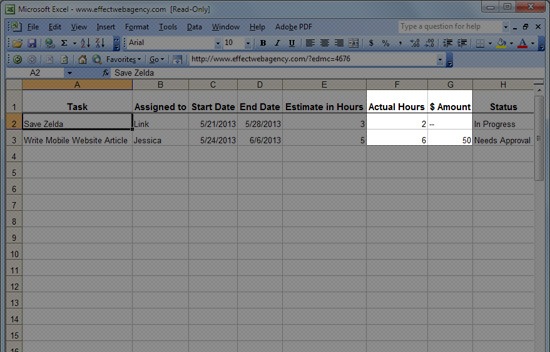
    <p>In the Action Register, you can easily adjust start and end dates to prioritize tasks.</p>
    <p>You can also use the <em>Actual Hours</em> and the <em>$ Amount</em> columns to tally up how much work you already have, to show you and the client if or how to factor in a new task.</p>
    <p><img alt="" src="http://cdn.sixrevisions.com/0365-03_action_register_priority.jpg" width="550" height="352" style="max-width: 100%; height: auto;"></p>
    <p><strong>Scope</strong></p>
    <p>It’s inevitable that the client or your team will discover a need to add some new tasks beyond what has already been agreed upon and approved.</p>
    <p><em>Related content: Do you want to know how to minimize the addition of new tasks in your projects (in project management terms: scope creep)? Read about <a href="http://sixrevisions.com/project-management/avoiding-unscoped-work-from-unreasonable-clients/" rel="nofollow external" class="bo">how to avoid unscoped work from unreasonable clients</a>.</em></p>
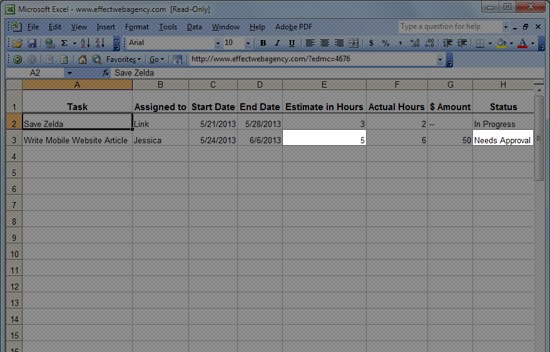
    <p>By listing these as new line items in the Action Register, they become separate tasks to be handled. If you need approval from the client to do the task, you can put the <em>Estimate in Hours</em> (or <em>$ Amount</em>) in and set the status to <em>“Needs Approval”</em>, and make sure to review at your next meeting.</p>
    <p><img alt="" src="http://cdn.sixrevisions.com/0365-04_action_register_needsapprove.jpg" width="550" height="352" style="max-width: 100%; height: auto;"></p>
    <p>The client then has the opportunity to fully understand the effect of adding the new request.</p>
    <p>We have had clients that have a tendency to add more and more tweaks to the project and expect the same deadline to happen.</p>
    <p>Once we started putting in estimated hours and how much it would cost them for us to be able to complete the new tasks, our clients would make these requests more carefully since they saw how it could affect the project’s completion time, require them to do additional work, or add cost to the project.</p>
    <p><strong>Invoicing</strong></p>
    <p>Ever had a client say <em>“I didn’t know I was going to be billed for this”</em> or <em>“I didn’t realize it would cost this much”</em>.</p>
    <p>It happens.</p>
    <p>Maybe you weren’t clear.</p>
    <p>Maybe the client doesn’t remember.</p>
    <p>Whatever the case, you can avoid this — and we have — by using the Action Register as the backbone of the project execution and by reviewing it regularly with the client.</p>
    <p>The <em>Estimate in Hours</em> and/or <em>$ Amount</em> columns make it totally clear what the cost will be.</p>
    <p>The <em>Status</em> column makes it clear if something was approved or not.</p>
    <p><strong>Responsibility</strong></p>
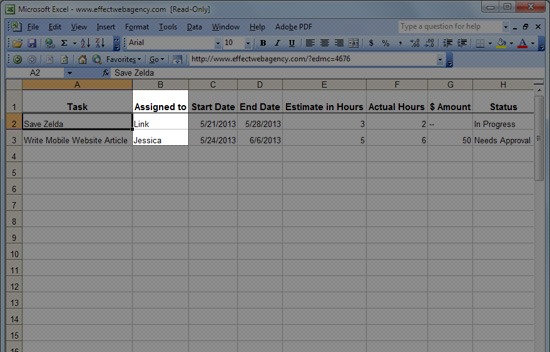
    <p>Like we talked about above, by assigning every task to a person, it is clear who should do what.</p>
    <p>There’s no more, <em>“Well, I thought Jessica was doing that”</em> and <em>“I didn’t know I was suppose to do that.”</em></p>
    <p><img alt="" src="http://cdn.sixrevisions.com/0365-05_action_register_responsibility.jpg" width="550" height="352" style="max-width: 100%; height: auto;"></p>
    <p>If someone isn’t doing their work or has left the team, their tasks can be reassigned to another person.</p>
    <p><strong>Tracking the Details</strong></p>
    <p>There is also a <em>Comments</em> column for adding details on the task items. Use this column for any additional details about what you and the client specifically agreed upon.</p>
    <p><img alt="" src="http://cdn.sixrevisions.com/0365-06_action_register_taskcomments.jpg" width="550" height="352" style="max-width: 100%; height: auto;"></p>
    <p>You can avoid or minimize the <em>“I thought it would work differently”</em> situations by adding clarifying comments to the Action Register.</p>
    <p>Case in point: We have a few clients that are perfectionists. It’s easy for them to come up with a new idea to tweak something about their project without realizing these ideas may require plenty of hours of additional work.</p>
    <p>That scenario happened frequently and it weighed us down.</p>
    <p>Once we employed the Action Register into our weekly meetings, it became obvious to the client that these new tasks don’t always fit into the project agreement.</p>
    <p>The client would then agree that some of their new requests weren’t really that important, or at least they would be OK with doing them later on.</p>
    <p>What happened? By fleshing out all the desired tasks into the Action Register, we made it clear as day what was on the list to be done and as well as the needed resources to do them.</p>
    <p>The client could plainly see when there’s a problem and offered a solution to prioritize some over others.</p>
    <p><em>Related content: Learn how to decline new task requests by reading about <a href="http://sixrevisions.com/project-management/saying-no/" rel="nofollow external" class="bo">the most powerful word known to mankind</a>.</em></p>
    <h3>How to Implement the Action Register</h3>
    <p>Using the Action Register really begins to help you when you use it to run your regular client meetings and schedule your work week.</p>
    <p>Let’s go over a simple process which you can use to cater to your own situation and style.</p>
    <h4>Weekly Review of the Action Register</h4>
    <p>On Monday, or whatever day of the week works best for you, block out time to sit down and review all your active tasks in your Action Register.</p>
    <p>This is your time to fully understand the status of each of your projects.</p>
    <p>If you or your team members are responsible for a particular task, get it on your/their calendars.</p>
    <p>If you are unsure of the status of a task, now is the time to find out. You will save time by knowing <em>for sure</em>, rather than kinda thinking it’s done and then finding out later that it really isn’t.</p>
    <p>Once you get into the habit of doing this weekly Action Register review, you will find that your head is much clearer and you won’t worry where you are in terms of the project’s progress.</p>
    <h4>Update the Action Register Whenever You Complete Tasks</h4>
    <p>As you and your project team members complete tasks throughout the week, update the Action Register.</p>
    <p>If the task needs tweaks before really being complete, request the tweaks.</p>
    <p>If a task is actually complete, update the appropriate task item with the <em>Actual Hours</em> and set the <em>Status</em> column to <em>“Complete”</em>.</p>
    <h4>Schedule Regular Client Meetings</h4>
    <p>Schedule regular meetings with your active clients.</p>
    <p>Having a quick phone meeting every week or every other week can make projects go more smoothly.</p>
    <p>These regular meetings have an agenda that goes like this:</p>
    <ol>
    <li>Go through the list of tasks in the Action Register and review their statuses and whether or not each task is on track.
    <ol>
    <li>If a task is not on track, identify why and what needs to be done by whom to get it on track.</li>
    <li>Adjust the Action Register accordingly. If this causes other tasks to be pushed back, clearly state why and agree on new dates with the client.</li>
    </ol>
    </li>
    <li>If a task was marked <em>“Complete”</em>, show the client that the task is complete and get their sign-off on the completed task if necessary.</li>
    <li>Move completed tasks to the bottom of the spreadsheet, or create a new sheet in the spreadsheet to move the completed tasks to. This way, you have a record of what was done and when. This can be very helpful if you ever need to look back and verify something. It’s a documented record of how the project went.</li>
    <li>If a task was recently added, and the estimated hours of completion or cost of the task is ready for approval, explain it to the client and ask for approval to begin work.</li>
    <li>If a task needs something in order to continue working, this is a good time to sync with the client on what you need and decide together how to continue.</li>
    </ol>
    <p>You can save many back and forth emails by having the client bring observations, ideas, and questions to the meeting to discuss rather than emailing on a whim. Unless of course it’s something urgent.</p>
    <h3>Final Thoughts</h3>
    <p>Doesn’t it all just seem like common sense? Like with anything else, the more experienced we get, the more we see things in a simpler, more straightforward way.</p>
    <p>The results of using the Action Register:</p>
    <ul>
    <li>Your clients will feel in sync with what is going on with the project</li>
    <li>You will minimize surprises</li>
    <li>You and the client will be collaborating together to get the project completed</li>
    </ul>
    <p>In the end, you’ll get to focus more time on the part of your work that you love the most: Building websites.</p>
    <h3>Related Content</h3>
    <ul>
    <li><a href="http://sixrevisions.com/project-management/how-to-fire-bad-clients/" rel="nofollow external" class="bo">How to Fire Bad Clients</a></li>
    <li><a href="http://sixrevisions.com/project-management/ways-more-productive-web-developer/" rel="nofollow external" class="bo">10 Ways to Be a More Productive Web Developer</a></li>
    <li><a href="http://sixrevisions.com/project-management/tips-emailing-important-people/" rel="nofollow external" class="bo">9 Tips for Emailing Important People</a></li>
    <li>
    <em>Related categories:</em> <a href="http://sixrevisions.com/category/project-management/" rel="nofollow external" class="bo">Project Management</a> and <a href="http://sixrevisions.com/category/productivity/" rel="nofollow external" class="bo">Productivity</a>
    </li>
    </ul>
    <h3>About the Author</h3>
    <p><img alt="" src="http://cdn.sixrevisions.com/authors/steve_schmidt_small.jpg" width="80" height="80" style="max-width: 100%; height: auto;"><strong>Steve Schmidt</strong> is the President and Web Strategist of <a href="http://www.effectwebagency.com/" rel="nofollow external" class="bo">Effect Web Agency</a>. Since 2005, Effect Web Agency has been serving clients with web design, web development, website planning, SEO and empowering people to make smart web marketing decisions. Connect with Steve by heading over to <a href="https://plus.google.com/110751026900200881824/" rel="nofollow external" class="bo">Google+</a>.</p>
    <p>The post <a href="http://sixrevisions.com/project-management/action-register/" rel="nofollow external" class="bo">Manage Your Web Design Projects Better with an “Action Register”</a> appeared first on <a href="http://sixrevisions.com" rel="nofollow external" class="bo">Six Revisions</a>.</p>
    </div>
]]>
</Body>
<Summary>Do you find that many of your web design projects start with great energy and clarity, only to slow down and get hairy a few weeks in?   I will discuss the typical problems that arise in web...</Summary>
<Website>http://feedproxy.google.com/~r/SixRevisions/~3/EPLY4G2-k4c/</Website>
<TrackingUrl>https://my3.my.umbc.edu/api/v0/pixel/news/33762/guest@my.umbc.edu/d81a3c3911bb22421d3070afae1e55dd/api/pixel</TrackingUrl>
<Tag>css</Tag>
<Tag>database</Tag>
<Tag>design</Tag>
<Tag>development</Tag>
<Tag>html</Tag>
<Tag>javascript</Tag>
<Tag>mysql</Tag>
<Tag>project-management</Tag>
<Tag>sql</Tag>
<Tag>web</Tag>
<Group token="retired-583">Web Developer - Build Group</Group>
<GroupUrl>https://my3.my.umbc.edu/groups/retired-583</GroupUrl>
<AvatarUrl>https://assets3-my.umbc.edu/system/shared/avatars/groups/000/000/583/fc60f5d7abc2e080599bb6dc465db54d/xsmall.png?1363101197</AvatarUrl>
<AvatarUrl size="original">https://assets4-my.umbc.edu/system/shared/avatars/groups/000/000/583/fc60f5d7abc2e080599bb6dc465db54d/original.jpg?1363101197</AvatarUrl>
<AvatarUrl size="xxlarge">https://assets4-my.umbc.edu/system/shared/avatars/groups/000/000/583/fc60f5d7abc2e080599bb6dc465db54d/xxlarge.png?1363101197</AvatarUrl>
<AvatarUrl size="xlarge">https://assets4-my.umbc.edu/system/shared/avatars/groups/000/000/583/fc60f5d7abc2e080599bb6dc465db54d/xlarge.png?1363101197</AvatarUrl>
<AvatarUrl size="large">https://assets3-my.umbc.edu/system/shared/avatars/groups/000/000/583/fc60f5d7abc2e080599bb6dc465db54d/large.png?1363101197</AvatarUrl>
<AvatarUrl size="medium">https://assets3-my.umbc.edu/system/shared/avatars/groups/000/000/583/fc60f5d7abc2e080599bb6dc465db54d/medium.png?1363101197</AvatarUrl>
<AvatarUrl size="small">https://assets4-my.umbc.edu/system/shared/avatars/groups/000/000/583/fc60f5d7abc2e080599bb6dc465db54d/small.png?1363101197</AvatarUrl>
<AvatarUrl size="xsmall">https://assets3-my.umbc.edu/system/shared/avatars/groups/000/000/583/fc60f5d7abc2e080599bb6dc465db54d/xsmall.png?1363101197</AvatarUrl>
<AvatarUrl size="xxsmall">https://assets4-my.umbc.edu/system/shared/avatars/groups/000/000/583/fc60f5d7abc2e080599bb6dc465db54d/xxsmall.png?1363101197</AvatarUrl>
<Sponsor>Web Developer - Build Group</Sponsor>
<PawCount>0</PawCount>
<CommentCount>0</CommentCount>
<CommentsAllowed>true</CommentsAllowed>
<PostedAt>Wed, 07 Aug 2013 06:00:36 -0400</PostedAt>
<EditAt>Wed, 07 Aug 2013 06:00:36 -0400</EditAt>
</NewsItem>

<NewsItem contentIssues="true" id="33760" important="false" status="posted" url="https://my3.my.umbc.edu/posts/33760">
<Title>Type &amp;amp; Grids: Free Responsive HTML5 Template</Title>
<Body>
<![CDATA[
    <div class="html-content">
    <table width="650">
    <tbody>
    <tr>
    <td>
    <div>
    <img src="http://statisches.auslieferung.commindo-media-ressourcen.de/advertisement.gif" alt="" style="max-width: 100%; height: auto;"><br><a href="http://auslieferung.commindo-media-ressourcen.de/random.php?mode=target&amp;collection=smashing-rss&amp;position=1" rel="nofollow external" class="bo"><img src="http://auslieferung.commindo-media-ressourcen.de/random.php?mode=image&amp;collection=smashing-rss&amp;position=1" alt="" style="max-width: 100%; height: auto;"></a> <a href="http://auslieferung.commindo-media-ressourcen.de/random.php?mode=target&amp;collection=smashing-rss&amp;position=2" rel="nofollow external" class="bo"><img src="http://auslieferung.commindo-media-ressourcen.de/random.php?mode=image&amp;collection=smashing-rss&amp;position=2" alt="" style="max-width: 100%; height: auto;"></a> <a href="http://auslieferung.commindo-media-ressourcen.de/random.php?mode=target&amp;collection=smashing-rss&amp;position=3" rel="nofollow external" class="bo"><img src="http://auslieferung.commindo-media-ressourcen.de/random.php?mode=image&amp;collection=smashing-rss&amp;position=3" alt="" style="max-width: 100%; height: auto;"></a>
    </div>
    </td>
    </tr>
    </tbody>
    </table>
    <p>Today, we are pleased to introduce <a href="http://www.typeandgrids.com/" rel="nofollow external" class="bo">Type &amp; Grids</a>, a free responsive HTML5 template by <a href="http://www.jeremiahshoaf.com/" rel="nofollow external" class="bo">Jeremiah Shoaf</a>. It looks great on all devices, including desktops, laptops, tablets and phones. All of the content resides in a single HTML file, so setting it up is super-simple.</p>
    <p>Its extensive customization options set Type &amp; Grids apart from other templates out there. The template has 21 type themes and 29 color themes built in, giving you over <strong>500 unique design combinations</strong>. Type theme number 21 is a bonus theme that Jeremiah has created exclusively for Smashing Magazine’s readers — it features the beautiful font <a href="http://www.huertatipografica.com.ar/tipografias/alegreya/ejemplos.html" rel="nofollow external" class="bo">Alegreya</a>.</p>
    <p>Each type theme is meticulously handcrafted, with attention paid to the smallest typographic details. The 16 thumbnail shape variations and 58 background textures that are included allow for a nearly endless combination of design styles — no two Type &amp; Grids websites will look the same.</p>
    <p><a href="http://media.smashingmagazine.com/wp-content/uploads/2013/08/typeandgrids_500x450_mini.jpg" rel="nofollow external" class="bo"><img src="http://media.smashingmagazine.com/wp-content/uploads/2013/08/typeandgrids_500x450_mini.jpg" alt="typeandgrids_500x450" width="500" height="450" style="max-width: 100%; height: auto;"></a></p>
    <p><a href="http://media.smashingmagazine.com/wp-content/uploads/2013/08/typeandgrids_05.png" rel="nofollow external" class="bo"><img src="http://media.smashingmagazine.com/wp-content/uploads/2013/08/typeandgrids_05.png" alt="Type &amp; Grids" width="500" height="615" style="max-width: 100%; height: auto;"></a></p>
    <h3>Instructions</h3>
    <ol>
    <li>Download and open the ZIP file.</li>
    <li>Edit the only HTML file, <code>index.html</code>, to add your own content.</li>
    <li>Mix and match the included type and color CSS files to customize the design. All fonts shown in the demo are included.</li>
    <li>Upload your new website to your Web host. Done!</li>
    <li>Please include a “Powered by Type &amp; Grids” link in the footer of your website as a credit link.</li>
    </ol>
    <h3>Demo And Downloads</h3>
    <ul>
    <li><a href="http://smashingmagazine.typeandgrids.com/" rel="nofollow external" class="bo">Demo</a></li>
    <li><a href="http://www.typeandgrids.com/" rel="nofollow external" class="bo">Type &amp; Grids official website</a></li>
    <li><a href="http://www.jeremiahshoaf.com/" rel="nofollow external" class="bo">Live website demo</a></li>
    <li>
    <a href="http://provide.smashingmagazine.com/Freebies/type_and_grids.zip" rel="nofollow external" class="bo">Download the set</a> (ZIP, 7.32 MB)</li>
    </ul>
    <h3>Features</h3>
    <ul>
    <li>The code is clean, semantic and SEO-friendly.</li>
    <li>It’s coded using the latest HTML5 and CSS3 standards, and all code is W3C-valid and cross-browser compatible.</li>
    <li>Video is supported. Easily embed your videos from Vimeo or YouTube.</li>
    <li>Works great for non-portfolio websites as well.</li>
    <li>Support and documentation are available. (But everything is so simple to set up that you probably won’t need it.)</li>
    <p><a href="http://media.smashingmagazine.com/wp-content/uploads/2013/08/typeandgrids_12.png" rel="nofollow external" class="bo"><img src="http://media.smashingmagazine.com/wp-content/uploads/2013/08/typeandgrids_12.png" alt="Type &amp; Grids" width="500" height="429" style="max-width: 100%; height: auto;"></a></p>
    <p><a href="http://media.smashingmagazine.com/wp-content/uploads/2013/08/typeandgrids_10.png" rel="nofollow external" class="bo"><img src="http://media.smashingmagazine.com/wp-content/uploads/2013/08/typeandgrids_10.png" alt="Type &amp; Grids" width="500" height="290" style="max-width: 100%; height: auto;"></a></p>
    <p><a href="http://media.smashingmagazine.com/wp-content/uploads/2013/08/typeandgrids_08.png" rel="nofollow external" class="bo"><img src="http://media.smashingmagazine.com/wp-content/uploads/2013/08/typeandgrids_08.png" alt="Type &amp; Grids" width="500" height="265" style="max-width: 100%; height: auto;"></a></p>
    <h3>Behind The Design</h3>
    <p>Here’s what Jeremiah Shoaf has to say about his thinking behind the design:</p>
    <blockquote>
    <p>“I created Type &amp; Grids to use for my own design portfolio website. I’m the type of designer who is never happy with the final design, and I will just keep tweaking things forever. I’ll create one color scheme for a website and then get sick of it and create a new variation.</p>
    <p>So, I decided to create “theme” CSS files for each color variation and for each typographic variation. This makes it easy to satisfy my need to constantly change things up. I ended up with 20 type themes and 29 color themes. When I turned Type &amp; Grids into a template, my goal was to make it as simple to set up as possible. Other templates and themes out there seem to pack in so many features that the website ends up feeling bloated and difficult to use.</p>
    <p>I tried to limit the features of Type &amp; Grids to just the bare basics. So, I feel it’s a great solution for someone who wants to set up a simple website quickly. And the design customization options make it easy to make your website look unique and not at all like a template.”</p>
    </blockquote>
    <p>Thanks for your fantastic work, Jeremiah!</p>
    <p><em>(al) (ea)</em></p>
    <hr>
    <p><small>© The Smashing Editorial for <a href="http://www.smashingmagazine.com" rel="nofollow external" class="bo">Smashing Magazine</a>, 2013.</small></p>
    </ul>
    </div>
]]>
</Body>
<Summary>        Today, we are pleased to introduce Type &amp; Grids, a free responsive HTML5 template by Jeremiah Shoaf. It looks great on all devices, including desktops, laptops, tablets and phones. All...</Summary>
<Website>http://www.smashingmagazine.com/2013/08/07/type-grids-free-template/</Website>
<TrackingUrl>https://my3.my.umbc.edu/api/v0/pixel/news/33760/guest@my.umbc.edu/89e593d2c9f2c09bfaaa99cfc0d58035/api/pixel</TrackingUrl>
<Tag>css</Tag>
<Tag>design</Tag>
<Tag>development</Tag>
<Tag>freebies</Tag>
<Tag>global-web-design</Tag>
<Tag>html</Tag>
<Tag>javascript</Tag>
<Tag>mysql</Tag>
<Tag>php</Tag>
<Tag>sql</Tag>
<Tag>typography</Tag>
<Tag>web</Tag>
<Group token="retired-583">Web Developer - Build Group</Group>
<GroupUrl>https://my3.my.umbc.edu/groups/retired-583</GroupUrl>
<AvatarUrl>https://assets3-my.umbc.edu/system/shared/avatars/groups/000/000/583/fc60f5d7abc2e080599bb6dc465db54d/xsmall.png?1363101197</AvatarUrl>
<AvatarUrl size="original">https://assets4-my.umbc.edu/system/shared/avatars/groups/000/000/583/fc60f5d7abc2e080599bb6dc465db54d/original.jpg?1363101197</AvatarUrl>
<AvatarUrl size="xxlarge">https://assets4-my.umbc.edu/system/shared/avatars/groups/000/000/583/fc60f5d7abc2e080599bb6dc465db54d/xxlarge.png?1363101197</AvatarUrl>
<AvatarUrl size="xlarge">https://assets4-my.umbc.edu/system/shared/avatars/groups/000/000/583/fc60f5d7abc2e080599bb6dc465db54d/xlarge.png?1363101197</AvatarUrl>
<AvatarUrl size="large">https://assets3-my.umbc.edu/system/shared/avatars/groups/000/000/583/fc60f5d7abc2e080599bb6dc465db54d/large.png?1363101197</AvatarUrl>
<AvatarUrl size="medium">https://assets3-my.umbc.edu/system/shared/avatars/groups/000/000/583/fc60f5d7abc2e080599bb6dc465db54d/medium.png?1363101197</AvatarUrl>
<AvatarUrl size="small">https://assets4-my.umbc.edu/system/shared/avatars/groups/000/000/583/fc60f5d7abc2e080599bb6dc465db54d/small.png?1363101197</AvatarUrl>
<AvatarUrl size="xsmall">https://assets3-my.umbc.edu/system/shared/avatars/groups/000/000/583/fc60f5d7abc2e080599bb6dc465db54d/xsmall.png?1363101197</AvatarUrl>
<AvatarUrl size="xxsmall">https://assets4-my.umbc.edu/system/shared/avatars/groups/000/000/583/fc60f5d7abc2e080599bb6dc465db54d/xxsmall.png?1363101197</AvatarUrl>
<Sponsor>Web Developer - Build Group</Sponsor>
<PawCount>0</PawCount>
<CommentCount>0</CommentCount>
<CommentsAllowed>true</CommentsAllowed>
<PostedAt>Wed, 07 Aug 2013 05:20:45 -0400</PostedAt>
<EditAt>Wed, 07 Aug 2013 05:20:45 -0400</EditAt>
</NewsItem>

<NewsItem contentIssues="true" id="33761" important="false" status="posted" url="https://my3.my.umbc.edu/posts/33761">
<Title>How to take WordPress to the cloud with Amazon S3 &amp; CloudFront</Title>
<Body>
<![CDATA[
    <div class="html-content">
    <p><img alt="thumbnail" src="http://netdna.webdesignerdepot.com/uploads/2013/05/thumbnail43.jpg" width="200" height="160" style="max-width: 100%; height: auto;">Cloud computing is one of the buzzwords in the web design and computing industry that seems to have a very simple definition, but a myriad of uses. It is a phrase used to define the use of the internet and remote servers to store and manage data.</p> <p>A popular example is Google Docs. You can create and work on your document on the internet, and when you save it, the file is also saved on the internet. Of course, while downloading it to your computer is always an option, most of what happens is on Google’s server.</p> <p>There are a number of benefits to this method of working.</p> <p>You can assume that since you are using a company as large as Google that all of your documents will be safe, plus you have reduced hard drive usage and are using less resources to create the document.</p> <p><a href="http://netdna.webdesignerdepot.com/uploads/2013/05/amazon_s3_homepage.png" rel="nofollow external" class="bo"><img src="http://netdna.webdesignerdepot.com/uploads/2013/05/amazon_s3_homepage.png" width="650" alt="How to take WordPress to the cloud with Amazon S3 &amp; CloudFront" style="max-width: 100%; height: auto;"></a></p> <p>Today I want to talk about two cloud computing applications: Amazon Simple Storage Services (S3) and Amazon CloudFront. What these two services do is save files from your website onto Amazon’s remote servers, and serve these files to your user from multiple locations in the world to optimize loading time and file delivery, respectively. Amazon CloudFront is what’s normally called a Content Delivery Network, or CDN for short. There are many services like these available, but due to the flexible pricing structures of each, and the reliability of Amazon, they seem to be a fan-favorite for cloud-based services. </p> <p>Now that you have a little background on cloud computing and the Amazon services we are going to be focusing on, what exactly are we using them for? Well, I am going to show you the simplest way to upload all of your WordPress website files to Amazon S3, and then use CloudFront to deliver these files in the quickest way possible. </p> <p> </p> <h1>Signing up for Amazon S3 and CloudFront</h1> <p>The first step to take is signing up for both Amazon S3 and CloudFront. You can do so by going to this page: <a href="http://aws.amazon.com/s3/" rel="nofollow external" class="bo">http://aws.amazon.com/s3/</a>, and once you sign up for one of the services, you will have all of them at your disposal. You only pay for what you use, which is what makes the services provided by Amazon so great. So once you’ve signed up, you can head on over to the Amazon Web Services (AWS) Management Console <a href="http://aws.amazon.com/console/" rel="nofollow external" class="bo">http://aws.amazon.com/console.</a> Once you sign into the AWS Console, you can see all of the services that Amazon offers. The AWS Console is where you will manage any of the services you use, but for now we are just interested in S3, so go ahead and click that link.</p> <p><a href="http://netdna.webdesignerdepot.com/uploads/2013/05/amazon_s3_console_dashboard.png" rel="nofollow external" class="bo"><img src="http://netdna.webdesignerdepot.com/uploads/2013/05/amazon_s3_console_dashboard.png" width="650" alt="How to take WordPress to the cloud with Amazon S3 &amp; CloudFront" style="max-width: 100%; height: auto;"></a></p> <p>The user interface is pretty minimal and is actually super easy to work with. We are first going to click on “Create Bucket” to create the bucket for our WordPress site. A bucket is effectively a container for all of your files. All it does is identify what website we are storing files for, and then holds them. You can name your bucket whatever you want, but your website or project name would probably make the most sense. </p> <p> </p> <h1>Setting up a CloudFront Distribution</h1> <p>Now, we’ll stay in the AWS Console, but navigate to the CloudFront area by clicking “Services” in the top navigation.</p> <p><a href="http://netdna.webdesignerdepot.com/uploads/2013/05/amazon_cloudfront_console_dashboard.png" rel="nofollow external" class="bo"><img src="http://netdna.webdesignerdepot.com/uploads/2013/05/amazon_cloudfront_console_dashboard.png" width="650" alt="How to take WordPress to the cloud with Amazon S3 &amp; CloudFront" style="max-width: 100%; height: auto;"></a></p> <p>Now, all we have to do is click on the “Create Distribution” button, and from the two options select “Download”, as it will use the S3 bucket that we created previously. Click “Continue” and you can select the “Origin Domain Name”, which will just be our S3 Bucket. Now click on “Create Distribution”. You should see the distribution show up on our CloudFront dashboard. Once the Status column says “Deployed” and State says “Enabled”, your website is moving from Amazon S3 to the CloudFront CDN. </p> <p> </p> <h1>Using W3 Total Cache and configuring S3</h1> <p>Now that we have our bucket created, we have to set up our WordPress site to communicate with S3 and start to upload all of our files. We are going to be using a popular WordPress Plugin called <a href="http://wordpress.org/plugins/w3-total-cache/" rel="nofollow external" class="bo">W3 Total Cache</a> because not only does the plugin have features for easily working with S3 (and any CDN for that matter), it does a great job of speeding up your website using the best caching techniques — describing the caching side of W3 Total Cache is outside the scope of this article, but you can find <a href="http://www.xldstudios.com/video-tutorial-how-to-configure-w3-total-cache/" rel="nofollow external" class="bo">a great tutorial here.</a></p> <p>Once we have the plugin installed and activated, we are going to navigate to the General Settings within the plugin options. Once there, scroll down until you see the options for CDN. Make sure you check enable, and for CDN Type, scroll down to Amazon CloudFront underneath Origin Pull/Mirror, and click “Save all settings”. </p> <p><a href="http://netdna.webdesignerdepot.com/uploads/2013/05/w3_total_cache_cdn_configuration.png" rel="nofollow external" class="bo"><img src="http://netdna.webdesignerdepot.com/uploads/2013/05/w3_total_cache_cdn_configuration.png" width="650" alt="How to take WordPress to the cloud with Amazon S3 &amp; CloudFront" style="max-width: 100%; height: auto;"></a></p> <p>Once we’ve set CloudFront as our CDN, we can now navigate to the CDN page within the plugin options. Ignore the General options at the top, and scroll down to Configuration. Here we are going to enter in our Access key ID, Secret key, and tell the plugin what S3 bucket we want to store our files in. To find your Access key and Secret key, simply click your name when logged into the AWS Console, and click “Security Credentials” to receive the necessary information. Once you have that information in, your buckets should automatically come up, so just make sure the correct one you want to use is selected. Don’t mess with SSL support or CNAME for now, just click the “Test S3 upload” button. After a minute or so you should get a message that says “Test passed”. If you do not, you may have one of your keys wrong. Once you have passed the test save your settings and now we’ll start to work with the General settings on the same page. </p> <p> </p> <h1>Uploading the Files</h1> <p>Now that we have everything set up, it’s time to get to the exciting part. We are going to start uploading our files to Amazon S3 using W3 Total Cache. In the General settings for CDN, I recommend checking the following options and saving them: </p> <ul> <li>Host attachments</li> <li>Host wp-includes/ files</li> <li>Host theme files</li> <li>Host custom files</li> </ul> <p>This will host all of your attachments, theme, and WordPress core files on S3 so almost your entire site will be served from Amazon S3. We are going to go in reverse order as we will be uploading our theme files first, then our wp-includes files, and lastly our host attachments. Go ahead and click on “Upload theme files” and you will see a popup come up.</p> <p><a href="http://netdna.webdesignerdepot.com/uploads/2013/05/w3_total_cache_cdn_transfer.png" rel="nofollow external" class="bo"><img src="http://netdna.webdesignerdepot.com/uploads/2013/05/w3_total_cache_cdn_transfer.png" width="650" alt="How to take WordPress to the cloud with Amazon S3 &amp; CloudFront" style="max-width: 100%; height: auto;"></a></p> <p>You will see the total number of files you have, and you can click Start. You will see progress as the files upload, and also identify any problems that may have occurred in the upload process. Uploading is usually pretty quick, and should only take a minute or two, depending on your internet connection, to upload the theme files. Next we will do the same thing for our wp-includes files and get those uploaded to S3. </p> <p>I chose to do the Host attachments last because personally, that was the longest process of getting all of my files uploaded to Amazon S3. I have a large blog, with over 11,000 images. If you want to reduce the size of your images and consequently, the time it takes for them to upload to S3, I highly recommend checking out the <a href="http://wordpress.org/extend/plugins/wp-smushit/" rel="nofollow external" class="bo">WP Smush.it plugin.</a> Now you can go ahead and upload all of your image attachments. It may take you a while depending on your internet connection and number of images. I had to let the service run for half a day just to get all of my images uploaded.</p> <p><a href="http://netdna.webdesignerdepot.com/uploads/2013/05/w3_total_cache_cdn_transfer_complete.png" rel="nofollow external" class="bo"><img src="http://netdna.webdesignerdepot.com/uploads/2013/05/w3_total_cache_cdn_transfer_complete.png" width="650" alt="How to take WordPress to the cloud with Amazon S3 &amp; CloudFront" style="max-width: 100%; height: auto;"></a></p> <p>Congratulations, your website should now be hosted on Amazon’s S3 service, and all of the images on your website should be pulled from your Amazon CloudFront distribution; you can check by right-clicking an image and checking its location URL. </p> <p> </p> <h1>Configuring S3 and CloudFront using WP Super Cache</h1> <p>If you are more a fan of WP Super Cache, an alternative caching plugin for WordPress, you’re in luck: setting up Amazon S3 and CloudFront is just as simple as using the former plugin. </p> <p>To start, you will need to install and activate the plugin. You activate the plugin by simply checking the “Caching On” radio button on the “Easy” tab of the WP Super Cache Settings. This will get the WP Super Cache plugin to start working. </p> <p><a href="http://netdna.webdesignerdepot.com/uploads/2013/05/wp_super_cache_cdn_settings.png" rel="nofollow external" class="bo"><img src="http://netdna.webdesignerdepot.com/uploads/2013/05/wp_super_cache_cdn_settings.png" width="650" alt="How to take WordPress to the cloud with Amazon S3 &amp; CloudFront" style="max-width: 100%; height: auto;"></a></p> <p>Next, navigate over to the CDN tab, and make sure “Enable CDN Support” is checked, and then we will enter in our CloudFront URL. You can find this URL by navigating to the AWS Console and looking at the Distribution that you just created, and it will be under the “Domain Name” column. It should look something like xxxxxxxxxx.cloudfront.net. Don’t change any other settings, just click the “Save Changes” button.</p> <p>Unfortunately, the WP Super Cache plugin does not include a way to automatically upload all of our WordPress files to our Amazon S3 bucket. This means we will have to install the <a href="http://wordpress.org/plugins/cdn-sync-tool/" rel="nofollow external" class="bo">CDN Sync Tool plugin</a> for WordPress. Install the plugin as you normally would, then navigate to the options page. </p> <p>We will first be working with the CDN Options tab, and fill in our Amazon S3 information. Make sure S3 is selected from the CDN dropdown menu. Next, type in your Amazon S3 domain name, for example domainname.s3.amazonaws.com, and type in your Access Key and Secret Key, which you can retrieve by clicking your name when logged into the AWS Console and then clicking “Security Credentials”, and type in the bucket name that you used earlier in this tutorial. Click the “Save and Test Changes” button. </p> <p><a href="http://netdna.webdesignerdepot.com/uploads/2013/05/cdn_sync_tool_sync_options.png" rel="nofollow external" class="bo"><img src="http://netdna.webdesignerdepot.com/uploads/2013/05/cdn_sync_tool_sync_options.png" width="650" alt="How to take WordPress to the cloud with Amazon S3 &amp; CloudFront" style="max-width: 100%; height: auto;"></a></p> <p>Navigate to the Sync tab, and select whatever files you want uploaded to the CDN. Click on the “Sync” button and this process will happen for you. </p> <p>Now all of your files should be synced up with your Amazon S3 bucket and the WP Super Cache plugin should be serving all of your files through CloudFront.</p> <p> </p> <h1>Wrapping Up</h1> <p>That’s it. Your website should now be hosting all of its files from Amazon’s Simple Storage Service and distributing them through the CloudFront content delivery network using your preferred WordPress caching plugin. If you are like me and don’t want to continue hosting those pesky media files anymore to save your VPS space, here are a couple of plugins you might want to check out: </p> <ul> <li><a href="http://wordpress.org/extend/plugins/wp2cloud-wordpress-to-cloud/" rel="nofollow external" class="bo">http://wordpress.org/extend/plugins/wp2cloud-wordpress-to-cloud/</a></li> <li><a href="http://wordpress.org/extend/plugins/amazon-s3-uploads/" rel="nofollow external" class="bo">http://wordpress.org/extend/plugins/amazon-s3-uploads/</a></li> </ul> <p>Both of those plugins will upload files directly to S3 and make sure they don’t reside on your own server; be sure to read the description for both to see how they work.</p> <p> </p> <p><em><strong>Have you migrated your site to the cloud? What services did you choose to use? Let us know in the comments. </strong></em></p> <p><em>Featured image/thumbnail, <a href="http://www.shutterstock.com/pic-111668297/stock-photo-white-cloud-in-the-blue-sky.html" rel="nofollow external" class="bo">cloud image</a> via Shutterstock.</em></p> <p><br><br> </p>
    <table width="100%"> <tbody>
    <tr> <td> <a href="http://www.mightydeals.com/deal/port-font-family.html?ref=inwidget" rel="nofollow external" class="bo"><strong>Popular Port Font Family – Elegance With Modern Twist – only $24!</strong></a> </td> <td> <a href="http://www.mightydeals.com/?ref=inwidget" rel="nofollow external" class="bo"><br> <img src="http://mightydeals.com/web/images/widget-logo.png" height="40" width="90" alt="How to take WordPress to the cloud with Amazon S3 &amp; CloudFront" style="max-width: 100%; height: auto;"><br> </a> </td> </tr> </tbody>
    </table> <p><br> </p> <a href="http://www.webdesignerdepot.com/2013/08/how-to-take-wordpress-to-the-cloud-with-amazon-s3-cloudfront/" rel="nofollow external" class="bo">Source</a> <br><div><table border="0"><tbody><tr><td>
    <a href="http://share.feedsportal.com/share/twitter/?u=http%3A%2F%2Fwww.webdesignerdepot.com%2F2013%2F08%2Fhow-to-take-wordpress-to-the-cloud-with-amazon-s3-cloudfront%2F&amp;t=How+to+take+WordPress+to+the+cloud+with+Amazon+S3+%26+CloudFront" rel="nofollow external" class="bo"><img src="http://res3.feedsportal.com/social/twitter.png" style="max-width: 100%; height: auto;"></a> <a href="http://share.feedsportal.com/share/facebook/?u=http%3A%2F%2Fwww.webdesignerdepot.com%2F2013%2F08%2Fhow-to-take-wordpress-to-the-cloud-with-amazon-s3-cloudfront%2F&amp;t=How+to+take+WordPress+to+the+cloud+with+Amazon+S3+%26+CloudFront" rel="nofollow external" class="bo"><img src="http://res3.feedsportal.com/social/facebook.png" style="max-width: 100%; height: auto;"></a> <a href="http://share.feedsportal.com/share/linkedin/?u=http%3A%2F%2Fwww.webdesignerdepot.com%2F2013%2F08%2Fhow-to-take-wordpress-to-the-cloud-with-amazon-s3-cloudfront%2F&amp;t=How+to+take+WordPress+to+the+cloud+with+Amazon+S3+%26+CloudFront" rel="nofollow external" class="bo"><img src="http://res3.feedsportal.com/social/linkedin.png" style="max-width: 100%; height: auto;"></a> <a href="http://share.feedsportal.com/share/gplus/?u=http%3A%2F%2Fwww.webdesignerdepot.com%2F2013%2F08%2Fhow-to-take-wordpress-to-the-cloud-with-amazon-s3-cloudfront%2F&amp;t=How+to+take+WordPress+to+the+cloud+with+Amazon+S3+%26+CloudFront" rel="nofollow external" class="bo"><img src="http://res3.feedsportal.com/social/googleplus.png" style="max-width: 100%; height: auto;"></a> <a href="http://share.feedsportal.com/share/email/?u=http%3A%2F%2Fwww.webdesignerdepot.com%2F2013%2F08%2Fhow-to-take-wordpress-to-the-cloud-with-amazon-s3-cloudfront%2F&amp;t=How+to+take+WordPress+to+the+cloud+with+Amazon+S3+%26+CloudFront" rel="nofollow external" class="bo"><img src="http://res3.feedsportal.com/social/email.png" style="max-width: 100%; height: auto;"></a>
    </td></tr></tbody></table></div>
    <br><br><a href="http://da.feedsportal.com/r/172487826622/u/49/f/661066/c/35285/s/2fa90e3b/a2.htm" rel="nofollow external" class="bo"><img src="http://da.feedsportal.com/r/172487826622/u/49/f/661066/c/35285/s/2fa90e3b/a2.img" style="max-width: 100%; height: auto;"></a>
    </div>
]]>
</Body>
<Summary>Cloud computing is one of the buzzwords in the web design and computing industry that seems to have a very simple definition, but a myriad of uses. It is a phrase used to define the use of the...</Summary>
<Website>http://rss.feedsportal.com/c/35285/f/661066/s/2fa90e3b/sc/4/l/0L0Swebdesignerdepot0N0C20A130C0A80Chow0Eto0Etake0Ewordpress0Eto0Ethe0Ecloud0Ewith0Eamazon0Es30Ecloudfront0C/story01.htm</Website>
<TrackingUrl>https://my3.my.umbc.edu/api/v0/pixel/news/33761/guest@my.umbc.edu/6095229be869b272e3161e821b2cb371/api/pixel</TrackingUrl>
<Tag>amazon-cloudfront</Tag>
<Tag>amazon-s3</Tag>
<Tag>art</Tag>
<Tag>cdn</Tag>
<Tag>css</Tag>
<Tag>design</Tag>
<Tag>development</Tag>
<Tag>html</Tag>
<Tag>html5</Tag>
<Tag>illustrator</Tag>
<Tag>javascript</Tag>
<Tag>mysql</Tag>
<Tag>oracle</Tag>
<Tag>photoshop</Tag>
<Tag>php</Tag>
<Tag>sql</Tag>
<Tag>wordpress</Tag>
<Tag>wordpress-hosting</Tag>
<Tag>wordpress-in-the-cloud</Tag>
<Group token="retired-583">Web Developer - Build Group</Group>
<GroupUrl>https://my3.my.umbc.edu/groups/retired-583</GroupUrl>
<AvatarUrl>https://assets3-my.umbc.edu/system/shared/avatars/groups/000/000/583/fc60f5d7abc2e080599bb6dc465db54d/xsmall.png?1363101197</AvatarUrl>
<AvatarUrl size="original">https://assets4-my.umbc.edu/system/shared/avatars/groups/000/000/583/fc60f5d7abc2e080599bb6dc465db54d/original.jpg?1363101197</AvatarUrl>
<AvatarUrl size="xxlarge">https://assets4-my.umbc.edu/system/shared/avatars/groups/000/000/583/fc60f5d7abc2e080599bb6dc465db54d/xxlarge.png?1363101197</AvatarUrl>
<AvatarUrl size="xlarge">https://assets4-my.umbc.edu/system/shared/avatars/groups/000/000/583/fc60f5d7abc2e080599bb6dc465db54d/xlarge.png?1363101197</AvatarUrl>
<AvatarUrl size="large">https://assets3-my.umbc.edu/system/shared/avatars/groups/000/000/583/fc60f5d7abc2e080599bb6dc465db54d/large.png?1363101197</AvatarUrl>
<AvatarUrl size="medium">https://assets3-my.umbc.edu/system/shared/avatars/groups/000/000/583/fc60f5d7abc2e080599bb6dc465db54d/medium.png?1363101197</AvatarUrl>
<AvatarUrl size="small">https://assets4-my.umbc.edu/system/shared/avatars/groups/000/000/583/fc60f5d7abc2e080599bb6dc465db54d/small.png?1363101197</AvatarUrl>
<AvatarUrl size="xsmall">https://assets3-my.umbc.edu/system/shared/avatars/groups/000/000/583/fc60f5d7abc2e080599bb6dc465db54d/xsmall.png?1363101197</AvatarUrl>
<AvatarUrl size="xxsmall">https://assets4-my.umbc.edu/system/shared/avatars/groups/000/000/583/fc60f5d7abc2e080599bb6dc465db54d/xxsmall.png?1363101197</AvatarUrl>
<Sponsor>Web Developer - Build Group</Sponsor>
<PawCount>0</PawCount>
<CommentCount>0</CommentCount>
<CommentsAllowed>true</CommentsAllowed>
<PostedAt>Wed, 07 Aug 2013 05:15:18 -0400</PostedAt>
<EditAt>Wed, 07 Aug 2013 05:15:18 -0400</EditAt>
</NewsItem>

<NewsItem contentIssues="true" id="33764" important="false" status="posted" url="https://my3.my.umbc.edu/posts/33764">
<Title>The Opt-Out Generation Wants Back In</Title>
<Body>
<![CDATA[
    <div class="html-content">A decade after they left their careers in favor of full-time lives at home, working mothers reflect on the choice they made and what it cost them.<div><table border="0"><tbody><tr><td>
    <a href="http://share.feedsportal.com/share/twitter/?u=http%3A%2F%2Fwww.nytimes.com%2F2013%2F08%2F11%2Fmagazine%2Fthe-opt-out-generation-wants-back-in.html%3Fpartner%3Drss%26emc%3Drss&amp;t=The+Opt-Out+Generation+Wants+Back+In" rel="nofollow external" class="bo"><img src="http://res3.feedsportal.com/social/twitter.png" style="max-width: 100%; height: auto;"></a> <a href="http://share.feedsportal.com/share/facebook/?u=http%3A%2F%2Fwww.nytimes.com%2F2013%2F08%2F11%2Fmagazine%2Fthe-opt-out-generation-wants-back-in.html%3Fpartner%3Drss%26emc%3Drss&amp;t=The+Opt-Out+Generation+Wants+Back+In" rel="nofollow external" class="bo"><img src="http://res3.feedsportal.com/social/facebook.png" style="max-width: 100%; height: auto;"></a> <a href="http://share.feedsportal.com/share/linkedin/?u=http%3A%2F%2Fwww.nytimes.com%2F2013%2F08%2F11%2Fmagazine%2Fthe-opt-out-generation-wants-back-in.html%3Fpartner%3Drss%26emc%3Drss&amp;t=The+Opt-Out+Generation+Wants+Back+In" rel="nofollow external" class="bo"><img src="http://res3.feedsportal.com/social/linkedin.png" style="max-width: 100%; height: auto;"></a> <a href="http://share.feedsportal.com/share/gplus/?u=http%3A%2F%2Fwww.nytimes.com%2F2013%2F08%2F11%2Fmagazine%2Fthe-opt-out-generation-wants-back-in.html%3Fpartner%3Drss%26emc%3Drss&amp;t=The+Opt-Out+Generation+Wants+Back+In" rel="nofollow external" class="bo"><img src="http://res3.feedsportal.com/social/googleplus.png" style="max-width: 100%; height: auto;"></a> <a href="http://share.feedsportal.com/share/email/?u=http%3A%2F%2Fwww.nytimes.com%2F2013%2F08%2F11%2Fmagazine%2Fthe-opt-out-generation-wants-back-in.html%3Fpartner%3Drss%26emc%3Drss&amp;t=The+Opt-Out+Generation+Wants+Back+In" rel="nofollow external" class="bo"><img src="http://res3.feedsportal.com/social/email.png" style="max-width: 100%; height: auto;"></a>
    </td></tr></tbody></table></div>
    </div>
]]>
</Body>
<Summary>A decade after they left their careers in favor of full-time lives at home, working mothers reflect on the choice they made and what it cost them.     </Summary>
<Website>http://www.nytimes.com/2013/08/11/magazine/the-opt-out-generation-wants-back-in.html?partner=rss&amp;emc=rss</Website>
<TrackingUrl>https://my3.my.umbc.edu/api/v0/pixel/news/33764/guest@my.umbc.edu/5fa855100354f686e48d230fb73c8f9e/api/pixel</TrackingUrl>
<Tag>careers-and-professions</Tag>
<Tag>labor-and-jobs</Tag>
<Tag>macys-inc-m-nyse</Tag>
<Tag>monster-worldwide-inc-mww-nyse</Tag>
<Tag>new</Tag>
<Tag>oracle-corporation-orcl-nyse</Tag>
<Tag>part-time-employment</Tag>
<Tag>safeway-inc-swy-nyse</Tag>
<Tag>sony-corporation-sne-nyse</Tag>
<Tag>technology</Tag>
<Tag>united-states</Tag>
<Tag>women-and-girls</Tag>
<Tag>work-life-balance</Tag>
<Tag>york</Tag>
<Group token="retired-583">Web Developer - Build Group</Group>
<GroupUrl>https://my3.my.umbc.edu/groups/retired-583</GroupUrl>
<AvatarUrl>https://assets3-my.umbc.edu/system/shared/avatars/groups/000/000/583/fc60f5d7abc2e080599bb6dc465db54d/xsmall.png?1363101197</AvatarUrl>
<AvatarUrl size="original">https://assets4-my.umbc.edu/system/shared/avatars/groups/000/000/583/fc60f5d7abc2e080599bb6dc465db54d/original.jpg?1363101197</AvatarUrl>
<AvatarUrl size="xxlarge">https://assets4-my.umbc.edu/system/shared/avatars/groups/000/000/583/fc60f5d7abc2e080599bb6dc465db54d/xxlarge.png?1363101197</AvatarUrl>
<AvatarUrl size="xlarge">https://assets4-my.umbc.edu/system/shared/avatars/groups/000/000/583/fc60f5d7abc2e080599bb6dc465db54d/xlarge.png?1363101197</AvatarUrl>
<AvatarUrl size="large">https://assets3-my.umbc.edu/system/shared/avatars/groups/000/000/583/fc60f5d7abc2e080599bb6dc465db54d/large.png?1363101197</AvatarUrl>
<AvatarUrl size="medium">https://assets3-my.umbc.edu/system/shared/avatars/groups/000/000/583/fc60f5d7abc2e080599bb6dc465db54d/medium.png?1363101197</AvatarUrl>
<AvatarUrl size="small">https://assets4-my.umbc.edu/system/shared/avatars/groups/000/000/583/fc60f5d7abc2e080599bb6dc465db54d/small.png?1363101197</AvatarUrl>
<AvatarUrl size="xsmall">https://assets3-my.umbc.edu/system/shared/avatars/groups/000/000/583/fc60f5d7abc2e080599bb6dc465db54d/xsmall.png?1363101197</AvatarUrl>
<AvatarUrl size="xxsmall">https://assets4-my.umbc.edu/system/shared/avatars/groups/000/000/583/fc60f5d7abc2e080599bb6dc465db54d/xxsmall.png?1363101197</AvatarUrl>
<Sponsor>Web Developer - Build Group</Sponsor>
<PawCount>0</PawCount>
<CommentCount>0</CommentCount>
<CommentsAllowed>true</CommentsAllowed>
<PostedAt>Wed, 07 Aug 2013 05:00:02 -0400</PostedAt>
</NewsItem>

</News>