<?xml version="1.0"?>
<News hasArchived="true" page="8450" pageCount="10726" pageSize="10" timestamp="Fri, 17 Jul 2026 04:16:24 -0400" url="https://my3.my.umbc.edu/posts.xml?page=8450">
<NewsItem contentIssues="true" id="33632" important="false" status="posted" url="https://my3.my.umbc.edu/posts/33632">
<Title>How do I change the default invitation settings in Google Calendar?</Title>
<Body>
<![CDATA[
    <div class="html-content"><div>    <p>
            Page
                <strong>edited</strong> by
                        <a href="https://wiki.umbc.edu/display/~amocko1%0A" rel="nofollow external" class="bo">Andrea Mocko</a>
                </p>
            <div>
            <h2>Show Me</h2>
    <p><a href="http://youtube.com/watch?v=3YWTvddCbKw" rel="nofollow external" class="bo"><img src="http://img.youtube.com/vi/3YWTvddCbKw/1.jpg" style="max-width: 100%; height: auto;"></a></p>
    <p>Video - 00:33</p>
    <h2>Tell Me</h2>
    <ol>
    <li>Access Google Calendar.</li>
    <li>In the upper right of the page, click the gear icon and select <strong>Calendar Settings</strong>
    </li>
    <li>On the <strong>General</strong> page, click the variables you want to change</li>
    <li>Click <strong>Save </strong>at the bottom of the page.</li>
    </ol>
    <h2>Rate this Article</h2>
    <p>


    <strong>Was this helpful?</strong>
    <a href="https://apps-my.umbc.edu/apps/rt-track/script.php?u=http://wiki.umbc.edu%2Fpages%2Fviewpage.action%3FpageId%3D30543465&amp;q=0&amp;v=1&amp;s=faq&amp;l=gcal+video" rel="nofollow external" class="bo">Yes</a>
     | <a href="https://docs.google.com/a/umbc.edu/spreadsheet/viewform?formkey=dEpyOEZxa29QY05BaVpBVzZSYmRMM0E6MA&amp;entry_15=http%3A%2F%2Fwiki.umbc.edu%2Fpages%2Fviewpage.action%3FpageId%3D30543465" rel="nofollow external" class="bo">No</a>
     | <a href="https://docs.google.com/a/umbc.edu/spreadsheet/viewform?formkey=dEpyOEZxa29QY05BaVpBVzZSYmRMM0E6MA&amp;entry_15=http%3A%2F%2Fwiki.umbc.edu%2Fpages%2Fviewpage.action%3FpageId%3D30543465" rel="nofollow external" class="bo">Correct or Suggest an Article</a>
     | <a href="https://apps-my.umbc.edu/apps/rt-track/script.php?u=http://wiki.umbc.edu%2Fpages%2Fviewpage.action%3FpageId%3D30543465&amp;q=0&amp;v=0&amp;s=faq&amp;l=gcal+video" rel="nofollow external" class="bo">Request Help</a></p>
        </div>
            <div>
           <a href="https://wiki.umbc.edu/pages/viewpage.action?pageId=30543465" rel="nofollow external" class="bo">View Online</a>
                  ·
           <a href="https://wiki.umbc.edu/pages/diffpagesbyversion.action?pageId=30543465&amp;revisedVersion=2&amp;originalVersion=1" rel="nofollow external" class="bo">View Changes Online</a>       
                      </div>
    </div></div>
]]>
</Body>
<Summary>Page             edited by                     Andrea Mocko                                  Show Me    Video - 00:33  Tell Me   Access Google Calendar.  In the upper right of the page, click the...</Summary>
<Website>https://wiki.umbc.edu/pages/viewpage.action?pageId=30543465</Website>
<TrackingUrl>https://my3.my.umbc.edu/api/v0/pixel/news/33632/guest@my.umbc.edu/b055fe28ecd5f6156feacb0a945a4d36/api/pixel</TrackingUrl>
<Tag>faq</Tag>
<Tag>gcal</Tag>
<Tag>video</Tag>
<Group token="retired-428">UMBC FAQ</Group>
<GroupUrl>https://my3.my.umbc.edu/groups/retired-428</GroupUrl>
<AvatarUrl>https://assets2-my.umbc.edu/images/avatars/group/1/xsmall.png?1784205622</AvatarUrl>
<AvatarUrl size="original">https://assets1-my.umbc.edu/images/avatars/group/1/original.png?1784205622</AvatarUrl>
<AvatarUrl size="xxlarge">https://assets4-my.umbc.edu/images/avatars/group/1/xxlarge.png?1784205622</AvatarUrl>
<AvatarUrl size="xlarge">https://assets1-my.umbc.edu/images/avatars/group/1/xlarge.png?1784205622</AvatarUrl>
<AvatarUrl size="large">https://assets4-my.umbc.edu/images/avatars/group/1/large.png?1784205622</AvatarUrl>
<AvatarUrl size="medium">https://assets4-my.umbc.edu/images/avatars/group/1/medium.png?1784205622</AvatarUrl>
<AvatarUrl size="small">https://assets1-my.umbc.edu/images/avatars/group/1/small.png?1784205622</AvatarUrl>
<AvatarUrl size="xsmall">https://assets2-my.umbc.edu/images/avatars/group/1/xsmall.png?1784205622</AvatarUrl>
<AvatarUrl size="xxsmall">https://assets4-my.umbc.edu/images/avatars/group/1/xxsmall.png?1784205622</AvatarUrl>
<Sponsor>UMBC FAQ</Sponsor>
<PawCount>0</PawCount>
<CommentCount>0</CommentCount>
<CommentsAllowed>true</CommentsAllowed>
<PostedAt>Mon, 05 Aug 2013 09:59:36 -0400</PostedAt>
</NewsItem>

<NewsItem contentIssues="true" id="33633" important="false" status="posted" url="https://my3.my.umbc.edu/posts/33633">
<Title>How do I create an all-day event in Google Calendar?</Title>
<Body>
<![CDATA[
    <div class="html-content"><div>    <p>
            Page
                <strong>edited</strong> by
                        <a href="https://wiki.umbc.edu/display/~amocko1%0A" rel="nofollow external" class="bo">Andrea Mocko</a>
                </p>
            <div>
            <h2>Show Me</h2>
    <p><a href="http://youtube.com/watch?v=4hKqrKQtl7g" rel="nofollow external" class="bo"><img src="http://img.youtube.com/vi/4hKqrKQtl7g/1.jpg" style="max-width: 100%; height: auto;"></a></p>
    <p>Video - 01:07</p>
    <h2>Tell Me</h2>
    <ol>
    <li><p>Click the <strong>Create</strong> button</p></li>
    <li><p>Check <strong>All day</strong> and enter your event criteria<br>By default, your event will show you as Available. If you set your self to Busy for an all day event, other will not be able to schedule events with you</p></li>
    <li><p>When you are finished editing the event, click <strong>Save</strong>. Your all day event will now appear on the top of your calendar below the date</p></li>
    </ol>
    <h2>Rate this Article</h2>
    <p>


    <strong>Was this helpful?</strong>
    <a href="https://apps-my.umbc.edu/apps/rt-track/script.php?u=http://wiki.umbc.edu%2Fpages%2Fviewpage.action%3FpageId%3D30543459&amp;q=0&amp;v=1&amp;s=faq&amp;l=gcal+video" rel="nofollow external" class="bo">Yes</a>
     | <a href="https://docs.google.com/a/umbc.edu/spreadsheet/viewform?formkey=dEpyOEZxa29QY05BaVpBVzZSYmRMM0E6MA&amp;entry_15=http%3A%2F%2Fwiki.umbc.edu%2Fpages%2Fviewpage.action%3FpageId%3D30543459" rel="nofollow external" class="bo">No</a>
     | <a href="https://docs.google.com/a/umbc.edu/spreadsheet/viewform?formkey=dEpyOEZxa29QY05BaVpBVzZSYmRMM0E6MA&amp;entry_15=http%3A%2F%2Fwiki.umbc.edu%2Fpages%2Fviewpage.action%3FpageId%3D30543459" rel="nofollow external" class="bo">Correct or Suggest an Article</a>
     | <a href="https://apps-my.umbc.edu/apps/rt-track/script.php?u=http://wiki.umbc.edu%2Fpages%2Fviewpage.action%3FpageId%3D30543459&amp;q=0&amp;v=0&amp;s=faq&amp;l=gcal+video" rel="nofollow external" class="bo">Request Help</a></p>
        </div>
            <div>
           <a href="https://wiki.umbc.edu/pages/viewpage.action?pageId=30543459" rel="nofollow external" class="bo">View Online</a>
                  ·
           <a href="https://wiki.umbc.edu/pages/diffpagesbyversion.action?pageId=30543459&amp;revisedVersion=2&amp;originalVersion=1" rel="nofollow external" class="bo">View Changes Online</a>       
                      </div>
    </div></div>
]]>
</Body>
<Summary>Page             edited by                     Andrea Mocko                                  Show Me    Video - 01:07  Tell Me    Click the Create button    Check All day and enter your event...</Summary>
<Website>https://wiki.umbc.edu/pages/viewpage.action?pageId=30543459</Website>
<TrackingUrl>https://my3.my.umbc.edu/api/v0/pixel/news/33633/guest@my.umbc.edu/8f5043f1f55e524239b85bb92f2d0fa2/api/pixel</TrackingUrl>
<Tag>faq</Tag>
<Tag>gcal</Tag>
<Tag>video</Tag>
<Group token="retired-428">UMBC FAQ</Group>
<GroupUrl>https://my3.my.umbc.edu/groups/retired-428</GroupUrl>
<AvatarUrl>https://assets2-my.umbc.edu/images/avatars/group/1/xsmall.png?1784205622</AvatarUrl>
<AvatarUrl size="original">https://assets1-my.umbc.edu/images/avatars/group/1/original.png?1784205622</AvatarUrl>
<AvatarUrl size="xxlarge">https://assets4-my.umbc.edu/images/avatars/group/1/xxlarge.png?1784205622</AvatarUrl>
<AvatarUrl size="xlarge">https://assets1-my.umbc.edu/images/avatars/group/1/xlarge.png?1784205622</AvatarUrl>
<AvatarUrl size="large">https://assets4-my.umbc.edu/images/avatars/group/1/large.png?1784205622</AvatarUrl>
<AvatarUrl size="medium">https://assets4-my.umbc.edu/images/avatars/group/1/medium.png?1784205622</AvatarUrl>
<AvatarUrl size="small">https://assets1-my.umbc.edu/images/avatars/group/1/small.png?1784205622</AvatarUrl>
<AvatarUrl size="xsmall">https://assets2-my.umbc.edu/images/avatars/group/1/xsmall.png?1784205622</AvatarUrl>
<AvatarUrl size="xxsmall">https://assets4-my.umbc.edu/images/avatars/group/1/xxsmall.png?1784205622</AvatarUrl>
<Sponsor>UMBC FAQ</Sponsor>
<PawCount>0</PawCount>
<CommentCount>0</CommentCount>
<CommentsAllowed>true</CommentsAllowed>
<PostedAt>Mon, 05 Aug 2013 09:59:30 -0400</PostedAt>
</NewsItem>

<NewsItem contentIssues="true" id="33634" important="false" status="posted" url="https://my3.my.umbc.edu/posts/33634">
<Title>How do I create repeating events in Google Calendar?</Title>
<Body>
<![CDATA[
    <div class="html-content"><div>    <p>
            Page
                <strong>edited</strong> by
                        <a href="https://wiki.umbc.edu/display/~amocko1%0A" rel="nofollow external" class="bo">Andrea Mocko</a>
                </p>
            <div>
            <h2>Show Me</h2>
    <p><a href="http://youtube.com/watch?v=HcMgc3-3o28" rel="nofollow external" class="bo"><img src="http://img.youtube.com/vi/HcMgc3-3o28/1.jpg" style="max-width: 100%; height: auto;"></a></p>
    <p>Video length - 00:53</p>
    <h2>Tell Me</h2>
    <ol>
    <li><p>Create an event and go to the <strong>event details</strong> page</p></li>
    <li><p>In the <strong>When</strong> section of the page, select the appropriate time interval from the drop –down menu entitled <strong>Repeats</strong></p></li>
    <li><p>Fill in other event information</p></li>
    <li>
    <p>Click <strong>Save</strong></p>
    <strong>Note: The maximum number of instances allowed for a recurring event is 365</strong>
    </li>
    </ol>
    <h2>Rate this Article</h2>
    <p>


    <strong>Was this helpful?</strong>
    <a href="https://apps-my.umbc.edu/apps/rt-track/script.php?u=http://wiki.umbc.edu%2Fpages%2Fviewpage.action%3FpageId%3D30543446&amp;q=0&amp;v=1&amp;s=faq&amp;l=gcal+video" rel="nofollow external" class="bo">Yes</a>
     | <a href="https://docs.google.com/a/umbc.edu/spreadsheet/viewform?formkey=dEpyOEZxa29QY05BaVpBVzZSYmRMM0E6MA&amp;entry_15=http%3A%2F%2Fwiki.umbc.edu%2Fpages%2Fviewpage.action%3FpageId%3D30543446" rel="nofollow external" class="bo">No</a>
     | <a href="https://docs.google.com/a/umbc.edu/spreadsheet/viewform?formkey=dEpyOEZxa29QY05BaVpBVzZSYmRMM0E6MA&amp;entry_15=http%3A%2F%2Fwiki.umbc.edu%2Fpages%2Fviewpage.action%3FpageId%3D30543446" rel="nofollow external" class="bo">Correct or Suggest an Article</a>
     | <a href="https://apps-my.umbc.edu/apps/rt-track/script.php?u=http://wiki.umbc.edu%2Fpages%2Fviewpage.action%3FpageId%3D30543446&amp;q=0&amp;v=0&amp;s=faq&amp;l=gcal+video" rel="nofollow external" class="bo">Request Help</a></p>
        </div>
            <div>
           <a href="https://wiki.umbc.edu/pages/viewpage.action?pageId=30543446" rel="nofollow external" class="bo">View Online</a>
                  ·
           <a href="https://wiki.umbc.edu/pages/diffpagesbyversion.action?pageId=30543446&amp;revisedVersion=3&amp;originalVersion=2" rel="nofollow external" class="bo">View Changes Online</a>       
                      </div>
    </div></div>
]]>
</Body>
<Summary>Page             edited by                     Andrea Mocko                                  Show Me    Video length - 00:53  Tell Me    Create an event and go to the event details page    In the...</Summary>
<Website>https://wiki.umbc.edu/pages/viewpage.action?pageId=30543446</Website>
<TrackingUrl>https://my3.my.umbc.edu/api/v0/pixel/news/33634/guest@my.umbc.edu/76c09caf7aa8018dfd523d7fe13a5e51/api/pixel</TrackingUrl>
<Tag>faq</Tag>
<Tag>gcal</Tag>
<Tag>video</Tag>
<Group token="retired-428">UMBC FAQ</Group>
<GroupUrl>https://my3.my.umbc.edu/groups/retired-428</GroupUrl>
<AvatarUrl>https://assets2-my.umbc.edu/images/avatars/group/1/xsmall.png?1784205622</AvatarUrl>
<AvatarUrl size="original">https://assets1-my.umbc.edu/images/avatars/group/1/original.png?1784205622</AvatarUrl>
<AvatarUrl size="xxlarge">https://assets4-my.umbc.edu/images/avatars/group/1/xxlarge.png?1784205622</AvatarUrl>
<AvatarUrl size="xlarge">https://assets1-my.umbc.edu/images/avatars/group/1/xlarge.png?1784205622</AvatarUrl>
<AvatarUrl size="large">https://assets4-my.umbc.edu/images/avatars/group/1/large.png?1784205622</AvatarUrl>
<AvatarUrl size="medium">https://assets4-my.umbc.edu/images/avatars/group/1/medium.png?1784205622</AvatarUrl>
<AvatarUrl size="small">https://assets1-my.umbc.edu/images/avatars/group/1/small.png?1784205622</AvatarUrl>
<AvatarUrl size="xsmall">https://assets2-my.umbc.edu/images/avatars/group/1/xsmall.png?1784205622</AvatarUrl>
<AvatarUrl size="xxsmall">https://assets4-my.umbc.edu/images/avatars/group/1/xxsmall.png?1784205622</AvatarUrl>
<Sponsor>UMBC FAQ</Sponsor>
<PawCount>0</PawCount>
<CommentCount>0</CommentCount>
<CommentsAllowed>true</CommentsAllowed>
<PostedAt>Mon, 05 Aug 2013 09:59:24 -0400</PostedAt>
</NewsItem>

<NewsItem contentIssues="true" id="33635" important="false" status="posted" url="https://my3.my.umbc.edu/posts/33635">
<Title>How do I remove an event in Google Calendar?</Title>
<Body>
<![CDATA[
    <div class="html-content"><div>    <p>
            Page
                <strong>edited</strong> by
                        <a href="https://wiki.umbc.edu/display/~amocko1%0A" rel="nofollow external" class="bo">Andrea Mocko</a>
                </p>
            <div>
            <h2>Show Me</h2>
    <p><a href="http://youtube.com/watch?v=FTmY09zHK9s" rel="nofollow external" class="bo"><img src="http://img.youtube.com/vi/FTmY09zHK9s/1.jpg" style="max-width: 100%; height: auto;"></a></p>
    <p>Video Length - 00:21</p>
    <h2>Tell Me</h2>
    <ol>
    <li>Click anywhere on the event box (except for the subject text) and the event dialog box will pop-up</li>
    <li>Click <strong>Delete</strong> and <strong>Delete</strong> again to confirm the event deletion</li>
    <li>
    <strong>Alternative method:</strong> If you click on the event's title, you'll be taken immediately to the "event details" page. At the top of the details page there is a delete button - clicking on that button will also delete event.</li>
    </ol>
    <h2>Rate this Article</h2>
    <p>


    <strong>Was this helpful?</strong>
    <a href="https://apps-my.umbc.edu/apps/rt-track/script.php?u=http://wiki.umbc.edu%2Fpages%2Fviewpage.action%3FpageId%3D30543384&amp;q=0&amp;v=1&amp;s=faq&amp;l=gcal" rel="nofollow external" class="bo">Yes</a>
     | <a href="https://docs.google.com/a/umbc.edu/spreadsheet/viewform?formkey=dEpyOEZxa29QY05BaVpBVzZSYmRMM0E6MA&amp;entry_15=http%3A%2F%2Fwiki.umbc.edu%2Fpages%2Fviewpage.action%3FpageId%3D30543384" rel="nofollow external" class="bo">No</a>
     | <a href="https://docs.google.com/a/umbc.edu/spreadsheet/viewform?formkey=dEpyOEZxa29QY05BaVpBVzZSYmRMM0E6MA&amp;entry_15=http%3A%2F%2Fwiki.umbc.edu%2Fpages%2Fviewpage.action%3FpageId%3D30543384" rel="nofollow external" class="bo">Correct or Suggest an Article</a>
     | <a href="https://apps-my.umbc.edu/apps/rt-track/script.php?u=http://wiki.umbc.edu%2Fpages%2Fviewpage.action%3FpageId%3D30543384&amp;q=0&amp;v=0&amp;s=faq&amp;l=gcal" rel="nofollow external" class="bo">Request Help</a></p>
        </div>
            <div>
           <a href="https://wiki.umbc.edu/pages/viewpage.action?pageId=30543384" rel="nofollow external" class="bo">View Online</a>
                  ·
           <a href="https://wiki.umbc.edu/pages/diffpagesbyversion.action?pageId=30543384&amp;revisedVersion=3&amp;originalVersion=2" rel="nofollow external" class="bo">View Changes Online</a>       
                      </div>
    </div></div>
]]>
</Body>
<Summary>Page             edited by                     Andrea Mocko                                  Show Me    Video Length - 00:21  Tell Me   Click anywhere on the event box (except for the subject...</Summary>
<Website>https://wiki.umbc.edu/pages/viewpage.action?pageId=30543384</Website>
<TrackingUrl>https://my3.my.umbc.edu/api/v0/pixel/news/33635/guest@my.umbc.edu/10a07ded404accf81a5db89b25194dfc/api/pixel</TrackingUrl>
<Tag>faq</Tag>
<Tag>gcal</Tag>
<Group token="retired-428">UMBC FAQ</Group>
<GroupUrl>https://my3.my.umbc.edu/groups/retired-428</GroupUrl>
<AvatarUrl>https://assets2-my.umbc.edu/images/avatars/group/1/xsmall.png?1784205622</AvatarUrl>
<AvatarUrl size="original">https://assets1-my.umbc.edu/images/avatars/group/1/original.png?1784205622</AvatarUrl>
<AvatarUrl size="xxlarge">https://assets4-my.umbc.edu/images/avatars/group/1/xxlarge.png?1784205622</AvatarUrl>
<AvatarUrl size="xlarge">https://assets1-my.umbc.edu/images/avatars/group/1/xlarge.png?1784205622</AvatarUrl>
<AvatarUrl size="large">https://assets4-my.umbc.edu/images/avatars/group/1/large.png?1784205622</AvatarUrl>
<AvatarUrl size="medium">https://assets4-my.umbc.edu/images/avatars/group/1/medium.png?1784205622</AvatarUrl>
<AvatarUrl size="small">https://assets1-my.umbc.edu/images/avatars/group/1/small.png?1784205622</AvatarUrl>
<AvatarUrl size="xsmall">https://assets2-my.umbc.edu/images/avatars/group/1/xsmall.png?1784205622</AvatarUrl>
<AvatarUrl size="xxsmall">https://assets4-my.umbc.edu/images/avatars/group/1/xxsmall.png?1784205622</AvatarUrl>
<Sponsor>UMBC FAQ</Sponsor>
<PawCount>0</PawCount>
<CommentCount>0</CommentCount>
<CommentsAllowed>true</CommentsAllowed>
<PostedAt>Mon, 05 Aug 2013 09:58:57 -0400</PostedAt>
</NewsItem>

<NewsItem contentIssues="true" id="33636" important="false" status="posted" url="https://my3.my.umbc.edu/posts/33636">
<Title>How do I create a tentative meeting in Google Calendar?</Title>
<Body>
<![CDATA[
    <div class="html-content"><div>    <p>
            Page
                <strong>edited</strong> by
                        <a href="https://wiki.umbc.edu/display/~amocko1%0A" rel="nofollow external" class="bo">Andrea Mocko</a>
                </p>
            <div>
            <h2>Show Me</h2>
    <p><a href="http://youtu.be/aV7sNxXXpMQ" rel="nofollow external" class="bo"><img src="http://img.youtube.com/vi/aV7sNxXXpMQ/1.jpg" style="max-width: 100%; height: auto;"></a></p>
    <p>Video - 01:03</p>
    <h2>Tell Me</h2>
    <p>Option 1</p>
    <ol>
    <li>Click on the event and then click the <strong>Edit event details</strong> link</li>
    <li>Assign a color to your tentative event under the <strong>Event Color</strong> section</li>
    </ol>
    <p>Option 2</p>
    <ol><li>Click on the event you'd like to add some flair to and select an icon from the <strong>Event flair</strong> gadget on the right.</li></ol>
    <h2>Rate this Article</h2>
    <p>


    <strong>Was this helpful?</strong>
    <a href="https://apps-my.umbc.edu/apps/rt-track/script.php?u=http://wiki.umbc.edu%2Fpages%2Fviewpage.action%3FpageId%3D30543381&amp;q=0&amp;v=1&amp;s=faq&amp;l=gcal+video" rel="nofollow external" class="bo">Yes</a>
     | <a href="https://docs.google.com/a/umbc.edu/spreadsheet/viewform?formkey=dEpyOEZxa29QY05BaVpBVzZSYmRMM0E6MA&amp;entry_15=http%3A%2F%2Fwiki.umbc.edu%2Fpages%2Fviewpage.action%3FpageId%3D30543381" rel="nofollow external" class="bo">No</a>
     | <a href="https://docs.google.com/a/umbc.edu/spreadsheet/viewform?formkey=dEpyOEZxa29QY05BaVpBVzZSYmRMM0E6MA&amp;entry_15=http%3A%2F%2Fwiki.umbc.edu%2Fpages%2Fviewpage.action%3FpageId%3D30543381" rel="nofollow external" class="bo">Correct or Suggest an Article</a>
     | <a href="https://apps-my.umbc.edu/apps/rt-track/script.php?u=http://wiki.umbc.edu%2Fpages%2Fviewpage.action%3FpageId%3D30543381&amp;q=0&amp;v=0&amp;s=faq&amp;l=gcal+video" rel="nofollow external" class="bo">Request Help</a></p>
        </div>
            <div>
           <a href="https://wiki.umbc.edu/pages/viewpage.action?pageId=30543381" rel="nofollow external" class="bo">View Online</a>
                  ·
           <a href="https://wiki.umbc.edu/pages/diffpagesbyversion.action?pageId=30543381&amp;revisedVersion=3&amp;originalVersion=2" rel="nofollow external" class="bo">View Changes Online</a>       
                      </div>
    </div></div>
]]>
</Body>
<Summary>Page             edited by                     Andrea Mocko                                  Show Me    Video - 01:03  Tell Me  Option 1   Click on the event and then click the Edit event details...</Summary>
<Website>https://wiki.umbc.edu/pages/viewpage.action?pageId=30543381</Website>
<TrackingUrl>https://my3.my.umbc.edu/api/v0/pixel/news/33636/guest@my.umbc.edu/75f307bc1532ddaa343dbff7663e77cc/api/pixel</TrackingUrl>
<Tag>faq</Tag>
<Tag>gcal</Tag>
<Tag>video</Tag>
<Group token="retired-428">UMBC FAQ</Group>
<GroupUrl>https://my3.my.umbc.edu/groups/retired-428</GroupUrl>
<AvatarUrl>https://assets2-my.umbc.edu/images/avatars/group/1/xsmall.png?1784205622</AvatarUrl>
<AvatarUrl size="original">https://assets1-my.umbc.edu/images/avatars/group/1/original.png?1784205622</AvatarUrl>
<AvatarUrl size="xxlarge">https://assets4-my.umbc.edu/images/avatars/group/1/xxlarge.png?1784205622</AvatarUrl>
<AvatarUrl size="xlarge">https://assets1-my.umbc.edu/images/avatars/group/1/xlarge.png?1784205622</AvatarUrl>
<AvatarUrl size="large">https://assets4-my.umbc.edu/images/avatars/group/1/large.png?1784205622</AvatarUrl>
<AvatarUrl size="medium">https://assets4-my.umbc.edu/images/avatars/group/1/medium.png?1784205622</AvatarUrl>
<AvatarUrl size="small">https://assets1-my.umbc.edu/images/avatars/group/1/small.png?1784205622</AvatarUrl>
<AvatarUrl size="xsmall">https://assets2-my.umbc.edu/images/avatars/group/1/xsmall.png?1784205622</AvatarUrl>
<AvatarUrl size="xxsmall">https://assets4-my.umbc.edu/images/avatars/group/1/xxsmall.png?1784205622</AvatarUrl>
<Sponsor>UMBC FAQ</Sponsor>
<PawCount>0</PawCount>
<CommentCount>0</CommentCount>
<CommentsAllowed>true</CommentsAllowed>
<PostedAt>Mon, 05 Aug 2013 09:58:50 -0400</PostedAt>
</NewsItem>

<NewsItem contentIssues="true" id="33637" important="false" status="posted" url="https://my3.my.umbc.edu/posts/33637">
<Title>How do I add an event or meeting using Google Calendar Quick Add?</Title>
<Body>
<![CDATA[
    <div class="html-content"><div>    <p>
            Page
                <strong>edited</strong> by
                        <a href="https://wiki.umbc.edu/display/~amocko1%0A" rel="nofollow external" class="bo">Andrea Mocko</a>
                </p>
            <div>
            <h2>Show Me</h2>
    <p><a href="http://youtube.com/watch?v=h11WPwFlAXM" rel="nofollow external" class="bo"><img src="http://img.youtube.com/vi/h11WPwFlAXM/1.jpg" style="max-width: 100%; height: auto;"></a><br> Video Length - 01:08</p>
    <h2>Tell Me</h2>
    <ol>
    <li>Click on the arrowhead pointing down next to the word <em>Create</em> and the <strong>Quick Add</strong> field will appear or type the letter <strong>Q</strong>
    </li>
    <li>Enter event information (i.e. Meeting in ENGR 234 9AM Friday)</li>
    <li>Click on the Plus sign <strong>+</strong>. Event will be automatically added to the day you requested</li>
    </ol>
    <p>The recipe for events is to enter 'what', 'who', 'where', and 'when' (only 'what' and 'when' are required).</p>
    <ul>
    <li>
    <strong>What</strong>: This can be any text; the event title is created from this.</li>
    <li>
    <strong>When</strong>: This can be nearly any date and/or time expression. Using 'at' and 'on' can help.</li>
    <li>
    <strong>Who</strong>: This should begin with 'with' followed by a list of email addresses; these are added to the guest list.</li>
    <li>
    <strong>Where</strong>: This can be any text following 'at' or 'in.'</li>
    </ul>
    <h2>Rate this Article</h2>
    <p>


    <strong>Was this helpful?</strong>
    <a href="https://apps-my.umbc.edu/apps/rt-track/script.php?u=http://wiki.umbc.edu%2Fpages%2Fviewpage.action%3FpageId%3D23658895&amp;q=0&amp;v=1&amp;s=faq&amp;l=gcal+video" rel="nofollow external" class="bo">Yes</a>
     | <a href="https://docs.google.com/a/umbc.edu/spreadsheet/viewform?formkey=dEpyOEZxa29QY05BaVpBVzZSYmRMM0E6MA&amp;entry_15=http%3A%2F%2Fwiki.umbc.edu%2Fpages%2Fviewpage.action%3FpageId%3D23658895" rel="nofollow external" class="bo">No</a>
     | <a href="https://docs.google.com/a/umbc.edu/spreadsheet/viewform?formkey=dEpyOEZxa29QY05BaVpBVzZSYmRMM0E6MA&amp;entry_15=http%3A%2F%2Fwiki.umbc.edu%2Fpages%2Fviewpage.action%3FpageId%3D23658895" rel="nofollow external" class="bo">Correct or Suggest an Article</a>
     | <a href="https://apps-my.umbc.edu/apps/rt-track/script.php?u=http://wiki.umbc.edu%2Fpages%2Fviewpage.action%3FpageId%3D23658895&amp;q=0&amp;v=0&amp;s=faq&amp;l=gcal+video" rel="nofollow external" class="bo">Request Help</a></p>
    <p> </p>
        </div>
            <div>
           <a href="https://wiki.umbc.edu/pages/viewpage.action?pageId=23658895" rel="nofollow external" class="bo">View Online</a>
                  ·
           <a href="https://wiki.umbc.edu/pages/diffpagesbyversion.action?pageId=23658895&amp;revisedVersion=8&amp;originalVersion=7" rel="nofollow external" class="bo">View Changes Online</a>       
                      </div>
    </div></div>
]]>
</Body>
<Summary>Page             edited by                     Andrea Mocko                                  Show Me    Video Length - 01:08  Tell Me   Click on the arrowhead pointing down next to the word Create...</Summary>
<Website>https://wiki.umbc.edu/pages/viewpage.action?pageId=23658895</Website>
<TrackingUrl>https://my3.my.umbc.edu/api/v0/pixel/news/33637/guest@my.umbc.edu/ad1472677c17b9484b24a7b9b1914f25/api/pixel</TrackingUrl>
<Tag>faq</Tag>
<Tag>gcal</Tag>
<Tag>video</Tag>
<Group token="retired-428">UMBC FAQ</Group>
<GroupUrl>https://my3.my.umbc.edu/groups/retired-428</GroupUrl>
<AvatarUrl>https://assets2-my.umbc.edu/images/avatars/group/1/xsmall.png?1784205622</AvatarUrl>
<AvatarUrl size="original">https://assets1-my.umbc.edu/images/avatars/group/1/original.png?1784205622</AvatarUrl>
<AvatarUrl size="xxlarge">https://assets4-my.umbc.edu/images/avatars/group/1/xxlarge.png?1784205622</AvatarUrl>
<AvatarUrl size="xlarge">https://assets1-my.umbc.edu/images/avatars/group/1/xlarge.png?1784205622</AvatarUrl>
<AvatarUrl size="large">https://assets4-my.umbc.edu/images/avatars/group/1/large.png?1784205622</AvatarUrl>
<AvatarUrl size="medium">https://assets4-my.umbc.edu/images/avatars/group/1/medium.png?1784205622</AvatarUrl>
<AvatarUrl size="small">https://assets1-my.umbc.edu/images/avatars/group/1/small.png?1784205622</AvatarUrl>
<AvatarUrl size="xsmall">https://assets2-my.umbc.edu/images/avatars/group/1/xsmall.png?1784205622</AvatarUrl>
<AvatarUrl size="xxsmall">https://assets4-my.umbc.edu/images/avatars/group/1/xxsmall.png?1784205622</AvatarUrl>
<Sponsor>UMBC FAQ</Sponsor>
<PawCount>0</PawCount>
<CommentCount>0</CommentCount>
<CommentsAllowed>true</CommentsAllowed>
<PostedAt>Mon, 05 Aug 2013 09:58:43 -0400</PostedAt>
</NewsItem>

<NewsItem contentIssues="true" id="33646" important="false" status="posted" url="https://my3.my.umbc.edu/posts/33646">
<Title>Multiplane Design with SVGs and CSS 3D Transforms</Title>
<Body>
<![CDATA[
    <div class="html-content">
    <p>Recently I tweeted about my experimentations with an idea that I’m calling <em>multiplane design</em>.</p>
    <blockquote>
    <p>I’ve been experimenting with multi planing using 3D and SVGs: <a href="http://t.co/l4h1slT4jK" rel="nofollow external" class="bo">http://t.co/l4h1slT4jK</a> Only works on desktop Chrome/Safari (for now).</p>
    <p>— Nick Pettit (@nickrp) <a href="https://twitter.com/nickrp/statuses/364083089238003712" rel="nofollow external" class="bo">August 4, 2013</a></p>
    </blockquote>
    <p>Right now this experiment only works well in Chrome and Safari on the desktop; other browsers will have mixed results that I can’t account for yet. I learned a lot while making this, so I’d like to explain my thought process and then discuss some practicalities. Click the demo button and then scroll down to see it in action.</p>
    <p><a href="http://codepen.io/nickpettit/full/eBCrK" rel="nofollow external" class="bo">See the Demo</a>   <a href="http://treehouse-code-samples.s3.amazonaws.com/multiplaning.zip" rel="nofollow external" class="bo">Download the Code</a></p>
    <h2>It Was All Started by a Mouse</h2>
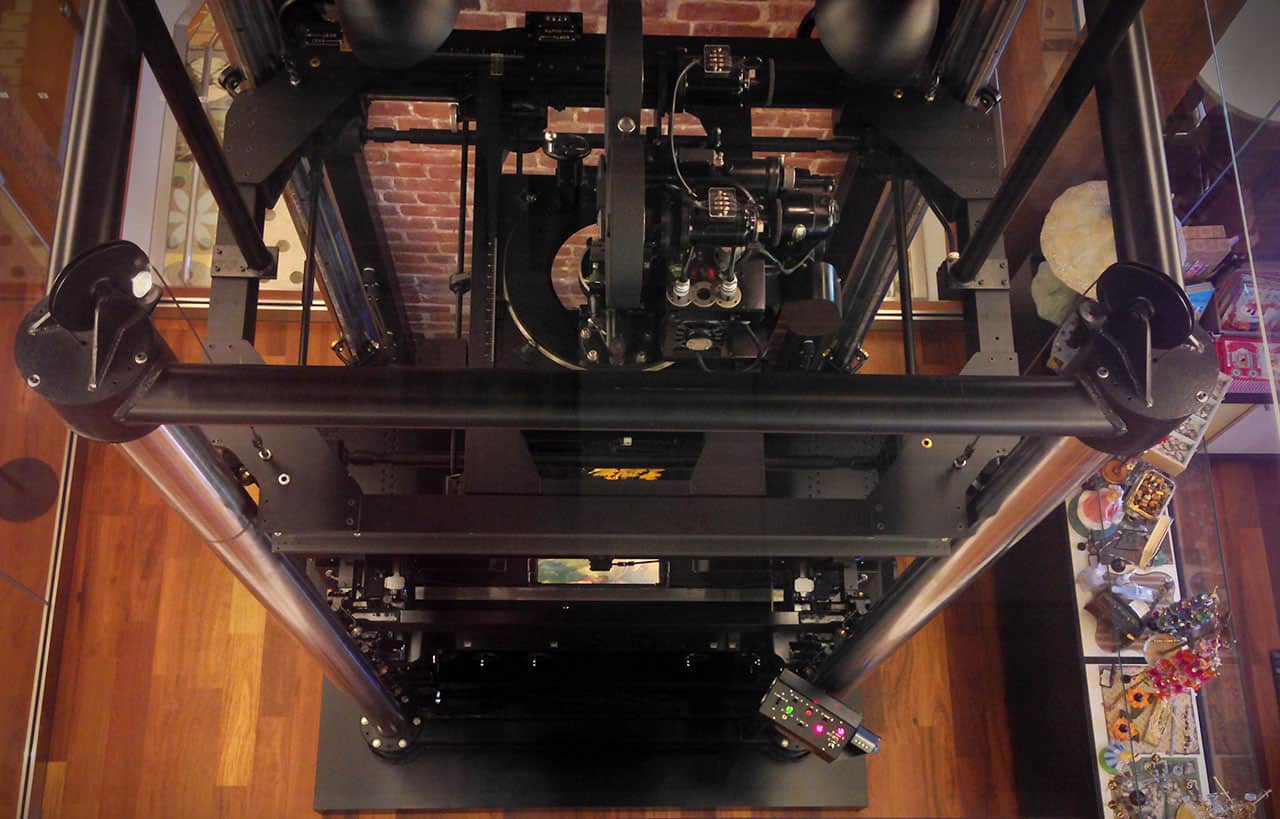
    <p>On a recent trip to San Francisco, I paid a visit to the Walt Disney Family Museum. It’s a beautiful building next to the Golden Gate bridge that showcases Walt’s life and his ideas. Many things stood out to me, but I was most impressed by the multiplane animation camera they had on display:</p>
    <p><img alt="Photo of Disney's multiplane camera." src="http://blog.teamtreehouse.com/wp-content/uploads/2013/08/multiplane_camera.jpg" width="1280" height="819" style="max-width: 100%; height: auto;"></p>
    <p>The multiplane camera uses moving layers of painted glass to create a parallax effect, giving the illusion of 3D depth to 2D images. The camera was first tested in the 1937 Academy Award winning short <em>The Old Mill</em> and was then used in many subsequent Disney feature length cartoons. Here’s a video of Walt explaining the technology:</p>
    <p></p>
    <div class="embed-container"><iframe src="//www.youtube.com/embed/kN-eCBAOw60?rel=0" frameborder="0" webkitallowfullscreen="webkitAllowFullScreen" mozallowfullscreen="mozallowfullscreen" allowfullscreen="allowFullScreen">[Video]</iframe></div>
    <h2>Multiplane Design</h2>
    <p>My fascination continued long after my museum visit. I thought, “Surely someone has built this in a web browser.” My Google searches didn’t find anything decent, so I started thinking about creating it myself using layered transparent images. Here’s how I did it.</p>
    <h3>Choosing Technology</h3>
    <p><a href="http://caniuse.com/transforms3d" rel="nofollow external" class="bo">Browser support for CSS 3D transforms</a> is pretty decent these days, so that seemed like the obvious choice for translating the planes and creating the environment. My backup plan was to scale 2D elements and create some faux 3D parallax, but fortunately I didn’t feel the need to dig into it.</p>
    <p>Next, I figured that some of the planes would need to be scaled to extremely large sizes but still look good up close. Bitmap images would be completely impractical in this case, but vectors are perfect, so I decided to use SVGs. I should note, <a href="http://caniuse.com/svg-css" rel="nofollow external" class="bo">browser support for SVGs in CSS background images</a> is good enough for experimentation, but Firefox will pixelate SVG backgrounds when the elements are scaled using a transform. I’m hoping this problem is fixed soon, but one workaround might be to include the image in the HTML instead of using a background.</p>
    <p>With my technology choices in mind, I went back to Google and I came across the <a href="http://2011.beercamp.com/" rel="nofollow external" class="bo">Beercamp SXSW 2011</a> website that made the rounds a few years ago. The site doesn’t use any SVG images, but it creates a 3D environment using layered elements, and it even allows you to scroll through them! I downloaded the HTML/CSS/JS, picked it apart, and came up with my own stripped down version. At this point, I knew that with a little more work, multiplaning in the browser was possible.</p>
    <h3>SVG Assets</h3>
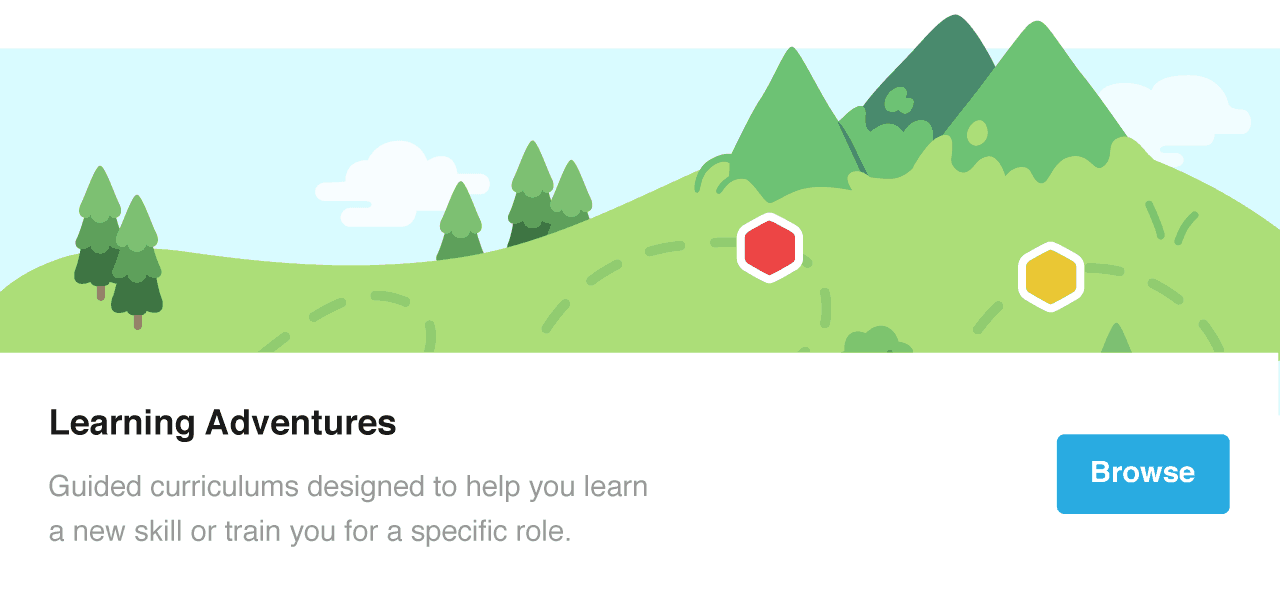
    <p>Next, I needed to create a scene. My illustration skills are still a work in progress, so I looked through some old <a href="http://teamtreehouse.com" rel="nofollow external" class="bo">Treehouse</a> visual assets and I found this wonderful illustration by <a href="https://twitter.com/okgriffin" rel="nofollow external" class="bo">Griffin Moore</a> that was never used:</p>
    <p><img alt='Illustration of a landscape with paths, grassy knolls, and mountains. The text says "Learning Adventures, Guided curriculums designed to help you learn a new skill or train you for a specific role."' src="http://blog.teamtreehouse.com/wp-content/uploads/2013/08/LAbanner.png" width="1280" height="607" style="max-width: 100%; height: auto;"></p>
    <p>I took the file into Illustrator and modified it for my purposes. I added a dark green hill in the foreground, made the background mountain much larger with a snowcap, and then rearranged the rest of the details. Here’s the result:</p>
    <p><img alt="Illustrator of a few grassy hills and a snowcapped mountain." src="http://blog.teamtreehouse.com/wp-content/uploads/2013/08/multiplane_landscape.png" width="1280" height="656" style="max-width: 100%; height: auto;"></p>
    <p>After some experimentation, I also scaled each object in Illustrator to match their relative distance and perspective in the scene. For example, the trees in the foreground are much larger than the tiny trees in background. Initially I thought that the 3D environment in the browser would be enough to take care of this (and I can still think of a few ways to make this happen), but that’s not really how this demo works.</p>
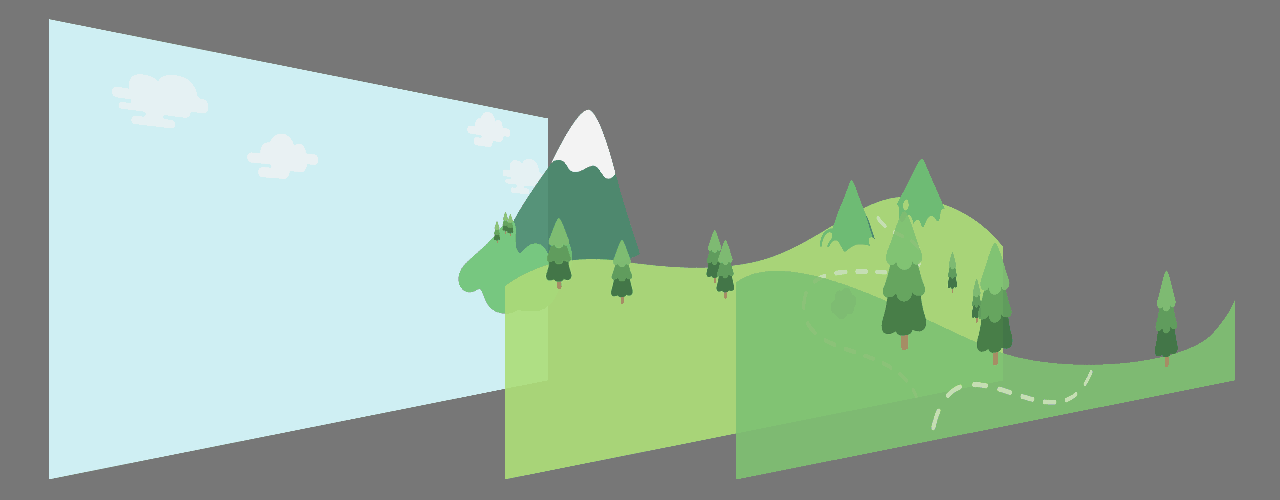
    <p>I saved each of the 4 planes as a separate SVG: the grassy foreground, hilly middle ground, the big snowcapped mountain, and finally the cloudy background. Normally you want to size your Illustrator artboard to the size of the SVGs, but I made all 4 SVGs the exact same size and trimmed the artboard to the size of the largest layer. There’s probably a better way to do this, but it worked for me. Here’s a diagram that shows the split between my planes:</p>
    <p><img alt="Illustration of the 4 planes broken apart in layers." src="http://blog.teamtreehouse.com/wp-content/uploads/2013/08/multiplane_landscape_layers.png" width="1280" height="500" style="max-width: 100%; height: auto;"></p>
    <h3>Building Scenes with 3D Transforms</h3>
    <p>Once I mapped each SVG to its own plane, things were starting to come together. After some more digging, I realized the Beercamp SXSW 2011 code actually does something pretty clever that I’d never thought of. The concept of a 3D camera doesn’t quite exist in CSS in the same way that it exists in 3D modeling programs and video games. However, the Beercamp site moves the entire 3D environment along the Z plane, which basically simulates  a ‘camera’ and allows you to dolly forward. It does a couple of other cool things like remapping the scroll event to the Z movement of the environment. I was planning to remap scrolling to the relative movement of each individual plane, which is a little more true to Disney’s multiplane camera, but this method is way easier for now.</p>
    <p>The last step was to appropriately space each plane relative to one other by translating them along the Z axis, then scale them to fill the browser window. The translation was the fun part; planes that are closer will whiz by quickly, while planes that are far away will appear to move very slowly. The scaling I still don’t understand, and honestly, I just guessed the values until it looked good and had some bleed on the sides. I started reading about <a href="http://www.w3.org/TR/css3-transforms/#mathematical-description" rel="nofollow external" class="bo">the math behind CSS transforms</a> to try and solidify my understanding, but after a few minutes I decided to save that mystery for another day. If you understand this, an explanation in the comments would be appreciated.</p>
    <h2>What’s Next?</h2>
    <p>There are a lot of technical problems with this creation (browser support, mobile devices, and so on), but those all seem solvable. I’m more interested in experimenting with practical applications of this. The Beercamp site might be one way to go about things, but that’s not <em>quite</em> the same feeling as moving through a multiplane scene.</p>
    <p>A site like this cannot avoid being classified as experiential, so perhaps it’s silly to look for a concrete functional driver. Rather, it might be more useful for creating experiences that are meant to transport you to a <em>place</em>, like the setting of a film or a video game. Heck, you could even bring this full circle and use it on a <a href="http://blog.teamtreehouse.com/progressive-enhancement-with-responsive-web-design-and-flash" rel="nofollow external" class="bo">Disney theme park website</a>.</p>
    <p>Taking a step back, I think the timing for this sort of thing is right for what’s in vogue. <a href="http://blog.teamtreehouse.com/the-future-beyond-flat-design" rel="nofollow external" class="bo">Flat design is all the rage</a> and it could serve as a nice evolution on the style. How would you use this in a practical setting? I’d love to hear your thoughts in the comments.</p>
    <p>The post <a href="http://blog.teamtreehouse.com/multiplane-design-with-svgs-and-css-3d-transforms" rel="nofollow external" class="bo">Multiplane Design with SVGs and CSS 3D Transforms</a> appeared first on <a href="http://blog.teamtreehouse.com" rel="nofollow external" class="bo">Treehouse Blog</a>.</p>
    </div>
]]>
</Body>
<Summary>Recently I tweeted about my experimentations with an idea that I’m calling multiplane design.    I’ve been experimenting with multi planing using 3D and SVGs: http://t.co/l4h1slT4jK Only works on...</Summary>
<Website>http://feedproxy.google.com/~r/teamtreehouse/~3/dFA1cKTTN2Y/multiplane-design-with-svgs-and-css-3d-transforms</Website>
<TrackingUrl>https://my3.my.umbc.edu/api/v0/pixel/news/33646/guest@my.umbc.edu/1dd5b77904eb42806571b9a2a383ae52/api/pixel</TrackingUrl>
<Tag>android</Tag>
<Tag>css</Tag>
<Tag>design</Tag>
<Tag>development</Tag>
<Tag>html</Tag>
<Tag>ios</Tag>
<Tag>javascript</Tag>
<Tag>make-a-website</Tag>
<Tag>responsive</Tag>
<Tag>web</Tag>
<Group token="retired-583">Web Developer - Build Group</Group>
<GroupUrl>https://my3.my.umbc.edu/groups/retired-583</GroupUrl>
<AvatarUrl>https://assets3-my.umbc.edu/system/shared/avatars/groups/000/000/583/fc60f5d7abc2e080599bb6dc465db54d/xsmall.png?1363101197</AvatarUrl>
<AvatarUrl size="original">https://assets4-my.umbc.edu/system/shared/avatars/groups/000/000/583/fc60f5d7abc2e080599bb6dc465db54d/original.jpg?1363101197</AvatarUrl>
<AvatarUrl size="xxlarge">https://assets4-my.umbc.edu/system/shared/avatars/groups/000/000/583/fc60f5d7abc2e080599bb6dc465db54d/xxlarge.png?1363101197</AvatarUrl>
<AvatarUrl size="xlarge">https://assets4-my.umbc.edu/system/shared/avatars/groups/000/000/583/fc60f5d7abc2e080599bb6dc465db54d/xlarge.png?1363101197</AvatarUrl>
<AvatarUrl size="large">https://assets3-my.umbc.edu/system/shared/avatars/groups/000/000/583/fc60f5d7abc2e080599bb6dc465db54d/large.png?1363101197</AvatarUrl>
<AvatarUrl size="medium">https://assets3-my.umbc.edu/system/shared/avatars/groups/000/000/583/fc60f5d7abc2e080599bb6dc465db54d/medium.png?1363101197</AvatarUrl>
<AvatarUrl size="small">https://assets4-my.umbc.edu/system/shared/avatars/groups/000/000/583/fc60f5d7abc2e080599bb6dc465db54d/small.png?1363101197</AvatarUrl>
<AvatarUrl size="xsmall">https://assets3-my.umbc.edu/system/shared/avatars/groups/000/000/583/fc60f5d7abc2e080599bb6dc465db54d/xsmall.png?1363101197</AvatarUrl>
<AvatarUrl size="xxsmall">https://assets4-my.umbc.edu/system/shared/avatars/groups/000/000/583/fc60f5d7abc2e080599bb6dc465db54d/xxsmall.png?1363101197</AvatarUrl>
<Sponsor>Web Developer - Build Group</Sponsor>
<PawCount>0</PawCount>
<CommentCount>0</CommentCount>
<CommentsAllowed>true</CommentsAllowed>
<PostedAt>Mon, 05 Aug 2013 09:42:42 -0400</PostedAt>
</NewsItem>

<NewsItem contentIssues="true" id="33620" important="false" status="posted" url="https://my3.my.umbc.edu/posts/33620">
<Title>Why can't I login to REX?</Title>
<Body>
<![CDATA[
    <div class="html-content"><div>    <p>
            Page
                <strong>edited</strong> by
                        <a href="https://wiki.umbc.edu/display/~amocko1%0A" rel="nofollow external" class="bo">Andrea Mocko</a>
                </p>
            <div>
            <h2>Tell Me</h2>
    <p>If you have been granted access to REX/T-REX here are a couple of things to verify when connecting to REX.  If you would like access to REX please put in a <a href="https://rt.umbc.edu/Ticket/Create.html?Queue=208" rel="nofollow external" class="bo">ticket</a>.</p>
    <ol>
    <li>If you are connecting from off campus, please make sure that you have connected to the UMBC VPN.  You can find instructions<a href="https://wiki.umbc.edu/pages/viewpage.action?pageId=1867886" rel="nofollow external" class="bo"> here</a>.</li>
    <li>When you are prompted to enter your username and password you will use your myUMBC username and password.  You must prefix your username with ad\.  For example, ad\kjoseph.  An image of what the login screen looks like is below.<br><br><img src="https://wiki.umbc.edu/download/attachments/30544104/rexloginpage.png?version=1&amp;modificationDate=1338993587000&amp;api=v2" style="max-width: 100%; height: auto;"><br><br>
    </li>
    <li>You can verify that you are using a supported browser <a href="https://wiki.umbc.edu/pages/viewpage.action?pageId=30543246" rel="nofollow external" class="bo">here</a>.</li>
    <li>If you are still having trouble logging in, please enter a <a href="https://rt.umbc.edu/Ticket/Create.html?Queue=208" rel="nofollow external" class="bo">ticket</a>.</li>
    </ol>
    <h2>Rate this Article</h2>
    <p>


    <strong>Was this helpful?</strong>
    <a href="https://apps-my.umbc.edu/apps/rt-track/script.php?u=http://wiki.umbc.edu%2Fpages%2Fviewpage.action%3FpageId%3D30544104&amp;q=0&amp;v=1&amp;s=faq&amp;l=rex" rel="nofollow external" class="bo">Yes</a>
     | <a href="https://docs.google.com/a/umbc.edu/spreadsheet/viewform?formkey=dEpyOEZxa29QY05BaVpBVzZSYmRMM0E6MA&amp;entry_15=http%3A%2F%2Fwiki.umbc.edu%2Fpages%2Fviewpage.action%3FpageId%3D30544104" rel="nofollow external" class="bo">No</a>
     | <a href="https://docs.google.com/a/umbc.edu/spreadsheet/viewform?formkey=dEpyOEZxa29QY05BaVpBVzZSYmRMM0E6MA&amp;entry_15=http%3A%2F%2Fwiki.umbc.edu%2Fpages%2Fviewpage.action%3FpageId%3D30544104" rel="nofollow external" class="bo">Correct or Suggest an Article</a>
     | <a href="https://apps-my.umbc.edu/apps/rt-track/script.php?u=http://wiki.umbc.edu%2Fpages%2Fviewpage.action%3FpageId%3D30544104&amp;q=0&amp;v=0&amp;s=faq&amp;l=rex" rel="nofollow external" class="bo">Request Help</a></p>
        </div>
            <div>
           <a href="https://wiki.umbc.edu/pages/viewpage.action?pageId=30544104" rel="nofollow external" class="bo">View Online</a>
                  ·
           <a href="https://wiki.umbc.edu/pages/diffpagesbyversion.action?pageId=30544104&amp;revisedVersion=5&amp;originalVersion=4" rel="nofollow external" class="bo">View Changes Online</a>       
                      </div>
    </div></div>
]]>
</Body>
<Summary>Page             edited by                     Andrea Mocko                                  Tell Me  If you have been granted access to REX/T-REX here are a couple of things to verify when...</Summary>
<Website>https://wiki.umbc.edu/pages/viewpage.action?pageId=30544104</Website>
<TrackingUrl>https://my3.my.umbc.edu/api/v0/pixel/news/33620/guest@my.umbc.edu/506518efa09b363bfc129dca8cb6229e/api/pixel</TrackingUrl>
<Tag>faq</Tag>
<Tag>rex</Tag>
<Group token="retired-428">UMBC FAQ</Group>
<GroupUrl>https://my3.my.umbc.edu/groups/retired-428</GroupUrl>
<AvatarUrl>https://assets2-my.umbc.edu/images/avatars/group/1/xsmall.png?1784205622</AvatarUrl>
<AvatarUrl size="original">https://assets1-my.umbc.edu/images/avatars/group/1/original.png?1784205622</AvatarUrl>
<AvatarUrl size="xxlarge">https://assets4-my.umbc.edu/images/avatars/group/1/xxlarge.png?1784205622</AvatarUrl>
<AvatarUrl size="xlarge">https://assets1-my.umbc.edu/images/avatars/group/1/xlarge.png?1784205622</AvatarUrl>
<AvatarUrl size="large">https://assets4-my.umbc.edu/images/avatars/group/1/large.png?1784205622</AvatarUrl>
<AvatarUrl size="medium">https://assets4-my.umbc.edu/images/avatars/group/1/medium.png?1784205622</AvatarUrl>
<AvatarUrl size="small">https://assets1-my.umbc.edu/images/avatars/group/1/small.png?1784205622</AvatarUrl>
<AvatarUrl size="xsmall">https://assets2-my.umbc.edu/images/avatars/group/1/xsmall.png?1784205622</AvatarUrl>
<AvatarUrl size="xxsmall">https://assets4-my.umbc.edu/images/avatars/group/1/xxsmall.png?1784205622</AvatarUrl>
<Sponsor>UMBC FAQ</Sponsor>
<PawCount>0</PawCount>
<CommentCount>0</CommentCount>
<CommentsAllowed>true</CommentsAllowed>
<PostedAt>Mon, 05 Aug 2013 09:28:33 -0400</PostedAt>
</NewsItem>

<NewsItem contentIssues="false" id="33621" important="false" status="posted" url="https://my3.my.umbc.edu/posts/33621">
<Title>What software does REX use?</Title>
<Body>
<![CDATA[
    <div class="html-content"><div>    <p>
            Page
                <strong>edited</strong> by
                        <a href="https://wiki.umbc.edu/display/~amocko1%0A" rel="nofollow external" class="bo">Andrea Mocko</a>
                </p>
            <div>
            <p>REX is built using Blackboard Analytics purchased from Blackboard in 2005.  Blackboard Analytics is built upon the Microsoft database and business intelligence suites, including the SQL Server relational database, SQL Server Analysis Services, SQL Server Reporting Services and ProClarity.</p>
    <h2>Rate this Article</h2>
    <p>


    <strong>Was this helpful?</strong>
    <a href="https://apps-my.umbc.edu/apps/rt-track/script.php?u=http://wiki.umbc.edu%2Fpages%2Fviewpage.action%3FpageId%3D30544263&amp;q=0&amp;v=1&amp;s=faq&amp;l=rex" rel="nofollow external" class="bo">Yes</a>
     | <a href="https://docs.google.com/a/umbc.edu/spreadsheet/viewform?formkey=dEpyOEZxa29QY05BaVpBVzZSYmRMM0E6MA&amp;entry_15=http%3A%2F%2Fwiki.umbc.edu%2Fpages%2Fviewpage.action%3FpageId%3D30544263" rel="nofollow external" class="bo">No</a>
     | <a href="https://docs.google.com/a/umbc.edu/spreadsheet/viewform?formkey=dEpyOEZxa29QY05BaVpBVzZSYmRMM0E6MA&amp;entry_15=http%3A%2F%2Fwiki.umbc.edu%2Fpages%2Fviewpage.action%3FpageId%3D30544263" rel="nofollow external" class="bo">Correct or Suggest an Article</a>
     | <a href="https://apps-my.umbc.edu/apps/rt-track/script.php?u=http://wiki.umbc.edu%2Fpages%2Fviewpage.action%3FpageId%3D30544263&amp;q=0&amp;v=0&amp;s=faq&amp;l=rex" rel="nofollow external" class="bo">Request Help</a></p>
        </div>
            <div>
           <a href="https://wiki.umbc.edu/pages/viewpage.action?pageId=30544263" rel="nofollow external" class="bo">View Online</a>
                  ·
           <a href="https://wiki.umbc.edu/pages/diffpagesbyversion.action?pageId=30544263&amp;revisedVersion=2&amp;originalVersion=1" rel="nofollow external" class="bo">View Changes Online</a>       
                      </div>
    </div></div>
]]>
</Body>
<Summary>Page             edited by                     Andrea Mocko                                  REX is built using Blackboard Analytics purchased from Blackboard in 2005.  Blackboard Analytics is...</Summary>
<Website>https://wiki.umbc.edu/pages/viewpage.action?pageId=30544263</Website>
<TrackingUrl>https://my3.my.umbc.edu/api/v0/pixel/news/33621/guest@my.umbc.edu/c8c9e588ef354e4053e6c92e55615ef1/api/pixel</TrackingUrl>
<Tag>faq</Tag>
<Tag>rex</Tag>
<Group token="retired-428">UMBC FAQ</Group>
<GroupUrl>https://my3.my.umbc.edu/groups/retired-428</GroupUrl>
<AvatarUrl>https://assets2-my.umbc.edu/images/avatars/group/1/xsmall.png?1784205622</AvatarUrl>
<AvatarUrl size="original">https://assets1-my.umbc.edu/images/avatars/group/1/original.png?1784205622</AvatarUrl>
<AvatarUrl size="xxlarge">https://assets4-my.umbc.edu/images/avatars/group/1/xxlarge.png?1784205622</AvatarUrl>
<AvatarUrl size="xlarge">https://assets1-my.umbc.edu/images/avatars/group/1/xlarge.png?1784205622</AvatarUrl>
<AvatarUrl size="large">https://assets4-my.umbc.edu/images/avatars/group/1/large.png?1784205622</AvatarUrl>
<AvatarUrl size="medium">https://assets4-my.umbc.edu/images/avatars/group/1/medium.png?1784205622</AvatarUrl>
<AvatarUrl size="small">https://assets1-my.umbc.edu/images/avatars/group/1/small.png?1784205622</AvatarUrl>
<AvatarUrl size="xsmall">https://assets2-my.umbc.edu/images/avatars/group/1/xsmall.png?1784205622</AvatarUrl>
<AvatarUrl size="xxsmall">https://assets4-my.umbc.edu/images/avatars/group/1/xxsmall.png?1784205622</AvatarUrl>
<Sponsor>UMBC FAQ</Sponsor>
<PawCount>0</PawCount>
<CommentCount>0</CommentCount>
<CommentsAllowed>true</CommentsAllowed>
<PostedAt>Mon, 05 Aug 2013 09:28:23 -0400</PostedAt>
</NewsItem>

<NewsItem contentIssues="false" id="33622" important="false" status="posted" url="https://my3.my.umbc.edu/posts/33622">
<Title>What is a data warehouse?</Title>
<Body>
<![CDATA[
    <div class="html-content"><div>    <p>
            Page
                <strong>edited</strong> by
                        <a href="https://wiki.umbc.edu/display/~amocko1%0A" rel="nofollow external" class="bo">Andrea Mocko</a>
                </p>
            <div>
            <p>Administrative computing systems are optimized for collecting and processing data, not for analysis and reporting. Although extracting and analyzing data directly from such systemS is possible, it is difficult and complex. A data warehouse is a system that contains much of the data from the administrative systems transformed into an architecture that is optimized for analysis and reporting.</p>
    <p>A data warehouse contains current and historical data organized in such as way that relevant data are clustered together for easy access.  The warehouse keeps several copies of the data from various points in time. Data in the warehouse are periodically refreshed with data from the operational databases.</p>
    <p>Once a data warehouse has been built, various user-friendly reporting and analysis tools can be used to access it.</p>
    <h2>Rate this Article</h2>
    <p>


    <strong>Was this helpful?</strong>
    <a href="https://apps-my.umbc.edu/apps/rt-track/script.php?u=http://wiki.umbc.edu%2Fpages%2Fviewpage.action%3FpageId%3D30544259&amp;q=0&amp;v=1&amp;s=faq&amp;l=rex" rel="nofollow external" class="bo">Yes</a>
     | <a href="https://docs.google.com/a/umbc.edu/spreadsheet/viewform?formkey=dEpyOEZxa29QY05BaVpBVzZSYmRMM0E6MA&amp;entry_15=http%3A%2F%2Fwiki.umbc.edu%2Fpages%2Fviewpage.action%3FpageId%3D30544259" rel="nofollow external" class="bo">No</a>
     | <a href="https://docs.google.com/a/umbc.edu/spreadsheet/viewform?formkey=dEpyOEZxa29QY05BaVpBVzZSYmRMM0E6MA&amp;entry_15=http%3A%2F%2Fwiki.umbc.edu%2Fpages%2Fviewpage.action%3FpageId%3D30544259" rel="nofollow external" class="bo">Correct or Suggest an Article</a>
     | <a href="https://apps-my.umbc.edu/apps/rt-track/script.php?u=http://wiki.umbc.edu%2Fpages%2Fviewpage.action%3FpageId%3D30544259&amp;q=0&amp;v=0&amp;s=faq&amp;l=rex" rel="nofollow external" class="bo">Request Help</a></p>
        </div>
            <div>
           <a href="https://wiki.umbc.edu/pages/viewpage.action?pageId=30544259" rel="nofollow external" class="bo">View Online</a>
                  ·
           <a href="https://wiki.umbc.edu/pages/diffpagesbyversion.action?pageId=30544259&amp;revisedVersion=2&amp;originalVersion=1" rel="nofollow external" class="bo">View Changes Online</a>       
                      </div>
    </div></div>
]]>
</Body>
<Summary>Page             edited by                     Andrea Mocko                                  Administrative computing systems are optimized for collecting and processing data, not for analysis and...</Summary>
<Website>https://wiki.umbc.edu/pages/viewpage.action?pageId=30544259</Website>
<TrackingUrl>https://my3.my.umbc.edu/api/v0/pixel/news/33622/guest@my.umbc.edu/b811cdb0cb1e57d10d6bc21d0561944f/api/pixel</TrackingUrl>
<Tag>faq</Tag>
<Tag>rex</Tag>
<Group token="retired-428">UMBC FAQ</Group>
<GroupUrl>https://my3.my.umbc.edu/groups/retired-428</GroupUrl>
<AvatarUrl>https://assets2-my.umbc.edu/images/avatars/group/1/xsmall.png?1784205622</AvatarUrl>
<AvatarUrl size="original">https://assets1-my.umbc.edu/images/avatars/group/1/original.png?1784205622</AvatarUrl>
<AvatarUrl size="xxlarge">https://assets4-my.umbc.edu/images/avatars/group/1/xxlarge.png?1784205622</AvatarUrl>
<AvatarUrl size="xlarge">https://assets1-my.umbc.edu/images/avatars/group/1/xlarge.png?1784205622</AvatarUrl>
<AvatarUrl size="large">https://assets4-my.umbc.edu/images/avatars/group/1/large.png?1784205622</AvatarUrl>
<AvatarUrl size="medium">https://assets4-my.umbc.edu/images/avatars/group/1/medium.png?1784205622</AvatarUrl>
<AvatarUrl size="small">https://assets1-my.umbc.edu/images/avatars/group/1/small.png?1784205622</AvatarUrl>
<AvatarUrl size="xsmall">https://assets2-my.umbc.edu/images/avatars/group/1/xsmall.png?1784205622</AvatarUrl>
<AvatarUrl size="xxsmall">https://assets4-my.umbc.edu/images/avatars/group/1/xxsmall.png?1784205622</AvatarUrl>
<Sponsor>UMBC FAQ</Sponsor>
<PawCount>0</PawCount>
<CommentCount>0</CommentCount>
<CommentsAllowed>true</CommentsAllowed>
<PostedAt>Mon, 05 Aug 2013 09:28:13 -0400</PostedAt>
</NewsItem>

</News>