<?xml version="1.0"?>
<News hasArchived="true" page="8481" pageCount="10725" pageSize="10" timestamp="Thu, 16 Jul 2026 09:33:44 -0400" url="https://my3.my.umbc.edu/posts.xml?page=8481">
<NewsItem contentIssues="false" id="33204" important="false" status="posted" url="https://my3.my.umbc.edu/posts/33204">
<Title>Sparrows Point: A year after collapse, unsettled lives</Title>
<Body>
<![CDATA[
    <div class="html-content">This special feature from the Baltimore Sun features videos from the "Mill Stories" project.</div>
]]>
</Body>
<Summary>This special feature from the Baltimore Sun features videos from the "Mill Stories" project.</Summary>
<Website>http://data.baltimoresun.com/stories/sparrows-point-a-year-after-bankruptcy-unsettled-lives/#intro</Website>
<TrackingUrl>https://my3.my.umbc.edu/api/v0/pixel/news/33204/guest@my.umbc.edu/87f3a1621a63726b3d8e1ee42e6f4196/api/pixel</TrackingUrl>
<Group token="millstories">Mill Stories</Group>
<GroupUrl>https://my3.my.umbc.edu/groups/millstories</GroupUrl>
<AvatarUrl>https://assets1-my.umbc.edu/system/shared/avatars/groups/000/000/555/b12131e87c87b7c13a36825bdc4abe77/xsmall.png?1368367350</AvatarUrl>
<AvatarUrl size="original">https://assets3-my.umbc.edu/system/shared/avatars/groups/000/000/555/b12131e87c87b7c13a36825bdc4abe77/original.gif?1368367350</AvatarUrl>
<AvatarUrl size="xxlarge">https://assets3-my.umbc.edu/system/shared/avatars/groups/000/000/555/b12131e87c87b7c13a36825bdc4abe77/xxlarge.png?1368367350</AvatarUrl>
<AvatarUrl size="xlarge">https://assets4-my.umbc.edu/system/shared/avatars/groups/000/000/555/b12131e87c87b7c13a36825bdc4abe77/xlarge.png?1368367350</AvatarUrl>
<AvatarUrl size="large">https://assets2-my.umbc.edu/system/shared/avatars/groups/000/000/555/b12131e87c87b7c13a36825bdc4abe77/large.png?1368367350</AvatarUrl>
<AvatarUrl size="medium">https://assets2-my.umbc.edu/system/shared/avatars/groups/000/000/555/b12131e87c87b7c13a36825bdc4abe77/medium.png?1368367350</AvatarUrl>
<AvatarUrl size="small">https://assets4-my.umbc.edu/system/shared/avatars/groups/000/000/555/b12131e87c87b7c13a36825bdc4abe77/small.png?1368367350</AvatarUrl>
<AvatarUrl size="xsmall">https://assets1-my.umbc.edu/system/shared/avatars/groups/000/000/555/b12131e87c87b7c13a36825bdc4abe77/xsmall.png?1368367350</AvatarUrl>
<AvatarUrl size="xxsmall">https://assets4-my.umbc.edu/system/shared/avatars/groups/000/000/555/b12131e87c87b7c13a36825bdc4abe77/xxsmall.png?1368367350</AvatarUrl>
<Sponsor>Mill Stories</Sponsor>
<PawCount>0</PawCount>
<CommentCount>0</CommentCount>
<CommentsAllowed>true</CommentsAllowed>
<PostedAt>Fri, 26 Jul 2013 10:02:06 -0400</PostedAt>
</NewsItem>

<NewsItem contentIssues="true" id="33208" important="false" status="posted" url="https://my3.my.umbc.edu/posts/33208">
<Title>Build the Android robot with CSS</Title>
<Body>
<![CDATA[
    <div class="html-content">If you've always wanted to draw something with CSS, this guide to making the Android robot can be used to kickstart your own creativity<div><table border="0"><tbody><tr><td>
    <a href="http://share.feedsportal.com/share/twitter/?u=http%3A%2F%2Fwww.netmagazine.com%2Ftutorials%2Fbuild-android-robot-css&amp;t=Build+the+Android+robot+with+CSS" rel="nofollow external" class="bo"><img src="http://res3.feedsportal.com/social/twitter.png" style="max-width: 100%; height: auto;"></a> <a href="http://share.feedsportal.com/share/facebook/?u=http%3A%2F%2Fwww.netmagazine.com%2Ftutorials%2Fbuild-android-robot-css&amp;t=Build+the+Android+robot+with+CSS" rel="nofollow external" class="bo"><img src="http://res3.feedsportal.com/social/facebook.png" style="max-width: 100%; height: auto;"></a> <a href="http://share.feedsportal.com/share/linkedin/?u=http%3A%2F%2Fwww.netmagazine.com%2Ftutorials%2Fbuild-android-robot-css&amp;t=Build+the+Android+robot+with+CSS" rel="nofollow external" class="bo"><img src="http://res3.feedsportal.com/social/linkedin.png" style="max-width: 100%; height: auto;"></a> <a href="http://share.feedsportal.com/share/gplus/?u=http%3A%2F%2Fwww.netmagazine.com%2Ftutorials%2Fbuild-android-robot-css&amp;t=Build+the+Android+robot+with+CSS" rel="nofollow external" class="bo"><img src="http://res3.feedsportal.com/social/googleplus.png" style="max-width: 100%; height: auto;"></a> <a href="http://share.feedsportal.com/share/email/?u=http%3A%2F%2Fwww.netmagazine.com%2Ftutorials%2Fbuild-android-robot-css&amp;t=Build+the+Android+robot+with+CSS" rel="nofollow external" class="bo"><img src="http://res3.feedsportal.com/social/email.png" style="max-width: 100%; height: auto;"></a>
    </td></tr></tbody></table></div>
    <br><br><a href="http://da.feedsportal.com/r/172449315633/u/49/f/502346/c/32632/s/2f32b801/a2.htm" rel="nofollow external" class="bo"><img src="http://da.feedsportal.com/r/172449315633/u/49/f/502346/c/32632/s/2f32b801/a2.img" style="max-width: 100%; height: auto;"></a>
    </div>
]]>
</Body>
<Summary>If you've always wanted to draw something with CSS, this guide to making the Android robot can be used to kickstart your own creativity     </Summary>
<Website>http://feedproxy.google.com/~r/net/topstories/~3/gg6vbEG_B5I/story01.htm</Website>
<TrackingUrl>https://my3.my.umbc.edu/api/v0/pixel/news/33208/guest@my.umbc.edu/0d15fa2fec5da465b82c897e80347758/api/pixel</TrackingUrl>
<Tag>css</Tag>
<Tag>development</Tag>
<Tag>html</Tag>
<Tag>javascript</Tag>
<Tag>mysql</Tag>
<Tag>net</Tag>
<Tag>php</Tag>
<Tag>sql</Tag>
<Tag>web</Tag>
<Group token="retired-583">Web Developer - Build Group</Group>
<GroupUrl>https://my3.my.umbc.edu/groups/retired-583</GroupUrl>
<AvatarUrl>https://assets3-my.umbc.edu/system/shared/avatars/groups/000/000/583/fc60f5d7abc2e080599bb6dc465db54d/xsmall.png?1363101197</AvatarUrl>
<AvatarUrl size="original">https://assets4-my.umbc.edu/system/shared/avatars/groups/000/000/583/fc60f5d7abc2e080599bb6dc465db54d/original.jpg?1363101197</AvatarUrl>
<AvatarUrl size="xxlarge">https://assets4-my.umbc.edu/system/shared/avatars/groups/000/000/583/fc60f5d7abc2e080599bb6dc465db54d/xxlarge.png?1363101197</AvatarUrl>
<AvatarUrl size="xlarge">https://assets4-my.umbc.edu/system/shared/avatars/groups/000/000/583/fc60f5d7abc2e080599bb6dc465db54d/xlarge.png?1363101197</AvatarUrl>
<AvatarUrl size="large">https://assets3-my.umbc.edu/system/shared/avatars/groups/000/000/583/fc60f5d7abc2e080599bb6dc465db54d/large.png?1363101197</AvatarUrl>
<AvatarUrl size="medium">https://assets3-my.umbc.edu/system/shared/avatars/groups/000/000/583/fc60f5d7abc2e080599bb6dc465db54d/medium.png?1363101197</AvatarUrl>
<AvatarUrl size="small">https://assets4-my.umbc.edu/system/shared/avatars/groups/000/000/583/fc60f5d7abc2e080599bb6dc465db54d/small.png?1363101197</AvatarUrl>
<AvatarUrl size="xsmall">https://assets3-my.umbc.edu/system/shared/avatars/groups/000/000/583/fc60f5d7abc2e080599bb6dc465db54d/xsmall.png?1363101197</AvatarUrl>
<AvatarUrl size="xxsmall">https://assets4-my.umbc.edu/system/shared/avatars/groups/000/000/583/fc60f5d7abc2e080599bb6dc465db54d/xxsmall.png?1363101197</AvatarUrl>
<Sponsor>Web Developer - Build Group</Sponsor>
<PawCount>0</PawCount>
<CommentCount>0</CommentCount>
<CommentsAllowed>true</CommentsAllowed>
<PostedAt>Fri, 26 Jul 2013 10:00:01 -0400</PostedAt>
</NewsItem>

<NewsItem contentIssues="true" id="33200" important="false" status="posted" url="https://my3.my.umbc.edu/posts/33200">
<Title>Creating Reusable Markup with The HTML Template Element</Title>
<Body>
<![CDATA[
    <div class="html-content">
    <p>Templates are one of the key tools at any developers disposable. They make it easier for us to build complex websites that are maintainable and easy for other developers to understand. With the exception of a few JavaScript frameworks, most templating is done on the server. When a request comes in to the server the templating engine pieces together the relevant templates and sends the constructed page down to the browser. This is great for a lot of use cases but with the increasing popularity of applications that run solely on the client-side we need a robust solution for handling templates in the browser. Enter the new HTML <code>&lt;template&gt;</code> element.</p>
    <h2>The &lt;template&gt; Element</h2>
    <p>The <code>&lt;template&gt;</code> element allows developers to create client-side templates made up of chunks of reusable DOM. The key thing about HTML templates is that they are <em>inert</em>. Your templates are not rendered by the browser until you <em>activate</em> them using JavaScript. This also means that any content they contain (images, video, audio) will not be loaded or played until the template is put to use.</p>
    <p>It’s also worth noting that content within a template is not considered part of the main document. Trying to select an element within a template from the main <code>document</code> object will not work. Instead you first have to select the template and then use <code>querySelector()</code> to access the element you want to target. You will see an example of this later.</p>
    <h2>Checking for Browser Support</h2>
    <p>The <code>&lt;template&gt;</code> element is currently supported in Chrome, Firefox and Opera (15+).</p>
    <p>You can detect support for HTML templates by checking to see if the <code>content</code> property is present on a <code>&lt;template&gt;</code> element. Here is an example:</p>
    <pre>if (‘content’ in document.createElement(‘template’)) {&#x000A;      // Templates are supported.&#x000A;    } else {&#x000A;      // Templates are not supported.&#x000A;    }</pre>
    <h2>Creating HTML Templates</h2>
    <p>Creating a template is pretty straight-forward. All you need to do is create a <code>&lt;template&gt;</code> element and give it an appropriate ID.</p>
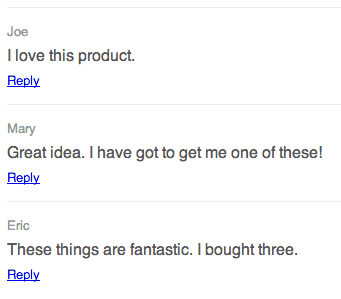
    <p>Lets take a look at an example template that could be used for a blog comment.</p>
    <pre>&lt;template id="comment-template"&gt;&#x000A;      &lt;li class="comment"&gt;&#x000A;        &lt;div class="comment-author"&gt;&lt;/div&gt;&#x000A;        &lt;div class="comment-body"&gt;&lt;/div&gt;&#x000A;        &lt;div class="comment-actions"&gt;&#x000A;          &lt;a href="#reply" class="reply"&gt;Reply&lt;/a&gt;&#x000A;        &lt;/div&gt;&#x000A;      &lt;/li&gt;&#x000A;    &lt;/template&gt;</pre>
    <p>Here we create a template with the ID <code>comment-template</code>. Our template’s content consists of a list item (<code>&lt;li&gt;</code>) with a number of <code>&lt;div&gt;</code>s that contain the comment author, body and a link for users to write a reply.</p>
    <p>You can also include CSS and JavaScript within your templates using the <code>&lt;style&gt;</code> and <code>&lt;script&gt;</code> elements.</p>
    <h2>Using HTML Templates</h2>
    <p>In order to use your template you will need to write a little JavaScript. Lets take a look at an example.</p>
    <pre>var tmpl = document.getElementById('comment-template');&#x000A;    document.body.appendChild(tmpl.content.cloneNode(true));</pre>
    <p>Here we start by getting a reference to our <code>&lt;template&gt;</code> element using it’s ID and store this in a variable named <code>tmpl</code>. In this example we are not manipulating anything within the template so we just create a copy of the it’s content (<code>tmpl.content.cloneNode(true)</code>) and add this to the <code>document.body</code>.</p>
    <p>Now that we’ve covered the basics I think you’re ready to move onto something a little more complex.</p>
    <p>In this next example we are going to render a series of blog comments using a template. Lets assume that there is an unordered list (<code>&lt;ul&gt;</code>) element in the main document that we want to add our comments to.</p>
    <hr>
    <p><strong>Note</strong>: I’ve created a variable named <code>comments</code> that contains an array of comment objects for us to play around with. In reality you would probably be loading this data via AJAX.</p>
    <hr>
    <pre>// An array of comments.&#x000A;    var comments = [&#x000A;      {'author': 'Joe', 'body': 'I love this product.'},&#x000A;      {'author': 'Mary', 'body': 'Great idea. I have got to get me one of these!'},&#x000A;      {'author': 'Eric', 'body': 'These things are fantastic. I bought three.'}&#x000A;    ];&#x000A;    &#x000A;    // Get a reference to the comments list in the main DOM.&#x000A;    var commentsList = document.getElementById('comments');&#x000A;    &#x000A;    // Loop through each of the comments and add them to the comments list.&#x000A;    for (var i = 0; i &lt; comments.length; i++) {&#x000A;      var comment = comments[i];&#x000A;      var tmpl = document.getElementById('comment-template').content.cloneNode(true);&#x000A;      tmpl.querySelector('.comment-author').innerText = comment.author;&#x000A;      tmpl.querySelector('.comment-body').innerText = comment.body;&#x000A;      commentsList.appendChild(tmpl);&#x000A;    }</pre>
    <p>Here we start by getting a reference to the comments list in the main DOM.</p>
    <p>We then loop through the items in the <code>comments</code> array. Each time we create a new variable called <code>comment</code> and initialize it with the appropriate comment in the array. This just makes the code a little more readable.</p>
    <p>We then select our <code>&lt;template&gt;</code> element and make a clone of the content using <code>content.cloneNode()</code>. This just means that we can add our text without changing the original template.</p>
    <p>Next we find the <code>&lt;div&gt;</code> elements that should contain the comment author and body by calling the <code>querySelector</code> on our <code>tmpl</code> variable. Then we update the <code>innerText</code> properties of these elements so that they contain the author and body content.</p>
    <p>Finally we add our cloned template content to the <code>commentsList</code> using the <code>appendChild</code> method.</p>
    <div>
    <a href="http://blog.teamtreehouse.com/wp-content/uploads/2013/07/comments.png" rel="nofollow external" class="bo"><img alt="Comments Rendered Using HTML Templates" src="http://blog.teamtreehouse.com/wp-content/uploads/2013/07/comments.png" width="341" height="299" style="max-width: 100%; height: auto;"></a><p>Comments Rendered Using HTML Templates</p>
    </div>
    <h2>Final Thoughts</h2>
    <p>In this blog post you have learned how to use the new HTML <code>&lt;template&gt;</code> element to define chunks of DOM that can be reused by your applications. Although browser support is currently confined to Chrome, Firefox and the latest release of Opera I’m optimistic that we will see support emerging in other browsers too.</p>
    <p>It’s worth remembering that as HTML templates rely on the use of JavaScript, user’s with browsers that have JavaScript disabled will not be able to see the content rendered using templates. This problem also affects some older screen-readers. It’s important to think this through and provide fallbacks for assistive technologies where appropriate.</p>
    <h2>Useful Links</h2>
    <ul>
    <li><a href="http://caniuse.com/#feat=template" rel="nofollow external" class="bo">Can I use… Templates</a></li>
    <li><a href="http://www.html5rocks.com/en/tutorials/webcomponents/template/" rel="nofollow external" class="bo">HTML’s New Template Tag</a></li>
    <li><a href="http://www.w3.org/TR/html-templates/" rel="nofollow external" class="bo">W3C HTML Templates Specification</a></li>
    <li>Related: <a href="http://blog.teamtreehouse.com/working-with-shadow-dom" rel="nofollow external" class="bo">Working with Shadow DOM</a>
    </li>
    </ul>
    <p>The post <a href="http://blog.teamtreehouse.com/creating-reusable-markup-with-the-html-template-element" rel="nofollow external" class="bo">Creating Reusable Markup with The HTML Template Element</a> appeared first on <a href="http://blog.teamtreehouse.com" rel="nofollow external" class="bo">Treehouse Blog</a>.</p>
    </div>
]]>
</Body>
<Summary>Templates are one of the key tools at any developers disposable. They make it easier for us to build complex websites that are maintainable and easy for other developers to understand. With the...</Summary>
<Website>http://feedproxy.google.com/~r/teamtreehouse/~3/lMYLCExzU7o/creating-reusable-markup-with-the-html-template-element</Website>
<TrackingUrl>https://my3.my.umbc.edu/api/v0/pixel/news/33200/guest@my.umbc.edu/40553ea9ee151337e88de8413accc0a8/api/pixel</TrackingUrl>
<Tag>android</Tag>
<Tag>css</Tag>
<Tag>design</Tag>
<Tag>development</Tag>
<Tag>html</Tag>
<Tag>html-templates</Tag>
<Tag>html5</Tag>
<Tag>ios</Tag>
<Tag>javascript</Tag>
<Tag>responsive</Tag>
<Tag>templates</Tag>
<Tag>web</Tag>
<Tag>web-components</Tag>
<Group token="retired-583">Web Developer - Build Group</Group>
<GroupUrl>https://my3.my.umbc.edu/groups/retired-583</GroupUrl>
<AvatarUrl>https://assets3-my.umbc.edu/system/shared/avatars/groups/000/000/583/fc60f5d7abc2e080599bb6dc465db54d/xsmall.png?1363101197</AvatarUrl>
<AvatarUrl size="original">https://assets4-my.umbc.edu/system/shared/avatars/groups/000/000/583/fc60f5d7abc2e080599bb6dc465db54d/original.jpg?1363101197</AvatarUrl>
<AvatarUrl size="xxlarge">https://assets4-my.umbc.edu/system/shared/avatars/groups/000/000/583/fc60f5d7abc2e080599bb6dc465db54d/xxlarge.png?1363101197</AvatarUrl>
<AvatarUrl size="xlarge">https://assets4-my.umbc.edu/system/shared/avatars/groups/000/000/583/fc60f5d7abc2e080599bb6dc465db54d/xlarge.png?1363101197</AvatarUrl>
<AvatarUrl size="large">https://assets3-my.umbc.edu/system/shared/avatars/groups/000/000/583/fc60f5d7abc2e080599bb6dc465db54d/large.png?1363101197</AvatarUrl>
<AvatarUrl size="medium">https://assets3-my.umbc.edu/system/shared/avatars/groups/000/000/583/fc60f5d7abc2e080599bb6dc465db54d/medium.png?1363101197</AvatarUrl>
<AvatarUrl size="small">https://assets4-my.umbc.edu/system/shared/avatars/groups/000/000/583/fc60f5d7abc2e080599bb6dc465db54d/small.png?1363101197</AvatarUrl>
<AvatarUrl size="xsmall">https://assets3-my.umbc.edu/system/shared/avatars/groups/000/000/583/fc60f5d7abc2e080599bb6dc465db54d/xsmall.png?1363101197</AvatarUrl>
<AvatarUrl size="xxsmall">https://assets4-my.umbc.edu/system/shared/avatars/groups/000/000/583/fc60f5d7abc2e080599bb6dc465db54d/xxsmall.png?1363101197</AvatarUrl>
<Sponsor>Web Developer - Build Group</Sponsor>
<PawCount>0</PawCount>
<CommentCount>0</CommentCount>
<CommentsAllowed>true</CommentsAllowed>
<PostedAt>Fri, 26 Jul 2013 09:30:36 -0400</PostedAt>
<EditAt>Fri, 26 Jul 2013 09:30:36 -0400</EditAt>
</NewsItem>

<NewsItem contentIssues="false" id="33199" important="false" status="posted" url="https://my3.my.umbc.edu/posts/33199">
<Title>Walk-in Advising Hours July 29th-August 2nd</Title>
<Tagline>Stop by to see an advisor</Tagline>
<Body>
<![CDATA[
    <div class="html-content">Monday, July 29th<br>None due to Orientation<br><br>Tuesday, July 30th<br>10am-11:30am<br><br>Wednesday, July 31st<br>None due to Orientation<br><br>Thursday, August 1st<br>None due to Orientation<br><br>Friday, August 2nd<br>10am-11:30am<br><br>Advisors are also available by appointment.</div>
]]>
</Body>
<Summary>Monday, July 29th None due to Orientation  Tuesday, July 30th 10am-11:30am  Wednesday, July 31st None due to Orientation  Thursday, August 1st None due to Orientation  Friday, August 2nd...</Summary>
<TrackingUrl>https://my3.my.umbc.edu/api/v0/pixel/news/33199/guest@my.umbc.edu/ceb0ce2a3360757e6e8d28efea39b579/api/pixel</TrackingUrl>
<Group token="coeitadvising">College of Engineering &amp;amp; Information Technology Advising</Group>
<GroupUrl>https://my3.my.umbc.edu/groups/coeitadvising</GroupUrl>
<AvatarUrl>https://assets3-my.umbc.edu/system/shared/avatars/groups/000/000/564/6207e48bc2612a0b21c093b4a46a3be8/xsmall.png?1778247417</AvatarUrl>
<AvatarUrl size="original">https://assets2-my.umbc.edu/system/shared/avatars/groups/000/000/564/6207e48bc2612a0b21c093b4a46a3be8/original.png?1778247417</AvatarUrl>
<AvatarUrl size="xxlarge">https://assets3-my.umbc.edu/system/shared/avatars/groups/000/000/564/6207e48bc2612a0b21c093b4a46a3be8/xxlarge.png?1778247417</AvatarUrl>
<AvatarUrl size="xlarge">https://assets3-my.umbc.edu/system/shared/avatars/groups/000/000/564/6207e48bc2612a0b21c093b4a46a3be8/xlarge.png?1778247417</AvatarUrl>
<AvatarUrl size="large">https://assets2-my.umbc.edu/system/shared/avatars/groups/000/000/564/6207e48bc2612a0b21c093b4a46a3be8/large.png?1778247417</AvatarUrl>
<AvatarUrl size="medium">https://assets4-my.umbc.edu/system/shared/avatars/groups/000/000/564/6207e48bc2612a0b21c093b4a46a3be8/medium.png?1778247417</AvatarUrl>
<AvatarUrl size="small">https://assets3-my.umbc.edu/system/shared/avatars/groups/000/000/564/6207e48bc2612a0b21c093b4a46a3be8/small.png?1778247417</AvatarUrl>
<AvatarUrl size="xsmall">https://assets3-my.umbc.edu/system/shared/avatars/groups/000/000/564/6207e48bc2612a0b21c093b4a46a3be8/xsmall.png?1778247417</AvatarUrl>
<AvatarUrl size="xxsmall">https://assets1-my.umbc.edu/system/shared/avatars/groups/000/000/564/6207e48bc2612a0b21c093b4a46a3be8/xxsmall.png?1778247417</AvatarUrl>
<Sponsor>Engineering &amp; Computer Science Advising</Sponsor>
<PawCount>0</PawCount>
<CommentCount>0</CommentCount>
<CommentsAllowed>false</CommentsAllowed>
<PostedAt>Fri, 26 Jul 2013 08:55:50 -0400</PostedAt>
</NewsItem>

<NewsItem contentIssues="true" id="33201" important="false" status="posted" url="https://my3.my.umbc.edu/posts/33201">
<Title>Chipping Away at the Smartphone Leaders</Title>
<Body>
<![CDATA[
    <div class="html-content">The competition in high-end cellphones is stirring, and consumers are giving a new look to brands they once ignored, a factor Samsung acknowledged in its latest earnings report.<div><table border="0"><tbody><tr><td>
    <a href="http://share.feedsportal.com/share/twitter/?u=http%3A%2F%2Fwww.nytimes.com%2F2013%2F07%2F27%2Fbusiness%2Fglobal%2Fchipping-away-at-the-smartphone-leaders.html%3Fpartner%3Drss%26emc%3Drss&amp;t=Chipping+Away+at+the+Smartphone+Leaders" rel="nofollow external" class="bo"><img src="http://res3.feedsportal.com/social/twitter.png" style="max-width: 100%; height: auto;"></a> <a href="http://share.feedsportal.com/share/facebook/?u=http%3A%2F%2Fwww.nytimes.com%2F2013%2F07%2F27%2Fbusiness%2Fglobal%2Fchipping-away-at-the-smartphone-leaders.html%3Fpartner%3Drss%26emc%3Drss&amp;t=Chipping+Away+at+the+Smartphone+Leaders" rel="nofollow external" class="bo"><img src="http://res3.feedsportal.com/social/facebook.png" style="max-width: 100%; height: auto;"></a> <a href="http://share.feedsportal.com/share/linkedin/?u=http%3A%2F%2Fwww.nytimes.com%2F2013%2F07%2F27%2Fbusiness%2Fglobal%2Fchipping-away-at-the-smartphone-leaders.html%3Fpartner%3Drss%26emc%3Drss&amp;t=Chipping+Away+at+the+Smartphone+Leaders" rel="nofollow external" class="bo"><img src="http://res3.feedsportal.com/social/linkedin.png" style="max-width: 100%; height: auto;"></a> <a href="http://share.feedsportal.com/share/gplus/?u=http%3A%2F%2Fwww.nytimes.com%2F2013%2F07%2F27%2Fbusiness%2Fglobal%2Fchipping-away-at-the-smartphone-leaders.html%3Fpartner%3Drss%26emc%3Drss&amp;t=Chipping+Away+at+the+Smartphone+Leaders" rel="nofollow external" class="bo"><img src="http://res3.feedsportal.com/social/googleplus.png" style="max-width: 100%; height: auto;"></a> <a href="http://share.feedsportal.com/share/email/?u=http%3A%2F%2Fwww.nytimes.com%2F2013%2F07%2F27%2Fbusiness%2Fglobal%2Fchipping-away-at-the-smartphone-leaders.html%3Fpartner%3Drss%26emc%3Drss&amp;t=Chipping+Away+at+the+Smartphone+Leaders" rel="nofollow external" class="bo"><img src="http://res3.feedsportal.com/social/email.png" style="max-width: 100%; height: auto;"></a>
    </td></tr></tbody></table></div>
    <br><br><a href="http://da.feedsportal.com/r/172449320970/u/0/f/640387/c/34625/s/2f319d74/a2.htm" rel="nofollow external" class="bo"><img src="http://da.feedsportal.com/r/172449320970/u/0/f/640387/c/34625/s/2f319d74/a2.img" style="max-width: 100%; height: auto;"></a>
    </div>
]]>
</Body>
<Summary>The competition in high-end cellphones is stirring, and consumers are giving a new look to brands they once ignored, a factor Samsung acknowledged in its latest earnings report.     </Summary>
<Website>http://www.nytimes.com/2013/07/27/business/global/chipping-away-at-the-smartphone-leaders.html?partner=rss&amp;emc=rss</Website>
<TrackingUrl>https://my3.my.umbc.edu/api/v0/pixel/news/33201/guest@my.umbc.edu/4b7c9d387db13d603c6abfa4a564696f/api/pixel</TrackingUrl>
<Tag>apple-inc-aapl-nasdaq</Tag>
<Tag>blackberry-bbry-nasdaq</Tag>
<Tag>cellular-telephones</Tag>
<Tag>forrester-research-inc-forr-nasdaq</Tag>
<Tag>new</Tag>
<Tag>nokia-oyj-nok-nyse</Tag>
<Tag>samsung-electronics-co</Tag>
<Tag>smartphones</Tag>
<Tag>sony-corporation-sne-nyse</Tag>
<Tag>technology</Tag>
<Tag>york</Tag>
<Group token="retired-583">Web Developer - Build Group</Group>
<GroupUrl>https://my3.my.umbc.edu/groups/retired-583</GroupUrl>
<AvatarUrl>https://assets3-my.umbc.edu/system/shared/avatars/groups/000/000/583/fc60f5d7abc2e080599bb6dc465db54d/xsmall.png?1363101197</AvatarUrl>
<AvatarUrl size="original">https://assets4-my.umbc.edu/system/shared/avatars/groups/000/000/583/fc60f5d7abc2e080599bb6dc465db54d/original.jpg?1363101197</AvatarUrl>
<AvatarUrl size="xxlarge">https://assets4-my.umbc.edu/system/shared/avatars/groups/000/000/583/fc60f5d7abc2e080599bb6dc465db54d/xxlarge.png?1363101197</AvatarUrl>
<AvatarUrl size="xlarge">https://assets4-my.umbc.edu/system/shared/avatars/groups/000/000/583/fc60f5d7abc2e080599bb6dc465db54d/xlarge.png?1363101197</AvatarUrl>
<AvatarUrl size="large">https://assets3-my.umbc.edu/system/shared/avatars/groups/000/000/583/fc60f5d7abc2e080599bb6dc465db54d/large.png?1363101197</AvatarUrl>
<AvatarUrl size="medium">https://assets3-my.umbc.edu/system/shared/avatars/groups/000/000/583/fc60f5d7abc2e080599bb6dc465db54d/medium.png?1363101197</AvatarUrl>
<AvatarUrl size="small">https://assets4-my.umbc.edu/system/shared/avatars/groups/000/000/583/fc60f5d7abc2e080599bb6dc465db54d/small.png?1363101197</AvatarUrl>
<AvatarUrl size="xsmall">https://assets3-my.umbc.edu/system/shared/avatars/groups/000/000/583/fc60f5d7abc2e080599bb6dc465db54d/xsmall.png?1363101197</AvatarUrl>
<AvatarUrl size="xxsmall">https://assets4-my.umbc.edu/system/shared/avatars/groups/000/000/583/fc60f5d7abc2e080599bb6dc465db54d/xxsmall.png?1363101197</AvatarUrl>
<Sponsor>Web Developer - Build Group</Sponsor>
<PawCount>0</PawCount>
<CommentCount>0</CommentCount>
<CommentsAllowed>true</CommentsAllowed>
<PostedAt>Fri, 26 Jul 2013 07:09:35 -0400</PostedAt>
<EditAt>Fri, 26 Jul 2013 09:59:35 -0400</EditAt>
</NewsItem>

<NewsItem contentIssues="true" id="33194" important="false" status="posted" url="https://my3.my.umbc.edu/posts/33194">
<Title>How to Quickly Get Started with Git</Title>
<Body>
<![CDATA[
    <div class="html-content">
    <p><a href="http://sixrevisions.com/web-development/easy-git-tutorial/" rel="nofollow external" class="bo"><img src="http://cdn.sixrevisions.com/0363-01_git_tutorial_guide_thumbnail.png" width="550" height="200" alt="How to Quickly Get Started with Git" style="max-width: 100%; height: auto;"></a></p>
    <p>A basic understanding of version control has become a <em>necessity</em> for everyone working with code, no matter if you’re a software developer, a web designer, or even a graphics designer who has to work with developers in a team.</p>
    <p>Apart from the <em>have-to-know</em> aspect, however, there are also a number of reasons why you should <em>want</em> to use a <strong>version control system (VCS).</strong></p>
    <p></p>
    <h3>Why You Want to Use a Version Control System</h3>
    <p>Version control makes <a href="http://sixrevisions.com/project-management/the-key-to-successful-collaboration/" title="The Key to Successful Collaboration" rel="nofollow external" class="bo">collaboration in a team</a> easier. Without a version control system, everybody on the team is probably working on the same shared set of files. It’s only a matter of time until someone overwrites someone else’s changes.</p>
    <p>Also, a VCS takes care of combining changes from different people into one common version. In version control nomenclature, this is called <strong>merging. </strong>As a result, working on the same files simultaneously becomes safe and easy.</p>
    <p>But even when you’re working on your own, a VCS still has plenty of benefits.</p>
    <p>For example, version control <em>makes storing and restoring versions</em> of your project a lot easier.</p>
    <p>Without a VCS, you’re probably saving  versions of your files and folders using your own adventurous naming scheme, resulting in a horrifically unmanageable number of files and folders with file names like <em>website-relaunch-homepage_2013-10-11_v3_JenniferSmith.html.</em></p>
    <p>With a VCS in place, you <em>only have a single project folder on your disk.</em> All other versions and variants are safely stored in your version control system’s database, neatly described, and ready to be restored any time you want them.</p>
    <p>Last but not least, one of the best aspects about using a VCS is that it <em>serves as documentation</em>, and also helps promote the act of documentation.</p>
    <p>Since each major change is wrapped in a <em>commit</em> (more about this term later), and each commit is described with a message, you can very easily follow along and understand the incremental changes in a project. This becomes even more useful <em>when problems arise</em> and you have to find out where they originated.</p>
    <h3>Why You Should Use Git</h3>
    <p><a href="http://sixrevisions.com/project-management/the-ultimate-guide-to-version-control-for-designers/" title="An article with a short list of version control systems (2009)" rel="nofollow external" class="bo">A ton of version control systems are available on the market</a>, each with their own pros and cons.</p>
    <p>However, there are many reasons why you should choose <strong>Git.</strong></p>
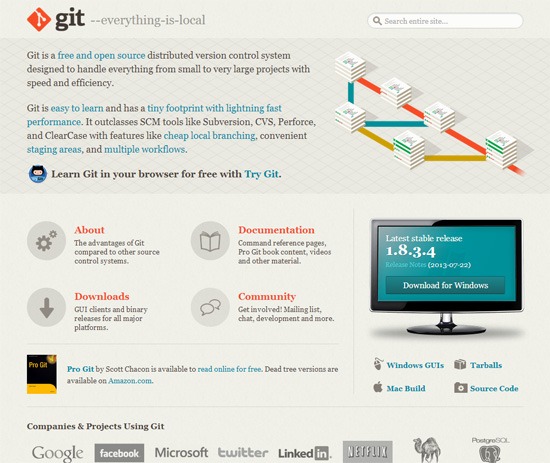
    <p><a href="http://git-scm.com/" rel="nofollow external" class="bo">Git</a>, for one, is arguably the most popular open source version control system out there right now.</p>
    <p><a href="http://git-scm.com/" rel="nofollow external" class="bo"><img src="http://cdn.sixrevisions.com/0363-02_git_home.jpg" width="550" height="463" alt="Git home page screenshot." style="max-width: 100%; height: auto;"></a></p>
    <p>As a <a href="http://en.wikipedia.org/wiki/Distributed_revision_control" title="Distributed revision control - en.wikipedia.org" rel="nofollow external" class="bo">decentralized version control system</a>, Git offers:</p>
    <ul>
    <li>Incredible <strong>speed</strong>
    </li>
    <li>The ability to <strong>work offline</strong>
    </li>
    <li>The advantage of having a <strong>complete copy</strong> (including the project’s history) on your machine</li>
    </ul>
    <p>Another big advantage of Git is its superior <strong>branching management.</strong> Although other version control systems also know the concept of branches, Git was really <em>built around it</em>, and thus it provides a <em>super-fast and easy branching experience</em>. Once understood, making use of this concept can really take code quality to another level.</p>
    <p>Other concepts, like the <strong>Staging Area</strong> or the <strong>Stash</strong>, also contribute to making Git a very useful part of your coding tool belt.</p>
    <p>When choosing any tool, you should also keep another factor in mind: Popularity. A tool without adoption in the market, without a community, is most often badly documented, can’t be integrated with other systems, and is not sure to survive in the long run.</p>
    <p>Git has already arrived in the mainstream. With projects like the Linux kernel, Ruby on Rails, jQuery, and many other major open source projects, as well as big companies (such as Google, Facebook, and Twitter) using it, both of <em>Git’s quality and its longevity are proven.</em></p>
    <h3>Install Git</h3>
    <p>Installing Git has become incredibly easy in recent times (lucky you!).</p>
    <p>There are one-click installers for both <a href="http://code.google.com/p/git-osx-installer" rel="nofollow external" class="bo">Mac</a> and <a href="http://code.google.com/p/msysgit" rel="nofollow external" class="bo">Windows</a>.</p>
    <p>To follow along with this guide, please install Git on your computer first.</p>
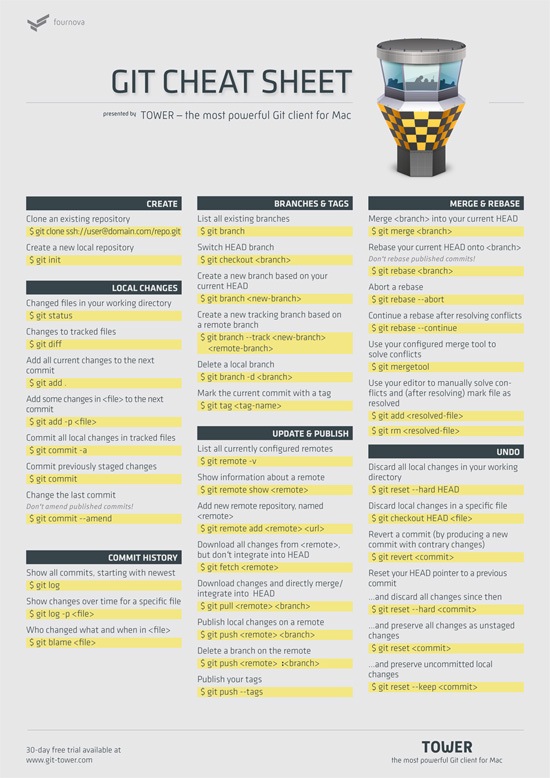
    <p>Also, having our <a href="http://www.git-tower.com/blog/git-cheat-sheet/" rel="nofollow external" class="bo">free Git cheat sheet</a>  handy will be useful before we begin delving into Git.</p>
    <p>With the Git cheat sheet, you don’t have to remember all the Git commands by heart, and it will allow you to deviate from this guide and explore Git on your own.</p>
    <p><a href="http://www.git-tower.com/blog/git-cheat-sheet/" rel="nofollow external" class="bo"><img src="http://cdn.sixrevisions.com/0363-03_git_cheat_sheet.jpg" width="550" height="778" style="max-width: 100%; height: auto;"></a></p>
    <p>After completing the Git installation, it’s time to fire up your command line.</p>
    <p>Two basic configurations should be made before you get started: Your name and your email.</p>
    <p>To set your name and email, issue the two following Git commands, but modify them so that you’re using your own name and your own email address:</p>
    <pre>$ git config --global user.name "<strong>Your Name</strong>"</pre>
    <pre>$ git config --global user.email "<strong><a href="mailto:your@email.org">your@email.org</a></strong>" </pre>
    <h3>Start Using Git with Your First Repository</h3>
    <p>There are two ways to start working on a project with version control: <em>cloning an existing repository</em> and <em>creating a new repository</em>.</p>
    <h4>Cloning an Existing Repository</h4>
    <p>When you’re getting on board of a project that’s already running with a version control system, you were probably provided with a URL to the project’s <strong>repository</strong> on a remote server.</p>
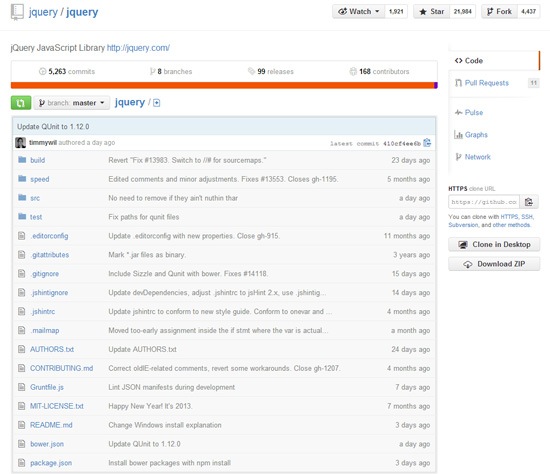
    <p><em>What’s a repository?</em> A repository is just a fancy term for a project’s <em>set of files and folders</em>.</p>
    <p>For example, check out <a href="https://github.com/jquery/jquery" rel="nofollow external" class="bo">jQuery’s repository on GitHub</a>:</p>
    <p><a href="https://github.com/jquery/jquery" rel="nofollow external" class="bo"><img src="http://cdn.sixrevisions.com/0363-04_github_jquery_repository.jpg" width="550" height="474" style="max-width: 100%; height: auto;"></a></p>
    <p>To get a copy of a project’s repository on your local computer, use the <code>git clone</code> command, like this:</p>
    <pre>$ git clone <strong><a href="https://github.com/gittower/git-crash-course.git">https://github.com/gittower/git-crash-course.git</a></strong></pre>
    <p>The command above will download the respective repository located at <em><a href="https://github.com/gittower/git-crash-course.git">https://github.com/gittower/git-crash-course.git</a></em> to your computer.</p>
    <p><strong>Note:</strong> If you don’t have a repository, feel free to clone from the above Git command example and fiddle with the test repository that it contains. You can also browse through open source projects on <a href="https://github.com/repositories" rel="nofollow external" class="bo">GitHub</a>, find a repository that’s interesting to you, and then clone it to your computer.</p>
    <h4>Creating a New Repository</h4>
    <p>The other possibility to getting started with version control is when you already have an existing project that is currently not under version control yet.</p>
    <p>Navigate into the project’s root folder with the command line, and then use the <code>git init</code> command to start versioning this project:</p>
    <pre>$ git init</pre>
    <h4>Verifying the Presence the .git Folder</h4>
    <p>You might be wondering where Git stores all the data about your repository.</p>
    <p>In both scenarios that I talked about — cloning an existing repository or creating a new repository — you should now have a hidden folder inside your project’s root folder. That folder is your local Git repository, and that folder’s name is <em>.git</em>.</p>
    <p>You can verify this by issuing the <code><a href="http://www.freebsd.org/cgi/man.cgi?query=ls&amp;apropos=0&amp;sektion=0&amp;manpath=FreeBSD+9.1-RELEASE&amp;arch=default&amp;format=html" rel="nofollow external" class="bo">ls</a></code> Unix command like this:</p>
    <pre>ls -la</pre>
    <p>Knowing that this folder exists is more than enough. You <strong>should not touch</strong> anything inside this magical folder.</p>
    <h3>Working on Your Files</h3>
    <p>When working on your project’s files, you’ll have a great deal of peace of mind, and it will help liberate your creative and experimental thinking.</p>
    <p>You don’t have to be fearful any longer about making changes to your files: modify, delete, add, copy, rename, or move them using whatever application  you prefer (such as your favorite editor, a file browser, etc.).</p>
    <p>Git will allow you to undo changes when necessary, and it won’t affect anyone else working on the same file.</p>
    <h4>Making Commits</h4>
    <p>It’s only when you feel you’ve reached a noteworthy state that you have to mind version control again.</p>
    <p>At this point, when you have reached a good stage in your work, it’s time to wrap up your changes in a <strong>commit.</strong></p>
    <p>A commit just means <em>submitting the changes you’ve made  to your files, to your repository.</em></p>
    <h4>Get an Overview of the Changes You’ve Made</h4>
    <p>My recommendation and a good practice: As the first step to making a commit, give yourself an overview of what you’ve changed.</p>
    <p>You can easily see an overview of your changes with the <code>git status</code> command:</p>
    <pre>$ git status</pre>
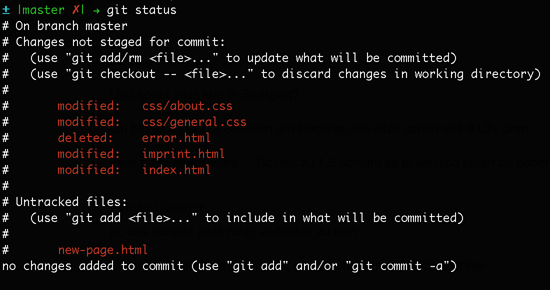
    <p>After issuing a <code>git status</code> command, Git will list all changes since you last committed, grouped into various categories.</p>
    <p>Here’s our working example output after issuing the <code>git status</code> command:</p>
    <p><img src="http://cdn.sixrevisions.com/0363-05_git_status01.png" width="550" height="290" alt="Git output example" style="max-width: 100%; height: auto;"></p>
    <p>You might be unfamiliar with a couple of terms in the working example output above:  </p>
    <ul>
    <li>
    <strong>Untracked files:</strong> Git calls files <em>untracked</em> when they aren’t yet under version control. In most cases, these are simply the <em>new files you’ve created</em> before committing to your repository<em>.</em>
    </li>
    <li>
    <strong>Staged/Unstaged files:</strong> Just because a file was modified doesn’t mean it’s automatically included in the next commit. To include changes in a commit, you explicitly need to tell Git to include them. This is a major difference that Git has compared to other version control systems; and a major advantage, at the same time, because it allows you to <em>compose a commit very precisely</em> with only related changes. Changes that were marked for the next commit are called <em>staged</em>, while changes that should simply be left as local modifications are called <em>unstaged</em>.</li>
    </ul>
    <h4>Preparing to Commit</h4>
    <p>Now is the time to mark the changes you want to wrap up in the next commit. In Git lingo, this process means you’re <em>staging your changes</em>.</p>
    <p>How do you stage your changes?</p>
    <ul>
    <li>Use the <code>git add</code> command for <em>modified and untracked files.</em>
    </li>
    <li>Use the <code>git rm</code> to confirm the <em>deletion of a file.</em>
    </li>
    <li>In cases where you want to <em>stage all of your changes</em> you can use the <code>git add -A</code> command.</li>
    </ul>
    <p>From our working example above, here’s how you would stage the <em>index.html</em> file (which was modified), the <em>new-page.html</em> file (which is  untracked), and the two modified files in the <em>css</em> folder:</p>
    <pre>$ git add index.html new-page.html css/*</pre>
    <p>Here’s the command confirming that you’d like to delete the <em>error.html</em> file:</p>
    <pre>$ git rm error.html</pre>
    <p>If you look at the output of the <code>git status</code> command from our working example above, you’ll see that, additionally, the <em>imprint.html</em> file was modified. I deliberately didn’t stage it with the <code>git add</code> command, because I want to leave it for a later commit.</p>
    <h4>Review Before the Commit</h4>
    <p>Again, I suggest taking a look at what <code>git status</code> tells you before finally making the commit.</p>
    <p>Here’s the output of our working example now, after I’ve staged the files I want to commit:</p>
    <p><img src="http://cdn.sixrevisions.com/0363-06_git_status02.png" width="550" height="280" style="max-width: 100%; height: auto;"></p>
    <p>The <em>Changes to be committed</em> paragraph informs you about what you just staged.</p>
    <h4>Make the Commit</h4>
    <p>To save this set of changes in a commit, you only have to use the <code>git commit</code> command with a good, descriptive message that tells you and others what the commit is about, right after the <code>-m</code> option, like this:</p>
    <pre>$ git commit -m <strong>"Implement the new login box"</strong></pre>
    <h4>Inspecting the Commit History</h4>
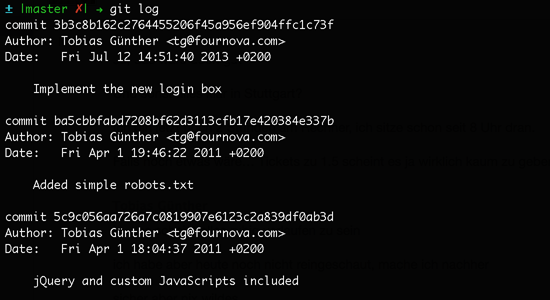
    <p>If you want to see what happened in the project so far, you can get an overview with the <code>git log</code> command:</p>
    <pre>$ git log</pre>
    <p>This Git command lists all recorded commits in chronological order.</p>
    <p><img src="http://cdn.sixrevisions.com/0363-07_git_log.png" width="550" height="300" style="max-width: 100%; height: auto;"></p>
    <h3>Your Next Steps to Git Mastery</h3>
    <p>Congratulations! By now, you’ve already grasped the most important concepts of version control and Git.</p>
    <p>To get your Git knowledge to the next level, I suggest the following steps.</p>
    <h4>Try a Git GUI</h4>
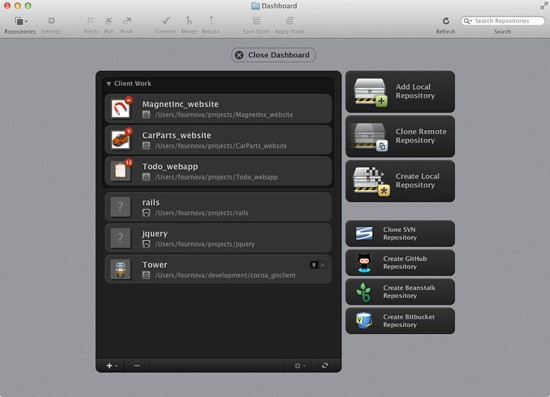
    <p>A lot of tasks can be performed easier and more comfortably using a desktop client application, let alone not having to memorize all of the commands and parameters.</p>
    <p>Windows users might want to have a look at <a href="http://code.google.com/p/tortoisegit" rel="nofollow external" class="bo">Tortoise Git</a>, while Mac OS users can give <a href="http://www.git-tower.com/" rel="nofollow external" class="bo">Tower</a> a try, the Git desktop client my team and I have created to make Git easier to use.</p>
    <p><a href="http://www.git-tower.com/" rel="nofollow external" class="bo"><img src="http://cdn.sixrevisions.com/0363-08_git_twr.jpg" width="550" height="397" style="max-width: 100%; height: auto;"></a></p>
    <h4>Git Learning Resources</h4>
    <p>In recent years, the amount of documentation, tutorials, and articles on Git has increased a ton.</p>
    <p>Read these resources to become better at using Git:</p>
    <ul>
    <li><a href="http://www.git-tower.com/learn/" rel="nofollow external" class="bo">Compilation of Git learning resources (books, articles, tutorials)</a></li>
    <li><a href="http://rogerdudler.github.io/git-guide/" rel="nofollow external" class="bo">Git – the Simple Guide</a></li>
    <li><a href="http://git-scm.com/book" rel="nofollow external" class="bo"><em>Pro Git</em> e-book (free)</a></li>
    <li>
    <em><a href="http://amzn.to/15jjdPt" rel="nofollow external" class="bo">Version Control with Git: Powerful tools and techniques for collaborative software development</a></em> (Amazon.com)</li>
    <li>
    <em><a href="http://amzn.to/13JiFmi" rel="nofollow external" class="bo">Git Pocket Guide</a></em> (Amazon.com)</li>
    </ul>
    <h3>Conclusion</h3>
    <p>Version control has become an integral part in the modern developer’s workflow.</p>
    <p>While version control used to be a chore in the past, systems like Git not only makes version control dead-simple, but also provides a lot of other workflow benefits.</p>
    <h3>Related Content</h3>
    <ul>
    <li><a href="http://sixrevisions.com/resources/git-tutorials-beginners/" rel="nofollow external" class="bo">Top 10 Git Tutorials for Beginners</a></li>
    <li><a href="http://sixrevisions.com/project-management/the-ultimate-guide-to-version-control-for-designers/" rel="nofollow external" class="bo">The Ultimate Guide to Version Control for Designers</a></li>
    <li><a href="http://sixrevisions.com/web-development/hacking-google-analytics-ideas-tips-and-tricks/" rel="nofollow external" class="bo">Hacking Google Analytics: Ideas, Tips and Tricks</a></li>
    <li>
    <em>Related categories</em>: <a href="http://sixrevisions.com/category/web-development/" rel="nofollow external" class="bo">Web Development</a> and <a href="http://sixrevisions.com/category/project-management/" rel="nofollow external" class="bo">Project Management</a>
    </li>
    </ul>
    <h3>About the Author</h3>
    <p><img src="http://cdn.sixrevisions.com/authors/tobias_gunther_small.jpg" alt="" width="80" height="80" style="max-width: 100%; height: auto;"><strong>Tobias Günther</strong> is CEO and founder of fournova. In 2010, he set out to make Git easier to use: Together with his team, he develops the Git desktop client, <a href="http://www.git-tower.com/" rel="nofollow external" class="bo">Tower</a> for Mac.</p>
    <p>The post <a href="http://sixrevisions.com/web-development/easy-git-tutorial/" rel="nofollow external" class="bo">How to Quickly Get Started with Git</a> appeared first on <a href="http://sixrevisions.com" rel="nofollow external" class="bo">Six Revisions</a>.</p>
    </div>
]]>
</Body>
<Summary>A basic understanding of version control has become a necessity for everyone working with code, no matter if you’re a software developer, a web designer, or even a graphics designer who has to...</Summary>
<Website>http://feedproxy.google.com/~r/SixRevisions/~3/COx4UVQR35A/</Website>
<TrackingUrl>https://my3.my.umbc.edu/api/v0/pixel/news/33194/guest@my.umbc.edu/29cdb0edeb74673db2758f652a2a62eb/api/pixel</TrackingUrl>
<Tag>css</Tag>
<Tag>database</Tag>
<Tag>design</Tag>
<Tag>development</Tag>
<Tag>html</Tag>
<Tag>javascript</Tag>
<Tag>mysql</Tag>
<Tag>sql</Tag>
<Tag>web</Tag>
<Tag>web-development</Tag>
<Group token="retired-583">Web Developer - Build Group</Group>
<GroupUrl>https://my3.my.umbc.edu/groups/retired-583</GroupUrl>
<AvatarUrl>https://assets3-my.umbc.edu/system/shared/avatars/groups/000/000/583/fc60f5d7abc2e080599bb6dc465db54d/xsmall.png?1363101197</AvatarUrl>
<AvatarUrl size="original">https://assets4-my.umbc.edu/system/shared/avatars/groups/000/000/583/fc60f5d7abc2e080599bb6dc465db54d/original.jpg?1363101197</AvatarUrl>
<AvatarUrl size="xxlarge">https://assets4-my.umbc.edu/system/shared/avatars/groups/000/000/583/fc60f5d7abc2e080599bb6dc465db54d/xxlarge.png?1363101197</AvatarUrl>
<AvatarUrl size="xlarge">https://assets4-my.umbc.edu/system/shared/avatars/groups/000/000/583/fc60f5d7abc2e080599bb6dc465db54d/xlarge.png?1363101197</AvatarUrl>
<AvatarUrl size="large">https://assets3-my.umbc.edu/system/shared/avatars/groups/000/000/583/fc60f5d7abc2e080599bb6dc465db54d/large.png?1363101197</AvatarUrl>
<AvatarUrl size="medium">https://assets3-my.umbc.edu/system/shared/avatars/groups/000/000/583/fc60f5d7abc2e080599bb6dc465db54d/medium.png?1363101197</AvatarUrl>
<AvatarUrl size="small">https://assets4-my.umbc.edu/system/shared/avatars/groups/000/000/583/fc60f5d7abc2e080599bb6dc465db54d/small.png?1363101197</AvatarUrl>
<AvatarUrl size="xsmall">https://assets3-my.umbc.edu/system/shared/avatars/groups/000/000/583/fc60f5d7abc2e080599bb6dc465db54d/xsmall.png?1363101197</AvatarUrl>
<AvatarUrl size="xxsmall">https://assets4-my.umbc.edu/system/shared/avatars/groups/000/000/583/fc60f5d7abc2e080599bb6dc465db54d/xxsmall.png?1363101197</AvatarUrl>
<Sponsor>Web Developer - Build Group</Sponsor>
<PawCount>0</PawCount>
<CommentCount>0</CommentCount>
<CommentsAllowed>true</CommentsAllowed>
<PostedAt>Fri, 26 Jul 2013 06:00:48 -0400</PostedAt>
</NewsItem>

<NewsItem contentIssues="true" id="33196" important="false" status="posted" url="https://my3.my.umbc.edu/posts/33196">
<Title>You are not your users!</Title>
<Body>
<![CDATA[
    <div class="html-content">Garrett Heath recounts Tony Santos' fantastic OSCON talk on human-centered design<div><table border="0"><tbody><tr><td>
    <a href="http://share.feedsportal.com/share/twitter/?u=http%3A%2F%2Fwww.netmagazine.com%2Fopinions%2Fyou-are-not-your-users&amp;t=You+are+not+your+users%21" rel="nofollow external" class="bo"><img src="http://res3.feedsportal.com/social/twitter.png" style="max-width: 100%; height: auto;"></a> <a href="http://share.feedsportal.com/share/facebook/?u=http%3A%2F%2Fwww.netmagazine.com%2Fopinions%2Fyou-are-not-your-users&amp;t=You+are+not+your+users%21" rel="nofollow external" class="bo"><img src="http://res3.feedsportal.com/social/facebook.png" style="max-width: 100%; height: auto;"></a> <a href="http://share.feedsportal.com/share/linkedin/?u=http%3A%2F%2Fwww.netmagazine.com%2Fopinions%2Fyou-are-not-your-users&amp;t=You+are+not+your+users%21" rel="nofollow external" class="bo"><img src="http://res3.feedsportal.com/social/linkedin.png" style="max-width: 100%; height: auto;"></a> <a href="http://share.feedsportal.com/share/gplus/?u=http%3A%2F%2Fwww.netmagazine.com%2Fopinions%2Fyou-are-not-your-users&amp;t=You+are+not+your+users%21" rel="nofollow external" class="bo"><img src="http://res3.feedsportal.com/social/googleplus.png" style="max-width: 100%; height: auto;"></a> <a href="http://share.feedsportal.com/share/email/?u=http%3A%2F%2Fwww.netmagazine.com%2Fopinions%2Fyou-are-not-your-users&amp;t=You+are+not+your+users%21" rel="nofollow external" class="bo"><img src="http://res3.feedsportal.com/social/email.png" style="max-width: 100%; height: auto;"></a>
    </td></tr></tbody></table></div>
    <br><br><a href="http://da.feedsportal.com/r/172449308203/u/49/f/502346/c/32632/s/2f301100/a2.htm" rel="nofollow external" class="bo"><img src="http://da.feedsportal.com/r/172449308203/u/49/f/502346/c/32632/s/2f301100/a2.img" style="max-width: 100%; height: auto;"></a>
    </div>
]]>
</Body>
<Summary>Garrett Heath recounts Tony Santos' fantastic OSCON talk on human-centered design     </Summary>
<Website>http://feedproxy.google.com/~r/net/topstories/~3/PL3ElpJ8S24/story01.htm</Website>
<TrackingUrl>https://my3.my.umbc.edu/api/v0/pixel/news/33196/guest@my.umbc.edu/d4b8eaa9b0cdc37668d9da93b2efdfb7/api/pixel</TrackingUrl>
<Tag>css</Tag>
<Tag>development</Tag>
<Tag>html</Tag>
<Tag>javascript</Tag>
<Tag>mysql</Tag>
<Tag>net</Tag>
<Tag>php</Tag>
<Tag>sql</Tag>
<Tag>web</Tag>
<Group token="retired-583">Web Developer - Build Group</Group>
<GroupUrl>https://my3.my.umbc.edu/groups/retired-583</GroupUrl>
<AvatarUrl>https://assets3-my.umbc.edu/system/shared/avatars/groups/000/000/583/fc60f5d7abc2e080599bb6dc465db54d/xsmall.png?1363101197</AvatarUrl>
<AvatarUrl size="original">https://assets4-my.umbc.edu/system/shared/avatars/groups/000/000/583/fc60f5d7abc2e080599bb6dc465db54d/original.jpg?1363101197</AvatarUrl>
<AvatarUrl size="xxlarge">https://assets4-my.umbc.edu/system/shared/avatars/groups/000/000/583/fc60f5d7abc2e080599bb6dc465db54d/xxlarge.png?1363101197</AvatarUrl>
<AvatarUrl size="xlarge">https://assets4-my.umbc.edu/system/shared/avatars/groups/000/000/583/fc60f5d7abc2e080599bb6dc465db54d/xlarge.png?1363101197</AvatarUrl>
<AvatarUrl size="large">https://assets3-my.umbc.edu/system/shared/avatars/groups/000/000/583/fc60f5d7abc2e080599bb6dc465db54d/large.png?1363101197</AvatarUrl>
<AvatarUrl size="medium">https://assets3-my.umbc.edu/system/shared/avatars/groups/000/000/583/fc60f5d7abc2e080599bb6dc465db54d/medium.png?1363101197</AvatarUrl>
<AvatarUrl size="small">https://assets4-my.umbc.edu/system/shared/avatars/groups/000/000/583/fc60f5d7abc2e080599bb6dc465db54d/small.png?1363101197</AvatarUrl>
<AvatarUrl size="xsmall">https://assets3-my.umbc.edu/system/shared/avatars/groups/000/000/583/fc60f5d7abc2e080599bb6dc465db54d/xsmall.png?1363101197</AvatarUrl>
<AvatarUrl size="xxsmall">https://assets4-my.umbc.edu/system/shared/avatars/groups/000/000/583/fc60f5d7abc2e080599bb6dc465db54d/xxsmall.png?1363101197</AvatarUrl>
<Sponsor>Web Developer - Build Group</Sponsor>
<PawCount>0</PawCount>
<CommentCount>0</CommentCount>
<CommentsAllowed>true</CommentsAllowed>
<PostedAt>Fri, 26 Jul 2013 05:35:24 -0400</PostedAt>
</NewsItem>

<NewsItem contentIssues="true" id="33193" important="false" status="posted" url="https://my3.my.umbc.edu/posts/33193">
<Title>How to boost your profit margin with a good brief</Title>
<Body>
<![CDATA[
    <div class="html-content">
    <p><img alt="thumbnail" src="http://netdna.webdesignerdepot.com/uploads/2013/07/thumbnail26.jpg" width="200" height="160" style="max-width: 100%; height: auto;">Do you cringe at the mention of a “brief”? It’s just a document for clients and “suits,” right? Wrong!</p> <p>A brief has the potential to be the single biggest factor to determine your profit margin, which means you should care about them.</p> <p>Creating a great design brief takes extra effort and time, yet a tight brief can save a designer up to 20% of the project’s timeline. If you’re working on a fixed-fee project, then that adds up to hundreds, if not thousands, of dollars saved.</p> <p>If you’re being paid for time and materials, then you won’t necessarily be losing money, but we all know how soul-destroying getting negative feedback and constant requests for changes can be, all because of a poor brief. It causes frustration for both the designer and the client.</p> <p> </p> <h1>How to develop a top design brief</h1> <h2>Ask questions</h2> <p>Don’t be afraid to ask questions. Ask as many as possible, and keep asking until you are satisfied that you understand what your client’s brief is. A great way to do this is by using a briefing template that you know and trust and that you feel has all of the necessary questions (so that you don’t forget to ask certain ones). Don’t just email the template to your client. Go through it with them. Discuss each question and even fill it in for them.</p> <h2>Communicate with your clients</h2> <p>Explain to the client the importance of the brief. Your clients are probably busy people, too, and so they might not appreciate the importance of spending extra time creating a brief.</p> <h2>Collaborate with your clients and colleagues</h2> <p>Collaborate. The more people involved in a design project (this could include more than one person on the client’s side, as well as the designer, the account manager, the creative director), the more important the brief becomes. Make sure that you all collaborate on the brief, so that by the time it is approved, everyone who is involved will understand what is required and what the brief is.</p> <h2>Use a written document</h2> <p>Always put the brief in writing. If you’re a freelancer, then you might not like this one. Just taking a verbal brief from the client is often quicker and easier. While discussing the brief is important, a written document gives you more cover and helps to protect your profit margin. If you’ve ever heard a client say, “I think you misunderstood what I meant” or “I don’t recall saying that,” then you’d know that having the brief in writing is the only option.</p> <h2>Use a single document</h2> <p>Have one brief, in one place. The best way to explain this is with a scenario. I’m sure many of you have experienced this: the client provides a written brief, and you meet (or Skype) to discuss it. Cool — you know what they want. A few days later, you receive an email with a few updates. Then the client calls to change something else. You’re now a week into the project, and the written brief you received is out of date, and keeping track of the phone calls and email conversations is getting confusing. What was the brief that the client approved? Keeping the brief in one place where all communication is documented will help to keep the project on track and keep disputes to a minimum.</p> <h2>Use the cloud</h2> <p>Put your brief in the cloud. Annotating a PDF or tracking changes in Microsoft Word gets messy. Long email trails and forgotten conversations are even messier. You’re a web designer, so use the web for your briefs. It will increase your productivity, your client’s productivity and your bottom line.</p> <p> </p> <h1>The final word</h1> <p>Briefs are never going to be the “exciting” part of web design, or any creative process. However, spending time developing a brief properly and giving it the care it requires, all the way to its final approval, leads to several things:</p> <ul> <li>higher profit margins;</li> <li>happier clients;</li> <li>happier designers;</li> <li>more productive freelancers and studios.</li> </ul> <p>Sounds simple, right? Take a few moments to think about your briefing process. Could it be improved? Are you wasting time and money because of poor or lazy briefs? The time to improve your briefing process is now.</p> <p> </p> <p><em><strong>How do you manage your briefs? Do you use formal documents? Let us know in the comments.</strong></em></p> <p><em>Featured image/thumbnail, <a href="http://www.shutterstock.com/pic-134719109/stock-photo-image-of-confident-colleagues-looking-at-their-business-partner-offering-them-to-sign-paper-at.html" rel="nofollow external" class="bo">briefing image</a> via Shutterstock.</em></p> <p><br><br> </p>
    <table width="100%"> <tbody>
    <tr> <td> <a href="http://www.mightydeals.com/deal/trainsimple-8-video-courses.html?ref=inwidget" rel="nofollow external" class="bo"><strong>8 Downloadable Web Design Courses – 90% off!</strong></a> </td> <td> <a href="http://www.mightydeals.com/?ref=inwidget" rel="nofollow external" class="bo"><br> <img src="http://mightydeals.com/web/images/widget-logo.png" height="40" width="90" alt="How to boost your profit margin with a good brief" style="max-width: 100%; height: auto;"><br> </a> </td> </tr> </tbody>
    </table> <p><br> </p> <a href="http://www.webdesignerdepot.com/2013/07/how-to-boost-your-profit-margin-with-a-good-brief/" rel="nofollow external" class="bo">Source</a> <div><table border="0"><tbody><tr><td>
    <a href="http://share.feedsportal.com/share/twitter/?u=http%3A%2F%2Fwww.webdesignerdepot.com%2F2013%2F07%2Fhow-to-boost-your-profit-margin-with-a-good-brief%2F&amp;t=How+to+boost+your+profit+margin+with+a+good+brief" rel="nofollow external" class="bo"><img src="http://res3.feedsportal.com/social/twitter.png" style="max-width: 100%; height: auto;"></a> <a href="http://share.feedsportal.com/share/facebook/?u=http%3A%2F%2Fwww.webdesignerdepot.com%2F2013%2F07%2Fhow-to-boost-your-profit-margin-with-a-good-brief%2F&amp;t=How+to+boost+your+profit+margin+with+a+good+brief" rel="nofollow external" class="bo"><img src="http://res3.feedsportal.com/social/facebook.png" style="max-width: 100%; height: auto;"></a> <a href="http://share.feedsportal.com/share/linkedin/?u=http%3A%2F%2Fwww.webdesignerdepot.com%2F2013%2F07%2Fhow-to-boost-your-profit-margin-with-a-good-brief%2F&amp;t=How+to+boost+your+profit+margin+with+a+good+brief" rel="nofollow external" class="bo"><img src="http://res3.feedsportal.com/social/linkedin.png" style="max-width: 100%; height: auto;"></a> <a href="http://share.feedsportal.com/share/gplus/?u=http%3A%2F%2Fwww.webdesignerdepot.com%2F2013%2F07%2Fhow-to-boost-your-profit-margin-with-a-good-brief%2F&amp;t=How+to+boost+your+profit+margin+with+a+good+brief" rel="nofollow external" class="bo"><img src="http://res3.feedsportal.com/social/googleplus.png" style="max-width: 100%; height: auto;"></a> <a href="http://share.feedsportal.com/share/email/?u=http%3A%2F%2Fwww.webdesignerdepot.com%2F2013%2F07%2Fhow-to-boost-your-profit-margin-with-a-good-brief%2F&amp;t=How+to+boost+your+profit+margin+with+a+good+brief" rel="nofollow external" class="bo"><img src="http://res3.feedsportal.com/social/email.png" style="max-width: 100%; height: auto;"></a>
    </td></tr></tbody></table></div>
    <br><br><a href="http://da.feedsportal.com/r/172311761018/u/49/f/661066/c/35285/s/2f2f003c/a2.htm" rel="nofollow external" class="bo"><img src="http://da.feedsportal.com/r/172311761018/u/49/f/661066/c/35285/s/2f2f003c/a2.img" style="max-width: 100%; height: auto;"></a>
    </div>
]]>
</Body>
<Summary>Do you cringe at the mention of a “brief”? It’s just a document for clients and “suits,” right? Wrong!   A brief has the potential to be the single biggest factor to determine your profit margin,...</Summary>
<Website>http://rss.feedsportal.com/c/35285/f/661066/s/2f2f003c/sc/4/l/0L0Swebdesignerdepot0N0C20A130C0A70Chow0Eto0Eboost0Eyour0Eprofit0Emargin0Ewith0Ea0Egood0Ebrief0C/story01.htm</Website>
<TrackingUrl>https://my3.my.umbc.edu/api/v0/pixel/news/33193/guest@my.umbc.edu/df8dd2eb7b71df4ed0b8495fe3f8930d/api/pixel</TrackingUrl>
<Tag>art</Tag>
<Tag>business</Tag>
<Tag>css</Tag>
<Tag>design</Tag>
<Tag>development</Tag>
<Tag>html</Tag>
<Tag>html5</Tag>
<Tag>illustrator</Tag>
<Tag>javascript</Tag>
<Tag>mysql</Tag>
<Tag>oracle</Tag>
<Tag>photoshop</Tag>
<Tag>php</Tag>
<Tag>sql</Tag>
<Group token="retired-583">Web Developer - Build Group</Group>
<GroupUrl>https://my3.my.umbc.edu/groups/retired-583</GroupUrl>
<AvatarUrl>https://assets3-my.umbc.edu/system/shared/avatars/groups/000/000/583/fc60f5d7abc2e080599bb6dc465db54d/xsmall.png?1363101197</AvatarUrl>
<AvatarUrl size="original">https://assets4-my.umbc.edu/system/shared/avatars/groups/000/000/583/fc60f5d7abc2e080599bb6dc465db54d/original.jpg?1363101197</AvatarUrl>
<AvatarUrl size="xxlarge">https://assets4-my.umbc.edu/system/shared/avatars/groups/000/000/583/fc60f5d7abc2e080599bb6dc465db54d/xxlarge.png?1363101197</AvatarUrl>
<AvatarUrl size="xlarge">https://assets4-my.umbc.edu/system/shared/avatars/groups/000/000/583/fc60f5d7abc2e080599bb6dc465db54d/xlarge.png?1363101197</AvatarUrl>
<AvatarUrl size="large">https://assets3-my.umbc.edu/system/shared/avatars/groups/000/000/583/fc60f5d7abc2e080599bb6dc465db54d/large.png?1363101197</AvatarUrl>
<AvatarUrl size="medium">https://assets3-my.umbc.edu/system/shared/avatars/groups/000/000/583/fc60f5d7abc2e080599bb6dc465db54d/medium.png?1363101197</AvatarUrl>
<AvatarUrl size="small">https://assets4-my.umbc.edu/system/shared/avatars/groups/000/000/583/fc60f5d7abc2e080599bb6dc465db54d/small.png?1363101197</AvatarUrl>
<AvatarUrl size="xsmall">https://assets3-my.umbc.edu/system/shared/avatars/groups/000/000/583/fc60f5d7abc2e080599bb6dc465db54d/xsmall.png?1363101197</AvatarUrl>
<AvatarUrl size="xxsmall">https://assets4-my.umbc.edu/system/shared/avatars/groups/000/000/583/fc60f5d7abc2e080599bb6dc465db54d/xxsmall.png?1363101197</AvatarUrl>
<Sponsor>Web Developer - Build Group</Sponsor>
<PawCount>0</PawCount>
<CommentCount>0</CommentCount>
<CommentsAllowed>true</CommentsAllowed>
<PostedAt>Fri, 26 Jul 2013 05:15:08 -0400</PostedAt>
<EditAt>Fri, 26 Jul 2013 05:15:08 -0400</EditAt>
</NewsItem>

<NewsItem contentIssues="false" id="33233" important="false" status="posted" url="https://my3.my.umbc.edu/posts/33233">
<Title>Heroku Staging</Title>
<Body>
<![CDATA[
    <div class="html-content">
    <p>Building a staging environment on Heroku is pretty straightforward, especially now they’ve released their <a href="https://blog.heroku.com/archives/2013/6/27/heroku-fork" rel="nofollow external" class="bo">new ‘fork’ feature</a>. </p>
    
    <p>To fork your app and ensure that all your assets, environmental variables, and Postgres databases are cloned, simply run:</p>
    
    <pre><code>heroku fork -a yourapp yourapp-staging &#x000A;    </code></pre>
    
    <p>I also recommend automatically deploying the staging server whenever you push to master. This is convenient, as it means you have a up-to-date version of your app always running. Your can test on staging, and then deploy production a couple of times a day. </p>
    
    <p>To automate staging deploys follow the instructions on the  <a href="https://github.com/himynameisjonas/github-heroku-pusher" rel="nofollow external" class="bo">github-heroku-pusher</a> project. A GitHub webhook POSTs to your deploy server, which will then deploy your staging environment in the background.</p>
    </div>
]]>
</Body>
<Summary>Building a staging environment on Heroku is pretty straightforward, especially now they’ve released their new ‘fork’ feature.     To fork your app and ensure that all your assets, environmental...</Summary>
<Website>http://blog.alexmaccaw.com/heroku-staging</Website>
<TrackingUrl>https://my3.my.umbc.edu/api/v0/pixel/news/33233/guest@my.umbc.edu/32ed87bf86407b96989c7789cffcc916/api/pixel</TrackingUrl>
<Group token="retired-583">Web Developer - Build Group</Group>
<GroupUrl>https://my3.my.umbc.edu/groups/retired-583</GroupUrl>
<AvatarUrl>https://assets3-my.umbc.edu/system/shared/avatars/groups/000/000/583/fc60f5d7abc2e080599bb6dc465db54d/xsmall.png?1363101197</AvatarUrl>
<AvatarUrl size="original">https://assets4-my.umbc.edu/system/shared/avatars/groups/000/000/583/fc60f5d7abc2e080599bb6dc465db54d/original.jpg?1363101197</AvatarUrl>
<AvatarUrl size="xxlarge">https://assets4-my.umbc.edu/system/shared/avatars/groups/000/000/583/fc60f5d7abc2e080599bb6dc465db54d/xxlarge.png?1363101197</AvatarUrl>
<AvatarUrl size="xlarge">https://assets4-my.umbc.edu/system/shared/avatars/groups/000/000/583/fc60f5d7abc2e080599bb6dc465db54d/xlarge.png?1363101197</AvatarUrl>
<AvatarUrl size="large">https://assets3-my.umbc.edu/system/shared/avatars/groups/000/000/583/fc60f5d7abc2e080599bb6dc465db54d/large.png?1363101197</AvatarUrl>
<AvatarUrl size="medium">https://assets3-my.umbc.edu/system/shared/avatars/groups/000/000/583/fc60f5d7abc2e080599bb6dc465db54d/medium.png?1363101197</AvatarUrl>
<AvatarUrl size="small">https://assets4-my.umbc.edu/system/shared/avatars/groups/000/000/583/fc60f5d7abc2e080599bb6dc465db54d/small.png?1363101197</AvatarUrl>
<AvatarUrl size="xsmall">https://assets3-my.umbc.edu/system/shared/avatars/groups/000/000/583/fc60f5d7abc2e080599bb6dc465db54d/xsmall.png?1363101197</AvatarUrl>
<AvatarUrl size="xxsmall">https://assets4-my.umbc.edu/system/shared/avatars/groups/000/000/583/fc60f5d7abc2e080599bb6dc465db54d/xxsmall.png?1363101197</AvatarUrl>
<Sponsor>Web Developer - Build Group</Sponsor>
<PawCount>0</PawCount>
<CommentCount>0</CommentCount>
<CommentsAllowed>true</CommentsAllowed>
<PostedAt>Fri, 26 Jul 2013 05:00:00 -0400</PostedAt>
</NewsItem>

<NewsItem contentIssues="true" id="33192" important="false" status="posted" url="https://my3.my.umbc.edu/posts/33192">
<Title>Mistakes I&#8217;ve Made (And Lessons Learned Along The Way)</Title>
<Body>
<![CDATA[
    <div class="html-content">
    <table width="650">
    <tbody>
    <tr>
    <td>
    <div>
    <img src="http://statisches.auslieferung.commindo-media-ressourcen.de/advertisement.gif" alt="" style="max-width: 100%; height: auto;"><br><a href="http://auslieferung.commindo-media-ressourcen.de/random.php?mode=target&amp;collection=smashing-rss&amp;position=1" rel="nofollow external" class="bo"><img src="http://auslieferung.commindo-media-ressourcen.de/random.php?mode=image&amp;collection=smashing-rss&amp;position=1" alt="" style="max-width: 100%; height: auto;"></a> <a href="http://auslieferung.commindo-media-ressourcen.de/random.php?mode=target&amp;collection=smashing-rss&amp;position=2" rel="nofollow external" class="bo"><img src="http://auslieferung.commindo-media-ressourcen.de/random.php?mode=image&amp;collection=smashing-rss&amp;position=2" alt="" style="max-width: 100%; height: auto;"></a> <a href="http://auslieferung.commindo-media-ressourcen.de/random.php?mode=target&amp;collection=smashing-rss&amp;position=3" rel="nofollow external" class="bo"><img src="http://auslieferung.commindo-media-ressourcen.de/random.php?mode=image&amp;collection=smashing-rss&amp;position=3" alt="" style="max-width: 100%; height: auto;"></a>
    </div>
    </td>
    </tr>
    </tbody>
    </table>
    <p>We all make mistakes. Whether in our design and development work or just in life in general, we all do it. Thankfully, even the biggest mistakes carry valuable lessons.</p>
    <p>As a contrast to the many Web design articles that focus on successes and what we can learn from those triumphs, this article looks to the other end of the spectrum to explore what failures teach us.</p>
    <p>Along the way, I will share stories of some of the missteps I have made in the course of my career and the lessons I’ve learned in the process — being ever mindful of composer John Powel’s words:</p>
    <blockquote>
    <p>“The only real mistake is the one from which we learn nothing.”</p>
    </blockquote>
    <h3>Mistake #1: Putting Process Over Projects (And People)</h3>
    <p>Anyone who has been designing and developing websites for any amount of time has come up with a process for working. Having a process is good, but be careful that it does not overshadow the project itself or the people involved.</p>
    <p>I was reminded of this a few years ago in a project that was going badly. The simple reality was that I was not getting along with the project manager who was appointed by the client. Our personalities clashed almost from the start, as I found her feedback and requests to be misguided and her personality abrasive. At the same time, I am sure she found me unhelpful and combative because I was unwilling to honor all of her requests.</p>
    <p>As frustration grew, I tried to fall back on our process as a way of adding structure to the relationship and trying to get it back on track. If she made a request that took us outside of our normal process, I explained how we could not do it without setting the project back in both time and budget. The worse the project got, the more I deferred to our process, until the client, exasperated to the limit, told me that I seemed to care more about our process than the project.</p>
    <p>My plan had backfired. I had tried to lean on our process in order to fix the problems, instead of having a difficult confrontation and dealing with the real issue — the fact that personality clashes were becoming strained to the point that nothing was being accomplished.</p>
    <p>Eventually, we reset the project by calling for a meeting to clear the air and address the problems honestly so that we could move forward. While I continued as the project lead on our side, I brought in another team member, someone who did not have a rocky history with the client’s project manager, to handle the day-to-day communications. Even though she acted as little more than an interpreter for me in many cases, the fresh voice and personality from our side did wonders for the relationship, and the project manager responded to our new team member much better than she had to me.</p>
    <p>Additionally, we looked at the client’s requests a little more deeply and, rather than dismissing them outright because they deviated from our normal process, tried to identify the reasoning behind each request so that we could honor them in the spirit in which they were made (which we normally do anyway). We realized that those requests didn’t really affect our normal process in a big way. Any deviation was minor, and the relationship and the project were much better off with the flexibility in our process.</p>
    <p><a href="http://media.smashingmagazine.com/wp-content/uploads/2013/05/people-project-process.jpg" rel="nofollow external" class="bo"><img alt="People &gt; Project &gt; Process" src="http://media.smashingmagazine.com/wp-content/uploads/2013/05/people-project-process.jpg" width="520" height="292" style="max-width: 100%; height: auto;"></a><br>
    <em>People are more important than the project, which is more important than the process.</em></p>
    <p>Of course, you need to strike a balance. A process exists for a reason, and if you abandon it whenever anyone shows resistance, then there is little point in having a process at all. That being said, any good process has some flexibility to accommodate the different needs of clients and projects.</p>
    <p><strong>Lesson learned</strong>: Followed blindly, no process will save you from having to deal with difficult personalities or bumps in the road. A process is meant to help a project along, not to be hidden behind when the going gets tough. For additional reading on client communications, see my previous articles, “<a href="http://www.smashingmagazine.com/2012/07/16/keys-better-client-communication/" rel="nofollow external" class="bo">Keys to Better Communication With Clients</a>” and “<a href="http://www.smashingmagazine.com/2012/01/25/how-to-deliver-exceptional-client-service/" rel="nofollow external" class="bo">How to Deliver Exceptional Client Service</a>.”</p>
    <h3>Mistake #2: Telling Instead Of Showing</h3>
    <p>I frequently speak with clients about their website needs. I listen to their concerns and the issues they’re having with their current website, and I tell them how we can meet their needs. Note that I said I “tell” them how we can help, when I should usually be <em>showing</em> what we can do for them.</p>
    <p>This might not seem like a big difference, but it could mean the difference between winning a new project or losing it to someone else — which is exactly what happened to me recently.</p>
    <p>A few weeks ago, I was informed by a prospective client that they had decided to work with another provider. Whenever this happens, I am gracious and thank the client for considering us in the first place. I also ask them what the deciding factor was. In this case, they loved our proposal and solutions, but another company had given a detailed demonstration of their preferred CMS and showed how they would use it to keep the website up to date. That company <em>showed</em> them instead of <em>told</em> them.</p>
    <p>I’d be lying if I said I didn’t kick myself upon hearing this feedback. I would have been happy to give this client a CMS demonstration, but they didn’t ask, so I didn’t offer. Instead, I answered their questions — all the while thinking I was giving them what they wanted.</p>
    <p><a href="http://www.flickr.com/photos/23322134@N02/4665323296/" rel="nofollow external" class="bo"><img alt="Certain things are more effective when shown instead of told. Image credit: flickr" src="http://media.smashingmagazine.com/wp-content/uploads/2013/05/fireworks.jpg" width="520" height="292" style="max-width: 100%; height: auto;"></a><br>
    <em>Certain things are more effective when <u>shown</u> instead of <u>told</u>. (Image: <a href="http://www.flickr.com/photos/23322134@N02/4665323296/" rel="nofollow external" class="bo">Joe Penniston</a>)</em></p>
    <p>The other provider’s CMS is not necessarily easier to use than the one I was offering, but I never even made that case because I <em>told</em> the client how easy our solution was to use, instead of <em>showing</em> them.</p>
    <p><strong>Lesson learned: </strong>Talk is cheap. Regardless of whether the client specifically asks for a demonstration in your proposal, showing them goes a long way by backing up your words.</p>
    <h3>Mistake #3: Not Informing Clients Of Staffing Changes</h3>
    <p>Staffing changes are a reality in this industry. Team members move onto other positions and opportunities, but business must go on. Projects need to be finished, and websites and clients need to be supported. As one team member departs and another joins, you will establish a plan for existing projects and clients, assigning responsibilities and tasks as needed. Still, however solid and measured your plans may be, don’t neglect to inform your clients of these staffing changes.</p>
    <p>I learned this lesson when a longtime colleague recently left for another position. We had a plan in place for the transition, a plan that involved him working with us part time to continue handling certain clients and services. The impact on our clients would be minimal, and I decided that we didn’t need to inform them of the changes because the services we provided would not suffer and the change in our staff would likely go unfelt. I was wrong.</p>
    <p>It didn’t take long for one of our clients to reach out to my departing colleague. My colleague’s work emails were now being forwarded to me, so I received the client’s request. We made the changes requested, and when I emailed the client to notify them that the work was done, I also explained the change in staffing to account for <strong>why the response was coming from me</strong>. As you can probably guess, they were surprised by this news, and what should have been a non-issue suddenly became an issue, simply because the client hadn’t learned of this sooner and was taken by surprise.</p>
    <p>While some staffing changes are certainly not appropriate to discuss with clients, others really do affect clients in a pretty big way. A person may be the client of a company as a whole, but if their day-to-day interaction is with a particular team member, then that team member “becomes” the company in their eyes. If that team member ever decides to leave, the client could feel as though they are switching providers, even though the company is still more or less the same.</p>
    <p>So, be proactive in informing clients of staffing changes. By explaining your plan for the transition of responsibilities with their account and reassuring them of your continued support of their company, you show them that, despite the change in staffing, you are still thinking about them and their needs.</p>
    <h3>Mistake #4: Focusing On Money At A Time Of Transition</h3>
    <p>Speaking of transitions, another reality in this industry is that clients sometimes decide to move onto another provider. When this happens, there is a period of transition away from your services, and you will likely need to be involved in that transition. This can be a strange and uncomfortable time, in part because you’re concerned about money.</p>
    <p>Ongoing clients have an incentive to pay their invoices because they want to continue working with you. Clients who switch providers are worrying because of the possibility that they won’t honor any outstanding invoices — including time spent helping them transition away from your services.</p>
    <p>This situation is delicate and needs to be handled case by case. Their reason for leaving, their overall payment history, how much they currently owe you (if anything), and how involved you will need to be during the transition are all factors that will determine how you handle the situation. The big lesson I have learned, however, is that dwelling on exactly when you will get paid during this time of transition, which is often a time of uncertainty and even fear for the client, is rarely wise.</p>
    <p>When I’ve focused on payment and gotten aggressive in making sure the client understands their financial obligation to us, those clients have actually turned out to be <em>less likely</em> to settle their accounts in good time than clients whom I approach more softly.</p>
    <p>Providing outstanding service to a client during a time of transition is the best way to end a relationship. If the relationship ends on a positive note, then the client will be more likely to pay what they owe and to say nice things about your company, because the last impression you’ve left them with was helpful and positive.</p>
    <p>Again, how you handle such situations will vary. If the breakup is messy, or you are owed a substantial amount of money or lawyers have to get involved, then you would handle that transition differently than if you had a good client who was leaving simply because you were no longer a good fit.</p>
    <p>For more tips on handling client payment issues, see “<a href="http://www.smashingmagazine.com/2010/04/09/dealing-with-clients-who-refuse-to-pay/" rel="nofollow external" class="bo">Dealing With Clients Who Refuse to Pay</a>.”</p>
    <h3>Mistake #5: Looking To The Past, Instead Of The Future</h3>
    <p>When we make decisions on a project, we often look for relevant data to justify our decisions. Referring to website analytics and usage data can help us make informed decisions, but remember that all of this data refers to the past, not the future.</p>
    <p>The Web industry is constantly moving forward, and if we make our decisions based solely on data gleaned from past usage, then the solutions we develop will be perfectly suited to those past situations, not necessarily future ones. This happened to me about a year ago when we were working with a client to come up with a mobile strategy for their website. While we absolutely wanted to make the website responsive, the scope of the project and the budget simply did not allow it. Plans were made and a budget allocated to redesign the website the following year, and a fully responsive design would certainly be part of that project, but for now, a separate mobile-only website would be our short-term solution.</p>
    <p>As with many mobile websites, our plan was to include only a small, targeted subset of the enormous content archive found on the current website. Looking back now, it was a mistake. Unfortunately, <a href="http://bradfrostweb.com/blog/mobile/content-parity/" rel="nofollow external" class="bo">content parity</a> wasn’t an option, so to determine what content to include, we looked to the analytics to see which pages mobile users were accessing. Office locations and directions, leadership team biographies, and contact details were the most popular pages being requested by mobile users, so that was what we included on the mobile website. There was, however, a problem with this logic of including only currently popular content on the mobile website: It did not account for future needs.</p>
    <p>As we were working on the mobile website, the client began to focus on their blog. They formed a team of authors among the subject matter experts in their organization and began publishing a lot of quality content — content that quickly became popular with their audience. This new blog content was often promoted and shared via social media, and many visitors accessed those links via mobile devices.</p>
    <p>You can probably see where this is heading. Because we had no data to show that the blog would be popular on mobile devices, we left the blog off of the mobile website. When the blog picked up steam and attracted interest from users on social networks and mobile devices, the website we had developed became a major problem. The experience would be as follows:</p>
    <ol>
    <li>A mobile user would see a comment about or link to an article in social media and, being curious about the article, click the link.</li>
    <li>The mobile device would navigate to the blog article on the full website, but then quickly redirect to the mobile website’s home page.</li>
    <li>Because the blog was not accessible from the mobile website’s menu, the visitor had to tap the “View full website” link and, on their small phone, try to find the blog on the full website. If that’s not frustrating, what is?</li>
    </ol>
    <p>Obviously, this experience was exceedingly poor, and very few visitors went through the entire process just to read the article. Most just left when presented with the mobile home page, instead of the article they were hoping to see. Even though we knew from the start that this mobile-only website was temporary, had we more effectively planned ahead and not based our decisions solely on analytics from the past, we may have been able to avoid this problem and develop a better solution.</p>
    <p>In this case, the answer was to kick off the responsive redesign project sooner and do away with this separate mobile-only website and its subset of content. The lesson we learned is that we <strong>have to look to both the past and the future</strong> when making decisions on a project.</p>
    <p><a href="http://www.flickr.com/photos/99175982@N00/4448688868/" rel="nofollow external" class="bo"><img alt="Always make new mistakes" src="http://media.smashingmagazine.com/wp-content/uploads/2013/05/new-mistakes.jpg" width="495" height="500" style="max-width: 100%; height: auto;"></a><br>
    <em>Making new mistakes helps you learn new lessons. (Image: <a href="http://www.flickr.com/photos/99175982@N00/4448688868/" rel="nofollow external" class="bo">Elyce Feliz</a>)</em></p>
    <p>This is why clients hire us in the first place — not only for our execution, but for our expertise. This expertise includes knowing where the industry is headed, what principles have to become an integral part of the experience (content parity) and what new technologies or approaches we can bring to a website today to ensure that it works well tomorrow.</p>
    <h3>The Value Of Mistakes</h3>
    <p>All of the blunders covered in this article are ones I’ve made that either took a project off track or strained a relationship or made a product far less successful than it could have been. As soon as I realized each mistake, I wished I could jump back in time and have a do-over.</p>
    <p>Well, I’ve yet to find that elusive time machine, but I do get do-overs of sorts. Every time I encounter a similar situation, I am able to make a better decision as a result of having learned the lesson from the previous mistake. That is my do-over, and that is the value of learning from one’s mistakes.</p>
    <p><a href="http://www.flickr.com/photos/47691521@N07/5496629643/" rel="nofollow external" class="bo"><img alt="" src="http://media.smashingmagazine.com/wp-content/uploads/2013/07/mistakes-made-lessons-learned.jpg" width="520" height="292" style="max-width: 100%; height: auto;"></a><br>
    <em>We all make mistakes. (Image: <a href="http://www.flickr.com/photos/47691521@N07/5496629643/" rel="nofollow external" class="bo">opensource.com</a>)</em></p>
    <h4>What about you?</h4>
    <p>What mistakes have you made, and what lessons have you learned from them? Not many folks like to talk about their mistakes, disappointments and things that just didn’t work out, but quite often they’re just as useful as all those amazing success stories you can read about in hundreds of books and articles. What tools worked for you and which didn’t, and why? Please share your stories and your thoughts with us by using the hashtag <code><a href="https://twitter.com/search?q=%23smworkflow&amp;src=typd&amp;mode=realtime" rel="nofollow external" class="bo">#smworkflow</a></code>!</p>
    <p><em>(al)</em></p>
    <hr>
    <p><small>© Jeremy Girard for <a href="http://www.smashingmagazine.com" rel="nofollow external" class="bo">Smashing Magazine</a>, 2013.</small></p>
    </div>
]]>
</Body>
<Summary>        We all make mistakes. Whether in our design and development work or just in life in general, we all do it. Thankfully, even the biggest mistakes carry valuable lessons.   As a contrast to...</Summary>
<Website>http://www.smashingmagazine.com/2013/07/26/mistakes-made-lessons-learned/</Website>
<TrackingUrl>https://my3.my.umbc.edu/api/v0/pixel/news/33192/guest@my.umbc.edu/ecaebbfd346020741d753b79acf2d0af/api/pixel</TrackingUrl>
<Tag>business</Tag>
<Tag>communication</Tag>
<Tag>css</Tag>
<Tag>design</Tag>
<Tag>development</Tag>
<Tag>discussions</Tag>
<Tag>html</Tag>
<Tag>javascript</Tag>
<Tag>mysql</Tag>
<Tag>opinion-column</Tag>
<Tag>php</Tag>
<Tag>sql</Tag>
<Tag>web</Tag>
<Group token="retired-583">Web Developer - Build Group</Group>
<GroupUrl>https://my3.my.umbc.edu/groups/retired-583</GroupUrl>
<AvatarUrl>https://assets3-my.umbc.edu/system/shared/avatars/groups/000/000/583/fc60f5d7abc2e080599bb6dc465db54d/xsmall.png?1363101197</AvatarUrl>
<AvatarUrl size="original">https://assets4-my.umbc.edu/system/shared/avatars/groups/000/000/583/fc60f5d7abc2e080599bb6dc465db54d/original.jpg?1363101197</AvatarUrl>
<AvatarUrl size="xxlarge">https://assets4-my.umbc.edu/system/shared/avatars/groups/000/000/583/fc60f5d7abc2e080599bb6dc465db54d/xxlarge.png?1363101197</AvatarUrl>
<AvatarUrl size="xlarge">https://assets4-my.umbc.edu/system/shared/avatars/groups/000/000/583/fc60f5d7abc2e080599bb6dc465db54d/xlarge.png?1363101197</AvatarUrl>
<AvatarUrl size="large">https://assets3-my.umbc.edu/system/shared/avatars/groups/000/000/583/fc60f5d7abc2e080599bb6dc465db54d/large.png?1363101197</AvatarUrl>
<AvatarUrl size="medium">https://assets3-my.umbc.edu/system/shared/avatars/groups/000/000/583/fc60f5d7abc2e080599bb6dc465db54d/medium.png?1363101197</AvatarUrl>
<AvatarUrl size="small">https://assets4-my.umbc.edu/system/shared/avatars/groups/000/000/583/fc60f5d7abc2e080599bb6dc465db54d/small.png?1363101197</AvatarUrl>
<AvatarUrl size="xsmall">https://assets3-my.umbc.edu/system/shared/avatars/groups/000/000/583/fc60f5d7abc2e080599bb6dc465db54d/xsmall.png?1363101197</AvatarUrl>
<AvatarUrl size="xxsmall">https://assets4-my.umbc.edu/system/shared/avatars/groups/000/000/583/fc60f5d7abc2e080599bb6dc465db54d/xxsmall.png?1363101197</AvatarUrl>
<Sponsor>Web Developer - Build Group</Sponsor>
<PawCount>0</PawCount>
<CommentCount>0</CommentCount>
<CommentsAllowed>true</CommentsAllowed>
<PostedAt>Fri, 26 Jul 2013 04:19:26 -0400</PostedAt>
<EditAt>Fri, 26 Jul 2013 04:19:26 -0400</EditAt>
</NewsItem>

</News>