Faculty and the creation of online accessible materials
Article in Inside Higher
http://www.insidehighered.com/news/2013/06/24/faculty-responsible-making-online-materials-accessible-disabled-students
]]>
http://www.insidehighered.com/news/2013/06/24/faculty-responsible-making-online-materials-accessible-disabled-students
https://my3.my.umbc.edu/api/v0/pixel/news/31738/guest@my.umbc.edu/dd75b9a2ae676059a400d250234e6da6/api/pixel
Office of Student Disability Services
https://my3.my.umbc.edu/groups/sss
https://assets2-my.umbc.edu/system/shared/avatars/groups/000/000/045/7bd1d4fb54807870659b6b4042c75b76/xsmall.png?1544104103
https://assets3-my.umbc.edu/system/shared/avatars/groups/000/000/045/7bd1d4fb54807870659b6b4042c75b76/original.jpg?1544104103
https://assets2-my.umbc.edu/system/shared/avatars/groups/000/000/045/7bd1d4fb54807870659b6b4042c75b76/xxlarge.png?1544104103
https://assets4-my.umbc.edu/system/shared/avatars/groups/000/000/045/7bd1d4fb54807870659b6b4042c75b76/xlarge.png?1544104103
https://assets3-my.umbc.edu/system/shared/avatars/groups/000/000/045/7bd1d4fb54807870659b6b4042c75b76/large.png?1544104103
https://assets3-my.umbc.edu/system/shared/avatars/groups/000/000/045/7bd1d4fb54807870659b6b4042c75b76/medium.png?1544104103
https://assets3-my.umbc.edu/system/shared/avatars/groups/000/000/045/7bd1d4fb54807870659b6b4042c75b76/small.png?1544104103
https://assets2-my.umbc.edu/system/shared/avatars/groups/000/000/045/7bd1d4fb54807870659b6b4042c75b76/xsmall.png?1544104103
https://assets3-my.umbc.edu/system/shared/avatars/groups/000/000/045/7bd1d4fb54807870659b6b4042c75b76/xxsmall.png?1544104103
Student Support Services
https://assets2-my.umbc.edu/system/shared/thumbnails/news/000/031/738/028e7cccc08d94601ba3e9407c743c7f/xxlarge.jpg?1372079204
https://assets4-my.umbc.edu/system/shared/thumbnails/news/000/031/738/028e7cccc08d94601ba3e9407c743c7f/xlarge.jpg?1372079204
https://assets4-my.umbc.edu/system/shared/thumbnails/news/000/031/738/028e7cccc08d94601ba3e9407c743c7f/large.jpg?1372079204
https://assets3-my.umbc.edu/system/shared/thumbnails/news/000/031/738/028e7cccc08d94601ba3e9407c743c7f/medium.jpg?1372079204
https://assets4-my.umbc.edu/system/shared/thumbnails/news/000/031/738/028e7cccc08d94601ba3e9407c743c7f/small.jpg?1372079204
https://assets3-my.umbc.edu/system/shared/thumbnails/news/000/031/738/028e7cccc08d94601ba3e9407c743c7f/xsmall.jpg?1372079204
https://assets4-my.umbc.edu/system/shared/thumbnails/news/000/031/738/028e7cccc08d94601ba3e9407c743c7f/xxsmall.jpg?1372079204
0
0
false
Mon, 24 Jun 2013 09:07:53 -0400
Sketching For Better Mobile Experiences
Mobile user experience design is maturing. One way to gauge this is to look at the tools at our disposal. Prototyping tools such as Balsamiq, Axure and Fireworks enable us to build wireframes and click-dummies, helping us to explain the targeted user experience. Cross-browser frameworks such as PhoneGap, Zurb Foundation and jQuery Mobile help us to create prototypes using the native languages of the Web: HTML, CSS and JavaScript.
Why? The Case For Sketching
We seem to be in a better position than ever to design great experiences in virtually no time. However, these tools come with a hidden cost: they tempt us to skip the key step necessary to creating a well-designed product — which is to take the time to understand the problem we are given.
That’s why I suggest to start using sketches to understand the problem and to come up with a concept before firing up your favorite tool.
Right now, you are probably thinking one of the following:
“We have a tight deadline and there is no time for doodling. We need to get started.”
“Designing in [insert your favorite tool] is faster by far. I need to get results quickly.”
“We need to present results to our [client or project partner or peers]. We cannot show them hand-drawn stuff.”
“Sorry, but I really can’t draw.”
Not only have I heard these objections a couple of times before, I’ve also said all of them myself.
Defining the Problem and the Solution
Sketching enables us to explore the problem space and define the solution space at the same time. It frames our current understanding of the problem, while also helping us to figure out possible solutions.
While we sketch out our thoughts, new ideas will emerge. The ambiguity and lack of detail in sketches foster new ideas. Here, ambiguity is a good thing, because we will automatically try to fill in the blanks in our heads. That’s what makes sketching “generative”: it captures the ideas we already have and sparks new ideas. As Bill Buxton says in Sketching User Experiences:
“Learning from sketches is based largely on the ambiguous nature of their representation. That is, they do not specify everything and lend themselves to, and encourage, various interpretations that were not consciously integrated into them by their creator.”
By sketching different solutions to a problem, we can explore them without immediately committing to one of them. This gives us new insight and raises new questions. Sketching is essentially a brainstorming exercise.
The “Cost” of Sketching
The fastest way to get something out of our heads is to grab a pen and a sheet of paper and quickly sketch it out. Trying to do the same in our favorite prototyping tool takes more time: We have to create a new project, decide on the right library to use, place our little rectangles on the canvas, draw little arrows connecting our little rectangles, rearrange everything a bit to make it look nice — and suddenly 30 minutes or more are gone.
If we don’t like what we see on a sheet of paper, we can just toss it in the bin and start over. Using our prototyping tool, however, makes throwing stuff away harder because of the time and effort we’ve spent creating it — even if the idea wasn’t a great one. Starting over is harder. Paper sketches, on the other hand, are cheap and fast.

The fastest way to capture and evaluate a concept is to sketch it out.
Sketching as a Communication Tool
However worn out the saying is, a picture does say a thousand words. Sketching enables us to walk our peers and stakeholders through our current understanding of a project. We can use various visual representations to explain different aspects of the project (we’ll cover the most common ones in the next chapter). In The Back of the Napkin, Dan Roam says:
“Pictures can represent complex concepts and summarize vast sets of information in ways that are easy for us to see and understand, they are useful for clarifying and resolving problems of all sorts.”
Our peers will be able to point out gaps in our thought process and discuss possible solutions and alternatives with us. They will most likely understand our shorthand and be able to give us feedback on the details of our concept. Presenting our idea to others also allows us reflect on our concept; we see mistakes and can find better alternatives just by walking through it.
Sketching as a Collaboration Tool
Sketching is a powerful tool for involving stakeholders early on in the design process. The following chicken-egg problem is typical when defining the process: Stakeholders are not able to formulate a complete set of requirements before they have seen some visual representation of the solution, but we designers are reluctant to start working on a solution before we are sure that the requirements we have been given are stable — we want to avoid unnecessary revision, which would result in extra work.
A way out of this dilemma is to start sketching possible solutions in a collaborative workshop, such as a design studio session (see Will Evans’ article “Introduction to Design Studio Methodology”). We can walk stakeholders through our concept (and alternatives) step by step and explain to them the impact of their requirements on the design.
Sketching also has a low barrier to entry, allowing non-designers to participate. (Whether you hand out pens to stakeholders is a matter of personal taste and of much debate. You’ll have to make up your own mind.)
Because sketches are rough and unfinished, giving feedback is also easier. Some people hold back upon seeing a pretty finished-looking version of a page because they think of all the work that must have surely gone into it. High-fidelity visuals also tend to distract people — instead of focusing on the concept, they are tempted to comment on the visual design or on minor details. Sketches keep them focused on the core concept.
The only thing you’ll need to overcome is your reluctance to show your unpolished work to others.
Sketching Is Not Drawing
A common misunderstanding is that your sketches have to be pretty. But interaction design is not art class. Your sketches don’t need to look good; they only have to convey your idea. They are supposed to spark discussion and generate ideas; they are unlikely to be framed on a wall. As long as you are able to draw boxes, arrows, circles and stick figures, you are good to go. As Joshua Brewer notes in “Sketch, Sketch, Sketch”:
“The sketch is not the end goal. The end goal of the drawing process is what you learn while sketching. So don’t worry if you can’t sketch.”
Learning how to sketch is beyond the scope of this article, but look at the following presentations, article and book to get the basics:
How To Sketch
Now that I have (hopefully) convinced you that sketching should be a part of your workflow, let’s talk about what to sketch in a mobile project.
Divergent Sketching
In the beginning, you will want to capture different ideas for your mobile app or website. Start sketching different versions of a single key screen or parts of it. Your goal is twofold: to generate a lot of different ideas, and to explore and evaluate them — at the same time. The more ideas you come up with, the more options you will have to choose from later on. This process is often called “divergent sketching.”
A useful tool for this type of sketching is a multi-page template. It offers enough space to sketch six different versions on a single page, and it provides some guidance on the available screen space. By showing different ideas side by side, it makes comparing and discussing them later on easier.
A lot of templates are available online (I use Erik Loehfelm’s most often). Pick the one you like.

Wireframe variants for global navigation. (Large version)
The screenshot above shows six different ideas for an app’s main menu (plus vivid proof that my sketches are not pretty). I don’t often come up with six versions (I like to tell myself that I am a structure-first person), but I do try to create at least three variants of a single key screen. Because this is brainstorming and you will want a lot of options to discuss later, quantity is your friend here.
If you happen to be short of ideas, browse some mobile UI galleries for inspiration (such as Inspired UI, Pttrns, Lovely UI and UI Parade). They showcase solutions grouped by topic and feature (for example, main menus, chat windows). Include the things you like in your sketches, and mix them with your own ideas.
Make a habit of titling each sketch. This will make it easier to differentiate between them and refer to them later on. I add notes and annotations to explain the sketches and the thought processes behind them (such as strengths, weaknesses, trade-offs compared to other concepts, questions, new features, etc.). Labelling and dating the sheets are also a good practice.
Convergent Sketching
Once you have sketched multiple versions of a screen, pick the one that best solves the problem. Unfortunately, a single sketch will rarely check all of the boxes. In most cases, you will have to combine ideas or parts of ideas into a single winning concept. To do this, you will need to explore in more depth by making a more detailed sketch on a single page. Use the white space to annotate. Jot down all questions, new ideas, important or unclear areas, and things to discuss. This will help others to understand your thought process. This activity is often called “convergent sketching.”
For more information on divergent and convergent sketching, see Leah Buley’s presentation from FailCon 2010, “Good Design Faster,” and Brandon Shauer’s article “Sketchboards: Discover Better + Faster UX Solutions.”
Creating UI Flows
After boiling your ideas down to a set of key screens, the next step is to explore how they work together. For this, create a few UI flows (i.e. a series of key screens) that showcase how a user would use your solution to accomplish a task. UI flows highlight which interface elements are used (for example, which button is clicked or which gesture is used) and how the system responds (for example, with an animation, transition, pop-up dialog or new screen). They also show key screens in different states (for example, initially empty and then later filled with content).
You can visualize different outcomes within a UI flow (such as a list of search results versus an empty list). Your flow would then no longer be linear; different branches would show different outcomes. But try to limit the number of branches in a single UI flow. Each branch increases the complexity, making your flow harder to understand. It also makes them harder to explain.

UI flows visualize how a user gets from A to B. (Large version)
You don’t need to sketch all use cases; pick the ones that are important and will be used most. The Pareto principle offers a good rule of thumb: prototype the 20% of functionality that will be used 80% of the time.
I usually start sketching one of the key use cases to try to come up with a way to solve it. I will highlight the interactions on the screens and (usually) connect the screens with arrows. I’ll explain each step and label the key screens. As always, I annotate wildly.
For inspiration on how to sketch mobile screens and UI flows, look at Gisele Muller’s article “Inspiring UI Wireframe Sketches”; MOObileFrames, a blog that showcases mobile wireframe sketches; and Wireframes, a website by Jakub Linowski. You can also use Jakub’s “Interactive Sketching Notation” (PDF) in your UI flows.
Steps to Take
To give you some more context and to show you how the three activities above relate to each other, here are the steps of a typical sketching session:
- List the information you have and what you want to capture.
- Make a first set of sketches (such as variations of a key screen or an initial UI flow).
- Review the sketches yourself.
- What are the strength and weaknesses of each variant?
- Are the UI elements and data consistent (i.e. the same elements are used for the same task)?
- Do you show data the same way?
- Are the interaction options clear?
- Get some feedback from others. Start with peers and continue with potential users if possible.
- What are their first impressions?
- What do they like best? Why?
- What do they dislike? Why?
- What is not clear in your sketch?
- What improvements have they suggested? Why did they suggest them?
- Iterate on the concepts.
- Can you combine different strengths of separate concepts into a new concept?
- Can the sketches be clarified?
- Can steps be reduced or simplified?
- Review the results in light of the initial feedback.
- Have new questions come up?
- What insights have you gained?
As you can see, a lot of these are “Why?” questions. This is because sketching is about trying to understand the problem while simultaneously working towards a solution. Write down all of the questions that come up during sketching next to the sketches themselves. This will guide you towards the right concept.
Beyond Sketching
After you’ve created sketches of the key screens and the main uses cases, you will want to try out your concept live on a real phone. Apps such as Pop and Protosketch enable you to import pictures of sketches and turn them into a prototype. This very fast and low-fi method will give you a feel for the concept’s interaction. Both apps allow you to define clickable hotspots and page transitions, which make a prototype’s interaction more realistic.
Alternatively, import your screens into a more advanced tool such as Axure and build a prototype in there.
Whatever method you choose, your goal is to test the concepts quickly and with little effort on a real phone.
Take-Aways
Sketching helps you better understand the problem you are trying to solve and lets you visualize possible solutions. It is a fast and inexpensive way to brainstorm and to test out a lot of UI ideas before committing to one. Sketching speeds us the concept creation and iteration phase and makes it possible to get feedback early on, when changes are easy to make.
For your next sketching session, keep the following principles in mind. They will help to keep you on track:
-
Be lazy.
Don’t try to reinvent the wheel. Use a template to guide your sketching.
-
Get inspired.
Browse design pattern libraries and mobile UI galleries, and look at wireframe showcases. Take what you like, mix it with your own ideas, and come up with something new.
-
Stop at good enough.
You sketches need to get your ideas across. Don’t get lost in (unimportant) details.
-
What would Pareto do?
A small set of your solution’s features will be used the most. Focus on them. Which 20% of the solution will be used 80% of the time?
-
Be consistent.
Use an existing sketching notation and/or develop your own. This will make your sketches reliable. Peers will understand your style and will need less time to look through the sketches to give feedback.
-
Annotate everything.
During sketching, new questions, ideas and problems will pop up. Write them down; otherwise, they will get lost.
-
Be open.
Make your sketches visible. Pin them on a wall, and always show them to others to get feedback.
-
When in doubt, sketch some more.
If you are unsure about a solution, start sketching variations. List their pros and cons and get feedback to see what works best.
Happy sketching!
(al)
© Lennart Hennigs for Smashing Magazine, 2013.
]]>
Mobile user experience design is maturing. One way to gauge this is to look at the tools at our disposal. Prototyping tools such as Balsamiq, Axure and Fireworks enable us to build...
http://www.smashingmagazine.com/2013/06/24/sketching-for-better-mobile-experiences/
https://my3.my.umbc.edu/api/v0/pixel/news/31735/guest@my.umbc.edu/b485bfbaab298f0cb105363e25ba95cd/api/pixel
css
design
development
html
javascript
mysql
php
sql
ux-design
web
Web Developer - Build Group
https://my3.my.umbc.edu/groups/retired-583
https://assets3-my.umbc.edu/system/shared/avatars/groups/000/000/583/fc60f5d7abc2e080599bb6dc465db54d/xsmall.png?1363101197
https://assets4-my.umbc.edu/system/shared/avatars/groups/000/000/583/fc60f5d7abc2e080599bb6dc465db54d/original.jpg?1363101197
https://assets4-my.umbc.edu/system/shared/avatars/groups/000/000/583/fc60f5d7abc2e080599bb6dc465db54d/xxlarge.png?1363101197
https://assets4-my.umbc.edu/system/shared/avatars/groups/000/000/583/fc60f5d7abc2e080599bb6dc465db54d/xlarge.png?1363101197
https://assets3-my.umbc.edu/system/shared/avatars/groups/000/000/583/fc60f5d7abc2e080599bb6dc465db54d/large.png?1363101197
https://assets3-my.umbc.edu/system/shared/avatars/groups/000/000/583/fc60f5d7abc2e080599bb6dc465db54d/medium.png?1363101197
https://assets4-my.umbc.edu/system/shared/avatars/groups/000/000/583/fc60f5d7abc2e080599bb6dc465db54d/small.png?1363101197
https://assets3-my.umbc.edu/system/shared/avatars/groups/000/000/583/fc60f5d7abc2e080599bb6dc465db54d/xsmall.png?1363101197
https://assets4-my.umbc.edu/system/shared/avatars/groups/000/000/583/fc60f5d7abc2e080599bb6dc465db54d/xxsmall.png?1363101197
Web Developer - Build Group
0
0
true
Mon, 24 Jun 2013 08:11:36 -0400
Mon, 24 Jun 2013 08:11:36 -0400
DealBook: Vodafone to Buy Germany’s Top Cable Giant for $10 Billion
The British telecommunications giant has agreed to buy the German cable operator Kabel Deutschland for 7.7 billion euros, or $10.1 billion.
 ]]>
The British telecommunications giant has agreed to buy the German cable operator Kabel Deutschland for 7.7 billion euros, or $10.1 billion.
http://dealbook.nytimes.com/2013/06/24/vodafone-to-buy-kabel-deutschland-for-10-1-billion/?partner=rss&emc=rss
https://my3.my.umbc.edu/api/v0/pixel/news/31739/guest@my.umbc.edu/4ef0e3ae549439efc0e3ddedb7e40c4d/api/pixel
germany
malone-john-c
mergers-acquisitions-and-divestitures
mergers-and-acquisitions
new
technology
telecommunications
top-headline-1
vodafone-group-plc
vodafone-group-plc-vod-nasdaq
york
Web Developer - Build Group
https://my3.my.umbc.edu/groups/retired-583
https://assets3-my.umbc.edu/system/shared/avatars/groups/000/000/583/fc60f5d7abc2e080599bb6dc465db54d/xsmall.png?1363101197
https://assets4-my.umbc.edu/system/shared/avatars/groups/000/000/583/fc60f5d7abc2e080599bb6dc465db54d/original.jpg?1363101197
https://assets4-my.umbc.edu/system/shared/avatars/groups/000/000/583/fc60f5d7abc2e080599bb6dc465db54d/xxlarge.png?1363101197
https://assets4-my.umbc.edu/system/shared/avatars/groups/000/000/583/fc60f5d7abc2e080599bb6dc465db54d/xlarge.png?1363101197
https://assets3-my.umbc.edu/system/shared/avatars/groups/000/000/583/fc60f5d7abc2e080599bb6dc465db54d/large.png?1363101197
https://assets3-my.umbc.edu/system/shared/avatars/groups/000/000/583/fc60f5d7abc2e080599bb6dc465db54d/medium.png?1363101197
https://assets4-my.umbc.edu/system/shared/avatars/groups/000/000/583/fc60f5d7abc2e080599bb6dc465db54d/small.png?1363101197
https://assets3-my.umbc.edu/system/shared/avatars/groups/000/000/583/fc60f5d7abc2e080599bb6dc465db54d/xsmall.png?1363101197
https://assets4-my.umbc.edu/system/shared/avatars/groups/000/000/583/fc60f5d7abc2e080599bb6dc465db54d/xxsmall.png?1363101197
Web Developer - Build Group
0
0
true
Mon, 24 Jun 2013 07:17:53 -0400
Tue, 25 Jun 2013 13:17:13 -0400
5 Usability Mistakes You Shouldn’t Make
]]>
The British telecommunications giant has agreed to buy the German cable operator Kabel Deutschland for 7.7 billion euros, or $10.1 billion.
http://dealbook.nytimes.com/2013/06/24/vodafone-to-buy-kabel-deutschland-for-10-1-billion/?partner=rss&emc=rss
https://my3.my.umbc.edu/api/v0/pixel/news/31739/guest@my.umbc.edu/4ef0e3ae549439efc0e3ddedb7e40c4d/api/pixel
germany
malone-john-c
mergers-acquisitions-and-divestitures
mergers-and-acquisitions
new
technology
telecommunications
top-headline-1
vodafone-group-plc
vodafone-group-plc-vod-nasdaq
york
Web Developer - Build Group
https://my3.my.umbc.edu/groups/retired-583
https://assets3-my.umbc.edu/system/shared/avatars/groups/000/000/583/fc60f5d7abc2e080599bb6dc465db54d/xsmall.png?1363101197
https://assets4-my.umbc.edu/system/shared/avatars/groups/000/000/583/fc60f5d7abc2e080599bb6dc465db54d/original.jpg?1363101197
https://assets4-my.umbc.edu/system/shared/avatars/groups/000/000/583/fc60f5d7abc2e080599bb6dc465db54d/xxlarge.png?1363101197
https://assets4-my.umbc.edu/system/shared/avatars/groups/000/000/583/fc60f5d7abc2e080599bb6dc465db54d/xlarge.png?1363101197
https://assets3-my.umbc.edu/system/shared/avatars/groups/000/000/583/fc60f5d7abc2e080599bb6dc465db54d/large.png?1363101197
https://assets3-my.umbc.edu/system/shared/avatars/groups/000/000/583/fc60f5d7abc2e080599bb6dc465db54d/medium.png?1363101197
https://assets4-my.umbc.edu/system/shared/avatars/groups/000/000/583/fc60f5d7abc2e080599bb6dc465db54d/small.png?1363101197
https://assets3-my.umbc.edu/system/shared/avatars/groups/000/000/583/fc60f5d7abc2e080599bb6dc465db54d/xsmall.png?1363101197
https://assets4-my.umbc.edu/system/shared/avatars/groups/000/000/583/fc60f5d7abc2e080599bb6dc465db54d/xxsmall.png?1363101197
Web Developer - Build Group
0
0
true
Mon, 24 Jun 2013 07:17:53 -0400
Tue, 25 Jun 2013 13:17:13 -0400
5 Usability Mistakes You Shouldn’t Make

No web designer sets out to create a terrible user experience.
And a terrible user experience usually isn’t just one thing — it’s dozens of tiny usability mistakes repeated all throughout the user interface that coalesce into one big, frustrating experience.
Let’s go over some usability mistakes that will frustrate your users.
1. Neglecting the Design of Blank Slates
The blank slate is what a screen looks like when a user hasn’t added any data yet, or when a user deletes all of the data related to that screen.
Let’s look at an example of a blank slate — FreshBook’s item estimates screen:
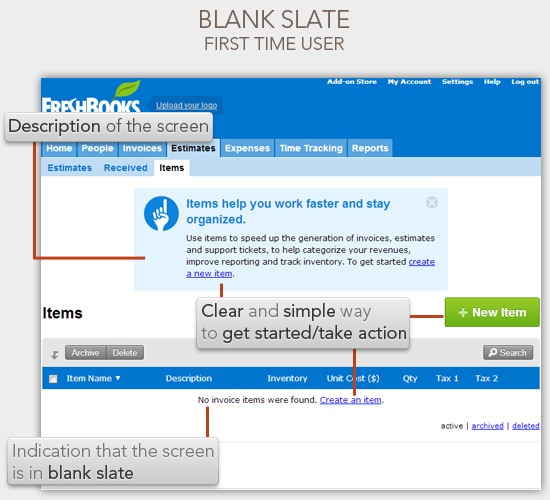 Blank slate example on FreshBooks
Notice how they have placed some simple elements in the blank slate that greatly enhances the usability of the screen. Namely:
-
Prominent description: At the top of the screen, there’s a distinct description of what the screen is
-
Actionable components: They have three pathways that allow users to take action and get started immediately
-
Blank slate indicator: To avoid confusion, there’s a statement saying that there are no items to display in the screen
Let’s take out these blank slate design components to see how powerful they are in terms of usability:
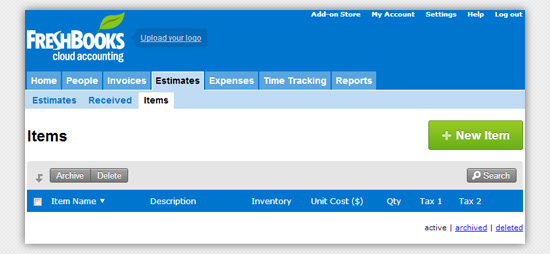
Imagine yourself as a first-time user presented with the screen above. You’re stuck. You don’t know what to do in this screen, and there are no pathways for you to learn what this screen is for (except creating a new item, but you won’t be sure what you’ll be creating and what the outcome will be).
What should you show on the blank slate?
At the bare minimum, you should have a blank slate indicator. "No invoices found", "No posts scheduled yet", "No photos to display", and so forth.
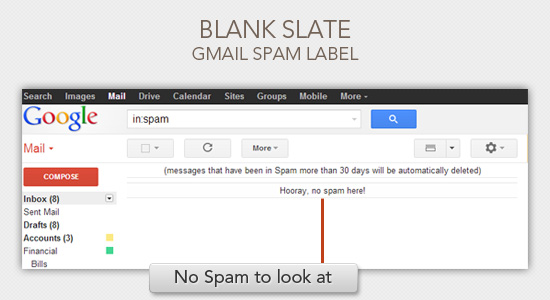
But, to me, the bare minimum of having a blank slate indicator is not good enough.
You want to teach new users how to use your software at every possible chance. And your perfect opportunity for teaching them are in these blank slates.
2. Unclear Button Labels
After you fill out a form to create an account on a web app, what should the button at the end of it say?
It should intuitively say "Create Account."
The label on actionable interface elements such as a web button should always tie back to what it will do for the user. These interface elements shouldn’t be unclear, questionable, ambiguous. They should be as obvious as possible.
Let me show you how subtle this idea is.
Look at the image below, it has an unclear button label.
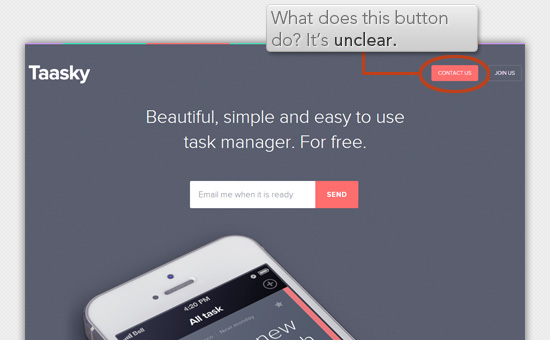
You might be saying, "How is that unclear? It obviously states the purpose of the button: Contact Us."
It’s unclear because the result of pressing the button is not obvious.
- Will it bring me to a new web page, such as a Contact Us page?
- Will it reveal a modal window with a web form where I can type a message?
- Will it open up a live chat widget where I can talk to a real person?
In fact, it’s none of the above.
What it does is it opens up your default email client:

What’s wrong about that? Here are some usability and user experience issues:
- It’s confusing, I didn’t expect that my email client would open
- What if I haven’t set my default email client to the one I use yet, and it opens up the operating system’s default email client (like MS Outlook)? That just wasted me some time.
- What if I was using someone else’s computer, or I was at work using my company’s computer and it wasn’t set to my preferences yet?
- What if I didn’t know websites could open my email client? It would be alarming if the email client just opened after clicking a button. It would make me fearful.
The resultant behavior of the button is not clear. If the button was labeled with "Send us an email" then having my email client open up wouldn’t be as surprising.
As a user, I shouldn’t have to take the time to look at the web page to derive the context of what a button will do for me. Why not just spell it out for me? If a button says "Save," I’m forced to look at the rest of the page to figure out what it is saving. But if it says "Save Post" then it’s immediately clear.
When setting the text of your web buttons, just ask this question to help you come up with good labels: What will the outcome be after pressing this button?
Here are a few examples of clear button labels:
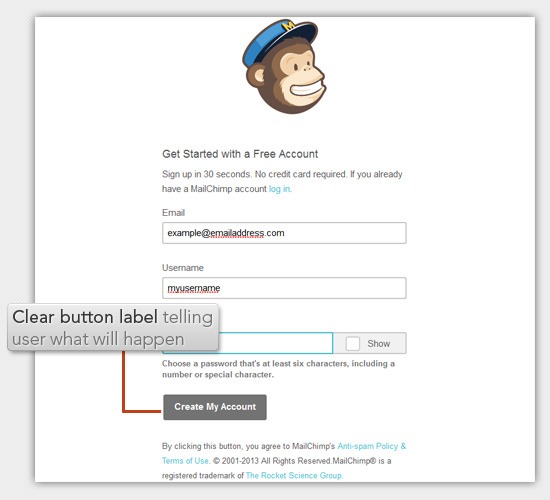 MailChimp signup form
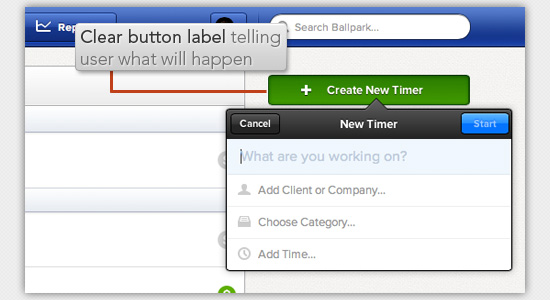 "Create new timer" button on Ballpark
 GoGardless signup form
Coming up with good button labels is a simple and quick affair that some of us tend to neglect.
Having clear button labels greatly enhances usability.
3. Making Users Wait Without Giving Them Any Feedback
I hate to wait. Especially if it’s for an unknown amount of time.
If we were driving down a road together — and you, the driver of our car — pulled over to the side of the road and sat in silence for a minute without telling me why, I’d be annoyed at you.
But, if you say, "Hey, I need to pull over for a second because I’m sleepy and I need a short break," I would completely understand and wait patiently.
We make users wait all the time in our websites and web applications.
We make them wait whenever we’re updating a web page’s content asynchronously, whenever we’re opening a modal window with a very large high-res photo, or when our web server suddenly experiences reduced performance.
Making users wait is sometimes unavoidable.
But making users wait — without telling them why — is never unavoidable.
Any time you’re loading data, updating some content, or otherwise possibly making the user wait, tell them.
Display a progress bar or spinning animation along with some text of what’s happening.
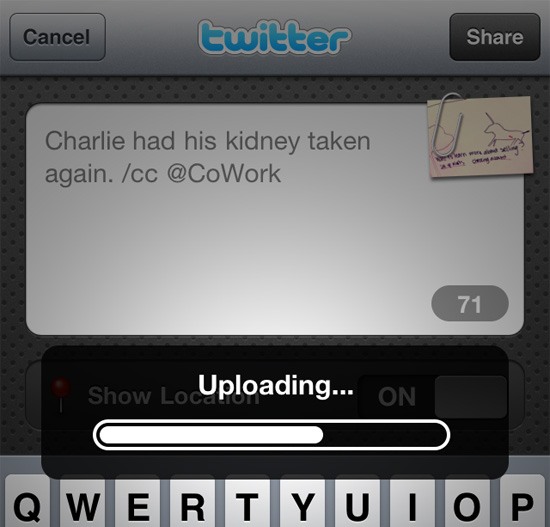 Camera Plus uploading progress bar
 Airbnb loading new content
If your site is experiencing uptime issues, tell your users what’s going on:
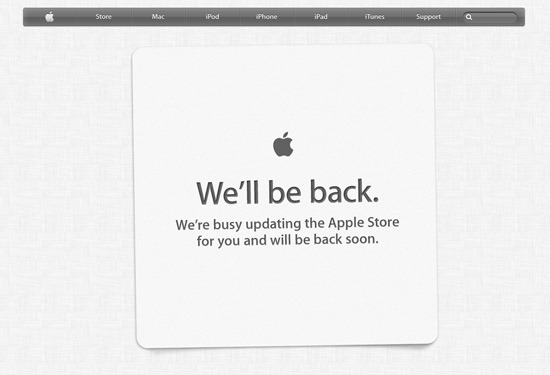 Store notice from Apple
People will be much more patient with you if they know what is going on.
4. Losing User Inputs in Web Forms
One time, I signed up for a web application. The first thing it wanted me to do after signing in was to fill out my profile information. That’s fine.
So I selected a photo, filled out one or two other input fields, and clicked a button to submit my info.
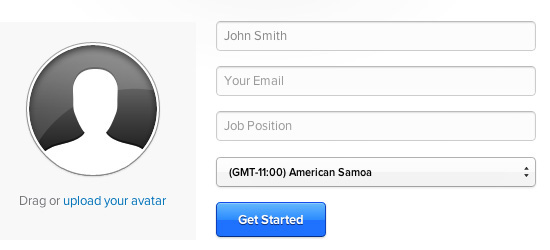
I was surprised when I was brought back to the same page, telling me that more fields were required.
But the real issue is that the photo I selected was gone — I needed to select the photo again and upload it.
This brings me to the cardinal rule of web form validation: Whatever you do, do not lose my data after validating my inputs.
Think of how frustrated your user would be if the form you’re asking her to fill out took a lot of time and, because she just forgot to fill out an input field, she now has to start over.
5. Clickable Areas Are Smaller Than They Appear to Be
It’s important to make sure that elements that appear to be clickable should be clickable.
Take a look at the image below to see what I mean:

A reasonable person would assume that the entire tab is clickable, but that’s not the case in the above example. Only the text is clickable. Not the tab. Yes, I know it is atrocious. What makes it worse is that it is a common mistake I see.
Why does this happen? It happens because most web designers create tabbed navigation menus using unordered lists (<ul>). So the markup looks like this:
<ul>
      <li><a href="">Link 1</a></li>
      <li><a href="">Link 2</a></li>
      <li><a href="">Link 3</a></li>
    </ul>
That is good.
The mistake happens when they add all the style properties (particularly the padding property) to the <li> elements rather than to the <a> elements (where the style properties belong).
Since the <a> element is the only part that is clickable, we want it to take up as much space as possible.
This means that for this style of navigation nearly all the CSS should be applied to the nested <a> elements.
Also, when styling links (without backgrounds or borders) use padding rather than margin. Padding will give you space between elements as margin does, but will keep the clickable area nice and large.
Quick Fixes
Most of these are really simple things to fix, so if you are making any of these mistakes, go fix them now.
If you made it through this article unscathed, congratulations! Just make sure to keep looking at your user interfaces with a critical eye to catch any other usability issues.
Your users will thank you.
Related Content
About the Author
 Nathan Barry is the author of Designing Web Applications, a complete guide to designing beautiful, easy-to-use web software. He also writes about design and business at NathanBarry.com.
The post 5 Usability Mistakes You Shouldn’t Make appeared first on Six Revisions.
]]>
No web designer sets out to create a terrible user experience. And a terrible user experience usually isn’t just one thing — it’s dozens of tiny usability mistakes repeated all throughout the...
http://feedproxy.google.com/~r/SixRevisions/~3/dAfC7P8-T60/
https://my3.my.umbc.edu/api/v0/pixel/news/31730/guest@my.umbc.edu/da9d21026dfe704787fe1d910b1757b1/api/pixel
css
database
design
development
html
javascript
mysql
sql
usability
web
Web Developer - Build Group
https://my3.my.umbc.edu/groups/retired-583
https://assets3-my.umbc.edu/system/shared/avatars/groups/000/000/583/fc60f5d7abc2e080599bb6dc465db54d/xsmall.png?1363101197
https://assets4-my.umbc.edu/system/shared/avatars/groups/000/000/583/fc60f5d7abc2e080599bb6dc465db54d/original.jpg?1363101197
https://assets4-my.umbc.edu/system/shared/avatars/groups/000/000/583/fc60f5d7abc2e080599bb6dc465db54d/xxlarge.png?1363101197
https://assets4-my.umbc.edu/system/shared/avatars/groups/000/000/583/fc60f5d7abc2e080599bb6dc465db54d/xlarge.png?1363101197
https://assets3-my.umbc.edu/system/shared/avatars/groups/000/000/583/fc60f5d7abc2e080599bb6dc465db54d/large.png?1363101197
https://assets3-my.umbc.edu/system/shared/avatars/groups/000/000/583/fc60f5d7abc2e080599bb6dc465db54d/medium.png?1363101197
https://assets4-my.umbc.edu/system/shared/avatars/groups/000/000/583/fc60f5d7abc2e080599bb6dc465db54d/small.png?1363101197
https://assets3-my.umbc.edu/system/shared/avatars/groups/000/000/583/fc60f5d7abc2e080599bb6dc465db54d/xsmall.png?1363101197
https://assets4-my.umbc.edu/system/shared/avatars/groups/000/000/583/fc60f5d7abc2e080599bb6dc465db54d/xxsmall.png?1363101197
Web Developer - Build Group
0
0
true
Mon, 24 Jun 2013 06:00:31 -0400
Mon, 24 Jun 2013 06:00:31 -0400
Get to the top of Google!
SEO is a shapeshifter: its current, grown-up incarnation is audience-driven, engine and user-friendly. Bryson Meunier has the details
 ]]>
SEO is a shapeshifter: its current, grown-up incarnation is audience-driven, engine and user-friendly. Bryson Meunier has the details
http://feedproxy.google.com/~r/net/topstories/~3/sosg-O6LuHg/story01.htm
https://my3.my.umbc.edu/api/v0/pixel/news/31733/guest@my.umbc.edu/171dcf299f3a16251de9c71689b26fa0/api/pixel
css
development
html
javascript
mysql
net
php
sql
web
Web Developer - Build Group
https://my3.my.umbc.edu/groups/retired-583
https://assets3-my.umbc.edu/system/shared/avatars/groups/000/000/583/fc60f5d7abc2e080599bb6dc465db54d/xsmall.png?1363101197
https://assets4-my.umbc.edu/system/shared/avatars/groups/000/000/583/fc60f5d7abc2e080599bb6dc465db54d/original.jpg?1363101197
https://assets4-my.umbc.edu/system/shared/avatars/groups/000/000/583/fc60f5d7abc2e080599bb6dc465db54d/xxlarge.png?1363101197
https://assets4-my.umbc.edu/system/shared/avatars/groups/000/000/583/fc60f5d7abc2e080599bb6dc465db54d/xlarge.png?1363101197
https://assets3-my.umbc.edu/system/shared/avatars/groups/000/000/583/fc60f5d7abc2e080599bb6dc465db54d/large.png?1363101197
https://assets3-my.umbc.edu/system/shared/avatars/groups/000/000/583/fc60f5d7abc2e080599bb6dc465db54d/medium.png?1363101197
https://assets4-my.umbc.edu/system/shared/avatars/groups/000/000/583/fc60f5d7abc2e080599bb6dc465db54d/small.png?1363101197
https://assets3-my.umbc.edu/system/shared/avatars/groups/000/000/583/fc60f5d7abc2e080599bb6dc465db54d/xsmall.png?1363101197
https://assets4-my.umbc.edu/system/shared/avatars/groups/000/000/583/fc60f5d7abc2e080599bb6dc465db54d/xxsmall.png?1363101197
Web Developer - Build Group
0
0
true
Mon, 24 Jun 2013 05:54:16 -0400
The A-Z of stock photo websites
]]>
SEO is a shapeshifter: its current, grown-up incarnation is audience-driven, engine and user-friendly. Bryson Meunier has the details
http://feedproxy.google.com/~r/net/topstories/~3/sosg-O6LuHg/story01.htm
https://my3.my.umbc.edu/api/v0/pixel/news/31733/guest@my.umbc.edu/171dcf299f3a16251de9c71689b26fa0/api/pixel
css
development
html
javascript
mysql
net
php
sql
web
Web Developer - Build Group
https://my3.my.umbc.edu/groups/retired-583
https://assets3-my.umbc.edu/system/shared/avatars/groups/000/000/583/fc60f5d7abc2e080599bb6dc465db54d/xsmall.png?1363101197
https://assets4-my.umbc.edu/system/shared/avatars/groups/000/000/583/fc60f5d7abc2e080599bb6dc465db54d/original.jpg?1363101197
https://assets4-my.umbc.edu/system/shared/avatars/groups/000/000/583/fc60f5d7abc2e080599bb6dc465db54d/xxlarge.png?1363101197
https://assets4-my.umbc.edu/system/shared/avatars/groups/000/000/583/fc60f5d7abc2e080599bb6dc465db54d/xlarge.png?1363101197
https://assets3-my.umbc.edu/system/shared/avatars/groups/000/000/583/fc60f5d7abc2e080599bb6dc465db54d/large.png?1363101197
https://assets3-my.umbc.edu/system/shared/avatars/groups/000/000/583/fc60f5d7abc2e080599bb6dc465db54d/medium.png?1363101197
https://assets4-my.umbc.edu/system/shared/avatars/groups/000/000/583/fc60f5d7abc2e080599bb6dc465db54d/small.png?1363101197
https://assets3-my.umbc.edu/system/shared/avatars/groups/000/000/583/fc60f5d7abc2e080599bb6dc465db54d/xsmall.png?1363101197
https://assets4-my.umbc.edu/system/shared/avatars/groups/000/000/583/fc60f5d7abc2e080599bb6dc465db54d/xxsmall.png?1363101197
Web Developer - Build Group
0
0
true
Mon, 24 Jun 2013 05:54:16 -0400
The A-Z of stock photo websites

Stock photo sites are almost always behind any great designer. Good stock photos can do great things for a project, just as bad stock photography can ruin it. Picking the right pics has a lot to do with picking the right site for your stock needs.
There are tons of sites that offer stock photography for free and for paid subscriptions. Today, we’re going to show you many of the sites that matter and why you may you may be interested in them. There are a lot, so let’s hop right in.
Premium stock sites
Thinkstock
What a great way to start this round up off — Thinkstock is a conglomerate sort of site. Purchasing credits or a subscription to this particular one gets you access to three of the more popular stock sites online. They have Image Packs that start at $49 for 5 pictures and subscriptions that start at $139 per month. This is a great choice for those that will need stock pictures often.

Shutterstock
Shutterstock boasts that they have over 25 million stock photos, illustrations, vectors and videos available by paid subscriptions. Of note, they have much more than just your typical stock photography. This is a great choice for anyone who not only designs, but dabbles in other areas as well. They have image packs starting at $29 for 2 pictures and subscriptions at $199 a month.

Getty Images
Getty Images is a leader not just in stock photography, but in photos used for news and editorial pieces as well. They are the reason we see many of these images on different news outlets all over the world. A subscription with Getty is a great idea if you are someone who needs photos of world leaders, countries, and more all the time. Their pricing tends to be dependent on how you want to use the photo.

123RF
This stock site has tons of great photography. The difference here, is how they create their subscription and payment plans. The idea behind 123RF is to be as affordable as possible. They do this by offering a basic subscription that allows you to download 5 photos a day — this plan starts at 30 days (600 images) at $89. They also have a premium plan for 26 images a day as well as a pay as you go plan.

Corbis Images
Corbis features images exclusive to them that are taken by some of the leading photographers of our time. They also have editorial pieces as well as creative pieces that aren’t your typical bland piece of stock photography. They have different types of subscriptions plans that you must contact for pricing.

iStockPhoto
iStockPhoto is a very familiar name in the stock photography world. They’ve been around for more than 10 years and continue to provide lots of stock solutions, including video and audio. And in the future, iStockPhoto even wants to offer logos. So, now may be the time for you to become well acquainted with of the better known stock sites. iStockPhoto sells photos by credits which are as low as $1.33 a credit, or they have subscriptions that start at $995 for 35 pictures a day for 30 days.

Dreamstime
Here, we have another pretty standard stock photography site that’s great to get images for whatever you need. Dreamstime enjoys priding themselves on being affordable by offering credits to download pictures as well as subscriptions. Credit packages start as low as $14.99 for 11 credits, while subscription plans are as low as $215 for 750 images in one month.

BigStock
A lot of these sites, above and below, are really clunky to use and rather cluttered. Obviously, these sites have millions of images to offer and there are tons of ways to categorize them. BigStock claims they are the stock site that makes this process simple and affordable. Their plans start at $69 for 1 month and $35 for 10 credits.

Veer
Unlike most sites that give you images, Veer aims straight for the designer’s heart by offering images and fonts. They also tend to have a lot more creative photos, rather than the bland, white background pictures you might find on other sites. They have credit packs that start at $18.48 for 12 credits and a 30 day, 20 image a day plan for $229. You can also buy everything a la cart, with images starting at $2 and fonts starting at $9.

Stocksy
I like Stocksy, because much like Veer, they aim straight for the heart of the designer by offering extremely creative and unique photographs. It’s an extremely clean and easy to navigate design that’s reminiscent more of a portfolio and less of a stock site. This is a wonderful site for those of us looking for meaningful images on a budget.

Jupiter Images
While many of these sites will boast and brag about having a collection of images in the double digit millions, Jupiter Images has a lot less. However, it’s still a fairly well known name and a subsidiary of Getty Images, so we have to assume the photography (and pricing) is high quality.

Can Stock Photo
This is one of your more standard and affordable stock photography sites. They have many of your typical photographs, with a few amazing things here and there. Can Stock Photo also offers video footage. With them, you’re able to download instantly (a la carte), starting at $2.50 for images and $10 for video. They also have a very affordable 1-week subscription package for $39 that allows you to download 10 images per day.

Deposit Photos
Deposit is another one of the pretty standard stock photography sites where you can find some really great things here and there. They are absolutely one of the cheapest at $69 for a 1 month, 5 image per day subscription and pay-as-you-go credits at $50 for 50 credits.

Alamy
With over 35 million photographs and footage, this is quite possibly the largest collection of stock online. Alamy is big on creative photography — if you browse a bit, you’ll see some things that should probably be in an art exhibit rather than a stock site. Alamy is also big in philanthropy, so if you want your subscription payments to go to a good cause, this may be your best bet.

Stockfresh
Stockfresh doesn’t seem to be all that popular, but they claim to have been involved with some other stock sites to boost their reputation. They also seem like a pretty standard stock site with some really great photos here and there. They have credits starting at $1.00 per credit and subscription plans for 1 month, 5 downloads a day for $99.

National Geographic Creative
Everyone loves and talks about the photos taken by the National Geographic all the time. Now, you can have access to those pictures and videos, and they also sell talent, much like an agency. Obviously, you’ll have to contact them for pricing and quotes as this isn’t your standard stock site, but a great resource for larger companies nonetheless.

Fotolia
Fotolia offers over 20 million stock resources in images, video and vector. They have a program for logos as well, where you can submit a brief and get a logo created for, at least, $195. They’re a bit more expensive than some places, with credits starting at $1.40 per credit, but they do seem to have some rather creative and interesting photos.

PhotoXpress
Here, they’re competing with other stock sites primarily based on price and features. It’s the first thing you see and almost the only thing they tell you about. PhotoXpress has subscription plans that start at $9.99 a month for 5 images a month. However, your images can roll-over if you don’t use them all and you can use those same credits for vectors. Not a bad deal if you only use stock photography once in a blue moon.

CreStock
Crestock is your pretty standard stock site, however they have a section dedicated to celebrity pictures. Most of them seem to be on the red carpet, but it could be very useful for one who needs that kind of thing but finds a Getty Images subscription too expensive. They have credits starting at $1 a piece and a 20 image a day, one month plan starting at $199.

Photospin
What I like about this site is they give you an option of how many photos you want access to in your subscription. You can get access to 1 million of the photos for one year for $429, which is one of the cheaper annual plans I’ve seen. Or you can access to the entire stock library of 2.4 million plus for $1188 a year.

Yay Images
If I had to judge a book by it’s cover, I’d probably tell you not to waste your time with this site. However, when you peruse the images, they have some fair pictures if you get past all the fluff. Frankly, I think one can find a higher quality experience for the amount of the subscriptions and the credits, which vary depending on the sizes of the images.

Cutcaster
Here’s another stock site that’s really nothing to write home about. However, they have a really advanced search system for their images, for those of us who like to get extremely specific. Subscriptions at Cutcaster start at $16.99 for 12 credits.

Mostphotos
Mostphotos is focused half on selling stock photos and half on getting photographers to join them to sell their photos. It’s actually a very nice site with some good stocks and some fair prices. Their images start at a whopping $5 a pop with a monthly subscription of 10 images a month for $39.

Pixmac
Pixmac seems to be a fast growing stock site, as it was created in 2008 and now has over 14 million pictures. They’re your pretty typical stock site with credit packages starting at $29.95 for 30 credits and subscriptions starting at $99.95 for 30 days. They also have a section of 64,000 free images.

Free Stock Sites
Stock Free Images
I don’t want to call it a scam, but it’s a very persuasive promotional tool. Dreamstime has put this site together to offer you 3 free downloads and then coerce you into getting a paid subscription. If you’re okay with this, I’d tell you to make good on your 3 free downloads then ditch them.

Stockvault
This is a surprisingly wonderful site with free stock photos. Some of them aren’t shot with the best lens or edited perfectly, but there are some gems. There aren’t a whole lot of options, but if you can make your idea work with what they have, Stockvault is a wonderful choice if you’re on a budget or just don’t want to buy stock photos.

EveryStockPhoto
ESP is a site where you can search the databases of every free stock site and some communities. Honestly, you’re better off just using the sites individually, as EveryStockPhoto seems to sometimes show old photos or photos you have to pay for in their results.

FreeDigitalPhotos
I’m sure someone can find a use for most of these photos. These are definitely the cheesier photos, but again, if you are in desperate need and have a $0 budget, this is probably the site for you. Honestly, there are better free alternatives.

StockXchng
This is my all time personal favorite. It’s probably not better than any other free stock site, it’s just a preference, especially as the search and site isn’t as cluttered as the rest. There seems to be lots of old pictures and photos people just didn’t sit around to edit. If you feel like digging and doing a lot of work, this is easily one of the best out there.

Morguefile
I’ve recently started using this site and it’s easily a favorite for free photographs. The pictures aren’t the best — they’re more like throwaway photos people decided to share, but you can find many usable pictures here.

PD Photo
Again, if I had to judge a book by its cover, I’d tell you to run far, far away. However, this site is great for photos of well-known places. Most aren’t big enough to print large things, however, it’s a decent site to get a different perspective on some nice landmarks.

FreeFoto
FreeFoto.com claims to have over 130,000 images available for free download. The one stipulation is that you must link back and give credit. Much like the rest of the free sites, this seems like a trash bin for some photos as well as some really old photographs, but I’m sure you can find a gem here and there.

Free Range Stock
In order to start downloading from Free Range Stock, you’ll have to register to download. You can check some pictures before you download them. And while none of them real probably blow you away, there are some really higher quality photos in their collection.

Photl
If you can get past their busy interface, you can find some decent stock photos. Beware, this site is half free half pay — you can get the smaller sized photos for free and the larger sized ones for around $2. Either way, it’s really not a bad deal if you can find something useful.

Free Pixels
there are not a ton of photos on this site. They’re pretty good, though, seeming to be from amateur photographers who just wanted to share. Not a bad site for someone looking to get a realistic view on scenery and such.

Free Images
Most of the images on Free Images are great for desktops and large website displays. There’s nothing really over 1600 pixels. The photography is fair, as with most free sites, these look like amateur photos.

FreePhotoBank
Here, you’re able to download free pictures thanks to the Creative Commons license. The only thing you have to do is link back to FreePhotoBank.

Imagebase
Imagebase has some really nice photographs all from the same photographer. He’s not asking for anything in return. At all. Just some general rules about he’d prefer the images to be used that you’d probably want to look at before you download them.

Wikimedia Commons
The Wikimedia Commons is a repository for all the media that’s used in the various Wikimedia Projects. Because of this, all these photographs have a creative commons license and are public domain. You don’t need to be a part of a project to be able to use them, just browse around and download what you like.

Communities
Photodune
Photodune is a marketplace for photographers to sell their images. They submit them to the powers that be, and once approved, they’ll get a price tag and it will be available for purchase. It’s a different set up mainly because you’re purchasing everything a la carte, with pictures starting at $1 for small, web resolutions.

Flickr
We all know Flickr is a site that’s to be used to share our photos. You can’t really go there and download pictures and use them as you please. However, some people use a creative commons license on their photos and others just ask that you let them know you’re using the picture. You’ll have to do a bit of searching (you may be able to find a group that focuses on such pics), but this is a great site to find some really good creative pictures.

Deviantart
Much like Flickr, different artists come together to share their work. Unlike Flickr, however, there’s more than just photography. And while Deviantart has a section for photography and stock photography, it’s much easier to find amateurs on Deviantart.

Conclusion
Based on your needs, you can find a stock site and plan that’s good for you. Personally, I like to use the free stock sites and take my own pictures when I need them. I rarely need to download stocks often, but when I do, I do a lot of a la carte purchasing. The idea is to think about what works for you, your projects and your budget. Good luck choosing!
Which of these sites do you rely on? Have we missed an invaluable resource? Let us know in the comments.
Source
 ]]>
Stock photo sites are almost always behind any great designer. Good stock photos can do great things for a project, just as bad stock photography can ruin it. Picking the right pics has a lot to...
http://rss.feedsportal.com/c/35285/f/661066/s/2db47b3b/l/0L0Swebdesignerdepot0N0C20A130C0A60Cthe0Ea0Ez0Eof0Estock0Ephoto0Ewebsites0C/story01.htm
https://my3.my.umbc.edu/api/v0/pixel/news/31728/guest@my.umbc.edu/35b244927f6631f82337ed4e84724674/api/pixel
art
css
design
development
html
html5
illustrator
javascript
mysql
oracle
photoshop
php
resources
sql
Web Developer - Build Group
https://my3.my.umbc.edu/groups/retired-583
https://assets3-my.umbc.edu/system/shared/avatars/groups/000/000/583/fc60f5d7abc2e080599bb6dc465db54d/xsmall.png?1363101197
https://assets4-my.umbc.edu/system/shared/avatars/groups/000/000/583/fc60f5d7abc2e080599bb6dc465db54d/original.jpg?1363101197
https://assets4-my.umbc.edu/system/shared/avatars/groups/000/000/583/fc60f5d7abc2e080599bb6dc465db54d/xxlarge.png?1363101197
https://assets4-my.umbc.edu/system/shared/avatars/groups/000/000/583/fc60f5d7abc2e080599bb6dc465db54d/xlarge.png?1363101197
https://assets3-my.umbc.edu/system/shared/avatars/groups/000/000/583/fc60f5d7abc2e080599bb6dc465db54d/large.png?1363101197
https://assets3-my.umbc.edu/system/shared/avatars/groups/000/000/583/fc60f5d7abc2e080599bb6dc465db54d/medium.png?1363101197
https://assets4-my.umbc.edu/system/shared/avatars/groups/000/000/583/fc60f5d7abc2e080599bb6dc465db54d/small.png?1363101197
https://assets3-my.umbc.edu/system/shared/avatars/groups/000/000/583/fc60f5d7abc2e080599bb6dc465db54d/xsmall.png?1363101197
https://assets4-my.umbc.edu/system/shared/avatars/groups/000/000/583/fc60f5d7abc2e080599bb6dc465db54d/xxsmall.png?1363101197
Web Developer - Build Group
0
0
true
Mon, 24 Jun 2013 05:15:00 -0400
Mon, 24 Jun 2013 05:15:00 -0400
Retriever Club Golf Outing Rescheduled for Monday, September 23 at RRGC
UMBC Athletics has rescheduled the Retriever Club Golf Outing for September 23, 2013 at the Rolling Road Golf Club. Heavy rain and unplayable course conditions forced a postponement on June 10th. Registration will begin at 10:00 a.m. and the shotgun start will commence at 11:00 a.m.
]]>
UMBC Athletics has rescheduled the Retriever Club Golf Outing for September 23, 2013 at the Rolling Road Golf Club. Heavy rain and unplayable course conditions forced a postponement on June 10th....
http://www.umbcretrievers.com/release.asp?RELEASE_ID=8054
https://my3.my.umbc.edu/api/v0/pixel/news/31758/guest@my.umbc.edu/08767e69205d05af7e2f6f6f6374fd5e/api/pixel
UMBC Athletics
https://my3.my.umbc.edu/groups/athletics
https://assets2-my.umbc.edu/system/shared/avatars/groups/000/000/009/69595c9b99f609d75fbb8232d9bd73d3/xsmall.png?1709304849
https://assets4-my.umbc.edu/system/shared/avatars/groups/000/000/009/69595c9b99f609d75fbb8232d9bd73d3/original.jpg?1709304849
https://assets3-my.umbc.edu/system/shared/avatars/groups/000/000/009/69595c9b99f609d75fbb8232d9bd73d3/xxlarge.png?1709304849
https://assets3-my.umbc.edu/system/shared/avatars/groups/000/000/009/69595c9b99f609d75fbb8232d9bd73d3/xlarge.png?1709304849
https://assets4-my.umbc.edu/system/shared/avatars/groups/000/000/009/69595c9b99f609d75fbb8232d9bd73d3/large.png?1709304849
https://assets4-my.umbc.edu/system/shared/avatars/groups/000/000/009/69595c9b99f609d75fbb8232d9bd73d3/medium.png?1709304849
https://assets1-my.umbc.edu/system/shared/avatars/groups/000/000/009/69595c9b99f609d75fbb8232d9bd73d3/small.png?1709304849
https://assets2-my.umbc.edu/system/shared/avatars/groups/000/000/009/69595c9b99f609d75fbb8232d9bd73d3/xsmall.png?1709304849
https://assets3-my.umbc.edu/system/shared/avatars/groups/000/000/009/69595c9b99f609d75fbb8232d9bd73d3/xxsmall.png?1709304849
UMBC Athletics
3
0
true
Mon, 24 Jun 2013 01:00:00 -0400
First Evidence Of Iranian Internet Throttling as a Form of Censorship
]]>
Stock photo sites are almost always behind any great designer. Good stock photos can do great things for a project, just as bad stock photography can ruin it. Picking the right pics has a lot to...
http://rss.feedsportal.com/c/35285/f/661066/s/2db47b3b/l/0L0Swebdesignerdepot0N0C20A130C0A60Cthe0Ea0Ez0Eof0Estock0Ephoto0Ewebsites0C/story01.htm
https://my3.my.umbc.edu/api/v0/pixel/news/31728/guest@my.umbc.edu/35b244927f6631f82337ed4e84724674/api/pixel
art
css
design
development
html
html5
illustrator
javascript
mysql
oracle
photoshop
php
resources
sql
Web Developer - Build Group
https://my3.my.umbc.edu/groups/retired-583
https://assets3-my.umbc.edu/system/shared/avatars/groups/000/000/583/fc60f5d7abc2e080599bb6dc465db54d/xsmall.png?1363101197
https://assets4-my.umbc.edu/system/shared/avatars/groups/000/000/583/fc60f5d7abc2e080599bb6dc465db54d/original.jpg?1363101197
https://assets4-my.umbc.edu/system/shared/avatars/groups/000/000/583/fc60f5d7abc2e080599bb6dc465db54d/xxlarge.png?1363101197
https://assets4-my.umbc.edu/system/shared/avatars/groups/000/000/583/fc60f5d7abc2e080599bb6dc465db54d/xlarge.png?1363101197
https://assets3-my.umbc.edu/system/shared/avatars/groups/000/000/583/fc60f5d7abc2e080599bb6dc465db54d/large.png?1363101197
https://assets3-my.umbc.edu/system/shared/avatars/groups/000/000/583/fc60f5d7abc2e080599bb6dc465db54d/medium.png?1363101197
https://assets4-my.umbc.edu/system/shared/avatars/groups/000/000/583/fc60f5d7abc2e080599bb6dc465db54d/small.png?1363101197
https://assets3-my.umbc.edu/system/shared/avatars/groups/000/000/583/fc60f5d7abc2e080599bb6dc465db54d/xsmall.png?1363101197
https://assets4-my.umbc.edu/system/shared/avatars/groups/000/000/583/fc60f5d7abc2e080599bb6dc465db54d/xxsmall.png?1363101197
Web Developer - Build Group
0
0
true
Mon, 24 Jun 2013 05:15:00 -0400
Mon, 24 Jun 2013 05:15:00 -0400
Retriever Club Golf Outing Rescheduled for Monday, September 23 at RRGC
UMBC Athletics has rescheduled the Retriever Club Golf Outing for September 23, 2013 at the Rolling Road Golf Club. Heavy rain and unplayable course conditions forced a postponement on June 10th. Registration will begin at 10:00 a.m. and the shotgun start will commence at 11:00 a.m.
]]>
UMBC Athletics has rescheduled the Retriever Club Golf Outing for September 23, 2013 at the Rolling Road Golf Club. Heavy rain and unplayable course conditions forced a postponement on June 10th....
http://www.umbcretrievers.com/release.asp?RELEASE_ID=8054
https://my3.my.umbc.edu/api/v0/pixel/news/31758/guest@my.umbc.edu/08767e69205d05af7e2f6f6f6374fd5e/api/pixel
UMBC Athletics
https://my3.my.umbc.edu/groups/athletics
https://assets2-my.umbc.edu/system/shared/avatars/groups/000/000/009/69595c9b99f609d75fbb8232d9bd73d3/xsmall.png?1709304849
https://assets4-my.umbc.edu/system/shared/avatars/groups/000/000/009/69595c9b99f609d75fbb8232d9bd73d3/original.jpg?1709304849
https://assets3-my.umbc.edu/system/shared/avatars/groups/000/000/009/69595c9b99f609d75fbb8232d9bd73d3/xxlarge.png?1709304849
https://assets3-my.umbc.edu/system/shared/avatars/groups/000/000/009/69595c9b99f609d75fbb8232d9bd73d3/xlarge.png?1709304849
https://assets4-my.umbc.edu/system/shared/avatars/groups/000/000/009/69595c9b99f609d75fbb8232d9bd73d3/large.png?1709304849
https://assets4-my.umbc.edu/system/shared/avatars/groups/000/000/009/69595c9b99f609d75fbb8232d9bd73d3/medium.png?1709304849
https://assets1-my.umbc.edu/system/shared/avatars/groups/000/000/009/69595c9b99f609d75fbb8232d9bd73d3/small.png?1709304849
https://assets2-my.umbc.edu/system/shared/avatars/groups/000/000/009/69595c9b99f609d75fbb8232d9bd73d3/xsmall.png?1709304849
https://assets3-my.umbc.edu/system/shared/avatars/groups/000/000/009/69595c9b99f609d75fbb8232d9bd73d3/xxsmall.png?1709304849
UMBC Athletics
3
0
true
Mon, 24 Jun 2013 01:00:00 -0400
First Evidence Of Iranian Internet Throttling as a Form of Censorship
Internet security expert publishes first evidence that Iran uses internet throttling to prevent the spread of information during periods of public unrest

]]>
Internet security expert publishes first evidence that Iran uses internet throttling to prevent the spread of information during periods of public unrest
http://www.technologyreview.com/view/516361/first-evidence-of-iranian-internet-throttling-as-a-form-of-censorship/
https://my3.my.umbc.edu/api/v0/pixel/news/31727/guest@my.umbc.edu/f0adae86a4c3598d55f558a8216447dc/api/pixel
development
internet
mit
technology
web
Web Developer - Build Group
https://my3.my.umbc.edu/groups/retired-583
https://assets3-my.umbc.edu/system/shared/avatars/groups/000/000/583/fc60f5d7abc2e080599bb6dc465db54d/xsmall.png?1363101197
https://assets4-my.umbc.edu/system/shared/avatars/groups/000/000/583/fc60f5d7abc2e080599bb6dc465db54d/original.jpg?1363101197
https://assets4-my.umbc.edu/system/shared/avatars/groups/000/000/583/fc60f5d7abc2e080599bb6dc465db54d/xxlarge.png?1363101197
https://assets4-my.umbc.edu/system/shared/avatars/groups/000/000/583/fc60f5d7abc2e080599bb6dc465db54d/xlarge.png?1363101197
https://assets3-my.umbc.edu/system/shared/avatars/groups/000/000/583/fc60f5d7abc2e080599bb6dc465db54d/large.png?1363101197
https://assets3-my.umbc.edu/system/shared/avatars/groups/000/000/583/fc60f5d7abc2e080599bb6dc465db54d/medium.png?1363101197
https://assets4-my.umbc.edu/system/shared/avatars/groups/000/000/583/fc60f5d7abc2e080599bb6dc465db54d/small.png?1363101197
https://assets3-my.umbc.edu/system/shared/avatars/groups/000/000/583/fc60f5d7abc2e080599bb6dc465db54d/xsmall.png?1363101197
https://assets4-my.umbc.edu/system/shared/avatars/groups/000/000/583/fc60f5d7abc2e080599bb6dc465db54d/xxsmall.png?1363101197
Web Developer - Build Group
0
0
true
Mon, 24 Jun 2013 00:40:28 -0400
Mon, 24 Jun 2013 00:40:28 -0400
Using JavaScript's CSS3 Selectors
The HTML5 selectors API has given Web developers unprecedented access to document elements. Developed by the W3C, the Selectors API provides a way of easily accessing elements in the DOM using a standardized syntax. Rob Gravelle shows how to use JavaScript to reference page elements using the new CSS selectors.
]]>
The HTML5 selectors API has given Web developers unprecedented access to document elements. Developed by the W3C, the Selectors API provides a way of easily accessing elements in the DOM using a...
http://www.htmlgoodies.com/beyond/javascript/using-javascripts-css3-selectors.html
https://my3.my.umbc.edu/api/v0/pixel/news/31724/guest@my.umbc.edu/766803305141c5aa21617bbfc46c72cf/api/pixel
html
htmlgoodies
learning
Web Developer - Build Group
https://my3.my.umbc.edu/groups/retired-583
https://assets3-my.umbc.edu/system/shared/avatars/groups/000/000/583/fc60f5d7abc2e080599bb6dc465db54d/xsmall.png?1363101197
https://assets4-my.umbc.edu/system/shared/avatars/groups/000/000/583/fc60f5d7abc2e080599bb6dc465db54d/original.jpg?1363101197
https://assets4-my.umbc.edu/system/shared/avatars/groups/000/000/583/fc60f5d7abc2e080599bb6dc465db54d/xxlarge.png?1363101197
https://assets4-my.umbc.edu/system/shared/avatars/groups/000/000/583/fc60f5d7abc2e080599bb6dc465db54d/xlarge.png?1363101197
https://assets3-my.umbc.edu/system/shared/avatars/groups/000/000/583/fc60f5d7abc2e080599bb6dc465db54d/large.png?1363101197
https://assets3-my.umbc.edu/system/shared/avatars/groups/000/000/583/fc60f5d7abc2e080599bb6dc465db54d/medium.png?1363101197
https://assets4-my.umbc.edu/system/shared/avatars/groups/000/000/583/fc60f5d7abc2e080599bb6dc465db54d/small.png?1363101197
https://assets3-my.umbc.edu/system/shared/avatars/groups/000/000/583/fc60f5d7abc2e080599bb6dc465db54d/xsmall.png?1363101197
https://assets4-my.umbc.edu/system/shared/avatars/groups/000/000/583/fc60f5d7abc2e080599bb6dc465db54d/xxsmall.png?1363101197
Web Developer - Build Group
0
0
true
Sun, 23 Jun 2013 22:58:00 -0400
MCOM Launches HOTstream HTML5 Solution for LG
Supporting HTML5, these advanced LG TVs allow hoteliers to benefit from MCOM’s state-of-the-art HOTstream technology without the need for an external set-top box, eliminating the hassle of additional cabling, network and power connections.
]]>
Supporting HTML5, these advanced LG TVs allow hoteliers to benefit from MCOM’s state-of-the-art HOTstream technology without the need for an external set-top box, eliminating the hassle of...
http://www.htmlgoodies.com/daily_news/mcom-launches-hotstream-html5-solution-for-lg.html
https://my3.my.umbc.edu/api/v0/pixel/news/31725/guest@my.umbc.edu/46cd4c4b5e748fe64b13b6cbcf6eae7c/api/pixel
html
htmlgoodies
learning
Web Developer - Build Group
https://my3.my.umbc.edu/groups/retired-583
https://assets3-my.umbc.edu/system/shared/avatars/groups/000/000/583/fc60f5d7abc2e080599bb6dc465db54d/xsmall.png?1363101197
https://assets4-my.umbc.edu/system/shared/avatars/groups/000/000/583/fc60f5d7abc2e080599bb6dc465db54d/original.jpg?1363101197
https://assets4-my.umbc.edu/system/shared/avatars/groups/000/000/583/fc60f5d7abc2e080599bb6dc465db54d/xxlarge.png?1363101197
https://assets4-my.umbc.edu/system/shared/avatars/groups/000/000/583/fc60f5d7abc2e080599bb6dc465db54d/xlarge.png?1363101197
https://assets3-my.umbc.edu/system/shared/avatars/groups/000/000/583/fc60f5d7abc2e080599bb6dc465db54d/large.png?1363101197
https://assets3-my.umbc.edu/system/shared/avatars/groups/000/000/583/fc60f5d7abc2e080599bb6dc465db54d/medium.png?1363101197
https://assets4-my.umbc.edu/system/shared/avatars/groups/000/000/583/fc60f5d7abc2e080599bb6dc465db54d/small.png?1363101197
https://assets3-my.umbc.edu/system/shared/avatars/groups/000/000/583/fc60f5d7abc2e080599bb6dc465db54d/xsmall.png?1363101197
https://assets4-my.umbc.edu/system/shared/avatars/groups/000/000/583/fc60f5d7abc2e080599bb6dc465db54d/xxsmall.png?1363101197
Web Developer - Build Group
0
0
true
Sun, 23 Jun 2013 22:00:00 -0400


