<?xml version="1.0"?>
<News hasArchived="true" page="8624" pageCount="10722" pageSize="10" timestamp="Sat, 11 Jul 2026 06:48:02 -0400" url="https://my3.my.umbc.edu/posts.xml?page=8624">
<NewsItem contentIssues="false" id="31271" important="false" status="posted" url="https://my3.my.umbc.edu/posts/31271">
<Title>I can't see all my grades in my Blackboard course?</Title>
<Body>
<![CDATA[
    <div class="html-content"><div>    <p>
            Page
                <strong>edited</strong> by
                        <a href="https://wiki.umbc.edu/display/~amocko1%0A" rel="nofollow external" class="bo">Andrea Mocko</a>
                </p>
            <div>
            <h2>Tell me</h2>
    <ol>
    <li>Go into your Blackboard course</li>
    <li>Click the <strong>Tools</strong> button</li>
    <li>Click the <strong>My Grades</strong> link</li>
    <li>Use the scroll bar to view any grades not visible. Remember, you can see the grades made available by your instructor.</li>
    </ol>
    <h2>Rate this Article</h2>
    <p>


    <strong>Was this helpful?</strong>
    <a href="https://apps-my.umbc.edu/apps/rt-track/script.php?u=http://wiki.umbc.edu%2Fpages%2Fviewpage.action%3FpageId%3D22709149&amp;q=33&amp;v=1&amp;s=faq&amp;l=blackboard+student" rel="nofollow external" class="bo">Yes</a>
     | <a href="https://docs.google.com/a/umbc.edu/spreadsheet/viewform?formkey=dEpyOEZxa29QY05BaVpBVzZSYmRMM0E6MA&amp;entry_15=http%3A%2F%2Fwiki.umbc.edu%2Fpages%2Fviewpage.action%3FpageId%3D22709149" rel="nofollow external" class="bo">No</a>
     | <a href="https://docs.google.com/a/umbc.edu/spreadsheet/viewform?formkey=dEpyOEZxa29QY05BaVpBVzZSYmRMM0E6MA&amp;entry_15=http%3A%2F%2Fwiki.umbc.edu%2Fpages%2Fviewpage.action%3FpageId%3D22709149" rel="nofollow external" class="bo">Correct or Suggest an Article</a>
     | <a href="https://apps-my.umbc.edu/apps/rt-track/script.php?u=http://wiki.umbc.edu%2Fpages%2Fviewpage.action%3FpageId%3D22709149&amp;q=33&amp;v=0&amp;s=faq&amp;l=blackboard+student" rel="nofollow external" class="bo">Request Help</a></p>
        </div>
            <div>
           <a href="https://wiki.umbc.edu/pages/viewpage.action?pageId=22709149" rel="nofollow external" class="bo">View Online</a>
                  ·
           <a href="https://wiki.umbc.edu/pages/diffpagesbyversion.action?pageId=22709149&amp;revisedVersion=8&amp;originalVersion=7" rel="nofollow external" class="bo">View Changes Online</a>       
                      </div>
    </div></div>
]]>
</Body>
<Summary>Page             edited by                     Andrea Mocko                                  Tell me   Go into your Blackboard course  Click the Tools button  Click the My Grades link  Use the...</Summary>
<Website>https://wiki.umbc.edu/pages/viewpage.action?pageId=22709149</Website>
<TrackingUrl>https://my3.my.umbc.edu/api/v0/pixel/news/31271/guest@my.umbc.edu/ce2c26a1f1b28001be503b1ffb9a7c8d/api/pixel</TrackingUrl>
<Tag>blackboard</Tag>
<Tag>faq</Tag>
<Tag>student</Tag>
<Group token="retired-428">UMBC FAQ</Group>
<GroupUrl>https://my3.my.umbc.edu/groups/retired-428</GroupUrl>
<AvatarUrl>https://assets3-my.umbc.edu/images/avatars/group/1/xsmall.png?1783534523</AvatarUrl>
<AvatarUrl size="original">https://assets2-my.umbc.edu/images/avatars/group/1/original.png?1783534523</AvatarUrl>
<AvatarUrl size="xxlarge">https://assets1-my.umbc.edu/images/avatars/group/1/xxlarge.png?1783534523</AvatarUrl>
<AvatarUrl size="xlarge">https://assets4-my.umbc.edu/images/avatars/group/1/xlarge.png?1783534523</AvatarUrl>
<AvatarUrl size="large">https://assets1-my.umbc.edu/images/avatars/group/1/large.png?1783534523</AvatarUrl>
<AvatarUrl size="medium">https://assets2-my.umbc.edu/images/avatars/group/1/medium.png?1783534523</AvatarUrl>
<AvatarUrl size="small">https://assets1-my.umbc.edu/images/avatars/group/1/small.png?1783534523</AvatarUrl>
<AvatarUrl size="xsmall">https://assets3-my.umbc.edu/images/avatars/group/1/xsmall.png?1783534523</AvatarUrl>
<AvatarUrl size="xxsmall">https://assets1-my.umbc.edu/images/avatars/group/1/xxsmall.png?1783534523</AvatarUrl>
<Sponsor>UMBC FAQ</Sponsor>
<PawCount>0</PawCount>
<CommentCount>0</CommentCount>
<CommentsAllowed>true</CommentsAllowed>
<PostedAt>Thu, 13 Jun 2013 13:06:50 -0400</PostedAt>
<EditAt>Sat, 03 Aug 2013 18:12:01 -0400</EditAt>
</NewsItem>

<NewsItem contentIssues="true" id="31272" important="false" status="posted" url="https://my3.my.umbc.edu/posts/31272">
<Title>How do I upload scantron results to my Blackboard course?</Title>
<Body>
<![CDATA[
    <div class="html-content"><div>    <p>
            Page
                <strong>edited</strong> by
                        <a href="https://wiki.umbc.edu/display/~amocko1" rel="nofollow external" class="bo">Andrea Mocko</a>
                </p>
            <div>
            <h2>Show me</h2>
    <p><a href="http://www.youtube.com/watch?v=vqEWDteDMs4" rel="nofollow external" class="bo"><img src="http://img.youtube.com/vi/vqEWDteDMs4/2.jpg" style="max-width: 100%; height: auto;"></a></p>
    <p>Video Length - 03:22</p>
    <h2>Tell me</h2>
    <ol>
    <li>Go to <a href="http://www.umbc.edu/oit/newmedia/blackboard/scantron_gradebook.html" rel="nofollow external" class="bo">http://www.umbc.edu/oit/newmedia/blackboard/scantron_gradebook.html</a> to convert the scantron CSV file to a format recognized by Blackboard.</li>
    <li>Go to your course "Control Panel", and click on "Grade Center", and then on the "Full Grade Center" SmartView.</li>
    <li>Click on "Work Offline" (upper right of the Grade Center) then "Upload". Click on "Choose File" and then navigate to the file that you created in Step I. Leave "Delimiter Type" set to "Auto" and click "Submit".</li>
    <li>Confirm the process by making sure there is a checkmark in the Upload box. Click Submit. Any users in the test file who are not enrolled in your Bb course will appear in a red error bar at the top of the window .</li>
    <li>The grades should now appear in the grade center under the column "New Grade". </li>
    </ol>
    <p><strong>NOTE:</strong> The grade will be in <strong>text format </strong>so will not be included in the Total or Weighted Total columns. Proceed to the next step to change the grade format to score format.</p>
    <ol><li>To modify the column name, or the grade format click on the chevrons to the right of the column name, and select "Edit Column Information". Replace "NewGrade" with the appropriate column name, and under Primary Display, choose Score and click "Submit". The column information will now be updated.</li></ol>
    <h2>Rate this Article</h2>
    <p>


    <strong>Was this helpful?</strong>
    <a href="https://apps-my.umbc.edu/apps/rt-track/script.php?u=http://wiki.umbc.edu%2Fpages%2Fviewpage.action%3FpageId%3D24478249&amp;q=0&amp;v=1&amp;s=faq&amp;l=blackboard+faculty" rel="nofollow external" class="bo">Yes</a>
     | <a href="https://docs.google.com/a/umbc.edu/spreadsheet/viewform?formkey=dEpyOEZxa29QY05BaVpBVzZSYmRMM0E6MA&amp;entry_15=http%3A%2F%2Fwiki.umbc.edu%2Fpages%2Fviewpage.action%3FpageId%3D24478249" rel="nofollow external" class="bo">No</a>
     | <a href="https://docs.google.com/a/umbc.edu/spreadsheet/viewform?formkey=dEpyOEZxa29QY05BaVpBVzZSYmRMM0E6MA&amp;entry_15=http%3A%2F%2Fwiki.umbc.edu%2Fpages%2Fviewpage.action%3FpageId%3D24478249" rel="nofollow external" class="bo">Correct or Suggest an Article</a>
     | <a href="https://apps-my.umbc.edu/apps/rt-track/script.php?u=http://wiki.umbc.edu%2Fpages%2Fviewpage.action%3FpageId%3D24478249&amp;q=0&amp;v=0&amp;s=faq&amp;l=blackboard+faculty" rel="nofollow external" class="bo">Request Help</a></p>
    <p><a href="http://my.umbc.edu/help/request" rel="nofollow external" class="bo"><img src="https://wiki.umbc.edu/download/attachments/29853066/RequestHelpicon.png?version=1&amp;modificationDate=1335472984000&amp;api=v2" style="max-width: 100%; height: auto;"></a></p>
        </div>
            <div>
           <a href="https://wiki.umbc.edu/pages/viewpage.action?pageId=24478249" rel="nofollow external" class="bo">View Online</a>
                  ·
           <a href="https://wiki.umbc.edu/pages/diffpagesbyversion.action?pageId=24478249&amp;revisedVersion=11&amp;originalVersion=10" rel="nofollow external" class="bo">View Changes Online</a>       
                      </div>
    </div></div>
]]>
</Body>
<Summary>Page             edited by                     Andrea Mocko                                  Show me    Video Length - 03:22  Tell me   Go to...</Summary>
<Website>https://wiki.umbc.edu/pages/viewpage.action?pageId=24478249</Website>
<TrackingUrl>https://my3.my.umbc.edu/api/v0/pixel/news/31272/guest@my.umbc.edu/13308e8776329db1675f268568143786/api/pixel</TrackingUrl>
<Tag>blackboard</Tag>
<Tag>faculty</Tag>
<Tag>faq</Tag>
<Group token="retired-428">UMBC FAQ</Group>
<GroupUrl>https://my3.my.umbc.edu/groups/retired-428</GroupUrl>
<AvatarUrl>https://assets3-my.umbc.edu/images/avatars/group/1/xsmall.png?1783534523</AvatarUrl>
<AvatarUrl size="original">https://assets2-my.umbc.edu/images/avatars/group/1/original.png?1783534523</AvatarUrl>
<AvatarUrl size="xxlarge">https://assets1-my.umbc.edu/images/avatars/group/1/xxlarge.png?1783534523</AvatarUrl>
<AvatarUrl size="xlarge">https://assets4-my.umbc.edu/images/avatars/group/1/xlarge.png?1783534523</AvatarUrl>
<AvatarUrl size="large">https://assets1-my.umbc.edu/images/avatars/group/1/large.png?1783534523</AvatarUrl>
<AvatarUrl size="medium">https://assets2-my.umbc.edu/images/avatars/group/1/medium.png?1783534523</AvatarUrl>
<AvatarUrl size="small">https://assets1-my.umbc.edu/images/avatars/group/1/small.png?1783534523</AvatarUrl>
<AvatarUrl size="xsmall">https://assets3-my.umbc.edu/images/avatars/group/1/xsmall.png?1783534523</AvatarUrl>
<AvatarUrl size="xxsmall">https://assets1-my.umbc.edu/images/avatars/group/1/xxsmall.png?1783534523</AvatarUrl>
<Sponsor>UMBC FAQ</Sponsor>
<PawCount>0</PawCount>
<CommentCount>0</CommentCount>
<CommentsAllowed>true</CommentsAllowed>
<PostedAt>Thu, 13 Jun 2013 13:06:02 -0400</PostedAt>
</NewsItem>

<NewsItem contentIssues="true" id="31273" important="false" status="posted" url="https://my3.my.umbc.edu/posts/31273">
<Title>How do I submit a SafeAssignment?</Title>
<Body>
<![CDATA[
    <div class="html-content"><div>    <p>
            Page
                <strong>edited</strong> by
                        <a href="https://wiki.umbc.edu/display/~amocko1" rel="nofollow external" class="bo">Andrea Mocko</a>
                </p>
            <div>
            <h2>Show Me</h2>
    <p> <a href="http://www.youtube.com/watch?v=7EYHI6T3ILk&amp;feature=plcp" rel="nofollow external" class="bo"><img src="http://img.youtube.com/vi/7EYHI6T3ILk/1.jpg" style="max-width: 100%; height: auto;"></a><br><br></p>
    <p>Video - 01:38</p>
    <h2>Tell me</h2>
    <ol>
    <li>Log in to <a href="http://blackboard.umbc.edu/" rel="nofollow external" class="bo">Blackboard</a> and click on your course among the list of "Courses in which you are participating" in the <strong>My Courses</strong> section of the opening page.</li>
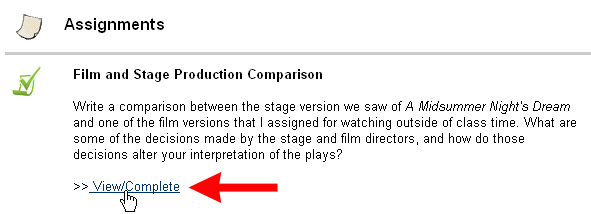
    <li>Return to the section of the course where your instructor posted the assignment, and click on the <strong>View/Complete Assignment </strong>link:<p><img src="http://www.departments.bucknell.edu/isr/teachingandtechnology/blackboard/studentsupport/submitsafeassignment/images/safeassignment.gif" style="max-width: 100%; height: auto;"></p>
    </li>
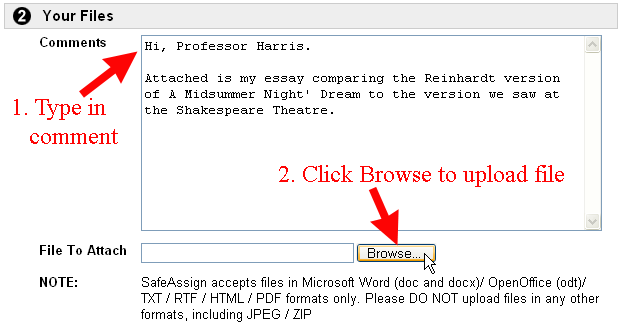
    <li>You will see  the <strong>Upload SafeAssignment</strong> page. Scroll down to Section 2 on the page: <strong>Your Files</strong>.  Optional: type a brief comment in the <strong>Comments </strong>box, giving your instructor details about the file you are submitting, then click on the Browse button to find your file:<p><img alt="Type in Comments and Attach File" src="http://www.departments.bucknell.edu/isr/teachingandtechnology/blackboard/studentsupport/submitsafeassignment/images/attachfile.gif" style="max-width: 100%; height: auto;"></p>
    <p> </p>
    </li>
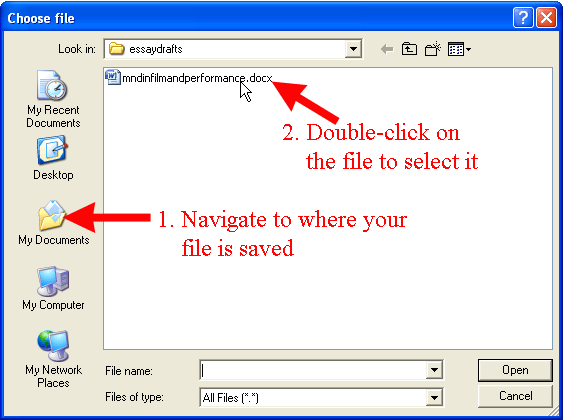
    <li>After you click on that "Browse" button, a dialog box will appear. Navigate to where you've saved the file that you want to submit to your instructor. When you find the file, double-click on the file name to select it:<p><img alt="Select Your Files" src="http://www.departments.bucknell.edu/isr/teachingandtechnology/blackboard/studentsupport/submitsafeassignment/images/selectfile.gif" style="max-width: 100%; height: auto;"></p>
    </li>
    <li>The path to your file will now be entered in the "File to Attach" window.</li>
    <li>Under  Section 3, "Global Reference Database",  you can submit your paper to Blackboard's global database, which means that if a student at another institution using SafeAssign copies your language too closely, SafeAssign will flag the instance and include the copied text as part of the "originality report," indicating that the passage was copied from your work. If you do want your paper included in the Global Reference Database, click in the square selection box in that section.</li>
    <li>Scroll down to the bottom of the page, and click the <img alt="Submit Button" src="http://www.departments.bucknell.edu/isr/teachingandtechnology/blackboard/images/submitbutton.gif" style="max-width: 100%; height: auto;"> button to send your submission to the server.</li>
    <li>Depending on how big your file is, SafeAssign will ask you to wait while your file is being uploaded. SafeAssign will confirm that your SafeAssignment has been "successfully submitted." Click on the <img alt="OK Button" src="http://www.departments.bucknell.edu/isr/teachingandtechnology/blackboard/images/okbutton.gif" style="max-width: 100%; height: auto;"> button to return to the opening page for your course.</li>
    </ol>
    <h2>Rate this Article</h2>
    <p>


    <strong>Was this helpful?</strong>
    <a href="https://apps-my.umbc.edu/apps/rt-track/script.php?u=http://wiki.umbc.edu%2Fpages%2Fviewpage.action%3FpageId%3D29851970&amp;q=0&amp;v=1&amp;s=faq&amp;l=blackboard+student+safeassign" rel="nofollow external" class="bo">Yes</a>
     | <a href="https://docs.google.com/a/umbc.edu/spreadsheet/viewform?formkey=dEpyOEZxa29QY05BaVpBVzZSYmRMM0E6MA&amp;entry_15=http%3A%2F%2Fwiki.umbc.edu%2Fpages%2Fviewpage.action%3FpageId%3D29851970" rel="nofollow external" class="bo">No</a>
     | <a href="https://docs.google.com/a/umbc.edu/spreadsheet/viewform?formkey=dEpyOEZxa29QY05BaVpBVzZSYmRMM0E6MA&amp;entry_15=http%3A%2F%2Fwiki.umbc.edu%2Fpages%2Fviewpage.action%3FpageId%3D29851970" rel="nofollow external" class="bo">Correct or Suggest an Article</a>
     | <a href="https://apps-my.umbc.edu/apps/rt-track/script.php?u=http://wiki.umbc.edu%2Fpages%2Fviewpage.action%3FpageId%3D29851970&amp;q=0&amp;v=0&amp;s=faq&amp;l=blackboard+student+safeassign" rel="nofollow external" class="bo">Request Help</a></p>
    <p><a href="http://my.umbc.edu/help/request" rel="nofollow external" class="bo"><img src="https://wiki.umbc.edu/download/attachments/29853066/RequestHelpicon.png?version=1&amp;modificationDate=1335472984000&amp;api=v2" style="max-width: 100%; height: auto;"></a></p>
        </div>
            <div>
           <a href="https://wiki.umbc.edu/pages/viewpage.action?pageId=29851970" rel="nofollow external" class="bo">View Online</a>
                  ·
           <a href="https://wiki.umbc.edu/pages/diffpagesbyversion.action?pageId=29851970&amp;revisedVersion=5&amp;originalVersion=4" rel="nofollow external" class="bo">View Changes Online</a>       
                      </div>
    </div></div>
]]>
</Body>
<Summary>Page             edited by                     Andrea Mocko                                  Show Me       Video - 01:38  Tell me   Log in to Blackboard and click on your course among the list of...</Summary>
<Website>https://wiki.umbc.edu/pages/viewpage.action?pageId=29851970</Website>
<TrackingUrl>https://my3.my.umbc.edu/api/v0/pixel/news/31273/guest@my.umbc.edu/af61f78ac7ad1c00c9d1ac4c23aca2b6/api/pixel</TrackingUrl>
<Tag>blackboard</Tag>
<Tag>faq</Tag>
<Tag>safeassign</Tag>
<Tag>student</Tag>
<Group token="retired-428">UMBC FAQ</Group>
<GroupUrl>https://my3.my.umbc.edu/groups/retired-428</GroupUrl>
<AvatarUrl>https://assets3-my.umbc.edu/images/avatars/group/1/xsmall.png?1783534523</AvatarUrl>
<AvatarUrl size="original">https://assets2-my.umbc.edu/images/avatars/group/1/original.png?1783534523</AvatarUrl>
<AvatarUrl size="xxlarge">https://assets1-my.umbc.edu/images/avatars/group/1/xxlarge.png?1783534523</AvatarUrl>
<AvatarUrl size="xlarge">https://assets4-my.umbc.edu/images/avatars/group/1/xlarge.png?1783534523</AvatarUrl>
<AvatarUrl size="large">https://assets1-my.umbc.edu/images/avatars/group/1/large.png?1783534523</AvatarUrl>
<AvatarUrl size="medium">https://assets2-my.umbc.edu/images/avatars/group/1/medium.png?1783534523</AvatarUrl>
<AvatarUrl size="small">https://assets1-my.umbc.edu/images/avatars/group/1/small.png?1783534523</AvatarUrl>
<AvatarUrl size="xsmall">https://assets3-my.umbc.edu/images/avatars/group/1/xsmall.png?1783534523</AvatarUrl>
<AvatarUrl size="xxsmall">https://assets1-my.umbc.edu/images/avatars/group/1/xxsmall.png?1783534523</AvatarUrl>
<Sponsor>UMBC FAQ</Sponsor>
<PawCount>0</PawCount>
<CommentCount>0</CommentCount>
<CommentsAllowed>true</CommentsAllowed>
<PostedAt>Thu, 13 Jun 2013 13:05:42 -0400</PostedAt>
</NewsItem>

<NewsItem contentIssues="true" id="31274" important="false" status="posted" url="https://my3.my.umbc.edu/posts/31274">
<Title>How do I generate Blackboard course reports?</Title>
<Body>
<![CDATA[
    <div class="html-content"><div>    <p>
            Page
                <strong>edited</strong> by
                        <a href="https://wiki.umbc.edu/display/~amocko1" rel="nofollow external" class="bo">Andrea Mocko</a>
                </p>
            <div>
            <h2>Tell me</h2>
    <div>
    <p>To generate a course report:</p>
    <ol>
    <li><p>On the <span>Control Panel</span>, expand the <span>Evaluation</span> section and select <span>Course Reports</span>.</p></li>
    <li><p>On the <span>Course Reports</span> page, click the <span> </span><span><span>Click the Action Link icon for a report to access the contextual menu </span></span></p></li>
    <li><p>Select <span>Run</span>.</p></li>
    <li>
    <p>On the <span>Run Reports</span> page, select the <span>Report Specifications</span>. Options vary depending on the type of report.</p>
    <ol></ol>
    <ul>
    <li>
    <span>Select Format</span>: Choose an output format from the drop-down list. Valid formats are PDF, HTML, Excel, or Word. Charts do not display in Excel format.</li>
    <li>
    <span>Select a Start Date</span> and <span>Select an End Date</span>: For reports covering a specific period of time, select to set beginning and ending dates for the report.</li>
    <li>
    <span>Select Students</span>: For reports to be run on a single student, select the student name from the drop-down list.</li>
    <li>
    <span>Select Users</span>: Select one or more users for the report. For Windows, to select multiple users in a list, press the <span>SHIFT</span> key and click the first and last users. To select users out of sequence, press the <span>CTRL</span> key and click each user needed. For Macs, press the <span>COMMAND</span> key instead of the <span>CTRL</span> key.</li>
    <li>
    <span>Average Range</span> and <span>Target Performance Level</span>: This is required for course performance reports. These reports can also be set to <span>Show Unavailable Students</span> and/or <span>Show Unaligned Students</span>.</li>
    </ul>
    </li>
    </ol>
    <li>Click <span>Submit</span>. If a course report includes a large number of users, it can take several minutes or longer for a report to be generated. PDF and HTML formats open directly in a new window. Excel and Word prompt you to save the file first. To print reports, use the print function in the application window that the report opened in.</li>
    <p><span><span>Note:  </span></span>Enable pop-ups for your browser if you are prompted.</p>
    <ol>
    <li>
    <p>After a report is successfully run, you can:</p>
    <ul>
    <li>
    <span>Save to Content Collection</span>: If your school licenses content management, you can save the report to a folder in the Content Collection.</li>
    <li>
    <span>Download Report</span>: Save the report to <span>y</span><span><span>our computer</span></span>
    </li>
    <li>
    <span>Run a New Report</span>: Return to the <span>Run Reports</span> page to run the report again with different criteria.</li>
    </ul>
    </li>
    <li><p>Click <span>OK</span> when finished.</p></li>
    </ol>
    </div>
    <h2>Rate this Article</h2>
    <p>


    <strong>Was this helpful?</strong>
    <a href="https://apps-my.umbc.edu/apps/rt-track/script.php?u=http://wiki.umbc.edu%2Fpages%2Fviewpage.action%3FpageId%3D29851739&amp;q=0&amp;v=1&amp;s=faq&amp;l=" rel="nofollow external" class="bo">Yes</a>
     | <a href="https://docs.google.com/a/umbc.edu/spreadsheet/viewform?formkey=dEpyOEZxa29QY05BaVpBVzZSYmRMM0E6MA&amp;entry_15=http%3A%2F%2Fwiki.umbc.edu%2Fpages%2Fviewpage.action%3FpageId%3D29851739" rel="nofollow external" class="bo">No</a>
     | <a href="https://docs.google.com/a/umbc.edu/spreadsheet/viewform?formkey=dEpyOEZxa29QY05BaVpBVzZSYmRMM0E6MA&amp;entry_15=http%3A%2F%2Fwiki.umbc.edu%2Fpages%2Fviewpage.action%3FpageId%3D29851739" rel="nofollow external" class="bo">Correct or Suggest an Article</a>
     | <a href="https://apps-my.umbc.edu/apps/rt-track/script.php?u=http://wiki.umbc.edu%2Fpages%2Fviewpage.action%3FpageId%3D29851739&amp;q=0&amp;v=0&amp;s=faq&amp;l=" rel="nofollow external" class="bo">Request Help</a></p>
    <p><a href="http://my.umbc.edu/help/request" rel="nofollow external" class="bo"><img src="https://wiki.umbc.edu/download/attachments/29853066/RequestHelpicon.png?version=1&amp;modificationDate=1335472984000&amp;api=v2" style="max-width: 100%; height: auto;"></a></p>
        </div>
            <div>
           <a href="https://wiki.umbc.edu/pages/viewpage.action?pageId=29851739" rel="nofollow external" class="bo">View Online</a>
                  ·
           <a href="https://wiki.umbc.edu/pages/diffpagesbyversion.action?pageId=29851739&amp;revisedVersion=5&amp;originalVersion=4" rel="nofollow external" class="bo">View Changes Online</a>       
                      </div>
    </div></div>
]]>
</Body>
<Summary>Page             edited by                     Andrea Mocko                                  Tell me   To generate a course report:    On the Control Panel, expand the Evaluation section and...</Summary>
<Website>https://wiki.umbc.edu/pages/viewpage.action?pageId=29851739</Website>
<TrackingUrl>https://my3.my.umbc.edu/api/v0/pixel/news/31274/guest@my.umbc.edu/feb5d4ef690a1f3aa640c8be691693bf/api/pixel</TrackingUrl>
<Tag>faq</Tag>
<Group token="retired-428">UMBC FAQ</Group>
<GroupUrl>https://my3.my.umbc.edu/groups/retired-428</GroupUrl>
<AvatarUrl>https://assets3-my.umbc.edu/images/avatars/group/1/xsmall.png?1783534523</AvatarUrl>
<AvatarUrl size="original">https://assets2-my.umbc.edu/images/avatars/group/1/original.png?1783534523</AvatarUrl>
<AvatarUrl size="xxlarge">https://assets1-my.umbc.edu/images/avatars/group/1/xxlarge.png?1783534523</AvatarUrl>
<AvatarUrl size="xlarge">https://assets4-my.umbc.edu/images/avatars/group/1/xlarge.png?1783534523</AvatarUrl>
<AvatarUrl size="large">https://assets1-my.umbc.edu/images/avatars/group/1/large.png?1783534523</AvatarUrl>
<AvatarUrl size="medium">https://assets2-my.umbc.edu/images/avatars/group/1/medium.png?1783534523</AvatarUrl>
<AvatarUrl size="small">https://assets1-my.umbc.edu/images/avatars/group/1/small.png?1783534523</AvatarUrl>
<AvatarUrl size="xsmall">https://assets3-my.umbc.edu/images/avatars/group/1/xsmall.png?1783534523</AvatarUrl>
<AvatarUrl size="xxsmall">https://assets1-my.umbc.edu/images/avatars/group/1/xxsmall.png?1783534523</AvatarUrl>
<Sponsor>UMBC FAQ</Sponsor>
<PawCount>0</PawCount>
<CommentCount>0</CommentCount>
<CommentsAllowed>true</CommentsAllowed>
<PostedAt>Thu, 13 Jun 2013 13:05:19 -0400</PostedAt>
</NewsItem>

<NewsItem contentIssues="true" id="31275" important="false" status="posted" url="https://my3.my.umbc.edu/posts/31275">
<Title>How do I enter grades via the Blackboard Grade Center page?</Title>
<Body>
<![CDATA[
    <div class="html-content"><div>    <p>
            Page
                <strong>edited</strong> by
                        <a href="https://wiki.umbc.edu/display/~amocko1" rel="nofollow external" class="bo">Andrea Mocko</a>
                </p>
            <div>
            <h2>Tell me</h2>
    <p>This option is best suited for quickly entering grades for an entire class or fairly large number of students.</p>
    <ol>
    <li>Click the <strong>Full Grade Center</strong> in the <em>Control Panel</em> menu</li>
    <li>Locate the student and item to be graded</li>
    <li>Move the cursor over the student's cell and click to make it "active"<br> <img src="https://wiki.umbc.edu/download/attachments/24477830/BbGradeCenterActiveCell.png?version=1&amp;modificationDate=1317216568000&amp;api=v2" style="max-width: 100%; height: auto;">
    </li>
    <li>Type the grade in the cell and press <strong>ENTER</strong>. The cursor will move down to the next student's cell making it the active cell. NOTE: Make sure to press the Enter key after entering the score, otherwise a dialog box will appear asking if you would like to save the entry. Select OK to save the grade if this happens</li>
    </ol>
    <h2>Rate this Article</h2>
    <p>


    <strong>Was this helpful?</strong>
    <a href="https://apps-my.umbc.edu/apps/rt-track/script.php?u=http://wiki.umbc.edu%2Fpages%2Fviewpage.action%3FpageId%3D24477830&amp;q=33&amp;v=1&amp;s=faq&amp;l=blackboard+faculty" rel="nofollow external" class="bo">Yes</a>
     | <a href="https://docs.google.com/a/umbc.edu/spreadsheet/viewform?formkey=dEpyOEZxa29QY05BaVpBVzZSYmRMM0E6MA&amp;entry_15=http%3A%2F%2Fwiki.umbc.edu%2Fpages%2Fviewpage.action%3FpageId%3D24477830" rel="nofollow external" class="bo">No</a>
     | <a href="https://docs.google.com/a/umbc.edu/spreadsheet/viewform?formkey=dEpyOEZxa29QY05BaVpBVzZSYmRMM0E6MA&amp;entry_15=http%3A%2F%2Fwiki.umbc.edu%2Fpages%2Fviewpage.action%3FpageId%3D24477830" rel="nofollow external" class="bo">Correct or Suggest an Article</a>
     | <a href="https://apps-my.umbc.edu/apps/rt-track/script.php?u=http://wiki.umbc.edu%2Fpages%2Fviewpage.action%3FpageId%3D24477830&amp;q=33&amp;v=0&amp;s=faq&amp;l=blackboard+faculty" rel="nofollow external" class="bo">Request Help</a></p>
    <p><a href="http://my.umbc.edu/help/request" rel="nofollow external" class="bo"><img src="https://wiki.umbc.edu/download/attachments/29853066/RequestHelpicon.png?version=1&amp;modificationDate=1335472984000&amp;api=v2" style="max-width: 100%; height: auto;"></a></p>
        </div>
            <div>
           <a href="https://wiki.umbc.edu/pages/viewpage.action?pageId=24477830" rel="nofollow external" class="bo">View Online</a>
                  ·
           <a href="https://wiki.umbc.edu/pages/diffpagesbyversion.action?pageId=24477830&amp;revisedVersion=8&amp;originalVersion=7" rel="nofollow external" class="bo">View Changes Online</a>       
                      </div>
    </div></div>
]]>
</Body>
<Summary>Page             edited by                     Andrea Mocko                                  Tell me  This option is best suited for quickly entering grades for an entire class or fairly large...</Summary>
<Website>https://wiki.umbc.edu/pages/viewpage.action?pageId=24477830</Website>
<TrackingUrl>https://my3.my.umbc.edu/api/v0/pixel/news/31275/guest@my.umbc.edu/af09a72fcdacffeed6a2cdba1ec3a4a0/api/pixel</TrackingUrl>
<Tag>blackboard</Tag>
<Tag>faculty</Tag>
<Tag>faq</Tag>
<Group token="retired-428">UMBC FAQ</Group>
<GroupUrl>https://my3.my.umbc.edu/groups/retired-428</GroupUrl>
<AvatarUrl>https://assets3-my.umbc.edu/images/avatars/group/1/xsmall.png?1783534523</AvatarUrl>
<AvatarUrl size="original">https://assets2-my.umbc.edu/images/avatars/group/1/original.png?1783534523</AvatarUrl>
<AvatarUrl size="xxlarge">https://assets1-my.umbc.edu/images/avatars/group/1/xxlarge.png?1783534523</AvatarUrl>
<AvatarUrl size="xlarge">https://assets4-my.umbc.edu/images/avatars/group/1/xlarge.png?1783534523</AvatarUrl>
<AvatarUrl size="large">https://assets1-my.umbc.edu/images/avatars/group/1/large.png?1783534523</AvatarUrl>
<AvatarUrl size="medium">https://assets2-my.umbc.edu/images/avatars/group/1/medium.png?1783534523</AvatarUrl>
<AvatarUrl size="small">https://assets1-my.umbc.edu/images/avatars/group/1/small.png?1783534523</AvatarUrl>
<AvatarUrl size="xsmall">https://assets3-my.umbc.edu/images/avatars/group/1/xsmall.png?1783534523</AvatarUrl>
<AvatarUrl size="xxsmall">https://assets1-my.umbc.edu/images/avatars/group/1/xxsmall.png?1783534523</AvatarUrl>
<Sponsor>UMBC FAQ</Sponsor>
<PawCount>0</PawCount>
<CommentCount>0</CommentCount>
<CommentsAllowed>true</CommentsAllowed>
<PostedAt>Thu, 13 Jun 2013 13:05:10 -0400</PostedAt>
</NewsItem>

<NewsItem contentIssues="false" id="110129" important="false" status="posted" url="https://my3.my.umbc.edu/posts/110129">
<Title>Solo Exhibition by Christine Ferrera, New Media Studio, Opens At Gibbs Street Gallery (6/21)</Title>
<Body>
<![CDATA[
    <div class="html-content">Friday, June 21 at 8:00 p.m., Between You and Me, an exhibition by Coordinator/Producer of the New Media Studio, Christine Ferrera ’10 M.F.A., Imaging and Digital Arts, opens at the Gibbs Street Gallery in Rockville, Maryland. According to Rockville’s VisArts website, Between You and Me is a collection of performance pieces “that circuitously contemplate art, humor and feminism. Each piece uses personal monologue as a vehicle to explore longing, insecurity, narcissism and enlightenment. By counter-posing live and recorded performance, satire and sincerity, the artist either transcends her angst or winds up in a self-reflexive tangle.” The works include Starbux Diary; Awkward Pauzez …</div>
]]>
</Body>
<Summary>Friday, June 21 at 8:00 p.m., Between You and Me, an exhibition by Coordinator/Producer of the New Media Studio, Christine Ferrera ’10 M.F.A., Imaging and Digital Arts, opens at the Gibbs Street...</Summary>
<Website>https://news.umbc.edu/solo-exhibition-by-christine-ferrera-new-media-studio-opens-at-gibbs-street-gallery-621/</Website>
<TrackingUrl>https://my3.my.umbc.edu/api/v0/pixel/news/110129/guest@my.umbc.edu/b46a22ea15bc274018aaba16f49c21e0/api/pixel</TrackingUrl>
<Tag>arts-and-culture</Tag>
<Tag>cahss</Tag>
<Tag>visualarts</Tag>
<Group token="umbc-news">UMBC News</Group>
<GroupUrl>https://my3.my.umbc.edu/groups/umbc-news</GroupUrl>
<AvatarUrl>https://assets2-my.umbc.edu/system/shared/avatars/groups/000/001/944/2c79aeea85b1abb37f8cf9fbcdc382b0/xsmall.png?1632921809</AvatarUrl>
<AvatarUrl size="original">https://assets4-my.umbc.edu/system/shared/avatars/groups/000/001/944/2c79aeea85b1abb37f8cf9fbcdc382b0/original.png?1632921809</AvatarUrl>
<AvatarUrl size="xxlarge">https://assets4-my.umbc.edu/system/shared/avatars/groups/000/001/944/2c79aeea85b1abb37f8cf9fbcdc382b0/xxlarge.png?1632921809</AvatarUrl>
<AvatarUrl size="xlarge">https://assets1-my.umbc.edu/system/shared/avatars/groups/000/001/944/2c79aeea85b1abb37f8cf9fbcdc382b0/xlarge.png?1632921809</AvatarUrl>
<AvatarUrl size="large">https://assets1-my.umbc.edu/system/shared/avatars/groups/000/001/944/2c79aeea85b1abb37f8cf9fbcdc382b0/large.png?1632921809</AvatarUrl>
<AvatarUrl size="medium">https://assets1-my.umbc.edu/system/shared/avatars/groups/000/001/944/2c79aeea85b1abb37f8cf9fbcdc382b0/medium.png?1632921809</AvatarUrl>
<AvatarUrl size="small">https://assets4-my.umbc.edu/system/shared/avatars/groups/000/001/944/2c79aeea85b1abb37f8cf9fbcdc382b0/small.png?1632921809</AvatarUrl>
<AvatarUrl size="xsmall">https://assets2-my.umbc.edu/system/shared/avatars/groups/000/001/944/2c79aeea85b1abb37f8cf9fbcdc382b0/xsmall.png?1632921809</AvatarUrl>
<AvatarUrl size="xxsmall">https://assets4-my.umbc.edu/system/shared/avatars/groups/000/001/944/2c79aeea85b1abb37f8cf9fbcdc382b0/xxsmall.png?1632921809</AvatarUrl>
<Sponsor>UMBC News</Sponsor>
<PawCount>0</PawCount>
<CommentCount>0</CommentCount>
<CommentsAllowed>false</CommentsAllowed>
<PostedAt>Thu, 13 Jun 2013 12:52:43 -0400</PostedAt>
</NewsItem>

<NewsItem contentIssues="true" id="31276" important="false" status="posted" url="https://my3.my.umbc.edu/posts/31276">
<Title>Gadgetwise Blog: Q&amp;A: Protecting a PC From Spam and Spoofs</Title>
<Body>
<![CDATA[
    <div class="html-content">Spam messages coming from a friend’s e-mail account could be caused by a virus, a hacker or another malicious source.<div><table border="0"><tbody><tr><td>
    <a href="http://share.feedsportal.com/share/twitter/?u=http%3A%2F%2Fgadgetwise.blogs.nytimes.com%2F2013%2F06%2F13%2Fqa-protecting-a-pc-from-spam-and-spoofs%2F%3Fpartner%3Drss%26emc%3Drss&amp;t=Gadgetwise+Blog%3A+Q%26A%3A+Protecting+a+PC+From+Spam+and+Spoofs" rel="nofollow external" class="bo"><img src="http://res3.feedsportal.com/social/twitter.png" style="max-width: 100%; height: auto;"></a> <a href="http://share.feedsportal.com/share/facebook/?u=http%3A%2F%2Fgadgetwise.blogs.nytimes.com%2F2013%2F06%2F13%2Fqa-protecting-a-pc-from-spam-and-spoofs%2F%3Fpartner%3Drss%26emc%3Drss&amp;t=Gadgetwise+Blog%3A+Q%26A%3A+Protecting+a+PC+From+Spam+and+Spoofs" rel="nofollow external" class="bo"><img src="http://res3.feedsportal.com/social/facebook.png" style="max-width: 100%; height: auto;"></a> <a href="http://share.feedsportal.com/share/linkedin/?u=http%3A%2F%2Fgadgetwise.blogs.nytimes.com%2F2013%2F06%2F13%2Fqa-protecting-a-pc-from-spam-and-spoofs%2F%3Fpartner%3Drss%26emc%3Drss&amp;t=Gadgetwise+Blog%3A+Q%26A%3A+Protecting+a+PC+From+Spam+and+Spoofs" rel="nofollow external" class="bo"><img src="http://res3.feedsportal.com/social/linkedin.png" style="max-width: 100%; height: auto;"></a> <a href="http://share.feedsportal.com/share/gplus/?u=http%3A%2F%2Fgadgetwise.blogs.nytimes.com%2F2013%2F06%2F13%2Fqa-protecting-a-pc-from-spam-and-spoofs%2F%3Fpartner%3Drss%26emc%3Drss&amp;t=Gadgetwise+Blog%3A+Q%26A%3A+Protecting+a+PC+From+Spam+and+Spoofs" rel="nofollow external" class="bo"><img src="http://res3.feedsportal.com/social/googleplus.png" style="max-width: 100%; height: auto;"></a> <a href="http://share.feedsportal.com/share/email/?u=http%3A%2F%2Fgadgetwise.blogs.nytimes.com%2F2013%2F06%2F13%2Fqa-protecting-a-pc-from-spam-and-spoofs%2F%3Fpartner%3Drss%26emc%3Drss&amp;t=Gadgetwise+Blog%3A+Q%26A%3A+Protecting+a+PC+From+Spam+and+Spoofs" rel="nofollow external" class="bo"><img src="http://res3.feedsportal.com/social/email.png" style="max-width: 100%; height: auto;"></a>
    </td></tr></tbody></table></div>
    <br><br><a href="http://da.feedsportal.com/r/165664971492/u/0/f/640387/c/34625/s/2d40a785/kg/342-363/a2.htm" rel="nofollow external" class="bo"><img src="http://da.feedsportal.com/r/165664971492/u/0/f/640387/c/34625/s/2d40a785/kg/342-363/a2.img" style="max-width: 100%; height: auto;"></a>
    </div>
]]>
</Body>
<Summary>Spam messages coming from a friend’s e-mail account could be caused by a virus, a hacker or another malicious source.     </Summary>
<Website>http://gadgetwise.blogs.nytimes.com/2013/06/13/qa-protecting-a-pc-from-spam-and-spoofs/?partner=rss&amp;emc=rss</Website>
<TrackingUrl>https://my3.my.umbc.edu/api/v0/pixel/news/31276/guest@my.umbc.edu/fe78e28324b2d74629c0d7bf03e8ce9c/api/pixel</TrackingUrl>
<Tag>about-com</Tag>
<Tag>computer-malware</Tag>
<Tag>computer-security</Tag>
<Tag>computers-and-the-internet</Tag>
<Tag>e-mail</Tag>
<Tag>new</Tag>
<Tag>pc-world</Tag>
<Tag>q-and-a</Tag>
<Tag>spam-electronic</Tag>
<Tag>technology</Tag>
<Tag>york</Tag>
<Group token="retired-583">Web Developer - Build Group</Group>
<GroupUrl>https://my3.my.umbc.edu/groups/retired-583</GroupUrl>
<AvatarUrl>https://assets3-my.umbc.edu/system/shared/avatars/groups/000/000/583/fc60f5d7abc2e080599bb6dc465db54d/xsmall.png?1363101197</AvatarUrl>
<AvatarUrl size="original">https://assets4-my.umbc.edu/system/shared/avatars/groups/000/000/583/fc60f5d7abc2e080599bb6dc465db54d/original.jpg?1363101197</AvatarUrl>
<AvatarUrl size="xxlarge">https://assets4-my.umbc.edu/system/shared/avatars/groups/000/000/583/fc60f5d7abc2e080599bb6dc465db54d/xxlarge.png?1363101197</AvatarUrl>
<AvatarUrl size="xlarge">https://assets4-my.umbc.edu/system/shared/avatars/groups/000/000/583/fc60f5d7abc2e080599bb6dc465db54d/xlarge.png?1363101197</AvatarUrl>
<AvatarUrl size="large">https://assets3-my.umbc.edu/system/shared/avatars/groups/000/000/583/fc60f5d7abc2e080599bb6dc465db54d/large.png?1363101197</AvatarUrl>
<AvatarUrl size="medium">https://assets3-my.umbc.edu/system/shared/avatars/groups/000/000/583/fc60f5d7abc2e080599bb6dc465db54d/medium.png?1363101197</AvatarUrl>
<AvatarUrl size="small">https://assets4-my.umbc.edu/system/shared/avatars/groups/000/000/583/fc60f5d7abc2e080599bb6dc465db54d/small.png?1363101197</AvatarUrl>
<AvatarUrl size="xsmall">https://assets3-my.umbc.edu/system/shared/avatars/groups/000/000/583/fc60f5d7abc2e080599bb6dc465db54d/xsmall.png?1363101197</AvatarUrl>
<AvatarUrl size="xxsmall">https://assets4-my.umbc.edu/system/shared/avatars/groups/000/000/583/fc60f5d7abc2e080599bb6dc465db54d/xxsmall.png?1363101197</AvatarUrl>
<Sponsor>Web Developer - Build Group</Sponsor>
<PawCount>0</PawCount>
<CommentCount>0</CommentCount>
<CommentsAllowed>true</CommentsAllowed>
<PostedAt>Thu, 13 Jun 2013 12:44:23 -0400</PostedAt>
</NewsItem>

<NewsItem contentIssues="true" id="31263" important="false" status="posted" url="https://my3.my.umbc.edu/posts/31263">
<Title>Phishing &amp; Spam</Title>
<Body>
<![CDATA[
    <div class="html-content"><div>    <p>
            Page
                <strong>added</strong> by
                        <a href="https://wiki.umbc.edu/display/~amocko1" rel="nofollow external" class="bo">Andrea Mocko</a>
                </p>
            <div>
            <table border="0" width="100%"><tbody><tr>
    <td>
    <h4>Browse All Articles</h4>    
        
    
    <div>


        <ul>
            
        </ul>


    </div>
    
    </td>
    <td>
    <h4>Popular Articles</h4>            <ol>
                            <li>
                    
                                                        <a href="/display/faq/Confluence+Wiki+at+UMBC" rel="nofollow external" class="bo">Confluence Wiki at UMBC</a>
                        
                                    (4836)
                                </li>
                            <li>
                    
                                                        <a href="/pages/viewpage.action?pageId=1867917" rel="nofollow external" class="bo">How do I view and edit contacts in Gmail?</a>
                        
                                    (3823)
                                </li>
                            <li>
                    
                                                        <a href="/pages/viewpage.action?pageId=31196914" rel="nofollow external" class="bo">Frequently Asked Questions (FAQs)</a>
                        
                                    (2045)
                                </li>
                            <li>
                    
                                                        <a href="/display/faq/Blackboard" rel="nofollow external" class="bo">Blackboard</a>
                        
                                    (1893)
                                </li>
                            <li>
                    
                                                        <a href="/display/faq/Find+Help" rel="nofollow external" class="bo">Find Help</a>
                        
                                    (1843)
                                </li>
                            <li>
                    
                                                        <a href="/pages/viewpage.action?pageId=24478366" rel="nofollow external" class="bo">How do I add a comment on a Confluence wiki page?</a>
                        
                                    (1709)
                                </li>
                            <li>
                    
                                                        <a href="/pages/viewpage.action?pageId=5245059" rel="nofollow external" class="bo">When I check my grades, there is a green exclamation point or a red question mark instead of a score. What does this mean?</a>
                        
                                    (1299)
                                </li>
                            <li>
                    
                                                        <a href="/display/faq/Software+Downloads" rel="nofollow external" class="bo">Software Downloads</a>
                        
                                    (1262)
                                </li>
                            <li>
                    
                                                        <a href="/pages/viewpage.action?pageId=31195506" rel="nofollow external" class="bo">How do I post a news blog in myUMBC groups?</a>
                        
                                    (1059)
                                </li>
                            <li>
                    
                                                        <a href="/pages/viewpage.action?pageId=22708259" rel="nofollow external" class="bo">How do I enable Blackboard discussion board subscription by email?</a>
                        
                                    (1019)
                                </li>
                            <li>
                    
                                                        <a href="/display/faq/Getting+Started+with+Your+FAR+Profile" rel="nofollow external" class="bo">Getting Started with Your FAR Profile</a>
                        
                                    (975)
                                </li>
                            <li>
                    
                                                        <a href="/pages/viewpage.action?pageId=30542501" rel="nofollow external" class="bo">How do I add comments to an FAQ article?</a>
                        
                                    (908)
                                </li>
                            <li>
                    
                                                        <a href="/pages/viewpage.action?pageId=1867962" rel="nofollow external" class="bo">What characters are NOT allowed in file names when files are uploaded to Blackboard?</a>
                        
                                    (732)
                                </li>
                            <li>
                    
                                                        <a href="/pages/viewpage.action?pageId=1867862" rel="nofollow external" class="bo">How do I make a course available or unavailable to students in Blackboard?</a>
                        
                                    (510)
                                </li>
                            <li>
                    
                                                        <a href="/pages/viewpage.action?pageId=2851116" rel="nofollow external" class="bo">Why can't I see my Blackboard course?</a>
                        
                                    (506)
                                </li>
                            <li>
                    
                                                        <a href="/pages/viewpage.action?pageId=1867886" rel="nofollow external" class="bo">How do I connect via VPN on a Windows computer?</a>
                        
                                    (494)
                                </li>
                            <li>
                    
                                                        <a href="/display/faq/Box+at+UMBC" rel="nofollow external" class="bo">Box at UMBC</a>
                        
                                    (429)
                                </li>
                            <li>
                    
                                                        <a href="/pages/viewpage.action?pageId=32692899" rel="nofollow external" class="bo">Antivirus/Antimalware Protection</a>
                        
                                    (386)
                                </li>
                            <li>
                    
                                                        <a href="/pages/viewpage.action?pageId=33850401" rel="nofollow external" class="bo">How do I fix "Not Genuine" issue with Windows XP?</a>
                        
                                    (376)
                                </li>
                            <li>
                    
                                                        <a href="/pages/viewpage.action?pageId=30541029" rel="nofollow external" class="bo">How do I change the display resolution in Mac OS X?</a>
                        
                                    (354)
                                </li>
                        </ol>
        <p><a href="http://my.umbc.edu/help/request" rel="nofollow external" class="bo"><img src="https://wiki.umbc.edu/download/attachments/29853066/RequestHelpicon.png?version=1&amp;modificationDate=1335472984000&amp;api=v2" style="max-width: 100%; height: auto;"></a></p>
    </td>
    </tr></tbody></table>
        </div>
            <div>
           <a href="https://wiki.umbc.edu/pages/viewpage.action?pageId=36766495" rel="nofollow external" class="bo">View Online</a>
                      </div>
    </div></div>
]]>
</Body>
<Summary>Page             added by                     Andrea Mocko                                  Browse All Articles...</Summary>
<Website>https://wiki.umbc.edu/pages/viewpage.action?pageId=36766495</Website>
<TrackingUrl>https://my3.my.umbc.edu/api/v0/pixel/news/31263/guest@my.umbc.edu/b0838361bb82e0a63f338adb983b3ac5/api/pixel</TrackingUrl>
<Tag>faq</Tag>
<Group token="retired-428">UMBC FAQ</Group>
<GroupUrl>https://my3.my.umbc.edu/groups/retired-428</GroupUrl>
<AvatarUrl>https://assets3-my.umbc.edu/images/avatars/group/1/xsmall.png?1783534523</AvatarUrl>
<AvatarUrl size="original">https://assets2-my.umbc.edu/images/avatars/group/1/original.png?1783534523</AvatarUrl>
<AvatarUrl size="xxlarge">https://assets1-my.umbc.edu/images/avatars/group/1/xxlarge.png?1783534523</AvatarUrl>
<AvatarUrl size="xlarge">https://assets4-my.umbc.edu/images/avatars/group/1/xlarge.png?1783534523</AvatarUrl>
<AvatarUrl size="large">https://assets1-my.umbc.edu/images/avatars/group/1/large.png?1783534523</AvatarUrl>
<AvatarUrl size="medium">https://assets2-my.umbc.edu/images/avatars/group/1/medium.png?1783534523</AvatarUrl>
<AvatarUrl size="small">https://assets1-my.umbc.edu/images/avatars/group/1/small.png?1783534523</AvatarUrl>
<AvatarUrl size="xsmall">https://assets3-my.umbc.edu/images/avatars/group/1/xsmall.png?1783534523</AvatarUrl>
<AvatarUrl size="xxsmall">https://assets1-my.umbc.edu/images/avatars/group/1/xxsmall.png?1783534523</AvatarUrl>
<Sponsor>UMBC FAQ</Sponsor>
<PawCount>0</PawCount>
<CommentCount>0</CommentCount>
<CommentsAllowed>true</CommentsAllowed>
<PostedAt>Thu, 13 Jun 2013 12:37:57 -0400</PostedAt>
</NewsItem>

<NewsItem contentIssues="true" id="31264" important="false" status="posted" url="https://my3.my.umbc.edu/posts/31264">
<Title>How do I turn off the pop-up blocker in my web browser?</Title>
<Body>
<![CDATA[
    <div class="html-content"><div>    <p>
            Page
                <strong>edited</strong> by
                        <a href="https://wiki.umbc.edu/display/~amocko1" rel="nofollow external" class="bo">Andrea Mocko</a>
                </p>
            <div>
            <h2>Tell Me</h2>
    <div><table>
    <colgroup></colgroup>
    <tbody><tr>
    <td><img src="/images/icons/emoticons/information.png" width="16" height="16" alt="" style="max-width: 100%; height: auto;"></td>
    <td><p>Troubleshooting tip: If you are pulling reports or unofficial transcripts from Peoplesoft and nothing happens after processing, try turning off the pop-up blocker.</p></td>
    </tr></tbody>
    </table></div>
    <h3>Firefox</h3>
    <h5>Windows</h5>
    <ol>
    <li>Select <strong>Tools</strong> from the Mozilla Firefox taskbar</li>
    <li>Select <strong>Options</strong> from the drop-down menu</li>
    <li>Select <strong>Content</strong> from the Options dialog box</li>
    <li>To disable all pop-ups, uncheck the <strong>Block pop-up windows</strong> radio button</li>
    <li>Select <strong>Close</strong>
    </li>
    </ol>
    <h5>Mac</h5>
    <ol>
    <li>Click <strong>Firefox</strong>
    </li>
    <li>Click <strong>Preferences</strong>
    </li>
    <li>Select <strong>Content</strong>
    </li>
    <li>Un-check <strong>Block pop-up windows</strong>
    </li>
    </ol>
    <h3><strong>Google Chrome</strong></h3>
    <ol>
    <li>Click on the<strong> WRENCH</strong> (upper right hand corner)</li>
    <li>Click on<strong> SETTINGS</strong>
    </li>
    <li>Scroll to<strong> PRIVACY</strong>, Click on <strong>Content Settings</strong>
    </li>
    <li>Scroll to<strong> POP-UPS</strong>
    </li>
    <li>Check <strong>Allow All Sites to show Pop-Ups</strong>
    </li>
    <li>Click<strong> OK</strong>
    </li>
    </ol>
    <h3><strong>Internet Explorer</strong></h3>
    <ol>
    <li>Click<strong> Tools </strong>menu<ul><li>Press <strong>Alt-T</strong> if you don't see a menu  </li></ul>
    </li>
    <li>Click<strong> Internet Options </strong>
    </li>
    <li>Click <strong>Privacy </strong>tab</li>
    <li>Under<em> Pop-up Blocker</em>, UnCheck <strong>Turn on Pop-up Blocker</strong>
    </li>
    <li>Click <strong>OK</strong>
    </li>
    </ol>
    <p><strong><br></strong></p>
    <h2>Rate this Article</h2>
    <p>


    <strong>Was this helpful?</strong>
    <a href="https://apps-my.umbc.edu/apps/rt-track/script.php?u=http://wiki.umbc.edu%2Fpages%2Fviewpage.action%3FpageId%3D1867972&amp;q=0&amp;v=1&amp;s=faq&amp;l=browser+configuration" rel="nofollow external" class="bo">Yes</a>
     | <a href="https://docs.google.com/a/umbc.edu/spreadsheet/viewform?formkey=dEpyOEZxa29QY05BaVpBVzZSYmRMM0E6MA&amp;entry_15=http%3A%2F%2Fwiki.umbc.edu%2Fpages%2Fviewpage.action%3FpageId%3D1867972" rel="nofollow external" class="bo">No</a>
     | <a href="https://docs.google.com/a/umbc.edu/spreadsheet/viewform?formkey=dEpyOEZxa29QY05BaVpBVzZSYmRMM0E6MA&amp;entry_15=http%3A%2F%2Fwiki.umbc.edu%2Fpages%2Fviewpage.action%3FpageId%3D1867972" rel="nofollow external" class="bo">Correct or Suggest an Article</a>
     | <a href="https://apps-my.umbc.edu/apps/rt-track/script.php?u=http://wiki.umbc.edu%2Fpages%2Fviewpage.action%3FpageId%3D1867972&amp;q=0&amp;v=0&amp;s=faq&amp;l=browser+configuration" rel="nofollow external" class="bo">Request Help</a></p>
    <p><a href="http://my.umbc.edu/help/request" rel="nofollow external" class="bo"><img src="https://wiki.umbc.edu/download/attachments/29853066/RequestHelpicon.png?version=1&amp;modificationDate=1335472984000&amp;api=v2" style="max-width: 100%; height: auto;"></a></p>
    <p> </p>
        </div>
            <div>
           <a href="https://wiki.umbc.edu/pages/viewpage.action?pageId=1867972" rel="nofollow external" class="bo">View Online</a>
                  ·
           <a href="https://wiki.umbc.edu/pages/diffpagesbyversion.action?pageId=1867972&amp;revisedVersion=9&amp;originalVersion=8" rel="nofollow external" class="bo">View Changes Online</a>       
                      </div>
    </div></div>
]]>
</Body>
<Summary>Page             edited by                     Andrea Mocko                                  Tell Me   Troubleshooting tip: If you are pulling reports or unofficial transcripts from Peoplesoft and...</Summary>
<Website>https://wiki.umbc.edu/pages/viewpage.action?pageId=1867972</Website>
<TrackingUrl>https://my3.my.umbc.edu/api/v0/pixel/news/31264/guest@my.umbc.edu/6000c3cc7f577ecd2700cb1480fa8ca3/api/pixel</TrackingUrl>
<Tag>browser</Tag>
<Tag>configuration</Tag>
<Tag>faq</Tag>
<Group token="retired-428">UMBC FAQ</Group>
<GroupUrl>https://my3.my.umbc.edu/groups/retired-428</GroupUrl>
<AvatarUrl>https://assets3-my.umbc.edu/images/avatars/group/1/xsmall.png?1783534523</AvatarUrl>
<AvatarUrl size="original">https://assets2-my.umbc.edu/images/avatars/group/1/original.png?1783534523</AvatarUrl>
<AvatarUrl size="xxlarge">https://assets1-my.umbc.edu/images/avatars/group/1/xxlarge.png?1783534523</AvatarUrl>
<AvatarUrl size="xlarge">https://assets4-my.umbc.edu/images/avatars/group/1/xlarge.png?1783534523</AvatarUrl>
<AvatarUrl size="large">https://assets1-my.umbc.edu/images/avatars/group/1/large.png?1783534523</AvatarUrl>
<AvatarUrl size="medium">https://assets2-my.umbc.edu/images/avatars/group/1/medium.png?1783534523</AvatarUrl>
<AvatarUrl size="small">https://assets1-my.umbc.edu/images/avatars/group/1/small.png?1783534523</AvatarUrl>
<AvatarUrl size="xsmall">https://assets3-my.umbc.edu/images/avatars/group/1/xsmall.png?1783534523</AvatarUrl>
<AvatarUrl size="xxsmall">https://assets1-my.umbc.edu/images/avatars/group/1/xxsmall.png?1783534523</AvatarUrl>
<Sponsor>UMBC FAQ</Sponsor>
<PawCount>0</PawCount>
<CommentCount>0</CommentCount>
<CommentsAllowed>true</CommentsAllowed>
<PostedAt>Thu, 13 Jun 2013 12:35:16 -0400</PostedAt>
</NewsItem>

<NewsItem contentIssues="true" id="31266" important="false" status="posted" url="https://my3.my.umbc.edu/posts/31266">
<Title>Bits Blog: Secret Surveillance Court May Reveal Some Secrets</Title>
<Body>
<![CDATA[
    <div class="html-content">The Federal Intelligence Surveillance Court, in a rare ruling, said its opinion could be subject to a Freedom of Information Act request by the San Francisco-based Electronic Frontier Foundation.<div><table border="0"><tbody><tr><td>
    <a href="http://share.feedsportal.com/share/twitter/?u=http%3A%2F%2Fbits.blogs.nytimes.com%2F2013%2F06%2F13%2Fsecret-surveillance-court-may-reveal-some-secrets%2F%3Fpartner%3Drss%26emc%3Drss&amp;t=Bits+Blog%3A+Secret+Surveillance+Court+May+Reveal+Some+Secrets" rel="nofollow external" class="bo"><img src="http://res3.feedsportal.com/social/twitter.png" style="max-width: 100%; height: auto;"></a> <a href="http://share.feedsportal.com/share/facebook/?u=http%3A%2F%2Fbits.blogs.nytimes.com%2F2013%2F06%2F13%2Fsecret-surveillance-court-may-reveal-some-secrets%2F%3Fpartner%3Drss%26emc%3Drss&amp;t=Bits+Blog%3A+Secret+Surveillance+Court+May+Reveal+Some+Secrets" rel="nofollow external" class="bo"><img src="http://res3.feedsportal.com/social/facebook.png" style="max-width: 100%; height: auto;"></a> <a href="http://share.feedsportal.com/share/linkedin/?u=http%3A%2F%2Fbits.blogs.nytimes.com%2F2013%2F06%2F13%2Fsecret-surveillance-court-may-reveal-some-secrets%2F%3Fpartner%3Drss%26emc%3Drss&amp;t=Bits+Blog%3A+Secret+Surveillance+Court+May+Reveal+Some+Secrets" rel="nofollow external" class="bo"><img src="http://res3.feedsportal.com/social/linkedin.png" style="max-width: 100%; height: auto;"></a> <a href="http://share.feedsportal.com/share/gplus/?u=http%3A%2F%2Fbits.blogs.nytimes.com%2F2013%2F06%2F13%2Fsecret-surveillance-court-may-reveal-some-secrets%2F%3Fpartner%3Drss%26emc%3Drss&amp;t=Bits+Blog%3A+Secret+Surveillance+Court+May+Reveal+Some+Secrets" rel="nofollow external" class="bo"><img src="http://res3.feedsportal.com/social/googleplus.png" style="max-width: 100%; height: auto;"></a> <a href="http://share.feedsportal.com/share/email/?u=http%3A%2F%2Fbits.blogs.nytimes.com%2F2013%2F06%2F13%2Fsecret-surveillance-court-may-reveal-some-secrets%2F%3Fpartner%3Drss%26emc%3Drss&amp;t=Bits+Blog%3A+Secret+Surveillance+Court+May+Reveal+Some+Secrets" rel="nofollow external" class="bo"><img src="http://res3.feedsportal.com/social/email.png" style="max-width: 100%; height: auto;"></a>
    </td></tr></tbody></table></div>
    <br><br><a href="http://da.feedsportal.com/r/165665050669/u/0/f/640387/c/34625/s/2d3f9124/a2.htm" rel="nofollow external" class="bo"><img src="http://da.feedsportal.com/r/165665050669/u/0/f/640387/c/34625/s/2d3f9124/a2.img" style="max-width: 100%; height: auto;"></a>
    </div>
]]>
</Body>
<Summary>The Federal Intelligence Surveillance Court, in a rare ruling, said its opinion could be subject to a Freedom of Information Act request by the San Francisco-based Electronic Frontier Foundation....</Summary>
<Website>http://bits.blogs.nytimes.com/2013/06/13/secret-surveillance-court-may-reveal-some-secrets/?partner=rss&amp;emc=rss</Website>
<TrackingUrl>https://my3.my.umbc.edu/api/v0/pixel/news/31266/guest@my.umbc.edu/852c769b009057241f3c1d6493e0d5d7/api/pixel</TrackingUrl>
<Tag>classified-information-and-state-secrets</Tag>
<Tag>data</Tag>
<Tag>electronic-frontier-foundation</Tag>
<Tag>feinstein-dianne</Tag>
<Tag>new</Tag>
<Tag>policy</Tag>
<Tag>privacy</Tag>
<Tag>san-francisco-calif</Tag>
<Tag>security</Tag>
<Tag>technology</Tag>
<Tag>walton-reggie-b</Tag>
<Tag>wyden-ron</Tag>
<Tag>york</Tag>
<Group token="retired-583">Web Developer - Build Group</Group>
<GroupUrl>https://my3.my.umbc.edu/groups/retired-583</GroupUrl>
<AvatarUrl>https://assets3-my.umbc.edu/system/shared/avatars/groups/000/000/583/fc60f5d7abc2e080599bb6dc465db54d/xsmall.png?1363101197</AvatarUrl>
<AvatarUrl size="original">https://assets4-my.umbc.edu/system/shared/avatars/groups/000/000/583/fc60f5d7abc2e080599bb6dc465db54d/original.jpg?1363101197</AvatarUrl>
<AvatarUrl size="xxlarge">https://assets4-my.umbc.edu/system/shared/avatars/groups/000/000/583/fc60f5d7abc2e080599bb6dc465db54d/xxlarge.png?1363101197</AvatarUrl>
<AvatarUrl size="xlarge">https://assets4-my.umbc.edu/system/shared/avatars/groups/000/000/583/fc60f5d7abc2e080599bb6dc465db54d/xlarge.png?1363101197</AvatarUrl>
<AvatarUrl size="large">https://assets3-my.umbc.edu/system/shared/avatars/groups/000/000/583/fc60f5d7abc2e080599bb6dc465db54d/large.png?1363101197</AvatarUrl>
<AvatarUrl size="medium">https://assets3-my.umbc.edu/system/shared/avatars/groups/000/000/583/fc60f5d7abc2e080599bb6dc465db54d/medium.png?1363101197</AvatarUrl>
<AvatarUrl size="small">https://assets4-my.umbc.edu/system/shared/avatars/groups/000/000/583/fc60f5d7abc2e080599bb6dc465db54d/small.png?1363101197</AvatarUrl>
<AvatarUrl size="xsmall">https://assets3-my.umbc.edu/system/shared/avatars/groups/000/000/583/fc60f5d7abc2e080599bb6dc465db54d/xsmall.png?1363101197</AvatarUrl>
<AvatarUrl size="xxsmall">https://assets4-my.umbc.edu/system/shared/avatars/groups/000/000/583/fc60f5d7abc2e080599bb6dc465db54d/xxsmall.png?1363101197</AvatarUrl>
<Sponsor>Web Developer - Build Group</Sponsor>
<PawCount>0</PawCount>
<CommentCount>0</CommentCount>
<CommentsAllowed>true</CommentsAllowed>
<PostedAt>Thu, 13 Jun 2013 12:16:09 -0400</PostedAt>
<EditAt>Fri, 14 Jun 2013 11:30:20 -0400</EditAt>
</NewsItem>

</News>