<?xml version="1.0"?>
<News hasArchived="true" page="9262" pageCount="10695" pageSize="10" timestamp="Mon, 08 Jun 2026 03:37:00 -0400" url="https://my3.my.umbc.edu/posts.xml?page=9262">
<NewsItem contentIssues="true" id="17678" important="false" status="posted" url="https://my3.my.umbc.edu/posts/17678">
<Title>How do I create a myUMBC portal account?</Title>
<Body>
<![CDATA[
    <div class="html-content"><div>    <p>
            Page
                <strong>edited</strong> by
                        <a href="https://wiki.umbc.edu/display/~amocko1%0A" rel="nofollow external" class="bo">Andrea Mocko</a>
                </p>
            <div>
            <h2>Show me</h2>
    <p><a href="http://www.youtube.com/watch?v=k6l_t_Mew_o" rel="nofollow external" class="bo"><img src="http://img.youtube.com/vi/yL4OKzy35AI/1.jpg" style="max-width: 100%; height: auto;"></a></p>
    <p>Video Length - 01:50</p>
    <h2>Tell me</h2>    <div>
                                
                    <div>
                                <p>You can use this account to track the status of your UMBC application. This account does NOT provide access to Blackboard or UMBC email.</p>
                        </div>
        </div>
    <ol>
    <li><p>Go to <a href="http://my.umbc.edu/account/setpassword" rel="nofollow external" class="bo">http://my.umbc.edu/account/setpassword</a></p></li>
    <li><p>Enter your campus ID</p></li>
    <li><p>Enter your date of birth (DOB) in MM/DD/YYYY format</p></li>
    <li><p>Click the <strong>Login</strong> button</p></li>
    <li><p>Set a password to this account</p></li>
    <li><p>Confirm password previously entered</p></li>
    <li><p>Enter a non-UMBC alternate email address</p></li>
    <li>
    <p>Click the <strong>submit </strong>button</p>    <div>
                                
                    <div>
                                <p>You can now log in to myUMBC using your password and either the email address you provided or your UMBC Campus ID as your name.</p>
                        </div>
        </div>
    </li>
    </ol>
    <h2>Rate this Article</h2>
    <p>


    <strong>Was this helpful?</strong>
    <a href="https://apps-my.umbc.edu/apps/rt-track/script.php?u=http://wiki.umbc.edu%2Fpages%2Fviewpage.action%3FpageId%3D1867941&amp;q=0&amp;v=1&amp;s=faq&amp;l=password+accounts+myumbc+video+portal" rel="nofollow external" class="bo">Yes</a>
     | <a href="https://docs.google.com/a/umbc.edu/spreadsheet/viewform?formkey=dEpyOEZxa29QY05BaVpBVzZSYmRMM0E6MA&amp;entry_15=http%3A%2F%2Fwiki.umbc.edu%2Fpages%2Fviewpage.action%3FpageId%3D1867941" rel="nofollow external" class="bo">No</a>
     | <a href="https://docs.google.com/a/umbc.edu/spreadsheet/viewform?formkey=dEpyOEZxa29QY05BaVpBVzZSYmRMM0E6MA&amp;entry_15=http%3A%2F%2Fwiki.umbc.edu%2Fpages%2Fviewpage.action%3FpageId%3D1867941" rel="nofollow external" class="bo">Correct or Suggest an Article</a>
     | <a href="https://apps-my.umbc.edu/apps/rt-track/script.php?u=http://wiki.umbc.edu%2Fpages%2Fviewpage.action%3FpageId%3D1867941&amp;q=0&amp;v=0&amp;s=faq&amp;l=password+accounts+myumbc+video+portal" rel="nofollow external" class="bo">Request Help</a></p>
        </div>
            <div>
           <a href="https://wiki.umbc.edu/pages/viewpage.action?pageId=1867941" rel="nofollow external" class="bo">View Online</a>
                  ·
           <a href="https://wiki.umbc.edu/pages/diffpagesbyversion.action?pageId=1867941&amp;revisedVersion=89&amp;originalVersion=88" rel="nofollow external" class="bo">View Changes Online</a>       
                      </div>
    </div></div>
]]>
</Body>
<Summary>Page             edited by                     Andrea Mocko                                  Show me    Video Length - 01:50  Tell me...</Summary>
<Website>https://wiki.umbc.edu/pages/viewpage.action?pageId=1867941</Website>
<TrackingUrl>https://my3.my.umbc.edu/api/v0/pixel/news/17678/guest@my.umbc.edu/657c9c43e8571f24c775b965466d6d6f/api/pixel</TrackingUrl>
<Tag>accounts</Tag>
<Tag>faq</Tag>
<Tag>myumbc</Tag>
<Tag>password</Tag>
<Tag>video</Tag>
<Group token="retired-428">UMBC FAQ</Group>
<GroupUrl>https://my3.my.umbc.edu/groups/retired-428</GroupUrl>
<AvatarUrl>https://assets4-my.umbc.edu/images/avatars/group/1/xsmall.png?1780599772</AvatarUrl>
<AvatarUrl size="original">https://assets3-my.umbc.edu/images/avatars/group/1/original.png?1780599772</AvatarUrl>
<AvatarUrl size="xxlarge">https://assets4-my.umbc.edu/images/avatars/group/1/xxlarge.png?1780599772</AvatarUrl>
<AvatarUrl size="xlarge">https://assets4-my.umbc.edu/images/avatars/group/1/xlarge.png?1780599772</AvatarUrl>
<AvatarUrl size="large">https://assets2-my.umbc.edu/images/avatars/group/1/large.png?1780599772</AvatarUrl>
<AvatarUrl size="medium">https://assets3-my.umbc.edu/images/avatars/group/1/medium.png?1780599772</AvatarUrl>
<AvatarUrl size="small">https://assets1-my.umbc.edu/images/avatars/group/1/small.png?1780599772</AvatarUrl>
<AvatarUrl size="xsmall">https://assets4-my.umbc.edu/images/avatars/group/1/xsmall.png?1780599772</AvatarUrl>
<AvatarUrl size="xxsmall">https://assets2-my.umbc.edu/images/avatars/group/1/xxsmall.png?1780599772</AvatarUrl>
<Sponsor>UMBC FAQ</Sponsor>
<PawCount>0</PawCount>
<CommentCount>0</CommentCount>
<CommentsAllowed>true</CommentsAllowed>
<PostedAt>Wed, 17 Oct 2012 13:43:26 -0400</PostedAt>
<EditAt>Mon, 05 Aug 2013 13:05:21 -0400</EditAt>
</NewsItem>

<NewsItem contentIssues="true" id="17679" important="false" status="posted" url="https://my3.my.umbc.edu/posts/17679">
<Title>How do I create a vacation message in the UMBC Webmail system?</Title>
<Body>
<![CDATA[
    <div class="html-content"><div>    <p>
            Page
                <strong>edited</strong> by
                        <a href="https://wiki.umbc.edu/display/~amocko1" rel="nofollow external" class="bo">Andrea Mocko</a>
                </p>
            <div>
            <h2>Answer</h2>
    <div><table>
    <colgroup></colgroup>
    <tbody><tr>
    <td><img src="/images/icons/emoticons/forbidden.png" width="16" height="16" alt="" style="max-width: 100%; height: auto;"></td>
    <td><p>This feature is not available if you have your myUMBC email forwarded to a non-UMBC email address.</p></td>
    </tr></tbody>
    </table></div>
    <ol>
    <li>Log into myUMBC</li>
    <li>Click your name displayed on the upper, right-hand corner of the screen (below the Search field), then <strong>Profile</strong>
    </li>
    <li>In the <strong>Email</strong> section, click the <strong>Create/Manage a Vacation Message</strong> link</li>
    <li>Complete the <strong>Vacation Messsage</strong> form</li>
    <li>Click the <strong>EnableVacation Message</strong> button</li>
    </ol>
    <h3>Screencast</h3>
    <p></p>
    <div class="embed-container"><iframe src="http://www.youtube.com/embed/_r7XKChsyao" frameborder="0" webkitallowfullscreen="webkitAllowFullScreen" mozallowfullscreen="mozallowfullscreen" allowfullscreen="allowFullScreen">[Video]</iframe></div>
        
    <h2>Rate this Article</h2>
    <p>


    <strong>Was this helpful?</strong>
    <a href="https://apps-my.umbc.edu/apps/rt-track/script.php?u=http://wiki.umbc.edu%2Fpages%2Fviewpage.action%3FpageId%3D1867964&amp;q=88&amp;v=1&amp;s=faq&amp;l=email+vacation" rel="nofollow external" class="bo">Yes</a>
     | <a href="https://docs.google.com/a/umbc.edu/spreadsheet/viewform?formkey=dEpyOEZxa29QY05BaVpBVzZSYmRMM0E6MA&amp;entry_15=http%3A%2F%2Fwiki.umbc.edu%2Fpages%2Fviewpage.action%3FpageId%3D1867964" rel="nofollow external" class="bo">No</a>
     | <a href="https://docs.google.com/a/umbc.edu/spreadsheet/viewform?formkey=dEpyOEZxa29QY05BaVpBVzZSYmRMM0E6MA&amp;entry_15=http%3A%2F%2Fwiki.umbc.edu%2Fpages%2Fviewpage.action%3FpageId%3D1867964" rel="nofollow external" class="bo">Correct or Suggest an Article</a>
     | <a href="https://apps-my.umbc.edu/apps/rt-track/script.php?u=http://wiki.umbc.edu%2Fpages%2Fviewpage.action%3FpageId%3D1867964&amp;q=88&amp;v=0&amp;s=faq&amp;l=email+vacation" rel="nofollow external" class="bo">Request Help</a></p>
    <table border="0" width="100%"><tbody><tr>
    <td>
    <h2>Popular FAQs</h2>            <table>
                            <tbody>
    <tr>
                    <td>
                    
                                                        <a href="/display/faq/Software+Downloads" rel="nofollow external" class="bo">Software Downloads</a>
                                        </td>
    
                                </tr>
                            <tr>
                    <td>
                    
                                                        <a href="/display/faq/Find+Help" rel="nofollow external" class="bo">Find Help</a>
                                        </td>
    
                                </tr>
                            <tr>
                    <td>
                    
                                                        <a href="/pages/viewpage.action?pageId=25657586" rel="nofollow external" class="bo">How do I perform a mail merge in Microsoft Word and Excel 2011?</a>
                                        </td>
    
                                </tr>
                            <tr>
                    <td>
                    
                                                        <a href="/display/faq/Blackboard" rel="nofollow external" class="bo">Blackboard</a>
                                        </td>
    
                                </tr>
                            <tr>
                    <td>
                    
                                                        <a href="/pages/viewpage.action?pageId=1867917" rel="nofollow external" class="bo">How do I view and edit contacts in Gmail?</a>
                                        </td>
    
                                </tr>
                        </tbody>
    </table>
        </td>
    <td>
    <h2>Related FAQs</h2>
    <table>
                            <tbody>
    <tr>
                <td>
                                     <span>Page:</span>
                             <a href="/pages/viewpage.action?pageId=1867964" rel="nofollow external" class="bo">How do I create a vacation message in the UMBC Webmail system?</a>
                                            <br>
                                </td>
            </tr>
                </tbody>
    </table>
    </td>
    </tr></tbody></table>
        </div>
            <div>
           <a href="https://wiki.umbc.edu/pages/viewpage.action?pageId=1867964" rel="nofollow external" class="bo">View Online</a>
                  ·
           <a href="https://wiki.umbc.edu/pages/diffpagesbyversion.action?pageId=1867964&amp;revisedVersion=12&amp;originalVersion=11" rel="nofollow external" class="bo">View Changes Online</a>       
                      </div>
    </div></div>
]]>
</Body>
<Summary>Page             edited by                     Andrea Mocko                                  Answer   This feature is not available if you have your myUMBC email forwarded to a non-UMBC email...</Summary>
<Website>https://wiki.umbc.edu/pages/viewpage.action?pageId=1867964</Website>
<TrackingUrl>https://my3.my.umbc.edu/api/v0/pixel/news/17679/guest@my.umbc.edu/c164db5c60c18f3b10962ad24b8a429f/api/pixel</TrackingUrl>
<Tag>email</Tag>
<Tag>faq</Tag>
<Tag>vacation</Tag>
<Group token="retired-428">UMBC FAQ</Group>
<GroupUrl>https://my3.my.umbc.edu/groups/retired-428</GroupUrl>
<AvatarUrl>https://assets4-my.umbc.edu/images/avatars/group/1/xsmall.png?1780599772</AvatarUrl>
<AvatarUrl size="original">https://assets3-my.umbc.edu/images/avatars/group/1/original.png?1780599772</AvatarUrl>
<AvatarUrl size="xxlarge">https://assets4-my.umbc.edu/images/avatars/group/1/xxlarge.png?1780599772</AvatarUrl>
<AvatarUrl size="xlarge">https://assets4-my.umbc.edu/images/avatars/group/1/xlarge.png?1780599772</AvatarUrl>
<AvatarUrl size="large">https://assets2-my.umbc.edu/images/avatars/group/1/large.png?1780599772</AvatarUrl>
<AvatarUrl size="medium">https://assets3-my.umbc.edu/images/avatars/group/1/medium.png?1780599772</AvatarUrl>
<AvatarUrl size="small">https://assets1-my.umbc.edu/images/avatars/group/1/small.png?1780599772</AvatarUrl>
<AvatarUrl size="xsmall">https://assets4-my.umbc.edu/images/avatars/group/1/xsmall.png?1780599772</AvatarUrl>
<AvatarUrl size="xxsmall">https://assets2-my.umbc.edu/images/avatars/group/1/xxsmall.png?1780599772</AvatarUrl>
<Sponsor>UMBC FAQ</Sponsor>
<PawCount>0</PawCount>
<CommentCount>0</CommentCount>
<CommentsAllowed>true</CommentsAllowed>
<PostedAt>Wed, 17 Oct 2012 13:38:48 -0400</PostedAt>
<EditAt>Wed, 17 Oct 2012 13:38:48 -0400</EditAt>
</NewsItem>

<NewsItem contentIssues="true" id="17680" important="false" status="posted" url="https://my3.my.umbc.edu/posts/17680">
<Title>Assessments</Title>
<Body>
<![CDATA[
    <div class="html-content"><div>    <p>
            Page
                <strong>edited</strong> by
                        <a href="https://wiki.umbc.edu/display/~amocko1" rel="nofollow external" class="bo">Andrea Mocko</a>
                </p>
            <div>
            <table border="0" width="100%"><tbody><tr>
    <td>
    <h4>Browse All Articles</h4>
    <div>
    
            
                    <div>
                <span>Collapse all</span>
                <div>
                    <a href="#" rel="nofollow external" class="bo">Expand all</a>  
                    <a href="#" rel="nofollow external" class="bo">Collapse all</a>
                </div>
            </div>
        
        <ul>
            
        </ul>


    </div>
    
    </td>
    <td>
    <h4>Popular Articles</h4>            <ol>
                            <li>
                    
                                                        <a href="/pages/viewpage.action?pageId=2851116" rel="nofollow external" class="bo">Why can't I see my Blackboard course?</a>
                        
                                    (407)
                                </li>
                            <li>
                    
                                                        <a href="/pages/viewpage.action?pageId=17171412" rel="nofollow external" class="bo">How do I remove an old Blackboard course from my list?</a>
                        
                                    (220)
                                </li>
                            <li>
                    
                                                        <a href="/pages/viewpage.action?pageId=22708244" rel="nofollow external" class="bo">How do I export or archive my old Blackboard course?</a>
                        
                                    (151)
                                </li>
                            <li>
                    
                                                        <a href="/pages/viewpage.action?pageId=5245059" rel="nofollow external" class="bo">When I check my grades, there is a green exclamation point or a red question mark instead of a score. What does this mean?</a>
                        
                                    (133)
                                </li>
                            <li>
                    
                                                        <a href="/pages/viewpage.action?pageId=1867862" rel="nofollow external" class="bo">How do I make a course available or unavailable to students in Blackboard?</a>
                        
                                    (124)
                                </li>
                            <li>
                    
                                                        <a href="/pages/viewpage.action?pageId=22708259" rel="nofollow external" class="bo">How do I enable Blackboard discussion board subscription by email?</a>
                        
                                    (104)
                                </li>
                            <li>
                    
                                                        <a href="/pages/viewpage.action?pageId=22709425" rel="nofollow external" class="bo">How do I view the list of students enrolled in my Blackboard course?</a>
                        
                                    (96)
                                </li>
                            <li>
                    
                                                        <a href="/pages/viewpage.action?pageId=5244774" rel="nofollow external" class="bo">How do I upload a file, such as a paper, for a grade in Blackboard?</a>
                        
                                    (89)
                                </li>
                            <li>
                    
                                                        <a href="/pages/viewpage.action?pageId=22708661" rel="nofollow external" class="bo">How do I add a basic adaptive release rule in Blackboard?</a>
                        
                                    (78)
                                </li>
                            <li>
                    
                                                        <a href="/pages/viewpage.action?pageId=26281388" rel="nofollow external" class="bo">How do I join a Blackboard Collaborate session?</a>
                        
                                    (77)
                                </li>
                            <li>
                    
                                                        <a href="/pages/viewpage.action?pageId=22708253" rel="nofollow external" class="bo">How do I import files into my Blackboard course shell?</a>
                        
                                    (70)
                                </li>
                            <li>
                    
                                                        <a href="/pages/viewpage.action?pageId=1867962" rel="nofollow external" class="bo">What characters are NOT allowed in file names when files are uploaded to Blackboard?</a>
                        
                                    (61)
                                </li>
                            <li>
                    
                                                        <a href="/pages/viewpage.action?pageId=24478249" rel="nofollow external" class="bo">How do I upload scantron results to my Blackboard course?</a>
                        
                                    (60)
                                </li>
                            <li>
                    
                                                        <a href="/pages/viewpage.action?pageId=5244742" rel="nofollow external" class="bo">What browser works best with UMBC's Blackboard system?</a>
                        
                                    (58)
                                </li>
                            <li>
                    
                                                        <a href="/display/faq/Assessments" rel="nofollow external" class="bo">Assessments</a>
                        
                                    (55)
                                </li>
                            <li>
                    
                                                        <a href="/pages/viewpage.action?pageId=4194548" rel="nofollow external" class="bo">What is the Edit Mode in Blackboard?</a>
                        
                                    (54)
                                </li>
                            <li>
                    
                                                        <a href="/pages/viewpage.action?pageId=22708792" rel="nofollow external" class="bo">How do I create a SafeAssignment in Blackboard?</a>
                        
                                    (48)
                                </li>
                            <li>
                    
                                                        <a href="/pages/viewpage.action?pageId=30544666" rel="nofollow external" class="bo">How do I grant moderator privileges to a Blackboard Collaborate participant during a live session?</a>
                        
                                    (42)
                                </li>
                            <li>
                    
                                                        <a href="/pages/viewpage.action?pageId=22709180" rel="nofollow external" class="bo">How do I embed a Google Calendar into my Blackboard course or community?</a>
                        
                                    (42)
                                </li>
                            <li>
                    
                                                        <a href="/display/faq/Getting+Started+in+Blackboard" rel="nofollow external" class="bo">Getting Started in Blackboard</a>
                        
                                    (37)
                                </li>
                        </ol>
        <p><a href="https://rt.umbc.edu/SelfService/Create.html?Queue=33" rel="nofollow external" class="bo"><img src="https://wiki.umbc.edu/download/attachments/29853066/RequestHelpicon.png?version=1&amp;modificationDate=1335472984000" style="max-width: 100%; height: auto;"></a></p>
    </td>
    </tr></tbody></table>
        </div>
            <div>
           <a href="https://wiki.umbc.edu/display/faq/Assessments" rel="nofollow external" class="bo">View Online</a>
                  ·
           <a href="https://wiki.umbc.edu/pages/diffpagesbyversion.action?pageId=21725587&amp;revisedVersion=7&amp;originalVersion=6" rel="nofollow external" class="bo">View Changes Online</a>       
                      </div>
    </div></div>
]]>
</Body>
<Summary>Page             edited by                     Andrea Mocko                                  Browse All Articles                                           Collapse all...</Summary>
<Website>https://wiki.umbc.edu/display/faq/Assessments</Website>
<TrackingUrl>https://my3.my.umbc.edu/api/v0/pixel/news/17680/guest@my.umbc.edu/cdd0cea4dd2e6f0a2a69d8d2a9f05532/api/pixel</TrackingUrl>
<Tag>blackboard</Tag>
<Tag>faq</Tag>
<Group token="retired-428">UMBC FAQ</Group>
<GroupUrl>https://my3.my.umbc.edu/groups/retired-428</GroupUrl>
<AvatarUrl>https://assets4-my.umbc.edu/images/avatars/group/1/xsmall.png?1780599772</AvatarUrl>
<AvatarUrl size="original">https://assets3-my.umbc.edu/images/avatars/group/1/original.png?1780599772</AvatarUrl>
<AvatarUrl size="xxlarge">https://assets4-my.umbc.edu/images/avatars/group/1/xxlarge.png?1780599772</AvatarUrl>
<AvatarUrl size="xlarge">https://assets4-my.umbc.edu/images/avatars/group/1/xlarge.png?1780599772</AvatarUrl>
<AvatarUrl size="large">https://assets2-my.umbc.edu/images/avatars/group/1/large.png?1780599772</AvatarUrl>
<AvatarUrl size="medium">https://assets3-my.umbc.edu/images/avatars/group/1/medium.png?1780599772</AvatarUrl>
<AvatarUrl size="small">https://assets1-my.umbc.edu/images/avatars/group/1/small.png?1780599772</AvatarUrl>
<AvatarUrl size="xsmall">https://assets4-my.umbc.edu/images/avatars/group/1/xsmall.png?1780599772</AvatarUrl>
<AvatarUrl size="xxsmall">https://assets2-my.umbc.edu/images/avatars/group/1/xxsmall.png?1780599772</AvatarUrl>
<Sponsor>UMBC FAQ</Sponsor>
<PawCount>0</PawCount>
<CommentCount>0</CommentCount>
<CommentsAllowed>true</CommentsAllowed>
<PostedAt>Wed, 17 Oct 2012 13:36:20 -0400</PostedAt>
<EditAt>Wed, 17 Oct 2012 13:36:20 -0400</EditAt>
</NewsItem>

<NewsItem contentIssues="true" id="17675" important="false" status="posted" url="https://my3.my.umbc.edu/posts/17675">
<Title>How do I remove an old Blackboard course from my list?</Title>
<Body>
<![CDATA[
    <div class="html-content"><div>    <p>
            Page
                <strong>edited</strong> by
                        <a href="https://wiki.umbc.edu/display/~anna%0A" rel="nofollow external" class="bo">Anna Sniadach</a>
                </p>
            <div>
            <h2>Show Me</h2>
    <p><a href="http://my.umbc.edu/groups/faq/media/8671" rel="nofollow external" class="bo"><img src="http://img.youtube.com/vi/mLb88DKou90/1.jpg" style="max-width: 100%; height: auto;"></a></p>
    <p>Video Length - 02:00</p>
    <h2>Tell me</h2>
    <p>Blackboard Admin usually sets a course duration to extend 3-4 weeks after exams end. After that date, students should not see the course unless the instructor has changed the date. If a student can still see a Blackboard course Web site from a previous semester, the student needs to contact the instructor and ask him/her to make it unavailable.</p>
    <p>Students should keep in mind that if another student from the same class has an incomplete grade, the instructor may be required to keep the Blackboard course Web site available to the entire class for as long as the instructor feels it is necessary.</p>
    <p>Note: Students and Faculty may also hide the link for the Blackboard course Web site by editing the My Courses module and removing the check mark for the class.</p>
    <ol>
    <li>Click the edit My Courses module button (gear icon) - see image below - located on the upper right corner of the My Blackboard page<br><img src="https://wiki.umbc.edu/download/attachments/17171412/Bb91MyCourses.png?version=1&amp;modificationDate=1366121119000&amp;api=v2" style="max-width: 100%; height: auto;">
    </li>
    <li>Remove the check mark in the Display Course Name column for each class that you do not want to display</li>
    <li>Click the Submit button</li>
    </ol>
    <h2>Rate this Article</h2>
    <p>


    <strong>Was this helpful?</strong>
    <a href="https://apps-my.umbc.edu/apps/rt-track/script.php?u=http://wiki.umbc.edu%2Fpages%2Fviewpage.action%3FpageId%3D17171412&amp;q=88&amp;v=1&amp;s=faq&amp;l=blackboard+student+video" rel="nofollow external" class="bo">Yes</a>
     | <a href="https://docs.google.com/a/umbc.edu/spreadsheet/viewform?formkey=dEpyOEZxa29QY05BaVpBVzZSYmRMM0E6MA&amp;entry_15=http%3A%2F%2Fwiki.umbc.edu%2Fpages%2Fviewpage.action%3FpageId%3D17171412" rel="nofollow external" class="bo">No</a>
     | <a href="https://docs.google.com/a/umbc.edu/spreadsheet/viewform?formkey=dEpyOEZxa29QY05BaVpBVzZSYmRMM0E6MA&amp;entry_15=http%3A%2F%2Fwiki.umbc.edu%2Fpages%2Fviewpage.action%3FpageId%3D17171412" rel="nofollow external" class="bo">Correct or Suggest an Article</a>
     | <a href="https://apps-my.umbc.edu/apps/rt-track/script.php?u=http://wiki.umbc.edu%2Fpages%2Fviewpage.action%3FpageId%3D17171412&amp;q=88&amp;v=0&amp;s=faq&amp;l=blackboard+student+video" rel="nofollow external" class="bo">Request Help</a></p>
        </div>
            <div>
           <a href="https://wiki.umbc.edu/pages/viewpage.action?pageId=17171412" rel="nofollow external" class="bo">View Online</a>
                  ·
           <a href="https://wiki.umbc.edu/pages/diffpagesbyversion.action?pageId=17171412&amp;revisedVersion=30&amp;originalVersion=29" rel="nofollow external" class="bo">View Changes Online</a>       
                      </div>
    </div></div>
]]>
</Body>
<Summary>Page             edited by                     Anna Sniadach                                  Show Me    Video Length - 02:00  Tell me  Blackboard Admin usually sets a course duration to extend...</Summary>
<Website>https://wiki.umbc.edu/pages/viewpage.action?pageId=17171412</Website>
<TrackingUrl>https://my3.my.umbc.edu/api/v0/pixel/news/17675/guest@my.umbc.edu/cac4aad99ebbd634726c82f762e18685/api/pixel</TrackingUrl>
<Tag>blackboard</Tag>
<Tag>faq</Tag>
<Tag>student</Tag>
<Tag>video</Tag>
<Group token="retired-428">UMBC FAQ</Group>
<GroupUrl>https://my3.my.umbc.edu/groups/retired-428</GroupUrl>
<AvatarUrl>https://assets4-my.umbc.edu/images/avatars/group/1/xsmall.png?1780599772</AvatarUrl>
<AvatarUrl size="original">https://assets3-my.umbc.edu/images/avatars/group/1/original.png?1780599772</AvatarUrl>
<AvatarUrl size="xxlarge">https://assets4-my.umbc.edu/images/avatars/group/1/xxlarge.png?1780599772</AvatarUrl>
<AvatarUrl size="xlarge">https://assets4-my.umbc.edu/images/avatars/group/1/xlarge.png?1780599772</AvatarUrl>
<AvatarUrl size="large">https://assets2-my.umbc.edu/images/avatars/group/1/large.png?1780599772</AvatarUrl>
<AvatarUrl size="medium">https://assets3-my.umbc.edu/images/avatars/group/1/medium.png?1780599772</AvatarUrl>
<AvatarUrl size="small">https://assets1-my.umbc.edu/images/avatars/group/1/small.png?1780599772</AvatarUrl>
<AvatarUrl size="xsmall">https://assets4-my.umbc.edu/images/avatars/group/1/xsmall.png?1780599772</AvatarUrl>
<AvatarUrl size="xxsmall">https://assets2-my.umbc.edu/images/avatars/group/1/xxsmall.png?1780599772</AvatarUrl>
<Sponsor>UMBC FAQ</Sponsor>
<PawCount>0</PawCount>
<CommentCount>0</CommentCount>
<CommentsAllowed>true</CommentsAllowed>
<PostedAt>Wed, 17 Oct 2012 13:01:33 -0400</PostedAt>
<EditAt>Wed, 11 Sep 2013 09:26:36 -0400</EditAt>
</NewsItem>

<NewsItem contentIssues="true" id="17676" important="false" status="posted" url="https://my3.my.umbc.edu/posts/17676">
<Title>How do I setup my iPhone, iPod Touch, or iPad to read UMBC Webmail?</Title>
<Body>
<![CDATA[
    <div class="html-content"><div>    <p>
            Page
                <strong>edited</strong> by
                        <a href="https://wiki.umbc.edu/display/~amocko1" rel="nofollow external" class="bo">Andrea Mocko</a>
                </p>
            <div>
            <h2>Tell Me</h2>
    <div><table>
    <colgroup></colgroup>
    <tbody><tr>
    <td><img src="/images/icons/emoticons/forbidden.png" width="16" height="16" alt="" style="max-width: 100%; height: auto;"></td>
    <td><p>This is for UMBC's old email system. If you've migrated to UMBC Gmail please go to <span><a href="https://wiki.umbc.edu/x/dgJ" rel="nofollow external" class="bo">https://wiki.umbc.edu/x/dgJ</a></span> for step-by-step instructions.</p></td>
    </tr></tbody>
    </table></div>
    <ol>
    <li>Connect your device to the internet</li>
    <li>Select the <strong>Settings</strong> app on the home screen</li>
    <li>Select <strong>Mail, Contacts, Calendars</strong>
    </li>
    <li>Touch <strong>Add Account</strong>, select <strong>Other</strong>
    </li>
    <li>Select <strong>Add Mail Account</strong>
    </li>
    <li>
    <p>Fill out the information fields as follows:</p>
    <div><div>
    <ul>
    <li>Name: Enter your full name as you would like it to appear on the messages that you send</li>
    <li>Address: <a href="mailto:myUMBCusername@umbc.edu">myUMBCusername@umbc.edu</a> (e.g. <a href="mailto:jack@umbc.edu">jack@umbc.edu</a>)</li>
    <li>Description: Name your account something descriptive such as "UMBC Mail"</li>
    </ul>
    </div></div>
    </li>
    <li>
    <span>Select </span><strong>IMAP</strong>
    </li>
    <li>
    <p>In the Incoming Mail Server section, enter the following information:</p>
    <div><div>
    <ul>
    <li>Host Name: imap.umbc.edu</li>
    <li>User Name : myUMBC username (please do NOT include @umbc.edu)</li>
    <li>Password: your account password</li>
    </ul>
    </div></div>
    </li>
    <li>
    <p>In the Outgoing Mail Server section, enter the following information:</p>
    <div><div>
    <ul>
    <li>Host Name: smtp.umbc.edu</li>
    <li>User Name : myUMBC username (please do NOT include @umbc.edu)</li>
    <li>Password: your account password</li>
    </ul>
    </div></div>
    </li>
    <li><p>Touch <strong>Next</strong>. Your account will be verified and you will be returned to the Mail settings screen.</p></li>
    <li>Touch <strong>Save.</strong>
    </li>
    <li>Choose the newly created account from the account list and touch <strong>Advanced</strong> to configure/verify additional settings.</li>
    <li><p>Verify these settings:</p></li>
    </ol>
    <div><div>
    <p><u>Mailbox Behaviors</u></p>
    <ul>
    <li>Drafts Mailbox: Drafts</li>
    <li>Sent Mailbox: Sent</li>
    <li>Deleted Mailbox: Trash</li>
    </ul>
    <p><u>Deleted Messages</u></p>
    <ul><li>Remove: Never</li></ul>
    <p><u>Incoming Settings</u></p>
    <ul>
    <li>server name: imap.umbc.edu</li>
    <li>Use SSL: On</li>
    <li>Authentication: Password</li>
    <li>IMAP Path Prefix: /</li>
    <li>Server Port: 993 (IMAP)</li>
    </ul>
    <p><u>Outgoing Settings</u></p>
    <ul>
    <li>server name: smtp.umbc.edu</li>
    <li>Use SSL: On</li>
    <li>Authentication: Password</li>
    <li>Server Port: 587</li>
    </ul>
    </div></div>
    <h2>Rate this Article</h2>
    <p>


    <strong>Was this helpful?</strong>
    <a href="https://apps-my.umbc.edu/apps/rt-track/script.php?u=http://wiki.umbc.edu%2Fpages%2Fviewpage.action%3FpageId%3D1867869&amp;q=0&amp;v=1&amp;s=faq&amp;l=email+iphone+configuration" rel="nofollow external" class="bo">Yes</a>
     | <a href="https://docs.google.com/a/umbc.edu/spreadsheet/viewform?formkey=dEpyOEZxa29QY05BaVpBVzZSYmRMM0E6MA&amp;entry_15=http%3A%2F%2Fwiki.umbc.edu%2Fpages%2Fviewpage.action%3FpageId%3D1867869" rel="nofollow external" class="bo">No</a>
     | <a href="https://docs.google.com/a/umbc.edu/spreadsheet/viewform?formkey=dEpyOEZxa29QY05BaVpBVzZSYmRMM0E6MA&amp;entry_15=http%3A%2F%2Fwiki.umbc.edu%2Fpages%2Fviewpage.action%3FpageId%3D1867869" rel="nofollow external" class="bo">Correct or Suggest an Article</a>
     | <a href="https://apps-my.umbc.edu/apps/rt-track/script.php?u=http://wiki.umbc.edu%2Fpages%2Fviewpage.action%3FpageId%3D1867869&amp;q=0&amp;v=0&amp;s=faq&amp;l=email+iphone+configuration" rel="nofollow external" class="bo">Request Help</a></p>
    <p><a href="http://my.umbc.edu/help/request" rel="nofollow external" class="bo"><img src="https://wiki.umbc.edu/download/attachments/29853066/RequestHelpicon.png?version=1&amp;modificationDate=1335472984000&amp;api=v2" style="max-width: 100%; height: auto;"></a></p>
        </div>
            <div>
           <a href="https://wiki.umbc.edu/pages/viewpage.action?pageId=1867869" rel="nofollow external" class="bo">View Online</a>
                  ·
           <a href="https://wiki.umbc.edu/pages/diffpagesbyversion.action?pageId=1867869&amp;revisedVersion=25&amp;originalVersion=24" rel="nofollow external" class="bo">View Changes Online</a>       
                      </div>
    </div></div>
]]>
</Body>
<Summary>Page             edited by                     Andrea Mocko                                  Tell Me   This is for UMBC's old email system. If you've migrated to UMBC Gmail please go...</Summary>
<Website>https://wiki.umbc.edu/pages/viewpage.action?pageId=1867869</Website>
<TrackingUrl>https://my3.my.umbc.edu/api/v0/pixel/news/17676/guest@my.umbc.edu/8d28819d309f2c6756536e260af711e8/api/pixel</TrackingUrl>
<Tag>configuration</Tag>
<Tag>email</Tag>
<Tag>faq</Tag>
<Tag>iphone</Tag>
<Group token="retired-428">UMBC FAQ</Group>
<GroupUrl>https://my3.my.umbc.edu/groups/retired-428</GroupUrl>
<AvatarUrl>https://assets4-my.umbc.edu/images/avatars/group/1/xsmall.png?1780599772</AvatarUrl>
<AvatarUrl size="original">https://assets3-my.umbc.edu/images/avatars/group/1/original.png?1780599772</AvatarUrl>
<AvatarUrl size="xxlarge">https://assets4-my.umbc.edu/images/avatars/group/1/xxlarge.png?1780599772</AvatarUrl>
<AvatarUrl size="xlarge">https://assets4-my.umbc.edu/images/avatars/group/1/xlarge.png?1780599772</AvatarUrl>
<AvatarUrl size="large">https://assets2-my.umbc.edu/images/avatars/group/1/large.png?1780599772</AvatarUrl>
<AvatarUrl size="medium">https://assets3-my.umbc.edu/images/avatars/group/1/medium.png?1780599772</AvatarUrl>
<AvatarUrl size="small">https://assets1-my.umbc.edu/images/avatars/group/1/small.png?1780599772</AvatarUrl>
<AvatarUrl size="xsmall">https://assets4-my.umbc.edu/images/avatars/group/1/xsmall.png?1780599772</AvatarUrl>
<AvatarUrl size="xxsmall">https://assets2-my.umbc.edu/images/avatars/group/1/xxsmall.png?1780599772</AvatarUrl>
<Sponsor>UMBC FAQ</Sponsor>
<PawCount>2</PawCount>
<CommentCount>0</CommentCount>
<CommentsAllowed>true</CommentsAllowed>
<PostedAt>Wed, 17 Oct 2012 12:58:49 -0400</PostedAt>
<EditAt>Fri, 01 Mar 2013 10:54:10 -0500</EditAt>
</NewsItem>

<NewsItem contentIssues="true" id="17677" important="false" status="posted" url="https://my3.my.umbc.edu/posts/17677">
<Title>How do I setup Thunderbird for UMBC Gmail?</Title>
<Body>
<![CDATA[
    <div class="html-content"><div>    <p>
            Page
                <strong>edited</strong> by
                        <a href="https://wiki.umbc.edu/display/~amocko1" rel="nofollow external" class="bo">Andrea Mocko</a>
                </p>
            <div>
            <p>&lt; <a href="https://wiki.umbc.edu/display/faq/Email" rel="nofollow external" class="bo">Back to Email Article Collection</a></p>
    <h2>Tell Me</h2>
    <div><table>
    <colgroup></colgroup>
    <tbody><tr>
    <td><img src="/images/icons/emoticons/information.png" width="16" height="16" alt="" style="max-width: 100%; height: auto;"></td>
    <td><ul>
    <li>These instructions are for UMBC email accounts created or migrated in Gmail</li>
    <li>Make sure IMAP is enabled in your UMBC Gmail account. <a href="http://support.google.com/mail/bin/answer.py?hl=en&amp;answer=77695" rel="nofollow external" class="bo">How do I enable IMAP for Gmail?</a>
    </li>
    <li>If you have not changed your password since migrating to Gmail, you will need to <a href="https://wiki.umbc.edu/pages/viewpage.action?pageId=1867939" rel="nofollow external" class="bo">change your password in myUMBC</a><a href="http://support.google.com/mail/bin/answer.py?hl=en&amp;answer=77695" rel="nofollow external" class="bo">.</a>
    </li>
    </ul></td>
    </tr></tbody>
    </table></div>
    <ol>
    <li><p>If you don't already have an email account set up in Thunderbird, you will be prompted to create one when you first start the application up.</p></li>
    <li><p>If you already use Thunderbird and wish to add your UMBC Gmail email as an additional account, from the <strong>Tools</strong> menu go to <strong>Account Settings</strong>. Then under the <strong>Account Actions</strong> drop-down menu click on <strong>Add Mail Account</strong>.</p></li>
    <li>Enter your name as you would like it to be displayed to others in the <strong>Your name</strong> field.</li>
    <li>Enter your full UMBC email address into the <strong>E</strong><strong>mail address</strong> field.</li>
    <li>Enter your myUMBC password into the box labeled <strong>Password</strong>.</li>
    <li>Thunderbird will attempt to work out your e-mail settings. Click <strong>Manual config</strong> to configure Thunderbird manually.</li>
    <li>Where it says <strong>Incoming:</strong>, make sure that "IMAP" is selected in the drop down box. To the right, set the incoming <strong>server hostname </strong>to "imap.gmail.com", the port to be 993, and select "SSL/TLS" from the drop down menu under <strong>SSL</strong>.</li>
    <li>To the right of where it says <strong>Outgoing:</strong>, set the outgoing <strong>server hostname</strong> to "smtp.gmail.com", the port to 587, and select "STARTTLS" for the outgoing SSL drop down menu.</li>
    <li>Enter your full UMBC email address into the <strong>Username</strong> box.</li>
    <li>Click <strong>Done</strong>.</li>
    <li>Your Google account is now ready to use via Thunderbird!</li>
    </ol>
    <div>
    <p> </p>
    <div><table>
    <colgroup></colgroup>
    <tbody><tr>
    <td><img src="/images/icons/emoticons/warning.png" width="16" height="16" alt="" style="max-width: 100%; height: auto;"></td>
    <td><p><span>The first time you send an e-mail from Thunderbird you may see a Login failed message. You will then be prompted for your password.</span></p></td>
    </tr></tbody>
    </table></div>
    </div>
    <h2>Rate this Article</h2>
    <p>


    <strong>Was this helpful?</strong>
    <a href="https://apps-my.umbc.edu/apps/rt-track/script.php?u=http://wiki.umbc.edu%2Fpages%2Fviewpage.action%3FpageId%3D3637305&amp;q=408&amp;v=1&amp;s=faq&amp;l=email+gmail+thunderbird" rel="nofollow external" class="bo">Yes</a>
     | <a href="https://docs.google.com/a/umbc.edu/spreadsheet/viewform?formkey=dEpyOEZxa29QY05BaVpBVzZSYmRMM0E6MA&amp;entry_15=http%3A%2F%2Fwiki.umbc.edu%2Fpages%2Fviewpage.action%3FpageId%3D3637305" rel="nofollow external" class="bo">No</a>
     | <a href="https://docs.google.com/a/umbc.edu/spreadsheet/viewform?formkey=dEpyOEZxa29QY05BaVpBVzZSYmRMM0E6MA&amp;entry_15=http%3A%2F%2Fwiki.umbc.edu%2Fpages%2Fviewpage.action%3FpageId%3D3637305" rel="nofollow external" class="bo">Correct or Suggest an Article</a>
     | <a href="https://apps-my.umbc.edu/apps/rt-track/script.php?u=http://wiki.umbc.edu%2Fpages%2Fviewpage.action%3FpageId%3D3637305&amp;q=408&amp;v=0&amp;s=faq&amp;l=email+gmail+thunderbird" rel="nofollow external" class="bo">Request Help</a></p>
    <p><a href="http://my.umbc.edu/help/request" rel="nofollow external" class="bo"><img src="https://wiki.umbc.edu/download/attachments/29853066/RequestHelpicon.png?version=1&amp;modificationDate=1335472984000&amp;api=v2" style="max-width: 100%; height: auto;"></a></p>
    <p> </p>
        </div>
            <div>
           <a href="https://wiki.umbc.edu/pages/viewpage.action?pageId=3637305" rel="nofollow external" class="bo">View Online</a>
                  ·
           <a href="https://wiki.umbc.edu/pages/diffpagesbyversion.action?pageId=3637305&amp;revisedVersion=22&amp;originalVersion=21" rel="nofollow external" class="bo">View Changes Online</a>       
                      </div>
    </div></div>
]]>
</Body>
<Summary>Page             edited by                     Andrea Mocko                                  &lt; Back to Email Article Collection  Tell Me    These instructions are for UMBC email accounts...</Summary>
<Website>https://wiki.umbc.edu/pages/viewpage.action?pageId=3637305</Website>
<TrackingUrl>https://my3.my.umbc.edu/api/v0/pixel/news/17677/guest@my.umbc.edu/a8d518ccb81e0faef9da2c2c40d64d4d/api/pixel</TrackingUrl>
<Tag>email</Tag>
<Tag>faq</Tag>
<Tag>gmail</Tag>
<Tag>thunderbird</Tag>
<Group token="retired-428">UMBC FAQ</Group>
<GroupUrl>https://my3.my.umbc.edu/groups/retired-428</GroupUrl>
<AvatarUrl>https://assets4-my.umbc.edu/images/avatars/group/1/xsmall.png?1780599772</AvatarUrl>
<AvatarUrl size="original">https://assets3-my.umbc.edu/images/avatars/group/1/original.png?1780599772</AvatarUrl>
<AvatarUrl size="xxlarge">https://assets4-my.umbc.edu/images/avatars/group/1/xxlarge.png?1780599772</AvatarUrl>
<AvatarUrl size="xlarge">https://assets4-my.umbc.edu/images/avatars/group/1/xlarge.png?1780599772</AvatarUrl>
<AvatarUrl size="large">https://assets2-my.umbc.edu/images/avatars/group/1/large.png?1780599772</AvatarUrl>
<AvatarUrl size="medium">https://assets3-my.umbc.edu/images/avatars/group/1/medium.png?1780599772</AvatarUrl>
<AvatarUrl size="small">https://assets1-my.umbc.edu/images/avatars/group/1/small.png?1780599772</AvatarUrl>
<AvatarUrl size="xsmall">https://assets4-my.umbc.edu/images/avatars/group/1/xsmall.png?1780599772</AvatarUrl>
<AvatarUrl size="xxsmall">https://assets2-my.umbc.edu/images/avatars/group/1/xxsmall.png?1780599772</AvatarUrl>
<Sponsor>UMBC FAQ</Sponsor>
<PawCount>1</PawCount>
<CommentCount>0</CommentCount>
<CommentsAllowed>true</CommentsAllowed>
<PostedAt>Wed, 17 Oct 2012 12:56:26 -0400</PostedAt>
<EditAt>Fri, 05 Apr 2013 09:27:05 -0400</EditAt>
</NewsItem>

<NewsItem contentIssues="true" id="17673" important="false" status="posted" url="https://my3.my.umbc.edu/posts/17673">
<Title>Real People Profiles: Josh Lubben</Title>
<Body>
<![CDATA[
    <div class="html-content">
    <span><em>We're asking some of the people you might encounter on the UMBC campus, including students, faculty, staff and alumni, to answer a few questions about themselves and their experiences. These are their responses.</em></span>
    <span><span><strong><br></strong></span>
    </span>
    <br>
    <div>
    <a href="http://4.bp.blogspot.com/-PbmQqMXgPDo/UF8ga0hr2qI/AAAAAAAACfc/WZnOtC_Ax6k/s1600/Josh+Lubben.jpg" rel="nofollow external" class="bo"><span><img height="320" src="http://4.bp.blogspot.com/-PbmQqMXgPDo/UF8ga0hr2qI/AAAAAAAACfc/WZnOtC_Ax6k/s320/Josh+Lubben.jpg" width="170" style="max-width: 100%; height: auto;"></span></a>
    </div>
    <span><strong>Name: </strong></span><span><span>Josh Lubben</span></span><br>
    <div>
    <div>
    <div>
    <div>
    <div>
    <div>
    <div>
    <div>
    <div>
    <span><span><span><br></span></span></span>
    </div>
    </div>
    </div>
    </div>
    </div>
    </div>
    </div>
    </div>
    </div>
    <div>
    <div>
    <div>
    <div>
    <div>
    <div>
    <div>
    <div>
    <div>
    <span><span><strong>Hometown: </strong></span></span><span><span>Originally from Iowa, have lived in Maryland for 12 years.</span></span>
    </div>
    </div>
    </div>
    </div>
    </div>
    </div>
    </div>
    </div>
    </div>
    <div>
    <div>
    <div>
    <div>
    <div>
    <div>
    <div>
    <div>
    <div>
    <strong><span><br></span></strong>
    </div>
    <div>
    <strong><span>Q: How long have you been at UMBC?</span></strong>
    </div>
    </div>
    </div>
    </div>
    </div>
    </div>
    </div>
    </div>
    </div>
    <div>
    <div>
    <div>
    <div>
    <div>
    <div>
    <div>
    <div>
    <div>
    <span><br></span>
    </div>
    </div>
    </div>
    </div>
    </div>
    </div>
    </div>
    </div>
    </div>
    <div>
    <div>
    <div>
    <div>
    <div>
    <div>
    <div>
    <div>
    <div>
    <span><span>A: </span></span><span><span>5+ years.</span></span>
    </div>
    </div>
    </div>
    </div>
    </div>
    </div>
    </div>
    </div>
    </div>
    <div>
    <div>
    <div>
    <div>
    <div>
    <div>
    <div>
    <div>
    <div>
    <span><br></span>
    </div>
    </div>
    </div>
    </div>
    </div>
    </div>
    </div>
    </div>
    </div>
    <div>
    <div>
    <div>
    <div>
    <div>
    <div>
    <div>
    <div>
    <div>
    <strong><span>Q: What is your current title (job or student organization position)?</span></strong>
    </div>
    </div>
    </div>
    </div>
    </div>
    </div>
    </div>
    </div>
    </div>
    <div>
    <div>
    <div>
    <div>
    <div>
    <div>
    <div>
    <div>
    <div>
    <span><br></span>
    </div>
    </div>
    </div>
    </div>
    </div>
    </div>
    </div>
    </div>
    </div>
    <div>
    <div>
    <div>
    <div>
    <div>
    <div>
    <div>
    <div>
    <div>
    <span><span>A: </span></span><span><span>Senior Admissions Counselor in the Office of Undergraduate Admissions and Orientation.</span></span>
    </div>
    </div>
    </div>
    </div>
    </div>
    </div>
    </div>
    </div>
    <div>
    <div>
    <div>
    <div>
    <div>
    <div>
    <div>
    <div>
    <span><br></span>
    </div>
    </div>
    </div>
    </div>
    </div>
    </div>
    </div>
    </div>
    <div>
    <div>
    <div>
    <div>
    <div>
    <div>
    <div>
    <div>
    <span><strong>Q: In 12 words or less, what role(s) do you play on campus?</strong> </span>
    </div>
    </div>
    </div>
    </div>
    </div>
    </div>
    </div>
    </div>
    </div>
    <div>
    <div>
    <div>
    <div>
    <div>
    <div>
    <div>
    <div>
    <div>
    <span><br></span>
    </div>
    </div>
    </div>
    </div>
    </div>
    </div>
    </div>
    </div>
    </div>
    <div>
    <div>
    <div>
    <div>
    <div>
    <div>
    <div>
    <div>
    <div>
    <span><span>A: </span></span><span><span>Help students find their right college "fit" while representing UMBC.</span></span>
    </div>
    <div>
    <span><span><br></span></span>
    </div>
    </div>
    </div>
    </div>
    </div>
    </div>
    </div>
    </div>
    </div>
    <div>
    <div>
    <div>
    <div>
    <div>
    <div>
    <div>
    <div>
    <div>
    <strong><span>Q: What aspect of your UMBC role(s) do you enjoy most?</span></strong>
    </div>
    </div>
    </div>
    </div>
    </div>
    </div>
    </div>
    </div>
    </div>
    <div>
    <div>
    <div>
    <div>
    <div>
    <div>
    <div>
    <div>
    <div>
    <span><br></span>
    </div>
    </div>
    </div>
    </div>
    </div>
    </div>
    </div>
    </div>
    </div>
    <div>
    <div>
    <div>
    <div>
    <div>
    <div>
    <div>
    <div>
    <div>
    <span><span>A: </span></span><span><span>I enjoy meeting new people and sharing the opportunities UMBC offers. In my position I get to learn about nearly every aspect of UMBC. It has been very exciting to see the campus grow in the 5 years I've been working at UMBC.</span></span>
    </div>
    </div>
    </div>
    </div>
    </div>
    </div>
    </div>
    </div>
    </div>
    <div>
    <div>
    <div>
    <div>
    <div>
    <div>
    <div>
    <div>
    <div>
    <span><br></span>
    </div>
    </div>
    </div>
    </div>
    </div>
    </div>
    </div>
    </div>
    </div>
    <div>
    <div>
    <div>
    <div>
    <div>
    <div>
    <div>
    <div>
    <div>
    <strong><span>Q: What is the most important or memorable thing you learned in college/have learned at UMBC?</span></strong>
    </div>
    </div>
    </div>
    </div>
    </div>
    </div>
    </div>
    </div>
    <div>
    <div>
    <div>
    <div>
    <div>
    <div>
    <div>
    <div>
    <span><br></span>
    </div>
    </div>
    </div>
    </div>
    </div>
    </div>
    </div>
    </div>
    <div>
    <div>
    <div>
    <div>
    <div>
    <div>
    <div>
    
    <div>
    <span><span>A: </span></span><span><span>Something that I always share with prospective students is that your college experience is shaped by your own choices. College often requires you to step out of your comfort zone, but doing so will pay off and more than likely, lead to a positive college experience.</span></span>
    </div>
    </div>
    </div>
    </div>
    </div>
    </div>
    </div>
    </div>
    </div>
    <div>
    <div>
    <div>
    <div>
    <div>
    <div>
    <div>
    <div>
    <div>
    <span><br></span>
    </div>
    </div>
    </div>
    </div>
    </div>
    </div>
    </div>
    </div>
    </div>
    <div>
    <div>
    <div>
    <div>
    <div>
    <div>
    <div>
    <div>
    <div>
    <strong><span>Q: Complete this sentence: "I am a big fan of __________"</span></strong>
    </div>
    </div>
    </div>
    </div>
    </div>
    </div>
    </div>
    </div>
    <div>
    <div>
    <div>
    <div>
    <div>
    <div>
    <div>
    <div>
    <span><br></span>
    </div>
    </div>
    </div>
    </div>
    </div>
    </div>
    </div>
    </div>
    <div>
    <div>
    <div>
    <div>
    <div>
    <div>
    <div>
    <div>
    <span><span>A: </span></span><span><span>Spending time with family and friends, eating food, and cycling.</span></span>
    </div>
    </div>
    </div>
    </div>
    </div>
    </div>
    </div>
    </div>
    </div>
    <div>
    <div>
    <div>
    <div>
    <div>
    <div>
    <div>
    <div>
    <div>
    <span><br></span>
    </div>
    </div>
    </div>
    </div>
    </div>
    </div>
    </div>
    </div>
    </div>
    <div>
    <div>
    <div>
    <div>
    <div>
    <div>
    <div>
    <div>
    <strong><span>Q: Do you have any UMBC stories, little-known facts about UMBC, favorite spots on campus, or anything else you’d like to share?</span></strong>
    </div>
    </div>
    </div>
    </div>
    </div>
    </div>
    </div>
    </div>
    <div>
    <div>
    <div>
    <div>
    <div>
    <div>
    <div>
    <div>
    <span><span><br></span></span>
    </div>
    </div>
    </div>
    </div>
    </div>
    </div>
    </div>
    </div>
    <div>
    <div>
    <div>
    <div>
    <div>
    <div>
    <div>
    <div>
    <span><span>A: </span></span><span><span>I've always thought UMBC has had a beautiful campus with lot of great views. One of the best views you can find is on the roof of the Administration Building. During my first year at UMBC the new Admissions Counselors (there were 5 newbies at once!) had a meeting with Dr. Hrabowski. Meeting Dr. Hrabowski as a fresh-out-college new Admissions Counselor is intimidating, by the way, but he was friendly and welcoming as always. After our meeting Dr. Hrabowski invited us up to the roof of the Administration Building, and of course we jumped at the opportunity. What made the experience particularly memorable was that we were on the roof in December. And it was cold. And snowing. Although we were a bit cold, the campus looked wonderful under a light blanket of snow, and I was certainly having fun.</span></span>
    </div>
    <div>
    <span><span><span><br></span></span></span>
    </div>
    <div>
    <span><em><a href="http://cocreateumbc.blogspot.com/" rel="nofollow external" class="bo">Co-Create UMBC</a> is a blog for and about UMBC, written by David Hoffman and Craig Berger from the Office of Student Life. Join the <a href="http://my.umbc.edu/groups/co-create" rel="nofollow external" class="bo">Co-Create UMBC group</a> on MyUMBC. Like <a href="https://www.facebook.com/cocreateumbc" rel="nofollow external" class="bo">Co-Create UMBC on Facebook</a>. And follow <a href="https://twitter.com/CoCreateUMBC" rel="nofollow external" class="bo">David</a> and <a href="https://twitter.com/CraigBerger" rel="nofollow external" class="bo">Craig</a> on Twitter.</em><span> </span></span><br>
    <span><span><br></span></span>
    </div>
    </div>
    </div>
    </div>
    </div>
    </div>
    </div>
    </div>
    <div></div>
    </div>
]]>
</Body>
<Summary>We're asking some of the people you might encounter on the UMBC campus, including students, faculty, staff and alumni, to answer a few questions about themselves and their experiences. These are...</Summary>
<Website>http://cocreateumbc.blogspot.com/2012/10/real-people-profiles-josh-lubben.html</Website>
<TrackingUrl>https://my3.my.umbc.edu/api/v0/pixel/news/17673/guest@my.umbc.edu/aa80e8acbc221d58972429bbf9fbbb83/api/pixel</TrackingUrl>
<Tag>real-people-profiles</Tag>
<Group token="co-create">Co-Create UMBC</Group>
<GroupUrl>https://my3.my.umbc.edu/groups/co-create</GroupUrl>
<AvatarUrl>https://assets4-my.umbc.edu/system/shared/avatars/groups/000/000/002/5b8f025dafb56cb8d3088b7259aadcfb/xsmall.png?1499890363</AvatarUrl>
<AvatarUrl size="original">https://assets2-my.umbc.edu/system/shared/avatars/groups/000/000/002/5b8f025dafb56cb8d3088b7259aadcfb/original.jpg?1499890363</AvatarUrl>
<AvatarUrl size="xxlarge">https://assets1-my.umbc.edu/system/shared/avatars/groups/000/000/002/5b8f025dafb56cb8d3088b7259aadcfb/xxlarge.png?1499890363</AvatarUrl>
<AvatarUrl size="xlarge">https://assets4-my.umbc.edu/system/shared/avatars/groups/000/000/002/5b8f025dafb56cb8d3088b7259aadcfb/xlarge.png?1499890363</AvatarUrl>
<AvatarUrl size="large">https://assets1-my.umbc.edu/system/shared/avatars/groups/000/000/002/5b8f025dafb56cb8d3088b7259aadcfb/large.png?1499890363</AvatarUrl>
<AvatarUrl size="medium">https://assets1-my.umbc.edu/system/shared/avatars/groups/000/000/002/5b8f025dafb56cb8d3088b7259aadcfb/medium.png?1499890363</AvatarUrl>
<AvatarUrl size="small">https://assets2-my.umbc.edu/system/shared/avatars/groups/000/000/002/5b8f025dafb56cb8d3088b7259aadcfb/small.png?1499890363</AvatarUrl>
<AvatarUrl size="xsmall">https://assets4-my.umbc.edu/system/shared/avatars/groups/000/000/002/5b8f025dafb56cb8d3088b7259aadcfb/xsmall.png?1499890363</AvatarUrl>
<AvatarUrl size="xxsmall">https://assets1-my.umbc.edu/system/shared/avatars/groups/000/000/002/5b8f025dafb56cb8d3088b7259aadcfb/xxsmall.png?1499890363</AvatarUrl>
<Sponsor>Co-Create UMBC</Sponsor>
<PawCount>31</PawCount>
<CommentCount>3</CommentCount>
<CommentsAllowed>true</CommentsAllowed>
<PostedAt>Wed, 17 Oct 2012 11:50:00 -0400</PostedAt>
</NewsItem>

<NewsItem contentIssues="false" id="17669" important="false" status="posted" url="https://my3.my.umbc.edu/posts/17669">
<Title>The Second General Body meeting will be held at noon in LH5. Come out to order U...</Title>
<Body>
<![CDATA[
    <div class="html-content">The Second General Body meeting will be held at noon in LH5. Come out to order UMBC Engineering T-shirts and know our progress on our semester projects!! Our new advisor, Dr. Neil Rothman, will also be present at the meeting.</div>
]]>
</Body>
<Summary>The Second General Body meeting will be held at noon in LH5. Come out to order UMBC Engineering T-shirts and know our progress on our semester projects!! Our new advisor, Dr. Neil Rothman, will...</Summary>
<Website>http://www.facebook.com/permalink.php?story_fbid=537879596226477&amp;id=372209249460180</Website>
<TrackingUrl>https://my3.my.umbc.edu/api/v0/pixel/news/17669/guest@my.umbc.edu/2c0e153536f043f13907c869ac8acdb1/api/pixel</TrackingUrl>
<Group token="asme">American Society of Mechanical Engineers</Group>
<GroupUrl>https://my3.my.umbc.edu/groups/asme</GroupUrl>
<AvatarUrl>https://assets3-my.umbc.edu/system/shared/avatars/groups/000/000/169/461482584ef6a9ff066524e0ed90472b/xsmall.png?1769468421</AvatarUrl>
<AvatarUrl size="original">https://assets4-my.umbc.edu/system/shared/avatars/groups/000/000/169/461482584ef6a9ff066524e0ed90472b/original.png?1769468421</AvatarUrl>
<AvatarUrl size="xxlarge">https://assets2-my.umbc.edu/system/shared/avatars/groups/000/000/169/461482584ef6a9ff066524e0ed90472b/xxlarge.png?1769468421</AvatarUrl>
<AvatarUrl size="xlarge">https://assets3-my.umbc.edu/system/shared/avatars/groups/000/000/169/461482584ef6a9ff066524e0ed90472b/xlarge.png?1769468421</AvatarUrl>
<AvatarUrl size="large">https://assets4-my.umbc.edu/system/shared/avatars/groups/000/000/169/461482584ef6a9ff066524e0ed90472b/large.png?1769468421</AvatarUrl>
<AvatarUrl size="medium">https://assets1-my.umbc.edu/system/shared/avatars/groups/000/000/169/461482584ef6a9ff066524e0ed90472b/medium.png?1769468421</AvatarUrl>
<AvatarUrl size="small">https://assets2-my.umbc.edu/system/shared/avatars/groups/000/000/169/461482584ef6a9ff066524e0ed90472b/small.png?1769468421</AvatarUrl>
<AvatarUrl size="xsmall">https://assets3-my.umbc.edu/system/shared/avatars/groups/000/000/169/461482584ef6a9ff066524e0ed90472b/xsmall.png?1769468421</AvatarUrl>
<AvatarUrl size="xxsmall">https://assets1-my.umbc.edu/system/shared/avatars/groups/000/000/169/461482584ef6a9ff066524e0ed90472b/xxsmall.png?1769468421</AvatarUrl>
<Sponsor>American Society of Mechanical Engineers</Sponsor>
<PawCount>0</PawCount>
<CommentCount>0</CommentCount>
<CommentsAllowed>false</CommentsAllowed>
<PostedAt>Wed, 17 Oct 2012 11:19:02 -0400</PostedAt>
<EditAt>Wed, 17 Oct 2012 11:19:02 -0400</EditAt>
</NewsItem>

<NewsItem contentIssues="true" id="17663" important="false" status="posted" url="https://my3.my.umbc.edu/posts/17663">
<Title>Northrop Grumman Foundation and UMBC announce UMBC Cyber Scholars Program</Title>
<Body>
<![CDATA[
    <div class="html-content">
    <p><a href="http://www.csee.umbc.edu/wp-content/uploads/2012/10/banner2.jpg" rel="nofollow external" class="bo"><img alt="" height="300" src="http://www.csee.umbc.edu/wp-content/uploads/2012/10/banner2.jpg" width="700" style="max-width: 100%; height: auto;"></a></p>
    <p>UMBC is partnering with the <a href="http://www.northropgrumman.com/corporate-responsibility/corporate-citizenship/foundation.html" rel="nofollow external" class="bo">Northrop Grumman Foundation</a> to launch the UMBC Cyber Scholars Program. Funded by a generous $1 million grant from the Northrop Grumman Foundation, and facilitated by the new <a href="http://cybersecurity.umbc.edu/" rel="nofollow external" class="bo">UMBC Center for Cybersecurity</a> and the UMBC <a href="http://www.cwit.umbc.edu/" rel="nofollow external" class="bo">Center for Women in Technology</a>, the scholarship program is slated to launch this January, according to this morning's <a href="http://www.csee.umbc.edu/wp-content/uploads/2012/10/CC-1012-343_UMBC_-CyberScholars_Final.pdf" rel="nofollow external" class="bo">press release</a>.</p>
    <p>The scholarship program will support 15 to 20 scholars each year, with a focus on women and underrepresented minorities. Along with financial support, scholars will have the opportunity to do advanced research, internships, and take both management-oriented and technical courses.</p>
    <p>To learn more about the new UMBC Cyber Scholars Program, read Northrop Grumman and UMBC's joint <a href="http://www.csee.umbc.edu/wp-content/uploads/2012/10/CC-UMBC_-PR-Oct2012-DM-GG-SH-CB_NR_SEM_Final.Final-ext1.pdf" rel="nofollow external" class="bo">press release</a><a href="http://www.csee.umbc.edu/wp-content/uploads/2012/10/CC-1012-343_UMBC_-CyberScholars_Final.pdf" rel="nofollow external" class="bo">.</a><br>
    	To learn more about the new <a href="http://cybersecurity.umbc.edu/" rel="nofollow external" class="bo">UMBC Center for Cybersecurity</a>, click <a href="http://www.csee.umbc.edu/?p=11695" rel="nofollow external" class="bo">here</a>.</p>
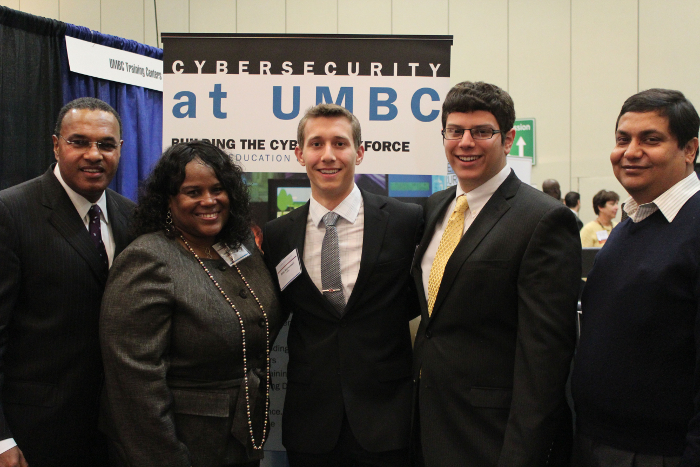
    <p><a href="http://www.csee.umbc.edu/wp-content/uploads/2012/10/UMBC_photo_11.jpg" rel="nofollow external" class="bo"><img alt="" height="467" src="http://www.csee.umbc.edu/wp-content/uploads/2012/10/UMBC_photo_11.jpg" width="700" style="max-width: 100%; height: auto;"></a>Northrop Grumman Foundation announced $1 million grant to launch the University of Maryland, Baltimore County Cyber Scholars program. Pictured from left are Freeman Hrabowski, president of UMBC; Sandra Evers-Manly, president of the Northrop Grumman Foundation; Alex Markowski, UMBC CWIT Scholar; Alec Pulianas, UMBC CWIT Scholar; and Anupam Joshi, director of UMBC’s Cybersecurity Center and head of the Cyber Scholars program.</p>
    </div>
]]>
</Body>
<Summary>UMBC is partnering with the Northrop Grumman Foundation to launch the UMBC Cyber Scholars Program. Funded by a generous $1 million grant from the Northrop Grumman Foundation, and facilitated by...</Summary>
<Website>http://www.csee.umbc.edu/2012/10/northrop-grumman-foundation-and-umbc-announce-umbc-cyber-scholars-program/</Website>
<TrackingUrl>https://my3.my.umbc.edu/api/v0/pixel/news/17663/guest@my.umbc.edu/cf5701d3ce388285833a667e159951f0/api/pixel</TrackingUrl>
<Tag>cybersecurity</Tag>
<Tag>news</Tag>
<Tag>nothrop-grumman-foundation</Tag>
<Tag>scholarships</Tag>
<Tag>umbc-cyber-scholars-program</Tag>
<Group token="csee">Computer Science and Electrical Engineering</Group>
<GroupUrl>https://my3.my.umbc.edu/groups/csee</GroupUrl>
<AvatarUrl>https://assets3-my.umbc.edu/system/shared/avatars/groups/000/000/099/d117dca133c64bf78a4b7696dd007189/xsmall.png?1314043393</AvatarUrl>
<AvatarUrl size="original">https://assets1-my.umbc.edu/system/shared/avatars/groups/000/000/099/d117dca133c64bf78a4b7696dd007189/original.png?1314043393</AvatarUrl>
<AvatarUrl size="xxlarge">https://assets1-my.umbc.edu/system/shared/avatars/groups/000/000/099/d117dca133c64bf78a4b7696dd007189/xxlarge.png?1314043393</AvatarUrl>
<AvatarUrl size="xlarge">https://assets4-my.umbc.edu/system/shared/avatars/groups/000/000/099/d117dca133c64bf78a4b7696dd007189/xlarge.png?1314043393</AvatarUrl>
<AvatarUrl size="large">https://assets3-my.umbc.edu/system/shared/avatars/groups/000/000/099/d117dca133c64bf78a4b7696dd007189/large.png?1314043393</AvatarUrl>
<AvatarUrl size="medium">https://assets1-my.umbc.edu/system/shared/avatars/groups/000/000/099/d117dca133c64bf78a4b7696dd007189/medium.png?1314043393</AvatarUrl>
<AvatarUrl size="small">https://assets2-my.umbc.edu/system/shared/avatars/groups/000/000/099/d117dca133c64bf78a4b7696dd007189/small.png?1314043393</AvatarUrl>
<AvatarUrl size="xsmall">https://assets3-my.umbc.edu/system/shared/avatars/groups/000/000/099/d117dca133c64bf78a4b7696dd007189/xsmall.png?1314043393</AvatarUrl>
<AvatarUrl size="xxsmall">https://assets3-my.umbc.edu/system/shared/avatars/groups/000/000/099/d117dca133c64bf78a4b7696dd007189/xxsmall.png?1314043393</AvatarUrl>
<Sponsor>Computer Science and Electrical Engineering</Sponsor>
<PawCount>6</PawCount>
<CommentCount>0</CommentCount>
<CommentsAllowed>true</CommentsAllowed>
<PostedAt>Wed, 17 Oct 2012 10:24:41 -0400</PostedAt>
<EditAt>Wed, 17 Oct 2012 10:24:41 -0400</EditAt>
</NewsItem>

<NewsItem contentIssues="true" id="32800" important="false" status="posted" url="https://my3.my.umbc.edu/posts/32800">
<Title>Vol. 31, Issue 5</Title>
<Body>
<![CDATA[
    <div class="html-content">
    <a href="http://www.apa.org/pubs/databases/news/2012/10/index.aspx" rel="nofollow external" class="bo">PsycINFO News, Volume 31, Issue 5.</a><br>
    <br>
    <a href="http://www.apa.org/pubs/databases/news/2012/10/index.aspx" rel="nofollow external" class="bo"><img alt="" src="http://www.apa.org/Images/psycINFO-index-2012-10_tcm7-143534.jpg" style="max-width: 100%; height: auto;"></a><br>
    <br>
    <strong>In this issue:</strong><br>
    <br>
    <a href="http://www.apa.org/pubs/databases/news/2012/10/linda-beebe-retires.aspx" rel="nofollow external" class="bo">The End of an Era: Linda Beebe is Retiring</a><br>
    We bid a grateful farewell to Linda Beebe and provide a brief review of what she's accomplished during her 12 years as PsycINFO's Senior Director.<br>
    <br>
    <a href="http://www.apa.org/pubs/databases/news/2012/10/in-search-of-methodology.aspx" rel="nofollow external" class="bo">In Search Of: Using the Methodology Limiter</a>
    The Methodology Limiter is one of our most useful and flexible search tools, allowing a searcher to refine a search by one or more of 21 classifications. We provide a multiplatform video of how to use the feature.<br>
    <br>
    <a href="http://www.apa.org/pubs/databases/news/2012/10/psycextra-regional-association-material.aspx" rel="nofollow external" class="bo">Regional Association Materials Are in PsycEXTRA®</a><br>
    The seven Regional Psychological Associations are an important source of research materials. They provide conference materials, organization information, and lots of practical advice on publishing and practice.<br>
    <br>
    <a href="http://www.apa.org/pubs/databases/news/2012/10/new-from-apa.aspx" rel="nofollow external" class="bo">New From APA</a><br>
    My List updates; The Psychologist-Manager Journal; new DVDs in the APA Psychotherapy Video Series; vendor showcase at the Charleston Conference; PsycTESTS now available on ProQuest<br>
    <br>
    <a href="http://www.apa.org/pubs/databases/news/2012/10/volume-31-issue-5.pdf" rel="nofollow external" class="bo"><img width="13" height="14" alt="" src="http://www.apa.org/images/pdf_dwnld.gif" style="max-width: 100%; height: auto;"></a><a href="http://www.apa.org/pubs/databases/news/2012/10/volume-31-issue-5.pdf" rel="nofollow external" class="bo">    Read the entire issue here as a PDF (343 KB).</a><br>
    <br>
    For more information, <a href="http://apadatabases.adobeconnect.com/psycinfo-customer-support/" rel="nofollow external" class="bo">see our training videos, Webinar training schedule, Twitter, Facebook, and YouTube pages, and more</a>
    </div>
]]>
</Body>
<Summary>PsycINFO News, Volume 31, Issue 5.        In this issue:    The End of an Era: Linda Beebe is Retiring  We bid a grateful farewell to Linda Beebe and provide a brief review of what she's...</Summary>
<Website>http://www.apa.org/pubs/databases/news/2012/10/index.aspx</Website>
<TrackingUrl>https://my3.my.umbc.edu/api/v0/pixel/news/32800/guest@my.umbc.edu/08890154a03afc127c6c16a9594fd580/api/pixel</TrackingUrl>
<Group token="retired-230">Psychology Student Association @ USG</Group>
<GroupUrl>https://my3.my.umbc.edu/groups/retired-230</GroupUrl>
<AvatarUrl>https://assets4-my.umbc.edu/system/shared/avatars/groups/000/000/230/b64bd4b2d025a7635eabf84b086f65fe/xsmall.png?1359246046</AvatarUrl>
<AvatarUrl size="original">https://assets4-my.umbc.edu/system/shared/avatars/groups/000/000/230/b64bd4b2d025a7635eabf84b086f65fe/original.jpg?1359246046</AvatarUrl>
<AvatarUrl size="xxlarge">https://assets1-my.umbc.edu/system/shared/avatars/groups/000/000/230/b64bd4b2d025a7635eabf84b086f65fe/xxlarge.png?1359246046</AvatarUrl>
<AvatarUrl size="xlarge">https://assets3-my.umbc.edu/system/shared/avatars/groups/000/000/230/b64bd4b2d025a7635eabf84b086f65fe/xlarge.png?1359246046</AvatarUrl>
<AvatarUrl size="large">https://assets3-my.umbc.edu/system/shared/avatars/groups/000/000/230/b64bd4b2d025a7635eabf84b086f65fe/large.png?1359246046</AvatarUrl>
<AvatarUrl size="medium">https://assets2-my.umbc.edu/system/shared/avatars/groups/000/000/230/b64bd4b2d025a7635eabf84b086f65fe/medium.png?1359246046</AvatarUrl>
<AvatarUrl size="small">https://assets2-my.umbc.edu/system/shared/avatars/groups/000/000/230/b64bd4b2d025a7635eabf84b086f65fe/small.png?1359246046</AvatarUrl>
<AvatarUrl size="xsmall">https://assets4-my.umbc.edu/system/shared/avatars/groups/000/000/230/b64bd4b2d025a7635eabf84b086f65fe/xsmall.png?1359246046</AvatarUrl>
<AvatarUrl size="xxsmall">https://assets2-my.umbc.edu/system/shared/avatars/groups/000/000/230/b64bd4b2d025a7635eabf84b086f65fe/xxsmall.png?1359246046</AvatarUrl>
<Sponsor>Psychology Student Association @ USG</Sponsor>
<PawCount>0</PawCount>
<CommentCount>0</CommentCount>
<CommentsAllowed>true</CommentsAllowed>
<PostedAt>Wed, 17 Oct 2012 10:18:58 -0400</PostedAt>
</NewsItem>

</News>